AI-Powered Sentiment Analysis: Understanding Customer Emotions on Social Media

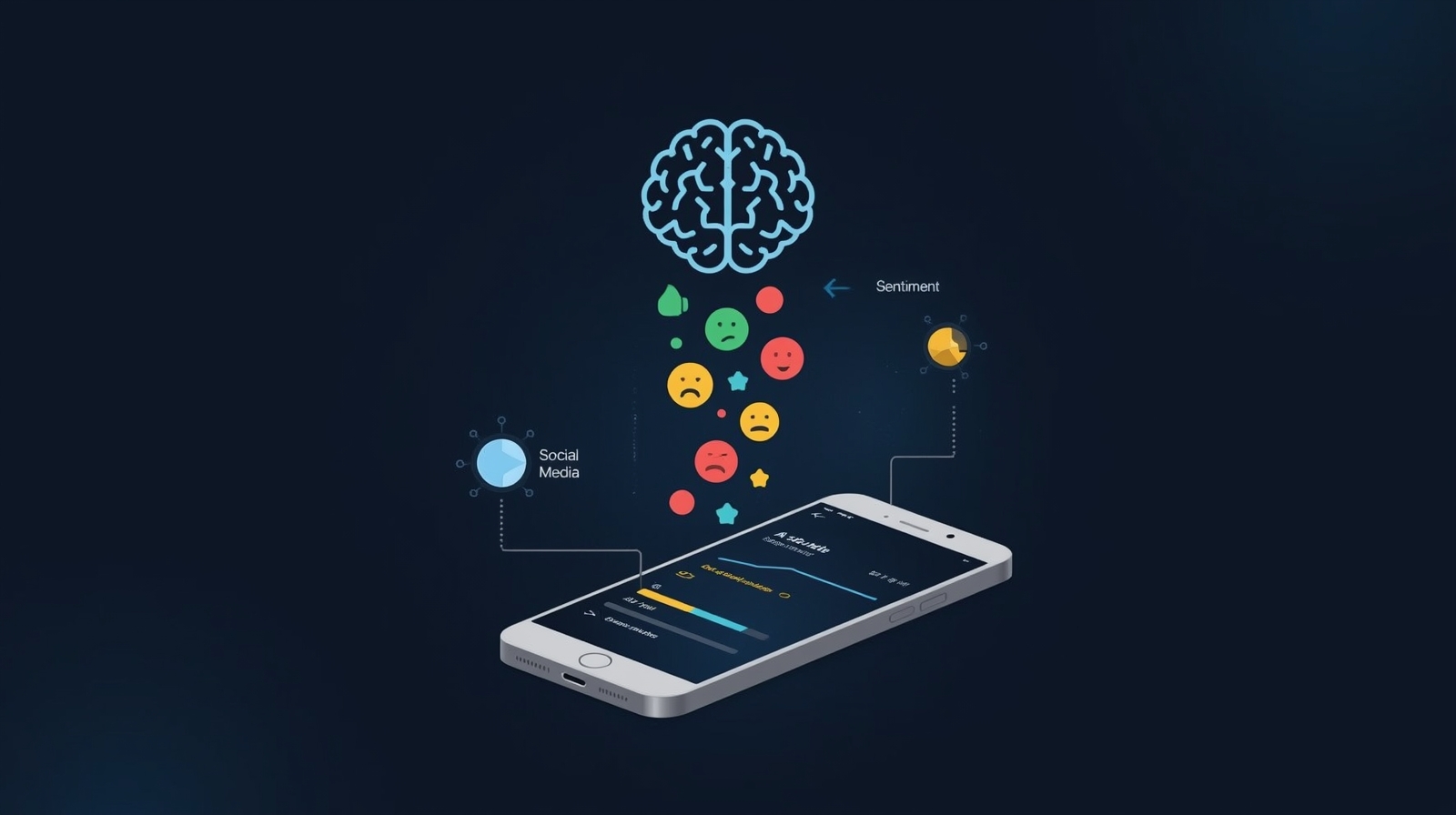
AI-Powered Sentiment Analysis has become one of the most valuable tools for businesses trying to understand what their customers really think. If you’ve ever wondered whether your social media posts are making people happy, frustrated, or completely indifferent, sentiment analysis gives you the answer. It’s like having a super-intelligent assistant who reads through thousands of comments, reviews, and tweets, then tells you exactly how people feel about your brand.
I remember when I first discovered sentiment analysis tools—I was helping a small coffee shop owner who was drowning in Instagram comments and Google reviews. Reading through hundreds of comments left her unsure about the success of her new menu. Within minutes of using a simple sentiment analysis tool, we discovered that customers loved her pastries but were confused about her seasonal drink names. That one insight changed her entire marketing approach.
In this guide, I’ll walk you through everything you need to know about using AI-powered sentiment analysis to understand customer emotions on social media. Whether you’re a small business owner, a marketer, or just curious about what people think of your brand, this step-by-step guide will show you exactly how to get started—no coding or technical background required.
What Is AI-Powered Sentiment Analysis?
Before we dive into the how-to steps, let’s make sure we understand what we’re working with. Sentiment analysis is the process of using artificial intelligence to automatically detect emotions in written text. When someone posts “I greatly enjoy this product!” versus “This is the worst purchase I’ve ever made,” sentiment analysis tools can tell the difference and categorize those emotions as positive or negative.
Think of it as teaching a computer to read between the lines. The AI looks at word choices, context, punctuation (yes, multiple exclamation marks matter!!!), and even emojis to determine whether someone is expressing joy, anger, sadness, excitement, or neutrality.
For social media monitoring, this technology is incredibly powerful because people express genuine, unfiltered opinions online. Your customers aren’t just rating you one to five stars—they’re telling stories, sharing frustrations, celebrating wins, and influencing their entire network. Sentiment analysis helps you understand all of that at scale.
Why Should You Care About Customer Emotions on Social Media?
The truth is that emotions, not just facts, influence people’s buying decisions. Someone might choose your restaurant over a competitor’s because they saw a heartwarming Instagram post, or they might avoid your store entirely because they read frustrated tweets about poor customer service.
Brand perception is built on these emotional connections. When you understand how customers feel about your business, you can:
- Spot problems before they become crises
- Identify which products or features make people genuinely happy
- Improve customer service by addressing complaints quickly
- Create marketing content that resonates emotionally
- Build stronger relationships with your audience
- Make data-driven decisions instead of guessing
Without sentiment analysis, you’re essentially operating blindly. You might have thousands of social media mentions, but no clear understanding of whether people are praising you or planning to never shop with you again.
Step 1: Choose the Right Sentiment Analysis Tool
The first step is picking a tool that matches your needs and budget. The good news is that there are numerous excellent options available for beginners, many of which offer free trials or basic free plans. Many excellent options exist for beginners, and several offer free trials or basic free plans.
Popular beginner-friendly options include:
For small businesses and individuals, tools like Hootsuite Insights, Brand24, and Mention provide easy-to-use dashboards where you can track sentiment without touching a single line of code. These platforms connect directly to your social media accounts and start analyzing immediately.
If you’re on a tight budget, MonkeyLearn and Brandwatch offer free tiers that work well for getting started. Google’s Natural Language API is another option if you want something more technical but still accessible.
My recommendation: Start with a tool that offers a free trial. Spend a week testing it with your actual social media data before committing to a paid plan. Look for tools that display results visually—charts and graphs make it much easier to understand sentiment patterns than spreadsheets full of numbers.
Common mistake to avoid: Don’t choose a tool just because it offers the most features. More features often mean more complexity. Select a straightforward solution that addresses your specific need: understanding how customers perceive your brand on social media.
Step 2: Connect Your Social Media Accounts
Once you’ve selected your tool, the next step is connecting it to your social media platforms. This process is usually straightforward—most tools guide you through it with simple authorization screens.
Start by connecting the platforms where your customers are most active. For many businesses, this means Facebook, Instagram, and Twitter (now X). If you’re in B2B, LinkedIn might be your priority. E-commerce brands should definitely include their review platforms too.
When you authorize the connection, the tool will ask permission to read your posts, comments, mentions, and direct messages. This is completely normal and necessary for the analysis to work. The tool isn’t posting anything on your behalf—it’s just reading the data.
Here’s what the process typically looks like:
Navigate to your tool’s settings or integrations page. Click “Add Account” or “Connect Social Network.” You’ll be redirected to log into your social media platform. Approve the permissions request. The tool will confirm the connection and start pulling historical data.
Most tools can analyze several months of past data immediately, which gives you a baseline understanding of how sentiment has changed over time. This historical context is incredibly valuable when you’re trying to spot trends or measure the impact of specific campaigns or events.
Tip for beginners: Start with just one or two platforms. You can add more social networks once you know how the tool works and what the data says. Trying to monitor everything at once when you’re just starting out can be overwhelming.
Step 3: Set Up Your Monitoring Keywords and Brand Mentions
Now comes the fun part—telling the AI what to listen for. You’ll need to create a list of keywords and phrases related to your brand that you want the tool to monitor and analyze.
Your keyword list should include:
Include your exact brand name, along with any common misspellings. For example, if your business is “Sarah’s Bakery,” also include “Sarahs Bakery” and “Sarah’s Bakary.” Include the names of your products and the services you offer. If you sell specific items, include those. Include the hashtags your company uses for marketing purposes. Include the names of your competitors to gain valuable comparison insights. You should also include industry terms that are pertinent to your business.
Most sentiment analysis tools let you create multiple “projects” or “streams,” each focused on different keyword sets. I recommend creating one project specifically for your brand mentions and another for broader industry conversations. This helps you understand both what people think about you specifically and the general sentiment in your market.
Machine learning algorithms improve as they process more data, so your results will become more accurate over the first few weeks of monitoring. The AI learns the specific context of your industry—for example, understanding that “sick” means something positive in skateboarding communities but negative in healthcare contexts.
Important note: Make sure to include branded hashtags, your social media handles (like @yourbusiness), and any campaign-specific terms you’re currently using. Should you have recently launched a promotion called “Summer Savings,” please consider adding that phrase to your monitoring list.
Step 4: Understand the Sentiment Categories
Most sentiment analysis tools classify emotions into three primary categories: positive, negative, and neutral. Some advanced tools offer more nuanced categories like “very positive,” “mixed,” or specific emotions like “joy,” “anger,” or “fear.”
Here’s how to interpret each category:
Positive sentiment includes compliments, expressions of satisfaction, excitement, gratitude, and recommendations. Comments such as “Best customer service ever!” or “I’m obsessed with this product” clearly fall into this category.
Negative sentiment covers complaints, frustrations, disappointment, anger, and warnings. “Never shopping here again” or “Worst experience of my life” are obviously negative.
Neutral sentiment is trickier—these are mentions that don’t express clear emotion either way. “I bought this yesterday” or “Store hours are 9-5” are factual statements without emotional weight.
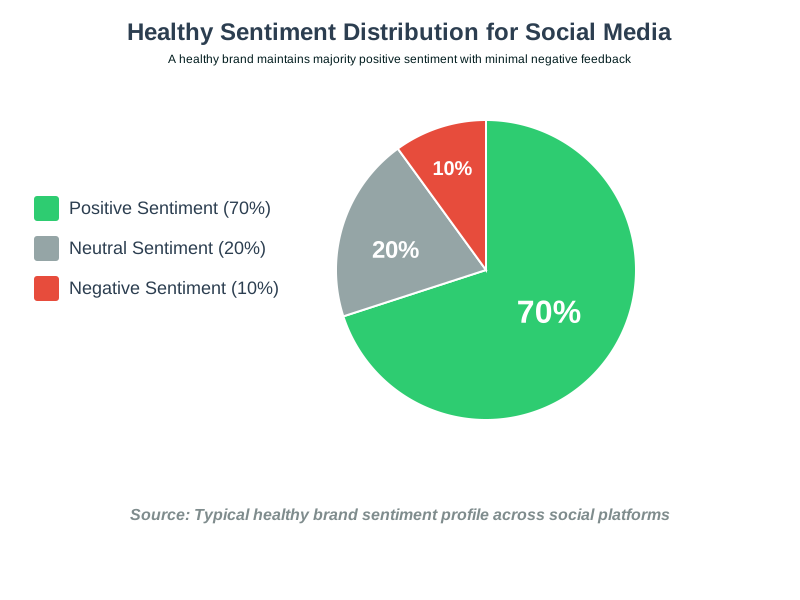
The key is looking at the ratio between these categories. If 70% of your mentions are positive, 20% are neutral, and only 10% are negative, that’s generally a healthy sentiment profile. If those numbers flip and 60% of your mentions are negative, you have a serious customer satisfaction problem that needs immediate attention.
Real-world example: A clothing retailer I worked with discovered that 45% of their social media mentions were negative, but almost all negative comments were about shipping delays, not product quality. This insight let them focus their improvement efforts on logistics rather than redesigning products. Within three months, negative sentiment dropped to 15% after they improved their delivery process and communication.
Step 5: Review Your Sentiment Dashboard Regularly
Once everything is set up, your sentiment analysis tool will start populating a dashboard with real-time data. This dashboard is your command center for understanding customer emotions.
Plan to check your dashboard at least once daily when you’re starting out. Look for sudden spikes in negative sentiment, which might indicate a problem that needs immediate attention. Monitor trends over time rather than obsessing over individual comments.
Your dashboard will typically show you:
You will typically see an overall sentiment score or percentage breakdown on your dashboard. You will also see a timeline graph that illustrates the changes in sentiment over a period of hours, days, or weeks. The system provides lists of the most commonly used positive and negative keywords in your mentions. The system organizes individual posts or comments by the sentiment category. The system sends alerts when significant changes in sentiment or spikes in mention volume occur.
Natural language processing powers all of this analysis, but you don’t need to understand the technical details to benefit from the insights. Focus on patterns and actionable information.
Practical tip: Set up alerts for negative sentiment spikes. If your tool notices a sudden increase in angry comments or complaints, you’ll receive a notification so you can investigate immediately. Quick responses to negative situations often prevent small problems from becoming viral disasters.
Step 6: Analyze Patterns and Identify Root Causes
Raw sentiment scores are useful, but the real value comes from digging deeper to understand why people feel the way they do. This is where you become a detective, searching for patterns in the data.
Start by reading through a sample of comments in each sentiment category. What specific words or phrases appear repeatedly in negative comments? Are complaints clustered around particular products, services, or times?
I often create a simple spreadsheet to track themes. For example, after reviewing 100 negative comments, I might find that 40 mention “long wait times,” 25 complain about “rude staff,” and 20 reference “confusing website.” These themes tell you exactly where to focus improvement efforts.
Look for correlations with external events. Did negative sentiment spike after you changed your pricing? Did positive mentions increase after you launched a new product? Did a competitor’s problem create an opportunity for you?
Text analysis tools often provide word clouds or frequency charts showing which terms appear most often in your mentions. These visualizations make patterns obvious at a glance.
Common beginner mistake: Don’t ignore neutral sentiment. Those apparently emotion-free mentions often contain valuable information about customer questions, confusion, or information-seeking behavior. Someone asking, “Do they ship internationally?” is neutral in sentiment but highlights a potential communication gap on your website.
Step 7: Take Action Based on Sentiment Insights
Data without action is just noise. The whole point of sentiment analysis is to improve your business based on what customers are telling you. Here’s how to turn insights into results:
For negative sentiment: Prioritize the most common complaints and create action plans to address them. If shipping delays are your primary concern, please collaborate with your logistics partners or consider adjusting delivery expectations on your website. If people complain about customer service, invest in staff training. Most importantly, respond to negative comments publicly and professionally. Let frustrated customers know you hear them and you’re working on solutions.
For positive sentiment: Amplify what’s working! If customers consistently praise a specific product feature, highlight it in marketing. If people love your customer service team, share those compliments internally to boost morale. Consider reaching out to happy customers and asking if they’d write reviews or participate in case studies.
For neutral sentiment: Address information gaps. If people frequently ask the same questions, please consider updating your FAQ page or creating content that addresses them proactively.
In business, emotional intelligence involves understanding the underlying emotions and providing genuine responses. People frequently want recognition more than anything else when they vent their frustration. Occasionally a simple “We hear you, and we’re sorry” goes further than elaborate explanations.
Real example: A software company I advised noticed that negative sentiment spiked every time they released updates. Through more profound analysis, they realized customers weren’t upset about bugs—they were frustrated by the lack of communication about what changed. The company started releasing detailed update notes with each release, and negative sentiment declined by 60% even though they hadn’t changed their development process at all.
Step 8: Monitor Competitors and Industry Trends
One of the most powerful features of sentiment analysis is the ability to track how people feel about your competitors. This competitive intelligence can reveal opportunities and threats you might otherwise miss.
Set up monitoring for your top three to five competitors using the same process you used for your brand. Compare their sentiment scores to yours. Are they struggling with problems you’ve already solved? Are customers praising features you don’t offer?
Industry-wide sentiment tracking also provides context. If negative sentiment is rising across your entire industry, it might not be your fault—there could be broader economic concerns, regulatory changes, or market shifts affecting everyone.
I once worked with a gym chain that panicked when their negative sentiment increased by 20%. After analyzing competitors, we discovered that every gym in their market experienced the same trend during that period due to seasonal factors (January resolutions followed by February dropouts). Understanding this broader context prevented them from making reactive changes based on temporary patterns.
Once set up, automated sentiment tracking makes this competitor monitoring effortless. You’ll receive the same insights about competitors that you get about your brand, all in one dashboard.
Step 9: Create Regular Sentiment Reports for Your Team
If you work with a team, share your sentiment insights regularly. Create simple weekly or monthly reports that highlight key findings, sentiment trends, and recommended actions.
Your reports can be straightforward and concise. Include:
Overall sentiment breakdown (percentages of positive, neutral, and negative). Comparison to the previous period (is sentiment improving or declining?). Top three themes in positive feedback. Top three complaints or concerns. Specific examples of notable comments (both positive and bad). The data should inform the recommended actions.
Make these reports visual. Charts and graphs communicate trends faster than paragraphs of text. Most sentiment analysis tools let you export charts directly from your dashboard.
Social listening becomes a team sport when everyone understands the data. Your customer service team needs to know what frustrations are trending. Your product team benefits from understanding which features excite customers. Your marketing team can create more effective messages by understanding which emotional triggers to trigger.
Tip: Schedule a monthly meeting specifically to review sentiment data as a team. This creates accountability and ensures that insights actually translate into action rather than sitting in someone’s inbox forever.
Step 10: Refine Your Approach Over Time
Sentiment analysis isn’t a “set it and forget it” tool. As you gain experience, you’ll discover ways to refine your monitoring for even better insights.
Adjust your keyword lists based on what you learn. If you observe individuals using slang terms or nicknames for your brand, please consider adding those. Remove keywords that create too much noise or irrelevant results.
Experiment with more advanced features as you become comfortable with the basics. Try analyzing sentiment by demographic segments, geographic regions, or customer types. Some tools let you create custom sentiment categories specific to your industry.
Test the accuracy of your tool’s sentiment classification by manually reviewing a random sample of categorized posts. If you notice consistent misclassification, you might need to adjust settings or train the AI with examples specific to your business.
Opinion mining becomes more sophisticated as you develop expertise. You’ll start noticing subtle patterns that others miss—like the difference between genuine enthusiasm and sarcastic positivity, or the tone shift that indicates a small complaint could escalate into a bigger problem.
Remember that sentiment analysis is just one tool in your customer understanding toolkit. Combine it with surveys, direct feedback, sales data, and actual conversations with customers for the most complete picture.
Common Mistakes Beginners Make (And How to Avoid Them)
Through years of helping people implement sentiment analysis, I’ve seen the same mistakes repeatedly. Here are the big ones to watch out for:
Mistake 1: Treating sentiment scores as absolute truth. AI is powerful but not perfect. Sarcasm, cultural context, and industry-specific language can confuse sentiment analysis tools. Always spot-check results and trust your human judgment.
Mistake 2: Obsessing over individual negative comments. One angry tweet doesn’t mean your business is failing. Look at overall trends and patterns, not isolated incidents.
Mistake 3: Analyzing sentiment without taking action. Data collection isn’t the goal—improvement is. Create specific action plans based on your findings.
Mistake 4: Only monitoring your brand name. People discuss your business using variations, hashtags, and indirect references. Cast a wider net with your monitoring keywords.
Mistake 5: Ignoring positive feedback. Many businesses only focus on fixing problems and miss opportunities to amplify what’s already working well.
Mistake 6: Expecting instant results. Sentiment patterns take time to change. Give your improvement efforts at least a few weeks before expecting measurable shifts in customer emotions.
Frequently Asked Questions
Your Next Steps: Start Understanding Customer Emotions Today
AI-powered sentiment analysis isn’t just for giant corporations with massive marketing budgets. It’s accessible, affordable, and incredibly valuable for businesses of any size. The technology does the heavy lifting of reading and categorizing thousands of customer comments, leaving you free to focus on what you do best—running your business and taking care of customers.
Start with these immediate action items:
Choose one sentiment analysis tool and sign up for a free trial this week. Connect your most active social media platform. Set up monitoring for your brand name and one or two product names. Spend 15 minutes daily for the next week reviewing your sentiment dashboard. Identify the single biggest complaint in your negative sentiment data. Create one action plan to address that complaint within the next 30 days.
Remember, every comment, review, and social media mention is a gift—it’s your customers telling you exactly what they think and feel. With sentiment analysis, you finally have the power to understand those emotions at scale and use that understanding to build a stronger, more beloved brand.
The businesses that thrive in our connected world are the ones that truly listen to their customers. With AI-powered sentiment analysis, you’re not just listening—you’re understanding, learning, and continuously improving based on real feedback from real people.
Don’t wait for a crisis to start paying attention to how customers feel about your brand. Start monitoring sentiment today, and you’ll be amazed at how much you discover about your business, your customers, and the opportunities hiding in plain sight within your social media mentions.
You’ve got this. Pick a tool, connect your accounts, and start your sentiment analysis journey. Your customers are talking—now it’s time to really hear what they’re saying.
About the Author
Abir Benali is a friendly technology writer who specializes in making AI tools accessible to non-technical users. With a passion for demystifying complex technologies, Abir has helped hundreds of small business owners, marketers, and entrepreneurs harness the power of AI without needing a computer science degree. Through clear, actionable guides, Abir believes that everyone can benefit from modern technology—you just need someone to explain it in plain English. When not writing about AI, Abir enjoys exploring local cafes, testing new productivity tools, and helping friends understand why their social media strategy isn’t working (usually, it’s because they’re not listening to their audience). Connect with Abir for more beginner-friendly AI insights and practical tips that actually work in the real world.