AI for Creative Expression: A Beginner’s Guide

AI for Creative Expression is transforming how we create art, music, writing, and design. I still remember the first time I used an AI tool to generate an image from a simple text description—it felt like magic. What once required years of technical training is now accessible to anyone with a smartphone and an idea. Whether you’re a hobbyist exploring digital art, a writer facing creative blocks, or someone who’s always wanted to create but didn’t know where to start, artificial intelligence offers exciting new pathways for creative expression.
The beautiful truth about AI creativity tools is that they don’t replace human imagination—they amplify it. You bring the vision, the emotion, and the unique perspective that only you possess. AI simply helps translate those ideas into tangible creations faster and more easily than ever before. In this guide, I’ll walk you through everything you need to know to start your creative journey with AI, from understanding the basics to choosing your first tools and creating your first projects.
What’s AI for Creative Expression?
At its core, AI for creative expression refers to using artificial intelligence technologies to assist in creating, enhancing, or generating creative content. These tools use machine learning algorithms trained on millions of examples to understand patterns, styles, and techniques across various creative disciplines.
Think of AI as a creative assistant rather than a replacement for your imagination. When you describe an image you want to see, an AI image generator interprets your words and creates visual representations. When you feed it a melody, an AI music tool can expand it into a full composition. When you share a story concept, an AI writing assistant can help develop characters, plot points, or even entire scenes.
The technology works by analyzing vast amounts of creative content—paintings, photographs, songs, and books—and learning the underlying patterns and structures. However, it’s important to understand that AI doesn’t “think” creatively the way humans do. It recognizes patterns and generates outputs based on its training, but the creative spark—the emotional resonance, the meaningful message, the unique perspective—still comes from you.
How AI Enhances Human Creativity
Many beginners worry that using AI creative tools somehow makes their work less authentic or valuable. I’ve heard this concern countless times, and I want to address it directly: AI doesn’t diminish your creativity; it extends your capabilities.
Consider how cameras didn’t make painting obsolete or how word processors didn’t devalue proficient writing. These tools simply changed how we create, making certain aspects easier while opening new possibilities. Generative AI for artists works the same way. It handles technical execution while you focus on conceptual direction, emotional depth, and personal expression.
Here’s how AI enhances the creative process:
Rapid Prototyping: Instead of spending hours or days creating multiple versions of an idea, you can generate dozens of variations in minutes. This lets you explore more creative directions and find the strongest concepts faster.
Skill Bridging: You might have brilliant visual ideas but lack drawing skills. AI art generators bridge that gap, translating your concepts into images even without traditional artistic training.
Creative Inspiration: AI tools can spark new ideas and directions by generating unexpected combinations or approaches you might not have considered when you find yourself stuck.
Technical Assistance: Tasks like color correction, background removal, or music mixing that once required specialized skills can now be handled by AI, letting you focus on the creative decisions that matter most.
Popular AI Tools for Different Creative Fields
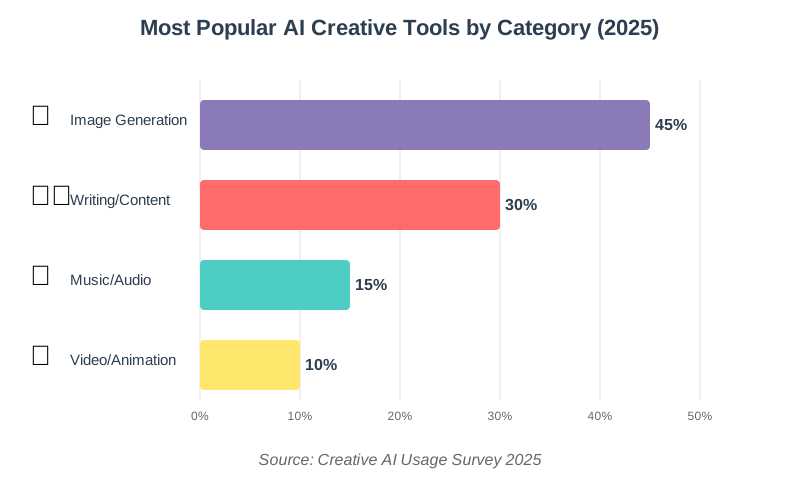
The landscape of AI creativity platforms has exploded recently, with tools available for virtually every creative discipline. Allow me to introduce you to some beginner-friendly options across different fields.
AI Image and Art Generation
Text-to-image generators are perhaps the most popular entry point for beginners. Tools like DALL-E, Midjourney, and Stable Diffusion let you type descriptions and receive unique images within seconds. I started with simple prompts like “sunset over mountains” and gradually learned to add details like art styles, lighting conditions, and mood descriptors to get exactly what I envisioned.
For photo editing, tools like Adobe Photoshop’s AI-powered features or Canva’s Magic Edit can remove backgrounds, enhance images, or even replace elements within photos using simple text commands. These tools understand context remarkably well, making photo manipulation accessible to complete beginners.
AI Writing and Content Creation
AI writing tools range from simple grammar checkers to sophisticated content generators. ChatGPT, Claude, and Jasper can help with everything from brainstorming ideas to drafting entire articles, stories, or scripts. I use these tools differently depending on my needs—sometimes for overcoming writer’s block, sometimes for editing and refinement, and sometimes just to explore different angles on a topic.
For creative writing specifically, tools like Sudowrite or NovelAI are designed with storytellers in mind, offering features like character development assistance, plot generation, and style matching.
AI Music and Audio Creation
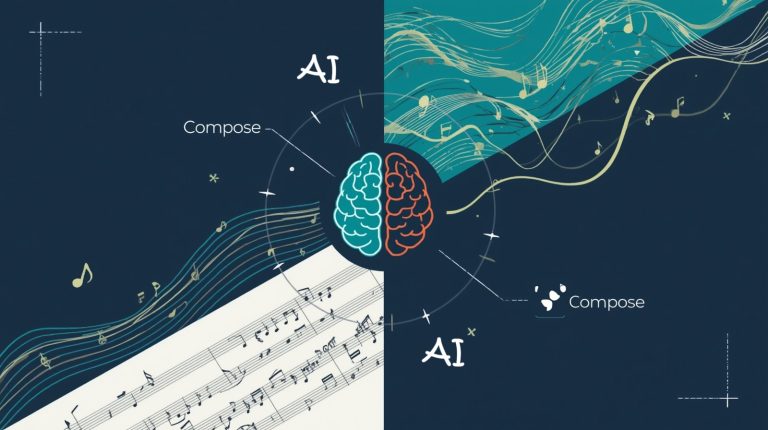
Creating music with AI has become surprisingly accessible. Platforms like Soundraw and AIVA let you generate royalty-free music by selecting mood, genre, and length. You don’t need to understand music theory or play an instrument—just describe what you want to hear.
For podcasters and video creators, AI voice generators like ElevenLabs or Descript can create realistic voiceovers, clone your own voice, or even remove filler words from recordings. These tools save enormous amounts of editing time while maintaining professional quality.
AI Video and Animation
Video creation, traditionally one of the most technically demanding creative fields, has become much more accessible through AI. Tools like Runway ML offer text-to-video generation, while others like Synthesia create videos with AI avatars that can speak any script you provide.
For animation, platforms like Animated Drawings can turn simple sketches into moving characters, while others help with motion graphics and visual effects that would typically require expensive software and extensive training.
Step-by-Step: Getting Started with AI Creative Tools
Let me walk you through a practical process for beginning your AI creative journey. This approach works whether you’re interested in visual art, writing, music, or any other creative field.
Step 1: Identify Your Creative Goal
Before diving into tools, clarify what you want to create. Are you looking to generate social media graphics, write short stories, compose background music for videos, or explore digital art? Having a clear goal helps you choose the right tool and learn more efficiently.
I recommend starting with one specific project rather than trying to master everything at once. For example, “I want to create three illustrated children’s book pages” is more actionable than “I want to learn AI art.”
Step 2: Choose Your First Tool
Based on your goal, select one beginner-friendly tool to start with. For AI image creation, I suggest starting with free options like Bing Image Creator or the free tier of Canva, which include AI features without requiring subscriptions.
For writing, ChatGPT’s free version offers plenty of capability for beginners. For music, Soundraw has a generous free trial that lets you explore music generation without commitment.
Don’t feel pressured to use the “best” or most advanced tool right away. The best tool for beginners is the one you’ll actually use and learn from.
Step 3: Learn Prompt Engineering Basics
The key to getting good results from AI generative tools is learning how to communicate effectively with them. This skill is called prompt engineering, and while it sounds technical, it’s simply about being clear and specific in your instructions.
For image generation, instead of typing “dog,” try “a golden retriever puppy playing in autumn leaves, warm afternoon sunlight, photography style.” The additional details help the AI understand exactly what you’re envisioning.
For writing, provide context and constraints: “Write a 200-word product description for eco-friendly water bottles, emphasizing sustainability and durability, in an enthusiastic but professional tone.”
Start simple and gradually add more details as you learn what works. Save your successful prompts for future reference—I keep a document of my best prompts organized by category.
Step 4: Experiment and Iterate
Your first results probably won’t be perfect, and that’s completely normal. The creative process with AI involves iteration—generating multiple versions, refining your prompts, and combining different outputs.
When I created my first AI-generated artwork, I went through probably twenty variations before finding one I loved. Each attempt taught me something about how the tool interpreted different descriptive words or style references.
Don’t be discouraged if initial results don’t match your vision. Treat each generation as a learning opportunity. Notice what works and what doesn’t, then adjust your approach accordingly.
Step 5: Add Your Personal Touch
Here’s the crucial step many beginners skip: adding your unique creative input. AI-generated content works best as a starting point or component within a larger creative vision that you direct.
If you made an image, try editing it, combining it with other elements, or using it as inspiration for a traditional piece. Restructure your text to better suit your needs, add personal anecdotes, or edit it to sound more like you if you wrote it with AI help.
The most successful creators using AI view it as one tool among many in their creative toolkit, not as a complete solution.
Common Mistakes Beginners Make (and How to Avoid Them)
Through helping dozens of people start their AI creative practice, I’ve noticed several common pitfalls that can frustrate beginners. Let me share these so you can avoid them.
Expecting Perfection Immediately: AI tools are powerful but not magical. They require practice and skill development just like traditional creative tools. Give yourself permission to produce mediocre results while learning.
Using Generic Prompts: Vague instructions produce vague results. The more specific and descriptive you can be, the better your outputs will match your vision. Include details about style, mood, colors, composition, and any other relevant factors.
Ignoring Copyright and Usage Rights: Different AI tools have different terms of service regarding commercial use and ownership of generated content. Always read and understand these terms, especially if you plan to use AI-generated content professionally or commercially.
Relying Too Heavily on AI: The best creative work combines AI assistance with human judgment, refinement, and personal expression. Use AI to enhance your creativity, not replace it entirely.
Not Keeping Records: When you generate something you like, save both the final result and the prompt you used. This builds a valuable reference library and helps you improve your prompting skills over time.
Ethical Considerations for AI Creative Work
As you explore AI for creative expression, it’s important to consider the ethical dimensions of this technology. I believe transparency and responsibility should guide our use of these powerful tools.
First, be honest about AI’s role in your creative process. You don’t need to apologize for using AI, but when sharing your work, consider acknowledging how AI contributed—especially in professional or commercial contexts.
Second, respect the data and artists whose work trained these models. While using AI tools is legal, the ethics around AI training data remain complex and evolving. Support artists and creators in your field, and consider how your use of AI impacts the broader creative community.
Third, be mindful of potential biases in AI outputs. These tools reflect the biases present in their training data, which can affect representations of people, cultures, and situations. Review AI-generated content critically and make adjustments when necessary.
Finally, use AI responsibly regarding authenticity and misinformation. Don’t use AI generation tools to create deceptive content, impersonate others, or spread false information. The power of these tools comes with the responsibility to use them ethically.
Tips for Continuous Improvement
Getting better at creative AI applications is an ongoing journey. Here are strategies that have helped me and others improve consistently.
Join online communities focused on AI creativity. Platforms like Reddit, Discord servers, and specialized forums provide spaces to share work, get feedback, and learn from others’ techniques. Seeing how experienced creators approach prompting and post-processing accelerates your learning dramatically.
Follow tutorials and experiment with techniques shared by others, but don’t just copy—adapt them to your own creative vision. The goal is developing your unique style and approach, not mimicking what everyone else creates.
Set regular creative challenges for yourself. Try “30 days of AI art,” where you create something new daily, or commit to writing one AI-assisted story per week. Consistent practice builds both technical skills and creative confidence.
Continue learning about new tools and features. The AI creativity landscape evolves rapidly, with new capabilities and improved tools launching constantly. Subscribe to newsletters or follow key voices in the space to stay informed about developments that might enhance your creative practice.
Most importantly, maintain your creative curiosity. The best part of working with AI is the discovery process—finding unexpected beauty in generated images, surprising turns in AI-assisted writing, or unique sounds in AI-composed music. Stay open to these surprises and let them inspire new creative directions.
Frequently Asked Questions
Your Creative Journey Starts Now
AI for creative expression represents one of the most exciting developments in creative technology. These tools democratize creativity, making artistic expression accessible to everyone regardless of traditional training or technical skills. The barriers between imagination and creation have never been lower.
As you begin exploring these tools, remember that your unique perspective, experiences, and creative vision are irreplaceable. AI doesn’t diminish your creativity—it amplifies your ability to bring your ideas to life. The combination of human imagination and AI capability creates possibilities that neither could achieve alone.
Start small, experiment freely, and don’t be afraid to make mistakes. Every creator working with AI today started exactly where you are now, uncertain but curious. The difference between them and you is simply that they took the first step.
Choose one tool, set one small creative goal, and start creating today. Whether you generate your first image, write your first AI-assisted story, or compose your first melody, you’re joining a global community of creators exploring new frontiers of human expression. Your creative voice matters, and now you have powerful new ways to share it with the world.
References:
Creative AI Usage Survey 2025
Schema.org Dataset Documentation
AI Ethics Guidelines for Creative Applications
About the Author
Abir Benali, a friendly technology writer who is passionate about making AI tools accessible to everyone, wrote this article. Abir specializes in explaining complex technology in clear, simple language that non-technical users can understand and apply immediately. With years of experience helping beginners navigate the world of artificial intelligence, Abir believes that everyone has creative potential waiting to be unlocked, and AI is one of the most powerful tools available today to help people discover and express their creativity. When not writing about technology, Abir enjoys experimenting with new AI tools and sharing discoveries with the growing community of creative AI enthusiasts.