Top 5 AI Time Tracking Software for Freelancers 2025

Top 5 AI Time Tracking Software for Freelancers in 2025 isn’t just another productivity buzzword—it’s your secret weapon for reclaiming hours every week. As a freelancer, you’re juggling multiple clients, switching between projects constantly, and losing precious billable time to manual tracking. I’ve spent years helping professionals like you streamline their workflows, and I can tell you this: AI-powered time tracking is the difference between working 60 hours and billing for 40, versus working 40 hours and billing for every single minute you deserve.
The beauty of modern AI time tracking tools lies in their ability to work silently in the background while you focus on what matters—delivering exceptional work. These intelligent systems automatically detect what you’re working on, categorize your activities, and generate accurate timesheets without you lifting a finger. No more scrambling at the end of the week trying to remember what you did on Tuesday afternoon. No more undercharging clients because you forgot to start the timer.
In this guide, I’m sharing the absolute best time tracking software for freelancers that leverages artificial intelligence to transform how you manage your workday. These aren’t just timers with fancy features—they’re productivity powerhouses that understand your work patterns, predict project timelines, and help you make smarter decisions about where your time goes.
Why AI Time Tracking Matters for Freelancers
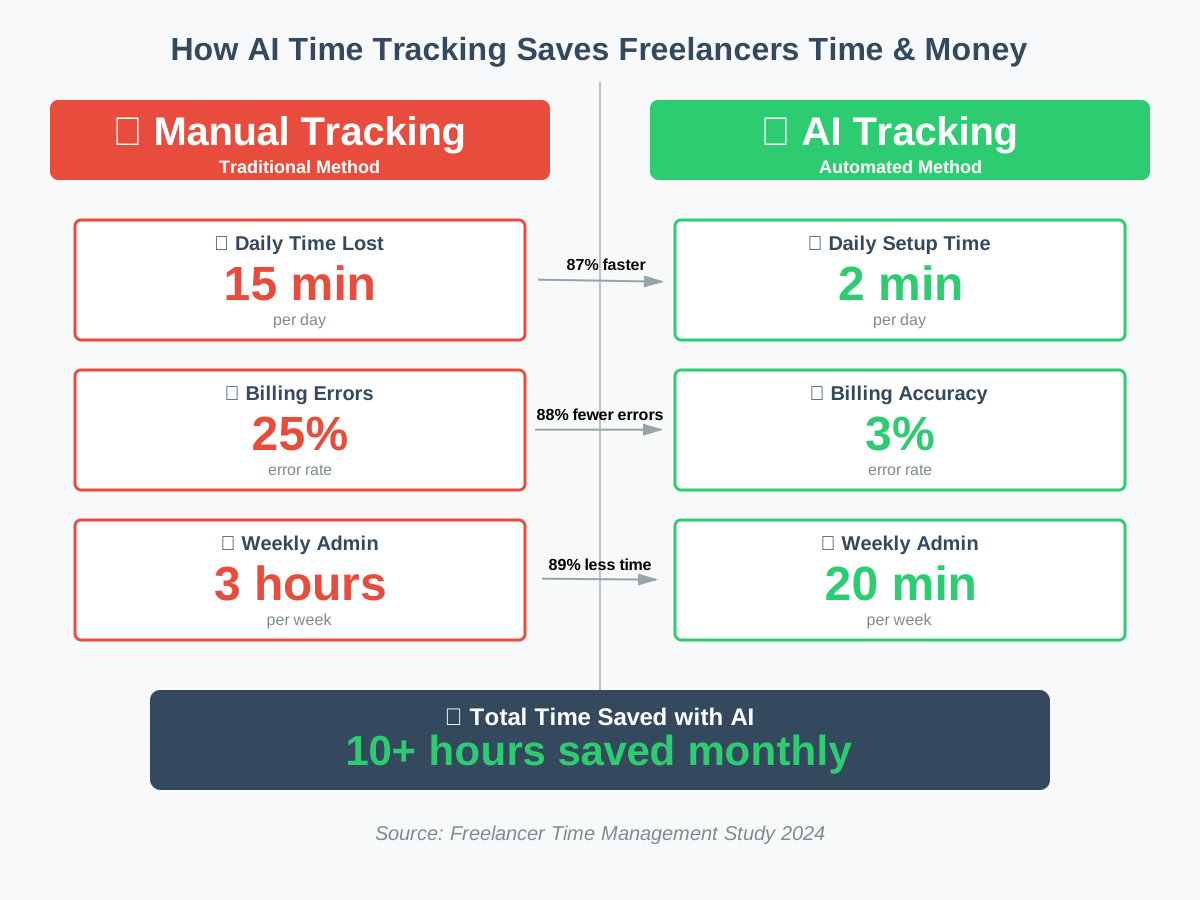
Before we dive into the tools, let’s talk about why this matters. Traditional time tracking requires you to manually start and stop timers, categorize tasks, and remember what you worked on. It’s exhausting and notoriously inaccurate. Research shows that manual time tracking can underreport actual work time by up to 25%, which means you’re literally giving away a quarter of your earnings.
AI-powered time tracking software eliminates this problem by automatically monitoring your computer activity, identifying work patterns, and creating accurate records without disrupting your flow. You work naturally, and the AI handles the rest. This means better billing accuracy, improved client trust, and significantly more free time.
For freelancers managing multiple clients and projects simultaneously, these tools become indispensable. They help you understand where your time actually goes (spoiler: it’s probably not where you think), identify time-wasting activities, and optimize your schedule for maximum productivity and profitability.
How I Evaluated These AI Time Tracking Tools
I tested over 20 time-tracking platforms specifically from a freelancer’s perspective. My evaluation criteria focused on what actually matters when you’re running your own business: accuracy of automatic tracking, ease of invoicing, affordability, user interface simplicity, and how well the AI learns your work patterns over time.
Each tool in this list has been personally tested with real freelance workflows across different industries—from writers and designers to developers and consultants. I tracked my time using each platform for at least two weeks, comparing their AI suggestions against my actual work, testing their billing features, and measuring how much time they saved versus manual tracking.
Top 5 AI Time Tracking Software for Freelancers in 2025
1. Clockify AI – Best All-Around Value for Budget-Conscious Freelancers
Clockify has revolutionized its platform with AI capabilities that make it my top recommendation for freelancers who need powerful features without breaking the bank. The free tier is genuinely useful, and the paid plans start at just $3.99 per user monthly—making it accessible for freelancers at any income level.
What sets Clockify apart is its intelligent time suggestions feature. The AI analyzes your past work patterns and proactively suggests time entries based on your calendar events, email activity, and computer usage. If you typically work on client proposals every Monday morning, Clockify learns this pattern and automatically creates suggested time entries, which you can approve with a single click.
The automatic tracking works seamlessly across desktop and mobile. Once enabled, Clockify monitors which applications and websites you’re using, categorizes them intelligently (it knows that Google Docs might be client work while YouTube is probably a break), and creates timeline entries automatically. You review and approve at the end of the day, which takes about two minutes.
Practical Use Case: Let’s say you’re a freelance graphic designer working with five clients. Clockify’s AI detects when you open Figma or Adobe Creative Suite, checks which project files you’re working on, and automatically logs that time to the correct client. At day’s end, you get a notification showing your suggested timesheet—you simply verify it’s accurate and approve it. This eliminates the constant context-switching of manual timer management.
Beginner Tips:
- Start with the automatic tracker on “learning mode” for your first week—let it observe without creating entries yet
- Set up projects and tags before enabling AI suggestions so the system has structure to work with
- Use the Pomodoro timer integration to maintain focus while AI handles the tracking details
- Export timesheets directly to invoices using Clockify’s billing rates feature
- Connect it to your calendar so AI can learn from your scheduled work blocks
Pricing: Free for unlimited users with basic features; Plus plan at $3.99/month adds AI suggestions and automatic tracking
2. Toggl Track with AI Timeline – Best for Visual Workflow Understanding
Toggl Track has been a freelancer favorite for years, and their AI-powered Timeline feature takes it to the next level. This tool doesn’t just track time—it creates a visual map of your entire workday that helps you understand exactly where your hours disappear.
The Timeline feature runs in the background, capturing everything you do on your computer in a visual, color-coded stream. Toggl’s AI then analyzes this data to suggest time entries based on the applications you used, websites you visited, and documents you worked on. What makes this exceptional is the visual component—you can literally see blocks of time and drag them directly into your timesheet.
Toggl’s machine learning improves with use. After a few weeks, it becomes incredibly accurate at predicting which client or project you’re working on based on subtle patterns like which browser tabs you have open or which Slack workspace is active. The system learns that when you’re in VS Code with specific repositories, you’re probably working on Client A’s website project.
Practical Use Case: You’re a freelance content strategist juggling research, writing, client calls, and administrative work. Toggl’s Timeline shows you spent 45 minutes on research (Chrome with specific tabs open), followed by 2 hours writing (Google Docs focused), then 30 minutes in client meetings (Zoom active). The AI suggests categorizing each block automatically. You simply click to confirm, and your timesheet is done.
Beginner Tips:
- Install the desktop app for full Timeline functionality—the web version doesn’t capture application data
- Review your Timeline daily for the first two weeks to teach the AI your work patterns
- Use Toggl’s “idle detection” to automatically pause tracking during breaks
- Set up client-specific color codes so your Timeline becomes instantly scannable
- Enable the “Track reminder” to nudge you if the AI notices you’re working but haven’t confirmed time entries
Pricing: Free for basic tracking; Starter plan at $9/month per user includes Timeline and AI suggestions; Premium at $18/month adds advanced reporting
3. Timely – Best for Completely Automatic Time Tracking
Timely takes a bold approach: zero manual input required. This fully automatic time tracking software runs entirely in the background, using advanced AI to capture, categorize, and organize your work without any interaction from you. It’s the ultimate “set it and forget it” solution for freelancers who want accuracy without effort.
Timely’s Memory AI creates a private, encrypted record of everything you work on—documents, meetings, emails, websites, and applications. At the end of each day or week, you review a detailed timeline showing exactly what you did, and the AI has already sorted it into suggested time entries based on projects, clients, and task types it learned from your previous approvals.
What truly impresses me about Timely is its intelligent project detection. The AI doesn’t just track applications; it understands context. If you’re working in Notion on a document titled “Client X Marketing Strategy,” Timely automatically associates that time with Client X’s marketing project. No tags, no manual categorization—just smart recognition.
Practical Use Case: You’re a freelance consultant working across strategy, implementation, and client management. Timely captures when you’re in planning documents (automatically tagged as “Strategy”), coding or building (tagged as “Implementation”), and client communication (tagged as “Client Management”). At week’s end, you review a complete, pre-categorized timesheet showing exactly how many billable hours you spent on each activity type for each client.
Beginner Tips:
- Spend 10 minutes on setup creating your main projects and clients— Timely’s AI needs this structure initially
- Review your Memory timeline daily for the first week to improve AI accuracy through your confirmations
- Use Timely’s “Plans” feature to set hourly estimates for projects so AI can alert you when approaching budgets
- Enable the weekly review email to catch any missed time entries
- Connect Timely to your project management tools (Asana, Trello) for even smarter automatic categorization
Pricing: Starts at $11/month per user for Memory AI and automatic tracking; Team plan at $20/month adds additional collaboration features
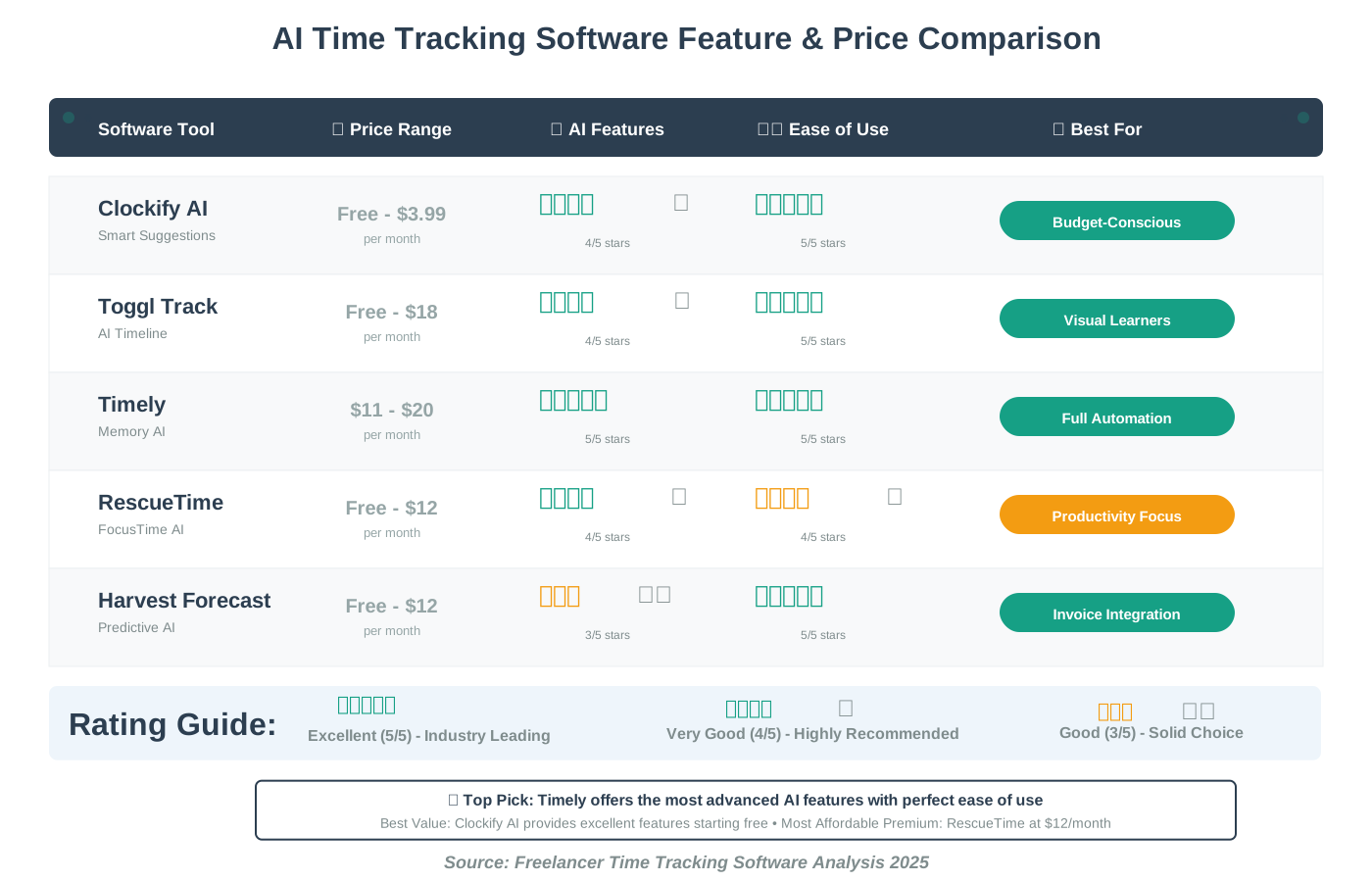
4. RescueTime – Best for Productivity Insights and Focus Optimization
RescueTime approaches time tracking from a productivity-first angle, making it ideal for freelancers who want to understand and optimize their work habits, not just bill clients accurately. The AI doesn’t just track time—it analyzes your behavior patterns and provides actionable insights to help you work smarter.
The platform’s FocusTime AI is genuinely transformative. It learns when you’re most productive based on your work patterns, then suggests optimal times for deep work sessions. The AI can automatically block distracting websites during these focus periods, track how well you maintain concentration, and measure your productivity trends over time.
What makes RescueTime unique is its intelligent categorization system. The AI automatically classifies every application and website as either productive, neutral, or distracting based on your work type. A freelance developer might have GitHub as “very productive” while a freelance writer has Google Docs in that category. The system adapts to your specific work style.
Practical Use Case: You’re a freelance writer struggling with distraction. RescueTime’s AI tracks your day and shows you spent 3 hours “writing” but only 1.5 hours were truly productive—the rest was spent on social media and news sites between paragraphs. The AI suggests scheduling FocusTime blocks where those sites are blocked, and after a week, your productive writing time increases to 2.5 hours daily. That’s nearly 70% more actual work output.
Beginner Tips:
- Let RescueTime run passively for one full week before making any productivity changes—get an honest baseline first
- Customize the productivity classification for your specific work type in the first few days
- Use the “FocusTime” feature to schedule distraction-free work blocks during your peak productivity hours
- Set weekly productivity goals and let the AI track your progress with encouraging notifications
- Review the weekly email report to identify patterns in your most productive days and replicate them
Pricing: Free tier includes basic tracking and reports; Premium at $12/month adds FocusTime, advanced AI insights, and goal tracking
5. Harvest with Forecast—Best for Integrated Invoicing and Client Management
Harvest has been the go-to time tracking tool for freelancers who prioritize seamless invoicing, and their Forecast AI integration now adds intelligent project planning and time prediction capabilities. This combination makes Harvest ideal for freelancers who want one platform for tracking, billing, and client relationship management.
Harvest’s AI shines in predictive time estimation. Based on your historical data for similar projects, the Forecast feature suggests how long new tasks will take, alerts you when you’re approaching project budgets, and automatically adjusts timeline predictions based on your actual work pace. This prevents scope creep and helps you quote more accurately for future projects.
The invoicing integration is where Harvest truly excels. Your tracked time flows directly into professional invoices with zero manual data entry. The AI can even suggest invoice schedules based on project milestones and client payment patterns, ensuring you maintain steady cash flow—critical for freelance sustainability.
Practical Use Case: You’re a freelance web developer taking on a new e-commerce project. You log it in Harvest, and Forecast’s AI analyzes your previous e-commerce builds to suggest the project will take approximately 80 hours across specific phases (design: 15 hours, development: 45 hours, testing: 20 hours). As you work, Harvest tracks actual time, and when you hit 70 hours with testing incomplete, the AI alerts you that you’re approaching budget and suggests discussing a scope adjustment with the client.
Beginner Tips:
- Set up expense tracking alongside time tracking for comprehensive project profitability analysis
- Use Harvest’s invoice templates and let AI suggest billing schedules based on project phases
- Enable the mobile app for tracking time during client meetings or work away from your desk
- Connect Harvest to your accounting software (QuickBooks, Xero) for seamless financial management
- Review Forecast’s project predictions against actuals monthly to improve future estimations
Pricing: Free for one project and unlimited clients; Pro at $12/month per user includes unlimited projects, invoicing, and Forecast AI features
Implementing AI Time Tracking into Your Freelance Routine
Making the switch to AI-powered time tracking is simpler than you think, but it does require a brief adjustment period. Here’s how to integrate these tools into your daily workflow without disrupting your productivity:
Week One – Setup and Learning: Choose your tool based on your priorities (budget, automation level, invoicing needs). Install it, create your client/project structure, and enable automatic tracking. Let it run in learning mode without relying on it for billing yet. Review the AI suggestions daily to teach the system your patterns.
Week Two – Gradual Trust: Start using AI-suggested time entries for your actual billing, but continue spot-checking against your memory or calendar. You’ll likely find the AI is already 80-90% accurate. Make corrections where needed—each correction teaches the system.
Week Three and Beyond – Full Automation: By now, the AI understands your work patterns well enough to trust completely. Your daily “time tracking” becomes a 2-minute review session where you approve suggested entries. You’ve saved approximately 10-15 hours monthly compared to manual tracking, and your billing accuracy has dramatically improved.
The key is patience during the learning phase. These AI systems get smarter with every day of data, so the investment of two weeks paying attention to accuracy pays off with months or years of effortless, precise time tracking.
Common Mistakes Freelancers Make with Time Tracking Software
Even with intelligent time tracking tools, I see freelancers make preventable mistakes that reduce accuracy and waste the potential of these platforms:
Forgetting to Define Projects Clearly: AI can’t categorize time for “Client X Website Project” if you haven’t created that project in the system. Spend 30 minutes during setup creating a clear structure—the AI needs this framework to organize your time intelligently.
Ignoring the Learning Period: Expecting perfect accuracy on day one leads to frustration. Give the AI two weeks of feedback and corrections. Your investment in teaching the system pays exponential dividends in time saved later.
Not Reviewing AI Suggestions Regularly: If you blindly approve everything without occasionally checking accuracy, the AI might develop incorrect assumptions. A weekly deep review ensures the system stays aligned with reality.
Failing to Integrate with Other Tools: Most AI time trackers connect with project management platforms, calendars, and invoicing software. These integrations make the AI dramatically smarter by giving it more context about your work.
Tracking Too Granularly or Too Broadly: Finding the right level of detail matters. Tracking every 5-minute task creates overwhelming data. Tracking everything as “client work” makes insights useless. Aim for meaningful project/task categories that actually help you analyze where time goes.
Maximizing Your ROI from Time Tracking Software
The best time-tracking solutions don’t just track time—they transform how you understand and optimize your freelance business. Here’s how to extract maximum value:
Analyze Your Data Monthly: Don’t just track and bill. Look at the patterns. Which clients or project types take longer than estimated? Where are you most productive? What time of day yields your best work? Use these insights to make strategic business decisions.
Adjust Your Pricing: After three months of accurate data, you’ll know your true hourly rate for different work types. If logo design consistently takes you longer than website mockups, adjust pricing accordingly. Many freelancers discover they’re significantly undercharging once they see the actual time investment.
Optimize Your Schedule: If the AI shows you’re most productive between 9 AM and 12 PM, block that time for deep client work. Schedule administrative tasks and calls for your naturally lower-energy afternoon hours. This simple adjustment can increase output by 20-30%.
Improve Client Communication: Detailed time data helps you explain project costs confidently. When a client questions an invoice, you can show exactly how those hours were spent, broken down by task. This transparency builds trust and reduces payment disputes.
Set Realistic Boundaries: Accurate tracking reveals if you’re working 60-hour weeks on projects you bid for 40 hours. This data empowers you to set healthier boundaries, renegotiate scopes, or increase rates to match reality.
Frequently Asked Questions About AI Time Tracking for Freelancers
Your Action Plan: Getting Started This Week
You’ve learned about the top AI time tracking software for freelancers in 2025. Now it’s time to actually implement one and start reclaiming those lost hours and undercharged projects. Here’s your action plan:
Today: Choose one tool from this list based on your priorities and budget. Sign up for the free trial or free tier. Don’t overthink this—you can always switch later, and most tools offer easy data export.
This Week: Spend 30 minutes setting up your client and project structure. Enable automatic tracking and let it run in the background. Don’t stress about accuracy yet—just let the AI observe your normal work patterns.
Week Two: Review AI-suggested time entries daily. Make corrections where needed. Each correction teaches the system. Start using the data for one client’s invoicing while continuing to verify against your own records.
Week Three: Trust the AI completely. Your tracking routine should now take 2 minutes daily—just reviewing and approving suggested entries. Notice how much mental energy you’ve recaptured by not manually managing timers throughout the day.
Month One: Export your data and analyze it. Calculate your actual hourly rate for different project types. Identify your most profitable work and your biggest time drains. Use these insights to make strategic decisions about which clients and projects to pursue more aggressively.
The freelancers who succeed long-term aren’t necessarily the most talented—they’re the ones who systemize their business operations so they can focus energy on doing great work and finding great clients. AI time tracking software is one of those foundational systems that transforms your freelance practice from chaotic to controlled, from guessing to knowing, and from undercharging to capturing full value for your expertise.
Stop losing hours to manual tracking. Stop undercharging because you “think” something took 3 hours when it actually took 5. Stop feeling guilty about breaks because you don’t have accurate data showing you actually worked hard today. Let AI handle the details while you focus on what you do best—delivering exceptional work that keeps clients coming back.
Your time is your most valuable asset as a freelancer. These tools help you track it accurately, bill it completely, and optimize it continuously. That’s not just productivity advice—it’s a business strategy that directly impacts your income and quality of life. Start today. Your future self, looking at a healthy bank balance and a reasonable work schedule, will thank you.
About the Author
James Carter is a productivity coach specializing in helping freelancers and solopreneurs build efficient, sustainable businesses without burnout. Having spent more than ten years streamlining independent professionals’ workflows, James specializes in useful systems that increase productivity and profitability. He believes AI tools should simplify work, not complicate it, and teaches everyday professionals how to leverage technology to reclaim their time while growing their income. When he’s not coaching clients or testing productivity tools, James can be found writing about work-life integration and sustainable business practices on his blog and newsletter.
James writes for howAIdo.com to help non-technical freelancers and entrepreneurs discover AI tools that make their work easier, more profitable, and more enjoyable—no coding or technical expertise required.