Boosting Your Coding Skills with AI: Best Tools & Practices

As someone who believes deeply in responsible technology use, I’ve watched artificial intelligence transform how we approach coding education—and I’ll be honest, it’s both exciting and a little overwhelming. When I first started exploring AI coding tools, I was cautious. Would these platforms compromise my learning? Would they expose my code to security risks? After months of careful testing and research, I’ve discovered that boosting your coding skills with AI isn’t just possible—it’s one of the most effective ways to accelerate your development journey, as long as you choose your tools wisely and use them responsibly.
The landscape of AI-powered programming assistants has evolved dramatically. Today’s platforms don’t just autocomplete your code; they explain concepts, catch errors before they become problems, and help you understand the “why” behind programming decisions. Whether you’re taking your first steps into Python, refining your JavaScript skills, or exploring new frameworks, the right AI tools can act as patient tutors available whenever you need them.
But here’s what matters most: not all AI coding tools are created equal. Some prioritize convenience over privacy. Others generate code without teaching you the underlying principles. Throughout this guide, I’ll share the platforms I trust—tools that enhance your learning without compromising your data security or development fundamentals. Each recommendation comes with practical safety tips and best practices I’ve learned through experience.
Why Use AI Tools for Learning to Code?
Before diving into specific platforms, let’s address an important question: why incorporate machine learning into your coding education at all? Traditional learning methods—textbooks, courses, tutorials—remain valuable, but they can’t offer the same personalized, interactive feedback that modern AI development tools provide.
Think about learning a spoken language. You could study grammar books for months, but nothing accelerates fluency like having conversations with a patient native speaker who corrects your mistakes in real-time. AI coding assistants function similarly. They observe your coding patterns, identify where you struggle, and offer immediate, context-specific guidance. When you’re stuck at 2 AM debugging a function, these tools provide explanations without judgment—something even the most supportive instructor can’t offer around the clock.
More importantly, AI tools help you build critical thinking skills around code. The best platforms don’t just hand you answers; they guide you toward solutions, explaining their reasoning along the way. This approach develops your problem-solving abilities rather than creating dependency. You’re learning to code with AI assistance, not because of it.
However—and this matters significantly—using these tools responsibly requires awareness. You need to understand what data you’re sharing, how your code might be stored, and whether the tool’s learning approach aligns with your goals. Throughout this article, I’ll highlight these considerations for each platform, because safe AI usage should never be an afterthought.
GitHub Copilot—Your AI Pair Programming Partner
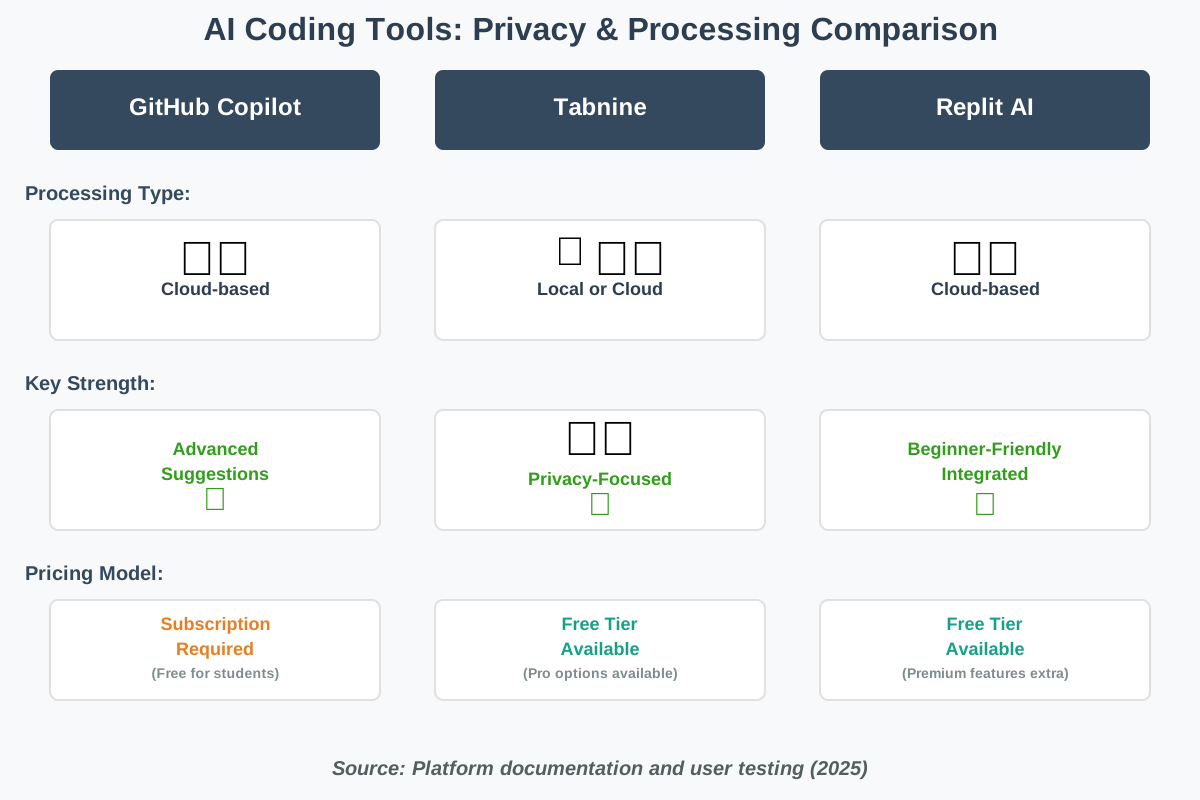
GitHub Copilot has become one of the most recognizable names in AI-assisted coding, and for good reason. Developed by GitHub in collaboration with OpenAI, Copilot functions as an intelligent code completion tool that suggests entire lines or blocks of code as you type. It’s trained on billions of lines of public code, giving it remarkable fluency across multiple programming languages.
What Makes It Useful
Copilot excels at handling repetitive coding tasks that slow down beginners. Writing boilerplate code, creating function structures, or implementing common patterns—tasks that feel tedious but are essential for learning—become faster with Copilot’s suggestions. The tool integrates directly into popular editors like Visual Studio Code, appearing as subtle gray text suggestions that you can accept with a tab key or ignore entirely.
For practical use, imagine you’re building your first REST API. You type a comment describing what you need: “Create a function that validates email addresses.” Copilot immediately suggests a complete implementation, often with error handling included. You can accept it, modify it, or reject it and try a different approach. This immediate feedback helps you understand multiple ways to solve problems.
Privacy and Safety Considerations
Here’s where I encourage caution. Copilot processes your code on remote servers, which means your work leaves your machine. GitHub states that code snippets you’re working on may be transmitted to their systems for generating suggestions. For personal learning projects, this typically poses minimal risk. However, if you’re working with sensitive information—API keys, proprietary algorithms, client data—you need to be careful.
Best practices for beginners:
- Review privacy settings carefully. GitHub Copilot offers options to control whether your code snippets can be used to improve the model. Navigate to your GitHub account settings and configure these preferences before writing your first line.
- Never include credentials or sensitive data in code. Get into the habit of using environment variables for API keys and passwords from day one. This protects you whether you’re using AI tools or not.
- Understand each suggestion before accepting it. Copilot occasionally suggests codes that work but aren’t optimal or don’t follow current best practices. Read what it proposes. Ask yourself, “Do I understand what this code does?” If not, research it before implementing.
- Use it as a learning tool, not a crutch. When Copilot suggests code, challenge yourself to write it manually first, then compare approaches. This reinforces learning rather than bypassing it.
- Check licensing implications. Because Copilot is trained on public code, there have been discussions about whether its suggestions might inadvertently replicate copyrighted code. GitHub has added features to detect and flag potential matches, but stay aware of this consideration.
The service requires a subscription after a trial period, but GitHub offers free access for verified students and maintainers of popular open-source projects. If cost is a concern, explore whether you qualify for these programs.
Real-world application: I’ve found Copilot most valuable when learning new frameworks. Recently, while exploring React hooks, Copilot’s suggestions helped me understand common patterns faster than documentation alone. However, I made it a rule: every time I accepted a suggestion, I spent a few minutes researching why that approach worked. This balance transformed Copilot from a shortcut into an educational asset.
Tabnine—Privacy-Focused Code Completion
If you’re concerned about data privacy—and honestly, you should be—Tabnine offers a compelling alternative to cloud-based coding assistants. This AI code generator provides intelligent code completion similar to Copilot, but with options for completely local processing. Your code never leaves your machine unless you explicitly choose cloud-based models.
What Makes It Useful
Tabnine supports over 30 programming languages and integrates with virtually every major code editor. What distinguishes it is flexibility. You can choose between three deployment models: fully local, hybrid (some processing on your device, some in the cloud), or fully cloud-based. For beginners prioritizing privacy, the local option eliminates concerns about data transmission entirely.
The platform learns from your coding style over time, adapting suggestions to match how you structure code. This personalization happens on-device with the local model, meaning your coding patterns remain private. For someone starting their programming journey, having an assistant that grows with you without surveillance feels reassuring.
Privacy and Safety Considerations
Tabnine’s commitment to privacy is its strongest selling point. With the local model, your code processing happens entirely on your computer. Nothing is transmitted to external servers. This makes it ideal for working with sensitive projects or if you’re simply uncomfortable with cloud-based code analysis.
Best practices for beginners:
- Start with the free tier using local processing. Tabnine offers a free plan that runs entirely on your device. Test this before considering paid options with cloud features.
- Understand the trade-offs. Local processing means suggestions might be slightly less sophisticated than cloud-based alternatives because the models run on your hardware with its limitations. However, for learning purposes, this difference rarely matters.
- Configure team settings if collaborating. If you’re learning with others or in a class environment, Tabnine can be configured to learn from shared code repositories without individual code leaving the team environment. Discuss these settings with collaborators.
- Review code suggestions critically. Like any AI tool, Tabnine can suggest suboptimal code. Don’t accept suggestions blindly. Read them, understand them, and modify them to fit your specific needs.
- Keep the tool updated. Tabnine regularly improves its models and security features. Enable automatic updates or check monthly for new versions.
The pricing structure accommodates various needs. Individual developers can use basic features free indefinitely, while teams and enterprises have paid options with advanced capabilities. For students and educators, Tabnine offers discounted plans—worth investigating if you’re in an academic setting.
Real-world application: When I was learning database queries and concerned about accidentally exposing connection strings, I switched to Tabnine’s local model for that project. The peace of mind let me focus entirely on learning SQL syntax rather than worrying about data exposure. The suggestions weren’t as elaborate as cloud-based alternatives, but they provided exactly what I needed: helpful patterns without privacy concerns.
Replit AI – Learning to Code in a Safe Environment
Replit AI distinguishes itself by focusing specifically on education and beginners. Rather than just offering code suggestions, Replit provides an entire integrated development environment (IDE) in your browser, complete with AI assistance designed for people still learning programming fundamentals. Think of it as a classroom, coding playground, and AI tutor combined.
What Makes It Useful
The platform removes one of coding’s biggest initial barriers: environment setup. You don’t need to install Python, configure compilers, or troubleshoot path variables. Open your browser, create a project, and start coding immediately. The AI assistant, called Ghostwriter, understands you’re learning and adjusts explanations accordingly.
Ghostwriter can explain errors in plain language, suggest fixes, and even generate code from natural language descriptions. If you’re stuck on an assignment asking you to “create a function that reverses a string,” you can describe what you need, and the AI will show you how—then explain why it works that way. This immediate feedback loop accelerates learning significantly.
Privacy and Safety Considerations
Because Replit is cloud-based, your code resides on their servers. For educational projects and practice exercises, this presents minimal risk. However, you should be aware of what you’re sharing and how the platform handles data.
Best practices for beginners:
- Use Replit for learning projects only. Keep personal data, API keys, or anything sensitive out of your Replit projects. Treat it as a public learning space, even if your projects are set to private.
- Take advantage of the educational features. Replit offers specific accounts for students and teachers with additional privacy protections. If you’re learning in an academic context, use these specialized accounts.
- Understand code visibility settings. By default, Replit projects can be set to public or private. Double-check this setting for each project. Public projects are visible to anyone, which is great for portfolio work but problematic for anything you want to keep confidential.
- Read AI-generated code carefully. Ghostwriter is designed for education, but it can still produce code that works without being optimal. Use it to learn patterns, but always ask yourself if you could improve the solution.
- Export your work regularly. Don’t let Replit be your only copy of important projects. Download your code periodically so you’re not dependent on cloud availability.
Replit offers a free tier with basic AI features, making it accessible for anyone starting their coding journey. Paid plans unlock more powerful AI capabilities and remove usage limits, but the free version is sufficient for most beginner needs.
Real-world application: I recommended Replit to a friend’s teenager learning JavaScript basics. The ability to share project links with me for help, combined with AI assistance when I wasn’t available, created a support system that kept motivation high. The environment’s simplicity eliminated technical frustrations that often derail beginners.
ChatGPT and Claude—Conversational Coding Mentors
Sometimes you need more than code completion—you need a conversation. Large language models like ChatGPT and Claude (yes, that’s me!) can serve as patient coding mentors, explaining concepts, reviewing code, and answering endless “why” questions without judgment. These tools aren’t specifically designed for coding, but their versatility makes them invaluable learning companions.
What Makes Them Useful
The conversational format changes the learning dynamic entirely. Rather than looking up documentation or scrolling through Stack Overflow threads, you can ask questions in plain English and receive explanations tailored to your level. “Why would I use a dictionary instead of a list in Python?” yields a customized explanation that addresses your specific confusion.
These platforms excel at debugging assistance. You can paste code that isn’t working, describe the error, and receive step-by-step troubleshooting guidance. Even better, they’ll explain why the error occurred, helping you avoid similar mistakes in the future. This transforms debugging from frustration into education.
Privacy and Safety Considerations
Here’s where responsible usage becomes critical. When you paste code into ChatGPT or similar platforms, that data is transmitted to the service provider. These conversations may be used to improve the models (though this varies by platform and settings). For learning exercises, this typically doesn’t matter. For work projects or anything containing sensitive information, it absolutely does.
Best practices for beginners:
- Never paste code containing credentials, API keys, or personal data. If you need help debugging code that interacts with services, replace actual credentials with placeholders like “YOUR_API_KEY_HERE” before sharing.
- Use conversation starters that protect privacy. Instead of pasting an entire file with potentially sensitive business logic, extract just the problematic function or section. Describe the context without revealing proprietary information.
- Verify AI responses through testing. These models are remarkably knowledgeable, but they can confidently provide incorrect information. Always test suggested code in your own environment before trusting it completely.
- Understand data retention policies. OpenAI, Anthropic, and other providers have different policies about conversation storage and usage. Review these before sharing anything you want to keep private. Some platforms offer options to disable conversation retention entirely.
- Use these tools to understand, not just copy. The biggest risk isn’t privacy—it’s becoming dependent on AI without developing real understanding. When you receive a code explanation, work through it line by line. Retype it manually rather than copying. This reinforces learning.
- Ask for explanations at your level. These models can adjust complexity. If an explanation uses terms you don’t understand, say, “Can you illustrate that more simply?” or “I’m a complete beginner—what does that mean?” The more specific you are about your knowledge level, the more helpful responses become.
Both platforms offer free tiers with limitations and paid subscriptions for extended access. For coding education, the free tiers are often sufficient, especially if you’re also using other tools.
Real-world application: When learning recursion—a concept that confuses many beginners—I had an extended conversation with an AI assistant asking variations of “but why would I ever use this?” The patience and varied explanations finally made the concept click in a way that textbooks hadn’t. However, I made sure to implement several recursive functions myself afterward, ensuring I didn’t just understand the theory but could apply it independently.
DeepCode (Snyk Code)—Your Safety-First Debugging Assistant
Code security matters from day one, even when you’re learning. DeepCode, now integrated into Snyk Code, analyzes your code for security vulnerabilities, potential bugs, and quality issues. While other tools focus on helping you write code faster, Snyk Code helps you write code safer.
What Makes It Useful
The platform scans your repositories and highlights potential problems before they become serious issues. It catches common security vulnerabilities—like SQL injection risks or insecure data handling—that beginners often miss. More importantly, it explains why something is problematic and suggests specific fixes.
For someone learning to code, developing security awareness early prevents bad habits. Snyk Code’s real-time feedback teaches you to think about security as you write, not as an afterthought. This mindset separates amateur projects from professional-grade code.
Privacy and Safety Considerations
Ironically, a tool designed for security requires you to grant access to your code repositories. This creates an important trust decision. Snyk is a reputable company specifically focused on security, but you’re still sharing code with a third party.
Best practices for beginners:
- Start with public repositories. If you’re learning with open-source projects or coursework, use Snyk Code on those first. This lets you evaluate the tool without exposing anything sensitive.
- Review permissions carefully. When connecting Snyk to GitHub or other platforms, examine exactly what access you’re granting. Modern integrations allow granular control—use it.
- Treat security warnings as learning opportunities. When Snyk flags an issue, don’t just fix it—understand it. Research why that pattern is problematic. This transforms security scanning from automated fixes into education.
- Don’t ignore “low severity” warnings. As a beginner, everything is a learning opportunity. That “low priority” issue might teach you something important about code quality or best practices.
- Combine with manual security learning. Snyk is excellent, but don’t let it replace understanding security fundamentals. Read about OWASP Top 10 vulnerabilities and other security basics to contextualize what the tool is protecting you from.
Snyk offers a free tier for individual developers and open-source projects, making it accessible for learners. This includes scanning for security vulnerabilities and code quality issues—sufficient for educational purposes.
Real-world application: During a web development project, Snyk flagged that I was storing passwords in plain text in a database—a critical security error I didn’t know I was making. The tool’s explanation didn’t just tell me to hash passwords; it explained why hashing matters and linked to resources about bcrypt. This single lesson fundamentally changed how I approach user data in every project since.
Sourcegraph Cody—Understanding Large Codebases with AI
As you progress beyond beginner projects, you’ll encounter larger codebases—whether contributing to open-source projects, starting internships, or collaborating on team projects. Sourcegraph Cody specializes in helping developers understand and navigate complex code repositories using AI assistance.
What Makes It Useful
Cody excels at answering questions about existing code. “What does this function do?” “Where is authentication handled?” “How do these modules interact?” Instead of manually tracing through files, Cody analyzes the codebase and provides context-aware answers. For beginners joining existing projects, this dramatically reduces the intimidation factor.
The tool also generates code that’s consistent with the existing codebase’s style and patterns. If you’re contributing to a project with specific conventions, Cody learns these patterns and suggests code that matches, helping you write code that looks like it belongs.
Privacy and Safety Considerations
Cody requires access to your codebase to function, similar to other AI assistants. However, Sourcegraph offers both cloud-hosted and self-hosted options. For companies and serious projects, the self-hosted option means your code never leaves your infrastructure.
Best practices for beginners:
- Use on open-source projects initially. The best way to learn Cody is with publicly available code. Fork a popular repository and use Cody to understand how it works. This builds skills without privacy concerns.
- Understand context boundaries. Cody analyzes code within the repositories you connect it to. Be mindful of what repositories you’re granting access to. Don’t connect personal and professional projects to the same instance without considering implications.
- Verify explanations by reading the actual code. Cody is remarkably accurate, but AI explanations should complement, not replace, actually reading code. Use Cody’s answers as a starting point, then examine the referenced code sections yourself.
- Respect project contribution guidelines. If you’re using Cody to help contribute to open-source projects, ensure you’re still following the project’s contribution standards. Some projects have specific views about AI-assisted contributions—check their guidelines.
- Use it to learn code organization patterns. Beyond just understanding specific functions, use Cody to learn how experienced developers structure large applications. Ask questions like “How is error handling organized in this project?” to understand architectural patterns.
Sourcegraph offers a free tier for individual developers with usage limits. For extensive use or team collaboration, paid tiers provide expanded capabilities. The free tier is typically sufficient for learning purposes.
Real-world application: When I wanted to contribute to an open-source Python library but felt overwhelmed by its size, Cody became my guide. I could ask, “How does this library handle configuration files?” and receive a clear explanation with file references. This accelerated my understanding from days to hours, making contribution actually feasible.
Jupyter AI – Making Data Science Accessible
If your coding interests lean toward data science, machine learning, or scientific computing, Jupyter AI brings AI assistance directly into the Jupyter notebook environment. This integration feels natural because it exists where data scientists already work, eliminating context switching between tools.
What Makes It Useful
Jupyter AI enhances the notebook experience with AI-powered code generation, explanation, and debugging. You can highlight a cell containing a data analysis error and ask the AI to explain what went wrong. Or describe a visualization you want to create, and the AI generates the corresponding matplotlib or seaborn code.
The tool understands data science contexts better than general-purpose coding assistants. It knows common data transformation patterns, statistical operations, and visualization techniques specific to the Python data science ecosystem. This specialized knowledge makes suggestions more relevant and educational.
Privacy and Safety Considerations
Because Jupyter AI can integrate with various AI backends (including OpenAI, Anthropic, and others), privacy considerations depend on which service you choose to power it. You control the backend, which means you can select providers based on your privacy preferences.
Best practices for beginners:
- Start with public datasets only. When learning data science, use publicly available datasets from sources like Kaggle or the UCI Machine Learning Repository. This lets you use AI assistance without worrying about data sensitivity.
- Be cautious with proprietary data. If you’re working with company data or research data with privacy restrictions, carefully review which AI backend you’re using and whether data is transmitted off your machine.
- Understand notebook sharing implications. Jupyter notebooks are often shared for collaboration or portfolio purposes. Before sharing, review all cells to ensure you haven’t accidentally included API keys, database credentials, or sensitive data insights.
- Use AI to understand libraries, not memorize syntax. The Python data science ecosystem is vast. Use Jupyter AI to learn how different libraries work, but invest time in understanding fundamental concepts. Don’t just generate pandas code—understand what transformations actually do to your data.
- Verify statistical interpretations. AI can generate statistical analyses, but it can’t always interpret results correctly for your specific context. Use AI to write code, but apply your own judgment to what the results mean.
The tool itself is open-source and free, though you’ll need API access to whichever AI service you choose to power it. Some services offer free tiers suitable for learning.
Real-world application: While learning data visualization, Jupyter AI helped me explore different ways to represent the same dataset. I could quickly generate various plot types and compare them, learning which visualizations communicate specific insights most effectively. However, I made sure to manually recreate my favorite visualizations without AI assistance to ensure I truly understood the code.
Essential Safety Practices Across All AI Coding Tools
Regardless of which platforms you choose, certain safety principles apply universally when boosting your coding skills with AI. These practices protect your privacy, enhance learning, and develop professional habits that will serve you throughout your career.
Never Share Sensitive Information
This bears repeating because it’s so fundamental: treat AI coding assistants as public forums. Never paste code containing passwords, API keys, personal data, or proprietary business logic. If you need help with code that includes sensitive elements, replace them with obvious placeholders before sharing. This habit protects you now and prevents career-threatening mistakes later.
Understand Terms of Service
I know reading terms of service feels tedious, but understanding how each platform handles your code matters enormously. Some key questions to research for each tool:
- Is my code used to train the AI model?
- How long is my code stored on their servers?
- Can I opt out of data collection while still using the service?
- What happens to my code if I cancel my subscription?
- Does the platform comply with GDPR or other privacy regulations?
Most reputable platforms clearly explain these policies. If you can’t find clear answers, that’s a red flag.
Verify Everything AI Suggests
AI hallucinations are real. These systems can confidently suggest code that looks right but contains subtle errors, uses deprecated methods, or introduces security vulnerabilities. Develop a verification habit:
- Read suggested code carefully before implementing it
- Test in a safe environment first
- Research unfamiliar methods or patterns
- Ask yourself, “Do I understand what this does?”
If you can’t explain the code to someone else, you don’t understand it well enough to use it responsibly.
Maintain Learning Balance
The most insidious risk isn’t privacy or security—it’s becoming dependent on AI assistance without developing real skills. Create deliberate practice where you code without AI help. Set aside time for “manual coding sessions” where you solve problems independently. This ensures AI remains a learning accelerator rather than a crutch.
Consider the “80/20 rule” for learning: spend 80% of your practice time coding with AI assistance, but dedicate 20% to manual practice. During that 20%, try to implement solutions entirely from scratch, then compare your approach with what AI might suggest. This comparison itself becomes valuable learning.
Stay Current with Tool Updates
AI coding tools evolve rapidly. New privacy features, improved models, and security updates appear regularly. Enable notifications for the tools you use, or schedule monthly reviews to check for updates. This isn’t just about new features—it’s about ensuring you’re using the most secure versions available.
Build a Personal Learning System
Create a structure that prevents over-reliance while maximizing learning:
- Document what you learn. When AI explains a concept, summarize it in your own words in a personal knowledge base or journal. This transformation from AI explanation to your understanding reinforces learning.
- Create a “patterns” collection. When you encounter useful code patterns, save them with explanations of when and why to use them. This builds your pattern recognition independent of AI assistance.
- Set project milestones without AI. For each learning goal, define one project you’ll complete entirely without AI help. This proves to yourself that you’ve truly internalized the skills.
- Join communities beyond AI. Participate in coding forums, study groups, or open-source projects where you interact with human developers. This exposes you to perspectives and approaches that AI might not provide.
Common Mistakes to Avoid When Learning to Code with AI
Through observing many learners—and making these mistakes myself—I’ve identified patterns that undermine effective AI-assisted learning. Avoiding these pitfalls will significantly accelerate your progress.
Copying Without Understanding
The most common mistake is treating AI coding assistants as answer generators rather than learning tools. You describe a problem, receive code, paste it in, and it works—done. Except you’ve learned nothing. The code might be perfect, but you can’t modify it, debug it, or explain it. You’ve borrowed a solution, not developed a skill.
The fix: Before accepting any AI-generated code, require yourself to explain each line’s purpose aloud or in writing. If you can’t, spend time researching until you can.
Ignoring Error Messages
AI can fix errors so quickly that some learners stop reading error messages entirely. This creates a dangerous dependency. Error messages are teachers—they explain what went wrong and often hint at solutions. Learning to interpret errors independently is essential.
The fix: Before asking AI about an error, spend five minutes trying to understand it yourself. Read the error message completely. Google specific error terms. Only then consult AI, and compare its explanation with your own understanding.
Overlooking Security from the Start
Many beginners think, “I’m just learning; security doesn’t matter yet.” This mindset creates habits that persist into professional work. Security practices are easiest to learn when you’re starting because you’re already establishing patterns.
The fix: Use security-focused tools like Snyk Code from your first projects. Make secure coding—validating inputs, hashing passwords, using environment variables—part of your fundamental approach, not something you add later.
Tool Hopping Without Mastery
New AI coding tools launch constantly. It’s tempting to try everything, but this prevents you from developing deep familiarity with any single platform. Each tool has nuances in how to use it effectively. Constantly switching means repeatedly relearning basics.
The fix: Choose two or three complementary tools and commit to them for at least three months. Learn their advanced features. Understand their limitations. Once you’ve mastered these, then explore alternatives with better judgment about what actually improves your workflow.
Neglecting Fundamentals
AI can help you build impressive projects before you understand programming fundamentals. You might create a functional web application without truly grasping data structures, algorithms, or object-oriented programming. These projects look great in portfolios but collapse under pressure because the foundation is missing.
The fix: Balance project work with deliberate fundamentals practice. Use platforms like LeetCode or HackerRank without AI assistance to ensure you’re developing problem-solving skills independent of tools.
Ignoring Privacy Settings
Many learners accept default settings without reviewing privacy options. This might mean your practice code is used for training, stored longer than necessary, or shared in ways you didn’t intend. While practice code typically isn’t sensitive, developing privacy awareness early matters.
The fix: Make privacy review part of onboarding any new tool. Spend fifteen minutes understanding and configuring settings before writing your first line of code. Document these configurations so you can replicate them across tools.
How to Choose the Right AI Coding Tool for Your Needs
With so many options available, selecting appropriate tools can feel overwhelming. Here’s a decision framework based on your specific situation and priorities.
If You’re a Complete Beginner
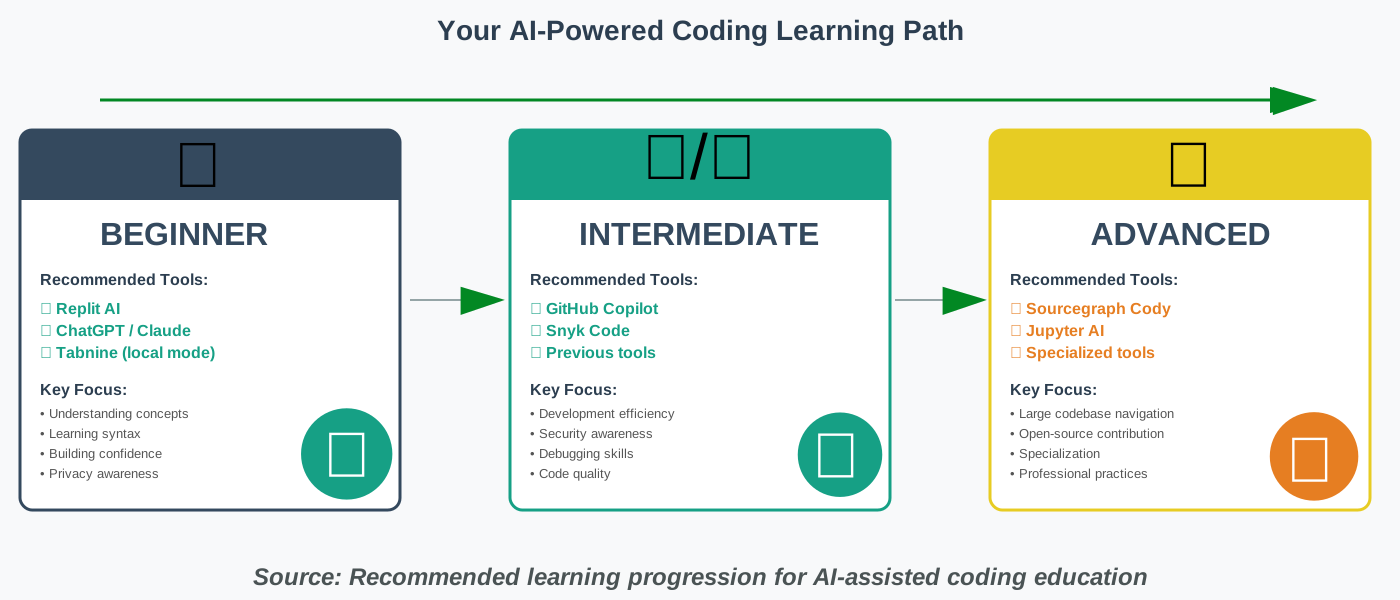
Start with Replit AI and ChatGPT/Claude
Why: Replit eliminates setup complexity, letting you start coding immediately. Its integrated AI provides gentle guidance without overwhelming you. Complement this with conversational AI for concept explanations and answering questions as they arise. This combination provides comprehensive support while you build confidence.
Privacy note: Use only for learning projects with no personal data. Both are cloud-based, so treat them as public learning spaces.
If Privacy is Your Primary Concern
Start with Tabnine (local mode) and self-hosted Jupyter AI
Why: Tabnine’s local processing means your code never leaves your machine. For data science work, Jupyter AI can be configured with privacy-focused backends or even local models. This combination provides robust assistance without cloud transmission.
Trade-off: Suggestions might be less sophisticated than cloud-based alternatives, but for learning, this rarely matters significantly.
If You’re Learning Web Development
Start with GitHub Copilot and Snyk Code
Why: Web development involves many frameworks, libraries, and patterns where Copilot’s extensive training shines. Pairing it with Snyk Code from the beginning instills security awareness—crucial for web applications handling user data.
Privacy note: Use environment variables for all credentials. Never commit API keys or passwords to repositories, whether using AI tools or not.
If You’re Preparing for Data Science or Machine Learning
Start with Jupyter AI and ChatGPT/Claude for concept explanation
Why: Jupyter AI integrates perfectly with the data science workflow. Combine it with conversational AI for understanding statistical concepts, machine learning algorithms, and data analysis techniques that require deeper explanation than code completion provides.
Privacy note: Use only public datasets while learning. Be extremely cautious with any real-world data, even if it seems anonymized.
If You’re Contributing to Open-Source Projects
Start with Sourcegraph Cody and GitHub Copilot
Why: Open-source projects often have large, unfamiliar codebases. Cody helps you understand existing code architecture, while Copilot assists in writing contributions that match the project style. Both excel at helping you become productive in unfamiliar codebases quickly.
Ethics note: Disclose AI assistance if project contribution guidelines require it. Some projects have specific policies about AI-generated contributions.
If Budget is a Major Constraint
Start with ChatGPT/Claude (free tiers), Replit (free plan), and Tabnine (free version)
Why: All offer genuinely useful free tiers sufficient for learning. As you progress and potentially earn income from coding, you can upgrade to paid features. But free versions provide everything beginners need.
Upgrade when: You hit usage limits regularly or when specific advanced features become essential for your work.
Frequently Asked Questions About AI-Assisted Coding
Your Action Plan: Starting Your AI-Assisted Coding Journey
You’ve learned about the tools, understood the safety considerations, and reviewed best practices. Now let’s create a concrete plan to begin boosting your coding skills with AI effectively and responsibly.
Week 1: Setup and Exploration
Day 1-2: Choose your initial tools based on the decision framework earlier. For most beginners, I recommend starting with Replit AI and one conversational AI (ChatGPT or Claude). Create accounts, review privacy settings carefully, and configure them according to your comfort level.
Day 3-4: Complete a simple introductory project using your chosen tools. Something basic like a calculator, a simple game, or a basic website. The goal isn’t complexity—it’s learning how to interact with AI assistance. Pay attention to how you ask questions and request explanations.
Day 5-7: Repeat the same project entirely without AI assistance. This immediately shows you what you’ve truly learned versus what you borrowed. Compare your manual solution with the AI-assisted version. Where do they differ? Why?
Weeks 2-4: Building Foundation with AI Support
Select a structured learning resource—a coding course, tutorial series, or book—and work through it with AI assistance. Use AI to:
- Explain concepts that confuse you
- Debug errors you encounter
- Suggest alternative approaches to problems
- Generate practice exercises
But remember: AI should enhance the learning resource, not replace it. Complete all course exercises yourself first, then compare with AI approaches.
Document everything you learn in a personal knowledge base. When AI explains something particularly well, summarize it in your own words. This transformation from AI explanation to personal understanding cements learning.
Months 2-3: Developing Independence
Begin alternating projects: one with full AI assistance, one with limited AI help, and one without any AI support. This progression develops skills at different support levels.
Introduce a second tool. If you started with Replit, add Tabnine or GitHub Copilot to your primary editor. If you began with general AI chatbots, explore specialized coding assistants. Learning to use multiple tools effectively is itself a valuable skill.
Start contributing to simple open-source projects. Use Sourcegraph Cody to understand codebases before contributing. This introduces you to real-world code and collaborative development while still leveraging AI assistance appropriately.
Months 4-6: Specialized Development
Choose a specialization direction—web development, data science, mobile development, etc.—and select AI tools optimized for that path. This is when specialized tools like Jupyter AI for data science or specific framework assistants become valuable.
Undertake an ambitious personal project. Something that challenges your current skills and requires sustained effort. Use AI throughout, but maintain your verification practices. This project should be portfolio-worthy—something you’re proud to show potential employers or collaborators.
Join coding communities. Participate in forums, Discord servers, or local meetup groups. Discuss how you and others use AI tools. Learn from diverse perspectives on balancing AI assistance with skill development.
Ongoing: Maintaining Skill Balance
Establish a permanent practice rhythm:
- Daily: Small coding challenges without AI assistance (15-30 minutes)
- Weekly: One project or feature with full AI support (2-3 hours)
- Monthly: Evaluate your AI dependency with a manual coding test
- Quarterly: Review and update your tool selection based on how your needs have evolved
This rhythm ensures AI accelerates your learning without creating dependency. You’re building real skills while leveraging modern tools to learn more efficiently than previous generations could.
Conclusion: Your Coding Journey with AI as Your Ally
Boosting your coding skills with AI represents one of the most effective educational opportunities available today. The tools we’ve explored—from privacy-focused Tabnine to conversational mentors like ChatGPT and specialized assistants like Jupyter AI—can accelerate your learning dramatically when used responsibly.
The key to success isn’t choosing the “perfect” tool or using every platform available. It’s developing a mindful relationship with AI assistance where these tools enhance your learning without replacing the fundamental work of actually becoming a skilled developer. Use AI to explain concepts you’re struggling with. Let it suggest code patterns you’re unfamiliar with. Allow it to catch errors before they become deeply embedded. But never let it become a substitute for your own understanding.
Remember the safety principles we’ve discussed throughout: protect your privacy by understanding what data you’re sharing, verify everything before trusting it, maintain balance between AI-assisted and independent coding, and treat security as fundamental from your first project. These practices protect you now and establish patterns that will serve you throughout your career.
I’ve seen too many talented people hesitate to try coding because it seems overwhelming. They imagine they need to master everything alone before starting. AI tools fundamentally change this equation—you can have patient, knowledgeable assistance available constantly as you learn. But I’ve also seen people become so dependent on AI that they never develop real capability. The path forward lies between these extremes: enthusiastic use of AI tools combined with deliberate practice ensuring you’re developing genuine skills.
Your coding journey is uniquely yours. Maybe you’re drawn to web development and will build the next innovative application. Perhaps data science calls to you, and you’ll discover insights that change how we understand the world. You might contribute to open-source projects that millions use daily or create tools that solve specific problems in your community. Wherever coding takes you, AI assistance can help you arrive there faster and more confidently—as long as you remain the one doing the learning, with AI as your supportive guide rather than your replacement.
Start today. Choose one or two tools from this guide. Create something simple. Make mistakes. Ask questions. Learn. And remember: every expert developer was once exactly where you are now, except they didn’t have access to the incredible AI tools you can use. You’re learning to code in the best era possible for beginners. Make the most of it—safely, thoughtfully, and enthusiastically.
References:
GitHub Copilot Documentation: https://docs.github.com/copilot
Tabnine Privacy and Security Policies: https://www.tabnine.com/security
Replit Education Resources: https://replit.com/learn
Snyk Code Security Documentation: https://docs.snyk.io/products/snyk-code
Sourcegraph Cody User Guide: https://docs.sourcegraph.com/cody
Jupyter AI Integration Guide: https://jupyter-ai.readthedocs.io
OWASP Top 10 Security Risks: https://owasp.org/www-project-top-ten
About the Author
Nadia Chen is an AI ethics researcher and digital safety advocate dedicated to helping non-technical users navigate artificial intelligence responsibly. With a background in computer science and privacy policy, Nadia specializes in making complex technical concepts accessible while emphasizing the importance of security and ethical AI use. She believes that everyone should have the opportunity to learn coding and use AI tools—but only with full awareness of how to protect their privacy and develop genuine skills. When not writing about technology safety, Nadia teaches digital literacy workshops and contributes to open-source privacy projects. Her approach combines technical expertise with a deep commitment to user empowerment and responsible innovation.
Through her work at howAIdo.com, Nadia helps thousands of beginners start their coding journeys safely, ensuring that the next generation of developers builds not just technical skills but also the ethical awareness needed to create technology that respects user privacy and promotes human flourishing.