AI for Automation: A Comprehensive Guide

AI for Automation is changing the way we work, and you don’t need to be a tech expert to benefit from it. I remember the first time I automated a repetitive task at work—scheduling dozens of follow-up emails manually felt overwhelming. Then I discovered AI tools that could handle it in minutes. That moment opened my eyes to how powerful automation can be, and I’ve been hooked ever since.
If you’ve ever felt buried under routine tasks like sorting emails, entering data, or managing schedules, you’re in the right place. This guide will walk you through everything you need to know about using AI automation to save time and reduce stress. Whether you’re managing a small business, working from home, or just trying to get more done in less time, these practical steps will show you exactly how to get started.
What’s AI for Automation?
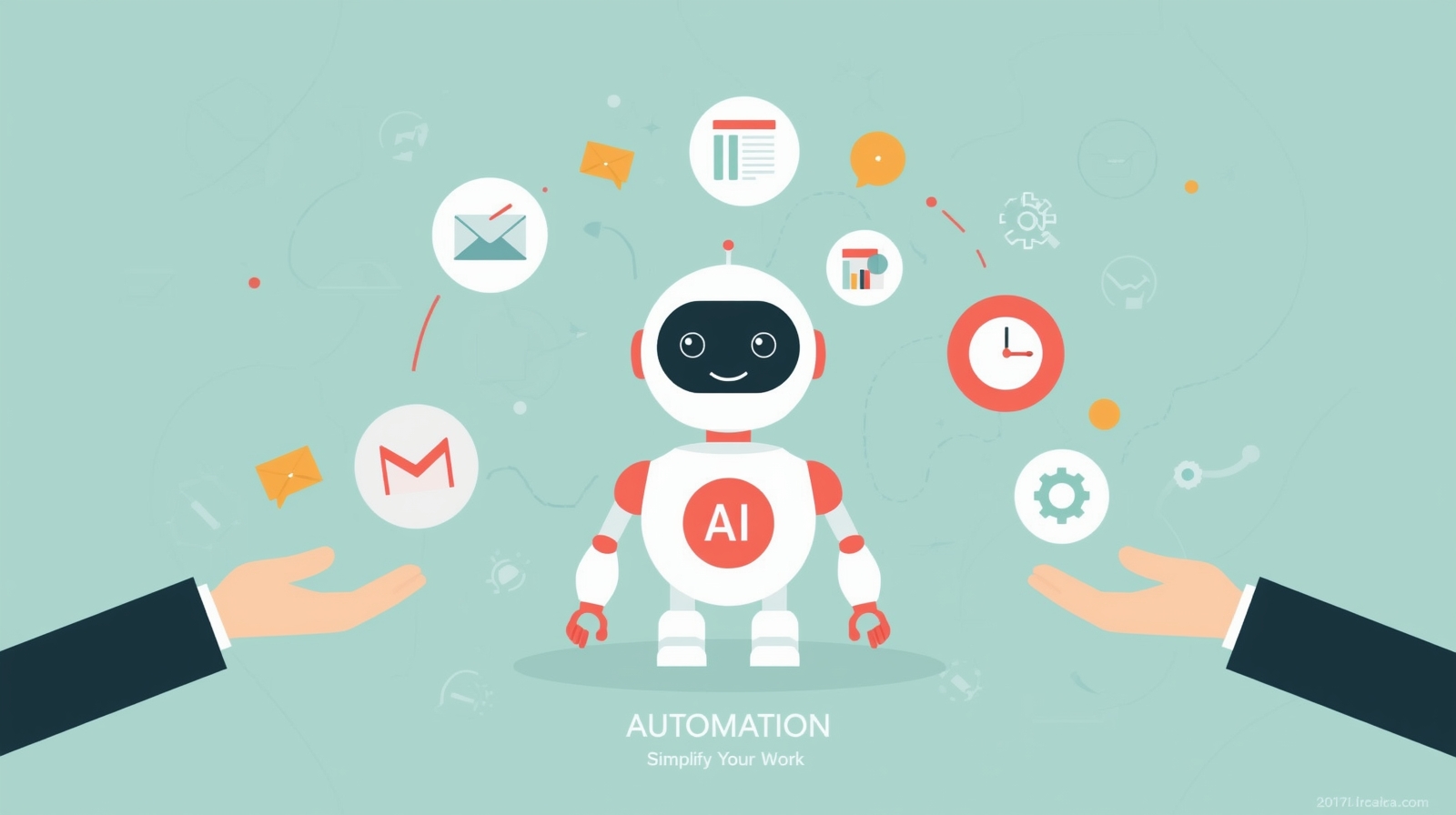
At its core, AI for Automation means using artificial intelligence to handle tasks that you’d normally do manually. Think of it as having a smart assistant that learns your preferences and takes care of repetitive work while you focus on what really matters.
Unlike traditional automation that follows rigid rules, AI-powered automation can adapt and improve over time. It recognizes patterns, makes decisions, and even predicts what you might need next. For example, an AI email filter doesn’t just sort messages based on keywords—it learns which emails are important to you and adjusts accordingly.
The beauty of modern AI tools is that they’re designed for everyday people. You don’t need coding skills or technical training. Most platforms offer simple interfaces where you click, drag, and set preferences. It’s like teaching a helpful friend how you like things done, except this friend never gets tired and works 24/7.
Why AI Automation Matters for Non-Technical Users
Here’s the truth: we all have the same 24 hours in a day. The difference between feeling overwhelmed and feeling in control often comes down to how we manage repetitive tasks. Artificial intelligence automation gives you back precious hours by handling the boring stuff.
I’ve seen colleagues cut their administrative work in half simply by automating appointment scheduling and invoice generation. That’s time they now spend on creative projects, connecting with clients, or simply enjoying life outside work. The impact goes beyond productivity—it reduces burnout and improves overall well-being.
What makes this even better is accessibility. AI automation tools have become incredibly user-friendly. Companies realize that their users aren’t always programmers, so they’ve built interfaces that feel natural. If you can use a smartphone, you can use these tools.
Step-by-Step Guide: Getting Started with AI Automation
Step 1: Identify Tasks Worth Automating
Start by making a list of tasks you do repeatedly. Write down everything you do more than twice a week that follows a predictable pattern. Common examples include responding to similar emails, updating spreadsheets, posting on social media, or generating reports.
Focus on tasks that consume time but don’t require creative thinking. If you’re copying and pasting information between systems or performing the same steps in the same order, that’s a prime candidate for automation with AI. Don’t worry about finding the “perfect” task—start with something that annoys you most. That personal frustration will keep you motivated through the learning process.
Step 2: Choose the Right AI Tool
The market is full of AI automation software, which can feel overwhelming. Here’s my advice: start simple. Look for tools that specialize in your biggest pain point rather than trying to find one solution for everything.
For email management, try tools like SaneBox or Clean Email. If you need to automate social media posting, Buffer or Hootsuite offer AI features. For connecting different apps together, Zapier and Make (formerly Integromat) are excellent choices. Most offer free trials, so test a few before committing.
When evaluating tools, ask yourself: Does it connect with the apps I already use? Is the interface intuitive? Are there templates I can start with? Can I get help when I’m stuck? The best tool is the one you’ll actually use, not the one with the most features.
Step 3: Set Up Your First Automation
Let’s create a simple automation together. We’ll use the example of automatically saving email attachments to cloud storage—something that saves countless clicks and prevents lost files.
Using Zapier as an example:
- Sign up for a free Zapier account and click “Create Zap”
- Choose your trigger: Select Gmail (or your email provider) and set the trigger to “New Attachment”
- Connect your email account when prompted and grant necessary permissions
- Choose your action: Select Google Drive, Dropbox, or your preferred storage service
- Map the fields: Tell it where to save files and what to name them
- Test your automation with a sample email to make sure it works
- Turn it on and let it run in the background
This entire process takes about five minutes, and suddenly you never have to manually download and organize attachments again. That’s the power of AI process automation in action.
Step 4: Monitor and Adjust
Your automation won’t be perfect immediately, and that’s completely normal. Check it out after the first day to see how it’s performing. Are files going to the right folders? Is it catching all the attachments you want?
Most AI automation platforms provide activity logs showing exactly what happened with each automated task. Review these logs regularly at first. If something isn’t working as expected, adjust your settings. Maybe you need to add filters to exclude certain file types or create different rules for different senders.
Think of this process as training your AI assistant. The more you refine the rules and provide feedback, the better it gets at understanding exactly what you need.
Step 5: Expand Gradually
Once your first automation runs smoothly for a week or two, it’s time to tackle another task. Build your automation ecosystem one piece at a time. This gradual approach prevents overwhelm and helps you truly master each tool before moving to the next.
Consider automations that connect multiple tools together. For instance, when someone fills out a form on your website, automatically add them to your email list, send a welcome message, and create a task in your project management tool. These multi-step automations are where AI and automation really shine, creating seamless workflows that would take you hours to do manually.
Common Mistakes to Avoid
I learned some lessons the hard way, so let me save you the trouble. First, don’t try to automate everything at once. I once spent an entire weekend setting up fifteen different automations, only to find myself confused and unable to manage them all. Start small and scale up.
Second, always include a human checkpoint for important decisions. Intelligent automation is powerful, but it shouldn’t send money, delete files, or make significant commitments without your review. Use automation for efficiency, not for replacing your judgment.
Third, remember to update your automations when things change. If you switch email providers or change your workflow, your automations need updating too. Set a calendar reminder every three months to review all your automated processes and make sure they still serve you well.
Real-World Applications of AI Automation
Let’s explore how different people use AI automation solutions in their daily lives. These examples show that automation isn’t just for big companies—it’s for anyone who wants more time and less stress.
For Small Business Owners
Sarah runs a small bakery and used to spend hours each week managing orders, updating inventory, and responding to customer inquiries. She now uses AI chatbots to answer common questions about ingredients and opening hours. Her inventory system automatically reorders supplies when stock runs low, and her booking system sends confirmation emails and reminders without any manual input.
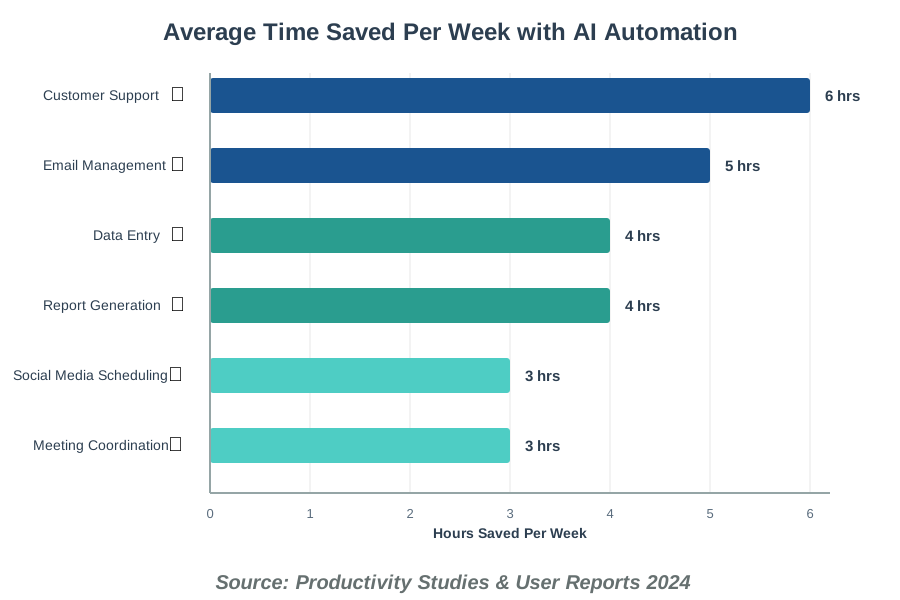
The result? Sarah spends three fewer hours per week on administrative tasks and has eliminated the anxiety of forgetting to reorder essential supplies. She’s reinvested that time into developing new recipes and engaging with customers in person—the parts of her business she actually loves.
For Content Creators
Marcus creates educational videos on YouTube. He used to manually schedule posts across five social media platforms, write descriptions, and respond to initial comments. Now, his automation AI tools handle the repetitive parts. When he uploads a video, it automatically posts announcements to all his channels, generates draft descriptions using AI, and even creates short clips for TikTok and Instagram Reels.
He still reviews everything before it goes live, but the heavy lifting is done for him. What used to take two hours per video now takes twenty minutes, allowing him to focus on video quality and creative content rather than administrative busywork.
For Remote Workers
Jennifer manages projects for a distributed team across three time zones. Coordinating meetings was a nightmare until she implemented AI scheduling assistants. Now, when someone needs to meet with her, they interact with an AI that checks her calendar, considers everyone’s time zones, and finds optimal meeting times.
She also uses AI to automatically transcribe and summarize her video calls, creating action items and distributing meeting notes. Her team collaboration has improved because nothing falls through the cracks, and she’s no longer drowning in meeting-related admin work.
Understanding the Different Types of AI Automation
Not all automation is created equal. Understanding the different types helps you choose the right approach for your needs. Machine learning automation refers to systems that improve through experience. These tools get smarter the more you use them, like spam filters that learn which emails you consider junk.
Then there’s robotic process automation (RPA), which handles structured, rule-based tasks. RPA is perfect for data entry, form filling, and any process that follows the same steps every time. It’s less flexible than machine learning but incredibly reliable for repetitive workflows.
Natural language processing (NLP) automation works with text and speech. Chatbots, email categorization, and sentiment analysis fall into this category. These tools understand human language well enough to respond appropriately or categorize content based on meaning, not just keywords.
Finally, there’s predictive automation, which uses AI to anticipate needs and take action proactively. Think of inventory systems that reorder products before you run out or customer service tools that identify potentially unhappy customers before they complain.
Frequently Asked Questions About AI Automation
The Future of AI Automation
The world of AI for Automation continues evolving rapidly. We’re moving toward more conversational interfaces where you can simply tell your AI assistant what you need in plain language, and it figures out the technical details. Imagine saying, “When someone mentions my product on Twitter, add them to my prospects list and draft a personalized thank-you message” and having it happen automatically.
We’re also seeing AI technologies become more predictive and proactive. Future systems won’t just respond to triggers—they’ll anticipate your needs based on patterns and context. Your automation might notice you always follow up with clients three days after sending proposals and start suggesting those follow-ups automatically.
Integration is becoming seamless too. More tools are building AI capabilities directly into their platforms, reducing the need for third-party connectors. This means fewer moving parts and more reliable automation that just works without constant tweaking.
Taking Your First Step Today
The journey to mastering AI for Automation starts with a single task. Choose one repetitive activity that annoys you today—just one. Set aside thirty minutes this week to automate it. You’ll be amazed at how satisfying it feels to watch a computer handle something that used to eat up your time.
Remember, you’re not trying to become an automation expert overnight. You’re simply exploring tools that can make your daily life easier. Every automation you implement is a small victory, a little more time back in your day, and a bit less stress on your shoulders.
The technology exists, it’s accessible, and it’s waiting for you to use it. The only thing standing between you and a more automated, less overwhelming work life is taking that first step. Trust me—once you experience the freedom of having routine tasks handled automatically, you’ll wonder how you ever managed without it.
Start small, stay curious, and don’t be afraid to experiment. The worst that can happen is you turn off an automation that doesn’t work. The best that can happen? You reclaim hours of your life to spend on things that actually matter to you. That’s a trade worth making.
References:
McKinsey & Company – “The State of AI in 2024”
Gartner Research – “Automation Technologies Market Analysis”
Harvard Business Review – “How AI Is Changing Work”
About the Author
Abir Benali is a friendly technology writer who specializes in making AI tools accessible to non-technical users. With years of experience demystifying complex technologies, Abir focuses on practical, real-world applications that help everyday people work smarter and live better. When not writing about AI, Abir enjoys exploring how technology can enhance creativity and human connection rather than replace it.