The Best AI Video Generators of 2025: A Head-to-Head Comparison

The Best AI Video Generators of 2025 have transformed from experimental novelties into powerful creative tools that anyone can master. I’ve spent countless hours testing these platforms, watching them evolve from simple text-to-video converters into sophisticated studios that understand context, emotion, and visual storytelling. What excites me most isn’t just the technology—it’s how these AI video creation tools are democratizing content creation, letting someone with zero video editing experience craft professional-looking content in minutes.
Whether you’re a social media creator racing against deadlines, a small business owner who needs marketing videos yesterday, or simply someone who wants to turn ideas into moving images without wrestling with complex software, this comparison will help you find your perfect match. I’ve tested each platform extensively, pushed them to their limits, and discovered what makes each one special—and where they stumble.
Why Does AI Video Generation Matter Now?
The content landscape has shifted dramatically. Video isn’t optional anymore—it’s essential. YouTube processes over 500 hours of video every minute, TikTok has reshaped how we consume content, and Instagram Reels dominate engagement metrics. Yet traditional video production remains expensive, time-consuming, and technically demanding.
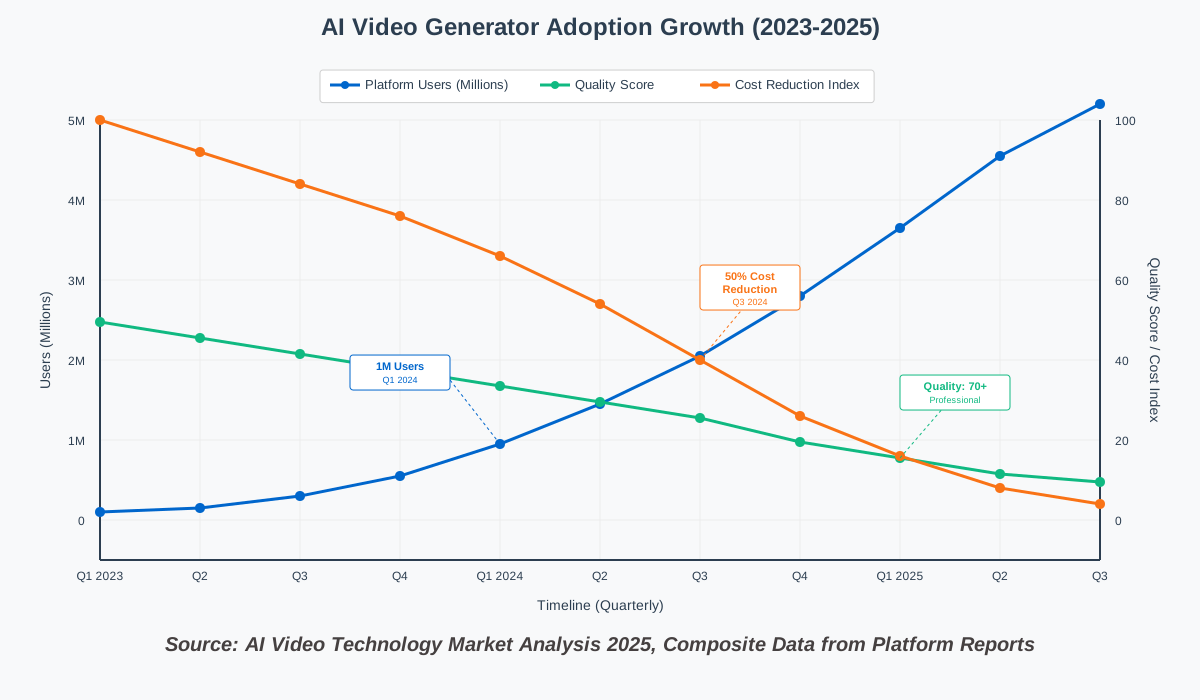
Enter AI-powered video generators. These platforms have cracked the code on several traditionally painful problems: scripting, filming, editing, and producing professional video content without cameras, studios, or years of experience. The technology has matured beyond those uncanny-valley clips we saw in 2023. Today’s generators create surprisingly coherent narratives, realistic movements, and genuinely useful content.
I remember trying early AI video tools in 2023—the results were amusing but rarely usable. Fast forward to 2025, and I’m regularly incorporating AI-generated footage into client projects. The quality gap between AI-generated and traditionally filmed content has narrowed dramatically.
Understanding What Makes a Great AI Video Generator
Before diving into specific platforms, let’s establish what separates exceptional AI video tools from mediocre ones. Through my testing process, five criteria emerged as non-negotiable:
Quality and Coherence: Does the video maintain consistency throughout? Are movements natural? Does the AI understand spatial relationships and physics? Early generators struggled with hands, reflections, and maintaining character appearance across frames. The best 2025 platforms handle these challenges gracefully.
Ease of Use: Can someone create something worthwhile in their first session? The learning curve matters enormously. Some platforms require understanding complex prompting techniques, while others feel intuitive from the start.
Customization Depth: While simplicity matters, so does control. Can you adjust camera angles, pacing, styles, and specific elements? The sweet spot balances accessibility with creative freedom.
Output Quality and Formats: Resolution, frame rates, aspect ratios, and export options determine whether your content works across platforms. A tool that only outputs square videos at 720p won’t cut it for YouTube creators.
Value Proposition: Cost versus capabilities. Some platforms charge premium prices for features you’ll rarely use. Others offer incredible value but with frustrating limitations. Finding your balance depends on your specific needs.
The Contenders: Top 5 AI Video Generators Tested
I’ve narrowed the field to five platforms that represent the current pinnacle of AI video generation technology. Each excels in different areas, and understanding their strengths helps you pick the right tool for your creative vision.
1. Runway Gen-3 Alpha: The Creative Professional’s Choice
Runway has consistently pushed boundaries in generative AI, and Gen-3 Alpha represents their most sophisticated offering yet. What struck me immediately was the platform’s understanding of cinematic language—it doesn’t just create moving pictures; it creates scenes with intentional composition, lighting, and movement.
Standout Features:
- Motion Brush: Paint exactly where you want movement to occur within your frame
- Director Mode: Control camera movements with precision (dolly, pan, zoom, orbit)
- Style Reference: Upload images to influence the aesthetic direction
- Multi-modal Input: Combine text, images, and video clips as prompts
- 4K Output: True high-resolution export at up to 60 fps
Pricing Structure: Runway operates on a credit system. The Standard plan starts at $15/month for 625 credits (approximately 125 seconds of Gen-3 video). The Pro plan at $35/month includes 2,250 credits plus faster generation. Enterprise solutions offer custom pricing with API access.
Real-World Testing: I tasked Runway with creating a product showcase for a fictional coffee brand. My prompt: “Cinematic close-up of artisan coffee being poured into a white ceramic cup, warm morning light streaming through a window, steam rising elegantly, shallow depth of field, 24fps film aesthetic.”
The result genuinely impressed me. The pour maintained liquid physics remarkably well, the lighting felt natural and motivated, and the depth of field created that premium commercial look. It took three generations to nail the exact vibe I wanted, consuming about 30 credits total.
- Exceptional quality and cinematic understanding
- Precise control over camera movements and composition
- Excellent for marketing content and professional projects
- Regular updates with new capabilities
- Active community sharing techniques and prompts
- Steeper learning curve than simpler competitors
- Credit system can feel limiting for experimentation
- Generation times vary (30 seconds to 3 minutes per clip)
- Occasional inconsistencies with complex scenes
Content creators, marketers, and agencies who need broadcast-quality output and have the time to refine their prompts. If you’re creating content where production value matters—commercials, music videos, high-end social content—Runway delivers.
Start with Runway’s preset camera movements before experimenting with custom controls. The platform includes templates for common shots (tracking, crane, establishing) that help you understand how to communicate your vision effectively.
2. Pika 1.5: The Fast and Flexible Experimenter
Pika approaches AI video creation with delightful spontaneity. While Runway feels like a professional suite, Pika feels like a playground where experimentation is encouraged and mistakes cost nothing. The platform’s standout feature is speed—both in generation time and in how quickly you can iterate ideas.
Standout Features:
- Lip-syncing: Make still portraits speak with uploaded audio
- Expand Canvas: Extend your video frame in any direction
- Region Control: Modify specific areas without regenerating the entire clip
- Sound Effects: AI-generated audio that matches your video
- Video-to-Video: Transform existing footage with new styles
Pricing Structure: Pika offers a generous free tier with limited generations per day. Standard subscription at $10/month provides 700 credits monthly (approximately 233 standard generations). Pro at $35/month includes 2,000 credits plus priority generation. Unlimited plans are available at $70/month.
Real-World Testing: I uploaded a photo of myself and used Pika’s lipsyncing feature with a voiceover about AI tools. Within 40 seconds, I had a talking-head video that synced impressively well. The mouth movements weren’t perfect—there’s still a subtle uncanniness—but for quick social media content or presentations, it absolutely works.
Then I tested the expand canvas feature. Starting with a portrait-oriented clip, I asked Pika to extend it to landscape, filling the sides with contextually appropriate content. The AI seamlessly added background elements that matched the original scene’s lighting and perspective.
- Extremely fast generation (often under 1 minute)
- Intuitive interface that encourages experimentation
- Excellent value with generous free tier
- Unique features like lipsyncing and canvas expansion
- Strong at transforming static images into video
- Slightly lower resolution than top competitors
- Less precise control over specific movements
- Occasional artifacts in complex scenes
- Sound effects feature still experimental
Social media creators, educators, and anyone who values speed and experimentation over pixel-perfect precision. Pika excels when you need content quickly and want to try multiple creative directions without overthinking.
Use Pika’s “Retry with Variations” option liberally. The platform excels at generating multiple interpretations of your prompt, and often the second or third variation captures what you imagined better than the first.
3. Synthesia: The Business Communicator’s Platform
Synthesia takes a fundamentally different approach than other platforms on this list. Rather than generating abstract scenes or artistic content, Synthesia specializes in AI-generated presenter videos—virtual humans who deliver your script with natural gestures and expressions. For corporate training, educational content, or explainer videos, this focused approach proves incredibly powerful.
Standout Features:
- 140+ AI Avatars: Diverse, professional presenters in multiple ethnicities and ages
- Custom Avatar Creation: Create a digital twin of yourself or brand spokesperson
- 65+ Languages: Native-quality translation and localization
- Screen Recording Integration: Combine AI presenters with software demonstrations
- Templates Library: Pre-designed layouts for common business use cases
- Brand Kit: Maintain consistent colors, fonts, and logos across videos
Pricing Structure: Synthesia starts at $29/month for the Starter plan (limited to 10 minutes of video monthly). The Creator plan at $89/month includes 30 minutes and custom avatars. Enterprise pricing offers unlimited video creation, premium avatars, and team collaboration features.
Real-World Testing: I created a product training video using Synthesia’s custom avatar feature (which requires submitting footage of yourself). The process took about 48 hours for avatar approval, but the result was eerily accurate. My digital twin delivered a five-minute training script with appropriate gestures and facial expressions.
What impressed me most was the multilingual capability. I took the same script and generated versions in Spanish, French, and Japanese. Each version maintained lip-sync accuracy—not just translated captions, but the avatar actually speaking those languages with proper pronunciation.
- Exceptional for business, training, and educational content
- Eliminates filming, lighting, and editing traditional presenter videos
- Multilingual capabilities are industry-leading
- Professional templates save significant time
- Consistently good quality without prompt engineering
- Limited creative flexibility compared to general generators
- Avatars still slightly uncanny for some viewers
- Locked into presenter-style format
- Higher cost for regular content creation
- Not suitable for artistic or abstract content
Businesses, educators, and training professionals who need scalable, multilingual presenter content. If you’re creating onboarding videos, product tutorials, corporate communications, or e-learning courses, Synthesia eliminates the traditional production bottleneck.
Start with Synthesia’s templates rather than blank canvas creation. The templates handle pacing, text placement, and visual hierarchy—you simply customize the script and avatar. Once comfortable, experiment with custom layouts.
4. Stability AI Video (SVD): The Open-Source Pioneer
Stability AI, the team behind Stable Diffusion, brings their open-source philosophy to video generation with Stable Video Diffusion. This platform appeals to technically minded creators who want maximum control and the ability to run models locally. While it requires more setup than cloud-based competitors, SVD offers unmatched flexibility in AI video creation.
Standout Features:
- Open-Source Model: Download and run locally or use cloud services
- API Access: Integrate video generation into custom workflows
- Fine-Tuning Capability: Train the model on specific visual styles
- Parameter Control: Adjust motion strength, coherence, and sampling steps
- Commercial Licensing: Clear terms for business use
- Community Models: Access specialized versions trained for specific purposes
Pricing Structure: The base model is free and open-source. Cloud API access through Stability AI starts at $10 for 1,000 image-to-video generations. DreamStudio (their web interface) operates on a credit system. Running locally requires significant GPU resources but eliminates ongoing costs.
Real-World Testing: I ran SVD both through their cloud API and locally on a machine with an RTX 4090. The local setup required technical knowledge—installing dependencies, managing Python environments, and understanding model parameters. But once configured, generation was lightning-fast and cost-free.
I tested SVD’s strength: transforming still images into short animations. Using a digital painting as input, I adjusted motion strength parameters to create subtle atmospheric movement—clouds drifting, grass swaying, and subtle lighting shifts. The control over motion intensity was precise, something cloud-based tools struggle to offer.
- Complete control over the generation process
- No ongoing subscription costs if running locally
- Active development community creating specialized variants
- Transparent about capabilities and limitations
- API enables custom integration into workflows
- Steep technical learning curve
- Requires powerful hardware for local generation
- Currently limited to shorter clips (typically 4 seconds)
- Less polished than commercial alternatives
- Documentation assumes technical background
Developers, technical creators, studios with specific visual requirements, and anyone wanting full control over their tools without subscription lock-in. If you have the technical chops and need to generate high volumes of content, SVD’s economics make sense.
Don’t start with local installation. Use Stability AI’s DreamStudio web interface first to understand the model’s capabilities and limitations. Once comfortable with the creative aspects, consider local deployment if volume justifies the setup effort.
5. HeyGen: The Marketing Team’s Secret Weapon
HeyGen bridges the gap between Synthesia’s presenter focus and broader AI video generation capabilities. The platform combines AI avatars with powerful editing tools, template libraries, and marketing-specific features. It’s designed for teams who need professional content without professional budgets or timelines.
Standout Features:
- Video Translation: Automatically translate videos into 40+ languages with matching lip-sync
- AI Avatars + Stock Footage: Combine presenters with b-roll seamlessly
- URL-to-Video: Convert articles or blog posts into video format
- Voice Cloning: Create custom voices that sound like you
- Brand Templates: Save custom styles for consistent content
- Team Collaboration: Multiple users, shared asset libraries, approval workflows
Pricing Structure: The Creator plan at $29/month includes 15 video credits (approximately 15 minutes). Business at $89/month provides 90 credits plus advanced features like voice cloning. Enterprise offers custom pricing with API access and dedicated support.
Real-World Testing: I handed HeyGen a blog post URL about sustainable fashion. Within minutes, the platform extracted key points, selected relevant stock footage, chose an appropriate avatar, and generated a two-minute explainer video. Was it perfect? No—I adjusted the script and swapped some stock clips—but the initial automated output saved hours of work.
The video translation feature genuinely impressed me. I took an English marketing video and translated it to Portuguese. Not only did the captions translate, but the avatar’s mouth movements synchronized with the Portuguese audio. For global marketing campaigns, this capability is transformative.
- Exceptional automation for common marketing content types
- Video translation with lip-sync is industry-leading
- Strong template library reduces decision fatigue
- Combines multiple content types (avatar, stock, text) seamlessly
- Team features make collaboration painless
- Less creative control than pure generation platforms
- Avatar library smaller than Synthesia’s
- Automated outputs often need refinement
- Higher cost for occasional users
- Limited to marketing/explainer video formats
Marketing teams, agencies, and businesses creating regular social media content, product explainers, or localized campaigns. HeyGen shines when you need consistent, professional output across multiple videos and languages.
Leverage HeyGen’s URL-to-video feature for content repurposing. Take existing blog posts, case studies, or documentation and quickly transform them into video content for different platforms. This multiplies your content’s reach without starting from scratch.
Head-to-Head: Which Platform Wins Each Category?
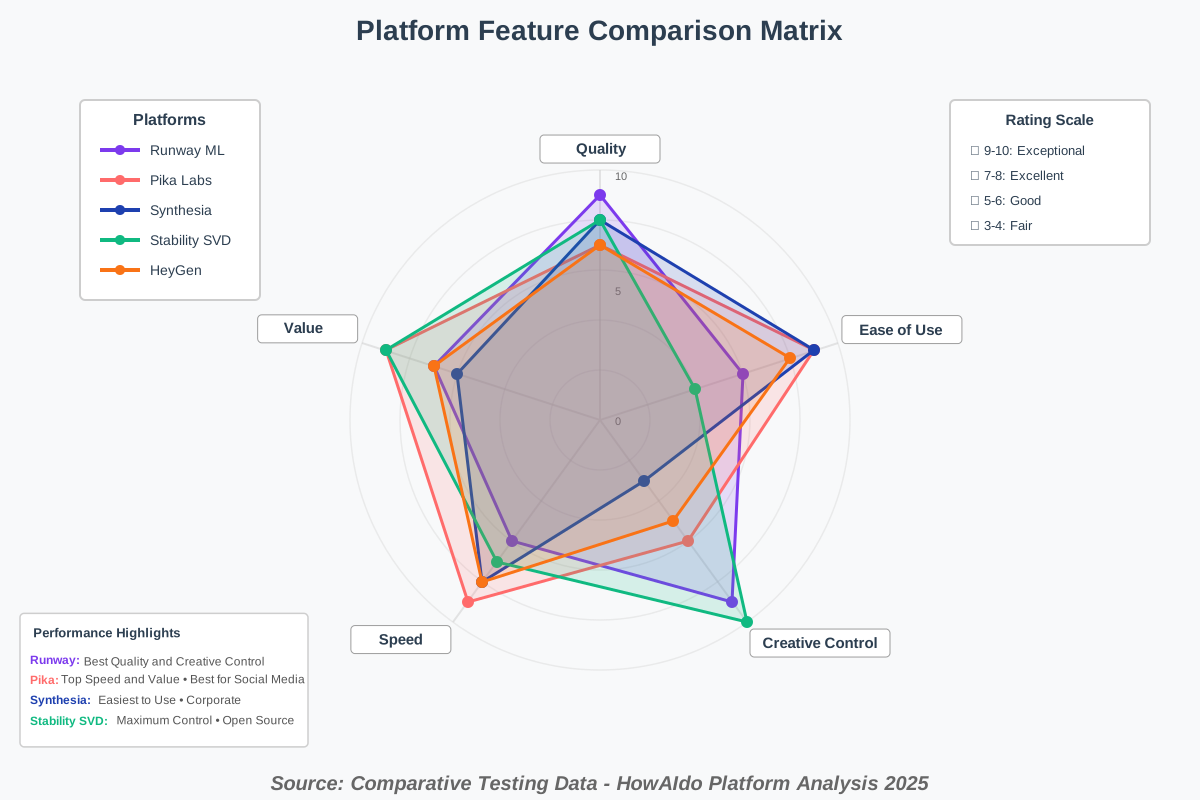
After extensive testing, clear winners emerged for specific use cases. Rather than crowning one overall champion, I’ve identified which platform excels in each common scenario.
Best for Creative Projects and Artistic Content
Winner: Runway Gen-3 Alpha
When creative vision matters most, Runway delivers. The platform’s cinematic understanding, precise camera controls, and style flexibility make it ideal for music videos, experimental content, or any project where production value differentiates your work. The learning investment pays dividends in output quality.
Runner-up: Pika 1.5 for creators who prioritize iteration speed and experimental approaches.
Best for Business and Corporate Content
Winner: Synthesia
No other platform matches Synthesia’s focus on professional presenter content. The multilingual capabilities, custom avatar creation, and business-oriented templates address specific corporate needs. For training videos, internal communications, or customer-facing explainers, Synthesia’s specialized approach wins decisively.
Runner-up: HeyGen for marketing teams needing more flexibility than pure presenter videos.
Best Value for Independent Creators
Winner: Pika 1.5
Pika’s generous free tier, affordable paid plans, and fast generation make it unbeatable for creators managing tight budgets. The platform doesn’t compromise on features—you get meaningful capabilities without premium pricing. For YouTubers, social media creators, or anyone producing regular content independently, Pika’s economics make sense.
Runner-up: Stability SVD for technically capable creators willing to invest setup time for zero ongoing costs.
Best for Technical Control and Customization
Winner: Stability AI Video (SVD)
Open-source wins when control matters. SVD’s parameter adjustability, fine-tuning capability, and local deployment options provide unmatched flexibility. Studios with specific visual requirements or developers building custom workflows will appreciate the transparency and control.
Runner-up: Runway Gen-3 Alpha for maximum creative control within a managed platform environment.
Best for Marketing Teams and Agencies
Winner: HeyGen
HeyGen’s feature set specifically addresses marketing workflows. The video translation capability enables global campaigns, URL-to-video automation speeds content production, and team collaboration features support agency workflows. For teams producing regular marketing content across platforms and languages, HeyGen’s specialized approach delivers efficiency.
Runner-up: Synthesia for agencies focused primarily on explainer and educational content.
Best for Social Media Content
Winner: Pika 1.5
Social media rewards speed and volume. Pika’s fast generation, easy experimentation, and multiple aspect ratio support align perfectly with social content demands. The platform’s playful features (like lip-syncing) resonate with social audiences, and the quick iteration cycle helps creators stay current with trends.
Runner-up: HeyGen for brands maintaining consistent social presence across multiple platforms.
Pricing Deep Dive: Finding Your Budget Sweet Spot
Understanding the true cost of AI video generation requires looking beyond monthly subscription fees. Let’s break down the economics:
Credit vs. Subscription Models: Runway and Pika use credit systems where each generation consumes credits based on duration and settings. This flexibility benefits occasional users but can feel restrictive during intensive projects. Unlimited plans exist but come at premium prices.
Synthesia and HeyGen offer minute-based subscriptions. You get a monthly video allowance, encouraging planning but potentially limiting experimentation. Unused minutes typically don’t roll over.
Stability SVD’s open-source model inverts the economics entirely. High upfront hardware investment but zero marginal costs for additional generations.
Cost Per Minute Analysis:
- Runway Gen-3: Approximately $3-5 per finished minute (standard plan)
- Pika 1.5: Approximately $1-2 per finished minute (standard plan)
- Synthesia: Approximately $3-4 per finished minute (creator plan)
- Stability SVD: Free (after hardware/setup costs)
- HeyGen: Approximately $2-3 per finished minute (business plan)
Hidden Costs to Consider: Time investment varies dramatically. Runway requires more prompt refinement. Synthesia needs script preparation. Pika encourages (and rewards) rapid iteration. Factor your hourly value into the real cost equation.
Learning curves represent opportunity costs. Stability SVD demands significant technical knowledge. Synthesia requires minimal onboarding. Choose platforms matching your existing skills or account for learning time.
Value Optimization Strategies: Start with generous free tiers (Pika, Stability) to understand your usage patterns before committing to paid plans. Many creators discover they need fewer premium features than anticipated.
Combine platforms strategically. Use Pika for rapid social content and Runway for flagship projects. The combined cost often beats relying solely on premium tiers of a single platform.
Consider annual billing. Most platforms offer 15-30% discounts for annual commitments. If you’ve validated a platform that meets your needs, the savings add up quickly.
Common Challenges and How to Overcome Them
Even the best AI video tools have limitations. Here’s what I’ve encountered and how to work around common frustrations:
Challenge: Inconsistent Quality Between Generations AI models contain inherent randomness. Identical prompts produce different results. This variability frustrates perfectionists but delights experimenters.
Solution: Generate multiple variations and select the best. Most platforms offer batch generation. Runway lets you generate four variations simultaneously. Pika’s “Retry with Variations” produces alternative interpretations. Budget extra credits for iteration.
Challenge: The “AI Look” Despite improvements, AI-generated videos sometimes exhibit telltale characteristics—slightly unnatural movements, specific lighting patterns, or textural qualities that signal artificial origin.
Solution: Blend AI with traditional footage. Use AI-generated content as b-roll or transitions rather than primary footage. Combine with stock footage, screen recordings, or traditionally filmed elements. Hybrid approaches leverage AI’s strengths while mitigating its weaknesses.
Challenge: Limited Duration Most platforms cap individual generations at 4-10 seconds. Creating longer content requires stitching multiple clips.
Solution: Plan your video as a series of distinct shots rather than one continuous take. This approach actually improves pacing and viewer engagement. Use video editing software (DaVinci Resolve, Adobe Premiere) to assemble clips with transitions and pacing that mask AI limitations.
Challenge: Prompt Engineering Complexity Effective prompts require understanding how models interpret language. Vague descriptions produce vague results. Overly specific prompts confuse the AI.
Solution: Study community prompt libraries. Runway, Pika, and Stability all have active Discord communities sharing effective prompts. Analyze what works, then adapt those patterns. Start with proven templates before experimenting with custom approaches.
Challenge: Rights and Commercial Use Concerns The legal landscape around AI-generated content remains evolving. Different platforms have different licensing terms.
Solution: Read licensing agreements carefully. Most platforms grant commercial rights to paid users but with varying restrictions. Synthesia and HeyGen offer clear commercial licensing. Stability SVD’s open-source model provides transparency. When in doubt, consult with legal counsel for high-stakes commercial projects.
Practical Integration: Making AI Video Part of Your Workflow
The most successful AI video creators don’t treat these tools as complete solutions but as powerful components within broader creative workflows. Here’s how to integrate AI-generated video content effectively:
Start with Strategic Planning: Identify which content types benefit most from AI generation. Tutorial intros? Social media teasers? Product showcases? Background footage? Focus your AI efforts where traditional production creates bottlenecks.
Build a Hybrid Production Pipeline: Combine AI-generated elements with traditional content. Film key scenes with your phone or camera. Generate establishing shots, transitions, or supplementary footage with AI. Edit everything together in your preferred NLE (non-linear editor). This approach produces higher-quality results than pure AI generation while dramatically reducing production time.
Create a Prompt Library: Document prompts that produce reliable results for your style. Build a personal database categorized by type—product shots, nature scenes, and abstract transitions. This library becomes increasingly valuable as you refine your aesthetic preferences.
Establish Quality Control Processes: Define your minimum quality standards. Which artifacts are acceptable for social content but not client projects? Create a review checklist covering technical quality (resolution, compression), creative quality (composition, pacing), and brand alignment (colors, tone, messaging).
Optimize for Platform Requirements: Different social platforms demand different specifications. Instagram Reels need 9:16 vertical. YouTube prefers 16:9 horizontal. TikTok optimizes for mobile. Generate or export your AI content in appropriate formats from the start rather than cropping or reformatting later.
Maintain Human Creative Direction: AI excels at execution but requires human creative vision. You make the strategic decisions—story, emotion, messaging. The AI handles technical execution. This division of labor maximizes both human creativity and AI efficiency.
Future-Proofing Your Choice: What’s Coming in 2026
The AI video generation landscape evolves rapidly. Understanding development trajectories helps you choose platforms with staying power:
Longer Duration Capabilities: Current platforms typically max out at 10-second clips. Development roadmaps indicate 30-60 second generations coming in 2026. Runway has demonstrated minute-long clips in beta. This extension will dramatically reduce the editing required to assemble longer content.
Improved Temporal Consistency: The holy grail: maintaining consistent character appearance, lighting, and style across extended sequences. Current models struggle with this. Next-generation systems promise better “memory” of previous frames, reducing jarring inconsistencies.
Real-Time Generation: Processing times will plummet. Imagine typing a prompt and watching a video generated in real-time, adjusting your description dynamically as the scene evolves. Early prototypes suggest this isn’t science fiction—it’s next year’s reality.
Enhanced Control Mechanisms: Expect more intuitive control interfaces. Drawing movement paths directly on frames. Adjusting lighting with sliders. Specifying exact color palettes. The gap between imagination and execution will narrow as interfaces become more sophisticated.
Audio-Video Integration: Current platforms treat audio as secondary. Next-generation systems will generate synchronized video from audio descriptions or create matching soundscapes for video prompts. This integration will streamline production for creators working across both mediums.
Frequently Asked Questions
My Final Recommendations: Matching Platform to Purpose
After months of testing, here’s my straightforward guidance for choosing among the best AI video generators of 2025:
If you’re a content creator focused on quality and willing to invest time learning: Choose Runway Gen-3 Alpha. The platform rewards patience with exceptional output quality. Your investment in prompt refinement pays dividends across projects.
If you’re producing high-volume social media content on a budget: Choose Pika 1.5. The speed, affordability, and experimental nature align perfectly with social content demands. The generous free tier lets you validate the platform before committing financially.
If you’re creating corporate training, explainers, or multilingual business content: Choose Synthesia. The specialized focus on presenter videos with multilingual capabilities solves specific business challenges no other platform addresses as effectively.
If you’re technically capable and need maximum control or high-volume generation: Choose Stability AI Video. The open-source approach and local deployment option provide flexibility and economics that commercial platforms can’t match for sophisticated users.
If you’re running marketing campaigns across multiple platforms and languages: Choose HeyGen. The automation features, team collaboration, and video translation capabilities streamline marketing workflows specifically.
If you’re just starting and want to experiment: Start with Pika’s free tier to understand AI video generation fundamentals, then evaluate whether Runway’s premium quality or Synthesia’s presenter focus better matches your emerging needs.
The Creative Opportunity Ahead
We’re witnessing the democratization of video production. Tools that once required six-figure budgets and specialized expertise now fit in monthly budgets under $100. The barrier to entry for video content has collapsed.
But here’s what excites me most: these platforms don’t replace human creativity—they amplify it. The creative vision, storytelling, emotional intelligence, and strategic thinking remain human domains. AI handles the technical execution that previously required years to master.
I’ve watched students create content that competes with agency work. I’ve seen small businesses produce marketing videos that punch above their weight class. I’ve collaborated with artists exploring visual territories that weren’t technically possible before.
The technology will improve. Generation times will decrease. Quality will increase. New capabilities will emerge. But the fundamental shift has already occurred: video creation is no longer a specialized skill—it’s an accessible medium for anyone with stories to tell.
These five platforms represent the current cutting edge of AI video generation, each excelling in specific scenarios. Your perfect choice depends on your unique combination of needs, budget, technical comfort, and creative vision.
The most important decision isn’t which platform to choose—it’s deciding to start creating. Pick a platform that aligns with your immediate needs, experiment fearlessly, and adjust as you discover how AI video generation fits your creative workflow.
The future of content creation isn’t purely AI or purely human—it’s the creative collaboration between human vision and AI execution. These platforms are your new creative partners. The question isn’t whether to adopt them, but how quickly you can integrate them into your creative process.
Your stories deserve to be told. These tools make telling them infinitely more accessible. Now go create something amazing.
References:
Runway AI Official Documentation and Platform Updates (2025)
Pika Labs Technical Specifications and Feature Releases (2025)
Synthesia Business Use Case Studies and Platform Capabilities (2025)
Stability AI Research Papers and Model Documentation (2025)
HeyGen Platform Features and Marketing Solutions Overview (2025)
AI Video Technology Market Analysis Reports (2025)
User Community Forums and Prompt Libraries across platforms
About the Author
Alex Rivera is a creative technologist passionate about making AI accessible to everyone. With over eight years of experience in digital content creation and emerging technologies, Alex specializes in helping non-technical users harness AI tools for creative projects. When not testing the latest AI platforms, Alex teaches workshops on creative technology and maintains an active presence in AI creator communities, sharing practical tips and encouraging experimentation. Alex believes that the best technology disappears into the creative process, empowering people to focus on their vision rather than technical obstacles.