AI Grammar Checkers: Advanced Tools for Language Mastery

Understanding the Evolution of Grammar Technology
AI Grammar Checkers represent a quantum leap from traditional spell-check tools, offering language learners sophisticated support that goes far beyond highlighting misspelled words. As someone who has spent years helping people navigate the complexities of digital safety and AI ethics, I’ve witnessed firsthand how these advanced tools transform the learning experience while raising important questions about privacy and responsible use.
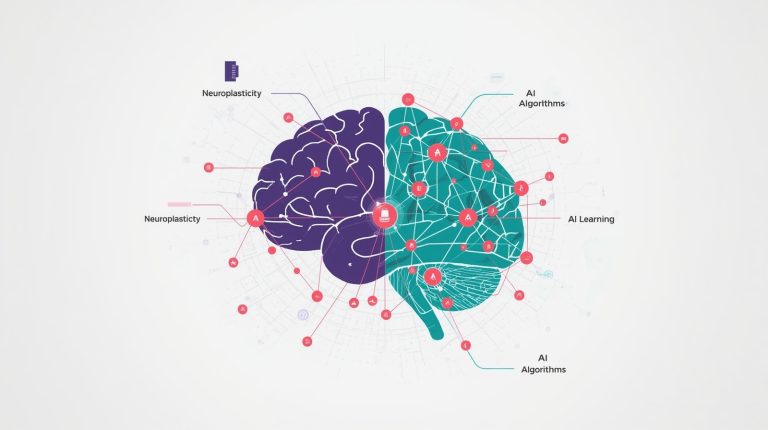
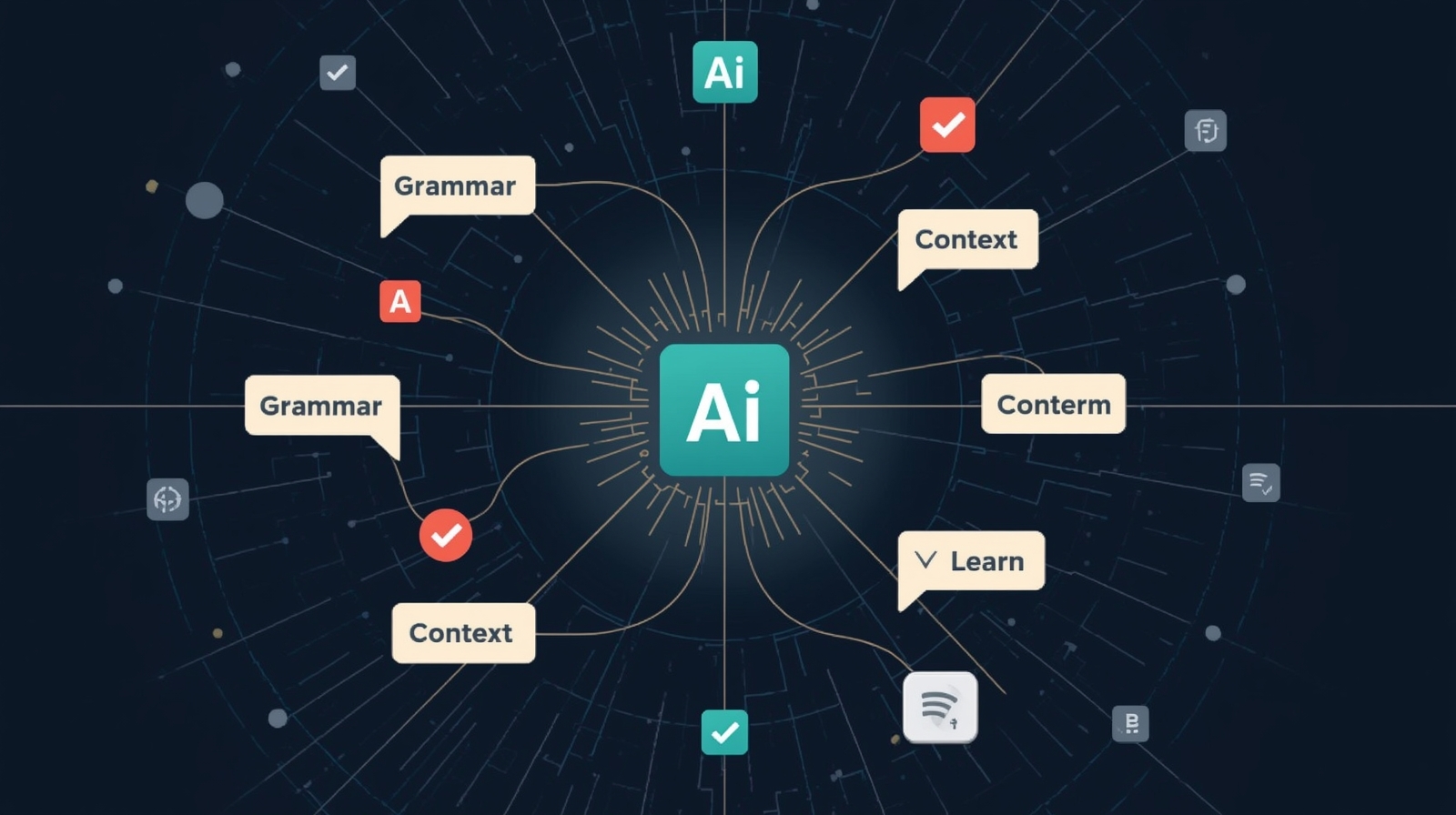
Traditional grammar checkers operated on rigid, rule-based systems that often missed context and nuance. Modern AI-powered grammar tools, however, leverage natural language processing and machine learning to understand not just what you’ve written, but what you’re trying to communicate. This fundamental shift changes everything for language learners who struggle with idiomatic expressions, cultural context, and the subtle rules that native speakers absorb naturally.
The technology behind these tools analyzes millions of text samples to recognize patterns, understand context, and provide suggestions that align with contemporary usage. But with this power comes responsibility—both for developers creating these tools and learners using them. Throughout this comprehensive guide, we’ll explore the leading AI Grammar Checkers, compare their capabilities, and discuss how to use them safely and effectively to accelerate your language learning journey.
Why Advanced Grammar Tools Matter for Language Learners
Language learning extends far beyond memorizing vocabulary and conjugation tables. The true challenge lies in mastering the subtle nuances that make communication feel natural and authentic. AI Grammar Checkers address this challenge by providing context-aware feedback that helps learners understand not just that something is wrong, but why it’s wrong and how to fix it.
Consider the difference between “I look forward to meeting you” and “I look forward to meeting you.” A basic spell-checker would miss this entirely, as all words are spelled correctly. An AI-powered grammar assistant, however, recognizes the grammatical structure and suggests the correct gerund form. More importantly, it can explain the rule about prepositions being followed by gerunds, turning a correction into a learning opportunity.
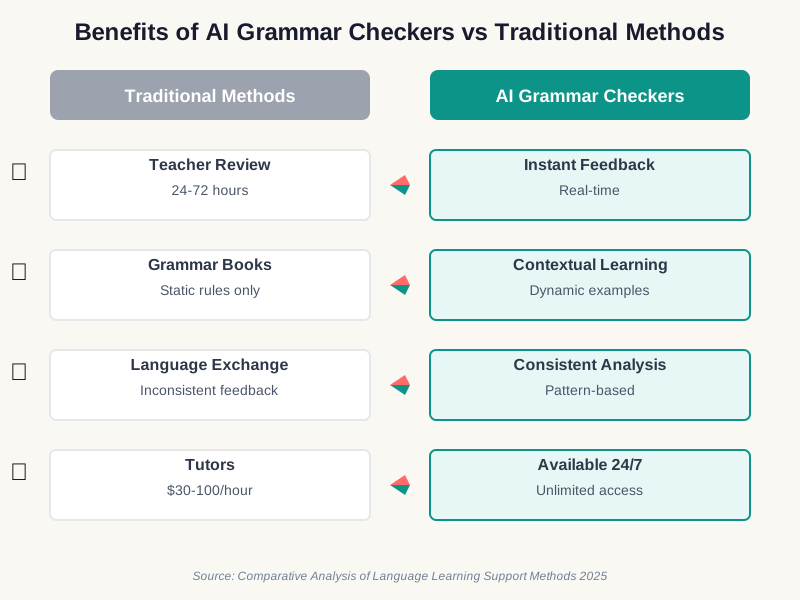
For language learners, these tools offer several critical advantages. They provide immediate feedback, allowing you to learn from mistakes in real-time rather than waiting for a teacher’s review. They’re available 24/7, supporting your learning whenever inspiration strikes. They offer consistent feedback based on established patterns, unlike human reviewers whose suggestions might vary based on personal preference or mood. Most significantly, modern AI Grammar Checkers adapt to your learning level, offering more detailed explanations for beginners while providing advanced stylistic suggestions for proficient users.
Leading AI Grammar Checkers: A Comprehensive Comparison
1. Grammarly: The Industry Standard for Comprehensive Feedback
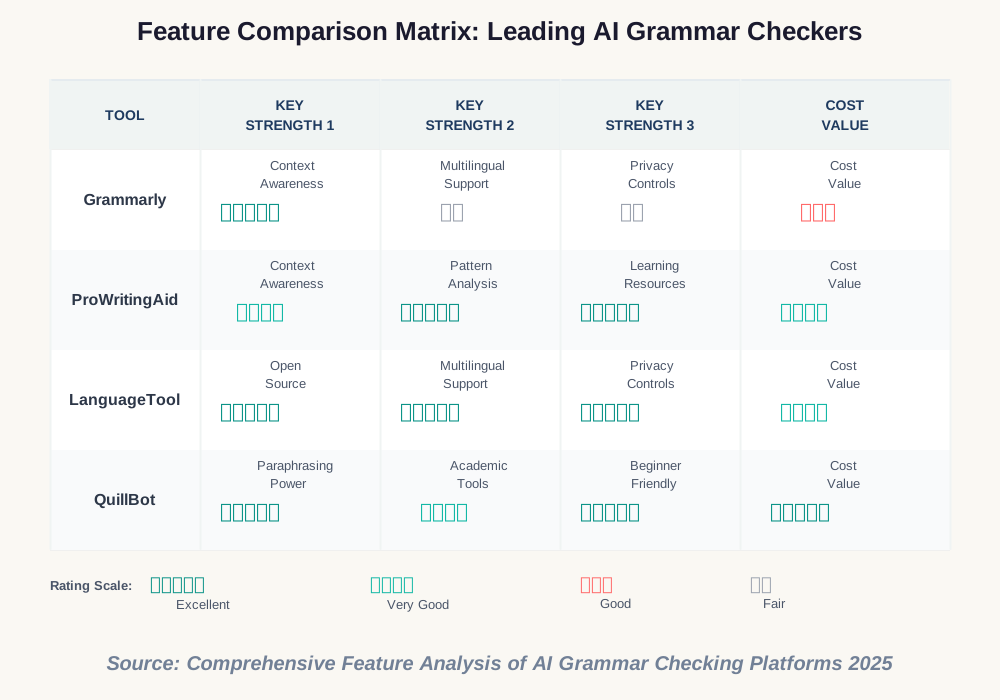
Grammarly has established itself as the most recognized name in AI Grammar Checking technology, and for good reason. Its sophisticated algorithms analyze your writing across multiple dimensions, from basic spelling and grammar to tone, clarity, and engagement. What sets Grammarly apart is its ability to understand context at a deep level, distinguishing between homophones based on meaning rather than simple pattern matching.
- Exceptionally accurate context-aware suggestions that understand nuanced language use
- Comprehensive style and tone guidance suitable for academic, professional, and creative writing
- Available across multiple platforms including browser extensions, desktop apps, and mobile keyboards
- Extensive explanation features that turn corrections into learning opportunities
- Plagiarism detection in premium tiers for academic integrity
- Personal dictionary customization for specialized vocabulary
- Premium features require subscription ($12-15 monthly), which may be prohibitive for students
- Can be overly prescriptive with style suggestions, sometimes prioritizing brevity over voice
- Privacy concerns, as all text is analyzed on cloud servers
- May suggest changes that don’t align with specific style guides or regional variations
- Free version offers limited advanced features
Grammarly excels for language learners working in academic or professional contexts who need comprehensive feedback across multiple writing dimensions. It’s particularly valuable for intermediate to advanced learners who understand basic grammar but need support with subtle nuances, idiomatic expressions, and style consistency. The tool shines when writing important documents like cover letters, academic papers, or professional emails where both correctness and tone matter significantly.
When using Grammarly, I strongly recommend reviewing their data handling policies carefully. Avoid processing highly sensitive information through the platform. Consider using the desktop application rather than the browser extension for sensitive work, and regularly review which websites have Grammarly access. Enable two-factor authentication on your account, and be aware that your writing is processed on external servers for analysis.
2. ProWritingAid: Deep Analysis for Serious Language Students
ProWritingAid offers something unique in the AI Grammar Checker landscape—a writing coach rather than just a correction tool. While Grammarly focuses on making your current text better, ProWritingAid emphasizes teaching you to become a better writer through detailed reports and explanations that reveal patterns in your writing habits.
- In-depth writing reports that identify patterns and recurring issues in your work
- Exceptional learning resources including video tutorials and detailed explanations
- Integration with major writing software including Scrivener, Google Docs, and Microsoft Word
- Lifetime license option available, making it cost-effective long-term
- Customizable writing style checks for different genres and purposes
- Excellent for identifying overused words and weak phrases
- Steeper learning curve due to the depth of analysis and reporting features
- Slower processing than some competitors, particularly for longer documents
- Interface can feel overwhelming for beginners with numerous reports and metrics
- Some suggestions can be overly technical for language learners
- Real-time checking less polished than dedicated competitors
ProWritingAid is ideal for dedicated language learners who want to understand and improve their writing patterns over time. It’s particularly valuable for students working on longer-form content like essays, research papers, or creative writing projects where deep analysis adds significant value. The tool works best for learners who have time to study the reports and implement systematic improvements rather than those needing quick corrections.
ProWritingAid offers more control over your data than some alternatives. You can choose to process documents locally on your device using the desktop application, keeping sensitive content off cloud servers. I recommend this approach for confidential or personal writing. Review the types of data collected through browser extensions, and consider using the standalone application for maximum privacy. Always ensure you’re using the latest version to benefit from security updates.
3. LanguageTool: Multilingual Support for Global Learners
LanguageTool distinguishes itself in the AI Grammar Checker market through exceptional multilingual support, offering comprehensive checking in over 30 languages. For language learners studying multiple languages or transitioning between them, this versatility proves invaluable. The open-source foundation of LanguageTool also means greater transparency about how your data is handled—a crucial consideration for privacy-conscious users.
- Supports over 30 languages with native-level checking for major European languages
- Open-source core provides transparency and community-driven improvements
- Strong privacy options, including self-hosted server capability for institutions
- Excellent detection of false friends and common errors in second-language writing
- More affordable premium options than major competitors
- Browser extension works seamlessly across web applications
- English language checking less sophisticated than Grammarly or ProWritingAid
- Fewer stylistic and tone suggestions compared to premium competitors
- Interface feels more functional than polished
- Limited plagiarism checking capabilities
- Smaller user community means fewer learning resources
LanguageTool excels for polyglots and language learners studying multiple languages simultaneously. It’s particularly valuable for learners working in languages beyond English, where other AI Grammar Checkers offer limited support. The tool shines for users who value privacy and open-source principles, especially in educational or institutional settings where self-hosting options matter. It’s also excellent for learners who frequently switch between languages in their writing.
LanguageTool’s open-source nature provides unique privacy advantages. For maximum security, institutions can self-host the server, ensuring all text analysis happens on controlled infrastructure. Individual users should review premium tier privacy policies carefully, as cloud-based analysis involves data transmission. I recommend using the browser extension’s incognito mode option for sensitive browsing, and regularly clearing your personal dictionary entries to remove potentially identifying information.
4. QuillBot: Paraphrasing Power Beyond Grammar Checking
While QuillBot began as a paraphrasing tool, its evolution into a comprehensive AI Grammar Checker makes it uniquely valuable for language learners. The paraphrasing functionality helps learners understand different ways to express the same idea—a critical skill for developing fluency and avoiding repetitive language patterns.
- Unique paraphrasing function helps learners understand alternative expressions
- Integrated summarizer excellent for studying and note-taking
- Citation generator supports academic writing across multiple formats
- Co-writer feature provides AI-powered writing assistance and brainstorming
- More affordable than premium alternatives with generous free tier
- Simple, intuitive interface ideal for beginners
- Grammar checking less comprehensive than dedicated competitors
- Limited style and tone analysis compared to Grammarly
- Paraphrasing can sometimes produce awkward phrasings
- Fewer integrations with external writing platforms
- Learning resources less extensive than competitors
QuillBot serves language learners particularly well when working on academic writing, where paraphrasing and summarizing source material is essential. It’s valuable for students struggling with expression variety or those who find themselves using the same phrases repeatedly. The tool excels for learners who need to understand multiple ways to express ideas, making it ideal for developing more flexible and natural-sounding writing. It’s also excellent for study purposes, with its summarization features supporting content comprehension.
When using QuillBot’s paraphrasing features, be mindful that your original text is processed on external servers. For academic work, I recommend using the tool for draft stages rather than processing final submissions containing original research. Review the plagiarism implications of paraphrasing tools with your institution, as some may have specific policies. Enable account security features, and avoid paraphrasing sensitive or confidential information. Consider the ethical implications of paraphrasing, ensuring you maintain original thinking rather than merely rewording others’ ideas.
Advanced Features That Transform Language Learning
Context-Aware Corrections: Understanding Beyond Rules
The revolutionary capability of modern AI Grammar Checkers lies in their context awareness. These tools don’t merely apply rigid rules—they understand the meaning and intent behind your writing. Consider how Grammarly distinguishes between “We’re already here” and “We’re all ready here,” recognizing that the first uses a contraction of “already” while the second means everyone is prepared. This semantic understanding proves invaluable for language learners who struggle with homophones and context-dependent usage.
Context awareness extends to recognizing informal versus formal writing contexts. An AI-powered grammar tool might accept contractions and casual phrasing in an email to a friend while flagging the same constructions in a cover letter. This sensitivity to register and audience represents a significant advancement over traditional grammar checkers that apply universal rules regardless of context.
For language learners, this means receiving feedback that matches your intended communication style rather than generic corrections that might make your writing feel stiff or inappropriate. The best AI Grammar Checkers learn your writing patterns over time, adapting their suggestions to support your natural voice while still correcting genuine errors.
Tone and Style Analysis: Developing Authentic Voice
Beyond grammatical correctness, advanced AI Grammar Checkers now analyze tone and emotional impact. They can identify whether your writing sounds confident, worried, formal, friendly, or urgent—and suggest adjustments to better align with your goals. This feature proves particularly valuable for language learners who understand the words individually but struggle to gauge the overall impression their writing creates.
Tone analysis helps learners navigate cultural nuances that textbooks rarely cover adequately. An AI Grammar Checker might flag that your email sounds more demanding than you intended or that your formal report includes unexpectedly casual phrasing. These insights accelerate cultural fluency alongside linguistic competence, helping learners communicate appropriately across different contexts and relationships.
Style consistency checking ensures your writing maintains a uniform voice throughout longer pieces. The technology identifies shifts in formality, point of view, or terminology that might confuse readers. For language learners working on extended projects like research papers or reports, this consistency checking prevents the common issue of mixing styles as you write over multiple sessions or when tired.
Vocabulary Enhancement and Synonym Suggestions
AI Grammar Checkers increasingly include sophisticated vocabulary development features. Rather than simply accepting or rejecting your word choice, these tools suggest alternatives that might be more precise, more sophisticated, or more appropriate for your context. For language learners, this transforms every writing session into a vocabulary lesson, exposing you to words you might not encounter in textbooks or casual conversation.
The most advanced tools consider register and formality when suggesting synonyms. They understand that “start” and “commence” aren’t truly interchangeable—one suits casual contexts while the other fits formal writing. This nuanced vocabulary guidance helps learners develop the sophisticated word choice that distinguishes advanced speakers from intermediates.
Vocabulary enhancement features also identify repetition and suggest variations to make your writing more engaging. When you’ve used “important” three times in one paragraph, the tool might suggest “crucial,” “significant,” or “essential” as alternatives. This functionality helps language learners develop the lexical variety that makes writing feel natural and professional rather than repetitive or limited.
Privacy and Ethical Considerations When Using AI Grammar Tools
Understanding Data Collection and Usage
As someone dedicated to digital safety, I must emphasize the privacy implications of using AI Grammar Checkers. These tools require access to your writing—sometimes before you’ve even finished typing—to provide real-time feedback. This means your text, which may include personal information, sensitive ideas, or confidential content, is being analyzed and potentially stored by external servers.
Most AI-powered grammar tools analyze your writing on cloud servers rather than locally on your device. This approach enables sophisticated analysis using powerful computing resources, but it also means your text leaves your computer. Companies typically use this data to improve their algorithms, train machine learning models, and occasionally for other business purposes outlined in their privacy policies.
I strongly encourage you to read the privacy policies of any AI Grammar Checker you use regularly. Pay particular attention to sections covering data retention (how long they keep your writing), data usage (what they do with it), and third-party sharing (whether they sell or share your information). Some tools offer more privacy-focused tiers that promise not to use your writing for training purposes—worth considering for sensitive work.
Protecting Sensitive Information
Never process highly sensitive information through AI Grammar Checkers without understanding the privacy implications. This includes confidential business documents, personal medical information, financial details, or anything you wouldn’t feel comfortable sharing publicly. While reputable companies implement security measures, no system is perfectly secure, and data breaches remain a persistent risk.
For professional or academic contexts involving sensitive information, consider using tools that offer local processing options. LanguageTool’s self-hosted server capability, for instance, allows institutions to analyze text without sending it to external servers. Some AI Grammar Checkers offer desktop applications that can work offline or with minimal data transmission—prioritize these for sensitive work.
When working with confidential documents, I recommend completing your final editing pass manually or using basic, local spell-checking tools rather than cloud-based AI Grammar Checkers. The convenience of AI-powered suggestions isn’t worth the risk of exposing truly sensitive information. Make it a habit to ask yourself, “Would I feel comfortable if this text became public by accident?” If the answer is no, avoid processing it through cloud-based grammar tools.
Academic Integrity and Responsible Use
Language learners must understand the ethical boundaries around using AI Grammar Checkers for academic work. While these tools are generally acceptable for editing and improving your own writing, their use raises questions about authorship and learning authenticity. Different institutions maintain different policies—some encourage AI grammar support, while others restrict it for certain assignments.
I recommend clarifying your institution’s policies before extensively using AI Grammar Checkers on graded work. Some professors view these tools as legitimate learning aids similar to dictionaries or tutors, while others consider them forms of unauthorized assistance. When in doubt, ask directly and keep documentation of any permissions granted.
The ethical line becomes particularly important with tools like QuillBot that offer paraphrasing capabilities. While these features can help you understand different ways to express ideas, they shouldn’t replace your own thinking or be used to disguise poorly understood content. The goal is developing your language skills, not masking your current limitations. Use paraphrasing tools to learn alternative expressions, but ensure the final writing represents your own understanding and voice.
Building Healthy Dependencies on Technology
As you incorporate AI Grammar Checkers into your language learning routine, maintain awareness of healthy versus unhealthy dependencies. These tools should support your learning, not replace it. If you find yourself unable to write anything without immediately checking it with AI, you may be developing an over-reliance that hinders skill development.
I suggest implementing a balanced approach: write first drafts without AI assistance to practice generating language independently, then use AI Grammar Checkers for review and learning from corrections. This approach builds your active language production skills while still benefiting from AI-powered feedback. Over time, you should notice yourself making fewer errors as you internalize the corrections you’ve learned from the tool.
Remember that AI Grammar Checkers aren’t infallible. They make mistakes, sometimes confidently suggesting incorrect changes or missing subtle errors. Develop critical thinking about their suggestions—don’t accept every correction blindly. Question suggestions that seem wrong or that change your intended meaning. This critical engagement transforms AI grammar checking from passive correction to active learning.
Frequently Asked Questions About AI Grammar Checkers
Making Your Final Choice: Recommendations by Learning Goal
For Academic Writing and Research
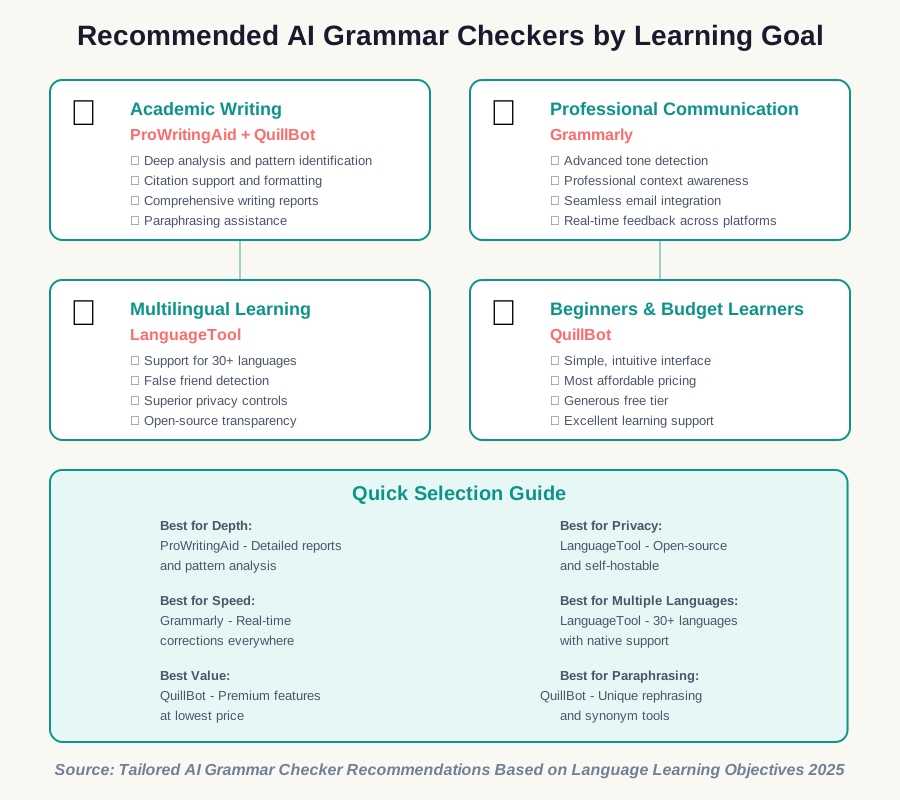
If your primary focus involves academic writing, ProWritingAid emerges as the strongest choice for serious language learners. Its comprehensive analysis reports help you identify and address patterns in your writing that might not be immediately obvious. The integration with reference management tools and detailed explanations make it particularly valuable for students working on research papers, theses, or dissertations. The learning curve proves worthwhile for the depth of insight provided.
Consider pairing ProWritingAid with QuillBot for academic contexts. While ProWritingAid handles the deep grammar and style analysis, QuillBot’s citation generator and paraphrasing tools support the research and writing process. This combination provides comprehensive support for academic language learning without overwhelming you with redundant features from a single tool.
For privacy-conscious academic users, especially those working with sensitive research data or in regulated fields, LanguageTool’s self-hosted option deserves serious consideration. Many universities now offer institutional access to grammar-checking tools—check with your academic support services before purchasing individual subscriptions.
For Professional Communication
Business professionals learning English need tools that understand corporate communication nuances. Grammarly excels in this domain with its sophisticated tone detection and style guidance tailored for professional contexts. The tool helps you navigate the delicate balance between friendliness and professionalism, directness and diplomacy—critical for effective workplace communication.
Grammarly’s browser extension integrates seamlessly with email platforms, project management tools, and document editors, making it effortless to maintain consistent, professional communication across all platforms. For language learners in professional settings, this integration proves invaluable—you receive feedback exactly when and where you need it without workflow disruption.
The premium tier’s advanced tone detection helps you understand how your messages might be perceived, allowing you to adjust for different audiences and situations. This capability accelerates professional fluency faster than traditional language learning approaches, which rarely address workplace communication subtleties adequately.
For Multilingual Learners
Students studying multiple languages simultaneously face unique challenges that most AI Grammar Checkers don’t address well. LanguageTool stands out as the obvious choice for polyglots, offering comprehensive checking across over 30 languages with native-level support for major European languages. The ability to seamlessly switch between languages without changing tools or learning new interfaces proves invaluable.
LanguageTool’s strength with false friends—words that look similar in different languages but have different meanings—makes it particularly valuable for multilingual learners prone to interference between languages. The tool recognizes these common traps and provides explanations that help you develop clearer distinctions between languages.
For privacy-conscious multilingual learners or those studying languages where other tools offer limited support, LanguageTool’s open-source foundation and transparency about data handling provide additional peace of mind. The active community contributes to continuous improvements across all supported languages.
For Beginners and Budget-Conscious Learners
New language learners need tools that encourage rather than overwhelm. QuillBot offers the most beginner-friendly interface with an exceptionally generous free tier that provides real value for learners on tight budgets. The simple, clean design reduces cognitive load, allowing you to focus on learning rather than navigating complex features.
QuillBot’s paraphrasing function provides unique value for beginners struggling to express ideas in different ways. By seeing alternative phrasings of the same concept, you develop flexibility in expression—a crucial skill for moving beyond beginner patterns. The summarization tool supports comprehension of study materials, making it a multi-purpose learning aid.
The affordable premium tier (typically under $10 monthly) makes advanced features accessible to students and budget-conscious learners who need more than free tools provide but can’t justify premium subscriptions to more expensive alternatives. For many beginners, QuillBot represents the ideal balance of capability, ease of use, and affordability.
Practical Tips for Maximizing Learning with AI Grammar Tools
Establish a Structured Review Process
To maximize learning from AI Grammar Checkers, develop a systematic approach to reviewing corrections. When your tool identifies an error, don’t immediately accept the suggestion. First, try to understand what’s wrong with your original phrasing. Read the explanation provided, and if it’s unclear, research the grammatical rule involved. This active engagement transforms corrections into learning opportunities rather than passive fixes.
Create a personal error log where you track recurring mistakes identified by your AI Grammar Checker. Note the error type, the incorrect phrase, the correction, and the underlying rule. Review this log weekly to identify patterns in your errors. You’ll likely notice certain mistake types appearing repeatedly—these become your priority areas for focused study and practice.
Set aside time for deliberate practice targeting your most common errors. If your AI-powered grammar tool consistently flags subject-verb agreement issues, dedicate practice sessions specifically to this grammatical area. Use exercise books, online drills, or write practice paragraphs deliberately including the structures you find challenging. This targeted approach accelerates improvement much faster than passive reliance on correction tools.
Customize Settings for Your Learning Level
Most advanced AI Grammar Checkers allow customization of feedback levels and priorities. Take time to explore these settings and adjust them to match your current learning stage. Beginners benefit from detailed explanations and conservative suggestions, while advanced learners might prefer concise feedback focused on subtle nuances rather than basic errors they’ve already mastered.
Consider temporarily disabling certain feedback categories to focus your attention. If you’re working specifically on verb tenses, disable style and vocabulary suggestions so they don’t distract from your current learning goal. This focused approach prevents overwhelming feedback that might cause you to ignore important corrections because there are simply too many to process.
As your skills improve, periodically adjust your AI Grammar Checker settings to provide more advanced feedback. Enable style and tone suggestions once basic grammar is solid. Activate formality checking when you’re ready to refine register and voice. This progressive approach ensures the tool continues providing valuable feedback at every stage of your learning journey rather than becoming less useful as you advance.
Combine AI Tools with Traditional Learning Methods
While AI Grammar Checkers provide powerful support, they shouldn’t replace traditional language learning methods. Use them as one component of a comprehensive learning strategy that includes grammar study, vocabulary building, reading, listening practice, and conversation. The feedback from AI tools helps you identify weaknesses, but targeted study and practice are necessary to address them effectively.
Schedule regular sessions where you write without any AI assistance, then review your work manually before submitting it to your AI Grammar Checker. This approach builds self-editing skills and helps you internalize grammar rules rather than depending on external correction. Compare your manual review to the AI feedback—areas where you missed errors indicate skills needing focused attention.
Seek human feedback periodically, even when using AI-powered grammar tools regularly. Language teachers and native speakers can provide insights about naturalness, cultural appropriateness, and rhetorical effectiveness that AI cannot yet match. Use AI tools for frequent practice and immediate feedback, but consult human experts for important writing and to validate that your learning is progressing in the right direction.
Practice Intentional Writing Without AI Support
Establish regular practice sessions where you write without AI assistance to build independence and confidence. Start with low-pressure exercises like personal journal entries or informal blog posts where mistakes don’t matter. Gradually progress to more formal writing as your confidence grows. This approach develops your ability to generate correct language independently rather than relying on AI correction as a crutch.
After completing AI-free writing sessions, use your AI Grammar Checker to review the work and create learning opportunities from errors. This sequence—independent writing followed by AI review—proves more effective for skill development than writing with AI actively correcting in real time. You engage more deeply with errors when you discover them after completion rather than being interrupted during composition.
Challenge yourself periodically with timed writing exercises where AI assistance isn’t available. These exercises simulate real-world situations where you must communicate correctly without technology support—job interviews, conversations, presentations, or exams. Track your performance over time to measure genuine skill improvement beyond your ability to use AI tools effectively.
Maintaining Privacy and Security When Using Grammar Tools
Understanding the Privacy Policies
Before entrusting your writing to any AI Grammar Checker, invest time in understanding their privacy policy and terms of service. Look specifically for information about data retention periods, usage rights for your content, and whether your writing will be used to train AI models. Companies vary significantly in their data practices—some promise not to use your content for training, while others explicitly reserve this right.
Pay attention to sections describing data sharing with third parties. Some AI-powered grammar tools integrate with advertising networks or analytics platforms that might collect information about your usage patterns. While this data collection is often anonymized, privacy-conscious users should understand the full scope of data sharing before committing sensitive content to these platforms.
Review the privacy policy periodically, as companies sometimes update their practices. Set a calendar reminder to check annually, and pay attention to any emails notifying you of policy changes. If a company significantly changes its data handling practices in ways that concern you, consider switching to an alternative tool with policies more aligned with your privacy priorities.
Implementing Best Practices for Sensitive Content
Never process highly confidential, legally sensitive, or personally revealing information through cloud-based AI Grammar Checkers without understanding and accepting the associated risks. This includes confidential business information, medical records, financial documents, legal contracts, or deeply personal writing. For such content, use local spelling and grammar tools built into word processors, or consult human editors under appropriate confidentiality agreements.
When working with moderately sensitive content, consider using AI Grammar Checkers that offer desktop applications with offline functionality. While these may provide slightly less sophisticated analysis than cloud-based counterparts, they keep your writing on your device rather than transmitting it to external servers. ProWritingAid and LanguageTool both offer desktop options with varying levels of offline capability.
For highly privacy-conscious users in institutional settings, explore self-hosted options like LanguageTool’s server software. This approach requires technical setup but ensures all text analysis happens on infrastructure you control. Universities, law firms, healthcare organizations, and businesses handling sensitive information often find self-hosted solutions worth the implementation effort for the privacy and security benefits provided.
Securing Your Accounts and Data
Implement strong security practices for accounts with AI Grammar Checkers to protect your writing and personal information. Enable two-factor authentication on all accounts that support it—this significantly reduces the risk of unauthorized access even if your password is compromised. Use unique, complex passwords for each platform rather than reusing passwords across services.
Regularly review the devices and browser extensions authorized to access your AI Grammar Checker accounts. Remove access for devices you no longer use or browsers on shared computers. Be particularly cautious about granting permissions to browser extensions, as these can access all text you type in web pages—only install extensions from official sources and review their permissions carefully.
Consider creating separate accounts for different sensitivity levels of writing. You might maintain a free account for casual personal writing and a premium account for professional work, avoiding cross-contamination of different content types on a single profile. While this approach requires managing multiple accounts, it compartmentalizes your writing and limits exposure if one account is compromised.
Conclusion: Empowering Your Language Journey with AI
AI Grammar Checkers have evolved into sophisticated learning companions that extend far beyond simple error correction. These advanced tools provide context-aware feedback, style guidance, and personalized learning support that accelerates your language development journey. By understanding the strengths and limitations of leading platforms, you can select tools that align with your learning goals, privacy requirements, and budget constraints.
The key to successful use of AI-powered grammar tools lies in maintaining the right balance—leveraging their power to enhance your learning while avoiding over-dependence that might stunt skill development. Use these tools as teachers rather than crutches, taking time to understand corrections and internalize patterns rather than blindly accepting suggestions. Combine AI feedback with traditional study methods, human interaction, and independent practice to develop genuine, lasting language competence.
As you integrate AI Grammar Checkers into your learning routine, remain mindful of privacy considerations and security best practices. Protect sensitive information by understanding data handling policies and choosing tools with appropriate privacy protections for your needs. Implement strong account security and think critically about what content you process through these platforms.
The future of language learning increasingly involves AI assistance, but remember that technology serves as a tool to support your efforts—not a replacement for the dedication, practice, and human interaction that truly develops fluency. Choose your AI Grammar Checker thoughtfully, use it wisely and ethically, and let it empower rather than replace your language learning journey. With the right approach, these sophisticated tools can help you achieve your communication goals more efficiently while maintaining the authenticity and depth that makes language learning rewarding.
Start exploring these tools today, beginning with free versions to discover which interface and feedback style resonate with your learning preferences. Set up your first error log, establish a review routine, and commit to learning from every correction. Your future, more fluent self will thank you for investing in both the right tools and the disciplined practices that transform AI assistance into genuine skill development.
References:
Grammarly Official Press Kit and Documentation, 2025
ProWritingAid Official Media Resources and User Guides, 2025
LanguageTool Press Materials Repository and Technical Documentation, 2025
QuillBot Official Marketing Materials and Product Updates, 2025
Anthropic AI Safety Research on Natural Language Processing, 2024-2025
Academic Studies on Computer-Assisted Language Learning (CALL) Effectiveness
Privacy and Security Best Practices for Cloud-Based Writing Tools
Comparative Analysis of Language Learning Support Methods, Educational Technology Research 2025
About the Author
This article was written by Nadia Chen, an expert in AI ethics and digital safety who specializes in helping non-technical users navigate technology safely and responsibly. With extensive experience in privacy protection and ethical AI use, Nadia focuses on empowering language learners to leverage AI tools effectively while maintaining security and developing genuine skills. Her approach emphasizes informed decision-making, privacy awareness, and balanced technology use that enhances rather than replaces human learning.