AI for Character Animation: Bringing Game Characters to Life

AI for Character Animation is transforming how game developers bring their digital characters to life, making realistic movement accessible even if you’ve never touched animation software before. I remember watching my nephew play his favorite game and being mesmerized by how naturally the characters moved—jumping, running, and even subtle breathing motions. Artificial intelligence, acting as your creative assistant, has made it possible to achieve tasks that once required months of tedious manual work in just a few days.
If you’re curious about creating lifelike game characters but worried the technical side might overwhelm you, you’re in the right place. This guide will walk you through everything you need to know about using AI-powered animation tools, from understanding the basics to implementing these techniques in your projects. You don’t need to possess a computer science degree; all you need is your creativity and a willingness to explore.
What Is AI for Character Animation?
At its core, AI for Character Animation uses machine learning algorithms to automate and enhance the process of making game characters move realistically. Think of it as having an expert animator looking over your shoulder, suggesting improvements and handling the repetitive technical work while you focus on the creative vision.
Traditional animation required artists to manually create every single frame of movement—a process called keyframing. AI changes this by learning from thousands of existing animations and generating new movements that look natural. It can predict how a character should transition from walking to running, how clothing should flow during movement, or how facial expressions should change during dialogue.
The technology works by analyzing patterns in motion capture data, real-world physics, and existing animation libraries. When you input basic instructions like “make this character climb stairs,” the AI generates a complete animation sequence that accounts for weight distribution, momentum, and natural body mechanics.
Why AI Matters for Game Character Animation
Saving Time and Resources
Before AI animation tools, creating a single combat move for a fighting game character could take days. An animator would reference real martial arts footage, create dozens of keyframes, adjust timing, and refine the motion repeatedly. Machine learning for animation can now generate that same move in minutes, leaving animators free to focus on polishing and adding unique creative touches.
Achieving Realistic Movement
AI excels at capturing subtle details humans might miss. When a character lands after jumping, AI considers micro-movements: knees bending slightly, shoulders adjusting for balance, and clothing settling. These tiny details make the difference between movement that looks robotic and animation that feels alive.
Making Animation Accessible
You no longer need years of training to create decent character animations. AI tools democratize the process, allowing indie developers, hobbyists, and small studios to produce quality animation that previously required large teams and budgets.
How AI Enhances Motion Capture
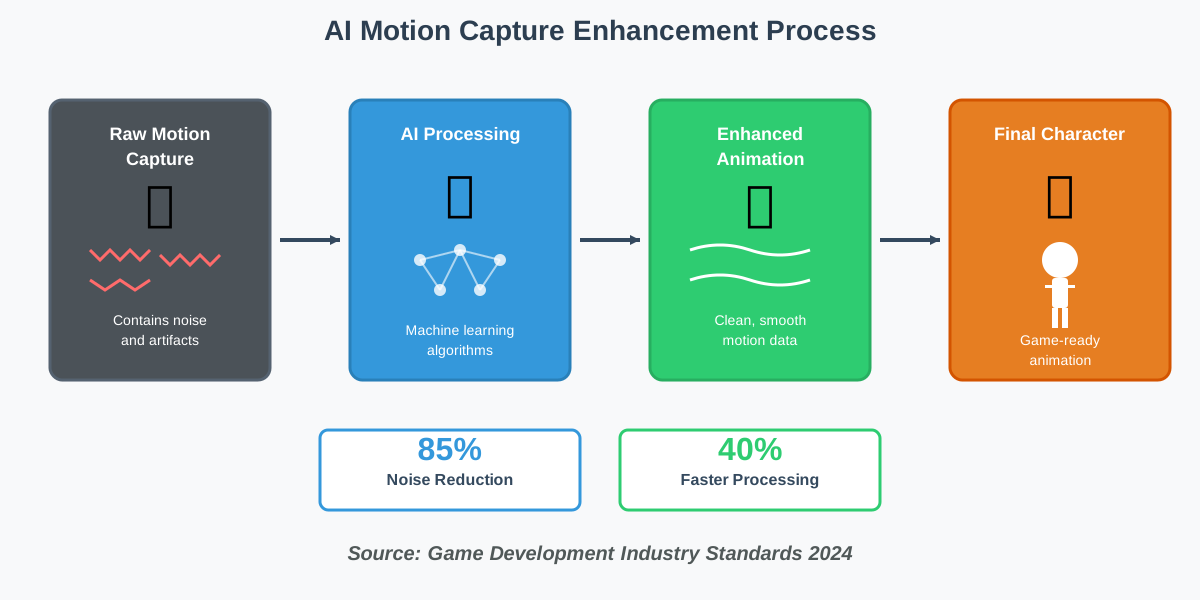
Motion capture enhancement represents one of AI’s most practical applications in character animation. Traditional motion capture involves actors wearing special suits with sensors, performing movements in a studio while cameras record their every motion. The raw data captured, however, often contains imperfections—jitters, gaps, or unnatural artifacts.
AI algorithms clean and enhance this data automatically. They smooth out irregular movements, fill gaps where tracking failed, and ensure the captured motion translates naturally to characters with different body proportions than the actor. If your game character is a seven-foot-tall alien but your motion capture actor is five-foot-six, AI handles the retargeting seamlessly.
Understanding Procedural Animation with AI
Procedural animation means creating movement through algorithms and rules rather than manual keyframing. When combined with AI, procedural techniques become incredibly powerful. The system can generate unique animations on the fly based on context and environmental factors.
Imagine your game character approaches a staircase. Instead of having premade animations for every possible stair height, an AI-powered procedural system analyzes the stairs and generates appropriate stepping animations in real-time. The character’s feet land precisely on each step, regardless of whether the stairs are steep, shallow, wide, or narrow.
This approach is particularly valuable for open-world games where characters interact with diverse, unpredictable environments. Neural network animation learns physics principles and movement patterns, applying them dynamically to new situations without requiring animators to anticipate every possible scenario.
AI-Driven Animation Blending Explained
Animation blending is the art of smoothly transitioning between different character movements. When your game character stops running and starts walking, you want that transition to look natural, not like someone flipped a switch between two separate animations.
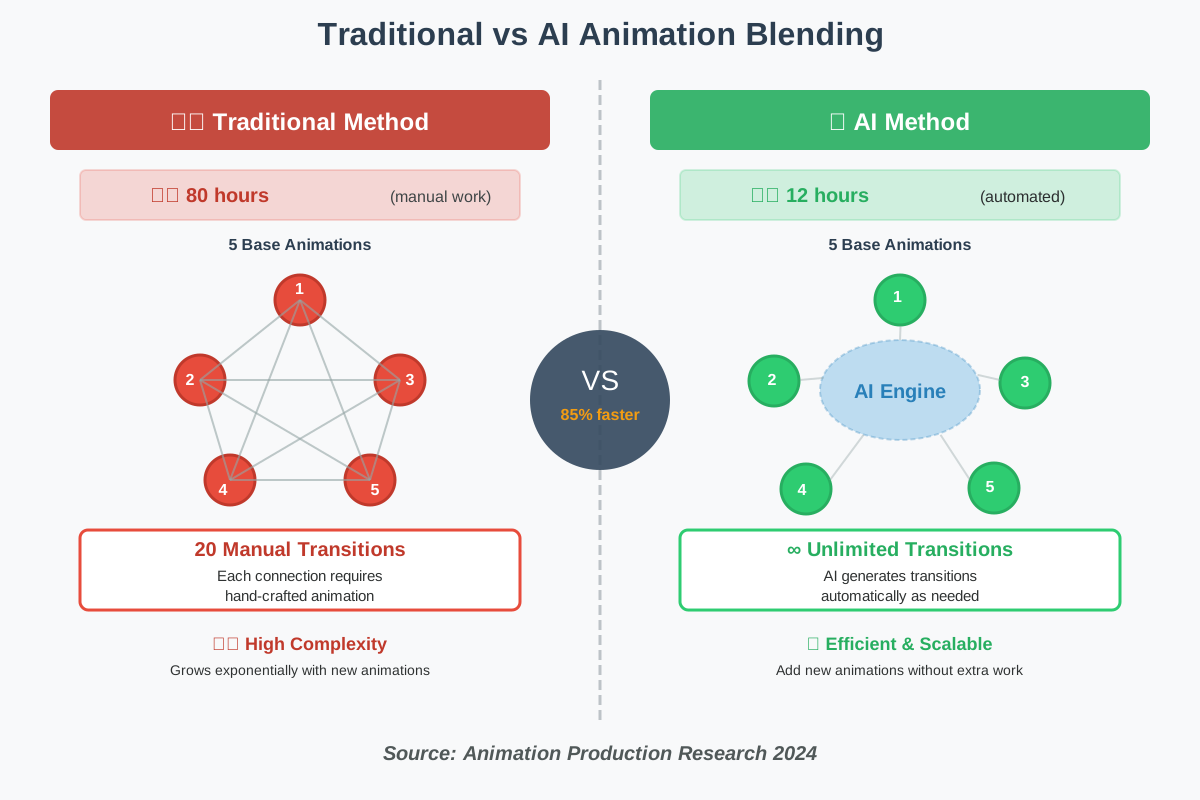
AI animation blending takes the technique to another level. Traditional blending required animators to create specific transition animations for every possible combination—walking to running, running to jumping, jumping to landing, and so on. The number of transitions grows exponentially with each new base animation added.
AI learns the relationships between different movements and generates natural transitions automatically. It understands that running and sprinting are closely related movements requiring minimal transition time, while running and sitting require more intermediate frames. The system considers momentum, weight distribution, and natural body mechanics to create seamless blends.
Step-by-Step Guide to Getting Started with AI Animation
Step 1: Choose Your AI Animation Tool
Several accessible platforms now offer AI character animation capabilities for beginners. Research options like DeepMotion, Plask, or Cascadeur, which provide user-friendly interfaces designed for non-technical users. Many offer free trials, so you can experiment before committing.
Consider what you need most: Does your project require realistic human motion? Creature animation? Facial animation? Various tools specialize in different areas. Read user reviews and watch tutorial videos to understand each platform’s strengths.
Step 2: Prepare Your Character Model
Before animating, you need a 3D character model. If you’re not a 3D modeler, marketplaces like TurboSquid or Sketchfab offer thousands of ready-made models. Ensure your chosen model has a proper skeleton (bone structure) called a rig—AI tools need this feature to understand how the character should move.
Check that your character’s rig follows standard conventions. Most AI animation tools expect humanoid characters to have specific bone names and hierarchies. Many platforms provide documentation explaining their requirements.
Step 3: Import Your Base Animations or Motion Capture
If you have existing animations or motion capture data, import them into your AI tool. Even rough, imperfect data works—remember, the AI will clean and enhance it. Some platforms let you record yourself with a webcam as a motion reference, making the process even more accessible.
For procedural approaches, you might not need any base animation. Instead, you’ll provide parameters like “walk speed: moderate” or “personality: energetic,” and the AI generates movement from scratch.
Step 4: Set Your Animation Parameters
Tell the AI what you want. Most tools use intuitive controls rather than complex coding. You might select a movement type from a menu (walk, run, or jump), adjust speed sliders, or choose emotional qualities (confident, worn out, or playful).
Deep learning animation systems learn from your adjustments. If you consistently modify certain aspects of generated animations, the AI adapts to your preferences over time, requiring fewer manual corrections.
Step 5: Let AI Generate and Refine
Press the “generate” button and witness the transformation take place. The AI processes your inputs and creates initial animation. This procedure usually takes seconds to a few minutes depending on complexity. Don’t expect perfection immediately—think of the procedure as a collaborative process where AI provides the foundation and you add finishing touches.
Review the generated animation carefully. Does the character’s weight feel right? Are movements smooth? Most tools let you adjust timing, intensity, and other parameters, then regenerate with your changes incorporated.
Step 6: Polish and Export
Once satisfied with the AI-generated base, add your creative flair. Adjust subtle details that make your character unique—a distinctive walk, a signature gesture, and personality quirks. These human touches combined with AI efficiency create the best results.
Export your finished animation in the format your game engine requires. Popular options include FBX for Unity and Unreal Engine. Most AI animation platforms support standard export formats and provide detailed guides for integration.
Common Mistakes to Avoid
Expecting Perfect Results Immediately
AI animation tools are powerful, but they’re assistants, not magic wands. New users sometimes expect to input minimal information and receive flawless, production-ready animation. In reality, you’ll need to iterate—generate, review, adjust parameters, and regenerate. Think of it as having a conversation with the AI, gradually refining toward your vision.
Ignoring Physical Constraints
AI generates movement based on patterns it learned from real motion. If you ask it to create something physically impossible, results may look unnatural. A character can’t instantly stop from a full sprint without momentum carrying them forward slightly. Understanding basic movement physics helps you set realistic parameters and recognize when outputs need adjustment.
Over-Relying on Defaults
Default settings exist for convenience, but they create generic results. Experiment with parameters. Adjust walk cycles to be bouncier or more grounded. Modify running animations to feel heavier or lighter. These customizations transform AI-generated movement from “good enough” to “perfect for my specific character.”
Neglecting Animation Testing in Context
An animation might look excellent in your animation software’s preview window but feel wrong in your actual game. Always test in your target environment. How does the character look when viewed from typical gameplay angles? Do animations work with your game’s pace and style? Context matters enormously.
Skipping the Learning Resources
Most AI animation platforms provide extensive tutorials, documentation, and community forums. New users sometimes skip these resources, struggling with problems that have simple solutions. Invest an hour watching introductory videos before diving in—you’ll save hours of frustration and learn techniques that dramatically improve your results.
Frequently Asked Questions
Taking Your First Steps
Starting with AI for Character Animation might feel overwhelming at first, but remember that every expert was once a beginner. The tools available today are more accessible than ever, designed specifically for people without technical backgrounds.
Choose one platform, spend an afternoon exploring its interface, and create something simple—maybe just a basic walk cycle for a character. You don’t need to build a complete game immediately. Each small experiment teaches you something new about how AI interprets movement and responds to your creative direction.
The beauty of AI animation is that it grows with you. As you become more comfortable with basic features, you’ll naturally discover advanced capabilities. Before long, you’ll be creating character movements that rival professional productions, all while maintaining your unique creative vision.
Your game characters are waiting to come alive. With AI as your creative partner, there’s never been a better time to start animating. Open that animation tool, import a character model, and see what movements you can create. The journey from static model to living, breathing character begins with that first step—and AI makes sure it’s an exciting one.
About the Author
Abir Benali is a friendly technology writer passionate about making AI tools accessible to everyone. With a focus on clear, jargon-free explanations, Abir helps non-technical users discover how artificial intelligence can enhance their creative projects. Through step-by-step guides and practical examples, Abir demonstrates that anyone can master modern AI tools with a bit of guidance and experimentation. When not writing about technology, Abir enjoys exploring how AI transforms various creative industries and sharing those insights with curious learners worldwide.