Leveraging AI for Task Management: Streamline Workflow

I’ve spent years watching people struggle under the weight of endless to-do lists, missed deadlines, and the constant anxiety of wondering what they should be working on next. The truth is, traditional task management often fails us—not because we lack discipline, but because our brains simply weren’t designed to juggle dozens of competing priorities while remembering every deadline and dependency. That’s where leveraging AI for task management becomes not just helpful but transformative.
When I first started exploring AI-powered task management tools, I was skeptical. Could software really understand the nuance of my work? Would it actually save time, or just add another layer of complexity? What I discovered changed how I approach productivity entirely. Leveraging AI for task management isn’t about replacing human judgment—it’s about amplifying our capabilities while protecting what matters most: our time, energy, and peace of mind.
What Is AI-Powered Task Management?
Leveraging AI for task management means using artificial intelligence to handle the cognitive overhead of organizing, prioritizing, and tracking your work. Unlike traditional task management apps that simply store your to-do lists, AI-powered systems actively analyze your tasks, understand context, predict what needs attention, and adapt to your working patterns.
Think of it as having a thoughtful assistant who knows your schedule, understands your priorities, and can make intelligent suggestions about what to focus on next—without requiring constant supervision. These systems use machine learning algorithms to recognize patterns in how you work, natural language processing to understand task descriptions, and predictive analytics to anticipate bottlenecks before they happen.
The technology combines several AI capabilities:
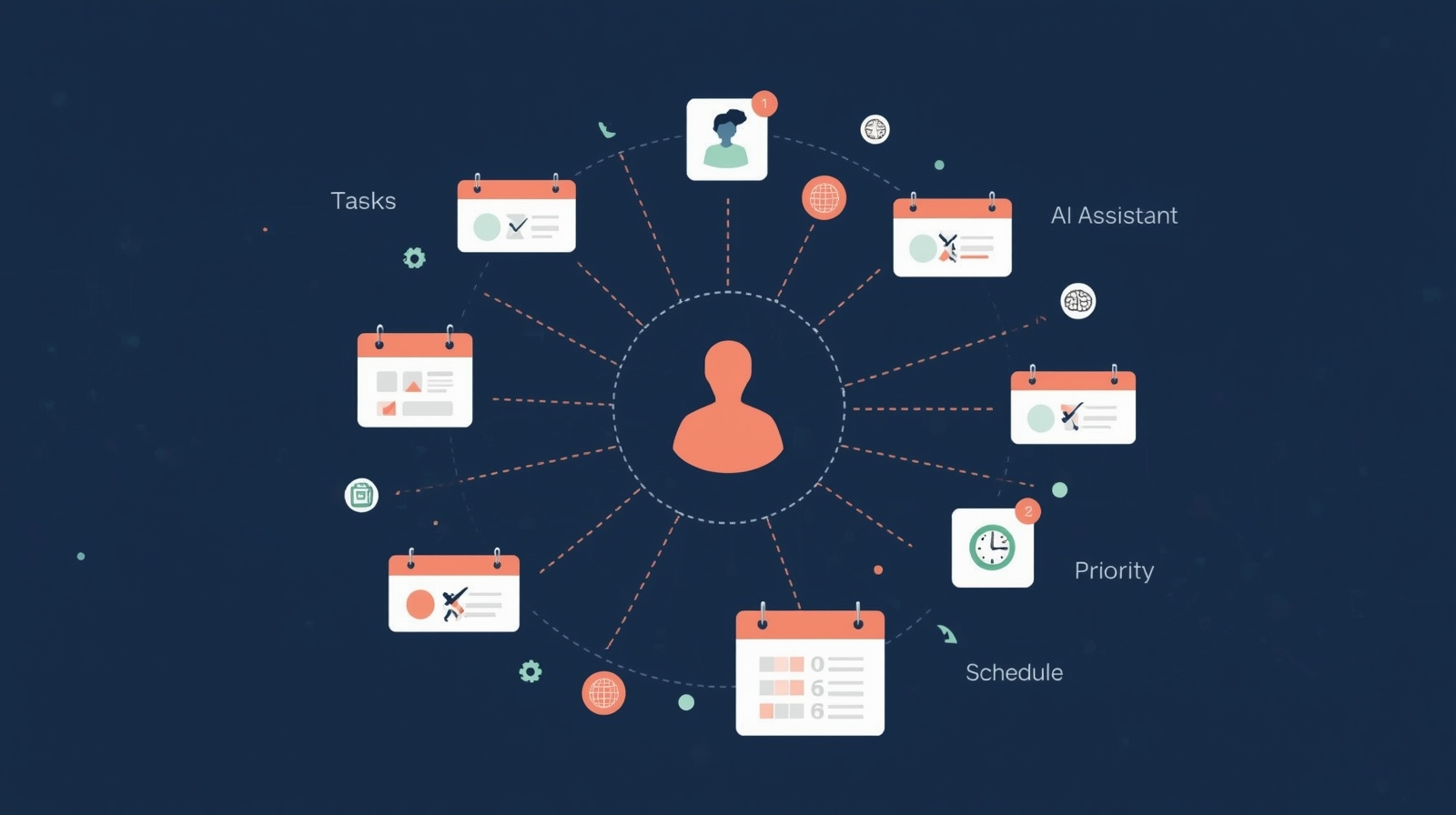
Smart scheduling algorithms that consider your energy levels, meeting patterns, and task dependencies when suggesting when to tackle specific work. Priority intelligence that weighs urgency, importance, and context to recommend what deserves your attention right now. Automated categorization that understands task types and organizes them without manual tagging. Progress prediction that estimates how long tasks will take based on historical data and complexity analysis.
What makes this different from older automation is the learning component. The system doesn’t just follow rules you program—it observes how you actually work and continuously refines its understanding of your preferences and patterns.
How AI Task Management Actually Works
Understanding the mechanics helps you use these tools safely and effectively. I always encourage people to know what’s happening behind the scenes, especially when AI-powered productivity tools are handling sensitive work information.
The Intelligence Layer
When you add a task like “Prepare quarterly report for client meeting next Thursday,” an AI system doesn’t just store those words. It performs several analyses simultaneously:
It extracts key information—the action (prepare), the deliverable (quarterly report), the context (client meeting), and the deadline (next Thursday). It identifies dependencies by checking if other tasks need completion first, like “gather Q4 data” or “review previous report format.” It assesses complexity based on the task description, historically similar tasks, and estimated time requirements. It considers your calendar to find optimal working blocks that align with the deadline.
This happens in milliseconds, creating what I call an “intelligence layer” over your raw task list. The AI essentially builds a sophisticated model of your work landscape.
Pattern Recognition and Learning
Here’s where privacy matters come into play. AI task management systems learn by analyzing patterns:
They track which tasks you complete quickly versus slowly, noting factors like time of day, task type, and surrounding activities. They observe your prioritization decisions—when you choose to work on urgent items versus important long-term projects. They monitor how you batch similar tasks and identify your productive periods versus low-energy times.
This data stays within the system—reputable tools don’t sell your task information to third parties. However, it’s crucial to read privacy policies carefully. I recommend choosing tools that clearly state they don’t use your data to train general AI models or share information with advertisers.
Automation Mechanisms
The practical magic happens through several automation types:
Smart scheduling moves tasks to optimal time slots based on your availability, energy patterns, and task requirements. If you’re most focused in the morning, complex analytical work gets scheduled then, while routine tasks fill afternoon slots.
Dynamic reprioritization continuously adjusts task order as new information arrives. When a client email flags something urgent, the AI recognizes the context and reshuffles your priorities accordingly—but always shows you what changed and why.
Intelligent reminders go beyond simple time-based alerts. They consider whether you’ve actually started the task, if you have the necessary prerequisites completed, and whether you have adequate time remaining before a deadline.
Automated progress tracking monitors task completion rates and updates project timelines automatically, flagging potential delays before they become critical.
Real-World Applications That Make a Difference
Let me share how AI task management solutions work in practice, across different scenarios. These aren’t hypothetical—they’re patterns I’ve observed helping real people regain control of their work lives.
Managing Multiple Projects Simultaneously
Sarah, a marketing consultant, juggles five clients with overlapping deadlines. Before leveraging AI for task management, she spent Sunday evenings manually reviewing the week ahead, color-coding tasks, and hoping she hadn’t missed anything critical.
Now her AI system handles the coordination. When she adds tasks for a new campaign, the AI automatically identifies dependencies—she can’t launch social media posts before the client approves the content calendar, and she needs final designs before scheduling posts. The system schedules these in proper sequence, reserves time for client review cycles, and alerts her when bottlenecks appear.
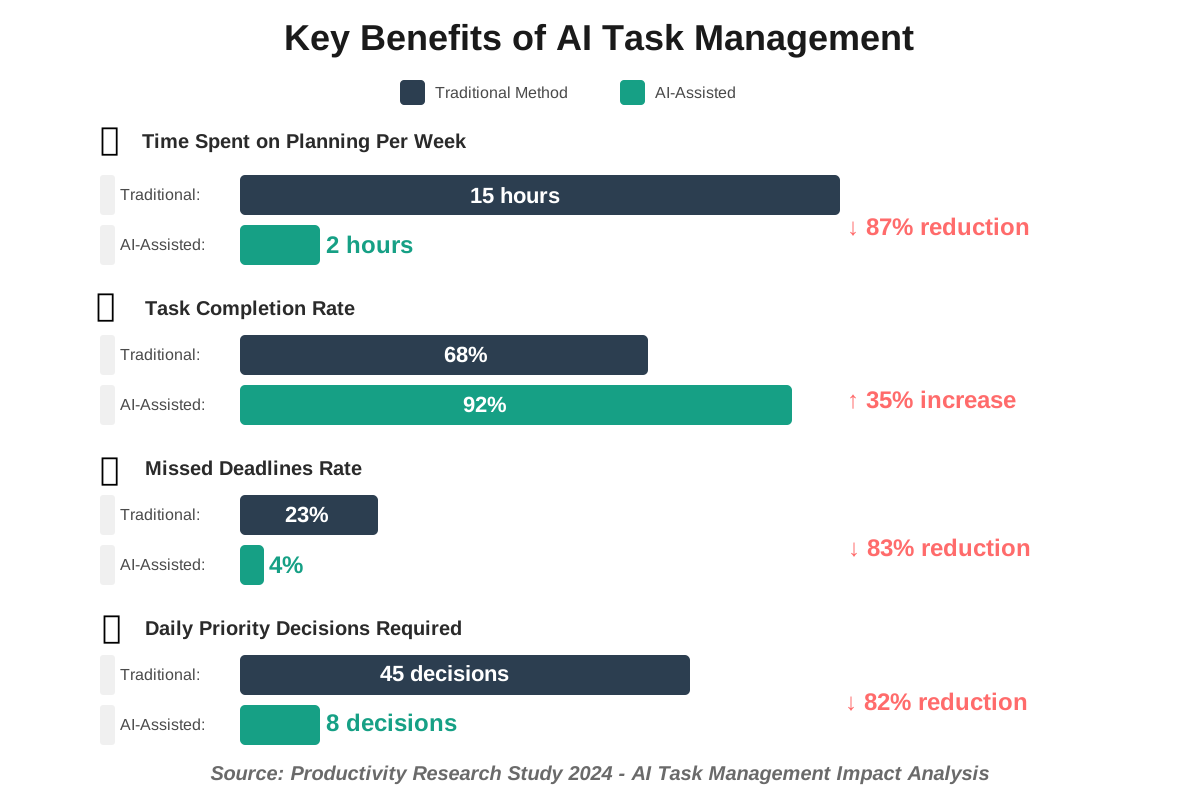
The result? Sarah reclaimed her Sunday evenings and reduced missed deadlines by 90%. More importantly, she stopped carrying the mental burden of constant schedule juggling.
Academic Research and Study Management
For students like Marcus, AI-powered study planners transform overwhelming coursework into manageable daily tasks. When he inputs “write a 3000-word essay on climate policy,” the AI breaks this into research phases, outline creation, draft sections, and revision time.
It schedules these components around his class schedule and other commitments, ensuring he makes steady progress instead of cramming the night before. The system even reminds him to start the bibliography as he researches, not after writing—a common mistake that costs hours of backtracking.
Marcus particularly values the AI’s ability to recognize when he’s falling behind and automatically adjust future schedules to compensate, rather than letting deadline violations cascade.
Team Coordination and Delegation
For team leaders, AI task management platforms solve the delegation puzzle. When Project Manager Chen assigns tasks to team members, the AI considers each person’s current workload, skillset, and availability before suggesting assignments.
It identifies when team members are overloaded and proposes redistributions before burnout occurs. It tracks dependencies across the team—when one person finishes their component, the AI automatically notifies whoever needs that output for their next step.
This creates transparency without micromanagement. Team members see how their work connects to the bigger picture, and leaders get early warnings about resource constraints instead of discovering problems during crisis moments.
Choosing the Right AI Task Management Tools Safely
Not all AI productivity platforms are created equal, especially regarding data security and privacy. Here’s my framework for evaluating tools responsibly.
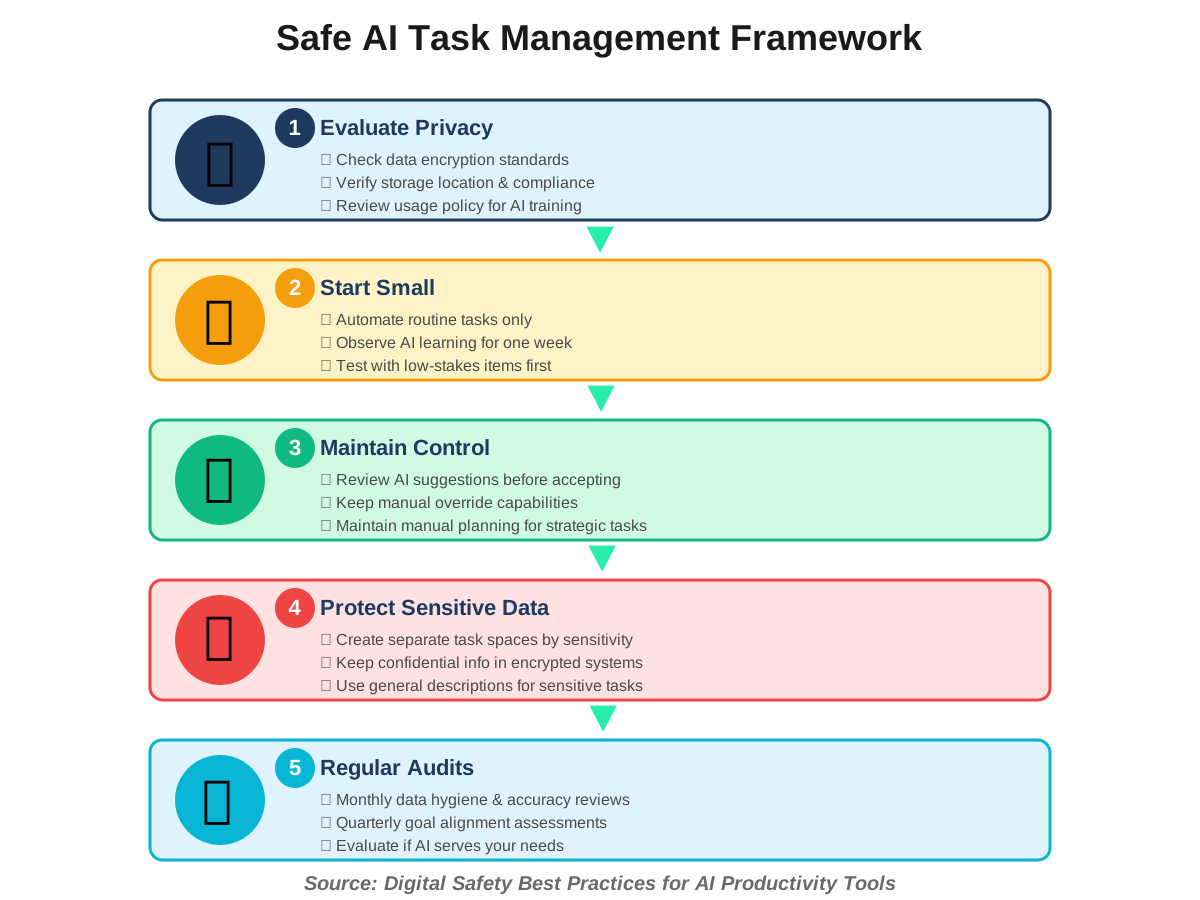
Privacy-First Selection Criteria
Before connecting any tool to your work or personal tasks, investigate these critical factors:
Data storage location: Where does the company store your information? Tools with servers in regions with strong privacy laws (EU GDPR compliance, for example) offer better protection. Avoid tools that won’t disclose data locations.
Encryption standards: Both in-transit and at-rest encryption should be standard. Your task data should be encrypted before leaving your device and remain encrypted on company servers. Look for end-to-end encryption when available.
Data usage policies: Read the fine print. Does the company use your tasks to train AI models that serve other users? Do they share anonymized data with partners? Can they access your information without your explicit permission?
Export and deletion rights: You should be able to export all your data in standard formats and permanently delete your information when you stop using the service. Test this before committing significant time to a platform.
Essential Features for Safe AI Task Management
The most effective and responsible tools share certain characteristics:
Transparency in AI decisions: The system should explain why it prioritizes certain tasks or makes specific suggestions. “You should do this now because…” builds trust and helps you learn better prioritization yourself.
Manual override capability: AI suggestions should always remain suggestions. You need one-click ability to reject recommendations or adjust automated decisions without fighting the system.
Privacy controls: Granular settings let you decide what the AI can access. Maybe it schedules work tasks but never touches personal to-dos, or it sees task titles but not detailed descriptions.
Offline functionality: The best tools work even without internet connectivity, syncing changes when you reconnect. This prevents vendor lock-in and ensures productivity isn’t hostage to connection reliability.
Cross-platform consistency: Your task management should work seamlessly across phone, computer, and web without requiring different approaches or creating sync conflicts.
Getting Started: Your First Week with AI Task Management
Transitioning to AI-enhanced productivity systems works best as a gradual process. Here’s how to begin safely and effectively.
Week One: Data Gathering Phase
Start by feeding the AI system information without relying on its recommendations yet. This is crucial—AI needs good data to provide good suggestions.
Day 1-2: Transfer your existing tasks into the system. Include everything—work projects, personal errands, recurring responsibilities, and even aspirational goals. Be thorough but protect sensitive information. If a task involves confidential details, use general descriptions like “Complete client project review” rather than including client names or project specifics.
Day 3-4: Continue adding tasks as they arise, but now include context. Please use “Email John about the Q4 budget approval deadline Friday” instead of simply “Email John.” This teaches the AI to recognize urgency signals, key stakeholders, and deadline patterns.
Day 5-7: Manually prioritize and schedule tasks while observing how you naturally make these decisions. The AI watches and learns your patterns—when you tackle creative work, how you batch similar tasks, and which items you tend to procrastinate on.
During this phase, resist the temptation to let the AI take over. You’re establishing a baseline of your actual working style, which makes future automation far more accurate and personalized.
Week Two: Gradual Automation
Now start accepting AI suggestions selectively.
Enable smart scheduling for routine tasks first—these have clear parameters and lower stakes. Let the AI schedule your weekly team meetings, recurring report preparation, or regular email check-ins.
Review priority suggestions each morning, but keep making final decisions yourself. Notice when the AI’s recommendations align with your instincts and when they differ. Those differences often reveal interesting insights about your habits.
Use AI-generated time estimates as data points, not mandates. If the system suggests a task needs 90 minutes but you typically finish similar work in 60, note the discrepancy. Over time, estimates become more accurate.
Set up basic automation rules for task creation. For example, when you receive calendar invitations, automatically create preparation tasks scheduled 24 hours before the meeting.
Establishing Healthy Boundaries
This is where my ethics and safety focus become crucial. AI task assistants should enhance your autonomy, not replace your judgment.
Schedule regular “AI-free” planning sessions where you review upcoming work without algorithmic input. This maintains your capacity for independent strategic thinking and prevents over-reliance on automation.
Question AI recommendations periodically. When the system suggests a priority, ask yourself whether you agree and why. This keeps your critical thinking sharp and helps you notice if the AI develops unhelpful patterns.
Maintain manual backup systems for critical deadlines. I use a simple physical planner for absolute must-do items as a failsafe against technical glitches or AI errors.
Set boundaries around notifications. AI systems can become overly enthusiastic about reminders. Configure alerts to respect your focus time and personal boundaries—no task management notification is worth interrupting dinner with family.
Common Pitfalls and How to Avoid Them
Even well-designed AI workflow optimization tools can create problems when misused. I’ve seen these patterns repeatedly and want to help you avoid them.
The Over-Automation Trap
The biggest mistake is letting AI manage too much too quickly. When automation handles every aspect of task management, you lose situational awareness and adaptability.
Symptoms: You feel disconnected from your work, surprised by deadlines the AI scheduled, or unable to explain your priorities without checking the system.
Solution: Reserve certain task categories for manual management. I keep all personal development goals, creative projects, and relationship-maintenance tasks under manual control. These require human intuition and shouldn’t be optimized purely for efficiency.
Data Quality Degradation
AI learns from the information you provide. Garbage in, garbage out—but this happens subtly over time.
Symptoms: AI suggestions become less advantageous, tasks get miscategorized, and time estimates drift further from reality.
Solution: Schedule monthly “data hygiene” sessions. Review completed tasks for accurate time tracking, update task templates that have changed, and delete obsolete recurring items. Think of this as maintaining your AI assistant’s education.
Privacy Creep
As you become comfortable with AI task management, it’s easy to add increasingly sensitive information without considering security implications.
Symptoms: Tasks containing confidential client information, personal health details, or sensitive workplace discussions appear in your main task list.
Solution: Create separate task management spaces for different sensitivity levels. Use the AI system for general work coordination, but keep confidential matters in encrypted, offline tools or secure company systems.
The Productivity Theater Trap
AI task management can create an illusion of productivity—lots of organized tasks and completed checkboxes without meaningful progress on important goals.
Symptoms: You feel busy but not accomplished, completing many small tasks while big projects stagnate.
Solution: Implement quarterly goal reviews separate from your AI system. Manually assess whether daily task completion aligns with larger objectives. Adjust task creation habits to ensure AI optimizes for impact, not just completion rates.
Advanced Techniques for Power Users
Once you’ve mastered the basics of leveraging AI for task management, these advanced approaches unlock even greater efficiency while maintaining safety and control.
Custom AI Training for Your Workflow
Most people accept default AI behavior, but sophisticated users actively shape their AI assistant’s intelligence. This doesn’t require technical skills—just intentional interaction patterns.
Create consistent naming conventions for similar task types. If all client deliverables start with “CLIENT:” and internal work starts with “INTERNAL:”, the AI learns to recognize these categories and apply appropriate defaults. For example, client tasks might automatically get higher priority and tighter deadlines, while internal tasks receive more flexible scheduling.
Use detailed task descriptions initially to teach the AI context. After several months, you can switch to shorthand because the system understands your patterns. “Q4 report” eventually means the same as “Prepare a comprehensive Q4 performance report with graphics for board presentation” because the AI recognizes the full scope from previous instances.
Deliberately vary your task completion times for similar activities on different days. Complete email responses in the morning one week and in the afternoon the next. This teaches the AI that you’re flexible, preventing it from over-optimizing around rigid patterns that might not suit all situations.
Integrated Ecosystems
The real power emerges when your task management AI connects with other tools in your workflow. This requires careful security consideration.
Calendar integration lets the AI see your meeting schedule and avoid scheduling focus work during back-to-back meetings. It can automatically create pre-meeting preparation tasks and post-meeting follow-up items. However, ensure the integration is read-only for your calendar unless you explicitly want the AI adding events.
Email connectivity enables the AI to create tasks from messages you flag or forward to a specific address. It can even detect commitments you make in emails and suggest adding them to your task list. The security consideration: the AI reads email content to identify tasks. Only connect inboxes where you’re comfortable with this access.
Project management platform links allow task updates in your AI system to reflect in team collaboration tools. When you mark something complete, your team sees the update without duplicate data entry. Verify that integration authentication uses secure protocols and that you can revoke access easily.
Time tracking automation records how long tasks actually take, feeding this data back to improve future estimates. This works best with time-tracking tools that respect privacy—look for ones that store data locally or use encryption.
Collaborative AI Task Management
When teams share AI task management systems, new capabilities and risks emerge.
Shared task pools let the AI optimize across the entire team, identifying who’s best positioned to handle each task based on workload, expertise, and availability. This prevents bottlenecks but requires transparency about individual capacity and priorities. Establish team agreements about what information is visible to whom.
Automated delegation can suggest task assignments, but human approval should be mandatory. The AI might propose that Sarah handle the data analysis because she completed similar work efficiently last month, but the manager makes the final call. This prevents AI from reinforcing unwanted patterns or biases.
Collective learning means the AI improves from observing multiple team members. When three people find different approaches to the same task type, the system recognizes diverse strategies and can suggest options. The privacy consideration: does the AI share individual working patterns across the team or only aggregated insights?
Emergency Protocols
Even the best AI systems fail occasionally. Have backup plans.
Offline access to critical task information prevents complete productivity loss during outages. Export your upcoming week’s priorities every Sunday evening to a simple text file or paper list.
Manual escalation procedures ensure urgent matters don’t get lost in automated workflows. Teach stakeholders to contact you directly for genuinely urgent issues rather than assuming the AI will surface their task immediately.
Regular system-independent reviews maintain your ability to function without AI assistance. Once a month, spend an hour reviewing your projects and priorities using only your memory and manual notes. This prevents learned helplessness.
Measuring Success: Beyond Task Completion Rates
AI productivity analytics often emphasize efficiency metrics, but these can be misleading. Here’s how to evaluate whether AI task management truly improves your life.
Meaningful Productivity Indicators
Look beyond simple completion rates to these deeper measures:
Goal progress percentage: Are you advancing on your quarterly objectives or just completing many small tasks? Track this manually, separate from the AI system, to avoid optimization games.
Deadline anxiety levels: Do you feel calmer about commitments or more stressed despite better organization? Subjective well-being matters more than objective efficiency.
Deep work frequency: Count how often you achieve multi-hour focused sessions on important projects. AI task management should increase these opportunities by handling smaller items efficiently.
Life balance metrics: Monitor whether work tasks consume evenings and weekends less frequently. Effective AI management should strengthen boundaries, not blur them.
Decision fatigue reduction: Note your energy levels at day’s end. If AI handles routine prioritization, you should feel less mentally depleted even on productive days.
Red Flags That Indicate Problems
Certain patterns suggest your AI task management needs adjustment:
Increasing task backlog: If your incomplete task list grows despite high completion rates, either you’re overcommitting or the AI encourages task creation without adequate capacity planning.
Declining task quality: When you’re rushing through items to check boxes, completion rates look good, but actual output suffers. The AI might be optimizing for quantity over quality.
Reduced creative output: If strategic thinking and innovation decrease while routine task completion increases, your AI system might be over-scheduling and leaving insufficient unstructured thinking time.
Growing resentment toward the system: When you find yourself resisting AI suggestions or feeling controlled by your task list, something needs to change. Tools should feel empowering, not oppressive.
Diminished work relationships: If colleagues complain about your responsiveness or engagement despite your organized task list, the AI might be optimizing individual efficiency at the expense of collaborative effectiveness.
Frequently Asked Questions About AI Task Management
Your Path Forward: Taking the First Step Safely
Leveraging AI for task management represents a fundamental shift in how we organize our work and lives. Like any powerful tool, it demands thoughtful implementation and ongoing attention to both benefits and risks.
Start your journey by clarifying what you want to achieve. Are you drowning in competing priorities and need help with scheduling? Struggling to remember commitments and need better tracking? Finding yourself constantly reacting instead of working proactively on important goals? Your specific pain points should guide which AI features you prioritize.
Choose your first tool based on privacy standards, not just features. A slightly less sophisticated system from a company with excellent security practices beats a feature-rich platform with questionable data handling. Remember that you’re teaching this AI about your work patterns, priorities, and often personal information—select a trustworthy partner.
Begin with low-stakes tasks and gradual automation. Let the AI handle routine scheduling before trusting it with strategic priorities. Observe how it learns your patterns and whether its suggestions align with your values. This testing phase protects you from automation problems while building confidence in what works.
Throughout your adoption journey, maintain your independent judgment. AI task management should amplify your capabilities, not replace your thinking. When you find yourself blindly following AI suggestions without understanding why, step back and reassess. The moment technology stops serving you and starts directing you, something has gone wrong.
Document your experiences as you go—what works, what doesn’t, and how different approaches affect your stress levels and productivity. This reflection helps you make informed adjustments and also clarifies your own working preferences. You might discover that you’re naturally an afternoon person but have been forcing morning deep work, or that you work better with fewer, longer tasks than many short ones.
Most importantly, remember that effective task management using AI isn’t about cramming more activities into your schedule. It’s about creating space for what matters—whether that’s complex projects requiring deep focus, meaningful relationships, or simply not feeling perpetually overwhelmed by your to-do list.
The technology exists to serve your goals and well-being, not to maximize output at the expense of your humanity. Use it wisely, question it regularly, and adjust your approach as you learn what supports your best work and best life. The goal isn’t a perfectly optimized schedule—it’s sustainable productivity that respects your energy, priorities, and personal boundaries.
Take that first step, but take it thoughtfully. Your future self, with clearer priorities and reduced decision fatigue, will thank you for implementing AI task management with both enthusiasm and wisdom.
References:
Society of Productivity Research: “Impact of AI Automation on Knowledge Worker Efficiency” (2024)
Digital Safety Institute: “Best Practices for AI Tool Privacy Protection” (2024)
International Data Protection Review: “GDPR Compliance in AI Productivity Platforms”
About the Author
Nadia Chen is an expert in AI ethics and digital safety, dedicated to helping non-technical users navigate artificial intelligence tools responsibly. With a background in information security and user privacy advocacy, Nadia focuses on making advanced technology accessible while maintaining strong safety standards. She believes that everyone deserves to benefit from AI innovation without compromising their digital well-being or personal data security. Through her writing for howAIdo.com, Nadia provides practical guidance that balances productivity enhancement with ethical considerations, ensuring readers can adopt AI solutions confidently and safely.