AI Task Assignment: Match Skills to Work Automatically

Have you ever watched a manager struggle to figure out who should handle which task? Or worse, have you been assigned work that doesn’t match your skills while someone else sits idle with the perfect expertise? Automated task assignment with AI is changing how teams distribute work, making sure every task lands with the right person at the right time.
I’ve seen firsthand how manual task assignment creates bottlenecks and frustration. But when AI steps in to analyze skills, workload, and performance, everything changes. Teams work smarter, deadlines become manageable, and everyone feels their talents are being used properly.
In this guide, I’ll walk you through exactly how AI task assignment works and how you can start using it today—no technical background required. Whether you manage a small team or work in a large organization, these practical steps will help you implement intelligent task distribution that actually works.
What Is Automated Task Assignment with AI?
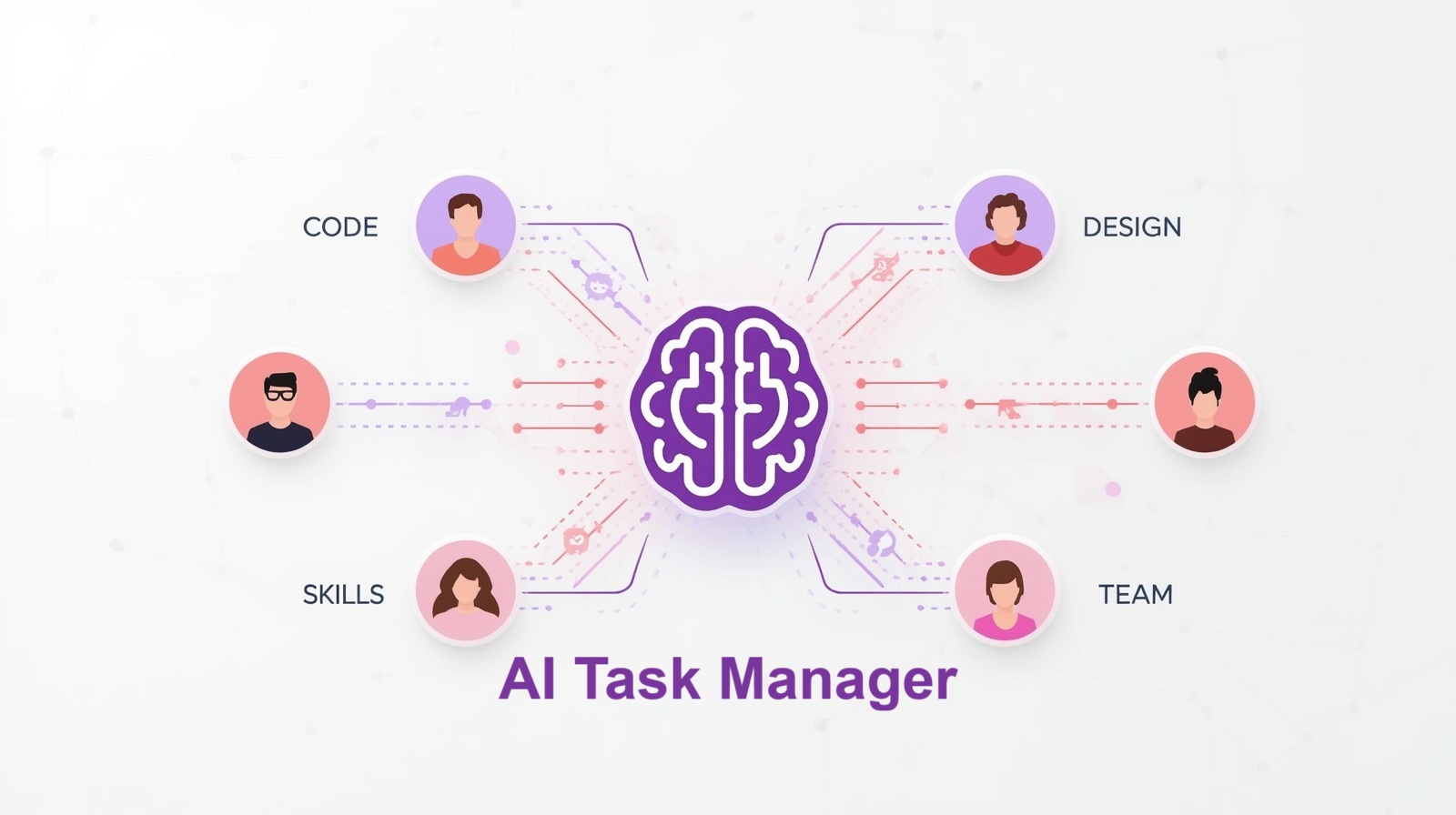
Automated task assignment with AI is a smart system that analyzes your team members’ skills, current workload, past performance, and availability to automatically assign tasks to the most suitable person. Instead of manually deciding who does what, AI algorithms make these decisions in seconds based on data and patterns.
Think of it as having a brilliant assistant who knows every team member’s strengths, remembers who excels at what, tracks everyone’s schedule, and instantly matches incoming tasks to the perfect person. The system learns from outcomes and gets better over time.
Why This Strategy Matters for Your Team
Traditional task assignment relies on managers’ memory and gut feelings. You might assign work to whoever seems free or default to the same reliable people. But this approach causes problems:
- Skill mismatches lead to slower completion and lower quality
- Uneven workload distribution burns out some while others are underutilized
- Hidden talents go unused because managers don’t know everyone’s full capabilities
- Manual assignment wastes valuable management time
AI solves these issues by making data-driven assignment decisions based on objective criteria. It considers factors humans might overlook and removes bias from the equation.
How AI Task Assignment Actually Works
Before we dive into implementation, allow me to explain what happens behind the scenes. Understanding this will help you use these systems more effectively.
The Core Components
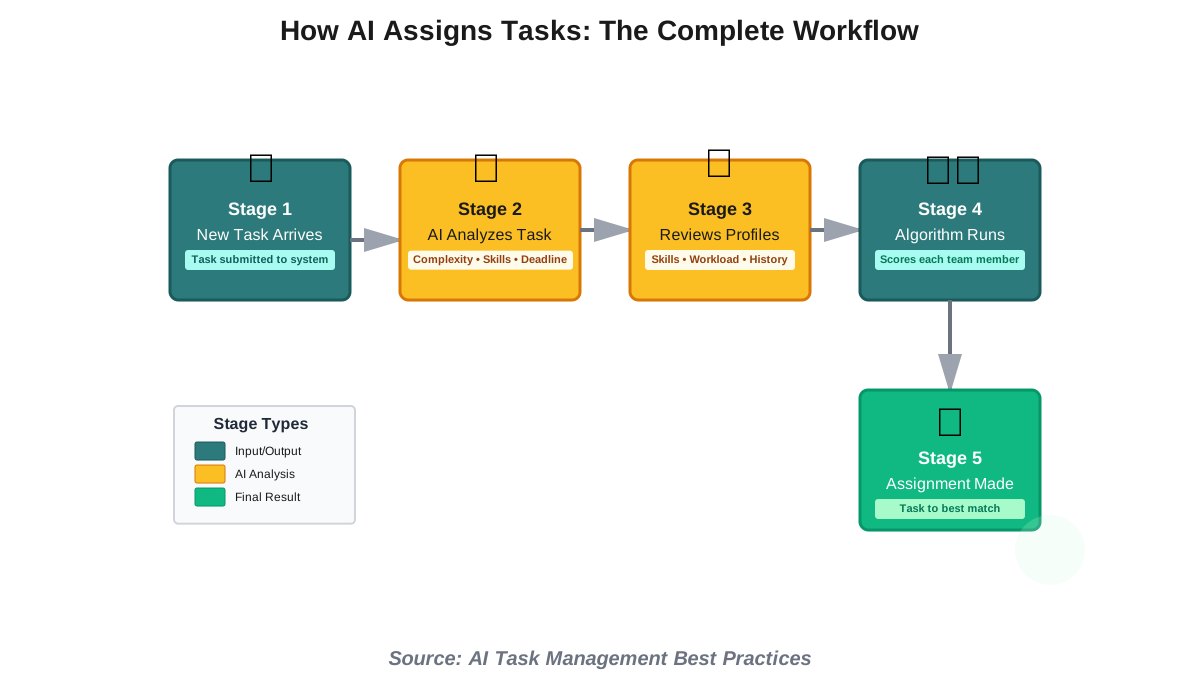
Skill mapping creates a comprehensive profile for each team member. The AI tracks technical abilities, soft skills, certifications, project experience, and specialized knowledge. This isn’t just a static list—it updates as people complete projects and develop new capabilities.
Performance analysis looks at historical data to understand quality and speed. The system notices patterns: Does someone deliver exceptionally well on design tasks but struggle with data analysis? Do they work better on solo projects or collaborative efforts?
Availability tracking monitors current workload, deadlines, time off, and capacity. The AI knows who’s overwhelmed, who has bandwidth, and when someone will finish their current assignments.
Task analysis examines incoming work to identify required skills, complexity level, estimated time, priority, and dependencies. The system understands what each task actually needs.
Matching algorithm combines all this information to determine the optimal assignment. It weighs multiple factors simultaneously—something that would take a human manager hours to do properly.
Step-by-Step: Implementing AI Task Assignment
Now let’s get practical. Here’s exactly how to set up automated task assignment for your team, broken into manageable steps you can follow today.
Step 1: Choose Your AI Task Management Platform
You don’t need to build anything from scratch. Several platforms offer AI-powered task assignment features built right in.
Popular options include:
Monday.com with AI features provides intelligent task routing based on workload and skills. Their AI suggests assignments but lets you maintain control.
Asana Intelligence analyzes project patterns and recommends task assignments. It learns from your team’s work history.
ClickUp AI offers automated task distribution with customizable rules. You can set criteria for how the AI should assign work.
Motion uses AI to automatically schedule and assign tasks based on priorities, deadlines, and team capacity.
Start with platforms that integrate with tools you already use. Most offer free trials, so test before committing.
Step 2: Build Comprehensive Team Profiles
The AI is only as good as the data you provide. Spend time creating detailed profiles for each team member.
Document skills thoroughly. List technical skills, software proficiencies, languages spoken, industry knowledge, certifications, and soft skills like communication or leadership. Be specific—instead of “good at writing,” note “excellent at technical documentation” or “strong at persuasive sales copy.”
Add experience levels. Note how long someone has worked with each skill. Mark whether they’re a beginner, intermediate, advanced, or expert. This helps AI assign appropriately complex tasks.
Include preferences and interests. Some people love certain types of work and dislike others. When possible, the AI can factor this in for better job satisfaction.
Set availability parameters. Enter typical working hours, part-time vs full-time status, planned time off, and maximum task capacity per week.
I recommend having each team member fill out their profile initially, then reviewing it together. People know their strengths best, and this collaborative approach increases buy-in.
Step 3: Define Clear Task Requirements
For the AI to make good assignments, tasks need proper specifications.
Required skills: List every skill needed to complete the task successfully. Be specific rather than vague.
Complexity and difficulty level: Rate tasks as simple, moderate, complex, or expert-level. This prevents assigning advanced work to beginners.
Estimated time: Provide your best guess for how long the task should take. The AI uses this for workload balancing.
Priority level: Mark as urgent, high, normal, or low priority. This influences which tasks get assigned first.
Dependencies: Note if the task requires other tasks to be completed first or needs specific team members’ input.
Deadline: Clear due dates help the AI schedule appropriately.
Many platforms let you create task templates with these fields pre-filled for recurring work types. This saves time and ensures consistency.
Step 4: Configure Assignment Rules and Preferences
Most AI task systems let you customize how assignments should work. Set rules that match your team’s needs.
Workload balancing settings: Decide whether to distribute tasks evenly or allow some variation. Some teams prefer equal distribution, while others optimize for speed by loading up fast workers.
Skill development mode: Enable options that occasionally assign slightly challenging tasks to help team members grow. This prevents people from being pigeonholed.
Collaboration preferences: Set rules about whether certain people should work together or separately based on past project success.
Notification preferences: Choose how team members receive new assignments—instant alerts, daily digests, or manual review.
Override permissions: Decide who can manually reassign tasks if the AI’s suggestion doesn’t work.
Start with conservative settings and adjust based on results. You can always fine-tune the rules as you see what works.
Step 5: Import Existing Work History
If your team has been working together, import past project data. This gives the AI valuable learning material.
Upload completed tasks with information about who did them, how long they took, and quality ratings if available.
Include performance reviews or feedback notes where relevant.
Add project outcomes showing which assignments led to successful results.
The more historical data the AI can analyze, the better its initial assignments will be. Even a few months of past work provides useful patterns.
Step 6: Start with Semi-Automated Mode
Don’t go fully automatic immediately. Begin with AI suggestions that require human approval.
Review suggested assignments for the first few weeks. Check if the AI’s reasoning makes sense.
Provide feedback when you override decisions. Many systems learn from corrections.
Watch for patterns in what works and what doesn’t. You might need to adjust rules or profile information.
Gather team feedback about whether assignments feel appropriate. Ask if people are getting work that matches their skills and capacity.
This transitional period builds trust in the system before you enable full automation.
Step 7: Enable Automatic Assignment Gradually
Once you’re confident in the AI’s decisions, increase automation levels.
Start with low-priority tasks being assigned automatically. Keep manual review for critical work initially.
Expand to routine tasks that have clear requirements and straightforward skill needs.
Eventually automate most assignments while maintaining override options for special circumstances.
Keep humans in the loop for strategic decisions, sensitive projects, or situations requiring contextual judgment the AI might miss.
I find that teams work best with about 80% automated assignments and 20% manual oversight for exceptional cases.
Step 8: Monitor Performance and Adjust
Automated task assignment with AI requires ongoing attention to stay effective.
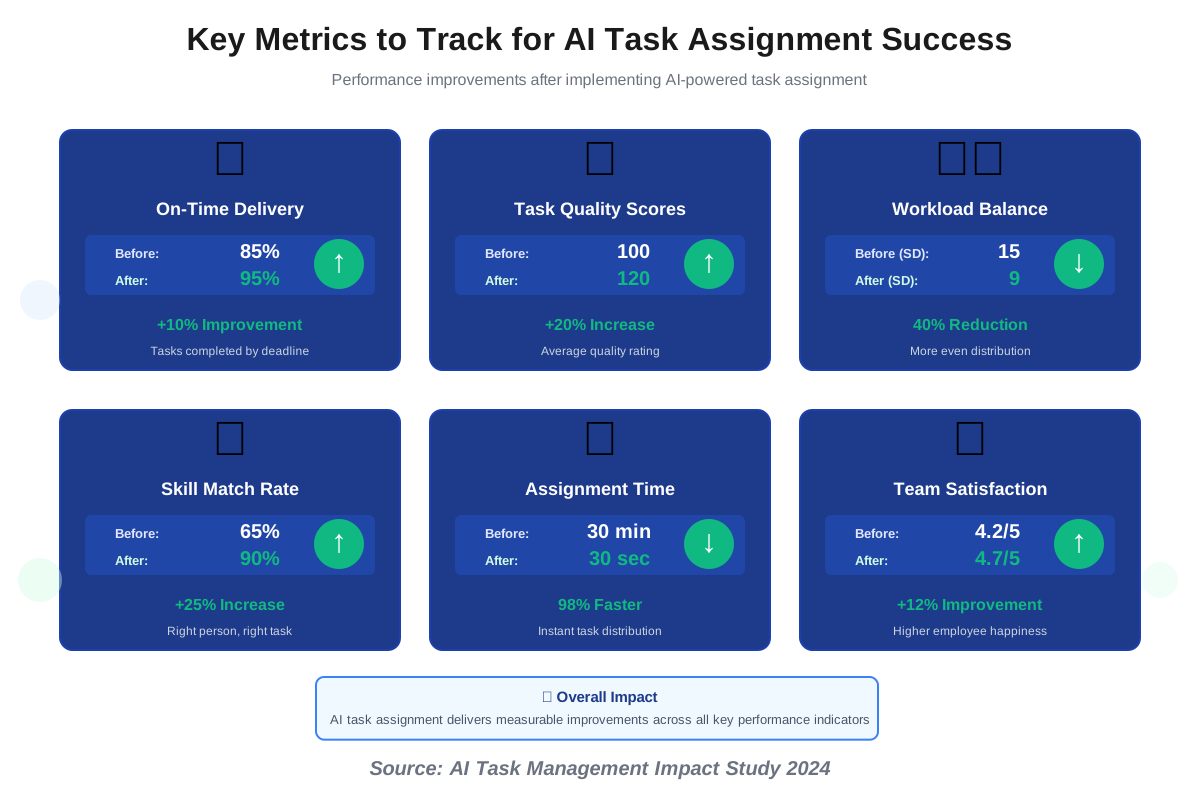
Track key metrics weekly:
- Task completion rates and on-time delivery percentages
- Quality scores or customer satisfaction with deliverables
- Team member workload distribution and balance
- Skill utilization rates showing if talents are being used
- Time from task creation to assignment
Review assignment patterns monthly. Look for situations where the AI consistently makes suboptimal choices.
Update profiles regularly as team members develop new skills or circumstances change.
Adjust rules and weights based on what you learn. Maybe deadline urgency should matter more than skill match, or vice versa.
Solicit team input through surveys or discussions. Are people satisfied with their assignments? Do they feel appropriately challenged?
Real-World Benefits You’ll Experience
Once your AI task assignment system is running smoothly, you’ll notice tangible improvements across your team.
Faster Task Distribution
Manual assignment might take 20-30 minutes when new work arrives. You need to think about who’s available, assess workloads, consider skills, and make decisions. AI-powered task assignment handles this in seconds. Tasks are distributed immediately, so work starts faster.
I’ve seen teams reduce their assignment time by 95%, freeing managers to focus on coaching and strategy instead of administrative work.
Better Skill Utilization
Matching skills to tasks becomes precise. The AI remembers every capability listed in team profiles and considers them for relevant work. Hidden talents get discovered and used.
One team I worked with found out their content writer had SQL skills from a previous job. The AI started assigning data reporting tasks that combined writing and database queries—work that had been awkwardly split between two people before.
Balanced Workloads
Human managers often accidentally overload reliable performers while less visible team members have spare capacity. AI distributes work more evenly by tracking actual current workload, not just perception.
Your consistent high performers still get important work, but they won’t be buried while others sit idle. Everyone contributes appropriately.
Improved Quality and Speed
When people work on tasks that match their expertise, they complete them faster and better. There’s less of a learning curve, fewer mistakes, and more confidence.
Performance-based assignment means the AI gradually learns who excels at what specific types of work, leading to increasingly better matches over time.
Reduced Burnout and Increased Satisfaction
Fair distribution and appropriate assignments improve morale. People feel valued when their specific skills are recognized and utilized. They’re less frustrated by receiving work outside their wheelhouse.
Teams report higher job satisfaction when automated task assignment removes the politics and favoritism that sometimes creep into manual distribution.
Common Challenges and How to Solve Them
Implementing AI task assignment isn’t always smooth. Here’s what might go wrong and how to fix it.
The AI Makes Unexpected Assignments
Why it happens: The algorithm weighs factors differently than you would, or it’s working with incomplete information.
Solution: Review the assignment reasoning if your platform shows it. Check whether profiles are accurate and complete. Adjust the weighting of different factors in your rules. Provide feedback to help the system learn.
Team Members Don’t Trust AI Decisions
Why it happens: People fear technology replacing human judgment or worry about fairness.
Solution: Maintain transparency about how the AI works. Show team members their profiles and let them update them. Keep human oversight for the first few weeks. Explain that AI removes bias rather than adding it. Give people a way to flag inappropriate assignments.
Skills Aren’t Updated and Profiles Go Stale
Why it happens: Updating profiles feels like extra work people forget to do.
Solution: Schedule quarterly profile reviews as part of normal performance check-ins. Have the AI prompt people when it notices they’ve completed tasks outside their listed skills. Make updating quick with simple forms or voice input. Some systems can automatically suggest skill additions based on completed work.
The System Over-Optimizes for Speed Over Development
Why it happens: The AI assigns work to people who can do it fastest, preventing others from learning.
Solution: Enable “learning mode” or “skill development” settings that occasionally assign stretch assignments. Set rules that newer team members should receive some tasks above their current level. Balance optimization with growth opportunities.
Integration with Existing Tools Causes Friction
Why it happens: The AI platform doesn’t connect smoothly with your current project management or communication tools.
Solution: Choose platforms with strong integration capabilities. Use tools like Zapier to bridge gaps. Consider switching to all-in-one platforms if integration issues persist. Prioritize tools your team already knows over feature-rich but unfamiliar options.
Advanced Tips for Better Results
Once you’ve mastered the basics, these strategies take your AI task assignment to the next level.
Create Skill Categories and Levels
Instead of just listing individual skills, organize them into categories with proficiency levels. This helps the AI understand relationships between skills and assign appropriately complex work.
For example, “Python Programming” might be a category with levels: Beginner (basic scripts), Intermediate (applications with databases), Advanced (optimization and architecture), and Expert (framework development).
Use Task Clusters for Related Work
When multiple tasks are related or build on each other, cluster them and assign them to the same person. This reduces context switching and improves efficiency. Configure your AI to recognize related tasks and keep them together.
Implement Dynamic Availability
Rather than static work hours, use calendar integration so the AI knows about meetings, appointments, and blocked time in real time. This prevents assigning urgent tasks to people who aren’t actually available even though they’re “in the office.”
Set Up Assignment Experiments
Try different assignment strategies for similar tasks and track results. Does assigning by pure skill match work better than considering personal interest? Test and measure to optimize your specific situation.
Create Specialty Teams
For certain types of work, designate specialist groups and have the AI only consider those people for those tasks. This works well for technical specialties, language requirements, or client-specific work where continuity matters.
Enable Collaborative Assignment
For complex projects needing multiple skills, let the AI assemble mini-teams rather than assigning to individuals. It can create balanced groups with complementary capabilities.
Privacy and Ethical Considerations
Automated task assignment with AI involves personal data about skills and performance, so handle it responsibly.
Protect Team Member Information
Ensure profiles are only visible to people who need them. Don’t share performance data unnecessarily. Use platforms with strong security and privacy protections.
Avoid Discriminatory Patterns
Monitor assignments to ensure the AI isn’t accidentally creating unfair patterns—like consistently giving high-visibility work to certain demographics. Regular audits catch bias before it becomes systemic.
Give People Control Over Their Data
Let team members see and edit their profiles. Allow them to mark certain skills as “do not assign” if they’re trying to move away from that work. Respect preferences where reasonable.
Be Transparent About How Decisions Are Made
Explain the factors the AI considers. Share why someone received a particular assignment if they ask. Transparency builds trust and acceptance.
Maintain Human Final Say for Sensitive Situations
Keep humans involved in assignments that affect someone’s career trajectory, involve sensitive client relationships, or have significant consequences. AI should assist these decisions, not make them alone.
Frequently Asked Questions About AI Task Assignment
Taking Your First Steps Today
You now have everything you need to start using automated task assignment with AI for your team. The technology isn’t complicated, and the benefits are immediate.
Begin by choosing one of the platforms I mentioned and signing up for a trial. Spend an afternoon setting up team profiles with current skills and availability. Create a few tasks with detailed requirements and let the AI make suggestions. Review those suggestions together with your team and discuss whether they make sense.
The first assignments might need adjustment, and that’s completely normal. Think of it as training the system to understand your team’s unique dynamics. Each correction teaches the AI more about what works for your situation.
Matching skills to tasks through AI transforms daily work. You’ll spend less time on administrative decisions and more time on meaningful work. Your team will feel valued and appropriately challenged. Projects will flow more smoothly because the right people are doing the right work.
Start small, learn as you go, and gradually increase automation as confidence grows. Within a few months, you’ll wonder how you ever managed task assignment manually. The future of work is here, and it’s designed to help everyone perform at their best.
About the Author
This article was written by Abir Benali, a friendly technology writer who specializes in making AI tools accessible to non-technical users. Abir focuses on practical, step-by-step guidance that helps everyday teams implement intelligent automation without requiring technical expertise. With a background in both technology writing and team management, Abir understands the real-world challenges teams face and provides clear, actionable solutions that work.