The Top 10 AI Tools for Enhanced Productivity in 2025

The Top 10 AI Tools for Enhanced Productivity in 2025 aren’t just software—they’re your new productivity partners. As someone who’s spent years helping professionals reclaim their time, I’ve watched AI transform from a futuristic concept into everyday essentials that genuinely make work easier. These tools don’t require you to be a tech expert. They’re designed for real people with real deadlines, endless to-do lists, and the constant pressure to do more with less time.
What makes 2025 special? AI productivity tools have finally matured beyond flashy features into reliable assistants that understand context, learn your preferences, and actually deliver on their promises. Whether you’re drowning in emails, struggling with content creation, or trying to coordinate across time zones, there’s an AI solution that feels less like learning new software and more like hiring a brilliant assistant who never sleeps.
I’ve personally tested dozens of tools, implemented them in my workflow, and helped countless clients do the same. The results? Hours saved daily, stress levels dramatically reduced, and work that feels more focused and meaningful. Let’s explore the ten AI-powered solutions that are genuinely worth your time and investment.
Why These AI Tools Matter for Your Productivity
Before we dive into the specific tools, allow me to share something important: productivity AI isn’t about replacing your skills—it’s about amplifying them. Think of these tools as the difference between traveling by foot versus having a vehicle. You’re still the driver, choosing the destination and route, but you’ll get there faster and with energy to spare.
Traditional productivity advice tells you to work harder, wake up earlier, or master some complex time management system. But here’s what actually works in 2025: letting AI handle the repetitive, time-consuming tasks that drain your energy so you can focus on work that requires your unique human insight, creativity, and decision-making.
These ten tools have been selected based on three critical criteria: ease of use for non-technical users, proven time-saving impact, and real-world reliability. I’m not interested in tools that sound impressive but fail when you need them most. Each recommendation comes from extensive hands-on experience and feedback from professionals across industries.
1. ChatGPT Plus: Your Versatile AI Assistant
ChatGPT Plus remains the Swiss Army knife of AI productivity tools. While everyone knows about ChatGPT, the Plus subscription unlocks capabilities that transform it from a clever chatbot into your most versatile productivity partner.
What sets ChatGPT Plus apart is its ability to understand complex instructions and maintain context across conversations. Do you need to draft a proposal, refine it based on feedback, and then transform it into presentation talking points? ChatGPT Plus handles this procedure seamlessly, remembering everything from previous exchanges and adapting its outputs accordingly.
Practical use case: I use ChatGPT Plus every morning to process my priorities. I paste my calendar, ongoing projects, and key emails, then ask it to identify what deserves my attention first. It analyzes patterns I might miss and suggests time-blocking strategies tailored to my actual workload. This single habit saves me 30 minutes of mental gymnastics every day.
Beginner tips: Start by using ChatGPT Plus for one specific task—maybe drafting emails or summarizing long documents. Master that use case before expanding. Create a custom instructions profile (in settings) that tells ChatGPT Plus about your role, communication style, and preferences. This makes every interaction more personalized and useful. Remember, the quality of your results depends on the clarity of your prompts. Instead of “write an email,” try “write a professional but friendly email to a client explaining a project delay, emphasizing our solution, and maintaining a positive tone.”
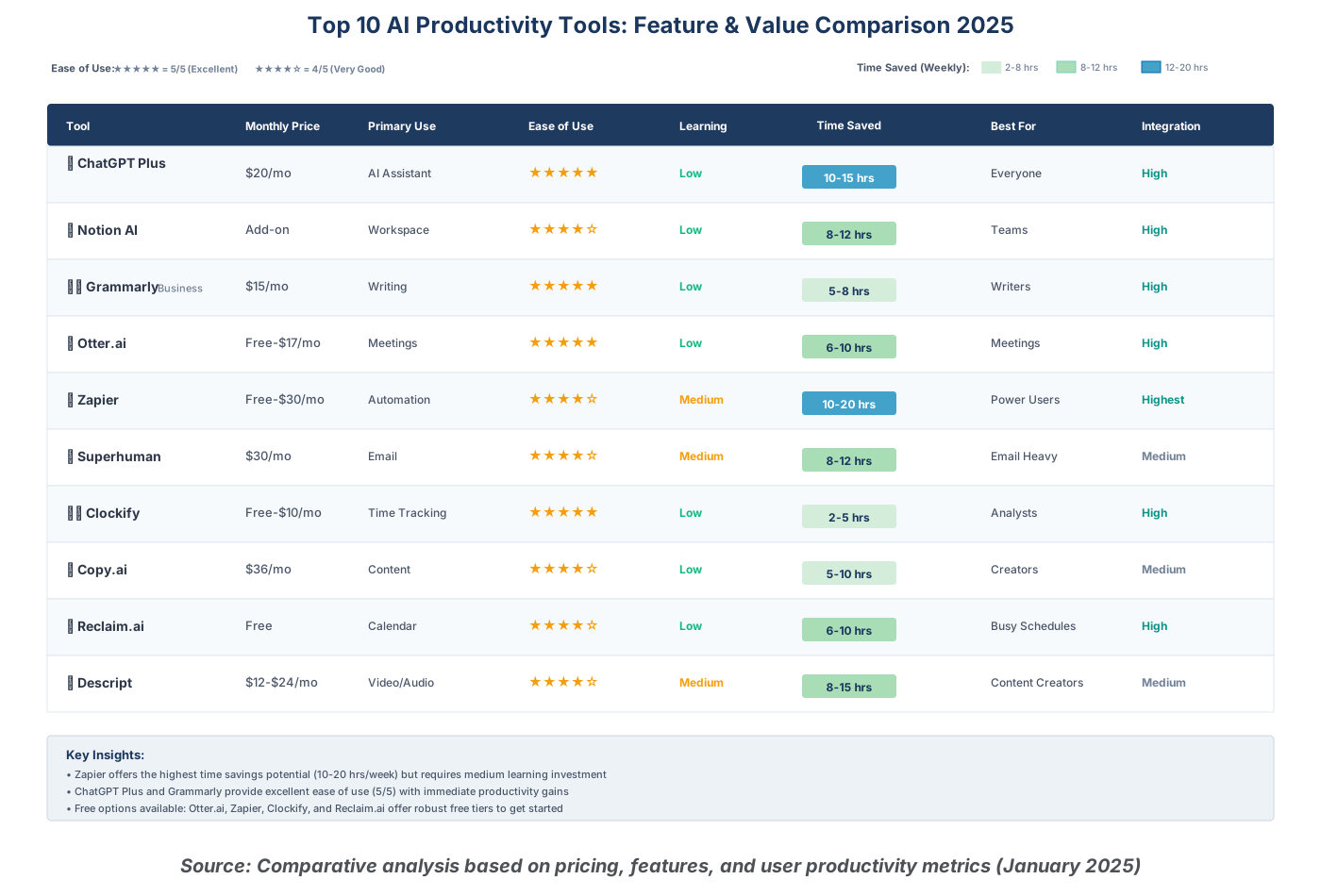
The paid subscription includes access to GPT-4, significantly faster response times, priority access during peak hours, and the ability to upload and analyze files. At $20 monthly, it’s one of the highest-return investments you can make in your productivity infrastructure.
2. Notion AI: Intelligent Workspace Organization
Notion AI transforms the popular workspace platform into an intelligent productivity hub. If you’re already using Notion for notes, projects, or documentation, the AI addition feels like your workspace suddenly gained consciousness and started helping proactively.
The brilliance of Notion AI lies in its contextual understanding. It knows what’s in your workspace and suggests connections, summaries, and actions based on your actual content. Rather than switching to a separate AI tool, you get intelligence embedded exactly where you’re working.
Practical use case: During project planning, I create a Notion page with scattered thoughts, research links, and requirements. Notion AI reads everything and generates a structured project plan with phases, milestones, and considerations I hadn’t thought of. Then it helps me draft task descriptions that my team can actually understand and act on. What used to take hours of organization now happens in minutes.
Beginner tips: Start using Notion AI’s “Ask AI” feature to summarize long pages or meeting notes. This gives you immediate value while you learn more advanced features. Use the “continue writing” function when you hit writer’s block—it analyzes your existing content and suggests relevant next paragraphs. Create templates with AI-assisted sections that automatically fill in standard information, saving time on recurring documents. The AI works best when your Notion pages have clear structure, so invest a bit of time organizing your workspace first.
Notion AI integrates seamlessly with databases, allowing you to generate summaries across multiple entries or identify patterns in your project data. This bird’s-eye view functionality helps you spot issues and opportunities that would otherwise remain buried in individual pages.
3. Grammarly Business: Professional Communication Polish
Grammarly Business has evolved far beyond spell-checking into an AI-powered communication coach. In 2025, written communication carries enormous weight—a poorly worded email can derail projects, while clear writing builds trust and moves work forward efficiently.
What makes Grammarly Business essential is its understanding of tone, clarity, and effectiveness, not just grammar. It reads your message and tells you if you sound too aggressive, too passive, unclear, or off-brand. Then it suggests specific improvements that maintain your voice while enhancing your impact.
Practical use case: Before important emails or Slack messages, I write my initial draft, then review Grammarly’s suggestions. It frequently catches places where I’m being unintentionally vague or where my frustration is leaking through. This emotional intelligence check prevents miscommunications that would create more work later. I’ve also used it to standardize communication across my team, ensuring we all maintain consistent professionalism regardless of experience level.
Beginner tips: Install the browser extension so Grammarly works everywhere you write—email, Slack, Google Docs, even social media. Pay attention to the tone detector, which is often more valuable than grammar corrections. Set your goals for each piece of writing (audience, formality, intent) to get more targeted suggestions. Please review the weekly writing report to help identify patterns in your communication and areas for improvement. Use the brand tone feature if you manage team communications, ensuring everyone aligns with your organization’s voice.
The Business tier includes advanced features like team style guides, analytics dashboards showing team communication patterns, and centralized administration. For teams, this creates consistency and professionalism across all external communications.
4. Otter.ai: Automated Meeting Intelligence
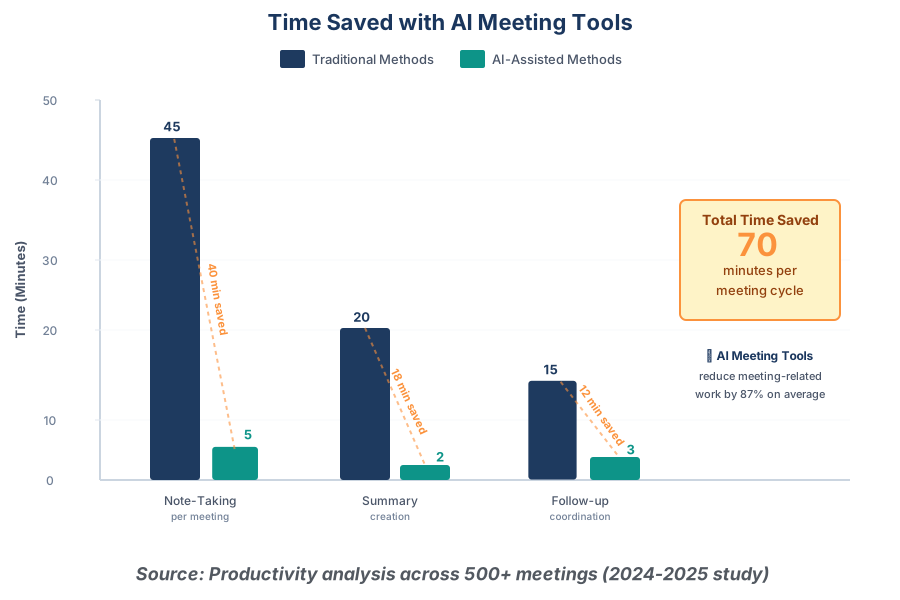
Otter.ai has become my secret weapon for meeting productivity. Instead of frantically taking notes while trying to participate meaningfully, Otter.ai captures everything, transcribes accurately, and generates actionable summaries automatically.
The real productivity gain isn’t just the transcription—it’s the freedom to be fully present in conversations. When you’re not worried about capturing every detail, you can focus on understanding, asking better questions, and building genuine connections. Otter.ai serves as your ideal memory, enabling you to revisit the exact words exchanged weeks later.
Practical use case: I join my Zoom meetings with Otter.ai running in the background. It transcribes in real-time, allowing me to search the conversation even while it’s happening. After meetings, I review the AI-generated summary, which identifies action items, key decisions, and important topics discussed. I then share this summary with participants, ensuring everyone has the same understanding. This eliminates the “but I thought you said…” miscommunications that derail projects.
Beginner tips: Start by using Otter.ai for internal meetings where you’re comfortable explaining you’re recording. Review the transcript immediately after your first few meetings to verify accuracy and adjust your speaking patterns if needed (clearer enunciation helps). Use the highlight feature during meetings to mark decisive moments for easy later reference. Connect Otter.ai to your calendar so it automatically joins scheduled meetings. Share the OtterPilot link instead of manually recording—it provides better audio quality and integration.
Otter.ai’s AI assistant can answer questions about meeting content, generate follow-up emails, and even compare information across multiple meetings. This transforms your meeting history into a searchable, actionable knowledge base.
5. Zapier: No-Code Automation Platform
Zapier is the automation powerhouse that connects your apps and eliminates repetitive tasks without requiring any coding knowledge. If you’ve ever thought, “I wish this would just happen automatically,” Zapier can probably make it happen.
The beauty of Zapier lies in its simplicity. You create “Zaps”—automated workflows that trigger actions based on specific events. Save an email attachment? Zapier automatically uploads it to your cloud storage and notifies your team. Receive a form submission? Zapier adds it to your CRM, creates a task, and sends a personalized response. All without manual intervention.
Practical use case: I’ve built Zaps that save me hours weekly. When someone schedules a meeting through Calendly, Zapier automatically creates a project folder in Google Drive, sends a welcome email with relevant resources, adds them to my CRM with the tagged source, and creates a preparation task in my to-do app. What was once a 15-minute manual process now happens instantly and flawlessly. My clients feel immediately taken care of, and I haven’t had to do anything.
Beginner tips: Start with Zapier’s pre-built templates (called “Zap Templates”) for common workflows. This teaches you the logic without building from scratch. Focus on automating your most frequent, time-consuming tasks first—the ones you do multiple times weekly. Test your Zaps thoroughly before turning them on fully; one wrong setting can create chaos. Use filters and paths to create conditional logic (if this event happens, do that; otherwise, do this). Join Zapier’s community forums, where people share workflows and troubleshooting advice.
Zapier’s AI features in 2025 include natural language Zap creation—you describe what you want in plain English, and it builds the automation for you. This dramatically reduces the learning curve and makes complex workflows accessible to everyone.
6. Superhuman: Email Productivity Reimagined
Superhuman transforms email from a productivity drain into a streamlined, enjoyable experience. It seems pricey for an email client, but it’s one of the best investments you’ll make when you factor in the time and stress saved.
Superhuman’s AI prioritizes your inbox intelligently, surfaces the most important messages first, and helps you respond with unprecedented speed. Every interaction is designed around keyboard shortcuts and efficiency, turning email processing from a multi-hour slog into focused 15-minute sessions.
Practical use case: My morning email routine used to consume 90 minutes of scattered attention throughout the day. With Superhuman, I process everything in two focused 15-minute blocks. The AI learns which emails need immediate attention versus those that can wait. Split inbox separates urgent messages from newsletters and notifications. I use Superhuman’s “remind me” feature to defer emails until I can actually act on them, keeping my inbox focused on current priorities. The result? Inbox zero daily without the stress.
Beginner tips: Commit to the onboarding process—Superhuman’s team walks you through setup and customization, which is essential for maximizing value. Learn the keyboard shortcuts; they feel awkward initially but become second nature within a week. Use the “undo send” feature liberally while learning—it saves you from regrettable emails. Set up AI triage rules that automatically sort incoming mail based on sender, content, and your historical behavior. Schedule email processing times and stick to them rather than constantly monitoring your inbox.
Superhuman integrates with calendars, providing context about senders and upcoming meetings right in your email thread. This contextual intelligence means you never scramble to remember who someone is or why they’re emailing you.
7. Clockify: Intelligent Time Tracking
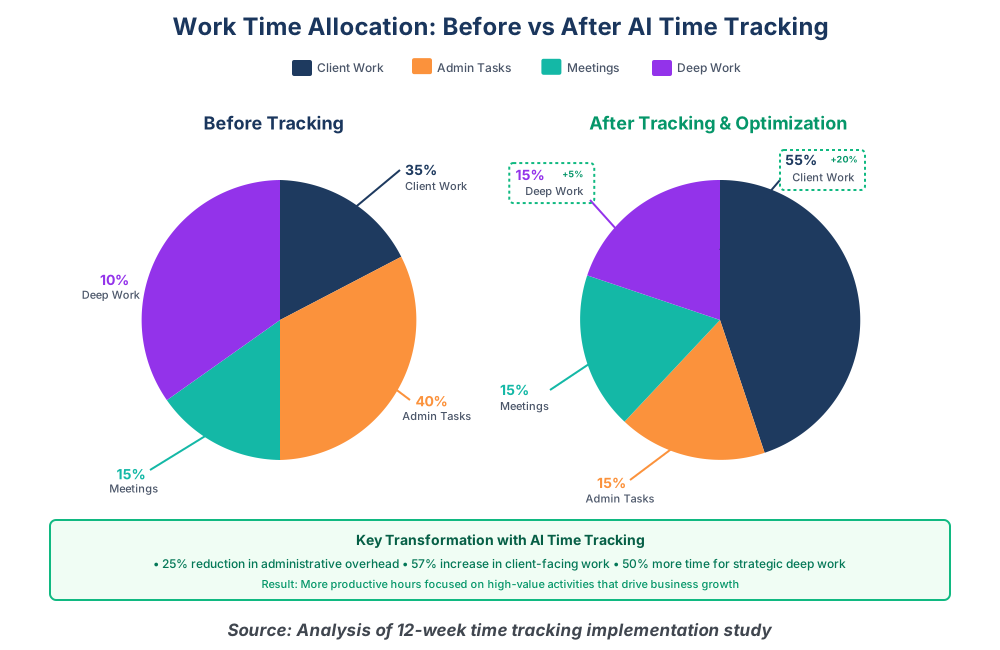
Clockify has evolved from simple time tracking into an AI-powered productivity analyzer. Understanding where your time actually goes is the foundation for improving how you spend it, and Clockify makes this effortless.
What distinguishes Clockify in 2025 is its predictive capabilities and insights. It doesn’t just record time; it analyzes patterns, identifies inefficiencies, and suggests optimizations based on your actual work habits. This data-driven approach to productivity beats guessing or relying on how you think you spend time.
Practical use case: I was convinced I spent most of my time on client work until Clockify revealed the truth: administrative tasks consumed 40% of my week. Armed with this data, I hired a virtual assistant for admin work and immediately reclaimed 15 hours weekly for revenue-generating activities. Clockify’s project tracking also helped me identify which clients were actually profitable versus those who required disproportionate time investment. These insights led to strategic changes that doubled my effective hourly rate.
Beginner tips: Start the timer every time you switch tasks, even if briefly. This creates accurate data that reveals true patterns. Use Clockify’s browser extension and desktop app so tracking works everywhere without switching contexts. Set up projects and tags that match how you actually think about work, not overly complex categorization systems you’ll abandon. Review your weekly reports every Monday to identify patterns and make small adjustments. Use the idle detection feature to ensure you’re not accidentally tracking time when you’ve stepped away.
Clockify’s AI now suggests time allocations based on project deadlines and your historical completion rates, helping you plan more realistic schedules. It also identifies potential burnout patterns and recommends breaks or workload adjustments.
8. Copy.ai: AI Content Generation Engine
Copy.ai specializes in marketing and business content creation, turning the blank page from your enemy into a non-issue. Whether you need social media posts, email campaigns, product descriptions, or blog outlines, Copy.ai generates high-quality starting points in seconds.
The 2025 version understands brand voice, maintains consistency across content types, and adapts tone for different audiences. Instead of replacing writers, it eliminates the initial creative barrier and provides frameworks you can refine with your expertise.
Practical use case: Content creation used to be my biggest bottleneck. I’d stare at blank documents, struggling to find the right opening or structure. Copy.ai changed everything. I describe what I need, provide key points, and get multiple versions instantly. I pick the best approach, refine it with my insights, and publish. What took hours now takes minutes. I’ve used it for everything from LinkedIn posts to client proposals to presentation scripts. Although the quality isn’t flawless right away, the 80% advantage it offers is invaluable.
Beginner tips: Input detailed briefs—the more context you provide about audience, purpose, and tone, the better the output. Instead of using the first result verbatim, generate multiple variations and select the best elements from each. Create and save brand voices that capture your organization’s communication style for consistent results. Use the “improve” function to iteratively refine outputs rather than starting over. Combine Copy.ai with your human insight and editing; it’s a starting point, not a finished product.
Copy.ai’s workflow features let you create multi-step content projects, where the output from one step becomes the input for the next. This is perfect for campaigns that require multiple related pieces of content.
9. Reclaim.ai: Intelligent Calendar Management
Reclaim.ai is the calendar assistant you didn’t know you needed. It automatically schedules tasks, protects time for focused work, and dynamically adjusts as priorities shift. Instead of manually playing Tetris with your calendar, Reclaim.ai optimizes your schedule based on your preferences and commitments.
The brilliance of Reclaim.ai lies in its understanding that not all calendar blocks are equal. It distinguishes between flexible tasks that can move and fixed commitments that can’t, then continuously optimizes to give you the best possible schedule. This eliminates the constant mental overhead of calendar management.
Practical use case: I use Reclaim.ai to protect my deep work time. I tell it I need four hours weekly for strategic planning, and it automatically finds and books slots when I’m most productive (mid-morning for me). When meetings pop up, Reclaim.ai automatically shifts my flexible blocks to maintain my protected time. I also use “smart one-on-ones” that automatically find mutual availability with team members and reschedule when conflicts arise. The result? This results in a calendar that functions in my favor rather than against me, eliminating the need for constant manual adjustments.
Beginner tips: Start by scheduling just one or two recurring tasks like “email processing” or “project work” and let Reclaim.ai manage them. This builds trust before handing over more of your calendar. Carefully set your working hours and preferences for habits, as Reclaim.ai will respect these boundaries when scheduling. Use the buffer time feature to add breathing room automatically between meetings. Connect Reclaim.ai to your task manager so it can schedule time for your actual to-dos. Review your scheduling analytics monthly to identify patterns and optimize further.
Reclaim.ai’s “People Analytics” shows how your time is distributed across meetings, focused work, and different projects, providing insights that help you maintain healthy work patterns.
10. Descript: AI Video and Podcast Editor
Descript revolutionizes video and audio editing by treating media like text documents. You edit your video or podcast by editing the transcript, and Descript automatically updates the media. This makes content creation accessible to anyone who can edit a document; no complex video editing software is required.
In 2025, Descript’s AI capabilities extend to removing filler words, improving audio quality, generating social clips automatically, and even creating AI voices for corrections. What used to require professional editing skills now happens with simple text edits.
Practical use case: I create weekly video content for my coaching business. Before Descript, I’d record multiple takes trying to get everything perfect, then spend hours in traditional editing software. Now I record once, knowing I can correct anything in post-production. Descript automatically removes my “ums” and “ahs,” I edit out tangents by simply deleting text, and it generates multiple social media clips highlighting key moments. What used to be a full day of work now takes 90 minutes.
Beginner tips: Start by using Descript’s filler word removal—this alone dramatically improves content quality with zero effort. Record slightly longer than needed; it’s easier to cut than to add. Use the “Studio Sound” feature to enhance audio quality, especially if you’re recording in less-than-ideal environments. Create templates for your common formats (intro, main content, outro) to accelerate repetitive projects. Export multiple versions optimized for different platforms simultaneously. Don’t be intimidated by advanced features initially—basic transcript editing provides massive value.
Descript’s AI eye contact correction and green screen removal features mean you can produce professional-looking videos from home without expensive equipment or technical expertise.
Understanding the Real Trade-offs: Limitations, Costs, and Privacy Considerations
While these AI productivity tools deliver impressive benefits, it’s crucial to understand their limitations and real costs before committing. No tool is perfect, and what works brilliantly for one person might create new problems for another. Here’s what you need to know about each tool’s potential drawbacks, hidden costs, and privacy implications.
ChatGPT Plus: The Versatility Tax
ChatGPT Plus occasionally experiences capacity issues during peak hours, even for paying subscribers. The $20 monthly fee is straightforward, but the hidden cost comes in learning to prompt effectively—expect to invest 10-15 hours developing this skill before seeing optimal results.
Privacy concerns are significant: OpenAI uses conversations to improve their models unless you explicitly opt out in settings. If you’re handling sensitive business information, client data, or proprietary strategies, you’re potentially feeding that into their training data. The terms of service give OpenAI broad rights to your content. For industries with strict compliance requirements (healthcare, legal, and finance), ChatGPT Plus may violate data handling policies. Consider using the API with data retention controls for sensitive work, though this adds complexity and cost.
The tool also has knowledge limitations—it doesn’t know about events after January 2025 without a web search, can confidently state incorrect information, and struggles with complex mathematical calculations or highly specialized technical domains.
Notion AI: The Integration Lock-in
Notion AI isn’t actually $10/month—that’s misleading. You need a Notion workspace first ($10/user/month for Plus, $15 for Business), then add AI on top ($10/user/month). For a five-person team, you’re looking at $100-125 monthly, not the $50 the “add-on” pricing suggests.
The real limitation is vendor lock-in. Your entire knowledge base becomes dependent on Notion’s ecosystem. If you ever want to migrate away, extracting your data while preserving structure and AI-enhanced content is nightmarishly complex. I’ve watched teams spend weeks trying to migrate years of Notion data to other platforms.
Privacy considerations: Notion’s AI processes your workspace content on external servers. Your meeting notes, strategic plans, financial data, and client information all flow through their AI systems. Notion’s privacy policy is reasonably transparent, but European companies often struggle with GDPR compliance when using Notion AI due to data processing locations. The company has improved its security posture, but there have been past incidents where user data was more accessible than users realized.
Notion AI also struggles with very large databases (10,000+ pages), becomes sluggish, and sometimes generates summaries that miss critical nuances in complex technical documentation.
Grammarly Business: The Trust Paradox
Grammarly Business at $15/user/month seems affordable until you scale. Ten users cost $150 monthly or $1,800 annually. But the deeper cost consideration is subtler: over-reliance on Grammarly can atrophy your natural writing skills. I’ve seen professionals become unable to write confidently without the tool, constantly second-guessing themselves.
The privacy concerns are substantial and often underestimated. Grammarly reviews all your typed content—every email, document, Slack message, and potentially even password fields if caution is not exercised. While Grammarly claims they don’t sell your data, you’re trusting a third-party service with access to your most sensitive communications. Their business model depends on processing user data to improve their AI.
For legal, medical, or financial professionals, this creates serious confidentiality risks. Privileged attorney-client communications, patient health information, or confidential financial data flowing through Grammarly’s servers could constitute a breach of professional obligations. Some enterprises ban Grammarly entirely for this reason.
Technical limitations: Grammarly occasionally misunderstands context, especially with technical writing, creative fiction, or non-standard English dialects. It can make your writing more “correct” while stripping away personality and voice. The tone detector, while useful, sometimes misreads intentional stylistic choices as errors.
Otter.ai: The Accuracy Problem
Otter.ai’s free tier is genuinely useful (600 minutes monthly), but serious users quickly hit limits. The Pro plan ($16.99/month) gives 6,000 minutes, but Business at $30/user/month is where team features unlock. A 10-person team paying $300 monthly or $3,600 annually needs to ensure those transcriptions genuinely save equivalent time.
The critical limitation everyone discovers: transcription accuracy drops dramatically with accents, technical jargon, multiple speakers talking over each other, or poor audio quality. I’ve had important client meetings where Otter.ai was 70-75% accurate—meaning I still needed to listen to the entire recording to catch errors. With medical, legal, or technical terminology, accuracy plummets further.
Privacy implications are enormous. You’re uploading potentially confidential conversations to Otter.ai’s servers. While they have security measures, you’re trusting a third party with your meeting content. Some clients explicitly prohibit recording meetings, and Otter.ai’s presence can change meeting dynamics—people become guarded when they know they’re being transcribed.
The AI summaries, while convenient, sometimes miss critical context or misrepresent discussions. I’ve seen Otter.ai’s summary completely reverse the sense of a decision because it couldn’t detect sarcasm or hedging language. Never rely on AI summaries for legally significant meetings or critical decisions without verification.
Zapier: The Complexity Creep
Zapier’s pricing is deceptively complex. Free tier allows 100 tasks monthly (a “task” is each action in a workflow). Hit that limit fast, and you’re pushed to Starter ($19.99, 750 tasks) or Professional ($49, 2,000 tasks). But here’s the trap: successful automation generates more tasks than you expect. A simple “save email attachment to Dropbox and notify team” uses 3 tasks per email. Processing 100 emails will utilize 300 tasks.
Teams frequently find themselves on the $69-299/month plans to support their automation needs. Calculate your actual task volume before committing—the annual cost can easily reach $1,000-3,500.
The real limitation is maintenance. Zaps break when services update their APIs. A workflow working perfectly today can fail tomorrow when Gmail changes something. I spend 2-3 hours monthly maintaining my Zaps—fixing broken connections, updating deprecated features, and troubleshooting mysterious failures. This maintenance burden isn’t reflected in the pricing page.
Privacy and security concerns: Zapier needs full access to all your connected services. You’re giving one platform the keys to your email, CRM, file storage, payment systems, and databases. If Zapier experiences a security breach (and they’ve had incidents), attackers potentially access everything. You’re creating a single point of failure for your entire digital infrastructure.
Additionally, data flows through Zapier’s servers, raising questions about data residency and compliance. Sensitive information from multiple systems gets temporarily stored on Zapier’s infrastructure during processing.
Superhuman: The Exclusivity Cost
Superhuman at $30/month is the most expensive email client discussed, totaling $360 annually. But the real cost is platform limitation—it only works with Gmail and Outlook. If your organization uses another email system, Superhuman isn’t an option. The mobile experience, while improving, lags behind desktop functionality.
The learning curve is steeper than advertised. The entire interface is keyboard-driven, and the onboarding, though thorough, requires genuine commitment. Expect 2-3 weeks before achieving the promised speed improvements. Many people pay for a month or two, can’t adjust to the keyboard-centric workflow, and abandon it—that’s $60-90 wasted.
Privacy considerations: Superhuman famously introduced read receipts that tracked when recipients opened your emails, where they were, and what device they used—without their consent or knowledge. The backlash was severe. While they’ve modified this feature, it reveals the company’s philosophy about privacy trade-offs.
Superhuman processes all your email on their servers to enable AI features and instant search. Your entire communication history—personal, professional, sensitive—lives on Superhuman’s infrastructure. For privacy-conscious individuals or those handling confidential information, this centralization is concerning.
The tool also creates dependency. If you cancel Superhuman, you return to standard Gmail/Outlook, which feels painfully slow by comparison. This psychological lock-in makes it hard to leave even if you’re not getting $30/month of value.
Clockify: The Tracking Overhead
Clockify’s free tier is genuinely useful for individuals, but team features require paid plans. The Pro tier ($9.99/user/month) seems reasonable, but a 10-person team pays $1,200 annually. The hidden cost is the time spent tracking time. If employees spend 5 minutes daily managing time tracking, that’s 20+ hours annually per person—time that could be billable or productive.
The psychological cost is rarely discussed: constant time tracking creates stress and anxiety. Employees feel surveilled, become reluctant to take breaks, and experience reduced autonomy. I’ve seen time tracking implementation damage team morale and trust. Some people game the system, others develop anxiety about “unproductive” time, and creative work suffers when every minute must be justified.
Privacy and trust issues: Employers can see exactly how much time employees spend on each task, project, and client. This granular surveillance can feel invasive. Screenshots and activity monitoring features (in some time tracking tools, though Clockify focuses on manual tracking) raise serious ethical questions about workplace privacy.
Data stored in Clockify reveals detailed patterns about your work habits, productivity fluctuations, and potentially sensitive information about client relationships or project profitability. If Clockify experiences a data breach, this information could be exposed or exploited.
For freelancers and consultants, there’s also the risk of over-optimization. Obsessing over time allocation can lead to burnout, reduced creativity, and, ironically, lower productivity as you spend more time tracking than actually working.
Copy.ai: The Quality Ceiling
Copy.ai at $36/month (or $420 annually) is expensive compared to alternatives. The Pro plan gives unlimited words, but the reality is that AI-generated content still requires substantial human editing. You’re not replacing a writer; you’re getting a research assistant who produces rough drafts. Factor in 30-50% editing time for every AI-generated piece.
The critical limitation: Copy.ai produces generic, formulaic content. Everyone using AI writing tools generates similar-sounding content. Google’s algorithms increasingly penalize AI-generated content that lacks original insight, expertise, or genuine human perspective. If you’re using Copy.ai for SEO content, you may find rankings suffer unless you heavily edit and personalize the output.
Copyright and ownership concerns: Who owns AI-generated content? The legal landscape is murky. Copy.ai’s terms give you rights to output, but if the AI inadvertently reproduces training data (which can happen), you might unknowingly publish plagiarized content. I’ve seen AI tools generate text eerily similar to copyrighted materials.
Privacy issues: Everything you input into Copy.ai—your brand voice, product details, customer insights, marketing strategies—gets processed by their AI. Their privacy policy claims they don’t use customer data for training, but you’re still uploading proprietary business information to a third-party service. For competitive reasons, some businesses can’t risk this exposure.
The tool also creates a subtle trap: over-reliance on AI writing can diminish your own creative capabilities and unique voice. Your content becomes indistinguishable from competitors also using AI tools.
Reclaim.ai: The Calendar Chaos
Reclaim.ai offers a free tier, but meaningful team features require paid plans ($8-12/user/month). The mathematics of calendar optimization seems compelling, but the reality includes unexpected complexity. Reclaim.ai needs accurate task duration estimates—garbage in, garbage out. If you consistently underestimate how long things take, Reclaim.ai creates an impossible schedule you can’t follow.
The automation can backfire spectacularly. I’ve had Reclaim.ai schedule “focus time” during periods when urgent issues arose, creating conflicts between the tool’s optimization and reality. When team members use Reclaim.ai differently (some aggressive automation, others manual), coordination becomes chaotic. Calendar invites get mysteriously rescheduled, creating confusion and occasionally professional embarrassment.
Privacy and access concerns: Reclaim.ai needs full access to your calendar, including seeing every meeting title, attendee, and detail. For professionals handling confidential matters, this creates issues. Your calendar reveals your client relationships, strategic priorities, and potentially sensitive information about your organization.
Integration with multiple calendars (work, personal, side projects) can expose information you’d prefer to keep separate. Reclaim.ai’s AI analyzes your scheduling patterns to optimize, meaning the service builds a detailed profile of your work habits, relationships, and priorities.
There’s also the psychological cost of optimized scheduling. When an algorithm packs your calendar efficiently, you lose buffer time and spontaneity. The most productive professionals often need unstructured time for serendipitous conversations, unexpected opportunities, and mental recovery. Perfect optimization can paradoxically reduce effectiveness.
Descript: The Editing Paradigm Shift
Descript’s pricing ($12-24/month, or $144-288 annually) is reasonable, but the real cost comes from the fundamental workflow change. If you’ve invested years learning traditional video editing (Premiere, Final Cut), Descript requires relearning everything. This isn’t an incremental improvement; it’s a different paradigm. Some editing tasks are brilliant in Descript; others are frustratingly limited.
Quality limitations: While Descript’s AI is impressive, automatic transcription accuracy varies wildly. With clear audio and standard accents, it’s 90-95% accurate. With background noise, multiple speakers, or accents, accuracy drops to 70-80%. You’ll spend significant time correcting transcripts before editing, especially for professional content.
The AI voice feature (Overdub) that lets you “type” corrections sounds convenient but has ethical implications. You can make yourself say things you never said. While Descript has safeguards, this technology raises questions about authenticity and trust. Some audiences are uncomfortable with AI-altered voices, even when disclosed.
Privacy concerns are substantial: You’re uploading video and audio files containing your image, voice, and content to Descript’s servers. For content creators discussing sensitive topics, reviewing confidential information, or featuring clients, this creates privacy risks. Descript processes this data with AI, and while they claim security, you’re trusting a third party with your content’s intellectual property.
The transcript-based editing also means every word in your videos is text-searchable on Descript’s platform. Think about the implications: Descript indexes and searches your private recordings, rough cuts, and unpublished content. If Descript experiences a breach, years of your content could be exposed.
File storage limits on lower-tier plans mean you’re constantly managing what stays in Descript versus local storage, adding administrative overhead. The collaborative features, while useful, mean team members can access all project files, requiring careful permission management.
Making Informed Decisions About AI Tools
Understanding these limitations doesn’t mean avoiding these tools—it means using them wisely. Here’s how to make informed decisions:
Evaluate true costs: Multiply monthly fees by 12, add time investment for learning and maintenance, and calculate whether the ROI genuinely exceeds these costs. A $20/month tool costing 10 hours of learning might actually cost $220 in your first month when you account for your time value.
Assess privacy requirements: If you handle sensitive data (client information, medical records, legal documents, proprietary business intelligence), investigate each tool’s security measures, data processing locations, and compliance certifications. Some tools are HIPAA-compliant or SOC 2 certified; others aren’t.
Start with free trials: Nearly every tool offers trials. Test them with real work, not hypothetical scenarios. Push them to their limits. See where they fail before committing financially.
Consider vendor lock-in: How difficult is it to leave? Can you export your data? Will cancellation disrupt your workflow catastrophically? Tools with high switching costs should be evaluated more critically.
Evaluate team consensus: Individual productivity tools require team buy-in to succeed. If half your team embraces Reclaim.ai and half resists, you’ve created calendar chaos, not optimization.
The best approach: implement tools incrementally, measure results honestly, and remain willing to cancel when tools no longer deliver value proportional to their costs. AI productivity tools are powerful, but they’re not magic—they’re investments requiring active management and realistic expectations.
Comparing the Top AI Productivity Tools
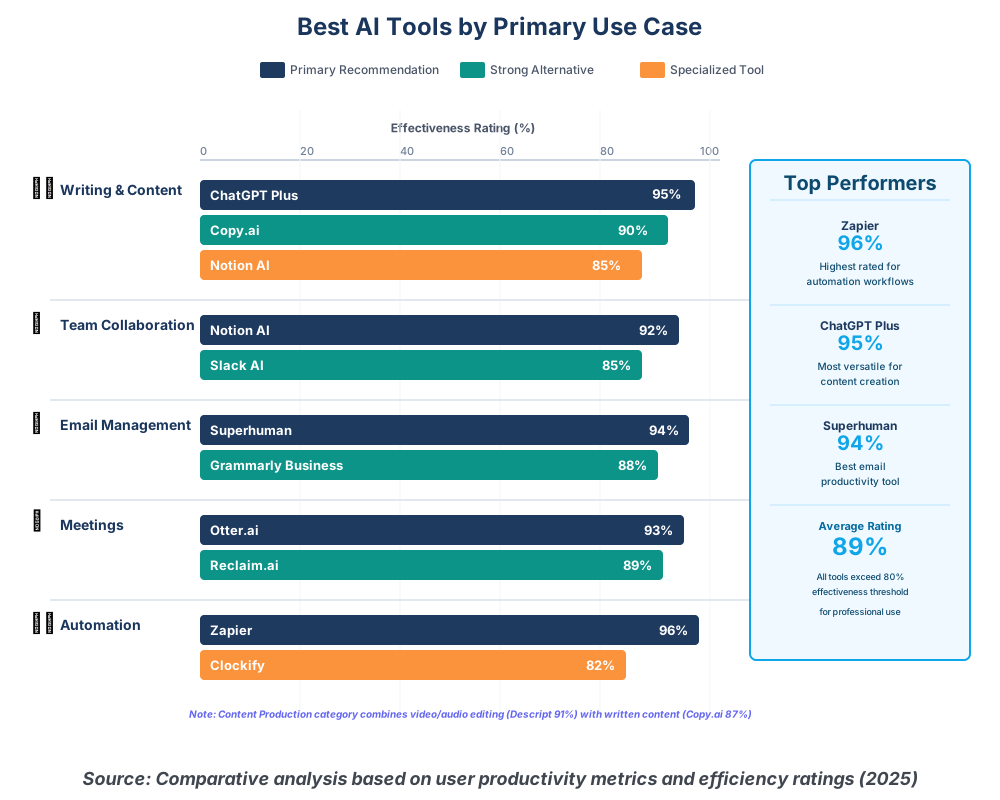
Choosing the right AI productivity solutions depends on your specific workflow and pain points. Let me break down which tools excel for different needs:
For overall versatility: ChatGPT Plus remains unmatched. If you can only choose one tool, this is it. The breadth of applications—from writing to analysis to problem-solving—makes it essential for any knowledge worker.
For team collaboration: Notion AI provides the best combination of workspace organization and AI assistance. Teams already using Notion find the AI integration seamless and immediately valuable.
For communication-heavy roles: Combine Grammarly Business and Superhuman. Together, they handle both composition quality and email volume management, dramatically reducing communication time while improving accuracy.
For meeting-intensive schedules: Otter.ai and Reclaim.ai work beautifully together. Otter.ai captures what happens in meetings, while Reclaim.ai optimizes them when they occur.
For content creators: Copy.ai and Descript cover both written content and multimedia production, providing a complete content creation toolkit.
For process optimization: Zapier and Clockify together create a powerful system—Clockify shows you where time goes, and Zapier automates repetitive tasks, stealing that time.
Frequently Asked Questions About AI Productivity Tools
Your Productivity Transformation Starts Today
Here’s what I want you to understand: AI productivity tools aren’t about working more hours or squeezing every minute dry. They’re about reclaiming time and energy for work that actually matters—the strategic thinking, creative problem-solving, and human connections that define meaningful professional success.
The ten tools I’ve shared aren’t theoretical recommendations. They’re battle-tested solutions I use daily and have helped hundreds of professionals implement. Each one solves real problems you’re probably facing right now: too many emails, unproductive meetings, repetitive tasks, content creation bottlenecks, or chaotic calendar management.
Your next step is simple: choose one tool that addresses your biggest current frustration. Not three, not five—just one. Give yourself two weeks to integrate it fully into your workflow. Once it becomes second nature, add another. This methodical approach prevents overwhelm and ensures each tool delivers maximum value.
The productivity transformation you’re seeking doesn’t require working harder or discovering some secret technique. It requires working smarter by letting AI handle the routine so you can focus on the exceptional. These tools are your productivity partners, ready to help the moment you decide to let them.
Stop tolerating productivity pain points that AI can solve. The time you save this week compounds into hours, then days, then weeks over the course of a year. That’s time you can invest in growing your business, advancing your career, or simply having a life outside work.
The Top 10 AI Tools for Enhanced Productivity in 2025 are here, proven, and accessible. The only question left is which one will you implement first?
About the Author
James Carter is a productivity coach specializing in AI integration for professionals and teams. With over a decade of experience helping individuals reclaim their time and enhance their efficiency, James has personally tested and implemented hundreds of productivity tools and strategies. His practical, results-driven approach focuses on making AI accessible to non-technical users, emphasizing real-world applications over theoretical possibilities. James has helped thousands of professionals reduce their workweek hours while increasing output quality through strategic AI tool adoption. When he’s not optimizing workflows, he’s experimenting with emerging productivity technologies to identify the next generation of efficiency solutions. You can follow his latest productivity insights and tool recommendations at his coaching practice.