AI for Enhanced Productivity: A Beginner’s Complete Guide

AI for Enhanced Productivity is transforming how we work, study, and manage our daily lives. If you’ve ever felt overwhelmed by endless to-do lists, repetitive tasks, or the struggle to stay organized, you’re not alone. The good news? Artificial intelligence tools can help you accomplish more in less time, without requiring any technical expertise. This guide will walk you through the basics of using AI to boost your productivity, with simple steps anyone can follow.
What’s AI for Enhanced Productivity?
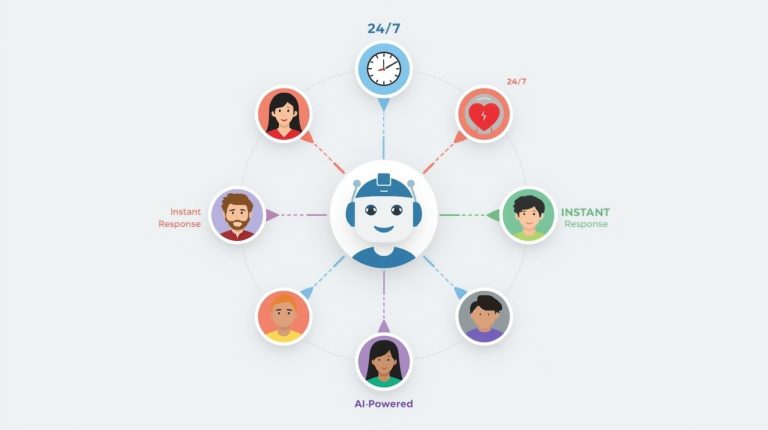
“AI for Enhanced Productivity” refers to using artificial intelligence tools and applications to streamline your work, automate repetitive tasks, and speed up better decisions. Imagine AI as your ever-present personal assistant, capable of processing information instantly and adapting to your preferences over time.
These tools use machine learning and natural language processing to understand your needs and help you work more efficiently. Whether you’re a student, professional, entrepreneur, or simply someone looking to manage life better, AI productivity tools can save you hours every week.
The best part? You don’t need to understand how AI works behind the scenes. Modern AI-powered productivity apps are designed to be as simple as using your favorite social media platform.
Why Use AI to Boost Your Productivity?
Before diving into the how-to steps, let’s understand why AI has become a game-changer for productivity:
Time Savings: AI can complete in seconds what might take you hours manually. Tasks like scheduling meetings, sorting emails, transcribing notes, or generating first drafts become almost instant.
Reduced Mental Load: When AI handles routine decisions and organization, your brain has more energy for creative thinking and important work that truly needs your attention.
Fewer Errors: AI tools maintain consistency and catch mistakes that humans might miss when tired or rushed.
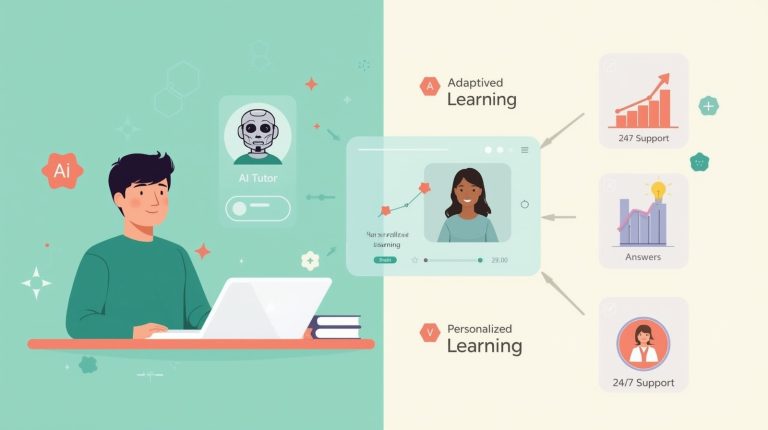
Personalization: Modern AI productivity solutions learn your patterns and preferences, adapting to your unique workflow over time.
Accessibility: You don’t need coding skills or technical knowledge. Most AI tools today are designed for everyday users with intuitive interfaces.
Important Considerations: The Reality of AI Tools
While AI automation tools offer tremendous benefits, it’s important to set realistic expectations. Here are some honest limitations to keep in mind:
Learning Curve Exists: Despite being user-friendly, you’ll still need time to understand each tool’s capabilities. The first week might feel slower as you adjust, and that’s completely normal.
Not Perfect Accuracy: AI makes mistakes. It might misinterpret your request, provide outdated information, or generate content that needs editing. Always review AI outputs before using them in important contexts.
Subscription Costs Add Up: While many tools offer free tiers, serious use often requires paid plans. Multiple subscriptions at $10-30 each can quickly reach $50-150 monthly. Budget accordingly and prioritize tools that genuinely save you time.
Privacy Considerations: Free AI tools may use your data to improve their models. Avoid inputting confidential business information, personal health details, or sensitive data into public AI platforms.
Dependency Risk: Over-reliance on AI can weaken skills you might need when technology fails. Maintain your ability to perform critical tasks manually as a backup.
Internet Connection Required: Most AI tools need active internet connections. If you work offline frequently or have unreliable connectivity, this limits usability.
Tool Changes and Shutdowns: AI companies frequently update features, change pricing, or even shut down services. Your workflow might need adjustment when this happens.
Not a Magic Solution: AI enhances productivity but won’t solve deeper issues like unclear priorities, poor communication, or organizational problems. It’s a tool, not a complete solution.
Understanding these limitations helps you use AI tools more effectively and avoid disappointment. The key is approaching AI as a helpful assistant with boundaries, not an infallible solution.
Step-by-Step Guide: Getting Started with AI for Enhanced Productivity
Step 1: Identify Your Productivity Challenges
Before choosing AI tools, spend a few minutes thinking about where you lose the most time. Do you often find yourself searching through emails? Do you struggle with writer’s block? Is scheduling meetings taking longer than expected?
Please create a straightforward list of your top three productivity challenges. This helps you choose the right AI automation tools for your specific needs rather than downloading everything and feeling overwhelmed.
Why this matters: Starting with clear problems ensures you’ll actually use the tools you choose and see immediate benefits, which builds momentum for adopting more AI solutions later.
Step 2: Start with an AI Writing Assistant
One of the easiest ways to experience AI productivity gains is through writing assistance. Tools like ChatGPT, Claude, or Gemini can help you:
- Draft emails in seconds
- Outline reports or presentations
- Summarize long documents
- Brainstorm ideas when you’re stuck
- Edit and strengthen your writing
How to do it: Simply create a free account with any major AI assistant, then start asking questions in plain English. For example, type “Help me write a professional email declining a meeting invitation” or “Summarize this article in three bullet points”, followed by pasting the text.
Common mistake to avoid: Many beginners try to write perfect prompts from the start. Don’t worry about this—just write naturally as if talking to a colleague. You can always refine your request if the first response isn’t quite right.
Step 3: Automate Your Email Management
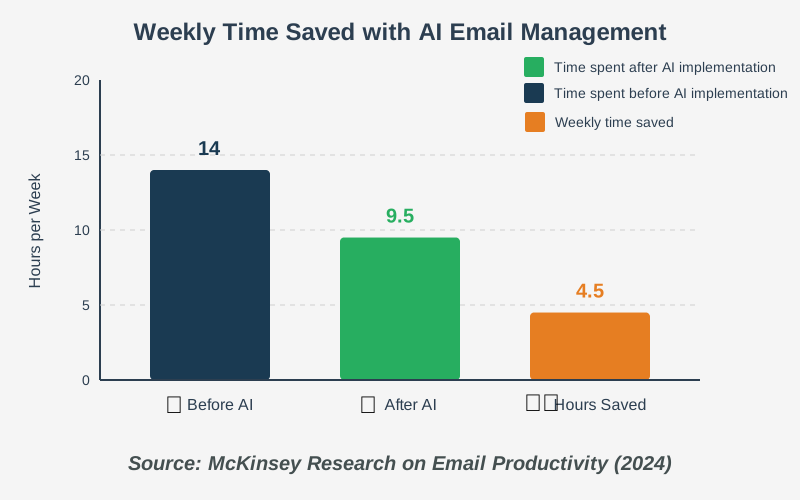
Email overload is one of the biggest productivity killers. AI email management tools can automatically categorize messages, draft responses, and even schedule sends for optimal timing.
How to do it:
- Try Gmail’s Smart Reply feature (it’s already built-in and free)
- Enable priority inbox sorting so you can see important messages first.
- Use tools like SaneBox or Clean Email to automatically filter newsletters and promotional content
- Set up simple rules where AI learns which emails you typically delete or archive
Why this step matters: The average person spends 28% of their workday on email. Even shaving off 30 minutes daily gives you 2.5 extra hours per week for meaningful work.
Step 4: Use AI for Task Management and Planning
Smart task management involves more than just listing what needs to be done. AI can help prioritize your tasks, estimate how long they’ll take, and even suggest the best time of day to tackle specific types of work.
How to do it:
- Try tools like Motion, Todoist (with AI features), or Reclaim.ai
- Enter your tasks and deadlines normally.
- Let the AI automatically schedule them based on your calendar and work patterns
- Review the suggested priorities each morning
- Adjust as needed—the AI learns from your changes
Why this step matters: Most people struggle not because they can’t do the work, but because they do tasks in the wrong order or at the wrong time. AI helps you work with your natural energy patterns rather than against them.
Step 5: Leverage AI for Meeting Management
Meetings consume enormous amounts of time, especially when you factor in scheduling coordination, note-taking, and follow-ups. AI meeting assistants handle all of this automatically.
How to do it:
- Use scheduling tools like Calendly or Clara that find mutual availability automatically
- Try meeting transcription tools like Otter.ai or Fireflies.ai to capture notes
- Let AI generate action items and summaries after each meeting
- Set up automatic follow-up reminders based on meeting commitments
Common mistake to avoid: Don’t record meetings without informing participants. Always announce when AI is transcribing for transparency and legal compliance.
Step 6: Automate Repetitive Tasks with AI Workflows
This is where AI automation tools really shine. Zapier, Make (formerly Integromat), or IFTTT can connect your apps and automate multi-step processes.
How to do it:
- Identify one repetitive task you do weekly (like saving email attachments to cloud storage or posting social media updates)
- Choose an automation platform and create a free account
- Use their pre-built templates—search for your use case
- Test the automation with one example before letting it run automatically
- Monitor for a week to ensure it works correctly
Why this step matters: Each small automation might save just 10 minutes, but stack five of them and you’ve reclaimed nearly an hour every single day.
Step 7: Implement AI Research and Information Gathering
When you need to learn something new or research a topic, AI-powered research tools can summarize articles, answer questions, and even help you understand complex subjects.
How to do it:
- Use AI chatbots to explain concepts in simple terms
- Try browser extensions like Perplexity or ChatGPT plugins that can search and summarize web content
- Ask AI to create study guides or compare different viewpoints on a topic
- Use AI to generate questions that test your understanding
Example: Instead of reading five articles about a topic, paste them into an AI tool and ask, “What are the three main points of agreement and disagreement across these articles?”
Step 8: Enhance Decision-Making with AI Analytics
AI can analyze patterns in your work habits, expenses, time usage, and more, helping you make data-driven productivity decisions.
How to do it:
- Use time-tracking tools with AI analysis like RescueTime or Clockify
- Review AI-generated insights about your most productive hours
- Identify your biggest time-wasters through automated reports
- Set goals based on AI recommendations rather than guesses
Why this step matters: You can’t improve what you don’t measure. AI makes measurement effortless and transforms raw data into actionable insights.
Frequently Asked Questions About AI for Enhanced Productivity
Tips for Success with AI Productivity Tools
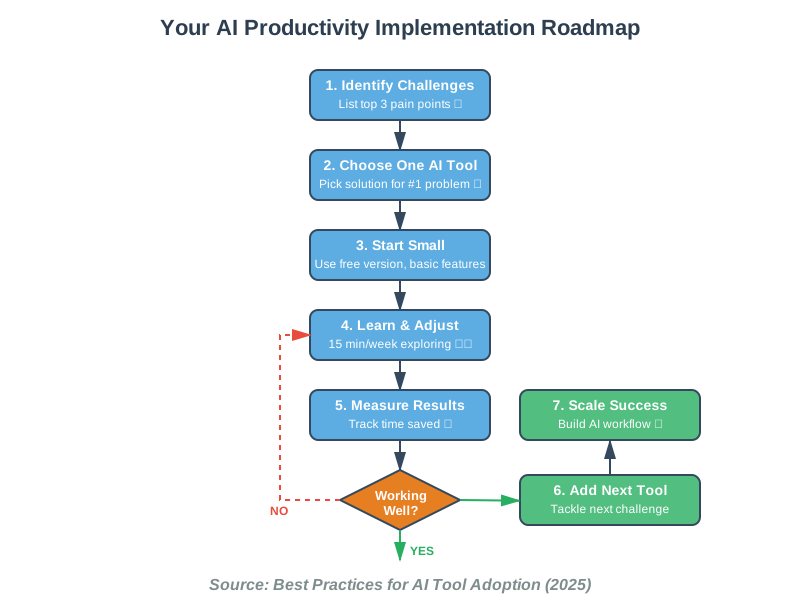
Start small: Don’t try to implement ten AI tools at once. Focus on mastering one tool, integrate it into your routine, and then consider adding another. This prevents overwhelm and ensures you actually benefit from each tool.
Give AI feedback: Most AI tools improve when you correct them or indicate preferences. Those few seconds of feedback make the tool exponentially more useful over time.
Combine tools strategically: Your AI writing assistant, task manager, and email tool can work together. For example, ask your AI assistant to draft tasks based on meeting notes, then add them to your AI task manager.
Schedule learning time: Dedicate 15 minutes weekly to exploring one new feature of your AI tools. Small, consistent learning compounds into major productivity gains.
Share your wins: When AI saves you significant time, notice it and celebrate. This positive reinforcement helps build the habit of reaching for AI tools when appropriate.
Taking Your First Steps Today
AI for Enhanced Productivity isn’t about transforming your entire workflow overnight. It’s about making small, strategic changes that accumulate into dramatic time savings and reduced stress. Start with just one step from this guide—perhaps trying an AI writing assistant for your next email or document.
Remember, the goal isn’t to use AI for everything but to identify where AI genuinely helps you focus on work that requires your unique human creativity, empathy, and judgment. AI handles the routine so you can concentrate on what matters most.
The tools are already here, they’re surprisingly easy to use, and they’re getting better every month. The only question is, which hour of your week will you reclaim first?
Take that first step today. Open one AI tool, give it a simple task, and experience how technology can truly work for you. You’ve got this!
References:
McKinsey & Company: “The Economic Potential of Generative AI”
Harvard Business Review: “How AI Is Helping Companies Redesign Processes”
MIT Technology Review: “AI Productivity Tools Research”
About the Author
Abir Benali is a friendly technology writer passionate about making AI accessible to everyone. With years of experience explaining complex tech concepts in simple terms, Abir specializes in helping non-technical users discover how AI tools can simplify their daily lives. When not writing, Abir enjoys exploring new productivity apps and sharing practical tips that anyone can implement immediately. Abir believes that technology should empower everyone, regardless of their technical background, to work smarter and live better.