AI-Assisted Creative Writing: A Beginner’s Guide

Have you ever stared at a blank page, wanting to write something amazing but not knowing where to start? AI-Assisted Creative Writing might be exactly what you need. I remember the first time I used an AI writing tool—I was working on a short story for my literature class and felt completely stuck. Within minutes, the AI helped me brainstorm character ideas and plot twists I hadn’t considered. That experience changed how I approach creative projects entirely.
This guide will teach you how to use AI for creative writing, even if you’re a beginner. Whether you’re writing stories, poems, or scripts or just exploring your creativity, these tools can become your collaborative partner in the writing journey.
What Is AI-Assisted Creative Writing?
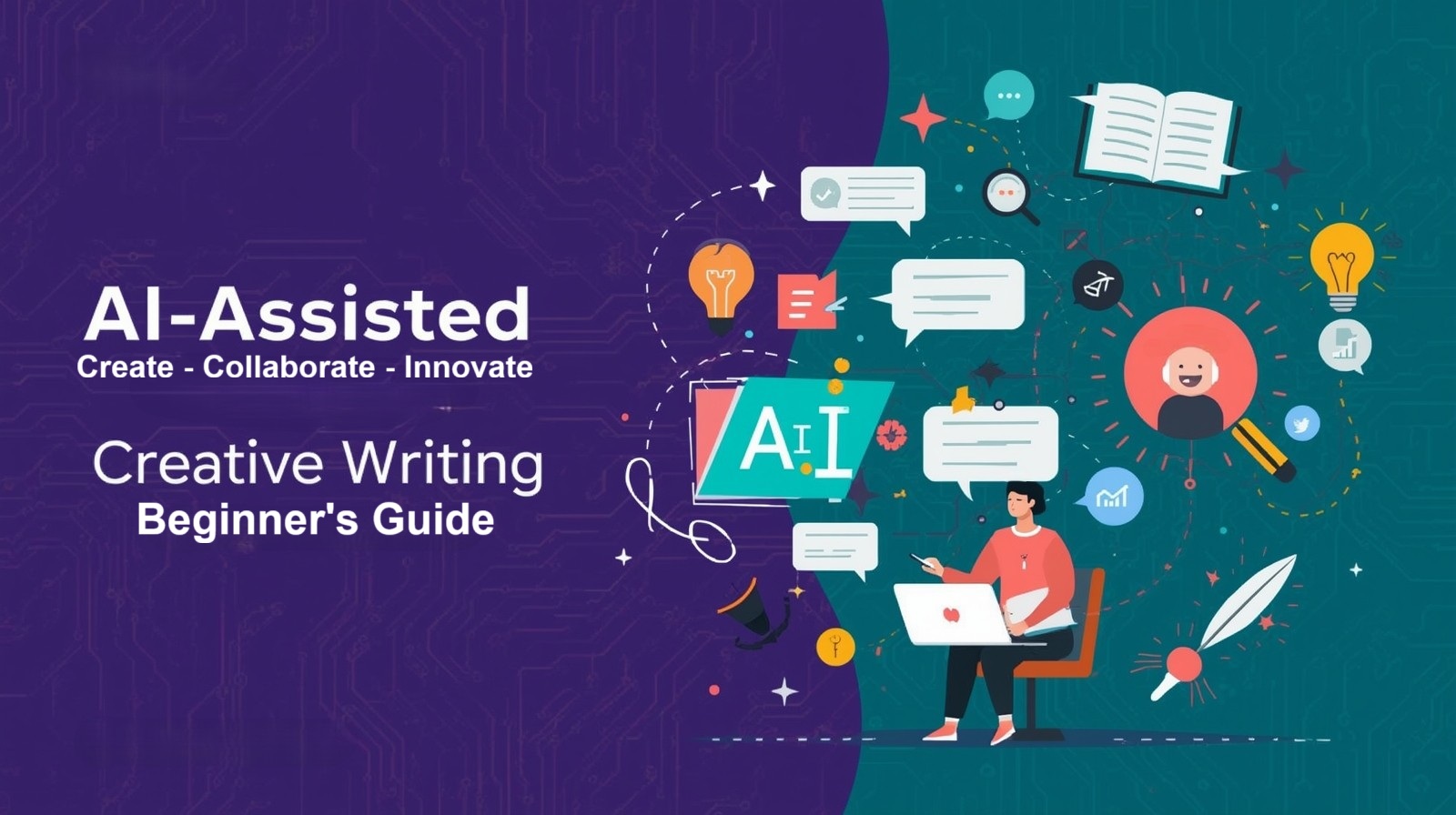
AI-Assisted Creative Writing refers to using artificial intelligence tools to help generate, improve, or organize creative content. Think of it as having a writing partner who’s available 24/7, ready to brainstorm ideas, suggest phrases, or help you overcome writer’s block.
These tools use machine learning and natural language processing to understand context and generate human-like text. But here’s the important part: AI doesn’t replace your creativity—it enhances it. You remain the author, the creative force behind your work. The AI simply helps you explore possibilities you might not have considered.
I’ve used these tools for everything from poetry assignments to developing characters for short stories. The key is understanding that AI gives you options, not final answers. You’re always in control of what makes it into your final piece.
Why Use AI for Creative Writing?
Before we dive into the how-to, let’s talk about why AI writing tools are worth exploring:
Overcome Writer’s Block: When you’re stuck, AI can suggest the next sentence or offer alternative directions for your story. This is especially helpful during late-night study sessions when your brain feels foggy.
Generate Ideas Quickly: Need character names, plot twists, or setting descriptions? AI can generate dozens of options in seconds, saving you hours of brainstorming time.
Learn Writing Techniques: By seeing how AI structures sentences and paragraphs, you can learn new writing patterns and vocabulary that improve your skills.
Experiment Safely: Want to try writing in a different genre or style? AI lets you experiment without the pressure of getting it perfect the first time.
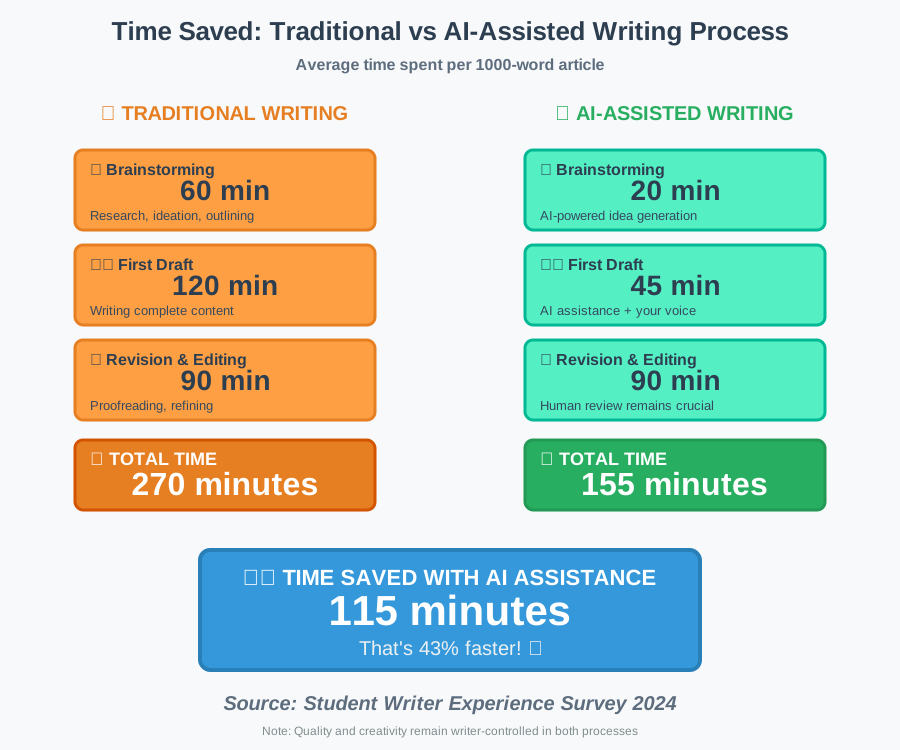
Save Time on Drafts: AI can help you create first drafts faster, leaving more time for revision and polishing—the parts where your unique voice really shines.
Step-by-Step Guide to Getting Started
Step 1: Choose Your AI Writing Tool
The first step is selecting a platform that matches your needs and experience level. Here are beginner-friendly options:
ChatGPT (Free and Paid versions): Perfect for conversational brainstorming and generating story ideas. You can have back-and-forth discussions about your plot or characters.
Google Gemini (Free): Great for research-heavy projects and getting detailed explanations about writing techniques or historical contexts for your stories.
Sudowrite (Paid, with free trial): Specifically designed for creative writers. It offers features like “Continue Writing” and “Rewrite” that feel intuitive for storytelling.
Jasper AI (Paid): More professional-focused but excellent for learning how to structure different types of content, from blog posts to short stories.
I started with ChatGPT because it’s free and conversational. For a student budget, free tools work perfectly well while you’re learning. You can always upgrade later if you find yourself using these tools regularly.
Why this step matters: Choosing the right tool ensures you won’t get frustrated with complicated interfaces. Starting with user-friendly platforms builds confidence quickly.
Step 2: Set Up Your Account and Workspace
Once you’ve chosen your tool, create an account and familiarize yourself with the interface:
- Sign up with your email (most tools offer free tiers for students)
- Complete any basic tutorials offered by the platform
- Explore the main features—usually a text box where you input prompts and a larger area where results appear
- Bookmark the tool in your browser for easy access during study sessions
Take five minutes to click around and see what options are available. Please don’t be concerned about grasping everything right away—you’ll become more familiar with it as you continue to use
Why this step matters: A comfortable workspace reduces friction when you want to write. The easier it is to access your tools, the more likely you’ll use them consistently.
Step 3: Learn to Write Effective Prompts
The quality of AI output depends heavily on how you communicate with it. Think of prompts as instructions you’d give a helpful friend who doesn’t know your project yet.
Basic prompt structure:
- Context: What are you writing? (story, poem, essay)
- Specifics: What exactly do you need? (character description, plot idea, opening sentence)
- Constraints: Any requirements? (tone, length, genre)
Example prompts that work well:
Instead of “Write a story” Try: “Generate three possible opening sentences for a mystery story set in a small coastal town, with a suspicious character arriving during a storm”
Instead of “Give me character ideas” Try: “Create a detailed character profile for a 17-year-old protagonist who loves astronomy but struggles with social anxiety. Include personality traits, a backstory hint, and a unique habit”
I learned this lesson the hard way. My early prompts were too vague, and I got generic results. Once I started being specific, the AI gave me genuinely useful suggestions that sparked my creativity.
Why this step matters: Good prompts save time and produce better results. You’ll spend less time regenerating responses and more time actually writing.
Step 4: Use AI for Brainstorming and Outlining
Now let’s put the tool to work. Start with the planning phase of your creative project:
For story ideas:
- Ask for plot concepts: “Suggest 5 unique plot twists for a science fiction story about time travel”
- Request character combinations: “Create an unlikely friendship between two contrasting characters”
- Generate setting details: “Describe what a futuristic library would look like in 2150”
For outlines:
- “Create a basic story structure for a 2000-word short story about overcoming fear”
- “Outline the key scenes for a three-act mystery story”
When I was writing a fantasy story for my creative writing class, I asked ChatGPT to suggest magical systems. It gave me ten different ideas. I didn’t use any of them exactly as presented, but they helped me develop my own unique magic system by combining elements I liked.
Why this step matters: Brainstorming with AI is low-pressure. You can explore wild ideas without committing to them, which often leads to unexpected creative breakthroughs.
Step 5: Generate Your First Draft Sections
With your outline ready, start writing with AI assistance. Here’s how to collaborate effectively:
The paragraph-by-paragraph approach:
- Write your opening paragraph yourself (this sets your voice)
- If stuck on what comes next, ask AI: “Continue this story: [paste your paragraph]”
- Read the AI’s suggestion
- Take elements you like and rewrite them in your own words
- Write the next section yourself
- Repeat when you need inspiration
Example workflow: You write: “Maya stood at the edge of the cliff, watching storm clouds gather over the ocean.”
You prompt: “What might Maya be thinking or feeling in this moment? Suggest three different emotional directions this scene could take”
AI provides options. You select one that resonates and write the next paragraph yourself, incorporating that emotional direction.
Why this step matters: This collaborative approach keeps your voice authentic while preventing writer’s block. You’re not copying AI text—you’re using it as a springboard for your own ideas.
Step 6: Refine and Edit with AI Assistance
Once you have a complete draft, use AI for revision:
Ask for feedback:
- “Read this paragraph and suggest ways to make the dialogue sound more natural”
- “Is this description too wordy? Suggest a more concise version”
- “Does this transition between scenes feel abrupt? Offer alternatives”
Improve specific elements:
- “Make this sentence more vivid using sensory details”
- “Suggest stronger verbs to replace these weak ones: [paste sentence]”
- “Rewrite this paragraph to show emotion rather than tell it”
I always do at least two rounds of editing. First, I read through and mark sections that feel off. Then I ask AI for specific suggestions on those sections. The key is being selective—don’t change everything the AI suggests. Keep what sounds like you.
Why this step matters: AI can spot issues you might miss after staring at your work for hours. It offers fresh perspectives on your writing without the judgment of showing work-in-progress to others.
Step 7: Add Your Personal Touch
This is the most important step: make the work authentically yours.
How to personalize AI-assisted content:
- Add personal experiences or observations that AI couldn’t know
- Include specific sensory details from your life
- Adjust the vocabulary to match how you actually speak
- Insert jokes, references, or cultural elements that reflect your background
- Change any phrasing that doesn’t sound like something you’d say
When I finished my AI-assisted story about a student juggling responsibilities, I went back and added details from my life—the specific smell of coffee in our campus library, the sound of rain on my dorm window, and the way my roommate hums while studying. These details made the story feel authentic because they were drawn from my own experiences.
Why this step matters: This final personalization is what transforms AI-assisted writing into YOUR writing. Without this step, the work lacks soul.
Common Mistakes Beginners Make (And How to Avoid Them)
Mistake 1: Copying AI output directly This is the biggest pitfall. Always rewrite and personalize everything. Your teachers and readers can tell when text sounds generic.
Mistake 2: Over-relying on AI If AI writes more than 30%–40% of your first draft, you’re using it too much. Let AI help with specific challenges, not write everything for you.
Mistake 3: Not fact-checking AI sometimes generates incorrect information. If your story includes real places, historical events, or scientific concepts, verify the details independently.
Mistake 4: Ignoring your instincts If an AI suggestion doesn’t feel right, trust yourself. You know your story better than the AI does.
Mistake 5: Expecting perfection immediately Like any tool, AI writing takes practice. Your first attempts might feel awkward. That’s completely normal. Keep experimenting.
Practical Tips for Better Results
Be specific with genres and tones: Instead of “write something funny,” say “write a humorous scene with witty dialogue, similar to the style of Terry Pratchett”
Use examples: Show AI what you like. “Generate three story openings similar to this one: [paste example]”
Iterate and refine: If the first output isn’t quite right, ask AI to adjust specific elements rather than starting over completely
Save good prompts: When you find a prompt structure that works well, save it in a notes app for future use
Mix AI and human resources: Use AI for brainstorming, but also read books on writing craft, join writing communities, and get feedback from human readers
Set boundaries: Decide upfront what you will and won’t use AI for. I use it for brainstorming and overcoming blocks, but I write my final drafts myself.
Frequently Asked Questions
Is using AI for creative writing considered cheating?
It depends on the context. For personal projects, it’s a helpful tool. For school assignments, check your institution’s AI policy. Always be transparent about your process. Think of AI like a grammar checker—helpful but not doing the work for you.
Will AI make my writing sound robotic?
Only if you copy it directly. When you use AI suggestions as inspiration and rewrite everything in your own voice, your writing will sound like you.
Can AI write in different genres?
Yes! You can specify genre, tone, and style and even ask it to emulate certain writing approaches. The more specific your prompt, the better the results.
How much does it cost?
Many powerful tools like ChatGPT and Google Gemini offer robust free tiers perfect for students. Paid versions typically start at $10-20 per month for enhanced features.
Will AI replace human writers?
No. AI lacks genuine creativity, personal experience, and emotional depth. It can assist with technical aspects of writing, but it cannot replace the human perspective that makes writing meaningful.
Taking Your First Steps Today
You don’t need to be a tech expert or an experienced writer to start using AI-assisted creative writing tools. The beauty of these platforms is their accessibility—they’re designed for everyone, including complete beginners.
Start small today. Open ChatGPT or Google Gemini and try one simple prompt: “Give me three ideas for a short story about friendship.” See what happens. Play around with the suggestions. Rewrite them. Make them yours.
Remember, AI is here to support your creativity, not replace it. Your unique experiences, your voice, and your perspective—these are irreplaceable. AI simply helps you express them more efficiently and overcome the technical hurdles that sometimes block creative flow.
Every writer struggles with blank pages sometimes. The difference is, you now have a tool that can help you move past those moments without giving up. Whether you’re working on a school assignment, exploring creative writing as a hobby, or dreaming of becoming a published author someday, AI writing assistance can accelerate your journey while you maintain full creative control.
So take that first step. Try one tool this week. Write one prompt. See what possibilities emerge. You might surprise yourself with what you create when you have a collaborative partner removing the barriers between your ideas and the page.
The blank page isn’t so intimidating anymore, is it? Go ahead—start writing. Your creative journey with AI begins now.
About the Author
Rihab Ahmed is an educator and lifelong learner who discovered the power of AI tools during her university studies. Passionate about making technology accessible to students and creative minds, Rihab specializes in breaking down complex AI concepts into practical, beginner-friendly guidance. When she’s not exploring new AI writing tools, she’s helping fellow students discover how technology can make learning and creating more efficient and enjoyable. Her mission is simple: show everyone that AI isn’t intimidating—it’s empowering.