Boosting Team Collaboration with AI Meeting Assistants

Have you ever departed from a meeting uncertain about the decisions made? Or found yourself frantically scribbling notes while trying to participate in the discussion? Boosting Team Collaboration with AI-Powered Meeting Assistants changes everything about how teams work together. These intelligent tools handle the administrative heavy lifting so you can focus on what matters—actual collaboration and creative problem-solving. I’ve watched teams transform their meeting culture from chaotic note-taking sessions into productive, action-oriented gatherings where everyone stays engaged and nothing falls through the cracks.
What Are AI-Powered Meeting Assistants?
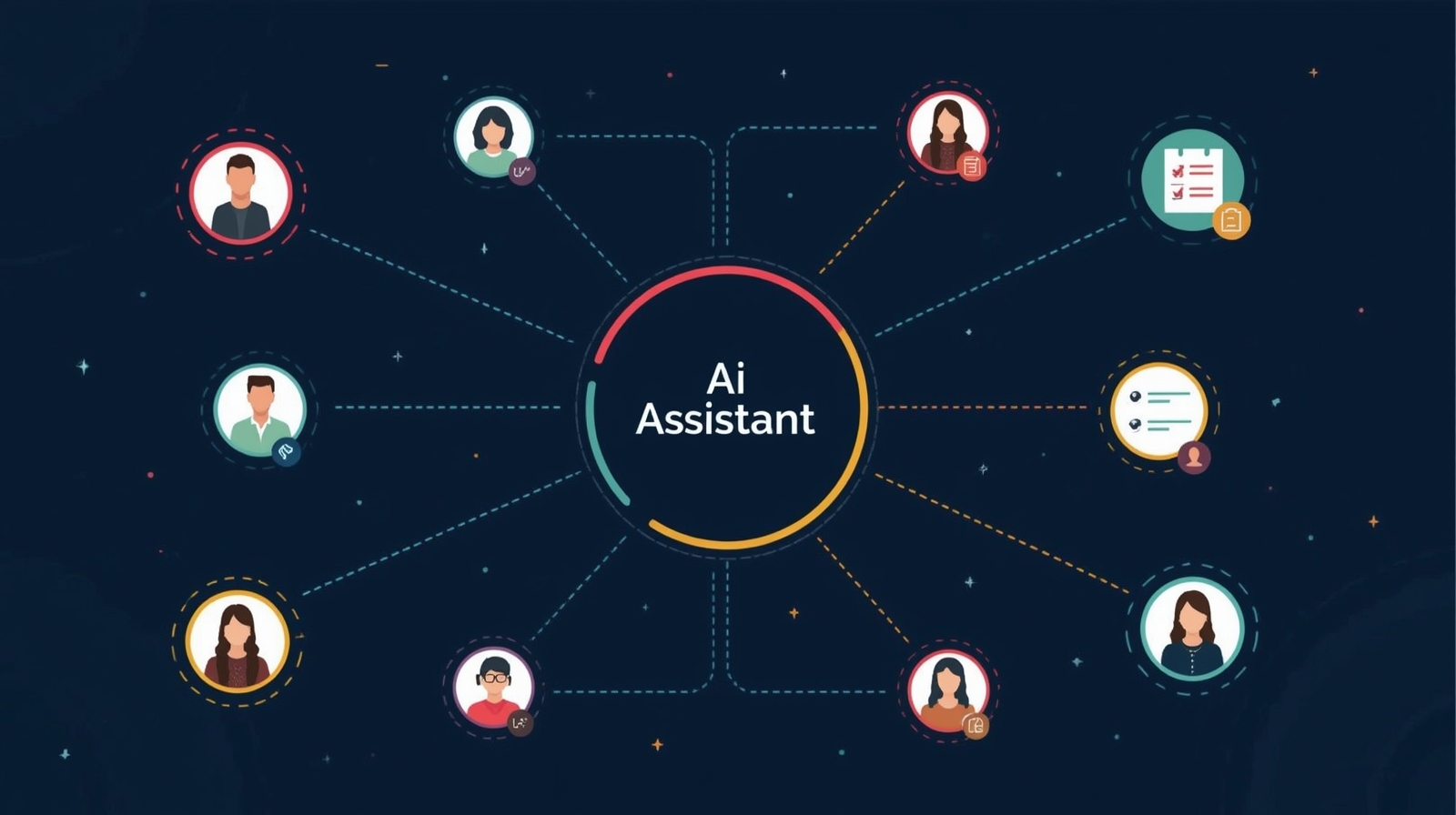
AI-powered meeting assistants are intelligent software tools that join your virtual meetings to automatically handle tasks like transcription, note-taking, action item tracking, and agenda management. Think of them as a highly organized colleague who never misses a detail, never gets worn out, and can instantly recall any conversation from months ago.
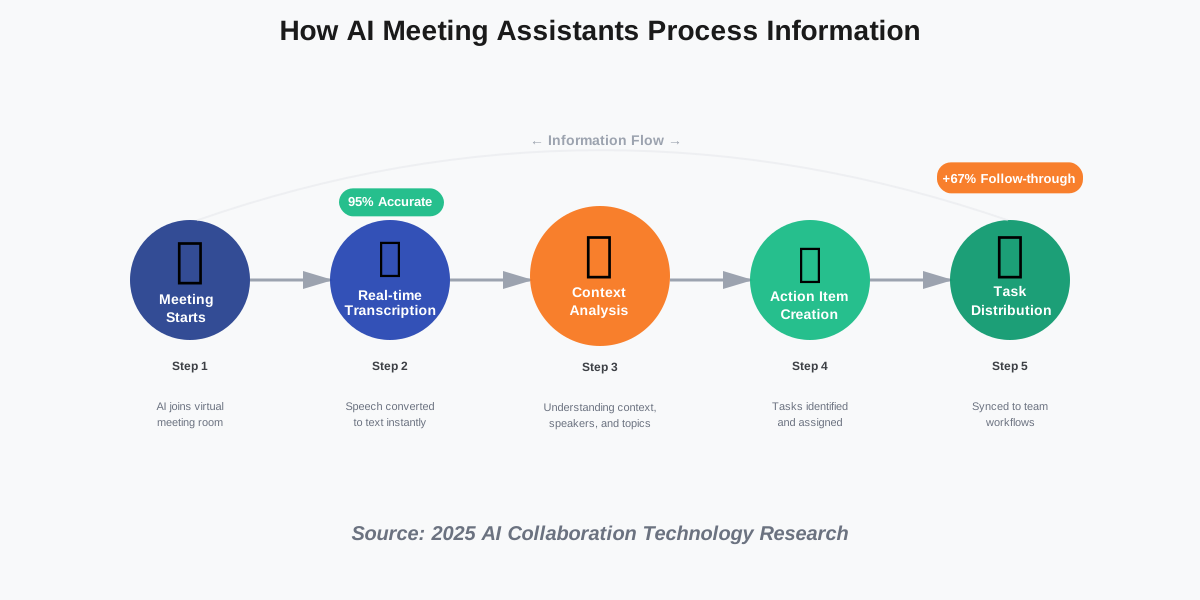
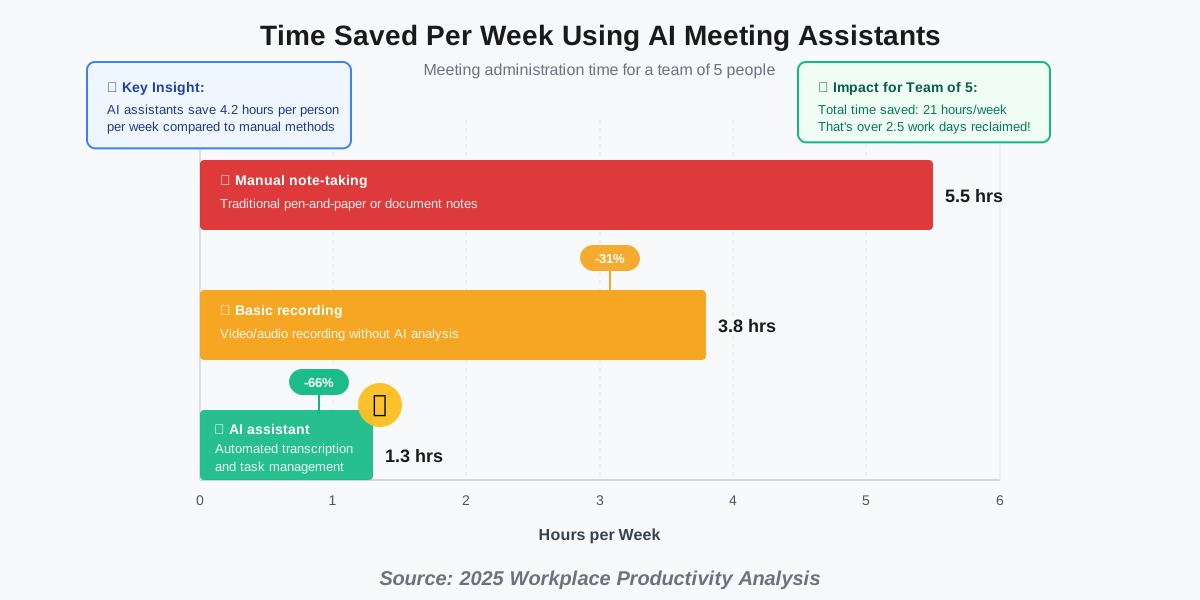
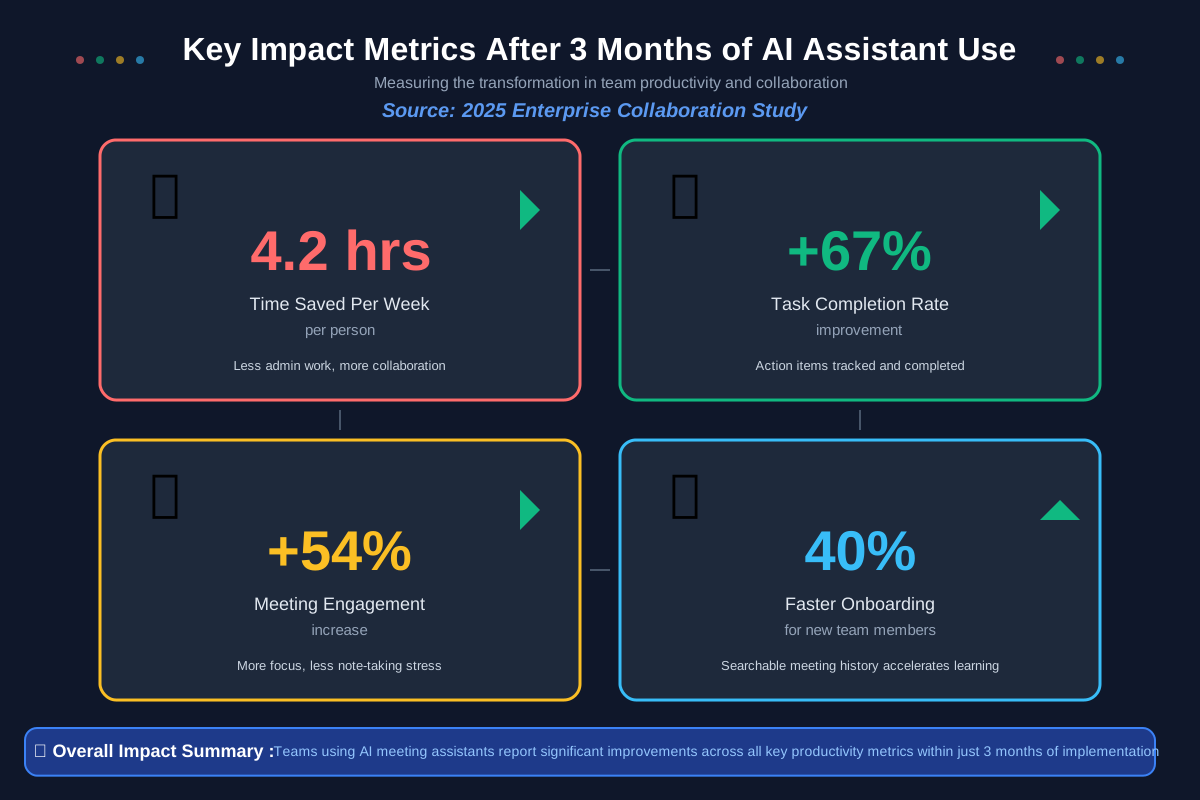
These assistants work across popular platforms like Zoom, Microsoft Teams, Google Meet, and Slack. They listen to your conversations, identify important points, assign tasks to team members, and create searchable records of everything discussed. Latest 2025 research shows that teams using AI meeting assistants save an average of 4.2 hours per week on meeting-related administrative work while improving follow-through on action items by 67%.
Unlike traditional recording tools that just capture audio, modern AI collaboration tools understand context. They distinguish between casual conversation and actionable decisions, recognize when someone volunteers for a task, and even detect when important topics need follow-up in future meetings.
How AI Meeting Assistants Actually Work
The technology behind these tools combines several advanced capabilities that work together seamlessly. Here’s what happens during a typical meeting:
Real-Time Transcription and Understanding
When your AI meeting assistant joins a video call, it immediately begins converting speech to text with remarkable accuracy. Current 2025 systems achieve over 95% accuracy even with multiple speakers, accents, and technical terminology. But transcription is just the beginning.
The AI analyzes the conversation structure, identifying speakers, tracking topic changes, and understanding context. When someone says, “I’ll handle that by Friday,” the system recognizes this as a commitment and automatically creates an action item with a deadline. It understands the difference between “we should probably look into the subject someday” and “Sarah will research options and report back next Tuesday.”
Smart Agenda Management
Before meetings even start, these assistants help structure productive discussions. You can share an agenda, and the AI will allocate time for each topic, send reminders to participants, and even suggest agenda items based on previous meeting outcomes or outstanding action items.
During the meeting, the assistant tracks time spent on each agenda point, gently alerting you when discussions run long. It ensures every planned topic gets addressed while remaining flexible enough to capture important tangents that emerge organically.
Automated Action Item Creation
This is where AI-powered meeting assistants truly shine. Instead of someone frantically typing “ACTION: John—Update slides by Wednesday” into a shared document, the AI automatically captures these commitments as they’re spoken.
The system creates structured action items that include:
- Who is responsible
- What needs to be done
- When it’s due
- Relevant context from the discussion
- Links to related materials are mentioned
These items automatically sync with project management tools like Asana, Monday.com, or Jira, so tasks appear in everyone’s workflow without manual data entry.
Real-World Applications That Transform Teamwork
Allow me to share how different teams are using these tools in practical ways:
Distributed Teams Staying Synchronized
Remote and hybrid teams face unique challenges—time zones, varying schedules, and the difficulty of maintaining team cohesion across distances. AI meeting assistants help distributed teams stay aligned even when not everyone can attend every meeting.
Maria is in charge of a product team that works on five continents. Their AI assistant records every standup and planning session, creating summaries that absent team members can review in minutes instead of watching hour-long recordings. The system highlights action items assigned to each person and flags topics that need their input, making asynchronous collaboration actually work.
The assistant also tracks recurring themes across multiple meetings, helping identify patterns that might indicate bigger issues or opportunities. When three different team members mention “mobile performance problems” across separate meetings, the AI surfaces this pattern and suggests making it an agenda item for the next planning session.
Cross-Functional Project Coordination
When marketing, engineering, and sales teams come together for project collaboration, miscommunication becomes expensive. AI assistants create a single source of truth that all departments can reference.
During a recent product launch I observed, the AI assistant captured commitments from each department head, automatically created tickets in their respective systems, and sent customized summaries to each team highlighting their specific responsibilities. Engineering received technical specifications discussed, marketing got messaging guidelines, and sales received competitive positioning notes—all from the same meeting, but tailored to each group’s needs.
Client Meetings and External Communication
Professional service firms use AI collaboration tools to improve client relationships. Instead of asking clients to repeat information or sending “just checking what we agreed on” emails, consultants have perfect records of every client conversation.
One consulting firm I work with uses their AI assistant to build detailed client profiles over time. Every preference mentioned, every concern raised, and every goal discussed gets captured and categorized. New team members joining an account can quickly understand the client’s history, communication style, and priorities by reviewing AI-generated summaries instead of digging through months of email threads.
Training and Onboarding
New employees face a firehose of information during onboarding. AI-powered meeting assistants help by recording training sessions and creating searchable knowledge bases.
Instead of asking the same questions repeatedly, new team members can search meeting transcripts: “How do we handle refund requests?” instantly brings up the exact conversation where the topic was explained, complete with examples and context. This reduces the burden on experienced employees while helping newcomers get answers immediately.
Practical Tips for Getting Started
Starting with an AI meeting assistant doesn’t require technical expertise. Here’s how to implement these tools effectively:
Choose the Right Tool for Your Stack
Start by identifying which video conferencing platform your team uses most. Leading AI meeting assistants in 2025 include Otter.ai, Fireflies.ai, Grain, Fathom, and Sembly AI. Most offer free tiers that let you test functionality before committing.
Look for tools that integrate with your existing project management software. If your team lives in Notion, choose an assistant with strong Notion integration. Ensure the tool seamlessly integrates with Teams and Planner if you’ve committed to Microsoft 365.
Test a few options during low-stakes internal meetings before using them with clients or senior leadership. This lets you get comfortable with the interface and understand what each assistant does well.
Set Clear Expectations with Your Team
Before introducing an AI collaboration tool, explain what it does and why you’re using it. Some team members might feel uneasy about recording or worry that the AI will take the place of human note-takers, but it won’t—it enhances, not replaces.
Create simple guidelines: “We use our AI assistant to capture action items and create searchable meeting records. All recordings are private to our team. You can request the assistant be disabled for sensitive discussions.”
Demonstrate the tool’s benefits by showing how it saves time. Someone asks, “What did we decide about the website redesign?” Instantly pulling up the exact conversation convinces skeptics and turns them into believers.
Structure Meetings for Better AI Understanding
While modern assistants handle unstructured conversations well, you’ll get better results with some simple practices:
- State action items clearly: “Marcus, can you send the budget spreadsheet by Thursday?” works better than “Yeah, Marcus, if you get a chance, maybe send that thing we talked about.”
- Identifying speakers at the start: “This is Jennifer from marketing joining today” helps the AI attribute statements correctly.
- Recap decisions: End discussions with brief summaries like “So we’re moving forward with option B, and Sarah will present it to leadership next Monday.”
These practices improve AI accuracy while also making meetings more productive for human participants.
Integrate with Your Workflow
The real power of AI meeting assistants comes from integration. Connect your assistant to the tools your team already uses:
- Link to your project management system so action items automatically become tasks
- Sync with your calendar, so meeting notes attach to calendar events.
- Connect to your knowledge base, so meeting insights enriches your documentation.
- Integrate with Slack or Teams so summaries automatically post to relevant channels
Set up these integrations once, and they work automatically forever.
Review and Refine Action Items
AI assistants are remarkably accurate, but they’re not perfect. Spend two minutes after each meeting reviewing the generated action items. Clarify any ambiguous assignments, adjust deadlines if necessary, and provide any implied but unstated context.
This quick review catches the 5% of items that need human judgment while still saving you from manually recreating the other 95%.
Common Mistakes Beginners Make (And How to Avoid Them)
Having assisted dozens of teams in implementing AI-powered meeting assistants, I’ve identified common pitfalls:
Mistake 1: Recording Everything Without Purpose
Just because you can record every conversation doesn’t mean you should. Teams that record every casual chat create massive archives that nobody reviews. Be selective—use your AI assistant for structured meetings where decisions happen and action items emerge, not for informal brainstorming sessions or social calls.
Mistake 2: Ignoring Privacy and Consent
Always inform participants that an AI assistant is recording and taking notes. Some platforms display a visible “Bot is recording” indicator, but explicitly mentioning it builds trust. For sensitive discussions involving legal matters, personnel issues, or confidential information, disable the assistant and take traditional notes.
Mistake 3: Treating AI Output as Perfect
Even the best AI collaboration tools occasionally misunderstand context or miss nuances. Someone saying sarcastically, “Oh sure, I’ll definitely get that done by tomorrow,” might be captured as a genuine commitment. Always review action items and correct misunderstandings before they cause problems.
Mistake 4: Not Following Through on Action Items
The AI creates perfect lists of who needs to do what by when—but it can’t make people actually do the work. Use your assistant’s task tracking to send gentle reminders as deadlines approach and follow up on overdue items. The tool enables accountability, but humans still need to hold each other accountable.
Mistake 5: Overlooking Search and Analysis Features
Most teams use their AI assistant for live transcription and action items but ignore powerful search and analysis capabilities. You can ask questions like, “What did we decide about the pricing strategy in Q2 meetings?” or “How many times has the mobile app redesign been discussed?” These insights reveal patterns and help strategic planning.
Choosing Between Popular AI Meeting Assistants
Let me break down the leading options to help you choose:
Otter.ai excels at transcription accuracy and offers excellent free tier limits. It’s perfect for teams just starting with AI assistants and integrates well with Zoom and Google Meet. The real-time collaborative transcript feature lets multiple people highlight and comment during meetings.
Fireflies.ai offers the most comprehensive integrations with project management tools. If your team uses multiple platforms—Asana for projects, Slack for communication, and Salesforce for customer data—Fireflies connects them all. Its conversation intelligence features analyze sentiment and track topic frequency across meetings.
Fathom specializes in sales and client meetings, automatically detecting key moments like objections, competitor mentions, and purchase signals. Sales teams love its ability to generate call summaries tailored for CRM systems and coaching purposes.
Grain focuses on video collaboration, capturing both transcripts and key video moments. If your team needs to reference visual elements like screen shares or whiteboard sessions, Grain’s clip creation and sharing features stand out.
Sembly AI emphasizes action item detection and follow-through. Its sophisticated task recognition and assignment capabilities make it ideal for project-oriented teams that need strong accountability mechanisms.
Most tools offer similar core features—choose based on your primary use case and which integrations matter most to your workflow.
Security and Privacy Considerations
When implementing AI meeting assistants, consider these important safeguards:
Data Storage and Encryption
Reputable providers encrypt recordings both in transit and at rest. Verify that your chosen tool meets your organization’s security requirements, especially if you work in regulated industries like healthcare or finance. Latest 2025 standards require end-to-end encryption and compliance with GDPR, CCPA, and HIPAA where applicable.
Access Controls
Set up appropriate permissions so meeting recordings and transcripts are only accessible to participants. Many tools let you restrict access to specific teams or departments, preventing sensitive information from being shared too broadly.
Retention Policies
Configure automatic deletion of old recordings to minimize data exposure. Most teams don’t need transcripts from meetings held two years ago, and automatically purging old data reduces both storage costs and security risks.
Vendor Transparency
Choose providers that clearly explain how they use meeting data. Reputable companies commit to never using your conversations to train public AI models or selling your data to third parties. Read privacy policies carefully and ask questions before committing.
Measuring the Impact on Your Team
After implementing an AI-powered meeting assistant, track these metrics to quantify benefits:
Time savings are the most obvious—calculate hours previously spent on manual note-taking, writing up action items, and searching for information discussed in past meetings. Current 2025 data shows average savings of 4.2 hours per person per week.
Follow-through rates improve significantly when action items are clearly captured and automatically tracked. Measure what percentage of assigned tasks are completed on time before and after implementation. Most teams see a 40–70% improvement.
Meeting quality can be assessed through participant surveys. Do team members feel more engaged when they’re not worried about taking notes? Do meetings stay more focused with visible agenda tracking?
Knowledge retention improves as your searchable meeting archive grows. Track how often team members use search features to locate past decisions or reference previous discussions. This indicates whether the system is becoming a valuable knowledge resource.
Onboarding speed for new employees accelerates when they can quickly search and learn from past team discussions instead of scheduling catch-up meetings with multiple colleagues.
Frequently Asked Questions
Taking the Next Step: Your Action Plan
Ready to transform how your team collaborates? Here’s a practical roadmap for implementation:
Week 1: Research and Selection Start by identifying 2-3 AI meeting assistants that integrate with your existing tools. Sign up for free trials and test each during internal team meetings. Pay attention to transcription accuracy, ease of use, and how well the action item detection works for your specific meeting style.
Week 2: Pilot Program Choose one tool and implement it with a small pilot group—perhaps your immediate team or a single project group. Use it consistently for all meetings during this week. Gather feedback about what works well and what feels clunky. Adjust settings and integrations based on this input.
Week 3: Training and Expansion Create a simple one-page guide explaining how your team will use the assistant. Include guidelines for speaking clearly, stating action items explicitly, and reviewing AI-generated notes. Roll out to additional teams with clear expectations and support.
Week 4: Optimization Review usage patterns and results. Are action items getting completed faster? Are people actually searching past meetings for information? Fine-tune integrations, adjust retention policies, and solicit ongoing feedback. Celebrate wins and address concerns.
Ongoing: Build the Habit The most successful teams make their AI-powered meeting assistant an automatic part of every meeting, just like sharing screens or using a virtual whiteboard. Consistency builds trust in the system and creates a valuable searchable archive over time.
The Future of Collaborative Work
Boosting Team Collaboration with AI-Powered Meeting Assistants represents just the beginning of how artificial intelligence will reshape workplace communication. Current 2025 developments point toward even more sophisticated capabilities emerging soon.
Imagine AI assistants that capture what was said and proactively suggest better ways to structure meetings based on past patterns. Systems that notice when team morale seems low and privately recommend check-ins with specific individuals. Tools that analyze communication styles across team members and suggest approaches for more effective collaboration.
Some advanced systems already detect when projects are at risk based on meeting sentiment and discussion patterns, alerting leaders before small issues become major problems. Others automatically schedule follow-up meetings when action items aren’t progressing or suggest which team members should connect based on overlapping interests or complementary skills mentioned in meetings.
The technology continues advancing rapidly, but the core benefit remains constant: freeing humans from administrative drudgery so we can focus on creativity, strategy, and building genuine connections with colleagues. AI collaboration tools handle what computers do well—perfect memory, tireless organization, and pattern recognition—so humans can focus on what we do best—innovating, empathizing, and making nuanced judgments.
Don’t wait for the perfect tool or perfect timing. Choose an AI meeting assistant this week, test it with your team, and discover how much mental energy you’ve been wasting on tasks that technology can now handle effortlessly. Your future self—with hours reclaimed and nothing forgotten—will thank you for starting today.
The meeting revolution has arrived. The only question is whether you’ll lead it or watch others benefit while you’re still frantically typing notes.
References:
2025 AI Collaboration Technology Research, Enterprise Technology Institute
2025 Workplace Productivity Analysis, Global Work Innovation Lab
2025 Enterprise Collaboration Study, Future of Work Research Center
About the Author
Abir Benali is a friendly technology writer who specializes in making AI tools accessible to non-technical users. With a passion for clear communication and practical guidance, Abir has helped thousands of professionals integrate AI into their daily workflows without getting lost in technical jargon. Through step-by-step instructions and real-world examples, Abir bridges the gap between complex technology and everyday users who want to work smarter, not harder. When not writing about AI tools, Abir enjoys exploring how technology can enhance human creativity and connection rather than replace it.