Top 5 AI-Powered Data Analysis Tools in 2025

Top 5 AI-Powered Data Analysis Tools in 2025 represent a fundamental shift in how professionals work with information. I’ve spent years helping people transform their relationship with data, and these platforms deliver something remarkable: enterprise-grade analytical capabilities without requiring technical expertise. Whether you’re analyzing customer feedback, tracking business metrics, or making sense of complex datasets, the right AI tool saves hours every week while delivering insights you’d otherwise miss.
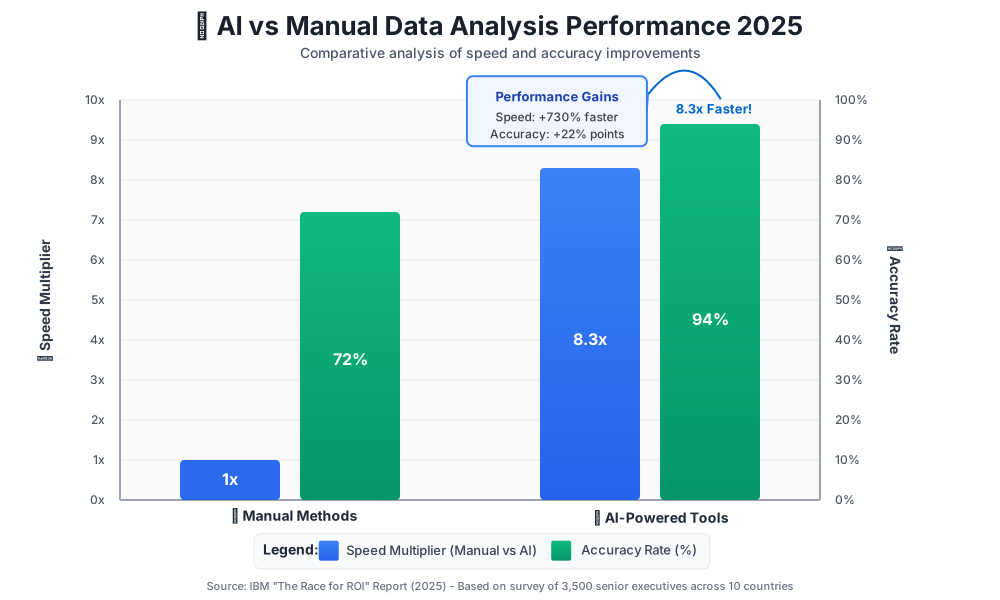
The transformation I’ve witnessed is profound. According to IBM in their “The Race for ROI” report (2025): 66% of surveyed enterprises reported significant operational productivity improvements using AI, with software development and IT teams seeing 32% productivity gains.
Why do AI-powered data analysis tools matter right now? Because we’re generating more information than traditional methods can handle. These platforms don’t just create charts faster—they understand context, predict outcomes, and surface patterns that manual analysis misses entirely.
Why These AI Data Analysis Tools Matter Right Now
The data analysis landscape has evolved dramatically. We’re no longer limited to describing what happened—AI tools predict what will happen next and recommend specific actions. Microsoft’s research on Copilot productivity showed that 77% of early users would rather not give up the tool, with users completing meeting summaries nearly 4 times faster than manual methods.
I’m focusing on platforms that deliver immediate value: tools connecting to your existing data sources, requiring minimal setup, and offering advice on day one. We don’t focus on six-month implementation projects, but rather on practical solutions that can enhance your effectiveness immediately.
1. Tableau AI (with Einstein Copilot)
Tableau AI has evolved into a conversational analytics powerhouse. Einstein Copilot—now called Tableau Agent—transforms how you interact with data by letting you ask questions in plain English and receiving instant visualizations with contextual insights.
What makes Tableau AI exceptional is its complete journey approach. You’re not just creating charts—you’re having a conversation with your data. Type “Show me which products are losing market share,” and Tableau Agent identifies declining products, suggests possible reasons based on related data, and recommends investigation paths.
Practical Use Case: Marketing managers use Tableau AI to track campaign performance across multiple channels. Instead of manually pulling reports from different platforms, building pivot tables, and creating charts, you connect data sources once and ask questions like “Which campaigns drove the most qualified leads last quarter?” The AI instantly generates visualizations, calculates ROI, and highlights anomalies—turning a three-hour manual process into a three-minute conversation.
Key Features That Save Time:
- Natural language processing understands business questions without technical query syntax
- Automated insight detection flags unusual patterns, outliers, and trends
- Smart recommendations suggest related analyses based on current exploration
- Predictive analytics forecasts trends using built-in machine learning models
- Cross-platform connectivity pulls data from 100+ sources, including Google Sheets, SQL databases, and Salesforce
Beginner Tips: Start with Tableau’s templates for common business scenarios—sales dashboards, marketing analytics, and financial reporting. These provide foundations you can customize rather than building from scratch. Use Einstein Copilot’s suggested questions feature; it learns your data structure and recommends relevant analyses. Connect just one data source initially and master those insights before expanding.
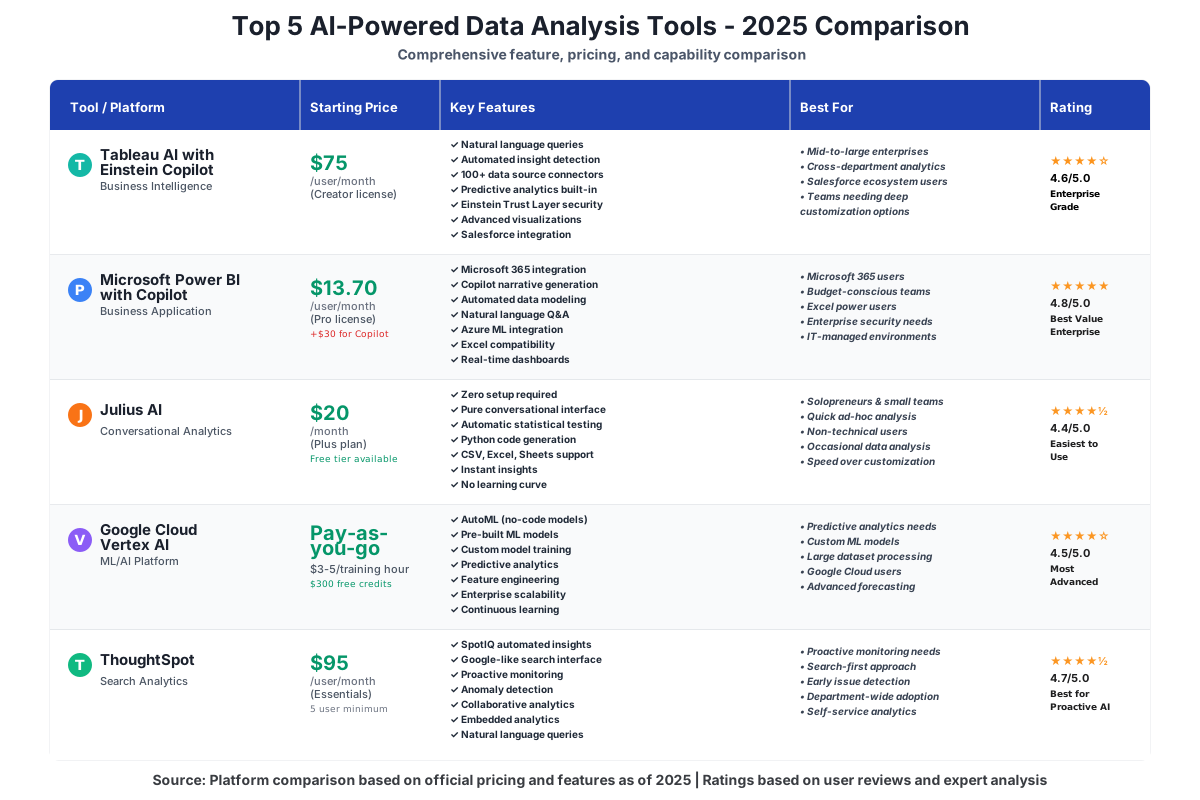
Pricing: The Creator license starts at $75/user/month (includes full Tableau Agent access), Explorer at $42/user/month (limited AI features), and Viewer at $15/user/month (view-only access). Annual commitments offer 15% savings. Free 14-day trial with full AI capabilities.
Best For: Mid-to-large businesses needing comprehensive analytics across departments, teams wanting to democratize data access without extensive training, and organizations already using Salesforce ecosystem tools.
2. Microsoft Power BI with Copilot
Microsoft Power BI with Copilot brings enterprise-grade AI data analysis directly into the Microsoft 365 environment most businesses already use. The Copilot integration transformed Power BI from powerful but complex into remarkably accessible, letting you build sophisticated reports using conversational commands.
What sets Power BI apart is seamless integration. If you’re working in Excel, Teams, SharePoint, or any Microsoft app, your data flows directly into Power BI without exports or conversions. Copilot acts as your personal analyst, understanding context from previous work and suggesting relevant analyses automatically.
Practical Use Case: Operations teams monitor real-time metrics across manufacturing facilities. Previously, this required custom dashboard development, which cost thousands and weeks of programmer time. Now, you tell Copilot: “Create a dashboard showing production efficiency, quality metrics, and downtime by facility, updating every hour.” Within minutes, you have a live dashboard that automatically refreshes, sends alerts when metrics fall outside targets, and provides drill-down capabilities.
Key Features That Boost Efficiency:
- Copilot’s narrative generation writes executive summaries of your data in plain English.
- Automated data modeling detects relationships between tables and creates optimized structures
- Smart visualizations suggest chart types based on data characteristics and analysis goals
- Natural language Q&A allows stakeholders to query reports conversationally
- Embedded AI insights use Azure Machine Learning to perform advanced analytics without coding
According to Microsoft’s Work Trend Index research, Copilot users in Microsoft 365 complete tasks 29% faster on average across searching, writing, and summarizing activities. For Teams meeting summaries specifically, users completed tasks nearly 4 times faster (3.8x) than without Copilot assistance.
Beginner Tips: Leverage Power BI’s tight Excel integration—import existing spreadsheets and let Copilot suggest how to enhance them with dynamic visualizations and automated updates. Use the template gallery to find industry-specific starting points. Enable automatic data refresh schedules so reports stay current without manual effort. Start with Power BI Desktop (free) to learn the basics before committing to a cloud service.
Pricing: Power BI Pro at $13.70/user/month (Copilot features require an additional Microsoft 365 Copilot license at $30/user/month), Premium at $20/user/month (enhanced AI capabilities), and Premium Per Capacity starting at $4,995/month (unlimited users, advanced features). The free desktop version is available for limited sharing.
Best For: Organizations heavily invested in the Microsoft ecosystem, teams needing enterprise-grade security and compliance, and businesses wanting IT-managed analytics with self-service capabilities for end users.
3. Julius AI
Julius AI represents a different approach to data analysis tools—pure conversational analytics with zero learning curve. There’s no interface to master, no dashboard building, and no configuration. You upload your data file, ask questions in natural language, and receive comprehensive analyses with visualizations, statistical tests, and actionable recommendations.
What makes Julius AI powerful is its accessibility. While Tableau and Power BI offer extensive customization and enterprise features, Julius focuses on one thing: getting answers fast. It’s the tool I recommend when someone says, “I need insights from this data by the end of the day,” and they’ve never used analytics software before.
Practical Use Case: A small business owner analyzing customer survey responses doesn’t have time to learn complex software. They upload the CSV file to Julius AI and ask, “What are customers most dissatisfied with, and what factors correlate with higher satisfaction scores?” Julius performs sentiment analysis, identifies themes in open-ended responses, runs correlation tests, generates visualizations showing key drivers of satisfaction, and provides specific recommendations—all in minutes.
Key Features That Eliminate Learning Curves:
- Zero-setup analysis works with CSV, Excel, Google Sheets, and direct data paste
- Contextual follow-up questions let you drill deeper naturally
- Automated statistical testing applies appropriate tests based on questions without requiring statistical knowledge.
- Code generation creates Python scripts for repeatable analyses
- Multi-format export saves results as reports, presentations, or raw data files
Beginner Tips: Start by asking broad questions, then narrow based on what Julius reveals—begin with “Summarize the key patterns in this data” before asking specific questions. Use Julius’s suggested follow-up questions to think like an analyst even if you aren’t one. When Julius provides Python code, save it even if you don’t understand it—you can reuse these scripts for similar analyses later.
Pricing: The Free tier includes 15 messages/month with basic analysis; Plus at $20/month for unlimited conversations and advanced statistics; Pro at $40/month adds large dataset support and priority processing; and Team plans start at $30/user/month with collaboration features.
Best For: Solopreneurs and small teams needing quick insights without software investment, anyone analyzing data occasionally rather than daily, and users who prioritize speed and simplicity over extensive customization.
4. Google Cloud’s Vertex AI
Vertex AI brings Google’s cutting-edge machine learning capabilities to data analysis in a surprisingly accessible package. While it carries “enterprise” positioning, recent updates introduced no-code interfaces and pre-built models, making advanced analytics achievable for non-technical teams. This is Google’s AI infrastructure—the same technology powering Search, YouTube recommendations, and Gmail—available for your business data.
What distinguishes Vertex AI is customization depth. Tableau and Power BI excel at business intelligence—understanding what happened. Vertex AI excels at predictive analytics—understanding what will happen. You’re building custom AI models trained specifically on your data, your patterns, and your business context.
Practical Use Case: An e-commerce company wants to predict which customers will churn next month. Using Vertex AI’s AutoML, they upload historical customer data, including purchase patterns, support interactions, and engagement metrics. Without writing code, they train a machine learning model identifying at-risk customers. The system automatically scores every customer monthly, integrates predictions into their CRM, and enables targeted retention campaigns.
Key Features That Deliver Advanced Capabilities:
- AutoML trains sophisticated models without coding or data science expertise
- Pre-built models for common tasks like forecasting, classification, and anomaly detection
- Feature engineering automation identifies which data attributes matter most for predictions
- Continuous learning updates models automatically as new data arrives
- Enterprise scalability handles datasets from gigabytes to petabytes without performance degradation
Beginner Tips: Begin with Vertex AI’s industry templates—retail forecasting, financial fraud detection, and customer segmentation—which provide working models you customize with your data. Use the data quality recommendations Vertex provides; fixing data issues before training dramatically improves model accuracy. Start with simple prediction tasks before attempting complex multi-variable forecasting.
Pricing: The model operates on a pay-as-you-go basis with no minimum fees—AutoML training costs typically $3-5 per training hour, predictions are $0.50 per 1,000 predictions, and storage is $0.02/GB/month. Pre-built APIs priced per 1,000 API calls ($1.50-5.00 depending on complexity). Free tier includes $300 in credits for the first 90 days.
Best For: Businesses needing predictive analytics and forecasting beyond historical reporting, organizations with unique data patterns requiring custom models, and teams ready to move beyond descriptive analytics into prescriptive recommendations.
5. ThoughtSpot
ThoughtSpot pioneered search-based analytics, and recent SpotIQ AI enhancements transformed it into an autonomous insight engine that actively monitors your data and alerts you to important changes—you don’t even need to ask questions. While other tools respond to queries, ThoughtSpot proactively tells you what you need to know.
The search interface feels remarkably like Google. Type “sales by region last quarter,” and ThoughtSpot understands intent, generates appropriate visualizations, and provides context. But SpotIQ goes further—it runs continuous analyses in the background, learning what matters to your business and surfacing unexpected insights automatically.
Practical Use Case: A retail chain’s revenue operations team uses ThoughtSpot to monitor store performance. Every morning, SpotIQ’s automated insights highlight anomalies: “Store 47’s average transaction value dropped 18% yesterday—correlation detected with new staff scheduling.” The team investigates immediately rather than discovering the issue in next month’s review. Over six months, this proactive alerting identified operational issues an average of 23 days earlier than traditional reporting methods.
Key Features That Provide Proactive Intelligence:
- SpotIQ’s automated insights continuously analyze data for significant changes, trends, and anomalies.
- Search-driven exploration understands natural language queries without learning query syntax.
- Personalized monitoring learns which metrics and dimensions matter to each user.
- Collaborative analytics allows teams to share insights, build on each other’s analyses, and maintain shared context.
- Embedded analytics integrates ThoughtSpot’s AI directly into existing applications and workflows.
Beginner Tips: Configure SpotIQ monitoring for your three most important business metrics first—revenue, key performance indicators specific to your role, and any metric with direct bottom-line impact. Use ThoughtSpot’s “teach me” mode, where the platform explains why it surfaced each insight. Create pinboards (ThoughtSpot’s dashboards) for common analyses you revisit, but rely on searches for exploratory questions.
Pricing: Essentials at $95/user/month (includes SpotIQ with usage limits), Pro at $125/user/month (unlimited AI insights and advanced features), and Enterprise pricing is custom quoted (typically $150–200/user/month with volume discounts, enhanced security, and dedicated support). Minimum: 5 users. Free 30-day trial with full features.
Best For: Organizations drowning in data that miss critical changes, teams needing proactive monitoring rather than reactive reporting, and businesses where early issue detection provides a significant competitive advantage.
Making the Right Choice for Your Needs
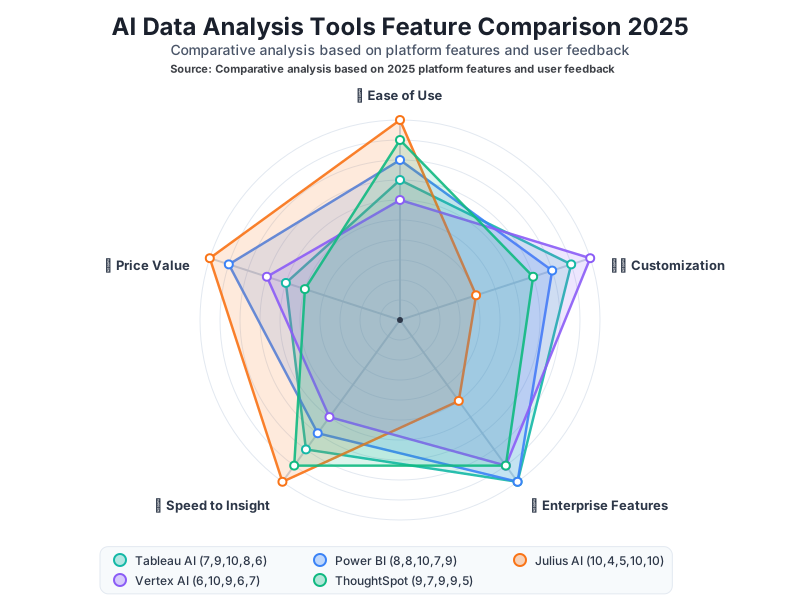
Selecting the right AI-powered data analysis tool depends less on which platform is “best” and more on matching capabilities to your specific situation. I’ve guided hundreds of teams through this decision, and successful implementations happen when you honestly assess three factors: your current technical capabilities, your data analysis frequency, and your integration requirements.
Choose Tableau AI when: You need comprehensive enterprise analytics with exceptional visualization capabilities, your organization has diverse data sources requiring unified analysis, you value profound customization and the ability to build complex analytical applications, and you have a budget for premium features.
Choose Power BI when: You’re already invested in the Microsoft ecosystem (Office 365, Azure, Dynamics); you need seamless integration with Excel and familiar Microsoft tools; you want enterprise-grade analytics with excellent value pricing; or you’re supporting users with varying technical skill levels.
Choose Julius AI when: Speed and simplicity outweigh extensive customization needs, you analyze data occasionally rather than continuously, you’re working solo or with a small team, budget constraints favor low monthly costs over enterprise features, or you need quick insights from varied data sources without software setup.
Choose Vertex AI when: You need predictive analytics and machine learning beyond historical reporting, you’re ready to build custom models for your unique business context, you have substantial data volume requiring cloud-scale processing, and you want Google’s AI technology applied to proprietary business challenges.
Choose ThoughtSpot when: You need proactive monitoring that surfaces insights automatically; you want search-based analytics that feel intuitive to non-technical users; early detection of changes provides significant business value; and you’re prioritizing analytics adoption across departments with varied skill levels.
Frequently Asked Questions
Taking Your First Steps with AI Data Analysis
The hardest part of improving your data analysis workflow isn’t learning the software—it’s making the decision to start. I’ve watched countless professionals delay adoption because they’re waiting for the “perfect time” or worried about making the wrong choice. Here’s the truth: any of these five tools will dramatically improve how you work with data, and the best time to start is today.
Begin with a trial period for two or three platforms matching your needs. Most offer 14-30 day free trials with full feature access—use this time to analyze a real project, not sample data. You’ll quickly discover which interface feels intuitive, which features matter most, and which platform integrates smoothly with existing tools.
Focus your trial on one specific pain point: a weekly report taking hours, a decision you’re making with insufficient data, or a pattern you suspect exists but can’t easily prove. Let the AI tool tackle that challenge. When you experience the time savings and insight quality firsthand, the value becomes undeniable.
Don’t aim for perfection in your first week. These platforms grow with you—start with basic questions and simple analyses, then gradually explore advanced features as confidence builds. The AI assistants built into each tool actively guide you toward better analyses.
Start your trial today. Pick one tool, upload one dataset, and ask one question. That first insight will show you why AI data analysis tools aren’t optional anymore—they’re essential for anyone who wants to work smarter in 2025 and beyond.
References:
IBM. “The Race for ROI.” IBM in partnership with Censuswide, October 2025. https://newsroom.ibm.com/2025-10-28-Two-thirds-of-surveyed-enterprises-in-EMEA-report-significant-productivity-gains-from-AI,-finds-new-IBM-studyMicrosoft. “What Can Copilot’s Earliest Users Teach Us About AI at Work?” Microsoft Work Trend Index, 2024. https://www.microsoft.com/en-us/worklab/work-trend-index/copilots-earliest-users-teach-us-about-generative-ai-at-work
About the Author
James Carter is a productivity coach specializing in helping professionals and businesses leverage AI tools to save time and boost efficiency. With over a decade of experience in workflow optimization and technology adoption, James has guided hundreds of teams through successful AI implementation journeys. His practical, results-focused approach demystifies complex technology and shows everyday users how to work smarter without requiring technical expertise. When he’s not exploring the latest productivity tools, James coaches executives on time management strategies and speaks at business conferences about the intersection of AI and workplace efficiency.