AI-Powered Task Prioritization: Your 5-Step Guide

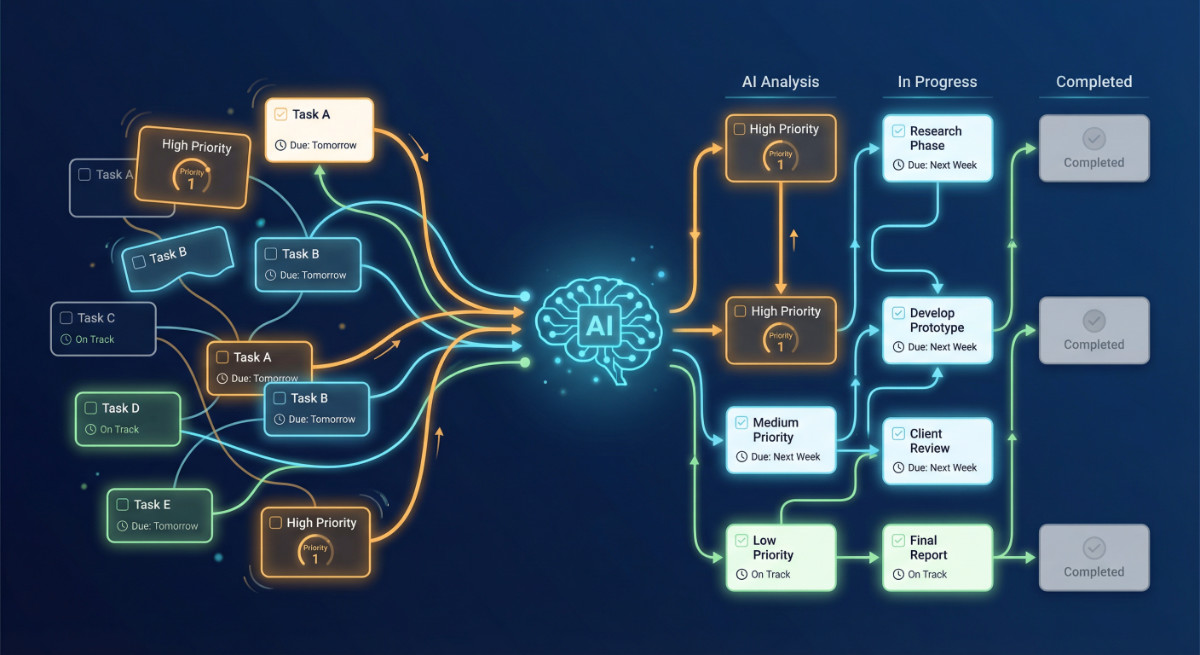
Managing multiple projects feels overwhelming when you’re drowning in tasks. I’ve been there—staring at endless to-do lists, wondering which fire to put out first. That’s where AI-Powered Task Prioritization transforms chaos into clarity. Instead of spending hours manually sorting tasks, AI algorithms instantly analyze dependencies, deadlines, and resources to tell you exactly what needs attention now.
This guide walks you through implementing AI task prioritization in your workflow, even if you’ve never used AI tools before. You’ll learn how these systems work, which tools to choose, and how to set them up step-by-step. By the end, you’ll automate the most time-consuming part of project management and focus on actually completing work instead of organizing it.
What Is AI-Powered Task Prioritization?
AI-Powered Task Prioritization uses machine learning algorithms to automatically rank your tasks based on multiple factors simultaneously. Unlike manual prioritization, where you might sort by deadline alone, AI considers task dependencies, team member availability, project milestones, estimated effort, and even historical completion patterns.
Think of it as having an extremely organized assistant who never sleeps. The AI continuously monitors your project landscape, identifies bottlenecks before they happen, and adjusts priorities as conditions change. When a team member calls in sick or a client moves up a deadline, the AI instantly recalculates the optimal task sequence across your entire project portfolio.
The technology works by analyzing patterns in your project data. It learns which types of tasks typically take longer, which dependencies cause delays, and which resources are most efficient for specific work types. Over time, the system becomes more accurate at predicting task duration and identifying the critical path through complex projects.
Why Project Managers Need AI Task Prioritization
Traditional project management methods break down when you’re juggling multiple projects with shifting priorities. I’ve watched talented managers spend two hours every Monday morning reorganizing their project boards—time that could be spent on actual strategic work.
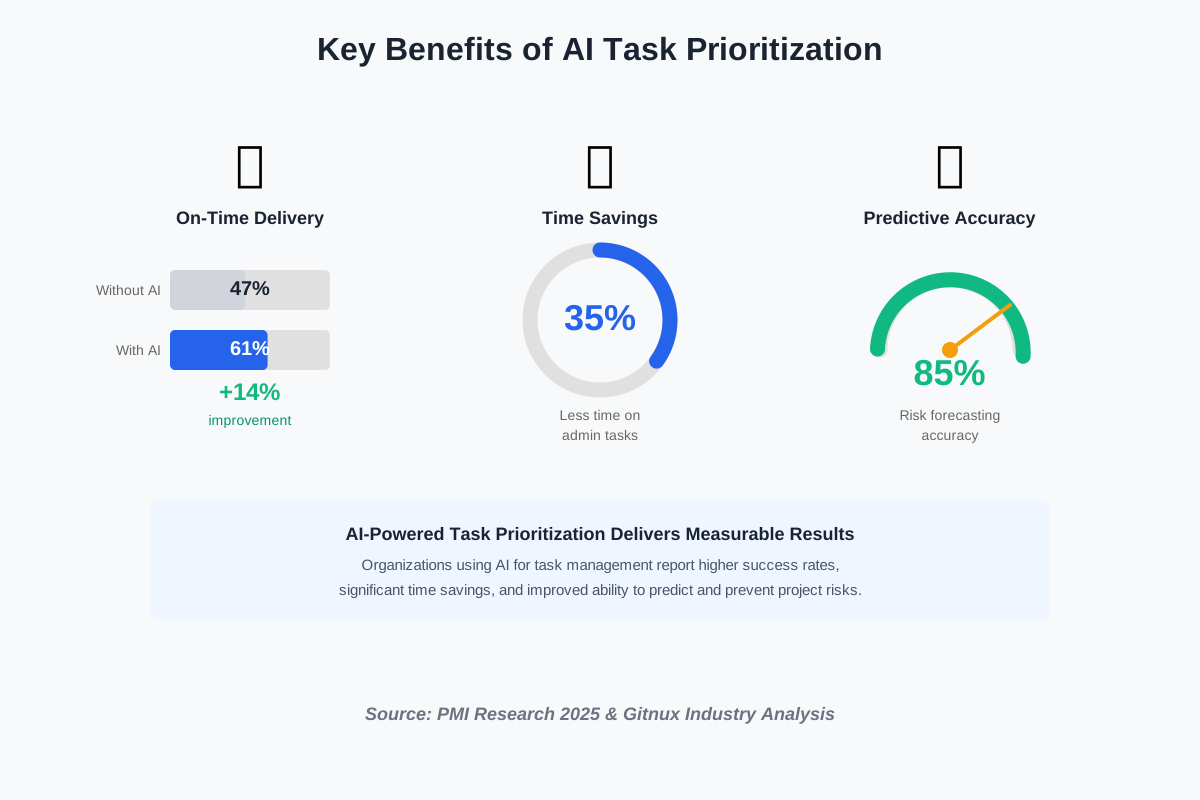
Machine learning algorithms solve three critical problems that plague traditional project management. First, they eliminate the bottleneck of manually updating priorities when circumstances change. Organizations implementing AI solutions report delivering 61% of projects on time compared to just 47% without AI tools, demonstrating how automation directly improves delivery reliability.
Second, AI prevents resource conflicts before they derail your timeline. When multiple projects compete for the same specialists, the system automatically identifies conflicts and suggests alternative resource allocations. This capability becomes invaluable in multi-project environments where manual coordination becomes mathematically impossible at scale.
Third, AI reduces the cognitive burden on project managers. Research indicates AI saves project managers up to 35% of their time on administrative duties like scheduling and progress tracking. That translates to roughly 14 hours per week that you can redirect toward strategic planning, stakeholder relationships, and team development—the high-value work that actually drives project success.
How AI-Powered Task Prioritization Actually Works
The technology behind automated task management combines several AI techniques working together. At the foundation sits a machine learning model trained on historical project data—thousands of completed tasks showing actual duration, dependencies, and outcomes.
When you add a new task to your project, the AI immediately analyzes multiple dimensions. It calculates the critical path by identifying which tasks block others from starting. It examines resource availability by checking team calendars and current workload. It estimates completion time by comparing the task to similar historical work. Then it assigns a dynamic priority score that updates continuously as conditions change.
The dependency mapping happens automatically through natural language processing. When you write “Design homepage mockup” followed by “Get client approval” and “Begin frontend development,” the AI recognizes the sequential relationship without requiring you to manually link them. This eliminates hours of diagramming work in traditional project management tools.
Real-time adjustments represent the most powerful aspect of AI prioritization. Imagine you’re managing three projects when a key developer announces unexpected sick leave. Within seconds, the AI recalculates priorities across all projects, identifies which tasks can be reassigned to other team members with similar skills, and flags which deliverables need stakeholder notification about potential delays. You receive a complete mitigation plan rather than scrambling to figure out the impact yourself.
Step-by-Step Guide to Implementing AI Task Prioritization
Step 1: Choose the Right AI Project Management Tool
Start by evaluating tools that offer genuine AI prioritization, not just automated reminders. Look for platforms that explicitly mention machine learning, predictive analytics, or intelligent scheduling in their feature list. Popular options include Monday.com with its AI assistant, ClickUp’s AI-powered task dependencies, and Asana Intelligence.
During your evaluation, test how the tool handles complex scenarios. Create a sample project with 20+ tasks, various dependencies, and resource constraints. See if the AI actually suggests meaningful priority changes or just sorts by deadline. The best systems will show you why they prioritized specific tasks, giving transparency into their decision-making logic.
Consider integration capabilities with your existing workflow. The AI tool needs access to your calendar, email, and communication platforms to accurately assess availability and urgency. Tools that work in isolation without understanding your broader context will provide mediocre prioritization results.
Step 2: Import Historical Project Data
Feed the AI system with past project information to improve its predictions. Export completed projects from your current tool, including task lists, actual completion dates, estimated versus actual hours, and final outcomes. Most AI platforms allow CSV imports or direct integrations with popular project management software.
Don’t worry if your historical data seems messy—AI systems excel at finding patterns even in imperfect information. Focus on getting at least three months of completed projects into the system. The more diverse your dataset (different project types, team sizes, and complexity levels), the better the AI learns your organization’s specific patterns.
Tag your historical projects with outcome labels: successful on-time delivery, delayed but delivered, cancelled, or scope-changed. This teaches the AI to recognize early warning signs of troubled projects based on task completion patterns and resource allocation decisions.
Step 3: Define Your Priority Criteria and Weights
Configure which factors matter most for your projects. Most AI tools let you adjust the importance of deadline proximity, estimated effort, number of dependencies, assigned resource seniority, and client priority level. Your configuration should reflect your organization’s actual decision-making process.
For example, if client deliverables always take precedence over internal improvements, set client-facing tasks with a higher base weight. If you typically address quick wins before tackling complex problems, configure the system to favor tasks with shorter estimated durations. The AI uses these preferences as guardrails while still applying its predictive capabilities.
Test your configuration with a pilot project before rolling out organization-wide. Run the project for two weeks, comparing the AI’s suggested priorities against what you would have chosen manually. Adjust weights based on discrepancies, then retest. Most teams need 2-3 iteration cycles to dial in settings that match their management philosophy.
Step 4: Set Up Automatic Data Collection
Enable all available integrations so the AI receives continuous updates about project status. Connect your time tracking software, communication tools, code repositories, and calendar system. The AI needs comprehensive visibility to make accurate prioritization decisions.
Configure automatic task status updates based on actual work patterns. If developers commit code related to a task, the AI should register progress even if they forget to manually update the task board. When meeting attendees include task numbers in calendar invites, the AI should note resource allocation for those items. This passive data collection reduces manual overhead while improving AI accuracy.
Schedule regular syncs with external data sources. Financial systems might provide budget consumption rates that affect priority. Customer relationship management platforms might flag high-value accounts whose projects deserve elevated attention. The AI becomes exponentially more valuable when it considers business context beyond just project mechanics.
Step 5: Monitor AI Decisions and Provide Feedback
Spend the first month actively reviewing the AI’s priority suggestions before implementing them blindly. When the AI recommends moving a task up or down in priority, examine its reasoning. Does it make sense given your knowledge of the project? This review process helps you understand the AI’s logic while also identifying any configuration gaps.
Implement a feedback loop mechanism. Most AI project tools include options to mark suggestions as “helpful” or “not helpful” with optional context. Use this religiously during your initial rollout. The AI improves faster when it receives specific feedback about which recommendations worked and which missed the mark.
Watch for systematic patterns in disagreements. If you consistently override the AI’s recommendations on a specific task type, that indicates a configuration problem or missing data source. Perhaps the AI doesn’t understand that tasks labeled “bug fix” should always receive high priority even if they have no dependencies. Add rules or adjust weights to align the system with your expertise.
Common Mistakes to Avoid When Using AI Task Prioritization
The biggest mistake I see beginners make is abandoning their judgment entirely. AI provides recommendations, not mandates. You bring irreplaceable context about team dynamics, client relationships, and strategic goals that no algorithm can fully capture. When the AI’s suggestion conflicts with your instinct, investigate why rather than automatically deferring to the machine.
Another frequent error is insufficient initial data. Expecting accurate prioritization from an AI system with only a week of historical information sets you up for disappointment. The algorithms need substantial pattern recognition before they provide reliable guidance. Plan for a learning period where the AI serves as a reference rather than your primary decision-making tool.
Many users also fail to update their priority criteria as business conditions evolve. The weights you set during initial configuration might become obsolete after a major client change or organizational restructuring. Review your AI configuration quarterly and adjust based on how your project priorities have actually shifted in practice.
Finally, don’t ignore tasks that the AI consistently ranks low. Sometimes genuinely important work lacks obvious urgency signals—maintenance, documentation, and technical debt reduction. Create manual override capabilities for strategic initiatives that deserve attention despite not fitting standard priority algorithms.
Frequently Asked Questions About AI Task Prioritization
Your Next Steps: Start Small and Scale Gradually
Begin your AI-powered workflow journey by selecting one pilot project rather than attempting to transform your entire organization overnight. Choose a project with moderate complexity—not your simplest work where AI adds little value, but not your most critical deliverable where risk tolerance is low. This middle-ground approach gives you realistic data while maintaining safe boundaries.
Dedicate 30 minutes daily during your first two weeks to reviewing AI suggestions and understanding its logic. This investment pays exponential dividends as you learn to work alongside the technology effectively. Schedule these reviews at the same time each day to establish habit formation—early mornings work well before daily urgency overwhelms your calendar.
Once your pilot project completes successfully, document specific improvements: actual time saved, number of deadline adjustments avoided, and team member satisfaction with workload distribution. These concrete metrics help you make the case for broader adoption while also identifying which aspects of AI prioritization delivered the most value for your specific context.
Share your learnings with colleagues before expanding to their projects. Create a simple one-page guide covering your configuration decisions, mistakes you corrected, and tips for effective AI collaboration. This knowledge transfer accelerates organization-wide adoption while building internal expertise that reduces dependence on external consultants.
The transition to AI-assisted project management doesn’t happen overnight, but each small step compounds. Start with one project today, learn from the experience, adjust your approach, and gradually expand. Within six months, you’ll wonder how you ever managed complex projects without intelligent prioritization working alongside you.
References
Primary Research Organizations:
- Project Management Institute (PMI) – AI in Project Management Reports
- PMI AI Innovators Report: “Cracking the Code on Project Performance”
- URL: https://www.pmi.org/learning/ai-in-project-management
- Community-Led Global Report: “Artificial Intelligence and Project Management”
- URL: https://www.projectmanagement.com/articles/1049056/the-ai-in-project-management-global-report–1-year-later–2025-and-beyond
- McKinsey & Company – The State of AI 2025 Report
- Title: “The State of AI in 2025: Agents, Innovation, and Transformation”
- Survey: 1,993 participants across 105 countries (conducted June-July 2025)
- URL: https://www.mckinsey.com/capabilities/quantumblack/our-insights/the-state-of-ai
- Alternate URL: https://www.mckinsey.com/capabilities/quantumblack/our-insights/the-state-of-ai-how-organizations-are-rewiring-to-capture-value
- Gartner Research – AI in Project Management
- Press Release: “Project Management Tasks to Be Eliminated as AI Takes Over”
- Prediction: 80% of PM tasks automated by 2030
- URL: https://www.gartner.com/en/newsroom/press-releases/2019-03-20-gartner-says-80-percent-of-today-s-project-management
Industry Statistics Sources:
- Epicflow – AI in Project Management Research (2025)
- Comprehensive analysis with KPMG data (15% productivity improvements)
- URL: https://www.epicflow.com/blog/ai-in-project-management-is-the-future-already-here/
- Published: August 29, 2025
- WifiTalents – AI in Project Management Industry Statistics (2025)
- Comprehensive statistical compilation
- URL: https://wifitalents.com/ai-in-the-project-management-industry-statistics/
- Published: June 1, 2025
- AI PM Tools – State of AI in Project Management (August 2025)
- Aggregated data from PwC, Gitnux, and other sources
- URL: https://aipmtools.org/ai-in-project-management-statistics
- Artsmart.ai – AI in Project Management: 2025 Trends and Statistics
- URL: https://artsmart.ai/blog/ai-in-project-management-statistics/
- Published: April 9, 2025
Additional Authoritative Sources:
- Celoxis – Top 10 Ways AI Transforming Project Management in 2025
- Practical use cases and implementation guidance
- URL: https://www.celoxis.com/article/ai-transforming-project-management
- Ravetree – Top 50 Project Management Statistics for 2025
- Comprehensive market statistics and trends
- URL: https://www.ravetree.com/blog/top-50-project-management-statistics-for-2025
- Work Insiders – AI Productivity Statistics (2025)
- 35 Eye-Opening AI Productivity Statistics
- URL: https://workinsiders.com/ai-productivity-statistics/
- Published: October 30, 2025
About the Author
This article was written by Abir Benali, a friendly technology writer who helps non-technical users understand and implement AI tools in their daily work. Abir specializes in breaking down complex AI concepts into actionable, beginner-friendly guidance that anyone can follow. With years of experience making technology accessible, Abir focuses on practical implementation strategies that deliver real results without requiring technical expertise.