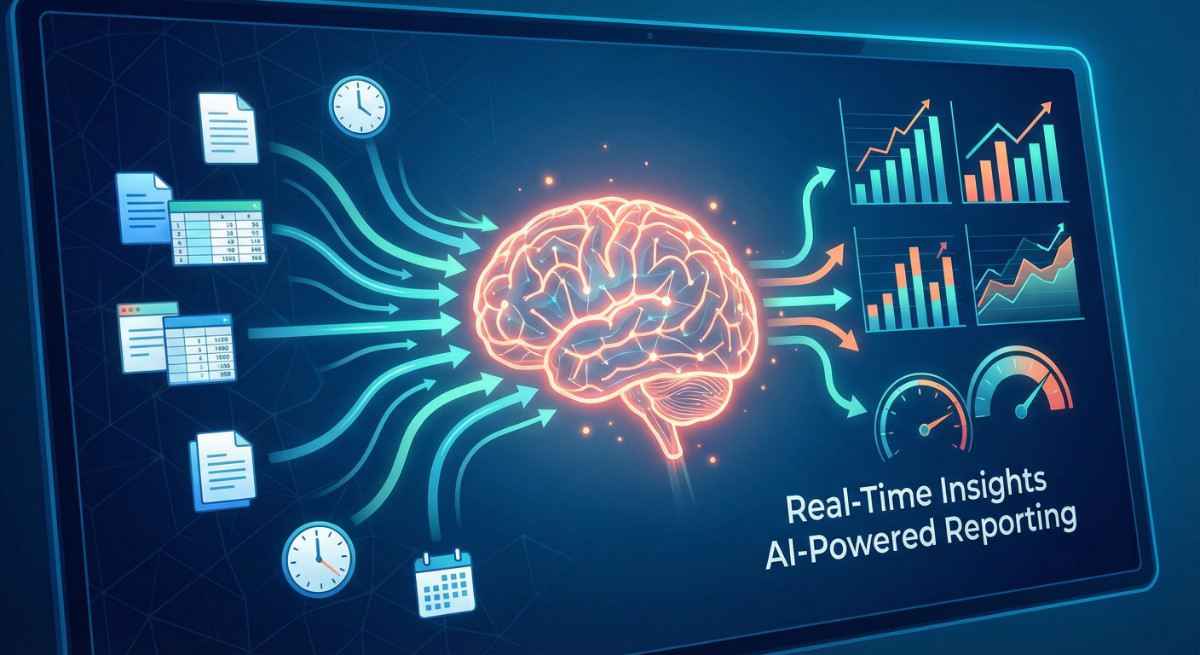
Automated Project Reporting with AI: Real-Time Insights

Automated project reporting with AI has transformed from a nice-to-have feature into an absolute necessity for project managers who want to stay competitive in 2025. I’ve spent years helping professionals optimize their workflows, and I can tell you this: the difference between managers drowning in spreadsheets and those leading with confidence often comes down to one thing—letting AI handle the reporting grunt work.
Here’s what makes this shift so powerful: according to McKinsey’s 2025 State of AI report, 88 percent of organizations now use AI in at least one business function McKinsey & Company, yet most are still stuck manually compiling project data. Meanwhile, the savvy ones using automated project reporting with AI are gaining hours back in their day and making better decisions with real-time data at their fingertips.
The beauty of AI-powered project reporting isn’t just about speed—though AI assists with time-consuming processes, enabling managers to dedicate 28% more effort to critical thinking and problem-solving. It’s about fundamentally changing how you lead projects. Instead of spending your afternoons updating status reports, you’re using that time to solve real problems, guide your team, and drive strategic initiatives forward.
In this guide, I’m sharing practical, actionable tips that any project manager can implement—regardless of technical background. These aren’t theoretical concepts; they’re battle-tested strategies that will transform your reporting from a weekly headache into an automated system that works while you sleep.
Why Automated Project Reporting Matters Now More Than Ever
Let me be direct: manual reporting is costing you more than you think. When most professionals spend 39% of their time on primary job duties while the rest goes to emails, meetings, and administration tasks, every hour saved on reporting is an hour gained for actual project leadership.
The real-time insights component is what changes the game. Traditional reporting gives you a snapshot of where things were yesterday or last week. AI-powered systems show you what’s happening right now—and more importantly, what’s likely to happen next. This predictive capability means you’re no longer playing catch-up with budget overruns or resource conflicts; you’re preventing them before they spiral.
Here’s what’s driving adoption: 64 percent of organizations say AI is enabling their innovation McKinsey & Company, and automated reporting is a foundational piece of that innovation. When your reporting runs itself, you free up cognitive bandwidth for the strategic thinking that actually moves projects forward.
10 Practical Tips for Implementing AI-Powered Project Reporting
1. Start with One Report Type and Perfect It
Don’t try to automate everything at once—that’s a recipe for overwhelm and abandonment. Pick your most painful, time-consuming report and focus there first. For most managers, that’s either the weekly status report or the monthly budget analysis.
How to do it: Identify the single report you dread most. Document exactly what data points it requires and where that data currently lives. Then configure your AI tool to pull those specific metrics automatically. Once that’s running smoothly for a month, add the next report type.
Time-saving tip: Your first automated report should save you at least 2-3 hours per week. If it doesn’t, you picked the wrong one. Go bigger or choose differently.
2. Connect All Your Data Sources for Comprehensive Reporting
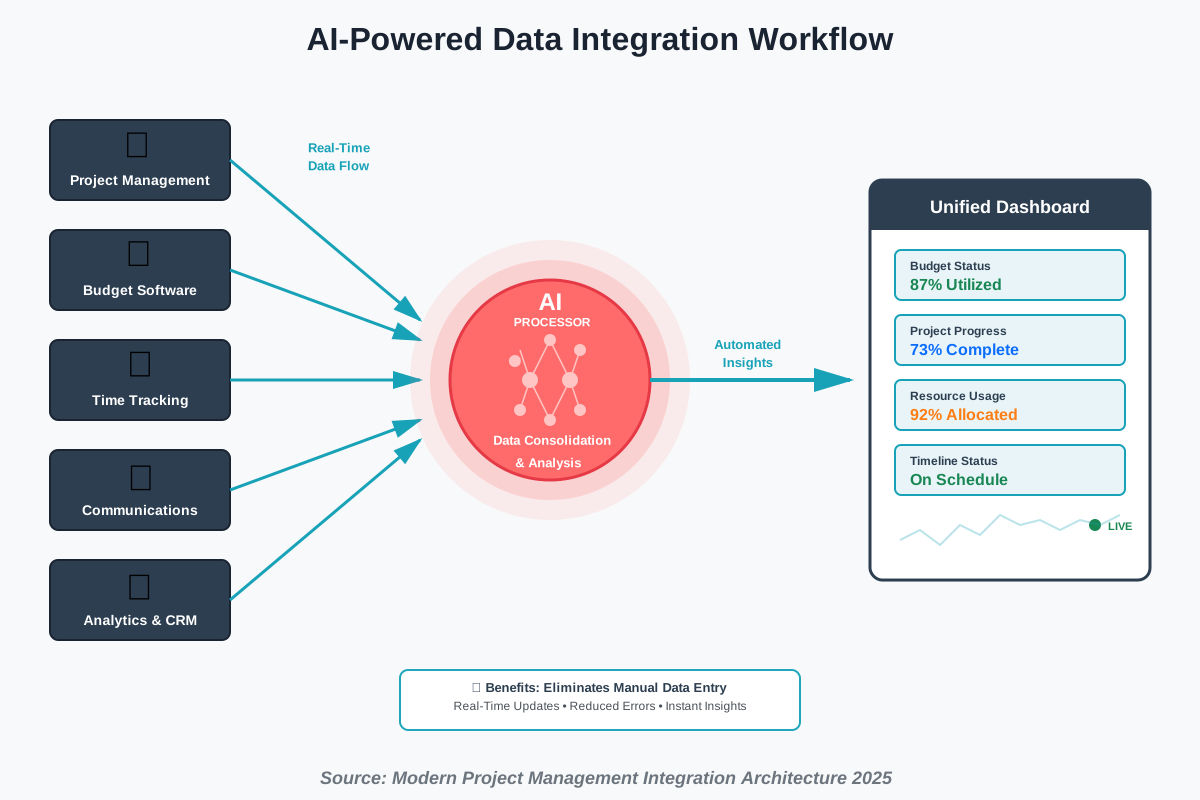
Automated project reporting with AI only works as well as the data it can access. The magic happens when your AI tool can pull information from your project management software, time tracking system, budget tools, and communication platforms simultaneously.
How to do it: Map out every tool your team uses that contains project data. Most modern AI reporting platforms offer pre-built integrations with major tools like Jira, Asana, Monday.com, Slack, and Microsoft Teams. Set up these connections one at a time, testing data flow after each integration.
According to research, automated systems link time data to financial tracking, allowing for real-time comparisons between planned and actual costs at every stage of project execution. This integrated approach means your reports automatically reflect reality, not someone’s manual update from three days ago.
Pro tip: If a critical tool doesn’t integrate directly, use automation platforms like Zapier or Make.com as a bridge. Yes, it’s an extra step, but comprehensive data beats perfect simplicity every time.
3. Set Up Custom Dashboards for Different Stakeholders
Here’s a truth that took me years to learn: your CEO doesn’t need the same report as your development team lead. Real-time insights mean different things to different people, and your AI system should reflect that.
How to do it: Create 3-4 dashboard views tailored to specific audiences. Executives need high-level metrics—overall budget health, milestone progress, and risk indicators. Team leads need operational details—task completion rates, resource allocation, and blockers. Clients need digestible progress updates without overwhelming detail.
Most AI reporting tools let you customize which metrics appear on each dashboard. Spend an hour setting these up properly, and you’ll never field another “can you send me a quick update on X?” email again.
Real-world application: AI-generated dashboards allow technical team leads to track migration metrics like data transfer rates and application uptime, while senior management can view overall project health metrics, including costs, timelines, and resource allocation.
4. Automate Report Distribution on a Schedule
The best report is the one that arrives automatically when stakeholders expect it. No reminders needed, no last-minute scrambles, and no forgotten updates.
How to do it: Configure your AI reporting system to automatically generate and send reports at specific intervals. Monday morning for weekly team updates. First business day of the month for executive summaries. Real-time alerts for critical thresholds like budget overruns or missed milestones.
This scheduled automation ensures consistency and builds trust. When stakeholders know they’ll receive updates reliably, they stop interrupting you for status checks.
Productivity hack: Set these to generate and send during off-hours. Having reports waiting in inboxes when people start their day makes you look incredibly on top of things—even though you were sleeping.
5. Implement Smart Alerts for Critical Metrics
Don’t wait for weekly reports to discover problems. Automated project reporting with AI should tap you on the shoulder the moment something important shifts.
How to do it: Define your critical thresholds—budget variance over 10%, tasks behind schedule by more than 3 days, or resource utilization below 60% or above 95%. Configure alerts that notify you (and only the relevant people) when these thresholds are crossed.
The key word here is “smart.” Too many alerts, and people ignore them all. Too few and you miss important signals. Start conservative with 3-5 critical alerts, then refine based on what actually matters in practice.
Warning: Resist the urge to set up alerts for every minor fluctuation. Alert fatigue is real, and it undermines the whole system. Focus on the metrics that demand immediate action.
6. Use Natural Language Queries for Ad-Hoc Insights
Modern AI reporting tools let you ask questions in plain English instead of building complex queries. This is transformative for managers who aren’t data analysts but still need quick answers.
How to do it: Instead of learning SQL or building pivot tables, simply type or speak your question: “What’s our budget burn rate this month?” or “Which team member has the most overdue tasks?” The AI interprets your intent and generates the answer instantly.
This capability means you can explore your data conversationally during meetings, respond to unexpected stakeholder questions on the spot, and investigate hunches without waiting for your data team to run a report.
Time-saver: Keep a running list of questions you find yourself asking repeatedly. These should become automated reports or dashboard widgets so you’re not even asking anymore—the information is just there.
7. Leverage Predictive Analytics for Proactive Management
This is where AI truly earns its keep. Instead of telling you what happened, predictive analytics tells you what’s likely to happen next—giving you time to course-correct.
How to do it: Enable predictive features in your reporting tool that analyze historical patterns to forecast future outcomes. Look for predictions on project completion dates, budget trajectory, resource needs, and risk probability.
The AI examines patterns humans miss: “When Task A runs late, Task C is 73% likely to also delay.” Armed with these insights, you intervene early rather than reacting to problems after they materialize.
Strategic advantage: Share these predictions proactively with stakeholders. When you say “based on current trends, we’ll need an additional developer in three weeks,” you look like a planning genius—but really, it’s just the AI doing its job.
8. Automate Time and Resource Tracking Integration
Manual time tracking is notoriously unreliable. People forget, round up, or simply guesstimate. Your AI reporting should pull actual logged time automatically, giving you accurate data without the nagging.
How to do it: Integrate your time tracking tool (Toggl, Harvest, Clockify, or built-in features from your project management software) directly with your reporting system. Automated systems record time entries directly from ongoing tasks, reducing manual effort and ensuring accuracy.
This integration means your resource utilization reports reflect reality, not fantasy. You’ll instantly see who’s overloaded, who’s underutilized, and where you need to rebalance workloads—all without sending a single “please update your timesheet” reminder.
Best practice: Make time tracking as frictionless as possible for your team. The easier you make it to log time accurately, the better your automated reports will be. Consider tools that auto-detect work sessions or integrate with calendars.
9. Create Workflow Templates for Recurring Projects
If you run similar projects repeatedly, you’re wasting time setting up reporting from scratch each time. Template your entire reporting workflow once, then clone it for each new project.
How to do it: Build a master reporting setup for your most common project type—complete with data connections, dashboard layouts, alert thresholds, and distribution schedules. When you start a new project, duplicate this template and adjust the specific details (project name, team members, dates).
This approach compounds efficiency. You’re not just automating individual reports; you’re automating the entire process of setting up automation.
Efficiency multiplier: Document your template setup process. When you bring on new project managers or expand your team, they can spin up comprehensive automated reporting in minutes instead of weeks.
10. Review and Refine Your Automation Monthly
Automation isn’t “set it and forget it.” The best project managers treat their reporting systems as living workflows that evolve with their needs.
How to do it: Schedule a monthly 30-minute review of your automated reporting. Ask yourself: Which reports aren’t being read? Which metrics no longer matter? What new questions keep coming up? What alerts are triggering too often (or not enough)?
Use these insights to prune what’s not working and expand what is. Maybe your weekly status report should be daily during crunch times. Maybe that budget variance alert threshold needs adjustment. Small refinements compound into significant improvements.
Only 39 percent of organizations report EBIT impact at the enterprise level from AI use McKinsey & Company, often because they implement tools but never optimize them. Don’t be part of that statistic. Active refinement is what separates AI users from AI masters.
Continuous improvement: Save your monthly review notes. Over time, you’ll see patterns in what works and what doesn’t, making each iteration smarter than the last.
Common Mistakes to Avoid
Even with the best intentions, certain pitfalls undermine AI reporting projects. Watch for these:
Over-automation too quickly: Start small, prove value, then expand. Trying to automate everything simultaneously overwhelms teams and leads to abandoned projects.
Ignoring data quality: AI amplifies whatever you feed it. Garbage in, garbage out. If your underlying data is inconsistent or inaccurate, your automated reports will be too. Invest in data hygiene before scaling automation.
Forgetting the human element: Automation handles reporting, but humans still make decisions. Make sure your reports are interpretable and actionable, not just data dumps. Context matters.
Not training your team: If only you knew how to access and interpret the automated reports, you’d have created a bottleneck, not a solution. Train your team to use these tools independently.
Assuming AI is perfect: AI makes mistakes, particularly with edge cases or unusual situations. Build in human review checkpoints for critical reports and decisions.
The Real ROI of Automated Project Reporting
Let’s talk numbers because that’s what gets budget approval. When managers implement automated project reporting with AI properly, the returns are substantial:
Time savings: The average project manager spends 6-8 hours per week on manual reporting tasks. Automation reclaims 80-90% of that time—roughly 5-7 hours weekly. Over a year, that’s 260-364 hours back in your calendar for actual project leadership.
Decision speed: High performers are more than three times more likely to say their organization intends to use AI to bring about transformative change to their businesses
McKinsey & Company. Real-time data enables faster, better-informed decisions. Instead of waiting for the weekly meeting to address issues, you’re course-correcting within hours.
Reduced errors: Manual data entry introduces mistakes. Automated data pulling eliminates transcription errors, version control issues, and the classic “forgot to update that one spreadsheet” problem.
Improved transparency: When stakeholders have self-service access to real-time dashboards, trust increases and micromanagement decreases. Everyone sees the same data simultaneously, reducing political disputes and finger-pointing.
Recommended Tools to Get Started
Based on real-world implementation experience, here are AI reporting tools that deliver results without requiring a data science degree:
For small teams (5-20 people): Monday.com or ClickUp with built-in automation features provide excellent reporting for teams just starting their automation journey. Both offer visual dashboards, basic AI insights, and straightforward integrations.
For medium organizations (20-200 people): Wrike or Smartsheet with advanced reporting modules handle complexity while remaining accessible. They offer sophisticated automation, predictive analytics, and enterprise-grade customization.
For large enterprises (200+ people): Domo or Power BI with AI capabilities provide enterprise-scale data integration, advanced analytics, and comprehensive governance. These platforms handle complex organizational structures and massive data volumes.
Specialized AI reporting: Tools like Forecast or Improvado focus specifically on AI-powered reporting and analytics, offering cutting-edge capabilities like natural language querying and advanced predictive models.
Budget-conscious option: Start with your existing project management tool’s built-in reporting features. Most modern platforms (Asana, Trello, Jira) have significantly upgraded their automation and reporting capabilities in 2025.
Getting Buy-In from Stakeholders
The technical implementation is only half the battle. Getting your team and leadership on board requires a different skill set.
Start with pain points: Don’t lead with “AI is cool.” Lead with “remember how we scrambled for three hours before last month’s board meeting trying to get accurate numbers? This eliminates that completely.”
Show quick wins: Implement one highly visible automated report first—something that everyone agrees is painful right now. When people see immediate benefit, resistance evaporates.
Emphasize control, not replacement: Make it clear that AI handles the tedious data compilation, but humans still make the strategic decisions. This reduces fear about job security and resistance to change.
Provide training and support: Resistance often stems from fear of the unknown. Offer hands-on training sessions, create simple how-to guides, and be available for questions during the transition.
Share the time savings: When your team gains back 5-7 hours per week, they notice. Let them experience that freedom, and they’ll become advocates for expanding automation further.
Frequently Asked Questions
Your Next Steps: Start Automating Today
The difference between project managers who thrive and those who struggle often comes down to one decision: choosing to let AI handle the reporting so they can focus on leading. You don’t need to implement everything at once, and you don’t need to be a technical expert.
Here’s your action plan for this week:
Day 1: Identify the single most time-consuming report you create regularly. Document exactly what data goes into it and where that data currently lives.
Day 2: Research AI reporting tools that integrate with your existing software. Most offer free trials—sign up for 2-3 and test them with your specific use case.
Day 3-5: Set up your first automated report in your chosen tool. Focus on getting it working end-to-end, even if it’s not perfect yet.
Day 6-7: Share the automated report with a small group and gather feedback. Refine based on what they actually need versus what you assumed they needed.
Within two weeks, you should have your first fully automated report running. Within a month, you’ll wonder how you ever managed without it. And within three months, you’ll be that project manager everyone else asks, “How do you always have accurate data ready instantly?”
The technology is here. The tools are accessible. The only question is: will you claim back those 5-7 hours per week and transform how you lead projects, or will you keep doing it the hard way?
The choice, as always, is yours. But I know which one leads to better projects, happier teams, and far less Sunday night anxiety about Monday’s status meeting.
References
- McKinsey & Company. (2025). The State of AI in 2025: Agents, Innovation, and Transformation. McKinsey QuantumBlack. https://www.mckinsey.com/capabilities/quantumblack/our-insights/the-state-of-ai
- ArtSmart AI. (2025). AI in Project Management: 2025 Trends, Stats, and Future Outlook. https://artsmart.ai/blog/ai-in-project-management-statistics/
- BigTime Software. (2025). Project Management Automation Guide. https://www.bigtime.net/blogs/project-management-automation/
- Celoxis. (2025). Top 10 Ways AI Transforming Project Management in 2025. https://www.celoxis.com/article/ai-transforming-project-management
About the Author
This article was written by James Carter, a productivity coach specializing in helping professionals leverage AI to save time and boost efficiency. With over a decade of experience in project management and workflow optimization, James has helped hundreds of teams transform their operations through smart automation. His practical, no-nonsense approach focuses on real-world implementation that delivers measurable results. When he’s not optimizing workflows, James is probably testing the latest productivity tools or teaching workshops on AI integration for business teams. Connect with him for more time-saving strategies and AI implementation guidance.