The Future of Graphic Design: AI’s Creative Revolution

The Future of Graphic Design isn’t about choosing between human creativity and artificial intelligence—it’s about understanding how these forces work together to create something entirely new. I’ve spent the last year exploring AI design tools, and I can tell you this: the designers who adapt will thrive, while those who resist may struggle. Let me show you exactly how to navigate this transformation.
According to the World Economic Forum in their “Future of Jobs Report 2025” (January 2025): Graphic design was identified as the 11th fastest-declining job category over the next five years, based on a survey of 1,000 employers representing over 14 million workers across 55 countries.
Source: https://www.weforum.org/publications/the-future-of-jobs-report-2025/
What’s Really Changing in Design?
The design industry is experiencing its biggest shift since Adobe Creative Suite replaced paste-up boards. AI-powered design tools are now generating logos in seconds, creating entire brand identities overnight, and automating tasks that once took hours. But here’s what most articles miss: AI isn’t replacing designers—it’s changing what design work looks like.
Traditional graphic designers spent 60-70% of their time on repetitive tasks: resizing images, adjusting layouts for different platforms, and creating variations of the same concept. AI handles these mechanical tasks instantly. What remains is the work only humans can do: understanding client needs, making strategic creative decisions, and adding the emotional intelligence that makes design meaningful.
Understanding the New Designer Role
From Creator to Creative Director
The designer’s role is evolving from hands-on creator to creative director. You’ll spend less time pushing pixels and more time:
Guiding AI outputs with precise prompts and strategic direction
Curating results from multiple AI-generated options
Refining machine-generated work with human judgment and taste
Focusing on strategy rather than execution
I recently worked with a small business owner who needed a complete rebrand. Instead of spending days creating initial concepts, I used AI to generate 50 logo variations in an hour. My real value came from understanding which direction matched her business goals, refining the chosen concept, and ensuring brand consistency across all materials.
The Hybrid Skillset You Need
The Future of Graphic Design requires a combination of traditional design knowledge and new technical skills:
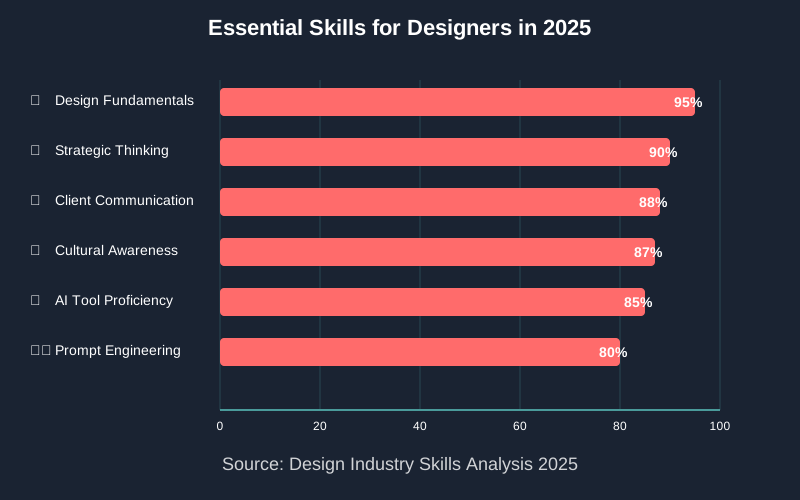
Design fundamentals remain critical. Color theory, typography, composition, and visual hierarchy matter more than ever. AI generates options, but you need strong fundamentals to recognize which outputs are actually beneficial.
Prompt engineering becomes essential. Learning to communicate clearly with AI tools is a skill in itself. The difference between mediocre and excellent AI output often comes down to how well you describe what you want.
Strategic thinking takes priority. You’ll spend more time understanding client goals, researching target audiences, and developing creative strategies. While the technical execution becomes faster, the importance of strategic thinking increases.
New Opportunities AI Creates
Expanded Services for Designers
AI design tools open doors to services you couldn’t offer before:
Rapid prototyping: Show clients multiple complete brand directions in your first meeting instead of rough sketches
Personalized design at scale: Create hundreds of customized variations for different audience segments
Animation and motion graphics: Generate basic animations without years of After Effects training
Faster iteration cycles: Make dramatic changes in minutes instead of hours, allowing more experimental work
I’ve added brand animation services to my offerings this year. Previously, I would have outsourced motion work or declined those projects entirely. Now I use AI animation tools to create social media content, logo animations, and simple explainer videos—services my clients desperately needed but couldn’t afford at traditional rates.
Breaking Into New Markets
AI democratizes access to professional design, which sounds threatening until you realize it also creates new client bases. Small businesses and startups that couldn’t afford a designer before can now afford hybrid human-AI services. This isn’t taking work from other designers—it’s creating an entirely new market.
The key is positioning yourself correctly. Don’t compete on price with pure AI solutions. Instead, offer the strategic thinking, brand expertise, and creative judgment that AI lacks.
Essential Skills for Tomorrow’s Designers
According to Designer Fund and Foundation Capital in their “State of AI in Design Report” (May 2025): 89% of designers reported that AI improved their design process in the past year, with the most significant impact occurring during the exploration and ideation phases.
Source: https://www.stateofaidesign.com/
Master These AI Tools
Start building proficiency with these categories:
Image generation: Tools like Midjourney and DALL-E for creating custom imagery
Layout automation: Platforms that generate responsive designs across devices
Brand identity systems: AI that creates comprehensive style guides and brand assets
Copywriting assistants: Tools that help develop headlines, slogans, and brand voice
Don’t try to learn everything at once. Pick one tool in one category and master it completely before moving on.
Develop Your Irreplaceable Human Skills
While learning AI tools, invest equally in skills machines can’t replicate:
Client communication: Understanding unstated needs and reading between the lines
Cultural awareness: Recognizing how design choices resonate with different audiences
Strategic thinking: Connecting design decisions to business outcomes
Emotional intelligence: Creating work that makes people feel something specific
These soft skills separate you from AI outputs. Technology handles execution; you provide meaning and purpose.
Build a Hybrid Portfolio
Your portfolio needs to showcase both traditional skills and AI-assisted design work. For each project, I recommend:
Showing your process: Document how you used AI in your workflow
Highlighting your decisions: Explain why you chose certain AI outputs over others
Demonstrating refinement: Show before and after comparisons where you improved AI-generated work
Emphasizing outcomes: Focus on how your designs solved client problems
Practical Steps to Adapt Now
Step 1: Audit Your Current Workflow
List every task you perform regularly. Identify which tasks AI could handle and which require human judgment. This clarity helps you prioritize where to implement AI tools.
For repetitive tasks like background removal, color palette generation, or social media resizing, find AI tools that automate them immediately. For strategic work like brand positioning or creative concepting, keep it human-centered while using AI for initial ideation.
Step 2: Start Small with One AI Tool
Choose a single AI tool that addresses your biggest time drain. Spend two weeks learning it thoroughly:
Complete the tutorials provided by the tool
Practice daily even on personal projects
Join community forums to learn from other users
Test limits to understand what the tool does well and poorly
I started with an AI background removal tool that saved me hours each week. That success motivated me to explore more complex AI applications.
Step 3: Experiment with Hybrid Projects
Take on personal or low-stakes projects where you combine traditional design skills with AI-powered design tools:
Create a fictional brand using AI for initial logo concepts, then refine manually
Redesign an existing brand using AI to explore directions you wouldn’t normally consider
Build a design system where AI generates components, which you then organize strategically.
These experiments build confidence before you incorporate AI into client work.
Step 4: Educate Your Clients
Many clients don’t understand how AI fits into the design process. Be transparent:
Explain your hybrid approach and how it benefits them
Emphasize your strategic role in guiding and refining AI outputs
Highlight faster turnarounds and more iterations within the budget.
Address quality concerns by showing examples of your refined work
I’ve found clients appreciate transparency. They care about getting excellent work efficiently, not whether a human or machine made the first draft.
Step 5: Invest in Continuous Learning
The Future of Graphic Design changes rapidly. Dedicate time weekly to learning:
Follow AI design communities on social media and forums
Try new tools as they launch
Attend webinars and workshops focused on AI in design.
Share knowledge with other designers to stay current
Common Concerns About AI in Design
Will AI Replace Human Designers?
Short answer: No. Long answer: AI replaces tasks, not designers. The profession transforms, but demand for design expertise remains strong. Clients still need someone who understands their business, makes strategic decisions, and ensures brand consistency.
Think of AI as powerful new software, not a replacement worker. When Photoshop launched, it didn’t eliminate photographers—it changed what photography work looked like. The same thing is happening with AI design tools.
How Do I Stay Competitive?
Focus on what makes you uniquely human: strategic thinking, emotional intelligence, and creative judgment. Build a hybrid skillset where you leverage AI for execution while providing the strategic direction and refinement only humans can offer.
The designers struggling most are those treating AI as a threat rather than a tool. Those thriving are the ones who learned AI tools quickly and repositioned themselves as creative strategists.
What About Design Quality?
AI outputs are only as good as the prompts guiding them and the humans refining them. Poor designers using AI produce poor work. Skilled designers using AI produce excellent work faster.
I’ve seen both extremes. Some designers generate AI images and ship them directly to clients with no refinement—the results look generic and soulless. Others use AI for ideation and rough drafts, then apply their expertise to refine outputs into polished, strategic solutions. The second approach consistently wins.
Challenges to Anticipate
Oversaturation of Generic Design
As AI tools become accessible to everyone, expect an influx of generic, template-based design work flooding the market. This actually works in your favor if you develop strong strategic and refinement skills.
Position yourself above the commodity design market. Offer consulting, brand strategy, and creative direction—services that require experience and judgment AI can’t replicate.
Client Education Needs
Many clients now think they can design everything themselves with AI. You’ll need to clearly articulate your value: the strategic thinking, refinement, and quality control that separate professional work from AI outputs.
Rapid Tool Evolution
New AI-powered design tools launch constantly, each promising to revolutionize the industry. You can’t learn them all. Develop a framework for evaluating new tools quickly and deciding which ones deserve your time.
Your Action Plan for the Next Six Months
Month 1-2: Audit your workflow, choose one AI tool, and master it completely through daily practice.
Months 3-4: Experiment with hybrid projects combining AI and traditional skills. Build portfolio pieces showcasing your process.
Months 5–6: Introduce AI into client work on smaller projects. Gather feedback, refine your approach, and document case studies.
Throughout this period, invest time weekly in learning about AI developments and connecting with other designers navigating this transition. The community support makes the learning curve much less steep.
Embracing the Evolution
The Future of Graphic Design isn’t something distant and uncertain—it’s happening right now. The choices you make today determine whether you’ll lead this transformation or struggle to catch up later.
I won’t pretend this transition is easy. Learning new tools while maintaining client work is challenging. But the alternative—ignoring AI until you’re forced to adapt—is far more difficult.
Start small. Pick one AI tool this week and spend 30 minutes exploring it. That small step begins your journey toward becoming the hybrid designer the industry needs.
The future belongs to designers who combine human creativity with AI efficiency. The technology handles execution; you provide the strategy, judgment, and emotional intelligence that make design meaningful. Master this balance, and you’ll find more opportunities than ever before.
Your clients need your expertise now more than ever—not despite AI, but because of it. They’re drowning in AI-generated options and desperate for someone who can guide them toward strategic, meaningful solutions. That’s your new role, and it’s more valuable than the old one ever was.
FAQ
References:
1. World Economic Forum – Future of Jobs Report 2025
- Full Title: “The Future of Jobs Report 2025”
- Organization: World Economic Forum
- Published: January 7, 2025
- Key Finding: Graphic design ranked as the 11th fastest-declining job category (surveyed 1,000 employers representing 14 million workers across 55 countries)
- URL: https://www.weforum.org/publications/the-future-of-jobs-report-2025/
- Direct PDF: https://reports.weforum.org/docs/WEF_Future_of_Jobs_Report_2025.pdf
2. Designer Fund & Foundation Capital – State of AI in Design Report
- Full Title: “The State of AI in Design Report 2025”
- Organizations: Designer Fund and Foundation Capital
- Published: May 21, 2025
- Key Finding: 89% of designers surveyed said AI improved their workflow in the past year; 84% said AI helps with the exploration phase
- Sample Size: Nearly 400 designers surveyed
- URL: https://www.stateofaidesign.com/
3. Adobe – Creators’ Toolkit Report
- Full Title: “Adobe Creators’ Toolkit Report”
- Organization: Adobe (in partnership with The Harris Poll)
- Published: October 28, 2025
- Key Findings:
- 86% of global creators use creative generative AI
- 85% would consider using AI that learns their creative style
- 70% are optimistic about agentic AI
- Sample Size: Over 16,000 content creators across 8 countries
- URL: https://news.adobe.com/news/2025/10/adobe-max-2025-creators-survey
4. The Business Research Company – AI-Powered Design Tools Market Report
- Organization: The Business Research Company
- Key Finding: Global AI-Powered Design Tools market expected to reach $15.06 billion by 2029 (at 22.1% CAGR)
- Market Growth: From $5.54 billion (2024) to $6.77 billion (2025)
- URL: https://www.thebusinessresearchcompany.com/report/ai-powered-design-tools-global-market-report
5. McKinsey & Company – The State of AI Global Survey 2025
- Full Title: “The State of AI: Global Survey 2025”
- Organization: McKinsey & Company
- Survey Period: June 25 – July 29, 2025
- Key Finding: 88% of organizations report regular AI use; 23% are scaling agentic AI systems
- Sample Size: 1,993 participants across 105 countries
- URL: https://www.mckinsey.com/capabilities/quantumblack/our-insights/the-state-of-ai
6. St. Louis Federal Reserve – Real-Time Population Survey on AI Adoption
- Full Title: “The State of Generative AI Adoption in 2025”
- Organization: Federal Reserve Bank of St. Louis
- Published: November 2025
- Key Finding: AI adoption increased from 44.6% (August 2024) to 54.6% (August 2025) among adults 18-64
- URL: https://www.stlouisfed.org/on-the-economy/2025/nov/state-generative-ai-adoption-2025
7. Stack Overflow – Developer Survey 2025
- URL: https://survey.stackoverflow.co/2025/ai
- Full Title: “2025 Stack Overflow Developer Survey – AI Section”
- Organization: Stack Overflow
- Published: July 29, 2025
- Key Finding: 80% of developers use AI tools; trust in AI accuracy fell from 40% to 29%
About the Author
This article was written by Abir Benali, a friendly technology writer who specializes in explaining AI tools to non-technical users. Abir focuses on making complex technology accessible through clear, practical guidance that anyone can follow. With a passion for bridging the gap between innovation and everyday users, Abir creates content that empowers readers to confidently embrace new tools and transform their workflows.