How to Select AI Tools & Organize Prompt Libraries

How to Select AI Tools & Organize Prompt Libraries Using AI starts with understanding one simple truth: the best AI tool is the one you’ll actually use consistently, and the best prompt library is one you can find things in. We’ve spent countless hours testing different combinations, and what we’re sharing here isn’t theory—it’s the exact system we use to manage our growing collection of AI tools and prompts.
Currently, you’re probably juggling ChatGPT, Claude, and a few other AI platforms. Each conversation disappears into a black hole, and that brilliant prompt you wrote last week? Gone.
We’ve been there, and we’re going to show you how to build a system that works.
Why This System Changes Everything
Before diving into the steps, let’s be clear about what you’re building here. This isn’t just about organization—it’s about creating a personal AI toolkit that evolves with you. When you can quickly find the right tool and the right prompt, you move from spending 30 minutes recreating work to executing in 30 seconds. That’s not an exaggeration; that’s what happens when your system actually works.
The breakthrough moment comes when you stop treating AI tools as isolated experiments and start building a connected ecosystem. We’re talking about selecting tools that complement each other, organizing prompts so they’re actually findable, and using AI itself to maintain the whole thing.
Step 1: Audit Your Current AI Tool Chaos
Start by making a brutally honest list of every AI tool you’ve tried in the past three months. Include the ones you used once and forgot about. We’re talking about ChatGPT, Claude, Gemini, Perplexity, specialized tools like Midjourney or ElevenLabs, and those random AI writing assistants you bookmarked.
For each tool, answer these questions in a simple document:
- When did you last actually use it?
- What specific problem were you trying to solve?
- Did it solve that problem better than alternatives?
- What friction stopped you from using it again?
We maintain a living spreadsheet where we track this. It’s not fancy—just tool name, last used date, primary use case, and a simple rating: Keep, Test More, or Drop. The “Test More” category is crucial because sometimes you abandon a tool before understanding its strengths.
Here’s what usually happens during this audit: you’ll discover you’re paying for three tools that do the same thing, you’ve forgotten about tools that could solve current problems, and you’re missing obvious gaps in your toolkit.
Step 2: Define Your Core Use Cases First
Here’s where most people get it backwards. They choose tools, then figure out what to do with them. We do the opposite.
Write down your five most frequent AI tasks. Not theoretical tasks—actual things you do or want to do weekly.
For us, it’s usually:
- Writing and editing content
- Brainstorming and ideation
- Research and summarization
- Code assistance and debugging
- Image generation and visual concepts
Your list will be different. Maybe you need AI tools for data analysis, customer service, or language translation. The point is specificity. “I need AI for work” is useless. “I need AI to draft client emails in my tone and then suggest three subject line options” is actionable.
Once you have your five core use cases, rank them by frequency and importance. This ranking determines which tools deserve premium access and which can be free-tier.
Step 3: Test AI Tools With Real-World Scenarios
Now comes the testing phase, but we’re not doing generic “hello world” prompts. Create a standardized test that reflects your actual work.
We use what we call the “3-Task Gauntlet.” Pick three real tasks from your recent work that represent your core use cases.
For example:
- Task 1: “Summarize this 3000-word article into key points with action items”
- Task 2: “Generate five social media post variations from this blog content”
- Task 3: “Analyze this data and suggest three insights I’m missing”
Run these exact same tasks through each AI tool you’re evaluating. Don’t change the wording—consistency is critical for fair comparison. Document the results, but also note how it felt to use each tool. Did the interface slow you down? Were the results easy to copy out? Could you continue the conversation naturally?
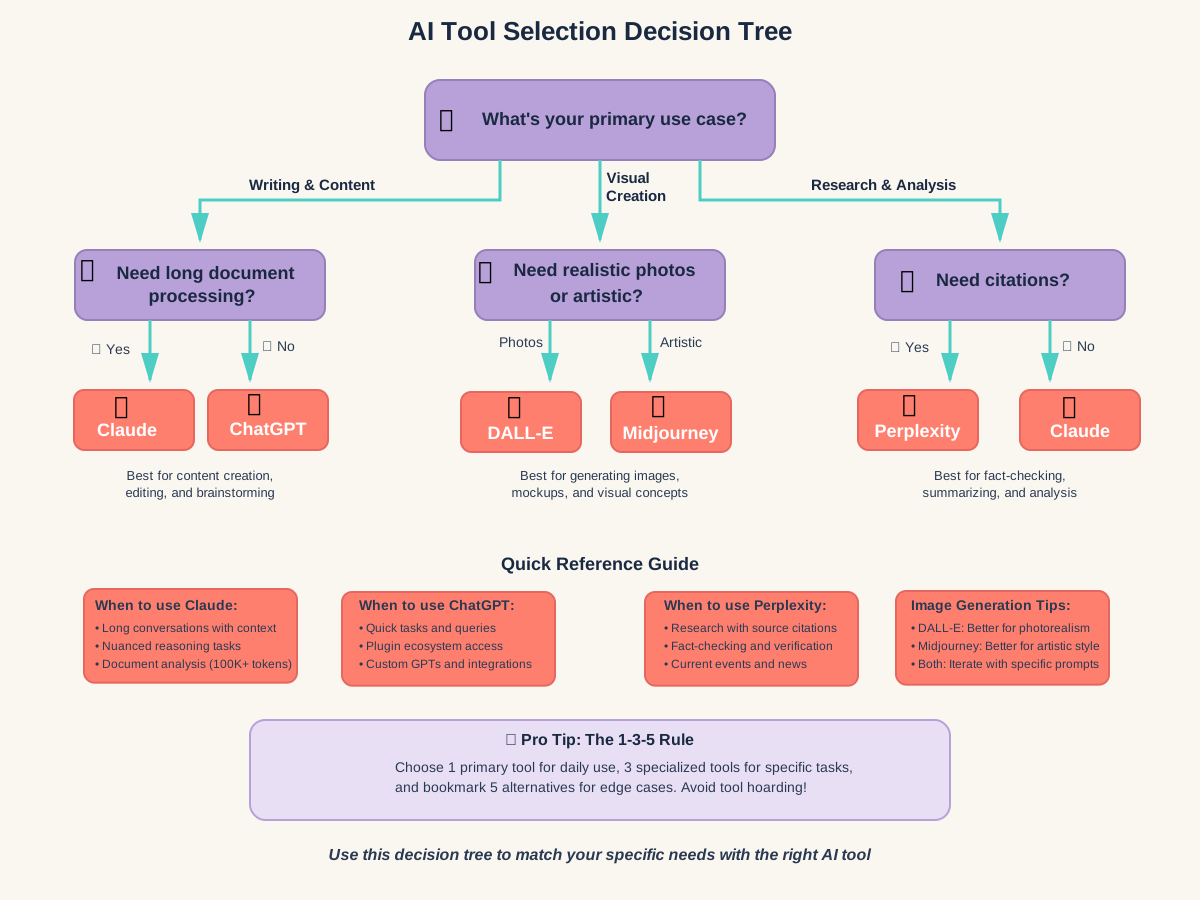
What we’ve discovered through countless tests: Claude excels at maintaining context through long conversations and nuanced reasoning, ChatGPT is often faster for quick tasks and has stronger plugin ecosystem integration, and Gemini can process much longer documents when you need to analyze extensive content.
But here’s the critical insight: you don’t need the “best” tool for everything. You need the right tool for each specific job. We use different AI platforms for different tasks, and that’s perfectly fine.
The Hidden Testing Variables
Beyond output quality, test these often-overlooked factors:
- Response speed: Does it take 2 seconds or 20 seconds to generate results?
- Conversation memory: Can it reference what you said five exchanges ago?
- File handling: Can you upload documents, images, or data files easily?
- Export options: How easy is it to get your results into your actual workflow?
- Mobile accessibility: Can you use it effectively on your phone when needed?
If you’re serious about mastering multiple platforms and optimizing your approach, we recommend grabbing a Prompt Tool Optimization Checklist that helps you systematically evaluate each tool against your specific needs. It’s designed to prevent the common mistake of choosing tools based on hype rather than actual fit for your workflow.
Step 4: Make Your Final Tool Selection (The 1-3-5 Rule)
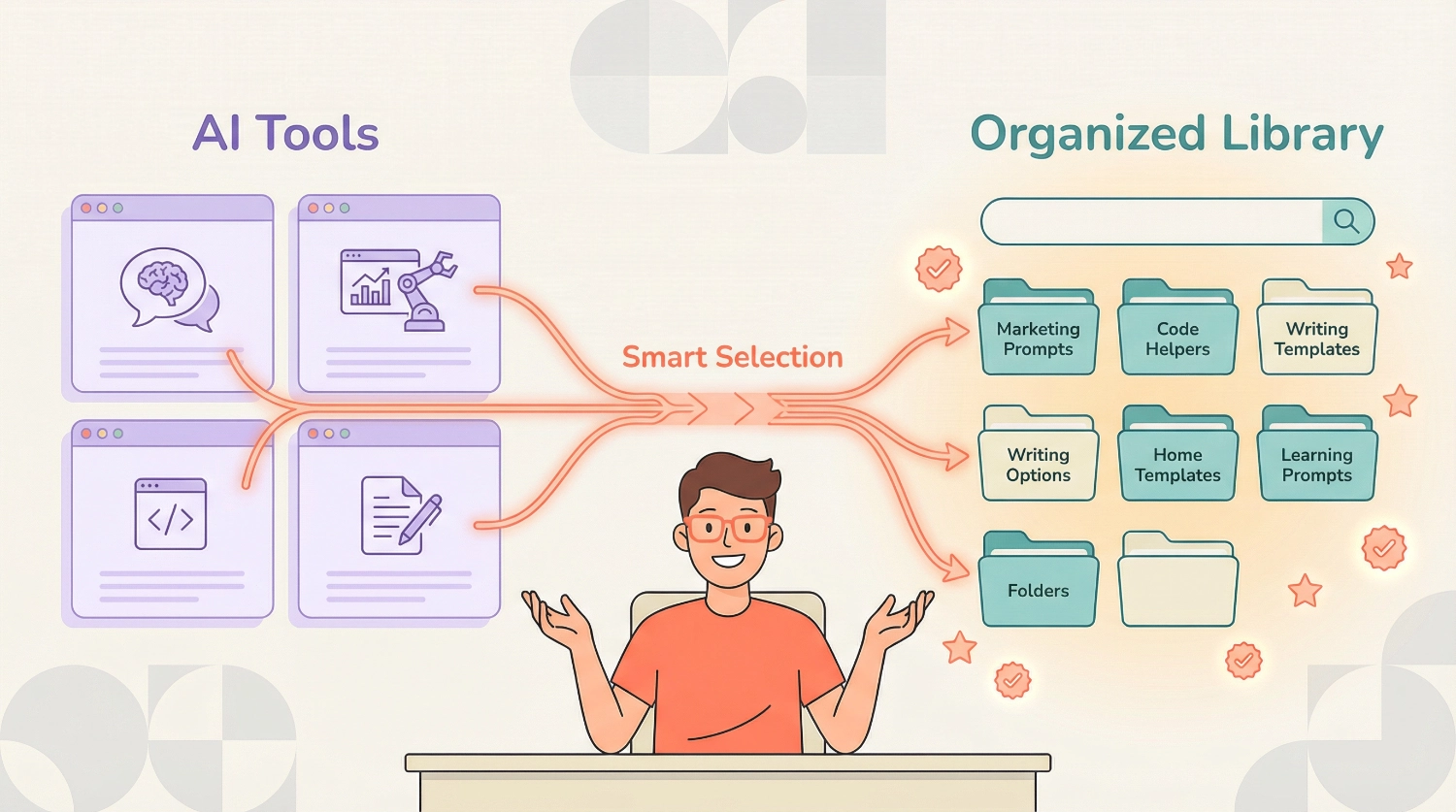
After testing, here’s our proven selection framework: one primary tool, three specialized tools, and five bookmarked alternatives.
Your primary AI tool is the one you’ll use daily for 70% of your tasks. This should be the tool with the best balance of capability, interface comfort, and reliability for your most frequent use cases. For most people, this means choosing between ChatGPT or Claude. We personally rotate depending on the project, but you should pick one and master it before expanding.
Your three specialized tools handle specific tasks that your primary tool doesn’t do as well. These might include:
- An AI image generator like Midjourney or DALL-E for visual content
- A specialized writing assistant like Jasper or Copy.ai if you do heavy marketing content
- A code-focused AI like GitHub Copilot if you’re a developer
- A research tool like Perplexity for fact-checking and source-gathering
Your five bookmarked alternatives are tools you keep ready but don’t use daily. These cover edge cases, provide backup when your primary tool is down, or offer unique features you need occasionally.
The mistake we see constantly: people try to actively use seven tools simultaneously. This creates cognitive overhead, subscription waste, and prompt library chaos. The 1-3-5 rule keeps you focused while maintaining flexibility.
Step 5: Create Your Prompt Library Structure
Now that you know your tools, let’s build a system that makes your prompts actually available. The goal isn’t perfection—it’s functionality.
We organize our prompt library using a three-tier structure:
Tier 1: Tool-Specific Folders Create a main folder for each AI tool you actively use. Inside each folder, your prompts are organized by that tool’s specific strengths. This acknowledges a reality people often ignore: the same prompt works differently across different AI platforms.
Tier 2: Category Subfolders Within each tool folder, organize by job category:
- Writing & Content
- Research & Analysis
- Creative & Brainstorming
- Technical & Code
- Personal & Productivity
Keep these categories broad. Over-organizing creates more friction than it solves.
Tier 3: Individual Prompt Files Each prompt gets its own file with a searchable naming convention:
[TOOL]-[CATEGORY]-[SPECIFIC-TASK]-v[VERSION].txt
For example:Claude-Writing-Blog-Outline-Creator-v2.txtChatGPT-Research-Competitor-Analysis-v1.txtMidjourney-Creative-Product-Mockup-v3.txt
The version number is crucial. As you refine prompts, increment the version rather than overwriting. Sometimes an older version worked better for specific contexts.
Step 6: Build Prompts That Actually Work
Here’s what separates working prompts from wishful thinking: specificity and structure.
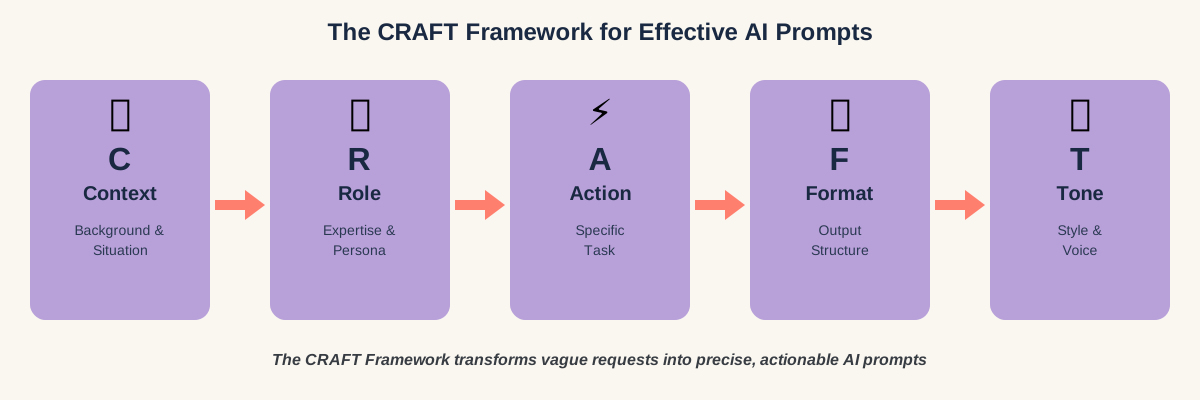
We build every prompt using the CRAFT framework:
C – Context: What background does the AI need to understand your request?
R – Role: What persona or expertise should the AI adopt?
A – Action: What specific task should it perform?
F – Format: How should the output be structured?
T – Tone: What style and voice should it use?
Let’s see this in practice. Here’s a weak prompt: “Write a blog post about productivity”
Here’s a CRAFT-structured prompt that actually delivers:
CONTEXT: I run a productivity blog for remote workers who struggle with work-life boundaries.

ROLE: You're a productivity coach with 10 years of experience helping remote teams.

ACTION: Write a 1500-word blog post about setting boundaries between work and personal life when working from home.

FORMAT: Include an engaging intro, 5 main strategies with examples, and a conclusion with 3 action steps.

TONE: Empathetic and practical, acknowledging that boundary-setting is difficult, not just a matter of discipline.
The difference in output quality is dramatic. The CRAFT framework forces you to think through what you actually need before hitting enter.
Step 7: Tag Your Prompts for Maximum Searchability
Even with organized folders, you need a tagging system. We add metadata to every prompt file using a simple header:
--- PROMPT METADATA ---
Tool: Claude
Primary Category: Writing & Content
Secondary Tags: Blog, SEO, Marketing, Beginner-Friendly
Use Case: Creating blog outlines for non-technical topics
Success Rate: High (8/10 runs produce usable results)
Last Updated: 2025-01-09
---
This metadata serves two purposes: it makes prompts searchable using your computer’s file search, and it helps you remember context when you revisit prompts months later.
For tags, use a consistent vocabulary. Don’t tag something “fast” in one prompt and “quick” in another. Create a master tag list and stick to it. Our core tags include:
- Tool names (Claude, ChatGPT, Midjourney, etc.)
- Job functions (Writing, Research, Analysis, Creative, and Technical)
- Output types (Blog, Email, Code, Image, and Summary)
- Difficulty levels (Beginner-Friendly, Intermediate, and Advanced)
- Quality indicators (High-Success, Experimental, and Needs-Refinement)
Step 8: Use AI to Organize Your AI Prompts
Here’s the meta-move that changed everything for us: we use AI itself to maintain and improve our prompt library. This feels recursive, but it’s incredibly practical.
Every week, we run a maintenance prompt through Claude that reviews our prompt library structure:
I have a prompt library with the following structure:
[paste your current folder/file structure]

Analyze this organization and suggest:
1. Duplicate prompts that could be consolidated
2. Categories that have grown too large and need splitting
3. Prompts that seem misplaced based on their names
4. Naming inconsistencies I should fix
5. Missing categories based on the prompts I have

Format your response as a prioritized action list.
This maintenance routine takes 10 minutes weekly and prevents the slow decay that kills most organizational systems.
We also use AI to improve individual prompts. When a prompt produces inconsistent results, we ask Claude or ChatGPT:
This prompt sometimes gives great results and sometimes misses the mark:
[paste your prompt]

Recent outputs ranged from excellent to mediocre. Analyze what might be causing inconsistency and suggest how to make this prompt more reliable and specific.
The AI typically identifies vague language, missing constraints, or unclear formatting requirements that you overlooked.
Step 9: Implement Version Control for Your Best Prompts
Your most-used prompts will evolve. Instead of overwriting them and losing what worked, implement simple version control.
When you modify a prompt, save the new version as a separate file with an incremented version number. Keep a changelog at the top of each prompt file:
--- CHANGELOG ---
v3 (2025-01-09): Added specific word count requirement and tone specification
v2 (2024-12-15): Included CRAFT framework structure
v1 (2024-11-20): Initial prompt creation
---
This practice has saved us countless times. Often, a “better” prompt works well for one use case but performs worse for another. Having access to previous versions lets you match the prompt to the context.
For your top 10 most-used prompts, consider keeping a dedicated “Versions” subfolder with all iterations. This seems excessive until the day you need to understand why version 3 worked better than version 5.
Step 10: Create a Prompt Testing Workflow
Before adding any prompt to your main library, test it. We use a three-run rule: run the same prompt three times and evaluate consistency.
Document your testing in a simple format:
PROMPT: [Name and tool]
RUN 1: [Brief result summary and quality rating 1-5]
RUN 2: [Brief result summary and quality rating 1-5]
RUN 3: [Brief result summary and quality rating 1-5]
CONSISTENCY: [Low/Medium/High]
DECISION: [Add to library / Needs refinement / Discard]
This testing workflow prevents your library from filling with untested experiments. We’ve found that prompts with high consistency (where all three runs produced similar quality) perform reliably in real-world use.
Low-consistency prompts aren’t necessarily bad—they just need refinement or work better for certain AI models than others. Occasionally what seems like inconsistency is actually the prompt working well in some contexts but poorly in others, which suggests it needs more specific constraints.
Step 11: Build Smart Search Systems
Your prompt library is only useful if you can find what you need in under 30 seconds. We use three search methods simultaneously:
File System Search: The native search on Mac (Spotlight) or Windows (Everything) searches inside text files. Because we add metadata tags to every prompt file, searching for “blog + SEO + beginner” instantly surfaces relevant prompts.
Spreadsheet Index: We maintain a simple spreadsheet that lists every prompt with columns for: Filename, Tool, Category, Description, Tags, Success Rate, Last Updated. When we need something fast, we search this spreadsheet first.
AI-Powered Search: This is the secret weapon.
We created a Claude prompt specifically for searching our library:I need a prompt for [describe your current need]. Here's my prompt library index: [paste your spreadsheet data or file list] Which existing prompts might work for this need? Suggest the top 3 matches and explain why each might fit. If none match well, explain what kind of prompt I should create.
This meta-search often uncovers prompts we forgot about or suggests combinations of existing prompts for complex tasks.
Step 12: Schedule Regular Library Maintenance
Organizational entropy is real. Without maintenance, your beautiful system becomes cluttered within months. We schedule library maintenance every two weeks using this checklist:
Biweekly Maintenance (15 minutes)
- Review prompts added in the last two weeks
- Test any marked as “Experimental”
- Update success rates based on recent use
- Consolidate any duplicate or very similar prompts
- Archive prompts not used in 60+ days to an “Archive” folder
Monthly Deep Clean (45 minutes)
- Review archived prompts—delete or restore them
- Update documentation for top 10 most-used prompts
- Check for category sprawl (too many subcategories)
- Update your tool selection based on current needs
- Test one alternative tool to stay current with options
Quarterly Strategy Review (2 hours)
- Audit your core use cases—have they changed?
- Evaluate whether your primary and specialized tools still fit
- Review success rates across all prompts to identify patterns
- Consider new AI tools that have launched recently
- Update your prompt library structure if needed
Setting calendar reminders for these maintenance sessions is crucial. Without scheduled maintenance, even the best system deteriorates.
If you want to accelerate this entire process with battle-tested templates, check out this collection of 100+ proven AI prompts used by solo entrepreneurs and creators. These are immediately implementable examples that show you exactly how high-performing prompts are structured across different tools and use cases—which dramatically shortens your testing and refinement phase.
Common Mistakes That Kill Prompt Libraries
We’ve made every mistake possible while building this system. Here are the ones that matter most:
Mistake 1: Perfect Organization Paralysis People spend weeks designing the “perfect” folder structure before adding a single prompt. Start messy. Organize as you go. Your system should evolve with your needs, not predict them perfectly.
Mistake 2: Tool Hoarding
Signing up for every new AI tool creates confusion, not capability. Stick to the 1-3-5 rule religiously. You can always add tools later when you identify specific gaps.
Mistake 3: No Prompt Testing Adding prompts to your library without testing them first pollutes your system with unreliable options. Always run the three-run consistency test before committing a prompt to your main library.
Mistake 4: Generic Naming Prompt filenames like “good-writing-prompt.txt” or “chatgpt-content.txt” are useless three months later. Be specific and descriptive. Your future self will thank you.
Mistake 5: Ignoring Tool-Specific Optimization A prompt that works perfectly in Claude might fail in ChatGPT and vice versa. Don’t assume portability. When you find a great prompt, note which tool it’s optimized for and create tool-specific versions if needed.
Advanced: Cross-Reference Your Prompts with Projects
Once your basic system runs smoothly, add project-based organization. We create a “Projects” folder that references prompts from the main library rather than duplicating them.
For example, if you’re working on a product launch, create a project file:
PROJECT: Product Launch - January 2025
GOAL: Launch new AI writing tool

RELEVANT PROMPTS:
- Claude-Writing-Landing-Page-Copy-v3
- ChatGPT-Marketing-Feature-Benefit-Transformer-v2
- Midjourney-Creative-Product-Screenshot-v1

CUSTOM PROJECT PROMPTS:
- [Any prompts specific to this project only]

NOTES:
- Landing page copy works best with Claude
- Use ChatGPT for social media variations
This project-based approach lets you quickly assemble the right toolkit for specific initiatives without losing the systematic organization of your main library.
How to Handle Tool-Specific Features
Different AI tools have unique capabilities that your prompt library should account for. Here’s how we handle the most common distinctions:
Claude’s Artifacts Feature: We mark prompts that intentionally use Claude’s artifact generation (for creating documents, code, or web components) with an [ARTIFACT] tag. These prompts typically include requests for specific file formats.
ChatGPT’s Custom GPTs: When we create prompts intended for custom GPT configurations, we store them in a “Custom-GPTs” subfolder with the GPT name and purpose clearly indicated.
Image Generation Tools: Prompts for Midjourney, DALL-E, or Stable Diffusion go in separate tool folders because they use completely different prompt structures (keywords, style modifiers, aspect ratios) compared to text-based AI.
Plugin/Extension-Enabled Prompts: Some prompts rely on plugins (like web browsing, code execution, or file analysis). We tag these as [REQUIRES-PLUGIN: web-search] or [REQUIRES-PLUGIN: code-interpreter] so we don’t waste time running them in contexts where they’ll fail.
This tool-specific awareness prevents frustration and wasted time trying to force prompts to work in environments they weren’t designed for.
Real-World Example: Our Current System in Action
Let’s walk through how we actually use this system daily. This morning, we needed to create a social media strategy for a new product feature.
Step 1: Opened our spreadsheet index and searched for “social media strategy”
Step 2: Found three relevant prompts:
– ChatGPT-Marketing-Social-Strategy-Generator-v4 (90% success rate)
– Claude-Marketing-Campaign-Framework-v2 (85% success rate)
– ChatGPT-Marketing-Platform-Specific-Posts-v3 (95% success rate)
Step 3: Started with the strategy generator in ChatGPT because of its high success rate for this task
Step 4: Used the output from ChatGPT as input for the platform-specific posts prompt (also ChatGPT)
Step 5: Total time from need to finished social strategy: 12 minutes
Without this system, we’d have spent 30 minutes trying to remember which prompts worked, another 20 minutes recreating prompts from memory, and probably would have ended up with mediocre results. The system isn’t just about organization—it’s about speed and consistency.
Measuring Success: Knowing When Your System Works
How do you know if your tool selection and prompt library actually work? We track three simple metrics:
Time-to-Output: How long from identifying a need to having usable AI-generated results? If this isn’t consistently under 15 minutes for routine tasks, your system needs refinement.
Prompt Success Rate: What percentage of your saved prompts produce immediately usable results on the first run? Aim for an 80%+ success rate across your most-used prompts.
Tool Utilization: Are you actually using your specialized tools, or has everything reverted to just using your primary tool? If specialized tools sit unused, either they’re the wrong choices or you need better prompts for them.
Document these metrics casually in your maintenance sessions. You don’t need precise measurement—directional accuracy is enough. If you notice success rates dropping or time-to-output increasing, it signals that your system needs attention.
Frequently Asked Questions
Your Next Steps Start Today
Building an effective tool selection and prompt library organization system isn’t a weekend project—it’s an evolving practice. But you can start seeing benefits immediately with just these three actions:
Action 1: Spend 30 minutes today auditing your current AI tools using the questions from Step 1. Create that simple spreadsheet with the tool name, last used date, and keep/test/drop rating. This single document will clarify which tools actually deserve your time and money.
Action 2: Pick your five most frequent AI tasks and write them down. Be ruthlessly specific. This clarity drives every other decision in your system and prevents tool collection without purpose.
Action 3: Create your basic prompt library structure today. Even if you only have five prompts, organize them properly with the tool-category-task naming convention and metadata headers. Starting with good structure is easier than reorganizing chaos later.
The system we’ve shared here evolved from our frustration with disappearing prompts and tool overload. It’s not perfect, and yours won’t be either—that’s fine. The goal is functional, not flawless. An imperfect system you actually use beats a perfect system you never implement.
As you build your library, you’ll discover patterns in what works for you. Some people need visual organization with color-coded folders. Others prefer ultra-minimal text-based systems. The principles remain the same: test thoroughly, organize consistently, maintain regularly, and use AI to improve your AI usage.
Remember, the best AI tool is still the one you’ll actually use tomorrow. And the best prompt library is the one where you can find what you need in under 30 seconds. Everything else is just details.
About the Authors
This article was written as a collaboration between Alex Rivera and Abir Benali, combining creative experimentation with practical clarity.
Main Author: Alex Rivera is a creative technologist who helps non-technical users unlock AI’s creative potential. Alex approaches AI as a collaborative creative tool rather than a replacement for human ingenuity and specializes in helping people build workflows that enhance rather than automate their unique creative process.
Co-Author: Abir Benali is a friendly technology writer passionate about making AI accessible to everyone. Abir focuses on translating complex technical concepts into clear, actionable steps that anyone can follow, regardless of their technical background. His approach emphasizes practical implementation over theoretical understanding.
Together, we bring both the creative exploration and systematic clarity needed to build AI systems that actually work in daily practice. We test everything we write about, and this system reflects what genuinely works for us—refined through countless experiments, mistakes, and adjustments.