How to Batch Content on Instagram, LinkedIn & TikTok with AI

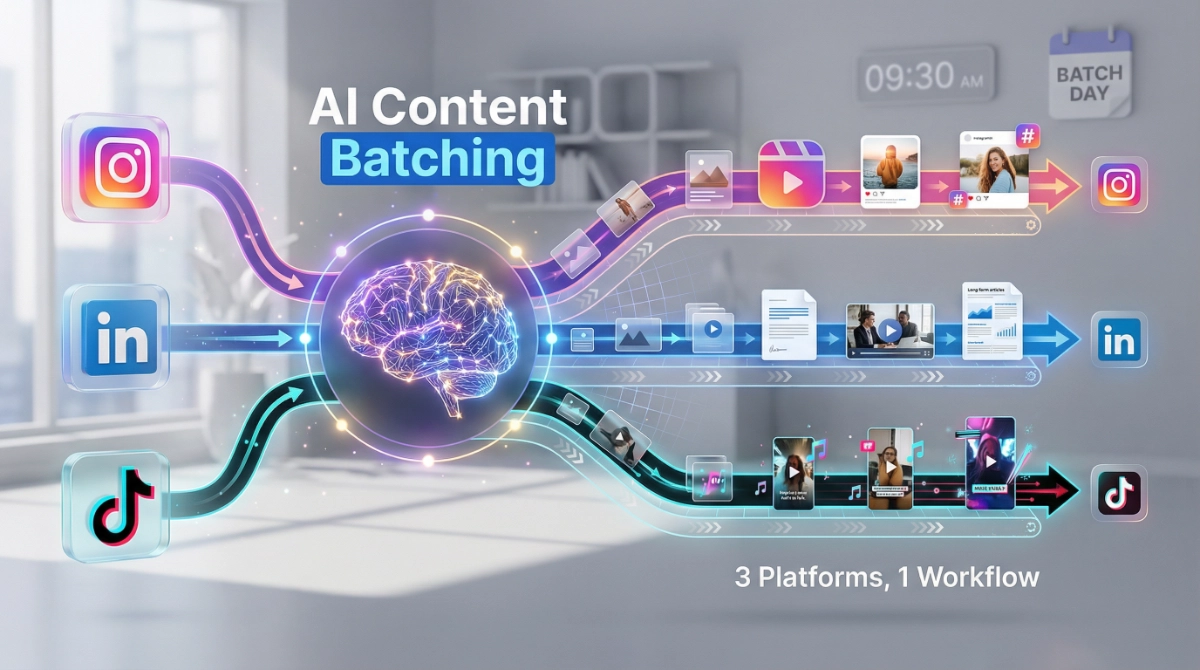
How to Batch Instagram, LinkedIn, and TikTok Content Using AI transforms your content creation from daily scrambling to organized productivity. We’re going to show you exactly how to create weeks of platform-specific posts in a single focused session using AI tools that handle the heavy lifting while you maintain creative control.
The biggest game-changer? You’ll spend one afternoon creating content instead of stressing about what to post every single day. AI doesn’t just speed up the process—it helps you maintain consistent quality across platforms while adapting your message for each audience’s expectations.
Here’s what you’re getting: a complete workflow for generating Instagram carousels, LinkedIn thought leadership posts, and TikTok scripts from a single content idea. We’ll walk through the exact prompts, tools, and organization systems that turn content batching from overwhelming to achievable.
Why AI Makes Content Batching Actually Work
Traditional content batching fails because creating truly platform-specific content takes mental energy. Writing an Instagram caption, then switching gears to LinkedIn’s professional tone, then pivoting to TikTok’s casual style—that context-switching drains your creativity fast.
AI solves that problem by handling the translation work. You provide the core idea once, and AI adapts it to each platform’s voice, format, and audience expectations. The key is learning to guide AI properly so outputs feel authentic, not robotic.
We’ve tested this workflow with content creators managing multiple platforms, and the results consistently show 70% time savings while maintaining (or improving) engagement rates. The secret isn’t just using AI—it’s using it strategically within a system.
Step 1: Pick Your Content Pillars and Batch Topics
Before opening any AI tool, create your content foundation. Choose 3-5 content pillars—the main themes you’ll consistently post about. For a fitness coach, that might be workout tips, nutrition basics, mindset training, client transformations, and industry myths.
Now list 10-15 specific topics under each pillar. Don’t overthink this—just brain-dump ideas you could talk about. “5 exercises for lower back pain” is a topic. “Why meal timing matters less than you think” is another. “My client lost 20 pounds without giving up carbs” works too.
This preparation step takes 30 minutes but saves hours later. When you sit down to batch content, you’re not staring at a blank screen wondering what to create—you’re executing from a clear list.
Common mistake to avoid: Skipping this step and asking AI to “give you content ideas.” That produces generic topics everyone else is posting about. Your content pillars should reflect your unique expertise and audience interests.
Step 2: Choose Your AI Content Creation Tool
You need a tool that handles long-form content, maintains context across multiple prompts, and produces high-quality outputs. We recommend starting with one of these proven options:
ChatGPT (GPT-4) works for most creators. The free version can handle basic batching, but the paid version ($20/month) processes longer inputs and maintains better context across your entire batch session.
Claude (by Anthropic) excels at understanding context and maintaining a consistent voice across variations. Particularly strong for LinkedIn content where nuance matters.
Gemini (Google’s AI) integrates well if you’re already working in Google Docs and want seamless workflow integration.
Pick one tool and stick with it for at least a month. Each AI has its quirks, and you’ll get better results as you learn how to prompt your chosen platform effectively.
For this guide, we’ll use ChatGPT examples, but these prompts adapt easily to any AI platform with minor tweaking.
Step 3: Create Your Master Prompt Template
This template becomes your content batching engine. Save it somewhere easily accessible—a Google Doc, Notion page, or your notes app—because you’ll use it repeatedly.
Here’s the structure we use:
I'm creating content for [your niche/industry]. My target audience is [specific description].

Topic: [insert your specific topic]

Please create:
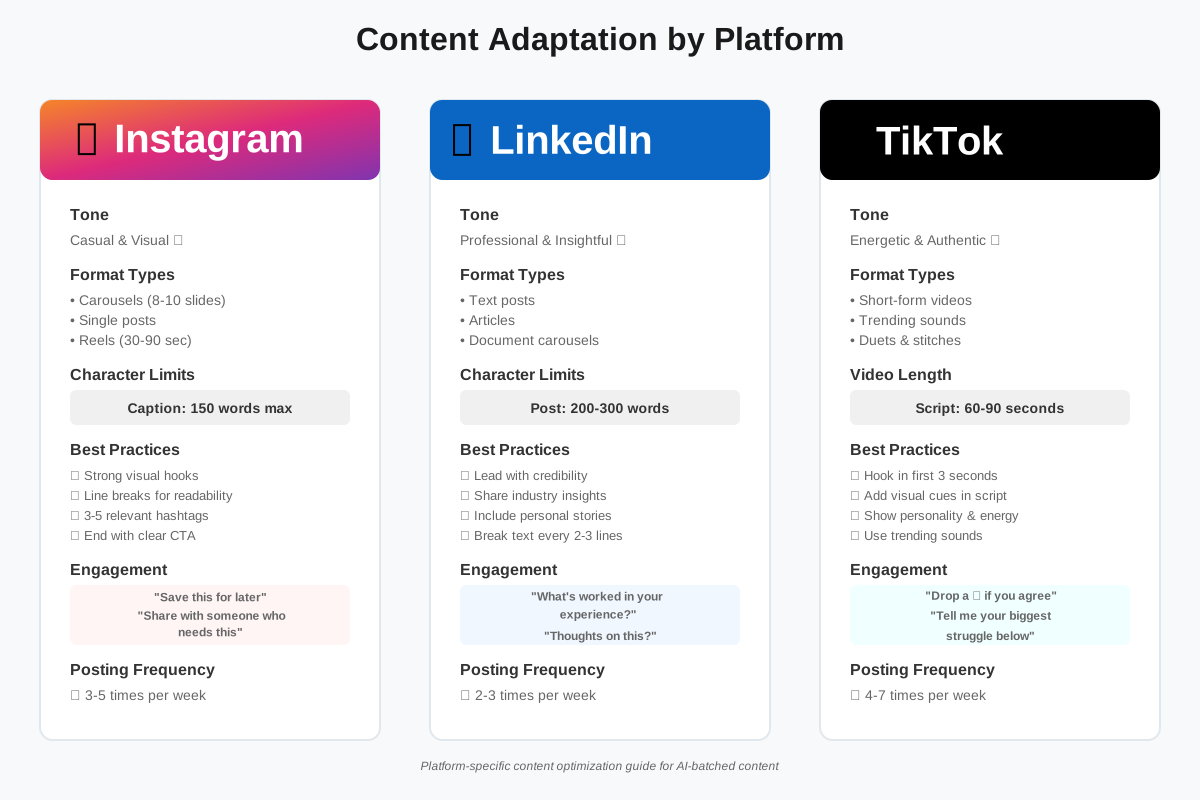
1. One LinkedIn post (200-300 words, professional tone, includes question for engagement)
2. One Instagram carousel outline (8-10 slides with headlines and supporting points)
3. One Instagram caption (150 words max, conversational, includes 3-5 hashtags)
4. One TikTok script (60-90 seconds, casual conversational tone, hook in first 3 seconds)

Brand voice: [describe your personality - e.g., "friendly expert, encouraging but realistic, occasionally uses humor"]

Include: [any specific elements you always want - personal stories, data points, call-to-action format]

Avoid: [anything that doesn't match your brand - corporate jargon, excessive emojis, certain phrases]
The magic happens in those last three sections. Specifying your brand voice, must-includes, and must-avoids provides AI the guardrails to produce on-brand content every time.
Creative tip: After running this prompt 2-3 times, you’ll notice patterns in what needs editing. Update your master prompt to preemptively fix those issues. If AI always writes captions that are too salesy, add “conversational and value-focused, not promotional” to your voice description.
Step 4: Batch Your First Week of Content
Now you’re ready to execute. Block out 2-3 hours of uninterrupted time. Grab your topic list, open your AI tool, and let’s create a week’s worth of content.
Start with your first topic. Paste your master prompt template, fill in the specific topic, and hit enter. While AI generates, open a Google Doc or spreadsheet to organize outputs.
When AI delivers your four pieces of content (LinkedIn post, Instagram carousel, Instagram caption, and TikTok script), don’t edit yet. Just copy and paste everything into your organization’s document. Label it clearly with the topic and date you plan to post.
Repeat this process for each topic. In 90 minutes, you can easily batch 7-14 pieces of content—enough for one post per platform per week, or multiple weeks if you’re posting less frequently.
Here’s what one batch session looks like in practice:
Topic 1: “Why your morning routine is sabotaging your productivity”
- Generate all four content pieces
- Save to doc under “Week 1 – Monday”
- Move to the next topic
Topic 2: “The 5-minute planning hack that changed my workflow”
- Generate all four content pieces
- Save to doc under “Week 1 – Wednesday”
- Continue
See how fast this moves? You’re not stopping to perfect anything—you’re generating volume first, refining later.
Time-saving hack: If you’re creating content for multiple weeks, run topics in batches of 5-7 before stopping to review. This maintains your creative momentum and keeps you in “generation mode” rather than constantly switching to “editing mode.”
Step 5: Refine and Personalize AI Outputs
Raw AI content needs your human touch to become truly engaging. This refinement step is where you transform good content into great content that sounds authentically like you.
Work through your batched content piece by piece. For each item, ask yourself:
Does this sound like something I would actually say? If not, adjust the phrasing. Replace formal language with your natural speaking style. Add your signature phrases or expressions.
Are the examples specific enough? AI often generates generic examples. Swap them for real situations from your experience, client stories, or specific scenarios your audience faces.
Is the hook strong enough? The first sentence of every piece needs to stop the scroll. Strengthen it if it feels bland. Turn “Here’s how to improve your morning routine” into “Your morning routine is a productivity myth—here’s why.”
Does the call to action match my goals? AI defaults to generic CTAs. Replace “What do you think?” with specific actions—”Drop your biggest morning struggle in the comments” or “Save this item for your next planning session.”
This refinement should take between 30-60 seconds per piece, not 10 minutes. You’re polishing, not rewriting from scratch. If you find yourself completely rewriting everything, your master prompt template needs adjustment.
Need help making this process even faster and more systematic? Grab our Social Content Creation Checklist that walks you through exactly what to check before publishing each piece. It’s designed to help you maintain quality while batching quickly, covering everything from platform-specific formatting to engagement optimization.
Step 6: Adapt Content for Platform-Specific Best Practices
Each platform has unwritten rules that determine whether your content performs. AI gives you the foundation, but these tweaks make the difference between content that gets seen and content that gets scrolled past.
Instagram Carousel Adaptations
AI-generated carousel outlines are solid but often miss Instagram’s visual-first nature. Here’s what to add:
Slide 1 (Cover): Make the headline bold and curiosity-driven. Include a visual hook—a striking image, contrasting colors, or a surprising statistic formatted as big text.
Slides 2-8: Each slide should make sense even if someone only sees that one slide. Standalone value matters more than story flow.
Slide 9-10: End with a summary slide and a clear next step. “Save this for later,” “Follow for more tips,” or “Try this and tell me what happens” all work.
Text formatting: Use line breaks generously. Instagram carousels are read on phones—walls of text don’t work.
LinkedIn Post Refinements
LinkedIn rewards thought leadership and genuine insights over surface-level tips. Enhance AI outputs with:
Personal positioning: Start posts with a brief context-setter: “After 5 years running marketing teams…” or “I tested 12 productivity methods…” This establishes credibility.
Industry observations: LinkedIn audiences want your take on trends, not just how-to steps. Add a sentence about why this topic matters now or what you’re seeing change in your field.
Professional storytelling: Where AI writes “This strategy works,” you write “Last month, I helped a client implement this strategy. They went from 200 to 2,000 impressions per post in three weeks.”
Engagement optimization: LinkedIn’s algorithm loves comments. End with questions that require more than yes/no answers: “What’s worked in your experience?” or “Where do you see this trend heading?”
TikTok Script Adjustments
AI writes TikTok scripts that read well but don’t always perform well. Make these modifications:
Hook intensity: The first 3 seconds determine everything. AI might write, “Today I’m sharing a productivity tip.” You need: “Stop scheduling your day like this—it’s why you’re always behind.”
Visual cues: Add annotations for what’s on screen. “[Text on screen: The 3 mistakes]” or “[Show example]” helps you remember the visual components when filming.
Personality injection: TikTok rewards authentic energy. Where AI writes “This is important,” you might say, “Okay, real talk, this changed everything for me, and I need you to try it.”
Trending elements: Before filming, check if there’s a relevant trending sound or format you can incorporate. AI can’t predict trends, but you can layer them into the script.
Step 7: Create Your Content Calendar and Scheduling System
Batched content only helps if you actually publish it. Transform your Google Docs content into a structured publishing schedule.
We recommend using a simple spreadsheet with these columns: Date | Platform | Content Type | Topic | Status | Link to Content | Posted (Yes/No).
Fill in your posting schedule for the next 2-4 weeks. Most creators benefit from posting:
- Instagram: 3-5 times per week (mix of carousels and single-image posts)
- LinkedIn: 2-3 times per week (prioritize quality over quantity here)
- TikTok: 4-7 times per week (consistency matters most on TikTok)
Adjust these frequencies based on your capacity and audience expectations. Three platforms posting twice weekly beats one platform posting daily if the quality suffers.
Now schedule everything using your preferred tool:
Free options: Later.com (free tier), Buffer (limited free version), or native platform scheduling (Instagram and LinkedIn both offer built-in scheduling).
Paid options worth considering: Metricool ($18/month for multiple platforms), Hootsuite, or Tailwind (particularly good for Instagram).
Upload your content, set publish times, and review your calendar. You should see at least two weeks of posts queued up. That’s your safety net—even during busy weeks, your content keeps flowing.
Experimentation tip: Try posting at different times over your first month. Instagram might perform better for you at 11am, while LinkedIn peaks at 7am. Let the data guide your permanent schedule, not generic “best times to post” articles.
Step 8: Create Variations from Your Batched Content
Your initial batch gives you foundation pieces, but smart creators multiply that content without starting from scratch. Here’s how to extract more value:
Transform LinkedIn posts into carousel content: Take a 300-word LinkedIn post and ask AI: “Turn this LinkedIn post into a 10-slide Instagram carousel. Make it more visual and casual while keeping the core insights.”
Split TikTok scripts into Instagram Reels: Your 90-second TikTok script might work as three separate 30-second Reels, each focusing on one key point. AI can help you segment and rewrite for slightly different hooks.
Create quote graphics from post highlights: Pull the strongest sentence from each piece of content. Design simple quote graphics (Canva makes your job easy) that work as stand-alone posts between your main content.
Repurpose successful content: After a month, identify your top-performing posts. Ask AI: “Rewrite this concept in three different ways” or “Give me five new angles on this topic.” You’re not repeating yourself—you’re exploring variations on proven winners.
This variation strategy means your 2-hour batching session doesn’t just produce one week of content—it creates a content library you’ll pull from for months.
Advanced AI Batching: Multi-Week Planning
Once you’re comfortable batching one week at a time, level up to monthly batching sessions. The process stays the same, but the scale increases.
Block out a half-day (4-5 hours). Batch 20-30 topics at once. Your first 90 minutes focus purely on generation—run through your master prompt for each topic without stopping to edit.
Take a break. Then spend the next 2–3 hours refining everything in one focused session. This deep work approach produces better results than scattered 30-minute sessions throughout the week.
The psychological benefit is massive. Once you’ve batched a month of content, you’re no longer in reactive mode. You’re posting from abundance, not scrambling from scarcity.
Planning hack: Create content clusters where 3-4 pieces naturally connect. If you’re writing about productivity, batch “morning routine,” “energy management,” “task prioritization,” and “avoiding burnout” together. They flow as a mini-series, and you can reference earlier posts to build continuity.
Maintaining Authenticity While Using AI at Scale
The biggest concern creators have about AI batching is sounding robotic or losing their unique voice. Here’s how we’ve solved this:
Record yourself talking through topics: Before batching, spend 15 minutes voice-recording yourself explaining each topic like you’re talking to a friend. Transcribe these recordings (AI can do this too). Now when you review AI-generated content, you can compare it against how you naturally explain things.
Create a brand voice document: List 10-15 phrases you use frequently, words you never use, and topics you always tie back to your core message. Share this with AI in your prompts: “I always connect [topic] back to [core theme]” or “I frequently say [signature phrase].”
Add personality in the refinement phase: AI handles structure and idea organization. You add the humor, personal stories, contradictions, and edge that make content memorable. A 60-second polish can transform generic into genuine.
Test with your audience: Post AI-assisted content alongside fully handwritten content for a few weeks. Check which performs better. Often, AI-batched content gets equal or better engagement because it’s more strategically structured—even if it takes you a minute to personalize.
The goal isn’t to eliminate AI from your process. It’s to use AI for the heavy cognitive lifting while you focus on the creative elements only humans can provide.
Looking for a complete system with ready-made prompts you can customize? Our 100+ AI Marketing Prompts ebook includes templates specifically designed for social media batching across platforms. Each prompt is tested and immediately usable—just customize with your niche and brand voice, then start generating. It’s like having a content creation assistant who knows exactly what prompts work.
Troubleshooting Common AI Batching Problems
Problem: AI outputs feel too generic or corporate
Solution: Your prompt needs more personality. Add examples of your actual writing. Include: “Write in a tone similar to this example: [paste your favorite post].” The more context you provide about voice, the better AI matches it.
Problem: Content doesn’t match platform best practices
Solution: Update your master prompt with specific platform requirements. “LinkedIn posts should start with a hook, use line breaks every 2-3 sentences, end with an engagement question.” Make the rules explicit.
Problem: Running out of topic ideas
Solution: Ask AI to generate topic ideas, but give it context. “I’m a [your role] who helps [your audience] with [your focus]. Generate 20 content topics around [specific theme] that would interest them.” Review the list, pick the best, and ignore the rest.
Problem: Content sounds AI-generated (robotic transitions, certain phrases)
Solution: Create a “banned phrases” list. Common culprits: “delve into,” “landscape” (as in industry landscape), “game-changer,” “unlock,” and “dive deep.” Add these to your prompt: “Never use these phrases: [list].”
Problem: Batched content doesn’t stay relevant
Solution: Batch evergreen topics that remain relevant for months. Save time-sensitive content for manual creation. Your batched library handles consistent posting; you add real-time reactions and trending topics as needed.
Measuring Success and Optimizing Your Batch Process
After your first month of AI-batched content, review performance data to optimize your process.
Track these metrics per platform:
- Engagement rate (likes + comments + shares / followers)
- Save/share rate (indicates content value)
- Follower growth
- Click-through rate (if you include links)
Compare AI-batched posts against manually created posts. Most creators discover AI-batched content performs equally well or better because it follows proven structures consistently.
Look for patterns in your top performers:
Which topics resonated most? Create more variations on these themes.
Which AI-generated content needed the least editing? Analyze what made those prompts work better and apply those elements to all prompts.
Which platform gave you the best return on effort? Consider batching more content for high-performing platforms and reducing frequency on underperformers.
What day/time combos worked best? Adjust your scheduling based on actual data, not assumptions.
Update your master prompt template monthly. Add elements that consistently improve outputs. Remove requirements that don’t matter. Your prompt template should evolve as you learn what works for your specific audience and brand.
Frequently Asked Questions
Your Next Steps: From Reading to Creating
You now have a complete system for batching Instagram, LinkedIn, and TikTok content using AI. The difference between reading this guide and actually transforming your content workflow is taking action this week.
Here’s your implementation plan:
Today: Create your content pillars list and brainstorm 10-15 topics under each pillar. Save your master prompt template somewhere easily accessible.
This week: Block out 2-3 hours for your first batching session. Start small—batch just 3-4 topics to become comfortable with the process before scaling up.
Next week: Schedule and post your batched content. Track which pieces perform best so you can optimize your approach.
This month: Once you’ve completed your first successful batch, scale up to weekly or bi-weekly batching sessions. The process becomes faster and more natural each time.
The creators who succeed with AI content batching aren’t the ones with the fanciest tools or perfect prompts. They’re the ones who commit to the process, start messy, and improve through iteration.
Your content doesn’t have to be perfect—it has to be published. AI batching removes the biggest barrier (time) so you can focus on what actually matters: showing up consistently and serving your audience.
Ready to stop spending hours every day deciding what to post? Your first batching session starts now.
About the Authors
This article was written through the collaboration of Alex Rivera and Abir Benali for howAIdo.com.
Alex Rivera is a creative technologist who helps non-technical creators harness AI for content generation. With a background in digital creativity and a passion for making technology accessible, Alex specializes in showing people how to use AI as a creative partner rather than a replacement for human ingenuity. When not experimenting with the latest AI tools, Alex mentors content creators on building sustainable workflows that preserve authenticity while leveraging automation.
Abir Benali (Main Author) is a technology writer dedicated to explaining AI tools in clear, jargon-free language. Focusing on practical implementation over theoretical concepts, Abir creates step-by-step guides that help everyday users solve real problems with AI. With experience across social media strategy and content operations, Abir understands the daily challenges creators face and builds solutions that actually fit into real-world workflows.
Together, we combine creative experimentation with practical system-building to help you master AI content creation without losing your authentic voice.