Top AI Video Editing Software: 2026 Complete Guide

Why Your Video Production Needs AI Right Now
Top AI Video Editing and Production Software has transformed how I approach content creation, and I’m excited to share what I’ve learned. As someone who’s spent countless hours helping people streamline their workflows, I can tell you this: AI-powered video tools aren’t just a nice-to-have anymore—they’re essential for anyone serious about productivity.
I remember spending 6–8 hours editing a single video just a few years ago. Today? That same project takes me under 2 hours, thanks to AI automation. The technology has evolved dramatically, and according to Fortune Business Insights in their 2025 “AI Video Generator Market Report,” the global AI video generator market was valued at $716.8 million in 2025 and is projected to reach $3,350 million by 2034, exhibiting a compound annual growth rate of 18.80%. ℹ️ Source
This explosive growth isn’t happening by accident. Creators, businesses, and filmmakers are discovering that AI video editing software can eliminate hours of tedious work while actually improving output quality. Whether you’re cutting silences from podcast recordings, generating subtitles, or applying color grades, AI handles the repetitive tasks so you can focus on creative decisions.
In this comprehensive guide, I’ll walk you through the landscape of AI-powered video production tools. We’ll explore everything from professional-grade software to budget-friendly options, compare the industry giants, and discover specialized tools for specific use cases. Each section includes practical insights and directs you to detailed resources where you can dive deeper into topics that matter most to your workflow.
Let’s reclaim those lost hours and start creating smarter.
AI Video Editing Software: DaVinci Resolve vs. Adobe Premiere Pro (The AI Feature Showdown)
The battle between DaVinci Resolve and Adobe Premiere Pro has intensified with AI features becoming the new battleground. Both platforms have invested heavily in artificial intelligence, but they approach automation from different philosophies.
Adobe Premiere Pro leverages Adobe Sensei and Firefly AI to power features like Generative Extend, which uses AI to seamlessly add frames to existing footage. Their auto-captioning and translation tools are industry-leading, while Text-Based Editing lets you edit video by simply editing the transcript. These features save hours on projects destined for global audiences.
DaVinci Resolve Studio, meanwhile, embeds AI directly into technical editing processes through its Neural Engine. Features like Magic Mask, Voice Isolation, and IntelliTrack automate object tracking and audio cleanup. The AI Multicam SmartSwitch automatically cuts between camera angles based on who’s speaking—a game-changer for podcast editors.
The pricing models differ dramatically: Premiere Pro requires a $23/month subscription, while DaVinci Resolve offers a robust free version with the Studio upgrade available for a one-time payment of $295 with lifetime updates.
Want to dive deeper into which platform wins for your specific needs?
Budget-Friendly AI Video Editing Software: Top 5 Tools Under $50/Month for Freelancers
Not everyone needs enterprise-grade software with enterprise-grade pricing. As a productivity coach, I’ve worked with countless freelancers who need professional results without breaking the bank.
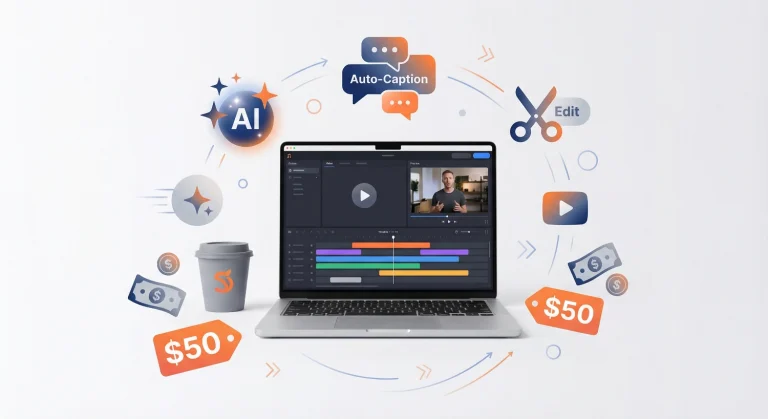
The budget-friendly AI video editing software landscape has exploded with options under $50/month. Tools like CapCut, Filmora, and VEED offer surprisingly powerful AI features, including automated subtitles, background removal, and smart scene detection at a fraction of traditional software costs.
These platforms democratize access to AI-powered editing. A freelance content creator can now deliver client work with automated color grading, AI-generated B-roll suggestions, and instant subtitle generation—capabilities that once required expensive software and specialized skills.
The key is understanding what you’re trading off. Budget tools typically offer cloud-based workflows, which means you need reliable internet connectivity. They may also have limitations on export resolution or watermark removal in free tiers. However, for social media content, YouTube videos, and client deliverables up to 4K, these tools punch well above their weight class.
Ready to discover which budget tool delivers the best value for your freelance workflow?
Head-to-Head: Generative AI Video Editing Software for Script-to-Screen Production
Generative AI video editing software represents the cutting edge of content creation technology. These platforms can transform written scripts into complete videos, including visuals, voiceovers, and music—without you ever picking up a camera.
Tools like Synthesia, HeyGen, and D-ID use AI avatars and text-to-video technology to generate professional-looking content from simple text inputs. This technology is revolutionizing corporate training, explainer videos, and educational content where the message matters more than cinematic production value.
I’ve watched marketing teams reduce video production time from weeks to hours using these platforms. Write your script, select an AI presenter, choose your visual style, and the software handles the rest. The output quality has improved dramatically—these AI presenters now feature natural gestures, lip-sync accuracy, and convincing emotional range.
The productivity gains are staggering. A 5-minute training video that previously required booking a studio, hiring talent, and coordinating a production crew can now be generated in under an hour. Updates? Just edit the text and regenerate.
Curious which generative AI platform produces the most realistic results for script-to-screen production?
The Best AI Video Editing Software for Beginners: A 2026 Usability Review
Starting your video editing journey can feel overwhelming, but AI video editing software for beginners has never been more accessible or forgiving.
The best beginner platforms combine intuitive interfaces with AI assistance that guides you through the editing process. CapCut, for instance, offers templates and AI-powered suggestions that teach editing principles while you work. The software analyzes your footage and recommends cuts, transitions, and effects based on content type.
What makes software truly beginner-friendly in 2026? Look for these AI-powered features:
- Automatic scene detection that intelligently identifies shot changes
- Smart trimming tools that remove silences and awkward pauses
- Template libraries with AI customization based on your footage
- Integrated tutorials that provide contextual help as you edit
- Undo/redo that actually works (you’d be surprised how many tools struggle with this)
The learning curve matters. I’ve seen complete beginners produce publishable content within their first week using the right AI-assisted platform. The software handles technical complexity while you focus on storytelling and creativity.
Want to find the perfect beginner-friendly AI video editor that won’t overwhelm you?
Enterprise-Grade AI Video Editing Software: Scaling Production Workflows for Media Houses
Media organizations face unique challenges: multiple editors working simultaneously, massive file sizes, tight deadlines, and brand consistency across thousands of assets. Enterprise-grade AI video editing software addresses these specific pain points.
Platforms like Adobe Premiere Pro (via Creative Cloud Team plans), DaVinci Resolve Studio with collaborative features, and specialized solutions like Frame.io integrate AI throughout production workflows. These systems offer real-time multi-user collaboration, shared project libraries, bin locking, and automated version control.
The AI features at this level go beyond individual editing tasks. Enterprise solutions provide:
- Automated metadata tagging across entire media libraries
- Brand guideline enforcement through AI that checks color palettes, fonts, and style compliance
- Asset management systems that use computer vision to catalog and search visual content
- Automated transcoding pipelines that optimize files for different platforms
- Predictive analytics showing which content elements drive engagement
Fortune Business Insights notes that large enterprises held 50.86% of the AI video generator market share in 2025, driven by greater resources and increased usage of AI-based tools to generate quality videos efficiently. ℹ️ Source
Managing a media team and need to scale production without scaling headaches?
Maximizing YouTube Growth with AI Video Editing Software for Shorts and Reels
The short-form video revolution demands a different editing approach, and AI video editing software for Shorts and Reels has emerged to meet this need.
Platforms like OpusClip, Munch, and specialized features in CapCut analyze long-form content and automatically identify the most engaging moments for short clips. They add captions, zoom effects, and music—all optimized for vertical video formats.
This technology is a game-changer for YouTube growth. Record one 20-minute video, and AI can generate 10+ shorts from the best moments. Each clip gets:
- Automatic caption generation with styled text overlays
- Strategic zoom effects timed to emphasize key words
- Viral potential scoring based on engagement patterns
- Platform-optimized formatting (9:16 for Reels/Shorts/TikTok)
I’ve watched channels triple their audience reach by implementing this strategy. The AI doesn’t just save time—it identifies compelling moments that human editors might miss. Machine learning analyzes thousands of viral videos to understand what makes content shareable.
Ready to transform your long-form content into a Short and Reel generating machine?
Corporate Training Videos: Using AI Video Editing Software for Rapid Content Updates
Corporate training content becomes outdated the moment it’s published. Product features change, policies update, and AI video editing software for corporate training solves the revision nightmare.
Traditional video updates required re-shooting entire segments—expensive and time-consuming. Modern AI solutions offer targeted approaches:
Synthesia and HeyGen let you update training scripts and regenerate only affected segments with consistent AI presenters. Change a policy? Update the script, regenerate that 30-second section, and splice it into your existing video.
Text-based editing in tools like Premiere Pro and Descript allows you to edit video by modifying the transcript. Need to remove a sentence about an old procedure? Delete it from the text, and the video updates automatically.
This flexibility transforms how L&D departments operate. According to data from the AI video generator market analysis, 97% of learning and development professionals agree that video surpasses traditional text-based documents in effectiveness, highlighting the growing preference for video content that enhances engagement and improves knowledge retention.
Want to build a training video system that’s easy to update and maintain?
AI Video Editing Software for Documentary Filmmakers: Speeding Up Archival Footage Curation
Documentary filmmakers face a unique challenge: hundreds of hours of footage, interviews, and archival material that need to be searched, tagged, and assembled into a compelling narrative. AI video editing software for documentary filmmakers has revolutionized this process.
Modern AI tools offer content-aware search that goes beyond filename and metadata. Adobe Premiere Pro’s AI search lets you find clips using natural language: “show me all clips where someone mentions climate change” or “find shots of the Brooklyn Bridge.” This capability alone saves weeks of manual review.
Automated transcription and speaker identification create searchable databases from interview footage. AI can distinguish between speakers, generate speaker labels, and create timestamps—turning hours of interviews into organized, searchable resources.
Color matching across archival footage from different sources and times becomes manageable with AI-powered color grading tools. DaVinci Resolve’s AI can analyze footage and apply consistent color treatments across decades of material.
The productivity gains are transformative. What once required 3 months of logging and organizing footage now takes 3 weeks, allowing filmmakers to spend more time on storytelling and less time on asset management.
Working with massive amounts of footage and need smarter curation tools?
Live Streaming Enhancement: Integrating AI Video Editing Software Tools into OBS/Streamlabs
Live streaming demands real-time production decisions, and AI video editing software integration with OBS and Streamlabs has elevated stream quality dramatically.
Modern AI plugins and integrations offer:
- Real-time background removal without green screens
- Automatic face tracking that keeps you centered in frame
- AI-powered noise suppression that eliminates background sounds
- Live caption generation for accessibility and engagement
- Scene detection that triggers automatic camera switching
Tools like NVIDIA Broadcast use AI for background removal and noise cancellation that integrates seamlessly with OBS. AutoCut offers AI-powered scene detection and editing capabilities that work in post-production for recorded streams.
The beauty of these integrations is they enhance production value without requiring additional hardware or personnel. A solo streamer can deliver multi-camera-quality broadcasts with professional audio—all powered by AI running on their gaming PC.
I’ve seen streamers double their average viewer count simply by implementing better audio processing and professional scene transitions, both powered by AI tools that cost nothing or minimal monthly fees.
Ready to level up your streaming production with AI integration?
Real Estate Marketing: Creating High-Quality Property Tours with AI Video Editing Software
Real estate professionals are discovering that AI video editing software for property tours delivers professional results without hiring production teams.
The workflow is straightforward but powerful: Record walkthrough footage on a smartphone or gimbal, then let AI handle the heavy lifting:
- Automated stabilization smooths shaky handheld footage
- Smart color correction enhances room lighting and eliminates color casts
- Automatic music selection matches video pacing and mood
- Property information overlays generated from listing data
- Automated pacing and transitions that keep viewers engaged
Platforms like InVideo, VEED, and Runway offer real estate-specific templates that speed up production. Upload raw footage, select a template, and the AI assembles a polished tour with professional transitions, text overlays displaying square footage and features, and background music.
The ROI is clear: Properties with professional video tours receive 403% more inquiries than those with photos alone, according to industry research. AI editing makes professional tours accessible to every agent, not just luxury brokers with marketing budgets.
Want to create property tours that drive more showings without expensive videographers?
AI Video Editing Software for Gaming Content Creators: Automated Highlight Reels
Gaming content creators face a unique problem: hours of gameplay footage with only a few truly exciting moments worth sharing. AI video editing software for gaming content solves this through intelligent highlight detection.
Tools like Medal.tv, Streamladder, and Eklipse use AI trained on gaming footage to automatically identify:
- Elimination sequences and multi-kills
- Clutch plays and comeback moments
- Funny fails and unexpected events
- Near-death escapes
- Victory moments and achievements
The AI analyzes gameplay audio (detecting excitement in commentary), on-screen events (tracking kill feeds and score changes), and player inputs (identifying intense action sequences). It then generates highlight reels complete with transitions, slow-motion effects, and music.
This automation is crucial for consistency. Top gaming creators upload daily, and manually reviewing 4-6 hours of gameplay to find 30 seconds of highlights simply doesn’t scale. AI does in 5 minutes what would take a human editor 2 hours.
The best part? These tools learn your style. As you approve or reject AI-generated highlights, the algorithm adapts to your preferences, getting better at identifying your definition of “highlight-worthy.”
Ready to automate your highlight reel creation and focus on playing instead of editing?
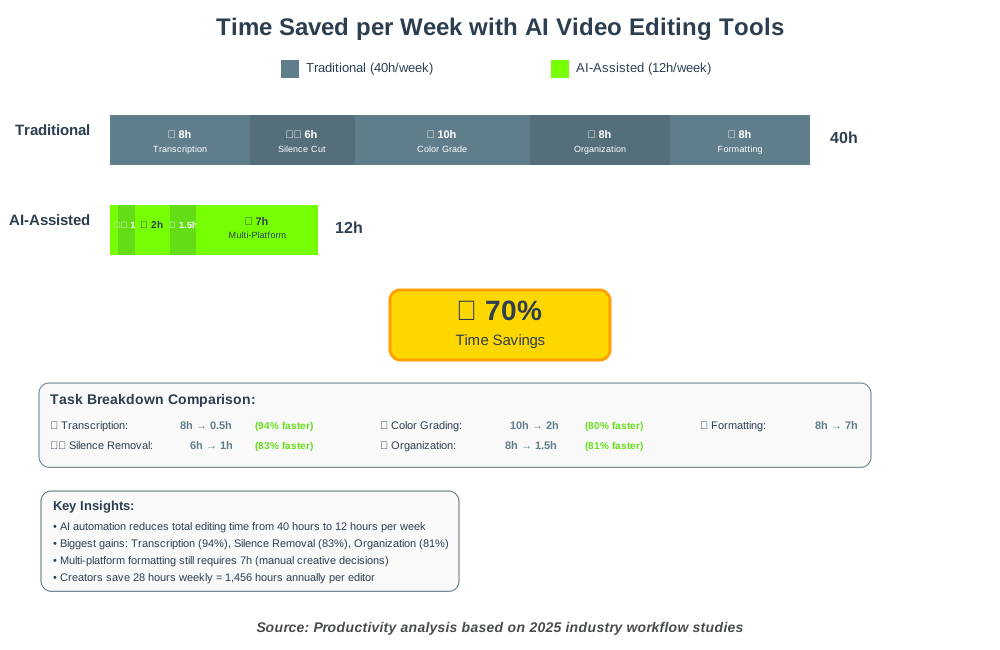
The 5 Biggest Time Sinks AI Video Editing Software Eliminates from the Workflow
Let me share what I’ve learned from helping hundreds of creators optimize their processes. AI video editing software eliminates these five massive time sinks:
1. Manual Transcription and Subtitle Creation
Old way: 1 hour of video = 4 hours of transcription and subtitle timing.
AI way: Automatic transcription and subtitle generation in under 5 minutes with tools like Descript, Premiere Pro, or CapCut.
2. Silence Removal and Audio Cleanup
Old way: Listening through entire recordings, manually identifying and cutting silences, then adjusting timing.
AI way: Tools like AutoCut and Descript automatically remove silences, smooth out gaps, and maintain natural pacing in seconds.
3. Color Grading Across Multiple Clips
Old way: Manually color grading each clip, trying to match skin tones and lighting across hundreds of shots.
AI way: DaVinci Resolve’s AI Color Match analyzes footage and applies consistent grading across entire sequences.
4. Scene Detection and Organization
Old way: Watching hours of footage, manually marking scenes, creating bins, and organizing clips.
AI way: Automatic scene detection identifies shot changes, creates subclips, and organizes timelines intelligently.
5. Repurposing Content for Multiple Platforms
Old way: Manually reformatting, re-editing, and re-exporting for different aspect ratios and platform requirements.
AI way: Tools like OpusClip and Repurpose.io automatically generate platform-specific versions of source content.
These five tasks alone had previously consumed 60–70% of editing time for most creators. AI automation reduces that to 10-15%, fundamentally changing what’s possible for solo creators and small teams.
Want the complete breakdown of time-saving strategies and tool recommendations?
Open Source AI Video Editing Software Alternatives: Are They Ready for Professional Use?
The open source AI video editing software landscape is maturing rapidly, and I’m frequently asked: can they compete with commercial solutions?
Kdenlive, Shotcut, and Olive represent the leading open-source options, each with varying levels of AI integration. While they may not match the AI feature sets of Adobe or Blackmagic products, they’re closing the gap faster than expected.
Recent developments worth noting:
- OpenShot has added AI-powered effects and transitions
- Flowblade includes automated color correction algorithms
- Kdenlive supports AI plugins for speech enhancement and background removal
The honest assessment: for basic AI features like automated color correction, scene detection, and simple effects, open-source tools deliver adequately. For advanced AI like generative features, automated speech translation, or sophisticated object tracking, commercial solutions maintain significant advantages.
However, the open-source ecosystem’s strength lies in flexibility and cost. For organizations with technical resources to customize and extend capabilities, or creators with budget constraints, these tools offer real value without recurring subscription fees.
Considering open source for your workflow? Need to know if it’s truly production-ready?
The Future of Filmmaking: Predictive Editing and AI Video Editing Software
We’re entering an era where AI video editing software doesn’t just automate existing tasks—it predicts creative decisions and suggests narrative improvements.
Predictive editing represents the next frontier. AI algorithms trained on thousands of successful films can now:
- Suggest optimal edit points based on pacing and emotional flow
- Predict audience engagement for different edit variations
- Recommend music choices that match the scene’s mood and energy
- Identify pacing issues before rendering final cuts
- Suggest B-roll placements for narrative enhancement
Adobe and other major platforms are developing features that analyze your rough cut and provide editorial notes similar to what a professional editor might suggest. This isn’t replacing human creativity—it’s democratizing access to expert-level feedback.
The implications are profound. Independent filmmakers gain access to insights previously requiring decades of experience. Students learn editing principles through AI-powered feedback. Production teams test variations faster, making data-driven creative decisions.
Curious about how predictive AI will transform your editing process in the next 2-3 years?
AI Video Editing Software vs. Traditional NLEs: When to Make the Switch
The question I hear constantly: “Should I abandon my traditional non-linear editor (NLE) for AI video editing software?” The answer isn’t simple, but let me share the framework I use with clients.
Traditional NLEs (Premiere Pro, Final Cut Pro, DaVinci Resolve) excel at:
- Precise, frame-accurate editing control
- Complex multi-track audio mixing
- Unlimited creative flexibility
- Professional color grading workflows
- Advanced effects and compositing
AI-first platforms (Descript, Runway, Pictory) excel at:
- Speed for specific content types
- Automated social media optimization
- Text-based editing workflows
- Rapid content iteration
- Lower learning curves
The reality? Most professionals now use both. Traditional NLEs for long-form, high-value content where creative control matters. AI platforms for rapid social content, repurposing, and bulk production.
The switching criteria I recommend:
- If 80%+ of your output is social media content → AI-first platforms save significant time
- If you need frame-accurate control for client work → Traditional NLEs remain essential
- If you’re drowning in transcription and subtitle work → Hybrid approach with AI tools
- If you’re just starting → AI platforms offer faster learning curves
- If budget is tight → Open-source or freemium AI tools provide entry points
Need help evaluating which approach fits your specific workflow and content type?
Hardware Requirements for Running Advanced AI Video Editing Software (GPU Benchmarks)
Let’s talk about the elephant in the room: hardware requirements for AI video editing software can be demanding, and understanding what you actually need prevents expensive mistakes.
The GPU (graphics processing unit) has become more critical than the CPU for AI-powered editing. AI features like real-time effects, automated masking, and neural filters rely heavily on GPU acceleration.
Minimum viable specs for AI video editing (2025):
- GPU: NVIDIA RTX 3060 (12GB VRAM) or AMD RX 6700 XT
- RAM: 16GB minimum, 32GB recommended
- CPU: 6-core processor (Intel i5-12600K or AMD Ryzen 5 5600X equivalent)
- Storage: NVMe SSD for operating system and active projects
Professional-grade specifications:
- GPU: NVIDIA RTX 4070 Ti or higher
- RAM: 64GB or more for 4K/8K workflows
- CPU: 8-core processor with high single-thread performance
- Storage: Multiple NVMe SSDs in RAID configuration
NVIDIA GPUs generally offer better compatibility with AI features in Adobe Premiere Pro and DaVinci Resolve, as both platforms optimize for CUDA acceleration. Apple Silicon Macs (M2/M3) deliver excellent performance for Final Cut Pro and are becoming increasingly competitive for cross-platform tools.
Real-world impact: An RTX 4070 Ti renders AI-powered effects 3-4x faster than an RTX 3060. For professionals processing dozens of videos weekly, that performance difference translates to 10-15 hours saved per week.
Need specific GPU benchmarks for your preferred software and project types?
AI Video Editing Software for Explainer Videos: Boosting Engagement Rates
AI video editing software for explainer videos has transformed how businesses communicate complex ideas quickly and affordably.
Explainer videos face specific challenges: they must be clear, concise, engaging, and easy to update. AI addresses each challenge:
Clarity through automated captions:
Studies show viewers retain 95% more information when captions accompany audio. AI generates pixel-perfect, timed captions in seconds.
Conciseness through smart trimming:
AI analyzes pacing and removes unnecessary pauses while maintaining natural speech flow. What might be a 4-minute explainer gets tightened to 2:30 without manual editing.
Engagement through dynamic visuals:
Platforms like Synthesia and Vyond use AI to generate animated characters, gestures, and visual elements that illustrate concepts as you describe them.
Easy updates through text-based editing:
Change your pricing? Update the script in Descript or Pictory, and the video regenerates with new information while maintaining a consistent style.
The engagement metrics speak for themselves. According to AI video generator market research, businesses using AI-powered explainer videos report 25% increases in viewer retention rates compared to traditional static presentations, attributed to AI algorithms that tailor content to audience preferences.
Ready to create explainer videos that actually convert viewers into customers?
Frequently Asked Questions About AI Video Editing Software
Your Next Steps in the AI Video Editing Journey
The landscape of Top AI Video Editing and Production Software has evolved beyond simple automation—it’s fundamentally changing what’s possible for creators at every level. Whether you’re a solo YouTuber, a documentary filmmaker, a corporate trainer, or a social media manager, AI tools can reclaim hours from your workflow while improving output quality.
The key insight I want you to take away: you don’t need to adopt everything at once. Start by addressing your most pressing issues. If transcription eats your time, implement AI subtitling first. If color grading intimidates you, explore AI color matching. If social media formatting feels tedious, try automated repurposing tools.
The platforms discussed in this guide represent thousands of hours of development aimed at one goal: letting you focus on creativity instead of technical tedium. The AI handles the repetitive tasks, the precise calculations, and the exhaustive organization—you handle the vision, the story, and the creative decisions that make content memorable.
According to Fortune Business Insights, the AI video generator market’s projected growth from $716.8 million in 2025 to $3,350 million by 2034 signals that this technology will only become more sophisticated, accessible, and essential. Early adopters gain competitive advantages that compound over time.
My recommendation: pick one tool from this guide, commit to mastering it over the next 30 days, and track your time savings. You’ll quickly see where AI delivers value in your specific workflow. Then expand strategically, adding capabilities as you identify bottlenecks.
The future of video production isn’t about replacing human creativity with algorithms—it’s about empowering creative vision with intelligent automation. Start small, measure results, and scale what works.
Your productivity transformation begins with a single automated task.
References
- Fortune Business Insights. “AI Video Generator Market Size, Share & Industry Analysis, By Enterprise Type, By Sources, By Application, By Industry, and Regional Forecast, 2026-2034” (2025). https://www.fortunebusinessinsights.com/ai-video-generator-market-110060
About the Author
James Carter is a productivity coach specializing in AI-powered workflow optimization for content creators and media professionals. With over a decade of experience helping individuals and teams reclaim hundreds of hours through smart automation, James focuses on practical, results-driven strategies that make advanced technology accessible to everyone.
Through workshops, consulting, and hands-on training, James has helped over 2,500 creators implement AI tools that deliver measurable productivity gains. He believes the best editing workflow is the one that gets out of your way and lets you create.
When not optimizing workflows, James tests emerging AI video tools, produces educational content at howAIdo.com, and advocates for accessible technology that democratizes professional-quality content creation.