AI Chatbots for Social Media: Enhancing Customer Service and Engagement

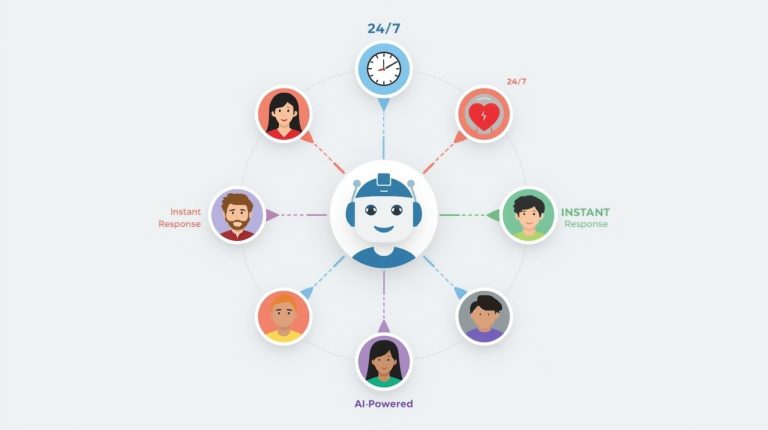
AI Chatbots for Social Media are transforming how businesses interact with their customers online. If you’ve ever messaged a brand on Facebook or Instagram and received an instant reply, chances are you were chatting with an AI-powered bot. These intelligent assistants work around the clock, answering questions, solving problems, and keeping conversations flowing—even when human team members are asleep or busy with other tasks.
I remember the first time I encountered a chatbot on social media. I was trying to track a package late at night, expecting to wait until morning for a response. Instead, within seconds, I had my tracking number and estimated delivery time. That moment showed me how AI chatbots for social media aren’t just convenient—they’re changing our expectations of customer service entirely.
What Are AI Chatbots for Social Media?
Let me break this down in simple terms. An AI chatbot is a software program that uses artificial intelligence and natural language processing (NLP) to understand and respond to messages automatically. When applied to social media platforms like Facebook Messenger, Instagram Direct, Twitter DMs, or WhatsApp Business, these bots become powerful tools for customer engagement.
Think of a chatbot as a tireless assistant who never needs coffee breaks. It reads incoming messages, understands what people are asking (even when they use slang or make typos), and provides relevant answers instantly. Unlike the rigid, frustrating automated systems of the past that only understood specific keywords, modern AI chatbots can handle complex conversations, remember context, and even detect emotions in your messages.
The technology behind these bots has evolved remarkably. They learn from every interaction, improving their responses over time. Some can handle multiple conversations simultaneously in different languages, making them invaluable for businesses with global audiences. The best part? They don’t replace human customer service teams—they enhance them by handling routine questions, freeing up human agents to tackle more complex issues that require empathy, creativity, or critical thinking.
How AI Chatbots Work on Social Media Platforms
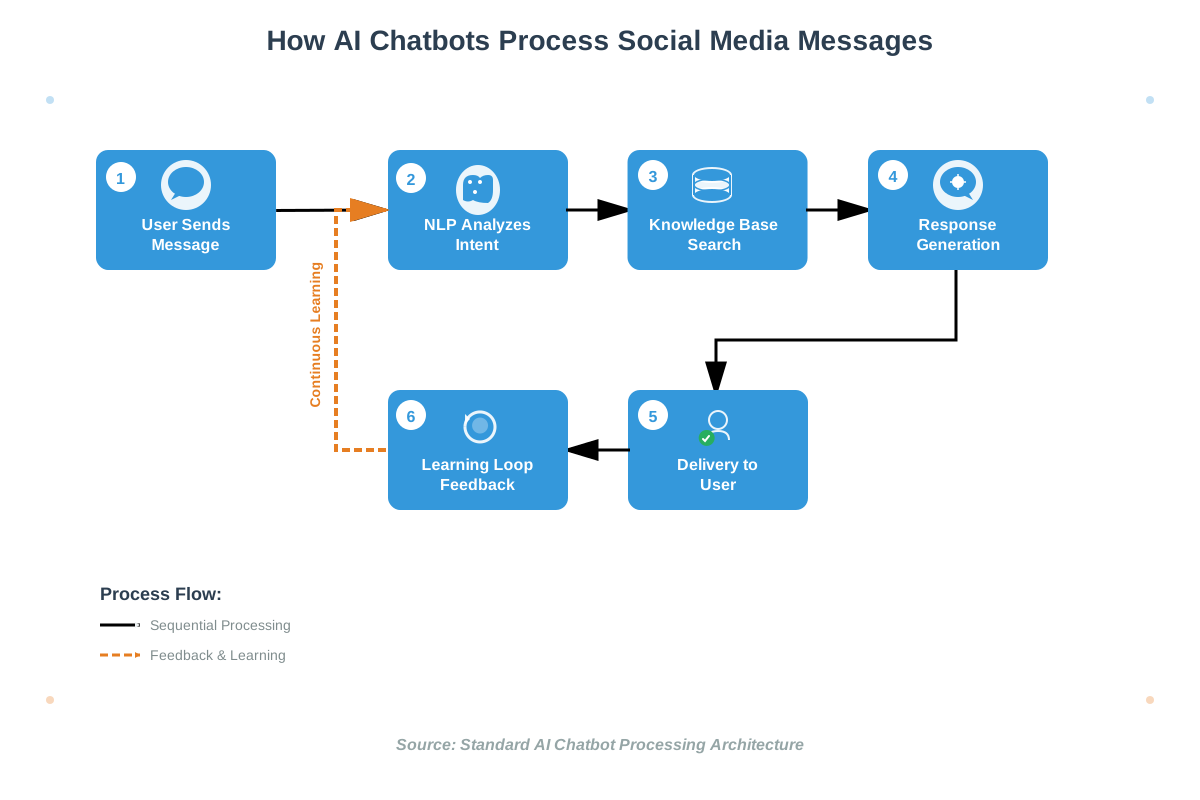
Understanding how these digital assistants function helps you appreciate their capabilities. The process happens in milliseconds, but several sophisticated steps occur behind the scenes.
The Message Recognition Process
When someone sends a message to your business page, the chatbot receives it first. The AI analyzes the text using natural language understanding (NLU), which breaks down the message into components. It identifies the intent—what the person actually wants—and extracts important details like product names, order numbers, or specific questions.
For example, if someone writes, “Hey, do you guys have those blue sneakers in size 10 that I saw yesterday?” the bot recognizes this as a product availability inquiry. It identifies “blue sneakers” as the product, “size 10” as the specification, and understands the urgency implied by “that I saw yesterday.”
Response Generation and Delivery
Once the bot understands the request, it searches its knowledge base for the appropriate response. This knowledge base contains information about your products, services, policies, and frequently asked questions. Advanced chatbots can also connect to your inventory systems, CRM databases, or order management platforms to provide real-time, personalized information.
The bot then crafts a response that sounds natural and helpful. Modern AI chatbots don’t just spit out robotic, templated answers. They use conversational language and emojis when appropriate and can even adapt their tone to match your brand voice—whether that’s professional, friendly, or playful.
Learning and Improvements
Here’s where it gets intriguing. Machine learning algorithms enable chatbots to improve continuously. Every conversation provides data that helps the bot understand language patterns better, recognize new ways people phrase questions, and identify gaps in its knowledge base. Some systems use supervised learning, where human agents review conversations and provide feedback, while others employ unsupervised learning, finding patterns independently.
Real-Life Applications and Use Cases
Allow me to share some concrete examples of how businesses are using AI chatbots effectively on social media. These aren’t hypothetical scenarios—they’re happening right now across various industries.
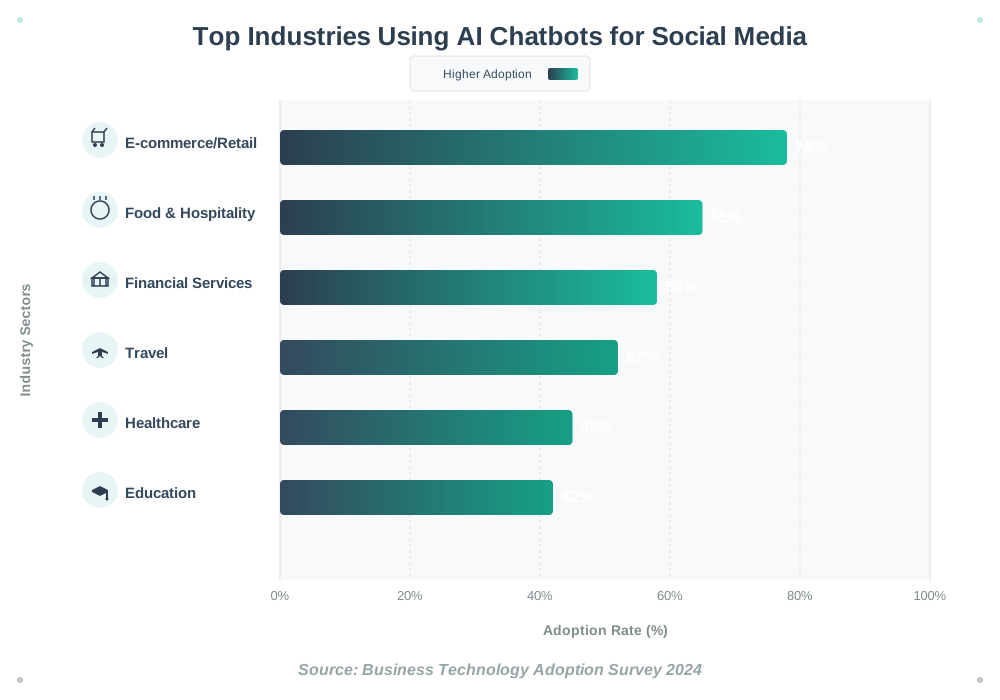
E-commerce and Retail
Online retailers have embraced chatbots enthusiastically. When you message a clothing brand asking about sizes, fabric details, or return policies, a bot often provides instant answers. I’ve used this feature countless times while shopping. The bot can show product recommendations based on your browsing history, notify you when items go on sale, and even process orders directly within the chat interface.
Fashion retailers use chatbots to create personalized styling sessions. You describe what you’re looking for or upload a photo, and the bot suggests complete outfits. It’s like having a personal shopper available 24/7. Some bots can even show you how clothes look on different body types or in various settings using augmented reality features.
Food and Hospitality
Restaurants and food delivery services have revolutionized their ordering process with social media chatbots. Instead of calling during busy hours or navigating a website, customers message the restaurant on Facebook, and the bot walks them through the menu, takes their order, processes payment, and provides delivery updates—all within the chat window.
Hotels use chatbots for reservations, answering questions about amenities, providing local recommendations, and handling check-in procedures. I once rebooked a hotel stay entirely through Instagram DM while sitting at an airport. The bot found available rooms, showed me photos, and confirmed my reservation in under three minutes.
Financial Services and Banking
Banks have deployed sophisticated chatbots to handle routine inquiries. Customers check account balances, review recent transactions, report lost cards, or find nearby ATMs through messaging apps. The bots provide this information securely while maintaining conversation logs for compliance purposes.
Insurance companies use chatbots to provide quotes, explain coverage options, and guide customers through claim filing processes. This makes insurance—typically a confusing, tedious experience—much more approachable and user-friendly.
Healthcare and Wellness
Healthcare providers use chatbots for appointment scheduling, prescription refills, and answering basic health questions. While these bots always clarify they’re not replacing medical advice, they help patients access information quickly and reduce administrative burden on staff.
Fitness brands and wellness apps use AI-powered chatbots as virtual coaches. They send motivational messages, track workout progress, answer nutrition questions, and adjust training plans based on your feedback—all through social media platforms where you already spend time.
Education and Online Learning
Educational institutions and online course platforms use chatbots to assist students. These bots answer questions about course content, deadlines, and enrollment procedures. They can quiz students, provide study reminders, and direct learners to relevant resources. During my online learning experiences, chatbots have helped me find lecture materials and understand assignment requirements without waiting for office hours.
Key Benefits of AI Chatbots for Customer Service
Now let’s explore why businesses are investing heavily in this technology. The advantages extend far beyond just answering questions quickly.
Instant Response Times
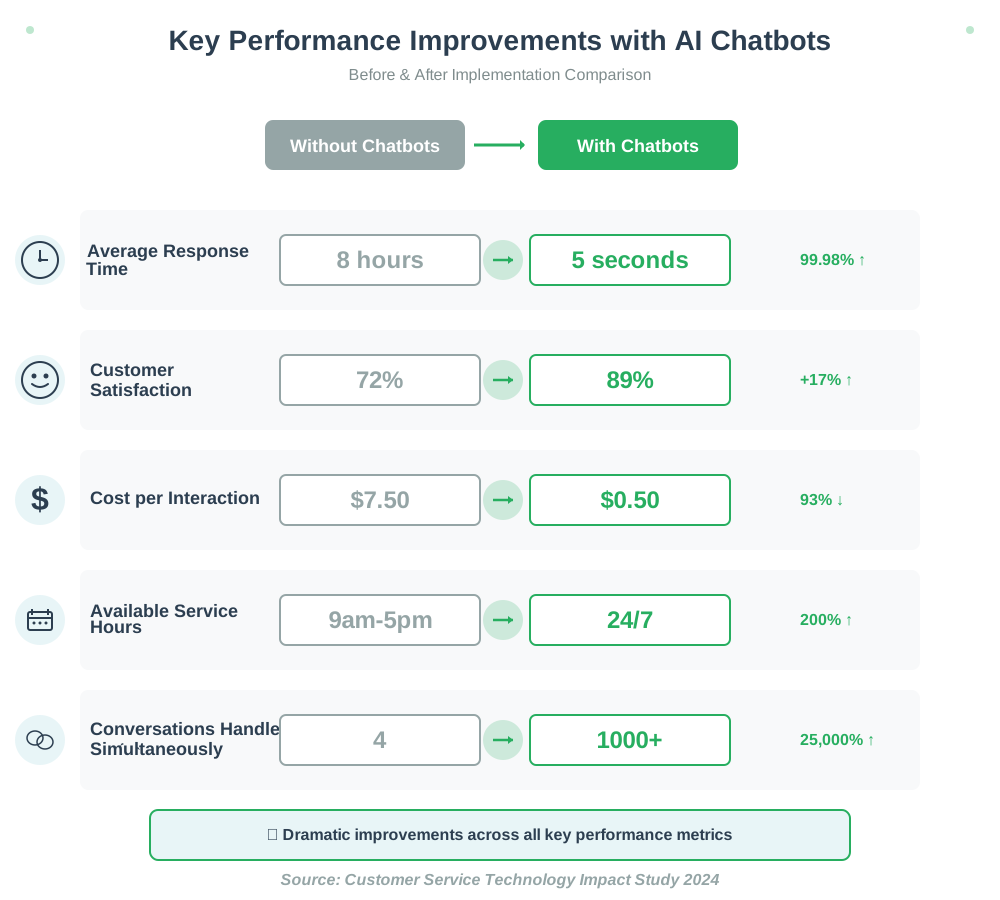
In our age of instant gratification, waiting hours or days for customer service responses feels unacceptable. AI chatbots eliminate wait times completely. The moment someone sends a message, they receive a response. This immediacy significantly improves customer satisfaction and reduces frustration.
I’ve experienced this benefit personally. When you have a simple question at 11 PM, getting an instant answer feels wonderful compared to waiting until business hours the next day. Even when the bot can’t fully resolve an issue, acknowledging the message immediately and setting expectations for when a human will follow up makes a huge difference.
24/7 Availability
Your customers live in different time zones and have varying schedules. Some prefer shopping late at night, while others browse during lunch breaks. Chatbots provide round-the-clock service, ensuring no inquiry goes unanswered regardless of when it arrives.
This constant availability doesn’t just benefit customers—it helps businesses too. Leads don’t go cold overnight. Sales opportunities don’t slip away during holidays. Your brand remains responsive and accessible at all times, which builds trust and loyalty.
Handling Multiple Conversations Simultaneously
While a human agent might manage three to five conversations at once, an AI chatbot can handle hundreds or thousands simultaneously without any degradation in quality. During peak times like Black Friday sales or product launches, this scalability becomes invaluable.
This capability also alleviates customer frustration by eliminating queues and waiting for available agents. Everyone receives immediate attention, regardless of how busy your business is at that moment.
Cost Efficiency
Implementing chatbots requires initial investment, but the long-term savings are substantial. You can deliver quality customer service without proportionally increasing your support team size as your business grows. One chatbot can perform work equivalent to multiple full-time employees, working 24/7 without overtime pay, sick days, or vacation time.
These savings allow businesses to reallocate resources toward more strategic initiatives—product development, marketing, or improving the customer experience in ways that require human creativity and judgment.
Consistent Service Quality
Human agents have good days and bad days. They might be worn out, distracted, or having personal issues affecting their performance. Chatbots maintain consistent quality every single time. They don’t get impatient with repetitive questions, they always follow company guidelines, and they deliver information accurately.
This consistency strengthens your brand image. Customers know what to expect when they contact you, no matter when or how.
Personalization at Scale
Advanced AI chatbots access customer data to provide personalized experiences. They remember previous conversations, preferences, and purchase history. When you return to a brand’s messaging, the bot greets you by name and recalls what you discussed last time.
This personalization makes interactions feel more human, even though you’re chatting with software. It’s the kind of service level that would be impossible for human agents to deliver consistently across thousands of customers.
Data Collection and Insights
Every conversation generates valuable data. Chatbots track common questions, identify pain points in your customer journey, reveal product issues, and surface trending topics. This information helps you improve products, refine messaging, and optimize operations.
Chatbot conversations, unlike phone calls or in-person interactions, automatically log and allow for analysis. You can spot patterns, measure satisfaction, and make data-driven decisions about your customer service strategy.
Enhancing Customer Engagement Through AI
Beyond just answering questions, chatbots actively boost customer engagement in creative ways. They transform passive social media presence into dynamic, interactive experiences.
Proactive Outreach
Smart chatbots don’t just wait for messages—they initiate conversations. When someone likes your page or views specific products, the bot can send a welcome message with helpful information. When a customer abandons their shopping cart, it can reach out with a friendly reminder or offer assistance.
This proactive approach feels less pushy than traditional marketing emails. It happens within a platform people already use regularly, making it feel more conversational and natural.
Interactive Content and Quizzes
Chatbots can host interactive experiences like quizzes, polls, or games that engage customers while gathering information about their preferences. A beauty brand might offer a “find your perfect skincare routine” quiz, while a travel company could provide a “discover your ideal destination” experience.
These interactions are fun, shareable, and memorable. They position your brand as innovative while collecting valuable data about customer interests.
Rich Media Integration
Modern chatbots handle more than text. They send images, videos, carousels of products, location maps, and clickable buttons. This rich media capability makes conversations more engaging and informative.
When I’ve asked chatbots about products, they often respond with photo galleries, demonstration videos, and direct purchase links—all without leaving the chat interface. This seamless experience increases the likelihood of conversion.
Sentiment Analysis and Escalation
Advanced bots detect emotional tone in messages. If someone sounds frustrated or uses language indicating dissatisfaction, the bot can adjust its approach, offer empathy, and smoothly transfer the conversation to a human agent when appropriate.
This emotional intelligence prevents situations where customers feel stuck talking to an unhelpful automated system. The bot recognizes its limitations and knows when human intervention would serve the customer better.
Community Building
Chatbots facilitate connections between customers. They can introduce users with similar interests, share user-generated content, notify about community events, or create group chats around specific topics.
Some brands use bots to power exclusive communities within messaging apps, where members receive special offers, early product access, or insider content. This builds brand loyalty and creates advocates who actively promote your business.
Popular Platforms and Tools for Social Media Chatbots
If you’re considering implementing a chatbot, several platforms make the process accessible even without technical expertise.
Facebook Messenger and Instagram
Meta’s platforms offer native chatbot integration through Messenger API. Tools like ManyChat, Chatfuel, and MobileMonkey provide user-friendly interfaces for building bots without coding. You create conversation flows using visual builders, dragging and dropping elements to design interactions.
These tools connect with your Facebook Business Page and Instagram account, allowing one bot to handle messages across both platforms. They integrate with e-commerce platforms, email services, and CRM systems for seamless data flow.
WhatsApp Business API
WhatsApp’s massive global user base makes it attractive for businesses. The WhatsApp Business API allows companies to deploy chatbots while maintaining the platform’s personal, intimate feel. It’s particularly popular in regions where WhatsApp dominates communication.
The API supports rich media, quick reply buttons, and list messages. WhatsApp’s widespread use across continents makes it ideal for businesses with international customers.
Twitter (X) Direct Messages
While less commonly used than Messenger, Twitter’s DM capabilities support chatbots through the Twitter API. This is particularly useful for brands wanting to provide customer service within the fast-paced Twitter environment.
Some companies use Twitter bots for reputation management, immediately responding to mentions or complaints and guiding users toward private resolution through DMs.
LinkedIn Messaging
For B2B businesses, LinkedIn chatbots help with lead generation, appointment scheduling, and professional networking. They qualify leads by asking business-relevant questions and can integrate with marketing automation tools.
LinkedIn’s professional context makes chatbots feel appropriate and expected, unlike more social platforms where automation might feel impersonal.
All-in-One Platforms
Services like Zendesk, Intercom, and Drift offer comprehensive solutions that work across multiple social platforms simultaneously. They provide unified inboxes where human agents can monitor bot conversations and intervene when needed.
These platforms typically offer more sophisticated AI capabilities, including machine learning models that improve over time and detailed analytics dashboards showing bot performance metrics.
Common Mistakes to Avoid
As helpful as chatbots are, I’ve seen (and experienced) several common pitfalls that frustrate users. Avoiding these mistakes ensures your chatbot enhances rather than harms your customer relationships.
Making It Impossible to Reach a Human
Nothing frustrates customers more than being trapped in an endless loop with a bot that can’t solve their problem. Always provide clear, easy pathways to human agents. Include options like “Speak to a person” or “Get human help” in your bot’s menu.
Some situations simply require human judgment, empathy, or authority. Your bot should recognize these scenarios and facilitate smooth handoffs rather than forcing users to type “agent” repeatedly in desperation.
Over-Complicating the Bot’s Capabilities
Trying to make your chatbot do everything often results in it doing nothing well. Start with core functions—answering FAQs, providing business hours, taking simple orders—and expand gradually based on performance and feedback.
A bot that excels at five tasks is far more valuable than one that struggles with twenty. Focus on the questions you receive most frequently and automate those responses first.
Pretending the Bot Is Human
While bots should sound natural and conversational, they shouldn’t pretend to be human. This creates trust issues when users discover they’re not talking to a person. Be transparent about it being a bot from the beginning.
Starting with something like “Hi! I’m the [Brand] Bot, and I’m here to help answer your questions instantly”, which sets honest expectations while still being friendly.
Neglecting Bot Maintenance
Your initial bot is just the beginning. Customer needs evolve, products change, and new questions emerge. If you don’t regularly review conversations, update responses, and expand the knowledge base, your bot becomes outdated quickly.
Schedule monthly reviews of bot conversations. Look for questions it struggled to answer, identify new patterns, and continuously refine its capabilities.
Ignoring Analytics
Your chatbot platform provides valuable analytics—response rates, conversation completion, common exit points, and satisfaction scores. Not monitoring these metrics means missing opportunities for improvement.
Analytics reveal what’s working and what isn’t. They show you where users get stuck, which features they use most, and how the bot impacts your business goals.
Using Inappropriate Tone
Your chatbot’s personality should match your brand voice. A playful, emoji-filled bot might work for a youth-oriented fashion brand but would feel inappropriate for a financial institution or healthcare provider.
Similarly, consider cultural differences for international audiences. Humor, casualness, and communication styles vary significantly across cultures. What feels friendly in one region might seem unprofessional or confusing in another.
Failing to Plan for Complexity
Sometimes simple questions have complex answers that depend on context. “What’s your return policy?” seems straightforward, but the answer might differ based on product type, purchase date, or customer location.
Your bot needs decision trees that account for these variables, asking clarifying questions before providing answers. Otherwise, it might provide incorrect information that creates bigger problems.
Getting Started: Actionable Steps
Ready to implement an AI chatbot for your social media presence? Here’s how to begin, even if you have no technical background.
Step 1: Define Your Goals
Start by identifying what you want your chatbot to accomplish. Are you primarily focused on customer support, lead generation, sales, or engagement? Different goals require different approaches.
Write down the top ten questions your customers ask most frequently. These become the foundation of your bot’s knowledge base. If you’re unsure about what customers typically ask, please take some time to review your existing customer service channels to identify patterns.
Step 2: Choose Your Platform
Decide which social media platforms your chatbot will operate on. Consider where your audience already engages with you. If the majority of customer inquiries are received through Facebook, it would be advisable to begin there instead of initially distributing efforts across multiple platforms.
For beginners, I recommend starting with one platform and expanding once you’ve worked out the kinks. Facebook Messenger is often the easiest starting point due to its extensive bot-building tools.
Step 3: Select a Bot-Building Tool
Research and choose a platform that matches your technical skill level and budget. Free options like ManyChat’s basic plan let you experiment without financial commitment. As you grow, you can upgrade to plans with more features.
Most platforms offer templates for common use cases—restaurant ordering, appointment booking, and FAQ responses. These templates provide excellent starting points that you can customize to your specific needs.
Step 4: Map Your Conversation Flows
Before building anything, sketch out conversation paths on paper. What happens when someone says “hello”? What options do you present? Where does each option lead? What happens when the bot doesn’t understand something?
Think through various scenarios, including happy paths (everything goes smoothly) and error cases (the user asks something unexpected). Planning these flows beforehand saves significant time and frustration during actual building.
Step 5: Build and Test
Use your chosen platform’s visual builder to create your chatbot. Start simple—a welcome message, a main menu with three to five options, responses to those options, and a pathway to human help.
Test thoroughly before launching. Invite team members, friends, or a small group of customers to interact with the bot. Have them try to break it by asking unusual questions or taking unexpected paths. Document issues and refine them.
Step 6: Train Your Bot
Populate your knowledge base with information about your products, services, and policies. If your platform supports it, train the AI by showing it various ways people might phrase the same question.
For instance, “What are your hours?” might also be phrased as “When are you open?”, “Are you open now?”, or “What time do you close?” The bot should recognize all these variations and provide the same helpful response.
Step 7: Launch Gradually
Rather than immediately directing all customers to your bot, start with a soft launch. Perhaps activate it only during off-hours, initially, or for specific types of inquiries. Monitor performance closely during this phase.
Gather feedback from customers. Send follow-up messages asking if the bot was helpful. Pay attention to when users request human agents—these moments reveal gaps in the bot’s capabilities.
Step 8: Monitor and Improve
Check your bot’s performance daily at first, then weekly as it stabilizes. Review conversations that went poorly. Please identify the common questions that the bot was unable to answer. Add these to its knowledge base.
Celebrate successes too. Notice conversations that went perfectly and understand why. These patterns show you what’s working and should be replicated in other conversation flows.
Step 9: Scale Strategically
Once your bot performs well on one platform with core functions, expand thoughtfully. Add more capabilities one at a time. Integrate with additional tools like your CRM or inventory system. Deploy to other social platforms.
Each expansion should be measured and intentional. Don’t add features just because you can—add them because they serve your customers’ needs and support your business goals.
Frequently Asked Questions
The Future of AI Chatbots in Social Media
The technology continues to evolve rapidly. Emerging trends point toward even more sophisticated, helpful experiences ahead.
Voice integration is expanding. Soon, customers might speak to chatbots through voice messages on social platforms, with the bot understanding spoken language and responding verbally. This makes interactions even more natural, especially for users who find typing cumbersome.
Emotion AI advances allow bots to better recognize and respond to emotional states. They’ll detect frustration, excitement, or confusion not just through words but also through typing patterns, punctuation, and message frequency, adjusting their approach accordingly.
Augmented reality integration will let chatbots show you how furniture looks in your room, how makeup appears on your face, or how clothes fit your body—all within a messaging conversation.
Predictive engagement will enable bots to anticipate needs before customers articulate them. Based on behavior patterns and past interactions, they’ll proactively offer relevant help, product recommendations, or information at precisely the right moment.
Cross-platform continuity will improve. You’ll start a conversation with a brand on Instagram, continue it on WhatsApp, and conclude it on their website, with the bot remembering the entire context across platforms.
Conclusion: Transform Your Customer Service Today
AI chatbots for social media represent a fundamental shift in how businesses interact with customers. They’re not a futuristic concept—they’re here now, accessible, and making real differences for businesses of all sizes.
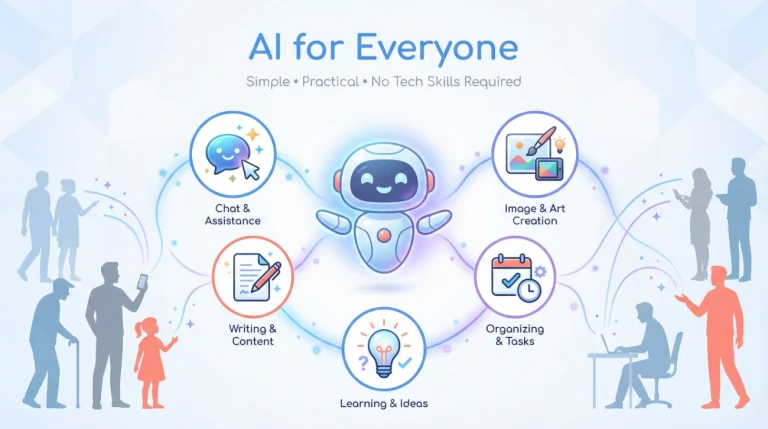
The beauty of this technology is that you don’t need to be a tech expert to benefit. With user-friendly platforms and clear strategies, any business can implement chatbots that genuinely enhance customer experience while reducing operational strain.
Start small. Choose one platform, define clear goals, and build a simple bot that handles your most common inquiries. Test it, refine it, and expand gradually. Monitor the results, listen to customer feedback, and continuously improve.
The customers messaging your business today expect quick, helpful responses. They would rather not wait, navigate complicated phone trees, or send emails into the void. They want conversations—immediate, useful, and pleasant interactions that respect their time and solve their problems.
By implementing AI chatbots, you’re meeting these expectations while building a more efficient, scalable business. You’re providing better service with existing resources, gathering valuable data about customer needs, and positioning your brand as innovative and customer-focused.
The technology will only get better, smarter, and more intuitive. Starting now means you’ll develop expertise as the field evolves, keeping you ahead of competitors who hesitate.
Your customers are waiting on social media. They have questions, need assistance, and want to engage with your brand. Give them the instant, helpful responses they deserve. Implement a chatbot, and watch how it transforms not just your customer service but your entire approach to customer relationships.
Take that first step today. Your future self—and your customers—will thank you.
References:
Business Technology Adoption Survey 2024
Customer Service Technology Impact Study 2024
Meta Business Tools Documentation
WhatsApp Business API Guidelines
Customer Experience Benchmarking Reports
About the Author
Abir Benali is a friendly technology writer who specializes in making AI tools accessible to non-technical users. Abir’s passion for clear communication and practical advice enables individuals and businesses to comprehend and apply AI solutions without becoming bogged down in technical jargon. Through step-by-step guides and real-world examples, Abir empowers readers to confidently embrace AI technology in their daily work and personal projects. When not writing, Abir enjoys testing new AI tools and sharing honest, beginner-friendly insights with the howAIdo.com community.