
AI for Creative Expression: A Beginner’s Guide
AI for Creative Expression is revolutionizing how we create, imagine, and share our artistic vision with the world. Whether you’ve spent years perfecting your craft or you’re just beginning to explore your creative side, artificial intelligence offers powerful new ways to bring your ideas to life. We’ve seen countless individuals transform their creative practice by embracing these tools—not as replacements for human imagination, but as collaborators that amplify what’s possible.
In this comprehensive guide, we’ll walk you through everything you need to know about using AI for creative expression, from understanding the basics to mastering specific techniques across different artistic mediums. You don’t need a technical background or coding skills. What you need is curiosity and a willingness to experiment. Together, we’ll explore how AI tools can help you overcome creative blocks, speed up your workflow, and discover entirely new forms of artistic expression you never thought possible.
By the end of this article, you’ll have practical knowledge about AI-powered art, music generation, writing assistance, and design tools that work for everyday creators. We’ll share step-by-step guidance, real-world examples, and tips for avoiding common mistakes beginners make. Let’s begin this exciting journey into the intersection of human creativity and machine intelligence.
Understanding AI for Creative Expression: A Beginner’s Guide
Before we dive into specific tools and techniques, let’s clarify what AI for Creative Expression: A Beginner’s Guide really means. At its core, AI for creativity involves using machine learning algorithms to assist, enhance, or generate creative content. Think of it as having a tireless creative partner who has studied millions of artworks, songs, stories, and designs.
The technology works by recognizing patterns in existing creative work and learning to generate new content based on those patterns. But here’s what makes it special: you remain in control. You provide the direction, the vision, and the final creative decisions. AI simply expands what’s technically possible and speeds up the parts of the creative process that might otherwise feel tedious or limiting.
We’ve found that the most successful creators approach AI tools with an open mind. They experiment freely, accept that not every result will be perfect, and view unexpected outputs as opportunities rather than failures. This mindset shift—from trying to control every detail to collaborating with intelligent tools—unlocks tremendous creative potential.
Getting Started: What You Need
Starting your journey with AI for creative expression requires surprisingly little:
Basic Requirements:
- A computer or smartphone – Most AI creative tools work on standard devices. You don’t need expensive equipment.
- Internet connection—Many tools run through web browsers, making them accessible anywhere.
- Willingness to learn—The learning curve is gentler than you might think. Most platforms are designed for non-technical users.
- Creative vision—Your ideas, emotions, and artistic goals matter most. AI amplifies your vision but doesn’t replace it.
Optional but Helpful:
- A free account with popular AI platforms (we’ll discuss these shortly)
- Basic familiarity with your chosen creative medium
- Patience for experimentation and iteration
The beauty of modern AI creative tools is their accessibility. Whether you’re working from a café in Marrakech or your home studio, these technologies democratize creative expression in unprecedented ways.
Generating Unique Music with AI: A Composer’s Perspective
Generating Unique Music with AI: A Composer’s Perspective opens entirely new sonic possibilities, even for those who can’t read traditional music notation. We’ve watched complete beginners create professional-sounding compositions within hours of discovering AI music tools.
AI music generators work by understanding musical theory, genre conventions, and emotional patterns in sound. You provide prompts—descriptions of mood, style, tempo, or instrumentation—and the AI composes original pieces matching your specifications.
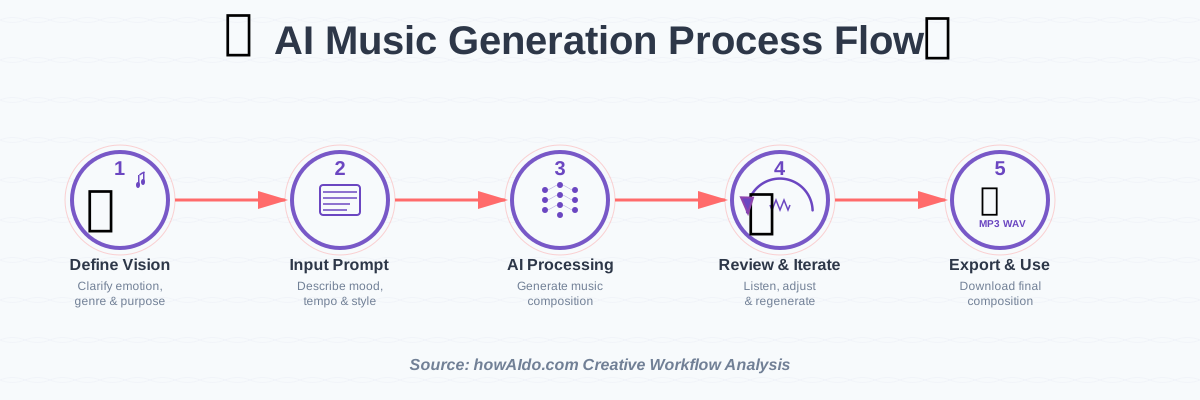
Step-by-Step: Creating Your First AI-Generated Music
Step 1: Choose Your Platform
Popular beginner-friendly options include Soundraw, AIVA, Boomy, and Mubert. Most offer free tiers perfect for learning. We recommend starting with Soundraw for its intuitive interface and immediate results.
Step 2: Define Your Musical Vision
Before touching any buttons, clarify what you want. Ask yourself:
- What emotion should this music evoke?
- What’s the intended use? (Background music, meditation, energetic workout track)
- Which genre feels right? (Electronic, classical, jazz, ambient)
Write these down. Clear direction produces better results.
Step 3: Input Your Prompt
Most platforms use text descriptions or selection menus. Be specific but not overly restrictive. Instead of “happy music,” try “upbeat electronic dance track with subtle piano melodies and energetic drums, perfect for morning motivation.”
Step 4: Generate and Review
Hit generate and listen critically. AI typically produces multiple variations. Don’t expect perfection on the first try—this is normal and expected.
Step 5: Refine and Customize
Here’s where the magic happens. Most tools let you adjust:
- Tempo and rhythm
- Instrumentation
- Energy levels
- Section lengths
- Key and mood
Make incremental changes and regenerate until the piece resonates with your vision.
Step 6: Export and Use
Once satisfied, export your composition in your preferred format (MP3, WAV). Check licensing terms—most platforms offer royalty-free music for paid subscribers.
Common Mistakes to Avoid:
- Being too vague—”Nice “music” gives AI nothing to work with
- Expecting perfection immediately – Iteration is essential
- Ignoring licensing – Always verify usage rights
- Overcomplicating prompts—Start simple, add complexity gradually
We’ve found that AI-generated music works exceptionally well for content creators needing original background tracks, meditation guides, or anyone wanting to experiment with composition without years of formal training.
AI-Powered Art: Exploring the Ethical Implications
AI-Powered Art: Exploring the Ethical Implications represents one of the most discussed aspects of creative AI. We believe it’s crucial to address these considerations honestly, as they affect how we responsibly use these powerful tools.
The primary ethical questions revolve around three areas: artist attribution, training data sources, and the definition of original creative work. When AI systems learn from millions of existing artworks, questions arise about compensation, consent, and intellectual property.
Understanding the Ethical Landscape
We approach AI art with respect for traditional artists while embracing technological progress. Here’s how to navigate these waters thoughtfully:
Training Data Transparency: Choose platforms that clearly state how their models were trained. Some services explicitly use licensed or public domain works, while others remain ambiguous about their data sources.
Attribution Practices: When sharing AI-generated art, be transparent about its origins. Many creators now include “Created with AI assistance” or specify which tools they used. This honesty builds trust and respects audience expectations.
Human Input Value: Remember that AI outputs reflect your creative decisions—prompt crafting, parameter selection, curation, and post-processing all represent genuine creative labor. You’re not simply pressing a button; you’re directing an intelligent tool.
Commercial Considerations: Different rules apply for personal versus commercial use. Always review platform terms of service before monetizing AI-generated content. Some platforms retain partial rights, while others grant full commercial licenses.
Supporting Human Artists: Consider balancing AI tool usage with supporting traditional artists. Commission original work, purchase art, and engage with creative communities. Technology should expand creative opportunities, not eliminate them.
We’ve observed that the most respected AI artists are those who acknowledge these complexities openly. They view AI as one tool among many, combining it with traditional techniques and maintaining ethical awareness throughout their creative process.
The conversation continues evolving. New platforms emerge with clearer ethical frameworks, and communities develop best practices. Staying informed and thinking critically about these issues demonstrates respect for the broader creative ecosystem.
AI Tools for Writers: Enhancing Your Creative Writing Process
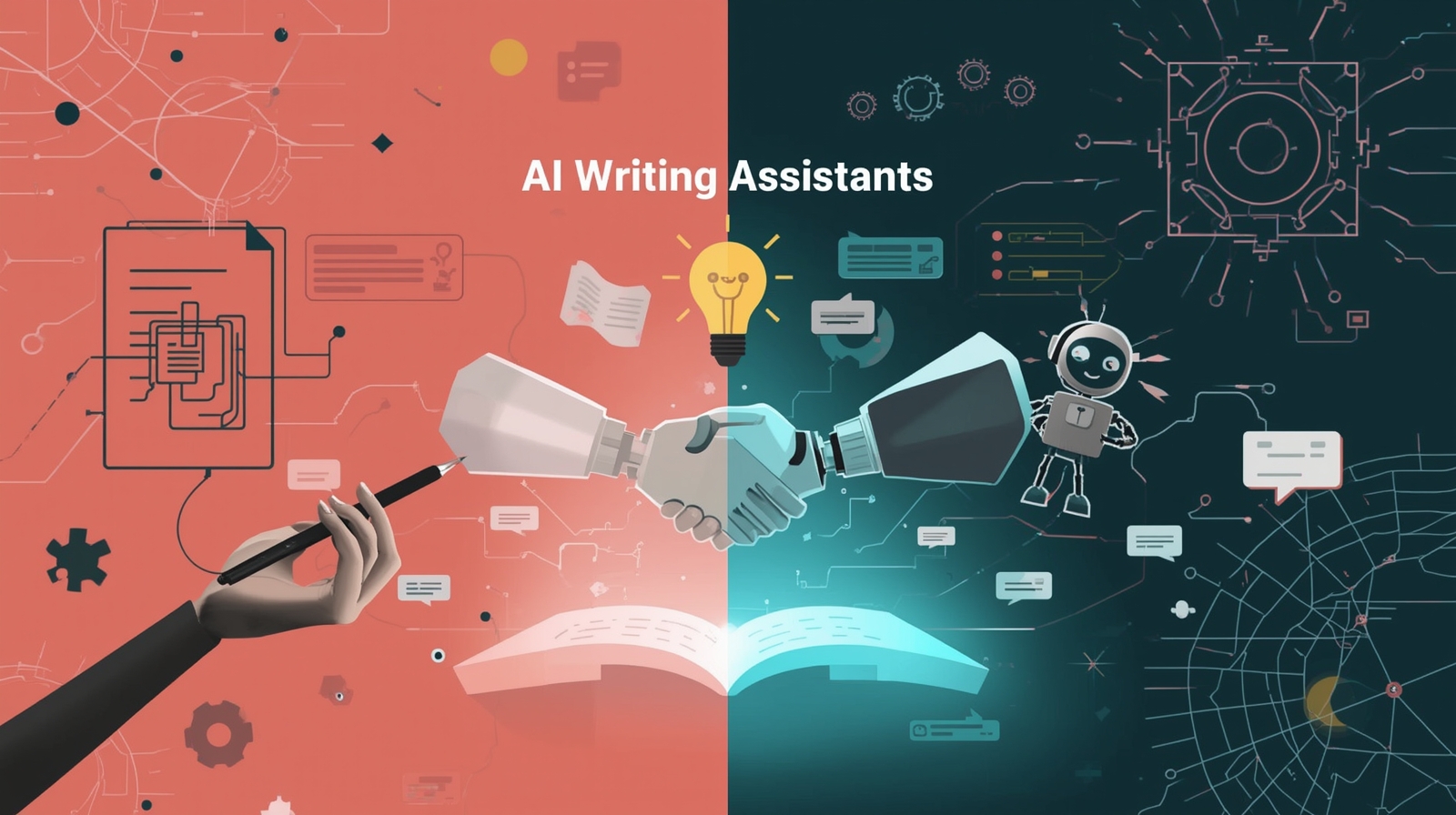
AI Tools for Writers: Enhancing Your Creative Writing Process has transformed how many authors approach their craft. From overcoming blank-page paralysis to refining prose polish, AI writing assistants offer practical support at every stage.
We’ve discovered that effective writing AI doesn’t replace your voice—it amplifies it. These tools excel at brainstorming, suggesting alternative phrasings, catching grammatical issues, and helping maintain consistency across long projects.
Practical Applications for Writers
Brainstorming and Ideation:
When you’re stuck on character development or plot direction, AI can generate possibilities you hadn’t considered. Describe your story premise, and ask for character backstory ideas, plot twist suggestions, or thematic connections.
Start with broad prompts: “I’m writing a mystery set in 1920s Cairo. What unique character backgrounds would create interesting conflict?” Review suggestions critically, adapting elements that resonate while discarding what doesn’t fit your vision.
Drafting Assistance:
Some writers use AI to overcome first-draft anxiety. Dictate your general scene intentions, let AI generate a rough version, then rewrite it entirely in your own voice. This removes intimidation from empty pages while ensuring the final work remains authentically yours.
We emphasize revision: never publish AI-generated text unmodified. The value lies in having raw material to reshape, not finished prose to copy.
Dialogue Enhancement:
AI tools trained on conversational patterns can suggest dialogue variations. If a conversation feels flat, input your existing dialogue and request alternatives with different emotional tones or subtext. This often sparks ideas you then develop independently.
Consistency Checking:
For long manuscripts, AI excels at tracking character details, timeline consistency, and recurring themes. Upload sections of your work and ask specific questions: “Have I established why Sarah fears water?” or “Does my timeline align across chapters 4-7?”
Style Refinement:
Tools like ProWritingAid or Grammarly use AI to identify passive voice, repetitive phrasing, or readability issues. While these don’t make creative decisions for you, they highlight areas worth reconsidering.
Step-by-Step: Using AI Writing Assistants Effectively
Step 1: Identify Your Specific Need
Don’t use AI writing tools aimlessly. Before starting, define exactly what you need help with: brainstorming, drafting, editing, or research.
Step 2: Provide Context
AI works better with background information. Share your genre, intended audience, tone preferences, and existing story elements. The more context provided, the more relevant suggestions you’ll receive.
Step 3: Generate Multiple Options
Request several alternatives for any given element. This prevents over-reliance on any single suggestion and helps you recognize patterns in what resonates with your creative vision.
Step 4: Synthesize and Transform
Take AI suggestions as raw ingredients, not finished dishes. Combine elements from multiple suggestions, inject your unique voice, and transform generic outputs into something distinctly yours.
Step 5: Maintain Your Authentic Voice
Read your work aloud regularly. If sections don’t sound like you, rewrite them. Your voice is your most valuable creative asset—protect it fiercely.
Common Mistakes Writers Make:
- Over-relying on AI-generated prose – Readers detect inauthentic writing
- Skipping the revision phase – AI outputs require substantial human refinement
- Losing creative confidence – You remain the artist; AI is merely an assistant
- Ignoring plagiarism concerns – Always verify AI-generated content originality
We’ve found that writers who maintain clear boundaries—using AI strategically rather than dependently—produce their strongest work. The technology should enhance your natural abilities, not substitute for developing craft skills.
Creating Visual Art with AI: A Deep Dive into DALL-E 2 and Midjourney
Creating Visual Art with AI: A Deep Dive into DALL-E 2 and Midjourney reveals the remarkable capabilities of today’s leading image generation platforms. Both tools have democratized visual art creation, allowing anyone with imagination to produce stunning imagery.
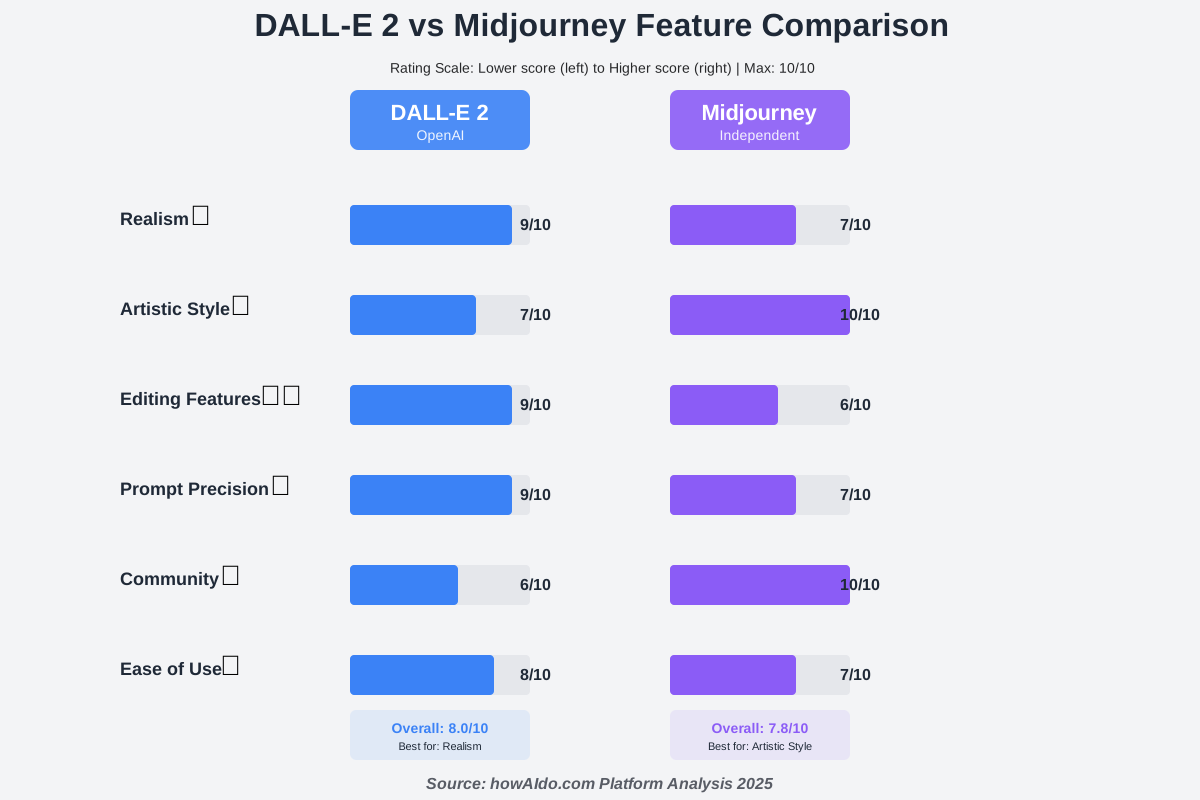
DALL-E 2, developed by OpenAI, excels at realistic imagery and precise prompt interpretation. Midjourney, conversely, leans toward artistic stylization and atmospheric aesthetics. Understanding their strengths helps you choose the right tool for specific projects.
Comparing DALL-E 2 and Midjourney
DALL-E 2 Strengths:
- Photorealistic rendering
- Precise object placement and relationships
- Better text interpretation within images
- Strong editing features (inpainting, outpainting)
- Consistent results across iterations
Midjourney Strengths:
- Artistic and painterly aesthetics
- Dramatic lighting and atmosphere
- Strong compositional sense
- Active community with shared prompts
- Excellent for abstract and conceptual art
When to Use Each:
We recommend DALL-E 2 for product mockups, realistic portraits, technical illustrations, or any project requiring photographic accuracy. Choose Midjourney for book covers, fantasy landscapes, concept art, or projects where artistic interpretation enhances the vision.
Mastering Prompt Crafting
Success with these platforms hinges on effective prompt writing. Here’s our proven framework:
The Anatomy of Great Prompts:
- Subject—What’s the main focus? (“A serene mountain lake”)
- Description—Add specific details (“surrounded by pine forests, reflecting pink sunset clouds”)
- Style—Reference artistic movements or artists (“in the style of Albert Bierstadt, oil painting”)
- Technical details—Specify quality and framing (“highly detailed, wide-angle view, 8k resolution”)
- Lighting and mood—Set emotional tone (“golden hour lighting, peaceful atmosphere”)
Example complete prompt: “A serene mountain lake surrounded by pine forests, reflecting pink sunset clouds, in the style of Albert Bierstadt oil painting, highly detailed, wide-angle view, 8k resolution, golden hour lighting, peaceful atmosphere”
Prompt Refinement Process:
Start simple, then add complexity incrementally. Generate an initial image with basic descriptions, identify what works and what doesn’t, then add specific modifiers addressing weaknesses.
If colors feel wrong, add color specifications: “vibrant cobalt blue sky, emerald green forests.” If the composition lacks focus, add framing terms: “rule of thirds composition, subject in center-left frame.”
Step-by-Step: Your First AI Art Creation
Step 1: Register and Familiarize
Create accounts on both DALL-E 2 and Midjourney (or start with one). Explore galleries to understand each platform’s aesthetic tendencies.
Step 2: Develop Your Vision
Before typing prompts, clearly envision what you want to create. Sketch thumbnail ideas if helpful. Clarity of vision produces better results.
Step 3: Write Your Initial Prompt
Following the framework above, craft a detailed prompt. Don’t worry about perfection—you’ll iterate.
Step 4: Generate and Analyze
Create your first image. Study it critically:
- What exceeded expectations?
- What missed the mark?
- Which elements need adjustment?
Step 5: Refine Systematically
Make one significant change per iteration. This helps you understand which modifications produce which effects, building your prompting expertise over time.
Step 6: Upscale and Post-Process
Once satisfied with the generation, use platform upscaling features for higher resolution. Consider light editing in programs like Photoshop or free alternatives like GIMP to perfect final details.
Advanced Techniques:
- Style blending—Combine multiple artist references: “blend of Van Gogh and HR Giger”
- Negative prompts– Specify what to avoid: “no people, no text, no watermarks”
- Aspect ratio control—Adjust image dimensions for specific use cases
- Seed preservation—Save successful seed numbers to maintain consistency across related images
We’ve seen beginners create gallery-worthy art within days of starting. The key lies in persistent experimentation and viewing “failed” generations as learning opportunities rather than wasted credits.
AI for Creative Expression: Transforming Photography with Artificial Intelligence
AI for Creative Expression: Transforming Photography with Artificial Intelligence extends beyond simple filters into sophisticated enhancement, restoration, and creative transformation. Modern AI photography tools handle complex tasks that once required expert Photoshop skills.
Photographers now leverage AI for portrait retouching, sky replacement, object removal, style transfer, and even generating entirely new photographic compositions. These capabilities save countless hours while maintaining—or enhancing—image quality.
Essential AI Photography Tools
Enhancement and Restoration:
Tools like Topaz Photo AI, Luminar Neo, and Adobe’s AI features automatically adjust exposure, color balance, and sharpness. More impressively, they can restore damaged or low-quality photos, upscale resolution without losing detail, and remove noise from high-ISO images.
We’ve watched old family photographs transformed from faded, scratched prints into vibrant, clear images. The emotional impact of recovering precious memories through AI restoration cannot be overstated.
Creative Transformation:
AI enables photographers to reimagine their work in different artistic styles. Convert photos to paintings, sketches, or entirely novel aesthetics. Apply the color palette of one image to another. Replace mundane skies with dramatic clouds. Remove distracting background elements seamlessly.
Portrait Enhancement:
AI-powered portrait tools handle skin retouching, blemish removal, teeth whitening, and lighting adjustments with remarkable natural results. Unlike heavy-handed filters, quality AI maintains realistic skin texture while improving overall appearance.
Practical Workflow Integration:
The most efficient photographers integrate AI into existing workflows rather than treating it as a separate process. Import images into Lightroom or Capture One, apply initial adjustments, then use specialized AI tools for specific enhancements before final export.
This hybrid approach leverages AI’s speed for repetitive tasks while preserving human judgment for creative decisions. You remain the photographer—AI simply handles technical execution more efficiently.
AI-Generated Poetry: Can Machines Truly Understand Emotion?
AI-Generated Poetry: Can Machines Truly Understand Emotion? raises fascinating philosophical questions about creativity, consciousness, and what makes writing meaningful. While AI can generate verse that scans properly and evokes feeling, whether it “understands” emotion remains debatable.
We approach this pragmatically: regardless of theoretical understanding, AI poetry tools offer valuable assistance to human poets. They suggest metaphors, generate rhyme schemes, experiment with meter variations, and help overcome writer’s block.
The best approach treats AI as a collaborative partner. Generate raw poetic material, then inject human experience, genuine emotion, and personal significance. The result carries authentic weight because you’ve transformed algorithmic suggestions into expressions of real feeling.
Using AI for Poetic Inspiration
Feed AI tools themes, emotions, or life experiences. Request poems in specific forms—sonnets, haikus, or free verse. Critically evaluate outputs, keeping resonant lines while discarding generic phrasing. Build complete poems from fragments across multiple AI generations combined with original writing.
Many poets find AI particularly useful during the ideation phase. When you know you want to write about loss, change, or joy but struggle with concrete imagery, AI suggestions can spark associations you develop into fully realized poems.
We’ve observed that poets who maintain strong personal voices while strategically using AI create their most distinctive work. The technology should serve your artistic vision, not define it.
The Future of AI in Creative Industries: A Panel Discussion
The Future of AI in Creative Industries: A Panel Discussion reveals expert perspectives on where creative AI technology is heading. Industry leaders, artists, developers, and ethicists increasingly agree: AI won’t replace human creativity but will fundamentally reshape how creative work happens.
Key trends emerging include:
Democratization of Technical Skills: Complex creative tasks that once required years of training become accessible to beginners. This doesn’t diminish specialized expertise—it raises the baseline, allowing more people to participate in creative expression.
Hybrid Workflows: Future creative professionals will seamlessly blend traditional techniques with AI assistance. Illustrators might sketch concepts by hand, generate variations with AI, then refine manually. Musicians could compose basic melodies, use AI for orchestration, and then record live performances.
Personalized Creative Assistants: AI systems will learn individual creative styles, preferences, and workflows, offering increasingly tailored suggestions. Your AI assistant will understand your aesthetic sensibilities and project goals better over time.
Real-Time Collaboration: Expect AI tools that collaborate dynamically during the creative process, suggesting alternatives instantly as you work rather than requiring separate generation steps.
Ethical Framework Development: As AI creative tools mature, industry standards around training data, attribution, and compensation will solidify. Expect clearer guidelines protecting both AI developers and human artists.
Enhanced Creative Education: Art schools and creative programs increasingly incorporate AI literacy alongside traditional skills. Tomorrow’s creatives will understand both human techniques and AI capabilities.
We’re witnessing not the end of human creativity but its expansion. Artists gain new tools, audiences get more diverse creative output, and the definition of “creative skill” evolves to emphasize vision, curation, and authentic expression over pure technical execution.
AI for Creative Expression: How to Overcome Creative Blocks
AI for Creative Expression: How to Overcome Creative Blocks addresses one of AI’s most valuable applications. When inspiration evaporates and blank canvases feel overwhelming, AI provides structured paths forward.
Creative blocks often stem from perfectionism, fear of judgment, or simple mental fatigue. AI removes the pressure of immediate perfection by generating imperfect starting points you’re invited to improve. This psychological shift—from creating something perfect to improving something flawed—often breaks the paralysis.
Strategies for Using AI Against Creative Blocks
1. Random Inspiration Generation:
When completely stuck, generate random AI outputs in your medium. Request abstract art, unusual musical combinations, or bizarre story premises. The strangeness often jolts your mind away from established patterns, sparking unexpected associations.
2. Constraint-Based Creation:
Sometimes freedom paralyzes. Ask AI to suggest specific constraints: “Write a story using only 50 words,” “Create artwork using only three colors,” “Compose music without percussion.” Working within arbitrary limitations often unleashes creativity by removing overwhelming choice.
3. Technique Exploration:
Use AI to explore unfamiliar styles or techniques. If you typically work realistically, generate abstract interpretations. If you favor minimal aesthetics, experiment with maximalism. Exposure to different approaches refreshes perspective.
4. Incremental Progress:
Break projects into tiny steps and use AI for just the next immediate one. Don’t think about finishing an entire novel—generate a single scene description. Don’t envision a complete album—create one 30-second melody. Small wins build momentum.
5. Collaborative Ping-Pong:
Alternate turns with AI: you create something small, AI generates a response, you respond to that, and so forth. This conversational creation removes pressure while maintaining forward motion.
Time-Saving Tip: Schedule specific “AI exploration sessions” during your naturally less creative times. Use these periods to generate raw material, knowing you’ll refine it later when inspiration returns. This prevents wasting peak creative energy on technical grunt work.
We’ve found that viewing creative blocks as normal, temporary phases rather than permanent conditions helps tremendously. AI provides scaffolding during these low periods, helping maintain creative practice even when inspiration feels distant.
AI-Assisted Design: Streamlining the Graphic Design Process
AI-Assisted Design: Streamlining the Graphic Design Process revolutionizes how designers approach visual communication. From logo generation to layout assistance, AI tools accelerate workflows while maintaining creative control.
Modern design AI handles tedious tasks: resizing images without quality loss, removing backgrounds automatically, generating color palette suggestions, creating pattern variations, and even suggesting layouts based on content and design principles.
Practical AI Design Applications
Logo and Brand Identity:
Tools like Looka, Brandmark, and Designs.ai generate logo concepts based on industry, style preferences, and brand values. While these shouldn’t entirely replace professional designers for major brands, they provide excellent starting points for small businesses or inspiration for design professionals.
Generate dozens of variations quickly, identify promising directions, then refine manually to add unique touches that pure AI couldn’t conceive.
Layout Automation:
AI-powered design platforms analyze content—text, images, and headings—and automatically generate layouts following design principles like hierarchy, balance, and white space. Adjust suggested layouts to fit specific needs faster than building from scratch.
Background Removal:
Removing backgrounds previously required careful manual selection. Now, tools like Remove.bg and Photoshop’s AI selection accomplish this task instantly with remarkable accuracy, even handling complex details like hair or transparent elements.
Color Palette Generation:
AI analyzes images to extract harmonious color schemes, suggests complementary palettes for given colors, and even generates palettes matching specific moods or brand guidelines. This accelerates the color exploration phase significantly.
Pattern and Texture Creation:
Generate seamless patterns, unique textures, and decorative elements through AI. These work excellently as design accents, backgrounds, or inspiration for custom elements you develop further.
Integrating AI Into Design Workflows
Step 1: Maintain Creative Direction
Always start with clear design goals, target audience understanding, and brand requirements. AI should serve these objectives, not determine them.
Step 2: Use AI for Rapid Exploration
During early phases, generate numerous concepts quickly. Don’t commit to perfecting any single AI output initially—explore broadly first.
Step 3: Selective Refinement
Identify the most promising AI-generated elements, then apply professional design skills to refine, customize, and perfect them. This combines AI’s speed with human creative judgment.
Step 4: Manual Finishing Touches
Final details—precise alignment, subtle color adjustments, and typography refinement—benefit from human attention. AI accelerates the journey to 80% complete; you perfect the final 20%.
Step 5: Maintain Consistency
For multi-piece projects, establish design systems rather than treating each piece independently. Use AI consistently across the project while maintaining cohesive brand expression.
We’ve observed that designers who embrace AI without fearing it as competition produce more work at higher quality. They allocate saved time to creative thinking, client communication, and exploring innovative concepts—activities AI cannot replicate.
AI for Creative Expression: A Comparison of Free and Paid Tools
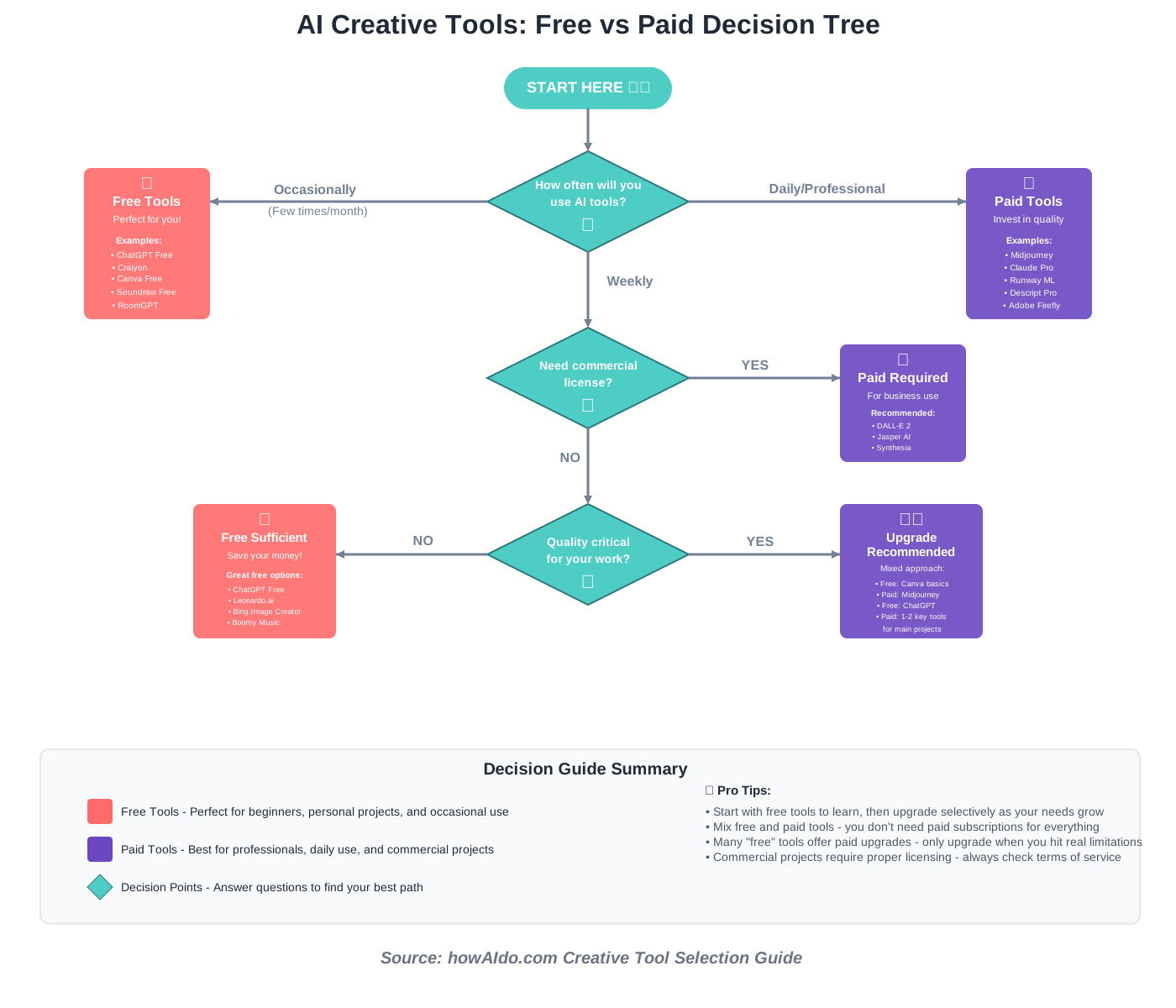
AI for Creative Expression: A Comparison of Free and Paid Tools helps you understand which investment level suits your needs. The creative AI market offers everything from completely free platforms to professional subscriptions costing hundreds monthly.
Free tools typically limit usage (generation credits, resolution limits, watermarks) but often provide sufficient capability for learning, personal projects, or occasional use. Paid tools remove restrictions while adding advanced features and commercial usage rights.
Free AI Creative Tools Worth Exploring
Visual Art:
- Craiyon (formerly DALL-E mini)—Unlimited free generations, lower quality but great for practice
- Leonardo.ai—Daily free credits for image generation with decent quality
- Bing Image Creator—Microsoft’s free DALL-E integration, surprisingly powerful
Music:
- Boomy – Free tier allows basic music generation and limited downloads
- Soundraw—Free version with restricted customization options
- BeatBot—Simple AI music creation with free access
Writing:
- ChatGPT Free—Substantial writing assistance without subscription
- QuillBot Free – Limited paraphrasing and grammar checking
- Rytr – Free tier offering 10,000 characters monthly
Design:
- Canva Free – AI-powered design features in free tier
- Remove.bg—Limited free background removals
- Coolors—Free AI color palette generation
When to Upgrade to Paid Tools
Consider paid subscriptions when:
Volume Needs Increase: Free tiers suffice for occasional use, but regular creative work quickly exhausts free credits. Paid subscriptions provide unlimited or substantially higher usage limits.
Quality Requirements Rise: Free versions often generate lower-resolution outputs with watermarks. Professional work demands full-quality exports.
Commercial Use Becomes Necessary: Many free tools restrict commercial usage. Monetizing your creative work requires paid licenses, ensuring legal usage rights.
Advanced Features Matter: Paid tiers unlock capabilities like inpainting, outpainting, style consistency, higher resolution, faster processing, and priority access.
Time Value Exceeds Cost: If waiting in free-tier queues or working around limitations costs more time than subscription fees, upgrading becomes economically sensible.
Our Recommendations by Use Case
Hobbyist/Learner: Start free, experiment broadly, and discover which tools resonate with your creative practice. Upgrade only specific tools you use consistently.
Content Creator: Invest in one or two platforms matching your primary medium (Midjourney for visuals, Soundraw for music). Use free tools for supplementary content.
Small Business: Budget for commercial licenses of essential tools. The cost typically remains far below hiring specialists for equivalent creative output.
Professional Creative: Consider multiple paid subscriptions covering different creative needs. Tax-deductible business expenses make professional tools financially reasonable.
We’ve found that beginning with free tools while learning, then strategically upgrading based on actual usage patterns, prevents wasteful spending while ensuring you have appropriate tools when needed.
Generating 3D Models with AI: The Rise of AI-Powered 3D Design
Generating 3D Models with AI: The Rise of AI-Powered 3D Design represents one of AI creativity’s most technically impressive frontiers. Creating 3D models traditionally required mastering complex software like Blender or Maya—a years-long learning curve. AI now generates 3D assets from text descriptions or 2D images.
Tools like Point-E, Shap-E, and Luma AI convert prompts into three-dimensional models suitable for games, animations, product design, or architectural visualization. While still maturing compared to 2D image generation, these platforms democratize 3D creation remarkably.
Understanding 3D AI Generation
These systems work by predicting three-dimensional structure from descriptions or reference images. Output formats include standard 3D file types (OBJ, STL, FBX) compatible with most 3D software.
Current limitations include:
- Less precise control than 2D generation
- Occasional topology issues requiring manual cleanup
- Lower detail levels than professionally modeled assets
- Limited understanding of complex mechanical structures
Despite limitations, AI 3D generation excels for:
- Rapid prototyping and concept visualization
- Background assets and scene filling
- Generating base meshes for manual refinement
- Creating placeholder models during early project phases
- Accessibility for non-3D artists needing occasional 3D content
We recommend viewing AI 3D generation as an accelerant rather than a complete solution. Use it to skip the initial modeling phase, then refine outputs in traditional 3D software for production-ready results.
AI for Creative Expression: Personalizing Art Experiences with Artificial Intelligence
AI for Creative Expression: Personalizing Art Experiences with Artificial Intelligence explores how AI adapts creative content to individual preferences, creating unique experiences for each viewer or listener.
Imagine music that adjusts tempo based on your activity level or visual art that evolves based on your emotional responses. AI enables dynamic, responsive creative experiences impossible with static traditional media.
Applications of Personalized Creative AI
Adaptive Music:
Streaming services use AI to create endless personalized playlists. Beyond this, emerging platforms generate original music tailored to your taste profile, energy level, or current activity.
Custom Visual Experiences:
Generative art installations use AI to create unique visuals responding to viewer movement, sound, or even biometric data. No two visitors experience identical artwork.
Interactive Storytelling:
AI-powered narratives adapt to reader choices in unprecedented ways, creating branching storylines with coherent, character-consistent dialogue generated in real time rather than prewritten.
Personalized Design:
AI systems learn your aesthetic preferences, automatically suggesting design directions matching your taste across color, layout, typography, and style.
This personalization raises interesting questions about authorship and artistic intent. When art adapts to each individual, does it retain a unified creative vision? We believe it represents evolution rather than replacement—a new form of creativity complementing traditional fixed-media art.
AI-Driven Animation: Creating Animated Content with Artificial Intelligence
AI-Driven Animation: Creating Animated Content with Artificial Intelligence transforms one of creative production’s most labor-intensive processes. Traditional animation requires drawing or modeling every frame—thousands of images for minutes of content.
AI animation tools interpolate between keyframes automatically, convert videos to animated styles, generate character movements from text descriptions, and even create lip-sync animation from audio.
Practical AI Animation Applications
Text-to-Animation:
Platforms like Runway ML and Synthesia convert written scripts into animated videos, complete with AI-generated voiceovers and synchronized character movements. While currently limited to simpler styles, the technology advances rapidly.
Video-to-Animation Conversion:
Record live-action reference footage, then apply AI-powered animation filters, converting it to cartoon, anime, or stylized animation. This technique, called rotoscoping acceleration, dramatically reduces traditional rotoscoping’s tedious frame-by-frame work.
Character Animation Automation:
AI systems analyze audio and generate facial animations matching speech, including appropriate emotional expressions. This handles one of animation’s most time-consuming aspects automatically.
In-Between Frame Generation:
Animate keyframes manually, then let AI generate smooth transitions between them. This combines human creative control with AI’s computational efficiency.
Getting Started with AI Animation
Step 1: Choose Appropriate Tools
Different tools serve different needs:
- Runway ML – Versatile AI video and animation toolkit
- D-ID – Face animation and talking head creation
- EbSynth—Transform video into painted animation
- Wonder Dynamics—AI-powered VFX and character animation
Step 2: Start with Simple Projects
Begin with short animations—5-15 seconds. Master basic workflows before attempting complex productions.
Step 3: Blend Manual and AI Techniques
Create keyframes manually establishing motion and timing, use AI for interpolation, then manually adjust any areas where AI interpolation lacks quality.
Step 4: Iterate Based on Output Quality
AI animation often requires multiple generation attempts with parameter adjustments. Treat first results as drafts, not final products.
Time-Saving Tip: Create a library of reusable AI-generated animation elements—walk cycles, facial expressions, and background movements. Reusing elements across projects multiplies time savings.
We’ve observed that animators integrating AI strategically produce significantly more content without sacrificing artistic quality. They focus creative energy on storytelling, character development, and key creative moments while AI handles repetitive technical execution.
AI for Creative Expression: The Role of AI in Film Production
AI for Creative Expression: The Role of AI in Film Production extends throughout the entire filmmaking pipeline from pre-production through post-production and distribution.
Modern films increasingly incorporate AI for:
Pre-Production:
- Script analysis and improvement suggestions
- Storyboard generation
- Location scouting via image analysis
- Casting assistance through facial recognition
- Budget forecasting
Production:
- Real-time scene composition suggestions
- Lighting optimization
- Performance capture enhancement
- Automated camera operation for specific shots
Post-Production:
- Automated rough cuts and assembly
- Color grading acceleration
- Visual effects generation
- Audio cleanup and enhancement
- Subtitle generation and translation
Distribution and Marketing:
- Trailer generation optimized for engagement
- Audience targeting and marketing strategy
- Predictive analytics for release timing
- Personalized streaming recommendations
Independent filmmakers benefit most dramatically. AI tools previously requiring expensive specialists now run on consumer hardware, democratizing production quality. A single creator with vision can produce content rivaling larger productions’ technical polish.
However, we emphasize that AI serves storytelling—it doesn’t replace it. The most important aspects of filmmaking—compelling narratives, authentic performances, emotional resonance, and thematic depth—remain fundamentally human concerns.
AI-Powered Fashion Design: The Future of Clothing Creation
AI-Powered Fashion Design: The Future of Clothing Creation revolutionizes how designers conceptualize, prototype, and produce garments. From generating design variations to predicting trend cycles, AI accelerates fashion’s notoriously fast-paced industry.
Fashion AI applications include:
Design Generation:
Input style parameters, fabric preferences, seasonal themes, or reference images, and AI generates clothing designs complete with pattern details, color schemes, and styling suggestions. Designers iterate on AI concepts much faster than sketching every variation manually.
Trend Prediction:
AI analyzes social media, runway shows, street style, and historical trends to predict emerging fashion directions. Brands use these insights for earlier production decisions, reducing wasted inventory from incorrect trend predictions.
Pattern Making Automation:
Converting designs into actual garment patterns traditionally requires specialized expertise. AI systems generate patterns from design sketches, dramatically reducing the time from concept to prototype.
Fabric and Material Suggestions:
AI recommends appropriate fabrics based on design style, intended use, season, and sustainability goals. It considers properties like drape, stretch, weight, and care requirements.
Fit Optimization:
Virtual fitting technology using AI ensures garments fit diverse body types before physical production. This reduces returns in online retail while improving customer satisfaction.
Sustainable Design:
AI helps designers minimize waste by optimizing pattern layouts, suggesting eco-friendly material alternatives, and predicting garment longevity based on construction methods.
The fashion industry’s adoption of AI doesn’t eliminate designers—it allows them to focus on creative vision while AI handles technical execution and data analysis. Small designers and independent brands particularly benefit, accessing capabilities previously available only to major fashion houses.
AI for Creative Expression: Mastering AI Image Upscaling Techniques
AI for Creative Expression: Mastering AI Image Upscaling Techniques addresses a common creative need: transforming low-resolution images into high-quality versions suitable for print or large displays.
Traditional upscaling simply enlarges pixels, resulting in blurry, pixelated images. AI upscaling analyzes image content and intelligently generates realistic detail that wasn’t present in the original, producing clean, sharp results even when enlarging images several times their original size.
How AI Upscaling Works
AI upscaling systems train on millions of high-resolution images, learning how details typically appear at various scales. When processing low-resolution input, they predict probable high-resolution details based on this training, essentially “imagining” realistic detail consistent with the image content.
Practical Upscaling Applications
Photo Restoration:
Old family photographs taken with vintage cameras lack modern resolution. AI upscaling brings them to contemporary quality standards suitable for reprinting or digital display.
Print Production:
Found the perfect image for your project, but it’s too small for printing? AI upscaling can transform web-sized images into print-ready files.
Logo and Graphics:
When clients provide low-resolution logos, AI upscaling reconstructs clean, vector-like quality from bitmap sources.
Video Enhancement:
AI video upscaling converts older SD content to HD or 4K quality, breathing new life into archival footage.
Best AI Upscaling Tools
Topaz Gigapixel AI:
Industry-leading upscaling with exceptional detail preservation. Handles photographs particularly well. Paid software with a one-time purchase.
waifu2x:
Free, open-source upscaling is especially effective for artwork and anime-style images. Web-based with no installation required.
Let’s Enhance:
Web-based AI upscaling with a free tier. User-friendly interface ideal for occasional use.
Adobe Photoshop Super Resolution:
Built into recent Photoshop versions. Convenient if you already subscribe to Creative Cloud.
Upscayl:
Free, open-source desktop application supporting multiple AI upscaling models. Excellent for batch processing.
Upscaling Best Practices
Start with Best Available Quality:
AI upscaling works best with reasonably decent input. Extremely degraded images have limits—AI cannot create information that’s completely absent.
Choose Appropriate Upscaling Factor:
Doubling resolution (2x) typically produces better results than aggressive scaling (8x). Multiple moderate upscaling passes often beat a single extreme enlargement.
Use Content-Appropriate Models:
Different AI models excel with different content types. Photo models for photographs, illustration models for artwork, and face models for portraits.
Enhance Before Upscaling:
Clean noise, adjust exposure, and correct color in the original image before upscaling. AI amplifies both detail and problems—fixing issues first produces superior results.
Post-Process After Upscaling:
AI upscaling sometimes introduces subtle artifacts or oversharpening. Light editing after upscaling perfects results.
We’ve seen AI upscaling rescue countless projects where perfect source images weren’t available. It’s particularly valuable for archival work, historical preservation, and situations where reshooting simply isn’t possible.
AI-Generated Sound Effects: Creating Unique Audio for Your Projects
AI-Generated Sound Effects: Creating Unique Audio for Your Projects solves a persistent challenge for content creators: finding perfect sound effects for specific needs without expensive sound libraries or field recording equipment.
AI audio generation tools create custom sound effects from text descriptions, opening new possibilities for podcasters, video creators, game developers, and filmmakers operating on limited budgets.
Understanding AI Sound Generation
These systems analyze thousands of hours of audio, learning relationships between sounds and their textual descriptions. Request “footsteps on gravel,” “distant thunder,” or “futuristic door opening,” and the AI generates audio matching your specifications.
Current capabilities include:
- Environmental sounds (weather, nature, ambient noise)
- Foley effects (footsteps, clothing rustles, object handling)
- Mechanical sounds (vehicles, machinery, electronics)
- Fantasy/sci-fi effects (impossible sounds for creative projects)
- Transitions and audio logos
Leading AI Sound Effect Platforms
AudioCraft by Meta:
Free, open-source AI audio generation producing high-quality results. Requires some technical setup but offers unlimited generation.
Stable Audio:
Commercial platform offering text-to-audio generation with high-quality outputs. Monthly subscription model with generous limits.
Soundful:
Originally focused on music, it now includes sound effect generation. User-friendly interface ideal for beginners.
Riffusion:
Specializes in musical content but handles some sound effect requests. Free and experimental.
Creating Custom Sound Effects
Step 1: Write Descriptive Prompts
Clarity matters enormously. Instead of “explosion,” try “distant military explosion with deep rumble and echoing debris.” Specify:
- Sound type and source
- Distance and perspective
- Environment and reverb characteristics
- Duration and intensity
- Additional contextual details
Step 2: Generate Multiple Variations
Create several versions of each sound effect. Subtle differences between generations might make one perfect while others feel almost right.
Step 3: Edit and Layer
Use audio editing software (free options like Audacity work perfectly) to trim, fade, combine, and process AI-generated sounds. Layering multiple AI generations often creates richer, more complex results than single generations.
Step 4: Adjust to Mix
Process AI sound effects to fit your project’s overall audio mix—EQ adjustments, compression, reverb matching, and volume balancing ensure cohesive soundscapes.
Common Mistakes:
- Overly vague prompts – Specificity produces better results
- Using raw AI output without editing – Light processing dramatically improves integration
- Expecting perfect realism—AI sound effects work best in creative contexts where slight artificiality is acceptable
- Ignoring licensing terms – Verify commercial usage rights
We’ve found AI-generated sound effects particularly valuable for projects needing impossible sounds—fantasy creatures, science fiction technology, or stylized cartoon effects where realism isn’t the goal.
AI for Creative Expression: Using AI to Restore Old Photos and Artwork
AI for Creative Expression: Using AI to Restore Old Photos and Artwork represents one of AI’s most emotionally powerful applications. Damaged, faded, scratched, or water-stained precious memories can be digitally restored to pristine condition.
AI restoration goes beyond simple cleanup. It intelligently reconstructs missing information, colorizes black-and-white images, removes damaged artifacts, and enhances detail while maintaining original character.
Types of AI Photo Restoration
Damage Repair:
AI analyzes surrounding undamaged areas to predict what missing or damaged regions should look like, seamlessly filling scratches, tears, and stains.
Colorization:
Black-and-white photos gain realistic color based on AI’s understanding of how different objects, skin tones, and scenes typically appear in color photography.
Enhancement:
Faded contrast, washed-out colors, and soft focus all improve through AI analysis predicting original photographic intent.
Face Restoration:
Specialized AI models trained specifically on faces produce remarkable results, restoring portrait details even when original images are severely degraded.
Recommended Restoration Tools
Remini:
Mobile and web application offering impressive face and photo restoration. Excellent for quick results on personal photographs. Free tier available.
MyHeritage Photo Enhancer:
Specialized in historical family photos. Particularly strong colorization and face enhancement. Free limited usage.
DeepImage.ai:
Professional-grade restoration with fine-tuned control. Subscription-based with high-quality outputs.
Hotpot.ai:
Free web-based restoration tools, including colorization, enhancement, and artifact removal. Generous free tier.
GFPGAN:
Open-source face restoration achieving cutting-edge results. Requires technical setup but is completely free.
Restoration Best Practices
Scan at Highest Quality:
If working with physical photographs, scan at the highest possible resolution (600 DPI minimum for small prints). AI restoration quality depends on input quality.
Clean Physical Damage First:
Gently clean physical prints before scanning. Remove surface dust and dirt with appropriate archival techniques.
Process Non-Destructively:
Always keep original scans untouched. Work on copies so you can restart if restoration attempts go wrong.
Use Multiple Tools:
Different AI tools excel at different restoration aspects. Combine results from multiple platforms for best outcomes.
Maintain Historical Accuracy:
When colorizing, research period-appropriate colors for clothing, vehicles, and environments. AI might choose anachronistic colors without contextual guidance.
Apply Subtle Adjustments:
Over-processing makes photos look artificial. Aim for authentic restoration rather than modern perfection.
The emotional impact of seeing damaged family photographs restored cannot be overstated. We’ve watched people moved to tears seeing grandparents’ faces clear for the first time or faded wedding photos restored to their original glory.
AI-Enhanced Storytelling: Crafting Compelling Narratives with AI Assistance
AI-Enhanced Storytelling: Crafting Compelling Narratives with AI Assistance empowers writers, game developers, and content creators to build richer, more complex narratives through AI collaboration.
Modern storytelling AI assists with:
Character Development:
Generate backstories, personality traits, speech patterns, motivations, and character arcs. AI helps ensure characters remain consistent while suggesting development directions you might not have considered.
Plot Structure:
Input story premises and receive plot outlines, chapter breakdowns, or scene sequences. AI understands narrative structures like the hero’s journey, the three-act structure, or nonlinear timelines.
Dialogue Writing:
Generate character-consistent dialogue, suggest conversation directions, or create realistic banter and argument patterns. Particularly useful for games requiring extensive branching dialogue trees.
World-Building:
Create detailed fictional settings with consistent history, geography, culture, and rules. AI helps maintain world consistency across long narratives or expansive universes.
Pacing Analysis:
Submit existing manuscripts for AI analysis identifying pacing issues, momentum drops, or rushed sequences. Receive specific suggestions for adjusting narrative rhythm.
Effective AI Storytelling Integration
We’ve developed a workflow maximizing AI storytelling benefits while preserving authentic creative voice:
Phase 1: Brainstorming
Use AI freely during early development. Generate dozens of character concepts, plot directions, thematic variations, or setting details. Don’t commit to anything yet—just explore possibilities.
Phase 2: Structure Development
Select promising ideas from brainstorming and ask AI to develop detailed outlines, beat sheets, or chapter summaries. This transforms vague concepts into concrete narrative structures.
Phase 3: Guided Drafting
Write drafts yourself, but consult AI when stuck. Request scene continuations, dialogue options, or descriptive language suggestions. Use AI outputs as scaffolding you reshape into your voice.
Phase 4: Consistency Review
Submit sections to AI asking specific questions: “Does this dialogue match how I’ve written this character previously?” “Is this plot development consistent with established world rules?” “Have I contradicted any earlier story elements?”
Phase 5: Independent Refinement
Final revision happens entirely without AI. This ensures the finished work truly represents your vision, voice, and creative intent.
Critical Principle: AI should never write your story for you. It should help you write your story better. Maintain ownership and authenticity throughout the process.
We’ve seen writers produce their best work using this approach—AI accelerates development and solves technical problems while human creativity drives emotional resonance and thematic depth.
AI for Creative Expression: The Impact of AI on Traditional Art Forms
AI for Creative Expression: The Impact of AI on Traditional Art Forms examines how new technology affects painting, sculpture, printmaking, calligraphy, and other established artistic practices.
Rather than replacing traditional arts, AI creates interesting tensions and opportunities. Some traditional artists view AI skeptically, while others eagerly integrate digital tools with physical techniques.
How Traditional Artists Use AI
Reference Generation:
Many painters use AI to generate reference images for complex poses, unusual lighting conditions, or imaginary creatures. This supplements rather than replaces traditional reference methods like life drawing or photography.
Composition Exploration:
Generate multiple compositional variations digitally before committing to expensive canvas and materials. This reduces wasted materials while encouraging ambitious experimentation.
Color Studies:
AI quickly generates color palette variations, helping artists preview how different schemes might work before mixing physical paints.
Pattern and Texture Design:
Traditional textile artists, ceramicists, and printmakers use AI to generate patterns they then execute physically, bridging digital generation with material craftsmanship.
Documentation and Promotion:
AI helps traditional artists with “business side” tasks—writing artist statements, generating social media content, and creating promotional materials—freeing time for studio work.
Preserving Traditional Techniques
We believe AI should complement rather than threaten traditional arts. Several approaches maintain traditional practice vitality while acknowledging technological change:
Hybrid Approaches:
Artists combine digital AI processes with physical execution. Generate designs digitally, then paint, sculpt, or print them traditionally. This blends technological efficiency with material authenticity.
Traditional Skills Remain Valuable:
Understanding composition, color theory, anatomy, perspective, and material properties through traditional training creates better AI prompters. Technical knowledge informs prompt craft, producing superior AI results.
Unique Material Qualities:
Physical artworks possess qualities AI cannot replicate—texture, dimension, material presence, and aging characteristics. These maintain traditional art’s distinct value.
Human Connection:
Audiences often value the human connection inherent in traditional art—knowing a person physically created every mark, made every decision, and invested time and emotion into material transformation.
Traditional arts evolve but persist through technological change because they offer experiences and values distinct from purely digital creation. AI represents another technological wave—significant but not existentially threatening to physical artistic practice.
AI-Driven Game Development: Creating Immersive Gaming Experiences
AI-Driven Game Development: Creating Immersive Gaming Experiences transforms how games are designed, developed, and experienced by players. AI assists across every development phase while enabling entirely new gameplay possibilities.
AI in Game Development Pipeline
Asset Generation:
Create game art, 3D models, textures, character designs, and environments using AI, dramatically reducing production time and budget requirements. Small indie teams can now produce assets rivaling larger studios.
Procedural Content Generation:
AI generates infinite variations of levels, quests, items, or encounters, providing unique experiences for each player and greatly extending replay value.
NPC Behavior and Dialogue:
Non-player characters with AI-driven dialogue systems engage in realistic conversations, responding contextually to player actions. No more repetitive canned responses—NPCs feel genuinely responsive.
Dynamic Difficulty Adjustment:
AI monitors player performance and adjusts challenge levels, maintaining optimal engagement—not so easy players feel bored, not so hard they feel frustrated.
Testing and Quality Assurance:
AI plays games thousands of times, identifying bugs, balance issues, and exploits much faster than human testing alone.
Player Behavior Analysis:
Analyze how players interact with games, identifying problematic difficulty spikes, confusing mechanics, or underutilized features. Data-informed design improvements increase player satisfaction.
Accessibility for Indie Developers
AI democratizes game development similarly to how it affects other creative fields. Solo developers or small teams now access capabilities previously requiring large studios:
- Professional-quality asset creation without art teams
- Complex NPC behaviors without extensive programming
- Infinite content generation providing AAA-scale experiences
- Sophisticated testing coverage without large QA departments
We’re entering an era where creative vision matters more than team size or budget. Compelling game design, interesting mechanics, and engaging narratives matter most—AI handles much of the technical execution.
AI for Creative Expression: Generating Unique Color Palettes with Artificial Intelligence
AI for Creative Expression: Generating Unique Color Palettes with Artificial Intelligence helps artists, designers, and creators overcome one of design’s most challenging aspects—selecting harmonious, purposeful color combinations.
AI color tools analyze images, understand color theory, consider emotional associations, and generate palettes for specific moods, brands, or aesthetic goals.
Leading AI Color Tools
Coolors.co:
Popular free tool generating random palettes with a tap of the spacebar. Lock colors you like and regenerate others until achieving perfect combinations. Also extracts palettes from uploaded images.
Adobe Color:
Generates palettes based on color rules (analogous, complementary, and triadic) with AI suggestions. Integrates with Creative Cloud applications.
Khroma:
AI learns your color preferences through training selections, then generates unlimited palettes matching your taste. Personalized color discovery.
Color Mind:
AI trained on photographs, art, and popular designs generates sophisticated palette suggestions. Particularly strong for contemporary aesthetic trends.
Huemint:
Machine learning-powered palette generation with context awareness—specify whether colors are for backgrounds, text, or accents.
Using Color AI Effectively
Input Quality Source Material:
When extracting palettes from images, use high-quality sources reflecting desired aesthetics. AI identifies dominant and accent colors based on your reference.
Consider Context:
Specify whether palettes are for web design, print, branding, or art. Different mediums have different color reproduction characteristics and conventional uses.
Test Accessibility:
Run generated palettes through contrast checkers, ensuring sufficient accessibility for text and interface elements, especially for web design.
Adjust for Cultural Context:
Color meanings vary across cultures. Research color symbolism relevant to your audience when designing for specific markets or regions.
Iterate Systematically:
Lock successful colors and regenerate complementary ones rather than starting completely over. Incremental refinement produces better results than random regeneration.
Time-Saving Tip: Build a library of successful AI-generated palettes for different moods, seasons, and project types. Reference this library for faster project starts rather than generating from scratch every time.
We’ve observed that AI color tools particularly benefit those without formal color theory training, providing intuitive access to sophisticated color relationships that would otherwise require years of study to internalize.
AI-Assisted Choreography: Exploring New Frontiers in Dance
AI-Assisted Choreography: Exploring New Frontiers in Dance represents creative AI’s most physically expressive application. Dancers and choreographers use AI to generate movement sequences, analyze performance, and explore motion possibilities beyond conventional choreographic thinking.
AI Dance Applications
Movement Generation:
AI systems trained on dance footage generate original movement sequences in specific styles—ballet, contemporary, hip-hop, traditional folk dance—or blend multiple styles, creating hybrid forms.
Motion Capture Analysis:
AI analyzes performance videos, providing detailed feedback on technique, synchronization, and expression. This supports training and refinement.
Music Visualization:
AI generates choreographic suggestions synchronized to music structure, helping choreographers explore how movement might respond to rhythmic and melodic elements.
Collaborative Creation:
Dancers improvise while AI responds in real-time with projections, soundscapes, or suggested next movements, creating human-machine performance dialogues.
Accessibility:
AI motion systems help adapt choreography for dancers with different physical abilities, suggesting modifications that maintain artistic intent while respecting physical limitations.
Notable Projects
Several groundbreaking dance companies now integrate AI into creative processes:
Wayne McGregor Studio:
Pioneering choreographer collaborates with AI researchers, creating systems that learn his choreographic style and suggest movements he might create.
MotionBuilder AI:
Dance technology platform analyzing movement and suggesting variations, combinations, and developments dancers might not conceive independently.
While still emerging, AI-assisted choreography demonstrates how technology can meaningfully engage with even the most physically embodied art forms. Dance remains a fundamentally human expression, but AI offers new vocabulary and creative partnerships.
AI for Creative Expression: Creating Hyperrealistic Portraits with AI
AI for Creative Expression: Creating Hyperrealistic Portraits with AI showcases how far image generation has advanced. Modern AI creates faces indistinguishable from photographs, opening possibilities for art, game development, filmmaking, and design.
These aren’t photographs of real people—AI generates entirely fictional faces with remarkable detail, expression, and character. Creators use this capability for character concept art, avatar generation, and anywhere photorealistic human imagery is needed without model photography.
Creating Convincing AI Portraits
Effective Portrait Prompting:
Successful hyperrealistic portraits require detailed prompts specifying:
- Demographics: Age, gender, ethnicity
- Expression: Emotion, gaze direction, mouth position
- Lighting: Type (studio, natural, dramatic), direction, quality
- Photography Details: Focal length, depth of field, film characteristics
- Context: Environment, clothing, styling
- Technical Quality: Resolution, lens characteristics, post-processing style
Example prompt: “Close-up portrait of a 60-year-old woman with silver hair and laugh lines, warm genuine smile, looking directly at camera, soft window lighting from left, shallow depth of field, shot on 85mm lens, natural skin texture, slight film grain, professional headshot style”
Ethical Considerations
Hyperrealistic AI faces raise important ethical questions we must address:
Deepfake Concerns:
Technology enabling realistic face generation also enables malicious deepfakes. Use AI portrait generation responsibly, never for deception or harm.
Representation:
Ensure AI-generated faces represent diverse ethnicities, ages, body types, and expressions. Avoid perpetuating narrow beauty standards or stereotypes.
Disclosure:
Be transparent when images are AI-generated, especially in contexts where authenticity matters (journalism, documentation, legal proceedings).
Commercial Use:
Verify platform terms allow commercial usage of generated faces. Some services restrict how generated likenesses can be used.
We advocate for thoughtful, ethical deployment of this powerful capability. Used responsibly, hyperrealistic portrait AI democratizes access to professional-quality imagery while raising important conversations about truth, representation, and digital identity.
AI-Generated Video Editing: Automating the Video Production Process
AI-Generated Video Editing: Automating the Video Production Process addresses video editing’s notorious time consumption. Traditional editing involves hours of reviewing footage, making cuts, adjusting timing, adding transitions, color grading, and audio mixing.
AI video editing tools automate substantial portions of this workflow:
Automated Rough Cuts:
AI analyzes raw footage, identifying the best takes, removing mistakes and pauses, and assembling initial sequences following basic editing principles. This transforms hours of rough cutting into minutes.
Smart Trimming:
AI detects and removes unwanted silences, filler words, repetitive content, or technical problems, leaving only relevant footage.
Music Synchronization:
Automatically sync cuts to music beats, creating rhythmic visual flow without manual timing adjustments.
Style-Based Editing:
Specify editing styles (“fast-paced, energetic” or “slow, contemplative”), and AI applies appropriate cut frequency, transition types, and pacing.
Automatic Captioning and Subtitles:
Speech recognition generates accurate captions automatically, with AI suggesting optimal positioning and timing.
Color Matching:
AI analyzes footage and applies consistent color grading across clips shot in different conditions, maintaining visual continuity.
Leading AI Video Editing Platforms
Description:
Text-based video editing is where you edit the transcript, and the video follows automatically. Revolutionary for podcasts and talking-head content.
Runway ML:
Comprehensive AI video toolkit including object removal, background replacement, rotoscoping, and creative effects.
Adobe Premiere Pro AI Features:
Auto Reframe, Scene Edit Detection, and Speech-to-Text integration streamline traditional editing workflows.
Kapwing:
Web-based AI editing with smart cut, subtitle generation, and resizing for different social platforms.
OpusClip:
Specifically designed for extracting short viral clips from long-form content using AI to identify engaging moments.
Effective AI Editing Workflow
Step 1: Organize Footage
Despite AI capabilities, organized project structure remains important. Clearly label clips, separate A-roll from B-roll, and organize by scene or topic.
Step 2: Generate AI Rough Cut
Let AI create the initial assembly. This provides a starting point and handles basic technical cleanup automatically.
Step 3: Review and Refine
Critically evaluate AI decisions. Keep strong choices, modify questionable ones, and add creative elements AI wouldn’t conceive.
Step 4: Manual Creative Touches
Apply your unique creative vision—specific timing for emotional impact, creative transitions, stylistic color grading, and thoughtful audio mixing.
Step 5: Final Quality Pass
Review complete project making fine adjustments AI’s broad strokes miss.
We’ve found that AI editing works best handling repetitive, technical tasks while humans focus on creative storytelling. The technology handles grunt work; you provide artistry and vision.
AI for Creative Expression: Using AI to Generate Textures and Materials
AI for Creative Expression: Using AI to Generate Textures and Materials serves 3D artists, game developers, architects, and product designers needing realistic surface materials.
Creating convincing textures—the visual and tactile surface qualities of materials—traditionally requires either photographing real materials or manually painting detailed maps. AI now generates tileable textures, complete material sets including normal maps and roughness maps, and variations on demand.
Texture AI Applications
Seamless Pattern Generation:
Create tileable textures for 3D models, architectural visualizations, or game environments. AI generates patterns repeating seamlessly without visible seams.
Material Set Creation:
Modern 3D rendering requires multiple texture maps: albedo/color, normal/bump, roughness/glossiness, metallic, and ambient occlusion. AI generates complete coordinated sets from simple descriptions.
Style Variations:
Transform existing textures into different styles or materials. Convert wood to aged wood, brick to painted brick, or metal to rusted metal.
Physical Material Simulation:
AI trained on real-world material properties generates textures that behave realistically under different lighting conditions.
Leading Texture AI Tools
Poly.cam:
3D scanning platform with AI-powered texture generation and cleanup.
Materialize:
Converts single images into complete PBR (Physically-Based Rendering) material sets.
Stable Diffusion Texture Models:
Open-source models specifically trained for seamless texture generation.
Ponzu (Poly Haven):
Free library with AI-assisted texture creation and variation tools.
Substance Sampler:
Adobe’s AI-powered texture creation and manipulation within the Substance ecosystem.
Creating professional textures previously required either expensive photo equipment, material samples, and technical photography knowledge or manual artistic texture painting. AI democratizes access to high-quality materials for all creators.
AI-Powered Scriptwriting: Developing Screenplays with Artificial Intelligence
AI-Powered Scriptwriting: Developing Screenplays with Artificial Intelligence assists screenwriters throughout development from initial concept through polished final draft.
Screenwriting’s unique format requirements, character consistency demands, and structural conventions make it particularly suitable for AI assistance that understands these specialized patterns.
How AI Assists Screenwriters
Premise Development:
Input rough story ideas and receive fleshed-out premises, including characters, settings, conflicts, and thematic directions.
Scene Outlining:
Break stories into detailed scene-by-scene outlines, maintaining proper dramatic structure and pacing.
Dialogue Generation:
Generate character-consistent dialogue exploring how scenes might play out. Use this as drafting scaffolding rather than finished dialogue.
Format Assistance:
Please ensure the screenplay format is applied automatically, including slug lines, action lines, and dialogue formatting.
Rewrite Suggestions:
Submit scenes receiving alternative approaches, dialogue variations, or pacing improvements.
Market Analysis:
Some AI tools analyze successful screenplays in specific genres, suggesting elements that resonate with audiences and industry professionals.
Maintaining Creative Authenticity
The screenplay marketplace values unique voices and original perspectives. AI should support your voice development, not homogenize it into generic templates.
We recommend this approach:
Use AI for structure and mechanics – Outlining, format checking, and consistency tracking Keep voice decisions human – Dialogue nuance, character psychology, thematic depth, and emotional authenticity must come from you Collaborate, don’t delegate— View AI suggestions as junior writer proposals requiring your approval and refinement Rewrite everything – Never submit AI-generated text unmodified; always rewrite in your distinctive voice
The most successful screenwriters we’ve observed use AI strategically—accelerating development while protecting what makes their work distinctly theirs.
AI for Creative Expression: Transforming Interior Design with Artificial Intelligence
AI for Creative Expression: Transforming Interior Design with Artificial Intelligence revolutionizes how designers visualize, plan, and communicate design concepts. From space planning to style exploration, AI tools accelerate the interior design process dramatically.
AI Interior Design Applications
Virtual Staging:
Transform empty rooms into fully furnished, styled spaces instantly. Real estate agents and designers use this to showcase potential rather than photographing expensive physical staging.
Style Exploration:
Upload room photos and generate versions in different design styles—minimalist, maximalist, mid-century modern, industrial, Scandinavian, or any aesthetic direction. This helps clients visualize options before committing to purchases.
Color Scheme Testing:
Try unlimited wall colors, accent combinations, and finish variations without purchasing paint samples.
Furniture Layout Optimization:
AI analyzes room dimensions and suggests furniture arrangements maximizing flow, function, and aesthetic balance.
Lighting Simulation:
Preview how spaces look under different lighting conditions—natural daylight, artificial lighting, various times of day—helping make informed fixture and treatment decisions.
Material and Finish Selection:
Visualize different flooring, countertops, cabinetry, and finishes before making final selections.
Top AI Interior Design Platforms
Spacely AI:
Comprehensive interior design platform with realistic rendering and extensive furniture libraries.
REimagineHome:
Particularly strong for redesigning existing spaces, virtual staging, and style transformations.
RoomGPT:
Free tool offering quick room redesign visualizations perfect for initial exploration.
HomeDesigns AI:
Professional-grade tool with precise control over design elements and high-quality rendering.
Modsy (now Decorist AI):
Virtual interior design service combining AI visualization with professional designer guidance.
Interior Design AI Workflow
Step 1: Photograph Existing Space
Take clear, well-lit photos from multiple angles. Good input photography produces better AI results.
Step 2: Define Design Goals
Clarify style preferences, functional requirements, budget constraints, and must-have elements before exploring AI options.
Step 3: Generate Style Variations
Create multiple AI visualizations exploring different approaches. Don’t settle on first results—explore broadly.
Step 4: Client Collaboration
Share AI visualizations with clients or collaborators, gathering feedback efficiently. Multiple quick iterations replace lengthy verbal discussions.
Step 5: Detailed Planning
Once direction is established, use AI for detailed decisions—specific furniture selections, precise color matching, and layout refinement.
Step 6: Source and Execute
AI visualizations guide purchasing decisions and contractor instructions, reducing miscommunication and costly mistakes.
We’ve seen interior designers dramatically reduce client revision cycles by visualizing options clearly upfront. AI removes ambiguity from design communication, ensuring clients and designers share understanding before execution begins.
AI and the Future of Creative Collaboration: Humans and Machines Working Together
AI and the Future of Creative Collaboration: Humans and Machines Working Together synthesizes everything we’ve explored throughout this guide, examining where human-AI creative partnerships are heading.
The most profound shift isn’t technical capability improvements—though those continue advancing rapidly. Rather, it’s conceptual: moving from viewing AI as a tool we use toward recognizing AI as a collaborator we work alongside.
Redefining Creative Process
Traditional creative processes flow linearly: conception → execution → refinement → completion. AI-enhanced creativity becomes more iterative and conversational: propose idea → AI responds → human reacts → AI adapts → collaborative refinement continues.
This mirrors human creative collaboration. Just as designers brainstorm with team members, bounce ideas off creative partners, and iterate through group feedback, AI provides responsive partnership throughout creative development.
What Remains Uniquely Human
Despite AI advances, certain aspects remain distinctly human:
Intentionality: We decide what to create and why it matters Meaning-Making: We determine significance, emotional resonance, and cultural context Ethical Judgment: We navigate moral complexities and social responsibilities Lived Experience: Our personal histories, emotions, and perspectives inform authentic creativity Aesthetic Judgment: We determine what’s excellent versus merely acceptable Connection: We create for other humans, understanding unspoken emotional needs
AI amplifies these human elements rather than replacing them. It’s a powerful brush, not the painter. A sophisticated instrument, not the musician. An intelligent collaborator, not the creative director.
Practical Principles for Human-AI Collaboration
Through everything we’ve discussed—from music generation to interior design—several principles emerge:
1. Maintain Creative Authority
You direct the collaboration. AI suggests, accelerates, and expands possibilities, but you make final creative decisions.
2. Embrace Iteration
AI excels at rapid generation. Don’t expect perfection immediately—generate extensively, curate carefully, and refine persistently.
3. Combine Intelligently
Blend AI outputs with traditional techniques, human creativity, and professional expertise. Hybrid approaches typically produce superior results to AI or human work alone.
4. Stay Ethically Aware
Consider implications of your AI use—attribution, consent, representation, authenticity, environmental impact, and effects on creative communities.
5. Continuously Learn
AI creative capabilities evolve rapidly. Maintain a learning mindset, experiment with emerging tools, and adapt workflows as technology advances.
6. Protect Your Voice
While using AI strategically, preserve what makes your creative work distinctly yours. Your unique perspective remains irreplaceable.
Looking Forward
We’re experiencing creative technology’s most transformative period since digital tools emerged decades ago. The difference? This transformation democratizes creativity itself, not just production efficiency.
Someone with vision but limited technical skills can now produce professional-quality creative work across multiple mediums. Geographic location matters less. Expensive equipment becomes optional. Large teams aren’t prerequisites for ambitious projects.
This democratization doesn’t diminish professional creative expertise—it expands the creative community. More voices contribute. More perspectives are shared. More creativity enters the world.
We believe this enriches rather than threatens creative culture. History shows that new creative tools—from oil paints to photography to digital software—initially sparked concerns but ultimately expanded artistic possibility without eliminating previous forms.
AI for creative expression represents the next chapter in this ongoing story of technology amplifying human imagination.
Frequently Asked Questions
Conclusion
We’ve explored how AI for creative expression transforms artistic practice across every creative medium—from visual art to music, writing to design, animation to interior spaces. What emerges clearly is that AI isn’t replacing human creativity; it’s amplifying it in unprecedented ways.
You don’t need to be a programmer or technical expert to harness these powerful tools. You simply need curiosity, willingness to experiment, and commitment to maintaining your authentic creative voice throughout the process. AI handles technical execution while you provide vision, meaning, and emotional resonance that only humans can supply.
Start with the free tools we’ve discussed, explore techniques matching your interests, and gradually expand as you discover which applications resonate with your creative practice. Remember that “failed” experiments teach as much as successful ones—AI creativity thrives on iteration and playful exploration.
Most importantly, embrace these tools as creative partners rather than replacements. The most exciting creative work happening today combines human imagination with AI capabilities, producing results neither could achieve independently. Your unique perspective, life experiences, and creative vision remain irreplaceable—AI simply helps you express them more effectively.
The future of creativity belongs to those who thoughtfully blend human artistry with intelligent tools, maintaining ethical awareness while pushing creative boundaries. We’re excited to see what you’ll create.
About the Authors
Abir Benali (Main Author) and James Carter (Co-Author) collaborated to create this article for howAIdo.com.
Abir Benali is a friendly technology writer specializing in making AI tools accessible to non-technical users. With a focus on clear, actionable guidance, Abir helps beginners navigate AI creative tools confidently while avoiding common pitfalls. Her writing emphasizes practical real-world applications that anyone can implement immediately.
James Carter is a productivity coach dedicated to helping individuals leverage AI for enhanced efficiency and time savings. James brings systematic, step-by-step approaches to complex creative processes, making them manageable for everyday creators. His work focuses on integrating AI tools into sustainable creative workflows that actually improve daily practice.
Together, we combine accessible education with practical productivity guidance, empowering readers to confidently embrace AI creative tools while maintaining authentic artistic expression. Our collaborative approach ensures content is both technically accurate and immediately actionable for beginners.