
AI-Powered Design Tools: Your Complete Guide to Creative Automation
Hey there, creative friend! I’m Alex Rivera, and I’ve been exploring the incredible world of AI-Powered Design Tools for years now. Whether you’re a seasoned designer looking to speed up your workflow or someone who’s never touched design software before, AI is about to become your new best friend in the creative process.
AI-Powered Design Tools are revolutionizing how we approach creativity, making professional-level design accessible to everyone. These intelligent systems can generate logos in seconds, upscale images to stunning clarity, create entire color palettes based on a single word, and even build website layouts while you focus on what really matters—your creative vision. The best part? You don’t need years of design school or technical expertise to use them effectively.
In this comprehensive guide, I’ll walk you through everything you need to know about AI design tools. We’ll explore how they work, discover the most exciting applications across different design disciplines, and I’ll share practical tips to help you integrate these tools into your creative workflow. Think of these resources as your friendly roadmap to becoming more efficient, more creative, and more confident in your design projects.
What Are AI-Powered Design Tools?
Let me break this down in the simplest way possible. AI-Powered Design Tools are software applications that use artificial intelligence—specifically machine learning algorithms—to automate, enhance, or completely generate design work. Instead of manually creating every element from scratch, these tools learn from millions of design examples and can make intelligent decisions about composition, color, typography, and visual hierarchy.
Imagine having a design assistant who’s studied every logo ever created, analyzed thousands of successful websites, and memorized the principles of color theory. That’s essentially what these AI systems do. They process vast amounts of design data and use that knowledge to help you create better work, faster.
Here’s what makes them special: traditional design software like Photoshop or Illustrator are incredible tools, but they only do exactly what you tell them to do. AI design tools, on the other hand, can understand context, make suggestions, and even generate complete designs based on simple text descriptions. You might type “modern tech startup logo with blue tones” and receive dozens of professional options in seconds.
The technology behind these tools typically involves neural networks—computer systems modeled after the human brain—that have been trained on enormous datasets of images, designs, and creative works. Through this training, they learn patterns, styles, and design principles that they can then apply to your specific projects.
How Do AI Design Tools Actually Work?
The magic happens through several key AI technologies working together:
Machine Learning Models analyze thousands or millions of examples to understand what makes good design. For instance, an AI trained on successful logos learns that certain color combinations work better for tech companies versus restaurants, or that specific typography choices convey different emotions.
Natural Language Processing allows you to describe what you want in plain English. Instead of knowing technical terms or mastering complex interfaces, you can simply tell the AI “create a minimalist wedding invitation with soft pastels” and it understands your intent.
Computer Vision helps AI tools recognize objects, faces, compositions, and visual elements within images. This is how AI-powered photo editors can automatically identify the subject of your photo and blur the background, or how they can intelligently remove unwanted objects without leaving traces.
Generative Models create entirely new content based on patterns they’ve learned. These are the systems behind text-to-image generators and AI art tools that can conjure up completely original visuals from your descriptions.
The practical result? You describe your vision, the AI processes your request through these various systems, and delivers results that would have taken hours or required extensive technical knowledge to create manually.
Real-World Benefits for Everyday Creators
Let me share something from my own experience: I remember spending entire weekends tweaking logo designs for a client, going through dozens of iterations. Now, with AI design tools, I can generate those dozens of variations in minutes, leaving me more time to focus on refinement and client communication. This isn’t about replacing creativity—it’s about amplifying it.
Time Savings are perhaps the most immediate benefit. Tasks that once consumed hours—like removing backgrounds from product photos, creating social media graphics in multiple formats, or generating design mockups—now take minutes or even seconds. This efficiency doesn’t just save time; it allows you to take on more projects, experiment more freely, or simply reclaim your evenings and weekends.
Accessibility is transforming the creative landscape. You no longer need expensive software subscriptions or years of training to create professional-looking designs. A small business owner can generate their own logo, a teacher can create engaging presentation slides, and a social media manager can produce branded graphics—all without hiring a professional designer or mastering complex software.
Creative Exploration becomes exponentially easier when AI handles the technical execution. Want to see your logo in twenty different color schemes? Done in seconds. Curious how your design would look in various styles—minimalist, vintage, or futuristic? The AI can show you instantly. This rapid iteration helps you discover creative directions you might never have explored otherwise.
Consistency across your design projects improves dramatically. AI systems can learn your brand guidelines and apply them consistently across all materials, ensuring that your social media posts, presentations, and marketing materials all share the same visual language.
Common Concerns and Misconceptions
I hear this question all the time: “Will AI replace human designers?” Let me be clear—AI is a tool, not a replacement. Think of it like how calculators didn’t eliminate mathematicians or how spell-check didn’t replace writers. The best results come from combining AI capabilities with human creativity, judgment, and strategic thinking.
Some people worry that using AI tools means they’re not really creating. That’s like saying photographers aren’t artists because they use cameras instead of painting. The tool doesn’t diminish the creativity—it’s how you use it, what you create, and the problems you solve that matter.
AI-Powered Logo Makers: A Comprehensive Comparison
Creating a memorable logo used to require hiring a professional designer and waiting weeks for iterations. AI-Powered Logo Makers have democratized this process, allowing anyone to generate professional-quality logos in minutes. But with so many options available, which one should you choose?
The landscape of AI logo generators has exploded in recent years. These tools use machine learning algorithms trained on millions of existing logos to understand what makes effective brand marks. When you input your company name and industry, they analyze design trends, color psychology, and composition principles to generate relevant options.
Looka (formerly Logojoy) stands out as one of the most sophisticated options. After answering questions about your design preferences and selecting logos you like, its AI creates hundreds of variations tailored to your taste. The platform learns from your choices, refining suggestions as you go. What I love about Looka is how it generates not just a logo, but entire brand kits including color palettes, fonts, and business card designs. Expect to spend around 20 minutes exploring options before finding your perfect logo.
Tailor Brands takes a different approach by focusing on complete brand identity. Its AI doesn’t just create logos—it builds comprehensive brand books and can even generate social media content matching your new identity. The tool excels at creating simple, modern wordmarks and abstract symbols. However, if you’re looking for highly detailed or illustrative logos, you might find the options limiting.
Canva’s Logo Maker integrates AI suggestions with manual customization. While it offers fewer truly AI-generated options than dedicated logo makers, the platform’s strength lies in flexibility. You can start with AI suggestions and then customize every element using Canva’s extensive library. This hybrid approach works beautifully for creators who want guidance but also enjoy hands-on design control.
For budget-conscious creators, Hatchful by Shopify provides completely free logo generation. The AI produces solid, professional logos particularly suited for e-commerce and retail brands. The trade-off is less sophistication in the AI’s ability to learn from your preferences—you’ll need to manually browse through categories to find options you like.
Brandmark.io deserves mention for its unique approach to color and style. Its AI excels at understanding abstract concepts like “trustworthy” or “innovative” and translating them into visual elements. The platform generates logos with sophisticated color theory applications that many competitors miss.
Choosing the Right Logo Maker for Your Needs
Consider your specific situation: if you’re launching a tech startup and need a complete brand identity quickly, Looka or Tailor Brands offers the most comprehensive solutions. For small businesses or side projects with limited budgets, Hatchful provides impressive results at no cost. Creative professionals who want AI assistance but prefer manual control should explore Canva’s hybrid approach.
One common mistake I see beginners make is accepting the first logo they like. Instead, generate at least twenty to thirty options, save your favorites, and return to them after a day or two. Fresh eyes often reveal which designs have lasting appeal versus which ones just seemed exciting in the moment.
Remember that these AI tools provide starting points. The best logos often result from taking an AI-generated design and refining it—adjusting colors, tweaking typography, or simplifying elements. Don’t be afraid to iterate and personalize the output.
The Future of Graphic Design: How AI is Changing the Industry
The graphic design industry is experiencing its most significant transformation since the shift from hand drafting to digital tools. The Future of Graphic Design isn’t about AI replacing designers—it’s about fundamentally changing what designers do and how they create value.
I’ve witnessed this evolution firsthand, and it’s both exciting and challenging. Traditional design roles focused heavily on technical execution: spending hours kerning typography, mastering complex software shortcuts, or manually composing layouts. Today’s AI tools handle much of this technical execution automatically, freeing designers to focus on strategy, conceptual thinking, and client relationships.
Automated Execution is perhaps the most visible change. AI systems can now generate design variations at speeds impossible for humans. A designer working on a marketing campaign might once have created three layout options over several days. Now, AI can produce hundreds of variations in minutes, allowing the designer to curate the best options and focus on strategic refinement.
Collaborative Intelligence is emerging as the new standard workflow. Rather than working in isolation, designers increasingly partner with AI systems that suggest improvements, flag potential issues, and offer alternative approaches. This collaboration amplifies human creativity rather than replacing it. For example, when designing a website, AI might analyze user behavior data and suggest layout optimizations while the human designer ensures the brand story resonates emotionally.
The Democratization of Design is creating both opportunities and challenges for professionals. While more people can now create decent designs without formal training, this expansion has increased demand for high-level creative strategy and brand thinking—skills that AI cannot replicate. Professional designers are shifting toward consultant roles, helping clients make strategic creative decisions rather than simply executing technical tasks.
Specialization is Evolving. Generic graphic designers face increasing competition from AI tools, but specialists in areas requiring deep human understanding—brand strategy, user experience research, cultural sensitivity, creative direction—are more valuable than ever. The designers thriving in this new landscape combine technical AI proficiency with irreplaceable human skills like empathy, cultural awareness, and strategic thinking.
Emerging Skills for the AI Era
Tomorrow’s successful designers need hybrid capabilities. AI Literacy is becoming as fundamental as knowing Photoshop once was. Understanding what AI can and cannot do, how to prompt systems effectively, and when to rely on AI versus human judgment separates effective designers from struggling ones.
Prompt Engineering—the art of describing what you want to AI systems—is a skill that didn’t exist five years ago. Designers who master this communication method can extract better results from AI tools faster than those who struggle with vague requests.
Ethical Considerations are increasingly important as AI-generated content becomes ubiquitous. Designers must navigate questions about originality, copyright, cultural appropriation, and transparency. When is it appropriate to use AI-generated images? How should we credit AI contributions? These questions don’t have simple answers, but designers must grapple with them.
The industry is also seeing increased value placed on Creative Direction and Curation. As AI generates abundant options, the ability to identify which solutions truly work—which designs tell the right story, connect with the right audience, or solve the actual problem—becomes the critical skill. This requires aesthetic judgment, strategic thinking, and deep understanding of human psychology.
Practical Adaptation Strategies
For working designers, I recommend dedicating time each week to experimenting with new AI tools. Treat this as continuing education, not a threat. Start incorporating AI into your current workflow for routine tasks—let it handle background removal, color palette generation, or initial layout options—while you focus on creative strategy and client relationships.
Students entering the field should build portfolios that showcase their ability to partner with AI tools effectively. Demonstrate not just what you created, but how you used AI to amplify your creativity, solve problems faster, or explore more options than would be humanly possible.
Business owners hiring designers should look for professionals who embrace AI as a tool while bringing irreplaceable human skills to the table. The best designers will show you how they use AI to deliver better results faster, not hide their tools out of insecurity.
AI-Driven Image Upscaling: Restore Old Photos and Enhance Low-Resolution Images
Have you ever tried to print a small image from the web and ended up with a blurry, pixelated mess? AI-Driven Image Upscaling solves this frustrating problem using sophisticated neural networks that can intelligently enlarge images while maintaining or even enhancing quality.
Traditional upscaling simply stretched pixels, creating blocky, unclear results. AI upscaling analyzes the content of your image—understanding what objects, textures, and patterns it contains—and generates new pixel data that matches the visual context. The results can be genuinely remarkable, transforming unusable low-resolution images into crisp, printable files.
Topaz Gigapixel AI leads the professional space with its advanced neural networks trained specifically on photo enhancement. I’ve used it to rescue countless client images that seemed hopeless—wedding photos from old albums, vintage family portraits, and low-resolution product shots. The software can enlarge images up to 600% while actually improving clarity. It excels particularly with faces and natural textures, understanding how skin, hair, and fabric should look at higher resolutions.
The tool works by analyzing your image in small sections, identifying patterns like “this looks like hair” or “this is part of a brick wall” and then generating high-resolution versions of those patterns based on its training on millions of high-quality photos. The result feels like magic, but it’s actually sophisticated pattern recognition and generation.
Let’s Enhance offers a more accessible, web-based alternative perfect for occasional users. You simply upload your image, select your desired enhancement level, and the AI processes it in the cloud. The platform works particularly well for product photography, graphic design elements, and digital art. I appreciate that it provides a free tier so you can test results before committing to a subscription.
For those working with anime, illustrations, or artistic images, Waifu2x specializes in upscaling drawn or painted artwork. Standard photo upscalers often struggle with the clean lines and flat colors of illustrations, but Waifu2x’s AI was trained specifically on this content type. It’s completely free and open-source, making it perfect for artists and designers working with illustrated content.
Adobe Photoshop’s Super Resolution feature, powered by Adobe Sensei AI, provides professional-grade upscaling directly within the workflow many designers already use. Accessible through Camera Raw, it can quadruple your image dimensions while maintaining impressive quality. The convenience of staying within Photoshop’s ecosystem makes this my go-to for quick professional work.
Practical Applications and Best Results
Restoring Old Family Photos is perhaps the most emotionally rewarding application. Those precious childhood photos from the 1970s or 1980s, scanned at low resolution or damaged by time, can be brought back to life. I’ve helped clients restore images of deceased relatives, creating enlarged, clear prints for family gatherings. The key is starting with the highest quality scan possible, even if the original is small or faded.
E-commerce Product Photography benefits enormously from AI upscaling. That supplier-provided product image that looks fine on mobile but blurry on desktop? Upscale it before using it on your website. The improved clarity can literally increase conversion rates by making products appear more professional and trustworthy.
Archival and Historical Preservation organizations are using these tools to digitize and enhance collections. Museums, libraries, and historical societies can create high-resolution digital archives from old photographs, newspapers, and documents that were previously too degraded or low-quality to be useful.
Getting the Best Results
Start with the highest quality source possible. While AI upscaling is impressive, it’s not truly creating information that wasn’t there—it’s making educated guesses based on context. The better your starting image, the more accurate those guesses will be.
Match the upscaling tool to your content type. Photo upscalers like Topaz Gigapixel excel with photographs but may struggle with graphics or illustrations. Similarly, tools optimized for artwork won’t deliver the best results on photos. Using the right tool for your content dramatically improves outcomes.
Upscale in stages for extreme enlargements. Instead of going directly from 800 pixels to 8000 pixels, try upscaling to 1600, then 3200, then your final size. This multi-stage approach often produces cleaner results than single extreme upscaling.
Be realistic about limitations. AI upscaling can’t recover information that’s completely lost to blur or compression. If your source image is severely damaged or of extremely low quality, even the best AI will produce imperfect results. However, the output will still be significantly better than traditional upscaling methods.
Common mistakes include over-sharpening after upscaling (the AI has already optimized clarity), using JPEGs instead of lossless formats when possible (compression artifacts get amplified during upscaling), and failing to experiment with different tools (what works best varies by image type).
Automated Social Media Graphics: AI Tools for Effortless Content Creation
Social media success demands consistent, visually appealing content—often multiple posts per day across various platforms. Automated Social Media Graphics tools use AI to help you maintain this demanding schedule without burning out or hiring an entire design team.
I’ll be honest: when I first started creating social media content, I spent hours in Photoshop crafting individual posts. It was exhausting and unsustainable. AI-powered social media tools transformed my workflow from grueling to genuinely enjoyable.
Canva’s AI-Powered Features have evolved far beyond simple templates. The platform’s Magic Resize instantly reformats your design for every social platform—Instagram post, Facebook cover, Pinterest pin, LinkedIn banner—with intelligent content repositioning that maintains visual hierarchy. The AI understands which elements are important and ensures they remain visible across all formats.
But where Canva’s AI really shines is in content generation. The Text-to-Image feature lets you describe a background or illustration in words, and the AI generates it instantly. Need a “sunset over mountains with inspirational vibes”? Type it in, and you’ll have a unique background in seconds. The Brand Kit feature uses AI to maintain consistency across all your designs, automatically applying your colors, fonts, and logos while suggesting layouts that match your established style.
Lately.ai takes a different approach by generating both visual and written content simultaneously. Feed it your long-form content—blog posts, articles, podcasts—and the AI extracts key points, generates social media captions, and suggests visual elements to accompany them. It learns your brand voice over time, producing captions that sound increasingly like you wrote them yourself.
Vista Social (formerly Postfity) combines AI design tools with scheduling functionality. Its AI can generate entire posts—copy and graphics—based on trending topics in your industry. You provide keywords or themes, and the system creates ready-to-post content. While you’ll want to review and personalize the output, it’s remarkable how much time this saves compared to starting from scratch.
Predis.ai specializes in video and animated social content. Describe your video concept in text, and the AI generates animated posts, video ads, and carousel designs with coordinated animations, transitions, and effects. For businesses wanting to embrace video content without video editing expertise, this is transformative.
Building an Efficient Workflow
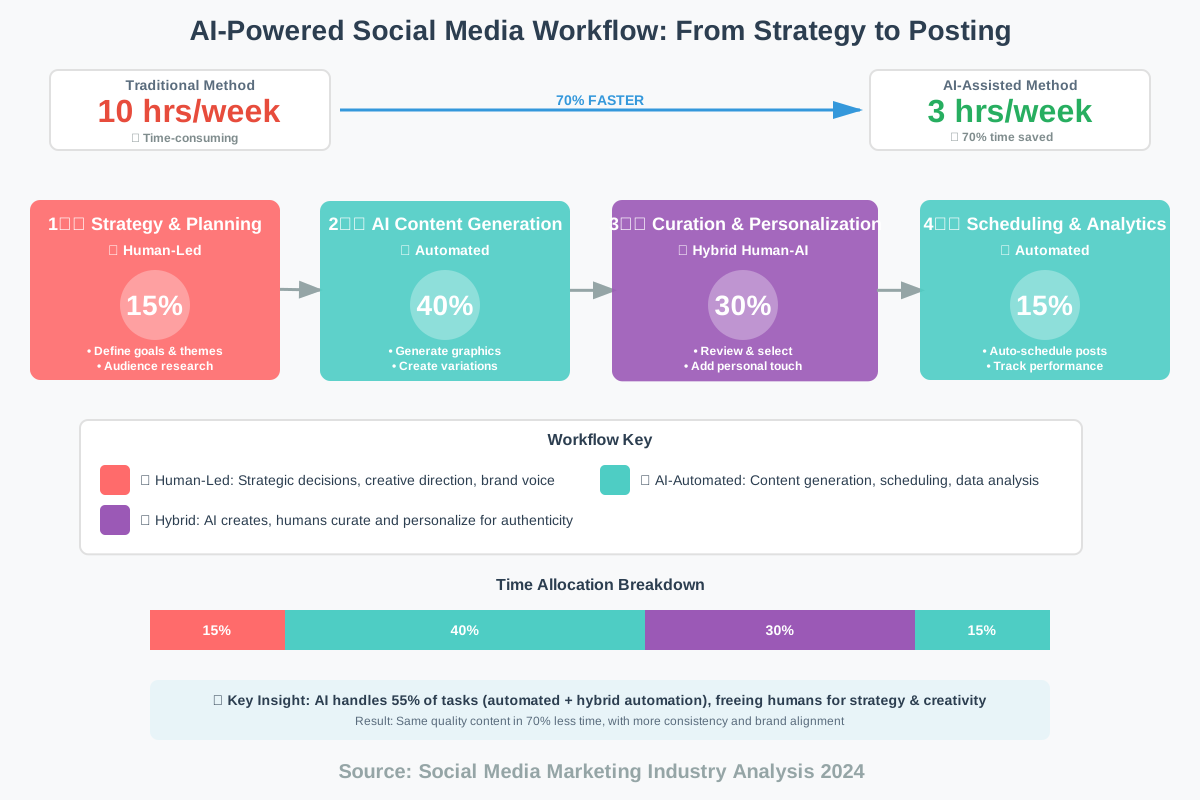
The most effective approach combines AI automation with human curation and strategy. Here’s the workflow I use and recommend:
Content Planning remains human-driven. AI can’t strategize your marketing goals or understand your audience’s evolving needs. Spend time outlining themes, campaigns, and key messages for the coming weeks. This strategic foundation ensures your AI-generated content stays on-brand and purposeful.
Batch Creation with AI becomes incredibly efficient. Set aside a few hours and generate two to four weeks of social graphics at once. Use AI to create multiple variations of each concept, then curate the best options. This batch approach prevents the daily stress of creating content and ensures consistent quality.
Personalization is where you add irreplaceable human value. Take AI-generated graphics and tweak them—adjust colors to match current campaigns, modify copy to reference timely events, or add personal touches that reflect your unique voice. This personalization prevents your content from looking generic while still maintaining efficiency.
Performance Analysis should inform your AI usage. Most platforms provide analytics showing which posts performed best. Feed these insights back into your AI tools by creating more content similar to high-performers and avoiding styles that underperformed.
Maintaining Authenticity
One concern I hear frequently: “Won’t my audience know I’m using AI?” The key is transparency and quality. If your content provides value—whether it entertains, educates, or inspires—your audience will appreciate it regardless of how it was created. However, heavily automated content that feels generic or irrelevant will disengage your audience.
Use AI to handle time-consuming technical execution while you focus on strategy, voice, and authenticity. Your captions should still sound like you. Your visual style should still reflect your brand. AI handles the heavy lifting; you provide the heart and soul.
I also recommend mixing AI-generated graphics with original photography, behind-the-scenes content, and user-generated content. This variety keeps your feed interesting and authentically represents your brand beyond polished marketing materials.
AI-Assisted Web Design: Building Websites Faster and Smarter
Website creation once required fluency in HTML, CSS, JavaScript, and design principles. AI-Assisted Web Design has democratized web development, enabling anyone to build professional, responsive websites without writing code—or augmenting experienced developers’ capabilities to build faster than ever before.
The transformation is profound. I remember building my first website in the early 2000s, painstakingly positioning every element and fighting with browser compatibility issues. Today’s AI web design tools understand your intent, generate layouts automatically, optimize for mobile devices, and even write functional code based on simple descriptions.
Wix ADI (Artificial Design Intelligence) pioneered AI-powered website creation. Answer a few questions about your business, select some style preferences, and the AI builds a complete website in minutes. It chooses layouts, color schemes, and images and even writes initial content based on your industry. The system continuously learns from millions of websites, understanding which designs work best for restaurants versus law firms versus online stores.
What impresses me most is how ADI balances automation with customization. The initial site is complete and functional, but every element remains editable. This “start with AI, refine with you” approach means you’re not locked into generic templates while still avoiding the blank-page paralysis of starting from scratch.
10Web’s AI Builder specializes in WordPress sites, bringing AI capabilities to the world’s most popular content management system. Describe your website goals in natural language—”I need a portfolio site for my photography business with a minimalist aesthetic”—and the AI generates a WordPress site matching your description. It selects appropriate themes, customizes layouts, and even optimizes settings for performance and SEO.
The real power emerges when you realize these aren’t rigid templates but fully customizable WordPress installations. You get AI speed with WordPress’s flexibility and extensive plugin ecosystem.
Framer AI takes a different approach, focusing on interaction design and advanced animations. Professional designers love Framer because it bridges the gap between design tools and actual code. The AI can generate complex interactions—like scroll-triggered animations or dynamic loading effects—without manual coding. Describe the interaction you envision, and Framer’s AI implements it using production-ready code.
Durable AI claims to build a complete business website with AI in under 30 seconds, and while that sounds like marketing hyperbole, it’s surprisingly accurate. The platform targets small businesses needing a simple, effective online presence. Input your business name and type, and Durable generates a multi-page site with relevant content, contact forms, service descriptions, and even AI-generated images matching your industry.
Relume serves professional designers and agencies, offering AI-powered wireframing and site mapping. Its AI generates complete website structures—sitemaps, wireframes, and content hierarchies—based on brief descriptions. Designers can then export these wireframes to Figma or Webflow for detailed design work. This speeds up the early conceptual phase dramatically, letting designers focus on visual refinement rather than structural planning.
Practical Implementation Strategies
Start with AI, Refine with Purpose. Let the AI generate the initial structure, then customize thoughtfully. Don’t accept the first output blindly, but don’t dismiss it entirely either. AI excels at creating functional foundations; you excel at adding personality and strategic refinement.
Leverage AI for Technical Optimization. Beyond design, AI web tools often include performance optimization, SEO configuration, and responsive design adjustments. These technical elements are time-consuming to implement manually but happen automatically with AI assistance. Take advantage of these features, even if you’re comfortable with the code.
Combine Multiple AI Tools for the best results. I often start with an AI website builder for structure, then use AI content writers for initial copy, AI image generators for custom graphics, and AI-powered SEO tools for optimization. This multi-tool approach leverages each system’s strengths.
Understand the Limitations. AI web builders excel at creating standard website types—business sites, portfolios, simple e-commerce, and blogs. They struggle with highly unique, custom functionality or complex web applications. Specialized needs necessitate custom development, although AI can still expedite certain aspects of the process.
Mobile-First Isn’t Automatic
One critical point: while most AI web builders claim responsive design, always test your AI-generated site on actual mobile devices. AI typically creates layouts that technically work on mobile but sometimes miss optimization opportunities. Manually adjust mobile-specific elements like button sizes, image scaling, and navigation menus to ensure genuinely excellent mobile experiences.
AI-Powered Color Palette Generators: Find the Perfect Colors for Your Designs
Color selection can paralyze even experienced designers. AI-Powered Color Palette Generators remove this creative block by understanding color theory, psychology, and contemporary trends, delivering harmonious color schemes in seconds.
The relationship between color and emotion is complex and culturally nuanced. Red signals passion or danger, blue conveys trust or coldness, and yellow radiates energy or caution—and these associations vary across cultures and contexts. AI color tools analyze millions of successful designs, understanding which color combinations work for specific industries, moods, and applications.
Khroma learns your personal color preferences through machine learning. When you first use Khroma, you select fifty colors you like. The AI then generates unlimited palettes matching your preferences, getting smarter over time as you favorite or dismiss its suggestions. This personalized approach means the tool becomes increasingly useful the more you use it, unlike static palette generators that always give the same results.
I particularly appreciate how Khroma shows each palette in context—on typography, gradients, images, and real design applications. This contextual preview helps you evaluate whether a palette will actually work for your project rather than just looking pretty in abstract color swatches.
Coolors.co combines AI generation with intuitive manual control. Press the spacebar, and the AI generates a random five-color palette. Lock the colors you like, and press again to see new colors that harmonize with your locked selections. This interactive approach feels playful and creative while leveraging AI’s understanding of color relationships.
The platform also offers an AI Color Palette Generator where you describe your desired mood or theme—”calm spa environment” or “energetic tech startup”—and receive palettes matching that description. Upload an image, and the AI extracts a harmonious palette from it, perfect for ensuring brand colors match existing photography or artwork.
Adobe Color (formerly Kuler) integrates AI-powered color suggestions into Adobe’s creative ecosystem. Its AI understands color relationships—complementary, analogous, triadic, and monochromatic—and generates palettes based on these theories. The Trends feature analyzes creative work across Adobe platforms, showing you what color palettes are currently popular in different creative fields.
For designers working in Adobe software, the seamless integration is invaluable. Generate a palette in Adobe Color, and it’s instantly available in Photoshop, Illustrator, InDesign, and other Creative Cloud apps.
Huemint uses machine learning to generate palettes specifically for user interfaces, websites, and digital products. Unlike generic color generators, Huemint’s AI understands that interface design requires consideration of accessibility, contrast ratios, and hierarchical emphasis. It generates not just attractive palettes but functional ones optimized for digital applications.
The tool shows your palette applied to actual interface elements—buttons, backgrounds, text, cards—helping you visualize how colors will work in your real project. This practical context prevents the common mistake of choosing colors that look beautiful abstractly but fail in application.
Colormind specializes in generating palettes from images, using deep learning to identify not just the prominent colors but the most harmonious color relationships within the image. Upload a photo, and Colormind extracts a palette that captures the mood and aesthetic of the image while ensuring the colors work well together in new contexts.
Color Theory Principles the AI Understands
These tools operate based on established color theory, but understanding these principles yourself helps you get better results:
Complementary Colors sit opposite each other on the color wheel and create vibrant contrast. AI tools often suggest complementary palettes for designs needing energy and attention.
Analogous Colors sit next to each other on the color wheel, creating harmonious, serene palettes. AI recommendations for calming, cohesive designs typically use analogous schemes.
Triadic Colors are evenly spaced around the color wheel, offering balanced vibrancy. AI often suggests triadic palettes for playful, creative projects.
Monochromatic Palettes use variations of a single hue—different tints, shades, and tones. AI tools generate these for sophisticated, cohesive designs where unity is paramount.
Practical Application Tips
Start with Context, Not Color. Before generating palettes, consider your project’s purpose, audience, and emotion. Input these parameters into AI tools rather than randomly generating palettes. “Professional financial services” will yield dramatically different suggestions than “playful children’s toy store,” and both are appropriate for their contexts.
Test for Accessibility. Many AI color tools now include accessibility checking, evaluating contrast ratios between text and backgrounds. Ensure your palette meets WCAG accessibility standards, particularly for digital products. Beautiful but illegible color schemes serve no one.
Consider Cultural Context. Colors carry different meanings across cultures. White symbolizes purity in Western cultures but mourning in some Eastern traditions. AI tools typically default to Western color associations, so manually verify appropriateness for international audiences.
Generate Multiple Options. Don’t settle on the first palette, even if it looks excellent. Generate ten to twenty options, save your favorites, and return to them later. Colors that initially seem perfect sometimes feel wrong after reflection, while palettes you first dismissed might grow on you.
Adapt, Don’t Accept Blindly. AI-generated palettes are starting points. Adjust shades, lighten or darken colors, and tweak saturation to match your specific needs. The AI provides harmonious foundations; you refine them for your unique application.
AI for Icon Design: Create Custom Icons in Minutes
Icons communicate instantly, transcending language barriers and condensing complex concepts into simple visuals. AI for Icon Design tools generates custom icons matching your specific style needs without requiring illustration skills or extensive design time.
Traditional icon creation demanded either illustration ability or hours spent browsing stock icon libraries hoping to find something close to your vision. AI icon generators let you describe what you need in words and receive custom icons in your preferred style, weight, and detail level.
IconifyAI excels at generating icon sets with consistent style. Describe your icon needs—”shopping cart, user profile, settings gear, and search magnifying glass in minimalist line style”—and the AI generates all icons with matching aesthetic characteristics. This consistency is crucial for interface design, where visual coherence across icons improves usability.
The tool offers multiple style options: line icons, filled icons, duotone, glyphs, and detailed illustrations. Each style serves different purposes—line icons work beautifully in minimal interfaces, while filled icons provide stronger visual weight for toolbars and navigation.
Iconscout’s AI Icon Generator focuses on customization flexibility. Generate base icons, then adjust stroke width, corner rounding, color, and detail level—all through AI-powered controls. This parametric approach means one base icon can be styled hundreds of ways to match your exact specifications.
I particularly value the export options. Icons export in SVG format (scalable and editable), PNG at various resolutions, and even as React components or web fonts. This flexibility means the icons integrate seamlessly into any workflow.
Recraft’s Icon Generator (formerly Recraft.ai) creates icons through conversational AI. Chat with the system, describing what you need and refining based on its outputs. “Make it more angular,” “add more detail,” “simplify the shapes”—the AI understands these natural language refinements and adjusts accordingly.
The conversational approach feels intuitive and creative, more like working with a designer than using a tool. For users who struggle with technical specifications, this natural language interaction removes barriers.
Icons8’s Smart Icons feature combines a vast library with AI-powered customization. Search their extensive collection for close matches, then use AI to modify colors, styles, or details to exactly match your needs. The AI understands your brand colors and can recolor entire icon sets consistently.
The platform also offers AI-powered icon style transfer—take an icon you like and apply its style to other icons in your set, ensuring perfect consistency without manual redrawing.
Design Principles for Effective Icons
Understanding these principles helps you prompt AI tools effectively and evaluate their outputs:
Simplicity is paramount. Icons must communicate instantly at small sizes. AI tools sometimes generate overly detailed icons that lose clarity when scaled down. Request simplification if initial outputs seem complex.
Consistency across your icon set matters more than individual icon perfection. Use the same AI tool with similar prompts for all icons in a set, ensuring consistent stroke weights, corner radiuses, and detail levels.
Recognizability means icons should communicate their purpose immediately. Abstract or overly creative icons confuse users. Test AI-generated icons by showing them to others without context—if they correctly identify the icon’s meaning, it’s working.
Scalability requires icons that work at multiple sizes. SVG format (which AI tools typically support) ensures mathematical precision at any scale. Always test your AI-generated icons at the smallest size they’ll appear.
Practical Workflow Recommendations
Start with Text Descriptions. AI icon generators work best when you’re specific. Instead of “home icon,” try “house icon with pitched roof and chimney, simple line style, rounded corners, minimal detail.” The more specific your description, the closer the first output will be to your vision.
Generate Entire Sets Together. Create all related icons in a single session with consistent prompts. This ensures stylistic consistency that’s hard to achieve when generating icons separately across multiple sessions.
Maintain a Style Guide. Document your icon specifications—stroke width, color codes, corner radius, and size specifications—so you can consistently prompt AI tools and manually adjust outputs if needed. This documentation becomes invaluable as your icon library grows.
Consider Context. Icons appearing on colored backgrounds need different design considerations than those on white backgrounds. Generate variations for different contexts, testing each in its intended environment.
Export Properly. The SVG format provides the most flexibility for future editing and scaling. Keep original SVG files even if you primarily use PNG exports, ensuring you can modify icons later without quality loss.
Common mistakes include accepting the first output without testing at actual usage size, generating icons individually without considering set consistency, and failing to simplify AI-generated icons that include excessive detail.
Text-to-Image AI: Unleashing Creativity with AI Image Generation
Text-to-Image AI represents perhaps the most transformative application of artificial intelligence in creative work. These systems generate completely original images from text descriptions, opening creative possibilities that simply didn’t exist before.
The technology seems like magic, but it’s actually sophisticated machine learning. These AI models have been trained on millions or billions of image-text pairs, learning the relationships between words and visual concepts. When you describe “a serene mountain lake at sunset with a purple sky,” the AI doesn’t search a database of existing images—it generates a completely new image based on its learned understanding of mountains, lakes, sunsets, and purple skies.
Midjourney produces some of the most aesthetically sophisticated AI-generated images available. Access it through Discord, where you submit text prompts and receive four image variations. The quality often rivals professional photography or illustration, with particular strengths in artistic, imaginative, or fantastical subjects.
I’ve used Midjourney for concept art, book covers, presentation visuals, and design inspiration. Its ability to combine disparate concepts—”steampunk library inside a giant tree”—yields images that would be difficult and time-consuming to create through traditional means.
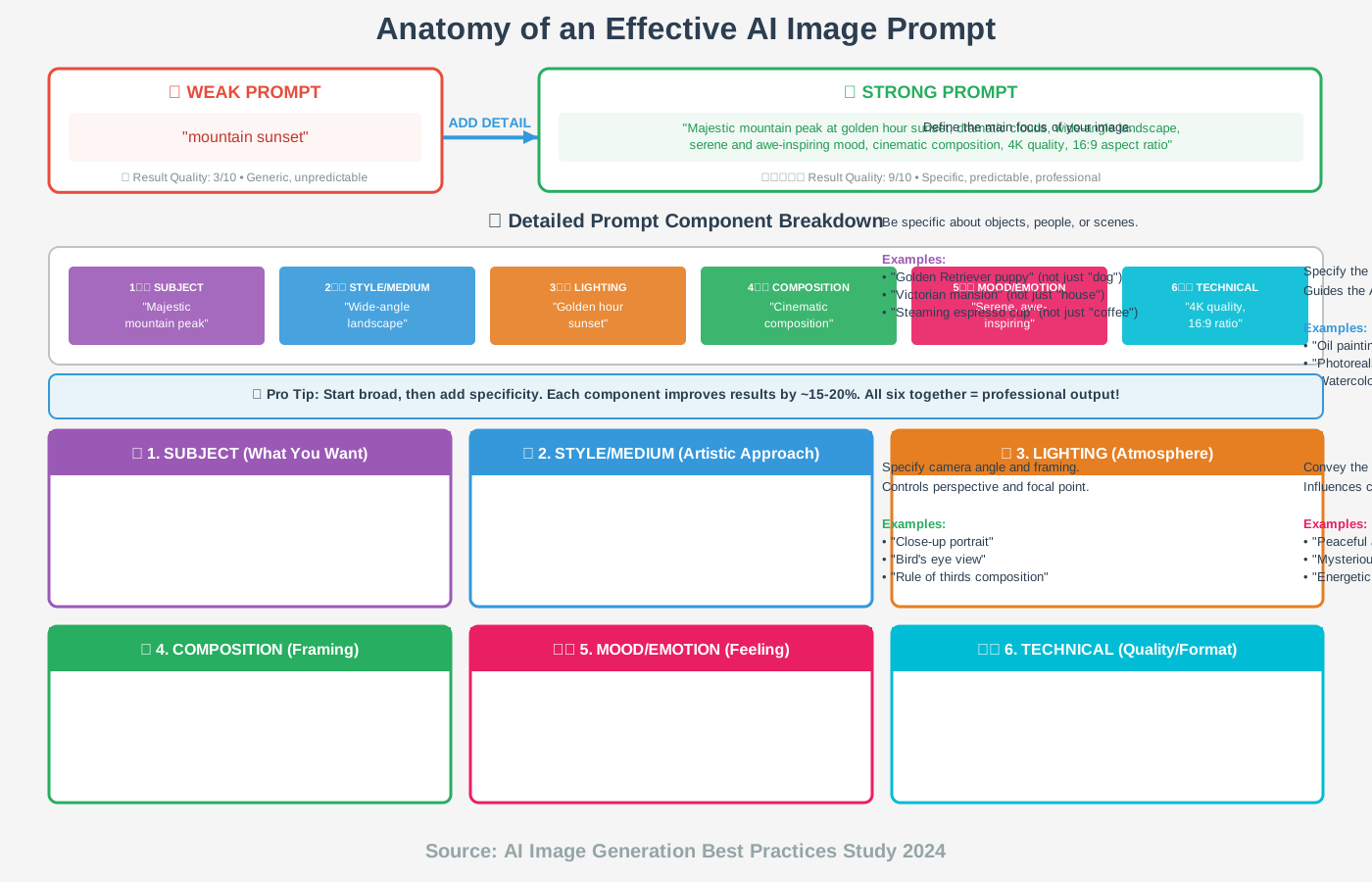
The learning curve involves understanding how to structure prompts effectively. Successful prompts typically include the subject, style or aesthetic, lighting description, mood, and technical parameters like aspect ratio. “Portrait of an elderly woman, oil painting style, soft window lighting, contemplative mood, cinematic composition” yields dramatically different results than simply “elderly woman.”
DALL-E 3 from OpenAI emphasizes user-friendly prompt interpretation. While Midjourney requires learning specific syntax and parameters, DALL-E 3 understands natural, conversational descriptions. Write a paragraph describing your vision, and it generates surprisingly accurate results.
DALL-E 3’s integration with ChatGPT means you can iteratively refine images through conversation. “Make the sky more dramatic,” “add a person in the foreground,” “shift the color palette toward cooler tones”—the AI understands these refinements and adjusts accordingly.
Stable Diffusion offers open-source flexibility with numerous implementations and interfaces. Unlike proprietary platforms, Stable Diffusion can be installed locally, giving you complete control and unlimited generation without subscription costs. This openness has spawned an ecosystem of custom models, extensions, and interfaces.
The trade-off is technical complexity. Running Stable Diffusion requires some technical knowledge and a capable graphics card. However, web-based implementations like DreamStudio provide simplified access to Stable Diffusion’s power without technical setup.
Adobe Firefly brings text-to-image generation into Adobe’s ecosystem with a critical advantage: training data exclusively from licensed content and public domain materials. This addresses copyright concerns that plague other AI image generators, making Firefly safer for commercial use.
Firefly integrates directly into Photoshop, Illustrator, and other Creative Cloud apps. Generate images within your existing workflow, edit them with Adobe’s tools, and combine AI-generated elements with traditional design work seamlessly.
Leonardo.ai specializes in game assets, concept art, and character design. Its AI understands gaming and fantasy aesthetics particularly well, generating consistent character designs, environmental concepts, and item illustrations. Game developers and RPG content creators find Leonardo especially useful.
The platform offers trained models for specific styles—anime, fantasy art, sci-fi, and photorealism—ensuring outputs match intended aesthetics. This specialization produces better results than general-purpose generators for gaming-related content.
Understanding Prompt Engineering
Getting great results from text-to-image AI requires thoughtful prompting. Here are principles I’ve learned through extensive use:
Be Specific About Subject and Context. “Dog” generates generic results. “Golden Retriever puppy playing in autumn leaves, afternoon sunlight” yields more interesting, specific images.
Specify Style or Medium. “Portrait” could be a photo, painting, sketch, or 3D render. Adding “oil painting” or “cinematic photograph” guides the AI’s aesthetic decisions.
Control Lighting and Atmosphere. Light dramatically affects mood. “Dramatic side lighting,” “soft overcast light,” or “golden hour glow” produce vastly different results for the same subject.
Use Artist or Style References. “In the style of Studio Ghibli” or “reminiscent of Ansel Adams photography” leverages the AI’s learned associations with recognized aesthetic styles.
Include Composition Terms. “Close-up portrait,” “wide-angle landscape” and “bird’s-eye view”—these composition descriptions help the AI frame your subject effectively.
Iterate and Refine. First attempts rarely produce perfect results. Generate multiple variations, identify what you like, and refine your prompt to emphasize those aspects.
Ethical Considerations and Responsible Use
Text-to-image AI raises important ethical questions. These tools were trained on vast datasets of images, often without explicit permission from original creators. While legally debated, this raises moral concerns about fair use, attribution, and compensation.
Transparency is crucial. If you’re using AI-generated images professionally, consider disclosing this fact. Many organizations now require such disclosure, and audiences increasingly expect transparency about AI involvement.
Respect Copyright and Style. While AI can generate images “in the style of” famous artists, doing so raises ethical concerns. Living artists may feel their style is being appropriated without permission or compensation. Consider whether your prompt respects creative rights.
Avoid Harmful Content. Most platforms prohibit generating violent, sexual, or discriminatory content. Beyond platform rules, consider the broader ethical implications of what you create and share.
Combine with Human Creativity. The most powerful approach uses AI generation as one tool among many. Generate concepts or elements with AI, then combine them with photography, traditional artwork, or design work. This hybrid approach produces unique results while acknowledging human creativity’s irreplaceable value.
Commercial Use Verification. Different AI platforms have different licensing terms. Verify you have rights to use generated images commercially if that’s your intent. Some platforms restrict commercial use on free tiers or require specific licenses.
Practical Applications
Concept Development accelerates creative exploration. Generate dozens of variations quickly, identifying promising directions before investing time in final execution. This works beautifully for book covers, product packaging concepts, or advertising campaign ideas.
Placeholder Content fills design mockups while final photography or illustration is being created. Generate temporary images matching your vision’s mood and composition, replacing them with final assets later.
Inspiration and Mood Boards come together rapidly using AI-generated imagery. Create visual representations of abstract concepts, combine multiple styles, or explore aesthetic directions impossible or expensive to photograph.
Custom Illustrations for blogs, presentations, and educational materials become accessible without hiring illustrators. While important projects deserve human-created artwork, AI-generated illustrations work well for supporting content, internal presentations, or draft materials.
Design Element Generation creates textures, patterns, backgrounds, and visual elements for larger compositions. Generate a unique texture, then use it as one layer in a complex design combining multiple sources.
AI-Driven Presentation Design: Create Stunning Slideshows with Ease
Creating compelling presentations traditionally consumed hours: choosing layouts, sourcing images, ensuring consistency, and animating transitions. AI-Driven Presentation Design tools handle this tedious work, allowing you to focus on your message while AI optimizes visual execution.
I remember all-nighters perfecting slide designs before important presentations. Today’s AI tools generate professional presentations in minutes, freeing me to rehearse, refine content, and prepare mentally rather than obsessing over alignment and color choices.
Beautiful.ai pioneered AI-powered presentation design with its intelligent slide formatting. As you add content, the AI automatically adjusts layouts to accommodate text, images, and charts while maintaining visual balance. Add three bullet points, and the AI formats them perfectly. Add a fourth, and the layout intelligently reorganizes to maintain readability.
This continuous auto-adjustment means you never face broken layouts or misaligned elements. The AI acts like a design assistant, constantly tidying your slides as you work. For non-designers, this removes the intimidation of empty slides and formatting complexity.
Gamma takes a different approach by generating entire presentations from brief outlines or documents. Paste in your text, describe your presentation topic, or upload a document, and Gamma’s AI creates a complete slide deck with relevant layouts, images, and design elements. The AI determines which content becomes headings, which becomes body text, and where visual elements would enhance understanding.
What distinguishes Gamma is its understanding of presentation structure. The AI doesn’t just format content—it organizes information logically, suggests where data visualization would help, and creates natural narrative flow across slides.
Tome combines presentation generation with AI-powered visual creation. Describe your presentation topic in text, and Tome generates both the slide structure and original AI-generated imagery matching your content. Need a slide about renewable energy? Tome creates the layout and generates custom illustrations of solar panels and wind turbines rather than using stock photography.
This integrated approach produces remarkably cohesive presentations where visuals feel specifically designed for your content rather than generic stock selections.
Presentations.AI focuses on business presentations, understanding common business slide types—problem statements, market analysis, solution descriptions, team introductions, and financial projections. Tell the AI your presentation purpose, and it structures slides using proven business presentation patterns.
The platform includes an AI copilot that suggests improvements as you work: “This text-heavy slide might benefit from a chart,” or “Consider splitting this content across two slides for better readability.” This real-time guidance helps inexperienced presenters avoid common mistakes.
Slidebean specializes in pitch decks for startups, using AI trained on successful investor presentations. Input your startup information—problem, solution, market size, business model, team—and the AI generates a pitch deck following patterns that resonate with investors.
Beyond design, Slidebean’s AI helps with content strategy, suggesting what information investors want to see and in what order. For entrepreneurs unfamiliar with pitch deck conventions, this guidance is invaluable.
Creating Effective AI-Generated Presentations
Start with Strong Content. AI handles visual execution beautifully, but it can’t create compelling arguments or structure persuasive narratives from nothing. Outline your key points, develop your narrative arc, and ensure your content is solid before involving AI.
Provide Context to the AI. When generating presentations, give the AI context about your audience, purpose, and tone. “Technical presentation for engineers” yields different design choices than “inspirational talk for general audience.” This context helps the AI make appropriate design decisions.
Customize the Output. AI-generated presentations provide excellent starting points, but personalization makes them great. Add your specific examples, customize colors to match your branding, and include personal touches that reflect your unique perspective.
Less Text, More Visuals. One mistake I see frequently: AI generates well-designed slides, then users cram them with additional text. Remember that slides should support your spoken presentation, not replace it. If AI suggests a minimal layout, resist the urge to add more text.
Consistent Visual Language. Most AI presentation tools maintain consistency automatically, but verify that all slides feel part of the same presentation. Check that headings use consistent formatting, bullet points align, and color schemes remain cohesive throughout.
Common Pitfalls to Avoid
Over-Reliance on Templates. While AI-generated presentations look professional, they can feel generic if you don’t customize them. Add your unique visual elements, specific data, and personal examples to differentiate your presentation.
Ignoring Audience Needs. AI optimizes for general design principles but doesn’t know your specific audience. Academic audiences may prefer dense, detailed slides, while business audiences want concise, visually driven presentations. Adjust AI outputs to match audience expectations.
Forgetting to Practice. Beautiful slides don’t compensate for poor delivery. Use the time AI saves you on design to practice presenting, refine your talking points, and prepare for questions.
Excessive Animation. AI tools often include transition effects and animations. Use these sparingly—too much motion distracts from your message. Professional presentations typically use subtle transitions or none at all.
Neglecting Accessibility. Ensure your AI-generated slides are readable for everyone. Check contrast ratios between text and backgrounds, avoid relying solely on color to convey information, and include alt text for images. Most AI tools don’t automatically optimize for accessibility, so manual verification is essential.
AI-Powered Design Mockups: Visualize Your Ideas Instantly
Presenting design concepts traditionally required extensive mockup creation: photographing products, editing images, and composing scenes showing designs in context. AI-Powered Design Mockups generate these visualizations instantly, letting you show clients how designs will look in real-world applications without time-consuming production.
Smartmockups leads the AI-powered mockup space with thousands of mockup templates—from device screens to packaging to apparel—enhanced with AI features. Upload your design, select a mockup template, and the AI automatically fits your design to the mockup with realistic perspective, lighting, and shadows.
The AI understands three-dimensional space, adjusting your flat design to wrap around curved surfaces, follow product contours, and respect perspective. This three-dimensional awareness produces mockups that look photographed rather than digitally pasted.
I particularly appreciate the contextual mockup options. Instead of just showing your app design on a generic phone, show it being used in a coffee shop, on a desk, or in someone’s hand outdoors. These contextual mockups help clients visualize how designs function in actual usage scenarios.
Placeit by Envato offers similar functionality with an enormous library of mockup templates across numerous categories. The AI-powered customization lets you adjust lighting, background blur, and scene elements to match your brand aesthetic.
Where Placeit shines is its video mockups. Show your app design in animated phone screens, with scrolling interfaces and tap interactions. These dynamic mockups bring designs to life far more effectively than static images, helping clients understand user interactions and flow.
Mockup.io takes a simpler, faster approach. Drag and drop your design onto device outlines, and the AI instantly generates mockups. While less sophisticated than dedicated mockup platforms, the speed and simplicity make it perfect for quick client previews or social media posts.
The platform works entirely in-browser with no software installation required. This accessibility means you can generate mockups from any device, anywhere—perfect for remote work or quick updates during client calls.
Shot Snap specializes in Apple device mockups with exceptional attention to detail. The AI-generated mockups capture the exact appearance of current iPhone, iPad, MacBook, and Apple Watch models with accurate colors, dimensions, and reflections.
For iOS app designers and Apple-focused brands, Shot Snap’s precision creates portfolio pieces and marketing materials that look like official Apple promotional photos.
MockMagic uses AI to generate custom background scenes for your mockups. Instead of choosing from pre-existing background options, describe the scene you envision—”modern office with natural light” or “cozy home workspace with plants”—and the AI generates unique backgrounds matching your description.
This AI-generated background approach ensures your mockups are unique rather than using the same stock scenes as competitors. The backgrounds feel specifically created for your design rather than generic templates.
Strategic Mockup Usage
Client Presentations benefit enormously from mockups showing designs in realistic contexts. Abstract design files can be hard for non-designers to evaluate. Mockups bridge this gap, helping clients visualize how final products will appear and function.
Portfolio Work looks more professional with contextual mockups. Instead of showing raw design files, present work as it would appear in use—websites on laptops, apps on phones, and logos on packaging. This context demonstrates not just design skill but strategic thinking about real-world application.
Social Media Marketing uses mockups to showcase products or services attractively. A well-designed mockup garners more engagement than raw screenshots or product photos. The professional presentation signals quality and attention to detail.
Internal Team Communication improves with mockups showing proposed designs in context. Instead of debating abstract designs, teams can discuss concrete visualizations of how designs will look when implemented.
Creating Compelling Mockups
Choose Appropriate Context. Match mockup context to your design’s purpose. Showing a mobile banking app in a luxury car interior might seem aspirational, but showing it during a coffee shop purchase demonstrates practical utility. Choose contexts that resonate with your target audience’s actual usage.
Maintain Realism. AI mockup tools sometimes produce technically perfect but unrealistic results—perfect lighting, improbable scenarios, and overly staged scenes. Adjust these AI outputs to feel authentic rather than artificial. Real-world imperfection often enhances credibility.
Consider Lighting and Environment. The mockup environment should complement, not distract from, your design. Busy backgrounds or dramatic lighting might look impressive but can draw attention away from the design itself. When in doubt, opt for simpler contexts that let your design shine.
Show Usage, Not Just Appearance. The most effective mockups show designs being used, not just displayed. A hand holding the phone, fingers positioned to tap a button, or the screen showing an active state—these details convey functionality and user experience.
Size Appropriately. Generate mockups at appropriate resolutions for their intended use. Instagram posts need different dimensions than printed marketing materials. Most AI mockup tools offer multiple export sizes—use them strategically.
Avoiding Common Mockup Mistakes
Don’t over-mockup everything. Not every design needs elaborate contextual mockups. Simple presentations of actual design files are often clearer and more appropriate, especially for detailed design reviews or technical discussions.
Avoid mismatched perspectives. If you’re showing multiple products or screens together, ensure the perspectives and lighting match. Mixing mockups from different sources often creates jarring inconsistencies that undermine professional presentation.
Be cautious with trendy mockup styles. Current popular mockup aesthetics—clay renders, isometric views, floating displays—can date quickly. Classic, realistic mockups have longer shelf lives for portfolio work and marketing materials.
AI for Font Selection: Find the Perfect Typeface for Your Project
Typography can make or break a design, yet font selection paralyzes many designers facing thousands of available typefaces. AI for Font Selection tools analyzes your project needs and recommends typefaces that match your aesthetic goals, improve readability, and convey the appropriate mood.
Fontjoy uses deep learning to generate harmonious font pairings. The AI understands the relationships between different typeface styles—serif versus sans-serif, geometric versus humanist, condensed versus extended—and suggests combinations that work well together.
Adjust a slider to control how similar or contrasting you want your font pairing. Need a safe, harmonious pairing? Slide toward similarity. Want a bold, contrasting combination? Slide toward contrast. The AI generates appropriate pairings across the spectrum, learning from thousands of successful typographic designs.
What I appreciate most is how Fontjoy shows pairings in context—headings with body text, different sizes, and various color combinations—helping you evaluate whether a pairing truly works before committing to it.
WhatTheFont by MyFonts uses AI to identify fonts from images. Upload a photo containing text, and the AI analyzes the letterforms, identifying the typeface or suggesting similar alternatives. This tool is invaluable when you see typography you love but don’t know its name.
The AI handles challenging scenarios—photos at angles, partial letterforms, stylized applications—with impressive accuracy. Even when it can’t identify the exact font, it suggests visually similar alternatives from MyFonts’ extensive library.
Fontshare.com by Indian Type Foundry includes an AI-powered recommendation engine. Describe your project’s mood, industry, and aesthetic preferences, and the AI suggests appropriate typefaces from Fontshare’s high-quality, free font collection.
The recommendations consider technical factors like character set completeness, weight availability, and language support alongside aesthetic considerations. This comprehensive analysis ensures suggested fonts actually work for your project’s technical requirements.
Type Genius analyzes your existing design and suggests complementary typefaces. Upload a design or website screenshot, and the AI identifies fonts that would pair well with elements already present. This context-aware recommendation prevents the common problem of choosing beautiful fonts that clash with existing design elements.
Fontpair curates font pairings manually but uses AI to learn from user preferences and interactions. The more you explore and favorite pairings, the better the AI understands your aesthetic preferences and refines its recommendations. This personalization makes the tool increasingly useful over time.
Typography Principles for Effective Selection
Understanding basic typography principles helps you evaluate AI recommendations and make informed decisions:
Contrast Creates Hierarchy. Pairing visually distinct typefaces—like a bold, geometric sans-serif headline with a traditional serif body text—creates a clear visual hierarchy, guiding readers through your content.
Consistency Builds Cohesion. While contrast has value, too many different fonts create visual chaos. Most professional designs use two to three typefaces maximum, relying on size, weight, and color variations for diversity within that limited palette.
Readability Trumps Creativity. Beautiful display fonts work wonderfully for headlines but often become illegible at small sizes or in body text. AI recommendations typically respect this principle, but manually verify readability in your specific context.
Cultural and Historical Context Matters. Typefaces carry associations—Art Deco fonts evoke the 1920s, distressed fonts suggest vintage or rustic aesthetics, and clean geometric fonts signal modernity. AI tools understand these associations and recommend contextually appropriate options.
Technical Considerations. Not all fonts include comprehensive character sets. If you’re designing for multiple languages or need special characters, verify that AI-recommended fonts include necessary glyphs. Premium and professional typefaces typically offer more complete character sets than free alternatives.
Practical Font Selection Workflow
Define Your Project Requirements before consulting AI tools. Consider your audience, brand personality, content length, and technical constraints. These parameters help AI tools provide relevant recommendations rather than random suggestions.
Explore Multiple Options. Don’t accept the first recommendation. Generate ten to fifteen font suggestions, apply them to your actual content (not lorem ipsum), and evaluate them in context. Fonts that look beautiful in isolation sometimes fail when applied to real content.
Test in Context. View font choices at actual usage sizes, on actual backgrounds, with actual content. A font that looks perfect in a type specimen might be illegible at small sizes or clash with your color palette. Context testing prevents expensive mistakes.
Consider Loading Times. Web fonts add page weight and loading time. If using AI recommendations for web design, verify font file sizes and consider performance implications, especially for projects requiring fast loading speeds.
License Verification. AI tools may suggest fonts without automatically checking licensing restrictions. Verify you have appropriate licenses for your intended use, especially for commercial projects. Assumptions about “free” fonts have led to costly legal issues.
Common Font Selection Mistakes
Choosing fonts based purely on personal preference rather than project appropriateness is perhaps the most common error. Your favorite typeface might be completely wrong for a specific project. Let project requirements guide choices, not personal taste.
Using too many fonts creates visual confusion. While AI tools might suggest numerous beautiful options, exercising restraint and limiting your typeface palette produces more professional results.
Ignoring hierarchy through poor font pairing or insufficient size differentiation makes content hard to scan. If your headings don’t clearly differ from body text, readers struggle to navigate your content regardless of how beautiful individual fonts appear.
Following trends without considering longevity can date your design quickly. Popular fonts cycle in and out of fashion. For projects requiring long-term relevance, prefer classic, timeless typefaces over trendy options.
AI-Enhanced Photo Editing: Automating Complex Editing Tasks
Professional photo editing once required years mastering complex software like Photoshop. AI-Enhanced Photo Editing automates many sophisticated techniques, making professional-quality results accessible to everyone while accelerating workflows for experienced editors.
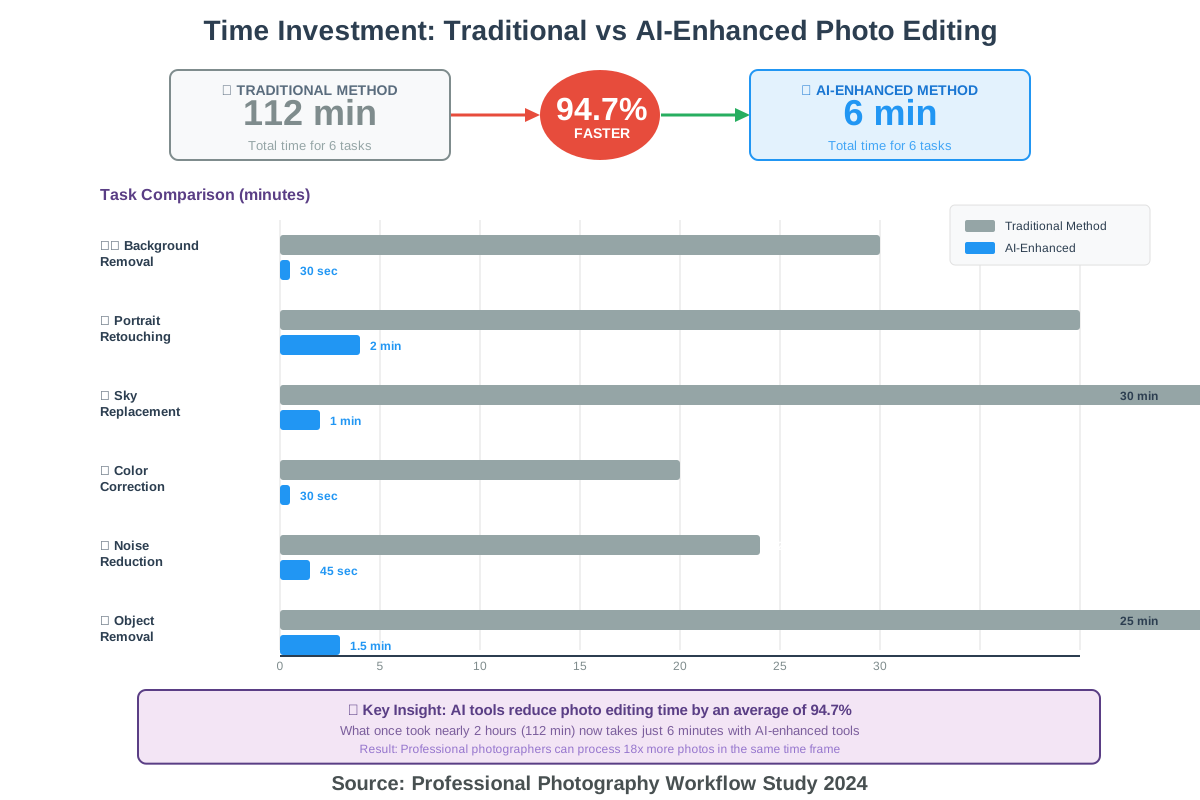
The transformation is remarkable. Tasks that once required careful manual selection, masking, and adjustment—like removing backgrounds, enhancing specific objects, or adjusting lighting—now happen automatically through AI analysis and processing.
Luminar AI (now Luminar Neo) pioneered AI-driven photo editing with features like sky replacement, portrait enhancement, and scene-aware adjustments. The AI analyzes your photo, identifying elements like sky, water, people, and structures, then applies contextually appropriate enhancements.
What makes this powerful is the AI’s understanding of relationships between elements. When brightening a portrait, the AI adjusts not just the person but also considers how changing the portrait affects overall image balance, automatically rebalancing other elements for natural results.
Adobe Photoshop’s AI Features (powered by Adobe Sensei) bring professional-grade AI tools into the industry-standard editing platform. Neural Filters apply complex effects—changing facial expressions, transferring color palettes, reducing noise—with slider controls instead of complex manual techniques.
The Content-Aware Fill powered by AI removes unwanted objects with remarkable intelligence, analyzing surrounding areas and generating fill content that matches texture, lighting, and perspective. What once required painstaking clone stamping now happens automatically.
Photoroom specializes in AI-powered background removal and replacement, particularly popular for e-commerce product photography. Upload a product photo, and the AI instantly removes the background, isolates the product cleanly, and optionally places it on professional-looking backgrounds.
The AI handles challenging scenarios—transparent objects, fine details like hair, and complex edges—that traditional background removal tools struggle with. For online sellers needing hundreds of clean product photos, this automation is transformative.
Remini focuses on AI-powered photo enhancement, specifically fixing blurry or low-quality images. The AI analyzes blurry photos, understanding what details were likely lost to blur or compression, then reconstructs those details based on its learned knowledge of how clear photos should appear.
While this isn’t truly recovering lost information, the AI’s educated guesses produce remarkably clear results from unpromising sources. This works particularly well for old family photos or images damaged by poor scanning or compression.
Topaz Labs offers a suite of AI-powered photo editing tools—Denoise AI for noise reduction, Sharpen AI for clarity enhancement, and Gigapixel AI for upscaling (discussed earlier). Each tool uses specialized neural networks trained for specific enhancement tasks.
The advantage of specialized tools is precision. General-purpose AI photo editors handle many tasks adequately, but specialized tools often produce superior results for their specific focus areas. Professional photographers often use multiple specialized AI tools for different enhancement needs.
Understanding AI Photo Editing Capabilities
Object Recognition and Selection. AI editors can identify and select objects automatically—every person in a group photo, all flowers in a garden scene, and specific architectural elements. This automatic selection accelerates editing workflows dramatically, eliminating tedious manual selection.
Contextual Adjustments. Rather than applying uniform adjustments across entire images, AI tools make context-aware changes. Brightening a sunset photo might mean enhancing the sky while maintaining natural shadow contrast in foreground elements—a balance AI handles automatically.
Style Transfer. AI can apply the aesthetic characteristics of one image to another—taking the color palette and mood from a reference image and applying it to your photo. This makes achieving specific looks or matching reference styles straightforward.
Intelligent Retouching. Portrait AI tools identify facial features automatically, applying appropriate enhancements to skin, eyes, and teeth without manual selection. The AI understands human faces’ structure, preventing unnatural over-processing that makes subjects look plasticky.
Practical Editing Workflows
Start with AI Automation for repetitive tasks. Let AI handle background removal, basic exposure correction, or noise reduction across multiple images. This batch processing frees time for creative decisions requiring human judgment.
Refine with Manual Adjustments. AI provides excellent starting points, but final quality often requires human refinement. After AI automatically enhances a portrait, manually adjust specific areas that seem over- or under-processed.
Combine Multiple Tools. Different AI tools excel at different tasks. Use background removal AI for clean cutouts, upscaling AI for resolution enhancement, and adjustment AI for color correction. This multi-tool approach leverages each system’s strengths.
Maintain Editing History. Work non-destructively, keeping original files and editing history. This allows reverting or adjusting AI-applied effects later. Most professional AI editing tools support nondestructive workflows through layers, adjustment layers, or version history.
Verify Quality at High Magnification. AI enhancements sometimes introduce subtle artifacts—unnatural textures, odd color shifts in specific areas, or processing errors at edges. Review edited photos at 100% magnification before considering them complete.
Creative Applications Beyond Basic Editing
Conceptual Photography combines AI-enhanced photos with AI-generated elements. Edit real photos with traditional AI tools, then seamlessly integrate AI-generated backgrounds, objects, or artistic elements for surreal or imaginative results.
Photo Restoration benefits from multiple AI tools working together. Upscale old photos for resolution, use AI to colorize black-and-white images, apply denoising to reduce grain, and use object removal to eliminate damage or tears.
Consistent Brand Photography across different sources becomes manageable with AI. Apply consistent color grading, styling, and enhancement to photos from various photographers or sources, creating cohesive visual libraries for brands.
Time-Saving for Volume Work. Photographers shooting events, weddings, or products face hundreds or thousands of images requiring processing. AI batch processing handles routine enhancements, allowing focus on images needing creative attention.
AI-Generated Art: Exploring the Potential and Limitations
AI-Generated Art has sparked intense debate in creative communities, raising questions about authorship, creativity, and the nature of art itself. Understanding both the remarkable potential and genuine limitations of this technology helps creators use it thoughtfully and responsibly.
The capability is undeniable. AI systems can now generate images virtually indistinguishable from human-created artwork, spanning styles from photorealism to abstract expressionism, from classical painting techniques to cutting-edge digital art. This technological achievement is remarkable.
However, AI-generated art comes with significant considerations and limitations that responsible creators must acknowledge.
Understanding AI’s Creative Capabilities
AI art generators don’t “create” in the human sense. They analyze patterns in vast training datasets, learning statistical relationships between visual elements, styles, and concepts. When generating images, they’re producing new combinations based on learned patterns, not originating ideas from understanding or intention.
This distinction matters. A human artist painting a landscape brings personal experiences, emotions, interpretive choices, and intentional meaning. The resulting artwork reflects the artist’s unique perspective shaped by their life, culture, and consciousness. AI lacks these qualities—it produces visually compelling results without understanding, feeling, or intending meaning.
That said, humans can use AI-generated elements as creative tools, combining AI outputs with human direction, curation, and refinement to create genuinely new works. The human creative vision and decision-making process surrounding AI usage can constitute artistic creation.
Current Limitations
Conceptual Understanding. AI doesn’t understand the concepts it depicts. It recognizes visual patterns associated with concepts but lacks comprehension. Ask AI to generate “injustice” or “democracy,” and it produces generic symbolic imagery rather than insightful visual commentary. Deep conceptual communication remains distinctly human.
Contextual Appropriateness. AI often generates technically proficient but contextually inappropriate results. It might create a beautiful image that’s culturally insensitive, historically inaccurate, or tonally wrong for its purpose. Human judgment about appropriateness, sensitivity, and context remains essential.
Intentional Meaning. AI cannot embed intentional meaning or narrative beyond what’s explicit in prompts. Complex symbolism, subtle commentary, or layered meaning requires human authorship. AI-generated images can illustrate concepts but rarely communicate sophisticated ideas independently.
Originality and Style Development. AI generates variations of learned patterns rather than developing genuinely novel aesthetic approaches. Revolutionary artistic movements—Impressionism, Cubism, and Abstract Expressionism—emerged from human artists challenging conventions and developing new ways of seeing. AI recombines existing approaches rather than pioneering new ones.
Physical Execution. AI art remains purely digital. While that’s not inherently limiting, many artistic practices involve physical materials, technical craftsmanship, and the expressive qualities of specific media. AI doesn’t engage with physical artistic processes.
Ethical Considerations
Training Data Concerns are significant. Most AI art generators are trained on massive image datasets scraped from the internet, often including copyrighted artwork without artists’ permission or compensation. This raises ethical questions about fair use, attribution, and the economic impact on working artists whose styles AI systems learned from and can now replicate.
Some artists feel their life’s work was used without consent to train systems that might compete with them economically. Others view AI tools as part of technological progress, similar to how photography once challenged painting. This debate continues without clear resolution.
Attribution and Transparency matter increasingly. If you’re using AI-generated elements in your work, transparency about that use respects audiences and other creators. Some contexts require explicit disclosure; even where not required, transparency often builds trust.
Economic Impact on working artists is real. AI tools can produce commercial artwork faster and cheaper than hiring human artists, affecting livelihoods. While technology historically creates new opportunities while disrupting existing ones, acknowledging this impact and considering how to support creative communities is important.
Environmental Concerns surrounding AI are emerging. Training large AI models requires enormous computational power and energy consumption, contributing to environmental impact. As these systems scale, their carbon footprint becomes a genuine ethical consideration.
Thoughtful Use Guidelines
Supplement, Don’t Replace. Use AI-generated art to supplement creative processes—generating concepts, creating placeholder content, inspiring directions—rather than completely replacing human creative work. Combine AI capabilities with human creativity, judgment, and refinement.
Credit Appropriately. When AI contributes to final work, acknowledge that contribution. Specific crediting standards are still developing, but transparency about tools and processes respects audiences and other creators.
Respect Copyright and Style. Avoid prompting AI to replicate specific living artists’ styles, especially for commercial work. This practice raises both legal and ethical concerns. Instead, explore generic style descriptors or historical art movements outside copyright protection.
Consider Context and Impact. Evaluate whether AI-generated content is appropriate for your specific use case. High-stakes applications—medical illustrations, legal diagrams, and educational materials requiring accuracy—may warrant human-created artwork ensuring precision and accountability.
Support Human Artists. Even while using AI tools, continue supporting human artists through commissions, purchases, and promotion. The creative economy thrives when both technological efficiency and human artistry are valued.
The Future Landscape
AI art generation will improve technically—higher quality, better prompt understanding, and more sophisticated outputs. However, the fundamental questions about creativity, authorship, and value won’t be resolved by better technology.
The most likely future involves hybrid practices: artists using AI as one tool among many, combining AI generation with traditional techniques, and human direction with AI execution. This balanced approach leverages technological capability while preserving uniquely human creative contributions.
Educational systems will adapt, teaching not just traditional artistic skills but also AI literacy, prompt engineering, and thoughtful technology integration. Tomorrow’s artists will likely be fluent in both traditional and AI-assisted creation.
Legal frameworks around AI-generated content, copyright, and training data usage will evolve, hopefully providing clearer guidance for creators navigating these complex issues.
The Ethics of AI Design: Navigating the Moral Landscape
As AI-Powered Design Tools become ubiquitous, addressing the ethical implications of their use becomes increasingly important. These aren’t abstract philosophical concerns—they have real impacts on working designers, creative communities, and society broadly.
Authorship and Credit
Who owns AI-generated designs? Current copyright law is unclear, with some jurisdictions granting copyright only to human-created works while others remain ambiguous about AI-assisted creation. This uncertainty creates practical challenges for designers using AI tools.
If you generate a logo using AI, then customize it extensively, is it your creation? Most would say yes. But what about minimal customization? What percentage of human contribution constitutes authorship? These questions lack clear answers.
Practical guidance: Be transparent about AI involvement in your creative process. Document your creative decisions, customizations, and human contributions. This documentation demonstrates your creative authorship beyond AI tool usage.
Fair Compensation and Economic Justice
AI design tools reduce demand for certain design services, particularly routine work like logo generation, social media graphics, or basic layouts. This impacts designers whose livelihoods depend on these services.
While technological disruption historically creates new opportunities, transitions can be painful. Some designers lose work without immediately obvious alternative career paths. Acknowledging this reality matters even if you believe AI adoption is inevitable.
Consider how you can support creative communities while using AI tools. Perhaps budget for human designers on important projects even when AI alternatives exist. Recommend human designers to others. Support design education adapting to the AI era.
Bias and Representation
AI systems reflect biases in their training data. If training datasets under-represent certain demographics, the AI perpetuates those biases. This manifests in AI-generated images defaulting to specific ethnic appearances, age groups, or cultural perspectives.
Users must actively counteract these biases through thoughtful prompting and careful evaluation of outputs. Don’t accept AI defaults as neutral or universal—they reflect patterns in training data that may not represent diversity adequately.
Test AI tools for bias. Generate people from various ethnicities, ages, body types, and abilities. If the AI struggles with certain representations, seek alternative tools or be prepared to manually edit outputs for appropriate representation.
Environmental Impact
Training large AI models requires significant computational resources and energy consumption. The environmental cost of AI development and operation is substantial, contributing to carbon emissions and resource depletion.
As individual users, our impact is indirect—we’re not training models ourselves. However, awareness of this cost can inform tool choices and usage patterns. Use AI thoughtfully rather than casually, making requests count rather than generating hundreds of variations frivolously.
Support AI developers committed to environmental sustainability—companies using renewable energy for data centers, optimizing models for efficiency, or offsetting carbon emissions.
Privacy and Data Usage
Some AI design tools process your uploads and prompts to improve their systems. This data collection raises privacy concerns, particularly if you’re working with confidential client materials or proprietary designs.
Please review the terms of service thoroughly. Understand what data AI platforms collect, how they use it, and whether your content might appear in future training data. For sensitive projects, choose tools with strong privacy commitments or on-premises options.
Client confidentiality requires extra caution. If your work involves non-disclosure agreements or confidential information, verify that your AI tool usage doesn’t violate those agreements through data collection or processing.
Accessibility and Inclusion
AI design tools can democratize creativity, making professional-quality design accessible to people who couldn’t afford designers or design education. This democratization is genuinely positive, opening creative opportunities to broader populations.
However, ensure the tools themselves are accessible. Can people with visual impairments use them with screen readers? Are interfaces navigable for people with motor impairments? Does the tool work across different devices and internet connection qualities?
Support AI tools prioritizing accessibility, and consider how your AI-generated designs serve diverse audiences. Alt text for images, color contrast for readability, and thoughtful representation all contribute to inclusive design.
Transparency with Clients and Audiences
Should you tell clients you used AI tools? There’s no universal answer, but transparency generally builds trust. Most clients care about results and value, not specific tools used. However, if clients specifically hire you for traditional creative services or prohibit AI usage, honoring those preferences is essential.
For public-facing work, consider disclosure appropriate to context. Educational materials might note “created with AI assistance” to help audiences understand tool capabilities. Artistic work might include tool credits similar to how photographers credit cameras or painters specify media.
Excessive disclosure can distract from content, while complete opacity feels deceptive. Find balance appropriate to your situation, erring toward transparency when uncertain.
Cultural Sensitivity
AI training data predominantly reflects Western, English-speaking perspectives. This creates challenges for culturally diverse design work. AI-generated content may inadvertently include culturally inappropriate elements, miss cultural nuances, or default to Western aesthetics.
Verify the cultural appropriateness of AI outputs, especially for international or multicultural audiences. Consult cultural experts, conduct research, and remain humble about your limitations. AI can’t replace genuine cultural understanding and sensitivity.
Avoid using AI to generate content representing cultures you’re unfamiliar with without proper research and consultation. The ease of AI generation doesn’t eliminate responsibility for cultural respect.
Navigating Ethical Gray Areas
Many ethical situations lack clear right or wrong answers. You’ll face decisions where reasonable people disagree. In these situations:
Research multiple perspectives. Understand arguments from various viewpoints—working artists, AI developers, legal scholars, and ethicists.
Consider stakeholder impact. Who benefits from your decision? Who might be harmed? How do various choices affect different groups?
Seek guidance. Discuss ethical dilemmas with colleagues, mentors, or professional communities. Collective wisdom often illuminates issues you might miss individually.
Document your reasoning. When making ethically complex decisions, document your thought process. This clarifies your thinking and provides justification if questioned later.
Remain open to evolution. Ethical understanding develops as situations unfold and consequences become clear. Be willing to revise your approaches as you learn more.
The Role of Professional Standards. Design organizations are developing ethical guidelines for AI usage. Follow developments from AIGA, Design Council, and other professional bodies. These evolving standards help individual designers navigate complex ethical terrain with community support.
Ultimately, ethical AI design usage requires thoughtfulness, empathy, and ongoing learning. The technology is evolving rapidly, and our ethical frameworks must evolve alongside it. Stay informed, question assumptions, and prioritize human well-being in your creative decisions.
AI-Powered Animation: Create Animated Videos with Ease
Animation traditionally required specialized skills, expensive software, and significant time investment. AI-Powered Animation tools democratize motion graphics and animation, enabling creators without animation expertise to produce professional-quality animated content.
Runway ML provides comprehensive AI-powered video and animation tools. Its Gen-2 model generates video from text descriptions, while motion tracking, object removal, and green screen tools accelerate traditional animation workflows. The platform bridges gap between simple animation tools and professional software, offering sophisticated capabilities with user-friendly interfaces.
I’ve used Runway for everything from product demonstration videos to abstract motion graphics. The AI’s ability to understand motion, maintain temporal consistency across frames, and generate smooth animations from simple prompts is remarkable.
Synthesia specializes in AI-generated presenter videos, creating realistic avatars that speak your script. While technically not traditional animation, the AI-generated human presenters serve similar purposes—explaining concepts, delivering information, and creating engaging video content—without filming, actors, or complex production.
This technology is revolutionary for educational content, corporate training, product explanations, and marketing videos. Generate multi-language versions instantly, update content without reshooting, and maintain consistent visual presentation across all materials.
Animoto uses AI to automate video editing and animation. Upload your clips, photos, and text, describe your desired style, and the AI assembles everything into cohesive animated videos with transitions, effects, and music. The AI understands pacing, matches music to content rhythm, and creates professional-looking results from raw materials.
For social media content creators needing consistent video output, Animoto dramatically reduces production time while maintaining quality.
Plotagon generates 3D animated videos from scripts. Write dialogue and scene descriptions, select character models and settings, and the AI creates animated scenes with characters performing your script. The 3D animation quality won’t compete with Pixar, but for explainer videos, educational content, or story visualization, it’s remarkably effective.
Krikey AI focuses on 3D character animation, letting you generate animated characters performing specific actions described in text. “Person waving hello,” “character doing a victory dance,” or “running forward”—the AI generates appropriate 3D animations. These animations export for use in other software or as standalone video content.
Understanding AI Animation Capabilities
Motion Generation from static images is increasingly sophisticated. Upload a single image, and AI can generate plausible motion—a photo of a person beginning to walk, a landscape with moving clouds, or a product rotating to show different angles.
Style Transfer for Video applies artistic styles consistently across moving footage. The AI maintains temporal coherence, preventing the flickering that plagued earlier style transfer attempts. Apply Van Gogh’s painting style to your video footage while maintaining smooth, consistent motion.
Automatic Lip-Syncing matches animated character mouth movements to audio scripts perfectly. This previously painstaking animation work now happens automatically, dramatically accelerating character animation workflows.
Scene Transitions and Composition are automated intelligently. AI tools analyze your content, suggesting appropriate transition types, composition adjustments, and pacing improvements based on learned patterns from professional animations.
Practical Animation Workflows
Script First, Animate Second. Write complete scripts before animating. Changing scripts after animation begins wastes time and creates inconsistency. Solid planning produces better results than improvising through animation.
Leverage Templates Intelligently. Most AI animation tools provide templates for common formats—social media videos, explainer videos, and promotional content. These templates encode professional animation principles. Customize them rather than starting completely from scratch.
Consider Voice and Audio Early. If your animation includes dialogue or narration, record or generate audio before animating. The audio’s rhythm and timing should drive visual pacing, not the reverse.
Iterate on Small Sections. Rather than animating entire projects before reviewing, work in small segments. Generate, review, and refine each section before proceeding. This prevents discovering fundamental problems after extensive work.
Export Options Matter. Consider where your animation will be used and export accordingly. Social media requires specific dimensions and file sizes, while presentations need different formats than web embedding. Most AI tools offer multiple export options—use them strategically.
Creative Applications
Educational Content benefits enormously from animation’s ability to visualize abstract concepts. Complex processes, historical events, scientific principles—animation makes these topics more engaging and understandable than static content.
Marketing and Advertising uses animation to stand out in crowded digital spaces. Animated ads often garner higher engagement than static imagery, and AI tools make animation creation affordable for small businesses.
Internal Communications in organizations become more engaging with animation. Training materials, policy explanations, or update announcements delivered through short animated videos maintain attention better than text documents.
Social Media Content increasingly demands video. Short animated clips, quote graphics with motion, or animated infographics perform well across platforms. AI animation tools let creators maintain video content schedules without video production expertise.
Presentation Enhancement uses subtle animations to maintain audience attention. Animated slide backgrounds, smooth transitions, or motion graphics illustrating key points make presentations more dynamic without overwhelming content.
Avoiding Common Animation Mistakes
Over-Animation distracts rather than enhances. Not everything needs constant motion. Strategic animation on key elements works better than excessive movement everywhere. Let content breathe.
Ignoring Audio Quality. Beautiful animation with poor audio undermines professionalism. Invest in decent audio recording or AI voice generation. Clear, well-mixed audio matters as much as visual quality.
Inconsistent Style. Jumping between animation styles within a project feels jarring. Establish a visual style at the outset and maintain it throughout. Consistency looks professional; random variety looks amateurish.
Neglecting Mobile Viewing. Most video content is consumed on mobile devices. Ensure text is readable, important elements are visible at small sizes, and pacing works for mobile viewing contexts.
Forgetting Accessibility. Include captions for dialogue and audio descriptions for visual-only information, and avoid effects triggering seizures (rapid flashing, extreme strobing). Accessible animation reaches broader audiences.
AI-Driven Design Systems: Building Scalable and Consistent Designs
AI-Driven Design Systems help organizations maintain visual consistency across products, platforms, and teams by using AI to enforce design patterns, generate components, and ensure brand coherence at scale.
Traditional design systems require extensive documentation, manual component creation, and constant maintenance to prevent drift. AI augments these efforts, automating consistency enforcement, generating system-compliant components, and adapting designs to new contexts while maintaining brand integrity.
Figma AI features integrate intelligent design assistance into the industry-leading design tool. Smart selection identifies similar elements across designs, AI-powered layout suggestions optimize component arrangements, and automated spacing and alignment enforce consistency without manual adjustment.
For design teams, Figma’s AI helps maintain system compliance automatically. When creating new designs, the AI suggests existing components rather than creating redundant elements, ensuring consistency while speeding up design processes.
UXPin Merge connects design systems to actual code components, using AI to synchronize design and development. Changes in the design system automatically propagate to development, while AI ensures design files use actual components rather than mockups. This synchronization prevents the common problem of designs diverging from implemented code.
Specify extracts design tokens—colors, typography, spacing values—from designs and generates code for multiple platforms. The AI analyzes your designs, identifies consistent patterns, and creates design tokens automatically. This automates the traditionally manual process of design system documentation.
Abstract.ai uses AI to analyze design files across teams, identifying inconsistencies, unused components, and opportunities for pattern consolidation. The AI audits design systems, flagging deviations and suggesting improvements for consistency.
For large organizations with multiple design teams, this automated auditing prevents gradual system degradation and ensures everyone works within established patterns.
Builder.io uses AI to generate responsive layouts automatically from design system components. Designers work with high-level components, and the AI handles responsive breakpoint adjustments, ensuring consistent presentation across devices without manually creating every layout variation.
Benefits of AI-Enhanced Design Systems
Consistency at Scale becomes manageable even for large organizations. As design systems grow and teams expand, maintaining consistency manually becomes increasingly difficult. AI automatically enforces patterns, preventing accidental deviations.
Faster Design Execution results from AI suggesting appropriate components and patterns. Designers spend less time searching documentation and more time solving creative problems. The system comes to them rather than requiring constant reference.
Reduced Technical Debt in design systems happens through AI identification of inconsistencies, unused components, and optimization opportunities. Regular AI audits keep systems healthy rather than letting issues accumulate.
Easier Onboarding for new team members occurs when AI guides proper system usage. Instead of reading extensive documentation, new designers receive real-time guidance as they work, learning through doing with AI support.
Adaptive Design becomes feasible at scale. AI can adapt existing designs to new contexts—different brands, markets, or platforms—while maintaining underlying systematic principles. This adaptation would be prohibitively time-consuming manually.
Implementing AI in Design Systems
Start with Documentation. Before implementing AI tools, thoroughly document your existing design system. AI tools work best when they understand your system’s principles, patterns, and guidelines. Well-documented systems produce better AI results.
Define Clear Rules. AI enforces the rules you specify. Explicitly define spacing values, color usage guidelines, typography hierarchy, and component composition rules. Vague guidelines produce inconsistent AI suggestions.
Integrate Gradually. Don’t overhaul entire workflows immediately. Introduce AI features incrementally—start with automated token generation, add consistency checking, then implement predictive suggestions. Gradual adoption allows learning and adjustment.
Train Teams. Provide training on working with AI-augmented design systems. Help designers understand how to prompt AI effectively, when to trust AI suggestions versus manual judgment, and how AI fits into existing workflows.
Maintain Human Oversight. AI suggestions should be reviewed, not blindly accepted. Establish approval processes ensuring AI-generated components and patterns receive human review before system inclusion.
Challenges and Considerations
System Complexity increases with AI integration. More sophisticated capabilities mean more complexity to manage. Balance powerful features against maintainability and team capacity for learning new tools.
Over-Automation Risks emerge when excessive AI automation removes designer agency. Designers need creative freedom within systematic constraints. Overly rigid AI enforcement stifles creativity and frustrates teams.
Cross-Platform Challenges occur when designs must work across web, mobile, and other platforms. AI tools often optimize for one platform, requiring manual intervention for true cross-platform consistency.
Cultural Change accompanying AI adoption can meet resistance. Designers accustomed to manual workflows may resist AI intervention. Address concerns through transparent communication, training, and gradual adoption allowing adjustment.
Vendor Lock-In risks arise when deeply integrating proprietary AI tools into design systems. Consider open standards, export capabilities, and alternatives before committing to specific platforms.
AI for 3D Modeling: Streamlining the 3D Design Process
Three-dimensional modeling traditionally required specialized expertise, expensive software, and significant time investment. AI for 3D Modeling democratizes 3D creation while accelerating professional workflows through automated generation, intelligent editing, and streamlined processes.
Spline AI brings AI-powered 3D creation to web-based environments. Describe 3D objects in text, and the AI generates three-dimensional models you can manipulate, texture, and animate directly in your browser. “Create a modern coffee mug with geometric patterns” produces editable 3D models in seconds.
What excites me about Spline AI is its accessibility. Traditional 3D modeling software like Blender or Cinema 4D presents steep learning curves. Spline’s AI-assisted approach lets beginners create usable 3D content immediately while providing enough sophistication for professional work.
NVIDIA’s GET3D generates 3D models from 2D images or text descriptions. Upload a photo of an object, and the AI constructs a plausible 3D model from that single viewpoint. While not always perfect, the generated models provide excellent starting points for refinement, saving hours of manual modeling.
Masterpiece Studio specializes in AI-powered character and creature modeling for games and animation. Describe your character—”armored knight with glowing blue accents”—and the AI generates fully rigged, animation-ready 3D models. The system understands anatomy, proportions, and typical character design conventions.
For game developers and animators without dedicated 3D artists, this capability is transformative. Generate placeholder characters for prototypes, create background NPCs quickly, or produce character variations without repetitive manual work.
Luma AI creates photorealistic 3D models from smartphone videos. Record a video walking around an object, upload it, and Luma’s AI processes the footage into detailed 3D models with accurate textures and geometry. This photogrammetry process traditionally required specialized equipment and expertise; Luma makes it accessible through AI.
I’ve used Luma to digitize physical products for e-commerce, create architectural documentation, and preserve objects for digital archives. The quality rivals professional photogrammetry at a fraction of the cost and complexity.
Point-E by OpenAI generates 3D point clouds from text descriptions. While currently more experimental than commercial products, it demonstrates emerging capabilities in text-to-3D generation. As this technology matures, expect increasingly sophisticated 3D generation from simple text prompts.
Understanding AI 3D Modeling Capabilities
Text-to-3D Generation creates three-dimensional objects from written descriptions. The AI understands object categories, typical forms, and spatial relationships, generating plausible 3D representations of described items.
Image-to-3D Reconstruction analyzes 2D images, inferring three-dimensional structure from visual cues like shading, perspective, and occlusion. This allows creating 3D models from photographs without manual modeling.
Automatic Rigging and Animation applies skeletal structures to 3D models automatically. The AI identifies joints, limb structures, and movement points, creating animation-ready characters without manual bone placement.
Texture Generation creates realistic surface textures for 3D models using AI. Describe desired material properties—”weathered bronze,” “polished marble,” or “rough tree bark”—and the AI generates appropriate textures with realistic detail.
Topology Optimization improves mesh efficiency using AI. The system analyzes geometry, identifying areas for polygon reduction or increased detail, creating models that render efficiently while maintaining visual quality.
Practical 3D Workflow Integration
Concept Development accelerates dramatically with AI-generated 3D mockups. Quickly visualize multiple design directions in three dimensions before committing to detailed modeling. This rapid iteration identifies promising concepts early.
Asset Generation for Games and Simulations becomes manageable for small teams. Generate environmental props, background objects, and secondary characters with AI, freeing artists to focus on hero assets requiring detailed attention.
Product Visualization for e-commerce and marketing benefits from AI 3D modeling. Create 3D product models for interactive viewers, AR applications, or 3D configurators without expensive 3D photography setups.
Architectural Visualization uses AI to generate 3D models from floor plans or sketches. Rapidly create building models for client presentations, urban planning visualization, or design exploration.
Education and Training leverages 3D models for interactive learning. Create anatomical models, historical artifact reconstructions, or mechanical system visualizations using AI, making 3D educational content more accessible.
Refining AI-Generated 3D Models
AI-generated 3D models rarely emerge perfect. Expect to refine outputs through manual editing:
Topology Cleanup often proves necessary. AI-generated meshes may include overlapping geometry, non-manifold edges, or inefficient polygon distribution. Manual cleanup or retopology tools optimize models for actual use.
UV Unwrapping for texture mapping sometimes requires manual adjustment. AI-generated UV maps may include stretching or inefficient layout affecting texture quality.
Detail Addition enhances AI-generated base models. Use AI for the overall form, then manually add fine details, surface imperfections, or specific features requiring precision.
Material Refinement improves realism. AI-generated materials provide starting points; manual adjustment of reflectivity, roughness, and other properties achieves photorealistic results.
Animation Testing reveals rigging issues in AI-generated characters. Test movements thoroughly, adjusting joint positions and weight painting for natural deformation.
Limitations and Realistic Expectations
Geometric Accuracy varies in AI-generated models. While often visually plausible, dimensions and proportions may not match real-world specifications. Verify accuracy for technical applications like engineering or architecture.
Complex Mechanisms challenge current AI systems. Mechanical assemblies with moving parts, intricate technical details, or precise tolerances typically require manual modeling or significant AI output refinement.
Artistic Specificity proves difficult for AI. Highly stylized designs, specific artistic visions, or unique aesthetic requirements often need human artists’ creative judgment throughout the process.
File Format Compatibility varies across AI tools. Verify that AI-generated models export in formats compatible with your workflow—OBJ, FBX, GLTF, or software-specific formats.
Performance Optimization for real-time applications requires manual work. AI-generated models may be too detailed for games or AR, requiring LOD (level of detail) generation and polygon reduction.
Future Developments
3D AI technology evolves rapidly. Expect improvements in generation quality, better understanding of physical properties, more sophisticated rigging and animation, and tighter integration with professional 3D software.
The boundary between “AI-generated” and “human-created” 3D content will blur as workflows increasingly combine AI generation with human refinement. This hybrid approach leverages each’s strengths—AI for speed and iteration, humans for precision and creative judgment.
AI-Assisted Illustration: Enhancing Digital Illustration Workflows
AI-Assisted Illustration tools don’t replace illustrators but augment their capabilities, handling tedious tasks, accelerating iteration, and enabling illustrators to focus on creative decision-making rather than technical execution.
Adobe Illustrator’s AI Features bring intelligent assistance to the industry-standard vector illustration tool. Vectorize automatically converts raster images to editable vectors with impressive accuracy. Recolor Artwork uses AI to generate harmonious color variations instantly. Generative Recolor suggests palette alternatives based on mood or theme descriptions.
The Integration with Adobe Firefly enables generating vector elements from text descriptions directly within Illustrator. Need a decorative flourish, pattern element, or background texture? Describe it, and the AI generates vectors you can immediately edit with Illustrator’s tools.
Vectorizer.AI specializes in converting raster images to vectors using AI that understands edge detection, shape recognition, and optimal curve placement. Traditional vectorization tools often produce jagged, inefficient paths; Vectorizer. AI creates clean, editable vectors that look hand-traced.
I’ve used this for converting client-provided logos, rescuing low-resolution artwork, and converting sketches to editable digital illustrations. The time savings compared to manual tracing is substantial.
Autodraw by Google offers AI-powered sketch recognition. Draw rough shapes, and the AI suggests clean illustrations matching your sketches. While designed for casual users, professional illustrators find it useful for rapid ideation—sketching concepts quickly and letting AI suggest refined versions.
Clip Studio Paint’s AI Features assist manga and comic artists specifically. Auto-colorization applies colors to line art intelligently, understanding boundaries and preventing color bleeding. Pose suggestions help with character anatomy, while background generator AI creates perspective-correct environments.
Procreate Dreams integrates AI-powered animation into digital illustration. Hand-drawn frames receive AI-assisted in-betweening, creating smooth motion from keyframes. The AI understands artistic style, generating intermediate frames that match your illustration aesthetic.
How AI Enhances Illustration Workflows
Sketch Refinement uses AI to transform rough sketches into clean line art. Upload loose sketches, and AI generates refined versions, maintaining your drawing’s character while improving line quality and consistency.
Color Exploration accelerates dramatically. AI generates dozens of color variations from base illustrations, helping illustrators explore palettes and moods quickly. This rapid iteration reveals color directions that might not have been considered otherwise.
Pattern and Texture Generation creates custom elements matching illustration style. Describe needed patterns—”geometric Art Deco pattern” or “organic leaf texture”—and AI generates vectors compatible with your project.
Perspective Assistance helps with complex architectural or environmental drawings. AI generates perspective guides, suggests vanishing points, and creates base geometry for elaborate scenes.
Character Variations generate multiple versions from base designs. Create one character illustration, then use AI to generate variations—different poses, expressions, clothing, or angles—maintaining consistent design language.
Maintaining Artistic Voice with AI Assistance
A common concern among illustrators: will AI homogenize artistic style? This is a valid concern requiring conscious effort to maintain individuality.
Customize AI Outputs Significantly. Never accept AI-generated elements as final. Treat them as underpaintings or rough drafts requiring your artistic refinement. This refinement process preserves your unique style.
Combine Multiple Approaches. Mix AI-assisted elements with traditionally created artwork. This combination prevents over-reliance on any single tool’s aesthetic, maintaining visual diversity and personal style.
Develop Signature Techniques AI can’t replicate. Personal artistic choices—specific texture applications, unique color approaches, and characteristic line qualities—differentiate your work. Consciously cultivate these distinctive elements.
Use AI for Technical Tasks, Not Creative Ones. Let AI handle perspective grids, color value adjustments, or pattern fills while you focus on composition, emotional expression, and narrative communication—areas where human creativity excels.
Professional Considerations
Client Disclosure about AI usage varies by industry and project. Commercial illustration often emphasizes results over process, making tool choice less important. Editorial and fine art contexts may require transparency about AI involvement.
Copyright and Ownership become complex with AI-assisted work. Understand your tools’ terms of service and how they affect your work’s copyright status. Most AI tools allow commercial use of outputs, but verify before client delivery.
Portfolio Presentation should emphasize your creative direction and refinement. Show process work demonstrating how you use AI as one tool among many, not a replacement for artistic skill.
Pricing Considerations emerge as AI accelerates workflows. Should you charge less because AI speeds up work? Consider that clients pay for expertise, creative judgment, and results—not just hours spent. Many illustrators maintain pricing while increasing output capacity.
Specialized Applications
Editorial Illustration benefits from AI’s speed for tight deadlines. Generate concept variations quickly, refine the strongest direction, and deliver polished work within compressed timelines.
Children’s Book Illustration uses AI for background generation and scene layout, letting illustrators focus on character expression and narrative moments requiring emotional nuance.
Technical Illustration leverages AI for accurate perspective, consistent rendering, and detailed texturing of mechanical or scientific subjects.
Pattern Design for textiles, packaging, or product design uses AI to generate seamless repeating patterns, explore variations, and test colorways efficiently.
Concept Art for games and film accelerates with AI generating environmental variations, character options, and prop designs for art direction review.
AI-Powered UI/UX Design: Creating User-Friendly Interfaces
AI-Powered UI/UX Design tools optimize interface creation through automated layout generation, usability prediction, and design system enforcement, helping designers create more effective user experiences faster.
Attention Insight uses AI to predict where users will look in interface designs before user testing. The AI generates attention heatmaps showing which elements attract focus, helping designers optimize layouts for important information visibility.
This predictive capability accelerates design iteration. Instead of multiple user testing rounds to identify attention patterns, designers can optimize layouts using AI predictions, reserving user testing for validation of refined designs.
Uizard generates functional UI mockups from hand-drawn sketches or text descriptions. Sketch interface concepts on paper, photograph them, and Uizard converts them to editable digital mockups. Alternatively, describe desired interfaces in text, and the AI generates appropriate layouts.
For rapid prototyping and concept communication, this capability is invaluable. Explore multiple interface directions quickly before committing to detailed design work.
Galileo AI specializes in generating editable UI designs from text prompts. Describe your application—”fitness tracking app with minimalist design”—and the AI creates complete screen designs with realistic content, appropriate components, and cohesive visual language.
The generated designs export to Figma for refinement, bridging AI generation with professional design tools. This workflow combines AI speed with design tool flexibility.
Microsoft’s Design Tools incorporate AI-powered accessibility checking that flags potential usability issues—color contrast problems, touch target sizing, navigation complexity—helping designers create more accessible interfaces proactively.
Visily transforms screenshots of existing interfaces into editable designs. Find interfaces you admire, upload screenshots, and Visily converts them to editable mockups you can customize. This isn’t copying—it’s using existing designs as starting points for your unique solutions.
AI-Enhanced UX Research and Testing
Maze AI analyzes user testing data, identifying patterns and insights automatically. Instead of manually reviewing hours of session recordings, the AI surfaces key findings—where users struggle, which paths they take, and what confuses them.
UserTesting’s AI Analysis processes qualitative feedback, categorizing comments, identifying sentiment, and highlighting recurring themes across test sessions. This automated analysis accelerates insight generation from user research.
Hotjar AI analyzes heatmaps and session recordings, flagging unusual behaviors, rage clicks, or unexpected navigation patterns. Designers can focus reviews on problematic areas rather than watching every session completely.
Design System Enforcement
AI tools help maintain UI consistency across large applications:
Figma AI Features identify design inconsistencies—mismatched spacing, incorrect typography, off-brand colors—suggesting corrections that align with design system specifications.
Zeplin AI generates design documentation automatically, describing components, specifying measurements, and creating style guides from design files. This automation ensures developers have accurate specifications without manual documentation effort.
Stark’s Accessibility Tools use AI to evaluate designs against accessibility standards, suggesting improvements for color contrast, touch targets, and navigation structure.
Practical UI/UX AI Integration
Start with Research. AI tools work best when informed by actual user needs. Conduct research to understand your users before generating interfaces. AI accelerates execution; it can’t replace user understanding.
Generate Multiple Options Quickly. Use AI to create numerous interface variations exploring different layouts, visual styles, and information architectures. This rapid generation reveals options you might not have considered.
Test AI-Generated Designs. Don’t assume AI-created interfaces are usable. Conduct usability testing validating that generated designs actually work for real users. AI optimizes for patterns it learned; it doesn’t guarantee usability for your specific context.
Refine Based on Brand and Users. AI-generated interfaces often feel generic. Customize them with your brand personality, specific user needs, and unique product requirements. This refinement transforms generic AI outputs into distinctive, effective designs.
Maintain Design Principles. Ensure AI-generated designs follow fundamental UX principles—clear hierarchy, consistent patterns, intuitive navigation, and accessible design. AI sometimes violates these principles in favor of aesthetic considerations.
Common Pitfalls
Over-Reliance on Templates. AI-generated UI designs often follow common patterns. While patterns have value, innovative interfaces require thinking beyond templates. Balance AI efficiency with creative exploration.
Ignoring Context. AI doesn’t understand your specific users, business constraints, or technical limitations. Designs that look beautiful may be technically infeasible or inappropriate for your audience. Always consider context when evaluating AI outputs.
Neglecting Accessibility. Some AI tools prioritize visual appeal over accessibility. Manually verify that generated interfaces meet accessibility standards, particularly color contrast and keyboard navigation.
Forgetting Content Strategy. AI generates placeholder content that often doesn’t reflect real content’s complexity. Test designs with actual content—real headlines, genuine product names, and authentic user-generated text—before finalizing.
Emerging Capabilities
Personalized Interface Generation will allow AI to create interface variations optimized for different user segments, adapting layouts, content emphasis, and interaction patterns to individual preferences.
Predictive UX Design will use AI to anticipate user needs before users express them, proactively suggesting interface improvements based on usage patterns and emerging behaviors.
Automated Responsive Design beyond simple responsive breakpoints will allow AI to fundamentally reconsider information architecture and interaction patterns for different device contexts.
Real-Time Interface Optimization will enable AI systems to adjust interfaces dynamically based on individual user behavior, A/B testing at scale, and continuous improvement without designer intervention for minor optimizations.
AI-Driven Infographic Design: Visualizing Data with AI
AI-Driven Infographic Design transforms raw data into compelling visual stories, automating chart creation, layout optimization, and visual hierarchy while maintaining design quality and information clarity.
Infogram uses AI to suggest optimal visualization types for your data. Upload a dataset, and the AI analyzes data characteristics—numerical ranges, categorical relationships, temporal patterns—recommending appropriate chart types, graph styles, and visualization approaches.
The AI doesn’t just create charts; it considers storytelling. What narrative does your data support? What insights should viewers extract? The AI structures information for comprehension and impact.
Venngage incorporates AI-powered template matching. Describe your infographic’s purpose—”customer journey visualization” or “quarterly performance report”—and the AI suggests appropriate templates optimized for that communication goal.
The platform’s AI also generates color schemes matching your data’s mood and purpose, suggests icon selections, and optimizes text hierarchy for readability.
Piktochart AI analyzes data complexity and audience sophistication, recommending visualization approaches matching both. Complex data for expert audiences receives detailed, nuanced visualizations. Simple data for general audiences gets streamlined, accessible presentations.
Canva’s AI Chart Generation creates publication-ready charts from pasted data. The AI formats axes, labels, legends, and titles appropriately, applying professional design principles without manual adjustment.
Microsoft Designer (formerly Designer for PowerPoint) uses AI to transform bullet points and data into visual layouts automatically. List key statistics, and the AI generates infographic layouts highlighting important numbers with icons, colors, and visual emphasis.
Data Visualization Best Practices AI Understands
Chart Type Selection matters enormously for data comprehension. AI tools analyze data structure, recommending:
- Bar charts for comparing quantities across categories
- Line graphs for showing trends over time
- Pie charts for part-to-whole relationships
- Scatter plots for correlation analysis
- Heat maps for complex multi-variable data
- Flow diagrams for process or journey visualization
Color Coding conveys meaning when used consistently. AI tools assign colors meaningfully—using heat scales for intensity, contrasting colors for comparison, and brand colors for identification while maintaining accessibility.
Visual Hierarchy guides viewer attention. AI-generated infographics emphasize key insights through size, position, and visual weight, ensuring important information dominates while supporting details remain accessible.
White Space prevents visual clutter. AI layout tools incorporate breathing room around elements, preventing overwhelming density that reduces comprehension.
Creating Effective Infographics with AI
Start with Clear Messaging. Before generating visualizations, identify your core message. What should viewers remember? What action should they take? This clarity guides AI tool choices and customization.
Provide Clean Data. AI works best with well-organized data. Remove duplicates, handle missing values, and structure data logically before upload. Garbage in, garbage out applies to AI visualization tools.
Choose Appropriate Complexity. Match visualization complexity to audience sophistication and message importance. Simple messages deserve simple visuals. Complex analysis may require detailed, layered information design.
Verify Accuracy. AI sometimes misinterprets data, creating technically accurate but misleading visualizations. Always verify that generated charts accurately represent your data and don’t create false impressions.
Customize for Brand. AI-generated infographics provide foundations. Add brand colors, fonts, custom icons, and unique design elements distinguishing your work from generic AI outputs.
Common Infographic Mistakes to Avoid
Misleading Scales. Truncated axes, non-zero baselines, or manipulated scales can distort data perceptions. Verify that AI-generated charts use honest, clear scales.
Too Much Information. Attempting to visualize excessive data creates incomprehensible complexity. Focus on key insights rather than comprehensive data dumps.
Poor Color Choices. Colors carrying unintended meanings or insufficient contrast reduce comprehension. Verify color choices work for your audience and message.
Ignoring Mobile Viewing. Many infographics are consumed on mobile devices. Ensure text remains readable and charts comprehensible at small sizes.
Chart Junk. Unnecessary decorative elements, 3D effects, or excessive ornamentation distract from data. AI sometimes adds visual flourishes, reducing clarity. Simplify when necessary.
Advanced Applications
Interactive Infographics allow viewers to explore data actively. AI tools increasingly support generating interactive charts where users can filter data, change time ranges, or drill into details.
Animated Infographics use motion to reveal data progressively, telling stories temporally. AI can suggest animation sequences that build understanding step by step.
Multilingual Infographics benefit from AI translation, maintaining layout and design across languages. Generate once, translate efficiently, and reach global audiences.
Accessibility-Optimized Visualizations include alt text, data tables, and screen reader compatibility, ensuring data accessibility for all users.
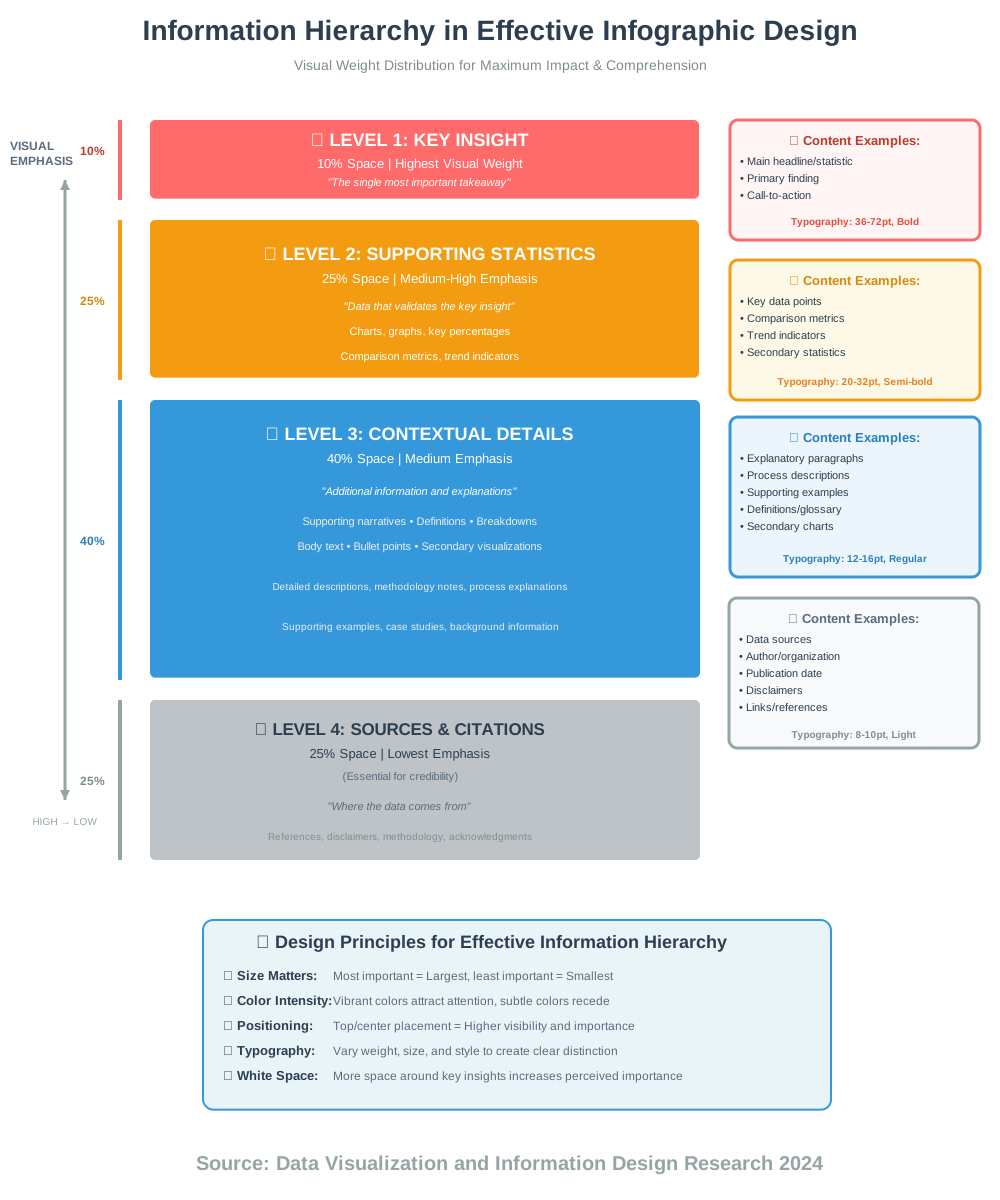
AI for Packaging Design: Optimizing Product Presentation
AI for Packaging Design optimizes product presentation through mockup generation, label design automation, and consumer preference prediction, helping brands create packaging that stands out on shelves and connects with target audiences.
Packaging design requires balancing numerous considerations—brand identity, regulatory requirements, shelf visibility, manufacturing constraints, and consumer appeal. AI tools help navigate these complexities while accelerating creative exploration.
Packhelp’s AI Design Tool generates custom packaging designs from brand descriptions. Input your brand values, target audience, and product type, and the AI creates packaging concepts with appropriate colors, typography, and visual elements.
The AI understands packaging-specific requirements—printable color spaces, bleed areas, and die-cut considerations—generating designs that are not just beautiful but technically feasible.
Arka’s Box Design AI specializes in structural packaging design, generating box templates, insert configurations, and packaging engineering solutions. Describe product dimensions and protection requirements, and the AI suggests optimal packaging structures, minimizing material waste while ensuring product safety.
BoxShot uses AI to generate photorealistic 3D packaging mockups. Upload your flat packaging design, select package types and configurations, and the AI creates realistic product shots showing your packaging in retail contexts, on shelves, or in consumer hands.
These mockups are invaluable for e-commerce listings, pitch presentations, and marketing materials before physical prototypes exist.
Printful’s AI Label Generator creates product labels automatically based on product information. The AI structures required information—ingredients, warnings, barcodes, certifications—in layouts that comply with regulations while maintaining aesthetic quality.
AI-Assisted Packaging Insights
Shelf Impact Prediction uses AI-trained on retail psychology and visual attention patterns. The AI predicts how packaging will perform on crowded shelves, identifying designs likely to attract consumer attention versus designs that blend into backgrounds.
Consumer Preference Analysis analyzes packaging designs against demographic preferences. The AI can predict how different age groups, genders, or market segments will respond to packaging choices, informing design decisions with data.
Sustainability Optimization helps AI analyze packaging materials and structures, suggesting improvements reducing environmental impact without compromising functionality. The AI can calculate material efficiency, recyclability scores, and carbon footprints of different design choices.
Regulatory Compliance Checking uses AI to flag potential regulatory issues—missing required information, incorrect label placement, and font size violations—before printing, preventing costly mistakes.
Practical Packaging Design Process
Brand Foundation First. AI packaging tools work best when informed by clear brand identity. Define your brand personality, values, and visual language before generating packaging concepts.
Consumer Research Integration. Combine AI insights with actual consumer research. Use AI for rapid iteration and preference prediction, then validate with real target audience feedback.
Technical Feasibility Verification. AI-generated packaging designs may not account for all manufacturing constraints. Consult with printers and manufacturers, verifying that designs can be produced cost-effectively.
Multiple Format Creation. Products often need packaging in various formats—retail boxes, e-commerce mailers, and point-of-sale displays. Use AI to maintain brand consistency across different packaging types and sizes.
Sustainability Consideration. Integrate environmental considerations early. Ask AI tools to prioritize sustainable materials, minimal packaging, and recyclable designs from the start rather than retrofitting sustainability later.
Special Considerations
Color Accuracy matters critically in packaging. Computer screens display RGB colors; printing uses CMYK. AI-generated designs may look different when printed. Always request physical color proofs before large print runs.
Cultural Sensitivity requires verification. AI training data may not adequately represent all cultural contexts. Packaging for international markets needs cultural review, ensuring colors, symbols, and imagery are appropriate.
Legal Requirements vary by product category and region. Food, pharmaceuticals, cosmetics, and other regulated products have specific labeling requirements. AI can help organize required information but verify compliance with legal expertise.
Unboxing Experience increasingly influences consumer perception. Consider how AI-generated packaging designs function during the opening experience—does it build anticipation? Create delight? Tell your brand story?
AI-Enhanced Video Editing: Automating Complex Video Tasks
AI-Enhanced Video Editing transforms video production through automated cutting, intelligent color grading, audio cleanup, and content-aware editing that would require hours of manual work.
I’ve spent countless hours on tedious video editing tasks—removing silence, adjusting audio levels, and color correcting multiple clips. AI video tools handle these tasks automatically, letting editors focus on storytelling and creative decisions.
Descript revolutionizes video editing through text-based editing. Transcribe your video automatically, then edit the video by editing the transcript. Delete words, and the corresponding video cuts automatically. Rearrange sentences, and the video reorders. This text-based approach makes video editing accessible to non-editors while accelerating workflows for professionals.
The AI also removes filler words (um, uh, like) automatically, tightens pacing by removing pauses, and even generates voice clones so you can correct mistakes by typing new words rather than re-recording.
Adobe Premiere Pro’s AI Features (powered by Adobe Sensei) automate numerous editing tasks. Auto Reframe intelligently crops videos for different aspect ratios, tracking important subjects and keeping them centered. Scene Edit Detection identifies cuts in existing videos, allowing editing of previously combined footage. Speech to Text generates editable transcripts automatically.
Runway ML Gen-2 generates video from text descriptions or extends existing footage with AI-generated content. While primarily a generative tool, it also offers video editing capabilities like background removal, object replacement, and motion tracking that traditionally required complex manual work.
CapCut’s AI Tools bring professional video editing capabilities to mobile devices and desktop free software. Auto captions generate accurate subtitles with customizable styling. Background removal works on video without green screens. AI-powered transitions suggest appropriate cuts based on content analysis.
Pictory transforms long-form content into short social media videos automatically. Upload webinar recordings, podcast episodes, or presentations, and the AI identifies key moments, extracts highlights, and creates shareable clips with captions and graphics.
Understanding AI Video Editing Capabilities
Automated Cutting analyzes footage, identifying optimal cut points based on audio pauses, scene changes, or subject movements. This automation accelerates rough cut assembly dramatically.
Intelligent Color Grading matches colors across clips shot in different conditions or with different cameras. The AI analyzes footage characteristics and applies consistent color grading, maintaining continuity.
Audio Enhancement removes background noise, normalizes volume levels, and enhances voice clarity automatically. AI can separate background music from dialogue, allowing independent control of each element.
Object Tracking follows subjects automatically, enabling effects, text, or graphics to follow moving elements without manual keyframing.
Style Transfer applies artistic or cinematic looks to footage based on reference images or described aesthetics. The AI analyzes style characteristics and applies them consistently across video.
Practical Video Editing Workflows
Rough Cut with AI, Refine Manually. Let AI assemble initial rough cuts, removing silences and organizing clips. Then manually refine pacing, timing, and storytelling for final quality.
Batch Processing for Consistency. Use AI to apply consistent treatments—color grading, audio normalization, and format conversions—across many clips simultaneously, ensuring visual and audio coherence.
Repurposing Content Efficiently. AI tools excel at adapting existing content for new platforms. Convert horizontal videos to vertical formats, extract highlights from long content, or generate multiple cuts from single source material.
Accessibility Enhancement. AI-generated captions, audio descriptions, and transcripts make video content accessible to broader audiences. These features also improve SEO and allow content consumption in sound-sensitive environments.
Avoiding Common Mistakes
Over-Automation removes human creativity. While AI speeds technical tasks, storytelling decisions—pacing, emotional beats, narrative arc—require human judgment. Don’t let AI automation replace creative editing decisions.
Ignoring Quality Control. AI-generated captions contain errors, automated cuts sometimes create awkward timing, and color grading may not match your vision perfectly. Always review and refine AI outputs before publishing.
Format Inconsistency. When auto-reformatting for different platforms, verify that important content remains visible and compositions still work. AI reframing sometimes crops essential elements or creates awkward framing.
Audio Dependence. AI tools trained on clean audio struggle with heavily compressed, noisy, or challenging recordings. Start with quality source audio for the best AI results.
Creative Applications
Documentary Editing benefits from AI’s ability to organize and search vast amounts of footage. Transcribe everything, then search for specific topics, quotes, or moments across hours of content instantly.
Social Media Content Creation leverages AI for rapid turnaround. Generate multiple variations of content quickly, test different approaches, and iterate based on performance data.
Educational Content uses AI to add professional polish—automatic captions for accessibility, clean audio for clarity, and consistent visual presentation—making educational videos more effective.
Marketing Videos combine AI-generated visuals with stock footage and branding elements, creating professional marketing content without extensive video production resources.
AI-Powered Design for Print: Creating High-Quality Print Materials
AI-Powered Design for Print addresses print-specific requirements—color management, resolution, bleed, and production specifications—while accelerating design creation for physical materials.
Print design has unique constraints different from digital design. Colors must work in CMYK, resolutions must support high-quality printing, and designs must account for trimming, folding, and physical production realities.
Canva’s Print Design Tools include AI features specifically for print production. Auto-resolution enhancement ensures uploaded images have sufficient quality for printing. Bleed zone guidance shows which areas may be trimmed. CMYK color previews show how colors will appear when printed.
The AI also suggests print-appropriate layouts, avoiding designs that work digitally but fail in physical production—like important elements too close to trim lines or text too small for legible printing.
VistaCreate (formerly Crello) offers AI-powered print template generation. Select your print product—brochure, business card, poster, or packaging—and the AI generates size-appropriate, production-ready templates with proper bleed, safe zones, and specifications.
Adobe InDesign’s AI Features automate layout adjustments, maintain consistent formatting across long documents, and optimize image placement for print specifications. Liquid Layout uses AI to adapt designs for different page sizes while maintaining hierarchy and readability.
Print.com’s Design Assistant uses AI to check print files for common problems before submission—low-resolution images, incorrect color spaces, missing fonts, improper bleed setup. This pre-flight checking prevents production delays and costly reprints.
Print-Specific Considerations
Color Management is critical and complex. What you see on screen (RGB) differs from printed output (CMYK). AI tools can preview CMYK colors and suggest adjustments, but always request physical proofs for color-critical projects.
Resolution Requirements differ from web design. Print requires 300 DPI minimum for quality output. AI upscaling tools can increase resolution, but starting with high-quality images produces better results.
Bleed and Safety Zones prevent important elements from being trimmed. AI layout tools can automatically position elements within safe zones, but understand these requirements yourself to evaluate AI outputs appropriately.
Typography Considerations for print differ from screen. Some fonts render poorly at small sizes when printed. Verify text legibility at actual print size, not just on screen.
Print Production Workflows
Design with Production in Mind. Consider printing processes, paper types, finishing options (lamination, embossing, foil), and folding or assembly requirements from the start. AI tools can suggest appropriate designs, but understanding production capabilities guides better requests.
Create Templates for Recurring Needs. If you regularly produce similar print materials, create templates incorporating brand guidelines, production specifications, and AI tool preferences. This standardization ensures consistency and speeds future production.
Proof Thoroughly. Request physical proofs for important print runs. Colors, paper texture, and finishing effects can’t be fully evaluated digitally. AI tools help but don’t eliminate the need for physical verification.
Work with Print Professionals. Maintain relationships with printers who can advise on technical requirements, material options, and cost-effective solutions. Their expertise complements AI tools’ capabilities.
Common Print Design Mistakes
Insufficient Image Resolution creates blurry, pixelated prints. Verify all images meet resolution requirements before sending designs to production.
RGB Color Mode instead of CMYK causes unexpected color shifts in final prints. Always convert to CMYK and preview in that color space.
Text Too Close to Edges risks trimming if cutting isn’t perfectly precise. Maintain adequate margins keeping important elements in safe zones.
Overlooking Paper Selection. Paper type affects how designs appear—glossy paper enhances colors, matte paper softens them, textured paper affects fine details. Consider paper characteristics during design.
Forgetting Folds or Scores. Designs crossing fold lines should account for how folding affects visual continuity. Important elements shouldn’t be obscured or split awkwardly by folds.
AI-Driven Brand Identity Design: Creating a Consistent Brand Experience
AI-Driven Brand Identity Design helps businesses develop cohesive visual identities through automated logo creation, style guide generation, and cross-platform consistency enforcement.
Brand identity encompasses far more than logos—it includes color palettes, typography, imagery style, tone of voice, and consistent application across all touchpoints. AI tools help create and maintain this complexity.
Looka’s Brand Kit generates comprehensive brand identities from initial preferences. After creating a logo, the AI develops complete brand guidelines including primary and secondary color palettes, font selections for different uses, and social media templates maintaining consistent visual language.
Tailor Brands’ Brand Book uses AI to create professional brand guidelines documenting proper logo usage, color specifications, typography rules, and visual style directions. This documentation ensures consistent brand application across teams and vendors.
Designhill’s AI Brand Identity Generator creates multiple brand identity variations exploring different aesthetic directions. This comparative approach helps businesses evaluate alternatives before committing to specific visual directions.
Brandmark’s Full Identity Package generates logos, social media assets, business cards, letterheads, and presentation templates maintaining consistent branding across all materials. This comprehensive approach ensures brand consistency from initial creation.
Renderforest offers AI-powered brand animation, creating animated logo variations, video intros, and motion graphics extensions of static brand identities. These animated elements extend brand identity into video and digital content.
Brand Identity Components
Logo System includes primary logos, logo variations for different contexts (reversed, simplified, monochrome), and usage guidelines specifying appropriate applications.
Color Palette typically includes primary brand colors (2-3 colors), secondary accent colors, and neutral colors for backgrounds and text. AI tools generate harmonious palettes while explaining each color’s intended use.
Typography System defines font families for headlines, body text, and specialty applications, establishing hierarchy and ensuring readability across applications.
Visual Style guidelines cover imagery style (photography aesthetic, illustration approach, and graphic elements), texture and pattern usage, and overall design philosophy.
Voice and Tone documentation, while not strictly visual, ensures messaging consistency matching visual identity. Some AI tools generate copy guidelines complementing visual elements.
Maintaining Brand Consistency
Asset Libraries centralize brand elements—logos, color values, typography files, and templates—ensuring everyone accesses current, approved materials. AI tools can automatically enforce these standards in new designs.
Template Systems provide pre-approved layouts for common materials—presentations, social media posts, and marketing collateral—maintaining consistency while allowing necessary customization.
Automated Checking uses AI to identify brand violations—wrong colors, incorrect logos, off-brand typography—before materials are published or printed.
Version Control tracks brand evolution over time, documenting changes and ensuring outdated materials are retired. AI can help identify and flag deprecated brand elements.
Implementation Strategies
Start with Clear Brand Strategy. AI tools create visual manifestations of brand strategies. Define your brand positioning, values, personality, and differentiation before visual identity creation. Strong strategy guides better AI outputs.
Test Across Applications. Ensure generated brand identities work across all needed contexts—digital and print, small and large applications, color and monochrome. AI may optimize for specific applications while neglecting others.
Get Stakeholder Input. Brand identity affects entire organizations. Involve key stakeholders in reviewing AI-generated options, ensuring buy-in and gathering diverse perspectives before final decisions.
Plan for Evolution. Brands evolve over time. Choose flexible identity systems that can adapt to growth, market changes, or strategic shifts without complete redesigns.
Document Thoroughly. Comprehensive brand guidelines prevent inconsistent application. AI-generated documentation provides starting points; enhance it with specific examples, do’s and don’ts, and real-world applications.
Special Considerations
Sub-Brands and Product Lines require identity systems that connect to master brands while maintaining distinct personalities. AI tools can generate related-but-differentiated identities maintaining family resemblance.
International Adaptations need cultural verification. Colors, symbols, and design elements carry different meanings across cultures. Review AI-generated identities with cultural expertise before international launches.
Accessibility Requirements ensure brand identities work for all audiences. Verify color contrast ratios, test with screen readers, and ensure brand elements don’t exclude users with disabilities.
Trademark Considerations require verification that AI-generated logos don’t infringe existing trademarks. Conduct searches before finalizing brand identities, consulting legal professionals for important launches.
AI for Pattern Design: Generating Unique and Seamless Patterns
AI for Pattern Design creates repeating patterns for textiles, packaging, wallpaper, and digital backgrounds through automated generation, ensuring seamless repeats and style consistency.
Pattern design requires mathematical precision—seamless repeats with no visible seams—combined with aesthetic appeal. AI tools handle technical precision while offering creative variations.
Patterned AI generates custom patterns from text descriptions. “Geometric Art Deco pattern in gold and navy” or “Organic floral pattern with watercolor aesthetic” produces multiple pattern variations matching your description.
The AI ensures patterns tile seamlessly, a technical requirement that traditionally required careful manual adjustment. Generate patterns, then customize colors, scale, and density to perfect your vision.
Patterninja transforms your sketches or uploaded images into seamless repeating patterns. Upload individual elements—flowers, geometric shapes, abstract forms—and the AI arranges them into balanced, repeating patterns with proper tiling.
Repper uses AI to analyze uploaded images, automatically creating seamless patterns from photographs, artwork, or graphic elements. The AI handles pattern matching at edges, ensuring invisible repeats.
Coolors’ Pattern Generator creates patterns using your color palettes, maintaining brand consistency while exploring different pattern styles and compositions.
Adobe Illustrator’s Repeat Tool enhanced with AI features simplifies complex pattern creation. The AI suggests optimal repeat configurations, predicts visual balance, and automates technical aspects of seamless pattern construction.
Pattern Types and Applications
Textile Patterns for fashion, upholstery, and home goods require specific technical considerations—repeat sizes matching production machinery, color limitations for printing processes, and scale appropriate for intended applications.
Packaging Patterns create visual interest while maintaining brand consistency. AI generates patterns working at various scales, from small product boxes to large shipping materials.
Wallpaper and Wall Covering Patterns need larger repeat sizes and careful consideration of how patterns appear at room scale. AI can generate patterns optimized for architectural applications.
Digital Backgrounds for websites, presentations, or graphics use patterns creating visual interest without overwhelming content. AI generates subtle patterns suitable for background usage.
Surface Pattern Design for products—phone cases, notebooks, accessories—requires patterns working on specific shapes and sizes. AI can adapt patterns to different product dimensions.
Creating Effective Patterns
Start with Style References. Show AI tools examples of patterns you admire. This visual guidance produces outputs closer to your aesthetic vision than text descriptions alone.
Consider Scale Carefully. Patterns working at small scales may feel overwhelming when large, while large-scale patterns may lose impact when small. Test AI-generated patterns at intended usage scales.
Color Reduction for Production. Physical printing often limits color counts. AI can generate patterns using specified color palettes, ensuring production feasibility.
Balance Density and Spacing. Busy patterns create visual energy but can overwhelm. Sparse patterns provide breathing room but may lack interest. AI tools often offer density controls—experiment to find ideal balance.
Test Seamless Repeats. While AI handles technical seaming, always verify patterns tile correctly. Create large compositions using repeated patterns, checking for obvious seams or unwanted visual effects where repeats meet.
Technical Considerations
Resolution Requirements vary by application. Textile printing requires high-resolution patterns, while digital backgrounds can use lower resolutions. Generate patterns at appropriate resolutions for intended uses.
Color Modes differ between screen and print. Textile printing often requires specific color systems (Pantone, spot colors). Verify AI-generated colors can be reproduced in your production process.
Repeat Size Specifications. Some applications require specific repeat dimensions. Textile production machinery may need patterns matching specific measurements. Communicate these requirements to AI tools or manually adjust outputs.
File Formats for pattern delivery vary. Vector formats (AI, EPS, SVG) maintain quality at any scale. Raster formats (PNG, TIFF) need sufficient resolution. Provide formats appropriate for your production needs.
Creative Exploration
Hybrid Patterns combine AI-generated elements with hand-drawn components, creating unique styles neither fully automated nor entirely manual.
Seasonal Collections use AI to generate pattern variations maintaining brand consistency while reflecting seasonal themes, colors, or moods.
Cultural Fusion patterns blend design traditions from different cultures. Use AI to generate base patterns, then refine with cultural research ensuring respectful representation.
Abstract Experimentation with AI pattern tools reveals unexpected design directions. Generate hundreds of variations quickly, identifying surprising combinations worthy of development.
AI-Assisted Landscape Design: Visualize Outdoor Spaces
AI-Assisted Landscape Design helps visualize outdoor spaces, suggesting plant combinations, hardscape layouts, and three-dimensional renderings showing proposed landscape transformations.
Landscape design combines horticultural knowledge, spatial planning, aesthetic design, and practical considerations like drainage, sunlight, and maintenance. AI tools help navigate this complexity.
iScape uses augmented reality and AI to visualize landscape designs. Photograph your property, then add plants, trees, hardscaping elements, and features. The AI places elements realistically, showing accurate scale and perspective. This visual preview helps homeowners and designers evaluate options before physical implementation.
The AI also suggests plants appropriate for your climate zone, sunlight conditions, and aesthetic preferences, combining design guidance with practical horticultural knowledge.
PRO Landscape Design uses AI for automated plant recommendations based on region, site conditions, and design goals. The system suggests suitable species, optimal placement, and mature sizes helping designers create thriving landscapes.
SketchUp with AI Plugins enables three-dimensional landscape modeling. AI assists with terrain modeling, plant population, and realistic rendering showing how landscapes will look when mature.
Gardenize includes AI plant identification and care recommendations. Photograph plants, and the AI identifies species and suggests appropriate care, helping landscape designers specify appropriate plants and educate clients about maintenance.
Visiscape (formerly Turbo Floor Plan) generates landscape plans from property surveys or photographs. The AI creates proportionally accurate plans showing existing conditions, then allows adding proposed elements with automatic scaling and placement.
Landscape Design Principles
Site Analysis precedes design. Understanding sunlight patterns, soil conditions, drainage, existing vegetation, and microclimates guides appropriate plant selection and placement. AI tools request this information to provide relevant recommendations.
Functional Zoning organizes outdoor spaces by use—entertaining areas, play spaces, vegetable gardens, quiet retreats. AI helps visualize these zones, ensuring adequate space allocation and logical flow.
Layering and Height Variation creates visual interest and habitat diversity. AI tools can suggest planting layers—ground covers, perennials, shrubs, small trees, canopy trees—creating dimensional landscapes.
Seasonal Interest ensures year-round appeal. AI can suggest plant combinations providing flowers, foliage, structure, or color across different seasons.
Maintenance Considerations affect long-term success. AI tools can estimate maintenance requirements, helping designers balance aesthetic ambitions with practical care capacities.
Practical Design Workflows
Start with Clear Goals. Define how you’ll use outdoor spaces before designing. Entertainment-focused landscapes need different features than wildlife gardens or productive food gardens. Clear goals guide AI recommendations.
Document Existing Conditions. Photograph your site from multiple angles, note sun patterns throughout the day, and identify existing features to keep or remove. Comprehensive documentation produces accurate AI visualizations.
Consider Mature Sizes. AI tools show plants at current nursery sizes or at maturity. Always evaluate designs at mature scale, ensuring adequate spacing and avoiding overcrowding as plants grow.
Plan in Phases. Large landscape transformations can overwhelm budgets and maintenance capacity. Use AI to visualize complete designs, then implement in phases as resources and time allow.
Integrate Hardscape and Softscape. Balance living plants with non-living elements—patios, paths, fences, water features. AI helps visualize these relationships, ensuring harmonious integration.
Special Considerations
Native Plant Emphasis supports local ecosystems, requires less maintenance, and adapts better to local conditions. Request native plant recommendations from AI tools when appropriate.
Water Conservation grows increasingly important. AI can suggest drought-tolerant plants, efficient irrigation approaches, and water-wise design principles.
Wildlife Support creates habitats for pollinators, birds, and beneficial insects. AI tools can suggest plants providing food and shelter for wildlife while maintaining aesthetic appeal.
Accessibility ensures outdoor spaces serve users with varying mobility. AI can help design accessible pathways, raised beds, and barrier-free features.
Climate Adaptation considers local climate realities—heat, cold, humidity, rainfall patterns—suggesting plants and designs appropriate for your specific conditions.
Implementation Tips
Consult Local Expertise. While AI provides valuable guidance, local landscape professionals understand regional conditions, plant availability, and specific challenges. Combine AI tools with local knowledge for best results.
Test Plant Choices. Before committing to large installations, try small quantities of suggested plants, verifying they thrive in your specific conditions before larger investments.
Plan for Growth. Newly installed landscapes look sparse. Resist temptation to over-plant for immediate fullness. Trust AI visualizations showing mature landscapes, spacing appropriately from the start.
Document Your Design. Maintain records of plant species, planting dates, and design decisions. This documentation guides future maintenance, modifications, and helps troubleshoot problems.
AI-Powered Interior Design: Generate Room Layouts and Decor Ideas
AI-Powered Interior Design visualizes room transformations, suggests furniture arrangements, recommends color schemes, and generates design concepts helping homeowners and designers explore possibilities before physical changes.
Interior design involves spatial planning, style coordination, functional considerations, and budget management. AI tools accelerate exploration and visualization while offering design guidance.
Roomvo AI visualizes paint colors and finishes in actual room photographs. Upload room photos, and the AI applies different paint colors realistically, showing accurate lighting effects and color relationships. This visualization helps choose colors confidently without extensive sampling.
Homestyler generates complete room designs from simple inputs. Photograph your empty or existing room, specify desired style—modern, traditional, minimalist, eclectic—and the AI places furniture, suggests colors, and creates cohesive designs.
The AI handles spatial planning, ensuring furniture fits proportionally, maintains appropriate traffic flow, and creates balanced compositions. Users can modify AI suggestions, trying different arrangements until finding optimal configurations.
RoomSketcher with AI Features creates floor plans from measurements or photos, then uses AI to suggest optimal furniture placement considering room proportions, natural light, and functional requirements.
Collov AI generates photorealistic room renderings from text descriptions. Describe your vision—”Scandinavian living room with neutral colors and natural materials”—and the AI creates detailed visualizations showing complete room designs.
Virtual Staging AI transforms empty room photos into fully furnished spaces for real estate marketing. The AI adds contextually appropriate furniture and decor, helping buyers visualize potential while maintaining photorealistic quality.
Interior Design Principles
Space Planning optimizes room functionality and flow. AI tools consider room dimensions, door swings, traffic patterns, and furniture clearances when suggesting layouts.
Style Consistency maintains cohesive aesthetics. AI analyzes style elements—furniture shapes, material finishes, color palettes, decorative accents—ensuring components work harmoniously.
Lighting Design affects both functionality and ambiance. AI tools can suggest lighting placements, fixture types, and light layering strategies creating well-lit, inviting spaces.
Color Theory Application creates appealing, comfortable environments. AI applies color principles—complementary schemes, monochromatic palettes, analogous colors—suggesting combinations that work psychologically and aesthetically.
Proportion and Scale ensure furniture and decor relate appropriately to room sizes. AI helps visualize whether furnishings are appropriately sized, avoiding pieces that overwhelm small spaces or get lost in large ones.
Practical Design Processes
Define Your Style before generating designs. Browse style references, create mood boards, and identify preferred aesthetics. This clarity helps AI tools generate appropriate recommendations rather than generic suggestions.
Measure Accurately. Precise room dimensions and existing furniture measurements ensure AI visualizations represent reality accurately. Incorrect measurements lead to unrealistic expectations and implementation problems.
Consider Lifestyle Needs. Beautiful designs fail if they don’t support actual living patterns. Communicate lifestyle requirements—kids, pets, entertaining, work-from-home needs—so AI suggestions remain practical.
Budget Realistically. AI can generate aspirational designs that exceed budgets. Specify price parameters when possible, or plan implementation in phases as finances allow.
Test Different Options. Generate multiple design variations exploring different styles, layouts, and color schemes. This comparison helps identify preferences and reveals options you might not have considered.
Implementation Strategies
Prioritize Impact Areas. If implementing AI-designed rooms in phases, start with high-impact spaces—living rooms, primary bedrooms, kitchens—where improvements create maximum benefit.
Mix AI Suggestions with Personal Items. Combine AI-recommended furnishings with meaningful personal possessions. This blend creates unique spaces reflecting individual personalities rather than showroom perfection.
Consider Longevity. Trendy AI-suggested designs may date quickly. Balance current trends with timeless elements ensuring spaces remain appealing for years.
Sustainability Matters. When purchasing items to match AI designs, consider quality, durability, and environmental impact. Sustainable choices create healthier homes and reduced long-term costs.
Professional Consultation for Complex Projects. While AI assists with many design decisions, complex renovations involving structural changes, electrical work, or plumbing benefit from professional expertise ensuring safety and code compliance.
Special Considerations
Rental Limitations. AI designs may suggest permanent modifications impossible in rental properties. Specify rental constraints so AI recommends portable, reversible solutions.
Accessibility Requirements. Ensure AI-generated designs accommodate mobility needs, aging-in-place considerations, or specific accessibility requirements.
Multi-Generational Households need spaces serving different age groups and abilities. AI can help balance competing needs, creating flexible spaces adapting to changing family dynamics.
Small Space Optimization. AI tools can suggest space-saving solutions, multi-functional furniture, and design tricks making small spaces feel larger and work harder.
AI for Fashion Design: Predicting Trends and Creating Garments
AI for Fashion Design assists with trend forecasting, garment design, pattern generation, and virtual try-on, transforming how fashion is created, marketed, and sold.
Fashion combines artistic creativity with commercial viability, technical construction, and trend awareness. AI tools help navigate these complex, interconnected considerations.
Heuritech analyzes millions of social media images, identifying emerging fashion trends before they reach mainstream awareness. The AI recognizes visual patterns—colors, silhouettes, details, fabrics—predicting which trends will gain momentum and which will fade.
Fashion brands use these insights for collection planning, inventory decisions, and design direction, reducing risk of unsold inventory and missing trends.
The New Black generates fashion designs from text descriptions. “Oversized blazer with sustainable materials and utilitarian details” produces multiple design variations showing different interpretations. Designers can iterate rapidly, exploring concepts without sketching every variation.
CALA combines AI design tools with manufacturing connections. Generate designs with AI, then connect directly with manufacturers for sampling and production, streamlining the design-to-production pipeline.
Vue.ai uses AI for fashion product tagging, visual search, and personalized recommendations. The system analyzes garment attributes—cut, pattern, color, style—enabling sophisticated search and recommendation engines for e-commerce.
Reactive Reality offers virtual try-on technology where AI maps garments onto photos or live video, showing how clothing looks on individual body types without physical sampling.
Fashion AI Applications
Trend Forecasting analyzes visual data from runways, street style, social media, and retail sales, identifying pattern shifts signaling trend emergence or decline.
Design Generation creates garment designs from text prompts, reference images, or existing designs, accelerating concept exploration and design variation.
Pattern Making uses AI to generate cutting patterns from garment designs, calculating fabric requirements and optimizing pattern layouts for material efficiency.
Fit Prediction analyzes body measurements and garment specifications, predicting fit issues before physical sampling, reducing sample iterations and development time.
Color Prediction forecasts popular color palettes for upcoming seasons based on runway analysis, cultural trends, and historical data.
Sustainable Design optimization uses AI to suggest material alternatives, minimize waste, and calculate environmental impacts of design decisions.
Practical Fashion Design Integration
Start with Strong Design Brief. AI tools work best with clear direction. Define target customer, price point, style direction, and functional requirements before generating designs.
Combine AI with Human Creativity. Use AI for rapid iteration and technical optimization while maintaining human judgment for aesthetic refinement and brand alignment.
Validate with Target Audience. AI trend predictions provide valuable insights, but validate with actual customer feedback before committing to production.
Consider Manufacturing Realities. AI-generated designs may not account for construction complexity or production costs. Consult manufacturers verifying feasibility before finalizing designs.
Protect Design IP. Understand how AI tools handle your designs. Some platforms may use submitted designs for training or may not provide clear IP ownership.
Fashion Industry Challenges
Fast Fashion Concerns. AI accelerates design and production, potentially exacerbating fast fashion’s environmental and ethical problems. Use AI responsibly, prioritizing quality, sustainability, and worker welfare over pure speed.
Homogenization Risk. If many brands use similar AI tools trained on similar data, fashion risks aesthetic homogenization. Counteract this by combining AI with unique brand perspectives and creative direction.
Size Inclusivity. Some AI tools default to limited size ranges. Advocate for and prioritize inclusive sizing in AI-generated designs and fit predictions.
Cultural Appropriation. AI trained on global fashion data may generate designs incorporating cultural elements without appropriate context or credit. Review designs carefully for respectful cultural representation.
AI-Driven Character Design: Create Unique Characters for Games and Animation
AI-Driven Character Design generates original characters for games, animation, comics, and storytelling through automated generation, iteration, and style exploration.
Character design requires balancing visual appeal, personality expression, functional requirements for animation or gameplay, and memorability. AI tools accelerate this complex creative process.
Midjourney excels at character concept generation. Detailed text prompts describing character traits, personality, visual style, and context produce remarkably sophisticated character designs suitable for concept art and design development.
The key is prompt engineering—describing not just physical appearance but personality, role, emotional qualities, and contextual details that inform visual design.
Artbreeder enables iterative character design by blending and evolving characters. Start with generated or uploaded character images, then adjust genetic sliders controlling features, expressions, age, ethnicity, and style, creating unique characters through evolutionary design.
Character.AI (different from chatbot service) generates consistent character designs across multiple poses and angles. This consistency is critical for animation production where characters must be drawn repeatedly in various positions.
Leonardo.ai offers character creation models specifically trained on game characters, anime figures, and fantasy creatures. These specialized models understand genre conventions, producing characters appropriate for specific media types.
DALL-E 3 generates characters from detailed descriptions, particularly excelling at unusual or fantastical character concepts combining disparate elements in coherent designs.
Character Design Principles
Silhouette Recognition ensures characters remain identifiable in silhouette. Strong, distinct shapes make characters memorable and readable at any scale or lighting condition.
Visual Personality conveys character traits through design choices. Colors, shapes, proportions, clothing, and accessories all communicate personality before characters speak or act.
Functional Design considers how characters will be used. Animation characters need simple, reproducible designs. Game characters require designs that read clearly at gameplay distances. Comics need designs working in black and white line art.
Cultural Sensitivity requires thoughtful representation. AI may generate stereotypical or culturally insensitive character designs. Review outputs carefully, consulting cultural experts for characters representing specific communities.
Age and Experience Indicators through design details. Proportions, posture, costume details, and accessories signal character age and background non-verbally.
Practical Character Development
Character Brief Development. Before generating characters, write briefs describing personality, role, backstory, and key traits. This foundation guides AI prompts and ensures designs serve narrative needs.
Style Reference Gathering. Collect visual references representing desired aesthetic—realistic, stylized, anime, cartoon, pixel art. Show AI tools these references for consistent style guidance.
Iteration and Refinement. Generate many character variations rapidly, identifying strongest concepts for further development. AI excels at exploration; use this capability extensively.
Consistency Across Views. For production use, create character turnarounds showing front, side, back, and three-quarter views. Some AI tools generate these automatically; others require multiple generations ensuring consistency.
Color Exploration. Generate the same character design in different color schemes, testing palettes’ effects on personality perception and memorability.
Production Considerations
Model Sheets for Animation. Create comprehensive character reference materials showing expressions, key poses, construction guidelines, and color specifications. AI can assist with generation, but human artists typically finalize these critical production documents.
Game Asset Requirements. Game characters need designs translating effectively to 3D modeling, rigging, and animation. Consider technical constraints when generating designs—polygon budgets, rigging complexity, texture detail.
Comic and Sequential Art. Characters for comics must work in various panel sizes and maintain recognition across different artists if team-produced. Simpler designs often work better for comic production.
Merchandising Potential. Commercially oriented projects should consider how characters translate to merchandise—toys, apparel, collectibles. Designs working in various media have broader commercial potential.
Advanced Techniques
Character Families. Generate multiple characters sharing design language—similar style elements, color palettes, or visual motifs—creating cohesive character ensembles for games, shows, or stories.
Evolution Over Time. Create character versions showing aging, alternate timelines, or power-ups maintaining core identity while demonstrating change.
Cross-Media Adaptation. Use AI to explore how characters translate across different media—from realistic to stylized, from 2D to 3D, from child-friendly to mature audiences.
Hybrid Creation. Combine AI-generated elements with traditional illustration. Use AI for base concepts, then manually refine, add details, and personalize designs creating unique characters neither fully AI nor fully hand-crafted.
AI-Enhanced Typography: Generate and Refine Typefaces
AI-Enhanced Typography assists with font generation, typographic layout optimization, and typeface customization, making typography more accessible while offering professionals powerful new capabilities.
Typography combines aesthetic design with technical precision, functionality, and cultural context. AI tools help navigate this complexity while maintaining the craft’s artistic elements.
Fontjoy (mentioned earlier) uses AI for font pairing but also explores font characteristics. The AI understands relationships between typeface styles, helping designers understand why certain fonts work together.
Prototypo offers parametric font design where AI assists with generating font variations from base designs. Adjust parameters like weight, width, or serif styles, and the AI generates consistent typefaces across all characters.
FontLab with AI Features provides professional font creation tools enhanced with AI assistance for curve optimization, spacing adjustment, and kerning automation. These AI features accelerate technical aspects of typeface design.
Type Scale uses AI to generate harmonious typographic scales—mathematically related font sizes creating visual hierarchy. Input base size, and the AI calculates optimal sizes for headings, subheadings, body text, and captions maintaining proportional relationships.
Calligraphr transforms handwriting into digital fonts using AI to smooth curves, optimize spacing, and ensure consistency across characters. This democratizes font creation, allowing anyone to create custom typefaces from their handwriting.
Typography Fundamentals
Typeface Classification understanding helps evaluate AI font suggestions. Serif fonts convey tradition and formality, sans-serif feels modern and clean, script suggests elegance or casualness, display typefaces create strong personality.
Hierarchy Through Type guides reader attention and comprehension. AI tools can suggest size, weight, and spacing relationships creating clear visual hierarchy.
Readability vs. Legibility. Legibility describes individual character clarity; readability describes overall text comprehension ease. Both matter differently for different applications—body text demands high readability, while headlines can prioritize impact over reading ease.
Spacing Considerations—leading (line spacing), kerning (letter pair spacing), and tracking (overall letter spacing)—dramatically affect typography effectiveness. AI tools can optimize these technical elements based on typeface characteristics and usage context.
Practical Typography Applications
Logo Typography. AI can generate custom letterforms or suggest typefaces appropriate for brand personalities. Custom typography creates unique brand identity but requires more sophisticated refinement.
Web Typography. AI tools help optimize typography for screen reading—selecting web-safe fonts, calculating appropriate sizes for different devices, and ensuring adequate contrast for accessibility.
Print Typography. Different considerations from screen typography—optical sizing for different print sizes, accounting for paper characteristics, and managing hyphenation and justification for long-form text.
Variable Fonts contain multiple weights and styles within single files. AI assists with generating smooth transitions between variations ensuring consistent design across weight spectrum.
Professional Typography Considerations
Licensing Clarity. Verify usage rights for AI-generated or AI-suggested typefaces. Some fonts restrict commercial use, modification, or distribution. Licensing violations can create legal problems.
Cultural Appropriateness. Typography carries cultural associations. AI suggestions may not account for cultural context. Verify that typeface choices respect cultural associations and avoid inappropriate appropriation.
Accessibility Requirements. Ensure typography meets WCAG standards—sufficient size, adequate contrast, appropriate line spacing, and avoiding problematic fonts for users with dyslexia or visual impairments.
Performance Considerations. Web typography affects page loading speed. Multiple font files or heavy fonts slow performance. Balance typographic richness with performance requirements.
Advanced Typography Techniques
Kinetic Typography uses animation to enhance meaning and emotion. AI tools can suggest animation approaches matching content mood and emphasis points.
Responsive Typography adapts to different screen sizes and orientations. AI can help calculate optimal size and spacing adjustments across breakpoints.
Multi-Language Typography requires understanding different scripts’ requirements—character sets, directionality, spacing conventions. AI assists with managing typographic complexity across languages.
Experimental Typography pushes conventional boundaries. While AI often defaults to conventional approaches, creative prompting can generate unexpected typographic explorations.
Conclusion: Embracing AI as Your Creative Partner
We’ve journeyed through the expansive landscape of AI-Powered Design Tools, exploring applications from logo creation to 3D modeling, from social media graphics to fashion design. The breadth of AI’s impact on creative work is genuinely remarkable, and we’re still in the early stages of this transformation.
Here’s what I want you to take away from this comprehensive guide: AI tools aren’t replacing your creativity—they’re amplifying it. They handle tedious technical execution, accelerate exploration and iteration, and make professional-quality design accessible to everyone. But they need you. Your creative judgment, strategic thinking, cultural awareness, and emotional intelligence remain irreplaceable.
The most successful creators in this AI era will be those who embrace these tools thoughtfully. They’ll understand what AI does well—rapid generation, technical optimization, pattern recognition—and what humans do better—creative strategy, emotional nuance, cultural sensitivity, ethical judgment. They’ll combine both capabilities, creating work that’s more ambitious, more polished, and more impactful than either could achieve alone.
Start exploring today. Don’t wait for perfect understanding before experimenting. Choose one AI design tool that addresses a current pain point in your workflow. Maybe you spend too long creating social media graphics—try Canva’s AI features. Perhaps logo concepts feel overwhelming—explore Looka or Tailor Brands. Struggle with color selection—experiment with Khroma or Coolors.
Experiment freely. Generate dozens of options. Try approaches you wouldn’t attempt manually. AI removes the cost of exploration—there’s no wasted canvas, no expensive mistakes. This freedom to experiment will expand your creative horizons and reveal possibilities you wouldn’t have discovered through traditional methods alone.
Maintain your artistic voice. Yes, use AI tools for efficiency and exploration, but always refine outputs to reflect your unique perspective. Customize AI-generated elements. Combine AI outputs with traditional creative work. Develop signature approaches that AI can’t replicate. Your individuality is your greatest creative asset—protect and cultivate it.
Stay informed and adaptive. AI design technology evolves rapidly. Tools we discussed will improve, new tools will emerge, and capabilities will expand. Dedicate time to continuous learning. Follow design technology developments. Experiment with new tools as they launch. This ongoing learning ensures you benefit from advancing capabilities.
Consider ethical implications. Use AI tools responsibly. Be transparent about AI involvement when appropriate. Support human creative communities even while using AI tools. Prioritize accessibility, cultural sensitivity, and environmental sustainability in your AI-assisted design work.
Remember the human element. Technology serves people. The most meaningful design work solves human problems, communicates human stories, and creates human connections. AI helps you execute faster and explore more thoroughly, but you provide the understanding of human needs that makes design matter.
The future of design isn’t AI replacing humans or humans working without AI—it’s thoughtful collaboration between human creativity and machine capability. In this future, designers who embrace AI while maintaining their creative integrity and ethical standards will thrive, creating work that’s both technically excellent and deeply human.
You’re now equipped with comprehensive knowledge about AI design tools and applications. The next step is yours: choose a tool, start experimenting, and begin your journey toward AI-augmented creativity. The creative possibilities are boundless, and I can’t wait to see what you create.
Happy designing!
Frequently Asked Questions
References:
Adobe Creative Cloud Documentation – https://helpx.adobe.com/creative-cloud.html
Canva Design School Resources – https://www.canva.com/learn/
MIT Technology Review – AI and Creativity Research
Stanford Human-Centered AI Institute – Design and AI Publications
Nielsen Norman Group – AI in UX Design Research
AIGA Professional Design Ethics Guidelines
W3C Web Accessibility Initiative Standards
Schema.org Structured Data Documentation
About the Authors
This comprehensive guide to AI-Powered Design Tools was created through the collaborative expertise of Alex Rivera and Abir Benali.
Alex Rivera (Main Author) is a creative technologist passionate about making AI accessible to everyone. With years of experience exploring cutting-edge design tools and teaching non-technical users, Alex specializes in breaking down complex technology into practical, actionable guidance. Alex believes AI should amplify human creativity, not replace it, and works to help creators of all skill levels harness these powerful tools confidently.
Abir Benali (Co-Author) is a friendly technology writer dedicated to explaining AI tools clearly and concisely. Abir’s approach focuses on real-world applications, common beginner mistakes, and practical implementation strategies. With a background in both design and technical writing, Abir ensures that guides remain approachable while maintaining technical accuracy and depth.
Together, we’ve combined our perspectives to create this comprehensive resource, blending creative inspiration with practical guidance. Our goal is helping you navigate the exciting world of AI-powered design with confidence, creativity, and critical thinking. We’re thrilled to be part of your creative journey!