AI in Education: 10 Practical Ways to Automate Admin Work

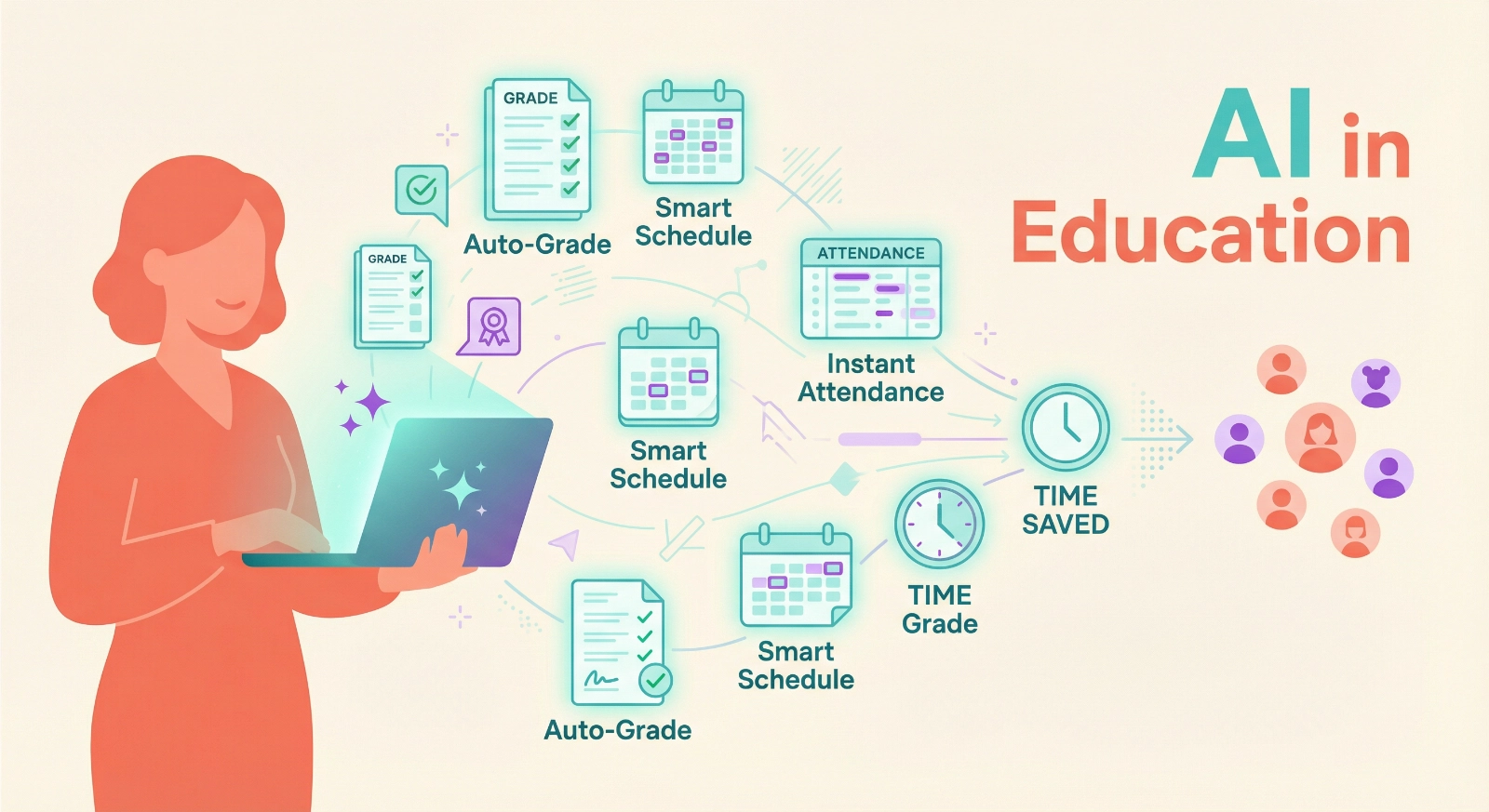
AI in Education isn’t about replacing teachers—it’s about giving you back the hours you lose to paperwork, grading marathons, and administrative busywork. After spending years helping educators streamline their workflows, I’ve seen firsthand how the right automation strategies can transform exhausting 70-hour workweeks into focused, energized teaching time. What’s even better? You don’t need to be tech-savvy to make this work.
This guide shares ten battle-tested tips for automating the administrative tasks that drain your energy, so you can redirect that time toward what actually matters: connecting with students, refining your teaching craft, and maybe even leaving school before dark. These aren’t theoretical concepts—they’re practical strategies you can implement starting today.
Why Automating Administrative Tasks Changes Everything
Let me be direct: administrative tasks consume approximately 50% of an educator’s working hours, according to numerous educator surveys conducted throughout 2025. That’s half your professional life spent on activities that don’t directly impact student learning. Think about what you could accomplish with even 10 of those hours back each week.
AI in Education tools have matured significantly, moving beyond the experimental phase into reliable, everyday solutions. The technology now handles routine tasks with accuracy rates that often exceed manual processing, while you focus on the irreplaceable human elements of teaching—mentoring, inspiring, and adapting to individual student needs.
The productivity equation is simple: automate the repeatable, and preserve your energy for the remarkable.
10 Practical Tips for Automating Educational Admin Work
1. Deploy AI-Powered Grading for Objective Assessments
Stop spending evenings grading multiple-choice tests and short-answer quizzes. AI grading systems can evaluate objective assessments instantly, providing students with immediate feedback while you maintain complete oversight.
How to implement this: Start with one subject or unit. Tools like Gradescope, Turnitin’s Revision Assistant, or even Google Forms with auto-grading can handle multiple-choice, fill-in-the-blank, and basic short-answer questions. Set up your answer key once, then let the system grade hundreds of submissions in seconds.
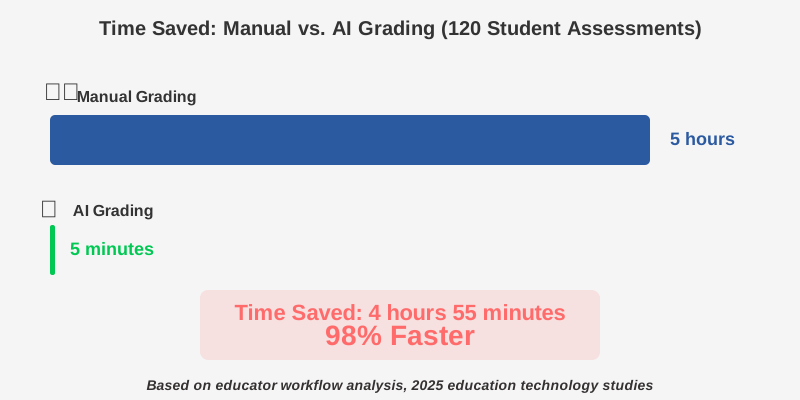
Time-saving reality: A typical teacher grading 120 multiple-choice tests manually takes 4–6 hours. AI does the job in under 5 minutes. That’s your weekend back.
Pro tip: Always review flagged responses where the AI shows uncertainty. This quality assessment takes 15-20 minutes but ensures accuracy while teaching you where students commonly struggle, informing your next lesson plan.
2. Automate Attendance Tracking with Smart Systems
Manual attendance taking steals 5-10 minutes from every class period—time that multiplies across your daily schedule.
Automated attendance systems eliminate this dead time while improving accuracy and creating reliable data for intervention programs.
How to implement this: Integrate digital check-in solutions through your learning management system (LMS), use QR code scanning apps, or implement biometric systems if your district supports them. Many LMS platforms now include one-click attendance features that sync automatically with your gradebook and administration systems.
The integration advantage: When attendance connects automatically to your student information system, parents receive instant notifications, counselors spot patterns immediately, and you generate reports without lifting a finger.
Common mistake to avoid: Don’t create complicated check-in procedures. The simpler the system, the more likely students will comply and the less time you’ll spend troubleshooting.
3. Let AI Schedule Your Parent-Teacher Conferences
Coordinating conference schedules through endless email chains is soul-crushing. AI scheduling assistants like Calendly for Education, Doodle, or built-in LMS booking systems eliminate the back-and-forth while respecting everyone’s constraints.
How to implement this: Set your available time blocks once. Share your scheduling link via email or your class website. Parents book their preferred slots and receive automatic confirmations and reminders, and the system prevents double bookings.
Efficiency multiplier: For 30 parent conferences, traditional scheduling takes 3-5 hours of email coordination. Automated scheduling reduces your involvement to 15 minutes of initial setup. The system handles everything else, including reminder emails that reduce no-shows by approximately 60%.
4. Automate Assignment Distribution and Collection
Stop managing paper stacks or chasing down late submissions. Digital assignment workflows through platforms like Google Classroom, Microsoft Teams for Education, or Canvas handle distribution, collection, organization, and even plagiarism checking automatically.
How to implement this: Create assignment templates for recurring work. Set due dates, attach rubrics, enable auto-submissions, and configure late-work policies. The system timestamps everything, organizes student submissions, and flags missing work without your intervention.
Workflow integration: These platforms connect seamlessly with your gradebook, so scores transfer automatically. You grade once in one location, and every connected system updates instantly.
Time-saving reality: Collecting, sorting, and organizing physical papers for a class of 30 students takes 20–30 minutes per assignment. Digital systems do this instantaneously while creating permanent, searchable records.
5. Use AI Writing Assistants for Feedback Generation
Providing detailed, personalized feedback is crucial but time-intensive. AI writing feedback tools can generate initial comments on student essays, identifying grammar issues, structural weaknesses, and areas for improvement while you focus on higher-level conceptual feedback.
How to implement this: Tools like Grammarly for Education, Turnitin’s feedback features, or Microsoft Editor can provide automated feedback on technical writing elements. Review and personalize these suggestions, adding your unique insights about content, critical thinking, and individual student progress.
The hybrid approach works best: Let AI handle mechanical corrections and formatting suggestions. You add the meaningful, relationship-building feedback about ideas, creativity, and growth that only you can provide.
Typical time savings: Pre-screening essays with AI reduces your per-essay review time from 15-20 minutes to 8-10 minutes while maintaining feedback quality.
6. Automate Progress Reports and Parent Communications
Writing individualized progress reports or frequent parent updates consumes precious hours. AI communication tools can generate personalized report drafts based on student data, grades, and attendance patterns, which you then customize with specific observations.
How to implement this: Many modern gradebook systems now include report generation features that pull student performance data automatically. Tools like TeacherMate, Bloomz, or ClassDojo can draft parent communications based on templates you create and data the system already tracks.
The personalization balance: Use AI to create the foundation—data summaries, attendance patterns, and grade trends. Then add 2-3 sentences of personal observation that only you can provide. This hybrid approach maintains authenticity while cutting report-writing time by 60-70%.
Pro tip: Create a bank of customizable observation templates for common scenarios (showing improvement, needing support, exceeding expectations). The AI pulls the appropriate template and populates it with student-specific data.
7. Implement Smart Lesson Planning Assistants
Building comprehensive lesson plans requires significant preparation time. AI lesson planning tools can generate activity frameworks, suggest resources, align standards, and create differentiation strategies based on your curriculum requirements.
How to implement this: Platforms like Education Copilot, Curipod, or ChatGPT can draft lesson outlines when you provide learning objectives, grade level, and subject area. Review and adapt these drafts to match your teaching style and student needs.
The planning workflow: Spend 10 minutes providing context to the AI. Review the generated 30-minute lesson framework. Customize for your specific students. What used to take 90 minutes now takes 30 minutes, and you often discover creative approaches you hadn’t considered.
Common mistake to avoid: Don’t use AI-generated lessons verbatim. They lack knowledge of your specific students, classroom culture, and ongoing narratives. Use them as starting frameworks requiring your professional judgment.
8. Automate Resource Curation and Organization
Finding, vetting, and organizing teaching resources drains countless hours. AI-powered content curation tools can search, recommend, and organize educational materials based on your specified criteria and teaching standards.
How to implement this: Tools like CommonLit’s AI recommendations, Newsela’s content matching, or even Google’s advanced search with specific educational filters can identify relevant resources. Browser extensions like Evernote Web Clipper or Wakelet can automatically tag and organize materials you find.
The systematic approach: Set up folders or collections organized by unit and standard. As you discover resources, use one-click saving tools to automatically categorize materials. The AI learns your preferences and suggests increasingly relevant content over time.
Integration tip: Connect your resource library to your lesson planning system. When planning a unit on ecosystems, for instance, all your curated materials appear automatically, eliminating the “where did I save that” time drain.
9. Deploy Automated Classroom Management Data Tracking
Tracking behavioral interventions, positive reinforcement, and classroom management patterns provides valuable data but typically relies on memory or inconsistent notes. Automated behavior tracking systems create reliable records while requiring minimal effort.
How to implement this: Apps like ClassDojo, LiveSchool, or PBIS Rewards let you award points or log behaviors with single taps on your phone or tablet. The system timestamps everything, generates reports for parents and administrators, and identifies patterns you might otherwise miss.
Data-driven intervention: These systems reveal which students need additional support and which strategies work best and provide documentation for parent conferences or intervention team meetings—all automatically generated from your simple daily inputs.
Time investment: Recording a behavior takes 5 seconds. The system does everything else, generating weekly reports, trend analyses, and parent communications without additional effort from you.
10. Automate Professional Development Tracking and Certification Management
Keeping records of professional development hours, certificate renewals, and continuing education requirements typically means scattered paperwork and pre-deadline panic. AI credential management systems track everything automatically and alert you before deadlines.
How to implement this: Use platforms like My Learning Plan, Frontline Professional Growth, or even a well-configured Google Sheet with reminder automation. Input each PD session once—the system calculates accumulated hours, flags approaching certification deadlines, and generates required documentation.
The career-long benefit: Instead of scrambling before recertification deadlines, you maintain continuous awareness of your professional development status. The system suggests relevant opportunities based on your certification needs and teaching areas.
Peace of mind value: Knowing your credentials are tracked reliably eliminates background stress that, while invisible, drains mental energy throughout the school year.
Getting Started: Your Action Plan
You don’t need to implement everything simultaneously. That’s overwhelming and counterproductive. Instead, follow this strategic rollout:
Week 1: Choose your biggest time drain. For most educators, that’s grading. Implement one automated grading solution for one type of assessment.
Week 2-3: Add attendance automation. This change requires minimal effort but delivers immediate daily benefits.
Week 4: Integrate automated assignment distribution and collection for one class or subject.
Ongoing: Add one new automation monthly. This gradual approach allows proper integration without disrupting your established workflows.
Common Questions About AI in Education Administration
The Real Impact: Beyond Time Savings
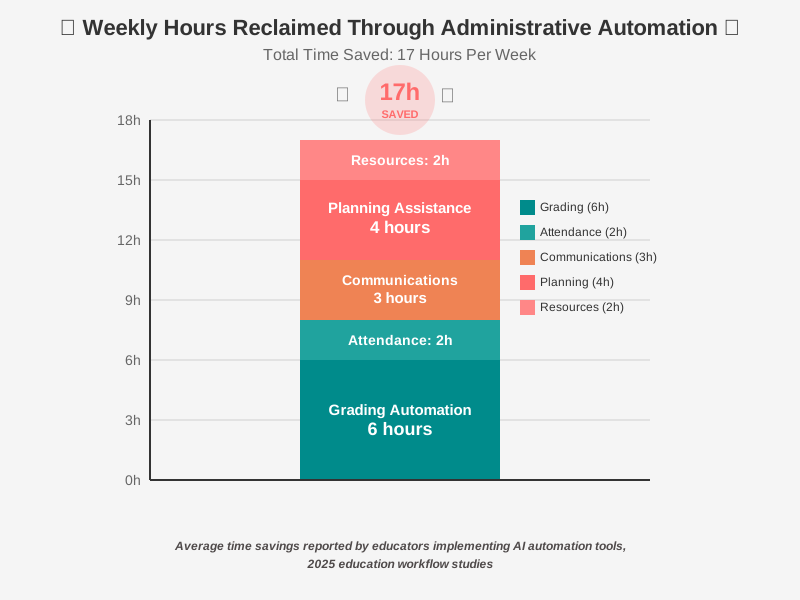
While reclaiming 10–17 hours per week matters tremendously, the deeper benefit is energy preservation. Administrative tasks drain mental resources through their repetitive, low-value nature. Automating them doesn’t just save time—it preserves the creative energy and emotional capacity that make you an exceptional educator.
Teachers using comprehensive automation strategies report not just more available hours but fundamentally transformed work experiences. They arrive at school energized rather than dreading the paper pile. They leave at reasonable hours. They have mental space to innovate and connect with students meaningfully.
That’s not just productivity improvement—that’s career sustainability.
Your Next Step
Start small, but start today. Choose one tip from this guide—ideally addressing your most frustrating administrative burden. Implement it for two weeks. Measure the time saved. Feel the difference in your energy levels and job satisfaction.
Then add the next automation. And the next. Each addition compounds the benefits, progressively transforming your teaching experience from overwhelming to sustainable.
The technology exists. The tools are accessible. The only remaining variable is your decision to begin reclaiming your time and energy. Your students deserve an educator who has the capacity to be fully present—and you deserve a career that doesn’t consume every waking hour.
The administrative burden isn’t going away, but your relationship with it can transform completely. Let AI in Education handle the paperwork while you focus on the irreplaceable work of shaping young minds and building futures.
Resources:
1. RAND Corporation – State of the American Teacher Survey 2025
- Source: Steiner, Elizabeth D., Ashley Woo, and Sy Doan, “To Make Teaching Sustainable, Help Teachers Balance Work and Personal Demands: Findings from the 2025 State of the American Teacher Survey,” RAND Corporation, RR-A1108-20, 2025.
- URL: https://www.rand.org/pubs/research_reports/RRA1108-20.html
- Key Verified Statistics:
- Three times as many teachers (71%) as similar working adults (22%) said it was difficult to change their work schedule or attend to personal matters at work
- 46% of teachers said their job made them too tired for activities in private life (vs 13% of similar working adults)
- Teachers reported working 49 hours per week on average (2025)
- Female teachers with children spent 40 hours per week on household duties (10 more than male teachers)
- Less than half of the teachers reported that their school or district made efforts to support work-life balance.
2. McKell Institute Report on Australian Teachers (2025)
- Source: “Freeing Teachers to Teach: Driving Productivity Through Classroom Support,” McKell Institute, 2025
- URL: https://thesector.com.au/2025/09/17/report-finds-teachers-burdened-by-106-million-hours-of-admin-tasks-calls-for-greater-support-to-boost-productivity/
- Key Verified Statistics:
- Australian teachers spend up to 106 million hours annually on administrative tasks
3. UK Government Research on Teacher Admin Time (2023)
- Source: “Exploring teachers’ admin time Research report,” Department for Education (UK), March 2023
- URL: https://assets.publishing.service.gov.uk/media/64b677e70ea2cb001315e4a2/Exploring_teachers__admin_time.pdf
- Key Verified Information:
- Teachers spend “a couple of hours a day – ten hours a week” on administrative tasks (varying between 8 and 12 hours)
- Study of 14 senior leaders, 14 middle leaders, and 10 teachers across 34 schools
About the Author
James Carter is a productivity coach specializing in helping educators leverage AI and automation tools to reclaim their time and energy. With over a decade of experience working with teachers across various educational settings, James has developed practical, non-technical strategies that help educators transition from overwhelming workloads to sustainable, fulfilling teaching careers. His approach focuses on implementing simple, effective systems that deliver immediate results without requiring advanced technical skills. James believes that when teachers have the time and energy to focus on what they do best—connecting with and inspiring students—everyone benefits.