
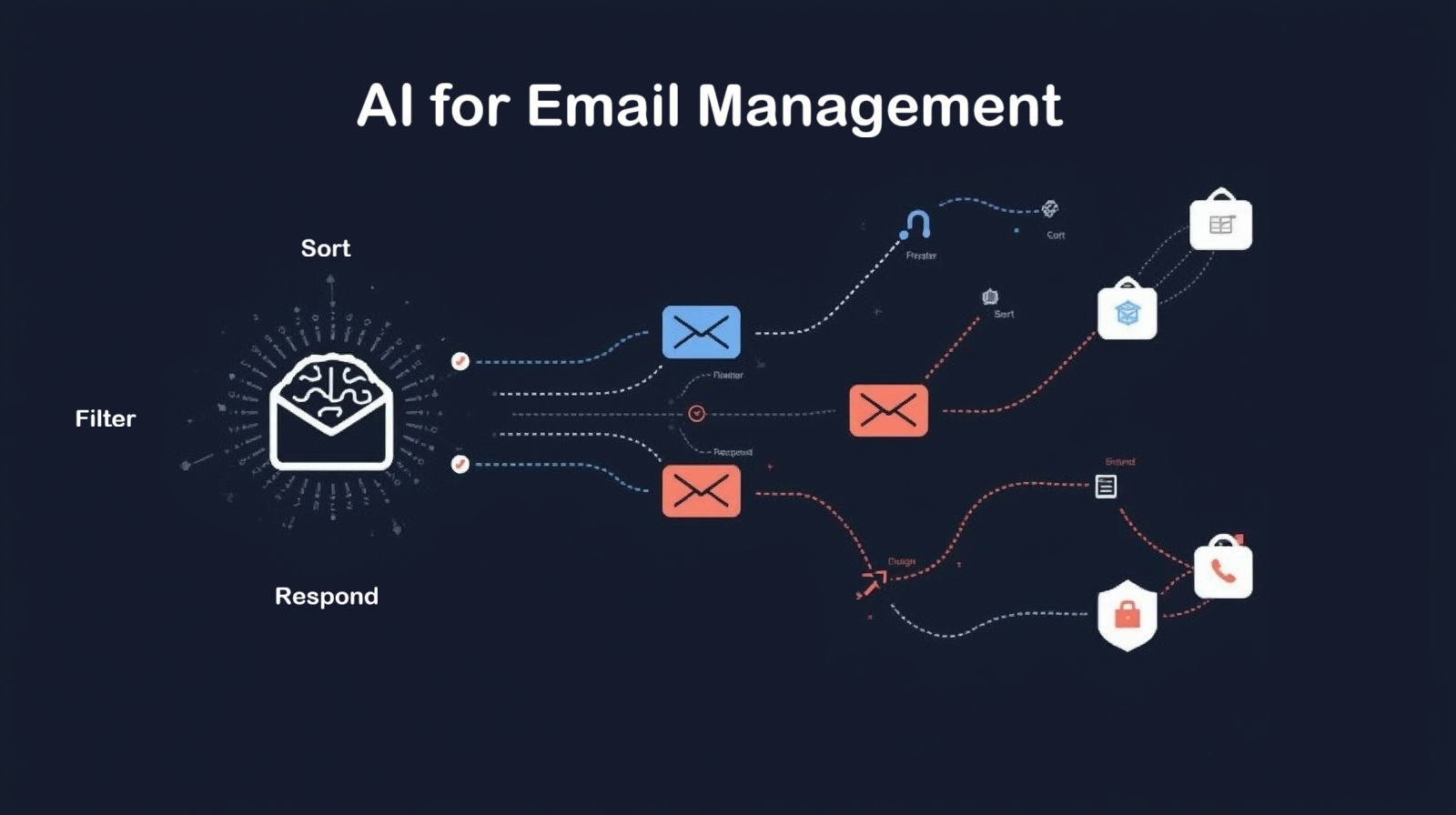
AI for Email Management: Your Complete Guide to Inbox Freedom
AI for Email Management has become the secret weapon for professionals drowning in digital correspondence. If you’re spending hours sorting through hundreds of emails each day, feeling like you’re constantly playing catch-up, or missing important messages buried under promotional clutter, you’re not alone. The average office worker receives 121 emails daily, and that number keeps climbing. But here’s the good news: artificial intelligence is revolutionizing how we handle our inboxes, turning email chaos into organized productivity.
I remember the first time I let an AI tool take over my email management. I was skeptical—how could a machine understand which emails mattered most to me? But within days, my inbox went from overwhelming to manageable. Important client messages surfaced immediately, newsletters moved to designated folders, and I even had time to actually respond to people instead of just starring emails to “deal with later.”
This comprehensive guide explores everything you need to know about AI for Email Management, from basic automation to advanced features that can transform your daily workflow. Whether you’re a busy professional, a small business owner, or someone who just wants their evenings back, AI email tools offer practical solutions that actually work.
What Is AI for Email Management?
At its core, AI for Email Management refers to intelligent software that uses machine learning algorithms and natural language processing to automatically organize, prioritize, filter, and even respond to your emails. Unlike traditional email rules that follow rigid instructions, AI systems learn from your behavior, adapt to your preferences, and make smart decisions about what deserves your attention right now versus what can wait.
Think of it as having a highly efficient personal assistant who knows your work patterns, understands your priorities, and handles the tedious sorting while you focus on meaningful communication. These systems analyze countless data points—sender reputation, email content, your past interactions, response patterns, and even the time of day—to make increasingly accurate predictions about what matters most to you.
The technology has evolved dramatically. Early email filters could barely distinguish legitimate messages from spam. Today’s AI systems understand context, detect urgency, recognize customer sentiment, and can even draft appropriate responses in your writing style. They’re not just sorting tools; they’re intelligent collaborators that enhance how we communicate.
The Ultimate Guide to AI-Powered Email Prioritization
The Ultimate Guide to AI-Powered Email Prioritization starts with understanding how these systems actually decide what’s important. AI prioritization algorithms consider multiple factors simultaneously: sender relationships (does this person email you frequently?), content analysis (are there words like “urgent” or “deadline”?), historical patterns (do you always open emails from this sender?), and contextual clues (is this part of an ongoing conversation?).
Modern prioritization goes beyond simple importance ranking. The best AI systems create multiple priority tiers—critical messages that need immediate attention, important emails to handle today, standard correspondence that can wait, and informational messages to review when you have time. Some tools even predict which emails you’re likely to ignore and automatically archive them after learning your patterns.
What makes AI prioritization truly powerful is its ability to learn and improve. When you consistently open certain types of emails immediately, the system notices. When you archive others without reading, it adjusts. Over weeks and months, the AI develops an increasingly accurate model of your priorities, often anticipating what matters before you consciously realize it yourself.
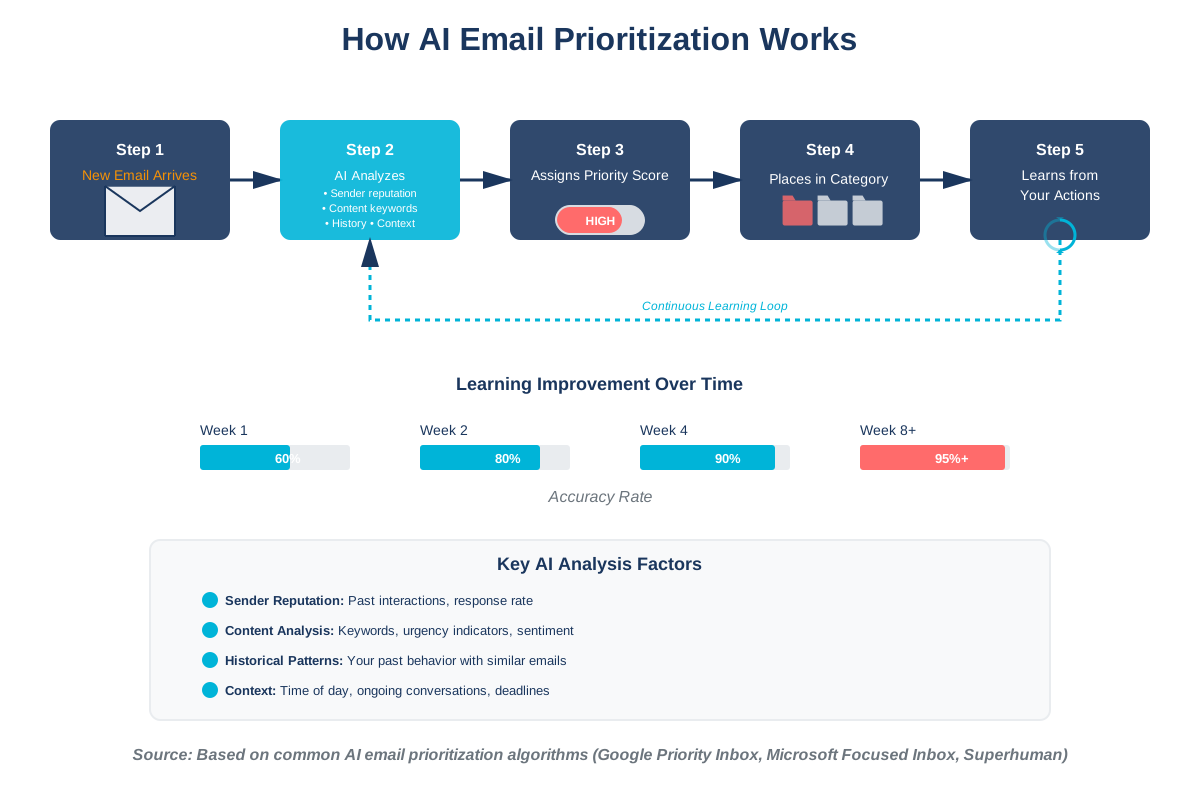
The practical impact is substantial. Users of AI-powered prioritization report spending 30-40% less time managing email while feeling more confident they’re not missing important messages. That’s hours back in your day, every single week.
AI for Email Automation: Automating Repetitive Tasks
AI for Email Automation: Automating Repetitive Tasks represents one of the most immediately useful applications of artificial intelligence in your inbox. We all have those emails we send repeatedly—meeting confirmations, status updates, information requests, and acknowledgments. AI automation handles these automatically, freeing you from digital busywork.
Smart automation starts with pattern recognition. The AI observes which emails trigger similar responses from you. After seeing you send the same type of reply five or ten times, it suggests automation rules or even drafts responses automatically. Unlike traditional email rules that require you to program every scenario, AI learns contextually when certain actions make sense.
Common automation scenarios include automatically scheduling emails to send at optimal times, filing messages into folders based on content rather than just sender, creating follow-up reminders when you don’t receive expected responses, archiving read newsletters after a specified time, and even handling common customer inquiries with pre-approved template responses.
The sophistication level is impressive. Modern AI automation can detect when someone’s asking for information you’ve shared before and draft a response including the relevant attachment. It can recognize meeting requests embedded in casual email language and offer to add them to your calendar. It can even identify emails requiring no response and automatically archive them after confirming you’ve read them.
How AI Detects and Filters Spam Email More Effectively
How AI Detects and Filters Spam Email More Effectively has become one of AI’s greatest success stories in email management. Traditional spam filters relied on keyword blocking and sender blacklists—crude tools that let sophisticated spam through while occasionally catching legitimate messages. AI changed everything.
Modern AI spam detection uses neural networks trained on billions of email examples to recognize patterns invisible to traditional filters. These systems analyze linguistic patterns (spam often has characteristic grammatical structures), sender behavior (spoofed addresses exhibit telltale signs), embedded content (malicious links have recognizable characteristics), and even timing patterns (spam campaigns send messages in predictable waves).
What’s particularly clever is how AI handles evolving threats. Spammers constantly adapt their tactics to evade filters. AI systems adapt too, learning from new spam examples across millions of users simultaneously. When one person marks a new spam variant, the entire network learns within hours. This collective intelligence makes modern AI spam filters extraordinarily effective—Gmail’s AI blocks 99.9% of spam while maintaining a false positive rate below 0.05%.
The technology also protects against more sophisticated threats like phishing attempts. AI can detect subtle anomalies—an email that looks like it’s from your CEO but has slightly unusual phrasing, a PayPal notification with a legitimate-looking but actually fraudulent link, a vendor invoice with unexpected payment instructions. These context-aware detections catch threats that would fool traditional security measures.
AI-Driven Email Summarization: Extracting Key Information
AI-Driven Email Summarization: Extracting Key Information addresses one of email’s biggest time drains: reading long messages to extract the essential points. AI summarization tools use natural language processing to identify the core message, key requests, action items, and important details within seconds.
This technology works by analyzing the semantic structure of emails. The AI identifies topic sentences, recognizes request patterns (“could you please…”), detects deadlines and dates, and distinguishes essential information from courtesy language or background context. It then generates concise summaries highlighting what actually matters.
For long email threads, this becomes invaluable. Instead of scrolling through fifteen messages trying to remember what was decided, AI summarization provides a clear synopsis: “Discussion about Q3 budget. Initial proposal was $150K. After revisions, the final approved amount is $135K. Next step: You need to submit a detailed breakdown by Friday.” That’s thirty seconds instead of ten minutes.
The practical applications extend beyond individual emails. AI can summarize entire inbox sections, giving you morning briefings: “Today you have 7 urgent messages requiring responses, 12 FYI messages you should review, and 23 newsletters. Top priority: Client X needs proposal feedback by noon.” This bird’s-eye view helps you plan your day strategically rather than reactively.
AI for Email Personalization: Crafting Tailored Messages
AI for Email Personalization: Crafting Tailored Messages transforms generic mass communication into relevant, individualized experiences. While traditional mail merge simply inserts names into templates, AI personalization considers recipient preferences, past interactions, behavioral data, and contextual factors to create messages that genuinely resonate.
The technology analyzes what types of content different recipients engage with. Some people respond well to data-driven arguments; others prefer storytelling. Some want concise bullet points; others appreciate detailed explanations. AI identifies these preferences and adjusts message structure, tone, content emphasis, and even subject lines accordingly.
Advanced personalization goes deeper. AI can determine optimal sending times for each recipient based on when they typically read and respond to emails. It can adjust vocabulary complexity based on the recipient’s background. It can include references to previous conversations or shared interests. The result feels less like mass communication and more like one-to-one correspondence.
This applies to both marketing emails and personal productivity. For businesses, AI personalization has been shown to increase email open rates by 26% and click-through rates by 40%. For individuals, AI-assisted writing tools help craft messages that strike the right tone for different contexts—formal for executives, friendly for colleagues, and empathetic for customer service situations.
The Future of AI in Email Marketing: Trends and Predictions
The Future of AI in Email Marketing: Trends and Predictions points toward increasingly sophisticated, autonomous systems that optimize campaigns in real time. We’re moving beyond static email blasts toward dynamic, adaptive communications that evolve based on recipient behavior and market conditions.
Emerging trends include predictive sending—AI determines not just the best time to send but also the best day of the week, week of the month, and even predicts when individual recipients are most likely to be receptive based on their current life circumstances. Imagine systems that delay promotional emails when someone’s recently experienced a negative event or accelerate delivery when patterns suggest heightened purchase intent.
We’re also seeing the rise of conversational email marketing, where AI enables back-and-forth exchanges that feel natural. Recipients can reply with questions, and AI responds appropriately, guiding them through product selection or troubleshooting while seamlessly escalating to humans when needed. This blurs the line between email marketing and customer service.
Another frontier is multimodal AI that coordinates email with other channels. These systems recognize when someone clicked an email link but didn’t complete a purchase, then automatically adjust follow-up timing and messaging across email, SMS, and social media for optimal conversion paths. The orchestration happens automatically, with AI managing the complexity.
Looking ahead, we’ll likely see AI systems that write entire marketing campaigns from scratch based on high-level objectives, test variations automatically, and continuously optimize messaging without human intervention beyond approving the strategy and reviewing results.
AI-Powered Email Sentiment Analysis: Understanding Customer Mood
AI-Powered Email Sentiment Analysis: Understanding Customer Mood gives businesses unprecedented insight into how customers actually feel, not just what they explicitly say. Natural language processing algorithms can detect emotion, frustration, satisfaction, urgency, and confusion within email text, often identifying issues before they escalate.
The technology analyzes multiple linguistic cues: word choice (negative words like “disappointed” or “unacceptable”), punctuation patterns (excessive exclamation points often indicate frustration), sentence structure (terse sentences may signal anger), capitalization (ALL CAPS suggests strong emotion), and even response time patterns (unusually long delays before replying can indicate disengagement).
What makes sentiment analysis particularly valuable is scale. While a small business owner might notice an unhappy customer in a dozen daily emails, enterprise companies receiving thousands of messages daily can’t manually assess emotional tone. AI does this automatically, flagging potentially problematic interactions for priority attention and identifying customers at risk of churning before they explicitly complain.
The applications extend beyond customer service. Sales teams use sentiment analysis to gauge prospect interest and adjust outreach strategies. Managers analyze team email sentiment to identify morale issues. Marketing departments assess campaign feedback. HR departments monitor internal communications for cultural problems. The ability to quantify and track emotional tone across large volumes of correspondence provides actionable intelligence that was previously invisible.
Best AI Tools for Email Management: A Comprehensive Review
Best AI Tools for Email Management: A Comprehensive Review helps you navigate the growing ecosystem of AI-powered email solutions. The landscape includes everything from intelligent inbox organizers to full-featured productivity suites with AI components.
SaneBox represents the accessible entry point—it works with any email provider, learns your priorities, and automatically filters messages into folders. Users appreciate its “SaneLater” feature that holds non-urgent emails for batch processing. Pricing starts at $7/month, making it budget-friendly for individuals.
Superhuman targets power users willing to pay ($30/month) for speed and efficiency. Its AI predicts which emails you’ll want to read, enables lightning-fast keyboard navigation, reminds you about messages that don’t receive responses, and provides read receipts. The interface feels remarkably fast—many users report cutting email time in half.
Google’s Gmail already incorporates significant AI features at no cost: Smart Reply suggests short responses, Smart Compose drafts messages as you type, Priority Inbox separates important emails, and advanced spam filtering blocks threats. For most users, Gmail’s built-in AI provides substantial value without additional investment.
Microsoft Outlook’s Focused Inbox uses AI to separate important messages from “other,” while its AI assistant suggests meeting times, tracks action items, and provides email summaries. Office 365 subscribers get these features included, making it particularly attractive for businesses already in the Microsoft ecosystem.
Specialized tools like Boomerang add AI-powered features to existing email clients: predictive sending time recommendations, follow-up reminders if you don’t receive responses, and “Respondable” which analyzes your drafts and suggests improvements for better response rates. At $4.98/month for basic features, it’s an affordable enhancement to Gmail or Outlook.
AI for Email Security: Protecting Against Phishing and Threats
AI for Email Security: Protecting Against Phishing and Threats has become critical as cyber attacks grow increasingly sophisticated. Traditional security measures struggle with modern threats that carefully mimic legitimate communications. AI provides dynamic, adaptive protection that evolves with threats.
AI security systems analyze emails across multiple dimensions simultaneously. They examine sender authentication protocols (SPF, DKIM, DMARC) while also evaluating whether the sender’s writing style matches historical patterns. They scan links not just against blacklists but also analyze URL structures for suspicious patterns. They check attachments not only for known malware signatures but also for behavioral indicators suggesting malicious intent.
The real power comes from anomaly detection. AI systems learn what normal looks like for your organization—typical sender domains, usual attachment types, characteristic language patterns, and standard request procedures. When something deviates significantly, the system raises alerts. This catches novel attacks that haven’t been seen before, including targeted spear-phishing attempts customized for specific executives or employees.
Advanced AI security also provides real-time user education. When someone’s about to click a suspicious link, the system can display immediate warnings explaining specific risk factors. This transforms security from a passive filter into an active training tool that helps users develop better threat recognition skills.
Enterprise solutions like Barracuda Sentinel, Abnormal Security, and Proofpoint use AI to analyze millions of data points across entire organizations, identifying compromised accounts, detecting business email compromise attempts, and blocking sophisticated social engineering attacks that would bypass traditional security.
Using AI to Optimize Email Send Times for Maximum Impact
Using AI to Optimize Email Send Times for Maximum Impact can dramatically improve email effectiveness through strategic timing. Research shows that sending emails at optimal times can increase open rates by 20-30% and response rates even higher, yet optimal timing varies dramatically by recipient, industry, and message type.
AI send-time optimization analyzes historical data to identify when specific recipients typically open and engage with emails. Rather than relying on generic advice like “Tuesday at 10am is best,” these systems recognize that Sarah checks email during her evening commute, Michael reviews messages first thing Monday morning, and Jennifer primarily engages during lunch breaks.
The algorithms consider multiple factors: time zones (obviously), day-of-week patterns (B2B emails often perform better mid-week, while B2C varies by industry), seasonal variations (email behavior changes during summer vacations and holidays), and even current events (engagement drops during major news events). Some systems incorporate weather data, noting that email engagement increases on rainy days when people stay indoors.
What’s particularly clever is how these systems balance competing priorities. If the optimal send time for five recipients falls at different hours, should you send five separate emails or find a compromise time? AI can calculate the trade-offs and recommend strategies that maximize overall campaign performance while managing sending reputation and avoiding spam filter triggers from too many emails in quick succession.
Tools like Seventh Sense, MailChimp’s Send Time Optimization, and HubSpot’s AI send-time features make this accessible to businesses of all sizes. For individuals, tools like Boomerang and Mailbutler offer send-time recommendations for important messages.
AI-Enhanced Email Writing: Improving Clarity and Tone
AI-Enhanced Email Writing: Improving Clarity and Tone helps everyone communicate more effectively, regardless of writing skill. These systems analyze your draft emails and provide real-time suggestions for improving clarity, adjusting tone, eliminating ambiguity, and increasing response likelihood.
Tools like Grammarly go beyond basic grammar checking to evaluate whether your message sounds confident or tentative, friendly or cold, formal or casual. They identify unnecessarily complex sentences and suggest simpler alternatives. They catch potentially insensitive language or phrases that might be misinterpreted. They even predict how recipients are likely to perceive your message’s overall tone.
The technology considers context. An email to your CEO needs different treatment than a message to a colleague or a customer service response. AI writing assistants adjust their suggestions accordingly, helping you maintain appropriate formality levels, professional vocabulary, and suitable messaging structure for each context.
Some AI systems offer style consistency features, learning your typical writing patterns and flagging drafts that deviate significantly. This helps maintain your authentic voice while eliminating actual errors or communication problems. Others provide predictive writing that completes sentences based on context, dramatically accelerating composition without making messages feel robotic.
The practical benefits are substantial. Users report 30-40% faster email composition, significantly fewer misunderstandings requiring clarification emails, and notably improved response rates to requests. For non-native English speakers, these tools provide invaluable assistance in crafting professional, natural-sounding business communications.
The Ethical Considerations of Using AI in Email Management
The Ethical Considerations of Using AI in Email Management deserve serious thought as these technologies become ubiquitous. While AI offers tremendous productivity benefits, it also raises questions about privacy, authenticity, bias, and human agency that we need to address thoughtfully.
Privacy concerns top the list. AI email systems analyze message content to function effectively. Who has access to this data? How is it stored? Can it be used for purposes beyond email management? Reputable providers encrypt data and maintain strict privacy policies, but users should understand what they’re agreeing to. Some AI tools operate entirely on-device to address privacy concerns, though with reduced functionality.
Authenticity questions arise with AI-generated responses. If AI drafts most of your emails, are you really communicating, or is the machine communicating on your behalf? This matters particularly in professional contexts where personal relationships drive business success. Most experts recommend treating AI as an assistant that drafts and suggests but keeping human review and approval in the loop for important communications.
Bias represents a technical and ethical challenge. AI systems trained on historical data can perpetuate existing biases. An AI might learn to prioritize emails from certain demographic groups or use language patterns that favor particular communication styles. Responsible developers actively work to identify and mitigate these biases, but users should remain aware of the potential for AI systems to reflect and amplify societal biases.
There’s also the question of disclosure. When AI generates responses, should recipients be informed? In customer service contexts, many regulations require disclosure of automated systems. In personal communication, ethical norms are still evolving. Transparency generally serves everyone better—most people appreciate efficient communication regardless of whether a human or AI drafted the initial version.
AI for Email Segmentation: Targeting the Right Audience
AI for Email Segmentation: Targeting the Right Audience revolutionizes how marketers divide their lists and target messaging. Traditional segmentation relied on simple demographic categories—age, location, and job title. AI enables far more sophisticated, behavior-based segmentation that significantly improves campaign relevance and performance.
AI segmentation algorithms analyze engagement patterns, purchase history, content preferences, behavioral signals, and dozens of other variables to identify natural groupings within your audience. Rather than manually creating segments based on hunches, the AI discovers categories you might never have recognized—people who browse extensively but rarely buy, customers who engage primarily with educational content versus promotional content, and recipients whose engagement spikes during specific life events.
The technology enables dynamic segmentation, where people automatically move between segments as their behavior changes. Someone transitioning from prospect to customer, from active to dormant, or from one interest category to another gets reclassified automatically with corresponding message adjustments. This fluidity ensures communications remain relevant as relationships evolve.
Predictive segmentation takes this further, identifying people likely to exhibit certain behaviors in the future. AI can flag customers at high risk of churning, prospects showing strong purchase intent, or recipients likely to become brand advocates. This enables proactive rather than reactive communication strategies.
Advanced AI segmentation also performs micro-personalization at scale, essentially creating individual segments for each recipient while maintaining manageable campaign structures. The AI determines optimal content variations, offer types, and messaging approaches for each person while organizing this complexity behind the scenes.
AI in Email Marketing ROI: Measuring and Improving Performance
AI in Email Marketing ROI: Measuring and Improving Performance transforms how businesses evaluate and optimize email campaigns. Traditional metrics—open rates, click rates, conversions—tell part of the story. AI provides deeper insights into what drives results and how to systematically improve performance.
AI analytics platforms track far more than basic metrics. They identify which subject line patterns generate higher opens across different audience segments, which content types drive engagement, which calls-to-action produce conversions, and even which email designs perform best on different devices. The systems recognize complex patterns invisible in traditional analytics—perhaps emails sent on Wednesday perform well except when there’s a major news event, or specific emoji use boosts opens among younger recipients but reduces them among executives.
Attribution modeling becomes dramatically more sophisticated with AI. Rather than simple last-click attribution, AI can track the full customer journey across multiple touchpoints, determining which emails contributed to conversions even when they weren’t the final touch. This prevents undervaluing emails that play important nurturing roles versus direct response messages.
Predictive ROI modeling represents the frontier. AI systems can forecast the expected return from different campaign strategies before you invest resources in implementation. Want to know whether increasing email frequency will boost revenue or cause unsubscribes? The AI can model probable outcomes based on historical patterns and similar campaigns, enabling data-driven strategic decisions.
These insights translate directly to improved performance. Companies using AI-powered email analytics report average ROI increases of 20-40% through systematic optimization—identifying underperforming elements, doubling down on winning strategies, and continuously refining approaches based on machine learning insights rather than guesswork.
Integrating AI with Existing Email Platforms: A Step-by-Step Guide
Integrating AI with Existing Email Platforms: A Step-by-Step Guide makes adopting AI email tools straightforward even for non-technical users. Most AI solutions integrate seamlessly with popular platforms like Gmail, Outlook, and others without requiring you to change email providers or learn entirely new systems.
Start by identifying your primary pain points. Drowning in email volume? Focus on prioritization and filtering tools. Spending too much time writing responses? Look at AI composition assistants. Managing marketing campaigns? Consider AI analytics and optimization platforms. Matching tools to actual problems ensures you’ll use and benefit from them rather than accumulating abandoned subscriptions.
For Gmail users, many AI tools integrate through G Suite marketplace extensions or browser plugins. SaneBox, for example, connects by granting it access to your account through standard OAuth protocols—no password sharing required. Installation typically takes minutes: find the tool in the marketplace, click “Install,” grant permissions, and configure initial settings. The tool immediately begins analyzing your email patterns.
Outlook users have similar options through Microsoft AppSource or dedicated plugins. AI tools like Superhuman or Microsoft’s own AI features integrate natively with Office 365. Third-party tools usually require downloading a plugin, connecting your account, and setting preferences. Most provide setup wizards that guide you through initial configuration.
Allow a learning period. AI systems typically need 1-2 weeks of observing your email behavior before they become accurate. During this time, actively train the system—when it makes mistakes, correct them through provided feedback mechanisms. When it does something helpful, reinforce that behavior. This supervised learning phase significantly improves long-term performance.
Start with conservative automation. Don’t immediately let AI auto-archive everything or send responses without review. Begin with suggestions and recommendations, verify they’re accurate, then gradually increase automation levels as trust builds. Most users find a hybrid approach works best—AI handles routine tasks automatically while flagging important decisions for human judgment.
AI-Powered Email Search: Finding Information Quickly and Easily
AI-Powered Email Search: Finding Information Quickly and Easily transforms finding old messages from frustrating archaeology to instant retrieval. Traditional email search requires remembering specific keywords, exact phrases, or sender names. AI search understands context, handles natural language queries, and finds relevant messages even when you can’t recall precise details.
Modern AI search systems use semantic understanding rather than simple keyword matching. You can search for “the email about the Chicago client meeting” even if those exact words never appeared in the message. The AI understands “Chicago client” might refer to a specific company you communicate with, “meeting” encompasses calendar invites and scheduling discussions, and retrieves relevant threads matching your intent.
These systems also enable temporal queries—”show me emails from last quarter about the website redesign” or “find messages from before I went on vacation in July.” The AI handles date interpretation, understands relative time references, and filters accordingly without requiring you to remember exact dates.
Contextual search represents another breakthrough. AI can find messages related to specific topics by understanding semantic relationships, not just keyword matches. Searching for “pricing” finds emails about “quotes,” “proposals,” “cost estimates,” and “budget discussions” because the AI recognizes these as related concepts. This dramatically improves search recall.
Some advanced systems enable conversational search where you can refine queries iteratively: “Find emails about the Johnson project” → “Just the ones from March” → “Show me any with attachments” → “Who did I ask to review the proposal?” Each query refines the results naturally, like talking with an assistant who remembers the conversation context.
AI for Email Template Creation: Designing Effective Emails
AI for Email Template Creation: Designing Effective Emails helps businesses and individuals develop high-performing email templates without requiring design expertise or extensive testing. AI systems analyze millions of successful emails to identify design patterns, structural elements, and content strategies that drive engagement.
AI template generators consider your specific goals—lead generation, customer onboarding, event promotion, newsletter engagement—and create appropriate designs optimized for those objectives. The systems incorporate proven elements: attention-grabbing subject lines, compelling opening hooks, clear value propositions, prominent calls-to-action, and mobile-responsive layouts.
What makes AI template creation particularly powerful is automatic optimization. Rather than designing one template and using it indefinitely, AI can generate variations for testing, identify which versions perform best with different audience segments, and continuously refine designs based on performance data. This creates a virtuous cycle of improvement without ongoing manual effort.
Content structure also benefits from AI insights. The systems recommend optimal email length, ideal positioning for key messages, effective use of images versus text, and appropriate reading complexity for target audiences. They can even generate compelling copy suggestions for various template sections based on your industry and audience characteristics.
For businesses, this democratizes professional email marketing. Small companies without dedicated designers or copywriters can create templates that rival those from enterprises with large marketing teams. The AI handles design principles, brand consistency, accessibility standards, and technical requirements while you focus on strategic messaging.
The Impact of AI on Email Customer Service: Improving Response Times
The Impact of AI on Email Customer Service: Improving Response Times has been transformative for businesses handling customer inquiries. Average email response times have traditionally been measured in hours or even days. AI-assisted customer service can provide relevant responses in minutes while maintaining quality and personalization.
AI customer service systems work through intelligent triage, automatic response generation, and agent assistance. When customer emails arrive, AI immediately categorizes them by topic, urgency, and complexity. Simple inquiries with known solutions trigger automatic responses. Complex issues requiring human judgment route to specialized agents with relevant context and suggested responses pre-populated.
The technology excels at handling repetitive inquiries—order status checks, password resets, business hours questions, and basic troubleshooting. For these common scenarios, AI generates accurate, personalized responses instantly. Customers get immediate help, and human agents focus on situations requiring creativity, empathy, or complex problem-solving.
Agent assistance features boost productivity for emails that do need human handling. The AI provides instant access to relevant knowledge base articles, suggests appropriate response templates, summarizes long customer message threads, and even drafts response options for agent review. This reduces average handling time by 40-50% while improving response consistency.
Quality doesn’t suffer with faster responses. AI systems can ensure responses include all necessary information, maintain an appropriate tone, follow brand guidelines, and avoid common communication errors. Some systems even learn individual agent writing styles and provide suggestions that match, making AI-assisted responses feel naturally authentic.
AI-Driven Email A/B Testing: Optimizing for Conversions
AI-Driven Email A/B Testing: Optimizing for Conversions automates and accelerates the testing process that traditionally required weeks of manual campaign management. AI testing platforms can run multiple experiments simultaneously, recognize winning variations faster, and implement optimizations automatically.
Traditional A/B testing typically compares two versions of a single variable—subject line A versus subject line B. AI enables multivariate testing at scale, simultaneously testing dozens of variables: subject lines, preview text, send times, content variations, image choices, call-to-action buttons, and layout options. The systems intelligently manage the complexity, determining which combination performs best across different segments.
AI testing also employs more sophisticated statistical methods. Rather than waiting until you’ve sent emails to your entire list to determine a winner, AI can predict winning variations based on smaller samples with high confidence. This enables faster optimization—sometimes determining optimal approaches after just 5-10% of your list has received messages, then automatically sending the winning version to the remainder.
The technology also identifies interaction effects—situations where variables combine in unexpected ways. Perhaps subject line A works best with content version 1, but subject line B performs better with content version 2. Human testers might miss these complex patterns, but AI recognizes and exploits them for improved performance.
Continuous testing represents the ultimate application. Rather than running distinct test campaigns, AI can treat every email sent as an opportunity for optimization, constantly experimenting with small variations and implementing improvements. Over time, this compounds into substantial performance gains—many companies report 30-50% improvement in key metrics through sustained AI-driven testing.
How AI Helps Manage Multiple Email Accounts Efficiently
How AI Helps Manage Multiple Email Accounts Efficiently solves a common modern challenge—juggling work email, personal email, side business email, and multiple client accounts without losing sanity or missing important messages. AI unified inbox solutions aggregate accounts while maintaining organization and context.
Intelligent aggregation goes beyond simple inbox consolidation. AI recognizes that different accounts have different priorities and communication patterns. Your work email might need hourly monitoring, while your newsletter subscription account can be batched weekly. The system presents unified views while respecting these different requirements.
Cross-account smart features prove particularly valuable. AI can recognize when the same person emails you at different addresses and consolidate conversation threads. It can identify duplicate messages that arrive at multiple accounts and show them only once. It can apply consistent organizational rules across accounts while respecting account-specific requirements.
Context switching becomes seamless. When composing replies, AI ensures you’re responding from the appropriate account, using the correct signature, and maintaining an appropriate tone for each context. No more accidentally sending personal messages from work accounts or vice versa—the system catches and prevents these embarrassing mistakes.
For professionals managing client work across multiple domains, AI can maintain separation while enabling efficient monitoring. You can see which accounts need attention without manually checking each one separately, respond to urgent messages regardless of which account they arrived at, and maintain organized archives that respect client confidentiality requirements.
AI for Email Compliance: Ensuring Regulatory Standards
AI for Email Compliance: Ensuring Regulatory Standards has become essential for businesses navigating complex regulatory environments. Whether dealing with GDPR, CAN-SPAM, HIPAA, or industry-specific regulations, AI helps ensure email practices meet legal requirements while maintaining operational efficiency.
AI compliance systems monitor email activities continuously, flagging potential violations before they occur. They can detect when employee emails might contain protected information that shouldn’t be sent to certain recipients, when marketing emails lack required unsubscribe options, when data retention policies aren’t being followed, or when encryption should be applied but isn’t.
The technology handles regulatory complexity that would overwhelm manual processes. Different recipients require different compliance measures based on their jurisdiction, relationship to your organization, and data they’re receiving. AI tracks these requirements and automatically applies appropriate safeguards—encryption for sensitive data, opt-out tracking for marketing contacts, access logs for financial information, and retention schedules for legal communications.
Automated documentation provides crucial audit trails. When regulators request evidence of compliance, AI systems generate comprehensive reports showing who received what information, when, how it was protected, and how retention policies were followed. This documentation proves invaluable during audits and significantly reduces legal risk.
For organizations operating globally, AI manages the patchwork of different regulatory requirements across jurisdictions. The system knows that GDPR applies to European recipients, CCPA covers California residents, different rules govern healthcare data, and applies appropriate compliance measures automatically. This prevents the complexity of global regulations from paralyzing business communication.
The Role of AI in Email Deliverability: Avoiding the Spam Folder
The Role of AI in Email Deliverability: Avoiding the Spam Folder addresses one of email marketing’s biggest frustrations—your carefully crafted message never reaches intended recipients. AI deliverability tools analyze dozens of factors that influence inbox placement and provide actionable recommendations for improvement.
Sender reputation management becomes scientifically precise with AI. The systems monitor your sending patterns, engagement rates, complaint rates, bounce rates, and dozens of other signals that ISPs use to evaluate sender trustworthiness. When metrics trend negatively, AI provides early warnings and specific corrective actions before deliverability suffers significantly.
Content optimization helps emails pass spam filters. AI analyzes your message content against current spam filter criteria, flagging problematic elements—suspicious subject lines, trigger words, formatting issues, broken links, or missing authentication headers. The systems suggest modifications that maintain message effectiveness while improving deliverability.
List hygiene automation ensures you’re sending only to engaged, valid addresses. AI identifies addresses that consistently don’t engage, hard bounces requiring removal, and addresses showing signs of becoming spam traps. Automated list cleaning maintains sender reputation without requiring manual data scrubbing.
Testing and prediction tools let you assess deliverability before sending campaigns. AI systems send test messages to seed addresses across major ISPs, analyze placement rates, and predict how your actual campaign will perform. This enables proactive optimization rather than discovering deliverability problems after sending to your entire list.
AI-Powered Email Reporting: Gaining Actionable Insights
AI-Powered Email Reporting: Gaining Actionable Insights transforms raw email data into strategic intelligence. While traditional reports present tables of metrics requiring manual interpretation, AI analytics automatically identify patterns, anomalies, trends, and opportunities—essentially doing the analysis for you.
Automated insight generation highlights what matters. Rather than wading through dozens of metrics, AI reports lead with key findings: “Campaign performance decreased 15% this month primarily due to lower engagement on mobile devices in the 25-34 age segment” or “Your most valuable segment is customers who engage with product update emails—they show 3x higher lifetime value.” These narrative insights enable immediate strategic action.
Anomaly detection catches problems and opportunities quickly. If campaign performance suddenly drops, engagement spikes unexpectedly, unsubscribe rates increase, or specific segments show unusual behavior, AI flags these anomalies immediately with contextual analysis explaining likely causes. This prevents small issues from becoming major problems.
Predictive reporting looks forward rather than just backward. AI forecasts future performance based on current trends—”At current unsubscribe rates, your list will decrease 8% over the next quarter” or “This segment shows patterns suggesting high conversion potential if you send targeted offers in the next two weeks.” These predictions enable proactive strategy rather than reactive responses.
Competitive benchmarking provides context. AI compares your metrics against industry standards, identifying where you outperform competitors and where improvement opportunities exist. The systems account for industry-specific factors, company size, and audience characteristics to ensure meaningful comparisons.
AI for Email Translation: Communicating Globally
AI for Email Translation: Communicating Globally has evolved dramatically beyond simple word-for-word translation. Modern AI translation systems understand context, maintain tone, adapt for cultural nuances, and enable seamless multilingual communication without requiring human translators for routine correspondence.
Neural machine translation produces remarkably natural results. Unlike older translation systems that produced awkward, obviously machine-generated text, modern AI translation often achieves near-human quality. The systems understand idiomatic expressions, adapt sentence structures appropriately for target languages, and maintain the original message’s tone and intent.
Context awareness makes translation accurate for business communication. AI translators recognize technical terminology, maintain consistency with industry jargon, understand company-specific terms, and adapt formality levels appropriate to business contexts. An email to a potential client translates differently than an internal team message, even when discussing the same project.
Real-time translation integration means language barriers don’t slow communication. When you receive an email in German and your native language is English, AI instantly provides a readable translation while preserving the original for reference. When replying, you compose in English, and AI generates appropriate German responses. The technical complexity remains invisible—you simply communicate naturally.
Quality assurance features help maintain professional standards. AI translation systems can flag ambiguous phrases that might translate poorly, suggest alternative phrasing for better cross-cultural communication, and indicate confidence levels for different translation segments. This helps identify sections where human translator review might be valuable for critical communications.
Using AI to Automate Email List Cleaning and Management
Using AI to Automate Email List Cleaning and Management prevents email lists from becoming bloated with inactive subscribers, invalid addresses, and contacts that damage sender reputation. AI list management systems continuously monitor list health and take automatic corrective action.
Engagement scoring helps identify subscribers at risk of becoming inactive. AI tracks multiple engagement signals—opens, clicks, forwards, replies, and website visits—and calculates comprehensive engagement scores for each subscriber. Rather than a binary active/inactive classification, these nuanced scores identify contacts requiring re-engagement campaigns before they’re lost entirely.
Automatic address validation catches problems immediately. When subscribers change email addresses or company domains expire, AI detects hard bounces and removes invalid addresses before they accumulate. The systems distinguish temporary problems (mailbox full) from permanent invalidity, attempting redelivery appropriately while protecting sender reputation.
Inactivity management implements sophisticated re-engagement strategies. Rather than immediately removing subscribers who haven’t opened recent emails, AI triggers targeted win-back campaigns. If re-engagement attempts fail, the system gradually reduces sending frequency, then suppresses the address from campaigns while retaining it in your database. This maintains list hygiene without prematurely discarding potential future value.
Duplicate detection prevents list bloat and annoying multiple deliveries. AI recognizes when the same person subscribes multiple times with slight variations (JohnSmith@email.com, John.Smith@email.com, J.Smith@email.com) and consolidates them. The systems even identify when different email addresses likely belong to the same person based on behavioral patterns and device fingerprinting.
AI-Driven Email Marketing Automation Workflows: Examples and Strategies
AI-Driven Email Marketing Automation Workflows: Examples and Strategies showcases how intelligent automation orchestrates complex, multi-step campaigns that adapt based on recipient behavior. These workflows far exceed simple triggered autoresponders, creating personalized customer journeys at scale.
Welcome series represent a common starting point. When someone subscribes, AI automation sends a series of emails over several days or weeks, introducing your brand, showcasing value, and guiding toward conversion. What makes this AI-powered rather than simple automation is adaptive branching—if someone clicks product links in email one, subsequent messages emphasize products; if they engage with content, future emails focus on education.
Abandoned cart recovery gets dramatically more sophisticated with AI. Rather than sending generic “you left items” messages, AI considers cart value, product types, customer purchase history, and likelihood of conversion to personalize recovery strategies. High-value potential customers might receive aggressive discounts quickly, while frequent buyers get gentler reminders, and bargain hunters receive time-limited offers.
Customer nurturing workflows adapt to engagement levels and expressed interests. Someone who downloads a whitepaper about topic A receives follow-up content about topic A, while someone clicking links about topic B gets appropriate educational content. The AI manages complexity that would require dozens of manual workflows, branching based on numerous behavior signals.
Reactivation campaigns identify dormant customers and implement targeted win-back strategies. AI determines optimal timing, messaging, and offers based on individual customer characteristics and historical patterns of successful reactivation. Some customers respond to new product announcements, others to special discounts, others to milestone celebrations—AI matches strategy to recipient.
How AI is Transforming Internal Email Communication in Businesses
How AI is Transforming Internal Email Communication in Businesses addresses the hidden productivity drain of excessive internal email. AI systems help companies communicate more efficiently while maintaining necessary information flow and collaboration.
Intelligent routing ensures messages reach appropriate people without constant cc: list debates. AI analyzes message content and organizational context to suggest relevant recipients, identify stakeholders who should be included, and flag people unnecessarily copied. This reduces inbox overload while preventing communication gaps.
Automatic summarization helps employees stay informed without drowning in email. AI can provide daily digests of team communications, highlighting important decisions, action items, and information relevant to each person’s role. This transforms email from a constant distraction to a managed information resource.
Meeting coordination becomes painless. Rather than email chains negotiating schedules, AI assistants access calendars, propose optimal times considering time zones and preferences, and book meetings automatically. This eliminates dozens of back-and-forth messages for routine scheduling.
Knowledge management improves through AI-powered email archiving and search. Important decisions and information discussed via email become easily retrievable organizational knowledge rather than being lost in individual inboxes. New employees can search for relevant historical discussions, and teams can quickly find past decisions and rationale.
Cultural analysis tools help management understand communication patterns and identify potential issues. AI can detect silos forming, spot teams experiencing communication breakdown, recognize individuals becoming isolated, and flag cultural problems visible in communication patterns before they cause serious disruption.
AI for Email Archiving and Compliance: Meeting Legal Requirements
AI for Email Archiving and Compliance: Meeting Legal Requirements ensures businesses retain necessary records while managing storage efficiently and maintaining regulatory compliance. Legal requirements often mandate retaining business emails for years, creating enormous data management challenges that AI helps solve.
Intelligent retention policies apply appropriate preservation rules based on message content and context. AI recognizes that emails containing contracts require long-term retention, routine operational messages might be deleted after shorter periods, and certain sensitive communications need special handling. The system applies complex retention rules automatically, preventing human error.
Smart archiving reduces storage costs while maintaining compliance. AI identifies truly important messages requiring long-term preservation versus routine correspondence that can be summarized or deleted. The systems compress and deduplicate archived data efficiently, reducing storage requirements by 60-70% compared to keeping every message in its original form.
E-discovery capabilities become dramatically more efficient with AI. When legal teams need to locate relevant emails for litigation or regulatory inquiry, AI search understands complex queries, identifies relevant messages even when exact keywords don’t appear, and organizes results logically. This reduces legal discovery costs significantly while improving thoroughness.
Privacy and data protection features help meet regulations like GDPR. AI systems can automatically identify emails containing personal data, apply appropriate encryption and access controls, implement data subject access requests, and execute right-to-be-forgotten requirements. This automation prevents compliance from becoming an overwhelming manual burden.
The Benefits of AI-Powered Email Assistants: A Productivity Boost
The Benefits of AI-Powered Email Assistants: A Productivity Boost synthesizes how these various AI capabilities combine into comprehensive solutions that fundamentally change email productivity. Users of AI email assistants report saving 2-5 hours weekly—time reclaimed for higher-value work, creative thinking, or simply better work-life balance.
Cognitive load reduction may be the most significant benefit. Email typically requires constant decision-making—which messages need immediate response, which can wait, what to prioritize, and how to phrase replies. AI handles many of these decisions automatically, reducing mental fatigue. Users report feeling less overwhelmed and more in control.
Consistency improves across all email communication. AI ensures you don’t forget to follow up on important messages, miss buried action items, or let promising opportunities slip through cracks. The systems catch things humans inevitably miss when managing hundreds or thousands of messages.
Work-life boundaries strengthen when AI manages your inbox. You can confidently stop checking email after hours, knowing the AI will surface truly urgent matters while holding everything else until your next work session. This reduces the always-on stress that plagues modern professionals.
Strategic advantage accrues from better email intelligence. When AI provides insights about customer sentiment, response patterns, engagement trends, and relationship health, you make better decisions. Marketing campaigns improve, sales relationships strengthen, and customer service excels.
The cumulative effect goes beyond simple time savings. Users describe feeling more professional, responsive, and in control—less like they’re drowning in email and more like they’re mastering communication.
AI-Enhanced Email Signature Management: Branding and Consistency
AI-Enhanced Email Signature Management: Branding and Consistency ensures every employee’s email signature maintains professional standards, brand consistency, and legal compliance across the organization. While this might seem minor compared to other AI applications, signature management impacts brand perception with every message sent.
Centralized control becomes possible even in large, distributed organizations. AI signature management systems deploy standardized signatures to all employees automatically, update them instantly when information changes (new logo, updated contact details, regulatory disclosures), and ensure compliance with brand guidelines without requiring individual employee action.
Dynamic content makes signatures more valuable. AI can automatically include relevant information based on context—sales reps’ signatures might display current promotions to prospects, customer service signatures include relevant support links, and executive signatures adjust formality for different recipients. This personalization happens automatically while maintaining brand consistency.
Compliance features ensure legal requirements are met. Many industries require specific disclaimers or disclosures in business email. AI signature systems automatically include appropriate text based on message content, recipient location, sender role, and regulatory requirements. This prevents costly compliance violations from forgotten disclaimers.
Analytics capabilities turn signatures into intelligence sources. AI tracks signature link clicks, banner engagement, and call-to-action performance. This data informs marketing strategy, identifies popular resources, and demonstrates signature ROI. Organizations discover that well-optimized email signatures drive significant traffic and engagement.
Taking Control of Your Inbox: Next Steps
We’ve explored how AI for Email Management transforms digital communication from overwhelming to manageable. The technology is no longer futuristic—it’s available now, affordable, and proven effective across millions of users worldwide.
Your next steps depend on your current email pain points. If you’re drowning in volume, start with AI prioritization tools like Gmail’s Smart Inbox or SaneBox. If you spend too much time writing responses, try AI writing assistants like Grammarly or Gmail’s Smart Compose. For businesses running email marketing, explore AI analytics platforms that optimize campaigns automatically.
Don’t try to implement everything at once. Choose one or two AI tools addressing your biggest frustrations, allow time for learning and adjustment, then gradually expand AI assistance as you become comfortable. Most users find that starting small and building trust with AI systems leads to better long-term adoption than attempting wholesale transformation immediately.
Remember that AI is a tool that amplifies human capability rather than replacing human judgment. The goal isn’t removing you from email entirely—it’s eliminating tedious tasks, surfacing what matters, and giving you time to focus on communication that genuinely requires your attention and expertise.
The inbox zero dream might finally be achievable, not through superhuman discipline or complex organizational systems, but through intelligent automation that works continuously in the background. Thousands of professionals have already reclaimed hours weekly through AI email management. Your turn to benefit from this technology starts with taking that first step—choose one tool and give it a try. Your future, less-stressed self will thank you.
References:
Gmail AI Features Documentation, Google Workspace
Microsoft Outlook AI Capabilities, Microsoft 365
“The State of Email 2024 Report”, Litmus
“Email Marketing Benchmarks”, Campaign Monitor
Radicati Group Email Statistics Report
“AI in Email Security: 2024 Threat Landscape”, Barracuda Networks
Superhuman User Productivity Studies
SaneBox Email Management Research

About the Author
This article was written by Abir Benali, a friendly technology writer who specializes in making AI tools accessible to non-technical users. With a passion for demystifying complex technology, Abir helps readers discover how AI can enhance their creative projects and daily lives. Through clear, jargon-free explanations and practical examples, Abir has helped thousands of beginners take their first steps into the world of AI music generation.