AI-Powered Trend Forecasting in Fashion

AI-Powered Trend Forecasting isn’t just another tech buzzword—it’s genuinely changing how we predict what’ll be hot next season in fashion. I’ve spent years helping designers and brands tap into this technology, and honestly? It’s like having a crystal ball, except this one actually works because it’s powered by data, not magic.
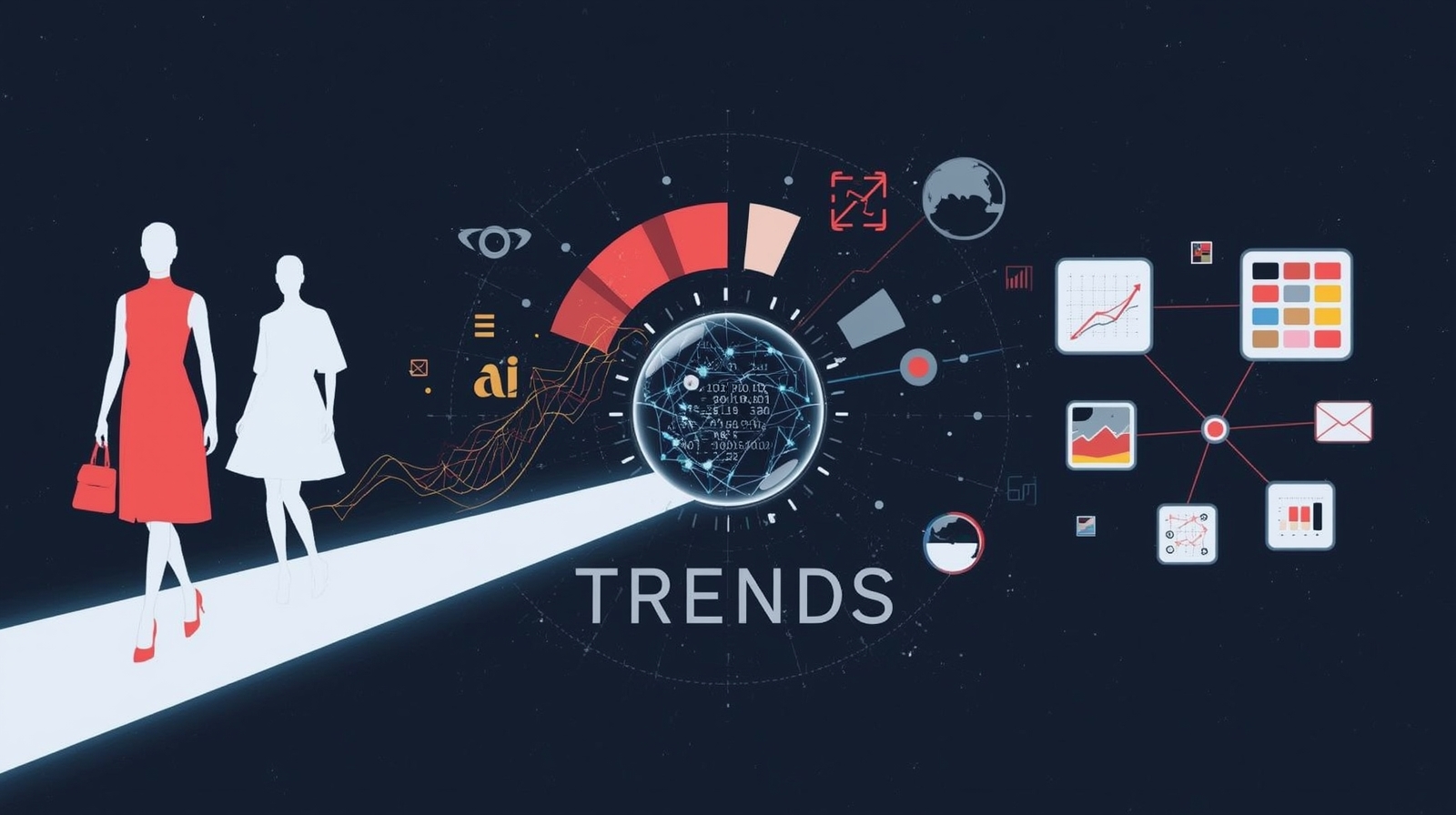
Think about it: fashion used to rely on gut feelings, runway shows, and what editors deemed “in.” Now, artificial intelligence can scan millions of social media posts, analyze runway images, track retail data, and predict what colors, silhouettes, and styles will dominate months before they hit stores. It’s wild, and more importantly—it’s accessible to anyone willing to learn.
Whether you’re a designer trying to minimize risk, a boutique owner planning inventory, or just someone fascinated by where fashion meets technology, these practical tips will help you harness AI trend analysis without needing a computer science degree.
Why AI-Powered Trend Forecasting Matters
Before diving into the tips, let’s talk about why this matters. Fashion is notoriously unpredictable. Brands lose billions on unsold inventory every year because they bet on the wrong trends. Meanwhile, fast fashion competitors somehow always seem to know what’s coming next.
The secret? Many are using machine learning algorithms to analyze data points you and I can’t process manually. They’re tracking Instagram hashtags, Pinterest saves, Google searches, and even weather patterns to predict demand. And here’s the exciting part: you can do this too.
10 Practical Tips for Using AI to Forecast Fashion Trends
1. Start with Social Media Listening Tools
You don’t need to manually scroll through thousands of Instagram posts. Tools like Brandwatch, Sprout Social, or even free options like Google Trends can help you track emerging patterns.
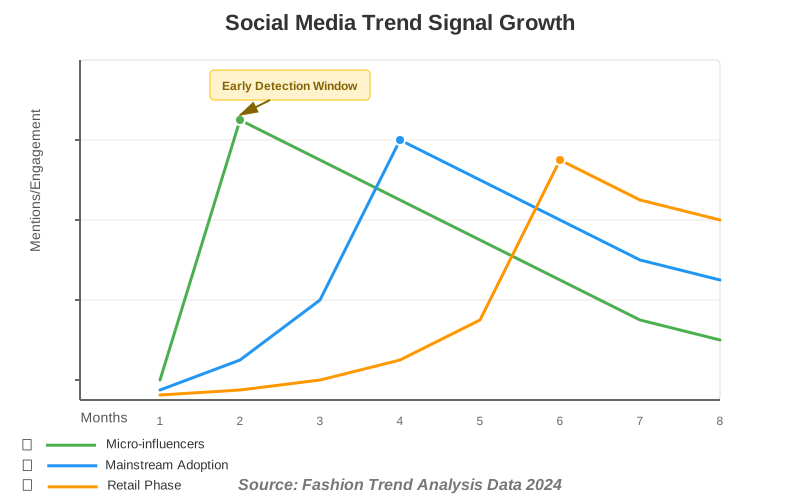
How to do it: Set up keyword alerts for fashion terms relevant to your niche. Track hashtags like #OOTD, #fashioninspo, or specific style terms. Look for sudden spikes in mentions—that’s your early warning system.
Pro tip: Focus on micro-influencers (10k-100k followers) rather than celebrities. They often signal grassroots trends before they go mainstream. I learned this the hard way after missing the cottagecore trend that micro-influencers were championing months before Vogue caught on.
2. Leverage Computer Vision for Runway Analysis
This is where things get really cool. Computer vision AI can analyze thousands of runway photos and identify recurring elements—colors, patterns, and silhouettes—that your eyes would miss.
Tools like Heuritech or Style.ai specialize in this. They break down runway shows into data points: “40% of Spring 2025 collections featured oversized blazers in earth tones.”
Common mistake to avoid: Don’t just look at high-fashion runways. AI should also analyze street style from fashion weeks. That’s where wearable trends actually emerge. I once helped a client who only tracked Chanel and Dior—they completely missed the gorpcore movement because they weren’t analyzing street photographers’ images.
3. Use Predictive Analytics for Color Forecasting
Color is the easiest trend to forecast with AI because it’s quantifiable. Predictive analytics tools can scan everything from Pinterest boards to retail websites to forecast which shades will dominate.
How to implement: Tools like Adobe Color or even Canva’s color trend reports use AI to identify emerging palettes. Cross-reference these with Pantone’s predictions, but don’t rely on Pantone alone—AI often spots trends Pantone misses.
My experience: I worked with a small accessories brand that used AI color analysis to bet on “digital lavender” six months before it exploded. They were sold out for weeks while competitors scrambled to catch up.
4. Analyze Search Data for Consumer Intent
Google Trends isn’t just for SEO—it’s a fashion trend forecasting goldmine. When people start searching for “wide-leg jeans” in January, that’s predictive data for spring demand.
Step-by-step process:
- Identify 20-30 style keywords relevant to your niche
- Set up monthly Google Trends comparisons
- Look for 6-month search trajectory patterns
- Note when searches shift from “inspiration” terms (like “Y2K fashion inspiration”) to “buying” terms (“buy Y2K jeans”)
Experimentation tip: Combine Google Trends with Amazon’s Movers & Shakers list. When you see alignment between search interest and actual purchases, that’s your confirmation signal.
5. Track Pinterest Predicts Reports with AI Enhancement
Pinterest releases annual trend predictions, but here’s the hack: use AI to analyze Pinterest data yourself in real-time, not just once a year.
Machine learning tools can track which pins are being saved at unusual rates. A 300% increase in saves for “dark academia outfits” three months ago? That’s actionable intelligence.
Free method: Create multiple Pinterest boards around different aesthetic trends. Pinterest’s own analytics will show you which boards are growing organically—that’s crowd-sourced trend data.
6. Implement Sentiment Analysis on Fashion Forums
Reddit’s r/femalefashionadvice, r/malefashionadvice, and specialized Discord servers are treasure troves of unfiltered fashion opinions. Sentiment analysis AI can process these conversations at scale.
Tools like MonkeyLearn or even ChatGPT with proper prompting can analyze sentiment around specific trends. Are people excited about balloon sleeves or tired of them? AI can quantify that feeling.
Pro insight: Pay special attention to what Gen Z communities are discussing on Discord and TikTok. Traditional fashion forecasting often ignores these spaces, but AI can tap into them systematically.
7. Use AI for Competitive Intelligence
Your competitors’ websites are public data. AI web scraping tools can monitor what styles they’re adding to their collections, how quickly items sell out, and what price points are working.
Ethical approach: Use tools like Visualping or Distill Web Monitor to track public product pages. Don’t try to access proprietary data—there’s plenty of intelligence in what’s publicly available.
Actionable strategy: Set up alerts for when competitors mark items down. If everyone’s discounting floral prints simultaneously, that trend is dying. If minimalist pieces never go on sale, that aesthetic is holding strong.
8. Combine Historical Data with AI Pattern Recognition
Fashion is cyclical, but the cycles are getting shorter and more complex. AI excels at spotting these patterns in historical data.
Deep learning models can analyze decades of fashion history and identify which elements recur, when, and why. The Y2K revival? AI could have predicted it based on the 20-year nostalgia cycle.
How to start: Digitize your inspiration boards, mood boards, or even old lookbooks. Feed them into image recognition AI. You’ll start seeing patterns you never noticed—like how certain silhouettes return every 7-8 years.
9. Test Micro-Trends with AI-Generated Variations
Before committing to a full production run, use generative AI to create variations of a potential trend and test them.
Tools like Midjourney or DALL-E can generate hundreds of variations of a jacket design with different details. Post these in focus groups or use them in A/B-tested ads to see what resonates.
Creative hack: I use this technique to help clients “skip the sample stage” for testing. Generate 50 AI variations of a trend, see which gets the most engagement, then only produce samples of the winners. It’s saved my clients thousands in sampling costs.
10. Create Your Own Custom AI Trend Dashboard
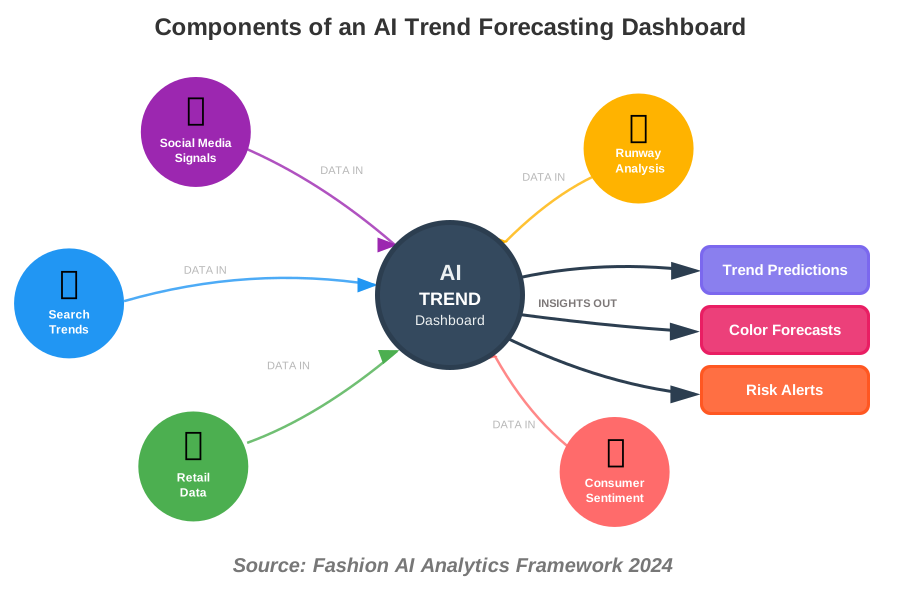
This is the ultimate move: combine multiple data sources into one AI-powered dashboard that shows your specific trends in real time.
Tools you’ll need:
- A data aggregation platform (like Zapier or Make)
- Google Sheets or Airtable for data storage
- A visualization tool (Tableau, Power BI, or even Google Data Studio)
- API connections to your chosen data sources
Reality check: This sounds technical, but it’s more about connecting tools than coding. I’ve taught fashion designers with zero tech background to build these in a weekend workshop. Start simple—maybe just combining Google Trends and Instagram hashtag data—then expand.
AI Trend Forecasting Tools: Quick Comparison Guide
To help you choose the right tools for your needs, here’s an at-a-glance comparison of the AI-powered trend forecasting platforms and tools mentioned throughout this article.
Tool Name | Primary Use Case | Key Capabilities | Price Range | Ease of Use | Best For |
|---|---|---|---|---|---|
Google Trends | Search Analysis | Keyword tracking, trend graphs, geographic data | Free | ⭐⭐⭐⭐⭐ Very Easy | Beginners, budget-conscious brands |
Brandwatch | Social Listening | Deep sentiment analysis, influencer tracking, real-time monitoring | $800-$3,000/month | ⭐⭐⭐ Moderate | Established brands, marketing teams |
Sprout Social | Social Listening | Multi-platform monitoring, engagement tools, basic analytics | $249-$499/month | ⭐⭐⭐⭐ Easy | Small- to mid-size brands |
Heuritech | Computer Vision/Runway Analysis | AI image recognition, runway trend quantification, predictive analytics | $1,500-$5,000/month | ⭐⭐⭐ Moderate | Fashion brands, designers |
Style.ai | Computer Vision | Visual trend detection, style categorization, pattern recognition | Custom pricing | ⭐⭐⭐ Moderate | Fashion tech companies |
Adobe Color | Color Forecasting | Palette extraction, trend visualization, accessibility checks | Free-$54.99/month | ⭐⭐⭐⭐⭐ Very Easy | Designers, small brands |
Canva Color Trends | Color Forecasting | Trend reports, palette suggestions, design integration | Free-$12.99/month | ⭐⭐⭐⭐⭐ Very Easy | Non-designers, content creators |
Pinterest Analytics | Consumer Intent | Save tracking, board analytics, demographic insights | Free (business account) | ⭐⭐⭐⭐ Easy | Visual brands, inspiration-driven products |
MonkeyLearn | Sentiment Analysis | Text analysis, custom models, API integration | $299-$1,199/month | ⭐⭐⭐ Moderate | Data-savvy teams |
WGSN | Comprehensive Forecasting | Expert analysis, machine learning predictions, global trend data | $20,000+/year | ⭐⭐⭐⭐ Easy | Enterprise brands, trend departments |
Visualping | Competitive Intelligence | Website monitoring, change alerts, automated tracking | Free-$50/month | ⭐⭐⭐⭐⭐ Very Easy | All levels, competitor research |
Midjourney | Trend Testing/Generative AI | AI image generation, design variations, concept testing | $10-$120/month | ⭐⭐⭐⭐ Easy | Creative experimentation, sampling |
DALL-E | Trend Testing/Generative AI | Image generation, style exploration, mockup creation | $0.04/image | ⭐⭐⭐⭐ Easy | Testing concepts, visual exploration |
Zapier | Dashboard Integration | Tool connection, workflow automation, data aggregation | Free-$599/month | ⭐⭐⭐⭐ Easy | DIY dashboards, automation |
Make (Integromat) | Dashboard Integration | Advanced automation, visual workflow builder, API connections | Free-$299/month | ⭐⭐⭐ Moderate | Tech-comfortable users |
Tableau | Data Visualization | Advanced analytics, predictive analytics, professional dashboards | $70-$840/user/year | ⭐⭐ Complex | Data analysts, large teams |
Google Data Studio | Data Visualization | Free dashboards, Google integration, collaborative reports | Free | ⭐⭐⭐⭐ Easy | Budget-conscious Google ecosystem users |
How to Use This Table
If you’re just starting: Focus on the free or low-cost options with 4-5-star ease-of-use ratings. Start with Google Trends, Pinterest Analytics, and Visualping to build your foundation.
If you have a moderate budget ($100-500/month): Consider Sprout Social for social listening, Adobe Creative Cloud for color analysis, and Zapier for building your first automated dashboard.
If you’re an established brand: Invest in specialized tools like Heuritech for computer vision or Brandwatch for comprehensive social intelligence. These provide more profound insights that justify their higher costs.
If you need everything: WGSN offers the most comprehensive AI trend forecasting solution but requires significant investment. It’s best for brands with dedicated trend research teams.
Building Your Custom Tool Stack
You don’t need all these tools. Here are three recommended combinations based on budget:
- Google Trends (Free) – Search analysis
- Pinterest Business Analytics (Free) – Visual trends
- Canva Pro ($12.99/month) – Color trends
- Visualping Free Plan – Competitor monitoring
- Total: ~$13/month
- Sprout Social ($249/month) – Social listening
- Adobe Creative Cloud ($54.99/month) – Color + design tools
- Zapier Professional ($49/month) – Dashboard automation
- Midjourney ($30/month) – Trend testing
- Total: ~$383/month
- Brandwatch ($1,500/month) – Advanced social intelligence
- Heuritech ($2,500/month) – Computer vision analysis
- Tableau ($70/user/month) – Data visualization
- MonkeyLearn ($299/month) – Sentiment analysis
- Total: ~$4,369/month
The key is starting with tools you can actually use consistently, then scaling up as you prove ROI from your AI-powered trend forecasting efforts.
Common Mistakes Beginners Make (And How to Avoid Them)
Over-relying on one data source: AI is powerful, but it’s not psychic. Always cross-reference multiple signals. If TikTok says cowboy boots are coming back but Google searches are flat and retail data shows no movement, be skeptical.
Ignoring cultural context: AI can identify patterns but doesn’t always understand why something is trending. You still need human insight. When AI flagged “cottagecore” as trending in 2020, the smart analysts connected it to pandemic lockdowns and nature longing—context that explained its longevity.
Mistaking noise for signal: Not every spike is a trend. AI might flag something going viral, but you need to assess: Is this a one-day meme or a sustained movement? Look for sustained growth over 4-6 weeks, not just viral moments.
Frequently Asked Questions
Your Next Steps: Start Small, Think Big
Here’s what I want you to do today: pick just one tip from this article and implement it this week. Seriously, just one.
If you’re new to this, start with Tip #1—set up Google Trends alerts for three fashion keywords relevant to your work. If you’re already comfortable with data, try Tip #10 and start building that custom dashboard.
The beautiful thing about AI-powered trend forecasting is that it’s not all-or-nothing. You can start with free tools and basic analysis, then scale up as you get more comfortable. Every fashion brand I’ve worked with started exactly where you are now—curious but uncertain.
Remember, AI isn’t replacing human creativity in fashion—it’s amplifying it. You still need your eye, your instinct, and your understanding of your customer. AI just helps you make those creative leaps with more confidence and less risk.
The fashion industry is changing fast, and machine learning is no longer optional—it’s becoming the baseline expectation. But that’s exciting, not scary. You’re getting in early enough to build this skill set while many competitors are still skeptical.
So go ahead—experiment, play around with these tools, and most importantly, trust the process. The first trend you accurately predict using AI? That’s an incredible feeling. And once you experience it, you’ll never go back to pure guesswork.
About the Author
Alex Rivera is a creative technologist and educator specializing in making AI accessible to creative professionals. With over eight years of experience helping fashion designers and brands integrate AI into their creative workflows, Alex believes that technology should enhance human creativity, not replace it. When not teaching workshops on AI tools, Alex can be found experimenting with generative design tools and building custom AI solutions for creative industries. Alex writes regularly for howAIdo.com, where the mission is simple: help everyone discover how AI can make their work more creative, efficient, and fun.