AI and Home Security: Proactive Protection

AI and Home Security isn’t just about cameras anymore. When I started exploring smart home technology, I was amazed at how far we’ve moved beyond simple motion sensors. Today’s systems don’t just record what happens—they actually predict and prevent security threats before they become real problems. This shift from reactive to proactive protection is transforming how we think about keeping our homes safe.
The technology behind modern home security has evolved dramatically. According to SafeHome.org in their “2025 Home Security Market Report” (2025), over 52 percent of U.S. households now have at least one security camera, with AI-powered features becoming the standard rather than the exception.
Source: https://www.safehome.org/resources/home-security-industry-annual/
In this guide, I’ll walk you through everything you need to know about how AI is revolutionizing home security, from understanding the basics to implementing these systems in your own home.
What Makes AI-Powered Home Security Different?
Traditional security systems wait for something bad to happen, then alert you. AI and Home Security systems work differently—they learn your home’s normal patterns and can spot unusual activity before it becomes a threat.
Think of it like having a highly observant neighbor who knows your routine. They’d notice if someone was lurking around your property at unusual times or if your front door opened when you’re typically at work. That’s essentially what AI does, but with far more precision and without ever taking a break.
The global smart home security market has seen explosive growth. According to Fortune Business Insights in their “Smart Home Security Market Size, Share & Industry Report [2032]” (2025), the market was valued at USD 29.04 billion in 2024 and is projected to grow from USD 33.20 billion in 2025 to USD 93.14 billion by 2032, exhibiting a CAGR of 15.9% during the forecast period.
Source: https://www.fortunebusinessinsights.com/smart-home-security-market-109801
This rapid growth isn’t just about more cameras—it’s about smarter technology that actually understands what it’s seeing.
Understanding Anomaly Detection: Your Home’s Digital Guardian
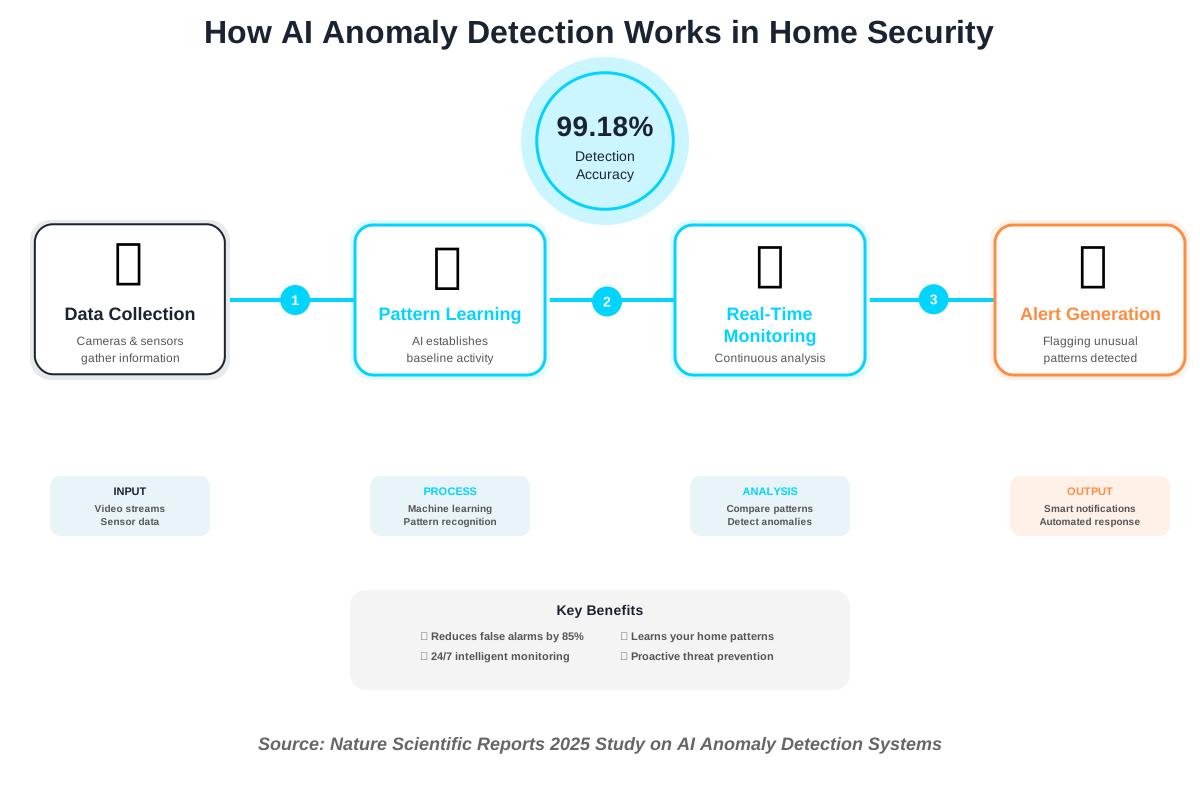
Anomaly detection is one of the most powerful features in modern home security. Instead of just alerting you to motion, these systems learn what’s normal for your household and flag anything that deviates from that pattern.
How Anomaly Detection Works
I like to explain anomaly detection using a simple analogy: imagine teaching your security system about your daily life. It learns that you typically leave for work at 8 AM, your kids arrive home at 3 PM, and your partner returns around 6 PM. The system also learns that your garage door usually opens twice a day, and your back door rarely opens during the night.
Once the AI establishes these baseline patterns, it continuously monitors for deviations. Could you imagine a door opening at 2 AM? That’s unusual. Is there movement occurring in your living room when everyone should be asleep? That’s worth investigating.
A study in Nature Scientific Reports from 2025 found that AI systems for spotting unusual activity can accurately detect problems 99.18% of the time, with only 15.42% of alerts being false alarms, effectively recognizing harmful actions like unauthorized access attempts.
Real-World Examples of Anomaly Detection
Allow me to share some practical scenarios where anomaly detection makes a real difference:
Example 1: The Midnight Intruder Sarah’s AI security system learned that her home is typically quiet between 11 PM and 6 AM. One night at 2:30 AM, the system detected movement in her kitchen. Instead of a generic “motion detected” alert, Sarah received a specific notification: “Unusual activity detected in kitchen—outside normal household patterns.” She checked her camera feed from bed and discovered her teenage son sneaking snacks. While harmless in this case, the same technology would have alerted her to a genuine intruder.
Example 2: The Forgotten Door James’s system knows that his front door typically closes within 10 seconds of being opened. One morning, the door remained open for three minutes—unusual behavior. The system sent an alert, and James realized he’d forgotten to fully close it before leaving for work. This procedure prevented potential theft or unwanted visitors.
Example 3: Package Theft Prevention Modern AI systems can detect when packages are delivered and then monitor for unusual removal patterns. If your system knows packages typically remain on your porch for 2-3 hours until you return from work but suddenly detects someone removing a package 10 minutes after delivery, it can send an immediate alert about potential theft.
Facial Recognition: Knowing Who’s at Your Door
Facial recognition technology in home security has become remarkably accessible and accurate. This isn’t science fiction anymore—it’s technology you can buy and install this weekend.
How Facial Recognition Enhances Home Security
Unlike commercial facial recognition systems that scan massive databases, home security systems work differently. You train them to recognize your family members, friends, and regular visitors like your mail carrier or dog walker.
Here’s what makes this technology practical for everyday use: instead of getting a generic “person detected” notification, you receive specific alerts like “Alex arrived home at 3:15 PM” or “Unknown person at front door.” This level of detail transforms how you interact with your security system.
According to SafeHome.org’s 2025 research, 40 percent of security system users expressed interest in adding biometric tracking tools to their home security devices, with facial recognition leading the demand for advanced features.
Source: https://www.safehome.org/resources/home-security-industry-annual/
Setting Up Facial Recognition: A Simple Guide
From my experience helping friends and family set up these systems, here’s the straightforward process:
Step 1: Choose Your System—Select a camera or doorbell with built-in facial recognition. Popular 2025 options include Google Nest Cam, eufy Security cameras with BionicMind AI, Ring Video Doorbell, and Lorex 4K systems. Prices range from $36 for basic Wyze cameras to several hundred dollars for premium systems.
Step 2: Install the hardware—Most modern systems are wireless and take 15–30 minutes to install. You’ll need a strong Wi-Fi signal and either a power outlet or good-quality batteries.
Step 3: Train the System—This is the fun part. The system will prompt you to add faces to its database. You can either upload photos or let the camera learn faces naturally as it captures footage. I recommend the natural learning approach—it typically takes 1-2 weeks for the system to accurately recognize regular visitors.
Step 4: Create Recognition Zones—Define specific areas where you want facial recognition active. For example, you might want it focused on your front door and driveway but not your neighbor’s yard.
Step 5: Set Up Custom Alerts—Configure notifications based on who’s detected. You might want immediate alerts for unknown faces but just quiet logs when family members arrive home.
Privacy Considerations
People frequently inquire about privacy issues with facial recognition, which is a legitimate concern. Here’s what you should know:
Local vs. Cloud Processing: Some systems process facial data locally on the device (like eufy’s BionicMind), while others send data to cloud servers (like Google Nest). Local processing offers better privacy since your facial data never leaves your home network.
Data Control: You control whose faces are in your system’s database. Unlike commercial facial recognition that searches billions of online images, home systems only recognize people you’ve explicitly added.
Encryption: Quality systems encrypt facial data both in storage and transmission. Look for systems that specify end-to-end encryption in their security features.
According to Consumer Reports’ analysis of facial recognition in home security, systems that process images locally on the device rather than sending them to cloud servers pose significantly lower privacy risks, as your data doesn’t get stored on manufacturer servers where it could potentially be accessed by third parties.
The Technology Behind Proactive Protection
Understanding how AI-powered security systems actually work helps you make better decisions about which features you need.
Machine Learning in Action
AI security systems use machine learning algorithms to improve over time. The more data they collect about your household patterns, the better they become at distinguishing between normal and suspicious activity.
Think of it like teaching a child to recognize different animals. At first, they might call every four-legged creature a “dog,” but with experience, they learn to distinguish dogs from cats, horses, and other animals. AI security systems work similarly—they start with basic pattern recognition and become increasingly sophisticated with time.
Edge AI vs. Cloud Processing
This is a technical detail that matters in practical use:
Edge AI means the processing happens directly on your camera or home hub. This offers faster response times (no internet lag) and better privacy since footage doesn’t leave your home network.
Cloud Processing sends footage to remote servers for analysis. This can offer more powerful processing but requires a stable internet connection and raises privacy considerations.
According to Mordor Intelligence’s “Home Security System Market Size, Growth, Share & Industry Report 2030” (2025), hardware design now focuses on low-power chips and modular form factors that enable edge-AI processing, allowing real-time threat detection directly on devices without requiring constant cloud connectivity.
Source: https://www.mordorintelligence.com/industry-reports/home-security-system-market
Many 2025 systems offer hybrid approaches, using local processing for immediate alerts and cloud backup for advanced analysis.
Integration with Smart Home Ecosystems
Modern AI security systems don’t work in isolation. They connect with your broader smart home ecosystem to create comprehensive protection:
- Smart Locks: Automatically unlock when recognized family members arrive
- Lighting: Turn on lights when unusual activity is detected at night
- Thermostats: Detect when you’ve actually left home (not just your phone) to adjust climate settings
- Voice Assistants: Check security status hands-free through Alexa or Google Assistant
Choosing the Right AI Security System for Your Home
With so many options available in 2025, here’s how I recommend approaching your decision:
Consider Your Specific Needs
For Apartment Dwellers: Focus on wireless, rental-friendly systems that don’t require permanent installation. Look for systems with good indoor camera options and video doorbell capability.
For Large Homes: Prioritize systems that support multiple cameras and zones. You’ll want central management through a hub device and possibly professional monitoring services.
For Tech Enthusiasts: Consider systems with open APIs that integrate with home automation platforms like Home Assistant or SmartThings. This gives you maximum customization options.
For Privacy-Conscious Users: Choose systems with local processing and encrypted storage. Avoid systems that require cloud storage for basic functionality.
Budget Considerations
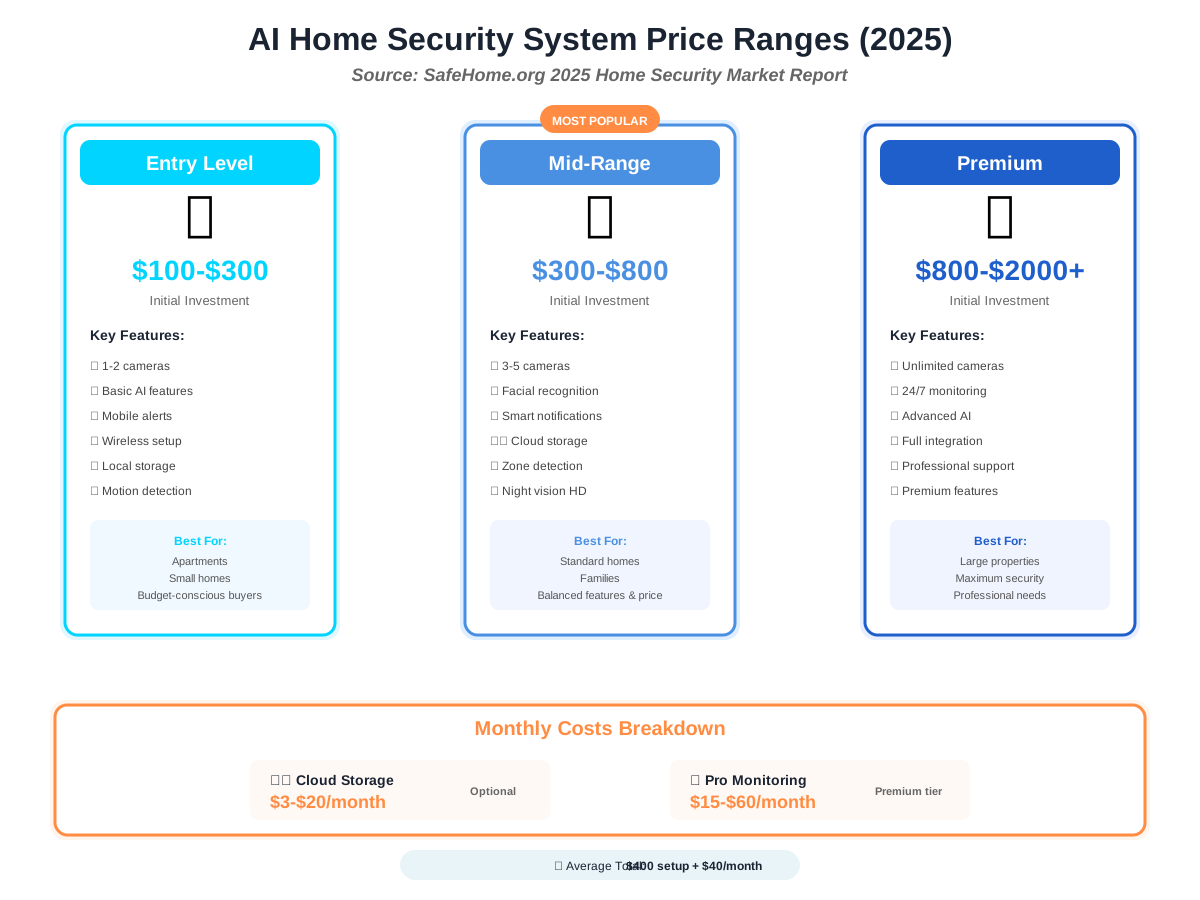
According to SafeHome.org’s 2025 market research, most users invest around $400 for installation and approximately $40 monthly for monitoring services, with costs varying based on system complexity and features selected.
Source: https://www.safehome.org/resources/home-security-industry-annual/
Here’s a realistic budget breakdown:
Entry Level ($100-$300): Single camera systems with basic AI features. These systems are ideal for apartments or small homes. Examples: Wyze Cam v3, basic Blink systems.
Mid-Range ($300-$800): Multi-camera systems with advanced facial recognition and anomaly detection. Suitable for most homes. Examples: eufy Security systems, Ring Alarm Pro.
Premium ($800-$2000+): Comprehensive systems with professional monitoring, multiple zones, and advanced AI analytics. These systems are best suited for large properties or for those with maximum security needs. Examples: ADT with Nest Cams, Vivint Smart Home.
Don’t forget ongoing costs: cloud storage subscriptions typically run $3-$20 monthly, while professional monitoring adds $15-$60 monthly.
Common Mistakes to Avoid
Over the years, I’ve seen people make the same mistakes when setting up AI security systems. Here’s how to avoid them:
Mistake 1: Poor Camera Placement—Don’t just stick cameras wherever it’s convenient to mount them. Think about sight lines, lighting conditions, and blind spots. I learned this the hard way when my first camera perfectly captured my garage door but completely missed the side gate where someone actually tried to enter.
Mistake 2: Ignoring Lighting—Facial recognition and anomaly detection work best with good lighting. If your entry areas are poorly lit at night, invest in motion-activated lights or cameras with excellent night vision capabilities.
Mistake 3: Weak Wi-Fi Coverage—Wireless cameras need strong, consistent Wi-Fi signals. Test signal strength in camera locations before installation. A $20 Wi-Fi extender can save hours of frustration.
Mistake 4: Skipping Regular Updates—Security vulnerabilities get patched through software updates. Enable automatic updates or check monthly for new firmware. This simple habit significantly improves your system’s security.
Mistake 5: Over-Relying on AI— AI is impressively capable, but it’s not perfect. Don’t disable basic security practices like locking doors and windows. Think of AI security as an enhancement to traditional security, not a replacement.
The Future of AI Home Security
The technology continues to evolve rapidly. Based on current trends, here’s what’s coming in the near future:
Predictive Analytics: Systems won’t just detect unusual activity—they’ll predict potential security threats before they occur based on neighborhood crime patterns and historical data.
Multi-Sensor Fusion: Integration of visual, audio, thermal, and other sensor data for more comprehensive threat assessment. A system might detect both an unexpected person and the sound of glass breaking simultaneously.
Behavioral Biometrics: Beyond facial recognition, systems will identify individuals by their walking gait, typical movements, and behavior patterns.
Enhanced Privacy Controls: As privacy concerns grow, expect more systems offering complete local processing with optional cloud backup only when explicitly authorized.
According to a report by Research and Markets, the intelligent home security market is expected to grow at an average rate of 15.79% each year, reaching about $16.412 billion by 2029, mainly due to improvements in AI and IoT technology.
Source: https://www.researchandmarkets.com/report/smart-home-security
Practical Steps to Get Started
Ready to upgrade your home security with AI? Here’s your action plan:
Week 1: Assessment Walk around your property and identify vulnerable areas. Note entry points, blind spots, and areas with valuable items. Consider your household’s typical patterns and routines.
Week 2: Research and Purchase Based on your assessment and budget, select a system. Read recent reviews (specifically from 2025) and watch installation videos to ensure you’re comfortable with the complexity level.
Week 3: Installation and Setup Install your system following manufacturer instructions. Most modern systems take 2-4 hours for complete setup. Don’t rush this—proper installation is crucial.
Weeks 4-6: Training Period Let your AI system learn your household patterns. During this time, review alerts regularly to help the system understand what’s normal. This training period is essential for reducing false alarms.
Ongoing: Optimization After the initial training period, fine-tune alert settings, adjust camera angles if needed, and add or remove recognized faces as your household changes.
Frequently Asked Questions
Taking Control of Your Home’s Safety
AI and Home Security represents a fundamental shift from reactive to proactive protection. Instead of simply recording incidents after they happen, modern systems predict, prevent, and intelligently respond to potential threats in real-time.
The technology has reached a point where it’s both accessible and genuinely useful for average homeowners. You don’t need to be a tech expert to benefit from AI-powered security—most systems are designed with simplicity in mind, offering powerful features through intuitive interfaces.
As someone who’s guided many people through their first AI security setup, I can tell you that the initial learning curve is minimal, and the peace of mind is substantial. Whether you’re concerned about package theft, want to know when your kids arrive home safely, or simply want better awareness of activity around your property, AI-powered security systems deliver practical, everyday value.
The key is starting with a clear understanding of your specific needs, choosing appropriate technology for your situation, and taking time to properly train and configure your system. Don’t feel pressured to implement every available feature immediately—start with core functionality and expand as you become comfortable with the technology.
Remember, AI security is a tool that enhances your overall safety strategy. Combine it with basic security practices, maintain your equipment properly, and stay informed about new capabilities as they emerge. The result is a comprehensive, intelligent protection system that adapts to your household and grows more effective over time.
Your home’s security deserves attention, and AI technology makes that protection smarter, more responsive, and more accessible than ever before. Take the first step today, and you’ll wonder how you managed without it.
References:
– SafeHome.org. “2025 Home Security Market Report” (February 11, 2025). https://www.safehome.org/resources/home-security-industry-annual/
– Fortune Business Insights. “Smart Home Security Market Size, Share & Industry Report [2032]” (2025). https://www.fortunebusinessinsights.com/smart-home-security-market-109801
– Nature Scientific Reports. Arun, M., et al. “Enhancing anomaly detection and prevention in Internet of Things (IoT) using deep neural networks and blockchain-based cyber security” (July 1, 2025). https://www.nature.com/articles/s41598-025-04164-4
– Mordor Intelligence. “Home Security System Market Size, Growth, Share & Industry Report 2030” (July 7, 2025). https://www.mordorintelligence.com/industry-reports/home-security-system-market
– Consumer Reports. “Facial Recognition Is Coming to Your Neighborhood Through Home Security Cameras and Video Doorbells” (2025). https://www.consumerreports.org/electronics/privacy/facial-recognition-and-home-security-cameras-video-doorbells-a9500287020/
– Research and Markets. “Intelligent Home Security Market Size & Forecast to 2029” (2025). https://www.researchandmarkets.com/report/smart-home-security
About the Author
Abir Benali is a friendly technology writer who specializes in making AI and smart home technology accessible to non-technical users. With years of experience explaining complex systems in simple terms, Abir focuses on practical, real-world applications that help everyday people benefit from emerging technology. Through clear, jargon-free writing, Abir has helped thousands of readers understand and implement AI solutions in their homes and daily lives. When not writing about technology, Abir enjoys testing new smart home devices and helping friends and family upgrade their home security systems.