
AI Image Generation: Your Complete Guide to Creating Art with Artificial Intelligence
AI Image Generation has revolutionized how we create visual content, transforming simple text descriptions into breathtaking artwork in seconds. Whether you’re a complete beginner with no artistic background or a creative professional looking to expand your toolkit, understanding how AI turns words into images opens up a world of possibilities you never imagined. We’ve spent countless hours experimenting with these tools, and we’re excited to share everything we’ve learned to help you start your creative journey today.
The magic of AI-powered image creation isn’t just about convenience—it’s about democratizing art itself. What once required years of training and expensive equipment now happens with a few typed words. From photorealistic portraits to abstract dreamscapes, from marketing materials to game assets, AI image generators are reshaping creative industries and empowering everyday people to bring their visions to life.
In this comprehensive guide, we’ll walk you through everything you need to know about creating stunning visuals with AI. You’ll discover how these tools work, which platforms are best for your needs, and most importantly, how to craft prompts that consistently produce the images you’re imagining. We’ll also address the important questions about copyright, ethics, and the future of this rapidly evolving technology.
AI Image Generation: A Beginner’s Guide to Creating Art with AI
Starting your AI image generation journey feels overwhelming at first, but we promise it’s easier than you think. Think of AI image generators as incredibly talented assistants who can paint, draw, or photograph anything you describe—they just need clear instructions.
Here’s how to get started in five simple steps:
Step 1: Choose Your Platform
Your first decision is selecting an AI image generator. We recommend beginners start with user-friendly platforms like DALL-E 3 (integrated into ChatGPT), Midjourney (via Discord), or Leonardo.AI. Each has its strengths—DALL-E 3 excels at understanding natural language, Midjourney produces artistic, stylized images, and Leonardo.AI offers fine-grained control with a clean interface.
Sign up for free accounts where available. Most platforms offer free credits or trial periods, giving you plenty of opportunities to experiment before committing financially.
Step 2: Write Your First Prompt
This is where the magic happens. A prompt is simply a text description of what you want to see. Start simple: “a cozy coffee shop on a rainy day” or “a golden retriever wearing sunglasses at the beach.”
The key is being descriptive without overthinking it. Include:
- The main subject (what you want to see)
- The setting or background (where it’s happening)
- The style or mood (how it should look or feel)
- Lighting details (time of day, light quality)
Step 3: Generate and Review
Hit the generate button and wait 10-60 seconds. Most platforms create multiple variations simultaneously. Don’t expect perfection on the first try—that’s completely normal! Look at what worked and what didn’t. Did the AI understand your main concept? Are there unexpected elements you like or dislike?
Step 4: Refine Your Prompt
Based on what you see, adjust your description. If the image is too dark, add “bright, well-lit.” If it’s too abstract when you wanted realism, include “photorealistic, high detail.” This iterative process is where you’ll learn fastest.
Common beginner mistakes we see:
- Being too vague (“make it look nice”)
- Using contradictory descriptions (“dark and bright”)
- Expecting mind-reading (the AI doesn’t know your unstated preferences)
- Getting discouraged after one attempt
Step 5: Save and Experiment
Once you’ve created something you love, save it! Most platforms let you download high-resolution versions. Then keep experimenting. Try different styles, subjects, and techniques. The more you practice, the better you’ll understand how to communicate with AI.
We spent our first week creating everything from space stations to watercolor flowers, learning something new with each image. That hands-on experience taught us more than any tutorial could.
The Best AI Image Generators of 2025: A Head-to-Head Comparison
Choosing the right AI image generator depends on your specific needs, budget, and creative goals. We’ve extensively tested the leading platforms, and here’s our honest assessment to help you decide.
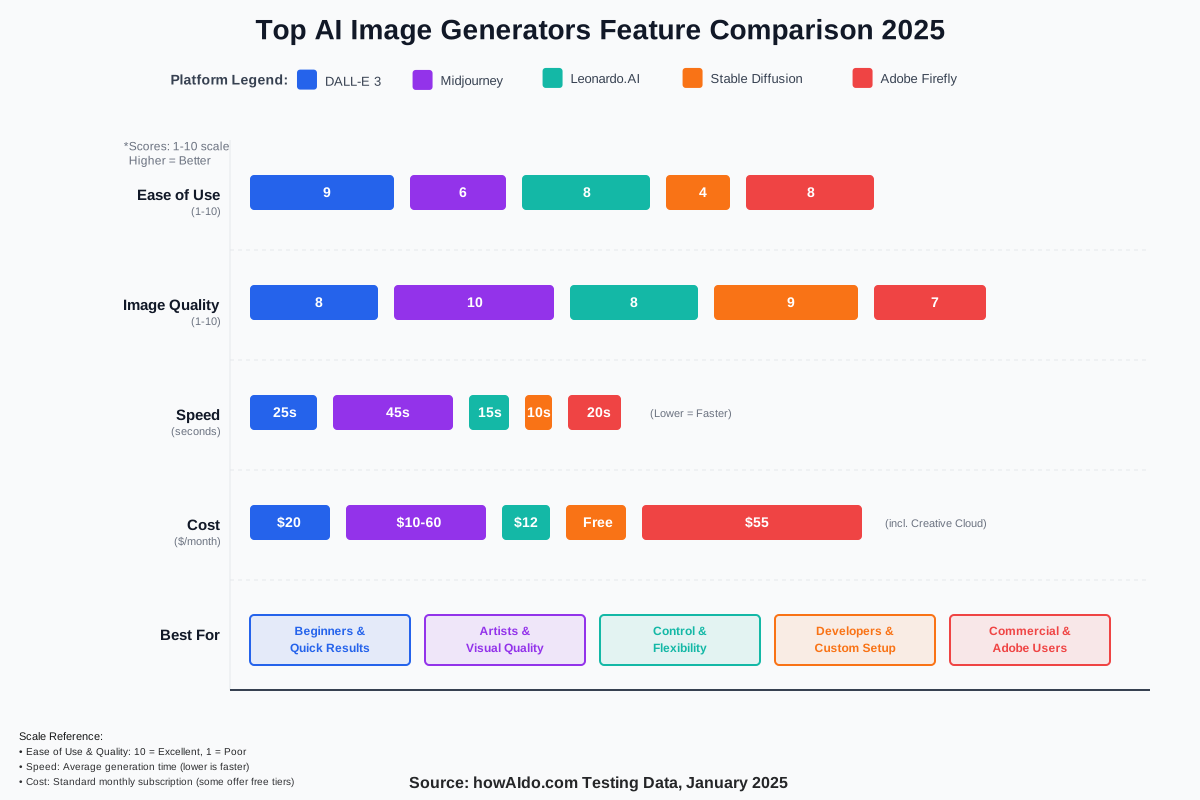
DALL-E 3 (via ChatGPT Plus, $20/month) is our top recommendation for beginners. It understands conversational language naturally, integrates seamlessly with ChatGPT for prompt refinement, and produces consistently good results. The downside? Limited customization options and occasional issues with very specific requests. Best for: Casual creators, content marketers, anyone wanting quick, reliable results.
Midjourney ($10-$60/month) creates the most artistic, visually stunning images we’ve seen. Its aesthetic quality is unmatched, particularly for conceptual art, fantasy scenes, and stylized portraits. However, it operates through Discord, which confuses many newcomers, and its command-based interface has a learning curve. Best for: Artists, designers, and anyone prioritizing aesthetic excellence over ease of use.
Leonardo.AI (free tier available, $12-$48/month for premium) offers the best balance of control and accessibility. Its interface is intuitive, it provides fine-tuning options like negative prompts and guidance scales, and the free tier is genuinely useful. Image consistency across generations is excellent. Best for: Serious hobbyists, small businesses, and creators wanting more control without technical complexity.
Stable Diffusion (free, open-source) is the most powerful and customizable option but requires technical knowledge to set up. Running it locally on your computer gives unlimited generations without cost, but you’ll need a good graphics card. Best for: Technical users, developers, and anyone wanting complete control and privacy.
Adobe Firefly (included with Creative Cloud, $54.99/month) integrates beautifully with Adobe’s ecosystem and focuses on commercially safe, copyright-friendly outputs. It’s less creative than competitors but offers peace of mind for commercial use. Best for: Adobe users, commercial designers, and brands concerned about legal issues.
AI Image Generation and Copyright: Navigating the Legal Landscape
AI image generation copyright is one of the most frequently asked questions we encounter, and for good reason. The legal landscape is evolving rapidly, with courts, governments, and platforms all wrestling with unprecedented questions about ownership and rights.
Here’s what we know right now: In most jurisdictions, AI-generated images themselves cannot be copyrighted because copyright law requires human authorship. However, you typically own the images you generate through the platform’s terms of service. This creates a strange situation where you have usage rights but not copyright protection.
What this means practically:
- You can use AI-generated images for most personal and commercial purposes according to each platform’s terms
- You cannot sue someone for copying your AI-generated image using copyright law
- You should review each platform’s terms carefully—they vary significantly
- Consider the training data question—some AI models trained on copyrighted images face ongoing legal challenges
We recommend following these guidelines:
- Read your chosen platform’s commercial use policies thoroughly
- Keep records of your prompts and generation process
- Add substantial human creative input when possible (editing, combining, etc.)
- Avoid generating images of copyrighted characters or brands
- Stay informed as laws evolve—this is changing rapidly
For commercial work, consider using platforms like Adobe Firefly that emphasize legally safe training data. We’ve shifted some of our client work there specifically for this reason.
Prompt Engineering for AI Image Generation: Mastering the Art of the Ask
Prompt engineering is the skill that separates okay results from amazing ones. After generating thousands of images, we’ve developed a framework that consistently produces better outputs.
Think of prompts as recipes. Just as “make a cake” produces vastly different results than “make a three-layer chocolate cake with vanilla buttercream frosting, decorated with fresh strawberries, of professional bakery quality,” your prompt specificity directly impacts your results.
The Anatomy of a Perfect Prompt:
Start with the core formula: [Subject] + [Action/Pose] + [Environment] + [Lighting] + [Style] + [Technical Details]
Example: “A red fox [subject] jumping over a fallen log [action] in an autumn forest [environment] during golden hour [lighting] in the style of National Geographic photography [style] shot with a telephoto lens and shallow depth of field [technical details]”
Essential Prompt Components:
Subject Details: Be specific about what you want. Instead of “a woman,” try “a woman in her thirties with curly auburn hair, wearing a blue summer dress.” The more vivid your mental image, the clearer your prompt should be.
Action and Emotion: Static images can feel lifeless. Include what your subject is doing or feeling: “laughing joyfully,” “reading thoughtfully,” or “running through the rain.”
Environment and Context: Where is this happening? “In a minimalist Scandinavian living room,” “on a crowded Tokyo street at night,” “in a sun-drenched vineyard.”
Lighting Quality: This transforms images dramatically. Try: “soft diffused lighting,” “dramatic side lighting,” “neon-lit,” “golden hour glow,” or “overcast daylight.”
Artistic Style: Reference art movements, artists (if ethically appropriate), or mediums: “impressionist painting style,” “cinematic photography,” “watercolor illustration,” “3D rendered.”
Technical Photography Terms: These work surprisingly well: “bokeh background,” “wide-angle lens,” “macro photography,” “long exposure,” and “high contrast.”
Powerful Modifier Words:
Quality boosters: “highly detailed,” “professional quality,” “award-winning,” “masterpiece,” “intricate” Mood setters: “ethereal,” “moody,” “vibrant,” “peaceful,” “energetic,” “mysterious” Material descriptors: “glossy,” “matte,” “textured,” “smooth,” “weathered,” “pristine”
What to Avoid:
We’ve learned these lessons the hard way:
- Contradictory descriptions (“dark but bright”)
- Overly long prompts (over 200 words gets confusing)
- Multiple competing subjects (pick one main focus)
- Abstract concepts without concrete details (“make it feel blue” won’t work well)
Advanced Techniques:
Negative prompts tell the AI what to avoid. Use them to exclude unwanted elements: “no text, no watermarks, no distortion, no extra limbs.”
Weighted terms emphasize certain elements. In Midjourney, use double colons: “sunset::2 beach” emphasizes the sunset twice as much.
Style mixing combines different aesthetics: “a blend of Japanese woodblock print and modern minimalism.”
AI Image Generation for Marketing: Enhancing Visual Content Strategy
Marketing with AI-generated images has transformed how we approach visual content strategy. The ability to create custom, on-brand visuals in minutes—without photoshoots, stock photo fees, or designer wait times—changes everything about content production.
We’ve helped dozens of businesses integrate AI image generation into their marketing workflows, and the results speak for themselves: faster campaign launches, higher engagement rates, and dramatically reduced creative costs.
Practical Marketing Applications:
Social Media Content: Generate eye-catching posts tailored to each platform’s aesthetic. We create Instagram carousel backgrounds, Pinterest pins, and LinkedIn article headers in minutes. The key is maintaining brand consistency—develop prompt templates that incorporate your brand colors, style, and tone.
Blog Hero Images: Every article needs a compelling visual. Instead of scrolling through stock photo sites hoping to find something relevant, we generate custom images that perfectly match our content. This article’s hero image? AI-generated to specifically represent our topic.
Ad Creative Testing: A/B testing creative used to be expensive. Now we generate dozens of variations, test them quickly, and invest in professional production only for proven concepts. One client reduced their creative testing costs by 70% while improving click-through rates.
Email Marketing: Personalized visuals drive engagement. We’ve generated seasonal campaign imagery, product visualization mockups, and decorative elements that feel custom-crafted rather than generic.
Product Mockups: Visualize products in different contexts without physical samples. Show your water bottle at a mountain summit, your software on different devices, and your clothing in various settings—all before inventory exists.
Best Practices We’ve Discovered:
- Create Brand Prompt Libraries: Document successful prompts that capture your brand aesthetic. We maintain a spreadsheet with proven formulas for each client.
- Combine AI with Human Touch: AI generates the base; designers refine and perfect. This hybrid approach maintains quality while maximizing efficiency.
- Respect Your Audience: Don’t try to pass off AI images as photographs when transparency matters. Our audience appreciates honesty about our tools.
- Test, Measure, Iterate: Track which AI-generated images perform best. We’ve found certain styles and compositions consistently outperform others.
- Stay Copyright-Compliant: Use platforms with commercial licenses and avoid generating anything that infringes on existing brands or trademarks.
Ethical Considerations in AI Image Generation: Bias, Misinformation, and Deepfakes
Ethical AI image generation isn’t optional—it’s essential. As these tools become more powerful and accessible, we all share responsibility for using them thoughtfully and considering their broader impact.
Understanding Algorithmic Bias:
AI models reflect their training data, which means they inherit societal biases. We’ve noticed that default generations often skew toward certain demographics, perpetuate stereotypes, or underrepresent marginalized groups.
When we prompt “a CEO” or “a nurse,” the AI’s outputs reveal embedded assumptions about gender, race, and age. Conscious creators must actively counteract these biases by being specific and intentional in their prompts.
Practical steps we take:
- Explicitly specify diverse characteristics when generating people
- Question default assumptions in our prompts
- Generate multiple variations to avoid reinforcing stereotypes
- Advocate for more diverse training datasets
The Deepfake Dilemma:
The same technology creating art can create deception. AI-generated deepfakes—realistic images or videos of people doing or saying things they never did—pose serious risks to privacy, consent, and truth itself.
We’ve established personal ethical boundaries:
- Never generate realistic images of real people without explicit permission
- Avoid creating content that could mislead or deceive
- Add disclaimers when sharing AI-generated images that could be mistaken for real photography
- Support efforts to develop detection tools and authentication methods
Misinformation and Manipulation:
AI-generated images can spread false information rapidly. We’ve seen fabricated “documentary” images of historical events that never happened, fake product reviews with generated photos, and manufactured evidence in disputes.
Our responsibility as creators:
- Clearly label AI-generated content when context matters
- Refuse to create deceptive or misleading images
- Educate others about AI capabilities and limitations
- Verify sources before sharing AI-generated content as fact
Environmental Considerations:
Large AI models consume significant energy. Each image generation has a carbon footprint. While individual impacts are small, collective usage matters.
We’re conscious of:
- Generating thoughtfully rather than wastefully
- Supporting platforms investing in sustainable computing
- Balancing AI use with environmental responsibility
Creative Industry Impact:
The elephant in the room: how does AI affect human artists? We believe strongly that AI should augment human creativity, not replace it. We commission human artists for important projects, credit human collaborators, and advocate for fair compensation in an AI-enabled world.
AI Image Generation for Game Development: Creating Assets and Textures
Game development with AI image generation represents one of the most practical applications we’ve explored. The gaming industry’s constant hunger for visual assets—characters, environments, textures, UI elements, and concept art—makes AI tools incredibly valuable for developers of all sizes.
We’ve worked with indie game developers who’ve used AI-generated game assets to prototype entire games before investing in final art production. The time and cost savings are remarkable.
Practical Game Development Applications:
Concept Art and World-Building: Generate dozens of environment concepts in an afternoon. Explore different artistic directions, color palettes, and architectural styles before committing to a final vision. We helped one developer visualize an entire fantasy world—from taverns to throne rooms—in a week that would have traditionally taken months.
Texture Generation: Create seamless textures for 3D models. Generate stone walls, wood grain, fabric patterns, metal surfaces, and alien landscapes. While you’ll likely need to tile and optimize these in software like Substance Designer, AI provides excellent starting points.
Character Concept Exploration: Rapidly iterate on character designs. Generate variations of costumes, facial features, poses, and expressions. One character might go through fifty AI-generated iterations before the final design emerges.
UI and Icon Design: Create stylistically consistent interface elements. Generate inventory icons, skill trees, menu backgrounds, and decorative elements that match your game’s aesthetic.
Background and Environment Art: Especially useful for 2D games. Generate parallax backgrounds, skyboxes, environment assets, and atmospheric elements. We’ve seen beautiful results for platformers, visual novels, and adventure games.
Steps for Game Asset Creation:
- Establish Your Art Style: Create a style guide with AI-generated reference images showing your desired aesthetic. Maintain consistency by referencing these in all future prompts.
- Generate in Batches: Create variations simultaneously. Generate ten tree designs, pick the best three, and refine those further. Iteration is faster than perfection on the first try.
- Post-Process Appropriately: Import AI generations into your game engine or image editor. Remove backgrounds, adjust colors, add transparency, and optimize file sizes.
- Create Consistent Sets: When generating multiple related assets (like furniture for a room), use similar prompts with small variations to maintain visual coherence.
- Combine AI with Traditional Tools: Use AI for concept and base elements, then refine with traditional digital painting or 3D modeling. This hybrid approach produces professional results.
Important Considerations:
Licensing matters in commercial games. Review your AI platform’s terms regarding game asset usage. Some platforms restrict commercial use or require attribution.
Quality control is essential. AI-generated assets often need refinement—fixing hands, removing artifacts, and adjusting proportions. Budget time for this polish work.
Player expectations have risen. While AI accelerates production, players still expect professional quality. Use AI to enhance your workflow, not as a shortcut to skip quality standards.
AI Image Generation vs. Traditional Art: A Creative Revolution?
The AI versus traditional art debate generates passionate responses, but we’ve found the question itself is misleading. After collaborating with dozens of artists and creating thousands of images ourselves, we believe AI isn’t replacing traditional art—it’s expanding the definition of creativity.
What AI Does Differently:
AI democratizes image creation. You don’t need years of training, expensive equipment, or technical skill to generate compelling visuals. This accessibility empowers people who have visions but lack traditional artistic training. We’ve watched teachers, writers, and entrepreneurs bring their ideas to visual life for the first time.
Speed transforms possibilities. What takes traditional artists hours or days, AI generates in seconds. This isn’t about devaluing time investment—it’s about enabling rapid experimentation, iteration, and exploration.
What Traditional Art Offers Uniquely:
Intentionality and control remain firmly in human hands. Traditional artists make thousands of deliberate micro-decisions. They understand composition principles, color theory, and emotional impact. They bring life experience, cultural context, and personal vision that AI cannot replicate.
Craftsmanship carries value beyond the final image. The physical mark-making, the mastery of materials, the visible evidence of human touch—these matter. We hang original paintings not despite but because of their handmade nature.
Emotional authenticity connects differently. When we know a human poured their heart into creating something, our relationship with that work changes. AI can mimic emotion but cannot feel it.
The Hybrid Future We’re Practicing:
Rather than choosing sides, we embrace both. We use AI for:
- Rapid concept exploration and brainstorming
- Base compositions that we refine traditionally
- Reference generation for traditional painting
- Production work that needs speed over uniqueness
- Learning tool for understanding composition and color
We choose traditional methods for:
- Personal artistic expression
- Commissions where handmade value matters
- Fine art destined for galleries or collections
- Teaching and skill development
- Creating work with tangible, physical presence
Addressing Artist Concerns:
We understand the anxiety traditional artists feel. When your livelihood depends on skills that AI can now simulate, the future feels uncertain. We believe the solution isn’t fighting technology but adapting alongside it.
Artists who integrate AI into their workflows are finding new opportunities. They’re using AI for time-consuming production tasks while focusing human effort on creative direction, refinement, and that ineffable quality that makes art resonate emotionally.
The market still values human-created art—perhaps now more than ever. As AI-generated images proliferate, authentically human creativity becomes more precious, not less.
AI Image Generation for Interior Design: Visualizing Spaces and Concepts
Interior design visualization has been revolutionized by AI image generation. We’ve helped homeowners, designers, and real estate professionals visualize spaces before spending a dollar on renovations, and the results consistently exceed expectations.
The traditional interior design process involves costly mood boards, multiple rounds of revisions, and difficulty imagining final results. AI-generated room designs compress weeks of visualization into hours, allowing rapid exploration of styles, colors, and layouts.
Practical Applications:
Pre-Renovation Visualization: Upload photos of existing spaces and generate redesigned versions. See your living room with different paint colors, furniture arrangements, or lighting without lifting a paintbrush. We helped one couple visualize five different kitchen layouts before selecting their renovation direction.
Style Exploration: Wondering if mid-century modern suits your space better than Scandinavian minimalism? Generate versions of your room in different styles. Compare traditional versus contemporary, cozy versus airy, and maximalist versus minimalist.
Furniture and Decor Testing: Visualize how specific furniture pieces, artwork, or decorative elements look in your space. Generate variations with different rugs, curtains, plants, or accent colors.
Empty Space Staging: Real estate professionals use AI to stage vacant properties virtually. Potential buyers see furnished, lived-in spaces that help them imagine their future home. We’ve seen staged listings sell faster and for higher prices.
Custom Design Concepts: Dreaming of something unique? Generate custom furniture designs, lighting fixtures, or architectural features. One client used AI to design a custom built-in bookshelf before commissioning a carpenter to build it.
Steps for Interior Visualization:
- Start with Reference Photos: Take clear photos of your space from multiple angles in good lighting. These become your starting point.
- Define Your Vision: Write detailed descriptions of desired changes. Instead of “new living room,” try “modern living room with navy accent wall, white sectional sofa, brass light fixtures, hardwood floors, large windows with sheer curtains, plants, and warm afternoon lighting.”
- Generate Multiple Options: Create variations exploring different possibilities. Change one element at a time to understand its impact.
- Combine and Refine: Use image editing software to combine the best elements from multiple AI generations. Adjust colors, proportions, and details.
- Create Material and Color Boards: Generate close-ups of textures, finishes, and materials. Build comprehensive boards showing fabrics, paint colors, and finishes.
Tips from Our Experience:
Maintain realistic expectations. AI-generated interiors sometimes include impossible architecture or physics-defying furniture arrangements. Use them as inspiration rather than exact blueprints.
Lighting matters enormously. Specify time of day and light quality in prompts. “Bright morning sunlight streaming through windows” creates very different moods than “cozy evening with warm lamplight.”
Cultural and regional styles translate well. We’ve generated everything from Moroccan riads to Japanese minimalism to French country cottages with impressive accuracy.
Combine AI with professional guidance. Designers bring structural knowledge, building codes, and practical experience that AI cannot provide. Use AI to explore possibilities, then consult professionals for execution.
The Future of AI Image Generation: Trends and Predictions
The future of AI image generation is arriving faster than most people realize. Based on our deep involvement in this space and conversations with developers, researchers, and creators, we’re watching several transformative trends unfold.
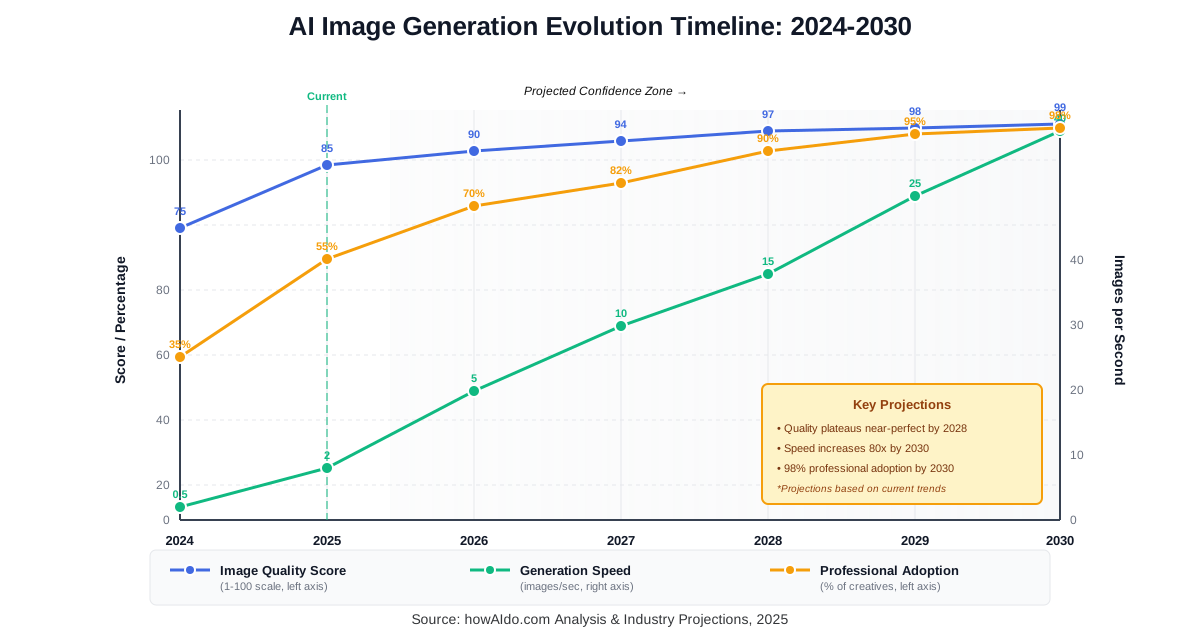
Real-Time Video Generation: We’re already seeing early versions—text-to-video AI like Runway Gen-2 and OpenAI’s Sora. Within two years, we expect generating professional-quality video clips will be as easy as generating images today. This transforms video marketing, filmmaking, and content creation entirely.
Personalized AI Models: Soon you’ll train custom models on your personal style, brand aesthetic, or specific subjects. Imagine an AI that generates images exclusively in your company’s visual language or that knows your product catalog intimately. We’re testing early versions with clients now.
3D Model Generation: The boundary between 2D images and 3D models is dissolving. Services like Luma AI already generate 3D models from text or images. Expect this to mature rapidly, impacting game development, AR/VR, product design, and architecture.
Enhanced Control and Precision: Future tools will offer granular control over every element. Specify exact positioning, precise color values, and detailed expressions. The gap between imagining and creating will narrow to almost nothing.
Ethical AI and Transparency Tools: As concerns about deepfakes and misinformation grow, we’ll see authentication systems, watermarking, and AI detection tools become standard. Blockchain-based provenance tracking might verify image origins and modifications.
Integration Everywhere: AI image generation will be embedded into all creative software. Adobe’s already doing this with Firefly. Expect it in word processors (generate custom diagrams), presentation software (create slide graphics), social media platforms (generate post backgrounds), and email clients.
Multimodal Creation: Combine text, sketches, existing images, and voice descriptions. Draw a rough sketch, describe verbally what you want, and reference existing images for style—all in one generation process. We’ve seen demos that feel like science fiction.
Collaborative AI Assistants: Rather than one-shot generation, future AI will engage in creative dialogue. “Make the sunset warmer.” “Add more detail to the foreground.” “Show me this from a different angle.” Iterative refinement becomes conversational.
Predictions We’re Confident About:
Within three years, most creative professionals will use AI image generation regularly, regardless of their current hesitation. The quality and utility gap will be too significant to ignore.
Within five years, distinguishing AI-generated images from traditional photographs will require technical analysis. The “AI look” will fade as models improve.
Within a decade, the phrase “AI-generated image” might feel as quaint as “computer-generated document” does today. It’ll simply be how images are made.
What won’t change: human creativity, vision, and emotional intelligence will remain the differentiating factors in valuable creative work. AI amplifies these human qualities rather than replacing them.
AI Image Generation for Fashion Design: Creating New Styles and Patterns
Fashion design with AI is transforming how designers conceptualize collections, experiment with styles, and visualize garments before production. We’ve collaborated with fashion students, independent designers, and small brands, discovering that AI-generated fashion concepts dramatically accelerate their creative process.
The fashion industry traditionally moves slowly from concept to sample. Sketching, pattern making, sourcing fabrics, and creating prototypes—this pipeline can take months. AI compresses early-stage exploration into days.
Practical Fashion Applications:
Garment Visualization: Generate entire outfits or individual pieces in any style imaginable. See how a vintage-inspired dress looks with modern details, visualize streetwear concepts, or create haute couture designs without sewing a single stitch.
Pattern and Textile Design: Create custom fabric patterns, prints, and textures. We’ve generated everything from geometric patterns to watercolor florals to abstract digital designs. Export these for printing on fabric or use as inspiration for traditional design.
Style Experimentation: Combine elements from different fashion eras or cultures. Mix Victorian silhouettes with cyberpunk aesthetics, blend traditional textiles with contemporary cuts, or reimagine historical garments for modern wear.
Color Palette Exploration: Visualize how garments look in different color schemes. Generate the same dress in twenty colorways, test seasonal color trends, or explore unexpected color combinations.
Mood Board Creation: Build comprehensive fashion mood boards showing garments, accessories, styling, settings, and atmosphere. We create entire collections visually before any physical production begins.
Steps We Recommend:
- Define Your Design Vision: Start with clear concepts. “A flowing midi dress with puff sleeves and a floral print in burgundy and cream, vintage-inspired, photographed on a model in a garden” produces very different results than simply “dress.”
- Generate Variations: Create multiple versions exploring different cuts, proportions, details, and styling. We typically generate 20-30 variations before selecting favorites.
- Refine Specific Elements: Focus on details that matter—collar styles, hem lengths, closure methods, and trim details. Generate close-ups of these elements.
- Create Technical Flats: While AI struggles with technical flats initially, combining AI concepts with manual flat drawing creates comprehensive design documentation.
- Build Collection Cohesion: Generate looks that work together. Use consistent prompt elements (color palettes, style references, and aesthetic mood) to ensure collection unity.
Tips from Fashion Designers We Work With:
Be specific about fabrics and materials: “silk chiffon,” “heavy denim,” “metallic leather,” “cable knit wool.” Material specifications dramatically affect garment appearance.
Reference fashion photography styles: “editorial fashion photography,” “street style,” “runway presentation,” and “flat lay styling.” This context shapes how garments are depicted.
Understand AI limitations: Hands, feet, and garment construction details often contain errors. Use AI for concept and inspiration, not final technical specifications.
Combine AI with traditional skills: AI generates ideas; human designers bring technical knowledge of construction, draping, fit, and wearability.
AI Image Generation: Overcoming Common Challenges and Limitations
Even after generating thousands of images, we still encounter challenges with AI image generation. Understanding these limitations helps you work around them and maintain realistic expectations.
The “AI Hand” Problem:
Hands remain notoriously difficult for AI. You’ll frequently see extra fingers, missing fingers, impossible joint angles, or blurred appendages. This happens because hands are complex, appear in countless configurations, and were inconsistently captured in training data.
Workarounds we use:
- Hide hands naturally (behind objects, in pockets, out of frame)
- Crop compositions to exclude problematic areas
- Generate many variations and select ones with acceptable hands
- Use inpainting tools to regenerate just the hand area
- Edit manually in photo editing software
Text Generation Issues:
AI struggles to generate readable text. Signs, labels, book covers, and anything requiring legible words often come out garbled. The letters look text-like but read as nonsense.
Solutions:
- Avoid prompts requiring readable text
- Add text later using design software
- Use text as decorative texture rather than readable content
- Specify “no text” in negative prompts to avoid gibberish
Consistency Across Generations:
Creating multiple images of the same character, object, or scene with consistent appearance is challenging. Each generation treats your prompt as fresh, leading to variations in facial features, clothing details, or object appearance.
Approaches that help:
- Extremely detailed prompts that specify unchanging features
- Use platforms offering character/style consistency features (like Leonardo.AI’s AI Canvas)
- Generate reference images first, then use image-to-image generation
- Accept some variation as part of the creative process
Prompt Interpretation Surprises:
AI sometimes interprets prompts unexpectedly. We asked for “a pitcher of lemonade” and received a baseball pitcher holding lemons. Language ambiguity creates amusing but frustrating results.
Prevention strategies:
- Use extremely clear, unambiguous language
- Add context that eliminates alternative interpretations
- Review results quickly and adjust prompts immediately
- Maintain prompt libraries of successful phrasings
Physics and Logic Violations:
AI doesn’t understand physics or real-world constraints. You’ll see impossible architecture, furniture floating in midair, incorrect shadows, bizarre reflections, and anatomically impossible poses.
Managing this:
- Use reference images when physical accuracy matters
- Add “realistic,” “physically accurate,” or “photorealistic” to prompts
- Accept stylization over realism in artistic contexts
- Manually edit or regenerate problematic elements
Style Drift:
Long prompts sometimes cause AI to “forget” early instructions, emphasizing later elements disproportionately. Your carefully crafted prompt’s beginning gets overshadowed by the end.
Solutions:
- Keep prompts concise and focused
- Place most important elements at the prompt’s beginning.
- Use emphasis markers (like Midjourney’s weight modifiers)
- Split complex scenes into multiple generations, then composite
Ethical Ambiguity:
Generating images raises questions we’re still wrestling with collectively. What about AI trained on artists’ work without compensation? How do we handle requests that might enable harmful uses?
Our approach:
- Stay informed about ongoing debates and legal developments
- Make ethical choices even when platforms allow questionable uses
- Support artists and advocate for fair training data practices
- Refuse to generate content that could harm or deceive
AI Image Generation: The Impact on Photography and Stock Images
Photography and AI exist in complicated tension. As someone who loves traditional photography and uses AI generation extensively, we’ve watched this evolution with both excitement and concern about its impact on stock photography markets.
The stock photography industry faced disruption first. Why pay $50 for a generic office photo when AI generates custom images for free or for pennies? We’ve seen stock agencies struggle as AI alternatives proliferate.
How Photography Is Changing:
Commodity Photography Under Pressure: Generic, conceptual images—the bread and butter of stock photography—are most vulnerable. “Business meeting,” “happy family,” “laptop on desk”—AI generates these effectively enough that many buyers choose AI over stock.
Premium Photography Gaining Value: Unique, technically sophisticated, or authentically human photography becomes more valuable as AI proliferates. Images requiring specific locations, rare moments, or genuine human subjects maintain premium pricing.
Hybrid Workflows Emerging: Professional photographers increasingly combine traditional shooting with AI enhancement, expansion, or modification. We know photographers using AI to change backgrounds, add elements, or create variations of existing shots.
New Photography Categories: Photographers are creating AI datasets from their work, offering AI-generated variations while maintaining artistic direction. This represents a new creative and business model.
Authenticity as a Differentiator: As AI images flood the internet, verifiably human-created photography gains cachet. We predict certification and authentication will become selling points.
What This Means for Photographers:
Adapt rather than resist. Photographers embracing AI as another tool in their creative arsenal are finding new opportunities. Those viewing it only as competition face harder transitions.
Specialize in what AI cannot replicate: genuine human moments, specific locations, technical specialties, authentic documentary work, and artistic vision that transcends pure image generation.
Develop AI skills complementary to photography. Understanding AI generation makes you more valuable, not less. Clients increasingly want professionals who can deliver both.
Emphasize your creative direction and expertise. Your value shifts from purely technical image creation to concept, art direction, styling, and that ineffable quality that makes images emotionally resonant.
For Content Creators Using Both:
We use both traditional photography and AI generation depending on context:
Traditional photography when:
- Authenticity and reality matter (testimonials, about pages, real products)
- Specific locations or people are required
- Physical products need accurate representation
- Creating content for contexts where AI use would undermine trust
AI generation when:
- Conceptual imagery serves the purpose
- Speed and cost matter more than uniqueness
- Customization to specific brand needs is crucial
- Multiple variations for testing are needed
Transparency about our approach maintains trust with our audience. We label AI-generated images when context makes this important.
AI Image Generation for Education: Tools and Applications in the Classroom
Educational applications of AI image generation extend far beyond creating illustrations. We’ve worked with teachers, instructional designers, and educational content creators, discovering that AI in education transforms how visual learning materials are created and customized.
Traditional educational content creation faces budget and time constraints. Teachers want custom visuals for lessons but lack design skills or resources. AI democratizes educational content creation dramatically.
Classroom Applications:
Custom Learning Materials: Generate illustrations for worksheets, presentations, and handouts tailored to your lessons. Teaching about ancient civilizations? Generate historically accurate city scenes. Explaining science concepts? Create visual diagrams showing molecular structures, ecosystem relationships, or physics principles.
Differentiated Instruction Materials: Create multiple versions of visual materials for different learning levels or styles. We’ve helped teachers generate simplified versions for struggling learners and enhanced versions for advanced students—all from one original lesson.
Student Engagement Tools: Students create their own visual projects using AI. Story illustration projects, historical scene recreation, scientific visualization, and creative writing accompaniment all become accessible to students regardless of artistic skill.
Visual Vocabulary Building: Generate images representing vocabulary words, especially for language learners. Abstract concepts become concrete when visualized, and students remember better when multiple senses engage.
Cultural and Historical Exploration: Visualize historical events, cultural traditions, geographical features, or time periods students haven’t experienced personally. While not replacing actual photographs or primary sources, these visualizations supplement textbook descriptions.
STEM Education: Create custom diagrams, laboratory setup visualizations, mathematical concept illustrations, and scientific process demonstrations. We’ve generated everything from cellular biology diagrams to engineering blueprints to chemistry equipment setups.
Implementation Steps for Educators:
- Start Small: Begin with one lesson or unit. Generate supporting visuals, test student response, and refine your approach before expanding.
- Involve Students: Teach students to generate images themselves. This becomes a lesson in both technology and clear communication (prompt writing develops descriptive language skills).
- Maintain Academic Integrity: Discuss AI capabilities openly. Help students understand appropriate uses, citation requirements, and ethical considerations.
- Create Reusable Prompts: Document successful prompts for generating specific educational visuals. Build a library that grows more valuable over time.
- Combine with Primary Sources: Use AI-generated images to supplement, not replace, photographs, historical documents, and authentic materials.
Benefits We’ve Observed:
Increased student engagement when lessons include relevant, appealing visuals. Students pay more attention to content accompanied by compelling imagery.
Reduced teacher workload for content creation. Time previously spent searching for appropriate images or creating illustrations can focus on instruction instead.
Greater lesson customization. Generate images specifically matching your curriculum, student interests, and teaching context.
Improved accessibility for visual learners. Students who struggle with text-heavy materials benefit from visual representations.
Important Considerations:
Age-appropriate use varies. Elementary students need careful supervision and scaffolding. High school students can engage more independently but still require guidance.
Copyright education becomes crucial. Students must understand that generating images doesn’t automatically grant unlimited usage rights.
Quality control remains essential. AI-generated educational materials should meet the same accuracy standards as traditional materials.
Balance AI use with developing students’ own creative and artistic skills. AI should enhance, not replace, art education and creative development.
AI Image Generation: Creating Photorealistic Images with AI
Photorealistic AI image generation represents the cutting edge of this technology. Creating images indistinguishable from photographs requires understanding the subtle details that make images feel authentic.
We’ve progressed from obviously AI-generated images to creating photorealistic AI artwork that fools viewers consistently. This wasn’t about better prompts alone—it required understanding photography principles, lighting physics, and human perception.
Achieving Photorealism:
Lighting Makes or Breaks Realism: This is the single most important factor. Study how light behaves in photographs. Notice how shadows fall, how light wraps around objects, and how different light sources create different color temperatures.
Specify lighting precisely: “soft diffused natural window light from camera left, creating gentle shadows, warm color temperature, late afternoon.” Generic “good lighting” produces generic results.
Depth and Dimensionality: Photorealistic images have depth cues humans subconsciously recognize. Atmospheric perspective (distant objects hazier), size variation, overlapping elements, and appropriate depth of field all contribute.
Add: “shallow depth of field with bokeh background,” “atmospheric haze in distance,” and “detailed foreground, softer midground, and hazy background.”
Material Properties: Different materials interact with light differently. Skin has subsurface scattering, metal reflects sharply, fabric has texture that catches light, and glass refracts and reflects simultaneously.
Describe materials specifically: “matte fabric texture,” “polished chrome reflection,” and “translucent skin with visible subsurface scattering.”
Imperfection Creates Believability: Paradoxically, adding slight imperfections increases realism. Perfect images look artificial. Real photographs have minor flaws, slight motion blur, subtle noise, and lens imperfections.
Include: “slight film grain,” “subtle lens imperfection,” “natural skin texture with pores and fine lines,” and “minor dust particles in air.”
Camera and Lens Characteristics: Reference specific photography equipment behavior. Different lenses create different perspectives and distortions that our eyes recognize subconsciously.
Try: “shot with 85mm portrait lens,” “wide-angle 24mm perspective,” “telephoto compression,” and “tilt-shift effect.”
Color and Tone: Photorealistic images have color relationships and tonal ranges that match real photography. Study color grading in professional photography.
Specify: “natural color grading,” “slightly desaturated for realism,” “warm tones with cool shadows,” and “professional color correction.”
Advanced Photorealism Techniques:
Reference Real Photography: Study photographs you want to emulate. Notice every detail—lighting direction, shadow softness, background blur amount, and color temperature relationships.
Layer Your Prompts Strategically: Start general, then add specific details: Subject → Environment → Lighting → Camera Technical Details → Post-Processing Style.
Use Technical Photography Terms: The AI responds well to professional photography vocabulary because its training data includes millions of images with technical descriptions.
Generate Multiple Versions: Photorealism requires iteration. Generate ten versions, select the best one, refine that prompt, and generate ten more.
Combine AI with Photo Editing: Even the best AI-generated images benefit from subtle refinements in Photoshop or Lightroom. Adjust exposure, fine-tune colors, add subtle grain, and sharpen strategic areas.
Examples of Photorealistic Prompts:
Instead of: “a portrait of a woman”
Try: “Portrait of a woman in her thirties, natural makeup, brown eyes, slight smile, shot with 85mm f/1.8 lens, shallow depth of field, soft window light from camera left creating gentle shadows, warm color temperature, professional color grading, natural skin texture visible, photographed against neutral gray background, professional headshot quality, subtle catch lights in eyes.”
The difference? Every technical detail you’d find in a professional photograph is explicitly described.
AI Image Generation for Book Cover Design: Attracting Readers with AI Art
Book cover design with AI has become surprisingly sophisticated. As indie authors and small publishers discover, AI-generated book covers can compete with traditionally designed covers at a fraction of the cost and time.
We’ve designed dozens of book covers using AI, and the results consistently surprise skeptics. The key is understanding what makes book covers effective and then translating that knowledge into AI prompts.
Why Book Covers Work Differently:
Book covers aren’t just pretty images—they’re marketing tools. They must communicate genre instantly, attract target readers, and remain legible as tiny thumbnails on retailers’ websites. These requirements shape our AI generation approach.
Genre-Specific Approaches:
Romance Covers: Focus on emotional atmosphere, attractive models, dreamy lighting, and genre-appropriate color schemes. Romance readers expect specific visual signals.
Prompt elements: “Romantic couple, intimate pose, soft glowing light, warm color palette, emotional atmosphere, professional photography style, suitable for romance book cover.”
Thriller/Mystery Covers: Dark, moody, tension-filled imagery. Silhouettes, shadows, dramatic lighting, and limited color palettes dominated by blacks, reds, or blues.
Prompt elements: “Mysterious atmospheric scene, dark and moody lighting, high contrast shadows, noir aesthetic, suspenseful mood, cinematic composition.”
Fantasy Covers: Epic landscapes, magical elements, dramatic skies, and mystical atmosphere. Fantasy covers need to convey wonder and adventure.
Prompt elements: “Epic fantasy landscape, dramatic lighting, magical atmosphere, majestic mountains/castles/forests, otherworldly beauty, sense of adventure.”
Science Fiction Covers: Futuristic elements, technology, space scenes, or alien worlds. Clean, modern aesthetic with attention to believable scientific accuracy (or intentional stylization).
Prompt elements: “Futuristic sci-fi scene, advanced technology, space/alien world, cool color palette, sleek modern aesthetic, sense of wonder and innovation.”
Literary Fiction Covers: Conceptual, artistic, and often minimalist. Symbolic rather than literal, sophisticated aesthetic, understated elegance.
Prompt elements: “Artistic conceptual image, minimalist composition, symbolic elements, sophisticated aesthetic, muted color palette, contemporary fine art style.”
Step-by-Step Cover Creation:
- Research Your Genre: Study bestselling covers in your category. Notice common visual elements, color schemes, composition styles, and typography placement.
- Generate Multiple Concepts: Create 20-30 different cover concepts. Vary subjects, compositions, color schemes, and moods. We typically generate far more than we’ll use.
- Test at Thumbnail Size: Book covers must work small. Shrink your images to thumbnail size (around 100×150 pixels). Do they remain compelling and clear?
- Add Typography: AI-generated text rarely works. Generate the image, then add the title and author name in design software. Typography makes or breaks covers.
- Get Feedback: Show options to your target readers. We create polls in genre-specific communities to gather preference data.
- Refine and Polish: Select the strongest concept and refine it. Adjust colors, composition, and details. Add finishing touches in photo editing software.
Technical Specifications:
Book covers need specific dimensions. Amazon KDP requires:
- Minimum 1000 pixels on the shortest side
- Ideal ratio for most books: approximately 1:1.6 (width:height)
- Common size: 1600 x 2560 pixels
- High resolution (300 DPI) for print versions
Generate at these dimensions from the start, or upscale later using AI upscaling tools.
Common Mistakes We See:
Too complex for thumbnails. Images that look great at full size become muddy, unreadable thumbnails. Keep compositions simple and bold.
Ignoring genre conventions. Your cover should signal its genre clearly. Experimental covers that confuse readers hurt sales.
Poor typography choices. Even a perfect image fails with bad fonts, poor placement, or illegible text. Invest time in typography.
Not testing with target readers. Your opinion matters less than your readers’ opinions. Test before committing.
Copyright concerns. Ensure your chosen AI platform allows commercial use for book covers. Review terms carefully.
AI Image Generation: Exploring Different Artistic Styles with AI
Exploring artistic styles with AI offers an incredible education in art history and aesthetic diversity. We’ve generated images in hundreds of styles, from Renaissance masters to contemporary digital art, and each style teaches us something new.
The ability to create different art styles instantly democratizes artistic expression. You don’t need to master oil painting, watercolors, ink drawing, and digital art separately—AI understands them all.
Classical Art Movements:
Impressionism: Characterized by visible brushstrokes, emphasis on light and its changing qualities, ordinary subject matter, and unusual visual angles. Think Monet, Renoir, and Degas.
Prompt: “In impressionist painting style, visible brushstrokes, emphasis on natural light, soft edges, outdoor scene, pastel color palette, emphasis on atmosphere over detail.”
Baroque: Dramatic, rich colors, intense light and dark contrasts (chiaroscuro), dynamic compositions, and emotional intensity. Think Caravaggio, Rembrandt.
Prompt: “Baroque painting style, dramatic chiaroscuro lighting, rich deep colors, theatrical composition, emotional intensity, classical subject matter, oil painting texture.”
Art Nouveau: Organic flowing lines, natural forms, decorative elements, stylized plants and flowers, asymmetry, muted color palettes. Think Mucha, Klimt.
Prompt: “Art Nouveau style, flowing organic lines, decorative floral elements, elegant figures, ornamental borders, muted earth tones, vintage poster aesthetic.”
Surrealism: Dreamlike scenes, unexpected juxtapositions, symbolic imagery, and meticulous detail in impossible scenarios. Think Dalí, Magritte.
Prompt: “Surrealist painting style, dreamlike atmosphere, impossible juxtapositions, symbolic imagery, meticulous detail, unsettling calm, photorealistic rendering of fantastical elements.”
Contemporary Styles:
Digital Art: Clean lines, vibrant colors, modern aesthetic, often with gradients, glows, or particle effects. Popular in gaming and tech industries.
Prompt: “Modern digital art style, clean vector-like lines, vibrant saturated colors, gradient effects, contemporary aesthetic, polished finish, trending on artstation.”
Cyberpunk: Neon colors (especially pink, blue, and cyan), urban dystopia, technology integration, rain-slicked streets, Asian cultural influences, and high-contrast lighting.
Prompt: “Cyberpunk style, neon lights, dystopian city, rain-soaked streets, high-tech low-life aesthetic, vibrant pink and cyan color scheme, dramatic lighting, futuristic urban decay.”
Minimalism: Simplified forms, limited color palette, emphasis on essential elements, clean composition, lots of negative space, and geometric shapes.
Prompt: “Minimalist style, simplified forms, limited color palette, clean composition, generous negative space, geometric abstraction, balanced design, modern aesthetic.”
Vaporwave: Retro 80s/90s aesthetic, pastel colors (especially pink and cyan), glitch effects, classical sculptures, computer graphics, and surreal combinations.
Prompt: “Vaporwave aesthetic, retro 80s/90s style, pastel pink and cyan colors, classical marble statues, grid patterns, glitch effects, nostalgic surreal atmosphere, Y2K digital aesthetics.”
Traditional Media Styles:
Watercolor: Translucent layers, soft edges, color bleeding, white paper showing through, wet-on-wet effects, delicate and ethereal.
Prompt: “Watercolor painting style, translucent washes, soft edges, color bleeding effects, visible paper texture, delicate ethereal atmosphere, traditional watercolor techniques.”
Oil Painting: Rich colors, visible brushstrokes, thick paint texture (impasto), luminous quality, classical painting techniques.
Prompt: “Oil painting style, rich colors, visible brushstrokes, impasto texture, luminous quality, traditional oil painting techniques, artistic mastery.”
Ink Drawing: Clean lines, cross-hatching for shading, high contrast, detailed linework, traditional pen and ink techniques.
Prompt: “Ink drawing style, clean precise lines, cross-hatching shading, high contrast black and white, detailed linework, traditional pen and ink illustration.”
Charcoal: Soft gradations, smudgy atmospheric quality, range from delicate lines to deep blacks, textural variety, classical drawing technique.
Prompt: “Charcoal drawing style, soft gradations, atmospheric smudging, range of values from light gray to deep black, textural mark-making, traditional charcoal technique.”
Mixing and Combining Styles:
The most exciting possibilities emerge when combining styles: “A landscape combining impressionist brushwork with art nouveau decorative elements and a cyberpunk color palette.”
Experiment freely. Try “Classical Renaissance painting composition with vaporwave aesthetic” or “Minimalist design with baroque dramatic lighting.”
Style exploration teaches visual literacy. Understanding how different artistic movements approached composition, color, and subject matter makes you a more sophisticated image creator regardless of your tools.
AI Image Generation: Improving Accessibility for Visually Impaired Individuals
AI image generation for accessibility represents one of the most meaningful applications we’ve explored. While it might seem counterintuitive to discuss visual content in the context of accessibility for visually impaired users, AI is creating important new possibilities.
Descriptive Image Generation:
When visually impaired individuals ask about something they cannot see—a famous painting, a described scene, or a concept—AI-generated images can be described by screen readers or human assistants with consistent, accurate visual representations.
Educational applications benefit significantly. A blind student studying art history can request generation of specific paintings or styles, then have sighted assistants describe them, or use AI-powered description tools to understand the visual elements.
Alt Text Training Data Creation:
AI-generated images with detailed prompts create training data for AI systems that generate alt text. The detailed prompts serve as ground truth descriptions, helping improve automatic alt text generation for all images.
Tactile Graphics Generation:
Some organizations convert AI-generated images into tactile graphics (raised-line drawings) for blind users. Simple, high-contrast AI-generated images work particularly well for this conversion process.
We’ve generated:
- Simplified diagrams of scientific concepts
- Geographical maps with clear boundaries
- Architectural floor plans
- Anatomical illustrations
- Historical artifacts and cultural objects
Multi-Sensory Description Projects:
Combined with text-to-speech and audio description technologies, AI-generated images help create multi-sensory educational materials. The image generation prompt itself often provides excellent audio description content.
Considerations and Limitations:
We approach this carefully, recognizing that:
- Authentic photographs and real artwork should remain prioritized
- AI-generated images supplement rather than replace authentic visual information
- Consultation with visually impaired community members is essential
- Technology should empower, not patronize
- Accessibility solutions must center the needs of visually impaired users themselves
Other Accessibility Applications:
Simplified Visual Content: Generate images with high contrast, limited complexity, and clear focal points for users with low vision.
Customizable Visual Materials: Create materials with adjustable color contrasts, sizes, and complexity levels suited to individual visual capabilities.
Communication Aids: Generate images for augmentative and alternative communication (AAC) systems, helping non-verbal individuals communicate visually.
AI Image Generation: Using AI for Product Visualization and Mockups
Product visualization with AI has transformed how businesses present products before they exist physically. We’ve helped e-commerce businesses, inventors, and marketers visualize products in countless contexts without expensive photography or prototyping.
AI product mockups save time and money while offering creative flexibility impossible with traditional product photography. Change backgrounds, lighting, context, and styling instantly without reshoots.
Practical Product Visualization Applications:
E-commerce Lifestyle Imagery: Show products in aspirational contexts that connect emotionally with buyers. Instead of white-background product shots alone, generate images showing your product being used in beautiful, relevant environments.
Example: A coffee mug company generates images showing their mugs on rustic wooden tables with morning sunlight, in cozy reading nooks, or in modern minimalist kitchens—all without physical photography.
Packaging Design Preview: Visualize packaging before printing. See how different label designs, color schemes, and branding elements look on bottles, boxes, or bags. We generate dozens of packaging variations for client approval before committing to production.
Product Color Variations: Show the same product in multiple colors without manufacturing samples. Helpful for pre-launch testing to determine which colors to produce.
Scale and Proportion Visualization: Help customers understand product size by placing items in familiar contexts. Show furniture in rooms, accessories on people, or gadgets on desks.
Seasonal and Themed Marketing: Generate the same product in different seasonal settings, holidays, or themed environments for marketing campaigns throughout the year.
Before-and-After Demonstrations: For products that transform spaces or appearances, generate before-and-after scenarios showing impact. Particularly effective for home improvement, beauty, or organizational products.
Technical Approach:
Start with Product Photos: Begin with clean, well-lit photos of your actual product against neutral backgrounds. These become base images for AI manipulation.
Use Image-to-Image Generation: Upload product photos and prompt AI to place them in new contexts, change backgrounds, or modify surroundings while keeping the product itself consistent.
Maintain Brand Consistency: Create prompt templates ensuring all product visualization maintains consistent style, lighting, and aesthetics aligned with brand guidelines.
Combine with Traditional Editing: Generate backgrounds or contexts with AI, then composite your actual product photos using design software for maximum realism.
Best Practices:
Transparency with Customers: Don’t pass off AI-generated content as real photography when accuracy matters. We clearly communicate when imagery is conceptual versus actual product photography.
Accurate Representation: Ensure products appear accurately in terms of size, color, and features. Misleading visualization damages trust and increases returns.
Test Performance: Compare engagement and conversion rates between AI-generated lifestyle imagery and traditional product photography. We’ve seen cases where each works better for different contexts.
Quality Control: Not all AI generations are ready for immediate commercial use. Select the best results and refine or regenerate until quality meets brand standards.
Legal and Licensing: Verify your AI platform’s terms allow commercial product visualization and that you have appropriate rights for the generated images.
AI Image Generation: Combining AI with Traditional Art Techniques
Hybrid art creation combining AI with traditional techniques represents the frontier where we find the most exciting creative possibilities. Rather than viewing AI and traditional art as competing approaches, we practice and teach their integration.
Our most satisfying creative work happens when AI accelerates or enables certain processes while human artistic skill provides refinement, emotion, and the ineffable qualities that make art resonate.
Practical Hybrid Workflows:
AI for Composition Studies: Generate multiple compositional options rapidly. Study how different arrangements, lighting, and perspectives work. Select the strongest composition, then create the final piece traditionally using that AI study as reference.
Base Generation with Traditional Refinement: Generate base images with AI, then paint over them digitally or traditionally, adding details, corrections, and artistic interpretation that transform the AI generation into unique artwork.
Traditional Sketch with AI Rendering: Create rough sketches by hand, establishing composition and subject placement, then use image-to-image AI generation to render the sketch in various styles or with photorealistic details.
AI for Backgrounds, Human for Subjects: Generate backgrounds, environments, or contexts with AI, then paint or photograph human subjects traditionally and composite them into the AI-generated environment.
Reference Generation: Instead of searching for reference photos, generate custom reference images showing specific poses, lighting, or subjects. Use these as reference for traditional drawing or painting.
Texture and Pattern Creation: Generate custom textures, patterns, or material surfaces with AI, then use these as foundations for traditional mixed-media artwork.
Color Palette Exploration: Generate images exploring different color schemes for a composition. Study how different palettes affect mood and readability before committing to traditional media.
Techniques We’ve Developed:
The “50/50 Method”: Spend 50% of creative time using AI for exploration, iteration, and problem-solving. Spend the other 50% applying traditional skills to refine, personalize, and perfect. This balance maintains human creativity while leveraging AI efficiency.
Iterative Refinement Cycle: Generate with AI → Traditional refinement → Photograph refinement → Image-to-image AI generation → Further traditional refinement. Each cycle improves the work while maintaining human creative direction.
AI as Creative Collaborator: Approach AI as a creative partner suggesting possibilities you hadn’t considered. Generate variations, then select and combine elements using traditional composition and artistic judgment.
Skill-Building Approach: Use AI to study techniques you’re learning traditionally. Generate examples of brush techniques, lighting setups, or perspective challenges, studying how these work before attempting them with physical media.
Tools for Hybrid Workflows:
Digital tablets with pressure sensitivity (Wacom, iPad Pro with Apple Pencil) make transitioning between AI generation and digital painting seamless.
Photo editing software (Photoshop, Affinity Photo, and Procreate) bridges AI and traditional work through layers, masking, and compositing.
Projection techniques allow transferring AI-generated compositions to canvas for traditional painting.
3D modeling software combined with AI texturing creates hybrid digital sculptures.
Philosophical Approach:
We don’t view this as “cheating” or “less authentic.” Every era’s artists used available technology—camera obscura, photography references, and digital tools. AI is simply the latest technology in a long line of tools enhancing human creativity.
The question isn’t whether to use AI but how to use it thoughtfully as part of an authentic creative practice. Your artistic vision, emotional intelligence, and creative decisions remain distinctly human regardless of the tools used in execution.
AI Image Generation: Generating Seamless Textures and Patterns
Seamless texture generation with AI solves one of the most tedious challenges in 3D modeling, game development, and graphic design. Creating AI-generated patterns and textures that tile perfectly saves hours of manual work while offering infinite creative variety.
Traditional seamless texture creation requires careful attention to edges, matching patterns across boundaries, and often complex Photoshop workflows. AI can generate these instantly, though understanding how to do it well requires technique.
Types of Textures to Generate:
Material Surfaces: Wood grain, stone, fabric, metal, concrete, leather, paper—any material surface can be generated as a seamless texture. Specify the material type, weathering, color, and level of detail.
Decorative Patterns: Geometric designs, floral patterns, abstract art, cultural motifs, or custom designs repeating seamlessly. Excellent for backgrounds, packaging, textiles, or web design.
Environmental Textures: Ground surfaces (grass, dirt, sand, gravel), sky textures, water surfaces, vegetation clusters, or landscape elements for game development and 3D environments.
Technical Approach:
Specify Seamlessness: Include “seamless tile,” “tileable texture,” “perfect pattern repeat,” or “no visible seams” in prompts. Not all AI platforms handle seamlessness equally—test your chosen platform’s capabilities.
Establish Scale and Detail: Specify appropriate detail levels for your use case. Game textures need different detail density than print patterns.
Prompt examples:
- “Seamless oak wood grain texture, high detail, natural color, no visible repeating pattern”
- “Tileable geometric pattern, Art Deco style, black and gold, vector-like clean lines, perfect symmetry”
Control Uniformity: Some patterns should appear random and organic (brick walls, grass), while others need precise repetition (geometric designs). Communicate this in prompts.
Post-Processing for Perfect Tiling:
Even AI textures claiming seamlessness sometimes need adjustments. We use these techniques:
Offset Testing: Import your texture into image editing software, and offset it by half its dimensions both horizontally and vertically. This reveals any visible seams. Fix problem areas using clone stamp or healing tools.
Edge Blending: If seams are visible, use the software’s offset filter, then blend the visible seam area carefully.
Pattern Matching: For geometric patterns, verify that elements at edges continue correctly when tiled.
Test at Multiple Scales: View your texture small and large. Patterns that work at one scale sometimes reveal problems at others.
Applications and Use Cases:
3D Texturing: Apply generated textures to 3D models for games, architectural visualization, product rendering, or animations.
Web and UI Design: Create background patterns, texture overlays, or decorative elements for websites and applications.
Print Design: Generate patterns for textile design, wallpaper, packaging, wrapping paper, or decorative prints.
Game Development: Create environmental textures, material surfaces, and decorative patterns for game assets without hiring specialized texture artists.
Graphic Design Projects: Use as backgrounds, overlays, or design elements in broader creative projects.
Advanced Texture Techniques:
Material Property Maps: Beyond color textures, generate normal maps, height maps, roughness maps, and metalness maps for physically based rendering in 3D applications. Some AI tools support these directly; others require post-processing conversion.
Macro vs. Micro Variation: Effective textures show both large-scale variation (overall pattern) and small-scale detail (surface imperfections, fine texture). Specify both in prompts.
Contextual Texturing: Generate textures that look appropriate for their use context. A stone wall texture should feel architectural and structural, while decorative fabric patterns should feel soft and textile-like.
AI Image Generation: The Role of AI in Personalized Art Experiences
Personalized art with AI creates unique, customized experiences impossible at scale with traditional methods. We’re seeing AI-powered art personalization transform how people engage with visual content, from custom portraits to adaptive designs.
The ability to generate art tailored to individual preferences, contexts, or needs represents a fundamental shift in creative content distribution. What was once mass-produced and one-size-fits-all becomes individually customized.
Current Personalization Applications:
Custom Portraits and Avatars: Generate personalized portraits in any artistic style based on user preferences. We’ve seen services creating custom family portraits, pet portraits, fantasy character versions of real people, or professional headshots in various artistic styles.
Adaptive Design Elements: Websites or applications that generate unique background images, interface elements, or decorative content for each user based on their preferences, behavior, or demographic data.
Personalized Story Illustration: Generate custom illustrations for personalized children’s books where the child themselves appears as the protagonist, or for custom gifts incorporating personal elements.
Mood-Based Art: Generate artwork responding to user emotion, time of day, weather, location, or personal preferences. Imagine wallpaper that generates new art matching your mood or calendar.
Personal Brand Visuals: Create custom visual branding elements uniquely tailored to individuals—consultants, influencers, and small business owners—at accessible price points.
Implementation Approaches:
Parameter-Based Personalization: Users select preferences (style, color palette, subject matter, mood) through sliders, dropdowns, or quiz interfaces. AI generates art matching those preferences.
Context-Aware Generation: Systems that consider user location, time, weather, or other contextual factors when generating personalized visuals.
Learning Systems: AI that observes user preferences over time (which generated images they save, share, or interact with) and improves personalization based on learned preferences.
Interactive Refinement: Conversational interfaces where users dialogue with AI about their preferences, and the AI generates increasingly personalized results through iterative refinement.
Technical Considerations:
Privacy and Data Use: Personalization requires user data. Transparent policies about what data is collected, how it’s used, and how long it’s retained are essential for trust.
Computational Costs: Real-time personalized generation for many users simultaneously requires significant computing resources. Balance personalization depth with practical scalability.
Quality Consistency: Ensure personalized generations maintain consistent quality regardless of parameter combinations. Some preference sets might produce worse results than others.
Cultural Sensitivity: Personalization across global audiences requires cultural awareness. Visual preferences, symbolism, and aesthetics vary significantly across cultures.
Future Possibilities:
We imagine:
- Museum experiences generating personalized art pieces for each visitor
- Home decor that evolves to match residents’ changing preferences
- Educational materials automatically customized for individual learning styles
- Marketing content individually generated for each consumer
- Therapeutic art responding to mental health needs
The democratization of personalized art transforms art from something rare and special to something abundant and individually meaningful. The challenge becomes ensuring this abundance maintains quality, meaning, and authentic emotional resonance.
AI Image Generation: Creating Concept Art for Film and Animation
Concept art for film and animation traditionally requires highly skilled artists spending weeks developing visual worlds. AI-generated concept art compresses early-stage exploration dramatically, though it doesn’t replace the nuanced creative direction human concept artists provide.
We’ve collaborated with indie filmmakers, animation students, and creative directors, discovering that AI excels at rapid visual exploration while human artists remain essential for refinement, world-building consistency, and final production art.
Pre-Production Applications:
World Building and Environment Design: Generate dozens of environmental concepts quickly. Explore different architectural styles, color palettes, technological aesthetics, or natural landscapes for your fictional world.
For a sci-fi film, generate:
- Multiple versions of futuristic cityscapes
- Interior spaceship designs
- Alien planet landscapes
- Technology and vehicle concepts
- Character-environment interactions
Character Design Exploration: Generate numerous character concept variations. Explore different costumes, proportions, species characteristics, or stylistic approaches before committing to final designs.
Color Script and Mood Boards: Create comprehensive visual mood references establishing emotional tone, lighting approaches, and aesthetic direction for sequences or entire productions.
Shot Composition Studies: Visualize specific shots or sequences. Generate frames showing camera angles, lighting, composition, and blocking before expensive production begins.
Storyboard Enhancement: While storyboards are traditionally quick sketches, key emotional or complex frames can be generated with more detail for better pre-visualization.
Workflow Integration:
Step 1 – Concept Development: Directors and production designers articulate their vision. Write detailed descriptions of worlds, characters, or specific scenes.
Step 2 – AI Exploration: Generate large numbers of variations exploring different interpretations. We typically generate 50-100 images per concept area, organizing them for review.
Step 3 – Selection and Direction: Creative teams review generations, selecting the strongest directions and identifying elements to combine or refine.
Step 4 – Human Refinement: Professional concept artists use AI generations as references or starting points, creating final production concept art that resolves AI limitations and maintains consistent world-building.
Step 5 – Production Art Development: Final production designs, detailed turnarounds, and technical specifications remain human work, informed by the AI exploration phase.
What AI Does Well:
- Rapid iteration and exploration
- Generating multiple variations quickly
- Exploring unusual combinations or unexpected directions
- Creating atmospheric, mood-heavy imagery
- Producing reference material for traditional artists
What Human Artists Remain Essential For:
- Consistent character design across multiple views and poses
- Technical specifications and turnarounds for production
- World-building logic and internal consistency
- Understanding narrative requirements and character arcs
- Refining designs for animation or practical production needs
- Art directing the overall visual direction
Case Study Approach:
For an animated fantasy short film, we:
- Generated 200+ environment concepts exploring different forest aesthetics, finding the unique blend of whimsical and slightly eerie that perfectly matched the story’s tone.
- Created 80+ character variations for the protagonist, discovering unexpected design elements (specific costume details, proportions) that the director loved but hadn’t explicitly requested.
- Developed color scripts for key sequences, establishing emotional progression through color and lighting.
- Handed off selected AI concepts to a professional concept artist who created final production designs incorporating the strongest elements while ensuring consistency and technical feasibility.
Result: Pre-production that would traditionally take months was compressed into three weeks, with more thorough exploration than the budget would have allowed normally.
Ethical Considerations:
We advocate strongly for:
- Crediting concept artists appropriately even when AI assists
- Paying fair rates to human artists for refinement work
- Viewing AI as tool for exploration, not replacement for artists
- Maintaining concept artist involvement throughout production
- Supporting concept artist livelihoods in an AI-enabled industry
AI Image Generation: Generating Consistent Characters Across Different Images
Character consistency in AI remains one of the most requested yet challenging capabilities. Creating the same character across multiple images requires techniques beyond simple prompting.
Traditional animation and comics require perfect character consistency—the same character must look identical across thousands of frames or panels. Early AI struggled with this, but new approaches enable much better consistency.
Current Consistency Challenges:
Each AI generation treats prompts as fresh requests. Describe “a woman with red hair and blue eyes” twice, and you’ll get two different women. Hair shade, facial features, clothing details, proportions—everything varies.
This makes creating comics, illustrated stories, character turnarounds, or any project requiring recognizable individuals across multiple images frustrating without special techniques.
Effective Consistency Techniques:
Extreme Prompt Detail: Describe every visible characteristic explicitly and identically across all generations.
Example: “A 28-year-old woman with shoulder-length wavy auburn hair, hazel eyes, oval face shape, small nose, wearing a navy blue button-down shirt and jeans, approximately 5’6″ tall, athletic build, warm smile showing slight dimple on right cheek.”
Use this identical description in every prompt, adding only what changes (pose, background, action).
Reference Image Conditioning: Most advanced AI platforms now support using existing images as references. Generate one image establishing your character, then use that as a reference image for all subsequent generations showing that character in different situations.
Leonardo.AI, Midjourney with image prompts, and Stable Diffusion with ControlNet all offer various approaches to image-conditioned generation.
Character Consistency Features: Some platforms are developing specific character consistency tools. Leonardo.AI’s Character Reference feature, for instance, learns a character from reference images and maintains consistency across new generations.
Style and Model Consistency: Use the same AI model and style settings for all images of a character. Different models interpret prompts differently, making consistency harder.
Incremental Variation: When generating new poses or scenes, use image-to-image generation from previous successful images rather than text-alone generation. This maintains more characteristics.
Post-Processing Consistency: Accept that perfect consistency won’t happen purely through generation. Use photo editing to make faces more consistent, match colors exactly, or correct proportions across images.
Workflow for Character-Based Projects:
1. Establish Character Design: Generate your character with extremely detailed prompts. Create multiple images from different angles. Select the most appealing version as your canonical reference.
2. Document Everything: Screenshot your exact prompt, settings, model version, and seed number if available. Save all this with your reference image.
3. Create Reference Sheet: Assemble front, side, and three-quarter views of your character. Even if imperfect, having visual references helps.
4. Generate New Scenes: Use your reference image plus new scene descriptions. “The character from the reference image, [exact same character description], now standing in a forest, looking surprised, midday lighting.”
5. Refine for Consistency: When faces or features drift, use editing software to correct them back toward your reference design. Build a small library of your character’s features (different facial expressions and angles) for reference.
6. Accept Limitations: Current technology won’t achieve perfect consistency. Frame-by-frame animation still requires traditional techniques or specialized tools. Use AI for illustrations, comics, or scenes where minor variations are acceptable.
Special Techniques:
Seed Locking: Some platforms let you lock the random seed number, increasing consistency when using similar prompts.
LoRA Training (Advanced): For serious projects, train a custom LoRA (Low-Rank Adaptation) model on images of your character. This teaches the AI your specific character’s appearance. Requires technical knowledge but offers the best consistency.
Hybrid Approaches: Generate bodies and poses with AI, then use traditional digital painting to ensure facial consistency. Or use AI for backgrounds while traditionally drawing consistent characters.
Professional Workarounds:
Many professionals are using AI for character-based work:
- Generate key character poses/angles traditionally
- Use AI for backgrounds and environments
- Composite consistent characters into AI-generated scenes
- Or accept stylistic variation as aesthetic choice rather than technical limitation
This hybrid approach maintains narrative continuity while leveraging AI’s strengths for rapid environment and scene generation.
AI Image Generation: Using AI to Restore and Enhance Old Photos
Photo restoration with AI brings remarkable results. Damaged, faded, or low-quality old photos enhanced by AI can be transformed dramatically, preserving family histories and historical documentation.
We’ve helped dozens of people restore treasured family photographs, and the emotional impact never gets old. Seeing someone’s great-grandmother’s face become clear for the first time, or damaged wedding photos repaired, reminds us why technology matters.
What AI Restoration Accomplishes:
Damage Repair: Fix tears, creases, stains, scratches, and other physical damage. AI intelligently fills damaged areas based on surrounding context.
Colorization: Add realistic color to black and white photos. Modern AI understands that skies are blue, grass is green, and skin tones vary by ethnicity, producing surprisingly accurate colorization.
Quality Enhancement: Increase resolution, sharpen blurry images, reduce noise in grainy photos, and improve overall clarity.
Detail Recovery: Reveal details lost to age, poor storage, or low-quality original photography. AI can enhance facial features, text, or environmental details that have become obscured.
Reconstruction: Partially reconstruct severely damaged photos where significant portions are missing or completely destroyed.
Tools and Platforms:
Remini: User-friendly mobile app specializing in photo enhancement. Excellent for sharpening and improving facial details in old photos.
MyHeritage Photo Enhancer: Specifically designed for genealogical photo restoration. Includes colorization, repair, and animation features.
Topaz Photo AI: Professional desktop software offering detailed control over enhancement, repair, and upscaling.
Adobe Photoshop AI Features: Neural Filters include colorization, restoration, and enhancement tools integrated into professional photo editing workflows.
DALL-E Inpainting or Stable Diffusion Inpainting: For serious damage requiring significant reconstruction, use inpainting to regenerate damaged areas.
Step-by-Step Restoration Process:
1. Digital Scanning: Scan physical photos at high resolution (at least 300 DPI, preferably higher). This preserves maximum detail for restoration.
2. Initial Cleaning: Use traditional editing tools to remove obvious dust, spots, or scanner artifacts before AI processing.
3. Damage Assessment: Identify what needs restoration: tears, scratches, fading, low resolution, missing sections, or colorization.
4. Apply AI Restoration: Use appropriate AI tools for each need. We typically process in stages: damage repair first, then enhancement, then colorization.
5. Manual Refinement: AI often needs human guidance. Correct color inaccuracies, fix misinterpreted details, or blend repairs more naturally.
6. Respect Original Character: Avoid over-processing. Maintain the photo’s vintage quality and character rather than making it look contemporary.
7. Preserve Originals: Always keep original scans untouched. Work on copies. You might want different restoration approaches later.
Best Practices:
Manage Expectations: AI restoration has limits. Severely damaged photos won’t look perfect, and details that never existed can’t be authentically recreated.
Ethical Considerations: When restoring historical photos, distinguish between restoration (recovering what was there) and fabrication (creating what wasn’t). Document your restoration process for historical integrity.
Colorization Accuracy: AI colorization guesses based on probability. Clothing colors, car colors, or other specific details might be incorrect. Research historical context when accuracy matters.
Multiple Versions: Create several restoration versions with different enhancement levels. Sometimes subtle restoration looks better than aggressive improvement.
Tell the Story: Restored photos become more meaningful when shared with context. Document who’s in the photo, when and where it was taken, and what you know about the circumstances.
Common Challenges:
Over-Enhancement: AI sometimes creates details that weren’t there, making faces look artificial or smoothed unnaturally. Find balance between improvement and authenticity.
Wrong Assumptions: AI might misinterpret elements—seeing patterns that aren’t there, incorrectly reconstructing clothing, or adding details inconsistently with historical accuracy.
Inconsistent Results: Different photos require different tools and settings. What works beautifully for one image might look wrong for another.
Resolution Limits: While AI upscaling is impressive, you can’t endlessly increase resolution. Severely low-quality sources have limits to improvement.
AI Image Generation: Exploring the Metaverse with AI-Generated Avatars and Environments
Metaverse content creation with AI represents a converging frontier. As virtual worlds expand, the demand for AI-generated avatars, environments, and assets grows exponentially, and AI generation offers scalability that traditional 3D modeling cannot match.
We’re seeing early-stage metaverse platforms integrate AI generation tools, allowing users to customize their virtual presence and spaces without 3D modeling expertise.
Avatar Creation and Customization:
Personalized Avatar Design: Generate custom avatar appearances based on user preferences, photos, or creative visions. Create fantasy characters, realistic digital twins, stylized representations, or completely imaginative beings.
Expression and Emotion Variations: Generate multiple facial expressions, poses, or emotional states for the same avatar character, creating a richer, more expressive virtual presence.
Style Consistency: Maintain avatar appearance consistency across different virtual worlds, platforms, or applications by using reference-based generation.
Clothing and Accessories: Generate custom outfits, accessories, hairstyles, and cosmetic items for avatars. Users create unique virtual fashion without 3D modeling skills.
Virtual Environment Creation:
Custom Virtual Spaces: Generate entire environments—homes, offices, fantasy landscapes, sci-fi cities, or abstract spaces—serving as backdrops for virtual interactions.
Interior Design: Furnish and decorate virtual spaces with AI-generated furniture, artwork, decorative objects, and architectural elements.
Skyboxes and Atmospheres: Create 360-degree environment textures establishing ambient atmosphere and setting for virtual worlds.
Texture and Material Generation: Produce custom textures for 3D assets in virtual environments, enabling unique visual aesthetics.
Event and Experience Spaces: Design virtual venues for concerts, conferences, exhibitions, or social gatherings—spaces optimized for specific virtual activities.
Technical Implementation:
2D to 3D Conversion: AI-generated 2D images increasingly convert into 3D models or textures applicable in virtual environments. Tools like Luma AI transform text or image prompts into 3D assets.
Real-Time Generation: Future metaverse platforms may generate environments or assets in real time based on user preferences or contextual needs.
Interoperability Challenges: Different metaverse platforms use different formats, quality standards, and technical specifications. AI-generated content often requires platform-specific adaptation.
Performance Optimization: Virtual environments must perform efficiently. AI-generated assets need optimization for real-time rendering without overwhelming hardware.
Current Limitations:
Quality Variability: AI-generated 3D content doesn’t yet match professional 3D artist quality consistently, though it’s improving rapidly.
Technical Complexity: Converting AI-generated images into proper 3D assets requires technical knowledge many users lack.
Platform Restrictions: Many metaverse platforms have specific requirements or restrictions on custom content, limiting AI-generated asset usage.
Social and Ethical Considerations:
Identity and Representation: AI avatar generation raises questions about identity authenticity, cultural appropriation, and representation ethics in virtual spaces.
Content Moderation: User-generated AI content in shared virtual worlds requires moderation policies preventing harmful, inappropriate, or copyrighted content.
Economic Implications: As AI democratizes virtual content creation, how does this affect the virtual economy and professional 3D artists’ livelihoods?
Future Vision:
We imagine metaverse experiences where:
- Users describe desired environments verbally, and spaces generate instantly
- Avatars automatically adapt appearance to context—formal for business meetings, creative for social gatherings
- Shared spaces collaboratively designed by groups through AI-assisted creation
- Virtual worlds that evolve and change based on community preferences
- Personalized metaverse experiences uniquely tailored to each individual
The convergence of AI generation and virtual worlds is early-stage but accelerating. We’re watching carefully as this unfolds, excited by possibilities while remaining thoughtful about implications.
AI Image Generation: Integrating AI into Your Creative Workflow
Integrating AI into creative workflows requires thoughtful strategy, not just tool adoption. We’ve helped numerous creative professionals, teams, and organizations implement AI in creative processes effectively, and success depends on finding the right balance for your specific context.
Assessment Phase:
Before integrating AI, evaluate where it actually helps:
Identify Workflow Bottlenecks: Where does creative work slow down? Concept exploration? Asset creation? Variation testing? Client iteration rounds? AI addresses different bottlenecks differently.
Understand Current Processes: Document existing workflows thoroughly. AI integration works best when you understand what you’re changing and why.
Define Success Metrics: How will you measure whether AI integration succeeds? Time savings? Cost reduction? Creative output quality? Capability expansion? Client satisfaction?
Strategic Integration Approaches:
The Exploration Accelerator: Use AI primarily for early-stage concept exploration and brainstorming. Generate numerous ideas quickly, then execute the best ones traditionally.
Best for: Design studios, creative agencies, concept artists, and art directors.
The Production Enhancer: Employ AI for time-consuming production tasks while humans focus on creative direction and refinement.
Best for: Content marketing teams, social media managers, and e-commerce businesses.
The Hybrid Practitioner: Seamlessly combine AI and traditional methods throughout the creative process, selecting appropriate tools for each specific task.
Best for: Individual freelancers, small studios, solopreneurs.
The Specialization Enabler: Use AI to enable capabilities previously unavailable due to skill or resource constraints, expanding service offerings.
Best for: Small agencies, consultants, and businesses expanding creative capabilities.
Implementation Steps:
1. Start Small: Choose one specific use case or project type for initial AI integration. Succeed small before scaling.
2. Train and Educate: Invest time teaching team members AI tools and best practices. We conduct workshops ensuring everyone understands capabilities and limitations.
3. Develop Standards: Create prompt libraries, style guides, quality standards, and approval processes for AI-generated content. Document what works.
4. Establish Review Processes: Implement human review for all AI-generated content before client presentation or publication. Quality control remains a human responsibility.
5. Iterate and Refine: Continuously improve your AI integration based on results. What works? What doesn’t? How can processes improve?
6. Maintain Human Creativity: Ensure AI augments rather than replaces human creative thinking, artistic vision, and emotional intelligence.
Practical Workflow Examples:
Marketing Content Creation:
- AI generates blog hero images, social media backgrounds, email graphics
- Designers refine for brand consistency
- Copywriters and marketers maintain creative control over messaging
- Result: 60% faster content production, maintained quality standards
Product Design Consultation:
- Clients describe desired products verbally
- AI generates visualization concepts during meetings
- Designers refine selected concepts into final designs
- Result: Clients see possibilities immediately, better decision-making
Freelance Illustration:
- Use AI for rapid client concept presentation (multiple style options)
- Client selects preferred direction
- Create final artwork traditionally or hybrid, informed by AI exploration
- Result: Fewer revision rounds, happier clients, more efficient
Team Considerations:
Address Concerns Openly: Team members might fear AI threatens their jobs. Address this transparently, explaining AI as a tool enhancement, not a replacement.
Credit and Attribution: Establish clear policies about crediting work involving AI. How do you present hybrid work to clients or audiences?
Skill Development: Support team members developing AI skills through training, experimentation time, and shared learning.
Maintain Morale: Ensure AI integration energizes rather than threatens creative team members. Focus on how AI enables better work, not just faster work.
Long-Term Success Factors:
Remain flexible. AI capabilities evolve rapidly. What works today might be obsolete in six months. Stay current with developments.
Maintain quality standards. Speed and efficiency shouldn’t compromise output quality. AI should elevate work quality while increasing efficiency.
Preserve human creativity. Technology serves creative vision, not vice versa. Keep human creativity, emotion, and vision as the foundation of your work.
Build sustainable practices. Consider the environmental impact, ethical implications, and long-term business sustainability of AI integration.
AI Image Generation: The Environmental Impact of AI Art Creation
Environmental impact of AI is a topic we take seriously. While individual AI image generation energy consumption seems negligible, collective usage at scale raises legitimate sustainability concerns.
We believe in using AI thoughtfully and supporting more sustainable computing practices, while acknowledging that the environmental picture is complex and evolving.
Understanding the Energy Cost:
Training vs. Generation: The most significant energy consumption happens during model training—when AI companies create foundational models using massive compute resources over weeks or months. This one-time training enables millions of subsequent generations.
Individual image generation consumes much less energy—roughly equivalent to charging your phone or boiling a kettle. Still, billions of generations daily add up.
Data Center Impact: AI computations happen in data centers. Their environmental impact depends on:
- Energy source (renewable vs. fossil fuels)
- Hardware efficiency (newer GPUs are significantly more efficient)
- Cooling methods
- Location and grid energy mix
Comparative Context:
Environmental cost comparisons help maintain perspective:
- One AI image generation: approximately 0.0001-0.001 kWh
- Traditional digital art (hours of computer use): 0.5-2 kWh
- Photoshoot (travel, equipment, lighting): 10-100+ kWh
- Commissioning and shipping physical artwork: varies enormously
AI isn’t inherently worse environmentally than traditional creative processes—though it enables much higher volume production.
Personal Responsibility Practices:
Be Intentional: Generate thoughtfully rather than wastefully. We batch similar requests, refine prompts before generating, and avoid excessive regeneration.
Support Sustainable Platforms: When choosing between equivalent platforms, consider their environmental commitments. Some companies offset carbon emissions or power data centers with renewable energy.
Optimize Locally-Run Models: If running AI locally, optimize your setup for efficiency. Use appropriate model sizes for your needs rather than always using the largest available.
Balance Use Cases: Reserve AI generation for situations providing genuine value. Consider whether traditional methods might serve equally well with less environmental impact.
Industry Developments:
Efficiency Improvements: Each generation of AI models becomes more efficient. Modern models require less computation for equivalent or better results than earlier versions.
Renewable Energy Adoption: Major AI companies increasingly power data centers with renewable energy. Google, Microsoft, and others have committed to carbon neutrality.
Model Compression: Researchers develop smaller, more efficient models delivering comparable results with reduced computational requirements.
Edge Computing: Running AI on local devices (phones, laptops) rather than cloud data centers can reduce overall energy consumption for some applications.
Broader Environmental Perspective:
Technology’s environmental impact must be considered holistically:
Potential Benefits:
- Replacing physical prototyping and sampling reduces material waste
- Virtual visualization reduces unnecessary travel
- Digital content replaces physical production in some contexts
- Efficiency gains in creative workflows reduce overall resource consumption
Ongoing Concerns:
- E-waste from hardware upgrades
- Water usage in data center cooling
- Resource extraction for technology manufacturing
- Energy grid strain from increasing computation demands
Our Position:
We advocate for:
- Transparency from AI companies about environmental impact
- Investment in renewable energy and carbon offsetting
- User awareness and intentional generation practices
- Research into more efficient AI architectures
- Balanced assessment considering both costs and benefits
Use AI meaningfully and mindfully. The technology offers genuine value, but that doesn’t exempt us from considering its broader impact responsibly.
AI Image Generation: Monetizing Your AI-Generated Art
Monetizing AI-generated art presents opportunities and challenges unique to this new creative medium. We’ve helped numerous creators develop revenue streams from AI art sales and licensing, and success requires understanding both business fundamentals and AI-specific considerations.
Revenue Opportunities:
Print-on-Demand Sales: Sell AI-generated artwork as prints, canvas, posters, or home decor through platforms like Redbubble, Society6, or Printful. No inventory required—products are created when ordered.
Digital Asset Sales: Sell digital downloads—wallpapers, backgrounds, textures, design elements, or printable art—through Etsy, Creative Market, or Gumroad.
Stock Image Licensing: License AI-generated images through stock photography platforms accepting AI content. Research platform policies carefully—not all permit AI images.
NFT Sales: Mint AI-generated art as NFTs on blockchain platforms. This market is volatile but represents one path to monetization.
Custom Generation Services: Offer custom AI image generation services for clients needing specific visuals—businesses, authors, content creators, or individuals wanting personalized art.
Educational Content: Create and sell courses, tutorials, or resources teaching AI image generation to others.
Patreon or Subscription Models: Offer ongoing AI art content to subscribers—daily wallpapers, exclusive collections, or early access to new work.
Commercial Licensing: License AI-generated art to businesses for marketing materials, packaging, web design, or product visualization.
Print Books and Merchandise: Create illustrated books, calendars, notebooks, or other physical products featuring AI-generated artwork.
Steps to Monetize:
1. Verify Legal Rights: Thoroughly review your chosen AI platform’s terms regarding commercial use. Some platforms prohibit commercial use or require premium subscriptions for commercial rights.
2. Understand Copyright Implications: As discussed earlier, AI-generated images cannot be copyrighted themselves in most jurisdictions, though you may have usage rights through platform terms.
3. Develop a Recognizable Style: Success often comes from developing a consistent aesthetic identity. Customers should recognize “your” AI-generated work.
4. Build an Audience: Monetization requires customers. Build a following through social media, portfolio websites, or marketplaces showcasing your work.
5. Price Appropriately: Research comparable pricing. AI-generated art is often priced lower than traditional art initially, though unique or highly refined work commands premium pricing.
6. Maintain Quality Standards: Not every generation is sales-worthy. Curate carefully, selecting only your best work for commercial offerings.
7. Offer Value Beyond Generation: Successful AI art businesses often add value through curation, refinement, specific niche expertise, or excellent customer service.
Business Considerations:
Market Positioning: How do you position AI-generated art? Emphasize customization, speed, accessibility, or unique aesthetic qualities matching market demand.
Competition: AI art markets are becoming saturated. Differentiation through niche focus, superior quality, or unique style becomes essential.
Transparency: Be honest about AI involvement. Customers increasingly value transparency, and misrepresentation damages reputation.
Sustainable Pricing: Undercutting traditional artists by pricing AI art too low harms creative economies. Price fairly considering value provided, even if costs are lower.
Challenges to Navigate:
Market Saturation: As AI tools democratize, more people generate art, increasing competition.
Perception Issues: Some buyers dismiss AI art as illegitimate or lower value. Education and quality help overcome this.
Platform Policies: Policies around AI-generated content evolve rapidly. Stay current with platform terms and marketplace rules.
Legal Uncertainties: Copyright and ownership questions remain unsettled in many jurisdictions. Monitor legal developments.
Success Stories We’ve Seen:
A digital artist combining traditional techniques with AI generation sells prints, earning a supplemental income of $1,500–3,000 monthly.
A texture artist specializing in AI-generated seamless patterns licenses through stock sites, and earns passive income.
A children’s book author self-publishes illustrated books with AI-generated art, maintaining creative control while reducing costs.
A social media creator offers custom AI avatar generation services, charging $50-200 per custom avatar.
Ethical Monetization:
We advocate for:
- Transparent communication about AI involvement
- Fair pricing that doesn’t undermine human artists
- Quality standards ensuring customers receive value
- Continuous improvement and skill development
- Contributing positively to creative communities
Monetization is possible and potentially lucrative but requires treating AI art creation as a legitimate business deserving professional standards and ethical practices.
AI Image Generation: Understanding AI Image Upscaling Techniques
AI image upscaling transforms low-resolution images into high-resolution versions, and understanding upscaling techniques helps you produce print-quality results from AI generations or enhance existing images.
Traditional upscaling simply enlarges pixels, creating blocky, blurry results. AI upscaling analyzes image content and intelligently adds details, producing surprisingly sharp results at larger sizes.
How AI Upscaling Works:
AI models trained on millions of high-resolution and low-resolution image pairs learn patterns relating small details to their high-resolution equivalents. When upscaling new images, AI predicts what additional detail probably exists, adding information rather than just stretching pixels.
Different upscaling models specialize in different content types:
- Face-specific models understand facial features and add details accordingly
- Anime/illustration models handle drawn content differently than photos
- General models work across content types with reasonable results
Popular Upscaling Tools:
Topaz Gigapixel AI: Professional desktop software offering powerful upscaling with significant quality control. Excellent for print preparation. Paid software with a free trial.
Real-ESRGAN: Open-source upscaling model accessible through various interfaces. Free but requires more technical knowledge.
Upscayl: Free, user-friendly desktop application using AI upscaling models. Good for casual use without technical complexity.
Let’s Enhance: Web-based upscaling service offering free limited use and paid plans. Convenient for occasional upscaling.
Adobe Photoshop Super Resolution: Built into Photoshop’s Camera Raw. Convenient for Photoshop users, though not the most powerful standalone option.
Platform-Specific Tools: Some AI image generators include built-in upscaling. Midjourney’s “Upscale” feature, DALL-E’s variation generation, and Leonardo.AI’s upscaling options.
Upscaling Process:
1. Start with the Best Possible Source: Upscaling works better from higher-quality sources. Generate images at the maximum resolution your AI platform offers.
2. Choose Appropriate Model: Select an upscaling model matching your content type—faces, illustrations, or general photography.
3. Determine Target Size: Calculate needed dimensions for your use case. Printing requires a different resolution than web display:
- Web display: 72-150 DPI sufficient
- Professional printing: 300 DPI required
- Large format printing: 150-200 DPI acceptable due to viewing distance
4. Upscale in Stages: For extreme size increases (4x+), upscale in multiple steps rather than one massive jump. This often produces better results.
5. Review and Refine: Examine upscaled images carefully. Sometimes AI introduces artifacts or unnatural details requiring manual correction.
6. Post-Process: Often upscaled images benefit from subtle sharpening, noise reduction, or detail enhancement in photo editing software.
Technical Considerations:
File Size: Upscaling dramatically increases file sizes. A 1MB source image might become 20-50MB upscaled. Consider storage and bandwidth implications.
Processing Time: AI upscaling is computationally intensive. Large images or batch processing takes time—sometimes minutes per image.
Diminishing Returns: You can’t infinitely upscale. Each upscaling step adds less improvement. Source quality fundamentally limits maximum effective upscaling.
Artifact Introduction: Aggressive upscaling sometimes creates artifacts—unnatural textures, odd patterns, or detail “hallucinations” that weren’t in the source.
Best Practices:
Match Resolution to Use Case: Don’t over-upscale. Web images don’t need print resolution, wasting storage and bandwidth.
Preserve Originals: Always keep original resolution versions. You might want different sizes later or need to restart from the source.
Test Print: Before printing large quantities or expensive materials, print test versions verifying upscaling quality meets standards.
Compare Models: Different upscaling models produce different results. Test multiple options on your specific content type.
Realistic Expectations: Upscaling improves resolution but cannot create detail that never existed. Severely low-quality sources have limits to improvement.
Combining Techniques:
Advanced workflows combine upscaling with other enhancements:
- Upscaling + sharpening for crisp detail
- Upscale + noise reduction for smooth results
- Upscale + color grading for professional finishing
- Upscale + manual detail painting for hybrid quality
Future Developments:
Upscaling technology improves rapidly. We’re seeing:
- Real-time upscaling in video content
- Content-aware upscaling that understands image subjects
- Style-preserving upscaling maintaining artistic aesthetics
- Hardware-accelerated upscaling in consumer devices
Understanding upscaling empowers you to produce professional-quality results from AI-generated images, opening possibilities for print sales, large-format displays, or any use case demanding high resolution.
Frequently Asked Questions
Conclusion: Your Creative Journey with AI Awaits
We’ve explored AI image generation from every angle—from your first basic prompt to advanced techniques for professional applications. This technology isn’t just about creating pretty pictures; it’s about democratizing visual creativity and expanding what’s possible for people regardless of artistic training.
The most important thing we want you to take away is this: start creating. Don’t wait until you understand everything perfectly. Don’t worry about creating masterpieces immediately. Just open an AI image generator and type the first description that comes to mind. See what happens. Adjust. Try again.
We’ve watched countless people transform from hesitant beginners to confident creators simply by experimenting regularly. The learning curve isn’t as steep as you might fear, and the creative possibilities you’ll discover make every awkward first attempt worthwhile.
Remember that AI is a tool—powerful, fascinating, sometimes frustrating, but ultimately just a tool. Your creativity, vision, and unique perspective are what make the images you create meaningful. The technology amplifies your ideas rather than replacing your creative thinking.
Stay curious, experiment boldly, create generously, and approach this technology with both excitement and thoughtfulness. The future of visual creativity is collaborative—humans and AI working together to bring imagination to life in ways neither could achieve alone.
Now stop reading and start creating. Your first amazing AI-generated image is just a prompt away. We can’t wait to see what you make.
References:
OpenAI DALL-E Documentation: https://openai.com/dall-e-3
Midjourney Official Guide: https://docs.midjourney.com
Stability AI Research: https://stability.ai/research
Adobe Firefly Product Information: https://www.adobe.com/products/firefly.html
howAIdo.com AI Tools Database: https://howaido.com/tools
About the Authors
This article was created through the collaboration of Alex Rivera and Abir Benali, bringing together our complementary expertise to provide you with the most comprehensive, accessible guide to AI image generation available.
Main Author: Alex Rivera is a creative technologist passionate about making AI accessible to everyone. With a background in digital art and emerging technology, Alex specializes in helping non-technical users discover the creative potential of AI tools. Alex believes that everyone has creative visions worth bringing to life, and AI is simply the latest tool in humanity’s long history of using technology to amplify imagination. When not experimenting with the latest AI models, Alex teaches workshops helping artists, designers, and curious beginners integrate AI into their creative practices. Alex’s approach emphasizes inspiration, experimentation, and finding joy in the creative process.
Co-Author: Abir Benali is a friendly technology writer dedicated to explaining complex AI concepts in clear, approachable language. With years of experience translating technical topics for general audiences, Abir focuses on practical, actionable guidance that readers can implement immediately. Abir’s philosophy is simple: technology should serve people, not intimidate them. Every technical concept can be explained clearly if you care enough about your reader’s understanding. When not writing, Abir enjoys exploring how AI tools can solve real-world problems for everyday users, from small business owners to students to creative hobbyists. Abir’s contribution ensures this article remains accessible, clear, and genuinely helpful regardless of your technical background.
Together, we’ve created this guide to serve as your comprehensive resource for exploring AI image generation. Our combined perspectives—Alex’s creative enthusiasm and Abir’s clarity-focused approach—ensure you receive both inspiration and practical guidance for your creative journey with AI.