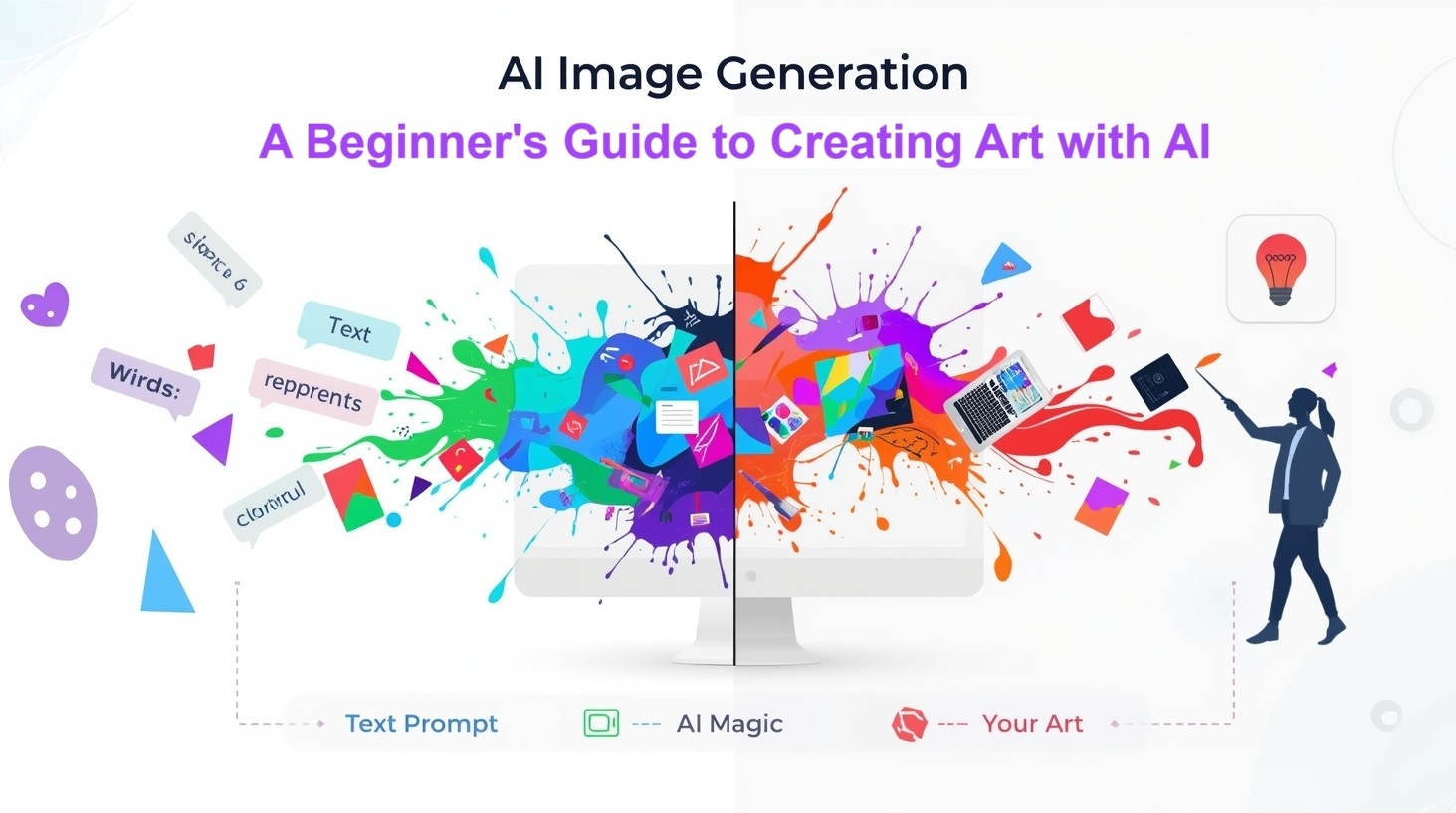
AI Image Generation: A Beginner’s Guide to Creating Art with AI

Your Gateway to Digital Creativity
AI Image Generation has transformed how we think about art and creativity. Gone are the days when creating beautiful, professional-looking images required years of training in design software or traditional art techniques. Today, anyone with an internet connection and a creative idea can generate stunning visuals in seconds, simply by describing what they want to see.
I remember the first time I generated an image using AI. I typed “a cozy coffee shop on a rainy day” and watched in amazement as the algorithm created a beautiful illustration that looked like something from a storybook. That moment opened my eyes to a new world of creative possibilities, and I want to share that excitement with you.
This guide will walk you through everything you need to know about AI image generation—from understanding how it works to creating your first piece of AI art. Whether you’re a complete beginner or someone who’s heard about tools like Midjourney or DALL-E but doesn’t know where to start, this article is for you.
What Is AI Image Generation?
At its core, AI image generation is the process of using artificial intelligence to create images from text descriptions, called “prompts.” Instead of picking up a paintbrush or opening Photoshop, you simply describe what you want to see, and the AI brings your vision to life.
These AI systems are trained on millions of images from across the internet. They learn patterns, styles, artistic techniques, and how different objects relate to one another. When you give them a prompt, they use this knowledge to generate entirely new images that match your description.
Imagine if you had an incredibly talented artist who could instantly grasp your ideas and sketch them out for you, yet this artist operates at a rapid pace and never experiences fatigue.
How Does AI Image Generation Actually Work?
You don’t need to understand the complex mathematics behind AI art generation to use these tools, but knowing the basics can help you create better results.
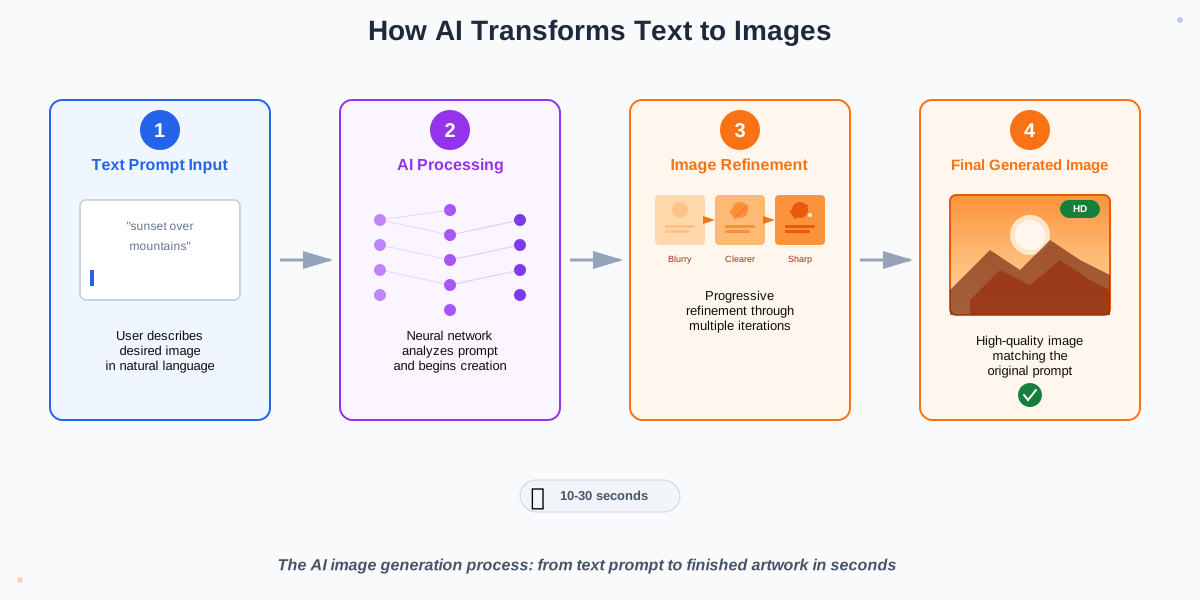
Most modern AI image generators use a technology called diffusion models. Here’s a simplified explanation: The AI starts with random noise (think of TV static) and gradually refines it into a coherent image based on your text prompt. It’s similar to watching a blurry photograph gradually come into focus, except that the AI is creating the image from the beginning.
The process happens in several steps:
- The AI reads your text prompt and understands what you’re asking for
- It starts with random pixels and begins shaping them
- Through multiple iterations, it refines the image, adding details and adjusting colors
- Finally, it produces a finished image that matches your description
The whole process typically takes between 10 seconds and a few minutes, depending on the platform you’re using and how complex your request is.
Popular AI Image Generation Tools to Get Started
Before you can create your first AI-generated image, you need to choose a platform. Here are the most beginner-friendly options available today:
DALL-E 3 (by OpenAI) is one of the most user-friendly options, especially if you already use ChatGPT. It excels at understanding detailed prompts and creating images that closely match what you describe. The integration with ChatGPT means you can have a conversation about your image and refine it through dialogue.
Midjourney is known for producing artistic, aesthetically beautiful images. It runs through Discord, which might seem unusual at first, but the community aspect makes learning easier. Other users share their prompts and results, which is incredibly helpful when you’re starting out.
Leonardo AI offers a web-based interface that’s intuitive for beginners. It provides fine-tuned models for different styles, from photorealistic to anime, making it versatile for various creative needs.
Adobe Firefly is integrated into Adobe’s creative suite and focuses on commercially safe image generation. If you’re creating images for professional projects, this is a solid choice.
Stable Diffusion is free and open-source, offering the most control over the generation process. However, its learning curve is more challenging than that of other options.
For absolute beginners, I recommend starting with DALL-E 3 through ChatGPT or Leonardo AI. Both offer intuitive interfaces and produce quality results without requiring technical knowledge.
Step-by-Step: Creating Your First AI Image
Let’s walk through the process of generating your first image. I’ll use general steps that apply to most platforms:
Step 1: Choose Your Platform and Create an Account
Select one of the AI image generators mentioned above. Most require you to create a free account. Some platforms offer free credits or a limited number of free generations to get you started.
Step 2: Understand the Prompt Box
Once you’re logged in, you’ll see a text box where you enter your prompt. This is where the magic begins. Your prompt is simply a description of what you want to create.
Step 3: Write Your First Prompt
Start simple. Instead of writing a complex description, try something straightforward like “a happy golden retriever playing in a park.” Clear, descriptive language works best.
Step 4: Generate the Image
Click the generate button (might be labeled “Create,” “Dream,” or “Generate”) and wait. Most platforms take 10—30 seconds to produce results.
Step 5: Review Your Results
Most platforms generate multiple variations. Look through them and see which one you like best. Don’t worry if they’re not perfect—we’ll cover how to improve them next.
Step 6: Refine and Regenerate
If the results do not meet your expectations, please consider modifying your prompt. Add more details, specify a style, or clarify what you want. For example, change “a golden retriever” to “a happy golden retriever with a red collar, playing with a tennis ball in a sunny park, watercolor painting style.”
Step 7: Save Your Image
Once you’re pleased with a result, download it. Most platforms offer different resolution options—choose the highest quality available for your needs.
Mastering the Art of Prompt Writing
The secret to creating amazing AI-generated images lies in writing effective prompts. Think of your prompt as giving instructions to an artist who will create exactly what you describe—but only if your instructions are clear.
Here’s what makes a good prompt:
Be Specific: Instead of “a cat,” try “a fluffy orange tabby cat with green eyes sitting on a windowsill.” The more details you provide, the better the AI can visualize your idea.
Include Style References: Want a specific look? Add style keywords like “oil painting,” “digital art,” “photograph,” “watercolor,” “anime style,” or even “in the style of Van Gogh.”
Set the Scene: Describe the environment, lighting, and mood. “Sunset lighting,” “dramatic shadows,” “soft morning light,” or “neon cyberpunk atmosphere” all create different feels.
Specify Composition: Terms like “close-up,” “wide angle,” “bird’s eye view,” or “portrait orientation” help control how your image is framed.
Use Quality Modifiers: Words like “highly detailed,” “4K,” “professional photography,” or “award-winning” often improve the overall quality of results.
Here’s an example of a basic versus improved prompt:
Basic: “a house”
Improved: “a cozy stone cottage with a thatched roof, surrounded by wildflowers, soft golden hour lighting, watercolor illustration style, highly detailed”
See the difference? The second prompt gives the AI much more information to work with.
Common Mistakes Beginners Make (And How to Avoid Them)
After helping dozens of friends get started with AI art, I’ve noticed some common stumbling blocks:
Mistake 1: Being Too Vague
“Make me something cool” won’t give you positive results. The AI needs specific information. Always include at least the subject, style, and setting in your prompt.
Mistake 2: Using Contradictory Instructions
Asking for “a realistic cartoon” or “daytime sunset” confuses the AI. Please ensure that your prompt elements are logically cohesive.
Mistake 3: Expecting Perfection on the First Try
Experienced users usually need more than one generation to get their perfect image. Plan to iterate and refine your prompts. Consider each generation a learning opportunity.
Mistake 4: Ignoring the Platform’s Strengths
Each AI tool has different strengths. Midjourney excels at artistic images, while DALL-E 3 is better at following complex instructions. Choose the right tool for your needs.
Mistake 5: Not Exploring Style Keywords
Many beginners stick to basic descriptions and miss out on the vast range of artistic styles available. Experiment with style keywords to discover what’s possible.
Mistake 6: Giving Up Too Soon
If your first few attempts don’t look great, don’t get discouraged. Learning to “speak AI” takes practice. Study other users’ prompts and experiment with different approaches.
Creative Uses for AI-Generated Images
Once you’ve mastered the basics, you’ll discover countless ways to use AI image generation in your daily life:
- Social Media Content: Create eye-catching visuals for your posts, profile pictures, or stories without hiring a designer.
- Presentations and Reports: Generate custom illustrations that perfectly match your topic instead of searching through stock photo libraries.
- Personal Projects: Design birthday cards, invitations, or personalized gifts with unique imagery.
- Concept Visualization: Bring abstract ideas to life for brainstorming sessions or pitching concepts to clients.
- Learning and Education: Create visual aids, historical recreations, or scientific illustrations for teaching materials.
- Creative Inspiration: Use AI-generated images as starting points for traditional art projects or to overcome creative blocks.
- Blog and Website Graphics: Generate custom header images, icons, or illustrations that align perfectly with your content.
The possibilities are truly endless. I’ve used AI image generation for everything from creating custom wallpapers for my phone to visualizing characters from the stories I write.
Understanding Image Rights and Ethics
As exciting as AI image creation is, it’s important to understand the ethical and legal considerations:
Most AI platforms train their models on publicly available images from the internet, which has sparked debates about copyright and artist rights. While the legal landscape is still evolving, here are some practical guidelines:
- Check Platform Terms: Different platforms have different policies about commercial use. Some generated images are free to use commercially, while others have restrictions.
- Be Respectful: Avoid creating images in the exact style of living artists without permission, and don’t generate images of real people without their consent.
- Give Credit When Appropriate: If you’re sharing AI-generated images, it’s good practice to mention they were created with AI, especially in professional contexts.
- Use Responsibly: Don’t create misleading content, deepfakes, or images that could harm others.
The AI art community is generally supportive and collaborative, but staying informed about these issues helps everyone navigate this new creative landscape responsibly.
Tips for Continuous Improvement
Getting better at AI image generation is a journey. Here are strategies that have helped me improve over time:
- Study Successful Prompts: Many platforms have public galleries where you can see which prompts created what images. This is invaluable for learning effective techniques.
- Keep a Prompt Library: When you create something you love, save the prompt. Build a personal collection of successful formulas you can adapt for future projects.
- Experiment with Parameters: Most platforms offer advanced settings like negative prompts (describing what you don’t want), image seeds (for consistent results), or style strength adjustments. Please take the time to familiarize yourself with these tools.
- Join Communities: Online forums, Discord servers, and social media groups dedicated to AI art are filled with helpful people sharing techniques and inspiration.
- Practice Regularly: Like any skill, prompt writing improves with practice. Try generating images daily, even if just for fun.
- Combine Techniques: Don’t be afraid to generate an image with AI, then edit it in traditional software, or use multiple AI tools in sequence to achieve your vision.
Frequently Asked Questions About AI Image Generation
Conclusion: Your Creative Journey Starts Now
AI Image Generation has democratized creativity in ways we couldn’t have imagined a few years ago. The tools are accessible, the learning curve is gentle, and the possibilities are limitless. Whether you want to create art for personal enjoyment, enhance your professional projects, or explore a new creative outlet, AI image generation offers an exciting path forward.
The most important thing is to start. Don’t worry about creating masterpieces on your first try—focus on learning, experimenting, and having fun with the process. Every image you generate teaches you something new about crafting effective prompts and working with AI.
Remember, the AI is your creative partner, not a replacement for imagination. Your ideas, descriptions, and artistic vision are what bring these images to life. The technology is simply a powerful tool that makes your creativity more accessible.
So go ahead—pick a platform, write your first prompt, and watch as your words transform into images. The world of AI-generated art is waiting for you to explore it.
Happy creating!
References:
OpenAI DALL-E Documentation: https://openai.com/dall-e
Midjourney Official Guide: https://docs.midjourney.com
Stable Diffusion Resources: https://stability.ai
Adobe Firefly Learning Hub: https://helpx.adobe.com/firefly
About the Author
Abir Benali is a friendly technology writer who specializes in making AI tools accessible to everyone. With a passion for breaking down complex technologies into simple, actionable guides, Abir helps thousands of non-technical users discover the creative possibilities of AI. When not writing about technology, Abir enjoys experimenting with digital art and teaching workshops on practical AI applications for beginners.