AI-Powered Logo Makers: A Comprehensive Comparison

AI-Powered Logo Makers have revolutionized how entrepreneurs, small business owners, and creative professionals approach brand identity design. I remember launching my first startup five years ago, spending weeks going back and forth with freelance designers, and burning through my limited budget before even getting a logo I felt lukewarm about. Today, the landscape looks completely different. These intelligent design tools have democratized professional branding, making it accessible to anyone with an idea and an internet connection. Whether you’re a solopreneur testing a side hustle, a nonprofit stretching every dollar, or simply someone who needs a polished logo without the designer price tag, AI logo generators offer a compelling solution that balances quality, speed, and affordability in ways that seemed impossible just a few years ago.
The beauty of modern AI-powered design tools lies in their ability to understand your brand personality through simple inputs—your company name, industry, preferred colors, and style preferences—then generate dozens of professional options in seconds. But here’s the catch: not all AI logo makers are created equal. Some excel at minimalist modern designs, others shine with intricate illustrations, and a few offer features that extend far beyond logo creation into complete brand identity packages. The right choice depends entirely on your specific needs, technical comfort level, and long-term branding goals.
Understanding AI Logo Makers: The Technology Behind Your Brand Identity
Before diving into specific platforms, let’s demystify what happens when you use an AI logo design tool. These systems leverage machine learning algorithms trained on millions of existing logos, design principles, and brand aesthetics. When you input your company name and select your industry, the AI doesn’t just randomly combine shapes and fonts—it analyzes successful branding patterns within your sector, considers color psychology, evaluates typography pairings, and applies established design rules that professionals have followed for decades.
The sophistication varies significantly across platforms. Entry-level tools might rely on template libraries with basic customization, while advanced systems use generative AI models that create genuinely unique designs from scratch. Some platforms incorporate neural networks that learn from user preferences, improving their suggestions as you interact with the interface. Others integrate natural language processing, allowing you to describe your ideal logo in conversational terms rather than selecting from predefined categories.
What excites me most about this technology is its iterative nature. Unlike traditional design processes where revisions mean scheduling another meeting and waiting days for updates, AI-powered branding solutions let you explore hundreds of variations instantly. You can test different color schemes, experiment with icon styles, and compare font combinations in real time. This immediate feedback loop accelerates decision-making and often leads to better outcomes because you’re seeing more possibilities than any single designer could reasonably present in a typical project timeline.
Top AI-Powered Logo Makers: Detailed Comparison
1. Looka (formerly Logojoy)
Looka represents what I consider the gold standard for AI-generated logos aimed at small businesses and entrepreneurs who want professional results without the learning curve. The platform uses a proprietary AI engine that generates designs based on your responses to a brief visual preference quiz—you’ll see various logo styles and color combinations, selecting ones that resonate with your aesthetic vision. This training phase helps the AI understand your taste before showing you actual logo concepts.
- Exceptionally intuitive interface that requires zero design experience
- Generates highly diverse options across different logo types (wordmarks, emblems, combination marks)
- Brand Kit feature provides matching business card designs, social media templates, and brand guidelines
- Unlimited revisions during the design process before purchase
- High-resolution files suitable for both print and digital use
- Responsive customer support with quick turnaround times
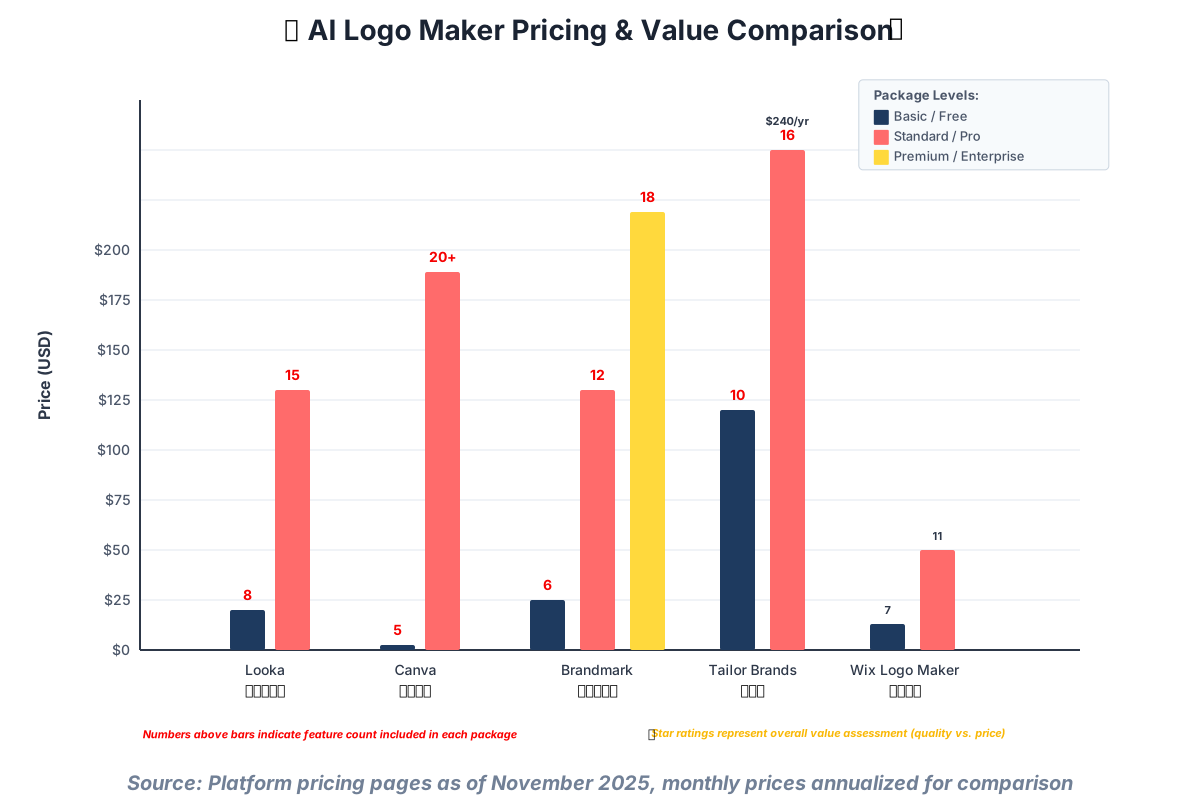
- Premium pricing compared to budget alternatives ($20 for the basic package, $65 for Brand Kit)
- Limited ability to upload custom graphics or illustrations
- Color adjustments sometimes require regenerating the entire design
- No font upload capability—you’re limited to their curated library
- Vector file editing requires downloading and using external software
Looka excels for service-based businesses, e-commerce stores, and tech startups needing a complete brand identity package. If you’re launching a business where brand consistency across multiple touchpoints matters—think Instagram posts, email signatures, and product packaging—Looka’s comprehensive approach justifies the higher price point. I’ve recommended it to several coaching clients who needed to establish a professional presence quickly, and they consistently report that the Brand Kit saves them hours of design work down the line.
The platform’s strength lies in its understanding of contemporary design trends. The logos feel current without being trendy in ways that’ll look dated next year. You’ll notice the AI tends toward clean, scalable designs that work equally well on a billboard or a mobile app icon—a critical consideration in our multi-platform world.
Pricing: The Basic logo package starts at $20, and the Premium Brand Kit at $65, includes logo files, business cards, social profiles, and a brand book.
2. Canva Logo Maker
Canva’s entry into AI logo creation leverages its massive existing user base and extensive template library. Rather than starting from scratch, Canva’s AI curates and customizes from thousands of pre-designed logo templates based on your inputs. This hybrid approach—AI-assisted template selection with powerful manual editing tools—offers tremendous flexibility for users who want some creative control.
- Seamlessly integrates with broader Canva ecosystem for all design needs
- Free tier available with basic functionality and export options
- Extensive customization capabilities, including custom font uploads
- Access to millions of stock photos, illustrations, and icons
- Real-time collaboration features for team-based branding decisions
- Regular updates with new templates and design elements
- Mobile app allows logo design on smartphones and tablets
- Template-based approach means less uniqueness compared to AI-generated designs
- Free version includes watermarks and limited download formats
- Can feel overwhelming for complete beginners due to numerous options
- Premium stock elements require paid subscription or additional purchases
- Export resolution in free tier insufficient for large-format printing
Canva Logo Maker shines for content creators, influencers, and small businesses that plan to do extensive design work beyond just logo creation. If you’re building social media graphics, presentations, marketing materials, and printed collateral, having everything in one ecosystem streamlines your workflow considerably. The ability to ensure brand consistency across dozens of different content types by pulling from the same logo file, color palette, and font library cannot be overstated.
I particularly appreciate Canva for clients who want to learn design fundamentals. The editing interface teaches design principles through intuitive drag-and-drop interactions. You’ll understand hierarchy, spacing, and color harmony just by experimenting with the tools. This educational aspect transforms logo creation from a one-time transaction into a skill-building experience.
Pricing: A Free tier is available; Canva Pro is $12.99/month (individual) or $14.99/month (teams) and includes premium templates, brand kit tools, and unlimited downloads.
3. Brandmark.io
Brandmark represents the cutting edge of generative AI logo design, using deep learning algorithms to create truly original logos rather than modifying templates. The system analyzes your brand name, identifies relevant visual metaphors, and generates unique icon concepts that didn’t exist before you started the process. This approach produces logos with a distinctive, custom-designed feel that stands apart from template-based competitors.
- Genuinely unique designs generated specifically for your brand
- Advanced AI creates sophisticated iconography and visual metaphors
- Comprehensive brand asset package including animated logos
- Style transfer technology allows matching specific aesthetic references
- Excellent for abstract and conceptual brand representations
- Includes social media profile designs and basic brand guidelines
- Animated logo versions for digital use
- Higher learning curve understanding the AI’s style preferences
- Premium pricing starts at $25; comprehensive packages reach $175
- Less intuitive editing compared to drag-and-drop competitors
- Occasional abstract results require multiple regenerations
- Limited font selection compared to larger platforms
- No free trial—requires purchase commitment to download files
Brandmark excels for tech companies, creative agencies, and businesses wanting distinctive, memorable branding that doesn’t resemble competitors. If you’re in a crowded market where visual differentiation matters—think apps competing in crowded app stores or consultancies targeting similar demographics—Brandmark’s unique iconography helps you stand out. The animated logo options prove particularly valuable for video content creators and brands with a strong digital presence.
I’ve seen Brandmark produce surprisingly sophisticated concepts for abstract service offerings. One client in the leadership development space received logo concepts incorporating subtle visual metaphors about growth, transformation, and elevation that would have taken extensive creative briefing sessions with traditional designers. The AI’s ability to translate conceptual ideas into visual language impresses me consistently.
Pricing: Basic logo package at $25, Designer package at $65, and Enterprise package at $175 including animated logos, social media assets, and a brand style guide.
4. Tailor Brands
Tailor Brands positions itself as an all-in-one AI branding platform extending beyond logo creation into complete business identity management. The system starts with logo design but seamlessly integrates trademark registration services, social media management tools, and even basic website building capabilities. This comprehensive approach appeals to entrepreneurs wanting a single platform for their entire brand presence.
- Affordable monthly subscription model starting at $10
- Integrated trademark search and registration services
- Social media content scheduling and management tools
- Automated brand consistency across all generated materials
- Simple resizing and reformatting for different use cases
- Regular content suggestions based on your industry
- Business card and merchandise mockup tools included
- Subscription required for continued access to logo files
- Design quality sometimes feels more template-based than AI-generated
- Canceling subscription removes access to previously created assets
- Less customization flexibility during initial design phase
- Interface can feel cluttered with upsell prompts for additional services
- Vector editing requires downloading files and using external programs
Tailor Brands works best for solopreneurs and very small businesses wanting simplified brand management without juggling multiple platforms. If you’re a consultant, coach, or service provider who needs a decent logo, consistent social media presence, and occasional marketing materials but doesn’t want to become a design expert, Tailor Brands handles the baseline branding competently. The trademark search integration proves particularly valuable for businesses concerned about the legal availability of their chosen name and logo.
The platform’s automated content suggestions help solve the “what should I post today?” problem that plagues small business social media. While not groundbreaking, having AI-generated post ideas aligned with your brand voice saves meaningful time for people wearing multiple business hats.
Pricing: Basic plan $10/month, Standard plan $20/month, includes logo, social media tools, business cards, and trademark services.
5. Wix Logo Maker
Wix Logo Maker leverages the company’s reputation in website building to offer an AI-driven logo solution that integrates perfectly with Wix’s website ecosystem. The AI uses a question-based approach, asking about your business type, design preferences, and intended use cases before generating logo concepts. The tight integration with Wix websites means your logo automatically appears properly formatted across your site the moment you select it.
- Seamless integration with Wix website builder
- One-time purchase model—no subscription required
- Clean, modern design aesthetic across generated options
- Instant implementation on Wix websites
- Responsive customer support
- Includes social media kit and basic brand assets
- No design experience necessary
- Best value requires Wix website subscription
- Limited customization compared to dedicated design platforms
- Smaller icon and illustration library than competitors
- Font selection feels limited for certain industries
- Premium package necessary for high-resolution print files
- Standalone logo creation without website feels overpriced
Wix Logo Maker makes perfect sense if you’re already planning to build your website on Wix or currently maintain one. The seamless integration eliminates technical headaches around file formats, sizing, and implementation. For restaurants, local service businesses, and retail shops building an online presence, having a logo and website created in one integrated environment simplifies the entire process considerably.
I appreciate Wix’s straightforward pricing model—you pay once and own the files without worrying about subscriptions lapsing. This proves especially appealing for businesses with tight monthly budgets, where one-time expenses fit better into financial planning than ongoing subscriptions.
Pricing: Basic logo download $13, Premium package with high-resolution files $50, significant discounts available with Wix website plans.
6. Hatchful by Shopify
Hatchful represents Shopify’s entry into AI logo generation, specifically designed with e-commerce businesses in mind. The platform offers completely free logo creation with unlimited downloads—yes, you read that correctly. The catch? It’s optimized for Shopify store integration, and the business model relies on converting free logo users into paying Shopify merchants. For e-commerce entrepreneurs, this alignment works beautifully.
- Completely free with unlimited logo downloads
- No watermarks or limitations on usage rights
- E-commerce optimized designs that work well on product packaging
- Quick generation process takes under five minutes
- Includes social media profile images and favicons
- Regular template updates reflecting current design trends
- No account creation required for basic downloads
- Smaller template library compared to premium competitors
- Limited customization options during design process
- Template-based rather than truly AI-generated designs
- No vector file formats in free version
- Best results require having Shopify store for full integration
- Cannot upload custom fonts or graphics
- Less sophisticated than paid AI alternatives
Hatchful excels for e-commerce startups, dropshippers, and makers launching products with minimal capital. If you’re testing a business concept, bootstrapping a side hustle, or need professional branding while preserving cash for inventory and marketing, Hatchful provides surprising quality at zero cost. The designs lean toward modern, clean aesthetics that photograph well on products—essential for Instagram-driven retail businesses.
I’ve guided numerous e-commerce clients toward Hatchful during their validation phase. You can launch with a legitimate-looking brand, test market response, and always upgrade to a custom design later if the business gains traction. This pragmatic approach aligns perfectly with lean startup methodology.
Pricing: Completely free with full commercial usage rights; a Shopify store subscription ($39-$399/month) is recommended for optimal integration but not required.
Key Features Comparison: What Really Matters
Design Quality and Uniqueness
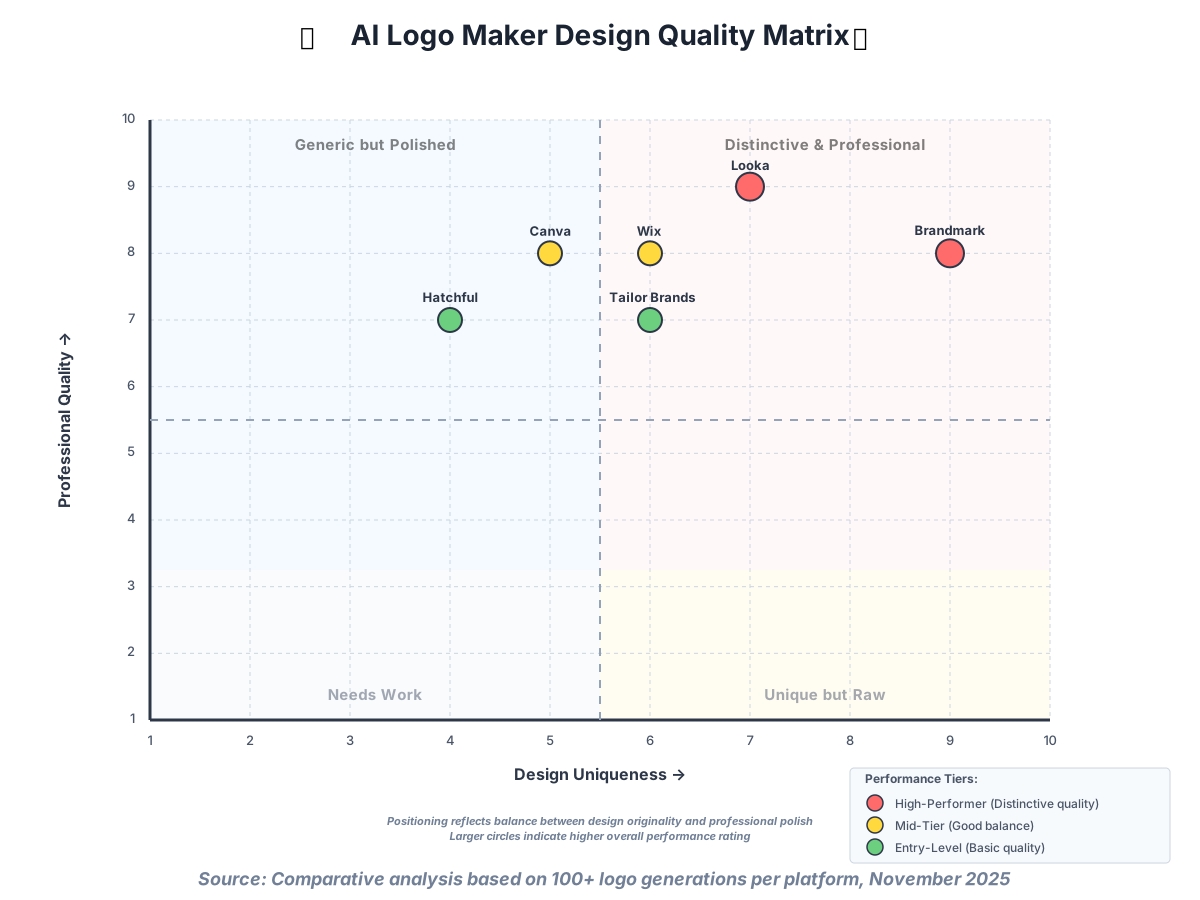
When evaluating AI logo design platforms, the fundamental question remains: how good are the actual logos? Template-based systems like Canva and Hatchful produce polished, professional results but with inherent similarity risks—you might discover competitors or businesses in other industries using variations of the same template. Generative AI platforms like Brandmark and Looka create more distinctive designs but occasionally produce concepts requiring multiple regenerations before hitting the mark.
My experience testing these platforms revealed interesting patterns. Modern, minimalist designs—think sans-serif wordmarks with simple geometric icons—come out consistently strong across all platforms. These styles play to AI strengths because they follow clear design rules and have abundant training data. However, if you need vintage aesthetics, intricate illustrations, or highly stylized typography, you’ll find significantly more variation in quality. Brandmark handles complex iconography best, while Canva’s manual editing tools let you refine vintage styles more precisely.
Customization Capabilities
The degree of post-generation editing varies dramatically across AI branding tools. Canva leads here with professional-grade editing capabilities—you can adjust individual letter spacing, manipulate anchor points on vector shapes, and apply sophisticated effects. This flexibility means you’re never truly stuck with the AI’s initial output. Conversely, platforms like Hatchful and Tailor Brands offer minimal customization, operating on the principle that the AI should nail the design upfront, requiring only color or font swaps.
I lean toward platforms offering substantial customization when working with clients who have specific brand guidelines or strong aesthetic opinions. Being able to tweak proportions, adjust spacing, and refine details transforms a good logo into the perfect logo. However, for decision-fatigued entrepreneurs or those with minimal design opinions, limited customization actually proves beneficial—fewer choices mean faster decisions and less second-guessing.
File Formats and Usage Rights
Pay close attention to what file formats you receive and any usage limitations. Most platforms provide PNG files suitable for websites and social media, but high-resolution printing requires vector formats like SVG, EPS, or PDF. Looka, Brandmark, and Canva (Pro tier) include comprehensive file packages with multiple formats. Budget options often limit you to rasterized images, creating problems when you eventually need that logo on a billboard or vehicle wrap.
Usage rights deserve equal scrutiny. Most platforms grant full commercial usage rights with purchase, but subscription-based models like Tailor Brands technically own the files—canceling your subscription means losing access. This distinction matters significantly if you’re building a brand intended to outlive quarterly subscription budgets. One-time purchase platforms provide peace of mind that your logo remains yours unconditionally.
Brand Asset Ecosystem
Modern branding extends far beyond a single logo file. Consider what additional assets each platform provides. Looka’s Brand Kit includes business cards, social media templates, and email signatures—everything required for consistent brand application. Canva offers the broadest ecosystem, letting you create virtually any marketing material using your logo and established brand colors. Tailor Brands includes social media management tools, while Wix focuses on website integration.
The value of these extended features depends entirely on your workflow preferences. If you’re comfortable using separate specialized tools for different tasks, standalone logo generation might suffice. However, most small business owners I work with appreciate having everything centralized, even if individual features aren’t best-in-class. The time saved navigating between platforms and manually ensuring brand consistency justifies comprehensive packages for many entrepreneurs.
Making Your Decision: Choosing the Right AI Logo Maker
Budget Considerations
Your financial situation should heavily influence platform selection, but think beyond immediate costs. Free options like Hatchful work brilliantly for initial testing but may require upgrading later. Monthly subscriptions seem affordable at $10-20, but annualized costs reach $120-240—potentially exceeding one-time purchase platforms over the logo’s useful lifetime. For businesses expecting to rebrand within a year or two, subscriptions make sense. For established businesses seeking professional identity, one-time purchases provide better long-term value.
Consider hidden costs too. Some platforms charge separately for premium fonts, specific file formats, or additional revisions. Others bundle everything into package prices. Calculate total investment including all elements you’ll actually need rather than comparing base prices alone. I’ve watched clients choose budget platforms only to discover they need premium upgrades, ultimately spending more than comprehensive packages would have cost initially.
Technical Skill Level
Honestly assess your design comfort level. Platforms like Looka and Wix Logo Maker cater specifically to complete beginners, holding your hand through the entire process with guided questions and limited choices. Canva and Brandmark assume some design literacy—you’ll benefit from understanding basic composition, color theory, and typography concepts. This isn’t insurmountable; plenty of resources explain these fundamentals. But if you’re starting from absolute zero and need a logo tomorrow, beginner-focused platforms prevent frustration.
Don’t underestimate the learning curve time investment. Experimenting with Canva’s extensive features might consume hours before you’re comfortable, whereas Hatchful’s streamlined approach generates acceptable logos in minutes. Your timeline matters. Need something today? Choose simplicity. Have time to learn and experiment? Complexity offers rewards.
Business Type and Industry
Certain platforms align better with specific business types. E-commerce businesses benefit from Hatchful’s product-focused designs and Shopify integration. Service professionals and consultants often prefer Looka’s sophisticated branding approach. Creative agencies and tech startups gravitate toward Brandmark’s unique iconography. Restaurants and local businesses find Wix’s straightforward implementation appealing.
Industry aesthetics matter too. Some sectors have established visual languages—law firms trend toward classic serif fonts and subdued colors, while wellness brands favor organic shapes and calming palettes. Evaluate whether each platform’s design output aligns with your industry expectations. Most offer industry filters during the generation process, but browse their example galleries to gauge whether the overall aesthetic matches your sector’s norms.
Long-Term Brand Strategy
Think beyond your immediate logo needs toward comprehensive brand development. Will you need extensive marketing materials? Consider platforms offering robust design ecosystems. Planning a significant social media presence? Platforms with integrated social templates save time. Expecting to trademark your brand? Tailor Brands’ integrated trademark services streamline that process.
Scalability matters too. As your business grows, will this platform accommodate evolving needs, or will you inevitably need to migrate to professional design software? Canva Pro offers surprising depth for growing businesses, while limited platforms create transition points requiring brand asset recreation. Factor in the hassle and cost of eventual platform switching when making initial selections.
Advanced Tips: Getting the Most from Your AI Logo Maker
Optimizing Your Initial Inputs
The quality of AI-generated logos correlates directly with input quality. Don’t rush through initial questionnaires. Spend time articulating your brand personality precisely. Rather than selecting “modern” as a style, consider what modern means for your specific context—sleek minimalism, bold geometric shapes, or clean sans-serif typography? The more specific your preferences, the better your results.
Brand name selection impacts design possibilities significantly. Shorter names provide more flexibility for icon integration and layout variations. Longer names might work better as standalone wordmarks. Consider how your name sounds, what visual associations it evokes, and whether obvious iconographic connections exist. A business named “Lighthouse Consulting” has natural visual metaphors that AI can leverage, while abstract names require more creative interpretation.
Color psychology deserves serious consideration. Different colors evoke specific emotional responses—blue conveys trust and stability, orange suggests energy and creativity, and green implies growth and sustainability. Research color associations within your industry. While you can always adjust colors later, starting with psychologically appropriate choices focuses AI generation productively.
Iterative Refinement Strategies
Rarely does the first generation produce the perfect logo. Embrace iteration. Generate multiple batches, save favorites from each round, then compare across sessions. This comparative approach reveals preferences you might not consciously recognize. Sometimes a design element from one option combines beautifully with a layout from another—many platforms allow requesting combinations of specific elements.
Pay attention to scalability during refinement. View your logo at various sizes—from favicon dimensions to billboard scale. Details that look fantastic at normal size might become illegible when small or overly simplistic when enlarged. Test on both light and dark backgrounds. A logo that only works on white backgrounds limits application options significantly.
Seek feedback strategically, but beware too many opinions. Show options to a few trusted people who understand your business and target audience. Avoid surveying everyone you know—you’ll receive contradictory advice that creates decision paralysis. Instead, test logo options with a small sample of your actual target market. Their responses matter more than general opinions because they represent the people you’re trying to reach.
Ensuring Brand Consistency
Once you’ve selected your logo, establish clear usage guidelines immediately. Document approved color codes (RGB for screens, CMYK for print, and hex codes for web), spacing requirements around the logo, minimum size specifications, and acceptable background colors. Most premium platforms provide basic brand guidelines, but expand these based on your specific needs.
Create a brand asset library organizing all logo variations—full color, black and white, horizontal, vertical, and icon-only versions. Label files clearly and store them in easily accessible cloud storage. Nothing frustrates faster than needing your logo for a time-sensitive opportunity but unable to locate the right file format. Spend thirty minutes organizing now to save hours of frustration later.
Communicate brand guidelines to everyone who might use your logo—team members, vendors, partners, and media contacts. Provide them with appropriate file formats and clear instructions. Logo misuse happens frequently, not from malice but from ignorance. A simple one-page visual guide showing correct and incorrect usage prevents most problems.
Common Mistakes to Avoid
Choosing Based Solely on Price
The cheapest option rarely proves most economical long-term. I’ve consulted with businesses that saved money using free tools only to rebrand within months because the logo looked amateurish or didn’t scale properly. Calculate the total cost, including your time investment. If you spend eight hours experimenting with a free tool versus two hours with a premium platform, what’s your time worth? Often, paying for better AI and more comprehensive features saves more money than the subscription costs.
Ignoring Trademark Considerations
Before falling in love with a logo, verify its legal availability. Even AI-generated designs can inadvertently resemble existing trademarks, especially in crowded industries. Conduct basic trademark searches through the USPTO database (in the US) or the equivalent in your country. Platforms like Tailor Brands integrate trademark searches, but independent verification provides peace of mind. Rebranding after legal challenges costs far more than proper due diligence upfront.
Over-Designing or Trend-Chasing
Simplicity almost always wins in logo design. Resist the temptation to include every feature or effect offered by your chosen platform. The most iconic logos—Apple, Nike, McDonald’s—succeed through elegant simplicity. They remain memorable, reproduce cleanly at any size, and work across diverse applications. If your logo needs a lengthy explanation, it might be a bit too complex.
Similarly, avoid chasing current design trends that’ll look dated quickly. Gradient overlays, specific illustration styles, or trendy color palettes might feel fresh now but age poorly. Classic approaches—clean typography, simple geometric shapes, restrained color use—remain effective across decades. Your logo should feel contemporary without screaming the specific year of creation.
Neglecting Testing Across Use Cases
Test your logo everywhere you’ll actually use it before finalizing. Does it work as a social media profile picture where most of the design gets cropped into a tiny circle? Can you read it in your email signature? Does it look professional on your website header? Will it print clearly on business cards? Discovering application problems after purchase forces compromises or expensive do-overs.
Create mockups showing your logo in various contexts—on product packaging, storefront signs, vehicle graphics, apparel, and digital ads. Most platforms provide basic mockup tools, and free resources like Mockup World offer thousands of templates. Seeing your logo in realistic applications often reveals issues invisible when viewing the logo file alone.
Frequently Asked Questions About AI Logo Makers
Final Recommendations: Which AI Logo Maker Should You Choose?
After extensive testing and real-world application across diverse business contexts, I can confidently offer tailored recommendations based on specific needs:
For complete beginners wanting simplicity: Looka provides the most intuitive experience with consistently high-quality results. The interface guides you naturally through decisions, and the comprehensive Brand Kit eliminates guesswork about applying your logo consistently. Yes, it costs more than alternatives, but the time saved and stress avoided justify the premium for most users.
For budget-conscious entrepreneurs: Hatchful by Shopify delivers surprising quality at zero cost. While customization options remain limited and the AI isn’t as sophisticated as paid alternatives, the results look professional and include all essential file formats for digital use. Perfect for validating business ideas before investing in premium branding.
For creative control enthusiasts: Canva Logo Maker wins hands-down. The editing capabilities let you refine every detail, and integration with the broader Canva ecosystem means you’ll use the platform for countless other design needs. The learning curve rewards investment with versatile skills applicable beyond logo creation.
For distinctive, unique branding: Brandmark’s generative AI produces the most original designs. If visual differentiation matters critically to your competitive positioning, the premium pricing buys genuinely unique iconography that stands apart from template-based competitors. The animated logo options add contemporary flair for digital-first businesses.
For integrated business management: Tailor Brands makes sense when you want logo design bundled with trademark services, social media management, and basic marketing tools. The subscription model works well for businesses needing ongoing support rather than one-time logo creation.
For Wix website owners: Wix Logo Maker offers seamless integration and reasonable one-time pricing. While not the strongest standalone logo maker, the convenience of perfect website implementation and cohesive brand management within Wix’s ecosystem provides meaningful value for existing platform users.
Remember, your logo represents your business visually but doesn’t define your success. A perfect logo won’t save a poor business model, while an adequate logo won’t prevent a great business from thriving. Focus on choosing a platform matching your current needs and constraints rather than pursuing perfection. You can always rebrand later as your business evolves—many successful companies have refreshed their logos multiple times throughout their growth journey.
Taking Action: Your Next Steps
Now that you understand the landscape of AI-powered logo makers, move forward with confidence. Here’s my recommended implementation process:
Step 1: Define your budget realistically, considering both immediate costs and long-term value. Remember to factor in your time investment—the cheapest monetary option isn’t always the most economical choice.
Step 2: Assess your technical comfort level honestly. Choose platforms matching your current skills rather than aspirational abilities. You can always graduate to more complex tools later.
Step 3: Research your industry’s visual language. Browse competitors’ logos, identify common patterns, and decide whether you want to fit within established norms or deliberately stand apart.
Step 4: Select one or two platforms from this comparison and create accounts. Most offer free trials or low-commitment entry options. Experiment with actual logo generation rather than endless research.
Step 5: Generate multiple logo batches across different sessions. Sleep on decisions rather than committing immediately. Fresh perspective often reveals preferences that weren’t initially apparent.
Step 6: Test finalists rigorously across all planned applications—digital, print, large, small, light backgrounds, and dark backgrounds. Identify any deal-breaker limitations before purchase.
Step 7: Gather targeted feedback from a small group representing your actual audience. Weigh their opinions appropriately—someone who’ll never be a customer shouldn’t influence your decision equally with ideal prospects.
Step 8: Make your selection with confidence, knowing you’ve done thorough due diligence. Trust your judgment and move forward. Analysis paralysis helps nobody.
The democratization of professional design through AI-powered branding tools represents one of the most significant leveling factors for small businesses and entrepreneurs in recent years. What once required thousands of dollars and weeks of back-and-forth communication now happens in hours at accessible price points. This isn’t about replacing human creativity—it’s about empowering more people to express their unique visions professionally.
Your brand journey starts with a logo, but it continues through countless customer interactions, product experiences, and value delivery. Let AI handle the technical aspects of visual design so you can focus energy on building something meaningful. The tools exist, they work remarkably well, and they’re available to you right now. Stop researching and start creating.
About the Author
Alex Rivera, a creative technologist who is passionate about making AI accessible to non-technical users, wrote this article. With over a decade of experience helping entrepreneurs launch their brands, Alex specializes in demystifying complex design processes and empowering people to create professional content without technical barriers. When not exploring the latest AI tools, Alex mentors startup founders through the early stages of brand development, believing that everyone deserves access to professional design resources regardless of budget or technical expertise. Alex’s philosophy centers on experimentation, iteration, and finding joy in the creative process—principles that guide every tutorial and recommendation.