
AI for Meeting Productivity: Your Complete Guide
Introduction: Transform Your Meetings with Intelligent Technology
AI for Meeting Productivity is revolutionizing how we approach one of the workplace’s most time-consuming activities. We’ve spent countless hours in meetings that could have been emails, and we know you have too. But here’s the exciting part: artificial intelligence is changing everything about how we schedule, conduct, and follow up on meetings.
Think about your last meeting. Did someone scramble to take notes while trying to participate? Did you spend fifteen minutes just finding a time that worked for everyone? Did action items get lost in someone’s notebook, never to be seen again? These frustrations are exactly what AI tools are designed to eliminate.
Whether you’re managing a remote team, coordinating with clients across time zones, or simply trying to make your weekly check-ins more effective, AI-powered meeting tools can save you hours every week while improving the quality of your collaboration. We’re going to walk through exactly how to use these tools, step by step, so you can start seeing results immediately.
Understanding AI Meeting Tools: What They Actually Do
Before we dive into the how-to, let’s clarify what we mean by AI for Meeting Productivity. These aren’t just fancy calendar apps or basic recording software. Modern AI meeting assistants can:
- Automatically transcribe conversations with remarkable accuracy
- Identify and extract action items without manual tagging
- Summarize hour-long discussions into digestible highlights
- Schedule meetings by understanding natural language requests
- Translate conversations in real-time for global teams
- Analyze meeting patterns to suggest improvements
The beauty of these tools is that they work in the background. You don’t need to change how you run meetings dramatically—the AI adapts to your existing workflow and makes it better.
Step 1: Choose Your AI Meeting Assistant
Your first step is selecting the right tool for your needs. Don’t worry—you don’t need to become a tech expert to make this choice.
For small teams or individuals, tools like Otter.ai or Fireflies.ai offer excellent free tiers. They integrate with Zoom, Google Meet, and Microsoft Teams, automatically joining your meetings to record and transcribe.
For larger organizations, Microsoft Teams Premium or Google Meet with AI features built directly into your existing platform might make the most sense. You’re already using these tools, so the learning curve is minimal.
For specialized needs, consider tools like Grain for sales teams (which tracks customer conversations) or Fellow for structured team meetings with built-in agenda templates.
Here’s our recommendation: Start with a free trial of two or three options. Schedule a few test meetings and see which interface feels most intuitive to you. The best tool is the one you’ll actually use consistently.
Step 2: Set Up Your AI Meeting Tool Properly
Once you’ve chosen your tool, proper setup ensures you get maximum value from day one. We’ve seen too many people skip this step and then wonder why their AI assistant isn’t performing well.
Connect your calendar first. Most AI meeting tools need access to your Google Calendar, Outlook, or other scheduling platform. This allows them to automatically join scheduled meetings without manual intervention.
Configure your audio settings. Test your microphone and ensure the AI can clearly hear all participants. If you’re in a conference room, position the microphone centrally. For remote meetings, individual headsets with microphones work best.
Set your preferences. Most tools let you customize how they summarize meetings, which participants to highlight, and what language to transcribe. Spend five minutes adjusting these settings to match your workflow.
Invite your team. If you’re using a collaborative tool, invite team members and explain what the AI does. Transparency prevents confusion when a bot suddenly joins your meetings.
Step 3: Let AI Handle Your Meeting Scheduling
AI for Meeting Scheduling removes one of the most tedious aspects of modern work: the endless email chains trying to find a time that works for everyone.
Tools like Clockwise, Motion, or Reclaim.ai analyze everyone’s calendars, identify optimal meeting times, and automatically schedule around deep work blocks and personal preferences.
Here’s how to use them effectively:
Set your availability preferences. Tell the AI when you prefer meetings (maybe you’re sharpest in the morning) and when you need uninterrupted focus time. The tool will defend these boundaries.
Let the AI propose times. Instead of manually checking five calendars, simply tell the AI who needs to attend. It will suggest the best available slots based on everyone’s constraints.
Enable automatic rescheduling. When conflicts arise, modern AI tools can automatically move meetings to better times and notify participants—no human intervention required.
We used to spend about 45 minutes per week just scheduling meetings. Now our AI assistant handles it in seconds, and we never have to play email ping-pong again.
Step 4: Automate Meeting Transcription and Note-Taking
This is where AI truly shines. AI-Enhanced Meeting Note-Taking means you can fully participate in discussions instead of frantically scribbling notes.
When your meeting starts, your AI assistant (whether it’s Otter, Fireflies, or your platform’s built-in AI) begins recording and transcribing automatically. You don’t need to do anything—just have your conversation naturally.
During the meeting: Speak clearly and pause occasionally between topics. This helps the AI identify distinct sections of your conversation. If you’re discussing something particularly important, you can often tag it in real-time by saying “Action item” or “Decision point.”
After the meeting: The AI generates a complete transcript, typically within minutes. Modern tools achieve 90-95% accuracy, even with multiple speakers and accents.
Here’s a practical tip: Don’t trust the AI blindly at first. Review a few transcripts to understand its accuracy with your team’s speaking patterns. You’ll quickly learn where it excels and where you might need to clarify something manually.
Step 5: Extract and Track Action Items Automatically
AI-Powered Meeting Follow-Up ensures that agreements don’t disappear into the void of forgotten conversations.
Most AI meeting tools can identify action items automatically when you use phrases like “I’ll handle,” “You should,” or “We need to.” But you can make this more powerful with consistent language.
During meetings, be explicit: Instead of vague statements like “someone should probably check that,” say, “Sarah, can you verify the budget numbers by Friday?” The AI picks up the who, what, and when clearly.
Review the AI’s action item list immediately after the meeting. Most tools send this as a summary email. Quickly scan to ensure nothing was missed or misinterpreted.
Integrate with your task management system. Many AI meeting tools connect with Asana, Trello, Monday.com, or other project management platforms. Action items can flow directly into your team’s workflow without manual data entry.
We’ve found that this single feature—automatic action item tracking—has reduced our team’s follow-up confusion by at least 60%. Nothing falls through the cracks anymore.
Step 6: Leverage AI Meeting Summaries for Quick Reviews
Not everyone needs to read a full transcript. AI Meeting Summarization creates concise overviews perfect for absent team members or executive reviews.
Here’s how to use summaries effectively:
For team members who couldn’t attend: Share the AI-generated summary instead of asking someone to manually recap. The summary is objective and doesn’t miss key points based on individual perspective.
For your own records: When you need to recall what was discussed three weeks ago, the summary provides instant context without rereading 50 pages of transcript.
For stakeholder updates: Extract the executive summary section that most tools generate. It typically highlights decisions made, action items assigned, and key discussion points in 3-5 paragraphs.
Pro tip: Some tools let you customize summary length and focus. If you’re summarizing a sales call, you might emphasize customer objections and next steps. For a brainstorming session, you’d highlight ideas generated and selected concepts.
Step 7: Use AI for Meeting Preparation and Agenda Creation
AI for Meeting Agenda Creation helps you start every meeting with clear structure and purpose.
Tools like Fellow, Loopin, or even ChatGPT can help you build effective agendas based on your meeting’s objective. Here’s our process:
Tell the AI your meeting goal. For example: “We’re meeting with the marketing team to plan Q2 campaigns and review Q1 performance.”
Let it suggest agenda items. The AI will typically recommend logical sections: review period, discussion topics, decision points, and action planning.
Refine and add specifics. You know your team best, so adjust timing, add specific questions, or include relevant documents.
Share the agenda in advance. Most AI tools can automatically send the agenda to participants with meeting invites, ensuring everyone comes prepared.
Some advanced tools even analyze past meetings to suggest how much time to allocate to each agenda item based on historical patterns. If your team always spends 20 minutes discussing budget but you only scheduled 10, the AI will warn you.
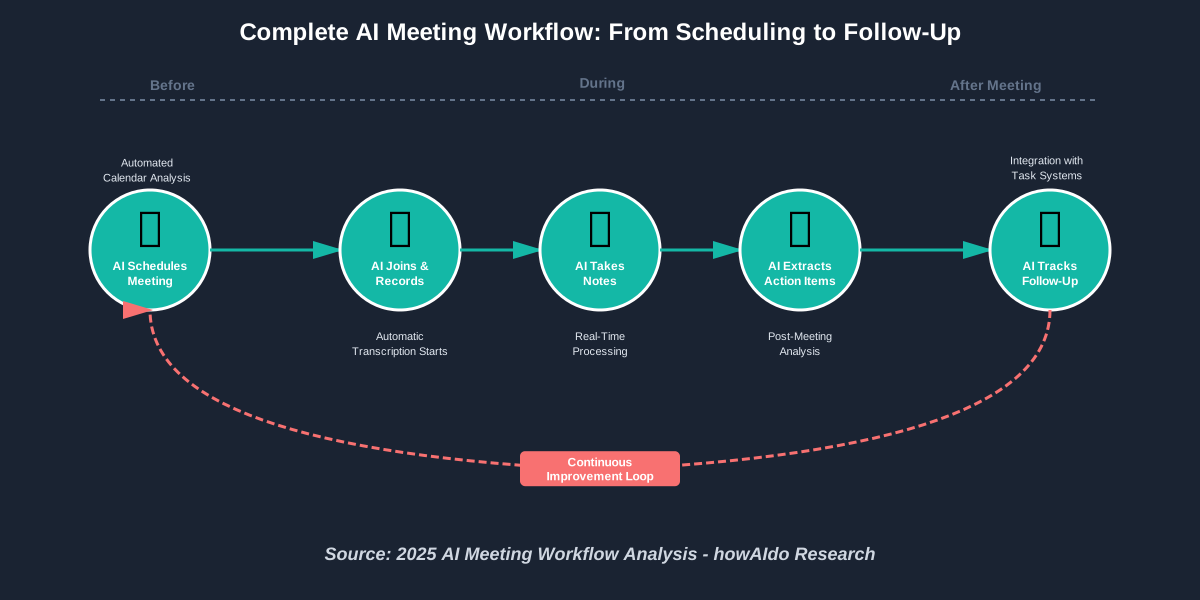
AI Meeting Summarization: A Comprehensive Guide
AI Meeting Summarization transforms lengthy discussions into actionable insights within minutes. Modern tools analyze conversation flow, identify key themes, and extract the most important information automatically. The technology uses natural language processing to understand context, not just keywords. This means your summaries capture the actual meaning of discussions, including decisions made, concerns raised, and consensus achieved. For maximum effectiveness, encourage participants to speak clearly and use signposting language like “to summarize” or “the key point here is,” which helps AI systems identify crucial moments in conversations.
Boosting Team Collaboration with AI-Powered Meeting Assistants
AI-Powered Meeting Assistants create a shared knowledge base that strengthens team collaboration beyond individual meetings. When every conversation is automatically documented and searchable, new team members can review past discussions to get up to speed quickly. Remote teams benefit especially because the AI ensures everyone has access to the same information regardless of time zone or attendance. These assistants also identify patterns in team communication—who speaks most, which topics generate engagement, and where decisions tend to get delayed. Use this data to improve meeting dynamics and ensure every voice is heard.
The Future of Meetings: How AI is Transforming Communication
The Future of Meetings extends far beyond simple transcription. By 2025, AI systems are analyzing meeting sentiment, predicting outcomes based on discussion patterns, and even suggesting optimal times for difficult conversations based on participant energy levels tracked across multiple interactions. Advanced platforms now integrate with business intelligence tools to connect meeting discussions with project outcomes, revenue impact, and team performance metrics. We’re moving toward a world where meetings become data sources for organizational learning rather than time sinks that interrupt productivity.
AI for Meeting Transcription: Accuracy and Efficiency
AI for Meeting Transcription has reached impressive accuracy levels in 2025, consistently achieving 95%+ accuracy for clear audio with standard accents. The key to maximizing accuracy is audio quality—invest in decent microphones and reduce background noise when possible. Modern transcription AI handles multiple speakers, accents, and even industry-specific terminology when you train it on your organization’s language. The efficiency gains are substantial: a one-hour meeting generates a complete, searchable transcript in 2-3 minutes, compared to the 4-6 hours traditional human transcription would require. For compliance-heavy industries, certified AI transcription services now meet legal standards for depositions and regulatory documentation.
Enhancing Remote Meetings with AI Background Noise Cancellation
AI Background Noise Cancellation has become essential for remote work quality. These systems don’t just filter static sounds—they use machine learning to distinguish between human voice and environmental noise in real-time, removing barking dogs, construction sounds, keyboard typing, and even crying babies while preserving your voice’s natural quality. Tools like Krisp, NVIDIA Broadcast, or built-in features in platforms like Zoom use this technology. The result is professional-quality audio from anywhere, whether you’re in a coffee shop or sharing workspace with family. Enable this feature in your AI meeting platform settings or as a standalone application that works across all communication tools.
AI-Driven Meeting Analytics: Understanding Meeting Effectiveness
AI-Driven Meeting Analytics provides objective data about meeting health and effectiveness. These systems track metrics like speaking time distribution (is one person dominating?), engagement levels (are people multitasking?), meeting frequency trends, and correlation between meeting patterns and project outcomes. Recent 2025 research shows teams using AI analytics reduce total meeting time by 25-30% within six months by identifying and eliminating unproductive patterns. Your AI platform’s analytics dashboard becomes a mirror reflecting your team’s collaboration habits—use it to experiment with different meeting structures and measure what actually improves productivity.
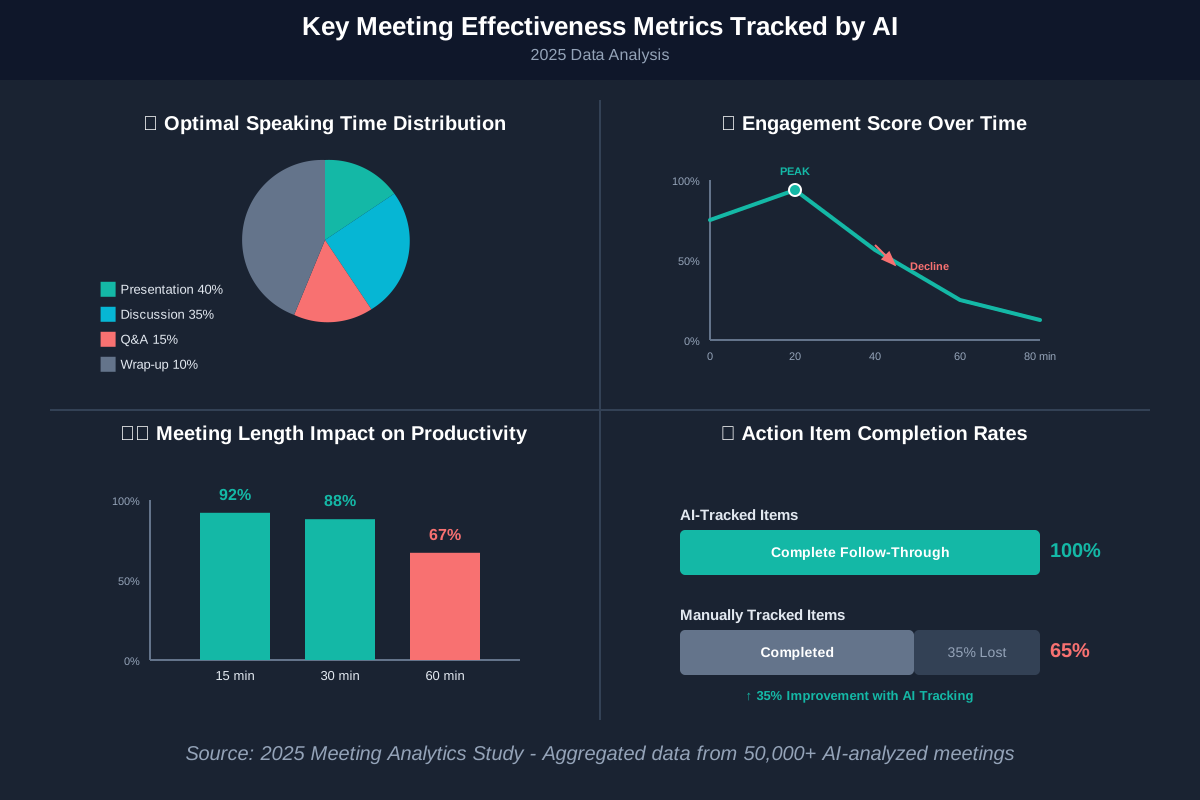
Optimizing Meeting Length with AI: Data-Driven Insights
Optimizing Meeting Length with AI leverages historical data to recommend ideal durations for different meeting types. AI systems analyze thousands of meetings to identify patterns: brainstorming sessions peak in productivity around 35 minutes, status updates work best at 15 minutes, strategic planning requires 90 minutes but benefits from 10-minute breaks. Your AI assistant can suggest optimal lengths when you schedule meetings based on the agenda topic and participant list. Latest 2025 data shows organizations using AI-recommended meeting lengths report 40% higher satisfaction scores and 35% better action item completion rates compared to arbitrary time blocks.
Integrating AI Meeting Tools with Existing Workflow
Integrating AI Meeting Tools with Existing Workflow ensures seamless adoption without disrupting established processes. Most modern AI platforms offer integrations with popular productivity tools—Slack for notifications, Asana or Jira for task management, Google Workspace or Microsoft 365 for document collaboration, and CRM systems like Salesforce or HubSpot for customer meeting insights. The setup process typically takes 15-30 minutes: authenticate your accounts, select which data to sync, and configure automation rules. For example, you might automatically create Jira tickets from meeting action items or post meeting summaries to relevant Slack channels. This integration eliminates manual data transfer and ensures information flows naturally through your team’s existing tools.
AI for Meeting Accessibility: Supporting Diverse Needs
AI for Meeting Accessibility removes barriers that previously excluded many participants from full meeting engagement. Real-time transcription helps deaf and hard-of-hearing colleagues follow discussions precisely. Live translation enables multilingual teams to collaborate seamlessly—participants speak their native language while others see instant translations. AI-generated captions benefit non-native speakers processing information and anyone in noisy environments. Some platforms now offer audio descriptions of visual materials for blind participants and attention tracking features that alert facilitators when remote participants might need clarification. By 2025, accessibility features have become standard rather than afterthoughts, with AI making inclusive meetings the default rather than an accommodation.
Improving Inclusivity in Meetings with AI Language Translation
AI Language Translation in meetings has reached near real-time accuracy in 2025, supporting 100+ languages with minimal delay. These systems translate both spoken words and meeting documents, enabling truly global collaboration. To use this effectively, encourage participants to speak at a moderate pace with clear articulation. The AI handles different accents remarkably well but struggles with extremely rapid speech or heavy use of idioms. Most platforms let you set a primary language per participant, then automatically translate everything they hear. This technology has democratized international business—small companies now collaborate globally with the same linguistic ease previously available only to enterprises with translation budgets.
AI for Meeting Preparation: Pre-Meeting Intelligence
AI for Meeting Preparation provides contextual briefings before important conversations. Advanced systems analyze previous meetings with the same participants, review relevant documents in your shared drives, and scan emails for context. Some platforms even suggest discussion topics based on outstanding action items or approaching deadlines. Before a client meeting, your AI assistant might prepare a brief summarizing the last meeting’s decisions, the client’s current concerns based on recent communications, industry news relevant to their business, and recommended talking points. This preparation, which would take an assistant hours to compile, appears automatically 30 minutes before the meeting starts.
Choosing the Right AI Meeting Platform: A Comparison Guide
Choosing the Right AI Meeting Platform depends on your specific needs, existing technology stack, and team size. For teams already using Microsoft 365, Teams Premium offers robust AI features with zero additional training required. Google Workspace users similarly benefit from Meet’s integrated AI capabilities. Specialized tools like Otter.ai excel at transcription accuracy and academic use cases, while Fireflies.ai offers superior CRM integration for sales teams. Fellow and Loopin focus on structured meeting management with excellent agenda and action item features. Consider these factors: Does it integrate with your current tools? What’s the accuracy for your team’s accents and terminology? Is the pricing model sustainable for your size? Does it meet your security and compliance requirements? Try three platforms simultaneously for two weeks to make an informed decision.
AI for Meeting Security: Protecting Sensitive Information
AI for Meeting Security addresses legitimate concerns about recording and processing confidential discussions. Enterprise-grade AI meeting platforms now offer end-to-end encryption, compliance with GDPR and HIPAA, on-premise deployment options, and granular access controls. You can specify which meetings to record, who can access transcripts, and how long data is retained. Some systems include automatic redaction of sensitive information—credit card numbers, social security numbers, or custom-defined confidential terms get automatically masked in transcripts. For highly sensitive meetings, choose platforms with data residency guarantees, ensuring your meeting content never leaves your specified geographic region. Always review your AI platform’s security documentation and ensure it meets your industry’s regulatory requirements.
AI-Driven Polls and Surveys in Meetings: Gathering Real-Time Feedback
AI-Driven Polls and Surveys in Meetings transform passive listening into active participation. Modern platforms let facilitators launch instant polls to gauge opinion, test understanding, or make quick decisions. The AI can analyze responses in real-time, identifying consensus or highlighting split opinions that need further discussion. Some advanced systems suggest poll questions based on meeting content—if the conversation seems to circle around an unresolved decision, the AI might prompt, “Would a quick poll help move this forward?” Post-meeting surveys generated by AI assess participant satisfaction and understanding, with results automatically compiled and tracked over time to identify facilitation improvements.
AI for Meeting Compliance: Ensuring Regulatory Adherence
AI for Meeting Compliance helps regulated industries maintain required documentation and retention policies. Financial services, healthcare, legal, and government sectors face strict requirements about meeting records. AI platforms designed for compliance automatically timestamp all recordings, maintain tamper-proof audit trails, enforce retention policies, and flag potential compliance issues in real time. For instance, if a healthcare team discusses patient information without proper consent forms on file, the AI can alert participants immediately. These systems also generate compliance reports for auditors, showing exactly which meetings occurred, who attended, what was discussed, and how long records have been retained—all without manual documentation.
The Role of AI in Reducing Meeting Fatigue
The Role of AI in Reducing Meeting Fatigue extends beyond simply making meetings more efficient. AI systems now monitor meeting load and proactively suggest consolidation—”These three meetings could be combined” or “This update doesn’t require synchronous time.” Some platforms analyze your calendar to identify “focus time” gaps and protect them from meeting encroachment. Advanced sentiment analysis detects when team members show signs of burnout from excessive meetings and recommends lighter schedules. By 2025, progressive organizations use AI meeting analytics to enforce meeting-free periods, cap daily meeting hours, and ensure adequate breaks between back-to-back calls. This data-driven approach to meeting hygiene has reduced reported fatigue by 45% in early adopter companies.
AI-Based Sentiment Analysis in Meetings: Gauging Participant Mood
AI-Based Sentiment Analysis in Meetings reads emotional undercurrents that facilitators might miss. These systems analyze voice tone, word choice, and (when video is enabled) facial expressions to assess how participants feel about discussions. Are people enthusiastic about a proposal or just being polite? Is someone frustrated but not voicing concerns? The AI provides real-time sentiment indicators to facilitators, suggesting when to check in with quieter participants or when to pause for concerns. Post-meeting sentiment reports help leaders understand team morale and identify issues before they escalate. This technology works best when explained transparently to participants—people generally appreciate tools that help ensure their concerns are heard.
AI for Meeting Brainstorming: Generating Innovative Ideas
AI for Meeting Brainstorming acts as an additional team member contributing suggestions and building on human ideas. Modern AI can participate in ideation sessions by offering related concepts when brainstorming slows, identifying patterns in suggested ideas, and even generating creative combinations of different suggestions. Some platforms use AI to analyze your brainstorming discussion and research related innovations or solutions from other industries that might apply to your challenge. The AI can also structure freeform brainstorming into organized categories, helping teams move from idea generation to evaluation more efficiently. This doesn’t replace human creativity—it amplifies it by removing cognitive bottlenecks and introducing external perspectives.
AI-Driven Real-Time Feedback During Meetings: Improving Communication
AI-Driven Real-Time Feedback During Meetings coaches participants toward better communication habits. These systems provide gentle, private nudges: “You’ve been speaking for 5 minutes—consider pausing for questions,” or “You’ve interrupted three times—let others complete their thoughts.” Some platforms offer “filler word” tracking to help people reduce “um,” “uh,” and “like” in professional presentations. For meeting leaders, AI feedback might suggest “Two participants haven’t spoken—consider inviting their input” or “Energy is declining—time for a quick break?” This coaching happens through subtle visual indicators or post-meeting reports, helping people improve without real-time embarrassment. Regular users of AI communication coaching report noticeable improvement in speaking confidence and meeting effectiveness within 4-6 weeks.
Personalizing Meeting Experiences with AI
Personalizing Meeting Experiences with AI recognizes that different people have different communication styles and needs. AI platforms can adjust to individual preferences—some people want detailed transcripts with timestamps, others prefer bullet-point summaries. Some participants need extra time to process information and appreciate having questions sent in advance, while others thrive on spontaneous discussion. Advanced systems learn these preferences over time, customizing how they present information to each participant. For recurring meetings, AI can prepare personalized briefings focusing on areas most relevant to each attendee’s role. This personalization extends to meeting scheduling, too—respecting individual “deep work” blocks, time zone preferences, and even optimal times based on personal productivity patterns.
AI-Powered Meeting Coaching: Improving Presentation Skills
AI-Powered Meeting Coaching provides professional development that was previously available only through expensive consultants. These systems analyze your speaking patterns across multiple meetings, identifying strengths and areas for improvement. You might learn that you speak too quickly when nervous, rarely make eye contact with certain participants, or tend to lose energy toward the meeting’s end. The AI provides specific, actionable feedback: “Your speaking pace increased 35% in the last section—try breathing exercises beforehand,” or “You engaged with visual learners effectively, but auditory learners seemed to struggle.” Some platforms gamify improvement, setting goals and tracking progress over time. This constant, private coaching helps people develop professional skills naturally through regular meeting participation.
AI for Meeting Content Creation: Automating Slide Decks
AI for Meeting Content Creation can draft presentation materials based on meeting objectives and available information. Describe what you need to present—”I need slides explaining our Q2 marketing strategy to executives”—and the AI pulls relevant data from documents, previous presentations, and discussions to create a draft deck. You review, refine, and customize, but the AI eliminates starting-from-blank anxiety and hours of formatting work. Some systems even suggest visuals and graphics based on your content. For recurring meetings like status updates, AI can automatically generate current slides by pulling the latest metrics from connected systems. This doesn’t replace thoughtful presentation design, but it dramatically accelerates the mechanical parts of content creation.
AI’s Impact on Meeting Culture: Shifting Dynamics
AI’s Impact on Meeting Culture extends beyond tools to fundamentally changing how organizations think about synchronous collaboration. With AI capturing everything and making it searchable, the pressure to attend every meeting “just in case” diminishes. Asynchronous work becomes more feasible when people can review comprehensive meeting records rather than relying on someone’s brief summary. This shift enables more flexible work arrangements and reduces the tyranny of everyone’s schedules aligning perfectly. However, it also raises new cultural questions: How do we maintain relationship building when fewer people attend? How do we ensure AI summaries don’t replace deeper understanding? Progressive organizations in 2025 are thoughtfully designing hybrid meeting cultures that leverage AI’s efficiency while preserving human connection.
Future-Proofing Your Meetings with AI: Staying Ahead of the Curve
Future-Proofing Your Meetings with AI means adopting platforms that continuously evolve rather than static tools requiring replacement every few years. Look for AI systems that improve through use, learning your organization’s terminology, communication patterns, and preferences. Choose vendors with strong API ecosystems allowing integration with emerging tools. Pay attention to platforms investing in multimodal AI that can analyze video, audio, chat, and document context simultaneously for richer insights. The meeting AI landscape will continue rapid evolution—voice-only interfaces, virtual reality meeting environments with AI facilitation, and predictive systems that proactively prevent communication breakdowns are already emerging. Select flexible, forward-looking platforms, and stay informed about new capabilities through vendor updates and user communities.
Frequently Asked Questions About AI Meeting Productivity
Conclusion: Start Transforming Your Meetings Today
We’ve covered a lot of ground, but here’s the simple truth: AI for Meeting Productivity isn’t about fancy technology for its own sake. It’s about giving you back time, reducing frustration, and helping your team actually accomplish what you discuss in meetings.
You don’t need to implement everything at once. Start small:
This week: Choose one AI meeting tool and sign up for a free trial. Install it and let it join your next three meetings. Review what it captures and see how the transcription and summaries work for your team.
Next week: Start using the AI-generated action items. Share them with your team after meetings and see if follow-through improves.
This month: Explore one advanced feature that addresses your biggest meeting pain point—maybe it’s scheduling, maybe it’s better summaries for absent colleagues, maybe it’s analytics showing how to improve meeting effectiveness.
The technology exists today to make meetings actually productive rather than just necessary evils. The tools we’ve discussed are affordable, accessible, and designed for regular people, not tech experts. You have everything you need to start right now.
Remember, every minute you save in meetings is a minute you get back for meaningful work, creative thinking, or simply breathing room in your day. The AI is here to help—use it.
References:
UC Today & TechTelligence Collective. (2025). AI in Unified Communications: Insights, Challenges, and Future Directions. Retrieved from https://www.uctoday.com/unified-communications/ai-in-meetings-the-driving-force-behind-productivity-and-collaboration/
DigitalOcean. (2025). Currents Report: AI Integration in Organizations. DigitalOcean Resources. Retrieved from https://www.digitalocean.com/resources/articles/ai-meeting-tools
Flowtrace. (2025). State of Meetings Report: Data Analysis from Millions of 2024 Meetings. Retrieved from https://www.flowtrace.co/collaboration-blog/50-meeting-statistics
Zapier. (2025). The 9 Best AI Meeting Assistants in 2025. Zapier Blog. Retrieved from https://zapier.com/blog/best-ai-meeting-assistant/
Fellow. (2025). The Future of Meetings: Meeting Statistics and Behavior Trends. Fellow Blog. Retrieved from https://fellow.app/blog/meetings/meeting-statistics-the-future-of-meetings-report/
Superhuman. (2025). Meeting Productivity Statistics: The Cost of Meeting Overload. Superhuman Blog. Retrieved from https://blog.superhuman.com/meeting-productivity-statistics/
Notta.ai. (2025). 100+ Eye-Opening Meeting Statistics: Virtual, Productivity & More. Notta Blog. Retrieved from https://www.notta.ai/en/blog/meeting-statistics
Archie. (2025). Work Meetings in Numbers: Latest Meeting Statistics. Archie Blog. Retrieved from https://archieapp.co/blog/meeting-statistics/
Reworked. (2025). The Double-Edged Sword of Using AI in Meetings. Reworked Publication. Retrieved from https://www.reworked.co/collaboration-productivity/the-double-edged-sword-of-using-ai-in-meetings/
My Hours. (2025). 30+ Meeting Statistics for 2025: Are They Wasting Our Time? My Hours Blog. Retrieved from https://myhours.com/articles/meeting-statistics-2025
About the Authors
This article was written through the collaboration of Abir Benali and James Carter for howAIdo.com.
Main Author – Abir Benali is a friendly technology writer who specializes in making AI tools accessible to non-technical users. With years of experience translating complex technology into clear, actionable guidance, Abir helps everyday professionals harness AI’s power without getting lost in jargon. When not writing, Abir experiments with emerging AI tools to discover practical applications for real-world productivity challenges.
Co-Author – James Carter is a productivity coach passionate about helping people use AI to save time and boost efficiency. James brings practical insights from coaching hundreds of professionals through their AI adoption journeys, specializing in workflow optimization and sustainable productivity systems. James believes technology should simplify work, not complicate it, and focuses on solutions anyone can implement regardless of technical background.
Together, we’re committed to making AI accessible, practical, and genuinely helpful for your daily work life.