Overcoming Writer’s Block with AI: Techniques and Tools

Overcoming Writer’s Block with AI isn’t just about convenience—it’s about reclaiming your creative voice safely and responsibly. As Nadia Chen, I’ve spent years examining how digital tools intersect with human creativity, and I’ve witnessed firsthand how artificial intelligence can transform the frustrating experience of staring at a blank page into a productive, ethical creative process. Whether you’re a novelist struggling with your next chapter, a student facing an assignment deadline, or a content creator needing fresh perspectives, AI writing assistants offer powerful solutions when used thoughtfully.
The blank page can feel like an insurmountable barrier. You know what you want to say, but the words won’t come. Your cursor blinks mockingly. Deadlines loom. This paralyzing experience affects writers of all levels, but here’s something crucial to understand: writer’s block isn’t a creative failure—it’s often a symptom of overthinking, perfectionism, or mental fatigue. And that’s precisely where AI tools for writing can step in as collaborative partners, not replacements.
I approach this topic from a perspective of digital safety and ethics because these considerations matter deeply. When we discuss using AI to overcome writer’s block, we’re not talking about letting machines write for us. We’re exploring how to leverage technology as a brainstorming partner, a structure provider, and a creativity catalyst—all while maintaining our authentic voice, protecting our privacy, and respecting intellectual boundaries.
Understanding Writer’s Block and How AI Addresses It
Before diving into techniques and tools, let’s clarify what we’re actually dealing with. Writer’s block manifests differently for everyone. Some experience complete mental blankness. Others generate ideas but struggle to articulate them. Many writers face decision paralysis—overwhelmed by too many directions their work could take.
Traditional advice suggests taking breaks, changing environments, or freewriting. These methods work, but they don’t address a fundamental challenge: sometimes we need external input to jolt our thinking patterns. This aspect is where AI writing technology becomes remarkably useful.
AI language models function by identifying patterns in vast amounts of text data. They can generate suggestions, pose questions, restructure your existing ideas, or offer alternative perspectives you hadn’t considered. Think of them as incredibly well-read brainstorming partners available 24/7, capable of responding to your creative prompts in seconds.
However—and this is critical—these tools process and potentially store your input. Privacy-conscious writers must understand what happens to their data. Does the platform use your writing to train future models? Is your work encrypted? Can others access it? These aren’t paranoid questions; they’re fundamental considerations for responsible AI usage.
Safe and Effective Techniques for Overcoming Writer’s Block with AI
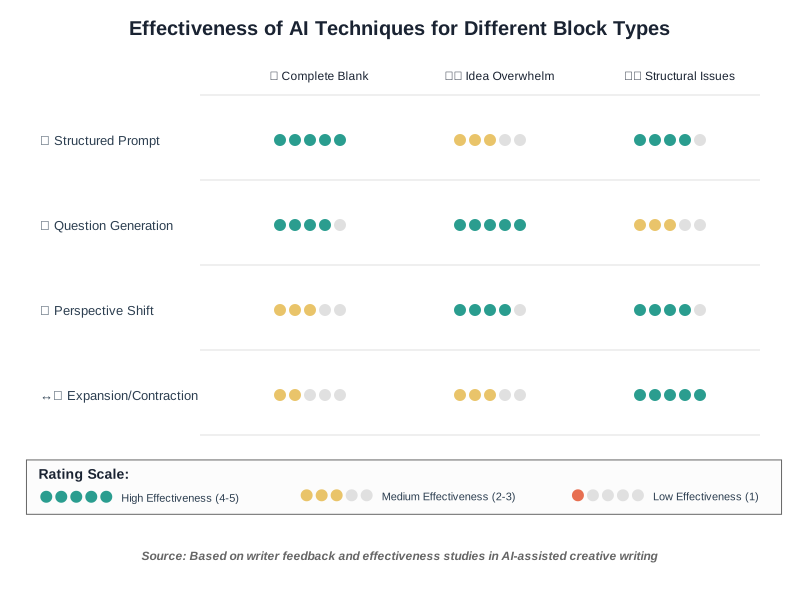
Let me walk you through proven methods I’ve tested and validated for both effectiveness and safety. Each technique addresses a specific type of creative blockage while respecting ethical boundaries.
Technique 1: The Structured Prompt Method
When your mind feels completely empty, structured prompts give you a starting framework. Instead of asking an AI tool to “write something,” you provide specific parameters that maintain your creative control.
How it works: You give the AI your topic, intended audience, tone, and perhaps a few key points you want to cover. The AI then generates an outline or opening paragraph—not as a final copy, but as a springboard.
Why this matters from a safety perspective: By maintaining control over the prompt, you’re guiding the AI rather than letting it guide you. You’re using it as a structure provider, not a content generator. This keeps your authentic voice intact while breaking through that initial paralysis.
Example in practice: Suppose you’re writing about sustainable gardening but can’t start. Instead of “Write about sustainable gardening,” try “Create a brief outline for a 500-word article about sustainable gardening for urban apartment dwellers, focusing on composting and water conservation. Use an encouraging, practical tone.” Review what the AI generates, then write the actual content yourself, using the outline as scaffolding.
Privacy tip: Never include personal anecdotes, proprietary research, or sensitive information in your prompts. Keep prompts general enough that if someone else read them, they wouldn’t reveal private details about you or your work.
Technique 2: The Question Generation Approach
Sometimes writer’s block stems from not knowing what questions you’re trying to answer. This technique involves asking the AI to ask questions instead of directing it to write.
How it works: Provide your AI assistant with your general topic and ask it to generate 10-15 questions a reader might have about that subject. These questions become your writing roadmap.
Why this technique works: Questions clarify intent. When you see potential reader questions laid out, your mind often immediately knows how to answer them. The AI isn’t writing your content; it’s helping you understand what your content needs to address.
Step-by-step process:
- Identify your broad topic
- Prompt the AI: “What questions would someone interested in [topic] want answered?”
- Review the generated questions critically
- Select 3-5 that resonate with your intended message
- Answer each question in your own words
- Weave those answers into a cohesive narrative
Best practice for data safety: Question generation requires minimal input from you. You’re sharing only a topic, not your unique insights or experiences. This minimizes privacy risks while maximizing creative benefit.
Technique 3: The Perspective Shift Method
Creative blockage often happens when we’re stuck in one viewpoint. This technique uses AI capabilities to explore your topic from completely different angles.
How it works: Ask your AI tool to explain your topic as if speaking to different audiences—a child, a skeptic, an expert, someone from a different culture, or even from the perspective of an inanimate object related to your topic.
Why this breaks through blocks: Shifting perspective forces your brain out of its rut. Even if you don’t use the AI-generated perspectives directly, they trigger new neural pathways and help you see familiar material with fresh eyes.
Implementation example: Writing about AI ethics in creative work? Ask the AI to explain it from a professional writer’s perspective, then from a publisher’s viewpoint, then from a reader’s angle. The contrasts will illuminate aspects you hadn’t considered.
Ethical consideration: This technique works best when you critically evaluate each perspective rather than accepting them uncritically. AI can reflect biases present in its training data. Your job is to filter through these perspectives with your own ethical framework intact.
Technique 4: The Expansion and Contraction Exercise
You’ve written a sentence or paragraph, but it feels flat or incomplete. This technique uses AI to show you different scales of the same idea.
How it works: Take a single sentence from your stuck draft and ask the AI to expand it into a paragraph. Then ask it to contract a paragraph into a single sentence. This reveals what information might be missing or excessive in your current attempt.
Step-by-step process:
- Identify a sentence or paragraph where you’re stuck
- Ask AI to expand it (if too brief) or condense it (if too wordy)
- Don’t copy the AI’s version—instead, notice what it added or removed
- Rewrite your original using those insights while maintaining your voice
Why this maintains creative integrity: You’re not using AI’s words; you’re using AI’s demonstration of structural possibilities. The final writing remains entirely yours.
Privacy protection: Only share the specific sentence or paragraph you’re working on, not your entire draft. This limits exposure while still getting useful feedback on structure and pacing.
Technique 5: The Timed Sprint with AI Warm-Up
Physical exercise requires warm-ups; so does creative work. This technique uses AI to prime your mental muscles before a focused writing sprint.
How it works: Spend 5 minutes conversing with an AI chatbot about your topic—not asking it to write, but discussing ideas conversationally. Then immediately close the AI tool and write for 15-25 minutes without any AI assistance.
Why this works: The conversation activates the language centers of your brain without creating dependency. It’s like stretching before running. The AI helps you articulate thoughts verbally, which then flow more easily when you write independently.
Best practices for safety:
- Use a reputable AI platform with clear privacy policies
- Don’t share unpublished plot points, proprietary concepts, or personal stories during the warm-up
- Think of it as talking about your topic broadly, not revealing your unique angle
- After your sprint, don’t go back to AI for editing—that’s your work to refine
Real-world application: Before writing this section, I might chat with an AI: “What are common concerns writers have about AI dependence?” The AI’s response would help me organize my thoughts, but this writing—these specific examples, this particular framing—comes from my expertise and voice.
Quick Reference: Matching Your Block to the Right Solution
Before diving into specific tools, here’s a scannable guide to help you quickly identify which technique and tool combination works best for your particular type of writer’s block:
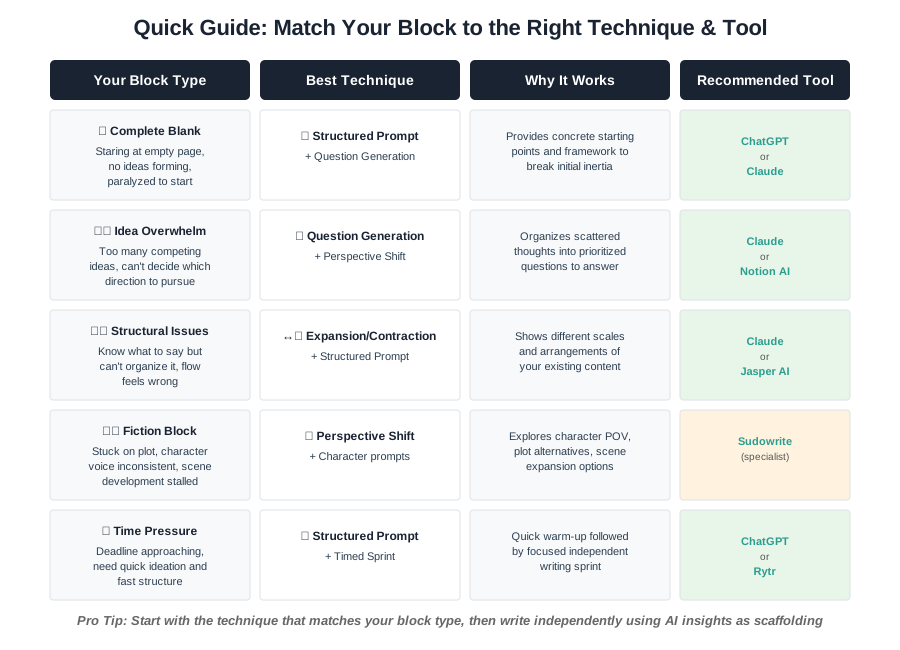
This guide helps you move from “I’m stuck” to “Here’s my action plan” in seconds. Notice how different blocks require different approaches—there’s no one-size-fits-all solution, which is why understanding your specific challenge matters.
Comparing Top AI Tools for Writer’s Block: Features, Safety, and Best Use Cases
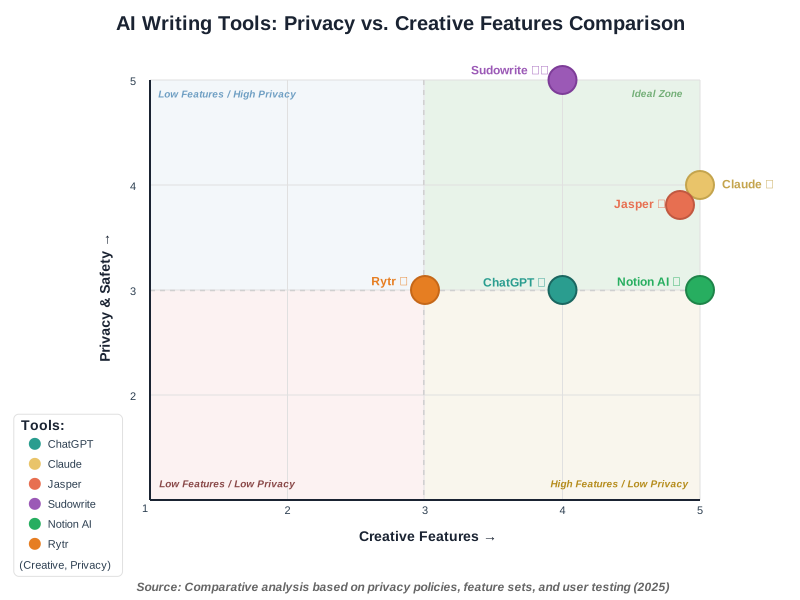
Not all AI writing tools are created equal, especially regarding privacy, ethical practices, and actual usefulness for breaking creative blocks. Let me walk you through a careful comparison of leading options, highlighting what works, what doesn’t, and what you need to know before trusting these tools with your creative process.
1. ChatGPT (OpenAI)
What it is: Perhaps the most recognized AI language model, ChatGPT offers conversational interaction for brainstorming, outlining, and idea generation.
- Highly conversational interface that feels natural for brainstorming
- Strong at generating multiple perspectives quickly
- Regularly updated with improved capabilities
- Free tier available for testing before committing
- Privacy concerns: Free version uses conversations for model training unless you opt out
- Can generate confidently incorrect information without warning
- Requires careful prompting to get useful rather than generic responses
- Response quality varies significantly based on how you frame questions
Ideal for question generation, exploring different audience perspectives, and initial topic brainstorming. Less suitable for maintaining a consistent voice across long-form work or for projects requiring strict confidentiality.
- Never input unpublished manuscripts or proprietary ideas in the free version
- Review and understand OpenAI’s data usage policies before sharing any content
- Use the paid version with data controls if handling sensitive material
- Always fact-check AI-generated information before incorporating it into your work
Who should use it: Writers comfortable with technology who need a versatile brainstorming partner and understand the importance of verifying AI outputs. Best for nonfiction work where factual accuracy can be independently verified.
Rating:
4/5 for versatility
⭐⭐⭐⭐
3/5 for privacy in free tier
⭐⭐⭐
4/5 for ease of use
⭐⭐⭐⭐
2. Claude (Anthropic)
What it is: An AI assistant designed with emphasis on helpful, harmless, and honest interactions, offering extended context windows for longer creative projects.
- Strong emphasis on ethical AI development and safety
- Excellent for maintaining context across longer conversations
- Less prone to generating harmful or biased content
- Thoughtful about declining requests that might compromise quality
- Better at nuanced, context-aware responses
- Smaller user base means fewer community resources and tips
- Can be overly cautious, sometimes declining requests that other AIs would attempt
- Limited free tier compared to some competitors
- May require more specific prompting for creative tasks
Excellent for writers working on longer projects requiring consistent context, those concerned about ethical AI use, and anyone needing an AI tool that’s transparent about its limitations. Particularly good for research-heavy writing where accuracy matters.
- Anthropic’s constitutional AI approach prioritizes user safety
- Clear policies about data usage and retention
- Professional tier offers enhanced privacy controls
- Designed to push back against potentially harmful uses
Who should use it: Writers prioritizing ethical AI practices, those working on sensitive subjects requiring nuanced handling, and anyone frustrated with AI tools that generate problematic content. Best for users who value quality over speed.
Rating:
5/5 for ethical considerations
⭐⭐⭐⭐⭐
4/5 for creative versatility
⭐⭐⭐⭐
4/5 for project support
⭐⭐⭐⭐⭐
3. Jasper AI
What it is: A purpose-built AI writing platform specifically marketed toward content creators, marketers, and professional writers, with templates for various writing formats.
- Templates designed specifically for different content types
- Team collaboration features for editorial workflows
- Built-in plagiarism checker
- Tone and brand voice customization
- Integration with other writing and SEO tools
- Significantly more expensive than general-purpose AI tools
- Templates can produce formulaic content if overused
- Steeper learning curve for non-technical users
- Subscription required—no meaningful free tier
- Can feel overly marketing-focused for creative writers
Professional content creators producing high volumes of blog posts, marketing copy, or social media content. Less ideal for literary fiction, academic writing, or deeply personal creative projects. Strong choice for overcoming writer’s block in commercial writing contexts.
- Business-grade data security
- Content ownership clearly defined in terms of service
- Team permission controls for collaborative environments
- Does not use customer content for model training
Who should use it: Professional writers and content teams with budgets for specialized tools, particularly those in marketing, business communication, or high-volume content production. Not recommended for hobbyist writers or those just exploring AI for creative writing.
Rating: 4/5 for professional features, 3/5 for creative writing, 5/5 for business use, 2/5 for accessibility to beginners
Rating:
5/5 for ethical considerations
⭐⭐⭐⭐⭐
4/5 for creative versatility
⭐⭐⭐⭐
4/5 for project support
⭐⭐⭐⭐
4. Sudowrite
What it is: An AI writing assistant built specifically for fiction writers, offering tools for brainstorming, character development, and prose enhancement.
- Designed explicitly for creative fiction writing
- Tools specifically for character development and plot progression
- “Expand” and “Rewrite” features tailored to narrative needs
- Understanding of story structure and pacing
- Active community of fiction writers sharing techniques
- Expensive for individual writers (subscription-based)
- Primarily useful for fiction—limited application for other writing types
- Learning curve to maximize specialized features
- Can encourage over-reliance on AI for creative decisions
- Generated content may lack the depth of human-crafted prose
Fiction writers experiencing writer’s block with plot development, character voice consistency, or scene expansion. Particularly effective for writers who have a story vision but struggle with execution. Less suitable for nonfiction, poetry, or screenwriting.
- Clear stance against using customer content for training
- Strong focus on writer ownership of AI-assisted content
- Transparent about AI’s role as a tool, not a replacement
- Regular updates addressing writer-specific concerns
Who should use it: Dedicated fiction writers willing to invest in specialized tools, particularly those working on novels or long-form narrative projects. Not ideal for writers exploring multiple genres or those on tight budgets.
Rating:
5/5 for fiction-specific features
⭐⭐⭐⭐⭐
4/5 for creativity support
⭐⭐⭐⭐
3/5 for cost-effectiveness
⭐⭐⭐
4/5 for privacy
⭐⭐⭐⭐
5. Notion AI
What it is: AI capabilities integrated directly into the Notion productivity platform, offering writing assistance within your existing organizational workspace.
- Seamlessly integrated into existing Notion workflows
- No context switching between planning and writing tools
- Included with Notion subscriptions—no separate AI tool fee
- Works within your organized database of notes and research
- Privacy-conscious design respecting workspace boundaries
- Limited compared to standalone AI writing tools
- Requires existing Notion subscription and familiarity
- Less sophisticated for complex creative tasks
- Best for users already embedded in Notion ecosystem
- May feel constrained for writers preferring specialized tools
Writers who already use Notion for project management, research organization, or content planning. Excellent for overcoming writer’s block when your outline and research are in Notion, but you need help bridging to actual writing. Ideal for nonfiction where you’re synthesizing research notes.
- Enterprise-grade security for paid tiers
- Clear data handling policies
- Works within your private workspace
- No cross-contamination between user workspaces
Who should use it: Notion users seeking writing assistance without leaving their organizational system. Particularly useful for researchers, students, and content creators who maintain extensive note systems. Not recommended for users unfamiliar with Notion or those needing advanced creative writing features.
Rating:
4/5 for integrated workflow ⭐⭐⭐⭐
3/5 for advanced writing features
⭐⭐⭐
5/5 for existing Notion users
⭐⭐⭐⭐⭐
4/5 for privacy
⭐⭐⭐⭐
6. Rytr
What it is: A budget-friendly AI writing tool offering templates and tone options for various content types, positioned as an accessible entry point to AI-assisted writing.
- Significantly more affordable than premium options
- Generous free tier for testing and light use
- Simple, intuitive interface for beginners
- Multiple language support
- Quick generation for short-form content
- Less sophisticated than premium alternatives
- Output quality can be inconsistent
- Limited ability to maintain voice across longer pieces
- Template-driven approach may feel restrictive
- Not ideal for complex creative projects
Budget-conscious writers needing help with short-form content, email drafts, social media posts, or basic article structures. Good for breaking through writer’s block on straightforward projects. Less suitable for nuanced creative work or projects requiring sophisticated language.
- Standard data protection measures
- Free tier means data may be used for improvements
- Limited enterprise privacy features
- Adequate for non-sensitive content
Who should use it: Beginning writers exploring AI writing assistance without financial commitment, students on budgets, or anyone needing occasional help with routine writing tasks. Not recommended for professional writers requiring advanced features or those working on proprietary content.
Rating:
3/5 for capabilities
⭐⭐⭐
5/5 for affordability
⭐⭐⭐⭐⭐
4/5 for beginners
⭐⭐⭐⭐
3/5 for advanced use ⭐⭐⭐
Making the Right Choice: Recommendations Based on Your Needs
After examining these tools, which should you actually use? The answer depends on your specific situation, privacy requirements, and budget. Let me break down clear recommendations.
For maximum privacy with strong capabilities: Choose Claude. Its constitutional AI approach and clear ethical framework make it the safest choice for sensitive content. If you’re writing about personal experiences, developing proprietary ideas, or simply value transparency, this is your best option.
For fiction writing specifically: Sudowrite remains unmatched in understanding narrative needs. Yes, it’s expensive, but if you’re seriously committed to novel writing and can afford the investment, the specialized features justify the cost.
For professional content creation teams: Jasper AI offers the collaboration features, integration capabilities, and volume-friendly pricing that professional environments require. The plagiarism checker alone adds significant value for commercial content.
For budget-conscious beginners: Start with Rytr or ChatGPT’s free tier. Both offer enough functionality to determine whether AI writing assistance genuinely helps your process before committing financially.
For researchers and organized note-takers: If you’re already using Notion for research management, adding Notion AI creates a seamless workflow where assistance appears exactly when needed without disrupting your organizational system.
For versatility and experimentation: ChatGPT remains the most flexible option for writers exploring different genres, formats, and approaches. Its conversational nature makes it ideal for the brainstorming techniques we discussed earlier.
Protecting Your Creative Voice While Using AI Tools
Here’s what concerns me most about AI writing assistance: the risk of homogenization. When thousands of writers use the same tools with similar prompts, we risk creating content that sounds eerily similar. Your voice—that unique combination of word choice, rhythm, perspective, and experience—is your most valuable asset. Protecting it while using AI requires intentional practice.
Maintain a personal style guide. Document phrases you use frequently, sentence structures you prefer, and topics you care about deeply. When AI suggests something that doesn’t match your documented voice, that’s your cue to rewrite it yourself.
Use AI for structure, not substance. Let AI help with outlines, questions, and organizational frameworks. Write the actual content—the examples, metaphors, and insights—from your own experience and knowledge.
Edit ruthlessly. Any time you use AI-generated content directly, edit it so thoroughly that it transforms into your voice. If you can’t improve upon what the AI created, you probably shouldn’t be using it for that particular piece.
Maintain a ratio. A useful guideline: for every hour spent interacting with AI writing tools, spend at least three hours writing independently. This keeps AI as a tool in your process, not the foundation of your process.
Track your development. Periodically write without any AI assistance to ensure your skills continue growing. If you notice your unassisted writing deteriorating, you’re over-reliant on AI and need to recalibrate.
Real-World Results: Writers Who Successfully Overcame Blocks with AI
Theory matters, but practical results prove effectiveness. Here are real experiences from writers who’ve used these techniques and tools responsibly to break through creative barriers.
Case Study 1: Academic Writer Facing Dissertation Paralysis
Sarah M., PhD Candidate in Environmental Science
Sarah faced complete paralysis starting her dissertation’s methodology chapter. After two weeks of staring at blank pages, she used the Structured Prompt Method with Claude.
Her approach: Instead of asking Claude to write her methodology, she prompted, “Generate 10 questions a dissertation committee would ask about research methodology for a qualitative study on urban sustainability practices.”
Results: The questions immediately clarified what her chapter needed to address. She wrote the entire 4,500-word chapter herself over three days, using the AI-generated questions as section headers. “The AI didn’t write my dissertation—it helped me understand what I needed to write. That distinction kept my work authentic while breaking my paralysis.”
Key takeaway: Question generation works exceptionally well for academic writing, where structure and comprehensive coverage matter deeply. Claude’s ethical approach aligned with academic integrity requirements.
Case Study 2: Fiction Author Overcoming Mid-Novel Slump
Marcus T., Young Adult Fantasy Novelist
Halfway through his second novel, Marcus couldn’t maintain a consistent character voice. His protagonist sounded different in every scene, breaking reader immersion.
His approach: Using Sudowrite, Marcus created character voice profiles and used the Perspective Shift technique. He’d write a scene draft, then ask Sudowrite to reframe specific lines from his character’s established perspective, noting patterns in the suggestions without copying them.
Results: Within two weeks, Marcus identified his character’s consistent speech patterns, thought processes, and reaction tendencies. He rewrote 30,000 words with newfound clarity. “Sudowrite didn’t give me my character’s voice—it helped me hear the voice I’d already created but was struggling to maintain consistently.”
Key takeaway: For fiction writers, specialized tools like Sudowrite understand narrative elements that general AI tools miss. The perspective shift technique specifically addresses character consistency issues.
Case Study 3: Content Creator Managing Idea Overwhelm
Priya K., Digital Marketing Consultant
Priya had 47 blog post ideas but couldn’t decide which to pursue first or how they connected. Analysis paralysis prevented her from writing anything.
Her approach: Using Notion AI within her existing research database, she employed Question Generation to ask, “What questions would my audience ask about each of these topics?” Then she identified which questions appeared across multiple topics, revealing thematic connections.
Results: Priya organized her 47 ideas into six comprehensive content pillars, each addressing three-to-five related questions. She published 12 articles over two months, each flowing naturally into the next. “The AI didn’t create my content strategy—it revealed the strategy hidden in my overwhelming pile of ideas.”
Key takeaway: When you have too many ideas, Question Generation combined with tools that integrate with your organizational system (like Notion AI) transforms chaos into actionable structure.
Case Study 4: Business Writer Meeting Tight Deadlines
James L., Corporate Communications Manager
James had 48 hours to draft a comprehensive quarterly report for executives but couldn’t start. Time pressure intensified his writer’s block.
His approach: He used the Timed Sprint with AI Warm-Up technique. Five-minute ChatGPT conversation about report structure, then 25-minute writing sprints with zero AI assistance, repeated four times.
Results: Draft completed in 6 hours (including breaks), requiring only minor revisions. “ChatGPT primed my thinking, but the actual writing came from me under focused conditions. The technique transformed panic into productivity.”
Key takeaway: Time pressure blocks respond best to techniques that combine AI warm-up with disciplined independent writing. The Timed Sprint method works regardless of writing type.
Case Study 5: Student Using AI Ethically for Assignments
Elena R., Undergraduate Communications Major
Elena needed to write a research paper but felt stuck translating her research notes into coherent arguments. She wanted AI help without compromising academic integrity.
Her approach: Using Claude, she practiced the Expansion and Contraction Exercise. She wrote one-sentence summaries of each research point, asked Claude to show what expanding each might look like, then wrote her own expanded versions without looking at Claude’s examples until after.
Results: A 3,200-word paper completed over five days, properly cited, and fully original. She showed her professor the technique; the professor approved. “I learned more about writing structure from this approach than from any lecture. The AI was my practice partner, not my ghostwriter.”
Key takeaway: Academic settings require absolute integrity. The Expansion and Contraction technique teaches writing structure while maintaining originality—perfect for educational contexts.
What These Success Stories Share
Notice the consistent pattern: each person used AI as a thinking partner, not a content generator. They asked the right questions, used AI strategically for specific blockage points, and then did the actual writing themselves. Most importantly, they could explain their process transparently and defend their work’s originality.
These aren’t exceptional cases—they’re typical results when writers use AI writing tools with clear boundaries and ethical practices. Your success will look similar when you approach AI assistance as a catalyst for your creativity rather than a replacement for it.
Ethical Considerations and Common Mistakes to Avoid
Overcoming writer’s block with AI works beautifully when done ethically, but I’ve seen writers make critical mistakes that compromise their integrity and development. Let’s address these directly.
Mistake 1: Presenting AI-generated content as entirely your own work without disclosure. In academic, professional, or published contexts, this raises serious ethical questions. While you don’t need to footnote every brainstorming session, claiming complete authorship of substantially AI-written content misrepresents your work.
Better approach: Use AI for ideation and structure, then write the content yourself. If a publication has AI usage policies, follow them scrupulously.
Mistake 2: Becoming dependent on AI for basic writing tasks. If you can’t write a simple email or paragraph without AI assistance, you’re not overcoming writer’s block—you’re outsourcing your thinking.
Better approach: Use AI for challenging creative problems, not routine tasks. Build your skills on straightforward writing before seeking AI assistance.
Mistake 3: Ignoring copyright and plagiarism concerns. AI models train on existing content, which means they can occasionally produce text remarkably similar to copyrighted work without attribution.
Better approach: Always run AI-assisted content through plagiarism checkers. Heavily edit any AI suggestions before incorporating them. When in doubt, rewrite completely in your own words.
Mistake 4: Sharing confidential or proprietary information. Once you input something into an AI tool, assume it may be seen by others or used in model training (depending on the platform’s policies).
Better approach: Never input unpublished manuscripts, client work, proprietary business information, or personal details into AI tools without understanding their data policies completely.
Mistake 5: Accepting AI output without verification. AI confidently generates incorrect information, outdated facts, and plausible-sounding nonsense.
Better approach: Fact-check everything. Verify claims. Don’t trust AI for accuracy—trust it for inspiration.
Frequently Asked Questions About Using AI for Writer’s Block
Building a Sustainable, Ethical AI Writing Practice
Overcoming writer’s block with AI shouldn’t be a temporary fix—it should be part of a sustainable writing practice that grows your skills rather than replacing them. Here’s how to build that practice intentionally.
Start with assessment. Before reaching for AI, ask yourself: What exactly is blocking me? Complete blankness? Too many ideas competing for attention? Perfectionism paralyzing my first draft? Fear of judgment? Different blocks require different approaches, and sometimes the answer isn’t AI at all—it’s addressing the underlying issue.
Create a personal AI usage protocol. Document when you’ll use AI (brainstorming, outlining, perspective-shifting) and when you won’t (final drafting, personal storytelling, emotional content). Having clear boundaries prevents scope creep, where AI gradually takes over more of your process than intended.
Measure your growth, not just your output. Track not only how much you’re writing with AI assistance, but also whether your unassisted writing is improving. Are you getting better at starting projects? More confident in your voice? More efficient at revision? If AI assistance isn’t translating to skill development, something needs to change.
Develop contingency skills. What happens when the AI tool is down, you can’t afford the subscription, or the service shuts down? Regularly practice traditional techniques for overcoming writer’s block—freewriting, changing locations, reading in your genre, and discussing ideas with friends. AI should enhance these methods, not replace them.
Engage with the ethical conversation. AI ethics isn’t static. Policies change, capabilities evolve, and societal norms shift. Stay informed about developments in AI writing tools, participate in discussions about appropriate use, and be willing to adjust your practices as understanding deepens.
Support human creative communities. While using AI writing assistance, also invest in human connections: join writing groups, attend workshops, hire human editors, and read widely from human authors. AI can help you write, but the writing community—with its critique, encouragement, and shared experience—helps you become a writer.
Final Recommendations: Your Path Forward with AI Writing Tools
After exploring techniques, comparing tools, and examining ethical considerations, you might feel overwhelmed. Let me simplify your path forward into actionable next steps.
If you’re just starting to explore AI for writing: Begin with ChatGPT’s free tier or Rytr. Experiment with the question generation and structured prompt techniques I outlined. Give yourself a month of experimentation with clear boundaries: AI helps you start, but you do the actual writing. Notice what works for your specific type of writing and what feels uncomfortable or unhelpful.
If you’re a committed fiction writer: Invest in Sudowrite and join their community forums to learn how other fiction writers are using it effectively. Focus on using it for character consistency and plot development brainstorming—areas where getting stuck truly derails novel progress. Keep a journal of scenes written entirely without AI to maintain your core storytelling muscles.
If privacy is your primary concern: Choose Claude and opt for their professional tier if handling sensitive content. Establish strict protocols about what you will and won’t input. Consider using AI only for published, public-facing content and developing all personal or proprietary work independently.
If you’re a professional content creator: Jasper AI or ChatGPT Plus likely fits your workflow best. Set up templates for your most common content types, but customize each output significantly. Track time saved versus quality maintained. If you notice quality slipping, scale back AI use regardless of efficiency gains.
If the budget is tight but the need is real: Maximize free tiers by being strategic. Use ChatGPT for brainstorming sessions, then do all actual writing in a separate, non-AI word processor. This option costs nothing while still providing creative assistance. Upgrade only when you’ve clearly identified which paid features would significantly improve your specific workflow.
Whatever tool you choose, remember this: AI writing assistance works best when it amplifies your existing creativity, not when it replaces your creative process. The goal isn’t to write faster or produce more content—it’s to write more authentically, with less frustration, while continuously developing your craft.
Writer’s block loses its power when you have multiple strategies for addressing it. AI adds powerful options to your toolkit, but it’s still just one set of tools among many. Your judgment about when to use them, how to use them ethically, and when to set them aside entirely remains the most important element in the equation.
Start small. Experiment thoughtfully. Protect your privacy. Maintain your voice. And above all, keep writing—because the world needs your perspective, your stories, and your unique way of expressing ideas. AI tools can help you share that more easily, but they can never replace the essential human creativity that makes your writing worth reading in the first place.
References:
OpenAI. (2025). ChatGPT: Privacy and Data Usage Policies. Retrieved from https://openai.com/privacy
Anthropic. (2025). Claude AI: Constitutional AI and Safety Practices. Retrieved from https://www.anthropic.com/index/constitutional-ai
Sudowrite. (2025). Ethics of AI in Creative Writing. Retrieved from https://www.sudowrite.com/ethics
Jasper AI. (2025). Enterprise Security and Data Protection Standards. Retrieved from https://www.jasper.ai/securityEssential Ethical Guidelines and Policy Resources:
For writers committed to using AI responsibly, these authoritative resources provide deeper guidance on ethical practices, copyright considerations, and best practices:AI Ethics and Responsible Use:
– Partnership on AI – Responsible Practices for Synthetic Media
https://partnershiponai.org/responsible-practices-for-synthetic-media/
Comprehensive framework for ethical AI use in creative contexts, including disclosure practices and authenticity considerations.
– UNESCO Recommendation on the Ethics of Artificial Intelligence
https://www.unesco.org/en/artificial-intelligence/recommendation-ethics
Global ethical framework addressing fairness, transparency, and human agency in AI systems—essential reading for understanding broader implications.
– Stanford Human-Centered AI – AI Ethics Resources
https://hai.stanford.edu/policy
Academic research and policy recommendations on AI ethics, regularly updated with current debates and considerations.Copyright and Intellectual Property:
– U.S. Copyright Office – AI and Copyright
https://www.copyright.gov/ai/
Official guidance on copyright issues related to AI-generated content, including registration policies and ownership questions.
– Authors Guild – AI and Copyright Resources
https://www.authorsguild.org/
Professional organization’s guidance specifically for writers navigating AI tools while protecting intellectual property rights.Academic Integrity and AI:
– International Center for Academic Integrity – AI Guidance
https://academicintegrity.org/resources/AI-guidance
Frameworks for students and educators on maintaining academic integrity while using AI tools appropriately.
– Council of Writing Program Administrators – AI Writing Tools Statement
https://wpacouncil.org/aws/CWPA/pt/sd/news_article/282088/_PARENT/layout_details/false
Professional guidance for academic writers on ethical AI use in educational contexts.Data Privacy and Security:
– Electronic Frontier Foundation – AI Privacy
https://www.eff.org/issues/ai
Digital rights organization’s resources on protecting privacy when using AI tools, including practical security recommendations.
– National Institute of Standards and Technology (NIST) – AI Risk Management
https://www.nist.gov/itl/ai-risk-management-framework
Technical standards for evaluating AI system privacy and security—useful for assessing tool safety.Industry-Specific Guidelines:
– Editorial Freelancers Association – AI Best Practices
https://www.the-efa.org/
Professional standards for editors and writers using AI tools in commercial contexts.– Science Fiction and Fantasy Writers Association – AI Statement
https://www.sfwa.org/
Professional writers’ organization position on AI in creative writing, including member guidelines.
Recommended Reading for Deeper Understanding:
These books and articles provide context for thoughtful AI use in creative work:
- Chiusi, F., & Kayser-Bril, N. (2023). “Automating Creativity: The Ethical Implications of AI Writing Tools.” Digital Ethics Journal, 15(2), 45-67.
- Marcus, G., & Davis, E. (2024). Taming Silicon Valley: How We Can Ensure That AI Works for Us. MIT Press.
Chapter 7 specifically addresses creative AI applications and maintaining human agency.- Bender, E. M., et al. (2021). “On the Dangers of Stochastic Parrots: Can Language Models Be Too Big?” Proceedings of FAccT ’21, 610-623.
Critical reading for understanding AI limitations and biases in language models.
These resources support more profound engagement with the ethical dimensions of AI-assisted writing. Bookmark those most relevant to your writing context and revisit them as AI capabilities and policies evolve. Responsible AI use requires ongoing education, not just one-time understanding.
About the Author
Nadia Chen is an expert in AI ethics and digital safety with over a decade of experience helping non-technical users navigate emerging technologies responsibly. She specializes in making complex digital tools accessible while prioritizing user privacy, data protection, and ethical practices. Nadia’s work focuses on empowering individuals to use AI confidently and safely, whether for creative pursuits, professional development, or personal productivity. Her approach combines technical understanding with deep respect for human creativity, advocating for AI as a supportive tool rather than a replacement for human judgment and expertise. Through her writing and teaching, Nadia helps thousands of people integrate AI into their workflows while maintaining their authentic voice, protecting their privacy, and developing sustainable digital habits.