
AI for Personal Assistants: Your Complete Guide
I still remember the morning I forgot my best friend’s birthday. Despite all my good intentions, life got busy, and that important reminder slipped through the cracks. That’s when I realized I needed help—not just any help, but smart, reliable assistance that could keep up with my chaotic schedule. Enter AI for Personal Assistants.
AI for Personal Assistants has fundamentally changed how we manage our daily lives. These intelligent companions don’t just set reminders—they learn your patterns, anticipate your needs, and help you stay organized without requiring constant input. Whether you’re an entrepreneur juggling multiple projects, a student managing assignments, or simply someone trying to balance work and personal life, AI-powered assistants have become indispensable tools for modern living.
In this comprehensive guide, we’ll explore everything you need to know about AI personal assistants. From understanding how they work to choosing the right one for your needs, troubleshooting common issues, and maximizing their potential, this article will equip you with the knowledge to transform your productivity and reclaim your time.
How AI is Revolutionizing Personal Assistant Tasks
How AI is Revolutionizing Personal Assistant Tasks represents one of the most significant technological shifts in our daily routines. Gone are the days when virtual assistants could only perform basic commands like setting timers or playing music.
Today’s AI assistants use sophisticated machine learning algorithms to understand context, predict your needs, and adapt to your unique communication style. When I first started using an AI assistant, I would speak to it like a robot, using stilted commands. Now, I chat naturally, and it understands exactly what I mean—even when I’m vague or change my mind mid-sentence.
The revolution extends beyond simple task execution. Modern AI assistants can:
– Analyze your calendar patterns to suggest optimal meeting times
– Learn your preferences for restaurants, travel, and entertainment
– Automatically categorize and prioritize your emails
– Transcribe and summarize lengthy meetings
– Coordinate across multiple apps and platforms seamlessly
– Provide proactive suggestions before you even ask
What makes this revolutionary is the shift from reactive to proactive assistance. My assistant now alerts me when I should leave for appointments based on real-time traffic, reminds me to follow up on emails that haven’t received responses, and even suggests when I might need a break based on my work patterns.
Top 5 AI-Powered Personal Assistant Apps for 2025
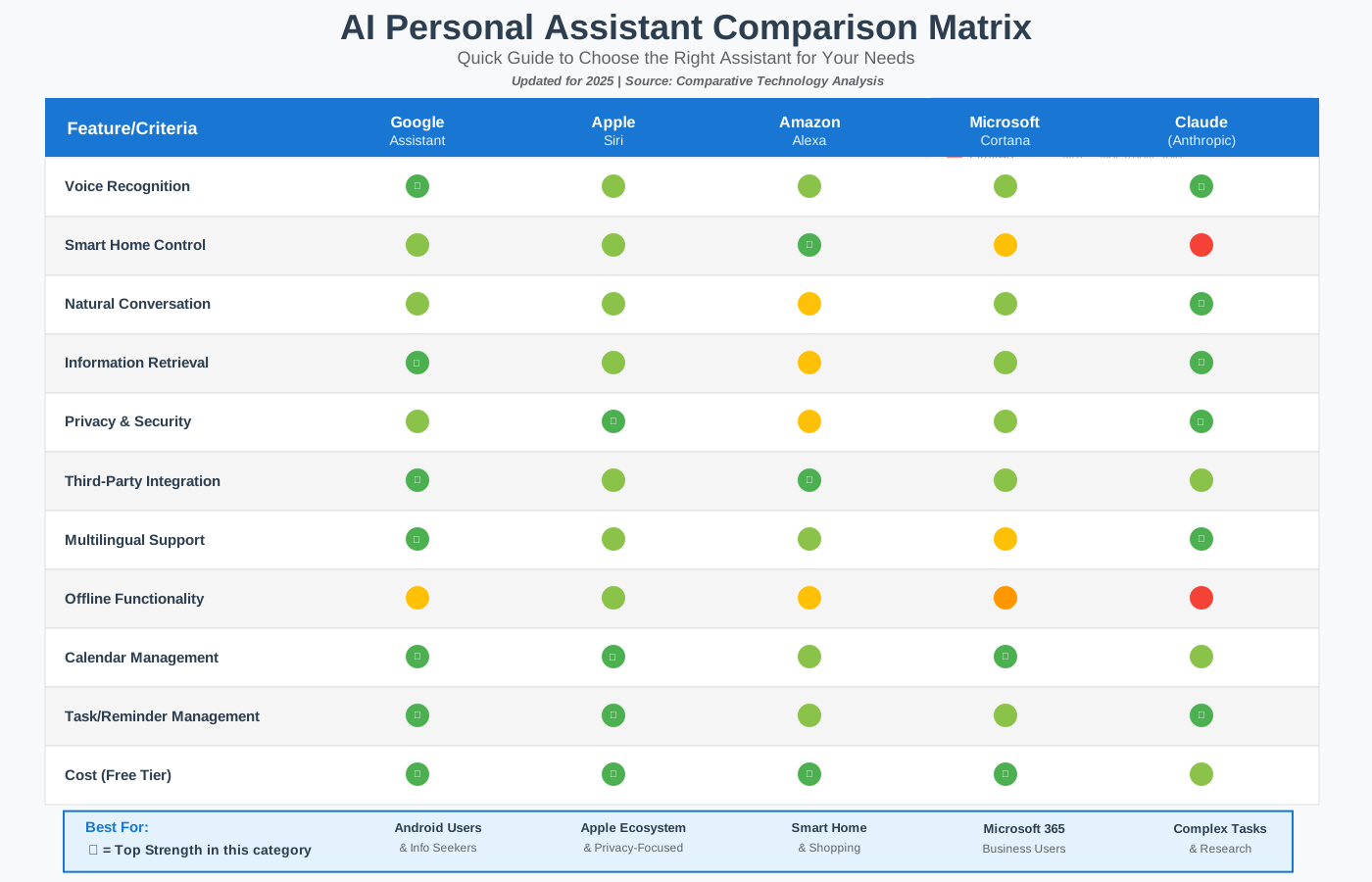
Top 5 AI-Powered Personal Assistant Apps for 2025 offer remarkable capabilities that cater to different needs and preferences. After testing dozens of options, I’ve identified the standout performers.
1. Google Assistant
Google Assistant continues to dominate with its deep integration across the Android ecosystem and impressive knowledge base. I’ve found it particularly excellent for quick information retrieval and controlling smart home devices.
Best for: Android users and smart home enthusiasts
Key strengths: Natural language understanding, extensive third-party integrations, multilingual support
Pricing: Free with Google account
Beginner tip: Start by teaching Google Assistant to recognize your voice by going to Settings > Voice Match. This dramatically improves accuracy and enables personalized responses.
2. Apple Siri
Siri has evolved significantly with iOS 18, offering enhanced contextual awareness and improved privacy features. The seamless integration with Apple devices makes it incredibly convenient for those in the Apple ecosystem.
Best for: iPhone, iPad, and Mac users
Key strengths: Privacy-focused processing, excellent device integration, shortcut automation
Pricing: Free with Apple devices
Beginner tip: Explore Siri Shortcuts to create custom voice commands for complex multi-step tasks. I use one shortcut that texts my family I leave work, start navigation home, and queue my podcast—all with a single command.
3. Amazon Alexa
Alexa shines in smart home control and has the most extensive library of third-party “skills.” I particularly appreciate its shopping integration and the ability to create routines that trigger multiple actions.
Best for: Smart home management and shopping
Key strengths: Vast skill library, multi-room audio, robust smart home ecosystem
Pricing: Free with Amazon account (hardware required)
Beginner tip: Create morning and evening routines that bundle multiple actions. My morning routine announces the weather, turns on lights gradually, starts my coffee maker, and gives me a news briefing—all automatically.
4. Microsoft Cortana
While Microsoft has repositioned Cortana away from consumer applications, it remains powerful for enterprise users, especially those deeply embedded in the Microsoft 365 ecosystem.
Best for: Business professionals using Microsoft tools
Key strengths: Microsoft 365 integration, meeting transcription, email management
Pricing: Included with Microsoft 365 subscription
Beginner tip: Use Cortana’s meeting prep feature to automatically surface relevant documents and emails before scheduled calls.
5. Claude (Anthropic)
As a newer entrant specifically designed for thoughtful, conversational AI assistance, Claude excels at complex task management, research assistance, and nuanced communication.
Best for: Knowledge workers needing research and writing support
Key strengths: Contextual understanding, long-form assistance, ethical AI design
Pricing: Free tier available; paid plans for enhanced features
Beginner tip: Treat Claude like a thoughtful colleague rather than a command-based tool. Ask follow-up questions and provide context for better results.
Quick Comparison: Which Assistant is Right for You?
Choosing between these five excellent options can feel overwhelming. Use this comparison matrix to quickly identify which assistant best matches your specific needs and ecosystem.
AI Personal Assistants vs. Human Assistants: A Detailed Comparison
AI Personal Assistants vs. Human Assistants: A Detailed Comparison reveals surprising insights about when each type of assistance truly shines. Having worked with both throughout my career, I’ve learned that it’s not about replacement—it’s about finding the right tool for each task.
Cost Considerations
AI assistants typically cost $0-20 monthly, while human assistants range from $15 to $75 per hour depending on expertise and location. For routine tasks like scheduling, reminders, and information retrieval, the cost difference is staggering. However, for complex judgment calls, nuanced communication, or relationship management, human assistants provide irreplaceable value.
Availability
AI assistants work 24/7 without breaks, holidays, or sick days. I once needed to reschedule an early morning flight while traveling across time zones—my AI assistant handled it at 3 AM without complaint. Human assistants, while generally available during business hours, require respect for work-life boundaries.
Task Complexity
AI excels at data processing, pattern recognition, quick information retrieval, scheduling across multiple calendars, and repetitive tasks. Human assistants excel at reading emotional subtext, managing sensitive communications, making judgment calls in ambiguous situations, and building genuine relationships with stakeholders.
Learning Curve
AI assistants learn your patterns continuously and automatically. However, they require upfront time to understand your preferences and integrate with your tools. Human assistants need training and documentation but can apply common sense and adapt to novel situations more quickly.
Privacy Considerations
AI assistants process your data through company servers, raising privacy concerns. Human assistants have access to confidential information but can sign NDAs and are governed by employment law. For highly sensitive work, this distinction matters significantly.
Scalability
AI assistants handle unlimited concurrent tasks without degradation. Human assistants can only do one thing at a time and become overwhelmed with too much volume.
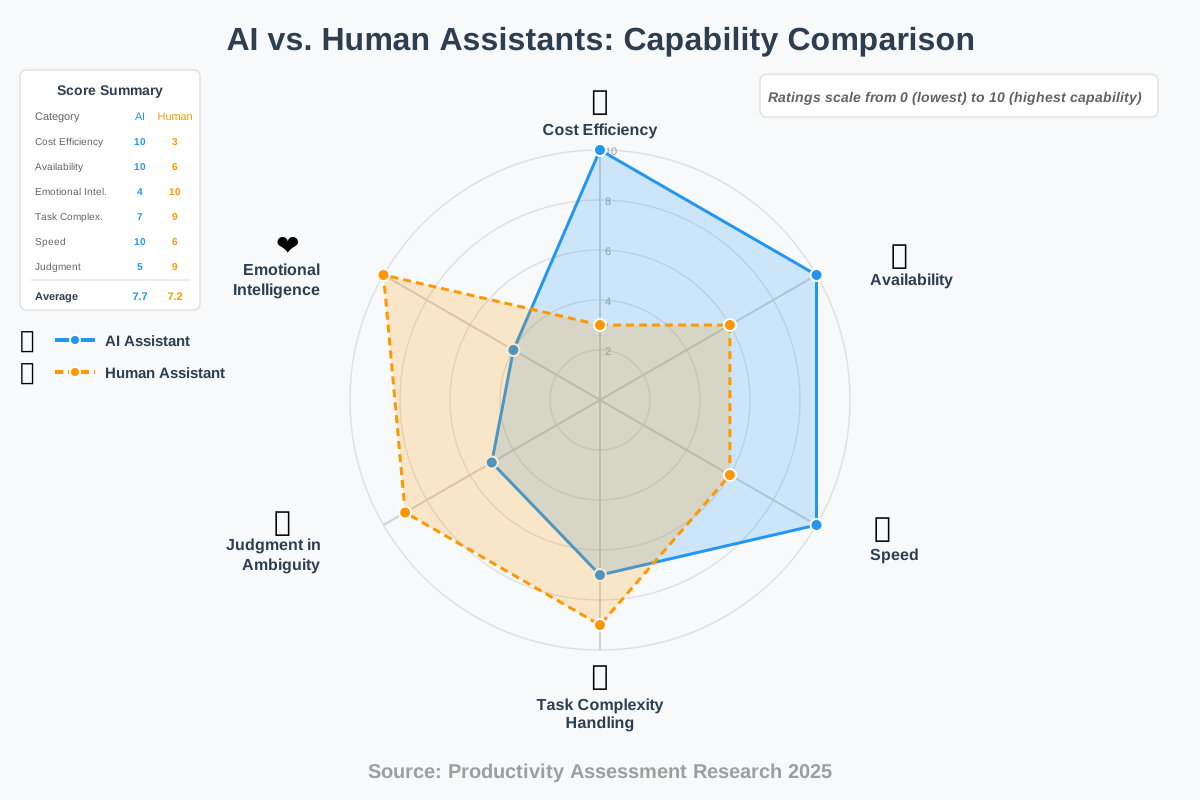
My Recommendation: Use both strategically. Let AI handle routine scheduling, reminders, research, and data organization. Reserve human assistance for stakeholder relationship management, sensitive communications, complex decision-making, and situations requiring genuine empathy.
The Future of AI in Personal Assistance: Trends and Predictions
The Future of AI in Personal Assistance: Trends and Predictions points toward a landscape that’s both exciting and somewhat daunting. Based on current development trajectories and conversations with AI researchers, we’re approaching a fundamentally different relationship with technology.
Multimodal Understanding will become standard by 2027. Your assistant won’t just hear your voice—it will see your screen, understand your gestures, read your facial expressions, and integrate all these inputs for unprecedented contextual awareness. Imagine saying “book that restaurant” while looking at a review on your phone, and your assistant instantly knowing which one you mean.
Ambient Computing will dissolve the boundaries between devices. Your assistant will follow you seamlessly from your phone to your car to your home to your office, maintaining complete context throughout your day. I’m already seeing early versions of this with continuity features between my devices, but the next generation will be dramatically more sophisticated.
Proactive Prediction will shift from reactive responses to anticipatory action. Rather than waiting for commands, your assistant will prepare information, suggest actions, and handle routine tasks autonomously. Early examples include my assistant pre-loading directions before I typically leave for recurring meetings or suggesting I might want to reschedule outdoor plans when rain is forecast.
Emotional Intelligence improvements will enable assistants to detect stress, confusion, or frustration in your voice and adjust their responses accordingly. This isn’t about fake empathy—it’s about appropriate communication adaptation. When I’m rushing between meetings, I appreciate concise responses. When I’m exploring options, I want detailed explanations. Future assistants will automatically recognize these contexts.
Specialized Agents will emerge for specific domains. Rather than one generalized assistant, you’ll have specialized AI for health management, financial planning, career development, and creative work—all coordinating behind the scenes. Think of it like having a team of expert consultants rather than a single general assistant.
Privacy-First Architecture will become mandatory as regulations tighten and users demand more control. Expect local processing, encrypted storage, and granular permission controls. The assistants that win will be those that earn user trust through transparent, respectful data practices.
Cross-Platform Collaboration will eliminate the current fragmentation. Your Google Assistant will seamlessly work with Apple devices, Amazon services, and Microsoft applications without the current friction. Industry standardization efforts are already underway.
Using AI Personal Assistants for Enhanced Productivity: A Guide
Using AI Personal Assistants for Enhanced Productivity: A Guide requires strategic thinking beyond basic commands. Here’s how we maximize AI assistance for genuine productivity gains.
Step 1: Conduct a Time Audit
Before implementing AI assistance, spend one week tracking how you actually spend your time. I used a simple spreadsheet, noting activities in 30-minute blocks. You’ll likely discover, as I did, that significant time disappears into repetitive tasks—exactly what AI handles brilliantly.
Step 2: Identify High-Value Tasks
Distinguish between work only you can do and tasks that could be automated. My high-value work includes strategic planning, client relationships, and creative problem-solving. Everything else—scheduling, research, data entry, routine communications—became candidates for AI assistance.
Step 3: Choose Your Primary Assistant
Select one assistant as your main platform based on your existing ecosystem. Trying to split tasks across multiple assistants creates confusion and duplicate work. I use Google Assistant as my primary because of Android integration but supplement it with specialized tools for specific needs.
Step 4: Integrate Your Calendar
Connect your calendar as the foundational integration. Grant permissions for reading and creating events. This enables your assistant to check availability, schedule meetings, send calendar invites, and provide intelligent reminders based on location and traffic.
Beginner tip: Start with view-only access if you’re concerned about your assistant creating errant calendar events. Graduate to full access once you’ve verified reliability.
Step 5: Set Up Email Management
Configure email access with appropriate permissions. Your assistant can read emails, draft responses, categorize messages, and surface urgent items. I was initially hesitant about this level of access but found the productivity gains substantial.
Start with basic email summaries: “What are my unread emails?” Progress to: “Draft a response to the email from Sarah about the project deadline, letting her know we’ll deliver by Friday.”
Step 6: Create Routines and Automation
Build morning, workday, and evening routines that bundle multiple actions. My workday startup routine checks my calendar, reads priority emails, provides traffic updates for my first meeting, and sets my phone to do-not-disturb mode.
Step 7: Teach Your Communication Style
Spend time correcting and refining your assistant’s understanding. When it misunderstands, don’t just repeat—explain: “No, when I say ‘schedule a check-in,’ I mean a 30-minute video call during business hours, not a text message.”
Step 8: Leverage Contextual Commands
Modern assistants understand context from previous exchanges. You can say, “Send her the document” after discussing a colleague, or “Move it to Thursday” after creating an event. This conversational approach feels natural and saves time.
Step 9: Integrate Productivity Tools
Connect your task manager, note-taking app, and project management tools. I linked Todoist, Notion, and Asana, allowing my assistant to create tasks, add notes, and update project status through voice commands.
Step 10: Review and Refine Weekly
Schedule 30 minutes weekly to review what’s working and what isn’t. Check which automations you’re actually using, which commands need refinement, and what new opportunities exist. Productivity systems require maintenance.
AI Personal Assistants for Entrepreneurs: Streamlining Your Business
AI Personal Assistants for Entrepreneurs: Streamlining Your Business addresses unique challenges faced by business owners who must juggle multiple roles simultaneously. As someone who’s built two businesses, I can attest that AI assistance isn’t a luxury—it’s survival.
Entrepreneurs face decision fatigue from constant context-switching. Your AI assistant becomes a force multiplier by handling the administrative load that doesn’t directly generate revenue but must be done.
Client Communication Management: Configure your assistant to track client communications, flag overdue responses, and draft follow-up messages. I set mine to remind me if I haven’t responded to a client within 24 hours—protecting relationships while I focus on delivery.
Financial Oversight: While your AI won’t replace an accountant, it can track expenses, categorize receipts, and alert you to unusual spending patterns. I use voice commands to log business expenses immediately: “Log the $47 expense for client lunch at Mario’s, marketing category.”
Research and Competitive Intelligence: Ask your assistant to monitor competitors, industry trends, and relevant news. I receive a daily briefing customized to my industry, keeping me informed without dedicating hours to research.
Meeting Preparation: Your assistant can pull relevant documents, previous conversation notes, and background information before calls. This transforms meetings from reactive discussions to strategic conversations.
Lead Management: Integrate your CRM with your assistant to log leads, schedule follow-ups, and move prospects through your pipeline through voice commands while driving or multitasking.
Content Creation Support: While your assistant shouldn’t write your content, it can handle research, outline generation, and fact-checking, dramatically reducing content creation time.
Time Blocking Protection: Entrepreneurs struggle with protecting deep work time. Configure your assistant to block recurring focus periods, decline low-priority meeting requests, and remind you when you’re overcommitting.
Ethical Considerations of AI Personal Assistants: Privacy and Security
Ethical Considerations of AI Personal Assistants: Privacy and Security require serious attention beyond convenience benefits. We’re granting these systems access to our most intimate information—calendars, emails, messages, locations, and conversations.
Data Collection Reality: Your AI assistant is constantly collecting data. Every command, every interaction, and every piece of information it accesses becomes part of your digital profile. This data trains the AI, improves services, and—depending on the company—may be used for advertising or shared with third parties.
I reviewed my Google Assistant data history and discovered it had recordings dating back years, transcripts of sensitive conversations, and detailed location tracking. While I voluntarily enabled these features, seeing the comprehensive profile was sobering.
Privacy Best Practices:
Audit Your Permissions: Review exactly what access you’ve granted. Most people enable permissions during setup and never reconsider. Monthly reviews ensure you’re only sharing what’s truly necessary.
Use Voice Match/Face Recognition: Prevent others from accessing your assistant and thereby your personal information. This is especially important in shared living spaces.
Disable Continuous Listening: Unless you genuinely need always-on activation, switch to button or gesture activation. This reduces the amount of ambient conversation captured.
Review and Delete History: Regularly review your interaction history and delete sensitive conversations. Most platforms allow automatic deletion after a set period—I recommend 3-6 months for most users.
Separate Personal and Professional: Consider using different assistants for work and personal life, or at minimum, separate accounts. This containment limits exposure if one account is compromised.
Understand Third-Party Access: When you grant your assistant access to third-party apps, you’re potentially sharing data with those services too. Read integration permissions carefully.
Location Tracking: This is particularly sensitive. While location-based reminders are convenient, continuous tracking creates detailed movement profiles. Use location services only when necessary.
Security Considerations:
Two-Factor Authentication: Always enable this for your assistant account. Your assistant has access to significant portions of your digital life—protect it accordingly.
Strong Unique Passwords: Use a password manager to create and store complex passwords. Never reuse passwords across services.
Regular Security Reviews: Check authorized devices and active sessions monthly. Revoke access for devices you no longer use.
Secure Your Physical Devices: Your AI assistant is only as secure as the devices it runs on. Use device passwords, biometric locks, and remote wipe capabilities.
Be Cautious with Sensitive Information: Avoid using your assistant for highly sensitive matters—financial passwords, medical details, legal issues. Some information shouldn’t be voice-activated or cloud-stored.
AI Personal Assistants for People with Disabilities: Accessibility Solutions
AI Personal Assistants for People with Disabilities: Accessibility Solutions represent some of the most meaningful applications of AI technology. These tools aren’t just convenient—they’re transformative for independence and quality of life.
Visual Impairments: Screen readers have existed for years, but AI assistants add environmental awareness. They can describe surroundings through phone cameras, read text from images, identify objects, and provide navigation assistance. A friend who lost her vision uses her assistant to identify products while shopping, read restaurant menus, and navigate unfamiliar spaces.
Hearing Impairments: Real-time transcription, visual alerts for doorbells and alarms, and video call captioning enable fuller participation in conversations and daily life. My colleague uses live transcription during meetings, allowing him to follow discussions despite significant hearing loss.
Motor Impairments: Voice control eliminates the need for fine motor control. Users can operate smartphones, computers, smart home devices, and communication tools entirely through voice. This includes typing messages, browsing the web, and controlling entertainment systems.
Cognitive Disabilities: Structured routines, medication reminders, step-by-step task guidance, and simplified interfaces help manage daily activities. AI assistants can break complex tasks into manageable steps, providing prompts and encouragement throughout.
Speech Impairments: While the situation seems paradoxical, AI assistants increasingly support alternative input methods—eye tracking, head movements, and switch controls. Some systems learn to understand unclear speech patterns, improving accuracy over time.
Specific Implementation Tips:
Customize Sensitivity Settings: Adjust wake word detection, voice speed, and confirmation requirements to match individual capabilities.
Create Accessibility Routines: “Morning routine” might include medication reminders, weather-appropriate clothing suggestions, and transportation scheduling—all automated.
Use Visual Indicators: Enable visual feedback for voice commands, advantageous for those with hearing impairments.
Integrate Assistive Devices: Connect wheelchairs, communication boards, and other assistive technology for unified control.
Family Sharing: Configure family accounts allowing caregivers to assist with setup and monitoring while preserving privacy.
Emergency Protocols: Establish voice commands that immediately contact emergency services or designated contacts.
The potential here extends beyond current implementations. As AI assistants gain more sophisticated understanding of context and need, they’ll provide increasingly personalized support. This isn’t about technology for technology’s sake—it’s about enabling independence and dignity.
Customizing Your AI Personal Assistant: Tips and Tricks
Customizing Your AI Personal Assistant: Tips and Tricks transforms generic functionality into personalized support perfectly matched to your unique needs and preferences.
Voice and Language Customization: Most assistants offer voice options, speech speed adjustments, and multiple language support. I switched to a male voice after years with the default female voice—a simple change, but it made interactions feel fresher. Speech speed matters too; I prefer slightly faster responses to match my pace.
Personalized Routines: Go beyond basic automations. Layer multiple conditions: “When my first calendar event is at the office AND it’s before 8 AM, start my commute routine—read news headlines, provide traffic updates, and send my ‘running late’ message if traffic exceeds 30 minutes.”
Custom Voice Commands: Create shortcuts for complex actions. I use “activate focus mode” to trigger do-not-disturb, close distracting apps, open my task manager, and start a focus timer—four actions with two words.
Nickname Recognition: Teach your assistant nicknames for contacts. I reference “my sister” or “my business partner” in commands, and my assistant knows exactly who I mean.
Smart Home Scenes: Create contextual scenes beyond simple “turn everything off.” My “movie mode” dims lights progressively over 10 minutes, adjusts the thermostat, silences phone notifications, and even starts my popcorn maker timer.
Location-Based Automation: Set up triggers that activate when you arrive or leave locations. Arriving home triggers “Welcome home”—unlocks the door, adjusts the temperature, turns on the lights, and asks about dinner plans.
Integration Depth: Don’t just connect apps—explore deep integration features. My calendar integration includes automatic weather checks before outdoor meetings, travel time buffers, and conflict highlighting.
Feedback Training: Consistently correct misunderstandings. When your assistant gets something wrong, immediately correct it: “No, I meant…” This feedback improves accuracy over time through machine learning.
Privacy Zones: Create privacy rules for sensitive contexts. My assistant won’t respond to commands or record when I’m in specific calendar events marked “confidential” or “private.”
Multiple User Profiles: If sharing devices, set up individual voice profiles. Each family member gets personalized responses, access to their calendars, and customized automation.
The Cost-Effectiveness of AI Personal Assistants: ROI Analysis
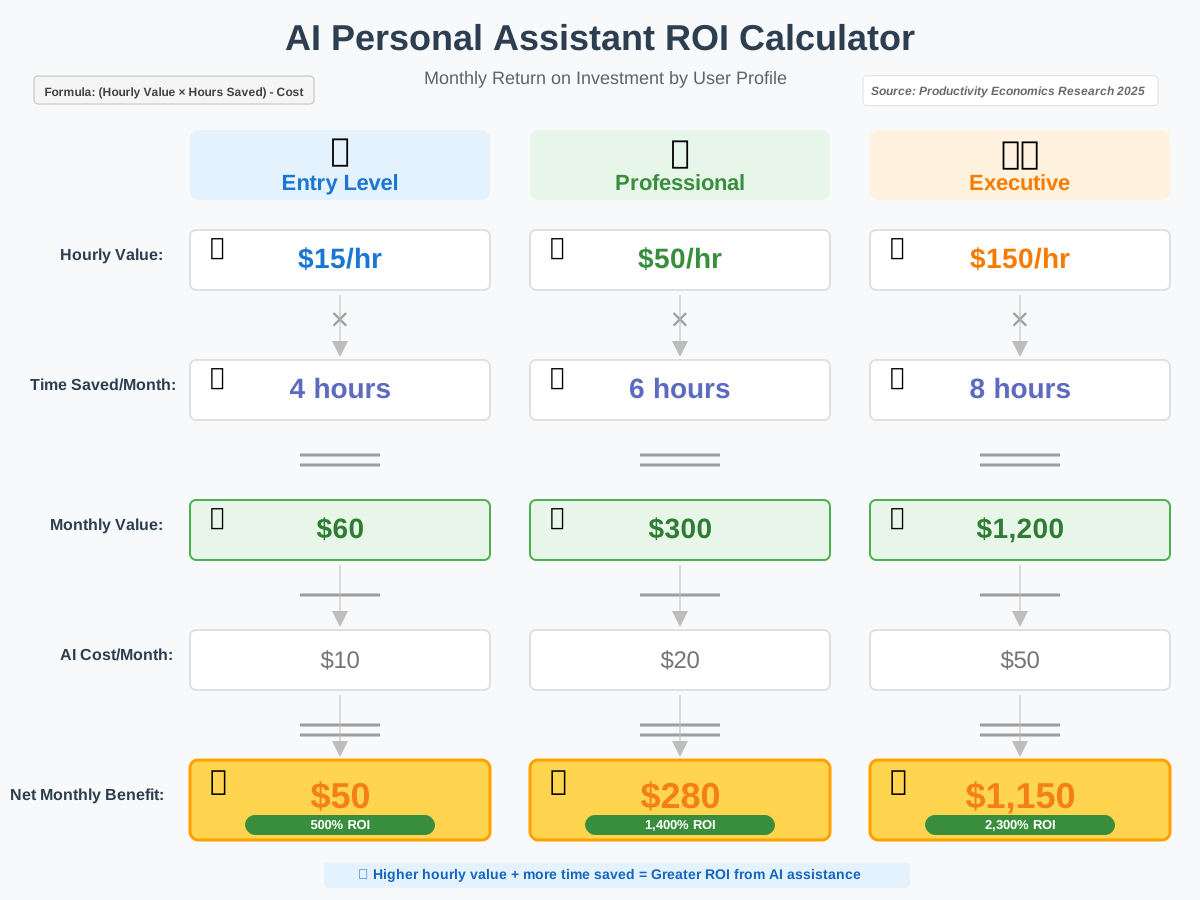
The Cost-Effectiveness of AI Personal Assistants: ROI Analysis reveals compelling economics, though calculating precise returns requires honest assessment of your time value and what you’ll do with reclaimed hours.
Direct Costs: Most consumer AI assistants are free (Siri, Google Assistant, and Alexa with purchased hardware). Premium services like specialized business assistants range from $10 to $50 monthly. Hardware costs for smart displays or speakers add $30-300 as one-time investments.
Time Savings Calculation: Track time saved for one month.
I documented that I saved approximately 90 minutes each week by doing the following:
- Calendar management: 20 minutes
- Email triage: 25 minutes
- Research and information retrieval: 15 minutes
- Routine communications: 10 minutes
- Smart home control: 5 minutes
- Navigation and travel planning: 15 minutes
That’s 6 hours monthly—72 hours annually. At even modest hourly valuations ($25-100/hour), the ROI becomes substantial.
Opportunity Cost: The critical question isn’t just time saved but what you do with it. If reclaimed time goes to scrolling social media, the ROI is questionable. If it enables additional client work, family time, or personal development, the value multiplies.
Productivity Gains: Beyond direct time savings, consider improved execution. I miss fewer deadlines, forget fewer tasks, and make better-informed decisions because relevant information surfaces when needed rather than after the fact.
Stress Reduction Value: How do you value reduced anxiety from fewer forgotten obligations? The peace of mind knowing my AI assistant tracks details while I focus on the bigger picture has mental health benefits that transcend financial calculation.
Business Impact: For entrepreneurs and professionals, AI assistance enables scaling that would otherwise require staff. I handle administrative tasks that would require a part-time assistant ($20,000-30,000 annually) for a fraction of that cost.
Hidden Costs: Factor in learning curve time, occasional errors requiring correction, privacy concerns requiring additional security measures, and integration troubleshooting. I spent approximately 10 hours on the initial setup and maintain it for about 30 minutes weekly.
Break-Even Analysis: At $20 monthly for premium features and 6 hours monthly savings, your hourly value only needs to exceed $3.33 for positive ROI. Even accounting for hidden costs and the learning curve, break-even occurs rapidly for most users.
AI Personal Assistants and Mental Health: Reducing Stress and Anxiety
AI Personal Assistants and Mental Health: Reducing Stress and Anxiety addresses an often-overlooked dimension of these technologies. The relationship between digital tools and mental well-being is complex, but thoughtful implementation can genuinely reduce daily stress.
Cognitive Load Reduction: Human working memory is limited. Every appointment, deadline, task, and commitment occupies mental space—even when successfully remembered. Offloading this tracking to AI assistance frees cognitive resources for creative and analytical thinking. I noticed improved focus on complex projects once I stopped mentally rehearsing my schedule throughout the day.
The Zeigarnik Effect: Uncompleted tasks create persistent mental pressure. Your AI assistant provides reliable capture—knowing tasks are recorded and will surface at appropriate times reduces this background anxiety. I use voice capture immediately when I think of something: “Remind me to call the dentist tomorrow at 9 AM.” Instant relief.
Decision Fatigue: Every decision depletes mental energy, even trivial choices. AI assistants reduce decision volume through automation and intelligent defaults. When my assistant automatically schedules routine tasks at optimal times, I preserve decision-making capacity for choices that actually matter.
Proactive Stress Management: Advanced assistants detect stress indicators—rushed speech patterns, frequent rescheduling, late-night activity—and can suggest breaks, breathing exercises, or schedule adjustments. While this capability is emerging, early implementations show promise.
Social Connection Support: Reminders to reach out to friends and family, prompts to respond to messages, and birthday alerts help maintain relationships despite busy schedules. Social connection is fundamental to mental health, and AI assistance prevents these important interactions from falling through cracks.
Boundary Establishment: Properly configured, AI assistants help establish and maintain healthy boundaries. Mine enforces “no meetings before 9 AM” and “no work emails after 7 PM” unless I explicitly override. This structure reduces evening anxiety and improves sleep.
Important Caveats:
AI assistance can also increase stress through:
- Over-optimization creating rigidity
- Notification overload
- Perfectionistic tracking of every minute
- Dependency anxiety when systems fail
- Privacy concerns about surveillance
Balance requires intentional configuration. Disable unnecessary notifications, maintain flexibility in schedules, and remember that AI assistance serves you—not the other way around.
Integrating AI Personal Assistants with Other Productivity Tools
Integrating AI Personal Assistants with Other Productivity Tools multiplies effectiveness exponentially compared to standalone usage. The real power emerges when your assistant becomes a central hub connecting everything else.
Calendar Integration: Beyond basic event management, connect multiple calendars (work, personal, shared family) for unified visibility. Enable automatic meeting link generation, attendee availability checking, and conflicting event warnings. My assistant suggests meeting times by checking all participants’ calendars simultaneously.
Task Management: Link your task manager (Todoist, Things, or Microsoft To Do) for voice-based task creation, deadline updates, and priority adjustments. “Add ‘Review contract’ to my work project, due Friday, high priority” creates a properly categorized task instantly.
Email Platforms: Connect Gmail, Outlook, or Apple Mail for email summarization, priority flagging, and draft assistance. Morning email briefings save 15-20 minutes daily by surfacing only what requires immediate attention.
Note-Taking Apps: Integration with Notion, Evernote, or OneNote enables voice-to-note capture. Thoughts occurring during commutes or workouts get captured immediately rather than forgotten. “Note to self: project idea for Q2—subscription model variant focusing on small businesses.”
Project Management: Connect Asana, Trello, or Monday.com for task updates, deadline tracking, and status checks through voice commands. “What’s my team’s progress on the website redesign?” provides instant visibility without opening applications.
Communication Platforms: Slack, Teams, and other messaging platforms enable message sending, status updates, and notification management. “Tell the team I’m in deep focus for the next two hours” updates the status across platforms simultaneously.
File Storage: Google Drive, Dropbox, or OneDrive integration allows file retrieval, sharing, and organization through voice. “Find the Q4 budget spreadsheet and share it with Sarah” executes a multi-step process instantly.
CRM Systems: For sales professionals, Salesforce or HubSpot integration enables lead logging, opportunity updates, and pipeline tracking without manual data entry.
Implementation Strategy:
Start with Core Systems: Don’t integrate everything immediately. Connect your calendar and email first, establish reliable workflows, and then expand.
Use Native Integrations: Official integrations typically offer better reliability and security than third-party connectors.
Test Gradually: When adding new integrations, test with non-critical tasks before trusting them for important work.
Establish Backup Processes: Integration failures happen. Maintain alternative methods for critical tasks.
Review Permissions Regularly: Each integration grants access to data. Audit quarterly to ensure you’re comfortable with access levels.
AI Personal Assistants for Travel Planning: Making Travel Easier
AI Personal Assistants for Travel Planning: Making Travel Easier addresses one of the most valuable use cases, where multiple variables, changing information, and coordination challenges create ideal conditions for AI assistance.
Pre-Trip Research: “Research direct flights from New York to Barcelona in September under $600” initiates a comprehensive search across multiple booking platforms. Your assistant compares options, flags unusual deals requiring verification, and monitors prices for optimal booking timing.
Itinerary Management: AI assistants consolidate confirmation emails, flight details, hotel reservations, and rental car information into unified itineraries. Mine automatically adds flight information to my calendar with check-in reminders, gate changes, and delay notifications.
Packing Assistance: “Create a packing list for a week in Iceland in March” generates appropriate clothing recommendations based on destination weather, planned activities, and trip duration. Customize the list, then have your assistant remind you of specific items the day before departure.
Real-Time Updates: During travel, your assistant monitors flight status, gate changes, cancellations, and delays. I’ve received gate change notifications before airport displays updated, allowing earlier repositioning to new gates.
Local Recommendations: “Find highly-rated seafood restaurants within walking distance of my hotel that accept reservations tonight” provides contextual suggestions based on current location, dietary preferences, and availability.
Language Assistance: Real-time translation enables communication in foreign countries. Hold your phone between speakers for live translation, or use text translation for menus, signs, and documents.
Navigation Support: Turn-by-turn directions with real-time traffic, public transportation schedules, and walking routes help navigate unfamiliar cities. Your assistant learns preferences—I prefer walking to short taxi rides when time permits.
Expense Tracking: Voice-log travel expenses immediately, “Log 35 euros for lunch in Paris, meal expenses category.” Categorized tracking simplifies expense reports and personal budgeting.
Emergency Support: In emergencies, quick access to embassy contacts, emergency services, travel insurance information, and translation assistance provides crucial support in stressful situations.
Post-Trip Tasks: Upon return, your assistant can help with expense report compilation, photo organization, review posting for accommodations, and follow-up with connections made during travel.
Travel-Specific Tips:
Download Offline Maps: Ensure map access without international data.
Save Important Documents: Screenshot or save offline copies of boarding passes, hotel confirmations, and emergency contacts.
Set Up International Calling: Verify voice assistant works with international numbers before traveling.
Configure Time Zone Handling: Ensure your assistant properly handles time zones for reminders and alarms.
Privacy Considerations: Some countries have different AI assistant regulations or restrictions. Research before traveling.
The Rise of Conversational AI in Personal Assistance
The Rise of Conversational AI in Personal Assistance marks a fundamental shift from command-based interaction to genuine dialogue. Early assistants required specific phrasing—”Set alarm for 7 AM”—while modern systems understand natural conversation.
This evolution stems from advances in natural language processing, contextual understanding, and multi-turn conversation management. My assistant now handles complex exchanges:
Me: “I need to meet with Sarah next week.” Assistant: “I found three open slots when you’re both available: Tuesday at 2 PM, Wednesday at 10 AM, or Thursday at 3 PM. Which works best?” Me: “Wednesday, but make it 30 minutes.” Assistant: “I’ve created a 30-minute meeting with Sarah for Wednesday at 10 AM and sent calendar invites to both of you. Would you like me to add a meeting agenda?”
This conversational flow mirrors human assistant interaction—ask follow-up questions, clarify ambiguities, and make contextual suggestions.
Key Conversational Capabilities:
Context Retention: Modern assistants remember earlier conversation parts. “Change it to Thursday” works after discussing a specific meeting. Earlier systems required complete restatement.
Ambiguity Resolution: When commands are unclear, assistants ask clarifying questions rather than guessing or failing. “Book a flight” triggers questions about dates, destinations, and preferences rather than an error message.
Informal Language: You can speak naturally—”Can you…” and “Would you mind…” work as well as direct commands. Conversational filler (“um,” “like,” “you know”) is filtered intelligently.
Multi-Step Reasoning: Complex requests involving multiple actions get decomposed intelligently. “Plan a dinner party for Saturday” might trigger questions about guest count, dietary restrictions, and budget before suggesting recipes, creating shopping lists, and setting preparation reminders.
Interruption Handling: Mid-conversation corrections work naturally. If your assistant misunderstands, interrupt immediately rather than letting errors cascade.
Personalized Responses: Conversational AI adapts to your communication style over time—formality level, detail preference, and humor appreciation.
The future trajectory leads toward assistants indistinguishable from human conversation partners in most routine interactions. This raises fascinating questions about human-AI relationships and appropriate boundaries, but the convenience and naturalness benefits are undeniable.
AI Personal Assistants for Remote Workers: Staying Connected and Organized
AI Personal Assistants for Remote Workers: Staying Connected and Organized addresses specific challenges of distributed work where traditional office structure no longer provides natural organization and connection.
Time Zone Management: When collaborating across time zones, your assistant can convert meeting times automatically, suggest optimal overlap periods, and prevent scheduling during teammates’ off-hours. Mine includes time zone indicators on every event involving international participants.
Virtual Meeting Coordination: Automate meeting link generation, calendar invitations, reminder sending, and participant notifications. “Schedule a team standup for tomorrow at 9 AM” creates the event, generates the video link, and sends invitations automatically.
Workspace Mode Switching: Create distinct modes for different work contexts. “Start deep work session” enables do-not-disturb, blocks distracting websites, opens relevant documents, and starts focus music. “Start collaborative mode” does the opposite—enables all notifications and communication channels.
Social Connection Maintenance: Remote work risks isolation. Schedule regular check-ins with colleagues beyond formal meetings: “Remind me to message Tom on Friday for a casual catch-up.” These small touchpoints maintain relationships and team cohesion.
Asynchronous Communication Support: Voice-to-text for detailed message composition, message scheduling for timezone-appropriate delivery, and read receipt tracking help manage communication when teams aren’t online simultaneously.
Home Office Automation: Smart home integration enables quick environment adjustments. “Start work mode” might adjust lighting for optimal screen viewing, set temperature for alertness, and activate noise cancellation systems.
Break Reminders: Remote workers often work longer hours than their office counterparts. Schedule regular breaks: “Remind me to take a 15-minute break every 2 hours” with activity suggestions—walk, stretch, hydrate.
End-of-Day Routines: Create shutdown rituals helping separate work and personal time—important when home and office occupy the same space. Mine includes status message updates, tomorrow’s task preview, and office light shutdown.
Productivity Tracking: While avoiding micromanagement, some tracking helps identify patterns. “How many meetings did I have this week?” reveals schedule overload. “What were my main focuses yesterday?” jogs memory for daily standups.
Emergency Coordination: Configure family-aware settings. When your partner needs immediate attention, they can trigger your “family emergency” alert that overrides do-not-disturb and immediately surfaces the notification.
AI Personal Assistants and Data Security: Protecting Your Information
AI Personal Assistants and Data Security: Protecting Your Information requires understanding both technical safeguards and practical behaviors that minimize risk exposure.
Encryption Standards: Verify your assistant uses end-to-end encryption for data transmission and secure encryption at rest for stored data. Industry-standard AES-256 encryption should be the minimum. Check provider security documentation—reputable companies publish detailed security practices.
Authentication Layers: Enable all available authentication methods:
- Biometric voice recognition
- Two-factor authentication on your account
- Device-level security (fingerprint, face recognition)
- PIN codes for sensitive actions
My assistant requires voice match for commands involving payments or personal information—preventing unauthorized access even if someone has physical device access.
Data Minimization: Grant minimum necessary permissions. If your assistant doesn’t need access to photos for your use case, don’t grant it. Regularly audit permissions and revoke unnecessary access.
Network Security: Use VPNs when accessing your assistant over public Wi-Fi. This prevents network-level interception of commands and responses. I never conduct sensitive assistant interactions on airport or coffee shop networks without VPN protection.
Local vs. Cloud Processing: Some assistants offer local processing options for enhanced privacy—commands are processed on-device rather than sent to servers. Trade-offs exist (reduced capability, limited features), but for privacy-critical users, this option merits consideration.
Data Retention Policies: Understand how long your data is retained. Configure automatic deletion—most platforms allow settings from 3 months to manual-only deletion. I maintain 6-month retention, balancing privacy with enough history for the assistant to learn patterns.
Third-Party Integrations: Each connected service represents additional exposure. Before integrating, research the third party’s security practices. Some questions to ask:
- Do they encrypt data in transit and at rest?
- Have they experienced past breaches?
- What’s their data retention policy?
- Can you revoke access granularly?
Account Monitoring: Enable security alerts for unusual activity—logins from new devices, permission changes, or commands from unrecognized locations. Act immediately on suspicious alerts.
Backup Authentication: Establish account recovery methods you control—recovery email, security questions, backup codes. Store these securely offline. Losing assistant access might mean losing access to integrated accounts.
Incident Response Plan: Prepare for potential breaches:
- List all integrated services for quick revocation if needed
- Know how to remotely wipe devices
- Understand data download procedures (download your data before deleting accounts)
- Document who to notify if work-related information is compromised
Physical Security: Your assistant is only as secure as your physical devices. Use strong device passwords, enable remote wipe capability, and never leave unlocked devices unattended in public spaces.
Regular Security Audits:
Quarterly review:
– Active sessions and authorized devices
– Granted permissions and integrations
– Recent command history for anomalies
– Security settings and authentication methods
Choosing the Right AI Personal Assistant: A Comprehensive Guide
Choosing the Right AI Personal Assistant: A Comprehensive Guide requires evaluating multiple factors beyond marketing claims and feature lists. After years of testing various assistants, I’ve developed a systematic selection framework.
Ecosystem Compatibility: Start with your existing devices. Apple ecosystem users benefit most from Siri’s tight integration. Android users find Google Assistant more capable. Mixed ecosystem users need assistants with strong cross-platform support.
Don’t underestimate this factor. I initially tried using Google Assistant with Apple devices and constantly fought integration limitations. Switching to Siri eliminated friction even though some individual features were slightly less capable.
Primary Use Cases:
Identify your top three use cases and verify capability:
– Smart home control: Alexa dominates with most device compatibility
– Information retrieval: Google Assistant leverages search superiority
– Professional productivity: Microsoft Cortana excels for Microsoft 365 users
– Creative and conversational tasks: Claude offers sophisticated dialogue
– Privacy-focused users: Apple Siri processes more data locally
Voice Recognition Quality: This varies surprisingly across platforms and even between users. Test your target assistant with your speaking style—accents, speed, and colloquialisms. I have a friend whose Southern accent confuses certain assistants but works perfectly with others.
Natural Language Understanding: Beyond basic recognition, how well does the assistant understand context and handle ambiguous requests? Test with complex, multi-part commands: “Schedule a meeting with both team members for next week when we’re all available, but not during lunch.”
Learning Capability: Better assistants improve through interaction. They learn your preferences, communication patterns, and routine behaviors. Ask existing users whether their assistant has noticeably improved over months of use.
Integration Breadth: Count available integrations for services you actually use. A thousand integrations don’t matter if none support your specific tools. Prioritize depth (how well it integrates) over breadth (how many integrations exist).
Privacy Reputation: Research the company’s data practices, history with user privacy, and regulatory compliance. Companies with better privacy practices typically process more data locally, offer granular privacy controls, and face fewer breaches.
Cost Structure:
Beyond upfront costs, consider:
– Subscription fees for premium features
– Hardware requirements
– Integration costs for business tools
– Costs to switch if you later change platforms
Developer Support: Active developer communities indicate ongoing improvement and available troubleshooting help. Check GitHub repositories, forums, and documentation quality.
Specialty Features:
Identify must-have features for your situation:
– Multiple user support for families
– Languages beyond English
– Offline functionality for frequent travelers
– Developer APIs if you want custom integrations
– Accessibility features if needed
Testing Approach:
Trial Period: Use free tiers or trial periods for serious evaluation. One week minimum to overcome novelty and establish routine use patterns.
Structured Testing: Create a testing checklist covering your use cases. Don’t rely on general impressions—systematically verify capability for your specific needs.
Real-World Scenarios: Test under actual conditions—noisy environments, while driving, hands-free, with background sounds. Performance in quiet testing environments doesn’t predict real-world reliability.
Integration Testing: Actually connect your important services and verify they work as expected. Marketing materials often oversimplify integration reality.
Stress Testing: Try complex, ambiguous requests. See how the assistant handles misunderstandings, errors, and edge cases.
AI Personal Assistants and Smart Home Integration: A Connected Life
AI Personal Assistants and Smart Home Integration: A Connected Life showcases how AI serves as a command center for comprehensive home automation. My smart home journey started with simple voice-controlled lights and evolved into sophisticated automation transforming daily routines.
Lighting Control: Basic voice commands for on/off evolved into scenes and automation. “Movie mode” dims lights gradually, while “reading mode” brightens task lighting specifically. Motion-based automation turns lights on upon room entry and off after vacancy—no commands needed.
Climate Management: Voice-adjustable thermostats become smarter with AI integration. My assistant learns occupancy patterns and preemptively adjusts temperature. “I’m cold” triggers an immediate temperature increase without specifying exact numbers.
Security Systems: Arm/disarm security, check camera feeds, receive alerts, and unlock doors through voice commands. Geofencing automatically arms when everyone leaves and disarms upon first arrival. “Show me the front door” displays the camera feed on my phone or smart display.
Entertainment Systems: Unified control across TV, speakers, streaming services, and gaming systems eliminates multiple remotes and apps. “Play The Office on the living room TV” works regardless of which streaming service hosts the show.
Appliance Control: Voice-start coffee makers, slow cookers, washing machines, and even some ovens. “Start morning coffee” begins brew timing timed with my wake-up routine.
Window Treatments: Automated blinds adjust based on sun position, time of day, or manual commands. “Close the bedroom blinds” works from bed—no need to walk around manually adjusting each window.
Irrigation Systems: Smart sprinklers adjust watering schedules based on weather forecasts, soil moisture sensors, and seasonal needs. Override manually when needed: “Skip watering today.”
Garage Door Control: Open/close garage doors remotely with location-based automation—opens automatically when you arrive home, closes automatically after you leave.
Leak Detection: Water sensors alert your assistant to potential leaks. Receive immediate notifications and automatic water shutoff where integrated, preventing disaster from small leaks.
Air Quality: Monitors track indoor air quality, triggering purifiers or ventilation when measurements exceed thresholds. “What’s the air quality?” provides instant assessment.
Advanced Automation Examples:
Morning Sequence: At wake-up time, gradually increase bedroom lights simulating sunrise, adjust thermostat to comfortable morning temperature, start coffee, open bedroom blinds, and provide weather and calendar briefing.
Departure Routine: “I’m leaving” triggers a comprehensive shutdown—turns off lights, adjusts thermostat to away mode, arms security, closes garage door, and locks smart locks.
Arrival Routine: Geofencing detects your arrival, triggering a welcome sequence—disarms security, unlocks the door, turns on entry lights, adjusts the temperature, and announces any important notifications or reminders.
Night Mode: “Good night” activates bedtime sequence—locks all doors, arms security, turns off all lights except nightlights, adjusts temperature for sleeping, and sets morning alarm.
Vacation Mode: “Activate vacation mode” creates occupancy simulation—random light patterns, occasional TV activity, and regular blind adjustments—while forwarding security alerts and maintaining conservative climate control for efficiency.
The Impact of AI Personal Assistants on the Job Market
The Impact of AI Personal Assistants on the Job Market sparks anxiety and opportunity simultaneously. Understanding realistic impacts helps navigate career planning and organizational adaptation.
Administrative Roles Evolution: Traditional administrative assistant positions are transforming rather than disappearing. Routine tasks—scheduling, email management, travel booking—increasingly migrate to AI. However, high-value administrative work—relationship management, judgment calls, crisis handling, executive support requiring discretion—remains firmly human territory.
Organizations still need administrative professionals but redefine roles around strategic support, stakeholder relationship management, and complex coordination that AI handles poorly. Forward-thinking administrative professionals position themselves for this evolution through developing skills AI can’t replicate—emotional intelligence, discretion, and relationship building.
New Job Categories:
AI assistant technology creates employment:
– Voice experience designers
– AI training specialists
– Integration developers
– Conversational flow engineers
– Privacy and ethics officers
– AI assistant customization consultants
These roles didn’t exist five years ago; now they’re growing fields with increasing demand and competitive compensation.
Productivity Enhancement: Most workers find AI assistants enhance rather than replace their roles. I’m more productive with AI assistance—handling more clients, responding faster, researching more thoroughly—but my role hasn’t diminished. Instead, I’ve expanded capacity.
Skill Premium Shift: Tasks requiring uniquely human capabilities—creativity, emotional intelligence, complex judgment, relationship building, strategic thinking—become more valuable as routine tasks automate. Career development should emphasize capabilities that complement rather than compete with AI.
Accessibility Increase: AI assistants enable workers previously excluded by certain barriers—physical disabilities limiting traditional work methods, caregiving responsibilities requiring flexible schedules, geographic distance from employment centers. This expands the potential workforce.
Entrepreneurship Enablement: Solo entrepreneurs and small businesses access capabilities previously requiring staff. This lowers barriers to business creation, potentially increasing small business formation and economic dynamism.
Displacement Reality: Some roles face legitimate disruption—particularly high-volume, low-complexity administrative work. Transitioning workers need support through retraining programs, educational access, and career counseling.
Wage Effects: Research shows mixed wage impacts—productivity gains sometimes translate to higher compensation, other times to work intensification without corresponding pay increases. Outcome depends significantly on labor market conditions, negotiation power, and organizational culture.
Organizational Structure Changes: Flatter hierarchies emerge as AI handles coordination previously requiring middle management. Span of control increases as managers leverage AI to track more direct reports.
Critical Skills:
Regardless of industry, valuable skills include:
– AI collaboration: Working effectively with AI tools
– Critical evaluation: Assessing AI outputs for accuracy and appropriateness
– Uniquely human capabilities: Empathy, creativity, ethical reasoning, relationship building
– Adaptability: Learning new tools and workflows as technology evolves
– Strategic thinking: Focusing on high-value work AI can’t perform
AI Personal Assistants for Students: Enhancing Learning and Organization
AI Personal Assistants for Students: Enhancing Learning and Organization addresses a demographic benefiting enormously from AI assistance yet often overlooking its educational potential. As someone who struggled with organization during school, I wish these tools existed back then.
Assignment Tracking: Voice-log assignments immediately upon receiving them: “Add psychology research paper to my assignments, due March 15th, high priority.” Your assistant can remind you as deadlines approach and even break large assignments into smaller milestones.
Study Schedule Management: Create realistic study schedules accounting for all commitments. “Block three hours for exam prep this weekend” finds available time considering existing obligations. Your assistant can distribute study time across days to avoid cramming.
Class Schedule Organization: Input class schedules once; your assistant provides daily briefings: “What classes do I have today?” Receive pre-class reminders with necessary materials lists: “Biology at 2 PM—don’t forget your lab notebook.”
Research Assistance: Quickly gather information for papers and projects. “Research the causes of World War I” provides starting points for deeper investigation. While AI shouldn’t write your papers, it accelerates initial research phases.
Study Group Coordination: Finding common availability across multiple schedules is tedious. Your assistant can check all participants’ calendars simultaneously and suggest optimal meeting times.
Note-Taking Support: Voice-to-text capture lets you record lecture thoughts or sudden insights without interrupting focus. “Note for biology class: research more about mitochondrial function in muscle cells.”
Reading List Management: Track assigned readings, receive reminders for upcoming assignments, and log completed materials. “Add chapters 5-7 of Pride and Prejudice to my reading list, due Friday.”
Exam Preparation: Set up exam countdown reminders starting weeks in advance. Create study routines triggered automatically: “It’s study time for your chemistry exam tomorrow—do you want to review flashcards?”
Time Management Skills: Students developing time management benefit from structured routines. Morning briefings, evening reviews, and automatic schedule optimization teach habits that persist beyond school years.
Mental Health Support: Academic stress impacts mental health significantly. Schedule breaks, limit late-night studying through bedtime reminders, and maintain social connections through friendship check-in prompts.
Language Learning: Many assistants support multiple languages, enabling practice conversations, vocabulary drills, and pronunciation checking. Switching your assistant’s language to one you’re learning creates immersive practice.
Financial Tracking: Students on tight budgets benefit from expense logging: “Log $23 for textbooks, education expense category.” Monthly summaries reveal spending patterns and opportunities for savings.
Campus Navigation: New students navigating large campuses use AI for directions to classes, buildings, and facilities. “Navigate to the engineering building” provides walking or biking directions.
Academic Resource Discovery: “When is the library open today?” “Where can I get free tutoring for calculus?” Your assistant can answer campus-specific questions after you teach it relevant information.
Focus Enhancement: Study mode enables do-not-disturb, blocks distracting apps and websites, and creates optimal study conditions. “Start focus session for two hours” removes temptations during critical study time.
Troubleshooting Common Issues with AI Personal Assistants
Troubleshooting Common Issues with AI Personal Assistants prepares you to resolve frustrations before abandoning AI assistance entirely. Most issues have straightforward solutions once you understand the underlying causes.
Issue: Assistant Doesn’t Understand Commands
Causes: Background noise, unclear pronunciation, overly complex phrasing, or an underdeveloped voice profile.
Solutions:
- Retrain voice recognition through settings menu
- Speak clearly at moderate pace
- Rephrase complex commands into simpler components
- Reduce background noise or use a different room
- Check microphone settings and phone position
Issue: Incorrect Calendar Events
Causes: Ambiguous time references, wrong time zone settings, or misunderstood participant names.
Solutions:
- Use explicit dates and times: “Next Tuesday at 3 PM” instead of “later next week”
- Verify time zone settings in calendar app and assistant settings
- Use contact names exactly as stored
- Create events through calendar app initially, then hand off to assistant once working correctly
Issue: Missed Reminders
Causes: Notification settings disabled, do-not-disturb overrides, wrong device selected, or location-based reminders when location services are disabled.
Solutions:
- Check notification permissions for your assistant app
- Review do-not-disturb settings and create exceptions for assistant
- Specify device for reminders: “Remind me on my phone” vs. “on my watch”
- Enable location services for location-based reminders
- Set multiple reminder methods for critical items
Issue: Integration Failures
Causes: Expired authentication tokens, permission changes, app updates breaking compatibility, or network connectivity issues.
Solutions:
- Disconnect and reconnect the problematic integration
- Verify granted permissions haven’t been accidentally revoked
- Update all apps to latest versions
- Check internet connectivity
- Review integration status pages for known issues
Issue: Privacy Concerns About Listening
Causes: Wake word false positives, unclear activation indicators, or misunderstanding how listening works.
Solutions:
- Disable wake word detection, switch to button/gesture activation
- Review recording history and delete unwanted captures
- Place devices away from private conversations
- Use visual/audio indicators to confirm when assistant is actively listening
- Configure sensitivity settings to reduce false activations
Issue: Battery Drain
Causes: Continuous wake word monitoring, background processing, or frequent network synchronization.
Solutions:
- Disable wake word activation when not needed
- Reduce sync frequency for less-critical integrations
- Close assistant app when not in use (if allowed by platform)
- Check for app updates addressing battery optimization
Issue: Incorrect Information
Causes: Outdated training data, misunderstanding your query, or hallucinated responses.
Solutions:
- Verify important information through direct sources
- Rephrase questions for clarity
- Ask for sources or how the assistant reached its conclusion
- Report incorrect information through feedback mechanisms
- Use specialized tools for critical information rather than general assistants
Issue: Commands Stop Working
Causes: Software updates changing functionality, removed features, changed service provider policies, or account issues.
Solutions:
- Check release notes for recent updates
- Verify account status and subscriptions
- Review assistant’s status page for service outages
- Contact support with specific examples of failed commands
Issue: Slow Response Times
Causes: Poor internet connectivity, server issues, complex processing requirements, or device performance problems.
Solutions:
- Test internet speed and strengthen Wi-Fi signal
- Restart devices to clear memory
- Simplify commands that timeout
- Check service status pages
- Update device software
General Troubleshooting Approach:
- Replicate the issue: Determine if problems are consistent or intermittent
- Isolate variables: Test on different devices, networks, or accounts
- Check basics: Updates installed, permissions granted, connectivity working
- Review settings: Something may have accidentally changed
- Consult documentation: Official help often addresses common issues
- Community resources: Forums and user groups share solutions
- Contact support: When all else fails, vendor support can diagnose deeper issues
AI Personal Assistants and Customer Service: Improving Support
AI Personal Assistants and Customer Service: Improving Support demonstrates how businesses leverage AI assistance to enhance customer experiences while reducing operational costs. Both sides benefit when implemented thoughtfully.
24/7 Availability: AI-powered customer service operates continuously without breaks or fatigue. Customers receive instant responses regardless of time zones or holidays. I’ve resolved simple account questions at 2 AM that would otherwise require waiting until business hours.
Instant Response Times: No hold music, no queue positions, no waiting. AI assistants provide immediate acknowledgment and often immediate resolution for straightforward queries. Even when escalation to humans is necessary, AI can gather information and context first, reducing overall resolution time.
Consistent Quality: Human representatives vary in knowledge, mood, and communication skill. AI assistants provide consistent information and tone regardless of query volume or timing. Every customer receives the same quality experience.
Multilingual Support: AI assistants offer native-quality support in dozens of languages without requiring multilingual staff. This dramatically expands accessible markets for businesses and service quality for non-English speakers.
Personalization at Scale: AI remembers every previous interaction, purchase history, preferences, and context. This enables highly personalized service impossible for human agents encountering customers for the first time.
Routine Query Handling: Password resets, order tracking, FAQ responses, and basic troubleshooting—these routine queries consume significant human agent time. AI handles them instantly, freeing human agents for complex issues requiring judgment and empathy.
Proactive Support: Rather than waiting for customers to contact them, AI assistants can proactively reach out about shipping delays, upcoming renewals, abandoned carts, and potential issues based on usage patterns. This prevents problems before they escalate.
Sentiment Analysis: AI detects frustration or satisfaction in customer communications, escalating unhappy customers to human agents immediately while continuing to serve satisfied customers efficiently.
Knowledge Base Navigation: Instead of customers searching help documentation, AI assistants understand natural language questions and surface relevant answers instantly. “How do I reset my password?” gets a direct answer rather than a list of potentially relevant articles.
Limitations and Human Handoff:
AI excels at structured, information-based queries but struggles with:
– Emotionally charged situations requiring empathy
– Novel problems not in training data
– Complaints requiring authority to make exceptions
– Complex judgment calls
– Building long-term customer relationships
Effective implementations recognize these limitations and provide seamless human escalation. The best systems use AI for initial triage and routine resolution while ensuring frustrated customers reach humans quickly.
Implementation Best Practices:
Clear AI Identification: Customers deserve to know they’re interacting with AI. Deceptive practices erode trust and violate regulations in many jurisdictions.
Easy Escalation: “Speak to a human” should work at any point. Forced interaction with unhelpful AI creates intense frustration.
Contextual Handoff: When escalating to humans, transfer all context—conversation history, account details, and attempted solutions. Customers shouldn’t repeat themselves.
Continuous Improvement: Monitor AI interactions for failure patterns. When customers frequently escalate specific query types, improve AI training or create human handoff rules.
Appropriate Use Cases: Not every customer interaction suits AI. Complex sales, sensitive issues, or high-value customers may warrant human-first approaches.
AI Personal Assistants for Healthcare: Improving Patient Care
AI Personal Assistants for Healthcare: Improving Patient Care represents both tremendous potential and significant responsibility. Healthcare applications require exceptional accuracy, privacy, and appropriate scope limitation.
Medication Management: AI assistants provide reliable medication reminders—dosage, timing, and food requirements. This improves adherence significantly, particularly for complex regimens. My grandmother manages six different medications with different schedules; her AI assistant ensures she never misses doses.
Appointment Scheduling: Streamline booking, rescheduling, and cancellation of medical appointments. “Schedule my annual checkup” can search available times, book appointments, and add them to calendars. Automated reminders reduce missed appointments.
Symptom Tracking: Voice logging enables consistent symptom documentation, “Log headache, severity 7 out of 10, started at 3 PM.” Over time, this data reveals patterns valuable for diagnosis and treatment adjustment.
Health Metric Monitoring: Integration with fitness trackers, blood pressure monitors, glucose meters, and other devices enables comprehensive health tracking. AI can identify concerning trends and prompt medical consultation.
Care Coordination: Managing multiple specialists, appointments, medications, and test results overwhelms many patients. AI assistants consolidate information, ensure specialists have relevant records, and flag scheduling conflicts or medication interactions.
Patient Education: AI provides accessible explanations of conditions, treatments, and procedures. “Explain diabetes management in simple terms” offers understanding without medical jargon. Follow-up questions clarify confusion.
Telehealth Support: During virtual visits, AI assistants can display relevant medical history, provide translation services for non-English speakers, transcribe consultations for later review, and schedule follow-up appointments.
Mental Health Support: While not replacing professional treatment, AI assistants can provide CBT exercises, mood tracking, mindfulness reminders, and crisis resources. Some specialized mental health AI assistants offer therapeutic conversations between professional sessions.
Elderly Care: Older adults benefit particularly from AI assistance—medication reminders, fall detection, social connection prompts, cognitive stimulation through conversation, and emergency service contact.
Disability Accommodation: Voice control, visual descriptions, medication identification, and navigation assistance enable greater independence for people with various disabilities.
Critical Limitations:
Not Diagnostic Tools: AI assistants should never diagnose conditions or replace professional medical advice. They support but don’t substitute for qualified healthcare providers.
Privacy Sensitivity: Health information requires strict protection. Medical-grade AI should comply with HIPAA and equivalent regulations. Consumer AI assistants may not meet these standards.
Accuracy Requirements: Medical information must be accurate. Hallucinated medication instructions or incorrect symptom interpretation could cause serious harm. Verify medical information through healthcare providers.
Scope Boundaries: Clear communication about what the assistant can and cannot do prevents dangerous misuse. Emergency situations require 911, not AI assistance.
Accessibility Considerations: Medical AI must work for users regardless of technical sophistication, disability status, or language proficiency.
The Evolution of AI Personal Assistants: From Siri to Advanced AI
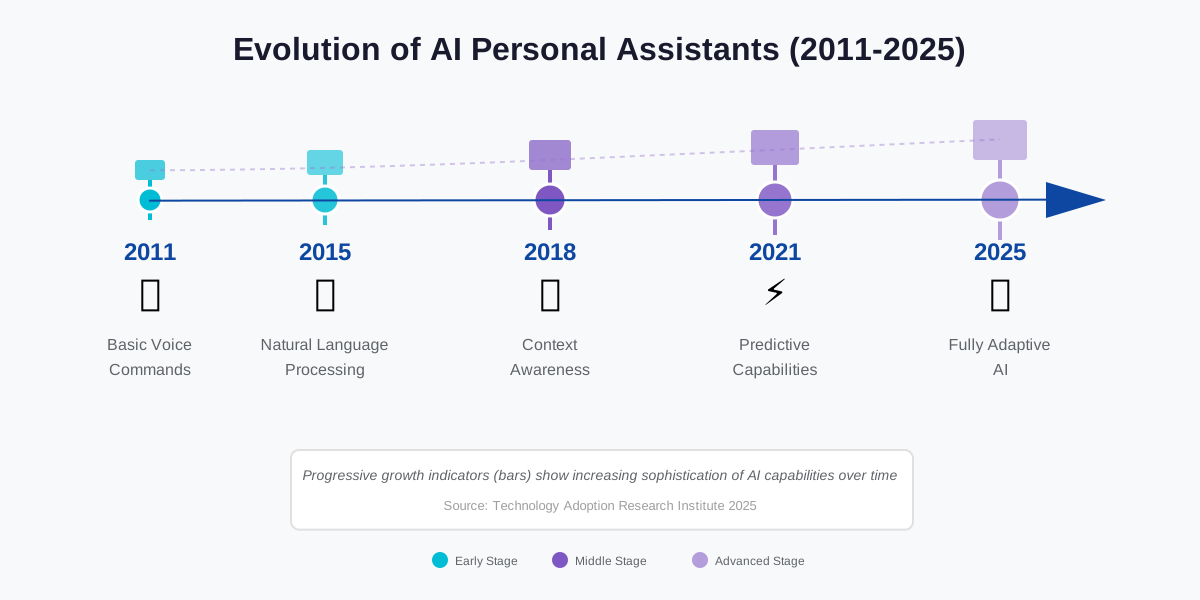
The Evolution of AI Personal Assistants: From Siri to Advanced AI traces a remarkable journey from simple voice commands to sophisticated conversational partners. Understanding this progression reveals why current capabilities exist and hints at future directions.
First Generation (2011-2015): Basic Commands
Siri launched in 2011, introducing mainstream voice interaction. Early assistants executed simple commands—”Set a timer,” “Call Mom,” “What’s the weather?”—but struggled with anything ambiguous or conversational. They functioned as voice-activated command interfaces rather than intelligent assistants.
I remember early Siri requiring exact phrasing. “Set alarm for 7 AM” worked; “Wake me up at seven tomorrow” failed. Natural language understanding was minimal.
Second Generation (2015-2018): Natural Language Processing
Google Assistant and Amazon Alexa introduced improved language understanding. Commands became more conversational: “What’s the weather like tomorrow?” “Find Italian restaurants nearby.” Context improved slightly—”What about Thursday?” after discussing Tuesday meetings.
Integration expanded dramatically. Smart home control, third-party services, and multi-step routines emerged. However, true conversation remained elusive—assistants treated each query independently.
Third Generation (2018-2021): Contextual Awareness
Machine learning advances enabled genuine context retention. Assistants remembered previous conversation turns, understood pronouns and references, and maintained conversation threads.
“Schedule a meeting with Sarah.” “Make it an hour long.” “Actually, change it to Friday.” This multi-turn exchange worked reliably.
Personalization deepened. Assistants learned individual preferences, adapted to communication styles, and provided proactive suggestions based on historical patterns.
Fourth Generation (2021-2024): Predictive and Proactive
Current-generation assistants anticipate needs before you ask. They surface information at relevant moments—traffic updates before your usual commute, meeting preparation materials before calls, and birthday reminders with gift suggestions.
Multimodal understanding combines voice, text, visual input, and sensor data. Point your phone at a plant and ask, “What is this?” —your assistant identifies it visually and verbally.
Fifth Generation (2024+): Advanced AI Integration
Emerging assistants incorporate large language models, enabling sophisticated conversation, complex reasoning, creative tasks, and nuanced understanding. The line between assistant and collaborator blurs.
Claude, ChatGPT, and similar platforms represent this evolution—capable of extended dialogue, research assistance, writing support, complex problem-solving, and adaptive personality.
Key Technology Drivers:
Natural Language Processing: Transformer architectures (attention mechanisms) revolutionized language understanding, enabling context-aware, coherent responses.
Machine Learning: Continuous learning from user interactions improves accuracy and personalization without explicit programming.
Cloud Computing: Powerful server-side processing enables complex computation impossible on mobile devices.
Edge Computing: Local processing improves privacy and response times for simple queries.
Multimodal AI: Unified models processing text, speech, images, and video enable richer interaction.
Neural Networks: Deep learning enables pattern recognition, prediction, and generation at human-competitive levels.
AI Personal Assistants and Time Management: Maximizing Your Day
AI Personal Assistants and Time Management: Maximizing Your Day focuses specifically on leveraging AI for the most precious resource—time. Effective time management requires more than task lists; it demands strategic allocation aligned with priorities.
Time Audit and Analysis: Your assistant can track time allocation across activities, revealing where hours actually go versus where you believe they go. I discovered I spent 12 hours weekly in meetings—time I could partly reclaim through better scheduling discipline.
Priority-Based Scheduling: Configure your assistant to understand priority hierarchies. High-priority tasks get prime cognitive time (typically mornings for most people). Lower-priority items fill afternoon slots when energy naturally wanes.
Energy Management: Beyond chronological scheduling, consider energy levels. My assistant knows I’m most creative 9-11 AM, best for analytical work 2-4 PM, and suitable only for routine tasks after 5 PM. It schedules accordingly.
Time Blocking: Protect focused work time through calendar blocking. “Block Thursday afternoons for deep work” creates recurring protected time. Your assistant declines meeting requests during these blocks automatically.
Transition Time: AI can automatically add buffer time between meetings—15 minutes for preparation, bio breaks, and mental reset. Without buffers, back-to-back meetings create exhaustion and diminish effectiveness.
Batch Similar Tasks: Group similar activities for efficiency. “Schedule all client calls on Tuesday and Thursday” batches context-similar work, reducing mental switching costs.
Deadline Management: Rather than simple due date reminders, AI can work backward from deadlines, suggesting when to start projects based on estimated duration and current workload.
Parkinson’s Law Mitigation: Work expands to fill available time. Time-boxed tasks combat this tendency. “I have 90 minutes for this report” triggers a timer and appropriate do-not-disturb settings.
Meeting Optimization: Your assistant can analyze meeting patterns, identify unnecessary recurring meetings, and suggest consolidation opportunities. I discovered three weekly meetings covering overlapping topics and combined them into one comprehensive session.
Strategic No: When asked to schedule something during protected time or when the calendar is overloaded, your assistant can automatically decline with a polite explanation. This removes guilt from necessary boundaries.
Pomodoro Technique Integration: Work in focused intervals (typically 25 minutes) with short breaks. “Start Pomodoro session” activates do-not-disturb, starts a timer, and reminds you for breaks—a proven productivity method automated.
Daily Reviews: Evening reviews of tomorrow’s schedule allow mental preparation and identify potential conflicts or overcommitment before they cause problems.
Weekly Planning: Sunday evening planning sessions review the week ahead, identify priorities, and ensure adequate time allocation for important projects often neglected amid urgency.
Progress Tracking: “How much time did I spend on the client project this week?” provides accountability and reveals whether time allocation matches stated priorities.
AI Personal Assistants and Voice Recognition Technology: A Deep Dive
AI Personal Assistants and Voice Recognition Technology: A Deep Dive explores the technical foundation enabling natural spoken interaction. Understanding these mechanisms helps troubleshoot issues and set realistic expectations.
How Voice Recognition Works:
Audio Capture: Microphones convert sound waves into digital signals. Quality dramatically affects recognition accuracy—noise-canceling microphones work better in challenging environments.
Signal Processing: Raw audio contains background noise, echo, and irrelevant sounds. AI filters and enhances the signal, isolating spoken words.
Acoustic Modeling: Machine learning models convert audio signals into phonetic representations—the building blocks of speech. These models learn from millions of hours of recorded speech.
Language Modeling: Phonetic sequences become word candidates. Language models predict likely words based on linguistic patterns and context. “Let’s meet for coffee” is more probable than “Let’s meat four coffee” despite similar pronunciation.
Speaker Recognition: Voice match technology identifies individual speakers through vocal characteristics—pitch, tone, speaking rate, and accent. This enables personalized responses and security features.
Continuous Improvement: Modern systems employ machine learning that improves through usage. Corrections, accepted suggestions, and interaction patterns refine models over time.
Challenges and Limitations:
Accents and Dialects: Models trained predominantly on certain accents perform less well on others. Manufacturers increasingly prioritize diverse training data, but gaps remain.
Music, and Background Noise: Multiple speakers, music, and traffic—noise interferes with recognition. Noise-canceling microphones and advanced signal processing help but don’t eliminate problems entirely.
Homophones: Words sounding identical but spelled differently (“their/there/they’re”) require contextual understanding for correct interpretation.
Rare Words: Proper names, technical terminology, and uncommon words appear infrequently in training data, reducing recognition accuracy.
Ambiguity: “Book a meeting with John Tuesday at two” could mean 2:00 PM or 2:00 AM, book on Tuesday for some other day, or various other interpretations.
Privacy vs. Performance: Better recognition requires more data—more training examples, more context, more history. This creates tension between privacy and performance.
Technical Advances:
Neural Networks: Deep learning revolutionized speech recognition, achieving near-human accuracy under good conditions.
Edge Processing: Local processing reduces latency, improves privacy, and enables offline functionality.
Transfer Learning: Models trained on one language or context adapt quickly to new contexts with less training data.
Multimodal Fusion: Combining audio with visual information (lip reading) or contextual data (calendar, location) improves accuracy.
Wake Word Detection: Specialized models efficiently monitor for activation phrases while minimizing battery drain and false positives.
Best Practices for Users:
Train Your Assistant: Initial voice training dramatically improves accuracy through learning your specific vocal patterns.
Reduce Background Noise: Speak in quieter environments when possible. Position yourself closer to microphones.
Speak Naturally: Don’t over-enunciate or speak robotically. Natural speech patterns work best with modern systems.
Provide Feedback: Correct misunderstandings immediately. This feedback improves your personal model.
Update Regularly: Software updates often include improved models and recognition algorithms.
AI Personal Assistants for Financial Management: Budgeting and Saving
AI Personal Assistants for Financial Management: Budgeting and Saving addresses one of the most impactful yet underutilized applications. Financial health significantly affects overall well-being, yet many people struggle with tracking and discipline.
Expense Tracking: Voice-log expenses immediately, “Log $47 grocery expense at Whole Foods.” Instant capture prevents forgotten purchases that derail budget awareness. My expense tracking improved 10x once I could log purchases in the moment rather than reconstructing from receipts later.
Category Budgeting: Set budget limits by category—groceries, dining out, and entertainment. Your assistant alerts you when approaching limits: “You’ve used 80% of your dining budget this month.” Real-time awareness enables mid-course corrections.
Bill Reminders: Never miss payment due dates. Your assistant reminds you before bills are due with sufficient lead time for payment processing. This prevents late fees and credit score damage.
Savings Automation: Configure automatic transfers to savings based on rules. “Transfer $50 to savings every Friday” creates consistent saving habits without willpower.
Financial Goal Tracking: Set savings goals with timelines. Your assistant calculates required monthly savings, tracks progress, and provides motivational updates: “You’re 60% toward your vacation fund goal!”
Spending Analysis: “How much did I spend on restaurants last month?” provides instant analysis. Patterns emerge—maybe Friday happy hours add up to more than realized.
Receipt Management: Take photos of receipts and have your assistant extract relevant information—vendor, amount, date, and category. This creates searchable records for taxes or returns.
Investment Monitoring: For those with investment accounts, AI can provide portfolio updates, alert to significant changes, and remind about rebalancing or contribution opportunities.
Debt Paydown Strategies: Track multiple debts, calculate payoff timelines under different scenarios, and receive motivation as balances decrease.
Subscription Tracking: Recurring subscriptions accumulate silently. Your assistant can track all subscriptions, alert you to upcoming renewals, and prompt cancellation evaluation for unused services.
Financial Education: Ask questions about financial concepts: “Explain compound interest” or “What’s a Roth IRA?” Your assistant provides accessible explanations without judgment.
Shared Expense Management: Couples and roommates can track shared expenses, calculate owed amounts, and receive settlement reminders.
Important Limitations:
Security Concerns: Financial information is highly sensitive. Use assistants with strong security practices. Never share account passwords with AI assistants—use read-only access through official integrations where possible.
Accuracy Verification: AI can miscategorize expenses or make calculation errors. Regular reviews ensure accuracy.
Professional Advice: AI provides information, not professional financial advice tailored to your specific circumstances. Consult qualified financial advisors for significant decisions.
Temptation Management: Easy expense logging shouldn’t become an excuse for overspending. Use insights for behavior change, not just passive observation.
The Impact of AI Personal Assistants on Communication
The Impact of AI Personal Assistants on Communication reveals both benefits and concerns about how AI mediates human interaction. Communication is fundamental to relationships, work, and society—changes here ripple widely.
Enhanced Efficiency: AI assistants dramatically accelerate communication. Dictate messages hands-free while driving, exercising, or cooking. Schedule meetings across multiple participants instantly. Retrieve contact information without searching. These efficiencies remove friction from staying connected.
Transcription Services: Real-time transcription makes spoken communication searchable and reviewable. I can reference exactly what was discussed in meetings weeks ago by searching transcripts. This reduces misunderstandings and improves accountability.
Translation Capabilities: Real-time translation enables communication across language barriers. While not perfect, AI translation allows business meetings, travel conversations, and international friendships that would otherwise be impossible for many people.
Writing Assistance: AI helps compose clear, professional communication. Suggest better phrasing, catch grammatical errors, and adjust tone for context—valuable for non-native speakers or those with writing challenges.
Communication Scheduling: Optimal send time features ensure messages arrive when recipients are most likely to engage. Night-owl habits don’t mean you should message colleagues at 2 AM—schedule for 9 AM instead.
Response Drafting: Your assistant can draft responses to routine messages: “Draft a polite decline to this meeting invitation.” Edit as needed, but starting from drafted text saves significant time.
Priority Filtering: Not all messages require immediate attention. AI can surface truly urgent communication while batching less time-sensitive items, enabling focused work periods without constant interruption.
Concerns and Drawbacks:
Reduced Authenticity: When AI drafts our messages, are they authentically ours? Recipients may question whether they’re engaging with you or your AI. This matters particularly in personal relationships.
Communication Skill Atrophy: Over-reliance on AI writing assistance might degrade our own communication abilities. Like navigation apps reducing our mental map-building, writing assistance could reduce communication skill development.
Misunderstanding Risk: AI might misinterpret context and draft inappropriate responses. A message requiring empathy might receive an efficient but cold reply.
Privacy in Conversation: When AI monitors communication to provide assistance, who else accesses these conversations? This is particularly sensitive for confidential business or intimate personal communication.
Social Expectation Shift: As AI enables instant responses, social expectations for response times may become unrealistic. The “always available” culture AI enables isn’t necessarily healthy.
Relationship Dynamics: Mediating human relationships through AI could affect emotional connection. The inefficiencies of human communication—the pauses, the struggle for words, the imperfect expression—often convey emotion and intention that polished AI text loses.
Balanced Approach:
Use AI for efficiency in routine, transactional communication. Reserve unmediated, direct communication for important relationships and sensitive conversations. The goal is augmentation, not replacement.
AI Personal Assistants and the Internet of Things (IoT): A Connected World
AI Personal Assistants and the Internet of Things (IoT): A Connected World explores how AI becomes the intelligent hub orchestrating countless connected devices. The IoT promises seamless integration; AI provides the interface, making that integration accessible.
Current IoT Landscape: Billions of connected devices now exist—home security cameras, smart thermostats, connected appliances, wearable fitness trackers, vehicle systems, industrial sensors, and agricultural monitors. Each generates data and offers remote control capabilities.
The challenge has been fragmentation—different apps, protocols, and interfaces for each device category. AI assistants provide unified control points, abstracting complexity behind natural language interfaces.
Smart Home Integration: This is the most mature IoT application. Single voice commands control dozens of devices: “Movie mode” might dim lights, close blinds, turn on the TV, adjust audio settings, and set phones to do-not-disturb—all through one integrated routine.
Beyond simple control, AI enables intelligence: thermostats learn patterns and adjust proactively, security systems recognize family members vs. strangers, refrigerators track inventory and suggest recipes, and washing machines optimize water usage based on load size.
Wearable Devices: Fitness trackers, smartwatches, and health monitors feed data to your AI assistant. It can provide analysis: “Your sleep quality decreased 30% this week—possibly related to increased late-evening screen time.”
Vehicle Integration: Connected cars become extensions of your digital life. Continue phone conversations seamlessly as you enter the car, receive optimal route suggestions based on calendar appointments and real-time traffic, and preheat or cool the car before you leave work.
Healthcare Monitoring: Connected medical devices—blood pressure monitors, glucose meters, and medication dispensers—provide data to AI assistants. They can identify concerning trends, remind about medication, and alert caregivers when needed.
Industrial Applications: Factories use AI assistants to monitor equipment, predict maintenance needs, optimize energy usage, and coordinate supply chains. The same natural language interface used at home works in industrial contexts.
Agriculture: Smart farming uses IoT sensors monitoring soil moisture, weather conditions, and crop health. AI assistants analyze data and suggest irrigation schedules, fertilizer application, or pest management actions.
Retail and Logistics: Connected inventory systems, shipping trackers, and warehouse automation coordinate through AI. Ask, “Where’s my package?” and receive real-time location and delivery estimates from integrated tracking systems.
Energy Management: Smart meters, solar panels, battery storage systems, and electric vehicle chargers coordinate through AI to optimize energy usage and costs. “Use battery power during expensive rate periods” happens automatically.
Security Implications: Every connected device represents a potential security vulnerability. AI assistants aggregating control magnify risk—compromising your assistant could grant control over your entire connected ecosystem.
Privacy Considerations: IoT devices generate detailed behavioral data—when you’re home, sleep patterns, appliance usage, and location history. This information paints intimate pictures of daily life. AI assistants processing this data must protect privacy rigorously.
Interoperability Challenges: Despite progress, device compatibility remains imperfect. Some devices work only with specific assistants, requiring multiple AI platforms or limiting device choices.
Future Directions: Expect increasing intelligence at the edge—devices making autonomous decisions without constant cloud consultation. Enhanced security through AI-powered threat detection. Predictive maintenance reduces failures. More seamless integration as standards mature.
The Role of Machine Learning in AI Personal Assistants
The Role of Machine Learning in AI Personal Assistants explains the foundational technology enabling intelligence, adaptation, and continuous improvement in assistant capabilities.
What is Machine Learning: Rather than explicitly programming every possible interaction, machine learning enables systems to learn patterns from data. Show AI millions of examples, and it discovers patterns humans might not recognize or be able to articulate.
For personal assistants, this means learning from:
- Your historical commands and preferences
- Millions of other users’ interactions (anonymized)
- Corrections when it misunderstands
- Which suggestions you accept or decline
- Your daily routines and patterns
Supervised Learning: AI trains on labeled examples—spoken commands paired with intended actions. “Set alarm for 7 AM” labeled with the correct response teaches the system to recognize similar commands.
Unsupervised Learning: AI discovers patterns without explicit labels. It might notice you typically schedule exercise before 9 AM and suggest morning time slots for workouts without being explicitly told this preference.
Reinforcement Learning: AI learns through trial and error, receiving positive or negative feedback. When you accept a suggestion, positive reinforcement encourages similar future suggestions. Rejections discourage that pattern.
Natural Language Understanding: Machine learning enables parsing complex, ambiguous language. “Schedule a quick catch-up with the team sometime next week” contains multiple ambiguous elements—”quick” (duration), “sometime” (specific time), and “the team” (which people). ML models trained on millions of similar examples learn to handle this ambiguity.
Personalization:
Your assistant learns your unique patterns:
- Communication style and terminology
- Daily routines and typical schedules
- Preferences for restaurants, entertainment, routes
- Relationship classifications (family, colleagues, clients)
- Priority hierarchies (what’s urgent vs. what can wait)
This learning happens continuously and automatically. My assistant now knows “schedule usual meeting” means specific duration, participants, and timing without explicit specification.
Prediction and Proactivity: Machine learning enables anticipation.
Your assistant predicts:
- When you leave for work based on historical patterns
- Which calendar events you likely to accept or decline
- What information you’ll need at specific times
- When you’re available for meetings without checking calendar
Context Understanding: ML models consider multiple inputs simultaneously—time of day, location, recent interactions, calendar context, historical patterns—to interpret commands accurately. “Call Sarah” at 9 AM might mean work Sarah; at 7 PM, friend Sarah.
Speech Recognition: Deep neural networks trained on millions of hours of speech learn to convert audio to text with human-level accuracy. These models adapt to individual vocal characteristics, accents, and speech patterns.
Sentiment Analysis: ML detects emotional state from voice patterns, word choice, and typing rhythm. Frustrated users might receive more detailed explanations or immediate human escalation.
Continuous Improvement:
Unlike static software, ML-powered assistants improve continuously through:
- User feedback and corrections
- New training data from millions of users
- Algorithmic improvements from research advances
- Domain-specific fine-tuning
Limitations and Concerns:
Training Data Bias: ML models reflect patterns in training data. If training data contains biases—demographic, linguistic, or cultural—those biases persist in the system.
Black Box Problem: Deep neural networks make decisions through millions of calculations difficult for humans to interpret. Understanding why an assistant made a specific decision can be impossible.
Privacy Trade-offs: Better personalization requires more data. Balancing performance and privacy remains challenging.
Catastrophic Errors: While rare, ML systems can make completely wrong predictions with high confidence. This is particularly dangerous in contexts like healthcare or finance.
Data Requirements: Machine learning requires extensive training data. For rare situations or specialized domains, insufficient data limits capability.
Understanding machine learning helps set realistic expectations—what AI can and cannot do, why it sometimes fails, and how to help it learn better through feedback and correction.
Frequently Asked Questions
Your Next Steps: Embracing AI Assistance
You’ve explored the comprehensive landscape of AI for Personal Assistants—from basic functionality to advanced applications, from privacy concerns to future possibilities. Now comes the exciting part: implementation.
Start small. Don’t attempt to automate your entire life overnight. Choose one or two pain points where AI assistance offers clear benefits:
– If you frequently miss appointments, start with calendar management and reminders
– If email overwhelms you, begin with inbox prioritization and summarization
– If household tasks feel chaotic, implement smart home routines
– If you struggle with productivity, try time blocking and focus modes
Give each new capability two weeks of consistent use before evaluating effectiveness. Initial awkwardness is normal—you’re developing new habits and teaching your assistant your preferences. Persist through the learning curve.
Week One Action Plan:
Day 1-2: Choose your primary assistant based on your device ecosystem. Download necessary apps and complete initial setup. Enable voice recognition training for improved accuracy.
Day 3-4: Connect your calendar and enable notification permissions. Test basic commands: “What’s on my schedule today?” “Add a dentist appointment for next Tuesday at 2 PM.”
Day 5-7: Establish one simple routine. Morning briefings work well for most people: “What’s my schedule today? What’s the weather?” Practice until this becomes automatic.
Week Two Action Plan:
Add one integration—email, task manager, or communication platform. Start with read-only access if you’re hesitant about granting full permissions. Test basic queries: “What are my unread emails?” “What tasks are due this week?”
Create your first custom routine combining multiple actions. Examples: departure routine (locks doors, adjusts thermostat, starts navigation), focus mode (enables do-not-disturb, blocks distractions, starts timer), or bedtime sequence (sets alarm, adjusts lighting, locks doors).
Month One Goals:
By the end of your first month, aim to have:
– Calendar fully integrated with automated meeting reminders
– One productivity routine you use daily
– Email summarization saving you 15+ minutes daily
– At least three custom voice shortcuts for frequent tasks
– Basic smart home control if applicable
Troubleshooting Mindset:
When things don’t work perfectly—and they won’t—approach issues with curiosity rather than frustration. Each failure teaches your assistant. Each correction improves accuracy. The investment in training during early weeks pays exponential dividends over months and years.
Remember that even modest time savings compound dramatically. Saving 30 minutes daily equals 182 hours annually—more than four full work weeks reclaimed for higher-value activities, relationships, rest, or pursuits you’ve postponed.
Community and Resources:
Join user communities for your chosen assistant. Reddit, Facebook groups, and official forums offer solutions to common challenges, creative automation ideas, and updates about new features. Learning from others’ experience accelerates your progress significantly.
Subscribe to official blogs or newsletters from your assistant provider. Feature announcements, best practices, and case studies arrive directly, keeping you informed about expanding capabilities.
Privacy Review Schedule:
Set quarterly reminders to audit your assistant’s permissions, review interaction history, delete unnecessary recordings, and verify security settings. Privacy isn’t a one-time configuration—it requires ongoing attention as your usage evolves and new features launch.
The Bigger Picture:
AI for Personal Assistants represents more than convenient technology—it’s a fundamental shift in how we interact with information, manage complexity, and allocate our most precious resource: attention. Used thoughtfully, AI assistance doesn’t replace human capability; it amplifies it.
You’ll handle more without feeling overwhelmed. You’ll remember what matters without mental strain. You’ll stay connected to people and priorities despite accelerating complexity. You’ll reclaim time and mental energy for work requiring uniquely human capabilities—creativity, empathy, strategic thinking, and relationship building.
This isn’t about optimizing every moment or eliminating all inefficiency. Some inefficiency is human, beautiful, and necessary. It’s about removing friction from routine tasks so you can be fully present for what actually matters.
The future of personal assistance will bring capabilities we can barely imagine today—more intelligent, more predictive, more personalized, and more seamlessly integrated into our lives. But you don’t need to wait for that future. Current AI assistants, properly implemented, already transform daily life.
Take the first step today. Choose your assistant. Complete setup. Issue your first command. You’re beginning a journey toward a more organized, productive, and intentional life—one voice command at a time.
The technology is ready. The question is, are you?
References:
Google AI Blog: Voice Recognition Advances
Apple Machine Learning Research: Siri Evolution
Amazon Alexa Skills Documentation
Microsoft Research: Conversational AI Development
Anthropic: Responsible AI Development
Stanford HAI: AI Impact on Productivity Research
MIT Technology Review: Personal AI Assistant Analysis
Pew Research Center: AI Adoption Statistics
Journal of Medical Internet Research: AI in Healthcare
IEEE Transactions: Voice Recognition Technology
About the Authors
Main Author: Abir Benali
Abir Benali is a friendly technology writer passionate about making AI accessible to everyone. With years of experience explaining complex technologies in simple terms, Abir specializes in helping non-technical users harness AI tools for everyday productivity. When not writing, Abir enjoys testing the latest AI assistants and discovering creative ways to simplify daily tasks through technology.
Co-Author: James Carter
James Carter is a productivity coach dedicated to helping people reclaim their time through intelligent technology adoption. He has worked with hundreds of professionals and entrepreneurs to implement AI assistance strategies that dramatically improve efficiency without sacrificing work-life balance. James brings practical, results-focused insights from real-world client experiences to every piece he writes.