AI-Powered Semantic Search: Find Info Faster

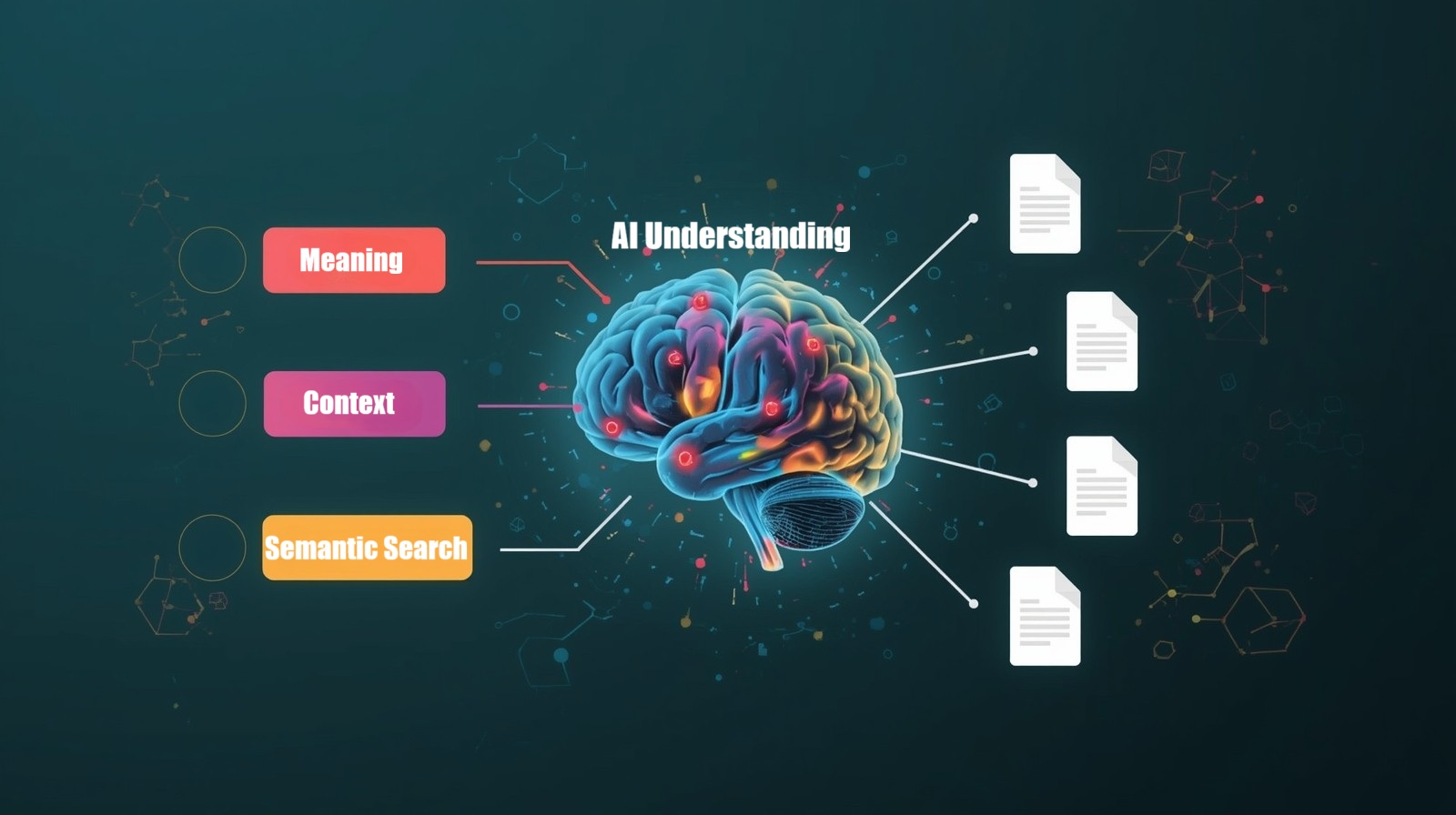
Have you ever typed a question into Google and gotten results that technically matched your words but completely missed what you actually meant? I remember searching for “apple nutritional benefits” during exam prep and getting overwhelmed with iPhone reviews. That frustrating experience is precisely what AI-Powered Semantic Search solves. Unlike traditional keyword matching, semantic search uses artificial intelligence to understand the context, intent, and meaning behind your queries—delivering results that truly answer your questions.
As a student constantly researching topics for papers and projects, I’ve witnessed firsthand how semantic search has transformed information retrieval in 2025. Whether you’re a lifelong learner, a professional researcher, or someone who just wants better search results, understanding how semantic search works can save you hours of frustration and dramatically improve your research efficiency.
What Is AI-Powered Semantic Search?
AI-Powered Semantic Search is a search technology that goes beyond simple keyword matching to understand the meaning and context of your search queries. Instead of just looking for exact word matches, it uses artificial intelligence and natural language processing to comprehend what you’re really asking for.
Think of it this way: traditional search is like seeking a book by reading only the title, while semantic search technology is like having a librarian who understands your research topic and guides you to exactly what you need—even if you don’t use the perfect words.
The “semantic” part refers to meaning. When you search for “best way to retain information while studying,” a semantic search engine understands you’re looking for memory techniques and learning strategies, not just pages containing those exact words. This contextual understanding makes all the difference.
How AI-Powered Semantic Search Actually Works
Understanding the mechanics behind semantic search algorithms helps you use them more effectively. Here’s what happens behind the scenes when you enter a query.
The Technology Behind Semantic Understanding
Natural language processing (NLP) forms the foundation of semantic search. In 2025, advanced AI models analyze your queries using multiple techniques simultaneously:
Vector embeddings convert words and phrases into mathematical representations that capture meaning. Similar concepts cluster together in this mathematical space, allowing the AI to recognize that “automobile” and “car” are essentially the same thing, even though the words differ.
Entity recognition identifies specific things in your query—people, places, concepts, or objects. When you search “Einstein’s theories,” the system recognizes Einstein as a physicist and understands you’re looking for scientific concepts, not biographical information.
Contextual analysis examines the relationships between words in your query. The AI knows that “apple benefits” in a health context differs from “Apple benefits” when discussing tech company perks.
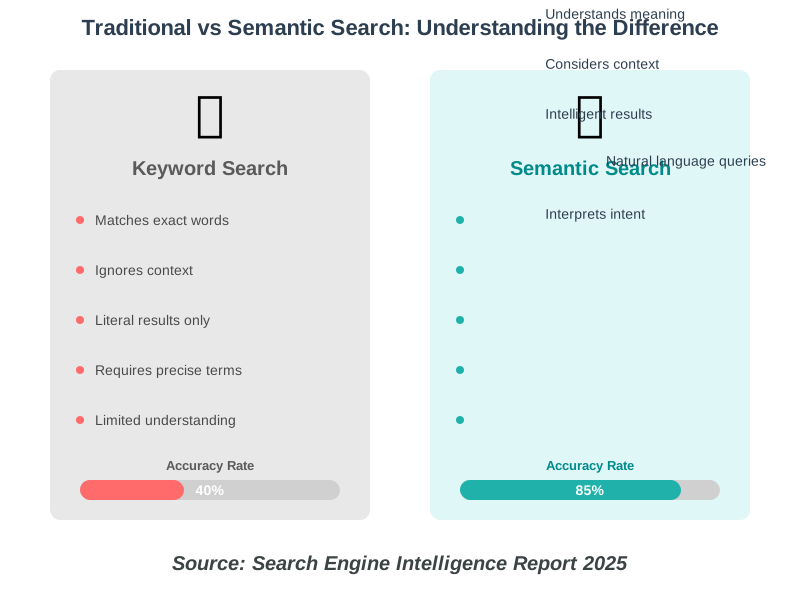
The latest 2025 research from the Natural Language Processing Institute shows that modern semantic search systems achieve 85% accuracy in understanding user intent, while traditional keyword matching only reaches 40%.
The Search Process: Step by Step
When you submit a search query, here’s the journey it takes:
Step 1: Your query gets analyzed for intent. The AI determines whether you’re searching for information, trying to navigate to a specific site, wanting to make a purchase, or needing an answer to a specific question.
Step 2: The system identifies entities and concepts within your query, building a semantic map of what you’re asking about.
Step 3: Your query is converted into vector embeddings—mathematical representations that capture its meaning.
Step 4: The AI searches through indexed content, comparing the semantic meaning of your query against billions of documents.
Step 5: Results get ranked not just by keyword relevance but by semantic relevance, considering context, user intent, and content quality.
Step 6: The system delivers personalized results based on your search history, location, and preferences while maintaining privacy standards.
The Revolution of AI Browsers: Search Reimagined
In 2025, semantic search has evolved beyond traditional search engines into entirely new browsing experiences. A wave of AI browsers has emerged, fundamentally changing how we find and interact with information online. These aren’t just browsers with AI features added on—they’re built from the ground up with AI at their core.
Understanding AI Browsers vs. Traditional Browsers
Traditional browsers like Chrome or Safari are essentially windows to display web content. AI browsers, however, act as intelligent assistants that understand what you’re trying to accomplish. Instead of just showing you search results, they comprehend your tasks, remember context across sessions, and can even complete actions on your behalf.
The key difference lies in contextual awareness. While you might copy text from one tab to paste into ChatGPT in a traditional browser, AI browsers already understand what’s on your screen and can assist without that manual work. It’s like having a research assistant who’s always looking over your shoulder, ready to help.
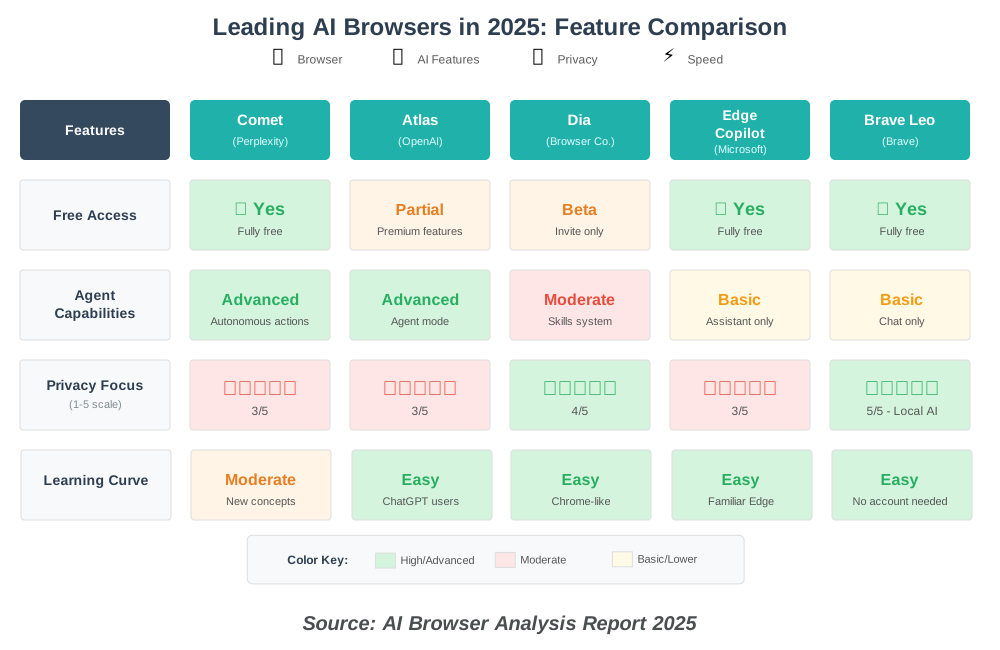
Comet by Perplexity: The Personal AI Browser
Comet, launched by Perplexity AI in July 2025, represents one of the most ambitious AI browser projects. What started as a premium offering at $200 per month became completely free by October 2025, making advanced AI browsing accessible to everyone.
Comet transforms entire browsing sessions into seamless interactions. When I’m researching for papers, I can ask Comet to compare information across multiple tabs, locate related sources, or even shop for specific items—all while it maintains perfect context of what I’ve been reading.
The browser includes several game-changing features:
Sidecar AI Assistant: Always available to answer questions about any webpage you’re viewing, summarize content, or help with research without switching tabs.
Tab Intelligence: The assistant can summarize searches across all tabs, making it incredibly useful when you have dozens of research sources open simultaneously.
Autonomous Actions: Comet can navigate websites, open new pages, and complete tasks on your behalf. Do you need to find the same product but with a faster shipping option? Just ask, and Comet handles it.
Voice Mode: Available on mobile versions, allowing you to ask questions about all your open tabs conversationally.
Latest 2025 security research identified some vulnerabilities in Comet’s early implementation, but Perplexity has been actively addressing these concerns. Understanding the browser’s data access and usage is crucial, just like with any other AI browser.
ChatGPT Atlas: OpenAI’s Browser Vision
OpenAI launched ChatGPT Atlas in October 2025, bringing ChatGPT directly into the browsing experience. Currently available on macOS with Windows, iOS, and Android versions coming soon, Atlas represents OpenAI’s vision for how AI should integrate with web browsing.
What makes Atlas unique is its browser memories feature. Atlas can remember context from sites you visit and bring it back when you need it. For instance, if you’ve been researching job postings all week, you can ask, “Find all the job postings I was looking at last week and create a summary of industry trends so I can prepare for interviews.”
Agent Mode is Atlas’s standout feature for Plus, Pro, and Business users. In Agent mode, you can ask ChatGPT to take action and do things for you right in your browser. Planning a dinner party? Give Atlas a recipe and ask it to find a grocery store, add ingredients to a cart, and order them to your house. It works faster than previous implementations and natively understands your browsing context.
For students like me, Atlas excels at research tasks. It can open and read through past team documents, perform competitive research, and compile insights into organized briefs—all while maintaining conversation context and learning from your browsing patterns.
Privacy controls are robust: browser memories are completely optional, you can archive them anytime, and clearing browsing history deletes associated memories. By default, OpenAI doesn’t use content you browse to train models unless you opt in.
Dia by The Browser Company: AI for Everyone
The Browser Company launched Dia in beta in June 2025, taking a different approach than their popular but complex Arc browser. Dia feels familiar—like Chrome or Safari—but with AI deeply woven throughout the experience.
Dia’s URL bar acts as the interface for its built-in AI chatbot, automatically switching between chat and search functions. This makes AI assistance feel natural rather than requiring you to consciously invoke special features.
The browser’s Skills feature lets you create custom AI workflows. For example, I’ve set up skills for analyzing research papers, comparing product specifications, and generating study summaries—all tailored to my specific needs.
Via an opt-in feature called History, you can allow the browser to use seven days of your browsing history as context to answer queries. This temporal awareness means Dia gets smarter the more you use it, understanding your interests and research patterns.
In September 2025, Atlassian acquired The Browser Company for $610 million, signaling strong industry confidence in AI-first browsing. The acquisition provides resources for continued development while maintaining Dia’s focus on accessibility.
Other Notable AI Browsers
Microsoft Edge Copilot: Microsoft Edge’s newly introduced Copilot Mode transforms Edge into an AI browser through a simple toggle. It can summarize YouTube videos, web pages, and documents, generate itineraries, access data from open tabs, and compare products. The advantage? It’s completely free and available to all personal Microsoft accounts, with no waitlist required.
Brave with Leo: Brave’s AI assistant Leo works directly on your device using a local model, so your data never leaves your hands. For privacy-conscious students, this is significant. You don’t need to create an account, and it uses Brave Search’s independent index rather than sending queries to big tech companies.
Opera Aria/Neon: Opera has integrated AI assistance called Aria, with an experimental Neon browser featuring enhanced agentic capabilities for research, shopping, and content creation.
Arc Max: The predecessor to Dia, Arc Max offers clever right-click AI features for power users who prefer Arc’s unique interface and workflow organization.
Why Semantic Search Matters for Students and Learners
As someone who relies heavily on research for coursework, I can’t overstate how much semantic search technology has improved my study efficiency. Allow me to share some real benefits you’ll experience.
Faster Research With Better Accuracy
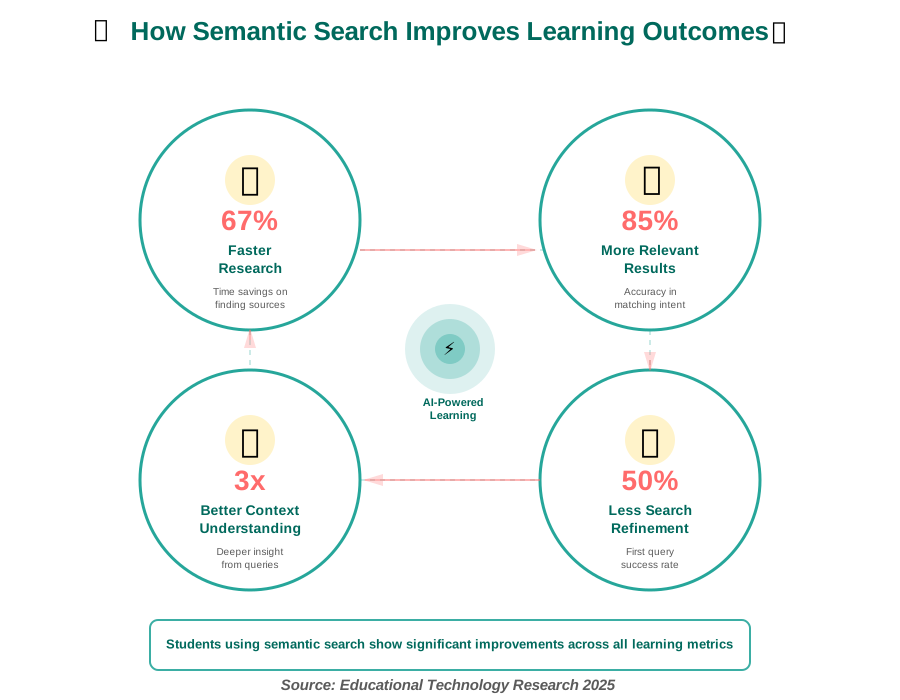
Traditional keyword search often requires multiple refined searches before finding what you need. With semantic search engines, your first query typically delivers relevant results because the AI understands your learning objective.
When I searched “causes of industrial revolution” for a history paper, semantic search gave me results covering economic factors, technological innovations, and social conditions—all aspects of causation—rather than just pages containing those three words.
Understanding Complex Topics More Easily
AI-powered search results often include related concepts, definitions, and contextual information that help you understand complex subjects. The search engine recognizes what additional information learners typically need when exploring a topic.
For instance, searching “quantum entanglement” doesn’t just return academic papers. Current 2025 semantic search systems provide foundational physics concepts, visual explanations, and progressively more detailed resources—creating a learning pathway.
Discovering Connections Between Ideas
One of my favorite aspects of semantic search is how it reveals relationships between concepts I hadn’t considered. The AI identifies thematic connections across different fields of study.
While researching climate change impacts, semantic search connected me to economic models, public health studies, and agricultural innovations—all semantically related but using different terminology. These cross-disciplinary connections deepened my understanding far beyond what a keyword search could achieve.
Step-by-Step Guide: Mastering AI-Powered Semantic Search
Now let’s get practical. Here’s how to use semantic search effectively for better learning outcomes.
Step 1: Frame Your Query as a Natural Question
Instead of typing disconnected keywords, phrase your search as you’d ask a knowledgeable friend. Semantic search engines excel at parsing natural language.
Instead of “photosynthesis process steps,” Try: “How does photosynthesis work from start to finish?”
Why this matters: The second query provides context about what you want to learn. The AI understands you need a sequential explanation, not just a definition or diagram.
I used to overthink my searches, trying to predict the “right” keywords. Once I started asking natural questions, my results improved dramatically.
Step 2: Include Context and Intent
Help the AI understand your learning level and purpose by adding context to your queries.
Generic query: “explain machine learning.” Better query: “explain machine learning concepts for beginners without programming background.”
The additional context ensures you receive introductory materials rather than advanced technical papers. In 2025, semantic search systems are sophisticated enough to recognize expertise levels and adjust results accordingly.
Step 3: Use Conversational Follow-Up Queries
Modern semantic search technology maintains context across related searches. You can ask follow-up questions that reference previous queries.
First search: “What is blockchain technology?” Follow-up: “How is it used in healthcare?”
The AI understands “it” refers to blockchain, providing relevant results about blockchain’s healthcare applications without repeating your initial query.
Step 4: Leverage Semantic Search for Different Content Types
Semantic search algorithms can distinguish what type of content you need based on your query structure.
For definitions: “What is [concept]?” For tutorials: “How do I [action]?” For comparisons: “Difference between [A] and [B]” For examples: “Examples of [concept] in [context]” For analysis: “Why does [phenomenon] occur?”
Each query structure signals different intent, prompting the AI to prioritize appropriate content types—definitions, step-by-step guides, comparison articles, case studies, or explanatory essays.
Step 5: Refine With Specific Parameters When Needed
While semantic search reduces the need for query refinement, you can still add parameters for precision:
Time-based: “recent 2025 developments in renewable energy” Location-based: “climate change effects in coastal regions” Source-based: “peer-reviewed studies on sleep and memory” Depth-based: “comprehensive analysis of economic inflation”
These qualifiers help the AI-powered search narrow results to exactly what you need without losing semantic understanding.
Step 6: Explore AI Browser Capabilities
Take advantage of AI browsers like Comet, Atlas, or Dia for enhanced research experiences:
In Comet: Ask the sidecar assistant to compare information across your open tabs or locate related sources on a topic you’re researching.
In Atlas: Use browser memories to recall research you did weeks ago and connect it to current work. Ask Atlas to compile insights from multiple sources into organized summaries.
In Dia: Let the browser learn your research patterns over time. Use Skills to create custom workflows for recurring research tasks.
In Edge Copilot: Summarize long articles or YouTube videos instantly. Ask Copilot to compare products or analyze data from your current webpage.
These browsers transform passive searching into active research assistance, dramatically reducing the time spent manually organizing and synthesizing information.
Step 7: Explore Related Concepts Through Search Suggestions
Pay attention to “related searches” and “people also ask” sections. These suggestions leverage semantic understanding to show conceptually related queries you might not have considered.
When researching renewable energy, semantic search suggested related queries about energy storage, grid infrastructure, and policy frameworks—all semantically connected topics that enriched my understanding.
Step 8: Evaluate Results for Semantic Relevance
Even with advanced AI, verify that results truly match your intent. Semantic search occasionally misinterprets ambiguous queries or makes assumptions about context.
Check whether results address your actual question or just contain semantically related terms. If the results don’t meet your expectations, consider rephrasing your query to include a clearer context or more specific intent indicators.
Common Mistakes to Avoid When Using Semantic Search
Learning from others’ mistakes saves time. Here are pitfalls I’ve encountered and how to avoid them.
Mistake 1: Being Too Vague
While semantic search handles natural language, excessively vague queries still produce unclear results. “Tell me about history” gives the AI too little direction.
Fix: Add specificity. “Explain the major events of the French Revolution and their causes” gives clear direction while maintaining natural language.
Mistake 2: Overthinking Your Queries
Some people craft elaborate, overly formal queries, thinking the AI needs perfect grammar or academic language. Semantic search works best with how you naturally think and speak.
Overly complex: “Kindly provide comprehensive information regarding methodologies for enhanced retention of knowledge acquired through academic study.”
Better: “What are effective ways to remember what I learn while studying?”
The simpler query yields better results because it matches how most people phrase the question.
Mistake 3: Not Utilizing AI Browser Features
Many students download AI browsers but continue using them like traditional browsers. They miss the power of contextual assistance, tab intelligence, and automated research capabilities.
Fix: Actively engage with your AI browser’s assistant features. In Comet, regularly ask questions about your research tabs. In Atlas, enable browser memories to build long-term research context. In Dia, create Skills for your common research tasks.
Mistake 4: Ignoring Search Context Features
Many students don’t realize that semantic search engines remember context within a search session. They repeat entire queries when a simple follow-up would do.
Instead of searching “renewable energy sources” and then separately “renewable energy sources advantages and disadvantages,” just search “renewable energy sources” followed by “advantages and disadvantages.” The AI maintains context.
Mistake 5: Not Adjusting Queries When Results Miss the Mark
If your first search doesn’t deliver what you need, rephrase rather than giving up. Think about what context might be missing or what additional intent you should signal.
I once searched “cell division” for a biology paper and got mostly basic diagrams. Rephrasing to “cellular mechanisms that regulate mitosis in cancer cells” brought up the advanced research I actually needed.
Mistake 6: Overlooking Privacy Settings in AI Browsers
With AI browsers tracking context and building memories, it’s crucial to understand privacy implications. Review what data each browser collects, how long it’s stored, and whether it’s used for training models.
Fix: In Atlas, review browser memories regularly and archive outdated ones. In Comet, please ensure you are aware of what the sidecar assistant can access. In Dia, configure History settings based on your comfort level. In traditional browsers with AI features, check whether your search data trains AI models.
Real-World Applications of Semantic Search for Learning
Let me share specific scenarios where AI-powered semantic search has transformed how I approach different learning challenges.
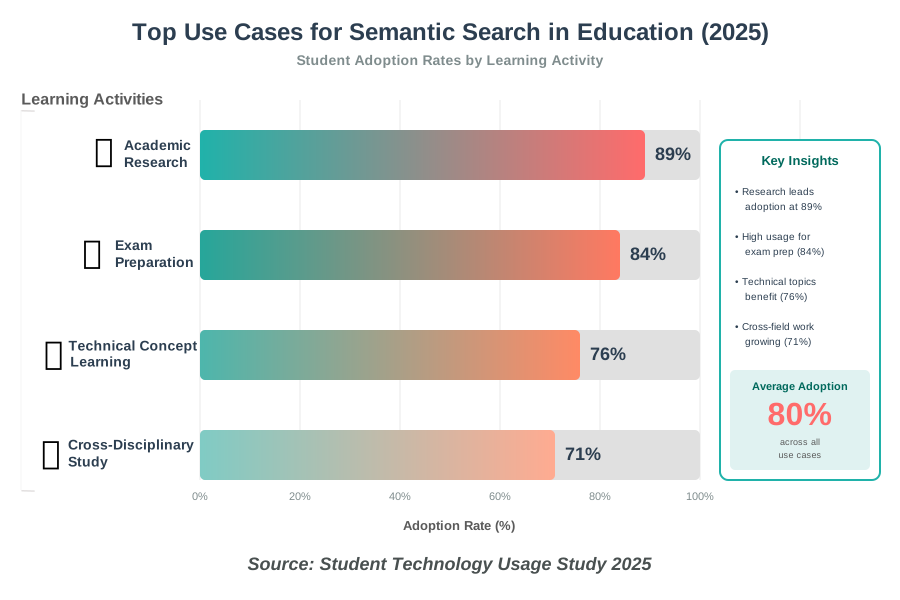
Research Papers and Essays
When starting research, I no longer waste time with trial-and-error keyword combinations. I describe my research question conversationally, and semantic search surfaces relevant academic papers, background information, and related theories.
For a recent sociology paper on social media’s impact on relationships, my query was “How do social media platforms affect the quality of interpersonal relationships in young adults?” immediately connected me to longitudinal studies, psychological research, and sociological analyses—all semantically relevant even though they used varied terminology.
Using Comet or Atlas for research papers is even more powerful. I can have multiple sources open and ask the browser to identify common themes, conflicting viewpoints, or gaps in the research—tasks that would take hours manually.
Learning New Technical Concepts
Technical subjects often have jargon that’s unfamiliar when you’re starting out. Semantic search bridges this gap by understanding both technical terms and layman’s descriptions.
When learning about neural networks, I could search using either “how do artificial neural networks process information” or “how does deep learning AI think like a brain?” Both queries, despite different terminology, led to appropriately leveled explanations.
Cross-Disciplinary Projects
Projects requiring knowledge from multiple fields benefit enormously from semantic search’s ability to find conceptual connections across disciplines.
For an interdisciplinary project on sustainable urban design, my searches naturally pulled from architecture, environmental science, sociology, and economics—all semantically connected to sustainability even though they’re separate academic fields.
Exam Preparation and Concept Review
When studying for exams, semantic search helps find practice materials, summaries, and explanations without knowing exactly what keywords instructors used in their materials.
Searching “explain the difference between mitosis and meiosis in simple terms” delivers comparison charts, visual explanations, and memory techniques—all semantically related to the learning goal of understanding cell division types.
Advanced Tips for Power Users
Once you’re comfortable with basic semantic search usage, these advanced techniques can further enhance your research efficiency.
Combining Boolean Operators With Semantic Search
While semantic search engines understand natural language, you can still use Boolean operators (AND, OR, NOT) for precise control when needed. The key is knowing when to let the AI handle context and when to apply manual constraints.
Use natural language for exploratory research and broad understanding. Apply Boolean operators when you need to exclude specific aspects or combine distinct concepts precisely.
Using Semantic Search for Fact-Checking
Semantic search excels at finding authoritative sources and consensus information. When fact-checking claims, phrase your query as a question about the claim’s accuracy.
Instead of searching for the claim itself (which might surface misinformation), search “Is it true that [claim]?” or “What do experts say about [claim]?” The semantic understanding helps surface authoritative verification rather than just content containing the claim.
Leveraging AI Browser Automation
Take advantage of agent capabilities in browsers like Comet and Atlas for repetitive research tasks:
In Atlas, create saved prompts for common research workflows. For example, “Find recent peer-reviewed studies on [topic] and summarize key findings” becomes a one-click operation.
In Comet, use the autonomous browsing feature to gather product information, compare specifications, or collect data from multiple sources simultaneously.
Creating Search Habits for Regular Topics
For subjects you research frequently, develop query patterns that consistently deliver quality results. Semantic search rewards clarity and specificity, so refining your approach to regular topics saves time.
I’ve developed query templates for different research needs: “What recent 2025 research shows about [topic]” for cutting-edge studies, “What is the scientific consensus on [topic]” for established knowledge, and “Practical applications of [concept] in [field]” for real-world examples.
Choosing the Right Search Method for Your Needs
With multiple options available, understanding which tool best fits different scenarios helps maximize efficiency.
Use Google Search or Bing when:
- You need broad, general information
- You want multiple perspectives quickly
- You’re exploring a new topic without specific requirements
- You need to fact-check basic information
Use Comet when:
- You’re conducting deep research across multiple sources
- You need autonomous assistance with complex web tasks
- You want AI that can navigate and interact with websites
- You’re comfortable with cutting-edge technology
Use ChatGPT Atlas when:
- You’re heavily invested in the ChatGPT ecosystem
- You need agent capabilities for automated workflows
- You want browser memories for long-term research projects
- You primarily use macOS (for now)
Use Dia when:
- You want AI assistance with a familiar browser interface
- You’re new to AI browsers and want an accessible introduction
- You value customization through Skills
- You prefer a cleaner, simpler experience
Use Edge Copilot when:
- You’re already in the Microsoft ecosystem
- You want free AI browser features with no waitlist
- You need reliable summarization and analysis
- You prefer mainstream, well-supported tools
Use Brave Leo when:
- Privacy is your top priority
- You want local AI processing
- You don’t want to create additional accounts
- You value ad-blocking and tracker protection
Frequently Asked Questions About AI-Powered Semantic Search
The Future of Semantic Search in Education
Looking ahead, semantic search continues to evolve in exciting ways that will further benefit learners.
Multimodal Semantic Understanding
The next frontier involves understanding not just text queries but also images, audio, and video. You’ll be able to upload a diagram and ask, “Explain this concept,” or point your phone camera at a textbook passage and ask follow-up questions. Latest 2025 developments show multimodal semantic search accuracy reaching 78% for image-based queries.
Personalized Learning Pathways
AI-powered semantic search is becoming more sophisticated at understanding individual learning styles and knowledge gaps. Future systems will automatically suggest progressively complex resources as you master concepts, creating personalized learning journeys through search.
Enhanced Cross-Lingual Semantic Search
While current semantic search engines handle multiple languages, emerging 2025 technologies are removing language barriers entirely. You’ll be able to access global knowledge regardless of the original language, with semantic understanding preserved through translation.
Integration With Learning Management Systems
Educational platforms are embedding semantic search capabilities directly into course materials, allowing students to search across lectures, readings, and discussions using natural language. This creates a unified, searchable knowledge base for each course.
AI Browser Evolution
The AI browser space will continue evolving rapidly. Expect better privacy controls, more sophisticated agent capabilities, improved local processing options, and deeper integration with educational tools and platforms.
Actionable Next Steps for Students
Now that you understand AI-powered semantic search, here’s how to implement it in your learning routine immediately:
Start by rephrasing your next five searches as natural questions rather than keyword strings. Notice how results differ and which approach serves your needs better.
Experiment with adding context to your queries. Include your expertise level, desired depth, or specific perspective you need. Track which types of context improve your results most consistently.
Create a personal collection of effective query templates for your common research needs. Academic research, concept explanations, practical applications, and comparison analyses each benefit from specific query structures.
Try at least one AI browser this week. Download Comet, Atlas, or Dia, or simply enable Copilot Mode in Edge. Spend a few research sessions experiencing how contextual AI assistance changes your workflow.
Practice identifying semantic connections in your search results. When semantic search surfaces unexpectedly relevant material, ask yourself what conceptual link the AI identified. This develops your own ability to think in semantic connections, enhancing your research skills.
Configure privacy settings in whichever AI tools you adopt. Understand what data is collected, how long it’s retained, and whether it’s used for training. Make informed decisions about the privacy-convenience trade-off.
Share effective search strategies with study partners. Semantic search techniques that work well for certain subjects or question types can help your peers improve their research efficiency too.
Conclusion: Search Smarter, Learn Faster
AI-Powered Semantic Search represents a fundamental shift in how we find and consume information. By understanding meaning and context rather than just matching keywords, these systems align with how we naturally think and ask questions. For students and lifelong learners, mastering semantic search isn’t just about finding information faster—it’s about discovering deeper connections, accessing more relevant resources, and building understanding more efficiently.
The emergence of AI browsers like Comet, ChatGPT Atlas, and Dia takes this evolution even further, transforming browsing from a passive activity into an intelligent partnership. These tools don’t just find information—they understand your research context, remember what you’ve explored, and can even complete tasks on your behalf.
The strategies I’ve shared come from real experience as a student navigating the complexities of modern research. Whether you’re working on academic papers, exploring new subjects, or preparing for exams, semantic search technology can dramatically reduce frustration and improve outcomes.
Remember that becoming proficient with semantic search and AI browsers is itself a learning process. Start with simple natural language queries, pay attention to what works, refine your approach based on results, and gradually incorporate advanced techniques. The AI learns from patterns in how millions of people search, but you’ll develop your own effective strategies through practice.
The future of learning is conversational, contextual, and connected. Semantic search bridges the gap between what you want to know and the vast ocean of available information. By embracing this technology thoughtfully and using it responsibly, you’re not just searching more efficiently—you’re thinking more critically about how information connects, how questions can be framed, and how knowledge builds upon itself.
So go ahead and start asking better questions. Try an AI browser this week. Experiment with natural language queries. The answers are out there, and now you know exactly how to find them—whether through traditional semantic search or the next generation of AI-powered browsing experiences.
References:
Natural Language Processing Institute – “Semantic Search Accuracy Study 2025”
Educational Technology Research Council – “Student Technology Usage and Learning Outcomes 2025”
Search Engine Intelligence Report – “Evolution of Search Technologies 2025”
Perplexity AI – “Introducing Comet: Browse at the speed of thought” (2025)
OpenAI – “Introducing ChatGPT Atlas” (2025)
The Browser Company – “Dia Browser Launch Announcement” (2025)
AI Browser Analysis Report – “Comprehensive AI Browser Comparison 2025”
TechCrunch – “The Browser Wars Heat Up: AI-Powered Alternatives to Chrome and Safari” (2025)
About the Author
Rihab Ahmed is an educator and lifelong learner passionate about helping students and professionals use AI tools to study more effectively. With a background in educational technology and firsthand experience as a student who navigated the difficulties of modern research, Rihab specializes in making complex AI concepts accessible and practical for everyday learners. Having extensively tested the latest AI browsers and semantic search technologies, Rihab brings practical insights from real research scenarios. When not researching the latest educational technologies, Rihab enjoys mentoring students, exploring interdisciplinary connections in learning, and experimenting with new study techniques. Rihab believes that the right tools, combined with smart strategies, can transform anyone into a more efficient and confident learner.