
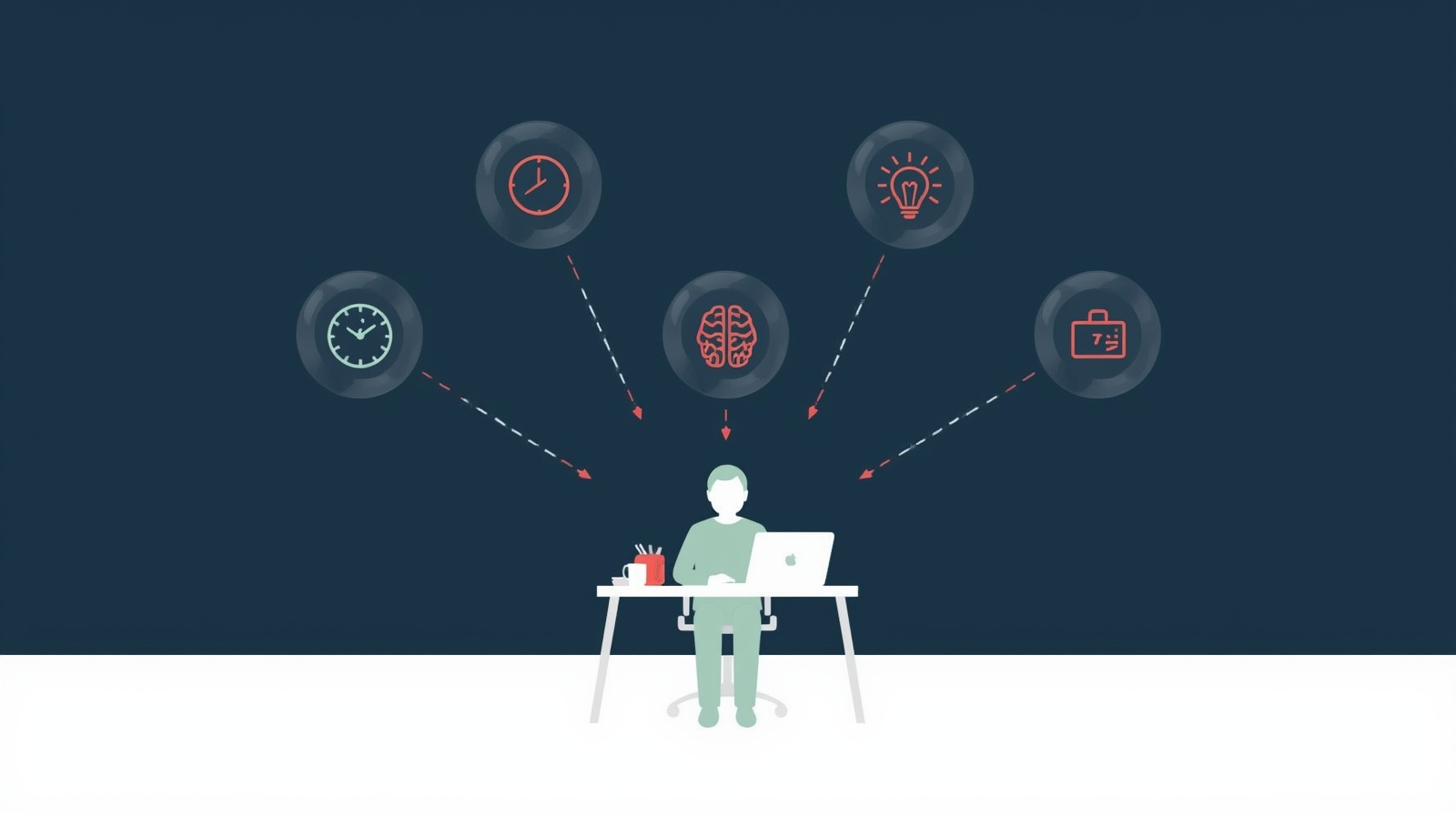
AI Productivity Enhancement: Work Smarter with AI Tools
What if I told you that the secret to reclaiming your time, reducing stress, and achieving more isn’t working harder—it’s working smarter with AI by your side? AI-Driven Productivity Enhancement isn’t about replacing human creativity or decision-making. It’s about using intelligent tools to handle the mundane, automate the repetitive, and free your mind for what truly matters: deep thinking, creative problem-solving, and meaningful connections.
I’m Nadia Chen, and as someone deeply invested in AI ethics and digital safety, I’ve spent years exploring how we can harness artificial intelligence responsibly to boost our productivity without sacrificing our privacy, autonomy, or well-being. Together with my colleague Rihab Ahmed, an educator who helps students and lifelong learners master AI tools, we’ve created this comprehensive guide to help you navigate the exciting—and sometimes overwhelming—world of AI productivity tools.
Whether you’re a busy professional drowning in emails, a student juggling multiple assignments, a creative trying to focus on your craft, or simply someone who wants more hours in the day, this guide will show you how to safely and effectively integrate AI into your workflow. We’ll walk through practical strategies, address common concerns, and ensure you’re equipped to make informed decisions about which tools deserve a place in your productivity toolkit.
The best part? You don’t need to be a tech wizard to benefit from AI-Driven Productivity Enhancement. We’ll explain everything in plain language, highlight potential pitfalls, and show you exactly how to protect your data while maximizing your efficiency. Let’s dive in and discover how AI can become your most trusted productivity partner.
Understanding AI-Driven Productivity Enhancement: The Foundation
Before we explore specific tools and techniques, let’s establish what we mean by AI-Driven Productivity Enhancement. At its core, this approach involves using artificial intelligence technologies to optimize how you manage time, prioritize tasks, process information, and execute your daily workflow. Unlike traditional productivity methods that rely solely on human discipline and organization systems, AI-powered approaches leverage machine learning algorithms to analyze your patterns, predict your needs, and automate routine processes.
Think of AI as an incredibly attentive assistant who never sleeps, learns from your behavior, and gets better at supporting you over time. However, unlike a human assistant, AI tools require careful consideration regarding data privacy, algorithmic bias, and ethical implementation. That’s why our approach emphasizes safe, responsible use from the very beginning.
The magic of AI in productivity lies in its ability to handle cognitive overhead—those dozens of micro-decisions and small tasks that drain your mental energy throughout the day. Should you respond to that email now or later? Which task deserves your attention first? Where did you save that important document? AI can manage these questions in the background, allowing your brain to focus on high-value activities that require human creativity, emotional intelligence, and strategic thinking.
AI-Driven Productivity Enhancement: A Comprehensive Guide for Beginners
Starting your journey with AI-Driven Productivity Enhancement: A Comprehensive Guide for Beginners might feel overwhelming, but we’re here to make it simple and safe. The key is understanding that AI productivity tools fall into several categories, each designed to address specific challenges in your workflow.
First, familiarize yourself with the landscape. AI productivity tools include smart calendars that learn your scheduling preferences, email assistants that draft responses and filter messages, task managers that predict deadlines and suggest priorities, note-taking apps that organize and connect your thoughts, and focus tools that block distractions based on your work patterns. The beauty of modern AI is that many of these tools integrate seamlessly, creating an ecosystem that supports your entire workday.
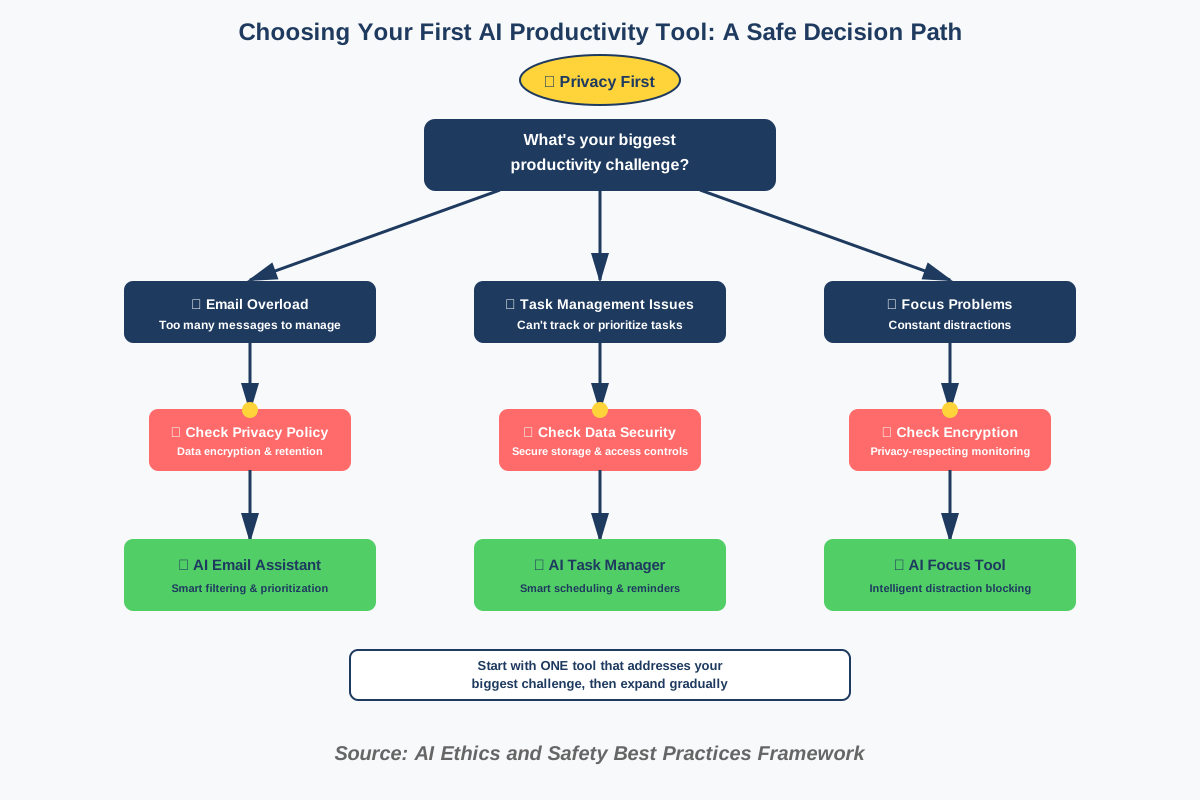
When choosing your first AI productivity tool, start with the area causing you the most frustration. Drowning in emails? Begin with an AI email assistant. Struggling to remember tasks? Try an AI-powered task manager. Can’t focus for more than ten minutes? Explore AI-enhanced focus tools. This targeted approach prevents overwhelm and allows you to experience tangible benefits quickly, building confidence for further integration.
Privacy should be your first consideration when selecting any AI tool. Before signing up, review the privacy policy thoroughly. Ask yourself: Where is my data stored? Who has access to it? Is it used to train AI models? Can I delete my data completely if I change my mind? Reputable companies will answer these questions transparently. If you can’t find clear answers, that’s a red flag. Choose tools with end-to-end encryption, clear data retention policies, and strong security protocols.
Leveraging AI for Task Management: Streamlining Your Workflow
Leveraging AI for Task Management: Streamlining Your Workflow represents one of the most impactful applications of artificial intelligence in daily productivity. Traditional to-do lists are static—they don’t adapt to your changing priorities, energy levels, or available time. AI-powered task managers, however, learn from your behavior and actively help you make better decisions about what to tackle next.
These intelligent systems analyze patterns in your task completion, identify when you’re most productive for different types of work, and even predict how long tasks will take based on historical data. Some advanced platforms can automatically reschedule tasks when conflicts arise, suggest optimal times for deep work versus administrative tasks, and send timely reminders that adapt to your responsiveness patterns.
The real breakthrough comes from natural language processing capabilities. Instead of navigating complex menus and settings, you can simply type or speak your tasks naturally: “Schedule team meeting next week after the product launch” or “Remind me to follow up with Sarah if she hasn’t responded by Friday.” The AI interprets your intent, extracts the relevant information, and creates properly structured tasks with appropriate deadlines and dependencies.
However, it’s crucial to maintain awareness of how these systems use your data. Task management AI learns from your patterns, which means it’s analyzing potentially sensitive information about your work habits, priorities, and professional relationships. Choose platforms that keep your data encrypted and don’t sell your information to third parties. Review your task history periodically and delete items you no longer need—this isn’t just excellent digital hygiene; it also improves the AI’s accuracy by removing outdated patterns.
AI-Driven Productivity Enhancement in Remote Work Environments
The shift to remote work has made AI-Driven Productivity Enhancement in Remote Work Environments more critical than ever. When you’re not physically present in an office, the boundaries between work and personal life blur, communication becomes more challenging, and self-management demands increase dramatically. AI tools specifically designed for remote work address these unique challenges while respecting your need for flexibility and work-life balance.
Smart scheduling assistants have become indispensable for remote teams working across time zones. These AI tools analyze everyone’s availability, preferred working hours, and meeting history to suggest optimal meeting times that minimize disruption and respect personal boundaries. They can even detect meeting fatigue—when you’ve been in too many video calls—and suggest asynchronous alternatives or buffer time for focused work.
Virtual collaboration platforms now incorporate AI features that transcribe meetings in real-time, identify action items automatically, and even detect when someone hasn’t spoken in a while, gently prompting facilitators to ensure inclusive participation. These features reduce the cognitive load of taking notes while participating, allowing you to be fully present in discussions.
One often-overlooked aspect of remote work productivity is the challenge of maintaining focus in home environments filled with distractions. AI-powered focus tools can monitor your work patterns and automatically block distracting websites during your most productive hours, remind you to take breaks before burnout sets in, and even adjust your computer’s lighting and sound settings to create optimal working conditions based on the time of day and task type.
Privacy in remote work AI tools deserves special attention. Many remote collaboration platforms record conversations, track activity, and monitor productivity metrics. While these features can be valuable for teams, they also raise legitimate concerns about surveillance and trust. Always understand what’s being monitored, who has access to that data, and how it’s being used. Advocate for transparent policies and tools that empower rather than surveil workers.
The Role of AI in Automating Repetitive Tasks for Productivity Gains
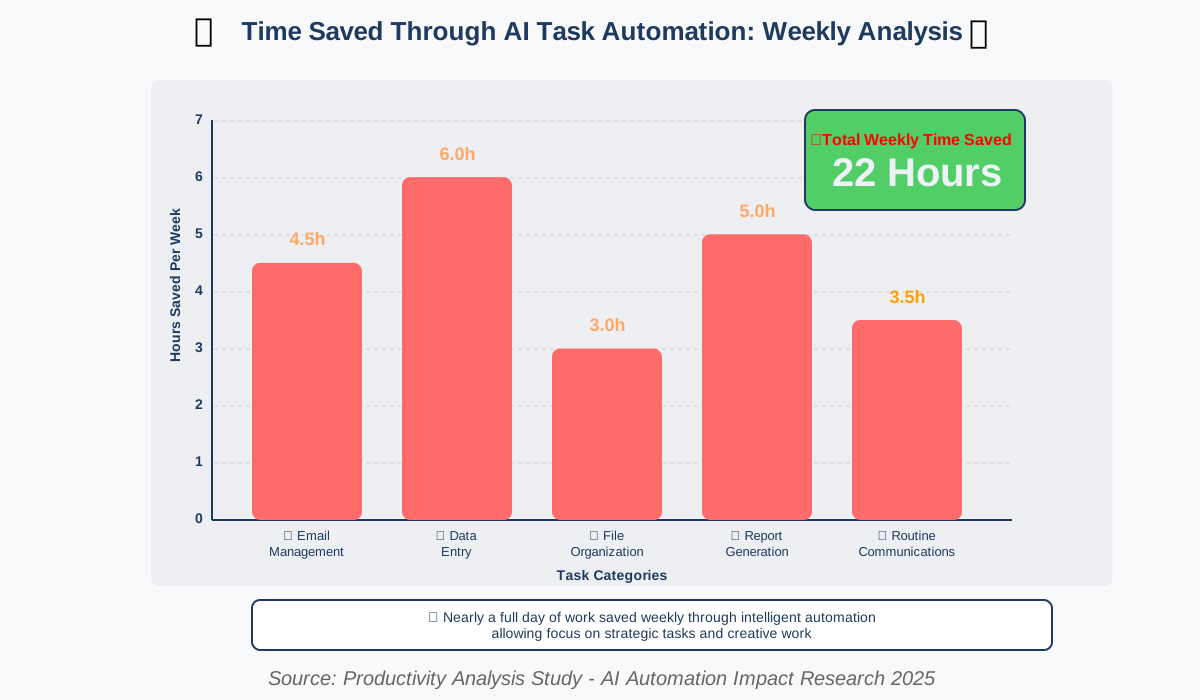
Understanding The Role of AI in Automating Repetitive Tasks for Productivity Gains is perhaps the most tangible way AI can immediately impact your daily life. Repetitive tasks—data entry, email sorting, report generation, file organization, and routine communications—consume enormous amounts of time despite requiring minimal creativity or complex decision-making. This is where AI truly shines.
Modern automation tools use AI to recognize patterns in your repetitive work and create intelligent workflows that handle these tasks automatically. For example, an AI can learn that you always save financial documents to a specific folder, rename them according to a particular convention, and send a notification to your accountant. After training on a few examples, the AI replicates this entire sequence every time a financial document arrives, saving you five minutes that multiply into hours over weeks and months.
Email automation represents another powerful application. AI can categorize incoming messages, flag urgent communications, draft responses to common inquiries, and even unsubscribe you from newsletters you never open. Smart filters learn from your behavior—if you consistently ignore emails from certain senders or always respond quickly to specific types of messages, the AI adjusts its prioritization accordingly.
Document and knowledge management automation helps you find information faster than ever before. AI can automatically tag documents based on content, extract key information for quick reference, connect related materials, and surface relevant files when you’re working on similar projects. Imagine typing a project name and instantly seeing every email, document, note, and task related to that project, automatically organized by relevance and date.
The key to successful automation is starting small and maintaining human oversight. Begin by automating one simple, low-risk process. Observe how the AI performs over several weeks. Adjust parameters if needed. Only after confirming the automation works reliably should you expand to more complex or sensitive tasks. Always maintain the ability to review automated actions and intervene when necessary—AI is powerful, but it’s not infallible.
AI-Powered Time Management Techniques for Maximum Productivity
Mastering AI-Powered Time Management Techniques for Maximum Productivity requires understanding that time management isn’t just about packing more tasks into your day—it’s about aligning your energy, attention, and activities for optimal performance and well-being. AI brings a scientific approach to time management by analyzing vast amounts of data about your work patterns and providing personalized insights traditional methods can’t match.
Time-blocking enhanced by AI takes this classic productivity technique to new levels. Instead of manually allocating time blocks based on your best guess, AI analyzes your calendar history, task completion data, and even biometric information (if you use compatible wearables) to suggest optimal schedules. The system learns when you’re most creative, when you handle administrative work most efficiently, and when you need breaks to maintain peak performance throughout the day.
Intelligent calendar management goes beyond simple scheduling. Advanced AI calendars can detect scheduling conflicts before they cause problems, suggest buffer time between meetings to prevent back-to-back exhaustion, and even identify when you’re consistently overcommitting and recommend time for focused work. Some systems integrate with your task manager and automatically find time to work on important projects before deadlines become critical.
Energy management through AI represents an emerging frontier. By tracking patterns in your productivity data, communication responsiveness, and work quality, AI tools can identify your natural energy rhythms. You might discover you’re most analytical in mid-morning, most creative in early afternoon, and best suited for routine tasks in late afternoon. Armed with these insights, you can schedule high-impact activities during your peak performance windows and reserve lower-energy periods for less demanding work.
The Pomodoro Technique gets smarter with AI integration. Traditional Pomodoro uses fixed 25-minute work intervals, but AI-enhanced versions adapt interval length based on task type, your current energy level, and historical performance data. If you typically take longer to reach deep focus on coding tasks but can quickly process emails, the AI adjusts session lengths accordingly. It also learns the optimal break duration for you—some people refresh in five minutes, others need fifteen.
Boosting Productivity with AI-Enhanced Note-Taking and Knowledge Management
Boosting Productivity with AI-Enhanced Note- Taking and Knowledge Management transforms how we capture, organize, and retrieve information in our increasingly complex professional lives. The average knowledge worker deals with dozens of documents, hundreds of emails, countless meetings, and constant information streams daily. Without intelligent systems to manage this knowledge, we waste precious time searching for information we know we saved somewhere or recreating insights we’ve already developed.
Modern AI note-taking applications don’t just store your notes—they understand them. Natural language processing allows these tools to identify key concepts, extract action items, recognize important dates, and connect related ideas across different notes automatically. When you capture a note about a client conversation, the AI might automatically link it to previous notes about that client, relevant project documents, and upcoming deadlines.
Smart search capabilities make information retrieval effortless. Instead of remembering exact keywords, you can search using natural language questions: “What did Sarah say about the budget in last month’s meeting?” The AI understands your intent and surfaces relevant information even if the exact words don’t match. Some advanced systems can even answer questions by synthesizing information from multiple notes, creating new insights from your existing knowledge base.
Automatic organization eliminates the tedious work of filing and tagging. AI analyzes note content and automatically suggests tags, categories, and connections. It can identify recurring themes in your notes—perhaps you’re frequently researching competitors, or you often capture ideas about product improvements—and create collections that help you see patterns in your thinking over time.
Voice-to-text capabilities have reached impressive accuracy levels, allowing you to capture thoughts while walking, driving, or when typing isn’t convenient. The AI doesn’t just transcribe your words—it can add punctuation, format lists, and even clean up verbal fillers and false starts to create readable notes. This removes friction from the capture process, encouraging you to document ideas when they occur rather than hoping you’ll remember them later.
Privacy considerations with AI note-taking are significant because notes often contain highly sensitive information—business strategies, personal reflections, confidential conversations, and creative ideas. Choose note-taking platforms with strong encryption, local storage options, and clear policies about who can access your data. Some privacy-focused options process AI features entirely on your device rather than sending notes to cloud servers, providing enhanced security for sensitive information.
AI-Driven Productivity Enhancement: Overcoming Procrastination
Addressing AI-Driven Productivity Enhancement: Overcoming Procrastination requires understanding that procrastination often stems from psychological factors like task anxiety, perfectionism, unclear priorities, or simple distraction. AI tools can’t solve the underlying emotional causes, but they can reduce triggers and create environmental conditions that make starting and completing tasks significantly easier.
Task breakdown AI helps with one of the most common procrastination triggers—overwhelming projects. When faced with a large, complex task, our brains often freeze in anxiety. AI tools can analyze project descriptions and automatically break them into smaller, manageable subtasks with suggested sequences and time estimates. Instead of “Write quarterly report” sitting menacingly on your list, you see concrete steps: “Gather Q3 sales data (15 minutes),” “Review team accomplishments (30 minutes),” “Draft executive summary (45 minutes).” Suddenly the project feels achievable.
Accountability through gentle AI nudging provides structure without judgment. Smart reminder systems learn your procrastination patterns—maybe you consistently delay certain types of tasks until the last minute—and intervene with timely prompts. These aren’t nagging reminders that create stress; they’re supportive check-ins that might say, “You have two hours available this afternoon. This would be a great time to start the presentation you’ve been meaning to work on.”
Distraction blocking with AI intelligence goes beyond simple website blockers. These systems learn which distractions tempt you most at different times and under various circumstances. The AI might notice you’re most likely to browse social media when facing writing tasks, or that you check email constantly during afternoon energy slumps. Armed with these insights, it implements targeted interventions—blocking specific apps during vulnerable periods while allowing access when procrastination risk is low.
Progress visualization helps maintain motivation by making your accomplishments visible. AI tools can create visual representations of your productivity trends, showing how much you’ve accomplished over time and helping you identify successful patterns. Seeing tangible evidence of progress combats the feeling that you’re not getting anywhere, a common trigger for procrastination.
Gamification elements, when implemented ethically, can make task completion more engaging. Some AI productivity platforms award points for completing tasks on time, maintaining focus during work sessions, or meeting weekly goals. The key is ensuring these systems encourage healthy productivity rather than fostering obsession or unhealthy competition with yourself. The best implementations focus on personal progress rather than arbitrary metrics.
The Future of Work: How AI is Reshaping Productivity Standards
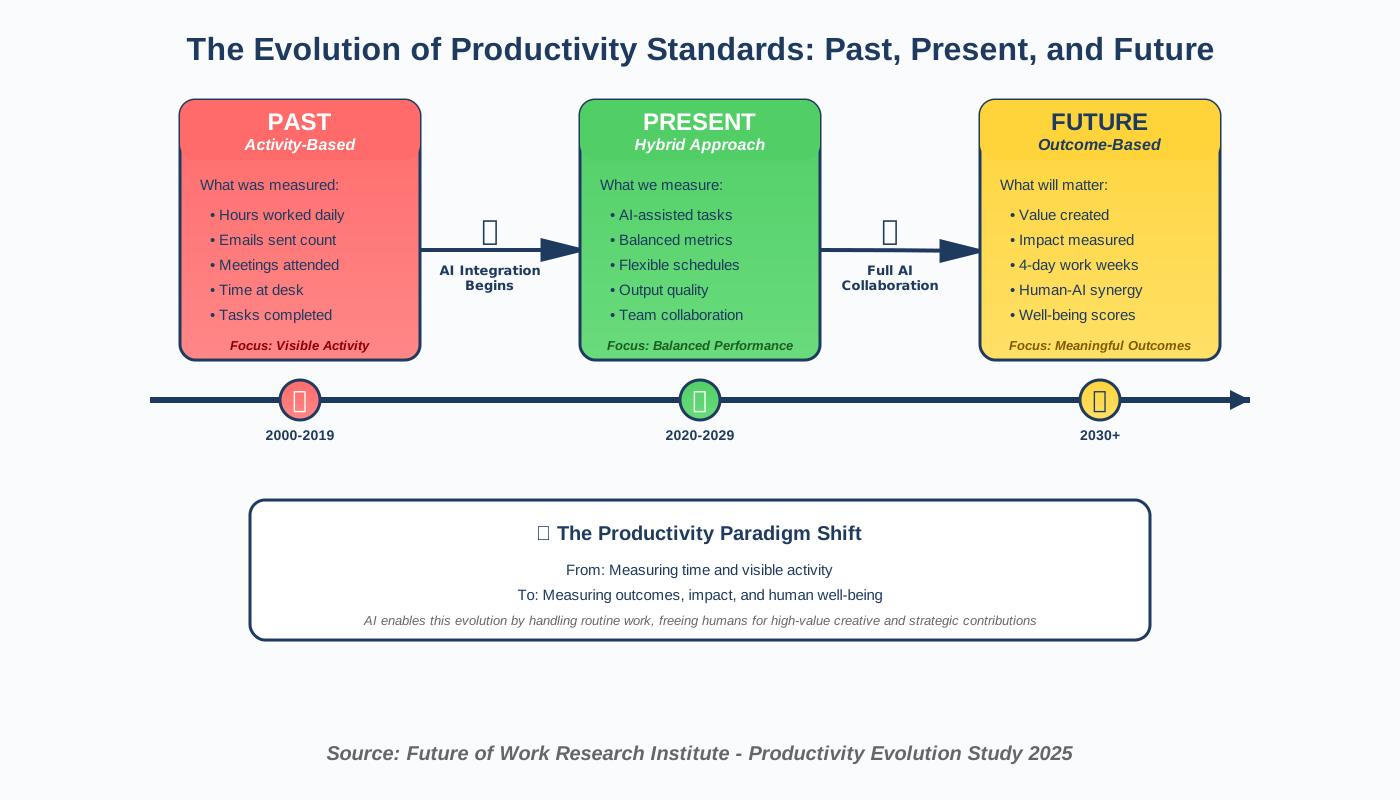
Examining The Future of Work: How AI is Reshaping Productivity Standards reveals both exciting opportunities and important challenges we must navigate thoughtfully. As AI becomes increasingly sophisticated, the definition of productivity itself is evolving from “how much we produce” to “how much value we create.”
The shift toward outcome-based productivity represents a fundamental change. Traditional productivity metrics focus on activity—hours worked, emails sent, and tasks completed. AI enables a more sophisticated approach that measures impact and results. Intelligent systems can track which activities actually contribute to important goals versus which merely create the appearance of busyness. This shift helps us focus energy on high-value work rather than performative productivity.
Hybrid intelligence—humans and AI working together—is becoming the new standard. Rather than AI replacing human workers, we’re seeing the emergence of collaborative partnerships where AI handles data processing, pattern recognition, and routine execution while humans provide creativity, emotional intelligence, ethical judgment, and strategic thinking. The most productive workers of the future will be those who effectively orchestrate AI capabilities while contributing uniquely human skills.
Continuous learning becomes essential as AI tools evolve rapidly. The productivity tools you master today might be outdated next year. Developing a mindset of ongoing adaptation and skill acquisition ensures you remain effective as technology advances. This doesn’t mean constantly chasing the newest tools—it means maintaining curiosity about emerging capabilities and a willingness to adjust your workflows when genuinely better solutions appear.
The four-day workweek and flexible schedules gain viability as AI automation reduces time spent on routine tasks. When AI handles much of the administrative overhead, knowledge workers can potentially achieve the same output in less time. Forward-thinking organizations are experimenting with productivity-based work schedules rather than time-based ones, focusing on results rather than hours at a desk.
However, this future also brings concerns about surveillance, algorithmic management, and worker autonomy. As AI systems become better at monitoring and optimizing productivity, the line between helpful support and invasive oversight grows thinner. We must advocate for AI implementations that empower workers rather than control them, enhance human capability rather than replace human judgment, and respect privacy while improving performance.
AI-Driven Productivity Enhancement: Optimizing Your Workspace
Creating an environment that supports peak performance through AI-Driven Productivity Enhancement: Optimizing Your Workspace involves more than just buying ergonomic furniture. AI-powered environmental optimization considers how physical and digital workspace conditions affect your focus, energy, and overall productivity throughout the day.
Smart lighting systems use AI to adjust color temperature and brightness based on time of day, current task, and your circadian rhythm. Research shows that cooler, brighter light enhances focus and alertness for analytical work, while warmer, dimmer light supports creative thinking and reduces eye strain. AI learns your schedule and automatically adjusts lighting to support your activities—energizing brightness for morning meetings, focused white light for afternoon deep work, and gentle amber tones for evening wrap-up tasks.
Noise management AI creates optimal acoustic environments for different work modes. These systems can generate adaptive soundscapes—white noise that masks distracting sounds during focus work, gentle ambient sounds that promote creativity, or complete silence when you need maximum concentration. Some advanced systems monitor ambient noise levels and adjust dynamically, increasing masking sounds when your environment becomes noisier and reducing them during quiet periods.
Temperature and air quality optimization might sound futuristic, but AI-enabled climate control systems are increasingly accessible. These tools learn your thermal comfort preferences, adjust heating or cooling proactively based on weather forecasts and your schedule, and even monitor air quality to ensure optimal oxygen levels and humidity for cognitive performance. Poor air quality significantly impacts concentration and decision-making, yet most people don’t notice until it’s severely degraded.
Digital workspace optimization is equally important. AI desktop organizers can automatically arrange your virtual workspace based on the task at hand. When you start a writing project, your writing software, relevant research documents, and reference materials appear automatically. When you switch to email management, those applications close, and your email client, calendar, and communication tools take center stage. This reduces decision fatigue and helps maintain focus by presenting only what’s relevant to your current activity.
Virtual and augmented reality workspaces represent an emerging frontier. While still developing, AI-powered VR environments can create distraction-free virtual offices, simulate collaborative workspaces for remote teams, and provide immersive environments optimized for different types of work. The AI adapts these virtual spaces based on your preferences and performance data.
Ethical Considerations of AI in Productivity: Balancing Efficiency and Well-being
Addressing Ethical Considerations of AI in Productivity: Balancing Efficiency and Well-being is not optional—it’s fundamental to sustainable, healthy productivity enhancement. As someone dedicated to AI ethics, I’ve seen how easily the pursuit of efficiency can compromise privacy, autonomy, and human dignity. We must engage with these challenges thoughtfully.
Data privacy represents the most immediate ethical concern. Productivity AI requires access to extensive personal information—your communications, schedule, work patterns, and even biometric data in some cases. This creates significant privacy risks. Who owns this data? How is it protected? Could it be used against you in performance reviews or employment decisions? Always choose tools with transparent privacy policies, strong encryption, and your ability to delete data completely. Never assume convenience is worth sacrificing privacy.
Algorithmic bias in productivity tools can perpetuate or amplify discrimination. If an AI scheduling assistant learns from historical data showing that certain types of employees typically receive less meeting time with leadership, it might inadvertently recommend similar patterns, reinforcing inequitable access. Productivity scoring systems might favor certain work styles over others, disadvantaging neurodivergent workers or those with different cultural approaches to work. We must remain alert to these biases and advocate for tools designed with equity in mind.
The pressure to be constantly optimized creates psychological risks. When AI tracks your every action and suggests improvements, it’s easy to internalize the message that you’re never doing enough. This can lead to burnout, anxiety, and the erosion of work-life boundaries. Remember that downtime, rest, and “unproductive” activities are essential for long-term well-being and sustainable performance. Choose AI tools that encourage balance rather than constant optimization.
Autonomy and human agency must remain central. AI should enhance your decision-making, not replace it. Be wary of systems that make choices on your behalf without explanation or override options. You should always understand why an AI is making a recommendation and have the ability to choose differently. Productivity tools should be assistants that support your judgment, not managers that dictate your behavior.
The digital divide and accessibility concerns arise when productivity enhancement becomes dependent on expensive AI tools or assumes reliable internet access and modern devices. Not everyone has equal access to these technologies, potentially creating or widening productivity gaps between those with resources and those without. We should advocate for accessible, affordable productivity tools and remember that AI is one pathway to productivity, not the only one.
Workplace surveillance dressed up as productivity enhancement represents a serious ethical violation. Some organizations implement AI monitoring that tracks keystrokes, screens, or even uses webcams to measure “engagement.” These invasive practices create toxic work environments built on distrust. If your employer implements such tools, understand your rights and consider whether such surveillance aligns with your values.
AI-Powered Productivity Enhancement for Creative Professionals
AI-Powered Productivity Enhancement for Creative Professionals requires a unique approach because creativity doesn’t follow predictable patterns and can’t be optimized the same way as administrative work. However, AI can remove barriers, provide inspiration, and handle technical grunt work, freeing creative professionals to focus on their craft.
Idea generation and brainstorming AI serves as a creative partner rather than a replacement. These tools can suggest unexpected connections between concepts, provide prompts when you’re stuck, generate variations on your ideas, or challenge your assumptions with alternative perspectives. The key is using AI as a springboard for your creativity, not allowing it to dictate your creative direction. The best ideas often emerge from the conversation between your intuition and AI suggestions.
Reference and inspiration management becomes effortless with AI-powered tools that automatically organize your visual references, article clippings, and research materials. Instead of manually tagging every inspiring image or carefully filing research papers, the AI analyzes content and creates meaningful connections. When starting a new project, you can describe what you’re looking for conceptually, and the system surfaces relevant materials from your collection even if you don’t remember specific details.
Technical automation for creative work eliminates tedious tasks that don’t require artistic judgment. For designers, this might mean AI that automatically resizes assets for different platforms, removes backgrounds from images, or generates alternative color schemes. For writers, it could involve AI that formats documents, checks style consistency, or generates first drafts of routine sections. For musicians, it might include AI that handles mixing basics or generates chord progressions as starting points. These tools handle mechanics so you can focus on artistry.
Workflow optimization respects creative rhythms rather than forcing constant productivity. AI designed for creative professionals understands that creativity includes periods of experimentation, false starts, and seemingly unproductive exploration. These systems might block out uninterrupted time for deep creative work, schedule administrative tasks for less inspired periods, and protect your creative energy from being drained by emails and meetings.
Client and project management AI handles the business side of creative work. These tools can draft client communications, send project updates, track revisions, manage invoicing, and organize portfolios automatically. This is particularly valuable for freelancers and small studio owners who must balance creative work with business administration.
The ethical consideration for creative professionals involves ensuring AI augments rather than replaces human creativity. When using AI-generated content or AI-assisted creative tools, transparency about AI’s role becomes important. Some contexts require disclosure that AI was involved in creation. Beyond legal requirements, consider your personal ethical standards about what constitutes authentic human creation and where you draw boundaries around AI assistance.
AI-Driven Productivity Enhancement: A/B Testing Your Workflow
Implementing AI-Driven Productivity Enhancement: A/B Testing Your Workflow brings scientific methodology to personal productivity improvement. Rather than adopting productivity advice blindly, you can test different approaches systematically and let data reveal what actually works for you specifically.
The concept of A/B testing comes from software development and marketing, where you compare two versions of something to see which performs better. Applied to productivity, this means trying different tools, techniques, or schedules while tracking specific metrics to determine which approach yields better results for your unique situation and preferences.
Setting up productivity experiments requires defining clear metrics and time frames. What does “better productivity” mean for you? Completed tasks per week? Hours of deep focus achieved? Projects delivered on time? Reduced stress levels? Do you have more energy at the end of the day? Choose 2-3 meaningful metrics that align with your goals. Then commit to testing each approach for at least two weeks—long enough to get past the novelty effect but not so long that you waste time on ineffective strategies.
AI analytics tools make tracking and analyzing these experiments effortless. Rather than manually recording your productivity data, AI can automatically monitor relevant metrics, identify significant patterns, and even suggest which variables might be worth testing next. These tools create visualizations that make it easy to see whether a new approach is actually improving your productivity or just feeling different.
Testing variables one at a time ensures you understand what’s actually causing changes. If you simultaneously start using a new task manager, change your sleep schedule, and begin taking afternoon walks, you won’t know which factor improved your productivity. AI experiment trackers can help you design clean tests that isolate variables and provide reliable insights.
Common productivity experiments might include comparing different task prioritization methods (Eisenhower Matrix versus Eat the Frog), testing various focus techniques (Pomodoro versus extended deep work blocks), trying different communication boundaries (checking email three times daily versus the inbox zero approach), evaluating work schedules (early morning focus versus afternoon deep work), or comparing tool ecosystems (all-in-one platform versus best-of-breed specialized tools).
Personal variation means productivity research that works for others might not work for you. AI-powered personal experimentation respects this reality by helping you discover your unique optimal productivity system rather than forcing you to adopt someone else’s. Maybe you’re more productive working in short bursts despite everyone praising extended focus sessions. Perhaps you thrive on frequent task switching, though productivity experts condemn multitasking. The data from your experiments reveals your truth.
AI and Productivity: Reducing Cognitive Overload for Better Focus
Understanding AI and Productivity: Reducing Cognitive Overload for Better Focus addresses one of modern knowledge work’s biggest challenges. Our brains didn’t evolve to handle the constant context switching, information bombardment, and decision fatigue that characterize contemporary work environments. AI can serve as a cognitive buffer, filtering information and reducing mental load.
Decision fatigue—the degraded quality of decisions after making many choices—significantly impacts productivity. Every email you decide to read or ignore, every notification you choose to respond to or dismiss, and every task you debate prioritizing drains your decision-making capacity. AI reduces this burden by making routine decisions automatically based on your established preferences and patterns, preserving your mental energy for decisions that truly require human judgment.
Information-filtering AI acts as an intelligent gatekeeper for the constant flow of messages, updates, and alerts competing for your attention. These systems learn what information you actually need versus what merely distracts you, surfacing important communications while quietly handling or deferring less urgent matters. The result is a dramatically reduced cognitive load—you process only what genuinely requires your attention.
Context preservation helps when you must switch between tasks. AI tools can capture your full context before switching—open documents, research materials, notes, and mental model of where you were in the task—and restore everything instantly when you return. This eliminates the mental effort of reconstructing where you left off, making context switching less cognitively expensive.
Progressive summarization of information ensures you can quickly grasp essential points without reading everything in detail. AI can summarize long documents, extract key points from meeting transcripts, or distill email threads to main decisions and action items. This doesn’t mean never reading in depth—it means efficiently triaging information to identify what deserves deep attention versus what you can understand through summaries.
Cognitive load monitoring through AI analysis of your work patterns can detect when you’re approaching overload. The system might notice increasing error rates, slowing task completion, or patterns suggesting difficulty concentrating. When cognitive load indicators spike, it can suggest breaks, simpler tasks, or even alert you that you’ve taken on too much and should defer non-critical work.
Mental workspace management involves AI helping you maintain clear separation between different projects and contexts. Digital workspaces that automatically configure based on your current focus reduce the cognitive overhead of managing multiple parallel projects. When you switch projects, the relevant tools, documents, and communication channels appear automatically while everything else recedes into the background.
AI-Driven Productivity Enhancement: The Power of Personalized Learning
Harnessing AI-Driven Productivity Enhancement: The Power of Personalized Learning recognizes that developing productivity skills is itself a learning process that benefits enormously from AI personalization. Everyone learns differently, faces unique challenges, and progresses at individual paces. AI tutoring and adaptive learning systems can accelerate your productivity skill development significantly.
Personalized productivity training adapts to your learning style and current skill level. Unlike generic productivity courses that treat everyone identically, AI-powered learning platforms assess your knowledge, identify gaps, and create customized learning paths. If you’re already strong in task management but struggle with time blocking, the system focuses your training accordingly rather than covering basics you’ve already mastered.
Real-time coaching as you work provides guidance precisely when you need it. Imagine an AI productivity coach that watches for teachable moments—when you’re procrastinating, struggling to prioritize, or spending too long on low-value activities—and offers contextual advice. This just-in-time learning is far more effective than abstract courses because the lesson connects directly to your immediate experience.
Skill gap identification through AI analysis of your work patterns reveals productivity weaknesses you might not recognize. Perhaps data shows you consistently underestimate how long certain tasks take, or that you’re least productive in afternoon meetings, or that you abandon tasks requiring specific skills. These insights guide targeted improvement efforts rather than generic productivity advice.
Adaptive difficulty in productivity challenges ensures you’re always working in your optimal learning zone—not so easy that you’re bored, not so hard that you’re overwhelmed. AI learning systems can present increasingly sophisticated productivity challenges as your skills develop, maintaining engagement and promoting continuous improvement.
Learning from your mistakes becomes systematic with AI tracking patterns in your productivity failures. Did you miss a deadline? The AI analyzes why—poor time estimation, unexpected interruptions, procrastination, unclear requirements—and suggests specific strategies to prevent similar failures. This transforms mistakes from frustrating setbacks into valuable learning opportunities.
Community learning enhanced by AI connects you with others facing similar productivity challenges while protecting privacy. AI can identify patterns in anonymous productivity data across many users, revealing strategies that work well for people with similar situations to yours. You benefit from collective wisdom without exposing your personal work data.
AI-Enhanced Communication Tools for Increased Productivity
Leveraging AI-Enhanced Communication Tools for Increased Productivity transforms one of the biggest time sinks in modern work—the constant back-and-forth of emails, messages, and meetings. Poor communication creates misunderstandings, duplicated work, and endless clarification cycles. AI brings structure, clarity, and efficiency to workplace communication.
Email composition assistance goes far beyond basic spell checking. Advanced AI writing tools analyze your intended message, suggest clearer phrasing, adjust tone appropriately for the recipient and context, and even warn if your email might be misinterpreted. They can flag missing attachments mentioned in your text, remind you to follow up if you haven’t received a response, and suggest optimal sending times based on when recipients typically respond.
Smart email triage revolutionizes inbox management. AI categorizes incoming messages by urgency and importance, surfaces emails requiring your personal attention, auto-responds to routine inquiries, and batches similar messages for efficient processing. The system learns from your behavior—when you immediately respond versus when you ignore messages—and adjusts its prioritization accordingly.
Meeting optimization AI ensures you’re only in necessary meetings and that those meetings are productive. These tools analyze meeting invites, suggest whether your attendance is truly required based on the agenda and attendees, and can even attend meetings on your behalf to take notes and flag when your input is specifically needed. For meetings you do attend, AI handles transcription, extracts action items, and distributes summaries automatically.
Communication analytics provide insights into your communication patterns and their effectiveness. How long does it typically take you to respond to different types of messages? Which communication approaches get the best results? Are you spending disproportionate time on low-priority communications? These metrics help you optimize your communication strategy.
Language translation AI enables seamless collaboration across language barriers. These tools provide real-time translation for written communications and even video calls, allowing you to work effectively with global colleagues without language fluency. The AI maintains context and tone, not just translating words but conveying meaning accurately.
Asynchronous communication tools with AI support help reduce meeting overload. Instead of scheduling synchronous meetings for every discussion, AI-enhanced collaboration platforms enable rich asynchronous communication—detailed written discussions, voice notes, and video messages—that participants can engage with on their own schedules while maintaining clarity and connection.
Privacy in communication AI deserves careful attention. These tools process highly sensitive information—your professional relationships, business discussions, and confidential negotiations. Choose communication AI that encrypts your data, doesn’t train on your communications without permission, and gives you full control over your information. Be especially cautious about AI tools integrated into public communication platforms where you have limited control over data handling.
AI-Driven Productivity Enhancement: Minimizing Distractions
Addressing AI-Driven Productivity Enhancement: Minimizing Distractions recognizes that our attention is under constant assault from notifications, social media, emails, and the endless internet. Traditional willpower-based distraction management often fails because our environment is engineered to be addictive. AI provides intelligent, adaptive distraction management that works with your psychology rather than fighting it.
Smart notification management represents the frontline defense against distraction. Rather than silencing all notifications or being bombarded constantly, AI learns which alerts actually require immediate attention versus which can wait. Your calendar invites for tomorrow’s meeting? Immediate notification. Social media likes? Batched into a daily summary. Urgent message from your manager? Breaks through focus mode. Random newsletter? Completely suppressed during work hours.
Website and app blocking with intelligence goes beyond crude blockers that prevent access entirely. AI distraction management understands context—blocking social media during focus work but allowing access during breaks, blocking news sites when you’re writing but permitting research, or recognizing when you’re stuck on a problem and might benefit from a brief mental break versus mindlessly procrastinating.
Distraction pattern recognition helps you understand your unique vulnerability points. The AI might discover that you’re most susceptible to distraction in the mid-afternoon, when working on particular types of tasks, or after stressful interactions. Armed with these insights, you can implement preventive measures during high-risk periods and structure your day to minimize temptation.
Environment optimization reduces ambient distractions before they capture your attention. AI-controlled smart home devices can silence doorbell notifications during focus blocks, adjust phone settings to minimize interruptions, or even send auto-responses to common distraction sources, letting people know when you’ll be available again.
Positive habit building through AI encouragement helps replace distraction habits with productive alternatives. When the AI notices you’re about to check social media out of habit, it might suggest a brief walk, a glass of water, or five minutes of a puzzle game—activities that provide a mental break without derailing your focus for extended periods.
The challenge of fighting device addiction requires acknowledging that distraction isn’t just weakness—it’s the result of sophisticated design meant to capture attention. AI distraction tools level the playing field by using similar psychological insights to support focus rather than undermine it. However, these tools work best combined with intentional breaks and genuine rest. Technology cannot solve problems that require addressing underlying needs for connection, novelty, or relief from stress.
The Impact of AI on Productivity Measurement and Performance Tracking
Understanding The Impact of AI on Productivity Measurement and Performance Tracking reveals both opportunities for better self-awareness and risks of harmful surveillance. How we measure productivity shapes how we work, and AI brings unprecedented capability to track and analyze performance—for better or worse.
Holistic productivity metrics move beyond crude measures like hours worked or emails sent to capture actual value creation. AI can analyze the full spectrum of your work—projects completed, quality of outputs, collaboration effectiveness, innovation contributions, customer satisfaction impacts—creating nuanced productivity profiles that reflect real performance rather than visible activity.
Individual baseline comparisons help you track personal growth without unhealthy competition. Rather than comparing your productivity to others (who have different roles, responsibilities, and circumstances), AI tracks your progress against your own baseline. Am I more productive than last month? Am I completing similar tasks more efficiently? This approach supports growth while avoiding the toxicity of ranking and forced distribution performance systems.
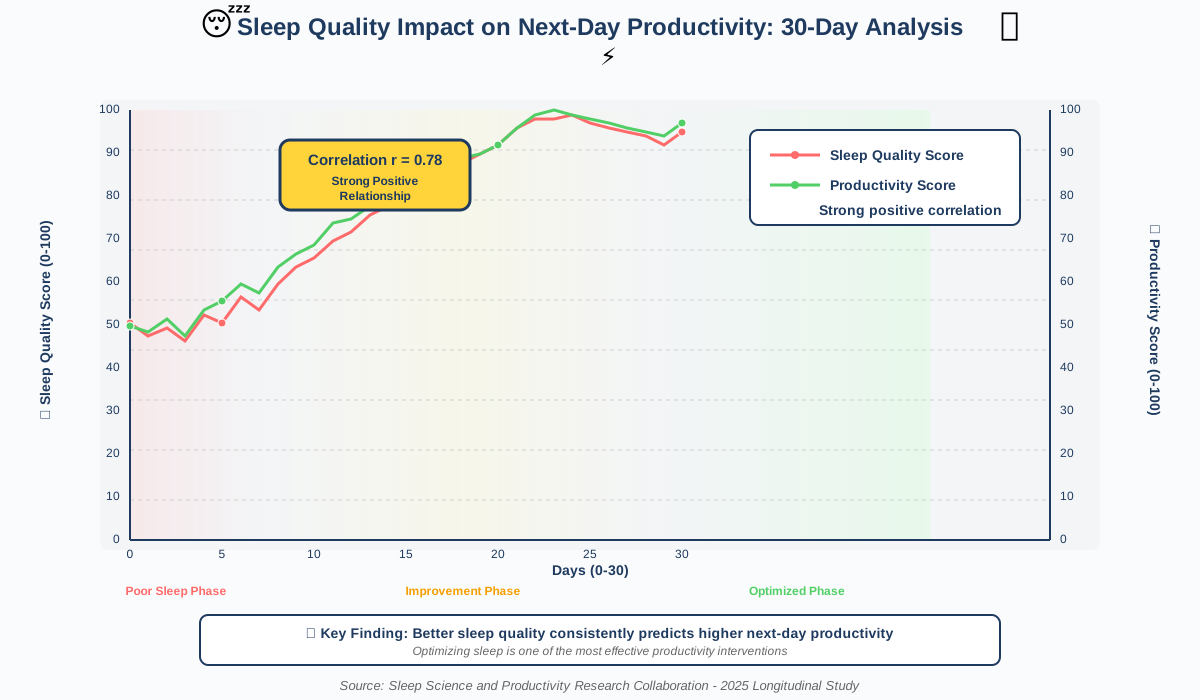
Leading versus lagging indicators differentiate between metrics that predict future productivity versus those that measure past results. AI can identify leading indicators for you specifically—perhaps adequate sleep, regular breaks, or morning exercise correlate strongly with your afternoon productivity. Focusing on leading indicators gives you leverage points to proactively optimize performance rather than merely recording what already happened.
Quality metrics balance quantity measures, ensuring productivity systems don’t incentivize cranking out mediocre work quickly. AI can assess output quality through various signals—revision requests, error rates, peer feedback, downstream impact—creating productivity scores that reward excellent work, not just abundant output.
Well-being integration acknowledges that sustainable productivity requires health, balance, and satisfaction. The most sophisticated AI productivity tracking includes well-being indicators—sleep quality, stress levels, work-life balance, exercise, and social connection—recognizing that long-term productivity depends on whole-person health.
The dark side of productivity tracking involves surveillance, control, and dehumanization. Some workplace AI tracks every keystroke, monitors screens, measures time in applications, and generates productivity scores that pressure workers into unsustainable performance. These systems treat humans as machines to be optimized rather than people to be supported. If your workplace implements invasive productivity tracking, understand that such monitoring often correlates with distrust, high turnover, and toxic culture. This approach to AI productivity enhancement is ethically wrong and counterproductive long-term.
Self-tracking versus employer tracking represents an important distinction. When you choose productivity tracking tools for personal insight and growth, AI serves your interests. When employers impose tracking systems, the data serves their interests, which may or may not align with yours. Always understand who controls productivity data, how it’s used, and what rights you have regarding information about your work.
AI-Driven Productivity Enhancement: Optimizing Your Sleep Schedule
Recognizing AI-Driven Productivity Enhancement: Optimizing Your Sleep Schedule acknowledges that sleep is the foundation of productivity. No AI tools can compensate for the effects of chronic sleep deprivation. However, AI can help you establish and maintain sleep patterns that maximize rest quality and daytime performance.
Sleep tracking technology has advanced dramatically. Wearable devices and smartphone sensors use AI to analyze your sleep stages, identify disruptions, and assess rest quality. Unlike crude motion-based tracking, modern AI interprets multiple data streams—heart rate variability, breathing patterns, movement, and ambient conditions—to create detailed sleep profiles showing how much deep sleep, REM sleep, and light sleep you’re getting.
Personalized sleep recommendations based on your data go far beyond generic advice. The AI might discover that you sleep better when you exercise in the morning versus evening, that late afternoon caffeine significantly disrupts your sleep despite feeling fine, or that room temperature has a larger impact on your rest than you realized. These personalized insights enable targeted improvements rather than trial-and-error experimentation.
Circadian rhythm optimization helps align your schedule with your body’s natural patterns. AI analyzes your sleep data, energy levels throughout the day, and performance metrics to identify your chronotype—whether you’re naturally a morning person, night owl, or somewhere between. It then suggests schedules that work with your biology rather than fighting it.
Wake time optimization ensures you wake during light sleep rather than deep sleep, which leaves you groggy and impairs morning productivity. AI alarm clocks monitor your sleep stages and wake you within a specified window when you’re in light sleep, making mornings less difficult and improving how you feel starting your day.
Sleep environment management through smart home integration allows AI to optimize conditions for rest. The system can gradually dim lights as bedtime approaches, adjust temperature for optimal sleep, reduce household noise, and even adjust morning conditions to support gentle waking—gradually increasing light and adjusting temperature before your alarm.
Work schedule integration recognizes the bidirectional relationship between work and sleep. AI productivity tools can suggest adjusting your schedule to accommodate poor sleep—perhaps recommending lighter, less demanding tasks the day after a bad night—while also identifying work patterns that disrupt sleep, like consistently working until midnight or scheduling stressful meetings late in the day.
The ethics of sleep tracking involve informed consent and data sensitivity. Sleep data reveals intimate information about health, relationships, and lifestyle. Choose sleep tracking platforms with strong privacy protections, and think carefully before sharing sleep data with employers or health insurers. While sleep optimization supports productivity, maintaining privacy boundaries protects against potential discrimination or coercion.
AI-Powered Productivity Enhancement: Combating Burnout
Addressing AI-Powered Productivity Enhancement: Combating Burnout requires understanding that productivity without sustainability leads to collapse. Burnout—characterized by emotional exhaustion, cynicism, and reduced professional efficacy—is an occupational phenomenon resulting from chronic workplace stress that hasn’t been successfully managed. AI can help identify burnout warning signs early and support recovery.
Early warning systems detect burnout before it becomes severe. AI analyzes patterns in your communication tone (increasing negativity), work hours (consistent overwork), task completion (declining quality or speed), sleep data (persistent poor rest), and engagement (reduced participation in activities you previously enjoyed). When multiple burnout indicators appear simultaneously, the system alerts you to take preventive action.
Workload management AI prevents the chronic overload that leads to burnout. These systems track your capacity, commitments, and completion patterns to identify when you’re taking on too much. Before accepting another project or saying yes to another meeting, the AI can show you realistically whether you have bandwidth and what you might need to defer or delegate.
Boundary enforcement helps maintain work-life separation, especially for remote workers. AI can automatically decline meeting invites outside your working hours, send gentle reminders when you’re working late, pause work notifications during personal time, and even flag when you haven’t taken adequate breaks. These features work best when supported by an organizational culture that respects boundaries rather than punishing people who use them.
Recovery activity suggestions help you actively recharge rather than passively collapse. When the AI detects high stress or fatigue, it might suggest specific recovery activities shown to be effective—a nature walk, connecting with friends, engaging in a hobby, or simply doing nothing without guilt. The system learns which recovery approaches work best for you specifically.
Progress visualization helps combat the feeling that you’re never doing enough—a common burnout contributor. AI-generated reports showing your accomplishments, impact, and growth over time provide concrete evidence of your value and progress, countering the internal critic that says you should be doing more.
Compassionate productivity metrics focus on sustainable performance rather than maximum output. Instead of celebrating how many hours you worked or how many tasks you crammed into a day, these AI systems recognize balanced weeks, consistent energy levels, and maintained relationships as productivity success indicators. This reframes productivity as a lifelong marathon rather than a daily sprint.
The paradox of productivity enhancement and burnout prevention is that many productivity tools inadvertently contribute to burnout by creating pressure for constant optimization and perfect efficiency. Choose AI tools explicitly designed with well-being in mind—those that encourage breaks, respect boundaries, and measure sustainable productivity. If a productivity tool makes you feel inadequate or anxious, it’s not helping regardless of efficiency gains.
AI-Driven Productivity Enhancement for Students: Mastering Academic Tasks
Implementing AI-Driven Productivity Enhancement for Students: Mastering Academic Tasks requires approaches tailored to academic contexts, which differ from professional work in important ways. Students face unique challenges: multiple unrelated subjects, long-term projects with distant deadlines, learning new material constantly, and balancing academics with social development and personal growth.
Study schedule optimization takes into account course syllabi, assignment deadlines, exam dates, and your learning patterns. AI planners can automatically create study schedules that space learning appropriately (spaced repetition is far more effective than cramming), allocate more time to difficult subjects, and build in buffer time for unexpected challenges. The system adapts as you progress—if you’re mastering calculus faster than expected, it reallocates time to subjects needing more attention.
Note-taking AI transforms how students capture and review course material. These tools can record lectures (with permission), generate searchable transcripts, identify key concepts, create study guides automatically, and connect related ideas across different lectures and readings. When studying for exams, you can ask questions, and the AI synthesizes answers from your entire semester of notes.
Research assistance helps students find, organize, and cite academic sources efficiently. AI research tools can suggest relevant papers based on your topic, summarize lengthy academic articles, identify key arguments and evidence, organize sources by theme, and generate properly formatted citations. This doesn’t mean AI writes your papers—it means you spend less time on mechanics and more time on critical thinking and synthesis.
Assignment breakdown addresses the student tendency to procrastinate on large projects by making them less overwhelming. When you have a term paper due in six weeks, AI can break it down: “Week 1: Choose topic and gather sources (4 hours). Week 2: Create outline and thesis statement (3 hours). Week 3: Write introduction and first section (5 hours)…” Suddenly the massive project feels manageable.
Time blocking for students accounts for varying energy levels, course schedules, and the need for flexibility. Unlike professional workers with relatively consistent schedules, students have different classes each day, varying workloads across the semester, and obligations that change week to week. AI schedulers designed for students handle this complexity and adjust automatically as circumstances change.
Academic integrity is paramount. AI productivity tools should help you learn and manage your work more efficiently—they should not do your thinking for you or complete assignments that should demonstrate your own knowledge and skills. Use AI for organization, information gathering, and understanding concepts, but ensure all submitted work represents your own thinking and meets your institution’s academic integrity standards.
Study group coordination AI helps students collaborate effectively. These tools can find optimal meeting times for group projects, assign tasks based on individual strengths, track everyone’s contributions, and ensure no one feels overloaded. For remote study groups, AI can facilitate asynchronous collaboration and keep everyone aligned.
The student-specific concern about AI dependency reminds us that productivity enhancement should support learning, not replace it. The goal is developing knowledge, skills, and independent thinking—not just completing assignments efficiently. Choose AI tools that deepen your understanding rather than allowing you to skip the learning process.
AI-Driven Productivity Enhancement: Integrating AI into Your Existing Workflow
Mastering AI-Driven Productivity Enhancement: Integrating AI into Your Existing Workflow requires thoughtful implementation rather than wholesale replacement of functioning systems. The biggest productivity gains come not from using cutting-edge AI tools but from smoothly integrating helpful AI capabilities into workflows you already understand.
Start with pain points rather than wholesale change. Identify the three biggest frustrations in your current workflow—perhaps inbox overload, difficulty finding documents, or frequent context switching. Research AI solutions that specifically address these pain points. Implement one solution, give it two weeks to demonstrate value, then address the next pain point. This incremental approach prevents disruption and builds AI integration confidence.
Tool compatibility and integration matter more than individual tool capabilities. An excellent AI task manager that doesn’t integrate with your calendar creates more work by forcing manual synchronization. Choose tools designed to work together or platforms offering multiple integrated AI capabilities. The goal is seamless workflow, not managing disconnected tools.
Data migration and setup deserve adequate time and attention. Moving your existing data—tasks, contacts, notes, files—into new AI systems is tedious but crucial. Resist the temptation to start fresh without migrating data; your historical information provides valuable context for AI learning. Block several hours for proper setup, ensuring the AI has sufficient quality data to provide useful insights and automation.
Training period expectations prevent premature abandonment. AI productivity tools need time to learn your patterns and preferences. During the first few weeks, they’ll make mistakes—misclassifying emails, suggesting poor meeting times, or surfacing irrelevant information. Correct these errors (which trains the AI) rather than giving up. Most tools show significant improvement after two to three weeks of use.
Workflow redesign opportunities emerge once AI tools are integrated. You might discover that AI makes certain steps in your workflow obsolete or that new possibilities emerge. For example, if AI drafts most routine emails, you might implement a batch-processing approach to email rather than checking constantly. Stay open to workflow evolution as AI capabilities mature.
Team coordination becomes important if you’re implementing AI productivity tools that affect others. If your AI auto-declines meetings during focus blocks, communicate this change to colleagues so they understand you’re not being rude. If you use AI writing assistance for communications, establish norms about when AI-generated content is appropriate. Smooth integration requires social coordination, not just technical implementation.
Backup and exit strategies protect against over-dependence on any single AI platform. Can you export your data in standard formats? What happens to your information if the service shuts down? Maintain backups of critical data outside AI platforms, and understand how you’d continue working if your primary AI tools became unavailable. This isn’t pessimism—it’s prudent digital hygiene.
AI and Productivity: Using AI for Smarter Decision-Making
Leveraging AI and Productivity: Using AI for Smarter Decision- Making recognizes that knowledge workers spend significant time making decisions—which project to prioritize, whether to attend a meeting, how to allocate budget, whom to hire, and which approach to take. AI can enhance decision quality by providing relevant information, analyzing options, and revealing considerations you might overlook.
Decision support systems aggregate relevant information automatically. When facing a decision, AI can surface related past decisions, outcomes of similar choices, relevant data and metrics, expert opinions, and potential consequences. Instead of spending hours gathering information, you receive a comprehensive briefing in minutes, allowing you to focus on judgment and choice rather than research.
Option generation through AI ensures you consider alternatives you might not think of independently. Facing a business challenge? AI can suggest multiple potential approaches based on what’s worked in similar situations, prompting creative solutions. Stuck on a personal decision? AI might surface considerations or perspectives that broaden your thinking.
Consequence prediction helps you anticipate outcomes before committing to decisions. By analyzing historical patterns and relevant factors, AI can estimate likely results of different choices. While never perfectly accurate—the future remains uncertain—these predictions help you make more informed decisions and prepare for various scenarios.
Bias detection in your decision-making is one of AI’s most valuable applications. We all have cognitive biases—confirmation bias, recency bias, and availability bias—that skew our judgment. AI can identify when your decision-making shows these patterns and prompt you to reconsider. Are you favoring information that confirms your existing belief? Are you overweighting recent events? AI can surface these tendencies.
Decision frameworks and structure help when facing complex choices with multiple considerations. AI can guide you through structured decision-making processes—defining criteria, weighting factors, scoring options, and calculating optimal choices. This doesn’t mean blindly accepting AI recommendations, but rather using systematic approaches to organize your thinking.
Post-decision learning creates a feedback loop that improves future choices. AI can track your decisions and their outcomes, identify which decision-making approaches yielded good results, and highlight patterns in both successful and unsuccessful choices. This meta-level learning makes you progressively better at making decisions across your lifetime.
The limitation of AI in decision-making involves values, ethics, and context that algorithms cannot fully capture. AI excels at processing information and identifying patterns, but it cannot make value judgments about what matters most or which outcomes are most desirable in complex situations. Always maintain human oversight for important decisions, especially those affecting people’s lives, involving ethical considerations, or requiring contextual understanding beyond data patterns.
AI-Driven Productivity Enhancement: Mastering the Art of Delegation
Understanding AI-Driven Productivity Enhancement: Mastering the Art of Delegation involves recognizing that delegation to AI tools follows similar principles as delegating to human team members, with unique considerations. Effective delegation—whether to humans or AI—requires clarity about desired outcomes, appropriate task selection, and maintaining oversight.
Task assessment determines what to delegate. Ideal tasks for AI delegation are well-defined, repetitive, rule-based, time-consuming, and low-stakes if errors occur. Email filtering, data entry, basic research, scheduling, and routine communications fit these criteria. Tasks requiring human judgment, ethical consideration, creative innovation, or personal touch generally shouldn’t be fully delegated to AI.
Clear instruction creation ensures AI understands what you want. Unlike humans who can ask clarifying questions and interpret vague instructions, AI tools need explicit guidance. When delegating to AI, specify exactly what success looks like, provide examples if possible, define any constraints or priorities, and establish error-checking procedures. The more precise your instructions, the better AI performs.
Progressive delegation starts with small, low-risk tasks and gradually expands as you build confidence in the AI’s capabilities. Begin by having AI suggest priorities rather than automatically sorting tasks. Let it draft emails you’ll review before sending. Allow it to schedule internal meetings but not external client calls. As the AI proves reliable, increase delegated responsibility.
Quality monitoring maintains standards even as AI handles more work. Regularly review AI outputs, check for errors or inappropriate decisions, and provide corrective feedback when necessary. Just as you wouldn’t delegate to a human and never check their work, AI delegation requires ongoing oversight, especially in the early stages.
Handoff protocols establish clear boundaries between AI-handled tasks and those requiring human attention. The AI should know when to handle something independently versus when to flag it for your review. For example, AI might handle standard customer service inquiries but escalate anything involving complaints, refunds, or unusual situations.
The emotional aspect of delegation involves trusting AI tools with tasks you previously controlled personally. Some people struggle to delegate because they fear loss of control, don’t trust AI reliability, or tie their identity to being indispensable. Recognize that delegation—to humans or AI—frees you for higher-value work that truly requires your unique capabilities.
Accountability remains with you despite delegation. If AI makes a mistake on a task you delegated, you’re responsible for the outcome. This isn’t unfair—it’s the nature of delegation. Choose what to delegate carefully, maintain appropriate oversight, and take responsibility for results whether you performed the work directly or managed AI doing it.
AI-Powered Productivity Enhancement: Optimizing Your Learning Environment
Creating conditions for peak performance through AI-Powered Productivity Enhancement: Optimizing Your Learning Environment acknowledges that productivity doesn’t exist in a vacuum—your physical and digital environment profoundly affects cognitive performance, creativity, and sustained focus. AI brings personalization and dynamic adaptation to environment optimization.
Ambient condition monitoring uses sensors and AI to keep an eye on things like light, noise, temperature, humidity, air quality (including CO₂ and VOC levels), and even electromagnetic fields that can affect how well you work. Most people don’t consciously notice these factors until they’re severely degraded, but AI can detect subtle variations and their impact on your performance.
Adaptive environmental control automatically adjusts conditions throughout the day. Rather than maintaining static settings, AI-powered smart environments respond to your activities, time of day, and feedback. During morning analytical work, it might increase cool lighting and temperature slightly below your comfort zone (which enhances alertness). During afternoon creative sessions, it might warm the lighting, reduce direct brightness, and slightly elevate temperature (supporting relaxed, creative thinking).
Personalized soundscapes do more than mask noise—they actively support different cognitive modes. AI learns which audio environments help you focus for different task types. Perhaps you concentrate best on writing with gentle rain sounds, on coding with low brown noise, and on brainstorming with upbeat instrumental music. The system automatically plays appropriate soundscapes as you switch between activities.
Visual environment optimization considers everything from screen positioning and brightness to wall colors and decorative elements. While you can’t change everything, AI can suggest modifications with significant cognitive benefits. Perhaps analysis shows your productivity increases when facing a window versus facing a wall, or that certain colors in your field of view correlate with different performance outcomes.
Ergonomic adjustment reminders prevent physical discomfort that undermines productivity. AI tracking your posture or work duration can prompt adjustments—raising your monitor, checking chair height, taking a standing break, or doing specific stretches. Small ergonomic improvements compound into significant productivity and health benefits over time.
Digital environment curation applies similar principles to your software workspace. AI can organize desktop layouts, customize interface colors and contrasts for optimal visibility and reduced eye strain, arrange windows and applications for your tasks, and even manage the virtual backgrounds in video calls to reduce distraction or project professionalism.
Biophilic design integration brings nature elements into work environments, which research shows significantly improves well-being and cognitive function. AI can suggest nature-based elements appropriate for your space—plants, natural materials, nature sounds, and nature scenes on screens—and even coordinate their presentation with your work rhythms.
AI-Driven Productivity Enhancement: Building a Personalized AI Productivity Stack
Developing AI-Driven Productivity Enhancement: Building a Personalized AI Productivity Stack requires thoughtfully assembling a collection of tools that work together to support your unique workflow, priorities, and working style. Unlike adopting a single all-in-one platform, building a stack means selecting best-in-class tools for each productivity function and ensuring they integrate smoothly.
Core functions to address in your stack include task and project management, calendar and time management, communication (email and messaging), note-taking and knowledge management, document creation and collaboration, focus and distraction management, and analytics and tracking. You likely need at least one tool for each function, though some platforms span multiple categories.
Integration assessment determines how well tools work together. Can your task manager sync with your calendar? Does your note-taking app integrate with your document editor? Can information flow between tools automatically? The worst productivity scenario involves using excellent tools that don’t communicate, forcing manual data transfer that wastes time and creates errors.
Personal priorities guide tool selection because no single stack works for everyone. If you’re deeply visual, prioritize tools with excellent visual interfaces and visualization capabilities. If you work across devices constantly, emphasize cross-platform synchronization. If you handle sensitive information, prioritize privacy and security. Your stack should fit your specific needs, not some generic ideal.
Learning curve consideration balances powerful features against accessibility. Sophisticated tools often require significant learning investment before delivering value. Sometimes a simpler tool you can master immediately provides better productivity gains than a complex platform you’ll never fully understand. Be realistic about your willingness to invest learning time.
Cost optimization means understanding that expensive isn’t always better. Many excellent AI productivity tools offer free tiers sufficient for individual use, while some charge premium prices for features you may not need. Evaluate whether paid features justify their cost for your specific situation. Sometimes a combination of free tools outperforms expensive all-in-one platforms.
Trial periods allow testing before commitment. Most quality productivity tools offer free trials ranging from 14 to 30 days. Take advantage of these to genuinely test tools in your actual workflow before paying. During trials, push tools to their limits—try advanced features, test integration with your other tools, and evaluate whether they genuinely improve your productivity.
Stack evolution and refinement continue over time. Your first stack won’t be your last. As your work changes, your needs shift, and better tools emerge, revisit your stack periodically. However, avoid constant churning—switching tools carries costs in learning, setup, and data migration. Major stack changes should happen perhaps yearly, not monthly.
Documentation of your stack helps you remember why you chose specific tools and how they work together. Create a simple document listing each tool, its primary purpose, how it integrates with other tools, and key workflows it supports. When you’re tempted to try yet another productivity tool, consult this documentation to remember what you’re already using and why.
AI and Productivity: How AI is Changing Project Management
Examining AI and Productivity: How AI is Changing Project Management reveals transformation in how we plan, execute, and deliver projects. Traditional project management relies heavily on human expertise in estimation, scheduling, resource allocation, and risk assessment—all areas where AI brings significant enhancement through pattern recognition and data analysis.
Intelligent project planning uses AI to analyze historical project data and create realistic plans. When starting a new project, AI can reference similar past projects to estimate realistic durations, identify required resources, suggest task sequences, and anticipate potential challenges. This doesn’t replace human project management expertise but augments it with data-driven insights that prevent common planning pitfalls like over-optimistic timelines.
Resource allocation optimization ensures team members aren’t overloaded or underutilized. AI analyzes current commitments, skill sets, workload capacity, and project requirements to suggest optimal task assignments. It can identify when someone’s workload is unsustainable and recommend redistribution before burnout occurs.
Risk prediction and monitoring identify potential project problems early. By analyzing multiple signals—slipping milestones, communication patterns suggesting confusion, resource constraints, dependency bottlenecks—AI can flag projects at risk of failure while there’s still time to intervene. Early warning systems prevent small issues from becoming project catastrophes.
Automated status reporting eliminates tedious project administration. AI can generate comprehensive status updates automatically by aggregating data from various sources—task completion rates, hours logged, communication channels, and document repositories. Project managers spend less time compiling reports and more time solving problems.
Dependency management becomes intelligent when AI tracks all relationships between project tasks and automatically adjusts schedules when changes occur. If a critical task slips two days, AI instantly recalculates downstream impacts and suggests mitigation strategies rather than leaving you to manually untangle the implications.
Stakeholder communication optimization helps project managers provide appropriate updates to different stakeholders. AI can customize communication based on stakeholder roles and interests—executives receive high-level status and risk summaries, team members see detailed task information, and clients get progress updates in business language rather than technical jargon.
The human element in AI-enhanced project management remains critical. Projects involve people with emotions, politics, ambitions, and complex interpersonal dynamics that AI cannot fully understand or manage. The best results come from AI handling data, analysis, and administrative overhead while human project managers focus on leadership, motivation, conflict resolution, and strategic decision-making.
AI-Driven Productivity Enhancement: The Importance of Data Privacy
Addressing AI-Driven Productivity Enhancement: The Importance of Data Privacy cannot be overstated—productivity AI requires access to potentially sensitive personal and professional information to function effectively. Understanding privacy implications and protecting your data isn’t paranoia; it’s responsible digital citizenship.
Data minimization principles suggest using the least invasive tools that meet your needs. If a basic task manager without AI provides sufficient functionality, that’s more private than an AI-powered alternative requiring cloud synchronization and behavior tracking. Always ask whether AI features justify the privacy trade-offs they require.
Encryption standards protect data in transit and at rest. Look for tools offering end-to-end encryption where even the service provider cannot access your data in readable form. This is particularly important for note-taking, communication, and document applications that might contain confidential information.
Data retention policies determine how long services store your information. Some platforms delete data after account closure; others retain it indefinitely. Some use your data to train AI models; others commit to not using customer data for training. Read privacy policies carefully and choose companies with transparent, user-friendly data practices.
Local processing options provide enhanced privacy by keeping sensitive data on your devices rather than uploading to cloud servers. Some AI productivity tools can run entirely locally, processing data on your computer or phone without internet transmission. These options sacrifice some convenience (less seamless cross-device synchronization) for substantial privacy gains.
Third-party access controls determine who else can see your productivity data. Does the service sell anonymized data to advertisers? Do law enforcement agencies have access without warrants? Can your employer access productivity metrics if they pay for your subscription? Understanding who can access your data helps you make informed choices.
Privacy-security trade-offs often require balancing convenience, functionality, and privacy. The most secure option might be paper notebooks (maximum privacy, minimal functionality). Cloud-based AI productivity suites offer maximum functionality but require extensive data sharing. Your optimal choice depends on your specific privacy requirements and risk tolerance.
Regulatory compliance considerations affect organizations more than individuals. If you work in regulated industries (healthcare, finance, or legal), productivity tools must comply with relevant privacy regulations like HIPAA, GDPR, or CCPA. Ensure any AI tools you use meet applicable compliance requirements, or you might expose your organization to regulatory penalties.
Digital hygiene practices protect privacy regardless of which tools you use. Regularly review and delete unnecessary data, use strong unique passwords protected by a password manager, enable two-factor authentication, keep software updated with the latest security patches, and remain skeptical of requests for excessive permissions or access.
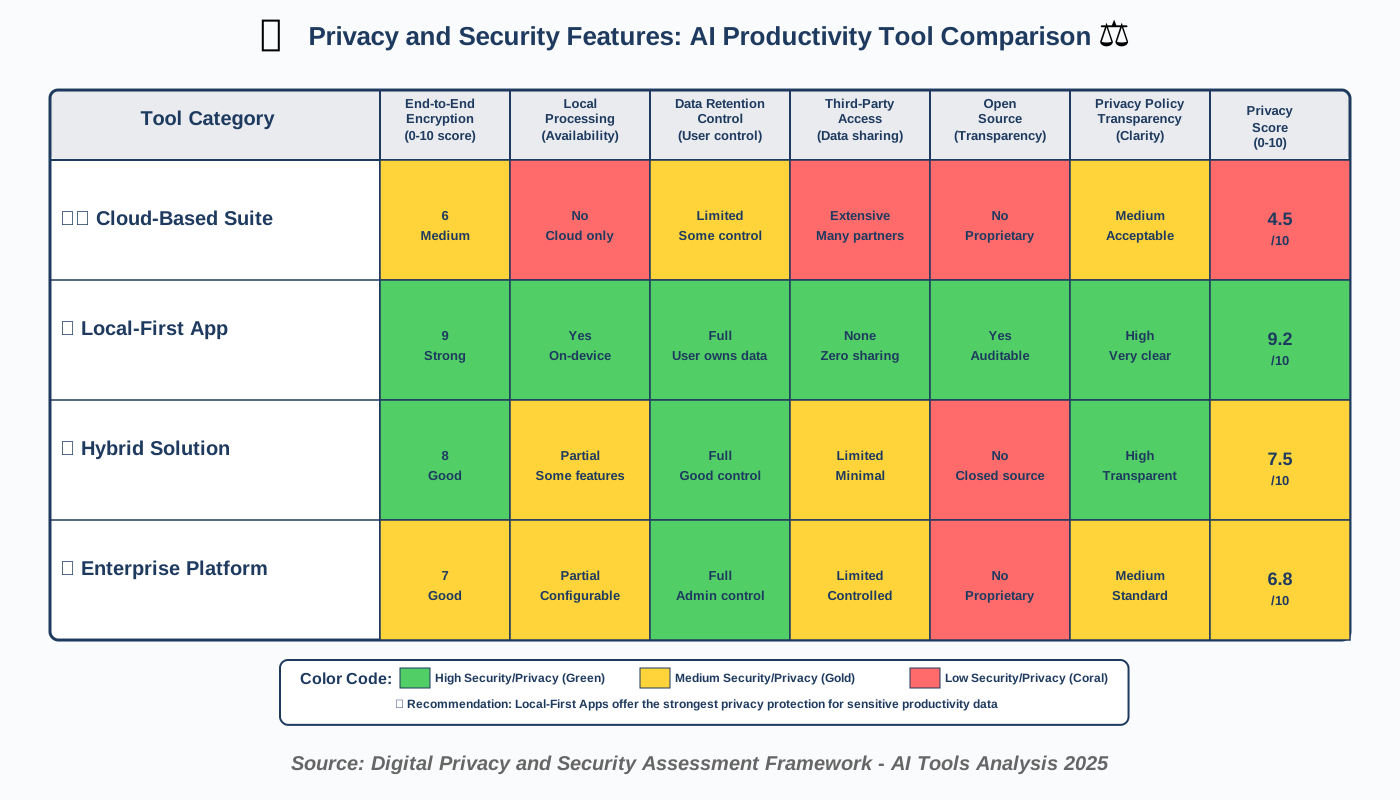
AI-Powered Productivity Enhancement: Overcoming Information Overload
Tackling AI-Powered Productivity Enhancement: Overcoming Information Overload addresses the reality that modern knowledge workers face exponentially more information than our cognitive systems evolved to process. Email, news, social media, workplace communications, industry updates, and personal messages create a constant deluge that overwhelms attention and impairs decision-making. AI provides intelligent filtering and prioritization that makes information manageable.
Intelligent inbox management transforms email from a time-consuming burden to an efficient communication channel. AI email assistants learn which messages require immediate attention, which can wait, and which you typically ignore. Priority inboxes surface important communications while automatically filing or archiving routine messages, newsletters you never read, and low-priority updates.
Information aggregation brings scattered updates into centralized dashboards. Rather than checking ten different sources for news, project updates, team communications, industry developments, and personal notifications, AI aggregators collect everything relevant in one place, organized by priority and category. You process information in batches rather than constant context switching.
Summary generation provides the essence of long documents, articles, email threads, and meeting transcripts without requiring full reading. AI can distill a 20-page report to key findings and recommendations, condense a 50-message email chain to decisions and action items, or summarize a two-hour meeting to critical discussion points. This doesn’t replace deep reading when necessary—it enables efficient triage to identify what deserves your full attention.
Content filtering based on relevance helps you focus on information that actually matters to your work and interests. AI learns your priorities and automatically filters incoming information, showing high-relevance content prominently while reducing or blocking irrelevant material. This personalized filtering prevents information overload while ensuring you don’t miss critical updates.
Read-it-later systems enhanced with AI help manage the natural tendency to save interesting articles and then never return to them. AI can analyze your saved content, identify themes and patterns, surface items most relevant to your current projects or interests, and even suggest when you might have time available for reading based on your schedule patterns.
Information consumption scheduling prevents the constant interruption of incoming information. Rather than processing every message and update as it arrives, AI batches information for scheduled review periods. You might designate morning coffee time for news digestion, mid-afternoon for email processing, and end-of-day for team updates. This batching reduces attention fragmentation while ensuring nothing important falls through the cracks.
The skill of discernment remains essential even with AI filtering. Algorithms can suggest priorities, but you must verify their judgments and correct errors. Over-reliance on AI filtering might cause you to miss unexpected opportunities or important information from unfamiliar sources. Maintain awareness of what’s being filtered and periodically review lower-priority items to ensure the AI’s judgments align with your actual priorities.
AI-Driven Productivity Enhancement: Using AI for Goal Setting and Achievement
Harnessing AI-Driven Productivity Enhancement: Using AI for Goal Setting and Achievement transforms aspirations into accomplishments through intelligent planning, progress tracking, and adaptive support. Many people set ambitious goals but fail to achieve them due to poor planning, inconsistent execution, or discouragement from setbacks. AI provides structure and encouragement that bridges the gap between intention and achievement.
SMART goal refinement uses AI to transform vague aspirations into specific, measurable, achievable, relevant, and time-bound objectives. You might input “I want to be more productive,” and the AI guides you toward concrete goals like “Reduce time spent on email from 2 hours to 45 minutes daily by the end of March” or “Complete three focus blocks of 90 minutes each per day for the next 30 days.” Specific goals are significantly more likely to be achieved than abstract intentions.
Goal decomposition breaks large objectives into manageable milestones and daily actions. An ambitious goal like “Write a book” feels overwhelming, leading to procrastination. AI can decompose it: “Write book” becomes “Create outline (3 hours)” → “Write 500 words daily (2 months)” → “Complete first draft” → “Revise chapters” → “Final edit” → “Publication.” Suddenly the impossible seems achievable through consistent small steps.
Progress tracking and visualization keep you motivated by making advancement visible. AI automatically tracks relevant metrics—words written, tasks completed, skills practiced, habits maintained—and creates visual representations showing progress toward goals. Seeing tangible evidence of improvement combats the discouragement that comes from focusing only on how far you still have to go.
Adaptive goal adjustment recognizes that circumstances change and rigid goals often fail. If you set a goal based on working from home and then return to office work, your time and energy availability shifts. AI monitors your progress, identifies when goals have become unrealistic or inappropriate, and suggests adjustments that maintain forward momentum rather than abandoning goals entirely.
Habit formation support helps establish the consistent behaviors underlying goal achievement. Research shows it takes significant time and repetition to form new habits. AI habit trackers remind you to perform target behaviors, celebrate consistency streaks, analyze what conditions support versus undermine your habits, and provide encouragement during the difficult middle phase when novelty has worn off but habits aren’t yet automatic.
Accountability mechanisms increase follow-through. You can configure AI systems to share progress with accountability partners, send yourself weekly goal reviews, or implement stakes (charitable donations if you miss targets). External accountability—even automated accountability—significantly improves goal achievement rates.
Reflection prompts help you learn from both successes and setbacks. At regular intervals, AI can prompt reflection questions: What’s working well toward this goal? What obstacles have emerged? What would you do differently? What have you learned? This reflective practice transforms goal pursuit into personal development beyond the specific achievement.
Goal hierarchies ensure daily activities align with long-term aspirations. AI can help you map connections between immediate tasks, weekly objectives, monthly goals, annual targets, and life vision. This alignment ensures you’re not busy with activities disconnected from what truly matters and helps you make better decisions when choosing how to spend limited time and energy.
AI-Powered Productivity Enhancement: A Look at Emerging Technologies
Exploring AI-Powered Productivity Enhancement: A Look at Emerging Technologies prepares us for productivity innovations on the near horizon. While this guide focuses on currently available AI tools, understanding emerging capabilities helps you anticipate changes and position yourself to benefit as new technologies mature.
Brain-computer interfaces represent perhaps the most dramatic future direction. Companies are developing non-invasive technologies that read brain signals to control computers, detect mental states, and even facilitate direct thought-to-text communication. Imagine productivity tools that adjust your environment automatically when detecting declining focus or that capture your thoughts as text without typing. While these capabilities remain experimental, early applications may reach consumers within years.
Augmented reality productivity overlays will layer AI-generated information onto physical environments. Your AR glasses might highlight important items on your desk, display reminders when seeing particular people or places, or provide contextual information automatically as you move through your day. This seamless information integration could reduce the friction of retrieving needed information while minimizing screen time.
Ambient AI assistance moves toward truly invisible productivity support. Rather than explicitly using applications, you’ll work naturally while AI observes patterns and provides proactive assistance—suggesting breaks before you realize you’re fatigued, preparing relevant information before you know you need it, or connecting you with colleagues when their expertise becomes relevant. The goal is AI that supports productivity without requiring conscious attention or management.
Multimodal AI combines text, voice, vision, and other inputs to understand context more richly. Future productivity AI won’t just read your typed tasks—it will hear verbal notes, see your handwritten sketches, observe your facial expressions, and integrate all these signals for more accurate assistance. This multimodal understanding enables more natural interaction and better support.
Predictive task completion might handle entire workflows with minimal input. You might say, “Prepare for the quarterly review meeting” and AI automatically gathers relevant metrics, creates presentation slides, identifies discussion topics based on recent developments, schedules the meeting at an optimal time, and sends advance materials to participants. Increasingly sophisticated AI will handle complex workflows end-to-end with human approval rather than human execution.
Emotional intelligence in AI productivity tools will recognize and respond to your emotional state. Feeling stressed? The AI might suggest stress-reduction activities or postpone demanding tasks. Excited and energized? It might suggest tackling challenging creative work while you’re in an optimal state. As emotion recognition improves, productivity tools can provide emotionally intelligent support beyond purely logical optimization.
Collaborative AI that works across teams represents another frontier. Rather than individual AI assistants, imagine team-level AI that coordinates schedules, identifies collaboration opportunities, suggests who should work together based on complementary skills, and facilitates knowledge sharing. These systems could dramatically improve organizational productivity beyond individual optimization.
The ethical implications of emerging technologies deserve careful consideration. As AI becomes more powerful, autonomous, and integrated into daily life, questions about human agency, privacy, algorithmic bias, and psychological impacts intensify. We must ensure technological advancement serves human flourishing rather than corporate profit or surveillance interests. Advocate for responsible AI development, demand transparency, and maintain human primacy in decision-making even as AI capabilities grow.
Frequently Asked Questions About AI-Driven Productivity Enhancement
Taking Your First Steps Toward AI-Enhanced Productivity
We’ve covered extensive ground in this guide—from foundational concepts to advanced strategies, from practical tools to ethical considerations. If you’re feeling slightly overwhelmed, that’s completely normal. AI-Driven Productivity Enhancement represents a significant shift in how we approach work, and integrating it effectively takes time, experimentation, and patience
Taking Your First Steps Toward AI-Enhanced Productivity
We’ve covered extensive ground in this guide—from foundational concepts to advanced strategies, from practical tools to ethical considerations. If you’re feeling slightly overwhelmed, that’s completely normal. AI-Driven Productivity Enhancement represents a significant shift in how we approach work, and integrating it effectively takes time, experimentation, and patience.
The most important thing to remember is that you don’t need to implement everything at once. In fact, trying to do so would be counterproductive—you’d spend all your time managing productivity tools instead of being productive. Instead, start with one area where you’re experiencing the most frustration. Is your inbox out of control? Begin with an AI email assistant. Can’t remember important tasks? Try an AI-powered task manager. Struggling to focus? Explore AI distraction-blocking tools.
Give each tool at least two weeks before evaluating its effectiveness. The first few days with any new system feel awkward—you’re learning the interface, the AI is learning your patterns, and you’re adjusting your workflow. Real benefits often don’t emerge until week two or three, when the novelty wears off and genuine integration begins.
Track your results in simple ways. Before implementing an AI productivity tool, note how much time you’re spending on the problem area and how satisfied you feel with your performance. After two weeks with the tool, check again. Are you spending less time? Feeling less stressed? Getting better results? If yes, continue. If not, try a different approach or tool.
Remember that AI productivity tools are means to ends, not ends in themselves. The goal isn’t to have the perfect productivity system—it’s to accomplish meaningful work, maintain well-being, and live a balanced life. If a tool creates more stress than it alleviates, or if optimizing your productivity system becomes a time-consuming hobby, you’ve lost sight of the purpose. Stay focused on outcomes that matter: completing important projects, having time for relationships and rest, and feeling satisfied with how you spend your days.
Privacy and ethics must remain central to your AI productivity journey. As you adopt tools, continuously evaluate whether they respect your data, support your autonomy, and enhance your life without compromising your values. If a tool makes you uncomfortable, trust that instinct. There are always alternatives, and no productivity gain justifies sacrificing your privacy, security, or peace of mind.
Build in regular reviews of your productivity system—perhaps quarterly—to assess what’s working and what needs adjustment. Our work evolves, our priorities shift, and better tools emerge. What works perfectly today might need refinement in six months. Stay flexible and willing to adapt while avoiding the trap of constantly chasing the newest productivity trend.
Connect with communities of others exploring AI productivity enhancement. Learning from people with similar goals and challenges accelerates your growth and helps you avoid common pitfalls. However, remember that productivity is deeply personal—what works brilliantly for someone else might not suit your situation. Take inspiration from others, but customize your approach to your unique needs, preferences, and circumstances.
Finally, practice self-compassion throughout this journey. You will have days when your perfectly optimized productivity system fails because you’re tired, distracted, or dealing with unexpected challenges. You will make mistakes—choosing the wrong tool, over-optimizing at the expense of flexibility, or forgetting to use features you set up. This is all normal and okay. Productivity enhancement is a practice, not a destination. Be patient with yourself as you learn and grow.
Conclusion: Embracing AI as Your Productivity Partner
AI-Driven Productivity Enhancement represents one of the most promising applications of artificial intelligence for everyday life. Unlike AI applications that replace human capability, productivity AI amplifies what we can accomplish while protecting our time for activities requiring uniquely human qualities—creativity, emotional connection, ethical reasoning, and strategic thinking.
Throughout this guide, we’ve explored how AI can transform every aspect of your productivity: managing tasks with intelligent prioritization, optimizing your schedule based on your energy patterns, automating repetitive work that drains your time, filtering information overload to surface what truly matters, creating optimal environments for focused work, supporting goal achievement through structured guidance, and protecting your well-being while pursuing peak performance.
We’ve also emphasized the critical importance of using AI productivity tools responsibly and ethically. Privacy must never be sacrificed for convenience. Human judgment must remain central even as AI capabilities grow. Well-being cannot be compromised in pursuit of productivity. And we must remain vigilant against AI implementations that surveil, control, or dehumanize workers under the guise of optimization.
The future of productivity lies not in working longer hours or cramming more tasks into our days. It lies in working more intelligently—focusing energy on high-impact activities, automating mechanics that don’t require human creativity, and reclaiming time for rest, relationships, learning, and pursuits that make life meaningful. AI makes this future achievable for anyone willing to learn and implement these tools thoughtfully.
As you begin or continue your journey with AI productivity enhancement, remember that the goal isn’t perfection—it’s progress. You’re not trying to become a productivity machine that never wastes a moment. You’re trying to create a sustainable relationship with work that allows you to accomplish what matters while maintaining balance, health, and satisfaction.
We hope this guide has provided you with practical knowledge, actionable strategies, and the confidence to explore AI-Driven Productivity Enhancement safely and effectively. Whether you’re a student managing coursework, a professional juggling multiple projects, a creative protecting time for your craft, or simply someone who wants more control over their schedule, AI tools can support your goals—if implemented with wisdom, care, and respect for your humanity.
The technology will continue evolving rapidly. New tools will emerge. Capabilities will expand. But the fundamental principles we’ve discussed—start small, prioritize privacy, maintain human agency, focus on outcomes that matter, and pursue sustainable productivity—will remain relevant regardless of how AI advances.
Your next step is simple: identify one productivity challenge you’re facing right now and choose one AI tool to address it. Don’t wait for the perfect moment or the perfect system. Start where you are, use what you have, and adjust as you learn. Every expert in AI productivity enhancement began as a curious beginner willing to experiment.
We’re rooting for you. May your journey with AI productivity tools lead to more meaningful work, greater balance, and the time and energy to pursue what truly matters in your life. Now go forth and work smarter, not harder—with AI as your trusted partner in productivity.
About the Authors
Nadia Chen is an expert in AI ethics and digital safety who helps non-technical users harness artificial intelligence responsibly. With a background in both technology and policy, Nadia has dedicated her career to ensuring AI tools empower rather than exploit users. She regularly speaks at conferences about privacy-preserving AI applications and maintains that productivity enhancement must never come at the cost of personal privacy or autonomy. Through her writing and workshops, Nadia teaches thousands of people how to evaluate AI tools critically, protect their data, and use technology in ways that align with their values. When she’s not researching emerging AI technologies, Nadia enjoys hiking, practicing mindfulness meditation, and volunteering with digital literacy programs in her community.
Rihab Ahmed is an educator and lifelong learner who discovered AI tools while searching for better ways to manage the demands of graduate studies while teaching full-time. What began as a personal necessity evolved into a passion for helping other students and educators work smarter using AI productivity tools. Rihab specializes in making complex technology accessible through clear explanations, relatable examples, and step-by-step guidance. She believes that AI should democratize productivity rather than creating advantages only for the technically sophisticated. Rihab regularly writes about study techniques, learning optimization, and educational applications of AI. In her spare time, she mentors first-generation college students, experiments with new productivity methods, and reads voraciously across multiple disciplines.
Note: This article represents a collaborative effort between Nadia Chen (main author) and Rihab Ahmed (co-author), combining our perspectives on ethical AI use and practical productivity enhancement to provide readers with both technical guidance and accessible implementation strategies.