AI-Driven Productivity Enhancement: Beginner’s Guide

Have you ever felt overwhelmed by your to-do list, wishing you had an extra pair of hands to help tackle everything? I remember sitting in my university library last semester, drowning in assignments, research papers, and study notes, thinking there had to be a better way. That’s when I discovered AI-Driven Productivity Enhancement—and honestly, it changed everything about how I approach my work and studies.
AI-Driven Productivity Enhancement isn’t about replacing human creativity or effort. Instead, it’s about using smart technology to handle repetitive tasks, organize information, and help you focus on what truly matters. Imagine AI as a personal assistant that is always available, never complains, and adapts to your specific needs. Whether you’re a student juggling classes, a professional managing projects, or someone trying to balance life’s many demands, AI tools can become your secret weapon for getting more done with less stress.
In this guide, I’ll walk you through exactly how to start using AI productivity tools even if you’ve never used anything beyond basic apps. You don’t need a computer science degree or any technical background—just curiosity and a willingness to try something new. By the end of this article, you’ll understand how AI works to boost productivity, which tools to start with, and how to integrate them into your daily routine seamlessly.
What Is AI-Driven Productivity Enhancement?
Let me break this down in the simplest way possible. Artificial intelligence refers to computer systems that can perform tasks that typically require human intelligence—like understanding language, recognizing patterns, making decisions, and learning from experience. When we apply this technique to productivity, we’re using these smart systems to help us work faster, smarter, and more efficiently.
Here’s what makes AI productivity enhancement special: traditional productivity apps require you to do all the thinking and organizing. You input data, set reminders, and create categories—basically, you’re doing all the heavy lifting. AI tools, however, actively assist you by understanding context, suggesting actions, automating repetitive work, and even predicting what you’ll need before you ask for it.
For example, instead of manually sorting through hundreds of emails, an AI tool can identify which ones need urgent attention, draft responses, and even schedule follow-ups automatically. Instead of spending hours creating a presentation outline, AI can generate a structured framework based on your topic in minutes. This isn’t magic—it’s machine learning analyzing patterns and applying them to help you accomplish tasks more efficiently.
Why AI Productivity Tools Matter for Beginners
When I started exploring AI-powered productivity solutions, I was skeptical. Could these tools genuinely save time, or might learning them result in additional work? I was surprised to learn that most modern AI productivity tools cater specifically to non-technical users. Their intuitive interfaces, simple commands, and helpful tutorials make starting surprisingly easy.
The real benefit isn’t just saving time—it’s reducing mental burden. Our brains have limited capacity for decision-making each day, and small tasks like organizing files, scheduling meetings, or formatting documents drain that capacity quickly. AI automation tools handle these micro-decisions for you, preserving your mental energy for creative thinking, problem-solving, and meaningful work.
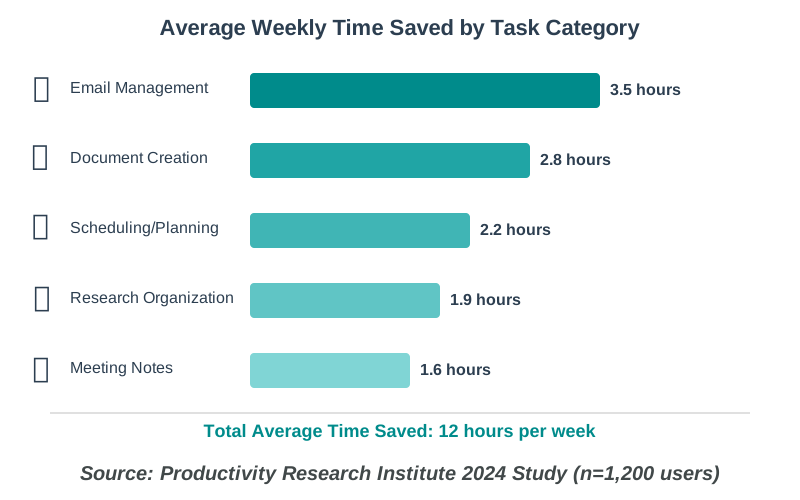
Consider the time you spend on these common tasks:
- Searching for that one document buried in folders
- Rewriting emails to sound more professional
- Creating meeting notes and action items
- Organizing research information
- Planning your daily schedule around priorities
Each task might take only 5-10 minutes individually, but they add up to hours every week. AI productivity software can reduce most of these tasks to seconds, giving you back valuable time for learning, creating, or simply taking a well-deserved break.
Step-by-Step Guide: Getting Started with AI Productivity Enhancement
Let me walk you through the exact process I used to integrate AI productivity tools into my daily routine. I’ve made plenty of mistakes along the way, so I’ll share what works best for beginners and help you avoid the pitfalls I encountered.
Step 1: Identify Your Biggest Time Drains
Before utilizing any tools, please consider dedicating a day to tracking how your time is actually spent. I used a simple notebook and was shocked to discover I spent nearly two hours daily just on email management and document formatting—tasks that felt important but didn’t require my full attention or creativity.
Write down activities that feel repetitive or tedious. These are your prime candidates for AI automation. Common examples include writing similar emails repeatedly, searching for information across multiple sources, creating routine documents, organizing files, transcribing notes, or scheduling appointments.
Why this step matters: Choosing AI tools randomly wastes time. When you identify specific pain points first, you can select targeted solutions that provide immediate value. This approach also helps you measure success—you’ll clearly see the improvement in areas that mattered most.
Step 2: Start with One Free AI Writing Assistant
The easiest entry point into AI productivity enhancement is using an AI writing assistant. These tools help with everything from drafting emails to creating study guides, and many offer free versions perfect for beginners.
I recommend starting with ChatGPT, Claude, or Microsoft Copilot (integrated with Microsoft 365). Here’s how to begin:
- Sign up for a free account on your chosen platform
- Start with a simple task: Ask the AI to help you write a professional email, summarize a long article, or outline a presentation
- Be specific in your requests: Instead of “help me with homework,” try “explain the main themes of the French Revolution in simple terms for a history essay”
- Review and personalize the output: Never use AI-generated content exactly as-is—add your personal touch, verify facts, and ensure it matches your voice
For example, when I needed to request an extension on an assignment, I asked ChatGPT, “Help me write a polite email to my professor requesting a two-day extension for my research paper due to illness. Keep it brief and professional.” Within seconds, I had a well-structured draft I could personalize with specific details.
Common beginner mistake to avoid: Don’t expect AI to read your mind. The more context and detail you provide in your request, the better the results. Think of it like giving instructions to a helpful friend who doesn’t know your situation yet.
Step 3: Implement an AI-Powered Task Manager
Once you’re comfortable with an AI writing assistant, the next game-changer is an AI task management tool. These go beyond traditional to-do lists by understanding priorities, suggesting schedules, and adapting to your work patterns.
Tools like Motion, Reclaim.ai, or Todoist (with AI features) can revolutionize how you organize your day. Here’s my process for setting one up:
- Choose a tool and connect your calendar: This allows the AI to understand your existing commitments
- Input all your tasks with deadlines: Be honest about how long things actually take—the AI learns from this information
- Set your working hours and preferences: Please inform the system of your most productive times or your preferences for certain types of work.
- Let the AI create your daily schedule: It will automatically prioritize tasks, block time for deep work, and even reschedule when urgent items appear
- Review and adjust the first week: The AI improves as it learns your patterns, so provide feedback on what worked and what didn’t
I remember the first time Motion automatically rescheduled my entire day after an unexpected meeting appeared on my calendar. It moved my study sessions to optimal times based on my energy patterns and even reminded me to take breaks. That level of intelligent automation felt almost magical.
Why this step matters: Task management is where AI truly shines for students and busy professionals. Instead of spending mental energy deciding what to work on next, you simply follow the AI’s recommendations and trust that important deadlines won’t be missed.
Step 4: Add AI Note-Taking and Organization
If you’re in school or attend frequent meetings, AI note-taking tools will transform how you capture and use information. Tools like Notion AI, Otter.ai, or Microsoft OneNote with Copilot can transcribe conversations, summarize key points, and even create action items automatically.
Here’s how I use Otter.ai during lectures:
- Start recording at the beginning of class: The app transcribes everything in real-time
- Add highlights or photos during decisive moments: This creates reference points in the transcript
- After class, review the AI-generated summary: Otter identifies key topics, action items, and important quotes automatically
- Export organized notes to your study system: The transcription is searchable, making exam prep incredibly efficient
The real power comes when you combine note-taking with an AI assistant. I upload my lecture transcripts to ChatGPT and ask it to create study guides, practice questions, or concept summaries. What used to take hours of manual review now happens in minutes.
Common beginner mistake to avoid: Don’t rely solely on AI transcription without reviewing. Technology occasionally misses context or makes transcription errors. Always skim through important sections to ensure accuracy.
Step 5: Explore AI-Powered Research and Learning Tools
For students and lifelong learners, AI research assistants dramatically accelerate the information-gathering process. Tools like Perplexity AI, Elicit, or Google’s Bard can summarize academic papers, explain complex concepts, and even identify connections between different sources.
My research workflow now looks like this:
- Start with a broad AI search: Ask Perplexity AI to explain the topic and identify key sources
- Request specific paper summaries: Upload or link to academic articles and ask the AI to highlight key arguments and findings.
- Compare perspectives: Ask the AI to identify agreements and disagreements between different researchers
- Create synthesis notes: Have the AI help you organize findings into coherent themes
- Generate questions for deeper exploration: The AI can identify gaps in your understanding and suggest areas to investigate further
Last month, I had to write a paper on strategies for mitigating climate change. Using AI-powered research tools, I analyzed 15 academic papers in a single afternoon—work that would have taken me an entire week previously. The AI didn’t write my paper, but it helped me understand sources quickly and identify the most relevant information for my arguments.
Why this step matters: Research overwhelm is real, especially when facing mountains of information. AI helps you work through sources efficiently while ensuring you actually understand the content rather than just collecting citations.
Step 6: Integrate AI Email Management
Email is one of the biggest productivity drains for most people, yet it’s also one of the easiest areas to optimize with AI email assistants. Tools like Superhuman, Gmail with Smart Compose, or Microsoft Outlook with AI features can draft responses, prioritize messages, and even unsubscribe you from unwanted newsletters automatically.
Start with these simple implementations:
- Enable smart reply suggestions: Most email platforms now offer AI-generated quick responses—use these for simple confirmations or acknowledgments
- Set up intelligent sorting: Let AI categorize emails by importance, sender type, or topic
- Use AI drafting for routine emails: When responding to common requests, ask your AI assistant to draft a response and then personalize it
- Schedule the send times strategically: AI can analyze when recipients typically read emails and suggest optimal sending times
- Batch process similar emails: Use AI to identify emails requiring similar responses and draft them all at once
I now spend about 30 minutes on email daily instead of two hours, and I’ve never missed an important message. The key is teaching the AI what matters to you through consistent feedback over the first few weeks.
Common beginner mistake to avoid: Don’t automate email responses for personal or sensitive conversations. AI is perfect for routine professional communication but shouldn’t replace authentic human connection in important relationships.
Step 7: Create an AI-Enhanced Daily Routine
The final step is integrating all these tools into a cohesive AI-enhanced workflow. This doesn’t mean becoming dependent on technology—it means strategically using AI to handle routine tasks so you can focus on meaningful work.
My current daily routine looks like this:
Morning (8:00 AM):
- Review my AI task manager to see the day’s prioritized schedule
- Review the emails summarized by AI and respond to any urgent items using the smart compose feature.
- Ask my AI assistant to outline my most important task for the day
Midday (During Classes/Work):
- Use AI transcription for lectures or meetings
- Take quick voice notes that AI converts to text and organizes
- Let AI handle scheduling when new commitments arise
Afternoon (Study/Deep Work Time):
- Follow AI-suggested focus blocks for concentrated work
- Use AI writing assistance for drafts and outlines
- AI research tools can help with information gathering.
Evening (Review Time):
- Let AI summarize the day’s notes and create study materials
- Review AI-suggested tasks for tomorrow and adjust priorities
- Use AI to draft any pending communications
Why this step matters: Individual AI tools provide incremental benefits, but combining them into a cohesive system creates exponential improvements. You’ll feel more organized, less stressed, and significantly more productive.
Best Practices for Long-Term Success
After several months using AI productivity enhancement tools, I’ve learned some important lessons about maintaining effectiveness:
Stay in Control: AI should assist your decisions, not make them for you. Always review suggestions, especially for important tasks or communications. The goal is augmented intelligence, not artificial replacement.
Regular Review and Adjustment: Spend 15 minutes weekly reviewing which AI features you actually use and which create unnecessary complexity. Remove or modify tools that don’t add clear value to your routine.
Maintain Privacy Awareness: Be cautious about what information you share with AI tools, especially free versions. Avoid inputting sensitive personal data, confidential work information, or anything you wouldn’t want potentially stored on external servers.
Balance AI Use with Human Skills: Don’t let AI atrophy your critical thinking, writing, or organizational skills. Use AI to enhance these abilities, not replace them. For example, use AI to draft, but always add your unique insights and voice.
Keep Learning: AI technology evolves rapidly. Set aside time monthly to explore new features in your existing tools or try emerging solutions that might better fit your needs.
Frequently Asked Questions About AI Productivity Enhancement
Your Next Steps: Starting Your AI Productivity Journey
If you’re feeling excited but slightly overwhelmed, that’s completely normal. The key to successful AI productivity enhancement isn’t adopting every tool at once—it’s starting small and building gradually.
Here’s my challenge to you this week: Please select one AI tool from the steps above and dedicate yourself to using it for seven days. If you spend a lot of time writing, start with an AI writing assistant. If organization is your greatest challenge, try an AI task manager. Give it a genuine try, experimenting with different features and approaches.
After one week, honestly assess the impact. Did it save you time? Reduce stress? Make your work higher quality? If yes, add one more tool. Try another one if you can’t. This iterative approach prevents overwhelm while ensuring you build a personalized AI productivity system that actually fits your life.
Remember, AI tools are meant to serve you, not the other way around. You’re not trying to become a productivity robot—you’re simply giving yourself the gift of more time and mental space for the things that truly matter. Whether that’s excelling academically, advancing professionally, pursuing hobbies, or simply having more moments of rest and joy, AI-driven productivity enhancement is your pathway to achieving it.
The future of work and learning isn’t about working harder—it’s about working smarter with tools that amplify our natural abilities. You don’t need to understand complex algorithms or have any special talent to benefit from this technology. You just need to take that first small step.
So what are you waiting for? Pick one tool, give it a try, and watch how even small changes in your productivity create ripples of positive impact across your entire life. I promise you won’t regret it. Your future, more productive, less stressed self will thank you for starting today.
References:
Productivity Research Institute—2024 Study on AI Productivity Impact
Microsoft Research – AI in Education and Productivity Report
Stanford Human-Centered AI Institute – AI Augmentation Research
About the Author
Rihab Ahmed is an educator and student passionate about making AI accessible for learners of all backgrounds. Currently completing her graduate studies while working part-time, Rihab discovered how AI tools could transform the student experience when she was struggling to balance coursework with other commitments. Through trial and error, she developed practical strategies for using AI to study smarter, not harder. Rihab writes for howAIdo.com to share these insights with fellow students and lifelong learners, believing that everyone deserves to understand how technology can support their educational journey. When she’s not writing or studying, you’ll find her exploring new AI tools, mentoring younger students, or enjoying a delightful book with a cup of mint tea.