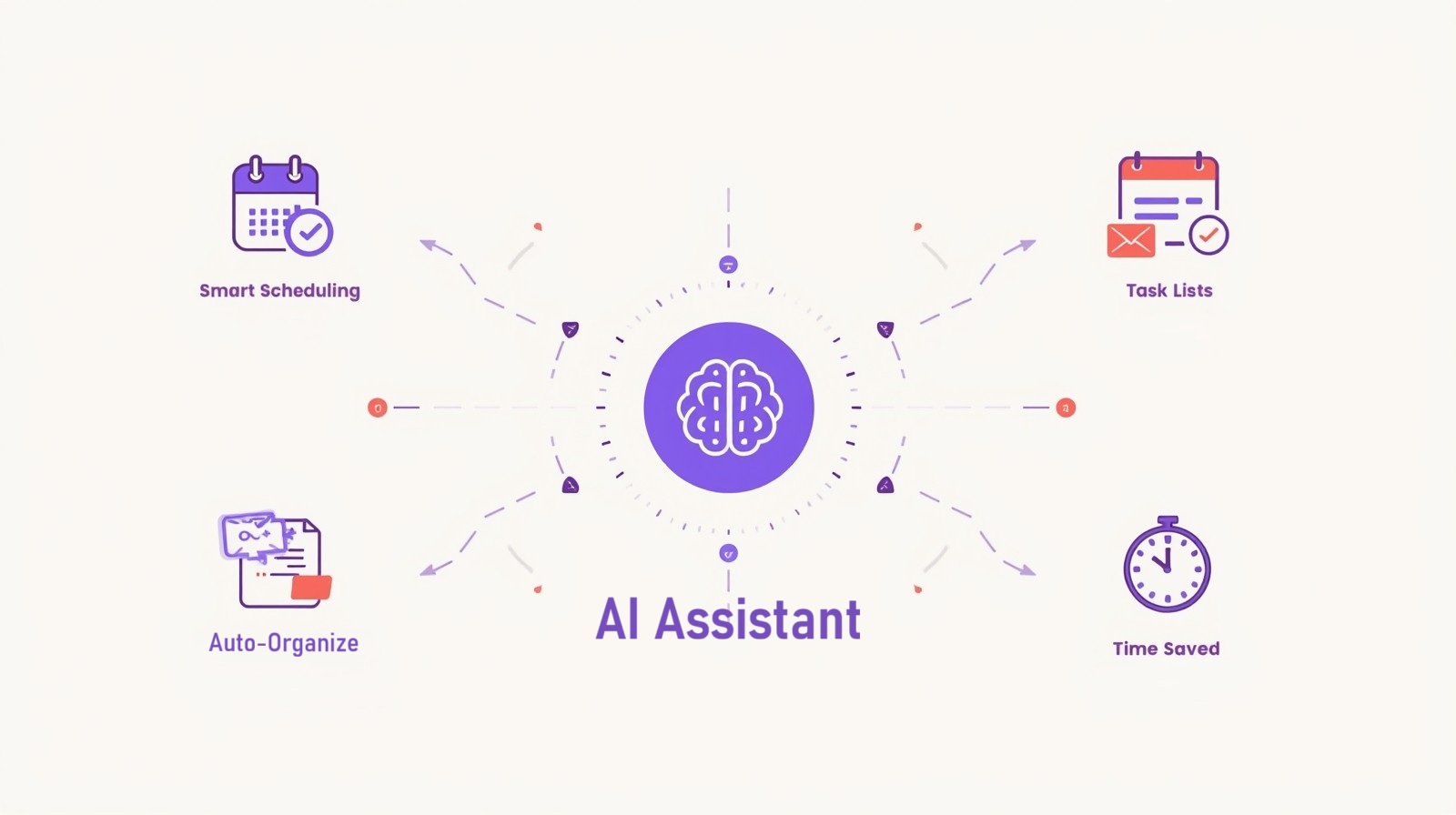
How AI is Revolutionizing Personal Assistant Tasks

How AI is Revolutionizing Personal Assistant Tasks might sound like something from a sci-fi movie, but it’s happening right now in your pocket, on your computer, and probably already helping you without you even realizing it. I remember when I first started using AI tools to manage my daily tasks—I was skeptical. Could a machine really understand what I needed better than my handwritten to-do lists? Spoiler alert: it absolutely could, and it changed everything about how I work.
As someone who helps non-technical people navigate the world of AI, I’ve seen firsthand how these tools transform chaotic schedules into organized systems and overwhelming inboxes into manageable streams of information. The best part? You don’t need to be tech-savvy to benefit from these innovations. Let me walk you through exactly how AI is changing personal assistant work and, more importantly, how you can start using these tools today.
Understanding AI Personal Assistants: What They Actually Do
Before diving into the how-to, let’s clarify what we mean by AI personal assistants. These aren’t just fancy reminder apps—they’re intelligent systems that learn from your behavior, anticipate your needs, and handle tasks that traditionally required human judgment.
Think of AI assistants as having three core capabilities: they can understand what you’re asking (even when you phrase things differently), they can learn from your patterns and preferences, and they can take action on your behalf. Traditional personal assistants could only follow explicit commands, but modern AI-powered tools adapt to your working style over time.
The real magic happens when these systems connect multiple aspects of your life. Your AI assistant might notice you always schedule client meetings on Tuesday afternoons, automatically block that time in future weeks, and even suggest agenda items based on your previous conversations. That’s not just automation—that’s intelligent assistance.
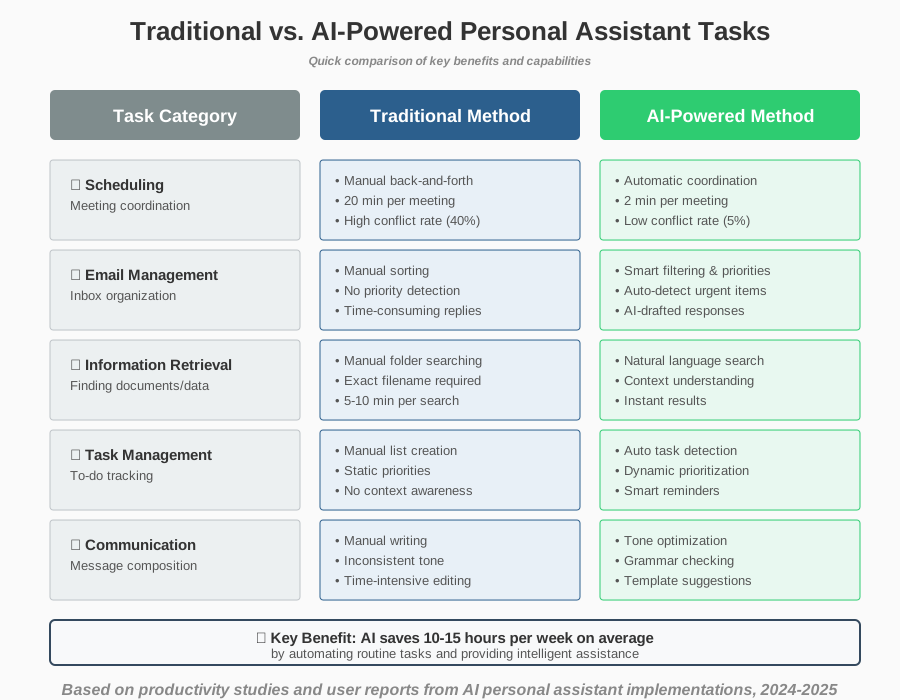
Before we dive into the how-to steps, let’s look at a quick comparison of what AI brings to each major task category:
How AI Handles Scheduling: Your New Time Management Partner
Scheduling with AI has become remarkably sophisticated. Instead of playing email tag to find meeting times, AI assistants can now analyze everyone’s calendars, identify optimal slots, and even negotiate times based on preferences and priorities.
Here’s how to start using AI for scheduling effectively:
Step 1: Choose an AI scheduling tool that integrates with your current calendar system. Popular options include Google Calendar’s Smart Scheduling, Microsoft Outlook’s Scheduling Assistant, or dedicated tools like Calendly with AI features. Most of these work with the calendars you already use, so you won’t need to switch platforms.
Step 2: Connect your calendar and grant necessary permissions. The AI needs to see your existing commitments to make smart suggestions. Don’t worry—you can control what information is shared. I usually recommend starting with one calendar and expanding once you’re comfortable.
Step 3: Set your preferences and availability patterns. Tell the AI when you prefer meetings (maybe you’re sharpest in the mornings), how long breaks you need between calls, and any recurring blocked time. The more specific you are initially, the better the AI performs. For example, I block every Friday afternoon as “focus time,” and my AI assistant never schedules meetings then.
Step 4: Use natural language to create events. Instead of filling out forms, try saying or typing, “Schedule a 30-minute team sync next week, preferably Wednesday morning.” The AI will find available times and create the event with appropriate details.
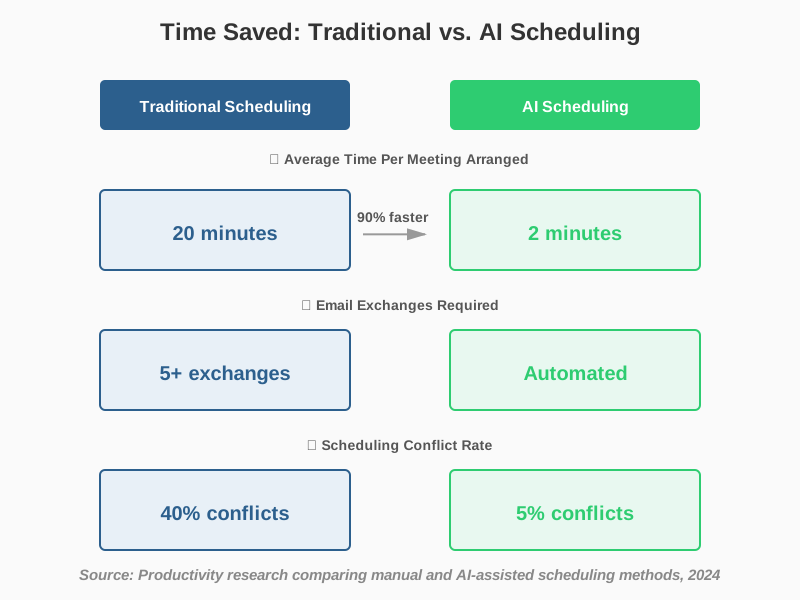
Step 5: Let the AI handle meeting coordination. When someone requests a meeting, forward the email to your AI assistant or use a scheduling link that shows your real-time availability. The system manages the back-and-forth automatically, which saves an average of 15-20 minutes per meeting arranged.
A common mistake beginners make is not updating their preferences regularly. Your schedule changes with seasons, projects, and life circumstances. I check my AI scheduling preferences monthly to ensure they still reflect my actual needs.
Transforming Communication Management with AI
AI communication tools have revolutionized how we handle emails, messages, and correspondence. Instead of drowning in your inbox, AI can prioritize what matters, draft responses, and even detect urgent items that need immediate attention.
Step 1: Enable smart filtering in your email client. Gmail’s Priority Inbox, Outlook’s Focused Inbox, and similar features use AI to separate important messages from noise. These systems learn which senders and topics matter most to you based on your reading and response patterns.
Step 2: Use AI writing assistants for email composition. Tools like Grammarly, Microsoft Editor, or built-in AI features can help you write clearer messages faster. They don’t just check spelling—they suggest better phrasing, adjust tone, and even complete sentences based on context. When I started using these tools, my email writing time dropped by 30%, and my messages became clearer.
Step 3: Set up smart replies and templates. Many AI email assistants can generate appropriate responses to common messages. You review and send them—the AI just handles the initial draft. For routine inquiries like meeting confirmations or status updates, this feature alone saves hours weekly.
Step 4: Implement email scheduling and follow-up reminders. AI can analyze when recipients typically open emails and suggest optimal sending times. It can also remind you to follow up if someone hasn’t responded, which prevents important conversations from slipping through the cracks.
Step 5: Use voice-to-text with AI enhancement. Modern voice assistants don’t just transcribe—they punctuate, format, and even clean up conversational language into professional writing. This is especially helpful when you’re on the go or prefer speaking to typing.
The biggest mistake I see people make with AI email management is not training the system properly. When the AI misfiles something, correct it. When it suggests a reply that’s not quite right, edit it before sending. These corrections teach the system your preferences, making it more accurate over time.
AI-Powered Information Management: Never Lose Track Again
One of the most impressive ways AI assists with information management is by organizing, retrieving, and synthesizing information across all your tools and files. It’s like having a librarian who’s read everything you’ve ever saved and can instantly find exactly what you need.
Step 1: Implement an AI-powered note-taking system. Tools like Notion AI, Evernote with AI features, or Microsoft OneNote’s intelligent search can automatically organize your notes, suggest tags, and surface relevant information when you’re working on related projects. I capture ideas constantly, and my AI system connects related thoughts I wouldn’t have remembered were linked.
Step 2: Use AI search across your documents and files. Instead of remembering exact filenames or folder locations, you can search by describing what you’re looking for: “That proposal we discussed in March about the marketing budget.” The AI understands context and finds the right document even if it doesn’t contain those exact words.
Step 3: Enable automatic summarization for long documents. When someone sends you a 50-page report, AI can provide a concise summary highlighting key points, action items, and important data. This doesn’t replace reading critical documents thoroughly, but it helps you prioritize what needs deep attention versus what just needs awareness.
Step 4: Set up smart bookmarking and content curation. AI assistants can monitor specified topics, save relevant articles, and even provide digests of important developments in your field. Rather than manually checking dozens of sources, you get a personalized briefing delivered when you want it.
Step 5: Implement AI-assisted research and fact-checking. When you’re gathering information for a project, AI tools can help verify facts, find additional sources, and even identify gaps in your research. This accelerates the research process while improving accuracy.
A tip from my experience: start with one type of information management (like notes or emails) before expanding to others. Trying to implement everything at once can feel overwhelming, and you won’t learn each system well enough to use it effectively.
Making AI Work for Your Specific Needs
The beauty of modern AI personal assistant technology is its adaptability. Whether you’re a student, freelancer, corporate professional, or parent managing family schedules, these tools can be customized to your unique situation.
Step 1: Assess your current pain points. Where do you waste the most time? What tasks feel repetitive? What information do you frequently search for? Your answers identify where AI assistance will provide the most value. I made a list and was surprised to discover I spent three hours weekly just coordinating meeting times—that became my first automation priority.
Step 2: Choose tools that integrate with your existing workflow. Don’t force yourself to adopt entirely new systems. Look for AI features within tools you already use, or select new AI assistants that connect seamlessly with your current setup. Integration reduces friction and increases the likelihood you’ll actually use the tools consistently.
Step 3: Start small and expand gradually. Pick one or two specific tasks to automate first. Once those become routine, add another. This approach prevents overwhelm and lets you learn each tool properly. When I started, I focused only on email filtering and calendar management for the first month before adding anything else.
Step 4: Customize settings to match your working style. AI assistants offer extensive personalization—notification preferences, language style, priority rules, and automation triggers. Spend time exploring settings menus. The default options work for some people, but customization is where AI assistants truly shine.
Step 5: Review and refine regularly. Every few weeks, check what’s working and what isn’t. Maybe the AI is scheduling meetings too close together, or perhaps your email priorities have shifted. Adjust accordingly. I have a monthly “AI tune-up” reminder where I review all my assistant settings.
Common Mistakes to Avoid When Using AI Assistants
Through helping countless people implement AI productivity tools, I’ve noticed recurring mistakes that limit effectiveness:
Over-relying on automation without understanding it. AI assistants make mistakes occasionally. Always review important actions before they execute, especially when you’re starting out. I learned this the hard way when my AI assistant scheduled a client call at 6 AM instead of 6 PM—always double-check until you trust the system’s accuracy.
Not providing enough initial context. AI works better when it knows your goals, preferences, and constraints. Take time to set up comprehensive profiles and preferences rather than jumping straight into use. The fifteen minutes you invest in setup saves hours of corrections later.
Ignoring privacy settings. Some AI assistants access sensitive information to function effectively. Understand what data they’re using, how it’s stored, and who can access it. Choose tools with strong privacy protections, especially for business or personal information.
Expecting perfection immediately. AI assistants learn over time. They’ll improve with use, but initial results might be imperfect. Patience and consistent feedback train the system to match your needs precisely.
Not integrating AI into existing habits. If you don’t naturally check your task manager, adding AI features to it won’t help. Build AI assistance into workflows you already follow consistently. For me, this meant integrating AI with my email since I check that religiously, rather than trying to build new checking habits around a separate AI dashboard.
Frequently Asked Questions About AI Personal Assistants
Your Next Steps: Starting Your AI Assistant Journey Today
How AI is Revolutionizing Personal Assistant Tasks isn’t just an interesting trend—it’s a practical opportunity to reclaim hours from your week and reduce the mental load of managing daily responsibilities. The tools exist, they’re accessible, and they work for people at all technical skill levels.
Here’s what I recommend you do right now:
Identify one time-consuming task from your daily routine—maybe it’s email management, scheduling, or information retrieval. Choose just one to start. Then explore AI solutions already available in tools you use. Check if your email provider, calendar app, or operating system has AI features you haven’t activated yet. Many people are surprised to discover powerful AI capabilities they already have access to.
Spend 30 minutes this week setting up and customizing one AI assistant feature. Follow the step-by-step guidance I’ve shared above for your chosen task area. Give it at least two weeks of consistent use before deciding whether it’s helping. AI assistants need time to learn your patterns, and you need time to learn how to work with them effectively.
Remember that these tools should reduce stress, not create it. If something feels complicated or isn’t saving you time, try a different tool or approach. The right AI assistant should feel like it’s working for you, anticipating your needs and quietly handling tasks in the background.
I started my AI assistant journey skeptically, expecting disappointing results and complicated setup processes. Instead, I discovered tools that genuinely transformed my productivity and reduced the daily friction of managing countless small tasks. You don’t need to be a tech expert to benefit from these innovations—you just need to take that first small step and try one feature that addresses a real pain point in your routine.
The revolution in personal assistant tasks is here, it’s accessible, and it’s ready to work for you. Why not start today?
About the Author
Abir Benali is a friendly technology writer who specializes in making AI tools accessible and practical for non-technical users. With years of experience helping people navigate digital transformation, Abir focuses on clear, actionable guidance that anyone can follow. When not writing about technology, Abir enjoys experimenting with new productivity tools and sharing discoveries that genuinely improve daily life. Through straightforward explanations and real-world examples, Abir helps readers confidently embrace AI tools that solve actual problems rather than creating new complications.