AI-Powered Smart Lighting: How It Adapts to Your Life

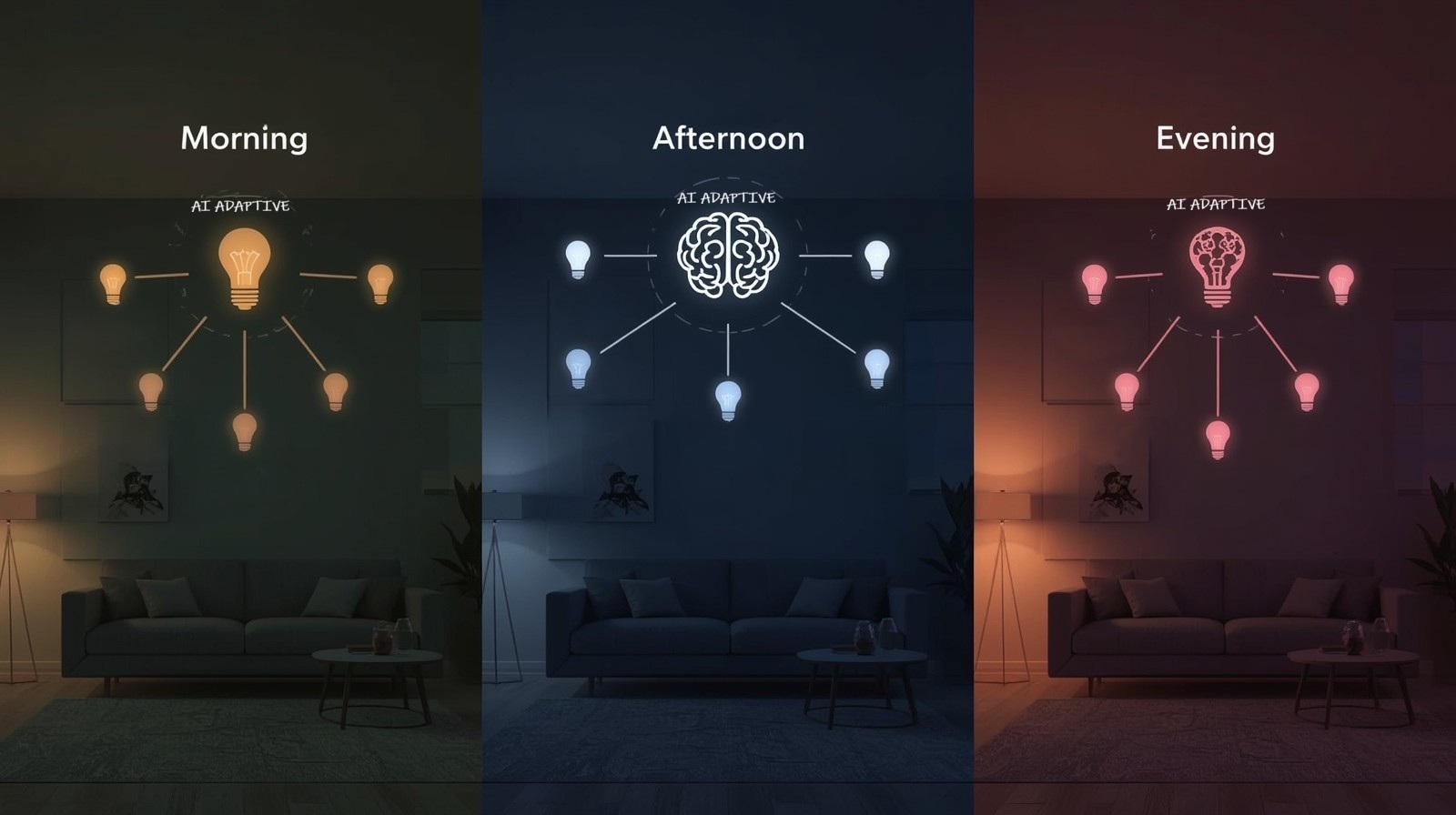
AI-Powered Smart Lighting has entirely changed how I think about the lights in my home. For years, I thought smart lighting meant using an app to turn lights on and off from my phone or setting a schedule so my porch light turns on at sunset. But modern AI-driven lighting systems do something far more intriguing: they learn from you, adapt to your life, and create the perfect lighting atmosphere without you lifting a finger.
I’ll never forget The first evening, my AI lighting system correctly predicted that I wanted softer, warmer tones as I settled on the couch with a book. I hadn’t programmed that scenario. The system had simply observed my patterns over a few weeks and understood what I needed. That’s when I realized we’ve moved beyond simple automation into genuine intelligence.
In this guide, I’ll walk you through exactly how AI-powered smart lighting works, what makes it different from traditional smart bulbs, and most importantly, how you can set it up in your own home—even if you’ve never used smart home technology before.
What Makes AI-Powered Smart Lighting Different?
Traditional smart lighting requires you to manually create scenes and schedules. You tell your lights, “At 7 PM, dim to 40% and turn warm white.” AI-powered smart lighting flips this approach entirely. Instead of you programming the lights, they learn from you.
Here’s what sets AI lighting apart:
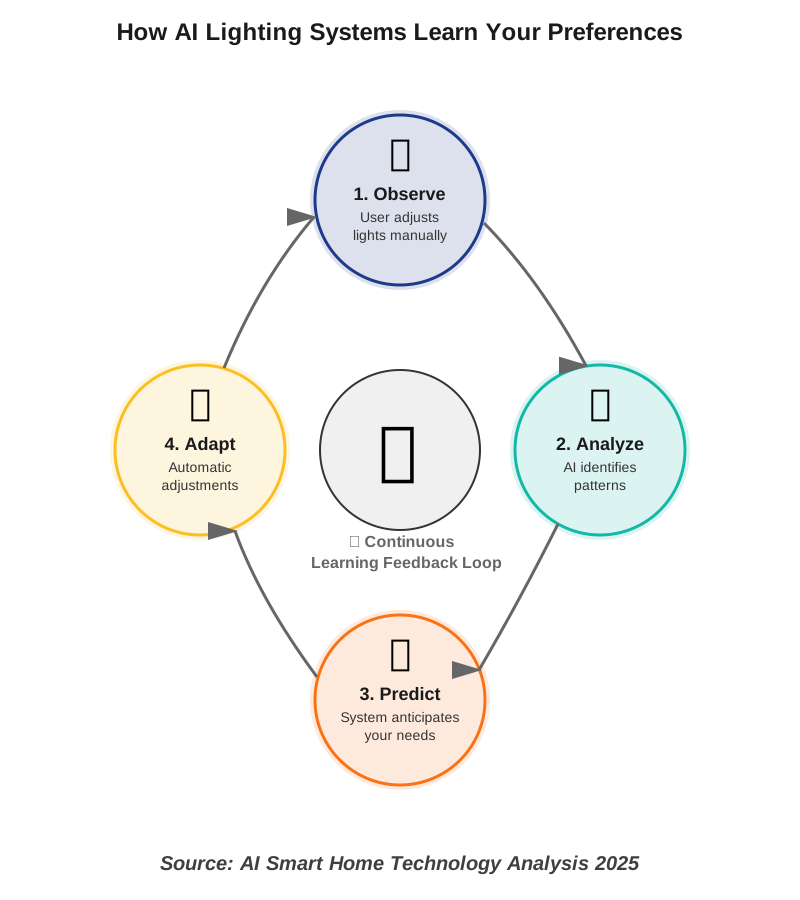
Behavioral Learning: The system observes when you adjust lights, noting the time, day, weather conditions, and what you were doing. Over time, it builds a model of your preferences and starts making those adjustments automatically.
Contextual Awareness: Modern AI lighting systems don’t just know the time. They understand context through sensors and integrations. Are you watching TV? Reading? Cooking? Are you reading, cooking, or working from home? The lighting adapts to each activity differently.
Mood Recognition: Some advanced systems can even detect your mood through voice tone analysis when you interact with smart assistants or through biometric data from connected wearables, adjusting lighting to support your emotional state.
Dynamic Adaptation: Unlike rigid schedules, AI systems adjust in real-time. If you usually wake at 7 AM but sleep in on Saturday, the system won’t blast you with bright morning light at your usual time.
The difference is profound. Traditional smart lighting is reactive—it does what you tell it. AI smart lighting is proactive—it anticipates what you need.
How AI-Powered Smart Lighting Actually Works
Let me break down the technology in plain terms. When I first researched this, I was worried it would be too technical to understand, but the core concepts are surprisingly straightforward.
The Learning Phase
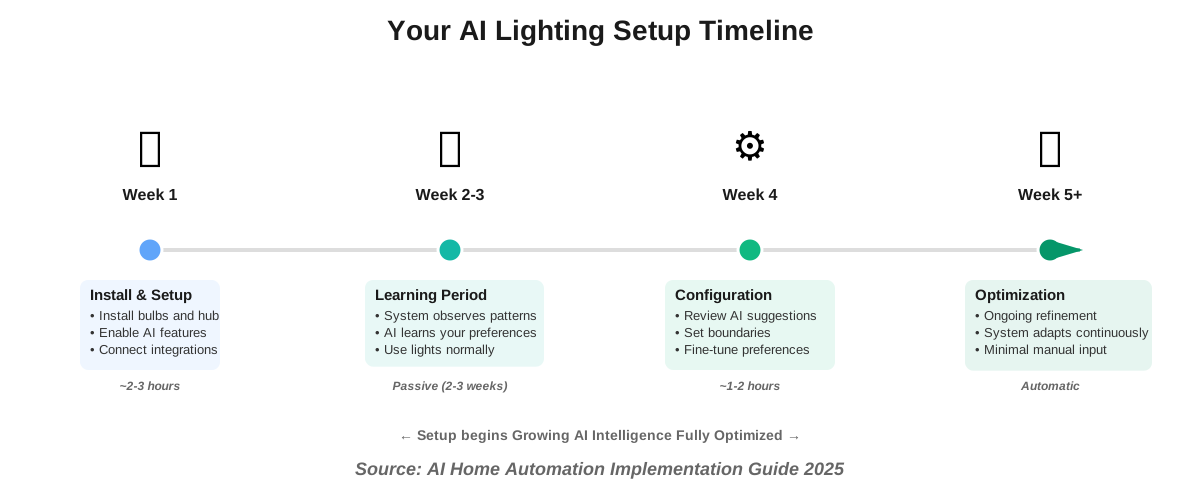
When you first install an AI lighting system, it enters a learning mode. During this period (usually 2-4 weeks), the system observes:
- When you manually adjust lights and to what settings
- Your daily routines and movement patterns through the home
- External factors like sunrise/sunset times and weather
- Which rooms you use at different times
- How long you typically spend in each space
The AI doesn’t just record this data—it searches for patterns. It notices that every Tuesday and Thursday at 6 PM, you dim the living room lights to 30% and switch to warm tones. It recognizes that on rainy mornings, you prefer brighter kitchen lighting than on sunny days.
The Pattern Recognition
This is where machine learning comes in. The system uses algorithms to identify correlations between variables. It might discover patterns like:
- You prefer cooler, energizing light when working at your desk before noon
- Evening lighting gradually warms and dims as bedtime approaches
- Weekend mornings have different lighting preferences than weekday mornings
- When multiple people are home, you prefer brighter social lighting
The AI doesn’t need you to explain these preferences. It discovers them by watching what you actually do, not what you think you want.
The Prediction Engine
Once the system understands your patterns, it starts making predictions. Before you even think about adjusting the lights, the AI has already set them to what you’re likely to want. This happens through:
Time-Based Predictions: “It’s 8 PM on Friday, and historically, this person dims the living room and brightens accent lighting for relaxation.”
Activity Recognition: Through integrations with other smart home devices, the system knows when you’re cooking, watching TV, or having guests over, and adjusts accordingly.
Occupancy Sensing: Motion sensors and presence detection tell the AI who’s home and where they are, so it only adjusts lights in occupied spaces.
Environmental Response: The system considers outside light levels, weather, and season to complement natural light perfectly.
Step-by-Step Guide to Setting Up AI-Powered Smart Lighting
I remember feeling overwhelmed when I first decided to upgrade my home lighting. Where do you even start? After going through the process myself and helping several friends set up their systems, I’ve developed a foolproof approach that anyone can follow.
Step 1: Choose Your AI Lighting Platform
Not all smart lighting systems have true AI capabilities. Here’s what to look for:
Philips Hue with AI Features: The latest Philips Hue bridge supports adaptive lighting routines that learn from your behavior. It integrates with major smart home platforms and offers extensive customization.
LIFX AI: LIFX bulbs now include cloud-based AI that analyzes your usage patterns and creates adaptive schedules without needing a separate hub.
Nanoleaf Learning: Nanoleaf’s panels and bulbs feature built-in machine learning that adapts to your preferences over time, with particularly strong mood-based lighting capabilities.
Google Nest Lighting Integration: If you’re already in the Google ecosystem, Nest’s AI can coordinate smart bulbs from various manufacturers into intelligent routines.
I started with Philips Hue because it offered the best balance of features and compatibility. Choose based on what other smart home devices you already own—integration matters more than you might think.
Step 2: Install Your Smart Bulbs and Fixtures
This step is refreshingly simple. AI-powered smart bulbs screw into your existing light fixtures just like regular bulbs. Here’s my process:
Start with your most-used rooms. I began with the living room, bedroom, and kitchen because that’s where I spend 90% of my time. You don’t need to outfit your entire home at once.
For each room, consider your lighting needs. Living rooms benefit from multiple bulbs or strips that can create layered lighting. Bedrooms need softer, adjustable tones for winding down. Kitchens require brighter task lighting but also benefit from ambiance options for evening meals.
Replace your existing bulbs one at a time, testing each as you go. Most smart bulbs are clearly labeled with their brightness equivalent (60W, 75W, 100W), so matching your current setup is straightforward.
One mistake I made initially: I bought all the same color temperature bulbs. Get tunable white bulbs that can shift from cool to warm, or better yet, RGBW bulbs that offer a full color spectrum. The AI needs this range to properly adapt to different scenarios.
Step 3: Set Up Your Hub or Controller
If your chosen system requires a hub (like Philips Hue does), plug it into your router with the included ethernet cable and follow the manufacturer’s app-based setup. This usually takes about five minutes.
Download the corresponding smartphone app and create an account. The app will automatically discover your hub and walk you through connecting your first bulbs. This process involves making the bulb discoverable (usually by turning it on and off a few times) and letting the app find it.
For hub-free systems like LIFX, you’ll connect each bulb directly to your Wi-Fi network through the app. This takes slightly longer per bulb but eliminates the need for additional hardware.
Step 4: Enable AI and Learning Features
Here’s where things get intriguing. In your lighting app, look for settings labeled “Adaptive Lighting,” “Learning Mode,” “AI Automation,” or similar terms. Enable these features.
Most systems will ask you some initial questions:
- What time do you typically wake up and go to bed?
- Do you prefer warmer or cooler light in the morning?
- What’s your primary use for each room?
Answer honestly, but don’t stress about perfection. The AI will refine these starting points based on your actual behavior. I initially told my system I preferred bright, cool light in the morning, but after a week of me dimming it down, the AI adapted to my true preference for gentler morning light.
Grant the necessary permissions when prompted. AI lighting systems need access to:
- Your location (for sunrise/sunset times)
- Other smart home devices (for activity context)
- Motion sensors if you have them (for occupancy detection)
- Your calendar if you want activity-based lighting (optional but helpful)
Step 5: Connect Integration Partners
This step dramatically improves your AI smart lighting performance. Connect services like:
Smart Assistants: Link Google Assistant, Amazon Alexa, or Apple HomeKit. This allows voice control but, more importantly, lets the AI understand voice commands as behavioral data.
Entertainment Systems: Connect your TV, streaming devices, or gaming consoles. When the AI knows you’re watching a movie, it can automatically create cinema lighting.
Wearable Devices: Some advanced systems integrate with fitness trackers or smartwatches to understand your sleep patterns and energy levels, adjusting lighting to support your circadian rhythm.
Weather Services: This allows the AI to compensate for cloudy days with brighter indoor lighting or celebrate sunny mornings with softer artificial light.
I was skeptical about connecting my fitness tracker, but it made a noticeable difference. On days when my sleep score was low, the morning lighting ramped up more gradually, which genuinely helped me wake up more comfortably.
Step 6: Go Through the Learning Period
For the next 2-4 weeks, use your lights normally but be intentional about adjustments. When you change brightness, color temperature, or turn lights on and off, the AI is watching and learning.
During this phase, don’t hesitate to manually adjust lights to exactly how you want them. Every adjustment teaches the system. I made it a point to fine-tune lighting whenever something didn’t feel quite right.
The learning happens automatically in the background. You’ll notice the system gradually starts anticipating your needs. The first time my bedroom lights automatically dimmed to a warm, low setting as I entered for my usual reading time, I knew the AI had figured out my routine.
Some systems provide a “learning dashboard” where you can see what patterns the AI has identified. This is fascinating to explore and helps you understand what the system is picking up on.
Step 7: Review and Refine AI Suggestions
After the initial learning period, most AI lighting systems will present suggested automations based on what they’ve observed. You’ll see recommendations like:
- “I noticed you dim the living room lights every evening around 8 PM. Should I automate this?”
- “You prefer cooler light in the home office on weekday mornings. Create this routine?”
- “When you watch TV, you typically turn off overhead lights. Automate this scene?”
Review these suggestions carefully. Approve the ones that make sense and ignore or modify the others. This collaborative approach between you and the AI creates the most accurate system.
I found that about 80% of the AI’s suggestions were spot-on, but I modified 20% because the system had picked up on temporary patterns rather than permanent preferences. That’s completely normal.
Step 8: Set Boundaries and Exceptions
Even the smartest AI needs guardrails. Configure limits like:
Quiet Hours: Times when lights shouldn’t automatically change (like when you’re sleeping).
Maximum Brightness: Set caps for rooms where you never want full brightness, like bedrooms.
Manual Override Priority: Ensure that when you manually adjust lights, the AI doesn’t immediately change them back.
Guest Mode: A setting that pauses learning when you have visitors, so their patterns don’t confuse your system.
These boundaries prevent the AI from making unhelpful changes. I learned this the hard way when my system decided that because I once turned on bright lights at 2 AM (I was looking for something), I must want bright lights every night at that time. Setting quiet hours fixed this immediately.
Real-World Applications: How AI Lighting Adapts to Your Life
The theory sounds great, but how does this actually work in daily life? Let me share some specific examples from my own home and friends who’ve implemented these systems.
Morning Wake-Up Routines
My AI lighting system has transformed my mornings. Instead of an alarm clock jarring me awake, my bedroom lights gradually brighten over 20 minutes before my wake time, simulating a natural sunrise. The system learned that I wake at different times on weekends, so it doesn’t blast me with light at 6 AM on Saturday.
But here’s the clever part: the AI adjusts the brightness curve based on the season and outside light levels. In summer when there’s already natural light, the simulation is gentler. In dark winter mornings, it compensates with a more pronounced brightening effect.
The color temperature shifts too. It starts with soft amber (like dawn) and gradually moves toward cooler, energizing daylight as I get moving. I never programmed this—the AI observed that I’m sluggish with too-warm morning light and adjusted accordingly.
Work-From-Home Productivity
When I sit at my desk on weekday mornings, the office lights automatically shift to cool, bright white—perfect for concentration and video calls. The AI figured this out by noticing my computer was active and lights were at maximum brightness during specific hours.
Around 3 PM, I noticed the lights automatically warm slightly. At first, I thought this was a glitch, but then I realized the AI had detected my afternoon energy dip (probably from calendar patterns or reduced movement) and was countering it with warmer, more comfortable light to reduce eye strain.
When I close my laptop in the evening, the office lights automatically turn off within a few minutes. I didn’t create this rule—the system learned that an inactive office after 6 PM means I’m done for the day.
Evening Relaxation and Entertainment
This is where AI-powered smart lighting really shines. As evening approaches, the lighting throughout my home gradually warms and dims. It’s so subtle that I barely notice, but the effect is profound—my body naturally winds down for sleep.
When I turn on my TV, the AI does something brilliant: it analyzes what I’m watching. Movie mode triggers low, warm accent lighting behind the screen. Watching sports? It keeps slightly brighter ambient light since I’m more active and social. Late-night YouTube? Softer overall lighting to reduce blue light exposure before bed.
The system even learned that when I have guests over (detected by multiple phone connections to Wi-Fi), I prefer brighter, more social lighting than when I’m alone. This adaptation happened without any explicit programming.
Circadian Rhythm Support
Perhaps the most impactful feature is circadian lighting, which aligns your home lighting with your body’s natural rhythms. The AI adjusts color temperature throughout the day to support your biological clock.
Morning light is cool and blue-rich to suppress melatonin and boost alertness. As the day progresses, it gradually warms. By evening, the system filters out blue light almost entirely, promoting natural melatonin production for better sleep.
I was skeptical this would make a real difference, but after a month, I noticed I was falling asleep faster and waking more refreshed. My fitness tracker confirmed it—my sleep quality scores improved measurably.
Common Mistakes and How to Avoid Them
After helping several people set up AI lighting systems, I’ve seen the same mistakes repeatedly. Here’s how to avoid them:
Mistake 1: Installing Too Many Bulbs at Once
I understand the temptation to outfit your entire home immediately, but start small. Begin with 3-5 rooms maximum. This gives you time to understand the system without becoming overwhelmed.
More importantly, the AI learns faster when it has focused data from fewer sources. Once you’ve mastered those initial rooms, expand gradually.
Mistake 2: Ignoring the Learning Period
Some people enable AI features and then immediately start creating manual automations and schedules. This confuses the learning algorithm because it can’t distinguish between what you genuinely want and what you’re experimenting with.
During the initial 2-4 weeks, resist the urge to over-program. Let the AI observe your natural behavior. You can always add manual rules later, but they should complement AI predictions, not replace them.
Mistake 3: Not Providing Enough Context
The more your AI smart lighting knows about your activities, the better it performs. If you’re not connecting integrations like calendar, weather, entertainment systems, and occupancy sensors, you’re limiting the AI’s understanding.
Each data point helps the system understand context. “Lights dim at 8 PM” is less useful than “Lights dim at 8 PM when the TV is on and two people are home on a Friday.” The latter allows much more sophisticated adaptation.
Mistake 4: Setting Unrealistic Expectations
AI lighting is impressive, but it’s not telepathic. It learns from patterns, so if your schedule is highly irregular or you constantly want different lighting for the same activities, the AI will struggle.
The system excels when you have general routines, even if they vary slightly. It’s perfectly fine to manually adjust lights when needed—that’s still easier than programming every scenario yourself.
Mistake 5: Forgetting to Update the System
AI algorithms improve over time. Make sure your lighting system’s firmware and app are always updated. Manufacturers regularly release improvements to the learning algorithms, new features, and bug fixes.
I set my system to auto-update overnight so I never have to think about it. Staying current ensures you benefit from the latest AI capabilities.
Privacy and Security Considerations
I’d be remiss not to address privacy. AI lighting systems collect data about your behavior patterns, which raises legitimate questions.
What Data Is Collected?: Most systems record when lights are adjusted, to what settings, the time of day, room occupancy patterns, and integration data from connected devices. They don’t record actual video or audio—just metadata about your lighting usage.
Where Is It Stored?: This information varies by manufacturer. Some process everything locally on the hub (better for privacy), while others use cloud processing (better for advanced AI features). Check your specific system’s privacy policy.
Who Has Access?: Reputable manufacturers encrypt your data and don’t sell it to third parties. However, read the terms carefully. Some systems anonymize and aggregate data for research purposes.
How to Protect Yourself: Use strong, unique passwords for your lighting system account. Enable two-factor authentication if available. Regularly review connected integrations and remove any you’re not using. Keep your hub’s firmware updated to patch security vulnerabilities.
I personally use a system that processes most AI locally on the hub, with only anonymous pattern data sent to the cloud for algorithm improvements. This balances functionality with privacy.
Frequently Asked Questions
Taking Your First Steps
If you’ve read this far, you’re probably intrigued by the possibilities of AI-powered smart lighting. Here’s my advice for getting started without feeling overwhelmed.
Begin with a single room that matters most to you. For many people, that’s the bedroom because better sleep quality is immediately noticeable. For others, it’s the living room where they spend evenings. Choose based on where improved lighting would have the biggest impact on your daily life.
Purchase 2-4 smart bulbs and a hub if needed. Don’t overthink the brand choice—most major manufacturers offer excellent products. Philips Hue, LIFX, and Nanoleaf all provide strong AI features. Read recent reviews, but understand that the experience is quite similar across premium brands.
Install the bulbs, set up the system following the manufacturer’s instructions, and enable AI features. Then—and this is crucial—just live your life normally. Adjust the lights when you want them different. The AI will watch, learn, and start adapting.
Give it at least a month before judging the results. The first week might feel like nothing special is happening, but by week three or four, you’ll notice the system anticipating your needs in ways that feel almost magical.
If you’re still uncertain, many smart home stores and some lighting manufacturers offer demo systems you can experience in person. Seeing AI lighting adapt in real-time is far more convincing than reading about it.
The investment is modest, the installation is simple, and the improvement to daily comfort is genuine. I never thought lighting could have such a significant impact on my quality of life, but it truly has. The best part? The system keeps getting smarter the longer you use it.
AI-powered smart lighting isn’t science fiction—it’s available right now, affordable for most households, and genuinely useful. Take that first step. Start small, let the AI learn, and discover how adaptive lighting can transform the feel of your home.
References:
– Precedence Research. (2025, August 25). “Smart Lighting Market Size and Forecast 2025–2034.” https://www.precedenceresearch.com/smart-lighting-market
– Jettanasen, C., Thongsuk, S., Sottiyaphai, C., et al. (2025, January 26). “An approach to energy conservation in lighting systems using luminaire-based sensors for automatic dimming.” Scientific Reports, 15, 3302. https://doi.org/10.1038/s41598-025-87813-y
– U.S. Department of Energy. (2025, April). “LED Lighting.” Energy Saver. https://www.energy.gov/energysaver/led-lighting
– Signify. (2025, January 7). “Philips Hue unveils AI-powered smart lighting and home security innovations.” Press Release. https://www.signify.com/global/our-company/news/press-releases/2025/20250107-philips-hue-unveils-next-gen-ai-powered-smart-lighting-and-smart-home-security-innovations
– Global Lighting Forum. (2025, March 9). “Harnessing AI to Drive the Next Generation of LED Lighting Solutions.” https://www.shine.lighting/threads/harnessing-ai-to-drive-the-next-generation-of-led-lighting-solutions.5348/
– Huberman Lab. (2025, February 27). “Using Light for Health.” Newsletter. https://www.hubermanlab.com/newsletter/using-light-for-health
– DataIntelo. (2025, January 7). “Smart Lighting Energy Saving Technology Market Report | Global Forecast From 2025 To 2033.” https://dataintelo.com/report/global-smart-lighting-energy-saving-technology-market
About the Author
Abir Benali is a technology writer specializing in making smart home innovations accessible to everyday users. With a background in simplifying complex tech concepts, Abir has helped thousands of readers implement AI-powered solutions in their homes without requiring technical expertise. When not writing, Abir enjoys experimenting with the latest home automation technologies and sharing practical insights that empower non-technical users to embrace modern innovations confidently. Follow Abir’s guides to discover how AI can enhance your daily life in simple, actionable ways.