Automated Social Media Graphics: Top AI Tools for 2025

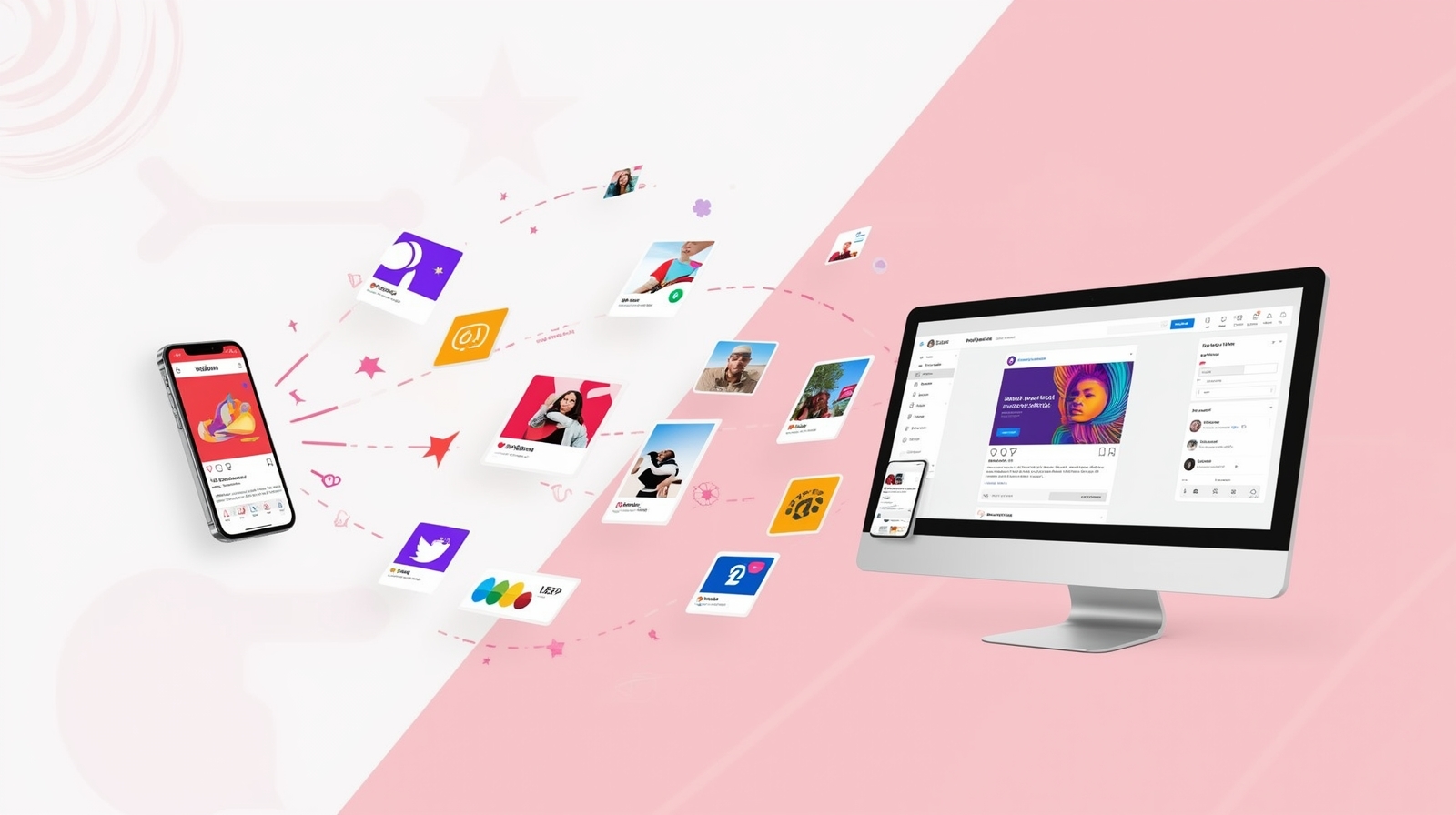
Creating eye-catching social media content shouldn’t feel like a full-time job. Whether you’re a small business owner juggling multiple roles, a content creator trying to maintain consistency, or someone who simply wants their Instagram feed to look professional without spending hours in design software, Automated Social Media Graphics tools are here to transform how you work. These AI-powered platforms take the stress out of visual content creation by offering smart templates, instant design suggestions, and even scheduling capabilities—all designed for people who don’t consider themselves designers. I’ve watched friends go from posting blurry phone photos to creating magazine-quality graphics in minutes, and the confidence boost is real. Let me walk you through the tools that make this magic happen.
Why Automated Social Media Graphics Tools Matter
Think about the last time you scrolled through your social media feed. What made you stop? Probably a visually striking post that caught your eye in that split second before your thumb kept moving. That’s the power of great graphics, and it’s why social media design tools have become essential for anyone trying to build an online presence.
Here’s the reality: posting regularly with high-quality visuals increases engagement by up to 650% compared to text-only posts. But creating those graphics traditionally meant mastering complex software like Photoshop or hiring a designer. AI-powered graphic design changes everything. These tools understand design principles—color theory, typography, spacing—and apply them automatically. They learn from millions of successful posts to suggest what works, then let you customize everything to match your brand in seconds.
The best part? You don’t need any design experience. These platforms are built for real people with real constraints: limited time, tight budgets, and zero formal training. They’re like having a creative director in your pocket who never sleeps and never judges your initial drafts. Whether you’re announcing a sale, sharing a motivational quote, or promoting your latest blog post, there’s an automated content creation tool ready to make it look stunning.
Top AI Tools for Automated Social Media Graphics
1. Canva with Magic Design
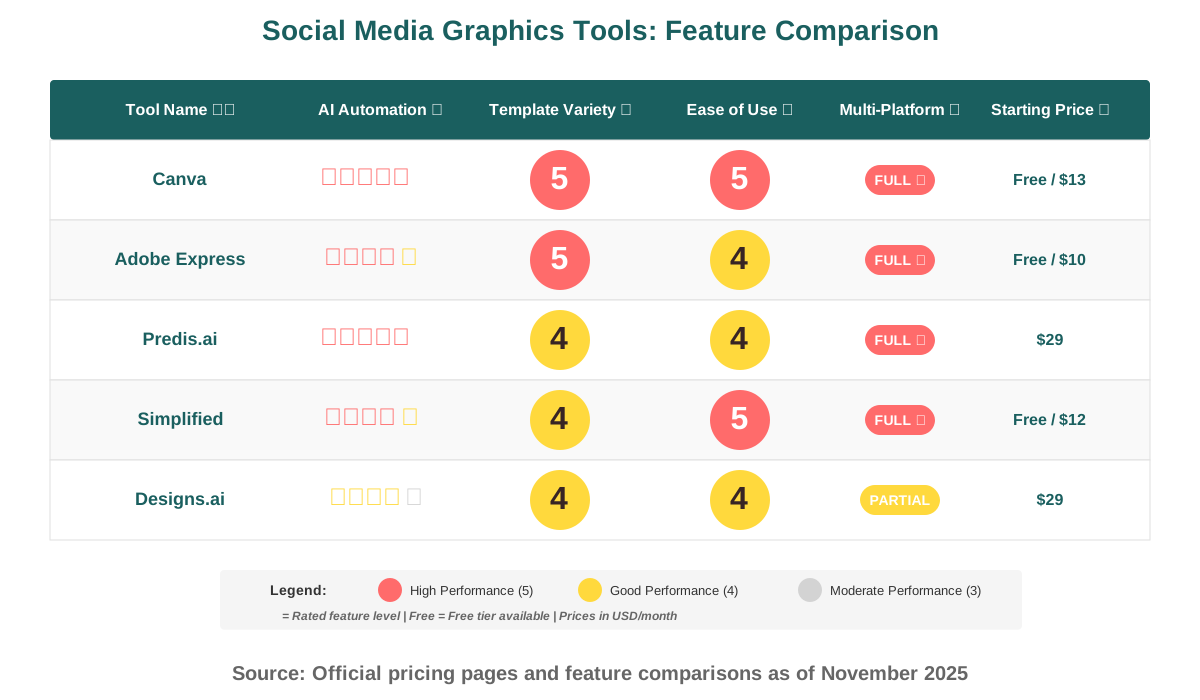
Canva has evolved from a simple template library into an AI powerhouse that feels almost telepathic. The Magic Design feature is where things get exciting. Upload a few images or describe what you need, and Canva’s AI generates multiple complete designs in your brand colors with appropriate fonts and layouts. It’s like having a design team that instantly knows your style.
Practical use case: A yoga instructor I know uses Canva to create her weekly class schedule graphics. She uploads a calming nature photo, types “Monday Evening Flow,” and gets eight professionally designed options in seconds. She picks one, tweaks the time, and she’s done. What used to take 30 minutes now takes three.
Beginner tips: Start with Canva’s Brand Kit feature—upload your logo and specify your colors once, then every design automatically uses them. Don’t overwhelm yourself with all the features at first. Pick one template category (like Instagram posts) and master it before exploring others. Use the “Magic Edit” tool to remove backgrounds from photos with one click—it’s genuinely magical and saves so much time. The free version is surprisingly powerful, but the Pro subscription ($13/month) unlocks AI features that genuinely pay for themselves in time saved.
2. Adobe Express (Formerly Adobe Spark)
Adobe Express brings Adobe’s legendary design expertise to the masses with surprisingly approachable AI tools. The platform excels at smart template suggestions that adapt to your content. Type your message, choose your vibe (professional, playful, or bold), and the AI constructs layouts that balance text and imagery perfectly. The Generative Fill feature lets you expand images or replace backgrounds using simple text descriptions.
Practical use case: A local bakery owner uses Adobe Express for daily specials posts. She photographs her croissants with her phone, drops the image into Adobe Express, types “French bakery special offer,” and the AI creates carousel posts with elegant typography and subtle textures that make her treats look even more irresistible.
Beginner tips: The Quick Actions menu is your best friend—features like “Remove Background,” “Resize,” and “Animate” solve common problems instantly. Create a content calendar by duplicating and modifying templates rather than starting fresh each time. The Adobe Express mobile app syncs with desktop, so you can start a design on your phone during your commute and finish it on your laptop. Use the Discover section to see trending templates in your industry. The free version offers substantial functionality, with Premium at $10/month unlocking advanced AI features and priority processing.
3. Predis.ai
Predis.ai takes automation to another level by focusing specifically on social media content. This platform doesn’t just design graphics; it suggests what to post based on your industry, current trends, and what’s working for similar accounts. The AI writes captions, selects relevant hashtags, generates on-brand visuals, and even recommends posting times. It’s like having a social media manager who never takes a day off.
Practical use case: A real estate agent I know uses Predis.ai to maintain active profiles on Facebook, Instagram, and LinkedIn without spending hours daily. She inputs “just listed” with property details, and the AI creates property showcase graphics, market update posts, and community spotlight content automatically. Her engagement tripled because she’s posting consistently with varied, professional content.
Beginner tips: Start by training Predis.ai on your brand—upload existing posts you love so it learns your visual style and tone. Use the competitor analysis feature to see what’s working in your niche and let the AI adapt those insights for your brand. The content calendar view helps you plan weeks in advance during a single focused session. Schedule posts during the AI-recommended times for 30 days and track which suggestions perform best. Pricing starts at $29/month, with a free trial that lets you generate 15 posts to test the platform.
4. Simplified
Simplified positions itself as an all-in-one app for content creators, combining graphic design, video editing, copywriting, and social media scheduling in one interface. The AI Designer feature analyzes your text input and generates complete social media graphics with complementary color schemes, appropriate imagery, and balanced layouts. What makes Simplified special is how it handles variations—create one design, and the AI automatically generates versions optimized for Instagram, Facebook, Twitter, and LinkedIn.
Practical use case: A fitness coach uses Simplified to announce her online classes. She writes “30-Day Core Challenge Starts Monday,” selects her workout category, and gets graphics for every platform plus suggested captions and a week’s worth of reminder posts. The AI even creates Stories-format countdowns and engagement posts asking followers about their fitness goals.
Beginner tips: Use the AI Writer to generate caption ideas if you’re stuck—it understands context from your graphics. The Background Remover is incredibly accurate; use it to create consistent-looking product shots. Explore the Animation features to make your graphics pop in feeds—subtle motion catches eyes without being overwhelming. Create design templates for recurring content types (quotes, tips, announcements) so you’re just swapping text and images. The free plan is genuinely useful for experimenting, with paid plans starting at $12/month offering unlimited projects.
5. Designs.ai
Designs.ai approaches automated graphic design with a suite of specialized AI tools that work together seamlessly. The platform includes a logo maker, video editor, design tool, and speech-to-text generator, but the social media graphics component truly shines. Input your brand information once, and every tool uses it automatically. The AI understands seasonal trends, holidays, and industry-specific events to suggest timely content ideas you might not have considered.
Practical use case: A boutique clothing store owner uses Designs.ai to create cohesive campaigns. When planning a spring collection launch, she inputs the collection name and key pieces. The AI generates announcement graphics, behind-the-scenes-style posts, customer testimonial templates, and sale countdown graphics—all visually coordinated. The mockup generator shows her clothes on models in various settings without expensive photoshoots.
Beginner tips: Spend time with the Brand Wizard setup—the more information you provide, the better your results. Use the Color Matcher to extract color palettes from photos you love; the AI will use those colors in future designs. The Smart Resize feature is invaluable for repurposing content across platforms without starting over. Try the Video Maker for promotional content; it uses the same visual language as your graphics for brand consistency. The basic plan starts at $29/month with a 14-day money-back guarantee.
6. Crello (by VistaCreate)
Crello, now operating under VistaCreate, brings animated social media content into the automated workflow. While static images work well, the platform’s AI specializes in creating eye-catching animated graphics and short videos that stop the scroll. The Smart Resize feature intelligently reflows animated elements when you adapt designs for different platform dimensions, maintaining the motion dynamics.
Practical use case: A podcast host uses Crello to create animated audiogram videos for social promotion. She uploads her podcast logo and episode artwork, and the AI generates animated waveforms, text reveals, and engaging visuals that make audio content visual. Her click-through rates to the actual podcast increased by 40% once she started using animated previews.
Beginner tips: Start with Crello’s “Animated Posts” category to see what’s possible before trying to animate from scratch. The animation timeline is surprisingly intuitive—you can adjust timing without any video editing experience. Use the stock library of video elements to add professional motion backgrounds to static designs. Preview animations on your phone before posting; what looks good on desktop sometimes feels too fast on mobile. The free version includes limited animations; Pro ($10/month) unlocks the full animation library and removes watermarks.
7. Snappa
Snappa focuses on speed without sacrificing quality. The platform is built for marketers and business owners who need professional graphics immediately. Its AI-powered Quick Setup asks a few questions about your brand, then pre-populates your workspace with relevant templates, stock photos tagged for your industry, and preset dimensions for every major social platform. The Graphics Upscaler uses AI to enhance low-resolution images, salvaging photos that would otherwise be unusable.
Practical use case: A nonprofit organization uses Snappa for donor appeals and event promotions. Their volunteer social media coordinator creates a month’s worth of content during one lunch break by selecting event templates, swapping in their photos, and adjusting text. The AI suggests color overlays that make text readable even on challenging background images.
Beginner tips: Use Snappa’s Buffer and Hootsuite integrations to schedule posts directly without leaving the platform. The built-in photo editor handles basic adjustments well enough that you can skip other apps. Favorite templates you use repeatedly for instant access. Use the Transparent Background feature to create versatile graphics you can layer over different backgrounds later. Try the Collections feature to organize templates by campaign or season. Pricing is straightforward: the Pro plan at $15/month gives you everything, including unlimited downloads.
8. Visme
Visme extends beyond simple social graphics into comprehensive visual content creation. The platform excels at data visualization, infographics, and presentation graphics, but its social media tools leverage the same sophisticated AI. The Content Idea Generator suggests post topics based on your industry and trending themes, then the Design AI creates appropriate visuals complete with data charts, icons, and imagery.
Practical use case: A financial advisor uses Visme to create educational social content explaining investment concepts. The AI helps her turn complex data about retirement savings into digestible infographics optimized for Instagram and LinkedIn. Her informational posts get 5x more shares than her text-based content did previously.
Beginner tips: Don’t shy away from the data visualization tools even if you’re not naturally analytical—the AI walks you through it. Use the Brand Wizard to ensure consistency across all your content types. The Collaboration features let teammates review designs before posting, reducing errors. Try the Presentation mode to turn social graphics into quick video presentations for Stories. The Basic plan starts free with limited projects; Premium ($29/month) unlocks AI features and advanced analytics.
Making the Most of Automated Social Media Tools
The real power of these platforms emerges when you understand one counterintuitive principle: constraints boost creativity. Rather than feeling overwhelmed by infinite possibilities, pick one tool, learn it deeply, and let the AI handle variations. I’ve noticed that people who commit to a single platform for 30 days develop an intuitive sense for what works and what doesn’t, which actually makes their AI-assisted content better than someone bouncing between tools trying to find the perfect one.
Here’s what actually works: Create content in batches. Set aside one hour weekly to generate 7-14 posts using your chosen AI tool. The mental shift from creation mode once rather than daily reduces decision fatigue dramatically. Use the AI to generate options, pick your favorites, schedule them, and move on. Your consistency will improve your results more than perfection ever could.
Experiment fearlessly with the AI suggestions. That weird color combination the algorithm suggested? Try it. That unconventional layout? Post it. AI tools analyze millions of successful posts and often recommend things that defy conventional wisdom but perform incredibly well. I’ve seen people reluctantly try an AI-generated design they thought was too bold, only to have it become their most engaged-with post ever.
Common Questions About AI Graphics Tools
Your Creative Journey Starts Now
The intimidation factor around creating professional social media graphics has officially dissolved. Automated Social Media Graphics tools have democratized visual content creation in ways that seemed impossible just a few years ago. You don’t need a design degree, expensive software subscriptions, or hours of free time. What you need is curiosity, willingness to experiment, and one of these AI-powered platforms.
Start simple. Pick one tool from this list—I’d suggest Canva if you’re overwhelmed by choices—and commit to creating just three posts this week. Don’t aim for perfection. Aim for completion. Let the AI suggest options, trust the algorithms’ understanding of what works, and customize enough to make it feel authentic to your voice. Notice which designs your audience engages with most, and let that feedback guide your future choices.
Remember, every successful content creator you admire started exactly where you are now: staring at a blank screen wondering what to post. The difference is they started. They experimented. They let tools help them amplify their message rather than allowing perfectionism to keep them silent. The AI graphic design revolution isn’t about replacing human creativity—it’s about removing barriers that prevented your creativity from reaching the world.
Your audience is waiting to hear from you. These tools are ready to help you be seen. What are you going to create first?
References:
Canva Official Website and Media Kit: https://www.canva.com
Adobe Express Product Documentation: https://www.adobe.com/express
Predis.ai Platform Features: https://predis.ai
Simplified Content Creation Suite: https://simplified.com
Designs.ai AI Tools Documentation: https://designs.ai
VistaCreate (Crello) Animation Features: https://create.vista.com
Snappa Quick Design Platform: https://snappa.com
Visme Visual Content Creation: https://www.visme.co
About the Author
Alex Rivera is a creative technologist passionate about making AI accessible and inspiring for everyone. With years of experience helping non-technical users discover the creative potential of AI tools, Alex believes that technology should empower, not intimidate. When not experimenting with the latest AI platforms, Alex enjoys photography, teaching digital creativity workshops, and exploring how everyday people can use technology to amplify their unique voices. Connect with Alex to discover more ways AI can transform your creative workflow.