AI-Powered Task Prioritization: A Smart Way to Work

AI-Powered Task Prioritization is changing how we organize our daily work. I remember drowning in endless to-do lists, never quite sure what to tackle first. Then I discovered how artificial intelligence could analyze my tasks and tell me exactly what deserved my attention. It felt like having a personal assistant who actually understood my workload.
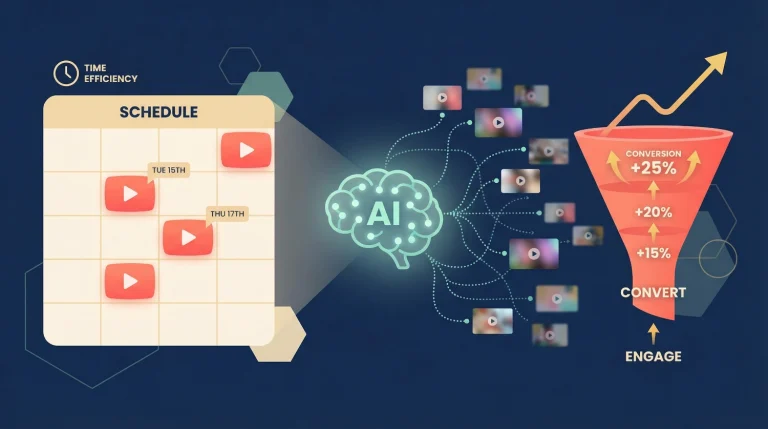
Consider this: instead of manually determining the most important tasks, intelligent algorithms handle this task for you. They look at deadlines, importance levels, your work patterns, and even how similar tasks were performed in the past. The result? The result is a meticulously arranged list that enables you to concentrate on the most important tasks.
In this guide, I’ll walk you through how AI task prioritization works, the techniques that power it, and how you can start using this technology today—no technical background needed.
What Is AI-Powered Task Prioritization?
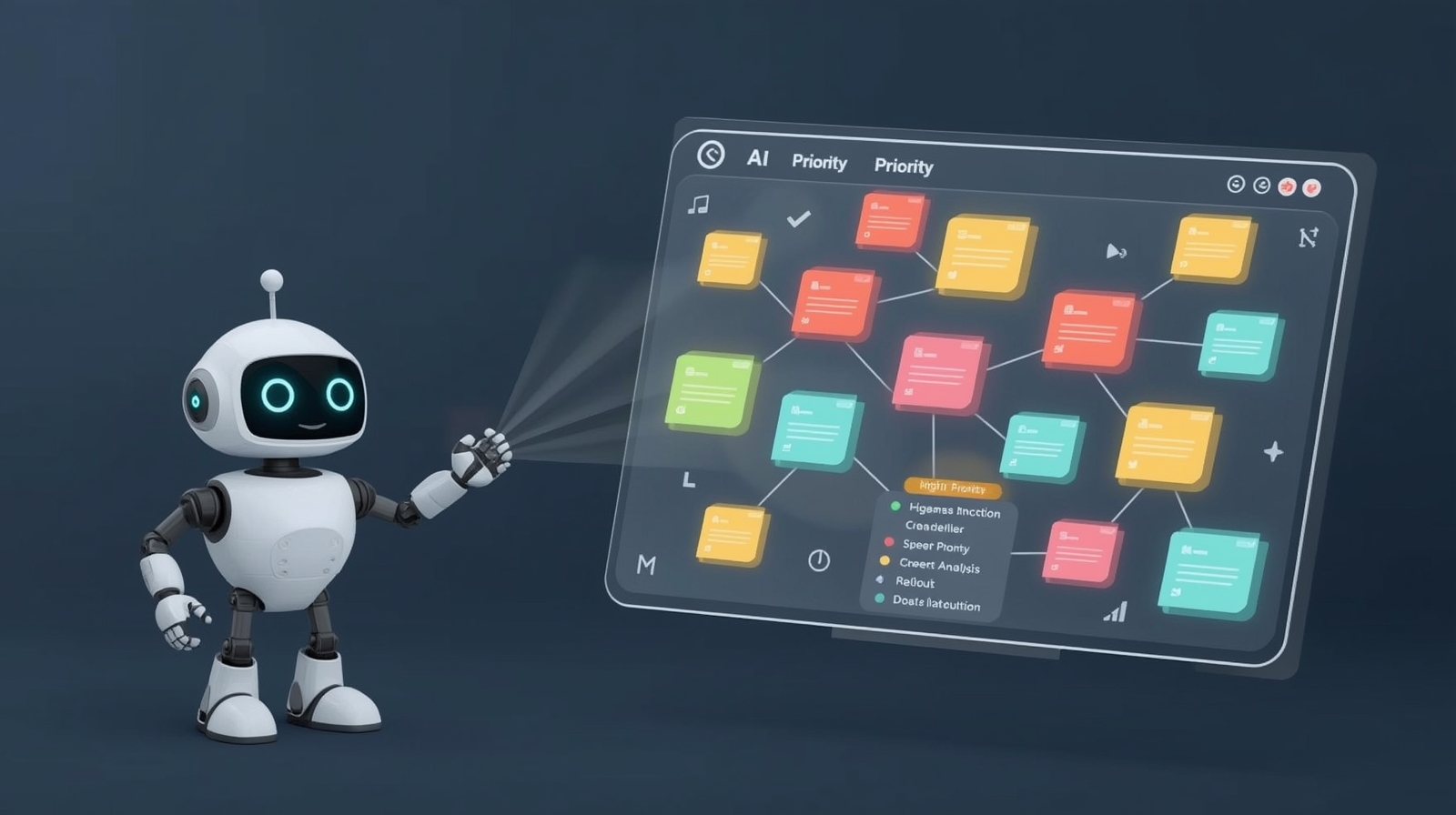
At its core, AI-Powered Task Prioritization is a system that uses artificial intelligence to automatically rank your tasks based on multiple factors. Unlike traditional to-do lists where you manually organize everything, AI systems analyze patterns, deadlines, dependencies, and your personal productivity habits to create an optimal work sequence.
The beauty of this technology lies in its ability to consider factors humans often miss. While you might focus on due dates, AI also evaluates task complexity, estimated completion time, energy requirements, and how completing one task affects others. It’s like having a chess master planning several moves ahead, but for your workday.
Why Traditional Task Management Falls Short
Before AI entered the picture, most of us relied on simple methods: writing lists, using basic apps, or following the “urgent vs. important” matrix. These approaches work, but they have limitations.
Traditional methods require constant manual updates. Your priorities shift throughout the day, but your list stays static unless you revise it. You also face decision fatigue—spending mental energy deciding what to do next instead of actually doing the work.
I experienced this firsthand when managing multiple projects. By noon, I’d already spent an hour just reorganizing tasks. That’s when I realized I needed a smarter system.
How AI Prioritization Actually Works
The magic happens through several interconnected processes working behind the scenes. Let me break down the key components in simple terms.
Data Collection and Analysis
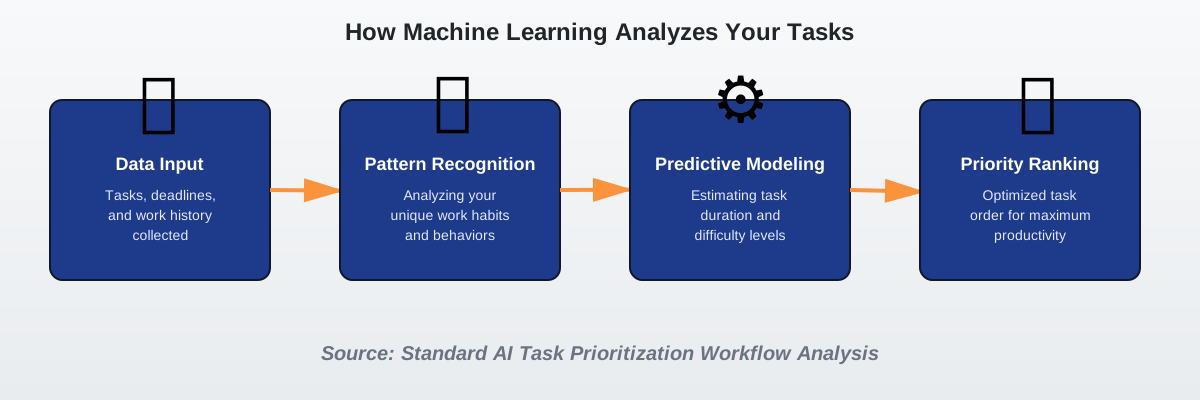
First, the AI system gathers information about your tasks. This includes obvious details like task names, due dates, and descriptions. But it also collects less obvious data: how long similar tasks took in the past, what time of day you’re most productive, and which tasks you tend to postpone.
Modern AI prioritization tools integrate with your calendar, email, and project management software. They build a comprehensive picture of your work life without you manually entering every detail.
The Role of Machine Learning Algorithms
Once the system has your data, machine learning algorithms get to work. These algorithms identify patterns in your work habits. For example, they might notice you complete creative tasks better in the morning or that certain types of tasks always take longer than you estimate.
The algorithms use these patterns to make predictions. They can estimate how long a new task will take based on similar past tasks. They can also predict which tasks you’re likely to procrastinate on and adjust accordingly.
Predictive Modeling in Action
Predictive modeling is where AI really shines. The system doesn’t just look at what you’ve done—it forecasts what you’ll need to do.
Let’s say you have a report due in two weeks. The AI knows similar reports took you six hours in the past. It also knows you have several meetings scheduled next week. Using this information, it suggests starting the report earlier than you might have planned, preventing a last-minute crunch.
This forward-thinking approach transforms reactive task management into proactive planning. You’re no longer constantly putting out fires; you’re staying ahead of them.
Reinforcement Learning: Getting Smarter Over Time
Here’s what makes AI prioritization systems truly intelligent: they learn from their mistakes. Through reinforcement learning, these systems improve their recommendations based on your feedback.
When you complete a task the AI marked as high priority, the system notes that it made a good call. If you consistently skip tasks it flags as important, it adjusts its understanding of your preferences. The AI gradually aligns itself with your actual work style and priorities.
I noticed this evolution in my experience. Initially, my AI tool suggested I tackle emails first thing. But after a few weeks of me postponing that activity, I learned I preferred morning creative work and moved email time to afternoon slots.
Key Techniques Behind AI Task Prioritization
Several sophisticated techniques work together to make AI prioritization effective. Understanding these techniques enables you to gain a deeper understanding of the underlying processes.
Natural Language Processing (NLP)
Natural language processing allows AI to understand your task descriptions written in plain English. You don’t need to use special codes or formats—just write “Finish client presentation by Friday” and the AI extracts the task, deadline, and urgency level.
Advanced NLP can even detect emotional cues. Phrases like “urgent,” “ASAP,” or “critical” trigger higher priority rankings. The system also understands context, recognizing that “review contract” likely relates to legal work requiring focused attention.
Weighted Scoring Systems
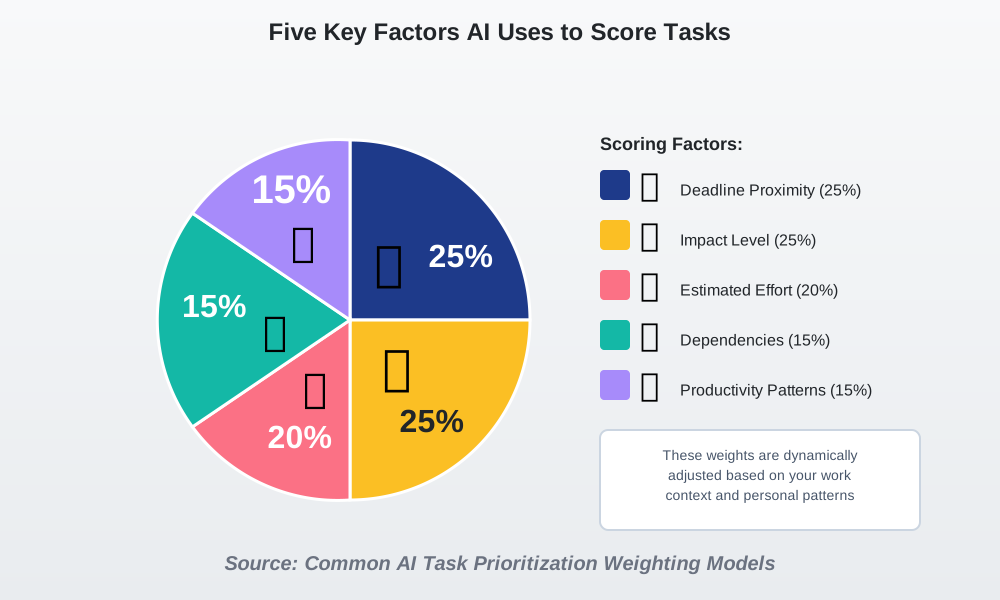
Most AI prioritization uses a weighted scoring system. Each task receives points based on multiple criteria:
- Deadline proximity (tasks due sooner score higher)
- Estimated effort (quick wins might be prioritized to build momentum)
- Impact level (high-value tasks receive bonus points)
- Dependencies (tasks blocking other work rise in priority)
- Personal productivity patterns (matched to your peak performance times)
The system calculates a total score for each task and ranks them accordingly. But here’s the clever part: the weights aren’t fixed. They adjust based on your situation. During crunch time, deadline proximity might carry more weight. During planning phases, impact levels might dominate.
Dynamic Re-Prioritization
Static lists become outdated quickly. AI-powered systems perform dynamic reprioritization throughout the day.
New urgent task arrives? The AI instantly recalculates your entire list. Completed a major project? It adjusts expectations for the rest of your day. Are you falling behind schedule? It reorganizes remaining tasks to accommodate the reality of your pace.
This constant adjustment means you always see an up-to-date view of what matters most right now—not what mattered most when you first created your list this morning.
Context-Aware Scheduling
Advanced AI considers your context when prioritizing. It knows that deep focus work requires uninterrupted time blocks, while quick administrative tasks can fit into smaller gaps.
If you have a 30-minute window before a meeting, the system suggests tasks that realistically fit that timeframe. It won’t propose starting a complex analysis when you only have a brief window—that’s a recipe for frustration and incomplete work.
The AI also considers your energy levels based on historical data. If you typically experience an afternoon slump, it schedules demanding cognitive tasks for morning hours and reserves routine work for post-lunch periods.
Real-World Applications and Use Cases
Allow me to share how different professionals use AI task prioritization to transform their productivity.
For Project Managers
Sarah, a project manager I know, oversees five simultaneous projects with overlapping deadlines. Before adopting AI prioritization, she spent hours each week manually adjusting schedules and redistributing work.
Now, her AI system tracks all project tasks across teams. It identifies critical path items—tasks that, if delayed, would push back entire projects. It also spots resource conflicts when team members are double-booked and suggests reassignments.
Sarah told me the system saved her approximately ten hours weekly in planning time. More importantly, the system flags potential bottlenecks early, allowing her projects to finish closer to their original timelines.
For Freelancers and Solopreneurs
As a freelancer, I juggle client work, business development, and administrative tasks. AI prioritization helps me balance these competing demands.
The system recognizes that client deadlines take precedence but also ensures I don’t neglect business development—the tasks that don’t seem urgent today but are critical for future income. It schedules networking activities and proposal writing during periods when I’m not under immediate client pressure.
This balanced approach has grown my business while maintaining client satisfaction. I’m not constantly in reactive mode, scrambling from one deadline to the next.
For Students and Researchers
Academic work involves a mix of rigid deadlines (assignment due dates) and flexible long-term projects (research, thesis work). AI prioritization for students excels at managing this combination.
The system guarantees timely completion of short-term assignments and establishes consistent progress periods for long-term projects. It prevents the common student problem of neglecting big projects until they become urgent crises.
One graduate student I advised used AI prioritization throughout her thesis year. She credited it with helping her make steady progress on her dissertation while keeping up with coursework and teaching responsibilities.
In Team Environments
Team-based AI prioritization adds another layer of sophistication. The system considers not just individual tasks but also team dependencies and workload distribution.
If one team member is overloaded while another has capacity, the AI suggests task reassignments. It identifies tasks where collaboration would be efficient versus those better handled individually. It even predicts when team members need to sync up based on task dependencies.
This collaborative intelligence reduces the coordination overhead that typically bogs down team productivity.
Common Mistakes to Avoid
Even with AI assistance, users sometimes stumble. Here are pitfalls I’ve seen and how to sidestep them.
Over-Relying on Automation
AI is powerful, but it’s not infallible. I’ve watched people blindly follow AI recommendations without applying their judgment. Remember: the AI doesn’t know about your boss’s sudden mood shift or your client’s unspoken expectations.
Use AI as a highly informed advisor, not a decision-making dictator. Review its suggestions and adjust based on factors the system can’t measure—office politics, relationship dynamics, or gut feelings about importance.
Insufficient Data Input
AI needs accurate data to make good recommendations. If you enter vague task descriptions like “work on project,” the system lacks information for accurate prioritization.
Be specific. Instead of “meeting prep,” write “prepare Q3 sales presentation for board meeting—needs financial slides and competitor analysis.” This detail helps the AI understand scope, urgency, and relationships to other tasks.
Ignoring the Learning Period
As you begin using AI prioritization, please anticipate an adjustment period. The system needs time to understand your work patterns and preferences.
During the first few weeks, actively provide feedback. If the AI suggests a task that seems unclear, please mark it and provide an explanation. This training phase is crucial for long-term accuracy.
I spent about three weeks actively teaching my system before it really clicked. Now, its suggestions feel almost intuitive—but that accuracy required initial investment.
Not Updating Task Information
Your work situation changes constantly, but if you don’t update task information, the AI works with outdated data.
Please update your system promptly when deadlines shift or task scope changes. If you discover that a task is more complex than initially anticipated, please adjust the estimated effort accordingly. This ongoing maintenance keeps AI recommendations relevant.
Frequently Asked Questions
Getting Started: Your Next Steps
Ready to experience the benefits of AI-Powered Task Prioritization? Here’s how to begin your journey.
1. Choose the Right Tool
Start by researching AI-powered task management tools that fit your needs. Popular options include Motion, Reclaim.ai, Todoist with AI features, and Microsoft To Do with intelligent suggestions. Each offers different strengths—some excel at calendar integration, others at team collaboration.
Try free trials before committing. Most platforms offer 14 or 30 day trial periods, giving you time to test whether the AI’s recommendations align with your work style.
2. Set Up Your System Properly
After selecting a tool, please take the time to ensure it is set up properly. Please import your existing tasks if feasible. Connect integrations with your calendar, email, and other productivity tools. The more data sources you connect, the smarter the AI becomes.
Configure your working hours, break preferences, and any recurring commitments. This baseline information helps the AI understand your available time and energy throughout the day.
3. Start Small and Scale
Don’t try to organize your entire life on day one. Begin with one project or area of focus. Master the basics before expanding to comprehensive life management.
I started by using AI prioritization only for work tasks. After a month of success, I gradually added personal projects and then household management. This phased approach prevented overwhelm and built confidence in the system.
4. Review and Refine Regularly
Schedule weekly reviews of your AI’s performance. Are the suggestions helping? Are there patterns in the recommendations you consistently override? Use these insights to adjust settings and train the system.
Most tools offer customization options for weighting different priority factors. Experiment with these settings until the AI’s natural suggestions match your instincts most of the time.
5. Combine AI with Human Wisdom
The most effective approach combines AI efficiency with human intuition. Let the AI handle the analytical heavy lifting—calculating optimal sequences, tracking dependencies, and monitoring deadlines. You provide the contextual intelligence—understanding relationships, recognizing strategic opportunities, and making values-based decisions.
This partnership leverages the strengths of both artificial and human intelligence, creating results neither could achieve alone.
The Future of AI Task Prioritization
Looking ahead, AI task management will become even more sophisticated and seamlessly integrated into our work lives.
Emerging Capabilities
Next-generation systems will incorporate emotion recognition, detecting when you’re stressed and automatically adjusting workloads. They’ll integrate with communication tools, automatically creating and prioritizing tasks from meeting notes and email conversations.
Voice-first interfaces will allow natural conversation with your AI assistant: “What should I focus on this afternoon?” or “I’m feeling overwhelmed—help me reprioritize.” The AI will understand context and nuance in these requests.
Cross-platform intelligence will connect work and personal spheres more intelligently, recognizing when professional demands require sacrificing personal time and suggesting compensatory adjustments for work-life balance.
Ethical Considerations
As AI becomes more influential in our decision-making, we must consider implications. Will constant optimization lead to burnout? Does efficiency always equal effectiveness? Can we maintain space for creativity and serendipity when AI optimizes every minute?
I believe the key is maintaining human control over values and goals. AI should optimize toward outcomes we define, not dictate what those outcomes should be. Use technology to support your life vision, not to replace having one.
Conclusion: Embrace Smarter Work
AI-Powered Task Prioritization represents a fundamental shift in how we approach productivity. By delegating the cognitive burden of task organization to intelligent systems, we free mental resources for creative thinking, strategic planning, and meaningful work.
The technology isn’t about working more—it’s about working smarter. It’s about spending your energy on high-impact activities instead of administrative overhead. It’s about ending each day knowing you focused on what truly mattered.
Start your journey with AI prioritization today. Choose a tool, invest in proper setup, and give the system time to learn your patterns. In a few weeks, you’ll wonder how you ever managed without this intelligent assistance.
The future of productivity isn’t about doing more tasks—it’s about doing the right tasks at the right time. AI makes that future available right now.
References:
Research on reinforcement learning applications in productivity software: Papers from IEEE Xplore on adaptive task management systems
Natural language processing in task management: Studies from Association for Computational Linguistics on NLP implementation
Predictive modeling techniques: Documentation from machine learning frameworks like TensorFlow and PyTorch
Productivity research: Academic papers on decision fatigue and cognitive load management
AI ethics considerations: Publications from AI Now Institute and Partnership on AI
About the Author
Abir Benali, a friendly technology writer who is passionate about making AI accessible to everyone, wrote this article. Abir specializes in explaining complex technology concepts in simple, practical terms that help everyday users leverage AI tools for better productivity. With years of experience translating technical jargon into actionable advice, Abir empowers readers to confidently embrace AI-powered solutions in their daily routines. When not writing about AI, Abir enjoys testing new productivity tools and sharing real-world insights from personal experience.