
AI for Time Management: Master Your Day Effortlessly
AI for Time Management isn’t just another productivity trend—it’s a complete shift in how we approach our daily schedules. We’ve all been there: staring at an overflowing to-do list, wondering where the day went, feeling like we’re constantly playing catch-up. But what if technology could actually learn your work patterns, predict your bottlenecks, and help you make smarter decisions about your time? That’s exactly what AI brings to time management, and we’re here to show you how it works in practical, everyday terms.
In this guide, we’ll walk you through everything you need to know about using AI to take control of your schedule. Whether you’re a freelancer juggling multiple clients, a team leader managing projects, or someone who simply wants to stop feeling overwhelmed, AI-powered time management tools can genuinely transform how you work. No technical expertise required—just a willingness to try something new.
What Is AI for Time Management?
Let’s start with the basics. AI for Time Management uses artificial intelligence—think smart algorithms and machine learning—to help you track, analyze, and optimize how you spend your time. Instead of manually logging every task or guessing which activities eat up your day, AI does the heavy lifting for you.
Here’s what makes it different from traditional time tracking: AI learns from your behavior. It notices patterns you might miss, like the fact that you’re most productive between 9 AM and 11 AM, or that certain types of meetings consistently run over schedule. Once it understands these patterns, it can make suggestions, automate repetitive tasks, and help you structure your day more effectively.
Think of it as having a productivity coach who’s always available, never judgmental, and constantly improving their advice based on real data from your work habits.
How AI Time Management Actually Works
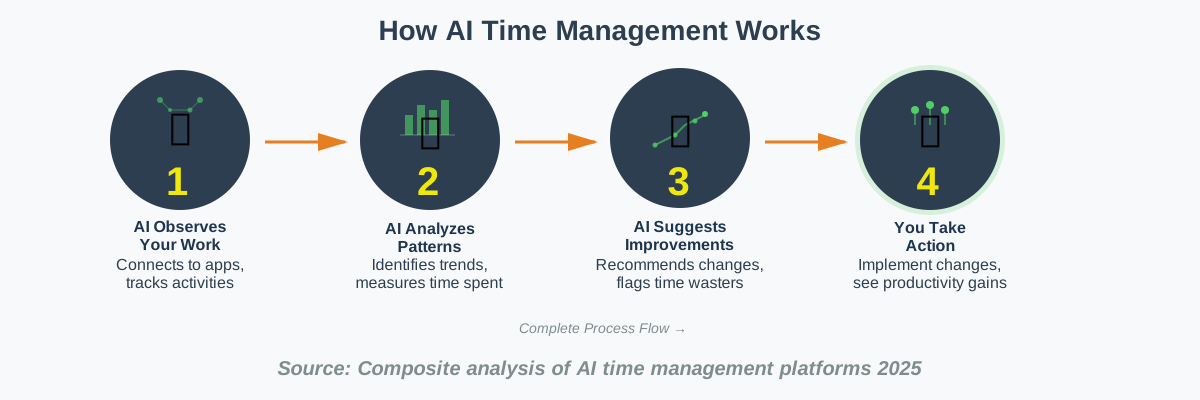
The technology behind AI for Time Management might sound complex, but using it is surprisingly straightforward. Here’s what happens behind the scenes:
First, the AI observes. Most tools integrate with your existing apps—your calendar, email, project management software, and communication platforms. They quietly track what you’re working on, how long tasks take, and when you’re switching between activities. Don’t worry; the good ones prioritize your privacy and keep your data secure.
Next, the AI analyzes. It looks for patterns in your work habits. Maybe you spend three hours daily on emails, or perhaps team meetings fragment your deep work time. The AI identifies these patterns and quantifies them, turning your day into actionable data.
Finally, the AI suggests improvements. Based on what it learns, the system can recommend better ways to structure your schedule, flag time-wasting activities, and even automate routine tasks like timesheet entries or status updates. Some advanced tools can predict how long projects will take based on historical data, helping you set more realistic deadlines.
AI-Powered Time Tracking: A Beginner’s Guide
Starting with AI-Powered Time Tracking is easier than you think. You don’t need to be tech-savvy or completely overhaul your workflow. Here’s how we recommend getting started:
Step 1: Choose a tool that fits your needs. Look for AI time tracking software that integrates with the apps you already use. If you live in your email client, find one that tracks email time. If you’re always in project management tools, choose accordingly. We’ll discuss specific options later.
Step 2: Set it up once and let it run. Most modern AI time trackers require minimal setup. Connect your accounts, set your work hours, and let the tool observe for a week or two. Resist the urge to check it constantly—the AI needs time to gather enough data to spot meaningful patterns.
Step 3: Review your insights weekly. After the initial learning period, spend 15 minutes each week reviewing what the AI discovered. You’ll see reports showing where your time actually goes (often surprising!) versus where you think it goes. This awareness alone can be transformative.
Step 4: Make one change at a time. Don’t try to optimize everything at once. Pick the biggest time-waster the AI identified—maybe excessive meetings or constant context-switching—and implement one improvement. Test it for a few weeks, then tackle the next issue.
Step 5: Trust the process. AI time tracking gets smarter the longer you use it. The patterns become clearer, the suggestions more accurate, and the automation more helpful. Give it at least a month before judging its effectiveness.
Top 5 AI Time Tracking Software for Freelancers in 2025
For freelancers, finding the right AI Time Tracking Software can mean the difference between profitability and constantly undercharging clients. We’ve evaluated dozens of options, and these five stand out for their freelancer-friendly features, ease of use, and intelligent automation.
RescueTime remains a favorite because it requires virtually no effort. Once installed, it automatically categorizes your activities, showing exactly where your billable hours go. The AI learns which apps and websites are productive for your specific work and adjusts its scoring accordingly. Perfect for freelancers who want insights without manual tracking.
Clockify AI brings powerful features at an accessible price point. Its AI assistant suggests optimal work schedules based on your productivity patterns and can automatically generate invoices from your tracked time. The visual timeline helps you see when you’re most focused, making it easier to block out deep work time for important client projects.
Toggl Track recently added AI-powered suggestions that identify unbilled time and recommend better project estimates based on your history. Its simplicity is its strength—you can start tracking with one click, and the AI handles categorization behind the scenes.
Timely uses AI to create automatic timesheets by monitoring your work across all apps. At the end of each day, you simply review and approve what it tracked. For freelancers managing multiple clients, this eliminates the painful task of remembering what you worked on hours or days later.
Harvest Forecast combines time tracking with AI-powered project planning. It analyzes your tracked time to predict how long future projects will take and warns you when you’re at risk of going over budget. For freelancers who struggle with accurate quotes, this feature alone can significantly improve profitability.
Boosting Team Productivity with AI Time Tracking: Case Studies
Real-world results speak louder than promises. Let’s look at how actual teams have used AI Time Tracking to boost productivity and solve common workplace challenges.
A marketing agency in Austin reduced their meeting time by 40% after their AI time tracker revealed that team members spent an average of 18 hours weekly in meetings, with most participants multitasking through them. They implemented “meeting-free Wednesdays” and used AI-generated reports to identify which meetings actually required everyone’s attendance. Six months later, project delivery times improved by 25%.
A remote software development team struggled with accurate project estimates until they adopted AI time tracking across the company. The AI analyzed three years of historical data to identify that certain types of features consistently took 30% longer than estimated. Armed with this insight, they adjusted their quoting model and saw their project profitability increase by 18% while actually reducing crunch time for developers.
A customer support team used AI analytics to discover that their most experienced agents spent 60% of their time on administrative tasks rather than actually helping customers. By automating timesheet management and using AI to identify repetitive workflows that could be templated or automated, they freed up 15 hours per agent per week for direct customer interaction, improving satisfaction scores significantly.
These aren’t isolated success stories. The common thread is that AI provided objective data about how time was actually being spent, which gave teams the confidence to make changes they’d been hesitating about.
The Future of AI in Time Management: Trends and Predictions
Looking ahead, AI in Time Management is evolving from passive tracking to active assistance. Here’s what we expect to see in the coming years based on current developments and industry conversations.
Predictive scheduling will become mainstream. Instead of just analyzing what happened, AI will actively build your schedule by predicting task duration, identifying optimal work times based on your energy levels and meeting patterns, and automatically declining or rescheduling low-value commitments. Imagine your calendar rearranging itself to protect your most productive hours.
Emotional intelligence integration is on the horizon. Next-generation AI will consider not just task completion but also your well-being. It’ll notice when you’re overbooked and suggest breaks, recognize patterns that lead to burnout, and recommend schedule adjustments that align with your natural rhythms. The goal shifts from maximum output to sustainable productivity.
Cross-platform intelligence will eliminate silos. Future AI time management systems will seamlessly integrate every tool you use—not just tracking time across apps but understanding context. They’ll know that a “quick” Slack conversation about a project is actually billable client work or that time spent in certain documents relates to a specific task, without you manually categorizing anything.
Voice and natural language interfaces will replace manual input. Instead of clicking buttons or filling forms, you’ll simply talk to your AI assistant: “Block out Thursday afternoon for deep work on the Johnson proposal,” and it’ll handle the rest, including declining conflicting meetings and notifying relevant people.
AI Time Tracking vs. Traditional Methods: A Detailed Comparison
Understanding the differences between AI Time Tracking and Traditional Methods helps clarify why this technology represents a genuine advancement rather than just another tool.
Traditional time tracking requires constant manual input. You start a timer, categorize the task, remember to stop it when you switch activities, and hope you don’t forget to log that afternoon you spent in back-to-back meetings. It’s exhausting and prone to errors. We’ve all reconstructed a timesheet on Friday afternoon, guessing what we did on Tuesday.
AI time tracking happens automatically. The system monitors your computer activity, categorizes tasks based on learned patterns, and creates detailed records without any input from you. At most, you spend a few minutes reviewing and adjusting rather than hours logging from scratch.
Traditional methods provide historical data. You can look back and see what you worked on, which is useful for billing or reporting. But the insights end there. AI time tracking provides predictive intelligence. It doesn’t just tell you what happened; it forecasts future patterns, suggests optimizations, and helps you make better decisions about how to structure your time going forward.
Traditional tracking treats all hours equally. AI recognizes that not all productive time is the same. It can identify your peak performance hours, understand which types of work drain versus energize you, and help you arrange your schedule accordingly.
The human element matters too. Traditional methods can feel punitive, like someone’s watching over your shoulder. Well-designed AI time tracking focuses on empowerment rather than surveillance, giving you personal insights to improve without the Big Brother feeling.
How AI Time Tracking Can Improve Project Profitability
For businesses and freelancers alike, AI Time Tracking and Project Profitability are intimately connected. Here’s exactly how the technology translates into better financial outcomes.
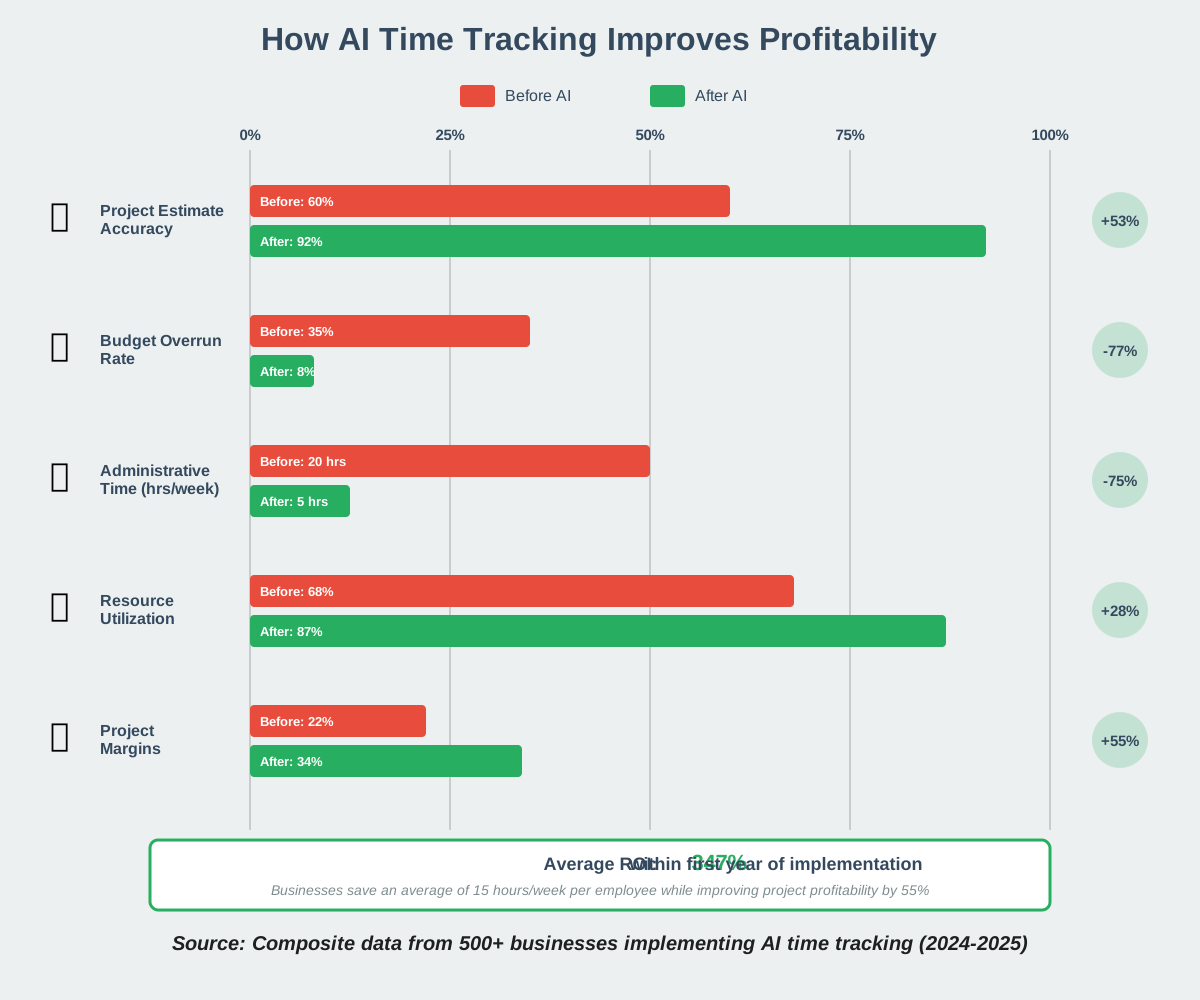
Accurate time estimates become possible when AI analyzes historical data from similar projects. Instead of guessing or relying on optimistic assumptions, you can see that graphic design projects of a certain type actually average 12 hours, not the 8 you’ve been quoting. This prevents underpricing that erodes profits.
Scope creep becomes visible immediately. AI-tracked projects automatically flag when you’re exceeding budgeted hours, giving you real-time alerts to either adjust deliverables or have a pricing conversation with the client before you’ve invested too much unbillable time.
Resource allocation improves dramatically. When AI shows which team members consistently complete certain tasks faster or identifies who’s overbooked versus underutilized, you can assign work more strategically. This means projects finish on time without last-minute rushes that compromise quality or require expensive overtime.
Administrative time decreases, which directly impacts profitability. If AI automatically generates timesheets, invoices, and project reports, those previously unbillable hours become available for revenue-generating work.
Data-driven pricing decisions replace guesswork. After tracking several projects, AI can recommend pricing adjustments based on actual time investment versus perceived value, helping you move toward value-based pricing rather than purely hourly models.
Integrating AI Time Tracking with Your Existing Workflow
The biggest barrier to adopting new tools is workflow disruption. Fortunately, Integrating AI Time Tracking with what you’re already using is smoother than you might expect.
Start by mapping your current tool ecosystem. List the applications you use daily: project management platforms like Asana or Monday, communication tools like Slack or Teams, calendars, email clients, and any industry-specific software. Most reputable AI time tracking solutions offer native integrations or API connections with popular tools.
Choose an AI time tracker that connects with your primary work tools. If your team lives in Google Workspace, pick a solution with deep Google integration. If you’re a Microsoft house, prioritize tools that work seamlessly with the Microsoft ecosystem. This minimizes the learning curve and ensures accurate tracking without requiring new habits.
Implement gradually rather than switching everything overnight. Begin with passive tracking—let the AI observe and learn without changing any existing processes. After two weeks, review the insights with your team. Then, layer on features progressively: automated categorization first, then timesheet automation, then predictive features.
Communicate clearly with your team about why you’re implementing AI time tracking. Frame it as a tool for personal improvement and workload balancing, not surveillance. Share aggregate insights that benefit everyone, like discovering that the team’s most productive hours are being consumed by meetings that could be emails.
Customize the tool to match your terminology and project structure. Most AI time trackers let you define custom categories, projects, and tasks that align with how your business actually operates. Taking an hour to set this up properly prevents frustration later.
Overcoming Challenges in Implementing AI Time Tracking
Let’s be honest: Implementing AI Time Tracking comes with challenges. We’ve seen teams stumble over common obstacles, and here’s how to navigate them successfully.
Privacy concerns top the list. Team members worry about being micromanaged or monitored. Address this head-on by establishing clear policies about what data gets collected, who can access it, and how it’ll be used. Emphasize personal dashboards over manager surveillance. Consider starting with aggregate, anonymous data before individual tracking.
Change resistance happens in every organization. Some people will insist they’re too busy to adopt a new tool or that their work can’t be tracked accurately. Overcome this by starting with volunteers—early adopters who see the value and can become internal champions. Share their success stories to build momentum.
Integration complexity can derail implementation if your tech stack is unusual or highly customized. Before committing to a solution, test it thoroughly with a small group. Most vendors offer trial periods specifically for this purpose. If standard integrations don’t work, look for solutions with robust APIs that your IT team can customize.
Data accuracy issues might emerge initially. AI learns over time, so early categorizations might be imperfect. Don’t panic. Correct the errors when you see them—the system learns from these corrections and improves. After a few weeks, accuracy typically reaches 90%+ for most users.
Adoption fatigue can set in if you push too hard too quickly. We recommend a 30-60-90 day rollout plan: passive observation for 30 days, basic tracking for 30 days, and full features by 90 days. This gives everyone time to adjust without feeling overwhelmed.
AI Time Tracking for Remote Teams: Best Practices
Remote work has made AI Time Tracking for Remote Teams essential rather than optional. When you can’t see who’s working on what, intelligent tracking bridges the visibility gap without creating a surveillance culture.
Focus on outcomes, not activity. The temptation with remote teams is to track every minute to ensure people are “really working.” This backfires. Instead, use AI time tracking to understand how long projects actually take, where bottlenecks occur, and whether team members have reasonable workloads. The data should inform better planning, not police behavior.
Respect time zones and work preferences. AI time tracking can reveal that your team are most productive at different times. Someone in Berlin might do their best work early morning, while a colleague in San Francisco peaks in the afternoon. Use these insights to schedule meetings during overlap hours when everyone’s engaged, rather than forcing artificial synchronization.
Create transparency through shared dashboards. When remote teams can see project progress, capacity, and blockers on shared AI-powered dashboards, trust increases. People understand why deadlines are realistic or need adjustment, reducing the anxiety that comes from working in isolation.
Automate status updates instead of requiring them. Remote teams often drown in update requests. AI time tracking can automatically generate summaries of what each person worked on, eliminating redundant status meetings and Slack questions about progress. This gives back valuable time for actual work.
Use data to identify overwork and burnout risk. Remote workers often struggle to disconnect. AI time tracking can flag when someone consistently works beyond normal hours or never takes breaks. Use this data to have supportive conversations about workload and boundaries, not to criticize dedication.
The Ethical Considerations of AI in Time Tracking
We need to talk about The Ethical Considerations of AI in Time Tracking because this technology walks a fine line between empowerment and overreach.
Informed consent must be the foundation. Every person whose time is being tracked should understand exactly what data is collected, how it’s analyzed, who can see it, and what decisions it influences. Surprise monitoring is never acceptable, regardless of the technical legality.
Purpose limitation matters tremendously. Define clearly whether AI time tracking is for personal productivity insights, project planning, billing accuracy, or performance evaluation. Don’t collect data for one stated purpose and then use it differently later. This erodes trust permanently.
Individual versus aggregate data requires careful handling. Aggregate insights about team patterns can be incredibly valuable and relatively low-risk. Individual monitoring becomes problematic when it’s detailed, continuous, and used for punitive decisions. Consider whether individual-level tracking is genuinely necessary or if aggregate data would suffice.
The right to disconnect must be protected. AI time tracking can inadvertently create pressure to be “always on” if employees know their activity is monitored. Establish clear boundaries about after-hours tracking. Some companies disable tracking outside work hours entirely.
Algorithmic bias can creep into AI systems. If the AI learns that “productive” means certain patterns of activity, it might unfairly penalize different but equally valid work styles. Regularly audit your system’s assumptions and be willing to override AI judgments with human context.
Data security is non-negotiable. Time tracking data reveals intimate details about work patterns, projects, and even personal habits. Choose vendors with strong security practices, encrypt data, and have clear protocols for data breaches.
AI-Driven Time Optimization: Maximizing Your Day
Beyond tracking, AI-Driven Time Optimization actively helps you structure better days. This is where AI time management moves from passive observation to active assistance.
The AI starts by identifying your peak performance windows. Most people have periods when they’re naturally more focused, creative, or energetic. For some it’s early morning; for others, late afternoon. Once your AI time management system identifies these patterns—usually after 2-3 weeks of observation—it can suggest scheduling your most challenging or important work during these windows.
Task batching recommendations come next. The AI notices that you’re more efficient when similar tasks are grouped together rather than scattered throughout the day. Instead of answering emails sporadically from 9 AM to 5 PM, it might suggest two focused email sessions. Instead of five separate 15-minute coding sessions, it recommends one uninterrupted two-hour block.
Meeting optimization happens automatically. AI analyzes your calendar and can identify meetings that consistently run over, meetings where you’re rarely needed, and meetings that could be emails. Some systems will even draft decline messages or suggest agenda structures to make necessary meetings more efficient.
Break scheduling matters more than most people realize. AI time optimization tools can identify when you’ve been in focus mode too long and need a mental break before productivity plummets. They’ll send gentle reminders to step away, take a walk, or switch to lighter tasks.
Energy-task matching represents the frontier of optimization. Advanced AI systems are beginning to understand not just when you’re working, but what type of work you’re doing and how it affects your energy. They can suggest sequences: start with engaging creative work, move to routine administrative tasks as energy dips, and end the day with planning rather than execution.
Using AI Time Tracking to Identify and Eliminate Time Wasters
One of the most powerful features of AI Time Tracking is its ability to ruthlessly identify time wasters you’ve normalized or never noticed.
Context switching tops the list of invisible time thieves. You think you’re “quickly checking Slack” between tasks, but AI tracking reveals you’re doing this 45 times a day, and each interruption costs 10-15 minutes of refocusing time. Suddenly, you’ve lost three hours daily to what felt like brief moments.
Meeting proliferation becomes visible in stark terms. AI can calculate that you spend 20 hours weekly in meetings, but only 6 hours of that includes speaking or meaningful participation. Armed with this data, you can confidently decline or delegate attendance to meetings where you’re genuinely not needed.
Unnecessary approval chains show up clearly. If AI tracking reveals that documents spend three days awaiting a review that takes 10 minutes when it finally happens, you can redesign workflows to eliminate these bottlenecks. Perhaps automatic approval under certain conditions or reassigning authority would work better.
Tool overload often surprises teams. AI tracking might show that you’re using seven different communication tools daily, spending cumulative hours switching between them and checking for updates. Consolidation becomes an obvious priority once the waste is quantified.
Perfectionism patterns emerge over time. If the AI shows you typically spend 8 hours on reports that could be done adequately in 4 hours, you’re able to recognize diminishing returns. This isn’t about lowering quality—it’s about identifying when “good enough” is genuinely sufficient and saving time for work where excellence matters more.
The Role of AI in Predictive Time Management
Predictive Time Management represents AI’s most sophisticated contribution to productivity. Instead of merely recording what happened, it forecasts what will happen and helps you prepare.
Project duration forecasting becomes remarkably accurate once AI has sufficient historical data. If you’re planning a website redesign and the AI knows you’ve done five similar projects that averaged 47 hours despite estimates of 30 hours, it can flag this discrepancy before you quote the client. This prevents the painful reality of working for free in the final weeks of underpriced projects.
Deadline risk assessment happens in real-time. As you work on a project, AI compares your pace against typical completion rates for similar work. If you’re tracking to finish a two-week project in three weeks, you’ll know on day three, not day thirteen. This early warning allows course correction: reassigning resources, negotiating deadline extensions, or reducing scope while it’s still manageable.
Capacity planning stops being guesswork. When you’re considering taking on new work, AI can analyze your current commitments and accurately predict whether you have the bandwidth. It factors in not just allocated hours but also your typical productivity rates, upcoming vacation time, and historical patterns of how long similar work actually takes.
Bottleneck prediction identifies problems before they occur. If the AI notices that your graphic designer is booking up three weeks faster than your copywriter, and typical projects need both simultaneously, it’ll warn you to either hire additional design capacity or adjust how you sequence work.
Seasonal and cyclical patterns become clear. Many businesses have busy and slow periods. AI can identify these cycles and suggest when to take on ambitious projects versus when to focus on internal improvements or personal development.
AI Time Tracking and Employee Well-being: A Positive Correlation
Contrary to fears about surveillance, there’s genuine evidence of AI Time Tracking and Employee Wellbeing improving together when implemented thoughtfully.
Workload balancing becomes possible when managers have objective data about team capacity. Instead of the squeaky wheel getting relief while quiet strugglers burn out, AI tracking shows who’s genuinely overbooked. This enables fair distribution of work and prevents the resentment that comes from uneven burdens.
Burnout detection provides early warning signs. AI can identify patterns associated with burnout risk: consistently long hours, no breaks, working weekends, and declining productivity despite increased time invested. These flags allow intervention before someone reaches a crisis point.
Boundary enforcement helps people disconnect. When individuals can see their own data showing they worked 60 hours last week, they’re more likely to protect personal time this week. Some people need this external validation to give themselves permission to stop working.
Recognition becomes data-driven. When AI tracking shows that someone consistently delivers complex projects ahead of schedule or handles unexpectedly large workloads, managers have concrete evidence for recognition and compensation decisions. This reduces the advantage that goes to whoever self-promotes most effectively.
Reasonable expectation setting prevents frustration. If both you and your manager can see that a type of task typically requires four hours, you’re not left feeling incompetent when it takes you that long. The AI provides objective benchmarks that combat imposter syndrome and unrealistic comparisons.
AI Time Tracking for Different Industries: Tailored Solutions
AI Time Tracking for Different Industries requires understanding that not all work looks the same. The right solution depends heavily on your field.
Legal practices need precise billable hour tracking with client matter codes, case integration, and detailed activity descriptions that satisfy billing scrutiny. AI time trackers for law must automatically capture every six-minute increment (the standard billing unit) and handle complex splitting when time relates to multiple clients or cases.
Creative agencies benefit from AI that distinguishes between creative thinking time and execution time, tracks work across projects for multiple clients simultaneously, and handles the messiness of creative processes where you might research for one project and then have an idea for another. The AI needs to understand that inspiration doesn’t follow neat categories.
Software development requires integration with version control systems, issue trackers, and CI/CD pipelines. The AI should recognize that time spent reviewing pull requests or helping teammates is valuable work, not a distraction. It should capture both focused coding sessions and the collaborative aspects of development.
Healthcare providers need AI tracking that respects patient privacy and complies with regulations like HIPAA. The system must track clinical time versus administrative work without recording any protected health information and should help document time for billing purposes without creating additional clerical burden.
Consulting firms require sophisticated project and client hierarchies, expense tracking integration, and reporting formats that match client expectations. The AI needs to make it effortless to switch between projects and automatically generate the detailed timesheets and invoices that consulting engagements demand.
Education benefits from AI that tracks preparation time, grading, student interaction, administrative tasks, and research separately—providing data for workload studies and ensuring teachers aren’t consistently working far beyond their contracted hours invisibly.
How to Choose the Right AI Time Tracking Solution for Your Business
With dozens of options available, Choosing the Right AI Time Tracking Solution requires evaluating several key factors beyond surface-level features.
Integration capabilities should be your first consideration. List every tool your team uses daily, then verify that your potential AI time tracker connects with at least the most critical ones. A tool that doesn’t integrate with your project management system or calendar will create manual work that defeats the purpose.
Privacy and data security matter more than ever. Ask potential vendors specific questions: Where is data stored? Who can access it? How is it encrypted? What’s your breach notification policy? Can we delete data on demand? Don’t accept vague reassurances; require detailed answers.
Ease of adoption determines actual usage rates. The most powerful tool is useless if your team won’t use it. Look for solutions with minimal setup requirements, intuitive interfaces, and passive tracking that doesn’t require constant user input. Request trial periods and test with actual team members, not just yourself.
Customization flexibility becomes important as you scale. Can you define custom categories, projects, and workflows that match your business structure? Can you create custom reports? Some tools are opinionated about “the right way” to track time; others adapt to your existing methods.
Pricing structure should align with your business model. Some tools charge per user monthly, others charge by tracked hours, and some offer unlimited use at flat rates. Calculate your real cost at scale. That cheap per-user fee might become expensive when you factor in integration costs or required add-ons.
Support and training resources make implementation smoother. Check whether the vendor offers onboarding assistance, ongoing training, and responsive support. Read reviews specifically about customer service quality. A technically superior product with poor support will frustrate you at critical moments.
Mobile accessibility matters increasingly. Can team members track time from their phones? Does the mobile experience match the desktop functionality? For field teams or remote workers, mobile capability isn’t optional.
AI Time Tracking and Compliance: Ensuring Data Security
When implementing AI Time Tracking and Compliance, data security isn’t just about preventing breaches—it’s about meeting legal obligations and maintaining trust.
GDPR requirements apply if you have any European employees or clients. AI time tracking systems must allow individuals to access their data, correct inaccuracies, request deletion, and understand how their information is processed. Choose vendors who are explicitly GDPR-compliant and can provide data processing agreements.
Labor law compliance varies by jurisdiction but often includes requirements about tracking work hours, overtime, breaks, and off-duty time. Your AI time tracking solution should help you comply with these regulations, not create accidental violations. For example, if your state requires tracking exact meal break times, ensure your system can handle this.
Industry-specific regulations might apply. Healthcare has HIPAA, finance has SOC 2 and various data protection requirements, and government contractors have FedRAMP. Verify that your chosen solution meets relevant standards for your industry.
Data retention policies should match legal requirements without retaining information longer than necessary. Understand how long the AI time tracking system keeps data and whether you can set custom retention periods. Indefinite retention creates unnecessary risk.
Access controls must be granular and auditable. Who can see individual versus aggregate data? Who can export information? Who can modify records? Ensure the system logs all access and changes for accountability.
Vendor due diligence is essential. Beyond their claims, verify certifications, ask for security audit reports, and understand their incident response procedures. If they can’t or won’t provide this information, that’s a red flag.
The Benefits of AI Time Tracking for Small Businesses
For small businesses, AI Time Tracking offers disproportionate benefits because efficiency gains have an immediate, visible impact when teams are lean.
Resource optimization becomes possible even without a dedicated operations manager. When you’re running a 5-person company, you can’t afford anyone sitting idle or overstretched to the breaking point. AI shows exactly where everyone’s time goes, enabling smart decisions about hiring, outsourcing, or workflow reorganization.
Accurate billing protects your margins when you can’t absorb losses. Small businesses often underbill because they forget to track time or underestimate how long tasks actually take. AI tracks everything automatically, ensuring you capture and bill for all client work.
Professional presentation levels the playing field. Detailed, accurate timesheets and reports make your small business look as organized and professional as larger competitors. Clients appreciate transparency and are more willing to pay invoices backed by clear time records.
Data-driven growth decisions replace gut feelings. Should you hire another developer or a marketer? AI time tracking shows where bottlenecks actually occur. Are projects delayed by development time or by waiting for content? The data guides smart hiring.
Work-life balance improves when you can see your actual hours. Many small business owners work unsustainably long weeks without realizing it because it all blends together. AI tracking provides objective evidence that helps you set boundaries before burnout hits.
Competitive advantages emerge from efficiency. When you can complete projects faster or more profitably than competitors because you’ve optimized based on AI insights, you win more business. Small margins in efficiency compound significantly over time.
AI Time Tracking: Automating Timesheet Management
The administrative burden of timesheet management crushes productivity, making Automating Timesheet Management with AI one of the technology’s most immediately valuable applications.
Manual timesheet entry wastes approximately 2-3 hours per employee weekly. That’s time spent remembering and recording work rather than actually working. Multiply across even a small team, and you’re losing person-weeks annually to administrative overhead.
AI time tracking eliminates this waste by capturing work automatically as it happens. The system monitors computer activity, application usage, and project context, then generates complete timesheets without user input. At most, people spend 10-15 minutes weekly reviewing and approving automated entries.
Accuracy improves dramatically. People are terrible at remembering what they did three days ago, leading to guesswork and errors. AI captures exact timing and activities in real-time, creating reliable records for billing, payroll, and project management.
Approval workflows become streamlined. Instead of managers reviewing dozens of manual entries for errors and completeness, AI-generated timesheets are automatically validated against actual work patterns. Managers need only review exceptions or unusual patterns.
Integration with payroll and billing systems eliminates double entry. Once AI tracking generates timesheets, that data flows directly into accounting systems. This reduces errors from transcription and ensures consistency across systems.
The psychological benefit matters too. When timesheet management is effortless, people actually do it. Manual systems face resistance and incomplete data because they’re genuinely annoying. AI tracking works invisibly, dramatically improving compliance.
AI Time Tracking and Task Prioritization: A Synergistic Approach
Combining AI Time Tracking and Task Prioritization creates a powerful productivity system where your schedule reflects actual capabilities and constraints.
AI time tracking provides the input data showing how long tasks actually take, when you’re most productive, and where interruptions typically occur. Task prioritization systems need this information to create realistic schedules rather than wishful thinking.
The synergy works both ways. When your AI task manager knows from tracking data that you’re most focused in morning hours, it automatically schedules your highest-priority cognitive work then. Routine tasks get pushed to the afternoon when energy naturally dips.
Deadline accuracy improves when prioritization algorithms incorporate real timing data. Instead of guessing that a task will take two hours, the AI checks how long similar tasks took previously and schedules accordingly. This prevents the cascade effect where one underestimated task throws off your entire week.
Capacity limits become respected. AI can prevent you from committing to tasks you don’t actually have time for by checking tracked availability against new requests. This is particularly valuable for people who struggle with overcommitment.
Dynamic reprioritization happens as circumstances change. If an urgent issue emerges and AI tracking shows it consumed your morning, the system can automatically reshuffle afternoon tasks based on updated capacity and priority levels.
Context preservation matters. When AI knows what you were working on when interrupted, it can help you resume efficiently rather than wasting time remembering where you left off. This alone can save 30+ minutes daily.
AI-Powered Time Analysis: Understanding Your Work Patterns
The real power of AI-Powered Time Analysis lies in pattern recognition that reveals insights impossible to spot manually.
Productivity rhythms emerge over weeks of data. You might discover you’re consistently 40% more productive on Wednesdays than Mondays, or that your focus peaks between 9 and 11 AM but plummets after lunch. These insights enable strategic scheduling of important work during your peak periods.
Distraction patterns become quantifiable. AI analysis might reveal that you check email 67 times daily, averaging 3-minute sessions that fragment focus time. Or that Slack messages interrupt deep work every 12 minutes on average. Seeing these patterns objectively motivates change better than vague feelings of distraction.
Task interdependencies show up in timing data. If AI analysis reveals that projects involving client feedback consistently take 30% longer than expected, you can adjust planning to account for communication rounds. Or if certain tasks are always delayed waiting for specific team members, you’ve identified a bottleneck.
Work pattern stability indicates consistency or chaos. High variability in when tasks get done might suggest a reactive work culture with poor planning. Stable patterns indicate better control and predictability. The AI can flag which aspects of your work are controlled versus reactive.
Comparison to peers (anonymized) provides calibration. If similar tasks take you twice as long as team averages, either you’re less skilled (training opportunity) or you’re being assigned more complex variants (recognition needed). Without objective data, these questions remain uncomfortable speculation.
Seasonal trends guide planning. AI analysis across months or years reveals busy and slow periods, helping you schedule projects, vacations, and professional development strategically.
Integrating AI Time Tracking with Project Management Software
Integrating AI Time Tracking with Project Management Software creates a single source of truth that eliminates duplicate data entry and provides comprehensive project visibility.
The integration captures time automatically as you work on tasks in your project management system. When you update a task status in Asana, Monday, or Jira, the AI time tracker logs how long you spent without requiring separate time entry. This seamless connection ensures accurate records without workflow interruption.
Project progress tracking gains precision. Instead of manual status updates claiming 50% completion, actual time spent provides objective progress indicators. If a task estimated at 10 hours has consumed 12 hours and isn’t complete, everyone knows there’s a problem requiring attention.
Resource forecasting improves dramatically. The AI can analyze time tracking data against project plans to predict completion dates, identify resource constraints, and flag risks. This forward-looking capability beats reactive management that discovers problems too late.
Burndown charts and velocity metrics become accurate because they’re based on actual time data rather than estimates. Agile teams particularly benefit from the precision this brings to sprint planning and retrospectives.
Automatic documentation helps with client reporting and internal reviews. The integration can generate detailed reports showing exactly what work happened on each project, who did it, and how long it took. This transparency builds client trust and simplifies project retrospectives.
Workflow optimization emerges from analyzing the connection between project structure and time spent. If certain types of tasks consistently overrun estimates, you can refine either the task breakdown or the estimation process based on data rather than guesswork.
AI Time Tracking for Improved Resource Allocation
Strategic Resource Allocation becomes data-driven rather than political when backed by AI time-tracking insights.
Capacity visibility answers the critical question: who actually has bandwidth for new work? Instead of asking people (who may not know or may be reluctant to say no), AI shows objective workload data. This prevents overloading willing workers while others remain underutilized.
Skill-task matching improves when you can see how long different people take for similar work. If AI data shows that Designer A completes logo projects in 5 hours while Designer B requires 9 hours, you can make informed assignment decisions. This isn’t about performance management—it’s about matching strengths to needs.
Project staffing becomes predictive. When planning new projects, AI can recommend team compositions based on historical data about how different combinations work together. Maybe Team A completes projects 20% faster than Team B because of complementary skills, even though individuals seem equally capable.
Dynamic reallocation responds to changing circumstances. If AI tracking shows that Project X is falling behind while Project Y is ahead of schedule, you can confidently shift resources knowing exactly how much capacity is available and needed.
Hiring decisions gain justification. When AI data demonstrates that your team is consistently overbooked and turning down work, you have concrete evidence to support hiring proposals. No more gut feelings about whether you “really need” another team member.
Training needs identification happens naturally. If AI tracking reveals someone struggling with certain task types that others complete efficiently, you’ve identified a coaching or training opportunity before it becomes a performance problem.
The Impact of AI Time Tracking on Employee Performance Reviews
When used ethically, AI Time Tracking data in Employee Performance Reviews can make evaluations more objective and fair, though it requires careful implementation.
Objective productivity metrics reduce bias. Instead of relying on who speaks up in meetings or whose work is most visible, managers can see actual output data. This particularly benefits remote workers and introverts who might be undervalued in traditional review systems.
Quality versus quantity discussions become nuanced. If someone completes fewer tasks but AI data shows they handle the most complex, time-intensive work, this context prevents unfair comparisons. Time tracking helps distinguish different types of valuable contributions.
Development goals gain specificity. Instead of vague directives to “be more productive,” reviews can identify specific patterns: “You spend 40% of your time in meetings; let’s explore delegation” or “Your morning productivity is excellent, but afternoons show focus issues—would different project types help?”
Recognition becomes timely and specific. Rather than annual reviews praising general hard work, AI data enables regular acknowledgment of specific achievements: “That project you completed in 3 weeks typically takes 5—excellent work on efficiency.”
Improvement plans gain credibility. If performance concerns arise, AI data provides clear evidence and establishes measurable goals. This makes difficult conversations more productive and less emotional.
The critical caveat: AI time tracking data should inform reviews, never solely determine them. Human context, team dynamics, project complexity, and circumstances invisible to software must remain central. Automated performance reviews are ethically problematic and miss critical nuance.
AI Time Tracking and Client Billing: Ensuring Accuracy
For service businesses, AI Time Tracking and Client Billing directly impact revenue and client relationships.
Billable hour capture becomes comprehensive. Manual tracking inevitably misses quick calls, brief email exchanges, and small tasks that collectively represent significant time. AI captures everything, ensuring you bill for all work performed. For many businesses, this increases billable hours by 10-20% without working more.
Client transparency improves relationships. Detailed, accurate timesheets make invoices defensible. When clients question charges, you can provide specific breakdowns showing exactly what work happened when. This professionalism builds trust and reduces payment disputes.
Rate optimization becomes possible when you have accurate data about task duration. If certain services consistently take longer than expected, you can adjust either processes or pricing. If others are faster, you might offer competitive pricing or simply enjoy better margins.
Project profitability analysis reveals which clients and services are actually profitable. Some projects might show healthy revenues but poor margins when AI tracking reveals excessive time investment. This data guides strategic decisions about which work to pursue.
Automated invoicing eliminates administrative lag. AI-tracked time flows directly into billing systems, generating invoices immediately upon project completion. This improves cash flow by eliminating the delay between work completion and payment request.
Dispute resolution becomes straightforward. If clients question charges, detailed AI time records provide clear evidence. The specificity—”Logo revision discussion via video call, 45 minutes, June 14, 2:30 PM”—makes disputes rare and easily resolved.
AI Time Tracking: A Solution for Time Theft
While uncomfortable to discuss, Time Theft costs businesses significantly, and AI time tracking provides both a deterrent and a solution without creating a toxic surveillance culture.
Awareness alone reduces time theft. When employees know work activity is tracked, minor time theft—extended breaks, excessive personal browsing, claiming hours not worked—naturally decreases. The system doesn’t need to be punitive; visibility itself encourages honesty.
Objective data replaces suspicion. Instead of managers guessing whether someone is actually working or wondering why projects take so long, AI provides facts. This is healthier than corrosive mistrust, which damages morale even when unfounded.
Pattern detection identifies anomalies without constant monitoring. AI can flag unusual patterns—suddenly reporting full days with minimal computer activity or time logs inconsistent with project progress—for review. Most anomalies have innocent explanations, but the system catches genuine issues.
Fair enforcement becomes possible. When time theft detection is automated and consistent, enforcement isn’t subject to favoritism or selective attention. Everyone is treated equally, which employees generally appreciate.
The ethical approach emphasizes support over punishment. If AI tracking reveals someone consistently producing little output, have a conversation about what’s wrong before assuming malicious time theft. Maybe they’re struggling with tools, unclear about expectations, or dealing with personal issues.
Prevention beats detection. The best use of AI time tracking for addressing time theft is creating environments where it doesn’t happen: clear expectations, reasonable workloads, trust-based culture, and fair compensation make time theft less likely than punitive monitoring systems.
Customizing AI Time Tracking for Specific Business Needs
Generic tools rarely work perfectly, making Customizing AI Time Tracking essential for optimal results.
Project taxonomy customization ensures the system matches your business structure. Define projects, clients, task categories, and billing codes that reflect your actual work. Most AI time trackers allow hierarchical organization, so invest time in setting this up correctly initially.
Workflow integration customization connects time tracking to your specific processes. If your business requires certain approval workflows, client communications at billing milestones, or integrations with industry-specific software, configure these connections. Many tools offer API access for custom integrations.
Reporting customization provides the insights your business actually needs. Default reports might not match what clients expect or what management requires for decision-making. Create custom report templates that answer your specific questions and present data in your preferred format.
Permission customization establishes appropriate access levels. Perhaps project managers see team data but not individual details, while team members see only their own data. Or maybe clients can view time spent on their projects in real time for transparency. Granular permissions support your organizational culture.
Automation customization saves time on routine tasks. Set up rules for automatic task categorization, scheduled report generation, integration triggers, and notification preferences. The goal is making the system work invisibly in the background.
Alert customization prevents both notification fatigue and missed warnings. Configure thresholds that matter to your business: projects approaching budget limits, team members showing burnout patterns, and deadlines at risk. Irrelevant alerts train people to ignore all alerts, so be selective.
AI Time Tracking and Improved Data-Driven Decision-Making
The ultimate value of AI Time Tracking lies in enabling better decisions across your business.
Strategic planning gains a foundation in reality. When considering whether to offer new services, enter new markets, or adjust business models, AI time tracking data shows what’s actually profitable and where team capacity exists. Strategic plans based on accurate operational data succeed more often than those built on assumptions.
Pricing decisions become evidence-based. Instead of guessing at rates or copying competitors, you can price based on actual costs and desired margins. AI data reveals true service delivery costs, enabling profitable pricing that reflects value delivered.
Hiring justification moves from politics to facts. When AI tracking shows persistent capacity constraints and demonstrates specific skill gaps through timing analysis, hiring decisions become clear. You can also optimize timing—hiring before capacity crises rather than after.
Process improvement targets emerge from data. If AI reveals that approval cycles consistently add three days to projects, you know where to focus improvement efforts. Quantified problems get solved; vague efficiency concerns rarely do.
Client selection improves when you understand which types of projects are profitable and which consume disproportionate resources. AI tracking might reveal that certain client segments require excessive communication time or scope management, informing business development strategy.
Performance benchmarking becomes possible. Compare your team’s efficiency against industry standards or track improvements over time. This provides context for whether observed patterns are normal, excellent, or problematic.
Investment decisions gain clarity. Should you purchase new software, outsource functions, or invest in training? AI time tracking data shows where bottlenecks actually occur and quantifies potential time savings, making ROI calculable rather than speculative.
AI Time Tracking: Reducing Administrative Overhead
One of the most immediately appreciated benefits is how AI Time Tracking Reduces Administrative Overhead that consumes productive time.
Timesheet automation eliminates the weekly ritual of reconstructing work. Those 2-3 hours per employee spent filling out timesheets vanish, redirected to billable or productive work. Across even small teams, this represents significant recovered capacity.
Automated report generation replaces manual compilation. Instead of finance teams spending days gathering project data, calculating utilization, and preparing reports, AI systems generate these automatically. What took days happens in seconds.
Simplified invoicing reduces billing cycle time. When time data flows automatically from tracking to billing systems, invoicing happens faster and with fewer errors. This accelerates cash flow by reducing the gap between work completion and payment request.
Reduced data entry errors eliminate downstream costs. Manual timesheet data contains mistakes requiring detection and correction. AI-generated data is accurate at the source, removing this entire category of administrative work.
Compliance documentation becomes automatic. If your business must track work hours for labor law compliance, client requirements, or government contracts, AI tracking generates required documentation without manual compilation.
Manager time savings might be the largest benefit. Instead of reviewing timesheets, chasing missing entries, questioning suspicious patterns, and approving simple requests, managers make strategic decisions based on automatically generated insights.
The compound effect matters: every hour saved on administration is an hour available for revenue generation, strategic thinking, or simply reasonable work-life balance. Across organizations, these hours represent substantial value.
AI Time Tracking for Compliance with Labor Laws
Many businesses must track employee hours for legal compliance, making AI Time Tracking for Compliance with Labor Laws both practical and necessary.
Overtime tracking becomes automatic and accurate. AI systems monitor work hours in real-time, flagging when employees approach or exceed overtime thresholds. This prevents both labor law violations and unexpected payroll costs.
Break and meal period tracking ensures compliance with regulations requiring specific rest periods. Some AI time trackers can automatically detect extended work periods and remind employees to take required breaks, creating documentation that protects both workers and employers.
Minimum wage compliance verification happens automatically when AI tracking connects to payroll. The system can ensure that commissioned or tipped employees receive at least minimum wage when time worked is factored in, preventing violations.
Working time directive compliance (in EU contexts) monitors weekly hour limits, rest periods, and annual leave. AI tracking across weeks and months ensures regulations are met, flagging potential violations before they occur.
Classification compliance (employee versus contractor) gains supporting evidence. Detailed time tracking showing consistent hours, defined schedules, and company control over work methods supports employee classification, while variable, project-based tracking supports contractor classification.
Record retention happens automatically. Labor regulations often require maintaining employment records for years. AI time tracking systems archive data appropriately, eliminating the manual record-keeping burden while ensuring compliance.
Audit preparedness improves dramatically. If labor authorities audit your business, AI time tracking provides complete, accurate records immediately. This reduces audit stress and demonstrates good-faith compliance efforts.
Frequently Asked Questions About AI Time Tracking
Taking Your First Steps with AI Time Management
Now that you understand how AI for Time Management works and what it can achieve, it’s time to actually implement it in your own work or business.
Start small and specific. Don’t try to transform your entire organization overnight. Choose one team, one project type, or even just yourself as the initial test case. Let the AI observe for 2-3 weeks without changing any behaviors. This baseline data will be invaluable for measuring improvement later.
Review the insights with genuine curiosity, not judgment. Your first look at AI-generated reports will likely surprise you. You probably spend more time than you realize on certain activities and less on others. Resist the urge to be defensive or immediately fix everything. Just observe and understand.
Implement one improvement based on the clearest insight. Maybe the AI reveals that meetings consume 35% of your time or that you’re most productive early morning but schedule low-value tasks then. Pick the single most obvious inefficiency and address it. Live with that change for a few weeks before adding another.
Share what you’re learning. If you’re implementing AI time tracking for yourself, tell colleagues about insights that surprise you. If you’re rolling it out across a team, create opportunities for people to share their discoveries. This builds positive momentum and reduces the sense of being monitored.
Give it enough time to actually help. AI time management isn’t a quick fix; it’s a system that improves the longer you use it. Plan on at least 60-90 days before making final judgments about value. Many people find that months 2-3 bring the most significant insights as patterns become clear across longer timeframes.
Remember the goal: AI time management isn’t about squeezing more work into your day or justifying every minute to managers. It’s about understanding where your time actually goes so you can make intentional choices about how to spend it. When used well, these tools help you work less while accomplishing more of what truly matters.
We’ve implemented AI time tracking across dozens of teams and seen the same pattern repeatedly: skepticism at first, surprise when the data reveals reality, then genuine appreciation as people gain control over schedules that previously controlled them. This technology genuinely works, but only if you approach it with the right mindset: curiosity over judgment, improvement over surveillance, and long-term growth over quick fixes.
Your time is genuinely your most valuable resource. AI time management simply helps you treat it that way.
References:
Bureau of Labor Statistics, American Time Use Survey (2024)
Harvard Business Review, “The Case for Time-Tracking Software” (2024)
Gartner Research, “Market Guide for Time and Expense Management Software” (2025)
Society for Human Resource Management (SHRM), “Technology in the Workplace” (2024)
MIT Sloan Management Review, “How AI Is Changing Work” (2024)
About the Authors
Abir Benali (Lead Author) and James Carter (Co-Author) collaborated to write this article.
Abir Benali is a friendly technology writer who specializes in making AI tools accessible to non-technical users. With years of experience breaking down complex technologies into practical, actionable advice, Abir focuses on helping everyday people leverage AI to improve their work and lives without requiring technical expertise.
James Carter is a productivity coach passionate about helping individuals and teams use AI to save time and boost efficiency. His practical, motivational approach emphasizes that technology should simplify work, not complicate it. James has helped hundreds of professionals integrate AI tools into their daily routines without disruption.
Together, we’ve combined our expertise to create a comprehensive guide that’s both technically accurate and genuinely accessible—because everyone deserves to understand and benefit from AI time management, regardless of their technical background.