AI Writing Assistants: Your First Steps to Smarter Writing

AI Writing Assistants have transformed how millions of people create content. Whether you’re drafting emails, writing blog posts, or crafting social media updates, these smart tools can help you work faster and produce better results. I remember the first time I used an AI writing tool—I was skeptical, nervous about technology replacing my own voice. But within minutes, I realized these assistants weren’t here to replace me. They were here to help me write more confidently and efficiently.
If you’ve ever stared at a blank page wondering where to start, felt stuck trying to find the right words, or spent hours editing a single paragraph, you’re in the right place. This guide will walk you through everything you need to know about AI writing tools, from understanding what they actually do to getting started with your first project.
What Are AI Writing Assistants?
AI Writing Assistants are software programs powered by artificial intelligence that help you create, edit, and improve written content. Think of them as incredibly smart writing partners that can suggest words, complete sentences, check grammar, adjust tone, and even generate entire paragraphs based on your instructions.
These tools use something called natural language processing (don’t worry about the technical term) to understand what you’re trying to say and offer helpful suggestions. They’ve learned from millions of text examples across the internet, books, and articles, which allows them to predict what words should come next and how to structure sentences effectively.
The key difference between AI writing assistants and traditional spell checkers? Traditional tools only catch basic errors. AI assistants understand context, suggest creative improvements, and can actually generate original content from scratch.
How Do AI Writing Assistants Actually Work?
You don’t need a computer science degree to use these tools, but understanding the basics helps you get better results.
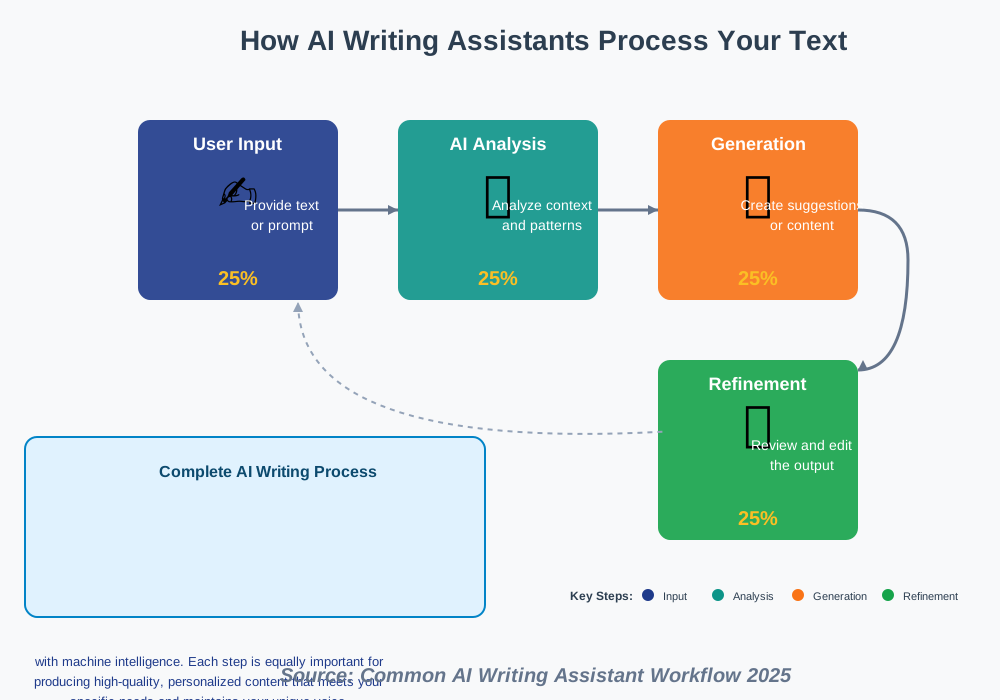
When you type a sentence or give an instruction, the AI writing software analyzes your words in real-time. It considers factors like grammar rules, writing style, tone, and context. Then it either suggests improvements to what you’ve written or generates new content that matches your requirements.
For example, if you write “The weather today is,” the AI might suggest completions like “beautiful and sunny” or “perfect for a walk outside.” It makes these suggestions based on patterns it has learned from analyzing billions of sentences.
Most AI writing tools work through three main methods:
Text completion: You start writing, and the AI suggests how to finish your sentence or paragraph. This feels almost like having someone reading your mind as you type.
Content generation: You provide a topic or prompt (like “write a paragraph about healthy breakfast options”), and the AI creates original text from scratch.
Editing and improvement: You paste existing text, and the AI suggests ways to make it clearer, more engaging, or better suited to your audience.
What Can AI Writing Assistants Help You With?
These tools are surprisingly versatile. Here’s what they excel at:
Writing emails and messages: Struggling with how to phrase a professional email? AI can help you strike the right tone, whether formal or friendly.
Creating blog posts and articles: Generate outlines, introductions, or entire drafts on virtually any topic. The AI handles the heavy lifting while you focus on adding your unique perspective.
Social media content: Craft engaging posts, captions, and responses that connect with your audience. Many tools can even adjust the tone for different platforms.
Business documents: From reports to proposals, AI assistants can help structure your ideas professionally and catch errors you might miss.
Creative writing: Whether you’re working on stories, poems, or scripts, AI can help overcome writer’s block and suggest creative directions.
Translation and adaptation: Need to explain something in simpler terms or adapt content for different audiences? AI content creation tools handle this smoothly.
I use my AI writing assistant most often for emails. Before, I’d spend ten minutes crafting a single message. Now I draft my main points, let the AI polish them, and I’m done in two minutes. That time adds up quickly.
Popular AI Writing Assistants for Beginners
Choosing your first AI writing tool can feel overwhelming. Here are the most beginner-friendly options in 2025:
ChatGPT
Free to start, with optional paid plans. Great for general writing tasks, brainstorming, and learning. The interface is simple—just type what you need, and ChatGPT responds conversationally. Perfect if you want something straightforward without complicated features.
Grammarly
Known primarily for grammar checking, but the premium version includes AI-powered writing suggestions and tone adjustments. It works directly in your browser, checking everything you type across websites and applications.
Jasper
Designed specifically for marketing and business content. Offers templates for common writing tasks like blog posts, ads, and product descriptions. The learning curve is slightly steeper, but the results are polished and professional.
Copy.ai
Focused on short-form content like social media posts, email subject lines, and product descriptions. The interface guides you through creating content with specific prompts and templates.
Claude
Excellent for longer, more thoughtful content. Particularly strong at maintaining context across lengthy documents and conversations. Useful when you need detailed explanations or complex writing tasks.
My recommendation? Start with a free option like ChatGPT or the free version of Grammarly. Experiment with different tools to find what feels natural for your workflow.
Step-by-Step: Getting Started with Your First AI Writing Assistant
Let’s walk through setting up and using an AI writing assistant. I’ll use ChatGPT as our example since it’s free and widely accessible, but these principles apply to most tools.
Step 1: Create Your Account
Visit the website of your chosen AI writing assistant. Look for a “Sign Up” or “Get Started” button. You’ll typically need to provide an email address and create a password. Some tools offer sign-up through Google or other accounts for convenience.
Common mistake to avoid: Using a complex password you’ll forget. Choose something secure but memorable, or use a password manager.
Step 2: Explore the Interface
Take five minutes to look around before diving in. Most AI writing platforms have a simple chat-like interface where you type your requests. Some include additional features like saved conversations, templates, or writing mode selections.
Notice where you type (usually a text box at the bottom), where responses appear, and any buttons for starting new conversations or accessing settings.
Step 3: Start with a Simple Request
Begin with something straightforward. Try typing, “Write a friendly email to my team about our upcoming meeting on Friday at 2 PM.”
Watch how the AI responds. You’ll get a complete email draft within seconds. This first interaction helps you understand response times and output quality.
Common mistake to avoid: Making your first request too vague. Be specific about what you want, including tone, length, and purpose.
Step 4: Learn to Give Better Instructions
The quality of AI output depends heavily on your instructions (we call these “prompts”). Here’s the difference:
Vague prompt: “Write about marketing”
Better prompt: “Write three tips for small business owners who want to improve their social media marketing. Keep it practical and under 300 words.”
Notice how the better prompt includes specific details: who it’s for, what format, and how long. The more context you provide, the better your results.
Step 5: Edit and Refine the Output
Never use AI-generated content without reviewing it. Read through what the AI created and ask yourself:
- Does this sound like me?
- Is the information accurate?
- Does it accomplish my goal?
Make edits to personalize the content. Add your own examples, adjust the tone, or remove sections that don’t fit. Think of the AI as providing a strong first draft, not a finished product.
Common mistake to avoid: Assuming AI output is always factually correct. Always verify important facts, statistics, or technical information.
Step 6: Iterate and Improve
If the first result isn’t quite right, tell the AI what to change. You might say: “Make this more casual” or “Add more specific examples” or “Shorten this to 200 words.”
Most AI assistants maintain context from earlier in your conversation, so they understand what “this” refers to. This back-and-forth process often produces the best results.
Step 7: Save and Organize Your Work
Don’t lose your good prompts and outputs. Most tools let you save conversations or export text. Create a system for organizing useful prompts you can reuse later.
I keep a simple document with my most effective prompts for different writing tasks. When I need to write a similar email or post, I don’t start from scratch—I use a proven prompt as my template.
Tips for Getting Better Results from AI Writing Assistants
Be Specific About Your Audience
Tell the AI who you’re writing for. “Write for busy professionals” produces different results than “Write for college students.” The more you define your reader, the better the AI can match the appropriate tone and vocabulary.
Include Examples When Possible
Show the AI what you’re looking for. If you want a certain style or format, paste an example and say, “Write something similar to this.” This dramatically improves output quality.
Set Clear Constraints
Specify word count, number of paragraphs, or structural requirements. “Write a 300-word blog intro with three main points” gives the AI clear boundaries to work within.
Request Multiple Versions
Ask the AI to generate three different options. This gives you choices and often sparks ideas you wouldn’t have considered. You might like the opening from version one and the middle from version two and combine them.
Use Follow-Up Questions
Treat the interaction like a conversation. If something isn’t clear, ask the AI to explain. If you need more detail, request it. The AI remembers your previous messages and builds on them.
Fact-Check Important Information
AI-powered writing assistants occasionally make mistakes or provide outdated information. Always verify dates, statistics, quotes, and technical details before publishing or sharing content.
I learned this lesson when an AI confidently gave me incorrect statistics for a blog post. Now I double-check anything that would hurt my credibility if wrong.
Understanding the Limitations
AI writing assistants are powerful, but they’re not perfect. Here’s what they struggle with:
Originality and creativity: While AI can generate creative text, truly original ideas still come from human minds. Use AI to enhance your ideas, not replace them.
Emotional nuance: AI might miss subtle emotional contexts or cultural sensitivities. Always review content that requires emotional intelligence.
Current events: Most AI tools have knowledge cutoffs and don’t know about recent events unless specifically updated. Don’t rely on them for breaking news or current statistics.
Your unique voice: AI generates generic content by default. Your personal experiences, perspectives, and writing style make your content special. Always add your own touch.
Complex research: AI can summarize and explain concepts, but it shouldn’t replace thorough research for academic or professional work requiring sources and citations.
Common Mistakes Beginners Make
Trusting AI blindly: Always review and edit. The AI doesn’t know your specific context, audience needs, or brand voice unless you explicitly tell it.
Not iterating: If the first output isn’t perfect, don’t give up. Refine your prompt and try again. Most people stop too soon.
Copying without personalizing: Raw AI output often sounds generic. Add your personality, examples, and unique insights to make it yours.
Ignoring privacy: Don’t input confidential information, passwords, or sensitive data into AI tools. Most companies use your inputs to improve their systems.
Expecting perfection immediately: There’s a learning curve. Your first attempts might feel awkward, but you’ll improve quickly with practice.
Over-relying on AI: Use these tools to enhance your writing, not replace your thinking. The best content combines AI efficiency with human creativity and judgment.
Practical Applications: Real-World Examples
Let me share how different people use AI writing assistants in their daily lives:
Sarah, a small business owner, uses AI to draft customer service responses. She provides the AI with her company’s return policy and asks it to write friendly, helpful responses to common questions. She reviews each message before sending, but the AI saves her hours each week.
Mark, a student, uses AI to outline essays and generate thesis statements. He provides his research notes and asks the AI to suggest organizational structures. The AI helps him see his argument more clearly, though he writes all final drafts himself.
Jennifer, a marketing manager, relies on AI for social media content. She gives the AI her product features and target audience, and it generates multiple post options. She picks the best ones, adjusts the voice to match her brand, and schedules them.
David, a non-native English speaker, uses AI to improve his business writing. He writes emails in his natural style, then asks the AI to check grammar and suggest more natural phrasing. This has boosted his confidence tremendously.
Each person uses AI differently based on their needs. There’s no single “right” way—experiment to find what works for you.
Privacy and Ethical Considerations
Using AI writing tools responsibly means understanding a few important principles:
Transparency: If you’re submitting AI-generated content for school or work, check the rules. Many institutions require disclosure of AI assistance.
Data privacy: Free AI tools often use your inputs to train their models. Avoid entering personal information, proprietary data, or anything confidential.
Plagiarism concerns: AI-generated content isn’t plagiarism in the traditional sense, but passing it off as entirely your own without significant editing raises ethical questions. Always add substantial original thought and personalization.
Quality control: You’re responsible for what you publish, even if AI helped create it. Review everything carefully before sharing.
Attribution: When using AI for creative work, consider mentioning AI assistance, especially in professional contexts where transparency matters.
These aren’t meant to scare you—just to help you use these tools thoughtfully and responsibly.
Next Steps: Building Your AI Writing Skills
You’ve learned the fundamentals. Here’s how to continue improving:
Practice regularly: Use your AI writing assistant for small tasks daily. Write one email, create one social media post, or draft one paragraph. Consistency builds skills faster than occasional intensive use.
Experiment with different prompts: Try various ways of asking for the same thing. Notice how small changes in your instructions produce different results.
Join communities: Online forums and social media groups focused on AI writing share tips, prompts, and use cases. Learning from others accelerates your progress.
Take notes on what works: Keep a record of successful prompts and approaches. Build your personal library of effective techniques.
Stay updated: AI technology evolves rapidly. Follow a few AI news sources or blogs to learn about new features and tools.
Combine tools: Don’t limit yourself to one assistant. Use different tools for different purposes. One might excel at creative writing while another is better for professional documents.
Frequently Asked Questions
Conclusion: Your Journey Starts Now
AI Writing Assistants represent one of the most practical applications of artificial intelligence available today. They’re not about replacing your writing—they’re about making you a more efficient, confident writer.
Start simple. Choose one free tool, try a few basic tasks, and see how it feels. Maybe you’ll use AI to draft your next email, brainstorm blog post ideas, or polish an important message. The first step is just trying it.
Remember, every expert started as a beginner. The person who masters these tools isn’t necessarily the most tech-savvy—it’s the person who practices consistently and learns from each experience.
Your writing has value, and your ideas matter. AI writing assistants are simply tools that help you express those ideas more effectively and efficiently. They handle the mechanics so you can focus on what makes your writing special: your unique perspective, experiences, and voice.
The best time to start was yesterday. The second-best time is right now. Open that AI writing assistant, type your first prompt, and discover how these remarkable tools can transform your writing process. You’ve got this, and I’m excited for you to experience how much easier writing can become.
About the Author
Abir Benali is a friendly technology writer who makes AI tools accessible to everyone. With years of experience explaining complex tech concepts in simple terms, Abir specializes in helping non-technical users discover how AI can enhance their daily work and creativity. When not writing about technology, Abir enjoys exploring new AI tools and sharing practical tips that make digital tasks easier for everyday users. Abir believes that everyone can benefit from AI—no computer science degree required.