The Best AI Image Generators of 2025

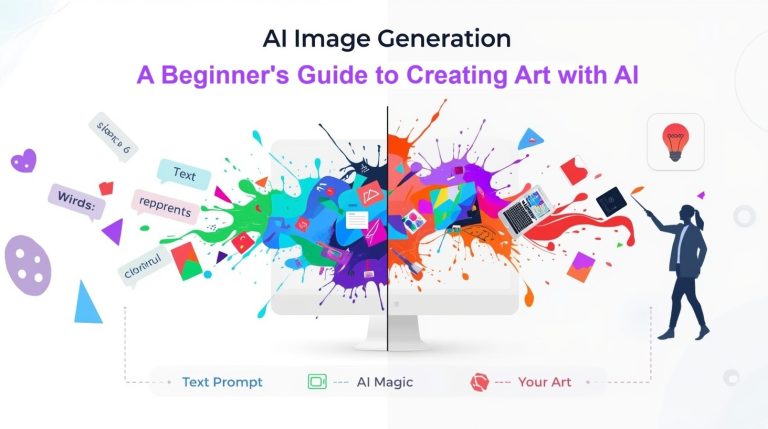
The Best AI Image Generators of 2025 have completely transformed how we create visual content. Whether you’re a designer looking to speed up your workflow, a content creator needing stunning visuals for social media, or someone who simply wants to bring imaginative ideas to life without artistic training, AI image generators have become essential tools in our creative arsenal.
We remember when creating professional-quality images required years of design experience, expensive software subscriptions, and hours of painstaking work. Today, you can type a simple description and watch as artificial intelligence transforms your words into breathtaking visuals in seconds. The technology has evolved so rapidly that choosing the right tool can feel overwhelming—which is exactly why we’ve created this comprehensive comparison.
In this guide, we’ll walk you through the top AI image generators available right now, breaking down their strengths, limitations, pricing structures, and ideal use cases. We’ve tested these platforms extensively, experimented with countless prompts, and discovered which tools excel in specific scenarios. By the end of this article, you’ll know exactly which generator matches your creative needs and budget.
Why AI Image Generators Matter in 2025
The landscape of digital content creation has shifted dramatically. Social media platforms prioritize visual content, businesses need constant streams of branded imagery, and creative professionals face tighter deadlines than ever before. AI image generators solve a fundamental problem: they democratize creativity while accelerating production timelines.
What makes these tools genuinely revolutionary isn’t just their speed—it’s their accessibility. You don’t need to understand layer masks, color theory, or composition rules. The AI handles technical complexity while you focus on creative vision. Type what you imagine, refine your prompt, and iterate until you achieve exactly what you envisioned.
The best platforms now offer photorealistic outputs, artistic styles ranging from watercolor paintings to 3D renders, and customization options that rival professional design software. They’ve moved far beyond novelty toys into legitimate professional tools that agencies, marketers, and artists rely on daily.
Understanding What Makes an AI Image Generator Great
Before diving into specific tools, let’s establish what separates exceptional AI image generation platforms from mediocre ones. We’ve identified several critical factors through our extensive testing.
Image quality tops the list. The best generators produce high-resolution outputs with crisp details, accurate lighting, and coherent compositions. They understand spatial relationships, maintain consistent styles across elements, and avoid the telltale artifacts that scream “AI-generated.”
Prompt understanding matters tremendously. Superior platforms interpret nuanced instructions, recognize artistic terminology, and deliver results that match your creative intent. They distinguish between “impressionist sunset” and “photorealistic sunset” while respecting modifiers like “dramatic,” “minimalist,” or “vintage.”
Customization options extend creative control. Features like style references, negative prompts (specifying what to exclude), aspect ratio selection, and editing capabilities determine how precisely you can realize your vision.
Speed and reliability affect workflow integration. Generators that process images quickly, handle high volumes without crashing, and maintain consistent quality across sessions become indispensable tools rather than occasional experiments.
Pricing transparency influences accessibility. The best platforms offer clear pricing tiers, reasonable free plans for exploration, and scalable options that grow with your needs without breaking your budget.
Midjourney: The Artist’s Choice for Stunning Visuals
Midjourney has earned its reputation as one of the most powerful AI art generators available. Operating exclusively through Discord, Midjourney delivers consistently gorgeous results that often feel more like fine art than computer-generated images.
Strengths That Set Midjourney Apart
Midjourney excels at creating aesthetically stunning, emotionally resonant imagery. The platform interprets artistic styles with remarkable sophistication—request a Baroque painting, an Art Nouveau poster, or a cyberpunk illustration, and Midjourney captures the essence of these movements with impressive accuracy.
The image quality is exceptional. Outputs feature rich color palettes, intricate details, and compositions that demonstrate genuine visual understanding. Lighting effects feel natural, textures appear tactile, and the overall aesthetic quality rivals work from experienced digital artists.
Advanced users love Midjourney’s powerful customization parameters. You can control chaos levels (randomness), stylization intensity, aspect ratios, and version selection. The platform regularly updates with new models, each bringing improvements to specific aspects like photorealism, coherence, or artistic interpretation.
Community integration through Discord creates an inspiring creative environment. Watching other users’ prompts and results provides endless learning opportunities. You discover prompt techniques, style combinations, and creative approaches you wouldn’t have considered independently.
Limitations to Consider
Midjourney’s Discord-based interface feels unconventional for users accustomed to traditional web applications. Commands use slash notation, and managing multiple projects requires navigating Discord channels. This approach works brilliantly once you adapt, but the learning curve intimidates newcomers.
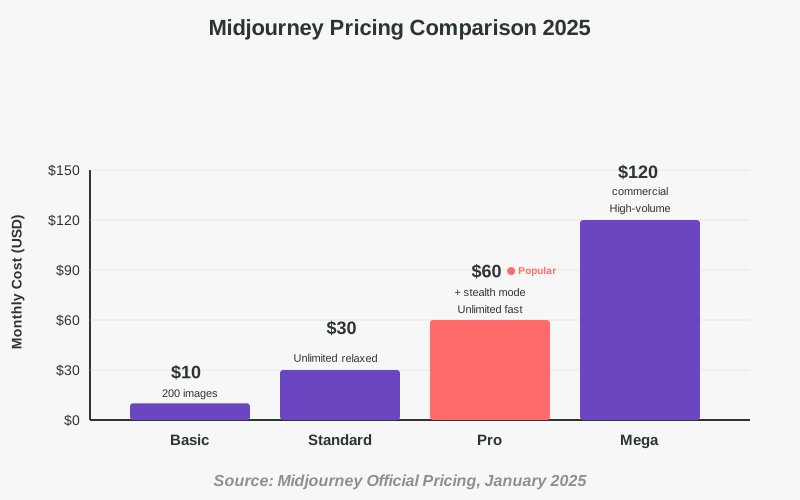
Pricing sits at the higher end. While Midjourney offers incredible value for serious creators, casual users might find the subscription cost steep. There’s no free tier anymore—access requires a paid subscription starting around $10 monthly.
Text rendering remains challenging. Like most AI image generators, Midjourney struggles with spelling words correctly within images. If your project requires specific text elements like logos or signage, expect to handle typography separately in editing software.
The platform lacks built-in editing tools. You can’t adjust specific elements within a generated image. If the composition almost works but needs one element repositioned, you’re either re-rolling new variations or exporting to external editors.
Best Use Cases for Midjourney
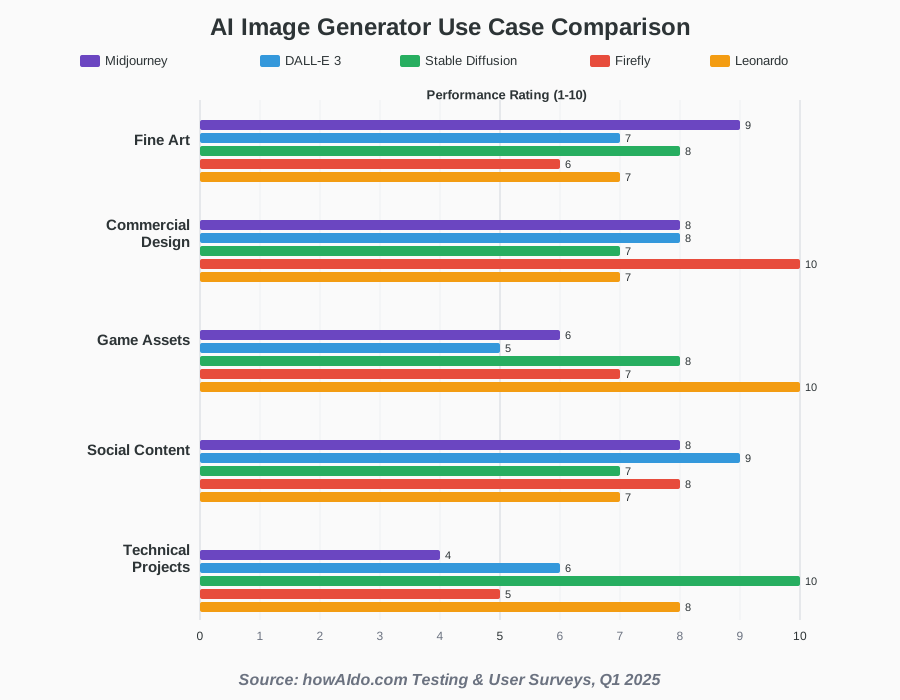
Midjourney shines for concept art, book cover designs, marketing visuals, and any project where artistic quality matters more than literal accuracy. It’s exceptional for creating mood boards, exploring visual directions, and producing social media content that demands attention.
Illustrators use Midjourney for inspiration and base compositions, refining outputs in traditional digital painting software. Marketing teams leverage it for campaign visuals, presentation graphics, and branded content that needs distinctive aesthetic appeal.
If you’re creating fine art prints, fantasy illustrations, surreal compositions, or stylized portraits, Midjourney delivers results that justify its premium positioning. The platform understands artistic intent in ways that feel almost magical.
Pricing Structure
Midjourney offers tiered subscriptions based on usage volume. The Basic plan provides limited monthly generations suitable for casual experimentation. Standard and Pro tiers unlock faster processing, unlimited relaxed generations, and commercial usage rights. Annual subscriptions offer discounts for committed users.
DALL-E 3: Integration and Accessibility
DALL-E 3, developed by OpenAI, brings sophisticated image generation directly into ChatGPT and Microsoft platforms. This integration creates seamless workflows where conversational AI and visual creation combine effortlessly.
What Makes DALL-E 3 Stand Out
The platform’s greatest strength lies in its accessibility and integration. ChatGPT Plus and Pro subscribers access DALL-E 3 directly within their existing workflow. Describe what you need conversationally, and ChatGPT automatically crafts optimized prompts while generating images. This removes prompt engineering complexity entirely for beginners.
DALL-E 3 demonstrates superior prompt adherence compared to earlier versions. The model understands complex instructions, maintains consistency across related elements, and respects nuanced descriptors. Request “a cozy coffee shop interior with vintage furniture, warm Edison bulb lighting, and patrons working on laptops,” and DALL-E 3 includes these specific elements coherently.
Safety filters and content policies ensure responsible use. While some creators find restrictions limiting, the guardrails prevent problematic content generation and protect intellectual property rights. The system refuses to create images in the style of living artists or reproduce copyrighted characters.
Microsoft integration extends DALL-E 3 into Designer and Bing Image Creator, offering free access tiers that make experimentation accessible for everyone. These implementations demonstrate how AI-powered creativity tools can reach broad audiences without technical barriers.
Where DALL-E 3 Falls Short
Artistic sophistication doesn’t quite match Midjourney’s output quality. DALL-E 3 produces clean, coherent images but sometimes lacks the aesthetic depth and emotional resonance that makes Midjourney outputs feel like fine art. Results lean toward illustration and digital art styles rather than painterly or photorealistic extremes.
Customization options remain limited compared to specialized platforms. You can’t adjust stylization levels, chaos parameters, or aspect ratios with the precision available in Midjourney. Advanced users seeking granular control over visual elements might find the simplified interface restrictive.
Generation speed varies depending on platform load. During peak usage, wait times extend beyond competitors. The system occasionally produces safe, generic imagery when prompts trigger content filters, requiring prompt revision to achieve desired results.
Commercial usage rights require careful consideration of your subscription level and Microsoft’s terms. Understanding licensing for professional projects demands reading fine print that confuses many users.
Ideal Scenarios for DALL-E 3
DALL-E 3 excels for content creators who need quick visuals without leaving their writing environment. Bloggers generating article illustrations, social media managers creating post graphics, and marketers developing presentation visuals benefit enormously from ChatGPT integration.
The platform works beautifully for iterative collaboration. Describe your vision, review the output, provide feedback conversationally, and watch as ChatGPT refines prompts for improved results. This interactive process feels natural and accessible.
Educational content, explainer graphics, conceptual diagrams, and infographic elements represent strong use cases. DALL-E 3 handles these informational visuals effectively while maintaining clarity and visual appeal.
Businesses using the Microsoft 365 ecosystem find natural integration points. Creating branded content within familiar tools reduces friction and accelerates adoption across teams with varying technical skill levels.
Pricing Considerations
ChatGPT Plus subscribers ($20 monthly) receive DALL-E 3 access as part of their subscription, making it excellent value for users already leveraging ChatGPT for writing and research. Microsoft Designer and Bing Image Creator offer limited free generation, providing risk-free exploration opportunities.
Stable Diffusion: Open-Source Power and Flexibility
Stable Diffusion represents the open-source revolution in AI image generation. Unlike proprietary platforms, Stable Diffusion’s models are freely available, creating an ecosystem of applications, modifications, and community innovations.
The Open-Source Advantage
Flexibility defines Stable Diffusion’s greatest strength. Run the model locally on your hardware, install custom models trained on specific artistic styles, and modify every aspect of generation parameters. Privacy-conscious users appreciate processing images locally without uploading prompts to external servers.
The community ecosystem around Stable Diffusion is extraordinary. Thousands of custom models (checkpoints) exist for specialized purposes—anime styles, photorealistic portraits, architectural visualization, product photography, and countless niche applications. You can download these models freely and switch between them depending on project requirements.
Advanced features like ControlNet, LoRA training, and inpainting give technical users unprecedented control. ControlNet lets you guide compositions using reference images, sketches, or edge detection. LoRA training enables creating custom models with minimal computational resources. Inpainting allows editing specific regions within existing images.
Cost-effectiveness makes Stable Diffusion attractive for high-volume users. After initial hardware investment or cloud computing setup, generation costs approach zero. Professional studios generating hundreds of images daily save substantially compared to subscription services.
Technical Complexity and Learning Curve
Stable Diffusion’s power comes with significant technical requirements. Setting up local installations demands comfort with Python, command-line interfaces, and troubleshooting. Hardware requirements include capable GPUs—generation on CPU alone proves frustratingly slow.
Web-based interfaces like Automatic1111 and ComfyUI simplify access but still require understanding numerous parameters: sampling methods, CFG scales, denoising strength, and scheduler types. These technical concepts overwhelm non-technical users expecting plug-and-play simplicity.
Image quality varies dramatically depending on model selection and parameter tuning. Default Stable Diffusion outputs often appear less polished than Midjourney or DALL-E 3 results. Achieving competitive quality requires experimentation, prompt refinement, and model optimization knowledge.
The open-source nature means limited official support. Community forums provide excellent resources, but troubleshooting issues demands research and patience. When problems arise, you’re navigating GitHub issues and Reddit threads rather than contacting customer support.
Who Should Choose Stable Diffusion
Developers and technical creators seeking maximum control and customization find Stable Diffusion ideal. The platform enables integration into custom applications, automated workflows, and specialized production pipelines.
High-volume content producers benefit from unlimited local generation. Stock photography creators, game developers needing asset variations, and agencies managing multiple client projects appreciate cost savings and processing freedom.
Privacy-focused users generating sensitive content prefer local processing. Medical visualization, confidential product designs, and personal projects involving private information remain entirely on your hardware.
Educators and researchers studying AI capabilities leverage Stable Diffusion’s transparency. Understanding how diffusion models work, experimenting with training techniques, and contributing to AI development become accessible.
Cost Structure and Resources
Stable Diffusion models are free to download and use. Costs involve hardware (a powerful GPU is recommended) or cloud computing services. Platforms like RunPod, Vast.ai, and Google Colab offer affordable GPU access for users without local hardware.
Numerous free applications implement Stable Diffusion with user-friendly interfaces. Stability AI’s DreamStudio provides official cloud access with pay-per-generation pricing. Community tools like AUTOMATIC1111 Web UI run locally with extensive features.
Adobe Firefly: Enterprise Integration and Safety
Adobe Firefly brings AI image generation into the professional creative software ecosystem that millions of designers already use daily. Built with commercial safety as a priority, Firefly addresses licensing concerns that prevent many businesses from adopting AI tools.
Professional-Grade Features
Adobe’s integration across Creative Cloud applications creates seamless workflows. Generate images directly in Photoshop, Illustrator, or Express without switching applications. Use Firefly as a starting point, then refine outputs with professional editing tools designers already know.
Commercial safety distinguishes Firefly from competitors. Adobe trained models exclusively on licensed stock imagery, public domain content, and expired copyrights. This careful curation means generated images don’t inadvertently reproduce copyrighted material, reducing legal risks for commercial projects.
Generative Fill in Photoshop showcases Firefly’s practical utility. Select any region, describe what should appear, and watch AI seamlessly blend new elements matching lighting, perspective, and style. This feature alone saves countless hours on image composition and editing.
Text effects generate eye-catching typography with customizable styles—metallic surfaces, natural textures, or fantastical treatments. These effects accelerate graphic design workflows while maintaining professional quality standards.
Vector generation in Illustrator uses Firefly to create scalable graphics from text descriptions. This capability bridges the gap between raster AI generation and vector design requirements for logos, icons, and print materials.
Limitations Within the Adobe Ecosystem
Firefly’s artistic range feels narrower than specialized competitors. The conservative training data and safety guardrails produce reliable, usable results but sometimes lack the creative unpredictability that makes Midjourney outputs exciting. Images lean toward commercial stock photography aesthetics rather than fine art.
Generation speed, while acceptable, doesn’t match the snappiest competitors. Processing times extend when Adobe’s servers experience high demand, creating workflow interruptions during critical deadlines.
Subscription requirements stack on top of Creative Cloud costs. While existing Adobe subscribers gain access through their plans, the overall investment becomes substantial. Users seeking only AI generation might find paying for the entire Creative Cloud ecosystem excessive.
Prompt complexity remains limited compared to platforms like Midjourney. Advanced parameters and style controls don’t match the granularity available elsewhere. Adobe prioritizes accessible simplicity over power-user customization.
Perfect Use Cases for Firefly
Professional designers and agencies working on commercial projects benefit most from Firefly’s legal safety. Marketing materials, client presentations, web design mockups, and branded content gain protection from copyright concerns that could create liability.
Creative Cloud subscribers discover immediate value without additional subscriptions. The tool integrates naturally into existing workflows, leveraging investments teams have already made in Adobe software.
Photo editors needing content-aware filling, object removal, or generative expansion find Photoshop’s Firefly integration invaluable. These features accelerate retouching and composition work dramatically.
Businesses with strict compliance requirements appreciate Adobe’s transparency regarding training data and usage rights. Enterprise licenses provide legal clarity that some organizations require before adopting AI tools.
Pricing and Availability
Adobe Firefly access comes included with various Creative Cloud subscription tiers. Individual plans start around $55 monthly for complete Creative Cloud access, while Firefly-only plans offer more affordable options for users needing just AI generation features.
Generative credits limit free and lower-tier usage, with additional credits available through purchase. Professional plans include higher credit allocations suitable for regular commercial work.
Leonardo AI: Gaming and Asset Creation Specialist
Leonardo AI carved out a distinctive niche serving game developers, concept artists, and digital asset creators. The platform combines powerful generation capabilities with tools specifically designed for production workflows.
Specialized Strengths for Digital Assets
Leonardo’s fine-tuned models excel at creating game assets, characters, and environments. Request fantasy character portraits, sci-fi weapon concepts, or environment tiles, and Leonardo delivers results optimized for game design workflows. Style consistency across asset sets makes creating cohesive visual libraries straightforward.
The platform’s Canvas editor enables post-generation refinement. Adjust compositions, extend images beyond original boundaries, or modify specific elements without leaving the interface. This integrated editing reduces the tool-switching that fragments workflows on other platforms.
Texture generation produces seamless, tileable patterns perfect for 3D modeling and game development. Create realistic stone surfaces, fabric patterns, or sci-fi metal textures that loop perfectly when applied to 3D objects.
Model training features let teams create custom models matching their project’s unique art direction. Train on your existing concept art, maintain visual consistency across hundreds of generated assets, and ensure new creations align with established aesthetic guidelines.
Real-time generation modes accelerate ideation. Sketch roughly, and watch Leonardo interpret your drawing as detailed artwork in real-time. This immediate feedback loop transforms brainstorming sessions and concept exploration.
Areas Needing Improvement
While excellent for digital asset creation, Leonardo’s general-purpose capabilities lag behind Midjourney’s artistic sophistication. Photorealistic outputs and fine art styles don’t achieve the same quality as specialized competitors.
The interface, though feature-rich, feels cluttered to newcomers. Multiple models, countless parameters, and specialized tools create cognitive overload during initial exploration. The learning curve steepens compared to more streamlined competitors.
Community gallery quality varies dramatically. Unlike Midjourney’s consistently impressive public feed, Leonardo’s gallery contains many amateurish attempts alongside professional work. Finding inspiration requires more selective browsing.
Pricing tiers based on monthly token allocations require careful planning. Running out of tokens mid-project creates frustrating interruptions, and purchasing additional tokens adds unpredictable costs.
When Leonardo AI Makes Sense
Game developers and indie studios find Leonardo’s specialized features justify its position in their toolkit. Character concept artists, environment designers, and UI/UX creators working on interactive projects appreciate purpose-built tools.
NFT creators and digital artists producing collectible art collections benefit from model training capabilities. Maintaining distinctive styles across large collections becomes manageable when custom models ensure consistency.
3D artists needing reference images, texture maps, or concept exploration use Leonardo to accelerate pre-production phases. The platform bridges the gap between initial ideas and detailed 3D modeling.
Marketing teams in gaming, entertainment, or tech industries leverage Leonardo for promotional materials, social media content, and community engagement visuals that match their brand’s aesthetic.
Subscription Options
Leonardo AI offers free tiers with daily token allowances suitable for light experimentation. Paid subscriptions scale based on monthly token allotments, with apprentice, artisan, and maestro tiers serving different usage volumes. Annual subscriptions provide discounts for committed users.
Ideogram: Typography and Text Integration Master
Ideogram addresses one of AI image generation’s most persistent challenges: accurately rendering text within images. While most platforms struggle with spelling and typography, Ideogram makes text integration its defining feature.
Revolutionary Text Capabilities
Ideogram generates readable text within images with remarkable reliability. Create posters with accurate headlines, design logos with properly spelled names, or generate meme templates with correct captions. This capability alone makes Ideogram invaluable for specific use cases where competitors fail consistently.
The platform understands typographic design principles. Request “bold sans-serif headline on vintage poster” or “elegant script text on wedding invitation,” and Ideogram respects these stylistic instructions while maintaining readability. Text placement, sizing, and integration with visual elements demonstrate sophisticated design understanding.
Magic Prompt features automatically enhance your descriptions, suggesting improvements that generate better results. This guided approach helps beginners craft effective prompts without studying prompt engineering techniques.
Remix capabilities let you iterate on successful generations. Adjust specific aspects, change color schemes, or modify text while preserving composition elements that already work. This streamlined iteration accelerates the design refinement process.
Style variety spans illustration, photography, and graphic design. While Ideogram specializes in text-heavy applications, it handles diverse visual styles competently. The platform doesn’t match Midjourney’s artistic sophistication but delivers solid results across creative directions.
Where Ideogram Shows Weaknesses
Despite its typography strengths, artistic quality doesn’t reach the heights of specialized competitors. Purely visual images without text elements often look less impressive than Midjourney or Leonardo AI outputs. The platform optimizes for text integration, sometimes at the expense of overall aesthetic sophistication.
Image resolution options remain limited. High-resolution outputs require workarounds, and extremely detailed, print-quality results need external upscaling tools. This limitation affects professional print applications.
Advanced customization features lag behind platforms like Stable Diffusion. Parameter control, style mixing, and fine-tuning options don’t match the depth available elsewhere. Power users seeking maximum control find the streamlined interface restrictive.
Community features and social aspects feel underdeveloped compared to Midjourney’s vibrant ecosystem. While Ideogram includes public galleries, the community engagement and collaborative learning opportunities don’t approach the richness of more established platforms.
Ideal Applications for Ideogram
Graphic designers creating text-heavy materials find Ideogram perfectly suited to their needs. Social media graphics, event posters, advertisement mockups, and promotional materials benefit from reliable text rendering.
Content creators producing meme templates, quote graphics, or educational infographics appreciate Ideogram’s text accuracy. These applications absolutely require correct spelling and typography—areas where other AI generators consistently disappoint.
Small business owners designing marketing materials without professional design budgets leverage Ideogram for flyers, menu boards, signage concepts, and branded social content. The text reliability makes DIY marketing more professional.
Presentation designers needing custom graphics with embedded text use Ideogram to create slide backgrounds, title cards, and visual elements that communicate clearly without requiring separate typography work.
Pricing Structure
Ideogram offers free tiers with daily generation limits suitable for casual users exploring the platform. Subscription plans unlock faster generation, higher resolution outputs, and commercial licensing. Pricing remains competitive with mainstream competitors while offering unique value through text capabilities.
Canva AI: All-in-One Content Creation Platform
Canva’s AI image generator, called Magic Media, integrates AI generation into the comprehensive design platform millions already use. This integration creates accessible, beginner-friendly workflows for users without technical experience.
Seamless Integration Benefits
Canva’s greatest strength lies in accessibility and workflow integration. Generate images directly within your design projects, instantly incorporating AI creations into presentations, social posts, or marketing materials. This unified environment eliminates file management complexity and application switching.
Template libraries complement AI generation beautifully. Start with professional design templates, generate custom images matching your specific needs, and combine elements into polished final products. This combination of human-designed frameworks and AI creativity accelerates production dramatically.
Collaboration features make Canva AI excellent for teams. Multiple members generate assets, share feedback, and iterate on designs within a single platform. Permission controls and version history ensure projects remain organized across distributed teams.
The learning curve barely exists. Canva’s interface prioritizes simplicity, making AI generation approachable for absolute beginners. You’ll create your first images within minutes of starting, without reading documentation or watching tutorials.
Brand kits ensure consistency. Upload your brand colors, fonts, and logos, then use AI generation alongside these established assets. Maintaining visual consistency across all content becomes effortless, even when multiple team members contribute.
Limitations for Advanced Users
Image quality doesn’t match specialized AI generators. Canva AI produces acceptable results for social media and web use but lacks the artistic sophistication or technical quality of platforms like Midjourney. Outputs feel generic compared to cutting-edge alternatives.
Customization options remain basic. Advanced prompt techniques, style parameters, and fine-tuning capabilities available elsewhere don’t exist in Canva’s simplified interface. Power users find the streamlined approach limiting.
Commercial usage rights require Canva Pro subscriptions. Free tier users face restrictions on commercial applications, creating confusion around licensing for business use. Understanding exactly what you can do with generated images requires careful review of terms.
The platform’s broad focus means AI generation receives less development attention than specialized competitors. Feature updates and model improvements occur less frequently than on platforms dedicated entirely to image generation.
Perfect Use Cases for Canva AI
Small businesses, solopreneurs, and content creators needing complete design solutions find Canva AI perfect. Social media managers creating daily posts, entrepreneurs designing marketing materials, and bloggers producing article graphics benefit from the unified platform.
Non-designers requiring professional-looking outputs use Canva AI to overcome technical barriers. The combination of templates and AI generation ensures visually appealing results without design expertise.
Teams working remotely leverage Canva’s collaboration features alongside AI generation. Marketing departments, virtual agencies, and distributed teams maintain productivity through shared access and real-time collaboration.
Budget-conscious users appreciate the comprehensive value. One subscription provides design tools, stock photos, templates, and AI generation—potentially replacing multiple separate services.
Pricing Considerations
Canva offers free tiers with limited AI generation credits. Canva Pro subscriptions (around $13 monthly) unlock unlimited AI generation alongside premium features, stock libraries, and brand kit capabilities. Team plans scale for organizations needing multi-user access with centralized billing and administration.
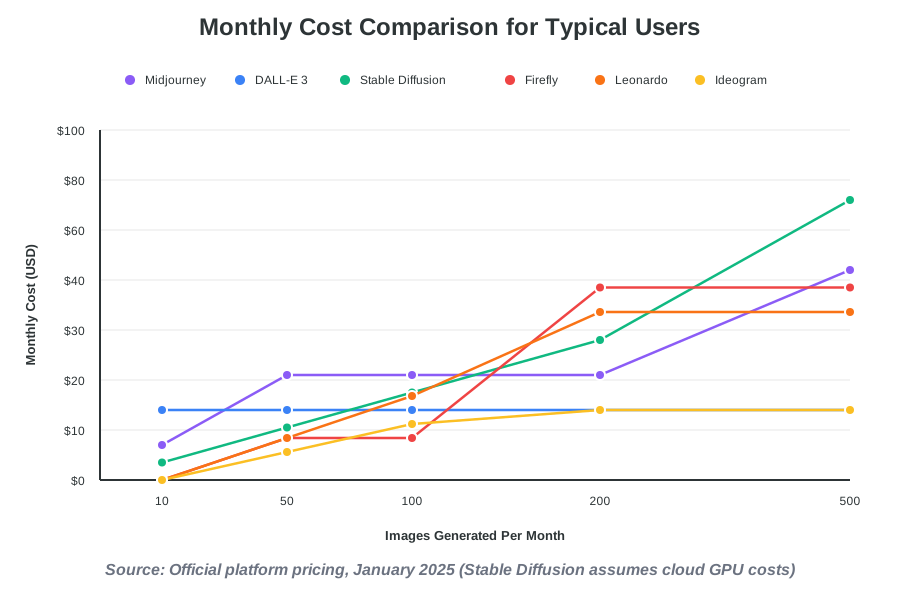
Comparing Pricing Across Platforms
Understanding the cost structure of different AI image generators helps match tools to your budget and usage patterns. Pricing models vary significantly, reflecting different business strategies and target audiences.
Subscription-based platforms like Midjourney and Adobe Firefly charge monthly fees for unlimited or high-volume generation. These models suit regular users integrating AI into consistent workflows. Predictable costs simplify budgeting for businesses and professionals.
Credit-based systems like Leonardo AI and Ideogram allocate monthly generation allowances. Users purchase additional credits when limits are exhausted. This flexibility benefits variable usage patterns but requires monitoring consumption to avoid unexpected costs.
Pay-per-generation models charge incrementally for each image. DreamStudio (Stable Diffusion’s official interface) uses this approach, making occasional use affordable while volume users face scaling costs.
Free tiers exist across most platforms, typically limiting daily generations, resolution, or commercial usage rights. These introductory offerings let you explore capabilities before committing financially.
Open-source solutions like Stable Diffusion eliminate subscription fees entirely but involve hardware costs or cloud computing expenses. The break-even point depends on generation volume and technical capabilities.
Consider total cost of ownership beyond direct subscriptions. Time spent learning platforms, productivity gains from seamless integrations, and opportunity costs of suboptimal tools affect real-world value calculations.
Making Your Decision: Which Generator Fits Your Needs?
Choosing among the best AI image generators depends on your specific requirements, technical comfort level, and creative goals. We’ve distilled our testing into practical decision frameworks to guide your selection.
For Professional Artists and Designers
If creating stunning, artistically sophisticated visuals matters most, Midjourney delivers unmatched quality. The platform’s outputs consistently impress clients and audiences, justifying the premium subscription through superior aesthetic results. Artists comfortable with Discord’s interface discover Midjourney becomes indispensable for concept work, portfolio pieces, and client presentations.
Adobe Firefly suits professionals already invested in Creative Cloud who need legally safe commercial assets. The seamless integration with Photoshop and Illustrator creates efficient workflows without application switching. Agencies managing multiple client projects appreciate the copyright clarity and enterprise licensing options.
For Content Creators and Marketers
Social media managers and content creators benefit most from DALL-E 3’s ChatGPT integration or Canva AI’s all-in-one platform. Both options accelerate production through intuitive interfaces and workflow integration. DALL-E 3 excels when you’re already using ChatGPT for content writing. Canva AI works better if you need complete design solutions beyond just image generation.
Text-heavy content like quote graphics, meme templates, or promotional materials with embedded headlines demands Ideogram’s specialized typography capabilities. The platform solves frustrations other generators create around text accuracy.
For Game Developers and Digital Asset Creators
Leonardo AI’s specialized tools for game assets, characters, and environments make it the obvious choice for interactive media production. Custom model training ensures visual consistency across asset libraries, while real-time generation accelerates ideation sessions.
Stable Diffusion appeals to technical studios requiring maximum control and unlimited local generation. The ability to train custom models, integrate into production pipelines, and process high volumes without per-image costs justifies the technical investment for large projects.
For Beginners and Casual Users
Newcomers to AI image generation should start with platforms emphasizing accessibility. Canva AI offers the gentlest learning curve with comprehensive design tools included. Free tiers on Leonardo AI or Ideogram provide risk-free exploration of more specialized capabilities.
DALL-E 3 through ChatGPT Plus creates intuitive workflows if you’re already using ChatGPT. The conversational interface removes prompt engineering challenges that intimidate beginners on other platforms.
For Budget-Conscious Users
Free tiers across multiple platforms let you explore without financial commitment. Ideogram, Leonardo AI, and Stable Diffusion implementations offer usable free access. For minimal monthly investment, Canva Pro provides tremendous value through combined design tools and AI generation.
High-volume users achieve the lowest per-image costs through Stable Diffusion, which runs locally or on affordable cloud GPU services. The initial learning investment pays dividends for sustained heavy usage.
Advanced Tips for Getting Better Results
Mastering AI image generation extends beyond platform selection. We’ve discovered techniques that dramatically improve output quality across all generators.
Crafting Effective Prompts
Specificity transforms generic results into precisely what you envisioned. Instead of “mountain landscape,” try “snow-capped mountain peak during golden hour, dramatic clouds, alpine meadow in foreground, photorealistic style.” Detail regarding lighting, composition, mood, and style guides AI toward your creative intent.
Reference artistic movements, photography styles, or specific artists when seeking particular aesthetics. “Impressionist garden painting in the style of Monet” or “film noir portrait with Rembrandt lighting” leverages the AI’s training on art history to deliver stylistically consistent results.
Use negative prompts to exclude unwanted elements. Specify “no people” for landscape work, “no text or watermarks” for clean compositions, or “no distortion or artifacts” for quality control. This subtractive approach complements positive instructions effectively.
Experiment with aspect ratios matching your intended use. Square formats suit social media, wide panoramas work for website headers, and vertical compositions fit mobile screens or Pinterest. Generating images in target dimensions eliminates cropping compromises.
Iterative Refinement Strategies
Generate multiple variations exploring different approaches. Review results collectively, identifying successful elements across variations. Combine winning aspects into refined prompts for subsequent generations.
Start broad, then narrow focus. Initial prompts establish general concepts and styles. Subsequent iterations add specific details, adjust compositions, and refine visual elements. This progressive refinement produces superior results compared to attempting perfection in single attempts.
Use platform-specific features strategically. Midjourney’s variation and remix options, DALL-E 3’s conversational refinement, and Leonardo’s Canvas editor each enable different iteration workflows. Master the tools your chosen platform provides.
Learning from Community Examples
Study successful prompts in platform galleries and communities. Analyze what makes outputs compelling—prompt structure, style references, and specific descriptors. Adapt successful techniques to your projects rather than copying directly.
Participate in community challenges and themed generation events. These focused exercises build prompt crafting skills while connecting you with other creators solving similar problems.
Follow advanced users sharing prompt breakdowns and technique tutorials. The collective knowledge accumulated across AI generation communities dramatically accelerates individual learning curves.
Common Mistakes to Avoid
Understanding frequent pitfalls helps you avoid frustration and wasted generation credits. We’ve made these mistakes ourselves so you don’t have to.
Overly vague prompts produce generic, uninspiring results. “Make a cool picture” gives the AI nothing meaningful to work with. Invest effort in descriptive prompts specifying style, subject, mood, and composition.
Ignoring aspect ratios until after generation forces awkward cropping. Consider final use cases before generating, selecting appropriate dimensions from the start.
Expecting perfection immediately leads to disappointment. AI generation involves experimentation and iteration. Treat initial results as starting points requiring refinement rather than finished products.
Neglecting licensing terms creates legal risks for commercial projects. Understand usage rights for your subscription level and specific platform. Adobe Firefly’s commercial safety matters for business applications. Open-source Stable Diffusion offers maximum flexibility but requires understanding legal nuances.
Using AI as a complete replacement for human creativity produces mediocre work. The best results combine AI generation with human judgment, curation, and refinement. Use AI to accelerate production while maintaining creative control over final outputs.
Failing to experiment across platforms limits your creative potential. Different generators excel in specific scenarios. Maintaining accounts across multiple platforms ensures you always use the optimal tool for each project.
The Future of AI Image Generation
The trajectory of AI-powered image creation suggests revolutionary developments emerging rapidly. Understanding where technology heads helps you prepare for coming capabilities.
Real-time generation speeds continue improving. Already fast platforms will become instantaneous, enabling interactive creative exploration where ideas manifest visually as quickly as you think them. This immediacy transforms brainstorming and ideation processes fundamentally.
Resolution and detail quality advance toward photographic equivalence and beyond. Current impressive outputs will seem primitive compared to the ultra-high-resolution, perfectly detailed imagery upcoming models produce. Print applications and large-format displays will benefit enormously.
3D and animation capabilities emerge. Early experiments in AI-generated 3D models, character rigging, and motion graphics hint at expanded creative possibilities. The boundary between still image generation and complete multimedia production blurs progressively.
Personalization through custom model training becomes accessible to non-technical users. Simplified interfaces for teaching AI your unique style, brand guidelines, or aesthetic preferences will make highly customized generation mainstream rather than expert-only.
Multimodal integration combines text, image, video, and audio generation in unified creative tools. Imagine describing a complete video concept and receiving finished multimedia content, including visuals, soundtrack, narration, and editing. These comprehensive AI creative suites approach rapidly.
Ethical frameworks and regulation mature alongside technology. Expect clearer guidelines around copyright, compensation for training data creators, and responsible AI usage. Platforms emphasizing safety and transparency will distinguish themselves as regulations evolve.
Frequently Asked Questions
Making the Most of Multiple Platforms
Strategic creators maintain access to multiple AI image generators rather than committing exclusively to single platforms. This portfolio approach ensures optimal tools for every project scenario.
Keep Midjourney for projects demanding artistic excellence and visual sophistication. Use it for client presentations, portfolio pieces, concept art, and anywhere aesthetic impact matters most. The subscription investment justifies itself through superior output quality.
Maintain DALL-E 3 access through ChatGPT Plus for integrated content workflows. Generate quick visuals while writing blog posts, create social media graphics matching article themes, and leverage conversational refinement when iteration speed matters.
Run Stable Diffusion locally or via cloud services for high-volume work, specialized applications, or privacy-sensitive projects. The unlimited generation and customization flexibility become crucial for specific scenarios despite the technical complexity.
Subscribe to Canva Pro when team collaboration, template access, and all-in-one design capabilities matter. Use it for routine marketing materials, social media calendars, and team projects requiring shared access.
Explore specialized platforms like Leonardo AI or Ideogram when projects match their strengths. Game development benefits from Leonardo’s asset tools. Text-heavy designs need Ideogram’s typography accuracy.
This diversified approach costs more than a single-platform commitment but delivers maximum creative flexibility. Match tools to projects rather than forcing every project into one tool’s limitations.
Taking Your First Steps
Starting your AI image generation journey feels exciting and slightly overwhelming simultaneously. Here’s how we recommend beginning.
Choose one platform for initial exploration. If you already use ChatGPT, start with DALL-E 3. For purely visual work, try Midjourney’s free trial or Leonardo AI’s free tier. Canva makes sense if you need complete design capabilities.
Spend your first session experimenting freely without pressure. Generate images from random ideas, silly concepts, or creative experiments. This playful exploration builds comfort with the interface and prompt syntax.
Study the community gallery on your chosen platform. Note what makes successful images compelling. Try recreating effects or styles that appeal to you, adapting others’ techniques to your interests.
Join the platform’s community forums or Discord servers. Ask questions, share your work, and learn from more experienced users. The collaborative culture around AI generation makes learning faster and more enjoyable.
Set small, achievable projects for practice. Create a series of images around a theme, design social media graphics for a real account, or generate concept art for a hobby project. Applied practice builds skills faster than abstract experimentation.
Document successful prompts and techniques. Maintain a prompt library noting what works well for specific scenarios. This personal knowledge base accelerates future projects dramatically.
Don’t get discouraged by imperfect results. Every experienced user has generated countless mediocre images. The learning process involves experimentation, iteration, and progressive improvement. Embrace the journey rather than expecting immediate mastery.
Conclusion: Your Creative Future Awaits
The best AI image generators of 2025 represent transformative tools democratizing visual creativity. Whether you’re a professional designer seeking efficiency gains, a content creator needing constant visual assets, or someone simply wanting to bring imaginative ideas to life, these platforms offer remarkable capabilities.
Midjourney delivers unmatched artistic sophistication for those prioritizing aesthetic excellence. DALL-E 3 provides accessible integration for content workflows. Stable Diffusion offers maximum flexibility and control for technical users. Adobe Firefly ensures commercial safety for professional applications. Leonardo AI specializes in game assets and digital creation. Ideogram solves typography challenges across the industry. Canva AI creates complete design solutions for beginners and teams.
The right choice depends on your specific needs, budget, and technical comfort level. We encourage exploring multiple platforms through free tiers and trial periods before committing to subscriptions. The investment in learning these tools pays enormous dividends as AI generation becomes increasingly central to content creation across industries.
Start experimenting today. Generate your first image. Refine a prompt until results match your vision. Share your creations with communities learning alongside you. The creative possibilities feel genuinely limitless once you develop comfort with these powerful tools.
We’re excited about where AI-powered creativity leads next. The technology evolves rapidly, capabilities expand constantly, and the barrier between imagination and visual reality dissolves progressively. Your creative journey with AI image generation begins now—embrace the possibilities, experiment fearlessly, and enjoy bringing your ideas to life in ways that seemed impossible just years ago.
References:
Midjourney Official Documentation and Pricing (midjourney.com)
OpenAI DALL-E 3 Platform Information (openai.com)
Stability AI and Stable Diffusion Resources (stability.ai)
Adobe Firefly Product Pages (adobe.com/products/firefly)
Leonardo AI Platform Documentation (leonardo.ai)
Ideogram Official Site (ideogram.ai)
Canva AI Features and Pricing (canva.com)
About the Authors
This article was written as a collaboration between Alex Rivera and Abir Benali.
Main Author: Alex Rivera is a creative technologist passionate about helping non-technical users unlock the potential of AI tools. Alex specializes in making complex technology accessible through step-by-step guides, practical examples, and encouraging experimentation. With a background in digital art and creative problem-solving, Alex believes AI should feel like a fun, empowering tool for everyone—regardless of technical expertise.
Co-Author: Abir Benali is a friendly technology writer dedicated to explaining AI tools in clear, concise language that anyone can understand. Abir focuses on practical applications, real-world examples, and helping readers avoid common mistakes beginners make when exploring new technology. Through actionable instructions and encouraging guidance, Abir makes AI image generation approachable for complete novices.
Together, we bring complementary perspectives that blend creative inspiration with practical clarity, ensuring readers leave with both understanding and confidence to begin their AI image generation journey.