
The Best AI Writing Assistants for Bloggers in 2025

The Best AI Writing Assistants for Bloggers in 2025 have transformed how we create content. I remember spending hours staring at blank screens, wrestling with writer’s block, and endlessly revising drafts. Those days feel like ancient history now. Today’s AI writing tools don’t just help you write faster—they unlock creative possibilities you never knew existed.
Whether you’re a seasoned blogger managing multiple publications or just starting your first personal blog, the right AI assistant can revolutionize your workflow. These tools handle everything from brainstorming blog post ideas to polishing final drafts, letting you focus on what truly matters: connecting with your readers and sharing your unique voice.
I’ve tested dozens of AI writing platforms over the past year, and I’m excited to share the ones that genuinely deliver. These aren’t just fancy autocomplete tools—they’re creative partners that adapt to your style, understand your audience, and help you produce content that resonates. Let’s explore the top AI writing assistants that are redefining blogging in 2025.
Why AI Writing Assistants Are Essential for Modern Bloggers
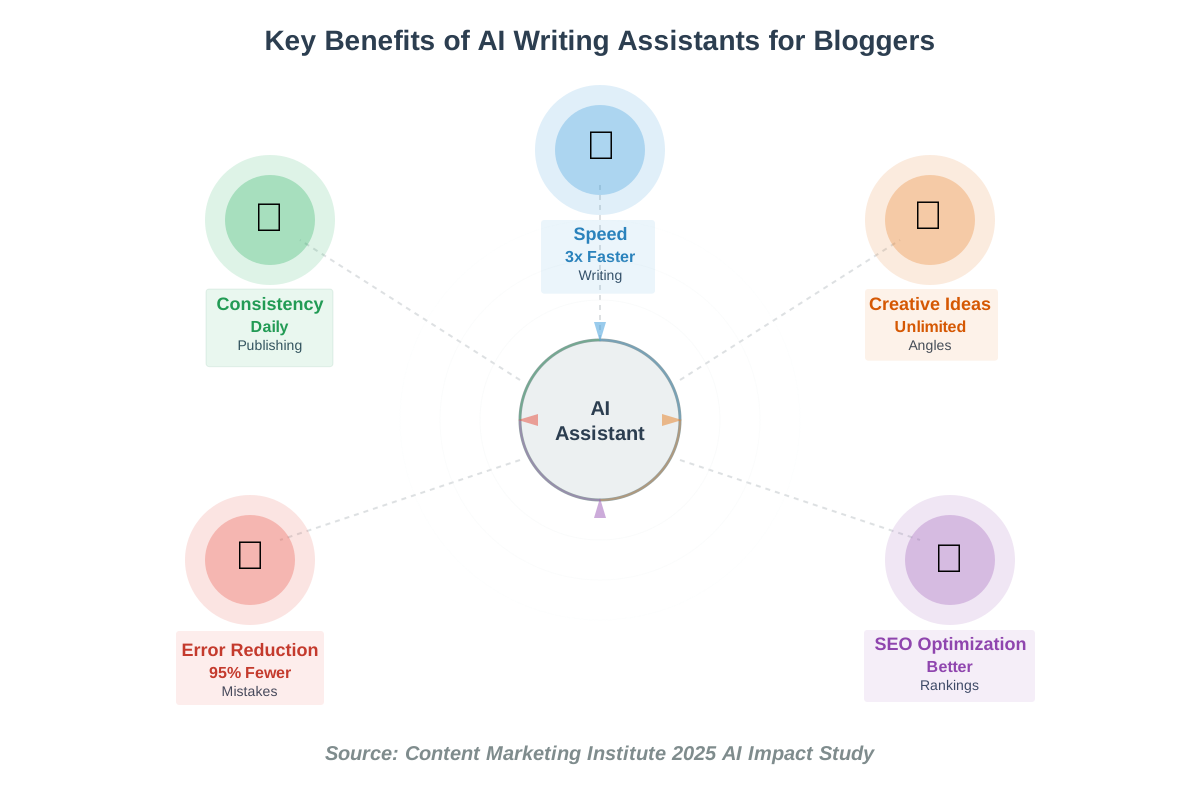
The blogging landscape has evolved dramatically. Readers expect consistent, high-quality content across multiple platforms. Search engines demand well-optimized articles. And you? You need to juggle writing, editing, SEO optimization, and promotion—often on tight deadlines.
AI writing assistants have become indispensable because they amplify your creative capacity without replacing your authentic voice. Think of them as incredibly skilled interns who never sleep, never complain, and continuously learn your preferences. They accelerate research, suggest compelling angles, catch grammatical errors, optimize for search engines, and even help you overcome that dreaded creative block.
What excites me most is how these tools democratize content creation. You don’t need a journalism degree or years of writing experience to produce engaging blog posts anymore. With the right AI assistant, anyone with passion and commitment can build a successful blog.
1. ChatGPT Plus (with GPT-4o)
ChatGPT Plus remains one of the most versatile AI writing tools available for bloggers. While everyone knows ChatGPT, most people underestimate its potential as a dedicated blogging assistant. I use it daily, and it consistently surprises me with its adaptability.
What Makes It special?
ChatGPT Plus offers access to GPT-4o, which delivers remarkably detailed knowledge regarding context, tone, and audience. Unlike earlier versions, it maintains conversation context across lengthy exchanges, remembering your blog’s style guide, target audience preferences, and specific requirements. This memory capability transforms it from a one-off generator into a genuine creative partner.
Practical Use Cases for Bloggers
I rely on ChatGPT Plus for brainstorming session starters. When I explore a new topic, I ask ChatGPT Plus to generate twenty unique angles on that subject. I get perspectives I hadn’t thought of in a matter of seconds. It’s brilliant for outlining complex articles, restructuring confusing paragraphs, and even creating meta descriptions that actually convert.
One of my favorite applications is using it for content repurposing. Copy a blog post, and it can transform it into social media threads, email newsletter snippets, or podcast talking points. You’re multiplying your content’s reach with minimal additional effort.
Tips for Beginners
Start with specific prompts. Instead of “Write a blog post about coffee,” try “Write an engaging 500-word introduction for a blog post about cold brew coffee techniques for beginners, with a friendly, enthusiastic tone.” The more detail you provide, the better the output.
Create a custom instruction set in your settings. Include your blog’s voice, typical post length, target audience details, and any words or phrases you avoid. ChatGPT will automatically apply these parameters to every conversation, dramatically improving consistency.
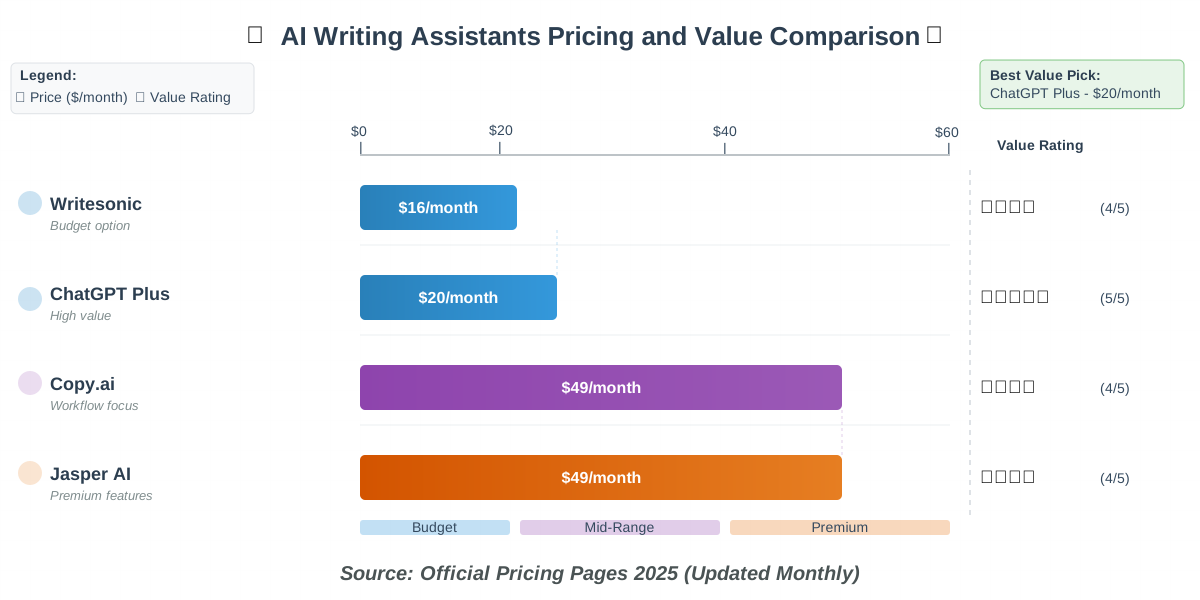
Pricing: $20/month for ChatGPT Plus
Best For: Versatile content creation, brainstorming, repurposing.
Learning Curve: Easy—conversational interface feels natural
2. Jasper AI
Jasper AI positions itself specifically as a content marketing platform, and it shows. This isn’t just another AI writing tool—it’s a comprehensive system designed around the blogger’s workflow. I was initially skeptical about the premium pricing, but after three months of daily use, I understand why serious bloggers invest in it.
What Makes It special?
Jasper offers over fifty specialized templates for different content types. There’s a specific template for blog post introductions, another for conclusions, and dedicated templates for product reviews, listicles, and comparison posts. Each template is optimized for its specific purpose, which means less editing and faster publishing.
The Boss Mode feature lets you write long-form content with AI assistance that feels almost collaborative. You provide the outline, and Jasper expands each section while maintaining your voice and style. The recent integration of SEO optimization tools directly into the writing interface is a game-changer—you can see keyword suggestions and content scores as you write.
Practical Use Cases for Bloggers
Jasper excels at maintaining consistent brand voice across multiple team members. If you run a multi-author blog or work with guest contributors, you can create brand voice profiles that ensure everyone’s content aligns with your established style.
I use Jasper for SEO-focused blog posts where keyword optimization matters. The built-in Surfer SEO integration analyzes top-ranking content and suggests improvements in real time. Your draft achieves improved SEO scores even before publication.
Tips for Beginners
Don’t skip the initial setup. Spend thirty minutes creating detailed brand voice samples and audience personas. This investment pays dividends in output quality. Jasper benefits from examples, so please provide your best previous blog posts.
Use the “Content Improver” template for existing drafts. Copy your writing, specify what needs improvement (clarity, engagement, SEO), and watch Jasper refine it while preserving your core message. It’s like having a professional editor reviewing your work.
Pricing: Starting at $49/month (Creator plan)
Best For: SEO-focused blogging, team collaboration, brand consistency.
Learning Curve: Moderate—worth investing time in setup
3. Copy.ai
Copy.ai started as a tool for marketing copy but has evolved into a powerful blog writing assistant that punches above its weight class. What I appreciate most is its clean, uncluttered interface that removes decision paralysis. You’re not overwhelmed with features—just straightforward tools that work.
What Makes It special?
Copy.ai’s strength lies in its workflow automation. The platform introduced “Workflows” that chain multiple AI operations together. You can create a custom workflow that generates a blog topic, creates an outline, writes each section, and produces social media promotion posts—all in one automated sequence.
The tone adjustment feature is surprisingly sophisticated. You can shift the same content from professional to casual, friendly to authoritative, or technical to accessible with a single click. This flexibility is invaluable when you’re writing for different audience segments.
Practical Use Cases for Bloggers
I use Copy.ai primarily for content ideation and headline testing. The blog topic generator considers current trends, search volume, and competition levels. When I need to choose between headline options, I generate twenty variations and test them with the platform’s engagement predictor.
The tool shines for producing first drafts quickly. When I have five blog posts to write in a week, Copy.ai helps me create solid foundations for each post. I spend my creative energy on refinement and adding personal insights rather than fighting blank page syndrome.
Tips for Beginners
Explore the template library methodically. Copy.ai offers templates you won’t find elsewhere, like “Blog Post from Product Description” or “Content from Company Values.” These specialized templates solve specific blogging challenges creatively.
Use the “Improve” function iteratively. Generate content, then paste it back and ask Copy.ai to improve specific aspects. Run this cycle two or three times, and you’ll have remarkably polished content that still feels human and authentic.
Pricing: Free plan available; Pro plan at $49/month
Best For: Workflow automation, headline testing, rapid first drafts.
Learning Curve: Easy—intuitive interface requires minimal training
4. Writesonic
Writesonic has quietly become one of the most cost-effective AI writing solutions for bloggers operating on tight budgets. Don’t let the lower price point fool you—this tool delivers impressive results, especially for bloggers prioritizing volume without sacrificing quality.
What Makes It special?
Writesonic’s article writer can produce complete 1,500-word blog posts in under two minutes. The AI Article Writer 5.0 (their latest version) incorporates real-time web search, ensuring your content includes current information and statistics. This integration eliminates the tedious research phase that typically eats up hours.
The platform includes Chatsonic, their ChatGPT alternative with internet access, image generation, and voice command capabilities. You can literally speak your blog post ideas and watch them transform into written content. It’s perfect for capturing inspiration during commutes or while away from your desk.
Practical Use Cases for Bloggers
Writesonic excels at bulk content creation for bloggers managing multiple niche sites. The bulk generation feature lets you upload a list of topics and generate dozens of articles simultaneously. While these require editing, they provide solid foundations that dramatically accelerate your publishing schedule.
I’ve found Writesonic particularly useful for data-driven content. When writing about statistics or research findings, the AI pulls current information from credible sources and automatically formats citations. You spend less time fact-checking and more time analyzing implications.
Tips for Beginners
Leverage the “Expand” and “Shorten” features during editing. Sometimes AI-generated paragraphs feel too dense or too thin. These one-click adjustments save you from manual rewriting while maintaining coherence and flow.
Experiment with the “Language” option. Writesonic supports twenty-five languages, but even if you’re writing in English, selecting different English variants (US, UK, or Australian) subtly shifts idioms and expressions, helping you connect better with regional audiences.
Pricing: A free trial is available; it starts at $16/month.
Best For: Budget-conscious bloggers, bulk content creation, multilingual blogs
Learning Curve: Easy—straightforward interface with clear options
5. Grammarly with AI Writing Support
Grammarly evolved far beyond its spell-checker origins. The platform now offers comprehensive AI-powered writing assistance that feels less like a tool and more like a skilled editor constantly reviewing your work. I’ve used Grammarly for years, and the recent AI enhancements have transformed it into an indispensable blogging companion.
What Makes It special?
Grammarly’s real-time feedback integrates seamlessly wherever you write—WordPress, Google Docs, email clients, even social media platforms. The AI doesn’t just catch typos; it analyzes your writing for clarity, engagement, tone consistency, and readability. The suggestions feel thoughtful rather than robotic.
The generative AI features in Grammarly Premium include rewriting suggestions that maintain your meaning while improving flow and an AI composition assistant that helps expand ideas when you’re stuck. Unlike standalone writing tools, Grammarly works within your existing workflow without requiring platform switches.
Practical Use Cases for Bloggers
I rely heavily on Grammarly’s tone detector when writing for different audiences. If I’m crafting a professional how-to guide, the tool flags casual phrases that might undermine credibility. Are you writing a personal essay? It highlights when my tone becomes too formal and distant.
The plagiarism checker is essential for bloggers who research extensively. Before publishing, I run a quick scan to ensure I’ve properly paraphrased sources and haven’t accidentally copied phrases. This protection is invaluable for maintaining your blog’s reputation and avoiding SEO penalties.
Tips for Beginners
Set specific goals for each piece using Grammarly’s intent settings. Select your audience (general, knowledgeable, or expert), formality level, and domain (academic, business, or casual). The AI adjusts its suggestions based on these parameters, giving you targeted feedback.
Review the “clarity” suggestions carefully. These often identify sentences that made perfect sense in your head but confuse readers. Accepting these suggestions typically improves your content’s accessibility without dumbing down your ideas.
Pricing: Free version available; Premium at $12/month (annual billing)
Best For: Real-time editing, tone consistency, plagiarism checking
Learning Curve: Minimal—works naturally as you write
6. Notion AI
Notion AI represents a different approach to AI writing assistance—it’s built directly into the productivity platform many bloggers already use for content planning and organization. If you’re managing your editorial calendar, research notes, and drafts in Notion, the integrated AI eliminates context-switching and streamlines your entire workflow.
What Makes It special?
The genius of Notion AI is contextual awareness. Because it lives inside your workspace, it can reference your existing notes, outlines, and research when generating content. Ask it to write a blog section, and it considers the outline above, the research linked in your database, and the style guide you’ve saved on another page.
The AI blocks let you embed intelligent content anywhere in your workspace. Create a block that automatically generates blog post summaries, another that suggests related topics, and another that drafts social media promotion copy. Your workspace becomes a dynamic content creation engine.
Practical Use Cases for Bloggers
I use Notion AI primarily for content planning and ideation. My editorial database includes topic ideas, and the AI analyzes patterns to suggest complementary content that fills gaps in my coverage. It’s like having a content strategist reviewing your plans.
The tool excels at transforming rough notes into polished drafts. After research sessions, I have messy bullet points scattered across pages. Notion AI synthesizes these fragments into coherent paragraphs while preserving key insights and maintaining logical flow.
Tips for Beginners
Build templates with AI commands embedded. Create a “New Blog Post” template that includes AI blocks for generating headlines, writing introductions, and creating SEO descriptions. Each new post starts with intelligent assistance automatically configured.
When you encounter mental blocks, utilize the “Continue writing” feature. Position your cursor after a partial sentence or paragraph, invoke Notion AI, and it completes your thought in a way that feels natural. It’s less jarring than switching to a separate AI tool.
Pricing: $10/month per member (add-on to a Notion subscription).
Best For: All-in-one workspace integration, content planning, note synthesis.
Learning Curve: Easy if you already use Notion; moderate learning curve for new users
7. Rytr
Rytr might be the most underrated AI writing tool in this lineup. While it lacks the brand recognition of ChatGPT or Jasper, it delivers exceptional value, particularly for bloggers just starting to explore AI assistance. The platform balances simplicity with surprising depth.
What Makes It special?
Rytr’s use case library is remarkably specific. Rather than generic “blog post” options, you’ll find templates for “Blog Idea & Outline,” “Blog Section Writing,” “Paragraph Rewriter,” and “Content Improver”—each optimized for its specific purpose. This specialization reduces the trial-and-error frustration common with more general tools.
The platform’s SEO meta description generator is possibly the best standalone tool for this purpose. It analyzes your content, considers character limits, includes relevant keywords, and creates descriptions that actually entice clicks. I’ve seen measurable improvements in click-through rates from search results.
Practical Use Cases for Bloggers
Rytr excels at expanding short-form content into long-form articles. Write a 300-word outline with key points, and the AI fleshes out each section with examples, explanations, and transitions. You retain control over the structure and direction, while the AI takes care of the elaboration.
I use Rytr extensively for creating content variations. When I’ve written a blog post that performs well, I’ll use Rytr to create alternative versions targeting slightly different keywords or audiences. This approach maximizes the value of successful content concepts.
Tips for Beginners
Master the creativity level slider. This controls how conservative or adventurous the AI’s output becomes. Set it low for factual, straightforward content like how-to guides. Crank it up for creative pieces, storytelling, or when you want unexpected angles.
Use the built-in plagiarism checker after generating content. While Rytr creates original text, the checker provides peace of mind and catches any unintentional similarities to existing web content before publication.
Pricing: Free plan available (10k characters/month); Premium at $9/month.
Best For: Budget-conscious beginners, SEO optimization, content expansion
Learning Curve: Effortless—streamlined interface with clear use cases
8. Frase.io
Frase.io is the AI writing assistant for bloggers who take SEO seriously. This platform doesn’t just help you write—it ensures everything you create is optimized for search engines without sacrificing readability or authenticity. If your blog depends on organic traffic, Frase deserves serious consideration.
What Makes It special?
Frase’s research panel is extraordinary. Enter your target keyword, and it analyzes the top twenty search results, extracting common topics, questions, headings, and statistics. You see exactly what comprehensive coverage looks like for your topic before writing a single word. This research would take hours manually; Frase delivers it in seconds.
The AI content brief generator creates detailed outlines based on search intent analysis. You’re not guessing what to include—you’re working from data-driven insights about what your audience actually wants to know and what search engines reward.
Practical Use Cases for Bloggers
I use Frase primarily for competitive content analysis. When entering a competitive niche, I analyze what’s currently ranking, identify gaps in existing content, and create posts that comprehensively address topics competitors have overlooked. This strategic approach accelerates ranking improvements.
The content optimization score guides revisions in real time. As you write or edit, Frase tracks how well your content covers important topics and includes relevant terms. You can watch your score improve as you enhance sections, making optimization feel like a game rather than tedious work.
Tips for Beginners
Start with the question feature. Frase identifies questions people ask about your topic across forums, social media, and search engines. Organize your blog post to address these questions directly, and you will naturally develop content that fulfills search intent.
Don’t obsess over achieving a perfect optimization score. Aim for 70-80%, focusing on natural integration rather than keyword stuffing. The goal is helping readers while satisfying search engines, not gaming algorithms.
Pricing: Starts at $15/month (Basic plan)
Best For: SEO-focused blogging, competitive analysis, content optimization.
Learning Curve: Moderate—SEO features require some understanding of search optimization
9. QuillBot
QuillBot occupies a unique niche as an AI paraphrasing and enhancement tool that complements other writing assistants beautifully. While not a full content generator, it’s invaluable for refining, varying, and improving existing text. I consider it an essential part of my blogging toolkit, even though I use it differently than traditional AI writers.
What Makes It special?
The paraphrasing engine offers seven different modes (Standard, Fluency, Creative, Formal, Shorten, Expand, and Custom), each transforming your text in distinct ways. Need to make a paragraph more concise? Use Shorten mode. Want to elaborate on a concept? Expand mode adds relevant details and examples.
QuillBot’s summarizer tool is phenomenal for research. Copy lengthy articles, academic papers, or competitor blog posts, and it distills the key points into digestible summaries. This accelerates your research process dramatically while ensuring you understand complex sources before referencing them.
Practical Use Cases for Bloggers
I rely on QuillBot for avoiding repetitive phrasing. When editing drafts, I often notice I’ve used the same sentence structure or transitional phrases repeatedly. Running problematic sections through QuillBot’s paraphraser introduces variety while preserving meaning.
The tool is perfect for content repurposing. Take a technical blog post and run it through Fluency mode to create a more accessible version for social media. Transform formal content into casual language for email newsletters. One piece of content becomes multiple assets tailored to different channels.
Tips for Beginners
Compare multiple paraphrase modes before choosing. Generate three or four variations, then cherry-pick the best phrases from each. This hybrid approach often produces superior results compared to accepting any single mode’s output completely.
Use the Synonym Slider strategically. Sliding it toward “More” increases vocabulary variation but risks introducing awkward phrasings. Keep it moderate for most content, only cranking it up when you deliberately want creative, unexpected word choices.
Pricing: Free version available; Premium at $8.33/month (annual billing)
Best For: Paraphrasing, content refinement, research summarization
Learning Curve: Very easy—simple interface with immediate results
How to Choose the Right AI Writing Assistant for Your Blog
Selecting among these excellent tools comes down to understanding your specific needs, budget, and blogging style. Here’s my framework for making this decision effectively.
Consider Your Primary Need
Are you struggling with content ideation or execution? If generating ideas is your bottleneck, prioritize tools like ChatGPT Plus or Copy.ai with strong brainstorming capabilities. If you have plenty of ideas but struggle with actual writing, focus on Jasper AI or Writesonic for robust content generation.
Does SEO optimization drive your blog’s success? Then Frase.io or Jasper’s SEO integration should top your list. If you’re building a personal brand where authentic voice matters most, Grammarly or QuillBot help refine your natural writing without replacing it.
Evaluate Your Budget Realistically
Free trials exist for a reason—use them strategically. Test three tools simultaneously over two weeks. Write similar blog posts with each, comparing not just output quality but workflow comfort. The best tool is the one you’ll actually use consistently.
Remember that cost per published post matters more than monthly subscription prices. If a $49 tool helps you publish twice as much quality content compared to a $16 alternative, the premium investment pays for itself through increased traffic and monetization opportunities.
Match Tools to Your Experience Level
Beginners benefit from tools with extensive templates and guidance, like Jasper AI or Rytr. These platforms reduce decision paralysis by providing clear starting points. Experienced writers who know exactly what they want might prefer ChatGPT Plus’s flexibility or Notion AI’s workspace integration.
Don’t underestimate the learning curve impact. A powerful tool you never fully learn is less valuable than a simpler tool you master completely. Invest time in understanding your chosen platform’s features—watch tutorials, read documentation, and experiment with different approaches.
Frequently Asked Questions
Taking Your Blogging to the Next Level with AI Assistants
The Best AI Writing Assistants for Bloggers in 2025 represent a fundamental shift in how we approach content creation. These tools don’t diminish the craft of writing—they amplify it, freeing you from mechanical tasks so you can focus on creativity, strategy, and connection.
I’ve watched my own blogging transform since embracing AI assistance. I publish more consistently. My content quality has improved through rigorous editing support. I spend less time fighting writer’s block and more time exploring interesting ideas. Most importantly, I enjoy the writing process again instead of dreading it.
Your journey with AI writing tools will be uniquely yours. Some bloggers use AI for every aspect of content creation. Others reserve it for specific tasks like research or editing. There’s no single correct approach—only what works for your workflow, goals, and creative preferences.
Start small. Choose one tool from this list based on your primary need. Commit to using it for at least a month. Learn its capabilities thoroughly. Notice how it changes your process. Then decide whether to expand your AI toolkit or optimize your use of that single platform.
The blogging landscape has never been more competitive, but paradoxically, it’s never been easier to stand out. AI writing assistants give you the efficiency of a full content team while you maintain creative control. You can finally operate at the scale your ambitions deserve without burning out or compromising quality.
The future of blogging isn’t human versus machine—it’s human amplified by machine. These tools are here, they’re affordable, and they’re remarkably effective. The only question left is, which one will you try first?
Experiment boldly. Fail safely. Iterate constantly. Your best blog posts are still ahead of you, and now you have the tools to create them faster, better, and more consistently than ever before. Welcome to the new era of blogging—it’s creative, it’s exciting, and it’s waiting for you to dive in.
References:
OpenAI. (2025). ChatGPT Product Documentation.
Jasper AI. (2025). Content Marketing Platform Features.
Copy.ai. (2025). Workflow Automation Guide.
Writesonic. (2025). AI Article Writer Documentation.
Grammarly. (2025). AI Writing Support Features.
Notion. (2025). Notion AI Capabilities.
Rytr. (2025). Use Case Library.
Frase.io. (2025). SEO Content Optimization Platform.
QuillBot. (2025). Paraphrasing Technology Documentation.
Content Marketing Institute. (2025). AI Impact Study.
About the Author
Alex Rivera is a creative technologist and content creator who specializes in helping non-technical users harness the power of artificial intelligence for creative work. With over five years of experience testing and implementing AI tools in real-world blogging scenarios, Alex brings practical insights and genuine enthusiasm to technology education.
Alex believes AI should feel like a creative partner, not an intimidating black box. Through clear tutorials, honest reviews, and hands-on experimentation, Alex helps bloggers of all skill levels discover how AI can amplify their creative voice without replacing their authentic perspective. When not exploring the latest AI writing tools, Alex maintains three successful blogs across different niches, practicing what he teaches about sustainable content creation.
Connect with Alex’s work at howAIdo.com, where technology meets creativity and everyone can participate in the AI revolution.