Best Free AI Writing Tools for Budget Creators 2026

The 10 Best Free AI Writing Tools in 2026 aren’t just about cutting costs—they’re about maximizing your creative output without draining your wallet. As someone who’s helped thousands of content creators streamline their workflows, I’ve spent hundreds of hours testing every major free-tier AI writing platform to find which ones actually deliver sustained value month after month.
Here’s what most “best AI tools” lists won’t tell you: the free AI writing landscape has fundamentally shifted in 2026. According to McKinsey’s “State of AI 2025” report, 78% of organizations now use AI in at least one function, up from 55% just a year earlier. While this percentage sounds promising, it also means companies are aggressively moving their best features behind paywalls. The tools that remain genuinely useful at the free tier are the ones truly committed to accessible AI—and those are exactly what I’m sharing with you today.
As a productivity coach, I’ve watched countless creators waste hours toggling between platforms, hitting usage limits at critical moments, or worse, paying for subscriptions they barely use. The truth? You don’t need to spend $200+ monthly on AI tools to produce professional content. What you need is a strategic approach: understanding each tool’s true limitations, knowing which platform excels at what, and building a workflow that maximizes free features without hitting frustrating walls.
This isn’t another surface-level comparison. Every tool here has been stress-tested with real-world projects—from drafting 2,000-word blog posts to generating ad copy, from editing research papers to crafting social media content. I’ve tracked usage limits, measured output quality, and identified the exact scenarios where each platform shines. Whether you’re a solopreneur managing multiple client projects, a student facing tight deadlines, or a small business owner bootstrapping your content marketing, you’ll find actionable strategies to make these free tools work harder for you.
Let’s cut through the noise and focus on what actually matters: which free AI writing tools deliver consistent value, how to work within their limits intelligently, and when it’s genuinely worth upgrading. Time is your most valuable asset, and these tools are about to give you a lot more of it.
1. ChatGPT – The Industry Standard That’s Still Free
ChatGPT remains the most recognized name in AI writing for good reason—OpenAI has managed to keep a genuinely capable free tier available even as competition intensifies. In 2026, the free plan gives you access to GPT-4o-mini by default, with intermittent access to the full GPT-4o model depending on system load and your usage patterns.
What You Actually Get
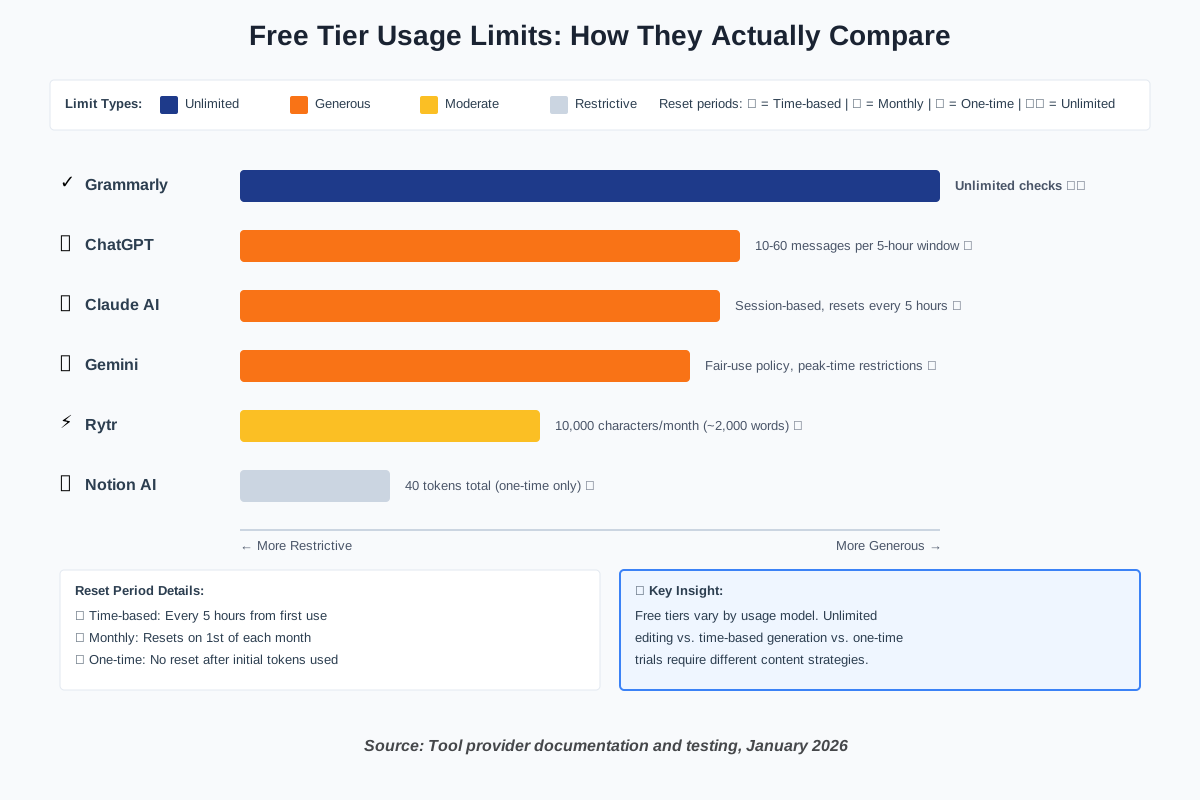
The free tier operates on a rolling 5-hour window system. You can send approximately 10-60 messages using GPT-4o within each window, with the exact number fluctuating based on message complexity and current demand. Once you hit the limit, ChatGPT automatically switches you to GPT-4o-mini—which is still remarkably capable for most writing tasks—or asks you to wait for your window to reset.
Beyond conversations, you get 2–3 DALL-E image generations per day (resetting 24 hours after your first generation), up to 3 file uploads per 24-hour period, and basic web search capabilities. These features operate on separate quotas from your message limit, giving you surprising versatility for a free account.
Perfect Use Cases
I recommend ChatGPT’s free tier as your primary brainstorming and first-draft tool. It excels at generating blog post outlines, drafting email sequences, creating social media content calendars, and turning rough ideas into structured content. The conversational interface makes it ideal for iterative refinement—you can keep nudging it toward exactly what you need.
For content creators on tight budgets, use ChatGPT for high-level strategy and initial drafts in the morning when GPT-4o access is most available. Save detailed editing for tools like Grammarly, and reserve your usage for creative work rather than basic proofreading.
Time-Saving Tips for Beginners
Write your prompts in a text editor first, then paste them into ChatGPT. This prevents you from burning messages while figuring out what you want to ask. Be specific and front-load context—”Write a 500-word blog intro about sustainable fashion targeting millennials, emphasizing cost savings” beats multiple back-and-forth clarifications.
Track your 5-hour windows if you’re doing multiple projects in a day. Set a timer when you start your session so you know when your access resets. During peak usage times (9 AM – 5 PM EST), you’ll hit limits faster, so schedule intensive work for early morning or evening when possible.
When you’re switched to GPT-4o-mini, don’t abandon your project. The mini model handles 80% of writing tasks perfectly well—it’s just slightly less nuanced with complex creative requests. Use it for straightforward tasks like formatting lists, creating bullet points, or generating variations of existing content.
Free Tier Limits: 10-60 GPT-4o messages per 5-hour window, unlimited GPT-4o-mini access, 2-3 images/day, 3 file uploads/day
Best For: First drafts, brainstorming, general-purpose content creation
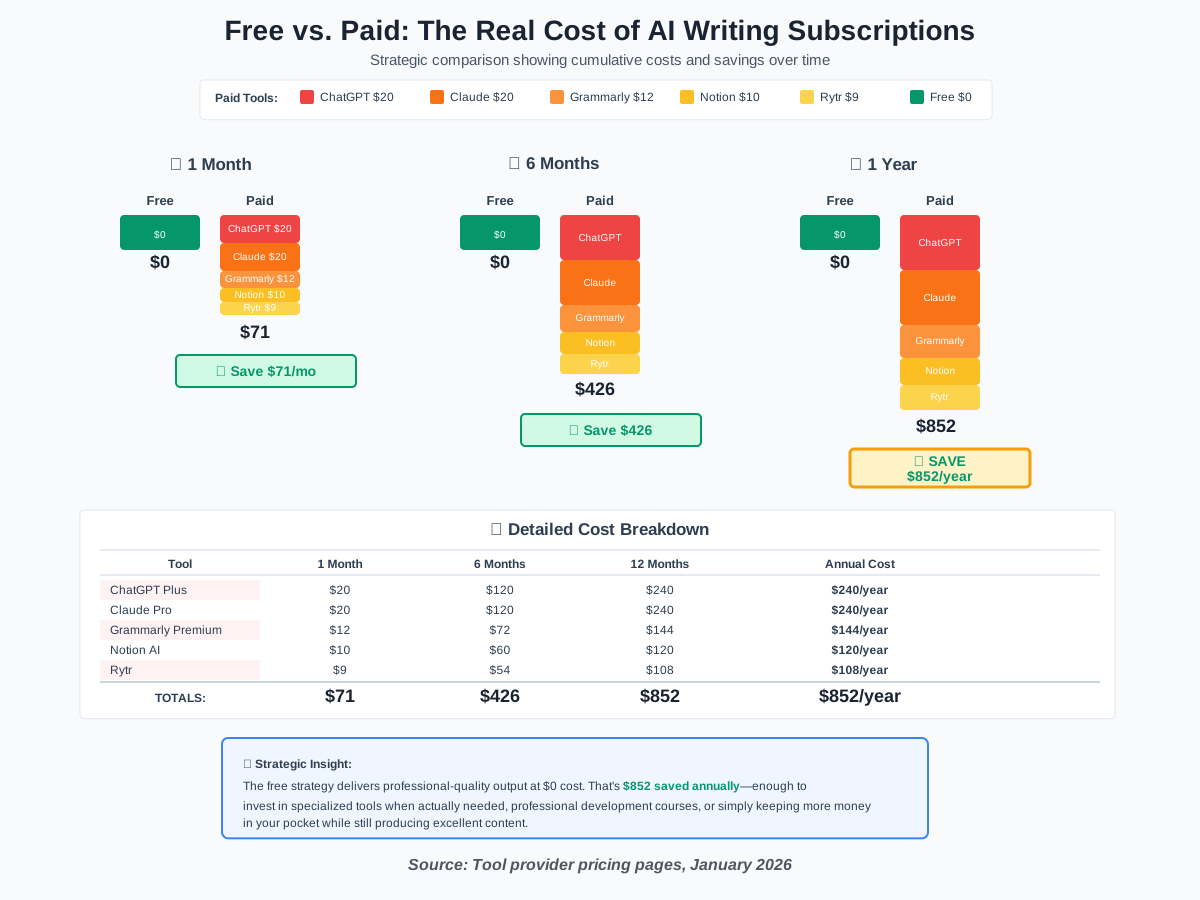
Upgrade Cost: $20/month for ChatGPT Plus (5x higher limits, priority access)
2. Claude AI – The Deep Thinker for Complex Projects
Claude AI has emerged as the thinking person’s AI assistant. While ChatGPT aims for breadth, Claude specializes in depth—it’s the tool I reach for when I need nuanced analysis, longer-form content, or writing that maintains a consistent voice across thousands of words.
What Makes Claude Different
The free tier uses a session-based quota system that resets every 5 hours, similar to ChatGPT, but the actual number of messages varies more dynamically based on what you’re asking Claude to do. Simple queries might let you send 30-50 messages, while uploading a 50-page PDF for analysis could consume your entire session in 3-4 exchanges.
What sets Claude apart is context handling. Free users can upload documents up to 30MB per file, with up to 20 files per conversation. This makes it exceptional for working with reference materials—research papers, brand guidelines, and previous content you want to match in style. Claude doesn’t just read these files; it genuinely understands them and can work with their content throughout your entire session.
Perfect Use Cases
Claude is my go-to for editing and refinement work. After getting a first draft from ChatGPT or another tool, I paste it into Claude and ask for specific improvements: “Tighten this section for readability”, “Make the tone more conversational”, “Find logical gaps in this argument.” Claude’s responses feel remarkably human—it catches subtle issues other AIs miss.
Use Claude when you’re working on projects that need consistency across multiple pieces. Upload your style guide, give it examples of your best work, and then generate new content that matches. It’s particularly strong at maintaining voice, which is critical for building brand identity.
For students and researchers, Claude excels at summarizing academic papers and extracting key insights. Upload your reading materials, then ask targeted questions to build your understanding. This approach saves hours compared to traditional reading and note-taking.
Time-Saving Tips for Beginners
Start conversations with clear context about your project’s goals. Tell Claude what you’re creating, who it’s for, and what success looks like. This upfront investment pays off exponentially as the conversation progresses—Claude remembers your context and applies it to every subsequent response.
When working with documents, be strategic about which files you upload. Claude processes everything you give it, which uses your session quota. Upload only the files you’ll actively reference rather than your entire research library.
If you hit your session limit mid-project, Claude tells you exactly when your access resets (always 5 hours from your first message in that session). Use this time productively: switch to a different tool for complementary tasks, or work on implementation while Claude’s suggestions are fresh in your mind.
Save complex analytical tasks for Claude rather than simple generation. It’s overkill for basic social media captions, but it’s perfect when you need someone to “think through” a complicated content strategy or identify what’s missing from your draft.
Free Tier Limits: Session-based usage (resets every 5 hours), file uploads supported, varies by complexity
Best For: Long-form content, editing and refinement, document analysis, maintaining consistent voice
Upgrade Cost: $20/month for Claude Pro (5x usage), $100-200/month for Claude Max (5x-20x usage)
3. Google Gemini – The Research Powerhouse
Google Gemini (formerly Bard) leverages Google’s massive search infrastructure to deliver something unique: real-time web integration without hitting paywalls. In 2026, Gemini stands out by offering genuinely useful free access to current information—something that’s increasingly rare as other platforms restrict their search features.
What You Actually Get
The free Gemini tier gives you access to Gemini Pro, which handles most writing and research tasks capably. Unlike ChatGPT and Claude, Gemini doesn’t publish specific message limits—instead, it uses a “fair use” policy that becomes more restrictive during peak hours but rarely cuts you off entirely for standard usage patterns.
What makes Gemini invaluable is its native integration with Google Search and the ability to verify information directly through web results. Ask it to research a topic, and it doesn’t just generate plausible-sounding content—it pulls actual current data, provides source links, and can even show you the search results it used. This verification layer prevents the “confident hallucination” problem that plagues other AI tools.
Perfect Use Cases
Use Gemini as your research assistant for anything requiring current data. I rely on it for finding recent statistics, checking facts, discovering trending topics, and understanding what content is already ranking well on a subject. The ability to say “search for recent articles about X” and get real results is a game-changer.
Content creators benefit enormously from Gemini’s trend identification. Before writing on any topic, ask Gemini to research what’s currently popular, what questions people are asking, and what angles competitors are taking. This competitive intelligence used to require hours of manual research—now it takes minutes.
For bloggers and marketers optimizing for SEO, Gemini helps identify content gaps. Ask it to analyze top-ranking content for your target keyword, then summarize what those articles cover and what they’re missing. This insight guides your content strategy without requiring expensive SEO tools.
Time-Saving Tips for Beginners
Start research sessions with Gemini before moving to drafting tools. Spend 15-20 minutes gathering information, verifying facts, and understanding the competitive landscape. Export this research into your notes, then use ChatGPT or Claude for actual writing. This workflow prevents mid-draft research interruptions.
When Gemini provides search results, don’t just read its summary—click through to the actual sources. Gemini occasionally misinterprets source material, but it’s transparent about where information comes from. This verification step ensures accuracy and often provides additional insights Gemini missed.
Use Gemini’s multimodal capabilities by uploading images when you need descriptions, analysis, or OCR (text extraction). This feature works surprisingly well for pulling text from screenshots, infographics, or handwritten notes—saving you from manual transcription.
If you’re researching multiple topics, use separate conversations for each subject. Gemini’s context management improves when conversations stay focused, and you can return to specific research threads later without wading through unrelated queries.
Free Tier Limits: No published hard limits, fair-use policy with peak-time restrictions, unlimited Google Search integration
Best For: Research, fact-checking, trend analysis, competitive intelligence, current events
Upgrade Cost: $20/month for Gemini Advanced (access to Ultra model, 2TB Google One storage)
4. Grammarly Free – The Essential Safety Net
Grammarly deserves a spot on this list not as a content generator but as the most important quality control tool in your free AI arsenal. According to Sacra’s research analysis, Grammarly reached $700 million in annual recurring revenue in May 2025, powered by 40 million users who recognize that even AI-generated content needs human-quality editing.
What You Actually Get
The free version of Grammarly provides real-time grammar, spelling, punctuation, and basic clarity suggestions across virtually every text field you use—browsers, email clients, word processors, and more. This universal coverage is its superpower. While paid tiers add tone detection and advanced style suggestions, the free version catches 90% of actual errors that would make your writing look unprofessional.
What many users don’t realize is that Grammarly Free has quietly added AI-powered suggestions beyond basic grammar. It now flags wordiness, suggests stronger vocabulary, and identifies confusing sentence structures. These aren’t as sophisticated as the premium “GrammarlyGO” generative features, but they’re substantial improvements over simple spellcheck.
Perfect Use Cases
Install Grammarly and leave it running everywhere—period. This isn’t a tool you “use” in the traditional sense; it’s insurance against the embarrassing typos and grammar mistakes that slip through when you’re moving fast. Every email, social post, blog draft, and document gets automatic scanning.
For content creators relying heavily on AI writing tools, Grammarly serves a critical function: catching AI-generated awkwardness. LLMs occasionally produce grammatically correct but stilted phrasing that human readers find odd. Grammarly flags these issues, helping you polish AI content until it reads naturally.
Students and professionals writing important documents benefit most from the plagiarism detector preview (showing where duplicated text exists, even if you can’t access full reports without premium). Combined with AI awareness, this helps ensure your AI-assisted content passes academic or professional scrutiny.
Time-Saving Tips for Beginners
Configure Grammarly’s browser extension to run automatically, but learn the keyboard shortcut to quickly disable it (usually right-click the icon). Some sites don’t play well with active editing suggestions, and you’ll save frustration by temporarily turning them off rather than fighting laggy text fields.
Review Grammarly’s suggestions in bulk after finishing a draft rather than fixing issues as you write. This “write first, edit later” approach maintains creative flow. AI tools like ChatGPT generate fast; Grammarly helps you polish just as efficiently.
Pay attention to the suggestions Grammarly makes repeatedly. If you keep writing “however” at the start of sentences, or you consistently misuse semicolons, these patterns indicate areas where your writing needs improvement. Grammarly is teaching you while it’s correcting you.
For longer documents, paste your content into Grammarly’s web app rather than relying solely on the browser extension. The full interface shows an overview of all issues, makes batch corrections easier, and provides better readability scores.
Free Tier Limits: Unlimited grammar/spelling/punctuation checks, no message limits, works across all platforms
Best For: Editing AI-generated content, real-time proofreading, catching embarrassing errors
Upgrade Cost: $12/month (annually) or $30/month for Grammarly Premium
5. Notion AI – The Integrated Writing Environment
Notion AI represents a different approach to AI writing tools: rather than being a standalone platform, it lives inside Notion’s all-in-one workspace, where many creators already organize their projects. This integration is both Notion AI’s strength and its limitation—it’s exceptional if you work in Notion, but less useful if you don’t.
What You Actually Get
Notion offers 40 free AI tokens when you start, which sounds generous until you realize they disappear quickly—typically within your first serious writing session. After that, AI features require a $10/month add-on subscription. However, these initial tokens provide enough runway to test whether Notion AI fits your workflow.
When active, Notion AI offers context-aware assistance directly in your documents. Press a slash command or select text, and you can ask AI to continue writing, summarize content, fix spelling and grammar, generate ideas, or rewrite in different tones. The AI understands your existing Notion content—databases, linked pages, and notes—giving it unique contextual awareness other tools lack.
Perfect Use Cases
If you already use Notion for content planning, project management, or knowledge management, those 40 free tokens offer just enough to experience the workflow benefit of AI assistance embedded in your workspace. Test it for tasks like generating blog outlines from your content calendar, expanding bullet points into full paragraphs, or summarizing meeting notes.
The value proposition becomes clear when you’re managing multiple projects in Notion. Rather than switching between your project tracker, ChatGPT, and Google Docs, everything happens in one interface. You draft content blocks, ask AI to improve them, organize related research in databases, and track publication status without leaving Notion.
For teams on Notion’s paid plans, the AI add-on makes more sense because you’re already paying for collaboration features. Solo creators need to evaluate whether $10/month adds enough value over free standalone AI tools.
Time-Saving Tips for Beginners
Use your 40 free tokens strategically on high-value tasks. Don’t waste them on simple grammar fixes (Grammarly handles that better and for free). Instead, focus on content generation, brainstorming, and complex rewrites where AI context awareness matters most.
Combine Notion AI with free external tools. Draft your initial content in ChatGPT, paste it into Notion, then use AI tokens to integrate it with your existing Notion content and reformat for your specific needs. This hybrid approach stretches your free tokens further.
If you hit the token limit and aren’t ready to subscribe, Notion still functions perfectly as your content workspace. Use the free AI tools we’ve discussed for generation and editing, then organize everything in Notion without AI assistance. Many successful creators work this way indefinitely.
Create templates for common content types before your tokens run out. While you can’t use AI after hitting the limit, you can still use the templates you created with AI assistance. This practice is effectively “banking” AI value for future use.
Free Tier Limits: 40 AI tokens total (one-time, not recurring), full Notion workspace features remain free
Best For: Notion power users, integrated content workflows, team collaboration scenarios
Upgrade Cost: $10/month per user for unlimited Notion AI (in addition to the Notion plan).
6. Rytr – The Speed Champion for Short-Form Content
Rytr has carved out a specific niche: ultra-fast generation of short-form marketing content. When you need social media posts, email subject lines, product descriptions, or ad copy right now, Rytr delivers. It’s not trying to compete with ChatGPT’s versatility or Claude’s sophistication—instead, it masters one thing: getting usable copy into your hands in under 30 seconds.
What You Actually Get
The free plan provides 10,000 characters per month, which translates to approximately 2,000 words—enough for 20-30 social media posts, 10-15 email drafts, or 3-5 blog post introductions. This limit is cumulative across your entire month rather than resetting daily, so strategic planning matters.
Rytr offers 40+ pre-built use cases covering everything from blog ideas to job descriptions to product reviews. Each use case is optimized for its specific format, asking for relevant inputs and generating appropriately structured output. This template-driven approach dramatically reduces the learning curve—you’re never staring at a blank prompt box wondering what to say.
Perfect Use Cases
Social media managers will find Rytr exceptionally valuable. Generate a week’s worth of LinkedIn posts, Instagram captions, or Twitter threads in a single session, then schedule them through your regular tools. The character limit aligns perfectly with this workflow—10,000 characters handles approximately 30 solid social posts.
Small business owners juggling multiple roles can use Rytr for marketing quick hits: email newsletters, product descriptions for e-commerce sites, simple landing page copy, and ad variations for A/B testing. The speed and simplicity mean you’re not context-switching away from your core work for long periods.
For content creators who’ve mastered long-form tools like ChatGPT, use Rytr as your micro-content generator. After publishing a comprehensive blog post, feed key points into Rytr to create social media teasers, email announcements, and promotional snippets. This repurposing strategy maximizes content ROI.
Time-Saving Tips for Beginners
Track your character usage carefully. Rytr displays the remaining characters in your account, but monitor this before starting large projects. Generate one piece, check the character count, and calculate how much budget you have left before committing to bulk generation.
Use the “tone” selector deliberately. Rytr can adjust output from professional to casual to humorous. Rather than generating multiple versions and burning characters, think through your desired tone first, then generate once. You’ll get better results faster.
Save high-performing outputs as templates. When Rytr generates exceptional copy, store it externally with notes about the inputs you used. This personal template library helps you recreate successful formats without trial and error.
Pair Rytr with editing tools like Grammarly and revision tools like ChatGPT. Generate your content in Rytr for speed, polish it in Grammarly for quality, then refine specific sections in ChatGPT if needed. This assembly-line approach respects each tool’s strengths.
If you exhaust your monthly limit, consider rotating between Rytr and similar tools like Copy.ai rather than upgrading immediately. Many free tiers offer similar character limits—strategically alternating tools effectively doubles your free capacity.
Free Tier Limits: 10,000 characters per month (~2,000 words), 40+ use case templates, multiple tone options
Best For: Social media content, email marketing, ad copy, product descriptions, quick marketing copy
Upgrade Cost: $9/month for 100K characters (~20,000 words)
7. QuillBot – The Paraphrasing Specialist
QuillBot serves a specific function that other AI writing tools handle poorly: intelligent paraphrasing and summarization. According to Siege Media’s 2025 survey of graduate students, QuillBot ranks as the #1 paraphrase tool choice. While it’s not a content generator in the ChatGPT sense, it’s essential for refining existing content, adapting found material ethically, and condensing long-form text.
What You Actually Get
The free version allows paraphrasing of limited text segments with access to two modes: Standard and Fluency. These modes adjust how aggressively QuillBot rewrites your input—Standard maintains more of your original structure, while Fluency prioritizes natural-sounding output.
Beyond paraphrasing, free users get basic grammar checking, a summarizer tool for condensing articles, and a citation generator supporting MLA, APA, and Chicago formats. While paid tiers unlock more sophisticated modes and longer input limits, the free tier handles the core task: taking existing text and making it genuinely your own while preserving meaning.
Perfect Use Cases
Students and researchers benefit enormously from QuillBot’s summarization tool. Feed it academic papers, articles, or long reports to extract key points rapidly. This isn’t about plagiarism—it’s about efficient information processing when you’re synthesizing multiple sources for literature reviews or research projects.
Content creators who’ve collected research notes, interview transcripts, or reference materials use QuillBot to transform raw information into original content. Rather than awkwardly rewording source material sentence by sentence, QuillBot handles the linguistic heavy lifting while you focus on adding insight and analysis.
For non-native English speakers, QuillBot’s Fluency mode polishes writing to sound more natural. Generate a first draft in your words, then run it through QuillBot to smooth awkward phrasing while maintaining your intended meaning. This workflow builds confidence and improves writing skills over time.
Time-Saving Tips for Beginners
Don’t use QuillBot on content that’s already well-written. It’s tempting to “improve” everything, but overuse creates unnecessarily complicated language. Reserve it for genuinely awkward sections or when you need to incorporate researched information without copying source phrasing.
Combine QuillBot with ChatGPT strategically. Generate initial content in ChatGPT, identify sections that sound “AI-ish” or too formal, then run those specific paragraphs through QuillBot’s Fluency mode. This hybrid approach produces more human-sounding results than either tool alone.
Use the summarizer before the paraphraser. When working with long source materials, summarize first to extract only relevant points, then paraphrase the summary. This two-step process prevents you from wasting time rewording information you won’t ultimately use.
For academic writing, use QuillBot’s citation generator in combination with its paraphrasing. This ensures you’re properly attributing sources while avoiding accidental plagiarism. The free tier’s citation support alone justifies keeping QuillBot in your toolkit.
Free Tier Limits: Limited text segments per paraphrase, 2 writing modes, basic grammar check, citation generator
Best For: Paraphrasing research, summarizing articles, citation management, ESL writing improvement
Upgrade Cost: $9.95/month for Premium (unlimited paraphrasing, all modes, longer text inputs)
8. Writesonic – The SEO-Focused One-Time Champion
Writesonic takes a different approach to free access: instead of ongoing monthly limits, it offers a substantial one-time trial. You get 10,000 words to use however you’d like, which is perfect for launching a specific project or testing whether the platform’s SEO-optimized output style matches your needs.
What You Actually Get
That 10,000-word allowance is enough to write 3-4 comprehensive blog posts, 10-15 product pages, or a complete month’s worth of social content. The key differentiator is Writesonic’s Article Writer 6.0, which actively pulls real-time data from Google Search to ensure content aligns with currently ranking articles.
While the free trial doesn’t recur monthly, it provides full access to premium features during your allotted words: keyword research integration, SEO scoring, fact-checking with source citations, and multiple content quality levels. This comprehensive trial helps you evaluate whether Writesonic’s workflow justifies the paid subscription for ongoing use.
Perfect Use Cases
New websites or blogs benefit most from Writesonic’s free trial. Use your 10,000 words to create cornerstone content—comprehensive guides, pillar posts, or essential service pages. The SEO optimization ensures these foundational pieces have the best possible chance of ranking from day one.
Product launches provide perfect timing for Writesonic. Generate your landing page copy, product descriptions, FAQ content, and launch email sequence all within your free allowance. The real-time web search helps ensure your messaging reflects current market positioning and customer language.
Content teams evaluating AI writing tools should definitely test Writesonic during the evaluation phase. The 10,000-word trial is generous enough to produce real work, not just toy examples. This makes evaluation fair and data-driven rather than speculative.
Time-Saving Tips for Beginners
Plan your content strategy before activating the trial. Unlike monthly-resetting free tiers, your 10,000 words won’t replenish. Create a prioritized list of what you’ll write, start with the highest-value content, and track word usage carefully to avoid running out mid-project.
Leverage the keyword research before writing. Writesonic’s integration with search data costs you nothing during the trial, but it dramatically improves output quality. Spend 20 minutes identifying target keywords and understanding ranking patterns, then use that intelligence to guide generation.
Edit aggressively after generation. Use Writesonic’s words for raw content creation, then refine with free tools like ChatGPT or Claude and edit with Grammarly. This workflow maximizes your Writesonic allocation while still producing polished final drafts.
If you complete your trial and aren’t ready to subscribe, export everything you created. Writesonic generates proper article structures with headings, which means your content is production-ready. Even if you never upgrade, you’ve gained significant value from those 10,000 words.
Free Tier Limits: 10,000-word one-time trial (not recurring), full feature access during trial
Best For: Website launches, SEO-optimized content, product launches, evaluating paid tools
Upgrade Cost: $39/month for Individual plan (when paid annually)
9. Copy.ai – The Marketing Copy Specialist
Copy.ai has found product-market fit with marketing teams and growth hackers who need high-converting copy across multiple channels. According to LinkedIn analytics from May 2025, Copy.ai consistently ranks #2 for the “AI writing assistant” hashtag, indicating strong community engagement and active use.
What You Actually Get
The free tier is notably limited compared to others on this list—you get a 7-day trial with 2,000 words, after which free access ends entirely. However, during those 7 days, you have full access to Copy.ai’s extensive template library covering sales emails, landing pages, Facebook ads, Google ads, Instagram captions, blog intros, and dozens more marketing formats.
What makes Copy.ai valuable despite the short trial is template quality. Each template is optimized with proven conversion frameworks like AIDA (Attention, Interest, Desire, Action) and PAS (Problem, Agitate, Solution). The system guides you through inputting relevant details and then generates multiple variations automatically.
Perfect Use Cases
Marketing campaigns benefit most from Copy.ai’s focused trial. Launch a new product, promotion, or campaign? Use your 7-day access to generate all necessary copy: email sequences, ad variations, social media content, and landing page text. This concentrated burst approach aligns perfectly with campaign timelines.
A/B testing becomes significantly easier with Copy.ai. Rather than manually writing five different versions of an ad or email, generate them instantly and let data decide which performs best. The 2,000-word limit actually encourages this variation-testing workflow rather than producing single “perfect” versions.
Agencies pitching new clients can use the trial period to mock up sample campaigns. Generate spec work showing what your AI-augmented agency can deliver, then either convert the client or decide Copy.ai’s paid tier isn’t necessary for your workflow.
Time-Saving Tips for Beginners
Don’t activate your trial until you’re ready to use it intensively. That 7-day window won’t pause, so have your marketing calendar planned, your product messaging defined, and your creative briefs ready. Maximize the trial by treating it like a sprint.
Generate multiple variations of everything. Copy.ai excels at creating options. For any single piece of copy, generate 5–10 versions, then mix and match the best elements manually. This assembly approach often produces better results than using AI output verbatim.
Export everything immediately. Copy.ai stores your generation history, but don’t rely on continued access. As soon as you generate a copy you like, paste it into your own document management system. Consider the trial a harvesting period rather than an ongoing service.
After the trial ends, determine if Copy.ai filled a genuine need. Many users find that ChatGPT or Claude can handle marketing copy adequately with excellent prompts, making Copy.ai’s specialized templates unnecessary. Others find the conversion-focused frameworks worth the subscription. Be honest about which camp you’re in.
Free Tier Limits: 7-day trial with 2,000 words, then paid-only access
Best For: Marketing campaigns, A/B testing copy variations, conversion-focused content, agency client mockups
Upgrade Cost: $49/month for the Pro plan (unlimited words, team collaboration features)
10. Google Docs Voice Typing + AI – The Hidden Free Combination
Most people don’t realize that Google Docs offers a powerful free AI writing workflow combining voice typing, Smart Compose suggestions, and integrated access to other AI tools through browser extensions. While not a dedicated AI writing platform, this combination delivers surprising productivity for exactly zero dollars.
What You Actually Get
Voice Typing in Google Docs provides rapid dictation with automatic punctuation and formatting. When combined with Smart Compose (which suggests completions as you type), you’re already working with AI assistance before adding any external tools.
The real power emerges when you install browser extensions like ChatGPT or Claude directly in Google Docs. Draft with voice, refine with AI assistance, collaborate with teammates, and maintain complete version history—all in a free platform you probably already use. This integrated workflow eliminates the constant app-switching that kills productivity.
Perfect Use Cases
Long-form content creators benefit enormously from voice drafting. Speak your ideas naturally while walking, then return to your desk to find a rough draft waiting in Google Docs. The combination of rapid voice input plus AI refinement dramatically accelerates first-draft creation.
Collaborative teams get the best of both worlds: Google Docs’ industry-leading sharing and commenting plus on-demand AI assistance when individuals need writing support. This option is especially valuable for teams that can’t justify per-user AI subscriptions but want occasional AI access.
Budget-conscious professionals who already live in Google Workspace find this the most seamless AI integration. Your workflow doesn’t change—you’re still working in Docs, Slides, and Sheets—but now you can summon AI assistance exactly when needed through extensions.
Time-Saving Tips for Beginners
Learn voice typing keyboard shortcuts. Hit Ctrl+Shift+S (Cmd+Shift+S on Mac) to start dictation, then speak naturally. Google’s voice recognition handles punctuation commands well: say “period,” “comma,” or “new paragraph” to control formatting without touching your keyboard.
Install the official ChatGPT or Claude browser extensions rather than third-party tools. Official extensions receive regular updates, maintain privacy standards, and integrate cleanly without breaking Google Docs features.
Use Docs’ built-in Explore feature (Ctrl+Alt+Shift+I) to research topics, find related information, and insert properly formatted citations. This Google-powered research capability complements AI writing tools perfectly—research in Explore, generate in ChatGPT, and refine in Docs.
Set up templates for recurring content types. Google Docs templates combined with AI assistance create powerful workflows. Draft your template structure once, then use AI to populate different versions rapidly. This approach is particularly effective for reports, newsletters, or any content with consistent formatting.
Free Tier Limits: Unlimited use of Google Docs, Voice Typing, and Smart Compose; free browser extension access to AI tools
Best For: Long-form writing, team collaboration, voice drafting, workflow integration
Upgrade Cost: Free (core features), optional Google Workspace subscription adds advanced sharing/admin
Building Your Free AI Writing Stack: A Strategic Workflow
Now that you understand what each tool offers, let’s talk about how to combine them strategically. The most productive content creators in 2026 aren’t using just one AI tool—they’re orchestrating multiple free platforms into an efficient production system.
The Morning Research & Planning Sprint (30 minutes)
Start your day with Google Gemini for research. Identify trending topics, verify statistics, and understand what’s already ranking for your target keywords. Export key findings to Google Docs or Notion. This research foundation prevents mid-draft interruptions and ensures your content addresses real user needs.
Follow up with ChatGPT for strategic planning. Generate content outlines, identify key points, and map out your content calendar. Use the GPT-4o window for complex planning that benefits from nuanced thinking, then switch to GPT-4o-mini for simpler organizational tasks.
The Focused Writing Block (2-3 hours)
Draft your primary content in whichever tool fits the format. Claude AI excels for long-form, analytical pieces where maintaining a consistent voice matters. ChatGPT handles versatile middle-ground content—blog posts, articles, and guides. Rytr generates short-form marketing pieces rapidly.
As you write, keep Grammarly active in the background. It’s catching errors in realtime without requiring conscious attention. This passive protection means your first draft is already cleaner than traditional writing would produce.
The Refinement & Polish Phase (45 minutes)
Move completed drafts into Claude AI for deep editing. Ask it to identify logic gaps, improve clarity, tighten wordiness, and strengthen your unique voice. Claude’s analytical strength makes this editing phase dramatically faster than manual revision.
For specific sections that need rephrasing or sound too AI-generated, use QuillBot’s Fluency mode. This targeted paraphrasing maintains meaning while adding human texture to otherwise robotic phrasing.
The Repurposing & Distribution Sprint (30 minutes)
Feed your long-form content into Rytr or ChatGPT to generate social media teasers, email announcements, and promotional snippets. One comprehensive blog post becomes 15+ pieces of micro-content across platforms.
Use Grammarly for a final quality pass across all generated content. Even perfect AI prose benefits from that last check before publication.
The Weekly Optimization Review (1 hour)
Track which tools you’re using most and where you’re hitting limits. Are you constantly maxing out ChatGPT’s 5-hour windows? Maybe that’s your signal to upgrade. Barely touching Notion AI’s tokens? Cancel that add-on and reallocate your budget.
Productivity isn’t about having more tools—it’s about using the right tools at the right time. This systematic approach respects each platform’s free-tier limitations while maximizing your total output.
Frequently Asked Questions About Free AI Writing Tools
The Bottom Line: Making Free AI Tools Work for Your Budget
The difference between free and paid AI writing tools in 2026 is not quality, but quantity. The 10 Best Free AI Writing Tools in 2026 produce professional-grade output. What paid subscriptions buy is higher usage limits, faster access during peak hours, and premium features that most budget creators don’t actually need.
I’ve spent the last year helping content creators, students, and small business owners optimize their AI workflows, and the pattern is consistent: people who strategically combine free tools outperform those who randomly pay for multiple subscriptions. The $71+ monthly cost of upgrading everything (ChatGPT Plus, Claude Pro, Grammarly Premium, Notion AI, and Rytr combined) rarely delivers proportional productivity gains for creators producing 5–10 pieces of content per week.
The strategic approach looks like this: Use ChatGPT and Claude as your primary generation engines, alternating based on which hasn’t hit limits. Deploy Gemini exclusively for research and fact-checking. Keep Grammarly running everywhere as your quality safety net. Pull in Rytr for rapid short-form generation and QuillBot for paraphrasing and summarization. Test Writesonic when launching new projects. Integrate Google Docs as your collaborative hub with voice typing for speed.
This diversified approach gives you resilience. When one tool hits limits, you seamlessly shift to another. When AI-generated content needs human polish, you have editing tools ready. When you need specialized capabilities like citation generation or SEO optimization, you access them without ongoing subscriptions.
The productivity gains are real and measurable. According to McKinsey’s State of AI 2025 report, teams using generative AI cut draft cycles by 30-40%. You can capture these benefits entirely with free tools if you’re strategic about workflow design. The tools aren’t the limiting factor—your understanding of how to orchestrate them is.
Start simple: pick two primary generation tools (I recommend ChatGPT and Claude), add Grammarly for editing, and use those three consistently for two weeks. Track when you hit limits, note what you actually need versus what sounds useful, and only then consider targeted upgrades. Most creators discover their needs are 90% met by free tools, with occasional paid access for peak production periods.
The AI writing landscape will continue evolving rapidly. Free tiers might become more generous as companies fight for market share, or they might tighten as costs increase. Your protection against these changes is workflow flexibility—building processes that adapt to tool availability rather than depending on any single platform.
Remember: AI tools are productivity multipliers, not magic solutions. The best free AI writing tool is the one you’ll actually use consistently, understand deeply, and integrate thoughtfully into your creative process. Start experimenting today, and you’ll be amazed at what’s possible without spending a cent.
References
- McKinsey & Company. “State of AI 2025.” McKinsey Global Institute, 2025.
ℹ️Source- OpenAI. “ChatGPT Free Tier FAQ.” OpenAI Help Center, December 2025.
ℹ️Source- Anthropic. “About Free Claude Usage.” Claude Help Center, 2025.
ℹ️Source- Sacra Research. “Grammarly vs. Notion: The Battle for AI-Native Productivity.” Sacra, May 2025.
ℹ️Source- Google Search Central. “Google Search’s Guidance About AI-Generated Content.” Google, 2025.
ℹ️Source
About the Author
James Carter is a productivity coach who helps people use AI to save time and boost efficiency. With over a decade of experience optimizing workflows for content creators, small businesses, and remote teams, James specializes in making complex technology accessible to non-technical users. His practical, results-driven approach has helped thousands of professionals integrate AI tools without the overwhelm. When he’s not testing the latest productivity platforms, you’ll find James conducting workshops on sustainable work practices and building systems that let people accomplish more while working less. Learn more about James’s productivity frameworks and AI integration strategies at howAIdo.com.