How to Create AI Engagement Schedules & Templates

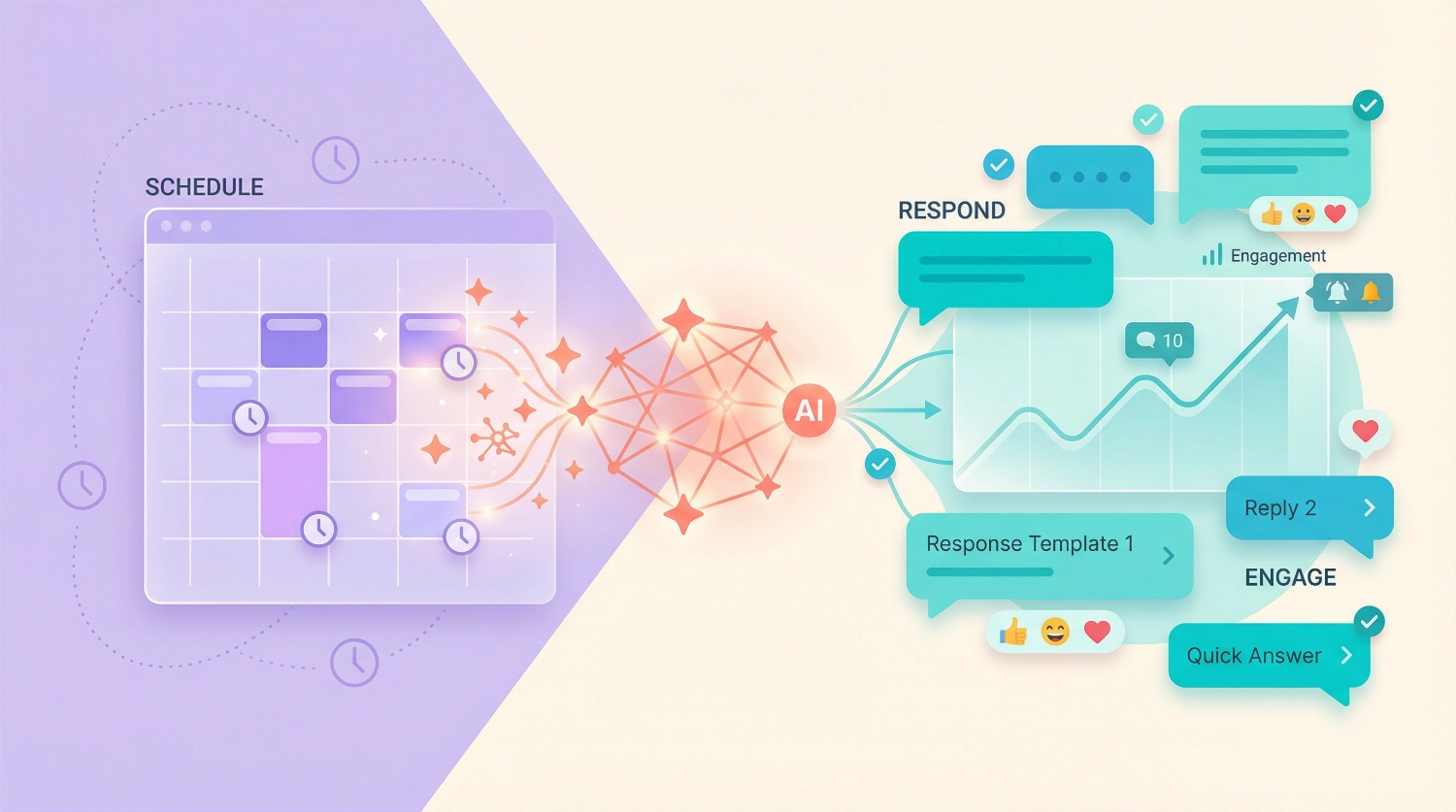
How to Create Engagement Schedules & Response Templates Using AI transforms the overwhelming task of consistent social media management into a streamlined, creative process. We’ve both struggled with the daily grind of staying active online—Alex through building creative campaigns, and Abir through helping everyday users master new tools. Together, we’ve discovered that AI doesn’t just save time; it helps you maintain authentic connections with your audience while freeing your creative energy for what matters most.
If you’ve ever found yourself scrambling to respond to comments, forgetting to check Instagram at peak hours, or using the same generic “Thanks for sharing!” response for the hundredth time, this guide is for you. We’ll walk you through building engagement schedules that match your lifestyle and creating response templates that feel personal, not robotic.
Why Engagement Schedules and Response Templates Matter
Before diving into the how-to, let’s talk about why this matters. Think of engagement as the conversation that keeps your community alive. You can create amazing content, but if you disappear after posting, your audience feels the silence.
We’ve seen creators burn out trying to be everywhere at once. The solution isn’t working harder—it’s working smarter. AI-powered engagement schedules ensure you show up consistently when your audience is most active. Response templates let you reply authentically without starting from scratch every single time.
The magic happens when these two work together. Your schedule tells you when to engage; your templates give you what to say. And here’s the beautiful part: once you set this up, AI can help you maintain and improve it based on what actually works.
What You’ll Need Before Starting
Let’s get practical. Here’s what you need to have ready:
- A clear picture of your platforms: Which social media channels matter most for your goals?
Focus on two or three rather than spreading yourself thin.- Understanding of your audience’s rhythm: When do they scroll, comment, and share?
You might already have hunches about this.- An AI tool for content creation: We recommend ChatGPT, Claude, or Gemini. Pick whichever feels most comfortable to you. The free versions work perfectly for this.
- A scheduling tool: This could be as simple as Google Calendar, or a dedicated platform like Buffer or Hootsuite if you’re already using them.
- 15-30 minutes of focused time: That’s all you need to build your first system. You can always refine it later.
Step 1: Map Your Current Engagement Reality
Before AI can help you improve, you need to understand where you’re starting. We call this the “engagement audit,” but don’t worry—it’s much simpler than it sounds.
Grab a notebook or open a blank document and answer these questions:
- Which platforms do I check most naturally throughout my day?
- When do I currently get the most comments or DMs?
- What types of content get the strongest reactions?
- Which engagement tasks feel like a chore, and which ones energize me?
Be honest here. If you dread checking LinkedIn but love responding to Instagram Stories, that’s valuable information.
Your AI engagement system should work with your natural patterns, not against them.
Here’s a quick exercise we use: Open your phone’s screen time settings and look at when you actually use each social app. Those patterns reveal your natural energy windows. Schedule engagement during times when you’re already likely to be online—AI can remind you to be intentional during those moments.
Step 2: Build Your Weekly Engagement Schedule Using AI
Now comes the fun part. We’re going to create a schedule that feels doable, not draining.
Open your chosen AI tool and use this prompt structure:
I manage [Instagram and TikTok] and want to stay engaged with my audience.
I'm most available [mornings before work and evenings after 7 PM].
My audience seems most active [during lunch breaks and late evening].
Create a weekly engagement schedule that includes: when to check comments, when to respond to DMs, when to engage with other creators' content, and when to analyze engagement patterns.
Make it realistic for someone with a full-time job.
Customize this prompt by filling in your specific details. The AI will generate a framework. Here’s what happened when Alex tried this:
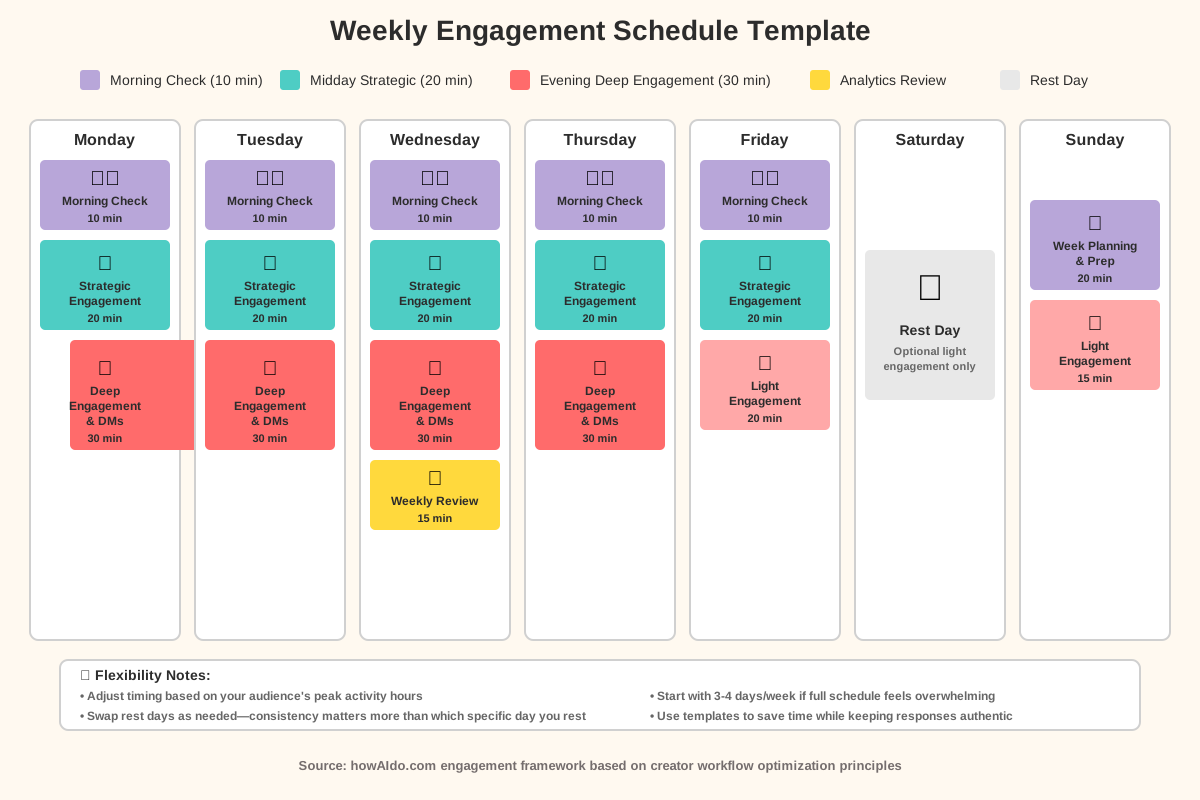
The AI suggested three “engagement windows” daily: a quick 10-minute morning check for overnight comments, a 20-minute midday session for strategic engagement with other creators, and a 30-minute evening block for deeper conversations and DM responses.
That felt manageable. The key is the AI factored in both audience activity and personal availability—something most generic scheduling advice misses.
Now, take the AI’s suggestion and adjust it. Maybe you can’t do mornings. Maybe weekends are your power days. The AI gave you a starting point; you make it yours.
Want to take this implementation further? We’ve created a comprehensive Social Consistency & Engagement Checklist that helps you build consistency and community engagement that grows your audience. It’s designed to work alongside the schedule you’re creating right now, ensuring you don’t miss any critical engagement opportunities.
Step 3: Create Your Core Response Template Categories
This is where response templates save your sanity. The goal isn’t to sound like a bot—it’s to have strong starting points you can personalize in seconds.
We organize templates into five core categories:
Category 1: First-Time Commenter Recognition When someone new joins the conversation, you want to make them feel welcomed without overthinking it.
Prompt this to your AI:
Create 5 warm, genuine response templates for first-time commenters on my [food blog Instagram].
Each should acknowledge their comment, add a personal touch, and encourage continued conversation.
Make them feel distinct from each other, varying length from brief to more detailed.
The AI will generate options like these (we’ll show you how to customize them in the next step).
Category 2: Question Responses People ask questions constantly. Some are common; others are unique.
Category 3: Appreciation and Praise When someone loves your work, you want to respond with matching energy without sounding rehearsed.
Category 4: Constructive Feedback or Criticism These need careful handling. Templates here provide structure while leaving room for empathy.
Category 5: Collaboration or Opportunity Inquiries These responses need to sound professional yet friendly.
Here’s the prompt framework we use for each category:
Generate 3-5 response templates for [category name] on [platform].
Context: I create content about [your niche].
My voice is [describe your tone: friendly, professional, humorous, etc.].
Each template should have a blank space where I can insert specific personal details.
Make them feel authentic, not corporate.
Step 4: Build Platform-Specific Template Sets
Here’s something we learned the hard way: what works on LinkedIn sounds weird on TikTok. Platform-specific response templates respect the culture of each space.
For Instagram: Instagram responses can be warmer and include emojis. People expect personality.
AI Prompt:
Create Instagram comment response templates that feel conversational and include appropriate emoji use.
I create [type of content].
Include templates for: appreciating saves/shares, responding to story replies, and thanking people for tags.
For LinkedIn: Professional but not stiff. Focus on value exchange.
AI Prompt:
Generate professional yet personable LinkedIn response templates for someone in [your industry].
Include responses for: article comments, connection request messages, and post engagement.
Keep them concise and value-focused.
For TikTok: Casual, quick, sometimes playful. Respect the platform’s fast-paced nature.
AI Prompt:
Create short, energetic response templates for TikTok comments.
My content focuses on [topic].
Include responses for: funny comments, question comments, and viral moments when lots of people are saying similar things.
When Abir started using platform-specific templates, response time dropped by half while engagement quality actually improved. The templates matched how each platform’s community expected communication to flow.
Step 5: Personalize Templates with Smart Placeholders
This step transforms generic templates into powerful tools. We use placeholders—spots where you insert specific details in seconds.
Here’s how it works:
Generic template:
Thanks for your comment! I'm glad you enjoyed the post.Smart template with placeholders:
Thanks for commenting, [NAME]! I love that you pointed out [SPECIFIC DETAIL FROM THEIR COMMENT]—that's exactly what I was hoping people would notice.Prompt your AI to build these:
Take this basic response template [paste your template] and rewrite it with clearly marked placeholders for: commenter's name, specific detail from their comment, and relevant detail from my original post.
Format placeholders in [BRACKETS] so they're easy to spot.
The difference is dramatic. The first response says “I saw you.” The second says “I heard you, and here’s why what you said matters.”
Create a simple document (Google Doc, Notion page, or even Notes app) where you keep these templates organized by category and platform. When it’s time to respond, you just copy, fill in the blanks, and go.
Step 6: Set Up AI-Assisted Engagement Reminders
Your beautiful schedule means nothing if you forget to check it. We automate reminders but keep them flexible.
Option 1: Calendar Integration Add your engagement windows to Google Calendar, Apple Calendar, or whatever you use. Set reminders 5 minutes before each window.
Make them specific: Instead of “Social Media Time,” write “Instagram Comment Response Window” or “TikTok Community Engagement.”
Option 2: AI-Powered Daily Briefings This is more advanced but incredibly helpful. Use an AI tool to generate a daily engagement plan.
Morning AI Prompt:
Based on my weekly schedule [paste your schedule], it's [day of the week].
What should I focus on for social engagement today?
Be specific about platform priorities and time allocation.
Some AI tools let you save this as a recurring prompt that adapts based on your inputs.
Option 3: Platform Notification Strategy Turn off random notifications that interrupt your flow. Turn on only the ones aligned with your engagement windows.
Step 7: Create Your Response Template Library
Now we organize everything into an accessible system. Think of this as your engagement command center.
Create a document with this structure:
Section 1: Quick Reference Guide
- Your weekly engagement schedule at a glance
- Peak audience activity times
- Your availability blocks
Section 2: Template Library by Category Each category gets its own section with templates ready to copy-paste.
Section 3: Platform-Specific Considerations Quick reminders about tone, emoji use, and length preferences for each platform.
Section 4: Common Questions & Prepared Answers These aren’t templates—they’re complete responses to frequently asked questions you can use immediately.
Here’s a powerful AI prompt for this section:
Based on my content about [your topic], generate 10 common questions my audience likely asks.
For each question, provide a friendly, detailed response that I can copy and use directly.
Include relevant examples and encourage further conversation.
If you want to supercharge your entire content and engagement workflow, consider downloading our 100+ AI Marketing Prompts collection. It includes proven prompts used by solo entrepreneurs, creators, and agencies—including advanced templates for engagement scenarios we haven’t covered in this guide. Master AI content creation with ready-to-use prompts that save you hours of trial and error.
Step 8: Implement Your System and Track What Works
Theory is useless without action. Let’s put your system to work.
Week 1: Foundation Follow your schedule exactly as designed. Use your templates but personalize every response. Notice what feels natural and what feels forced.
Keep a simple log:
- Which templates did you use most?
- Which engagement windows were easiest to maintain?
- What unexpected interactions happened?
Week 2-3: Refinement Adjust based on reality. Maybe your Tuesday evening window is consistently impossible. Move it or eliminate it.
Update your templates based on what got the best reactions. If one template consistently sparks longer conversations, create variations of it.
Week 4: Optimization By now you have data.
Look at:
- Which days have the highest quality engagement?
- Which response templates led to followers checking out more of your content?
- Which engagement windows felt energizing versus draining?
Use AI to analyze your experience:
I've been following an engagement schedule for a month.
Here's what worked [list successes] and here's what felt difficult [list challenges].
Suggest 3-5 specific adjustments to make this more sustainable and effective.
The AI will spot patterns you might miss and suggest adjustments based on behavioral psychology principles.
Step 9: Build Scenario-Based Response Workflows
Sometimes engagement isn’t straightforward. Someone asks a complex question, leaves critical feedback, or shares something deeply personal. Pre-built workflows help you navigate these moments with care.
Workflow 1:
Complex Question You Need to Research Template:
This is such a great question, [NAME]!
I want to give you a thoughtful answer.
Let me look into [specific aspect] and get back to you by [timeframe].
In the meantime, have you checked out [related resource]?
This buys you time while showing you value their question.
Workflow 2:
Negative Feedback Template:
I really appreciate you sharing this, [NAME].
You're right that [acknowledge valid point].
Here's what I'm doing about it: [action].
Would love to hear if you have specific suggestions—your perspective helps me improve.
This validates their concern, shows accountability, and invites collaboration instead of defensiveness.
Workflow 3:
Opportunity Inquiry Template:
Thanks for reaching out, [NAME]!
[Specific thing about their profile/work that caught your attention].
I'm definitely interested in learning more.
Here's my email: [email].
Send me details about [what they mentioned] and let's explore if there's a good fit.
Professional, specific, and moves the conversation off public comments into proper channels.
Create these with AI:
Generate response workflow templates for [scenario type] that include: acknowledgment, bridge statement, action or solution, and invitation to continue conversation.
Make them feel empathetic and solution-focused.
Step 10: Maintain and Evolve Your System
The final step is ongoing. Your audience evolves. Platforms change. Your content shifts. Your engagement system should adapt.
Monthly System Review Set a calendar reminder for the last Friday of each month. Spend 20 minutes reviewing:
- Template performance: Which ones do you use most? Which gather dust?
- Schedule effectiveness: Are your engagement windows still aligned with audience activity?
- New patterns: What new types of comments or questions are appearing?
Use AI for monthly optimization:
Based on these patterns from the last month [describe what you've noticed], suggest updates to my engagement schedule and 2-3 new response templates to address emerging needs.Seasonal Adjustments Some creators see dramatic shifts in audience behavior during holidays, summer, or specific industry seasons. Don’t fight it—adjust your schedule.
AI-Powered Engagement Insights Every few months, analyze your engagement data more deeply:
I've been tracking engagement for [timeframe].
Here's what I've noticed: [list top 3-5 observations about response rates, conversation quality, time investment].
What patterns do you see, and what should I test next?
The AI might suggest experiments like responding to comments within the first hour versus waiting until evening, or trying more question-based templates to increase conversation length.
Common Mistakes to Avoid
We’ve made these mistakes so you don’t have to:
Mistake 1:
Over-Scheduling Your engagement schedule should fit your life, not consume it.
If you’re scheduling more than 60–90 minutes of daily engagement across all platforms, you’re probably doing too much.
Mistake 2:
Templates That Sound Like Templates If someone reading your response can tell it’s from a template, you’ve failed.
The placeholders exist precisely so you can personalize. Take the extra 10 seconds.
Mistake 3:
Ignoring Your Energy Levels Scheduling engagement when you’re exhausted leads to mediocre responses.
Be honest about when you have genuine energy for community connection.
Mistake 4:
Perfectionism Some days you’ll skip your schedule. Some responses won’t be your best work. That’s being human. Always prioritize consistency over perfection.
Mistake 5:
Forgetting to Celebrate Wins When a template sparks an amazing conversation, or when you stick to your schedule for a month straight, acknowledge it. This positive reinforcement keeps the system sustainable.
Advanced Tips for Power Users
Once you’ve mastered the basics, try these advanced techniques:
Dynamic Template Rotation
Don’t use the same template for the same type of comment too often. Create 3-4 variations and rotate them. Your frequent commenters will notice and appreciate the variety.
Engagement Batch Processing
Instead of responding to comments as they arrive (which fragments your attention), batch similar types of responses together. Answer all questions, then all appreciation comments, then DMs. You’ll move faster and maintain better quality.
AI-Assisted Comment Sorting
If you get dozens or hundreds of comments, use AI to prioritize:Here are today's comments [paste them]. Which 5-10 should I prioritize responding to based on: question depth, new follower engagement, and conversation potential?
Seasonal Template Sets
Create holiday-specific or event-specific templates. During product launches, conference seasons, or relevant holidays, you’ll have ready responses that feel timely.
Cross-Platform Conversation Tracking
When someone engages across multiple platforms, acknowledge it:Hey [NAME]! Loved your Instagram comment earlier, and now seeing you here on LinkedIn—appreciate you following along!This recognition strengthens connection.
Frequently Asked Questions
Your Next Steps: From Reading to Doing
You’ve made it through the complete system. Now comes the exciting part—implementation.
Here’s your action plan for the next 7 days:
Today: Spend 10 minutes mapping your current engagement reality using the questions from Step 1. Be brutally honest.
Day 2: Use AI to create your weekly engagement schedule. Don’t overthink it—start with something manageable and adjust later.
Day 3: Generate your first set of response templates for your top two comment categories. Test them on recent comments to see how they feel.
Day 4: Set up your template library document. Organization now saves chaos later.
Day 5: Add engagement windows to your calendar with specific reminders.
Days 6-7: Follow your schedule for the weekend. Notice what works and what feels forced.
Following Monday: Adjust based on your weekend experience and commit to the system for at least two full weeks.
Remember, the goal isn’t perfection—it’s sustainable community building. Your audience wants to connect with you, not a social media robot. These tools and templates simply make it possible to show up consistently without burning out.
The most powerful thing about combining AI engagement schedules with response templates is this: you reclaim time and mental energy while actually deepening relationships. That’s not a tradeoff; that’s transformation.
Start small. Be patient with yourself. Adjust based on reality, not ideals. And most importantly, remember why you’re doing this—because you have something valuable to share, and your community deserves your consistent, authentic presence.
We’re cheering for you. Now go build your system and watch your engagement transform from draining obligation to energizing connection.
About the Authors
This article was collaboratively written by Alex Rivera and Abir Benali for howAIdo.com.
Alex Rivera (Main Author) is a creative technologist who helps non-technical users unlock the creative potential of AI tools. With a background in digital content creation and community building, Alex specializes in making complex technology feel accessible and exciting. Alex believes AI should amplify human creativity, not replace it, and loves sharing practical systems that help creators reclaim their time while deepening audience connections.
Abir Benali (Co-Author) is a friendly technology writer passionate about explaining AI tools to everyday users. Abir’s strength lies in breaking down technical processes into clear, actionable steps that anyone can follow. With experience helping diverse audiences adopt new technologies confidently, Abir focuses on practical implementation over theory, ensuring readers can immediately apply what they learn.
Together, we combine creative innovation with clear, step-by-step guidance to help you master AI-powered engagement strategies that actually work in real life.