How to Create Prompt Variations & Prompt Chaining

How to Create Prompt Variations & Prompt Chaining isn’t just about asking AI better questions—it’s about building a systematic approach that transforms inconsistent results into reliable, high-quality outputs. Whether you’re generating marketing copy, analyzing data, or creating content, mastering these techniques gives you control over AI’s creative potential while building reusable templates your entire team can leverage.
We’ve spent countless hours testing different prompting approaches, and what we’ve learned is that the difference between frustrating AI interactions and genuinely useful ones often comes down to these two skills: creating thoughtful variations to find what works and chaining prompts together to handle complex tasks that single prompts can’t solve.
What Are Prompt Variations and Prompt Chaining?
Before we dive into the how-to, let’s get clear on what we’re actually talking about.
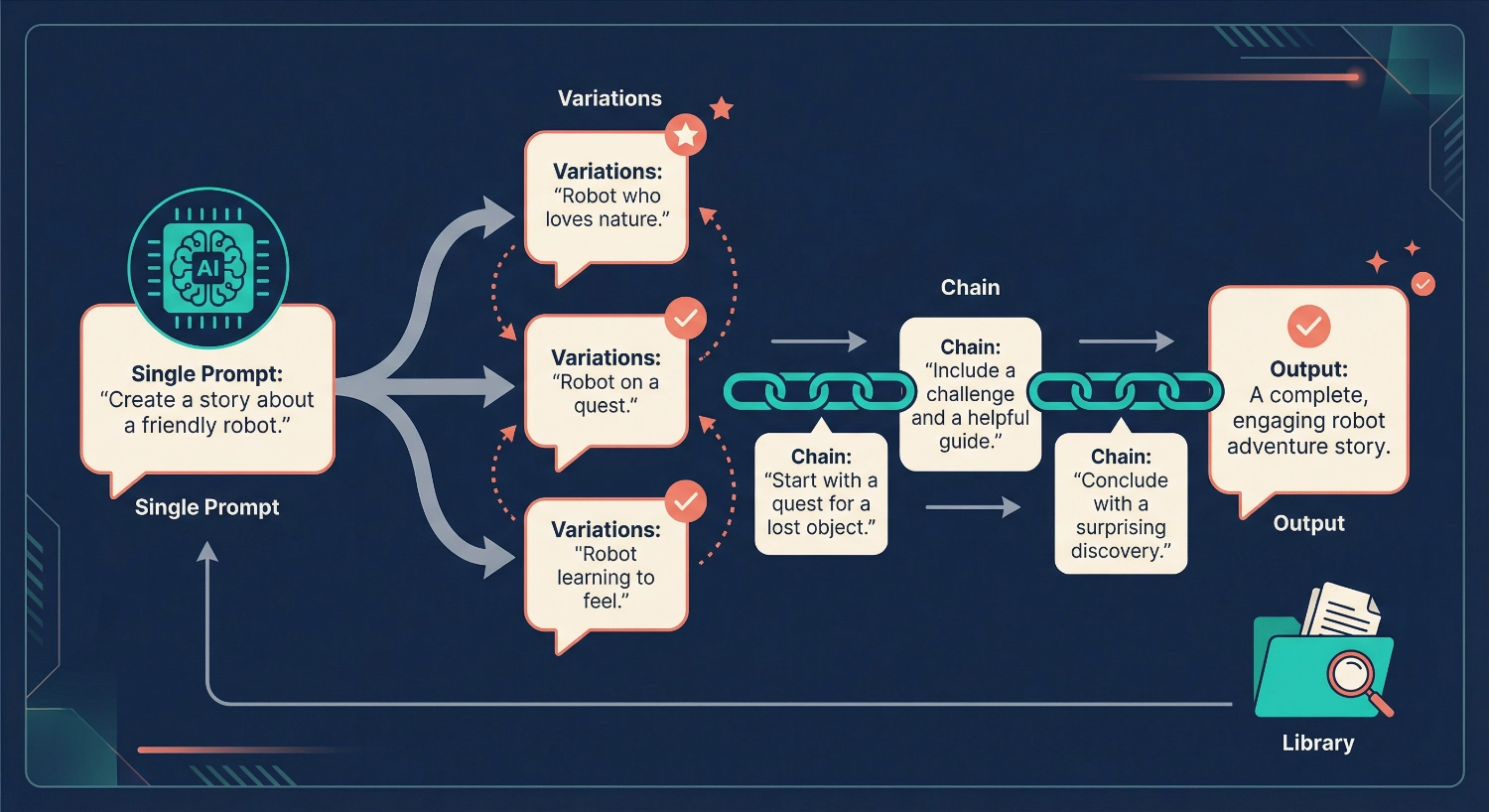
Prompt variations mean creating multiple versions of the same basic prompt, each with slight adjustments to wording, structure, tone, or specificity. Think of it like trying different keys to see which one unlocks the best response. You might ask the same question five different ways, and one version will consistently produce superior results.
Prompt chaining is the process of breaking down complex tasks into smaller, sequential prompts where each output feeds into the next input. Instead of asking AI to “write a complete marketing campaign” (which often produces generic results), you chain prompts: first researching your audience, then identifying pain points, then crafting messaging, then writing copy. Each step builds on the previous output.
The real magic happens when you combine both techniques—testing variations at each step of your chain to optimize the entire workflow.
Why This Approach Changes Everything
We’re not exaggerating when we say this methodology has transformed how we work with AI. Here’s what happens when you implement these techniques:
Consistency replaces randomness. Instead of hoping AI gives you something useful, you’ll have proven prompts that deliver reliable results every time.
You discover what actually works. Testing variations reveals patterns. Maybe you’ll find that starting with “You are an expert in…” dramatically improves outputs. Alternatively, you may discover that providing three examples is more effective than giving just one. These insights compound over time.
Complex projects become manageable. Prompt chaining breaks down intimidating tasks into achievable steps. That research report that seemed impossible? It’s just a chain of eight focused prompts.
Your team shares knowledge. When you build a prompt library, everyone benefits from the best techniques. New team members ramp up faster. Quality becomes consistent across projects.
Step-by-Step: Creating Effective Prompt Variations
Let’s walk through the process of developing and testing prompt variations. This is where experimentation meets methodology.
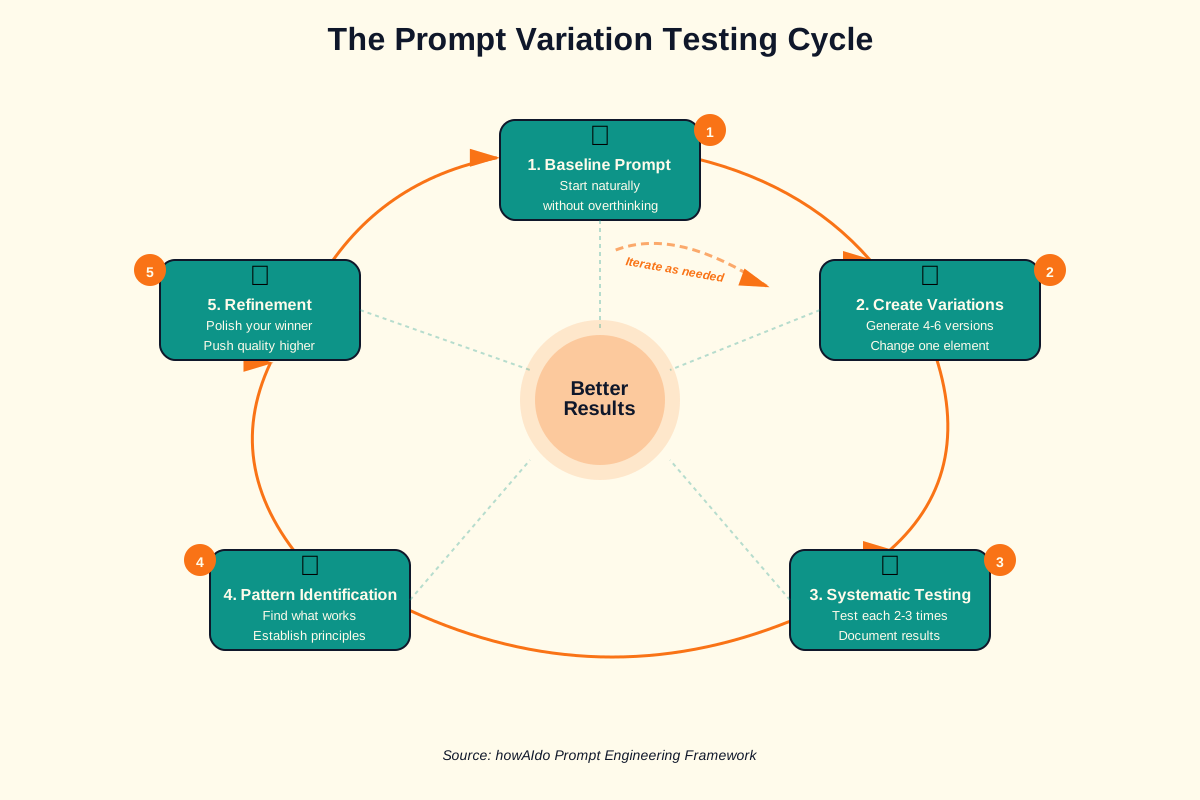
Step 1: Start With Your Baseline Prompt
Write your first attempt at the prompt naturally, exactly as you would normally ask it. Don’t overthink this—you’re establishing a starting point to improve upon.
Example baseline: “Write a social media post about our new product launch”
This is too vague to produce great results, but that’s okay. We’re going to systematically improve it.
Step 2: Create Variations Across Key Dimensions
Now generate 4-6 variations by changing one element at a time. Focus on these dimensions:
Specificity Level:
- Variation A (vague): “Write a social media post about our new product”
- Variation B (specific): “Write a 280-character Twitter post announcing our new project management tool, highlighting the automated workflow feature”
- Variation C (very specific): “Write a Twitter post for B2B tech professionals announcing our new project management tool. Focus on how automated workflows save 10 hours per week. Include a question to drive engagement. Tone: professional but conversational.”
Role Assignment:
- Variation D: “You are a social media marketing expert with 10 years of experience in B2B tech. Write a Twitter post…”
- Variation E: “You are a busy product manager who understands customer pain points deeply. Write a Twitter post…”
Format Instructions:
- Variation F: “Write a Twitter post… Structure: Hook (question), Benefit (time saved), Call-to-action (link to demo)”
- Variation G: “Write three different Twitter posts… Label each as Option 1, Option 2, Option 3”
Step 3: Test Each Variation Systematically
Here’s the crucial part: test each variation under the same conditions and document results. Create a simple tracking system:
Testing format:
- Variation ID
- Full prompt text
- Output received
- Quality rating (1-5)
- Notes on what worked/didn’t work
Run each variation 2-3 times because AI outputs vary. You’re looking for which approach consistently produces better results.
Step 4: Identify Winning Patterns
After testing, look for patterns in your highest-rated outputs:
- Do prompts with role assignments perform better?
- Does providing examples improve quality?
- Which tone instructions work best?
- What level of specificity hits the sweet spot?
These patterns become your prompting principles—rules you’ll apply to future prompts.
Step 5: Refine Your Winner
Take your best-performing variation and refine it further. Maybe it scores 4/5 consistently. Can you push it to 4.5/5?
Try adjusting:
- Word choice (is “explain” clearer than “describe”?)
- Additional context (does mentioning the target platform help?)
- Constraints (does setting a word count improve focus?)
observeIf you’re serious about mastering this testing process, we’ve created a structured resource to help you track variations systematically. Our Prompt Testing & Optimization Checklist walks you through testing, refining, and optimizing prompts for consistently better AI outputs. It’s the exact framework we use when developing new prompts for our team.
Step-by-Step: Building Effective Prompt Chains
Now let’s move to prompt chaining—the technique that handles complex tasks AI struggles with in single prompts.
Step 1: Map Out Your Desired Outcome
Start by clearly defining what you want to achieve. Then work backwards, identifying each discrete step needed to get there.
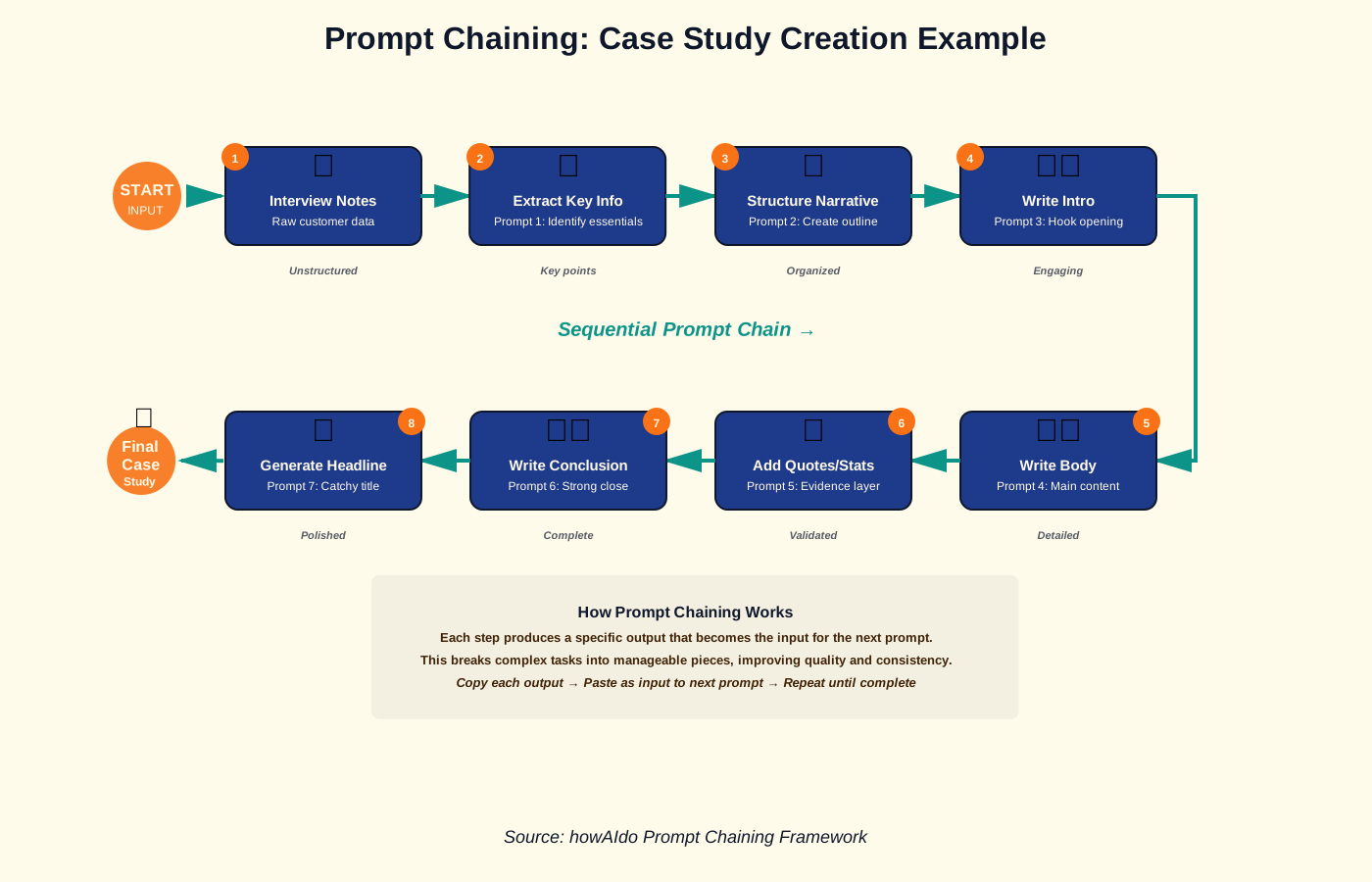
Example task: Create a customer case study
Chain map:
- Extract key information from customer interview notes
- Identify the main challenge and solution
- Structure the narrative arc
- Write the introduction
- Write the body sections
- Create quotes and statistics section
- Write the conclusion with a call to action
- Generate a compelling headline
Notice each step produces a specific output that feeds into the next step.
Step 2: Write Prompts for Each Chain Link
For each step in your map, write a focused prompt. The key is making each prompt self-contained yet designed to accept input from the previous step.
Prompt 1 (Extract information): “Review these customer interview notes and extract: 1) The main business challenge they faced, 2) What they tried before our solution, 3) The specific results they achieved, 4) One memorable quote. Format as a bulleted list.”
Prompt 2 (Structure narrative): “Based on these key points: [paste output from Prompt 1], create a case study outline using the challenge-solution-results format. Include suggested section headings.”
Prompt 3 (Write introduction): “Using this outline [paste outline from Prompt 2], write a compelling 150-word introduction for the case study. Hook: surprising statistic or bold statement about the challenge.”
You see the pattern—each prompt builds on the previous output.
Step 3: Test the Chain End-to-End
Run through your entire chain with real content. Don’t skip this step! You’ll discover:
- Which links produce weak outputs that derail the chain
- Where you need to provide more context
- Which steps can be combined
- Where the chain breaks down entirely
We usually find that our first chain design needs adjustment after this test run.
Step 4: Optimize Weak Links
Identify which prompts in your chain produced unsatisfactory results. Apply the variation testing method to those specific prompts.
Maybe Prompt 4 consistently generates generic copy. Create 3-4 variations of that prompt, test them, and replace the weak link with the winner.
Step 5: Document Your Chain Template
Once your chain reliably produces satisfactory results, document it clearly for reuse:
Template format:
- Chain name: “Customer Case Study Generator”
- Purpose: “Transform interview notes into publication-ready case study”
- Total prompts: 8
- For each prompt:
- Prompt number
- Objective
- Full prompt text with [VARIABLE] placeholders
- Example input
- Expected output format
- Quality checks
This documentation is what makes prompt chaining scalable across your team.
Building Your Team Prompt Template Library
Here’s where individual expertise becomes organizational knowledge. A prompt template library ensures everyone on your team benefits from the best-performing prompts and chains.
Step 1: Choose Your Library System
You don’t need fancy software. Pick a system your team will actually use:
- Shared document (Google Docs, Notion): Simple, searchable, easy to update
- Spreadsheet (Google Sheets, Airtable): Great for filtering and categorization
- Knowledge base (Confluence, Wiki): Best for larger teams with many templates
We’ve found that simpler is usually better. A well-organized Google Doc beats an elaborate system nobody maintains.
Step 2: Establish Your Template Structure
Create a consistent format for every prompt template in your library:
Template components:
- Name: Clear, searchable title
- Category: Type of task (content creation, analysis, research, etc.)
- Purpose: One-sentence description of what it does
- Best For: Use cases and scenarios
- Prompt Text: Full prompt with [PLACEHOLDERS] for variables
- Variables: List of what needs to be customized
- Example: Filled-in version with sample output
- Tips: What makes this prompt work well
- Version: Track updates (v1.0, v1.1, etc.)
- Author: Who created/refined it
- Last Tested: Date of most recent use
Step 3: Organize by Use Case, Not by Tool
Don’t organize your library by AI tool (ChatGPT prompts, Claude prompts, etc.). Most prompts work across platforms with minimal adjustment.
Instead, organize by what people are trying to accomplish:
- Content Creation → Blog posts, social media, emails and video scripts
- Analysis → Data interpretation, customer feedback, competitive research
- Communication → Meeting summaries, reports, presentations
- Strategy → Planning, brainstorming, problem-solving
- Workflows → Multi-step prompt chains
This makes your library actually useful when someone needs to complete a specific task.
Step 4: Implement a Contribution Process
Your library only stays valuable if people contribute their best prompts. Create a simple submission process:
Simple submission form:
- Submit your prompt using the standard template format
- Include at least one example output
- Note any edge cases or limitations
- Tag 2-3 people who might benefit from this prompt
Consider a monthly “prompt showcase” where team members share their newest additions. This keeps the library alive and encourages contribution.
Step 5: Maintain and Prune Regularly
Libraries die when they become cluttered with outdated, redundant, or low-quality templates. Assign someone (or rotate responsibility) to:
- Review new submissions monthly
- Test older prompts periodically (AI capabilities change!)
- Merge duplicate or very similar prompts
- Archive prompts that no longer perform well
- Update documentation when patterns change
Think of your library as a living document that evolves with your team’s needs.
If you’re looking to jumpstart your prompt library with proven, high-quality templates, we’ve compiled exactly that. Our ebook 100+ AI Marketing Prompts Ready to Copy and Use provides immediately implementable prompts and templates used by solo entrepreneurs, creators, and agencies. These aren’t generic prompts—they’re battle-tested templates you can add directly to your library and customize for your specific needs.
Common Mistakes That Undermine Your Results
After helping dozens of teams implement these techniques, we’ve seen the same mistakes repeatedly. Learn from our failures:
Mistake 1: Testing Too Many Variables at Once
When you change three things in a prompt variation (tone, format, and length), you can’t tell which change drove the improved results. Test one variable at a time.
Wrong approach:
- Baseline: “Write a blog post”
- Variation: “You are an SEO expert. Write a 500-word blog post in a friendly tone about productivity hacks for remote workers”
Right approach:
- Baseline: “Write a blog post about productivity hacks for remote workers”
- Variation A: “You are an SEO expert. Write a blog post about productivity hacks for remote workers”
- Variation B: “Write a 500-word blog post about productivity hacks for remote workers”
- Variation C: “Write a blog post in a friendly tone about productivity hacks for remote workers”
Change one thing. Measure the impact. Then change the next thing.
Mistake 2: Not Capturing Why Prompts Fail
When a prompt produces poor output, we instinctively move on and try something else. But understanding why it failed teaches you more than understanding why something succeeded.
Document failures with the same care you document successes:
- What made this output poor?
- Was it too vague? Too specific?
- Did the AI misunderstand the task?
- Did it lack necessary context?
These insights prevent you from making the same mistake in different prompts.
Mistake 3: Skipping the Chain Test Run
You’ve mapped your eight-step prompt chain. Each individual prompt looks good. You’re tempted to add it straight to your library without testing end-to-end.
Don’t do this!
Running the full chain reveals issues you won’t see when evaluating prompts in isolation. Maybe Prompt 4 produces output that Prompt 5 can’t work with. Maybe the chain takes too long to be practical. Maybe Step 6 is unnecessary.
Always test the complete chain before considering it “done.”
Mistake 4: Creating Overly Complex Chains
We’ve seen prompt chains with 15+ steps. Sometimes this complexity is necessary, but usually it’s a sign that the chain wasn’t designed thoughtfully.
If your chain has more than 10 steps, ask yourself:
- Can any steps be combined?
- Is each step truly necessary?
- Could a different approach simplify this?
Simpler chains are easier to maintain, faster to run, and more likely to be used by your team.
Mistake 5: Treating Prompts as Set-and-Forget
AI capabilities evolve rapidly. A prompt that worked perfectly six months ago might now be outdated because the underlying model improved or changed.
Schedule quarterly reviews of your most-used prompts. Test them again. Are they still performing well? Could they be improved given new AI capabilities?
Frequently Asked Questions
Your Next Steps: From Reading to Doing
Knowledge without action is just information. Here’s how to start implementing these techniques today:
This week, pick one repetitive task you currently handle with AI. Maybe it’s writing email responses, creating social media posts, or summarizing documents. That’s your testing ground.
Create three variations of the prompt you normally use. Change one element in each variation—add a role, adjust specificity, or modify the format. Test each variation three times and note which produces the best results consistently.
If the task is complex, map out a potential prompt chain. Don’t worry about perfecting it—just identify 3-5 logical steps that break the task into smaller pieces. Test your chain with real content and see what happens.
Document what you learn. Start a simple document tracking your experiments. Write down what worked, what failed, and why you think each result occurred. This becomes the foundation of your personal prompt library.
The beautiful thing about prompt engineering is that you become better every time you practice. Your fifth prompt will be better than your first. Your tenth chain will be more elegant than your second. Each experiment teaches you something new about how AI thinks and how to communicate with it effectively.
We didn’t become effective prompt engineers by reading about techniques—we became effective by testing hundreds of variations, building dozens of chains, and learning from countless failures. The process we’ve shared here is precisely what we use every day, refined through real projects and real deadlines.
Start small. Experiment freely. Document thoroughly. Share generously.
Your future self (and your team) will thank you for building these skills now.
About the Authors
This article was written as a collaboration between Alex Rivera (Main Author) and Abir Benali (Co-Author).
Alex Rivera is a creative technologist passionate about making AI accessible to everyone. With a background in design and development, Alex specializes in helping non-technical users unlock AI’s creative potential through practical, hands-on approaches. Alex believes AI should feel like a fun, empowering tool—not an intimidating technology.
Abir Benali is a friendly technology writer dedicated to explaining AI tools in clear, jargon-free language. Abir’s mission is to demystify artificial intelligence for everyday users, providing step-by-step guidance that makes advanced technology approachable and actionable. When complex concepts meet simple explanations, that’s where Abir thrives.
Together, we bring creative inspiration and practical clarity to help you master AI tools without needing a technical background.