How to Build Welcome & Educational Email Sequences Using AI

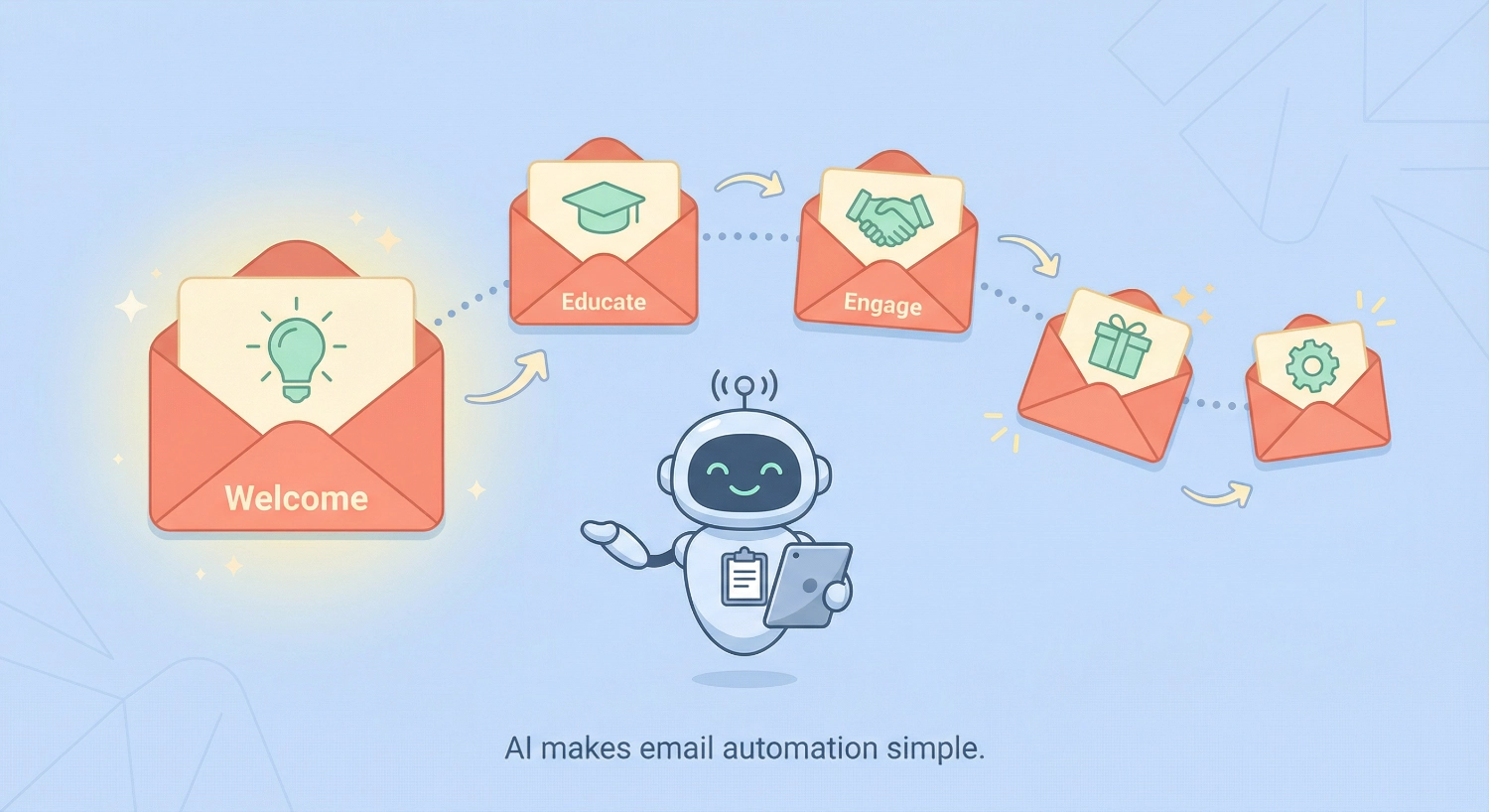
How to Build Welcome & Educational Email Sequences Using AI transforms what used to take weeks of writing and testing into a streamlined process you can complete in a single afternoon. We’ve both struggled with the same challenge: staring at a blank screen, wondering what to say to new subscribers, how often to email them, and whether we’re being helpful or annoying.
The good news? AI changes everything.
Why Your Email Sequence Makes or Breaks Your Relationship
When someone joins your list, they’re at their most engaged. They want to hear from you. Yet most creators and entrepreneurs waste this golden opportunity with a single “thanks for subscribing” email—or worse, radio silence. A well-crafted email sequence nurtures that initial enthusiasm, builds trust, and naturally guides people toward your offers without feeling pushy.
We’re Alex and Abir, and we’ve helped hundreds of people build their first automated email sequences. Alex brings a creative approach to prompt engineering, while Abir focuses on making technical processes simple enough for anyone to follow.
Together, we’ll show you exactly how to use AI tools to create sequences that sound human, deliver value, and actually convert.
By the end of this guide, you’ll have a clear roadmap for building welcome emails, educational sequences, and even re-engagement campaigns using AI assistance. No technical jargon. No overwhelming complexity. Just practical steps you can implement today.
What You’ll Need Before You Start
Before we dive into building your sequences, let’s make sure you have everything ready. This preparation phase takes about 15 minutes but saves hours of frustration later.
Essential Tools:
- An email marketing platform (we’ll focus on beginner-friendly options like MailerLite, ConvertKit, Mailchimp, or your own mail server)
- Access to an AI writing assistant (ChatGPT, Claude, or similar)
- A clear understanding of what you’re selling or promoting
- Basic information about your ideal subscriber
Nice to Have:
- A spreadsheet to organize your sequence plan
- Examples of emails you’ve loved receiving (for inspiration)
- A simple brand voice guide (even just 3-5 adjectives describing your tone)
The beauty of using AI for email marketing is that you don’t need to be a copywriter. You just need to be clear about what you want to achieve and willing to refine AI outputs until they sound like you.
Step 1: Define Your Sequence Goals and Subscriber Journey
Start by mapping out what you want your subscribers to experience and learn. This becomes your roadmap for everything else.
We like to use what we call the “conversation method.” Imagine you’re having coffee with your ideal subscriber. What would you tell them first? What questions would they ask? What would make them trust you enough to eventually buy from you?
Create a simple journey map:
- Day 1 (Welcome): Who are you? What will they receive? Set expectations
- Day 2-3 (Value): Deliver your best free content related to your main topic
- Day 4-5 (Education): Teach something actionable they can implement immediately
- Day 6-7 (Social Proof): Share success stories or case studies
- Day 8-10 (Soft Offer): Introduce your product/service naturally
- Day 11+ (Ongoing): Continue providing value with occasional offers
Write this down in whatever format works for you. We use a simple Google Doc with bullets. The key is having clarity before you ask AI to help you write.
Pro tip from Alex: Consider your sequence to be a mini-course delivered via email. Each message should have one clear teaching point or action item. When you frame it this way, writing becomes much easier because you’re educating, not selling.
Need a structured framework to organize your entire email funnel strategy? Our Email Funnel Foundation Checklist walks you through every component of a complete email system, from welcome sequences to conversion tracking. It’s designed to help you build a funnel that turns subscribers into paying customers without missing any critical steps.
Step 2: Craft Your Welcome Email Using AI Prompts
Your welcome email is your handshake. It sets the tone for everything that follows. Let’s use AI to create one that feels warm and personal.
The Master Prompt Template:
I'm creating a welcome email for new subscribers to [your business/blog name].
My target audience is [describe your ideal subscriber in detail].
My brand voice is [3-5 adjectives describing your tone].

The email should:
- Thank them for subscribing
- Explain what they'll receive and how often
- Deliver the lead magnet/freebie they signed up for
- Include one clear call-to-action: [specify what you want them to do]
- Be approximately [word count] words
- Sound conversational and friendly, not corporate

Write this welcome email. Include a compelling subject line.
Example in action:
I'm creating a welcome email for new subscribers to HowAIDo, a blog teaching non-technical people how to use AI.
My target audience is small business owners, freelancers, and creators who feel intimidated by AI but want to use it to save time.
My brand voice is friendly, encouraging, clear, practical, and never condescending.

The email should:
- Thank them for subscribing
- Explain they'll receive weekly AI tips and tutorials
- Link to a beginner's guide to ChatGPT (my lead magnet)
- Include one clear call-to-action: reply and tell me their biggest AI challenge
- Be approximately 200 words
- Sound conversational and friendly, not corporate

Write this welcome email. Include a compelling subject line.
The AI will generate a draft. Your job is to review it and add personal touches. We always:
- Replace generic phrases with specific ones
- Add a personal detail or story in the opening
- Check that it sounds like something we’d actually say
- Test the subject line for clarity and curiosity
Common mistakes to avoid:
- Overwhelming new subscribers with too much information
- Making promises you can’t keep about email frequency
- Forgetting to actually deliver what they signed up for
- Ending without a clear next step
Abir’s simplification tip: If you’re struggling with the AI output, ask it to “make this simpler and shorter” or “rewrite this in a more conversational tone.” Occasionally the first draft is too formal.
Step 3: Build Your Educational Email Series
Now we’re moving into the meat of your sequence: the emails that build trust and establish your expertise. These are where AI-powered email automation truly shines because you can create multiple high-quality emails quickly.
The 5-Email Educational Framework:
Email 2: Quick Win (2-3 days after welcome) Give them something they can implement in 10 minutes or less. This builds confidence and proves you deliver real value.
Email 3: Deep Dive (4-5 days after welcome) Teach one concept thoroughly. This positions you as an expert who doesn’t just scratch the surface.
Email 4: Common Mistakes (6-7 days after welcome) Share what NOT to do. People love learning from others’ mistakes without making them personally.
Email 5: Case Study/Story (8-9 days after welcome) Show real results. This builds credibility and demonstrates what’s possible.
Email 6: Resource Round-Up (10-11 days after welcome) Provide a curated list of your best free resources. This section is where you can naturally introduce paid offerings.
AI Prompt for Educational Emails:
I need to write email #[number] in my educational sequence about [your topic].

Context about my audience: [brief description]
Main teaching point for this email: [one clear concept]
Desired outcome: After reading, subscribers should be able to [specific action]

Write an email that:
- Opens with a relatable scenario or question
- Explains [the concept] in simple terms
- Provides 2-3 actionable steps
- Includes one real-world example
- Ends with encouragement to implement what they learned
- Is approximately 300-400 words
- Uses short paragraphs for readability

Subject line should create curiosity without being clickbait.
Let’s see this in action for Email 2 (Quick Win):
I need to write email #2 in my educational sequence about using AI for content creation.

Context about my audience: Small business owners with limited time who want to use AI to create social media content faster.

Main teaching point for this email: How to turn one blog post into 5 social media posts using ChatGPT in under 10 minutes.

Desired outcome: After reading, subscribers should be able to use a simple prompt to repurpose their existing content.

Write an email that:
- Opens with the frustration of needing daily social content
- Explains the repurposing concept in simple terms
- Provides the exact 3-step process with the prompt to use
- Includes one example showing before (blog excerpt) and after (social posts)
- Ends with encouragement to try it with their own content today
- Is approximately 300-400 words
- Uses short paragraphs for readability

Subject line should create curiosity without being clickbait.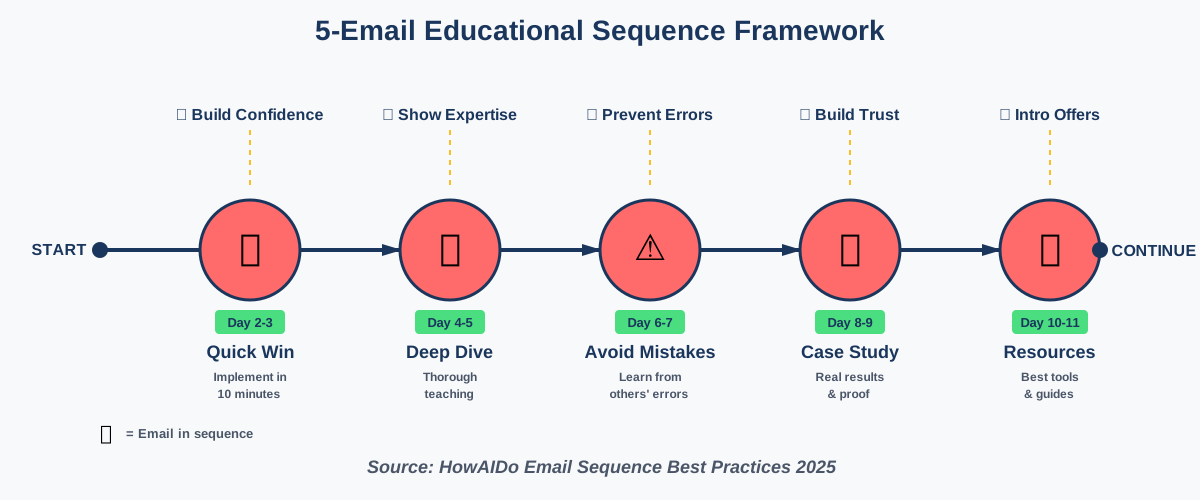
Alex’s creative tip: After AI generates your email, read it out loud. If you stumble over phrases or it doesn’t sound like something you’d say to a friend, edit it. AI gives you the structure and saves time, but your personality makes it memorable.
Step 4: Design Your Sales Sequence with AI Assistance
Here’s where many creators get uncomfortable. But selling via email doesn’t have to feel pushy when you’ve already delivered massive value. Think of your sales emails as simply letting people know how they can go deeper with you.
The Soft-Sell Framework:
Most people make the mistake of going from pure education straight to “BUY NOW!” That creates whiplash. Instead, we use a bridge approach.
Email 7: The Transition Email (12-13 days after welcome) Acknowledging the free content was just scratching the surface. Hint that there’s a deeper level available for those who want to go further.
AI Prompt for Transition Email:
I'm writing a transition email that bridges from free educational content to introducing my paid [product/service].

My offer is: [clear description of what you sell]
Price point: [if relevant]
It helps people: [specific outcome]

The email should:
- Acknowledge what we've covered so far
- Gently point out limitations of doing this alone or with just free resources
- Introduce my paid offering as the natural next step for serious learners
- Be warm and consultative, not pushy
- Around 250 words
- End with a soft call-to-action to learn more (not buy immediately)

Subject line should be curiosity-based and non-salesy.
Email 8-10: The Value Stack These three emails each highlight a different benefit or feature of your offer, always tying back to the outcomes your subscribers care about.
Pro framework for each email:
- Open with a specific problem or frustration
- Show how your offer solves that particular issue
- Include social proof (testimonial, result, case study)
- Provide a clear, low-pressure call to action
- Remind them of any bonuses or time-sensitive elements
AI Prompt for Value Stack Emails:
I'm writing email #[8/9/10] in a series introducing my [product/service].

Focus for this email: [choose one: time-saving benefit / money-saving benefit / skill development / community access / specific feature]

Include:
- Opening story or scenario that illustrates the pain point
- How [your offer] specifically addresses this
- One short testimonial or result example (I'll insert real data)
- Call-to-action to [schedule call / view sales page / start free trial]
- Approximately 300 words

Keep the tone helpful and advisory, not desperate or aggressive.
Subject line should focus on the benefit, not the product.
Abir’s clarity note: We always ask AI to generate multiple subject line options and then test them. The best subject lines for sales emails focus on the outcome or transformation, not the purchase. “How Sarah Cut Her Writing Time in Half” beats “Our Course is On Sale.”
Step 5: Create Re-Engagement and Win-Back Sequences
Not everyone will engage with every email, and some subscribers will go quiet. That’s normal. But before you give up on them, use AI to create re-engagement campaigns that bring people back.
The Re-Engagement Trigger:
Most email platforms can tag subscribers who haven’t opened emails in 30-60 days. Once tagged, they enter a special sequence.
The 3-Email Win-Back Framework:
Re-Engagement Email 1:
The Check-In should be simple, honest, and human. Ask if they still want to hear from you.
AI Prompt:
Write a re-engagement email for subscribers who haven't opened my emails in 60 days.

Tone: Friendly, understanding, no guilt-tripping
Length: 150-200 words maximum

The email should:
- Acknowledge they've been quiet
- Ask if our content is still relevant to them
- Give them an easy way to stay (click any link) or unsubscribe
- Include a brief reminder of what we cover
- Feel personal, not automated

Subject line options: Generate 3 subject lines that are direct and curiosity-driven.
Re-Engagement Email 2:
The Best-Of If they’re still subscribed after Email 1, send them your absolute best content—your greatest hits. This reminds them why they joined.
Re-Engagement Email 3:
The Last Chance Final email. Clear choice: stay or go. Make it easy either way.
These sequences matter because keeping an engaged list is far more valuable than having a large inactive list. Plus, most email platforms charge based on subscriber count, so there’s a financial incentive to maintain a healthy list.
Step 6: Set Up Your Automation and Test Everything
Now comes the technical part, but we’ll keep it simple. Every email platform works slightly differently, but the core concept is the same.
Basic Automation Setup:
- Create Your Emails: Copy your AI-generated content into your email platform
- Build the Sequence: Arrange them in order with appropriate delays between each
- Set Your Trigger: Usually “subscribes to list” or “receives lead magnet”
- Add Tags: Use tags to track which sequence people are in
- Set Exit Conditions: Decide what moves someone out of the sequence (purchases, unsubscribes, etc.)
Testing Protocol (Critical!):
We can’t stress this enough:
Test your sequence before launching it to real subscribers.
- Subscribe using a test email address
- Verify each email arrives with correct timing
- Click every link to ensure they work
- Check formatting on mobile devices
- Read through the complete sequence as if you’re a new subscriber
Common automation mistakes:
- Forgetting to connect the trigger to the first email
- Setting delays in hours instead of days (or vice versa)
- Not removing people who purchase from continuing to receive sales emails
- Having links that point to draft pages instead of live URLs
Alex’s implementation hack: Use a spreadsheet to track your sequence before building it in your platform. Create columns for: Email Number, Subject Line, Key Teaching Point, CTA, Delay (days), and Status. This process makes the technical setup much faster.
Step 7: Refine Your AI Outputs to Sound Human
This is where the magic happens. AI gives you the foundation, but you make it authentic. Here’s our process for every AI-generated email:
The 5-Point Humanization Checklist:
- Add Personal Details: Insert a brief story, observation, or specific example from your experience
- Adjust the Tone: Replace any overly formal language with how you actually talk
- Check for AI Tells: Look for phrases like “delve into,” “it’s important to note,” “in today’s digital landscape” and replace them
- Add Unexpected Elements: Throw in a surprising fact, a joke, or an unconventional perspective
- Read Aloud: If it doesn’t sound like something you’d say in conversation, revise it
Before and After Example:
AI Output: “It’s important to note that email marketing remains one of the most effective channels for reaching your audience. Studies show that email delivers a strong return on investment compared to other marketing methods.”
Humanized Version: “Here’s something that surprised me when we started: email outperformed our Instagram, our blog, and even our paid ads. By a lot. Turns out, when someone gives you their email, they actually want to hear from you. Who knew?”
See the difference? Same information, entirely different feel.
Want to accelerate your email marketing skills? We’ve compiled over 100 proven AI prompts specifically for email sequences, subject lines, and conversion copy. These aren’t generic templates—they’re the exact prompts we use with clients to create emails that feel personal and drive results. Check out our guide: 100+ AI Marketing Prompts Ready to Copy and Use. It’s designed to help you master AI content creation without the trial-and-error phase.
Step 8: Monitor Performance and Iterate
Building your sequence is just the beginning. The real learning happens when you watch how people respond.
Key Metrics to Track:
- Open Rates: Are your subject lines working? Aim for 20-30% as a baseline
- Click Rates: Are people engaging with your content and links? 2-5% is reasonable
- Unsubscribe Rate: If it’s above 0.5% per email, something’s wrong
- Conversion Rate: For sales emails, track how many people take your desired action
- Reply Rate: One of our favorite metrics—are people responding to your emails?
The AI Optimization Prompt:
I'm analyzing my email sequence performance. Here are the metrics:

Email #[number]: [Subject line]
Open rate: [%]
Click rate: [%]
Unsubscribe rate: [%]

Average performance for my list:
Open rate: [%]
Click rate: [%]

This email was meant to [describe goal].

Based on these numbers, suggest:
1. Three possible reasons this email underperformed (if applicable)
2. Specific improvements to the subject line
3. Specific improvements to the opening paragraph
4. Whether the call-to-action needs strengthening

Be specific and actionable in your recommendations.
Testing Strategy:
We recommend the “one change at a time” approach:
- Weeks 1-2: Run your sequence as-is to establish a baseline
- Weeks 3-4: Test new subject lines
- Weeks 5-6: Test different CTAs
- Weeks 7-8: Test email timing/delays
Don’t try to optimize everything at once. You won’t know what made the difference.
Abir’s practical tip: Set a recurring calendar reminder to review your metrics monthly. Five minutes of data review can lead to insights that dramatically improve your results. But don’t obsess over daily fluctuations—look for patterns over weeks.
Advanced: Using AI to Personalize at Scale
Once you have your core sequence working, you can get fancy with personalization. Modern AI tools make this surprisingly accessible.
Segmentation Strategies:
Use AI to help you create variations of your sequence for different subscriber groups:
AI Prompt for Segmented Content:
I have a core email sequence, but I want to create a variant for [specific segment].

Original email purpose: [describe]
Original target: [general audience]
New segment: [specific group with unique characteristics]

Rewrite this email keeping the same structure and teaching point, but:
- Adjust examples to be relevant to [new segment]
- Change language/terminology to match their world
- Modify the call-to-action to fit their context
- Keep it the same length

Here's the original email: [paste original]
For example, if you teach productivity, you might have one version for corporate employees and another for entrepreneurs. Same core content, different framing.
Dynamic Content Blocks:
Most advanced email platforms let you show different content blocks based on subscriber data. Use AI to generate these variations:
- Different examples for different industries
- Different CTAs based on previous engagement
- Different social proof based on subscriber demographics
This level of sophistication isn’t necessary when you’re starting out, but it’s where you can go as your list grows.
Frequently Asked Questions
Your First Sequence Starts Today
Building welcome and educational email sequences using AI doesn’t require technical expertise or copywriting mastery. What it requires is clarity about what you want to teach, consistency in delivering value, and willingness to let AI handle the heavy lifting while you add the human touch.
We’ve walked you through the complete process: from planning your subscriber journey and crafting individual emails to setting up automation and optimizing performance. Each step builds on the last, creating a system that works while you sleep—welcoming new subscribers, building trust, and naturally leading people toward your offers.
The most important thing? Start simple. Don’t try to build a 20-email sequence right away. Begin with a solid 5-email welcome series. Get that working. Learn from your subscribers’ behavior. Then expand.
Remember that every expert you admire started with an imperfect first attempt. Your sequence doesn’t need to be perfect—it needs to be helpful and authentic. AI handles the structure and saves you time. You bring the insight and personality that makes people want to stay subscribed.
Here’s your action plan for this week:
- Map out your 5-6 email journey using the framework we shared
- Use the AI prompts to write your first three emails
- Humanize each one with your personal touch
- Set up the automation in your email platform
- Test it thoroughly with your own email address
- Launch it to new subscribers
Your email list is one of the most valuable assets you’ll build in your business. These subscribers chose to hear from you. Honor that choice with sequences that educate, inspire, and genuinely help them solve problems.
Now go create something that makes your future subscribers grateful they joined your list. We’re rooting for you.
About the Authors
Alex Rivera and Abir Benali, two writers passionate about making AI accessible to everyone, collaborated to create this article.
Alex Rivera (Main Author) is a creative technologist who helps non-technical users leverage AI for content creation. With a background in design and digital marketing, Alex specializes in breaking down complex AI tools into fun, practical workflows that anyone can follow. When not experimenting with the latest AI features, Alex is probably sketching new ways to visualize technical concepts.
Abir Benali (Co-Author) is a friendly technology writer dedicated to explaining AI tools in clear, jargon-free language. Abir’s mission is simple: if you can use email, you can use AI. Through step-by-step guides and beginner-focused tutorials, Abir helps thousands of people discover that AI isn’t scary—it’s just a really helpful assistant. Abir believes that the best technology for writing never makes readers feel inadequate for asking questions.
Together, we bring creative inspiration and practical clarity to every guide we write for HowAIDo.com.