How to Map the Customer Journey from Awareness to Loyalty Using AI

How to map the customer journey from awareness to loyalty using AI starts with understanding one simple truth: your customers don’t wake up knowing your brand exists, and they don’t become loyal fans overnight.
They take a journey, and if you can see that journey clearly, you can meet them exactly where they are with exactly what they need.
I’ve spent years helping non-technical business owners, marketers, and creators use AI to understand their customers better. What used to take weeks of spreadsheets, guesswork, and expensive consultants can now happen in hours with the right AI tools and approach. You don’t need to be a data scientist or a tech wizard—you just need curiosity and a willingness to experiment.
In this guide, we’ll walk through mapping the customer journey step by step, from that first spark of awareness all the way to genuine loyalty. You’ll learn which AI tools make this process simple, what questions to ask at each stage, and how to turn insights into action. By the end, you’ll have a clear roadmap that shows you exactly how customers discover you, why they choose you (or don’t), and how to keep them coming back.
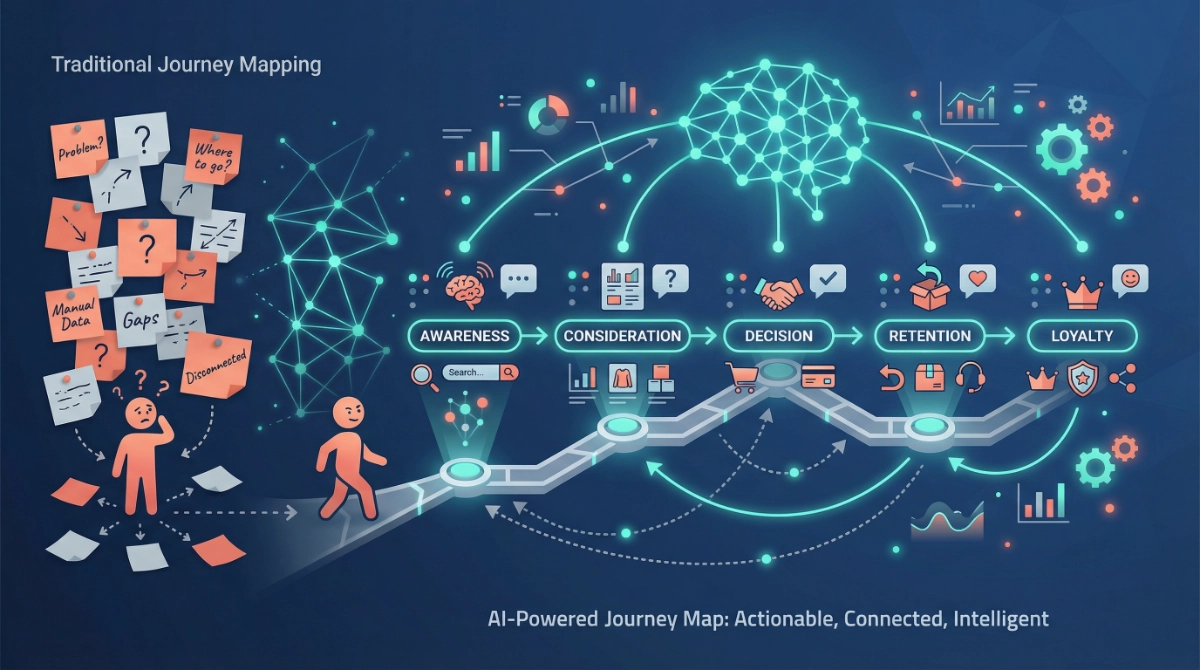
What Is Customer Journey Mapping (And Why AI Changes Everything)?
Think of customer journey mapping as creating a detailed story of how someone goes from never hearing about you to becoming your biggest advocate. It’s like plotting a road trip, except instead of highways and pit stops, you’re tracking touchpoints, emotions, pain points, and decisions.
Traditionally, businesses built these maps through surveys, interviews, and endless team meetings. The problem? People don’t always remember their journey accurately, and manual analysis misses patterns buried in mountains of data.
AI changes this completely. Modern AI tools can analyze thousands of customer interactions simultaneously, spot patterns humans would never notice, identify emotional triggers in customer language, predict which touchpoints matter most, and continuously update insights as new data comes in.
The result is a living, breathing map that tells you not just what customers do, but why they do it and what you should do about it.
The Five Stages Every Customer Journey Includes
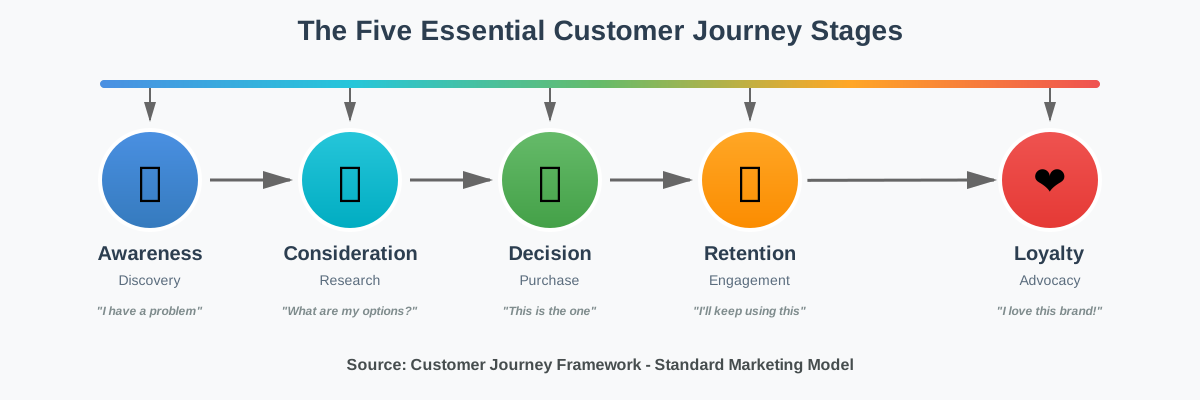
Before we dive into the how-to, let’s get clear on the five essential stages of any customer journey:
Awareness: This is when someone first discovers you exist. Maybe they saw your social media post, found you through search, or heard about you from a friend. They have a problem or need, but they might not fully understand it yet.
Consideration: Now they’re actively researching solutions. They’re comparing options, reading reviews, and watching demos. They know their problem, and they’re evaluating whether you’re the right answer.
Decision: This is the moment of truth. They’re ready to buy, sign up, or commit. Everything comes down to trust, value, and removing the last bit of friction.
Retention: The relationship doesn’t end at purchase—that’s where it begins. This stage is about delivering on your promises, providing value, and making sure they don’t regret choosing you.
Loyalty: The ultimate destination. These customers don’t just stay—they advocate. They refer friends, leave glowing reviews, and choose you again and again even when competitors try to woo them away.
Understanding these stages helps you craft messaging that actually resonates, because you’re speaking to where someone is right now, not where you hope they are.
Step 1: Gather Your Raw Data (The Fuel for AI Analysis)
Here’s where your journey mapping actually begins, and the good news is you probably already have more data than you think. AI tools need information to work with, but you don’t need perfect data—you just need starting material.
Start by collecting what you already have. Pull your website analytics showing which pages people visit and how long they stay. Export your email marketing metrics revealing open rates, click patterns, and unsubscribes. Gather customer support transcripts and chat logs capturing real questions and concerns. Compile survey responses or feedback forms if you’ve collected them. Download social media engagement data showing what content resonates.
If you’re just starting out and don’t have much data yet, don’t worry. You can start with as few as 20–30 customer interactions. AI tools like ChatGPT, Claude, or Gemini can still find patterns and insights that help you understand your customers better.
Common mistake to avoid: Don’t wait for “perfect” data or obsess over having millions of data points. Imperfect data analyzed today beats perfect data you never get around to collecting. Start with what you have, then improve as you go.
For this step, I recommend creating a simple spreadsheet or document that organizes your data by source type. Label one section “Website Behavior,” another “Email Interactions,” another “Support Conversations,” and so on. This makes it easier when you’re ready to feed information to AI tools.
Creative tip: Record yourself having actual conversations with 5-10 recent customers or leads. Ask them to walk you through how they found you and what they were thinking at each step. These qualitative stories often reveal insights pure numbers can’t capture, and AI can analyze transcripts to identify recurring themes.
Step 2: Choose Your AI Mapping Tools (No Technical Skills Required)
You don’t need expensive enterprise software or a Ph.D. in data science to map the customer journey with AI. Several beginner-friendly tools can handle this work, and many offer free tiers perfect for getting started.
ChatGPT or Claude (what I’m using right now) are excellent for analyzing text-based data. Upload your customer support transcripts, email responses, or survey feedback, and ask questions like “What are the top 5 concerns customers express before buying?” or “Identify patterns in why customers churn.” These AI assistants excel at finding themes in conversational data.
Google Analytics with AI Insights automatically identifies unusual patterns in your website traffic and suggests opportunities. The AI-powered insights section highlights things like “Users who visit your pricing page three times are 80% more likely to convert” or “Mobile users drop off at checkout 2x more than desktop users.”
HubSpot’s Customer Journey Analytics (free plan available) uses AI to map touchpoints automatically based on your CRM data. It shows you which marketing channels drive the most valuable customers and where people typically fall out of your funnel.
Hotjar and Clarity provide AI-powered heatmaps and session recordings. The AI automatically identifies “rage clicks” (when users frantically click something that isn’t working) and confusing navigation patterns you’d never spot manually.
For beginners, I suggest starting with ChatGPT or Claude for qualitative analysis and Google Analytics for quantitative patterns. These two tools alone can create a surprisingly detailed customer journey map without costing a penny.
Common mistake to avoid: Don’t try to use every tool at once. Pick one qualitative tool (like ChatGPT) and one quantitative tool (like Google Analytics), master those first, then expand if needed.
If you want a complete toolkit to accelerate this process, check out this resource: Master AI content creation with prompts used by solo entrepreneurs, creators, and agencies. It includes ready-to-use prompts specifically designed for customer journey analysis that you can copy, paste, and customize immediately.
Step 3: Map the Awareness Stage (How Do People Find You?)
Now we’re getting into the actual mapping work, and we’ll go stage by stage. The awareness stage answers one critical question: How do people discover you exist in the first place?
Feed your website analytics data to your chosen AI tool and ask, “What are the top 5 traffic sources bringing new visitors to my site?” This reveals whether people find you through search engines, social media, referrals, ads, or direct visits.
Next, dig deeper into search data. If you use Google Search Console, export your top queries and ask AI, “Categorize these search queries by intent. Which ones show problem awareness vs. solution awareness?” You’ll often find people searching for problem descriptions (“how to reduce customer churn”) before they search for solutions (“customer retention software”).
For social media awareness, upload your most engaged posts and ask AI, “What themes, formats, and topics generate the most shares and saves?” This shows you what content acts as your awareness magnet.
Creative experiment: Create a simple survey asking recent customers, “How did you first hear about us?” Run the responses through AI and ask it to identify patterns you might miss. You’ll often discover awareness channels you didn’t even know existed—like a podcast mention you forgot about or a Reddit thread from months ago that still drives traffic.
Real-world example: When I helped a small software company analyze their awareness data, AI revealed something surprising. While they were spending thousands on LinkedIn ads, most of their best customers actually discovered them through SEO blog posts about specific pain points. They reallocated the budget to content creation and saw qualified leads increase 40% within two months.
At this stage, your goal is to create a list that looks like this:
- Primary awareness channel: Organic search (45% of new visitors)
- Top awareness trigger: Blog post about [specific problem]
- Key awareness message needed: We help [audience] solve [specific pain] without [common frustration]
- Awareness gaps: Not appearing in social media discovery; no video content for visual learners
Step 4: Understand the Consideration Stage (Why Do They Care?)
The consideration stage is where potential customers decide whether you’re worth their time. They’re comparing you to alternatives, reading reviews, and asking, “Is this really for me?”
Start by analyzing which pages people visit after their first landing. Ask your AI tool: “Looking at user paths, what content do visitors consume during their second and third sessions?” You’re searching for patterns like “people who read the case studies page are 3x more likely to request a demo.”
Export any email sequences or newsletter data and have AI analyze: “What subject lines and content topics get the highest engagement?” This reveals what information people crave when they’re in research mode.
If you have customer support chat transcripts, this is gold. Ask AI: “What questions do people ask most often before making a purchase decision?” The answers show you exactly what hesitations and concerns you need to address in your messaging.
Common mistake beginners make: Assuming people care about your features. In consideration, they care about outcomes and transformations. AI can help you identify when your language is feature-focused (“Our software has 47 integrations”) versus benefit-focused (“You’ll never manually export data again”).
For consideration mapping, analyze:
- Top researched topics: Pricing, implementation time, customer results
- Most viewed comparison pages: You vs. competitor A, alternative solutions
- Key questions asked: “How long until we see results?” “Do we need technical knowledge?”
- Emotional drivers: Fear of wasting money, desire for simplicity, need for proven results
Use AI to transform your findings into consideration messaging. For example, if AI analysis shows people repeatedly ask, “How long does setup take?”, your consideration content should prominently answer that question with specifics: “Complete setup in under 2 hours with our guided walkthrough—no IT team required.”
Step 5: Optimize the Decision Stage (Remove Every Last Friction Point)
The decision stage is where money either changes hands or opportunities disappear. Someone is ready to buy, but tiny friction points can derail everything at the last second.
Analyze your checkout or signup process with AI-powered tools. If using Hotjar or Clarity, ask the AI, “Show me where users drop off during checkout/signup.” You’ll get heatmaps showing exactly where people hesitate, abandon forms, or close the page.
For e-commerce, export abandoned cart data and use AI to categorize reasons: “Analyze these cart abandonment patterns and identify the top 3 reasons people don’t complete purchase”. Common culprits include unexpected shipping costs, required account creation, or complicated checkout processes.
If you offer demos, trials, or consultations, analyze the conversion rate from “scheduled” to “showed up” to “converted.” AI can spot patterns like “People who schedule on weekends have a 60% no-show rate” or “Prospects who engage with the pre-demo email sequence convert at 2x the rate.”
Real action you can take today: Record your own checkout or signup process on video. Watch it like a customer sees it for the first time. Then ask AI: “I just described my checkout process. What friction points or hesitations might a customer experience?” You’ll be amazed at the insights you get from this fresh perspective.
Creative tip: If you have access to customer service conversations, find the ones where people asked for help right before buying or during the purchase process. These conversations reveal last-minute concerns that your decision-stage content should preemptively address.
Your decision stage map should identify:
- Current conversion rate: From consideration to purchase
- Primary friction points: Price transparency, trust signals, process complexity
- Decision accelerators: Testimonials, guarantees, limited-time incentives
- Last-minute objections: “What if it doesn’t work?” “Can I cancel easily?”
The goal is to use AI insights to engineer a decision stage so smooth that committed customers glide through without hesitation.
Step 6: Strengthen Retention (Keep the Relationship Alive)
Here’s a truth many businesses ignore: retention is where your real profit lives. Acquiring a new customer costs 5-25x more than keeping an existing one, yet most companies spend 90% of their energy on acquisition.
AI excels at identifying retention risk early. Feed your customer usage data or engagement metrics into an AI tool and ask, “Which customer behaviors predict churn within 30 days?” You might discover patterns like “Customers who don’t log in within the first week have an 80% chance of canceling” or “Users who engage with only one feature rarely renew.”
Analyze your customer support tickets by sentiment. AI can categorize tickets as positive, neutral, or frustrated, then identify: “What issues cause the most frustration that could lead to churn?” This helps you proactively solve problems before they become cancellation reasons.
For email-based businesses, examine open and click patterns. Ask AI: “At what point do customers stop engaging with our emails, and what happens right before that drop-off?” You’ll often find that engagement dies when you get too sales-focused or stop providing value.
Common mistake: Treating retention as “send them monthly newsletters.” AI analysis often reveals retention happens through small, consistent value moments. Maybe it’s a weekly tip via email, a monthly feature spotlight, or automated check-ins when usage drops.
Create a retention map that includes:
- Early warning signals: Decreased login frequency, support tickets about “how to cancel”
- Value reinforcement moments: Onboarding milestones, achievement notifications, usage insights
- Re-engagement triggers: Automated check-ins, personalized recommendations, exclusive content
- Loyalty bridges: Early access to new features, community access, VIP support
AI can even help you personalize retention. Instead of sending everyone the same email, use AI to segment customers by behavior and tailor messaging: power users get advanced tips, casual users get simplification guides, and at-risk users get success stories from similar customers.
If you want a practical tool to implement these retention strategies systematically, I recommend downloading the Customer Journey Mapping Checklist. It walks you through each stage with specific action items so nothing falls through the cracks.
Step 7: Cultivate Loyalty (Transform Customers Into Advocates)
Loyalty isn’t just about repeat purchases—it’s about creating advocates who actively promote your brand because they genuinely believe in what you do.
Start by identifying your most loyal customers using AI. Upload your customer list with purchase history, referrals, and engagement data. Ask AI: “Who are our top 20% customers based on lifetime value, referrals, and engagement?” Then study what these customers have in common: “What patterns do these loyal customers share that others don’t?”
You might discover your most loyal customers all came from a specific source, engaged with particular content, or shared similar pain points. This intelligence tells you how to cultivate more loyalty deliberately.
Analyze reviews and testimonials with AI sentiment analysis. Ask: “What specific outcomes or experiences do our happiest customers mention most often?” These become the transformation stories you should amplify.
For loyalty stage messaging, focus on three elements: community, exclusivity, and recognition. AI can help you identify opportunities in each category.
Community: Analyze your most engaged social media comments or forum discussions. Ask AI: “What topics create the most enthusiastic conversation among our customers?” Build community features around these topics.
Exclusivity: Use AI to predict, “Based on behavior patterns, which customers would most appreciate early access to new features?” Create VIP tiers that make loyalty tangible.
Recognition: Identify milestone moments. AI can flag achievements like “Customer just reached 100 logins” or “This user has helped five other customers in the forum.” Celebrate these publicly.
Creative experiment: Interview or survey your most loyal customers and ask, “What would make you even more excited about recommending us?” Feed the responses to AI and ask it to identify common themes. Often, loyal customers want better referral programs, exclusive content, or simply more appreciation.
Your loyalty map should include:
- Loyalty indicators: Referral count, review activity, community participation, repeat purchase frequency
- Loyalty program elements: Rewards for advocacy, exclusive access, recognition systems
- Loyalty messaging themes: Belonging, impact, insider status, shared values
- Advocacy channels: Referral programs, case study opportunities, community leadership roles
The loyalty stage isn’t an endpoint—it’s an ongoing relationship. AI helps you maintain that relationship at scale by identifying when loyal customers need attention, what they value most, and how to keep them excited about your brand.
Step 8: Create Your Visual Customer Journey Map (Make It Actionable)
Now it’s time to take all your AI insights and transform them into a visual map you can actually use. This is where analysis becomes action.
You don’t need fancy design software. A simple tool like Google Slides, Canva, or even a whiteboard works perfectly. The goal is to create a single-page visualization that anyone on your team can understand at a glance.
Start by creating five columns, one for each stage: Awareness, Consideration, Decision, Retention, and Loyalty.
In each column, include:
- What customers think/feel: Use actual quotes from your AI analysis
- What customers do: List specific behaviors and actions
- Touchpoints: Where they interact with you (website, email, social, support)
- Pain points: Frustrations or concerns at this stage
- Opportunities: What you can improve based on AI insights
Here’s the creative part—use AI to help you visualize this. Take your mapped data and ask ChatGPT or Claude: “Help me create a customer journey map outline that includes customer emotions, actions, touchpoints, pain points, and opportunities for each of the five stages. Use the insights I’ve shared.” The AI will structure everything in a clear format you can copy into your visual tool.
Common mistake: Creating a beautiful map that sits in a folder and never gets used. Instead, make your map a living document. Update it quarterly as you gather new data. Share it in team meetings. Reference it when making marketing decisions. The map is only valuable if it drives action.
For each stage, add specific action items. Instead of just noting “friction at checkout,” write “Reduce checkout fields from 12 to 6 by March 15.” Instead of “improve awareness,” specify, “Create SEO content targeting ‘how to reduce churn’ keywords by the end of the month.”
Pro tip: Create two versions of your map—a detailed internal version for your team and a simplified version for stakeholders or clients. AI can help you summarize: “Take this detailed journey map and create an executive summary version highlighting only the top insights and priorities.”
Step 9: Test, Measure, and Refine (The AI Advantage)
Your customer journey map isn’t a one-time project—it’s a living framework that evolves as your business grows and customer behavior changes. AI makes continuous improvement dramatically simpler.
Set up a monthly rhythm where you feed fresh data to your AI tools and ask, “What has changed in customer behavior this month?” You’ll quickly spot emerging patterns like new traffic sources, shifting pain points, or evolving customer expectations.
Create simple experiments to test your journey insights. If AI analysis suggests people who watch your demo video convert at 2x the rate, create an A/B test where more visitors see that video. If retention data shows early engagement predicts long-term success, experiment with different onboarding sequences.
AI makes testing faster: Instead of waiting weeks to manually analyze results, feed test data to AI and ask, “Compare these two customer segments. Which journey performs better and why?” You’ll get insights in minutes that used to take days.
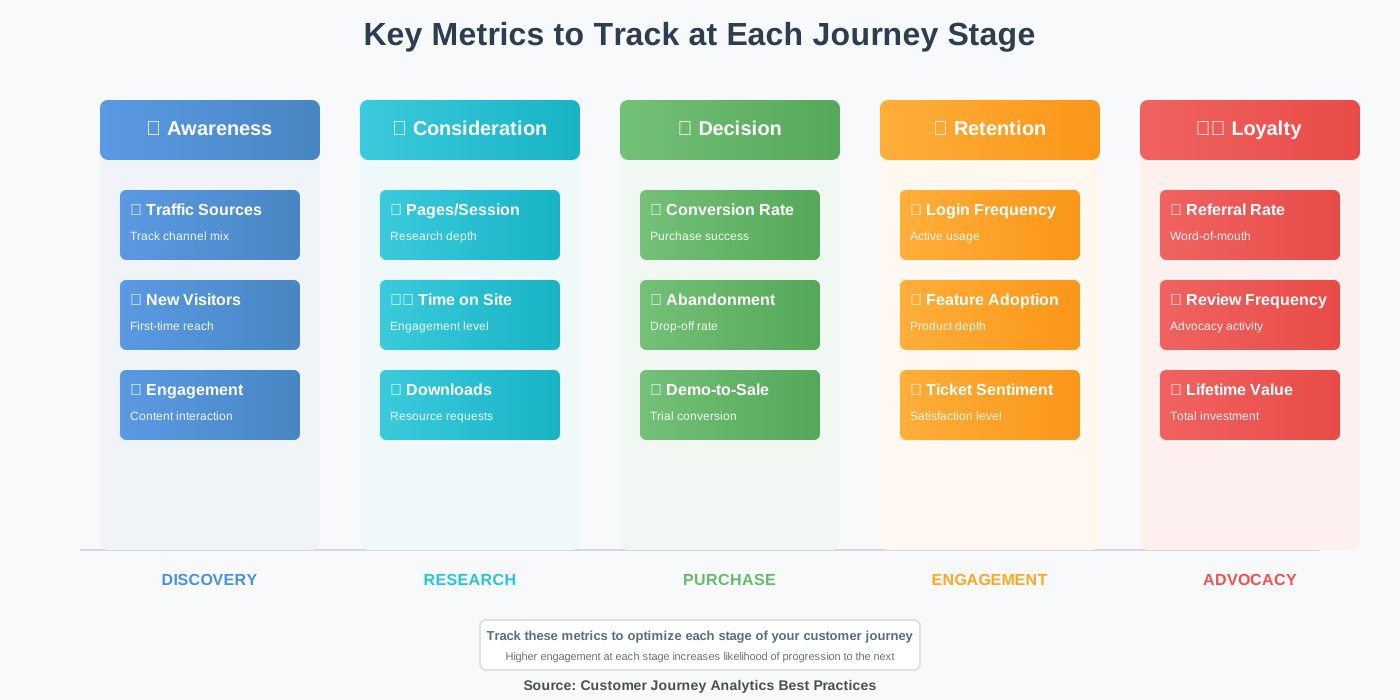
Track these key metrics monthly:
- Awareness efficiency: Cost per new visitor and awareness-to-consideration conversion rate
- Consideration depth: Average pages viewed and time spent researching
- Decision speed: Days from first visit to purchase
- Retention health: Month-over-month active customer percentage
- Loyalty strength: Referral rate and customer lifetime value growth
Use AI to spot early warning signs. Ask: “Looking at the past 3 months of data, are there any negative trends emerging?” Catching problems early—like declining retention or increasing decision-stage abandonment—lets you resolve issues before they become crises.
Creative refinement tip: Every quarter, run a “journey audit” where you personally experience your customer journey as if you were a new prospect. Record what you notice, then ask AI: “I just completed our customer journey, and here’s what I experienced. What friction points or confusion would a real customer encounter?” This first-person perspective combined with AI analysis reveals gaps you’d never see in data alone.
Common Mistakes to Avoid When Mapping with AI
Through countless journey mapping projects, I’ve seen the same mistakes trip up beginners. Here’s how to avoid them:
Mistake 1: Treating AI as magic instead of a tool. AI analyzes patterns in your data, but it can’t read minds or predict the future with certainty. Always combine AI insights with common sense and direct customer conversations.
Mistake 2: Mapping what you hope happens instead of what actually happens. Your ideal customer journey and your real customer journey are probably different. Let the data tell the truth, even when it’s uncomfortable.
Mistake 3: Creating analysis paralysis. Don’t wait to have perfect data or complete analysis. Map what you know today, take action, then refine as you learn more.
Mistake 4: Forgetting that different customer segments take different journeys. Your B2B enterprise customers might have a completely different path than your B2C individual buyers. Use AI to identify these segments and map them separately.
Mistake 5: Ignoring emotional journey alongside behavioral journey. AI can analyze sentiment in customer communications, reviews, and support tickets. Don’t just map what customers do—map how they feel.
Mistake 6: Building the map alone in a silo. The best journey maps come with cross-functional input. Share your AI insights with sales, support, product, and marketing teams. They’ll spot implications you miss and help ensure the map reflects reality.
Mistake 7: Never updating the map. Customer behavior shifts constantly. Set a recurring calendar reminder to refresh your journey analysis with new data at least quarterly.
Frequently Asked Questions
Your Next Steps: From Insight to Action
You now have a complete framework for mapping the customer journey from awareness to loyalty using AI. The knowledge is valuable, but only if you put it into action.
Start small. Don’t try to implement everything at once. Pick one stage that’s causing the most problems in your business right now—maybe it’s low awareness, high decision-stage drop-off, or poor retention. Focus your initial AI analysis there.
Spend one afternoon this week gathering the data you already have. Export those analytics, collect those support emails, and compile those customer conversations. Then open ChatGPT or Claude and start asking questions. You’ll be surprised how quickly patterns emerge.
Remember, the goal isn’t creating a perfect map—it’s creating a more profound understanding of your customers so you can serve them more effectively. Every insight you gain, every friction point you remove, and every message you align with customer needs makes your business stronger.
The most successful journey mappers I work with share one trait: they experiment constantly. They test new approaches, measure results, refine based on feedback, and use AI to accelerate the whole cycle. They don’t wait for permission or perfect conditions—they start with curiosity and improve through iteration.
To make implementation even easier, grab the Customer Journey Mapping Checklist. It breaks down each stage into specific action items with checkboxes, so you always know what to do next. It’s designed to work alongside the AI tools we’ve discussed, ensuring nothing gets missed.
And if you want to go deeper with AI-powered customer insights, explore 100+ AI Marketing Prompts Ready to Copy and Use. It includes prompts specifically for journey analysis, customer research, messaging development, and personalization strategies—all tested and refined by marketers who’ve gotten real results.
The customer journey never stops evolving. Neither should your understanding of it. With AI as your analysis partner and curiosity as your guide, you’ll build the kind of customer experience that turns strangers into advocates and transactions into relationships.
Now go map that journey. Your customers are waiting.
About the Authors
Alex Rivera and Abir Benali collaborated to write this article, blending creative innovation with practical clarity.
Alex Rivera is a creative technologist who helps non-technical users harness AI for content creation and business growth. With a background in design thinking and emerging technology, Alex believes AI should feel like a creative partner, not an intimidating tool. When not experimenting with the latest AI applications, Alex teaches workshops that make technology accessible and inspiring for everyday entrepreneurs.
Abir Benali (Lead Author) is a friendly technology writer passionate about making AI simple for everyone. With years of experience translating complex technical concepts into clear, actionable guidance, Abir has helped thousands of non-technical users confidently adopt AI tools. Abir’s philosophy is straightforward: if you can describe what you need, AI can help you achieve it—no coding required.
Together, we believe that understanding your customers through AI isn’t just for big companies with massive budgets. It’s for anyone who wants to build better products, create more meaningful connections, and grow sustainably. We write to empower you with tools and knowledge that were once accessible only to large enterprises with dedicated data teams.